Website Security
How will you
 know if a
 website is
  secured
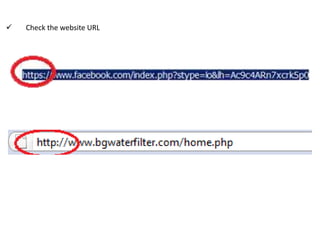
   Check the website URL
Security difference between web browsers
 For Firefox

The Site Identity Button will
   display in one of three
           colors:
                Gray
                Blue
                Green
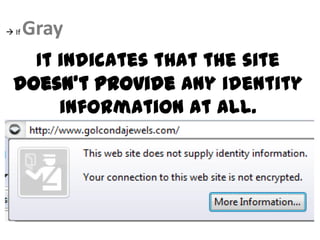
 If   Gray
    It indicates that the site
  doesn't provide any identity
       information at all.
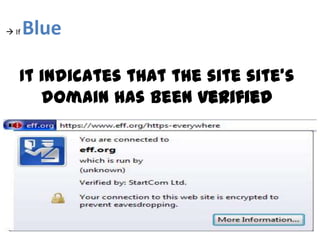
 If   Blue

   It indicates that the site site's
      domain has been verified
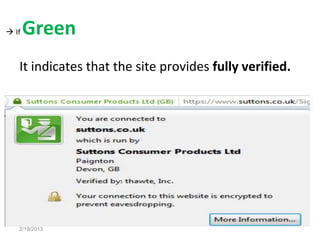
 If   Green
   It indicates that the site provides fully verified.


   2/19/2013
 For Chrome


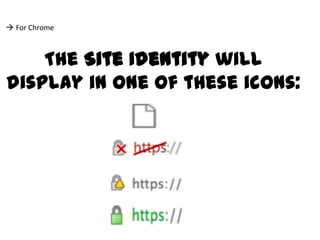
    The Site Identity will
display in one of these icons:
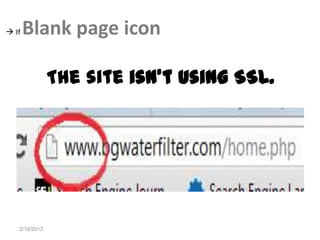
 If   Blank page icon

               The site isn't using SSL.


   2/19/2013
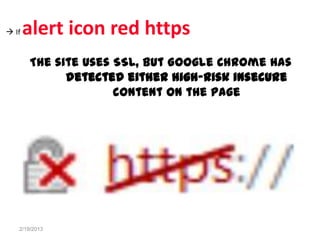
 If   alert icon red https
       The site uses SSL, but Google Chrome has
             detected either high-risk insecure
                     content on the page


   2/19/2013
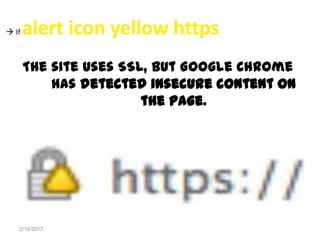
 If   alert icon yellow https
       The site uses SSL, but Google Chrome
           has detected insecure content on
                        the page.


   2/19/2013
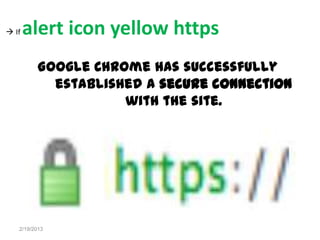
 If   alert icon yellow https
          Google Chrome has successfully
            established a secure connection
                     with the site.


   2/19/2013
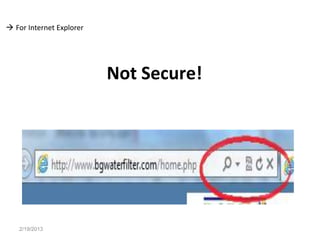
 For Internet Explorer


                          Not Secure!


   2/19/2013
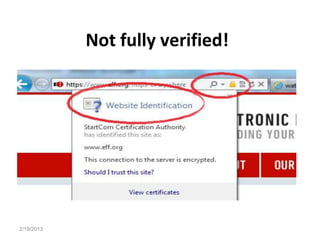
Not fully verified!


2/19/2013
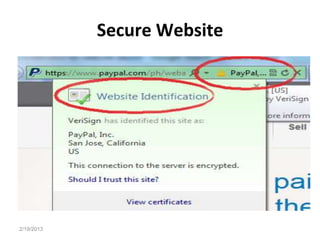
Secure Website


2/19/2013
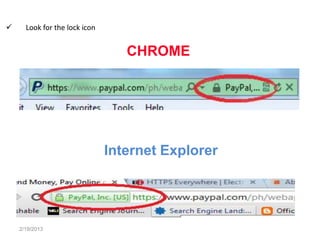
     Look for the lock icon


                                  CHROME


                               Internet Explorer


    2/19/2013
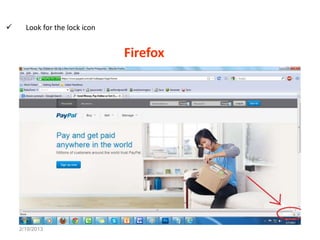
     Look for the lock icon


                               Firefox


    2/19/2013
     Notice the security certificate seal.


                  if you don’t see a security
                certificate seal, be sure to look
                for the “https” before entering
                        any information.


    2/19/2013
     Read the website’s privacy policy.


      A website’s privacy policy should
        tell you how your information
                  is collected.


    2/19/2013
What is the effect
on the SEO process
  if a website is
      secured
           Top Things to Consider When Optimizing an HTTPS
                                Website


                     Loading times
                     Robots.txt file
                          Files
                      Certification
                     HTTP versions

2/19/2013
           An  unsecured website’s               impact on
           can be separated into three major categories:


 Effect on search engine ranking        rankings will be dropped
       until the website has fully recovered from the
       attack.
      Effect on customer quality experience and security steal your

       customers’ personal and financial
       information
      Effect on trust very hard to re-establish and

       recover your lost reputation.
    2/19/2013
"No matter how   GOOD
                YOUR WEBSITE'S
             SEO is, if you IGNORE the
            site’s SECURITY ISSUES,

             then all of your EFFORTS to
              increase rankings and traffic
              WILL BE GONE in an
             instant the moment an attacker
               gets inside your website and
                compromises everything."
2/19/2013
• http://en.wikipedia.org/wiki/
 • http://www.fweb.com.au/How-Can-You-Tell-If-Payment-
   Secure-Area.php
 • http://www.seochat.com/c/a/search-engine-optimization-
   help/website-security-tips-for-seo/
 • http://www.highervisibility.com/blog/will-a-secure-https-
   website-impact-your-seo/
 • https://support.google.com/chrome/bin/answer.py?hl=en&an
   swer=95617&p=ui_security_indicator
 • http://support.mozilla.org/en-US/kb/how-do-i-tell-if-my-
   connection-is-secure


                                      Research Sources
2/19/2013

Website Security

  • 1.
  • 2.
    How will you know if a website is secured
  • 3.
    Check the website URL
  • 4.
  • 5.
     For Firefox TheSite Identity Button will display in one of three colors: Gray Blue Green
  • 6.
     If Gray It indicates that the site doesn't provide any identity information at all.
  • 7.
     If Blue It indicates that the site site's domain has been verified
  • 8.
     If Green It indicates that the site provides fully verified. 2/19/2013
  • 9.
     For Chrome The Site Identity will display in one of these icons:
  • 10.
     If Blank page icon The site isn't using SSL. 2/19/2013
  • 11.
     If alert icon red https The site uses SSL, but Google Chrome has detected either high-risk insecure content on the page 2/19/2013
  • 12.
     If alert icon yellow https The site uses SSL, but Google Chrome has detected insecure content on the page. 2/19/2013
  • 13.
     If alert icon yellow https Google Chrome has successfully established a secure connection with the site. 2/19/2013
  • 14.
     For InternetExplorer Not Secure! 2/19/2013
  • 15.
  • 16.
  • 17.
    Look for the lock icon CHROME Internet Explorer 2/19/2013
  • 18.
    Look for the lock icon Firefox 2/19/2013
  • 19.
    Notice the security certificate seal. if you don’t see a security certificate seal, be sure to look for the “https” before entering any information. 2/19/2013
  • 20.
    Read the website’s privacy policy. A website’s privacy policy should tell you how your information is collected. 2/19/2013
  • 21.
    What is theeffect on the SEO process if a website is secured
  • 22.
    Top Things to Consider When Optimizing an HTTPS Website Loading times Robots.txt file Files Certification HTTP versions 2/19/2013
  • 23.
    An unsecured website’s impact on can be separated into three major categories:  Effect on search engine ranking rankings will be dropped until the website has fully recovered from the attack.  Effect on customer quality experience and security steal your customers’ personal and financial information  Effect on trust very hard to re-establish and recover your lost reputation. 2/19/2013
  • 24.
    "No matter how GOOD YOUR WEBSITE'S SEO is, if you IGNORE the site’s SECURITY ISSUES, then all of your EFFORTS to increase rankings and traffic WILL BE GONE in an instant the moment an attacker gets inside your website and compromises everything." 2/19/2013
  • 25.
    • http://en.wikipedia.org/wiki/ •http://www.fweb.com.au/How-Can-You-Tell-If-Payment- Secure-Area.php • http://www.seochat.com/c/a/search-engine-optimization- help/website-security-tips-for-seo/ • http://www.highervisibility.com/blog/will-a-secure-https- website-impact-your-seo/ • https://support.google.com/chrome/bin/answer.py?hl=en&an swer=95617&p=ui_security_indicator • http://support.mozilla.org/en-US/kb/how-do-i-tell-if-my- connection-is-secure Research Sources 2/19/2013