WebDNA user guide


How to run inbound links analysis
and generate Google Disavow
file in minutes


How to run an analysis with WebDNA?
Use the setup wizard
Step 1: Enter your website URL
Step 2: Choose your backlinks source option


Option 1: : Fast Link Discovery from 3 different sources
Option 2: Upload a file with backlinks 

e.g. GWT File, Bing File, Majestic SEO export or other
Option 3: Paste backlinks from clipboard

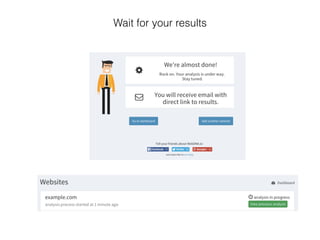
Wait for your results
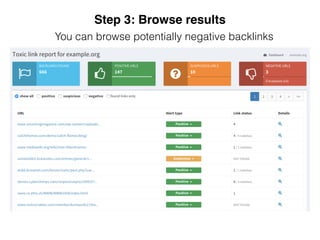
You can browse potentially negative backlinks

Step 3: Browse results
and adjust the positive/negative list
You can export the backlinks marked as negative to a disavow
file and upload it to Google Webmaster Tools
Step 4: Remove toxic links
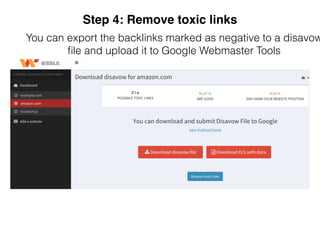
You can export the backlinks marked as negative to a disavow
file and upload it to Google Webmaster Tools
Step 4: Remove toxic links
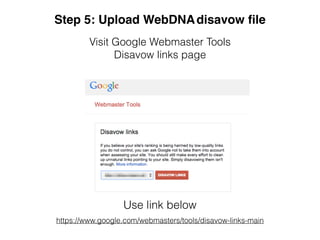
Visit Google Webmaster Tools 

Disavow links page
Step 5: Upload WebDNAdisavow file
https://www.google.com/webmasters/tools/disavow-links-main
Use link below
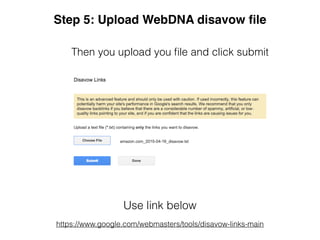
Then you upload you file and click submit
Step 5: Upload WebDNA disavow file
Use link below
https://www.google.com/webmasters/tools/disavow-links-main
Wait until your search engine traffic goes up!
Checkout WebDNA free trial now

It’s time to Control Your Digital Footprint!

WebDNA User Guide

  • 1.
    WebDNA user guide
 
 Howto run inbound links analysis and generate Google Disavow file in minutes
 

  • 2.
    How to runan analysis with WebDNA? Use the setup wizard Step 1: Enter your website URL
  • 3.
    Step 2: Chooseyour backlinks source option 
 
 Option 1: : Fast Link Discovery from 3 different sources
  • 4.
    Option 2: Uploada file with backlinks 
 e.g. GWT File, Bing File, Majestic SEO export or other
  • 5.
    Option 3: Pastebacklinks from clipboard

  • 6.
  • 7.
    You can browsepotentially negative backlinks
 Step 3: Browse results
  • 8.
    Step 3: Browseresults and adjust the positive/negative list
  • 9.
    You can exportthe backlinks marked as negative to a disavow file and upload it to Google Webmaster Tools Step 4: Remove toxic links
  • 10.
    You can exportthe backlinks marked as negative to a disavow file and upload it to Google Webmaster Tools Step 4: Remove toxic links
  • 11.
    Visit Google WebmasterTools 
 Disavow links page Step 5: Upload WebDNAdisavow file https://www.google.com/webmasters/tools/disavow-links-main Use link below
  • 12.
    Then you uploadyou file and click submit Step 5: Upload WebDNA disavow file Use link below https://www.google.com/webmasters/tools/disavow-links-main
  • 13.
    Wait until yoursearch engine traffic goes up!
  • 14.
    Checkout WebDNA freetrial now
 It’s time to Control Your Digital Footprint!