WebApplication1 how the web applications are worked.pptx
1.
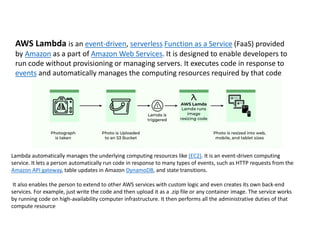
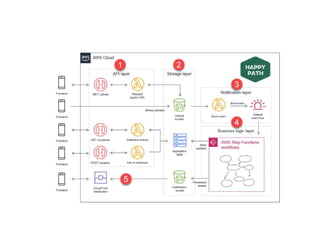
AWS Lambda isan event-driven, serverless Function as a Service (FaaS) provided
by Amazon as a part of Amazon Web Services. It is designed to enable developers to
run code without provisioning or managing servers. It executes code in response to
events and automatically manages the computing resources required by that code
Lambda automatically manages the underlying computing resources like (EC2). It is an event-driven computing
service. It lets a person automatically run code in response to many types of events, such as HTTP requests from the
Amazon API gateway, table updates in Amazon DynamoDB, and state transitions.
It also enables the person to extend to other AWS services with custom logic and even creates its own back-end
services. For example, just write the code and then upload it as a .zip file or any container image. The service works
by running code on high-availability computer infrastructure. It then performs all the administrative duties of that
compute resource
2.
What is AmazonVPC?
With Amazon Virtual Private Cloud (Amazon VPC), you can launch AWS resources in a logically isolated virtual
network that you've defined. This virtual network closely resembles a traditional network that you'd operate in
your own data center, with the benefits of using the scalable infrastructure of AWS.
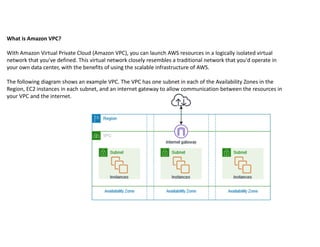
The following diagram shows an example VPC. The VPC has one subnet in each of the Availability Zones in the
Region, EC2 instances in each subnet, and an internet gateway to allow communication between the resources in
your VPC and the internet.
5.
Features of Virtualprivate clouds (VPC)
closely resembles a traditional network that you'd operate in your own data center.
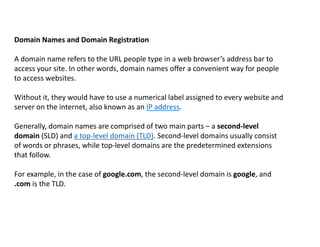
Subnets
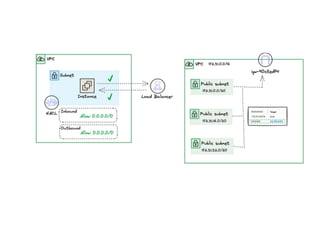
A subnet is a range of IP addresses in your VPC. A subnet must reside in a single Availability Zone. After you
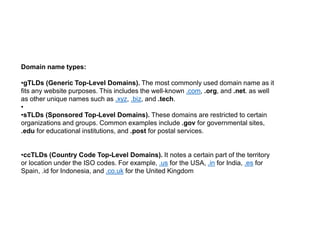
add subnets, you can deploy AWS resources in your VPC.
IP addressing
You can assign IP addresses,
Routing
Use route tables to determine where network traffic from your subnet or gateway is directed.
Gateways and endpoints
A gateway connects your VPC to another network. For example, use an internet gateway to connect your
VPC to the internet. Use a VPC endpoint to connect to AWS services privately, without the use of an internet
gateway.
Peering connections
Use a VPC peering connection to route traffic between the resources in two VPCs.
Transit gateways
Use a transit gateway, which acts as a central hub, to route traffic between your VPCs,
VPN connections
Connect your VPCs to your on-premises networks using AWS Virtual Private Network (AWS VPN).
7. Single PageApplications (SPA): SPAs are web applications that load a
single HTML page and dynamically update the page as the user interacts with the
application. They use AJAX and frameworks/libraries like React.js, Angular, or
Vue.js to handle routing, state management, and rendering of content without
reloading the entire page. Examples include Google Maps, and Trello.
8. Multi Page Applications (MPA): A multiple-page web app reloads the whole
page when the user navigates to a different page. A typical example of this web
application is a webmail application. A user can open the email client on his
computer, and then he can read messages in the inbox folder, compose new
messages and send them to other users. All these activities are done through the
same interface, but different pages realize them.
10.
What is thedifference between a web application and a website?
When the internet was newly invented, websites had significantly less
functionality than web apps. They were only capable of delivering
information to users through static content. You had to install and run
software with complex functionality. Web apps were built to bridge the gap
between software and static sites. They had functionality and interactive
user elements like the software but were delivered using a web browser
URL.
However, web technology has evolved significantly since then. Most
modern websites are complex web applications in their design.
11.
What is thedifference between a web app and a native app?
A native app is a computer program that has been specifically designed for a particular
user environment. One of the most common types of native apps are mobile apps,
which are developed using specific programming code.
Unlike web apps, native or mobile apps are downloaded by the user to their mobile
device, usually through app stores. Native apps can only be accessed on the device they
have been downloaded on, and users are responsible for downloading any updates.
Developers have to build different versions of their mobile applications if they want to
make them available across operating systems like iOS or Android, ensuring they have
as broad a reach as possible. Developers must also ensure their mobile apps adhere to
app store standards or risk having their apps rejected.
12.
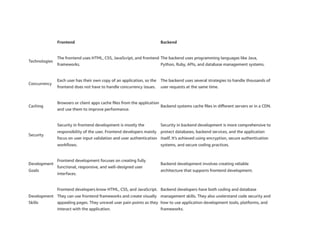
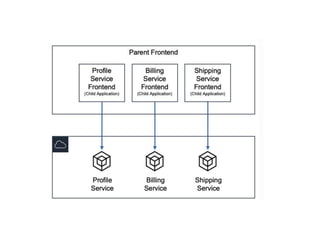
Frontend and backendare two critical aspects of any application. The frontend is
what your users see and includes visual elements like buttons, checkboxes, graphics,
and text messages. It allows your users to interact with your application.
14.
Frontend and Backendin Application Development:
The backend is the data and infrastructure that make
your application work. It stores and processes
application data for your users.
16.
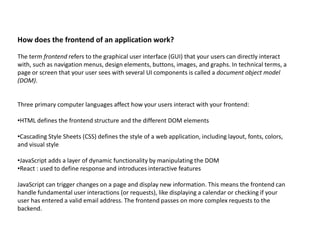
How does thefrontend of an application work?
The term frontend refers to the graphical user interface (GUI) that your users can directly interact
with, such as navigation menus, design elements, buttons, images, and graphs. In technical terms, a
page or screen that your user sees with several UI components is called a document object model
(DOM).
Three primary computer languages affect how your users interact with your frontend:
•HTML defines the frontend structure and the different DOM elements
•Cascading Style Sheets (CSS) defines the style of a web application, including layout, fonts, colors,
and visual style
•JavaScript adds a layer of dynamic functionality by manipulating the DOM
•React : used to define response and introduces interactive features
JavaScript can trigger changes on a page and display new information. This means the frontend can
handle fundamental user interactions (or requests), like displaying a calendar or checking if your
user has entered a valid email address. The frontend passes on more complex requests to the
backend.
17.
How does thebackend of an application work?
Sometimes called the server side, the backend of your application manages your web application's
overall functionality. When your user interacts with the frontend, the interaction sends a request to
the backend in HTTP format. The backend processes the request and returns a response.
When your backend processes a request, it usually interacts with the following:
•Database servers to retrieve or modify relevant data
•Microservices that perform a subset of the tasks your user requested
•Third-party APIs to gather additional information or perform additional functions
The backend uses several communication protocols and technologies to complete a request.
Additionally, it handles thousands of distinct requests simultaneously. The backend combines
concurrency and parallelism techniques, like distributing requests across many servers, caching, and
data duplication.
18.
Back-end development:
One ofthe fundamentals of web app development, the back-end involves building the server-
side logic, databases, and APIs. Thanks to the back-end, you can store users’ passwords,
implement logging functions, keep your application updated, etc.
The technologies traditionally applied at this stage include
•Server-side languages (e.g., Python, Ruby, PHP, Java)
•Databases (e.g., DynamoDB., MySQL, PostgreSQL, MongoDB)
•Server frameworks (e.g., Django, Ruby on Rails, Express.js)
•APIs (e.g., REST, GraphQL)
•Authentication systems (e.g., OAuth, JWT)
19.
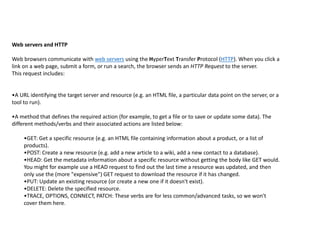
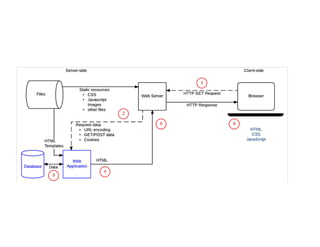
Web servers andHTTP
Web browsers communicate with web servers using the HyperText Transfer Protocol (HTTP). When you click a
link on a web page, submit a form, or run a search, the browser sends an HTTP Request to the server.
This request includes:
•A URL identifying the target server and resource (e.g. an HTML file, a particular data point on the server, or a
tool to run).
•A method that defines the required action (for example, to get a file or to save or update some data). The
different methods/verbs and their associated actions are listed below:
•GET: Get a specific resource (e.g. an HTML file containing information about a product, or a list of
products).
•POST: Create a new resource (e.g. add a new article to a wiki, add a new contact to a database).
•HEAD: Get the metadata information about a specific resource without getting the body like GET would.
You might for example use a HEAD request to find out the last time a resource was updated, and then
only use the (more "expensive") GET request to download the resource if it has changed.
•PUT: Update an existing resource (or create a new one if it doesn't exist).
•DELETE: Delete the specified resource.
•TRACE, OPTIONS, CONNECT, PATCH: These verbs are for less common/advanced tasks, so we won't
cover them here.
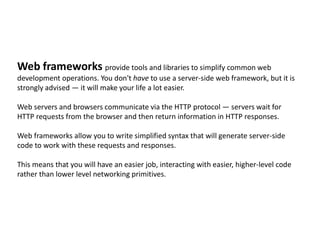
21.
Web frameworks providetools and libraries to simplify common web
development operations. You don't have to use a server-side web framework, but it is
strongly advised — it will make your life a lot easier.
Web servers and browsers communicate via the HTTP protocol — servers wait for
HTTP requests from the browser and then return information in HTTP responses.
Web frameworks allow you to write simplified syntax that will generate server-side
code to work with these requests and responses.
This means that you will have an easier job, interacting with easier, higher-level code
rather than lower level networking primitives.
22.
Why Backend Frameworksare Important?
- Development Efficiency: Backend frameworks provide a wide array of reusable
features and functions, reducing repetitive work and speeding up the
development process.
- Scalability: With a tried and tested structure, backend frameworks allow
applications to grow and handle high traffic without compromising
performance.
- Security: Backend frameworks often come with built-in security features that
help protect applications from attacks
23.
Server Side Languages:
Example:The AWS Cloud Development Kit (AWS CDK) has first-class support for the
following general-purpose programming languages:
•TypeScript
•JavaScript
•Python
•Java
•C#
•Go
The AWS Construct Library
offers language's standard
package management tools.
It also provide a version of
the AWS CDK API Reference
for each language.
24.
Domain Names andDomain Registration
A domain name refers to the URL people type in a web browser’s address bar to
access your site. In other words, domain names offer a convenient way for people
to access websites.
Without it, they would have to use a numerical label assigned to every website and
server on the internet, also known as an IP address.
Generally, domain names are comprised of two main parts – a second-level
domain (SLD) and a top-level domain (TLD). Second-level domains usually consist
of words or phrases, while top-level domains are the predetermined extensions
that follow.
For example, in the case of google.com, the second-level domain is google, and
.com is the TLD.
25.
To geta domain name for your website, you need to register it first. Domain
registration is the process of reserving a name on the internet for a certain
period.
Usually, you need to renew the license once per year, but you can pay up in
advance for up to 10 years for the domain to be registered under your name.
Companies or organizations that sell and manage domain name registrations
are called domain registrars.
Domain registrars are listed under ICANN (Internet Corporation for Assigned
Names and Numbers), an authority that coordinates and manages domain
databases on the internet.
However, before moving on to domain registration with a domain registrar, it is
essential to check your custom domain’s availability.
26.
Domain name types:
•gTLDs(Generic Top-Level Domains). The most commonly used domain name as it
fits any website purposes. This includes the well-known .com, .org, and .net. as well
as other unique names such as .xyz, .biz, and .tech.
•
•sTLDs (Sponsored Top-Level Domains). These domains are restricted to certain
organizations and groups. Common examples include .gov for governmental sites,
.edu for educational institutions, and .post for postal services.
•ccTLDs (Country Code Top-Level Domains). It notes a certain part of the territory
or location under the ISO codes. For example, .us for the USA, .in for India, .es for
Spain, .id for Indonesia, and .co.uk for the United Kingdom
27.
Web Hosting
Web hostingis a service that allows you to publish the website on the internet. If you
buy a hosting service from a provider, you will have a portion of their web servers to
store your website’s files and data.
Whenever someone types in your website’s domain name, your web hosting provider
will be responsible for sending its content to the visitor.
Web hosts also provide beginner-friendly tools for all users so that you can manage the
website with little to no technical skills.
In addition to storing website files, a web host protects the server and your website files
from malicious attacks.
28.
Types of Hosting
•Webhosting. This type of hosting is where multiple websites share the same physical server
and have a set amount of storage and resources. Shared hosting is the most affordable option
out of all and is perfect for small businesses or personal websites.
•VPS hosting. A physical server is virtually separated into multiple partitions, giving users a
private environment with their dedicated resources. This hosting type works great for websites
with medium-to-high traffic.
•Cloud hosting. It uses a cluster of different servers to host the website. Whenever one server
experiences downtime, another server quickly steps in to keep your site running. Cloud
hosting is the ideal solution for sites that need high-availability, such as eCommerce stores.
29.
Factors you needto consider, while choosing hosting service:
•User-friendliness. Every web host provides a control panel to manage your web hosting
account. Make sure the dashboard offered is easy-to-use and has extensive functionality.
•Server speed and uptime. Choose a web hosting company that ensures fast loading
speeds and offers an excellent uptime guarantee so that your site experiences minimum
downtime.
•Pricing and plans. Before purchasing a hosting plan, it helps to consider the add-ons and
renewal fees that would fit your budget in the long-term.
•Customer service. Pick a hosting company with a reliable support team to give you
immediate assistance when running into a technical issue.
33.
Testing And Debugging
Duringdeveloping your website, you might come across errors in the code which need to
be identified and fixed; this is known as debugging. In addition, it is recommended to
write test codes and run them to ensure a seamless experience.
Version Control
With version control, you can track and manage code changes, helping prevent code loss
or resurrect an older version if the newer code doesn’t work.
Responsive Web Design
With the web being accessible to all, wherein multiple people use their smartphones to
access websites, one must also learn about responsive web design. This helps webpages
adapt to different devices and screen sizes.
With the help of responsive web design, you ensure a seamless interactive experience for
the user regardless of their device. CSS plays a significant role in responsive web design
through media queries that can help rearrange or resize elements based on the screen
size.













![[DSC Europe 25] Stefan Brankovic - #ResumeIsDead. AI-Powered Interviews and C...](https://cdn.slidesharecdn.com/ss_thumbnails/qnmbsv0xq3uysdrq3sev-2-stefan-brankovic-job-bolt-260114111931-a065aa3d-thumbnail.jpg?width=640&height=640&fit=bounds)


![[DSC Europe 25] Dragan Jerosimovic - The Anatomy of a Narrative Simulation.pdf](https://cdn.slidesharecdn.com/ss_thumbnails/vzputuprdqr6zwbrwdcw-1-dragan-jerosimovic-the-anatomy-of-a-narrative-simulation-260114111931-9d04fba2-thumbnail.jpg?width=640&height=640&fit=bounds)


![[DSC Europe 25] Elena Menshikova - AI-Powered Operational Excellence: Revolut...](https://cdn.slidesharecdn.com/ss_thumbnails/es6nholbqy3zaao2c2yd-2-elena-menshikova-data-ai-in-decision-making-260115093812-4fba8b38-thumbnail.jpg?width=640&height=640&fit=bounds)