WEB DESIGNING
AND
PUBLISHING
By Atul Bhatt
What is Website
• A website is a collection of publicly accessible,
interlinked Web pages that share a single domain
name. Websites can be created and maintained by an
individual, group, business or organization to serve a
variety of purposes.
•
Websites come in a nearly endless variety, including
educational sites, news sites, forums, social media
sites, e-commerce sites, and so on. The pages within a
website are usually a mix of text and other media. That
said, there are no rules dictating the form of a website.
How do websites work?
• A website is simply a collection of web pages of codes
– codes that describes the layout, format and content
on a page.
• The web server is a internet-connected computer that
receives the request for a web page sent by your
browser.
• The browser connects your computer to the server
through an IP address. The IP address is obtained by
translating the domain name.
• In other words, in order to display your
website on the Internet, you will need:
• A website
• A domain name
• A server
A Website
• A website is typically a collection of web pages, images and
other elements that are linked together to form a larger,
structured document. Think of a website as a book and each
individual page is a web page.
• A website can be made up of a single page or it could have
thousands of pages. Each page will have its own text, images
and other elements. All web pages and elements are then
placed in a folder and stored on your web host server.
• Each web page is written in codes and these codes describe the
layout, format and content on the page. The most common
coding language used to create web pages is HTML.
A domain name
• A domain name is the address that you type into your web
browser address bar to get to a website. An example of a
domain name is www.geekstalk.tech.
• A domain name is unique to a website. In other words, no
two websites can have the same domain name.
• While it is true that you don’t necessarily need a custom
domain name for your website. Many website builders offer
free plans that comes with a free website address. But these
free website addresses come in the form of a sub-domain. .
For example, if your website builder is “example.com” your
free web address may be http://yourname.example.com.
A web server
• A web server is the computer that receives the
request for a web page sent by your browser.
• Consider this: your company is hiring for a position
that has just opened up and you are in charge of
writing the job ad. You may have crafted the most
compelling ad but unless you post the ad on a job
board, no one will see it.
• This is the same with websites. You could create the
most stunning website but unless it’s uploaded to a
web server, it is not accessible or viewable on the
Internet.
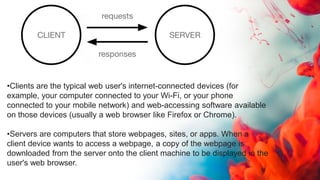
How the Web works
• Clients and servers
• Computers connected to the web are
called clients and servers. A simplified
diagram of how they interact might
look like this:
•Clients are the typical web user's internet-connected devices (for
example, your computer connected to your Wi-Fi, or your phone
connected to your mobile network) and web-accessing software available
on those devices (usually a web browser like Firefox or Chrome).
•Servers are computers that store webpages, sites, or apps. When a
client device wants to access a webpage, a copy of the webpage is
downloaded from the server onto the client machine to be displayed in the
user's web browser.
What Is Front-End and Back-End
Development?
• What is Front-End Development?
• The front-end is built using a combination of
technologies such as Hypertext Markup Language
(HTML), JavaScript and Cascading Style Sheets (CSS).
• Front-end developers design and construct the user
experience elements on the web page or app including
buttons, menus, pages, links, graphics and more.
HTML
Hypertext Markup Language is the core of a website, providing the overall design
and functionality.
The most recent version was released in late 2017 and is known as HTML5.2.
The updated version includes more tools aimed at web application developers as
well as adjustments made to improve interoperability.
CSS
Cascading style sheets give developers a flexible, precise way to
create attractive, interactive website designs.
JavaScript
This event-based language is useful for creating dynamic elements on static
HTML web pages.
It allows developers to access elements separate from the main HTML page, as
well as respond to server-side events.
Front-end frameworks such as Angular, Ember, Backbone, and React are also
popular.
These frameworks let developers keep up with the growing demand for enterprise
software without sacrificing quality, so they’re earning their place as standard
development tools.
One of the main challenges of front-end development - which also goes by the
name “client-side development” - is the rapid pace of change in the tools,
techniques and technologies used to create the user experience for
applications and websites.
What is Back-End Development?
• The back-end, also called the server side, consists of the server
which provides data on request, the application which channels it,
and the database which organizes the information.
• For example, when a customer browses shoes on a website, they
are interacting with the front end.
• After they select the item they want, put it in the shopping cart,
and authorize the purchase, the information is kept inside the
database which resides on the server.
• A few days later when the client checks on the status of their
delivery, the server pulls the relevant information, updates it with
tracking data, and presents it through the front-end.
Back-end Tools
• The core concern of back-end developers is creating
applications that can find and deliver data to the front end.
• Many of them use reliable enterprise-level databases like
Oracle, Teradata, Microsoft SQL Server, IBM DB2,
EnterpriseDB and SAP Sybase ASE.
• There’s also a number of other popular databases including
MySQL, NoSQL and PostgreSQL.
• There are a wide variety of frameworks and languages
used to code the application, such as Ruby on Rails, Java,
C++/C/C#, Python and PHP.
What is Full-Stack Development?
• The development of both the back- and front-end
systems has become so specialized, it’s most common for
a developer to specialize in only one.
• As a general rule, full-stack development by a single
programmer isn’t a practical solution.
• However, at times a custom software development
company will have developers who are proficient with
both sides, known as a full stack developer.
What Is the Difference Between Front-End
and Back-End Development?
The term “front-end” refers to the user
interface, while “back-end” means the
server, application and database that
work behind the scenes to deliver
information to the user.
Client-side Scripting
• Client-side scripting is performed to generate a code
that can run on the client end (browser) without
needing the server side processing. Basically, these
types of scripts are placed inside an HTML document.
The client-side scripting can be used to examine the
user’s form for the errors before submitting it and for
changing the content according to the user input. As I
mentioned before, the web requires three elements for
its functioning which are, client, database and server.
• The effective client-side scripting can significantly
reduce the server load. It is designed to run as a
scripting language utilizing a web browser as a host
program. For example, when a user makes a request
via browser for a webpage to the server, it just sent the
HTML and CSS as plain text, and the browser interprets
and renders the web content in the client end.
Client-side scripting languages:
 HTML: It is the fundamental building blocks of web programming which provides the
frame to the website. It describes the arrangement of the content.
 CSS: CSS provides the way to design the graphic elements which help in making the
appearance of the web application more attractive.
 JavaScript: It is also a client-side scripting language which essentially devised for the
specific purpose, but currently there are various JavaScript frameworks used as
server-side scripting technology.
Server-side scripting
• Server-side scripting is a technique of programming
for producing the code which can run software on the
server side, in simple words any scripting or
programming that can run on the web server is known
as server-side scripting. The operations like
customization of a website, dynamic change in the
website content, response generation to the user’s
queries, accessing the database, and so on are
performed at the server end.
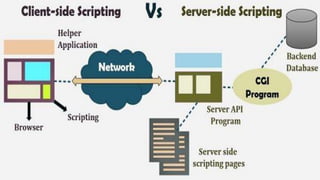
• The server-side scripting constructs a communication link between a
server and a client (user). Earlier the server side scripting is implemented
by the CGI (Common Gateway Interface) scripts. The CGI was devised to
execute the scripts from programming languages such as C++ or Perl on
the websites. The server-side involves three parts: server, database, API’s
and back-end web software developed by the server-side scripting
language.
• When a browser sends a request to the server for a webpage consisting of
server-side scripting, the web server processes the script prior to serving
the page to the browser. Here the processing of a script could include
extracting information from a database, making simple calculations, or
choosing the appropriate content that is to be displayed in the client end.
The script is being processed and the output is sent to the browser. The
web server abstracts the scripts from the end user until serving the
content, which makes the data and source code more secure.
Server-side scripting languages:
After the advent of CGI, multiple programming languages were evolved such as PHP,
Python, Ruby, ColdFusion, C#, Java, C++ and so on for server-side scripting among
which some of them are described below:
PHP: It is the most prevalent server-side language used on the web which was designed
to extract and manipulate information in the database. The language is used in
association with SQL language for the Database. It is used in Facebook, WordPress and
Wikipedia.
Python: The language is fast and contains shorter code. It is good for beginners as it
concentrates on the readability and simplicity of the code. Python functions well in the
object-oriented environment and used in famous sites like Youtube, Google, etc.
Ruby: It contains complex logic which packages the back-end with database utility which can
also be provided by PHP and SQL.
Difference Between Server-side Scripting and
Client-side Scripting
• The scripts can be written in two forms, at the server
end (back end) or at the client end (server end). The
main difference between server-side scripting and
client-side scripting is that the server side scripting
involves server for its processing. On the other hand,
client-side scripting requires browsers to run the scripts
on the client machine but does not interact with the
server while processing the client-side scripts.
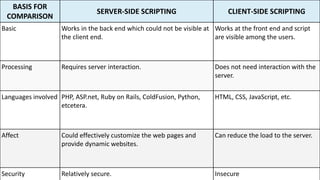
BASIS FOR
COMPARISON
SERVER-SIDE SCRIPTING CLIENT-SIDE SCRIPTING
Basic Works in the back end which could not be visible at
the client end.
Works at the front end and script
are visible among the users.
Processing Requires server interaction. Does not need interaction with the
server.
Languages involved PHP, ASP.net, Ruby on Rails, ColdFusion, Python,
etcetera.
HTML, CSS, JavaScript, etc.
Affect Could effectively customize the web pages and
provide dynamic websites.
Can reduce the load to the server.
Security Relatively secure. Insecure
Static Websites
• A Static Website (sometimes called a flat or stationary page) is
displayed in a web browser exactly as it is stored. It contains
web pages with fixed content coded in HTML and stored on a
web server. It does not change, it stays the same, or "static"
for every viewer of the site.
• A static website does not require web programming or
database design. Static is the most basic form of website and
are the most simple to create and are perfect for small scale
sites. Maintaining a large number of static pages can become a
time consuming and impractical hassle very quickly. If you
require a website with hundreds of pages and a ton of
content, a dynamic website may be for you
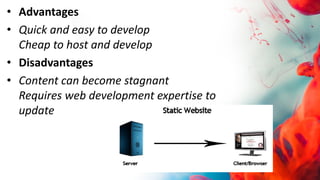
• Advantages
• Quick and easy to develop
Cheap to host and develop
• Disadvantages
• Content can become stagnant
Requires web development expertise to
update
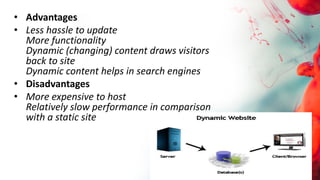
Dynamic Websites
• A Dynamic Website (also referred to as a database-
driven site) requires web programming and database
design. A dynamic website contains information and
content that changes, depending on factors such as
the viewer of the site, the time of the day, the time
zone, or the native language of the country the
viewer). The content of your site (text/images) is
stored on a database or content management system.
When the information is updated or changed within
the database, it changes on the site.
When a user visits your site, data is passed to the server from the
user's browser. When a dynamic site is accessed, pages are
generated on-the-fly (or in real-time) to the user based on this data
from the visitor.
Scripting code analyzed and interpreted on the web server and the
resulting HTML is displayed to the visitor's web browser.
This means different content can be generated at different times of
the day, or based on cookies (little pieces of data that a web server
stores on a visitor’s computer), or environmental variables (what
kind of browser is being used, what a user's IP address is, or what
page they visited prior to the current page).
• Advantages
• Less hassle to update
More functionality
Dynamic (changing) content draws visitors
back to site
Dynamic content helps in search engines
• Disadvantages
• More expensive to host
Relatively slow performance in comparison
with a static site
SGML (Standard Generalized Markup Language)
• SGML (Standard Generalized Markup
Language) is a standard for how to
specify a document markup language
or tag set. Such a specification is itself a
document type definition (DTD). SGML
is not in itself a document language,
but a description of how to specify one.
It is metadata.
• SGML is based on the idea that documents have structural and
other semantic elements that can be described without
reference to how such elements should be displayed. The actual
display of such a document may vary, depending on the output
medium and style preferences. Some advantages of documents
based on SGML are:
• They can be created by thinking in terms of document structure
rather than appearance characteristics (which may change over
time).
• They will be more portable because an SGML compiler can
interpret any document by reference to its document type
definition (DTD).
• Documents originally intended for the print medium can easily
be re-adapted for other media, such as the computer display
screen.
Websites Hosting
• Web hosting is a service of providing online space for storage of
web pages. These web pages are made available via World Wide
Web. The companies which offer website hosting are known
as Web hosts.
• The servers on which web site is hosted remain switched on 24
x7. These servers are run by web hosting companies. Each server
has its own IP address. Since IP addresses are difficult to
remember therefore, webmaster points their domain name to
the IP address of the server their website is stored on.
• It is not possible to host your website on your local computer, to
do so you would have to leave your computer on 24 hours a day.
This is not practical and cheaper as well. This is where web
hosting companies comes in.
• Types of Hosting
• The following table describes different types of hosting that can be availed as per the need:
S.N. Hosting Description
1. Shared Hosting
In shared hosting, the hosting company puts thousand of website on the same physical server.
Each customer has their own allocation of physical web space and a set of bandwidth limit. As all
websites share same physical memory, MYSQL server and Apache server, one website on the
server experiencing high traffic load will affect performance of all websites on the server.
2. Virtual Private Server (VPS)
It is also known as Virtual Dedicated Server. It is a server which is partitioned into smaller servers.
In this customer is given their own partition, which is installed with its own operating system.
Unlike shared hosting, VPS doesn’t share memory or processor time rather it allocates certain
amount of memory and CPU to use which means that any problem on a VPS partition on the
same drive will not affect other VPS customers.
3. Dedicated Server
In this kind of hosting, single dedicated server is setup for just one customer. It is commonly used
by the businesses that need the power, control and security that a dedicated server offers.
4. Reseller Hosting
A reseller acts as a middle man and sells hosting space of someone else’s server.
5. Grid Hosting
Instead of utilizing one server, Grid Hosting spreads resources over a large number of
servers. It is quite stable and flexible. The servers can be added or taken away from the
grid without crashing the system.
Web Hosting Companies
Following are the several companies offering web hosting service:
S.N. Hosting Company
1. Blue Host
2. Go Daddy
3. Host Gator
4. just Host
5. Laughing Squid
6. Hivelocity
7. liquid Web
8. Media TempleServInt
9. Wired Tree
10. Wild West Domains
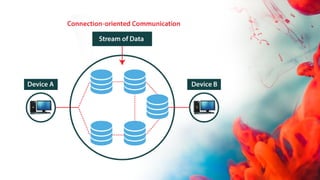
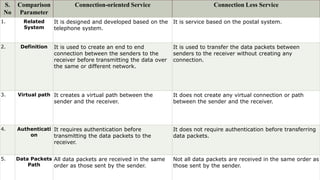
Connection-Oriented
• A connection-oriented service is a network service that
was designed and developed after the telephone system.
A connection-oriented service is used to create an end to
end connection between the sender and the receiver
before transmitting the data over the same or different
networks. In connection-oriented service, packets are
transmitted to the receiver in the same order the sender
has sent them. It uses a handshake method that creates a
connection between the user and sender for transmitting
the data over the network. Hence it is also known as a
reliable network service.
• Similarly, a receiver can respond or send the data to the sender in
the form of packets. After successfully exchanging or transmitting
data, a sender can terminate the connection by sending a signal to
the receiver. In this way, we can say that it is a reliable network
service.
• What is a TCP?
• TCP (Transmission Control Protocol) is a connection-oriented
protocol that allows communication between two or more
computer devices by establishing connections in the same or
different networks. It is the most important protocol that
uses internet protocol to transfer the data from one end to
another. Hence, it is sometimes referred to as TCP/IP. It ensures
that the connection is established and maintained until the data
packet is transferring between the sender and receiver is
complete.
Connectionless Service
• A connection is similar to a postal system, in which each
letter takes along different route paths from the source to
the destination address. Connectionless service is used in the
network system to transfer data from one end to another
end without creating any connection. So it does not require
establishing a connection before sending the data from the
sender to the receiver. It is not a reliable network service
because it does not guarantee the transfer of data packets to
the receiver, and data packets can be received in any order to
the receiver. Therefore we can say that the data packet does
not follow a defined path. In connectionless service, the
transmitted data packet is not received by the receiver due to
network congestion, and the data may be lost.
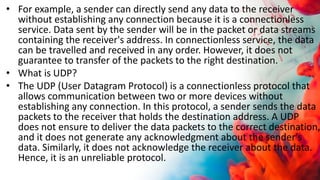
• For example, a sender can directly send any data to the receiver
without establishing any connection because it is a connectionless
service. Data sent by the sender will be in the packet or data streams
containing the receiver's address. In connectionless service, the data
can be travelled and received in any order. However, it does not
guarantee to transfer of the packets to the right destination.
• What is UDP?
• The UDP (User Datagram Protocol) is a connectionless protocol that
allows communication between two or more devices without
establishing any connection. In this protocol, a sender sends the data
packets to the receiver that holds the destination address. A UDP
does not ensure to deliver the data packets to the correct destination,
and it does not generate any acknowledgment about the sender's
data. Similarly, it does not acknowledge the receiver about the data.
Hence, it is an unreliable protocol.
S.
No
Comparison
Parameter
Connection-oriented Service Connection Less Service
1. Related
System
It is designed and developed based on the
telephone system.
It is service based on the postal system.
2. Definition It is used to create an end to end
connection between the senders to the
receiver before transmitting the data over
the same or different network.
It is used to transfer the data packets between
senders to the receiver without creating any
connection.
3. Virtual path It creates a virtual path between the
sender and the receiver.
It does not create any virtual connection or path
between the sender and the receiver.
4. Authenticati
on
It requires authentication before
transmitting the data packets to the
receiver.
It does not require authentication before transferring
data packets.
5. Data Packets
Path
All data packets are received in the same
order as those sent by the sender.
Not all data packets are received in the same order as
those sent by the sender.
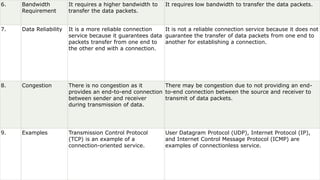
6. Bandwidth
Requirement
It requires a higher bandwidth to
transfer the data packets.
It requires low bandwidth to transfer the data packets.
7. Data Reliability It is a more reliable connection
service because it guarantees data
packets transfer from one end to
the other end with a connection.
It is not a reliable connection service because it does not
guarantee the transfer of data packets from one end to
another for establishing a connection.
8. Congestion There is no congestion as it
provides an end-to-end connection
between sender and receiver
during transmission of data.
There may be congestion due to not providing an end-
to-end connection between the source and receiver to
transmit of data packets.
9. Examples Transmission Control Protocol
(TCP) is an example of a
connection-oriented service.
User Datagram Protocol (UDP), Internet Protocol (IP),
and Internet Control Message Protocol (ICMP) are
examples of connectionless service.
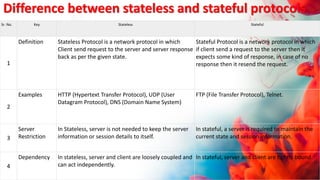
Difference between stateless and stateful protocols
Sr. No. Key Stateless Stateful
1
Definition Stateless Protocol is a network protocol in which
Client send request to the server and server response
back as per the given state.
Stateful Protocol is a network protocol in which
if client send a request to the server then it
expects some kind of response, in case of no
response then it resend the request.
2
Examples HTTP (Hypertext Transfer Protocol), UDP (User
Datagram Protocol), DNS (Domain Name System)
FTP (File Transfer Protocol), Telnet.
3
Server
Restriction
In Stateless, server is not needed to keep the server
information or session details to itself.
In stateful, a server is required to maintain the
current state and session information.
4
Dependency In stateless, server and client are loosely coupled and
can act independently.
In stateful, server and client are tightly bound.
HTML(Hyper Text Markup Language)
By Atul Bhatt
 HTML is the standard markup language for creating Web pages.
 HTML stands for Hyper Text Markup Language
 HTML describes the structure of a Web page
 HTML consists of a series of elements
 HTML elements tell the browser how to display the content
 HTML elements are represented by tags
 HTML tags label pieces of content such as "heading", "paragraph",
"table", and so on
 Browsers do not display the HTML tags, but use them to render
the content of the page
What is HTML?
A Simple HTML Document
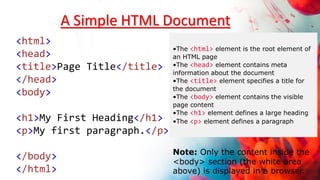
<html>
<head>
<title>Page Title</title>
</head>
<body>
<h1>My First Heading</h1>
<p>My first paragraph.</p>
</body>
</html>
•The <html> element is the root element of
an HTML page
•The <head> element contains meta
information about the document
•The <title> element specifies a title for
the document
•The <body> element contains the visible
page content
•The <h1> element defines a large heading
•The <p> element defines a paragraph
Note: Only the content inside the
<body> section (the white area
above) is displayed in a browser.
HTML Text Formatting
 <b> - Bold text
 <strong> - Important text
 <i> - Italic text
 <em> - Emphasized text
 <mark> - Marked text
 <small> - Small text
 <del> - Deleted text
 <ins> - Inserted text
 <sub> - Subscript text
 <sup> - Superscript text
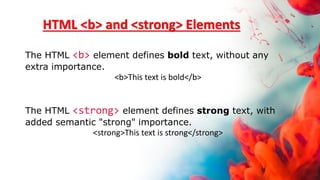
HTML <b> and <strong> Elements
The HTML <b> element defines bold text, without any
extra importance.
<b>This text is bold</b>
The HTML <strong> element defines strong text, with
added semantic "strong" importance.
<strong>This text is strong</strong>
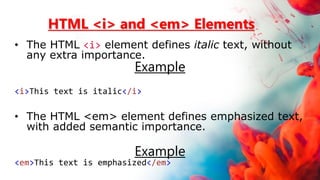
HTML <i> and <em> Elements
• The HTML <i> element defines italic text, without
any extra importance.
Example
<i>This text is italic</i>
• The HTML <em> element defines emphasized text,
with added semantic importance.
Example
<em>This text is emphasized</em>
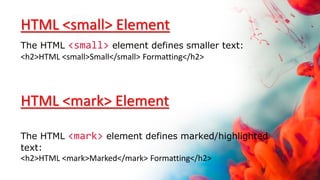
HTML <small> Element
The HTML <small> element defines smaller text:
<h2>HTML <small>Small</small> Formatting</h2>
HTML <mark> Element
The HTML <mark> element defines marked/highlighted
text:
<h2>HTML <mark>Marked</mark> Formatting</h2>
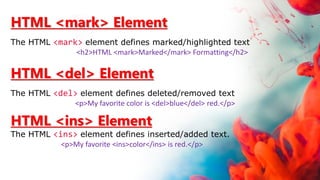
HTML <mark> Element
The HTML <mark> element defines marked/highlighted text
<h2>HTML <mark>Marked</mark> Formatting</h2>
HTML <del> Element
The HTML <del> element defines deleted/removed text
<p>My favorite color is <del>blue</del> red.</p>
HTML <ins> Element
The HTML <ins> element defines inserted/added text.
<p>My favorite <ins>color</ins> is red.</p>
HTML <sub> Element
The HTML <sub> element defines subscripted text.
<p>This is <sub>subscripted</sub> text.</p>
HTML <sup> Element
The HTML <sup> element defines superscripted text
<p>This is <sup>superscripted</sup> text.</p>
HTML Headings
HTML headings are defined with the <h1> to <h6> tags.
<h1> defines the most important heading. <h6> defines the
least important heading:
Example
<h1>This is heading 1</h1>
<h2>This is heading 2</h2>
<h3>This is heading 3</h3>
<h4>This is heading 3</h4>
<h5>This is heading 3</h5>
<h6>This is heading 3</h6>
HTML Paragraphs
HTML paragraphs are defined with the <p> tag:
Example
<p>This is a paragraph.</p>
<p>This is another paragraph.</p>
<p>
This paragraph
contains a lot of lines
in the source code,
but the browser
ignores it.
</p>
<p>
This paragraph
contains a lot of spaces
in the source code,
but the browser
ignores it.
</p>
HTML Line Breaks
The HTML <br> element defines a line break.
Use <br> if you want a line break (a new line) without
starting a new paragraph:
Example
<p>This is<br>a paragraph<br>with line breaks.</p>
The <br> tag is an empty tag, which means that it
has no end tag.
HTML <hr>
The align attribute specifies the alignment of a horizontal line.
<hr size="5" color="red">
<html>
<body>
<h1 style="background-color:Tomato;">Tomato</h1>
<h1 style="background-color:Orange;">Orange</h1>
<h1 style="background-color:DodgerBlue;">DodgerBlue</h1>
<h1 style="background-color:MediumSeaGreen;">MediumSeaGreen</h1>
<h1 style="background-color:Gray;">Gray</h1>
<h1 style="background-color:SlateBlue;">SlateBlue</h1>
<h1 style="background-color:Violet;">Violet</h1>
<h1 style="background-color:LightGray;">LightGray</h1>
</body>
</html>
HTML Colors
<html>
<body>
<h1 style="background-color:DodgerBlue;"> <center>Hello World</center></h1>
<p style="background-color:Tomato;">
Themes and styles also help keep your document coordinated. When you click Design
and choose a new Theme, the pictures, charts, and SmartArt graphics change to match
your new theme. When you apply styles, your headings change to match the new theme.
</p>
</body>
</html>
Background Color
HTML Images
In HTML, images are defined with the <img> tag.
The <img> tag is empty, it contains attributes only, and does not have a
closing tag.
The src attribute specifies the URL (web address) of the image:
<img src="url">
The alt Attribute
The alt attribute provides an alternate text for an image, if the user for some reason cannot
view it (because of slow connection, an error in the src attribute, or if the user uses a screen
reader).
The value of the alt attribute should describe the image:
<html>
<body>
<h2>Image Size</h2>
<p>In this example, we specify the width and height of an image with the width and height
attributes:</p>
<img src="img_girl.jpg" alt=“sorry" width="500" height="600">
</body>
</html>
HTML Images
<html>
<body>
<p>If a browser cannot find the image, it will display the alternate text:</p>
<img src="wrongname.gif" alt="Flowers in Chania">
</body>
</html>
HTML Images
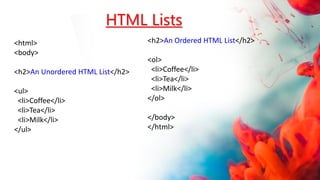
HTML Lists
<html>
<body>
<h2>An Unordered HTML List</h2>
<ul>
<li>Coffee</li>
<li>Tea</li>
<li>Milk</li>
</ul>
<h2>An Ordered HTML List</h2>
<ol>
<li>Coffee</li>
<li>Tea</li>
<li>Milk</li>
</ol>
</body>
</html>
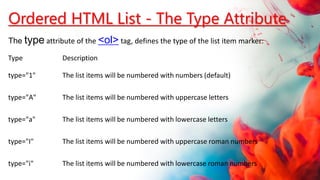
Type Description
type="1" The list items will be numbered with numbers (default)
type="A" The list items will be numbered with uppercase letters
type="a" The list items will be numbered with lowercase letters
type="I" The list items will be numbered with uppercase roman numbers
type="i" The list items will be numbered with lowercase roman numbers
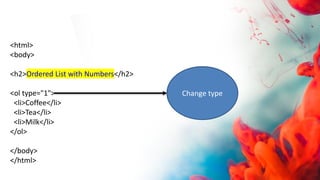
Ordered HTML List - The Type Attribute
The type attribute of the <ol> tag, defines the type of the list item marker:
<html>
<body>
<h2>Ordered List with Numbers</h2>
<ol type="1">
<li>Coffee</li>
<li>Tea</li>
<li>Milk</li>
</ol>
</body>
</html>
Change type
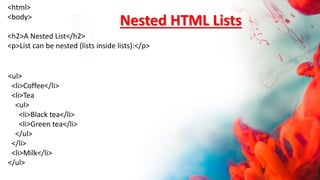
<html>
<body>
<h2>A Nested List</h2>
<p>List can be nested (lists inside lists):</p>
<ul>
<li>Coffee</li>
<li>Tea
<ul>
<li>Black tea</li>
<li>Green tea</li>
</ul>
</li>
<li>Milk</li>
</ul>
Nested HTML Lists
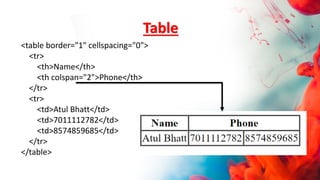
Table
<table border="1" cellspacing="0">
<tr>
<th>Name</th>
<th colspan="2">Phone</th>
</tr>
<tr>
<td>Atul Bhatt</td>
<td>7011112782</td>
<td>8574859685</td>
</tr>
</table>
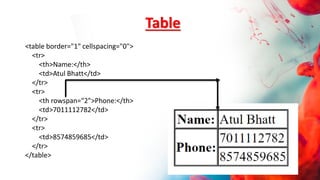
Table
<table border="1" cellspacing="0">
<tr>
<th>Name:</th>
<td>Atul Bhatt</td>
</tr>
<tr>
<th rowspan="2">Phone:</th>
<td>7011112782</td>
</tr>
<tr>
<td>8574859685</td>
</tr>
</table>
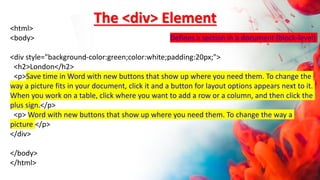
<html>
<body> Defines a section in a document (block-level)
<div style="background-color:green;color:white;padding:20px;">
<h2>London</h2>
<p>Save time in Word with new buttons that show up where you need them. To change the
way a picture fits in your document, click it and a button for layout options appears next to it.
When you work on a table, click where you want to add a row or a column, and then click the
plus sign.</p>
<p> Word with new buttons that show up where you need them. To change the way a
picture </p>
</div>
</body>
</html>
The <div> Element
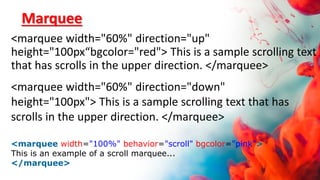
Marquee
<marquee width="60%" direction="up"
height="100px“bgcolor="red"> This is a sample scrolling text
that has scrolls in the upper direction. </marquee>
<marquee width="60%" direction="down"
height="100px"> This is a sample scrolling text that has
scrolls in the upper direction. </marquee>
<marquee width="100%" behavior="scroll" bgcolor="pink">
This is an example of a scroll marquee...
</marquee>
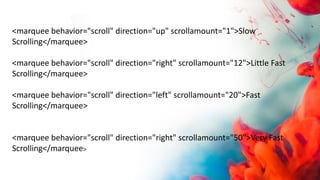
<marquee behavior="scroll" direction="up" scrollamount="1">Slow
Scrolling</marquee>
<marquee behavior="scroll" direction="right" scrollamount="12">Little Fast
Scrolling</marquee>
<marquee behavior="scroll" direction="left" scrollamount="20">Fast
Scrolling</marquee>
<marquee behavior="scroll" direction="right" scrollamount="50">Very Fast
Scrolling</marquee>
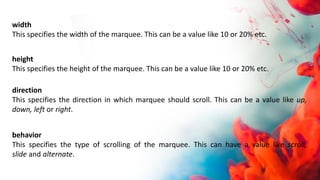
width
This specifies the width of the marquee. This can be a value like 10 or 20% etc.
height
This specifies the height of the marquee. This can be a value like 10 or 20% etc.
direction
This specifies the direction in which marquee should scroll. This can be a value like up,
down, left or right.
behavior
This specifies the type of scrolling of the marquee. This can have a value like scroll,
slide and alternate.
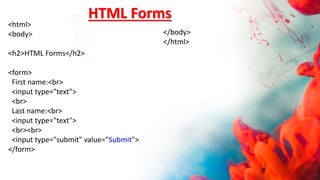
HTML Forms
<html>
<body>
<h2>HTML Forms</h2>
<form>
First name:<br>
<input type="text">
<br>
Last name:<br>
<input type="text">
<br><br>
<input type="submit" value="Submit">
</form>
</body>
</html>
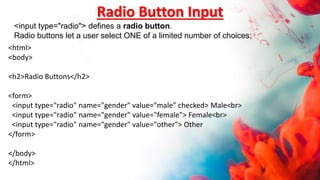
<html>
<body>
<h2>Radio Buttons</h2>
<form>
<input type="radio" name="gender" value="male" checked> Male<br>
<input type="radio" name="gender" value="female"> Female<br>
<input type="radio" name="gender" value="other"> Other
</form>
</body>
</html>
Radio Button Input
<input type="radio"> defines a radio button.
Radio buttons let a user select ONE of a limited number of choices:
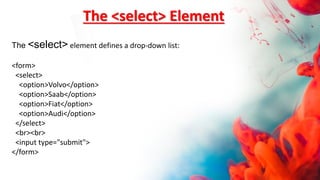
The <select> Element
The <select> element defines a drop-down list:
<form>
<select>
<option>Volvo</option>
<option>Saab</option>
<option>Fiat</option>
<option>Audi</option>
</select>
<br><br>
<input type="submit">
</form>
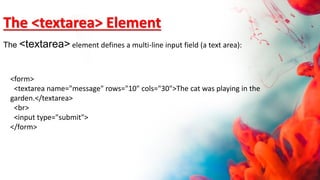
<form>
<textarea name="message" rows="10" cols="30">The cat was playing in the
garden.</textarea>
<br>
<input type="submit">
</form>
The <textarea> Element
The <textarea> element defines a multi-line input field (a text area):
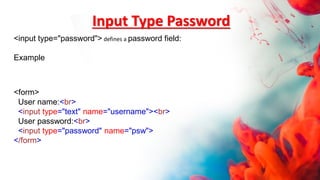
Input Type Password
<form>
User name:<br>
<input type="text" name="username"><br>
User password:<br>
<input type="password" name="psw">
</form>
<input type="password"> defines a password field:
Example
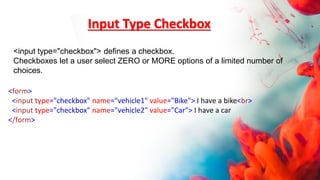
Input Type Checkbox
<form>
<input type="checkbox" name="vehicle1" value="Bike"> I have a bike<br>
<input type="checkbox" name="vehicle2" value="Car"> I have a car
</form>
<input type="checkbox"> defines a checkbox.
Checkboxes let a user select ZERO or MORE options of a limited number of
choices.
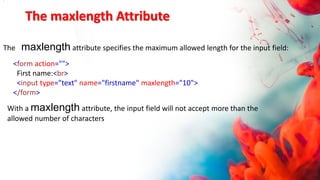
The maxlength Attribute
The maxlength attribute specifies the maximum allowed length for the input field:
<form action="">
First name:<br>
<input type="text" name="firstname" maxlength="10">
</form>
.
With a maxlength attribute, the input field will not accept more than the
allowed number of characters
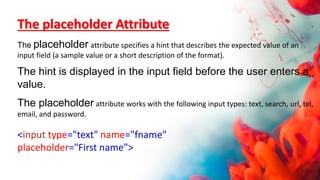
The placeholder Attribute
The placeholder attribute specifies a hint that describes the expected value of an
input field (a sample value or a short description of the format).
The hint is displayed in the input field before the user enters a
value.
The placeholder attribute works with the following input types: text, search, url, tel,
email, and password.
<input type="text" name="fname"
placeholder="First name">
<INPUT type="text" STYLE="color: green; font-size: 12px;
background-color: red;" size="50" maxlength="30">
•input[type=text] - will only select text fields
•input[type=password] - will only select password fields
•input[type=number] - will only select number fields
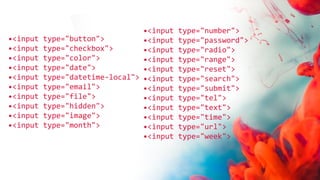
•<input type="button">
•<input type="checkbox">
•<input type="color">
•<input type="date">
•<input type="datetime-local">
•<input type="email">
•<input type="file">
•<input type="hidden">
•<input type="image">
•<input type="month">
•<input type="number">
•<input type="password">
•<input type="radio">
•<input type="range">
•<input type="reset">
•<input type="search">
•<input type="submit">
•<input type="tel">
•<input type="text">
•<input type="time">
•<input type="url">
•<input type="week">
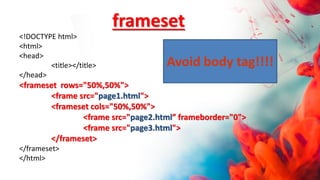
<!DOCTYPE html>
<html>
<head>
<title></title>
</head>
<frameset rows="50%,50%">
<frame src="page1.html">
<frameset cols="50%,50%">
<frame src="page2.html” frameborder="0">
<frame src="page3.html">
</frameset>
</frameset>
</html>
frameset
Avoid body tag!!!!
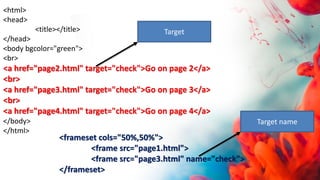
<html>
<head>
<title></title>
</head>
<body bgcolor="green">
<br>
<a href="page2.html" target="check">Go on page 2</a>
<br>
<a href="page3.html" target="check">Go on page 3</a>
<br>
<a href="page4.html" target="check">Go on page 4</a>
</body>
</html>
<frameset cols="50%,50%">
<frame src="page1.html">
<frame src="page3.html" name="check">
</frameset>
Target
Target name
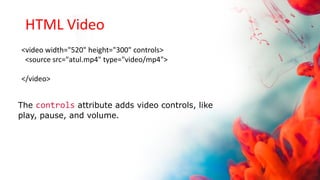
HTML Video
<video width="520" height="300" controls>
<source src="atul.mp4" type="video/mp4">
</video>
The controls attribute adds video controls, like
play, pause, and volume.
HTML Audio
<audio controls>
<source src="pop.mp3" type="audio/mpeg">
</audio>
<div style="background-color:black;color:white;padding:20px;">
<h2>Heading</h2>
<p>Themes and styles also help keep your document coordinated. When you click
Design and choose a new Theme</p>
</div>
The <div> Element
<p>Use the min and max attributes to add restrictions to dates:</p>
<form>
Enter a date before 1980-01-01:<br>
<input type="date" name="bday" max="1979-12-31"><br><br>
Enter a date after 2000-01-01:<br>
<input type="date" name="bday" min="2000-01-02"><br><br>
<input type="submit">
</form>
<p><strong>Note:</strong> type="date" is not supported in Safari or Internet Explorer 11
and earlier versions.</p>
Input Type Date
The <input type="date"> is used for input fields that should contain a date.
Depending on browser support, a date picker can show up in the input field.
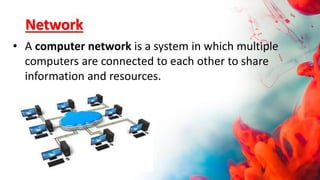
Network
• A computer network is a system in which multiple
computers are connected to each other to share
information and resources.
Characteristics of a Computer Network
• Share resources from one computer to another.
• Create files and store them in one computer, access
those files from the other computer(s) connected over
the network.
• Connect a printer, scanner, or a fax machine to one
computer within the network and let other computers of
the network use the machines available over the
network.
Internet
• It is a worldwide/global system of interconnected
computer networks. It uses the standard Internet
Protocol (TCP/IP). Every computer in Internet is
identified by a unique IP address. IP Address is a
unique set of numbers (such as 110.22.33.114) which
identifies a computer’s location.
Intranet
• Intranet is the system in which multiple PCs are
connected to each other. PCs in intranet are not
available to the world outside the intranet. Usually
each organization has its own Intranet network and
members/employees of that organization can
access the computers in their intranet.
Differences between Internet and Intranet
• Internet is general to PCs all over the world whereas
Intranet is specific to few PCs.
• Internet provides a wider and better access to websites to
a large population, whereas Intranet is restricted.
• Internet is not as safe as Intranet. Intranet can be safely
privatized as per the need.
Features Of Computer network
A list Of Computer network features is given
below.
• Communication speed
• File sharing
• Back up and Roll back is easy
• Software and Hardware sharing
• Security
Communication speed
Network provides us to communicate over the network in a fast and efficient manner. For
example, we can do video conferencing, email messaging, etc. over the internet.
Therefore, the computer network is a great way to share our knowledge and ideas.
File sharing
File sharing is one of the major advantage of the computer network. Computer network
provides us to share the files with each other.
Back up and Roll back is easy
Since the files are stored in the main server which is centrally located. Therefore, it is easy
to take the back up from the main server.
Software and Hardware sharing
We can install the applications on the main server, therefore, the user can
access the applications centrally. So, we do not need to install the software
on every machine. Similarly, hardware can also be shared.
Security
Network allows the security by ensuring that the user has the right to
access the certain files and applications.
ARPANET
• Advanced Research Projects Agency
Network, ARPANET or ARPAnet began development
in 1966 by the United States ARPA. ARPANET was a Wide
Area Network linking many Universities and research
centers, was first to use packet switching, and was the
beginning of what we consider the Internet today. ARPANET
was created to make it easier for people to access
computers, improve computer equipment, and to have a
more effective communication method for the military.
World Wide Web (WWW)
• The World Wide Web (WWW) is a network of online
content that is formatted in HTML and accessed via
HTTP. The term refers to all the interlinked HTML
pages that can be accessed over the Internet. The
World Wide Web was originally designed in 1991 by
Tim Berners-Lee .
What is Ecommerce?
• Ecommerce, also known as electronic commerce or internet
commerce, refers to the buying and selling of goods or
services using the internet, and the transfer of money and
data to execute these transactions. Ecommerce is often used
to refer to the sale of physical products online, but it can also
describe any kind of commercial transaction that is
facilitated through the internet.
• Whereas e-business refers to all aspects of operating an
online business, ecommerce refers specifically to the
transaction of goods and services.

web desigining and publishing and easy level

  • 1.
  • 2.
    What is Website •A website is a collection of publicly accessible, interlinked Web pages that share a single domain name. Websites can be created and maintained by an individual, group, business or organization to serve a variety of purposes. • Websites come in a nearly endless variety, including educational sites, news sites, forums, social media sites, e-commerce sites, and so on. The pages within a website are usually a mix of text and other media. That said, there are no rules dictating the form of a website.
  • 3.
    How do websiteswork? • A website is simply a collection of web pages of codes – codes that describes the layout, format and content on a page. • The web server is a internet-connected computer that receives the request for a web page sent by your browser. • The browser connects your computer to the server through an IP address. The IP address is obtained by translating the domain name.
  • 5.
    • In otherwords, in order to display your website on the Internet, you will need: • A website • A domain name • A server
  • 6.
    A Website • Awebsite is typically a collection of web pages, images and other elements that are linked together to form a larger, structured document. Think of a website as a book and each individual page is a web page. • A website can be made up of a single page or it could have thousands of pages. Each page will have its own text, images and other elements. All web pages and elements are then placed in a folder and stored on your web host server. • Each web page is written in codes and these codes describe the layout, format and content on the page. The most common coding language used to create web pages is HTML.
  • 7.
    A domain name •A domain name is the address that you type into your web browser address bar to get to a website. An example of a domain name is www.geekstalk.tech. • A domain name is unique to a website. In other words, no two websites can have the same domain name. • While it is true that you don’t necessarily need a custom domain name for your website. Many website builders offer free plans that comes with a free website address. But these free website addresses come in the form of a sub-domain. . For example, if your website builder is “example.com” your free web address may be http://yourname.example.com.
  • 8.
    A web server •A web server is the computer that receives the request for a web page sent by your browser. • Consider this: your company is hiring for a position that has just opened up and you are in charge of writing the job ad. You may have crafted the most compelling ad but unless you post the ad on a job board, no one will see it. • This is the same with websites. You could create the most stunning website but unless it’s uploaded to a web server, it is not accessible or viewable on the Internet.
  • 9.
    How the Webworks • Clients and servers • Computers connected to the web are called clients and servers. A simplified diagram of how they interact might look like this:
  • 10.
    •Clients are thetypical web user's internet-connected devices (for example, your computer connected to your Wi-Fi, or your phone connected to your mobile network) and web-accessing software available on those devices (usually a web browser like Firefox or Chrome). •Servers are computers that store webpages, sites, or apps. When a client device wants to access a webpage, a copy of the webpage is downloaded from the server onto the client machine to be displayed in the user's web browser.
  • 11.
    What Is Front-Endand Back-End Development? • What is Front-End Development? • The front-end is built using a combination of technologies such as Hypertext Markup Language (HTML), JavaScript and Cascading Style Sheets (CSS). • Front-end developers design and construct the user experience elements on the web page or app including buttons, menus, pages, links, graphics and more.
  • 13.
    HTML Hypertext Markup Languageis the core of a website, providing the overall design and functionality. The most recent version was released in late 2017 and is known as HTML5.2. The updated version includes more tools aimed at web application developers as well as adjustments made to improve interoperability. CSS Cascading style sheets give developers a flexible, precise way to create attractive, interactive website designs.
  • 14.
    JavaScript This event-based languageis useful for creating dynamic elements on static HTML web pages. It allows developers to access elements separate from the main HTML page, as well as respond to server-side events. Front-end frameworks such as Angular, Ember, Backbone, and React are also popular. These frameworks let developers keep up with the growing demand for enterprise software without sacrificing quality, so they’re earning their place as standard development tools. One of the main challenges of front-end development - which also goes by the name “client-side development” - is the rapid pace of change in the tools, techniques and technologies used to create the user experience for applications and websites.
  • 15.
    What is Back-EndDevelopment? • The back-end, also called the server side, consists of the server which provides data on request, the application which channels it, and the database which organizes the information. • For example, when a customer browses shoes on a website, they are interacting with the front end. • After they select the item they want, put it in the shopping cart, and authorize the purchase, the information is kept inside the database which resides on the server. • A few days later when the client checks on the status of their delivery, the server pulls the relevant information, updates it with tracking data, and presents it through the front-end.
  • 16.
    Back-end Tools • Thecore concern of back-end developers is creating applications that can find and deliver data to the front end. • Many of them use reliable enterprise-level databases like Oracle, Teradata, Microsoft SQL Server, IBM DB2, EnterpriseDB and SAP Sybase ASE. • There’s also a number of other popular databases including MySQL, NoSQL and PostgreSQL. • There are a wide variety of frameworks and languages used to code the application, such as Ruby on Rails, Java, C++/C/C#, Python and PHP.
  • 17.
    What is Full-StackDevelopment? • The development of both the back- and front-end systems has become so specialized, it’s most common for a developer to specialize in only one. • As a general rule, full-stack development by a single programmer isn’t a practical solution. • However, at times a custom software development company will have developers who are proficient with both sides, known as a full stack developer.
  • 18.
    What Is theDifference Between Front-End and Back-End Development? The term “front-end” refers to the user interface, while “back-end” means the server, application and database that work behind the scenes to deliver information to the user.
  • 19.
    Client-side Scripting • Client-sidescripting is performed to generate a code that can run on the client end (browser) without needing the server side processing. Basically, these types of scripts are placed inside an HTML document. The client-side scripting can be used to examine the user’s form for the errors before submitting it and for changing the content according to the user input. As I mentioned before, the web requires three elements for its functioning which are, client, database and server.
  • 20.
    • The effectiveclient-side scripting can significantly reduce the server load. It is designed to run as a scripting language utilizing a web browser as a host program. For example, when a user makes a request via browser for a webpage to the server, it just sent the HTML and CSS as plain text, and the browser interprets and renders the web content in the client end.
  • 21.
    Client-side scripting languages: HTML: It is the fundamental building blocks of web programming which provides the frame to the website. It describes the arrangement of the content.  CSS: CSS provides the way to design the graphic elements which help in making the appearance of the web application more attractive.  JavaScript: It is also a client-side scripting language which essentially devised for the specific purpose, but currently there are various JavaScript frameworks used as server-side scripting technology.
  • 22.
    Server-side scripting • Server-sidescripting is a technique of programming for producing the code which can run software on the server side, in simple words any scripting or programming that can run on the web server is known as server-side scripting. The operations like customization of a website, dynamic change in the website content, response generation to the user’s queries, accessing the database, and so on are performed at the server end.
  • 23.
    • The server-sidescripting constructs a communication link between a server and a client (user). Earlier the server side scripting is implemented by the CGI (Common Gateway Interface) scripts. The CGI was devised to execute the scripts from programming languages such as C++ or Perl on the websites. The server-side involves three parts: server, database, API’s and back-end web software developed by the server-side scripting language. • When a browser sends a request to the server for a webpage consisting of server-side scripting, the web server processes the script prior to serving the page to the browser. Here the processing of a script could include extracting information from a database, making simple calculations, or choosing the appropriate content that is to be displayed in the client end. The script is being processed and the output is sent to the browser. The web server abstracts the scripts from the end user until serving the content, which makes the data and source code more secure.
  • 24.
    Server-side scripting languages: Afterthe advent of CGI, multiple programming languages were evolved such as PHP, Python, Ruby, ColdFusion, C#, Java, C++ and so on for server-side scripting among which some of them are described below: PHP: It is the most prevalent server-side language used on the web which was designed to extract and manipulate information in the database. The language is used in association with SQL language for the Database. It is used in Facebook, WordPress and Wikipedia. Python: The language is fast and contains shorter code. It is good for beginners as it concentrates on the readability and simplicity of the code. Python functions well in the object-oriented environment and used in famous sites like Youtube, Google, etc. Ruby: It contains complex logic which packages the back-end with database utility which can also be provided by PHP and SQL.
  • 26.
    Difference Between Server-sideScripting and Client-side Scripting • The scripts can be written in two forms, at the server end (back end) or at the client end (server end). The main difference between server-side scripting and client-side scripting is that the server side scripting involves server for its processing. On the other hand, client-side scripting requires browsers to run the scripts on the client machine but does not interact with the server while processing the client-side scripts.
  • 27.
    BASIS FOR COMPARISON SERVER-SIDE SCRIPTINGCLIENT-SIDE SCRIPTING Basic Works in the back end which could not be visible at the client end. Works at the front end and script are visible among the users. Processing Requires server interaction. Does not need interaction with the server. Languages involved PHP, ASP.net, Ruby on Rails, ColdFusion, Python, etcetera. HTML, CSS, JavaScript, etc. Affect Could effectively customize the web pages and provide dynamic websites. Can reduce the load to the server. Security Relatively secure. Insecure
  • 28.
    Static Websites • AStatic Website (sometimes called a flat or stationary page) is displayed in a web browser exactly as it is stored. It contains web pages with fixed content coded in HTML and stored on a web server. It does not change, it stays the same, or "static" for every viewer of the site. • A static website does not require web programming or database design. Static is the most basic form of website and are the most simple to create and are perfect for small scale sites. Maintaining a large number of static pages can become a time consuming and impractical hassle very quickly. If you require a website with hundreds of pages and a ton of content, a dynamic website may be for you
  • 29.
    • Advantages • Quickand easy to develop Cheap to host and develop • Disadvantages • Content can become stagnant Requires web development expertise to update
  • 30.
    Dynamic Websites • ADynamic Website (also referred to as a database- driven site) requires web programming and database design. A dynamic website contains information and content that changes, depending on factors such as the viewer of the site, the time of the day, the time zone, or the native language of the country the viewer). The content of your site (text/images) is stored on a database or content management system. When the information is updated or changed within the database, it changes on the site.
  • 31.
    When a uservisits your site, data is passed to the server from the user's browser. When a dynamic site is accessed, pages are generated on-the-fly (or in real-time) to the user based on this data from the visitor. Scripting code analyzed and interpreted on the web server and the resulting HTML is displayed to the visitor's web browser. This means different content can be generated at different times of the day, or based on cookies (little pieces of data that a web server stores on a visitor’s computer), or environmental variables (what kind of browser is being used, what a user's IP address is, or what page they visited prior to the current page).
  • 32.
    • Advantages • Lesshassle to update More functionality Dynamic (changing) content draws visitors back to site Dynamic content helps in search engines • Disadvantages • More expensive to host Relatively slow performance in comparison with a static site
  • 33.
    SGML (Standard GeneralizedMarkup Language) • SGML (Standard Generalized Markup Language) is a standard for how to specify a document markup language or tag set. Such a specification is itself a document type definition (DTD). SGML is not in itself a document language, but a description of how to specify one. It is metadata.
  • 34.
    • SGML isbased on the idea that documents have structural and other semantic elements that can be described without reference to how such elements should be displayed. The actual display of such a document may vary, depending on the output medium and style preferences. Some advantages of documents based on SGML are: • They can be created by thinking in terms of document structure rather than appearance characteristics (which may change over time). • They will be more portable because an SGML compiler can interpret any document by reference to its document type definition (DTD). • Documents originally intended for the print medium can easily be re-adapted for other media, such as the computer display screen.
  • 35.
    Websites Hosting • Webhosting is a service of providing online space for storage of web pages. These web pages are made available via World Wide Web. The companies which offer website hosting are known as Web hosts. • The servers on which web site is hosted remain switched on 24 x7. These servers are run by web hosting companies. Each server has its own IP address. Since IP addresses are difficult to remember therefore, webmaster points their domain name to the IP address of the server their website is stored on. • It is not possible to host your website on your local computer, to do so you would have to leave your computer on 24 hours a day. This is not practical and cheaper as well. This is where web hosting companies comes in.
  • 36.
    • Types ofHosting • The following table describes different types of hosting that can be availed as per the need: S.N. Hosting Description 1. Shared Hosting In shared hosting, the hosting company puts thousand of website on the same physical server. Each customer has their own allocation of physical web space and a set of bandwidth limit. As all websites share same physical memory, MYSQL server and Apache server, one website on the server experiencing high traffic load will affect performance of all websites on the server. 2. Virtual Private Server (VPS) It is also known as Virtual Dedicated Server. It is a server which is partitioned into smaller servers. In this customer is given their own partition, which is installed with its own operating system. Unlike shared hosting, VPS doesn’t share memory or processor time rather it allocates certain amount of memory and CPU to use which means that any problem on a VPS partition on the same drive will not affect other VPS customers. 3. Dedicated Server In this kind of hosting, single dedicated server is setup for just one customer. It is commonly used by the businesses that need the power, control and security that a dedicated server offers.
  • 37.
    4. Reseller Hosting Areseller acts as a middle man and sells hosting space of someone else’s server. 5. Grid Hosting Instead of utilizing one server, Grid Hosting spreads resources over a large number of servers. It is quite stable and flexible. The servers can be added or taken away from the grid without crashing the system.
  • 38.
    Web Hosting Companies Followingare the several companies offering web hosting service: S.N. Hosting Company 1. Blue Host 2. Go Daddy 3. Host Gator 4. just Host 5. Laughing Squid 6. Hivelocity 7. liquid Web 8. Media TempleServInt 9. Wired Tree 10. Wild West Domains
  • 39.
    Connection-Oriented • A connection-orientedservice is a network service that was designed and developed after the telephone system. A connection-oriented service is used to create an end to end connection between the sender and the receiver before transmitting the data over the same or different networks. In connection-oriented service, packets are transmitted to the receiver in the same order the sender has sent them. It uses a handshake method that creates a connection between the user and sender for transmitting the data over the network. Hence it is also known as a reliable network service.
  • 41.
    • Similarly, areceiver can respond or send the data to the sender in the form of packets. After successfully exchanging or transmitting data, a sender can terminate the connection by sending a signal to the receiver. In this way, we can say that it is a reliable network service. • What is a TCP? • TCP (Transmission Control Protocol) is a connection-oriented protocol that allows communication between two or more computer devices by establishing connections in the same or different networks. It is the most important protocol that uses internet protocol to transfer the data from one end to another. Hence, it is sometimes referred to as TCP/IP. It ensures that the connection is established and maintained until the data packet is transferring between the sender and receiver is complete.
  • 42.
    Connectionless Service • Aconnection is similar to a postal system, in which each letter takes along different route paths from the source to the destination address. Connectionless service is used in the network system to transfer data from one end to another end without creating any connection. So it does not require establishing a connection before sending the data from the sender to the receiver. It is not a reliable network service because it does not guarantee the transfer of data packets to the receiver, and data packets can be received in any order to the receiver. Therefore we can say that the data packet does not follow a defined path. In connectionless service, the transmitted data packet is not received by the receiver due to network congestion, and the data may be lost.
  • 43.
    • For example,a sender can directly send any data to the receiver without establishing any connection because it is a connectionless service. Data sent by the sender will be in the packet or data streams containing the receiver's address. In connectionless service, the data can be travelled and received in any order. However, it does not guarantee to transfer of the packets to the right destination. • What is UDP? • The UDP (User Datagram Protocol) is a connectionless protocol that allows communication between two or more devices without establishing any connection. In this protocol, a sender sends the data packets to the receiver that holds the destination address. A UDP does not ensure to deliver the data packets to the correct destination, and it does not generate any acknowledgment about the sender's data. Similarly, it does not acknowledge the receiver about the data. Hence, it is an unreliable protocol.
  • 44.
    S. No Comparison Parameter Connection-oriented Service ConnectionLess Service 1. Related System It is designed and developed based on the telephone system. It is service based on the postal system. 2. Definition It is used to create an end to end connection between the senders to the receiver before transmitting the data over the same or different network. It is used to transfer the data packets between senders to the receiver without creating any connection. 3. Virtual path It creates a virtual path between the sender and the receiver. It does not create any virtual connection or path between the sender and the receiver. 4. Authenticati on It requires authentication before transmitting the data packets to the receiver. It does not require authentication before transferring data packets. 5. Data Packets Path All data packets are received in the same order as those sent by the sender. Not all data packets are received in the same order as those sent by the sender.
  • 45.
    6. Bandwidth Requirement It requiresa higher bandwidth to transfer the data packets. It requires low bandwidth to transfer the data packets. 7. Data Reliability It is a more reliable connection service because it guarantees data packets transfer from one end to the other end with a connection. It is not a reliable connection service because it does not guarantee the transfer of data packets from one end to another for establishing a connection. 8. Congestion There is no congestion as it provides an end-to-end connection between sender and receiver during transmission of data. There may be congestion due to not providing an end- to-end connection between the source and receiver to transmit of data packets. 9. Examples Transmission Control Protocol (TCP) is an example of a connection-oriented service. User Datagram Protocol (UDP), Internet Protocol (IP), and Internet Control Message Protocol (ICMP) are examples of connectionless service.
  • 46.
    Difference between statelessand stateful protocols Sr. No. Key Stateless Stateful 1 Definition Stateless Protocol is a network protocol in which Client send request to the server and server response back as per the given state. Stateful Protocol is a network protocol in which if client send a request to the server then it expects some kind of response, in case of no response then it resend the request. 2 Examples HTTP (Hypertext Transfer Protocol), UDP (User Datagram Protocol), DNS (Domain Name System) FTP (File Transfer Protocol), Telnet. 3 Server Restriction In Stateless, server is not needed to keep the server information or session details to itself. In stateful, a server is required to maintain the current state and session information. 4 Dependency In stateless, server and client are loosely coupled and can act independently. In stateful, server and client are tightly bound.
  • 47.
    HTML(Hyper Text MarkupLanguage) By Atul Bhatt
  • 48.
     HTML isthe standard markup language for creating Web pages.  HTML stands for Hyper Text Markup Language  HTML describes the structure of a Web page  HTML consists of a series of elements  HTML elements tell the browser how to display the content  HTML elements are represented by tags  HTML tags label pieces of content such as "heading", "paragraph", "table", and so on  Browsers do not display the HTML tags, but use them to render the content of the page What is HTML?
  • 49.
    A Simple HTMLDocument <html> <head> <title>Page Title</title> </head> <body> <h1>My First Heading</h1> <p>My first paragraph.</p> </body> </html> •The <html> element is the root element of an HTML page •The <head> element contains meta information about the document •The <title> element specifies a title for the document •The <body> element contains the visible page content •The <h1> element defines a large heading •The <p> element defines a paragraph Note: Only the content inside the <body> section (the white area above) is displayed in a browser.
  • 50.
    HTML Text Formatting <b> - Bold text  <strong> - Important text  <i> - Italic text  <em> - Emphasized text  <mark> - Marked text  <small> - Small text  <del> - Deleted text  <ins> - Inserted text  <sub> - Subscript text  <sup> - Superscript text
  • 51.
    HTML <b> and<strong> Elements The HTML <b> element defines bold text, without any extra importance. <b>This text is bold</b> The HTML <strong> element defines strong text, with added semantic "strong" importance. <strong>This text is strong</strong>
  • 52.
    HTML <i> and<em> Elements • The HTML <i> element defines italic text, without any extra importance. Example <i>This text is italic</i> • The HTML <em> element defines emphasized text, with added semantic importance. Example <em>This text is emphasized</em>
  • 53.
    HTML <small> Element TheHTML <small> element defines smaller text: <h2>HTML <small>Small</small> Formatting</h2> HTML <mark> Element The HTML <mark> element defines marked/highlighted text: <h2>HTML <mark>Marked</mark> Formatting</h2>
  • 54.
    HTML <mark> Element TheHTML <mark> element defines marked/highlighted text <h2>HTML <mark>Marked</mark> Formatting</h2> HTML <del> Element The HTML <del> element defines deleted/removed text <p>My favorite color is <del>blue</del> red.</p> HTML <ins> Element The HTML <ins> element defines inserted/added text. <p>My favorite <ins>color</ins> is red.</p>
  • 55.
    HTML <sub> Element TheHTML <sub> element defines subscripted text. <p>This is <sub>subscripted</sub> text.</p> HTML <sup> Element The HTML <sup> element defines superscripted text <p>This is <sup>superscripted</sup> text.</p>
  • 56.
    HTML Headings HTML headingsare defined with the <h1> to <h6> tags. <h1> defines the most important heading. <h6> defines the least important heading: Example <h1>This is heading 1</h1> <h2>This is heading 2</h2> <h3>This is heading 3</h3> <h4>This is heading 3</h4> <h5>This is heading 3</h5> <h6>This is heading 3</h6>
  • 57.
    HTML Paragraphs HTML paragraphsare defined with the <p> tag: Example <p>This is a paragraph.</p> <p>This is another paragraph.</p> <p> This paragraph contains a lot of lines in the source code, but the browser ignores it. </p> <p> This paragraph contains a lot of spaces in the source code, but the browser ignores it. </p>
  • 58.
    HTML Line Breaks TheHTML <br> element defines a line break. Use <br> if you want a line break (a new line) without starting a new paragraph: Example <p>This is<br>a paragraph<br>with line breaks.</p> The <br> tag is an empty tag, which means that it has no end tag.
  • 59.
    HTML <hr> The alignattribute specifies the alignment of a horizontal line. <hr size="5" color="red">
  • 60.
    <html> <body> <h1 style="background-color:Tomato;">Tomato</h1> <h1 style="background-color:Orange;">Orange</h1> <h1style="background-color:DodgerBlue;">DodgerBlue</h1> <h1 style="background-color:MediumSeaGreen;">MediumSeaGreen</h1> <h1 style="background-color:Gray;">Gray</h1> <h1 style="background-color:SlateBlue;">SlateBlue</h1> <h1 style="background-color:Violet;">Violet</h1> <h1 style="background-color:LightGray;">LightGray</h1> </body> </html> HTML Colors
  • 61.
    <html> <body> <h1 style="background-color:DodgerBlue;"> <center>HelloWorld</center></h1> <p style="background-color:Tomato;"> Themes and styles also help keep your document coordinated. When you click Design and choose a new Theme, the pictures, charts, and SmartArt graphics change to match your new theme. When you apply styles, your headings change to match the new theme. </p> </body> </html> Background Color
  • 62.
    HTML Images In HTML,images are defined with the <img> tag. The <img> tag is empty, it contains attributes only, and does not have a closing tag. The src attribute specifies the URL (web address) of the image: <img src="url"> The alt Attribute The alt attribute provides an alternate text for an image, if the user for some reason cannot view it (because of slow connection, an error in the src attribute, or if the user uses a screen reader). The value of the alt attribute should describe the image:
  • 63.
    <html> <body> <h2>Image Size</h2> <p>In thisexample, we specify the width and height of an image with the width and height attributes:</p> <img src="img_girl.jpg" alt=“sorry" width="500" height="600"> </body> </html> HTML Images
  • 64.
    <html> <body> <p>If a browsercannot find the image, it will display the alternate text:</p> <img src="wrongname.gif" alt="Flowers in Chania"> </body> </html> HTML Images
  • 65.
    HTML Lists <html> <body> <h2>An UnorderedHTML List</h2> <ul> <li>Coffee</li> <li>Tea</li> <li>Milk</li> </ul> <h2>An Ordered HTML List</h2> <ol> <li>Coffee</li> <li>Tea</li> <li>Milk</li> </ol> </body> </html>
  • 66.
    Type Description type="1" Thelist items will be numbered with numbers (default) type="A" The list items will be numbered with uppercase letters type="a" The list items will be numbered with lowercase letters type="I" The list items will be numbered with uppercase roman numbers type="i" The list items will be numbered with lowercase roman numbers Ordered HTML List - The Type Attribute The type attribute of the <ol> tag, defines the type of the list item marker:
  • 67.
    <html> <body> <h2>Ordered List withNumbers</h2> <ol type="1"> <li>Coffee</li> <li>Tea</li> <li>Milk</li> </ol> </body> </html> Change type
  • 68.
    <html> <body> <h2>A Nested List</h2> <p>Listcan be nested (lists inside lists):</p> <ul> <li>Coffee</li> <li>Tea <ul> <li>Black tea</li> <li>Green tea</li> </ul> </li> <li>Milk</li> </ul> Nested HTML Lists
  • 69.
    Table <table border="1" cellspacing="0"> <tr> <th>Name</th> <thcolspan="2">Phone</th> </tr> <tr> <td>Atul Bhatt</td> <td>7011112782</td> <td>8574859685</td> </tr> </table>
  • 70.
    Table <table border="1" cellspacing="0"> <tr> <th>Name:</th> <td>AtulBhatt</td> </tr> <tr> <th rowspan="2">Phone:</th> <td>7011112782</td> </tr> <tr> <td>8574859685</td> </tr> </table>
  • 71.
    <html> <body> Defines asection in a document (block-level) <div style="background-color:green;color:white;padding:20px;"> <h2>London</h2> <p>Save time in Word with new buttons that show up where you need them. To change the way a picture fits in your document, click it and a button for layout options appears next to it. When you work on a table, click where you want to add a row or a column, and then click the plus sign.</p> <p> Word with new buttons that show up where you need them. To change the way a picture </p> </div> </body> </html> The <div> Element
  • 72.
    Marquee <marquee width="60%" direction="up" height="100px“bgcolor="red">This is a sample scrolling text that has scrolls in the upper direction. </marquee> <marquee width="60%" direction="down" height="100px"> This is a sample scrolling text that has scrolls in the upper direction. </marquee> <marquee width="100%" behavior="scroll" bgcolor="pink"> This is an example of a scroll marquee... </marquee>
  • 73.
    <marquee behavior="scroll" direction="up"scrollamount="1">Slow Scrolling</marquee> <marquee behavior="scroll" direction="right" scrollamount="12">Little Fast Scrolling</marquee> <marquee behavior="scroll" direction="left" scrollamount="20">Fast Scrolling</marquee> <marquee behavior="scroll" direction="right" scrollamount="50">Very Fast Scrolling</marquee>
  • 74.
    width This specifies thewidth of the marquee. This can be a value like 10 or 20% etc. height This specifies the height of the marquee. This can be a value like 10 or 20% etc. direction This specifies the direction in which marquee should scroll. This can be a value like up, down, left or right. behavior This specifies the type of scrolling of the marquee. This can have a value like scroll, slide and alternate.
  • 75.
    HTML Forms <html> <body> <h2>HTML Forms</h2> <form> Firstname:<br> <input type="text"> <br> Last name:<br> <input type="text"> <br><br> <input type="submit" value="Submit"> </form> </body> </html>
  • 76.
    <html> <body> <h2>Radio Buttons</h2> <form> <input type="radio"name="gender" value="male" checked> Male<br> <input type="radio" name="gender" value="female"> Female<br> <input type="radio" name="gender" value="other"> Other </form> </body> </html> Radio Button Input <input type="radio"> defines a radio button. Radio buttons let a user select ONE of a limited number of choices:
  • 77.
    The <select> Element The<select> element defines a drop-down list: <form> <select> <option>Volvo</option> <option>Saab</option> <option>Fiat</option> <option>Audi</option> </select> <br><br> <input type="submit"> </form>
  • 78.
    <form> <textarea name="message" rows="10"cols="30">The cat was playing in the garden.</textarea> <br> <input type="submit"> </form> The <textarea> Element The <textarea> element defines a multi-line input field (a text area):
  • 79.
    Input Type Password <form> Username:<br> <input type="text" name="username"><br> User password:<br> <input type="password" name="psw"> </form> <input type="password"> defines a password field: Example
  • 80.
    Input Type Checkbox <form> <inputtype="checkbox" name="vehicle1" value="Bike"> I have a bike<br> <input type="checkbox" name="vehicle2" value="Car"> I have a car </form> <input type="checkbox"> defines a checkbox. Checkboxes let a user select ZERO or MORE options of a limited number of choices.
  • 81.
    The maxlength Attribute Themaxlength attribute specifies the maximum allowed length for the input field: <form action=""> First name:<br> <input type="text" name="firstname" maxlength="10"> </form> . With a maxlength attribute, the input field will not accept more than the allowed number of characters
  • 82.
    The placeholder Attribute Theplaceholder attribute specifies a hint that describes the expected value of an input field (a sample value or a short description of the format). The hint is displayed in the input field before the user enters a value. The placeholder attribute works with the following input types: text, search, url, tel, email, and password. <input type="text" name="fname" placeholder="First name">
  • 83.
    <INPUT type="text" STYLE="color:green; font-size: 12px; background-color: red;" size="50" maxlength="30"> •input[type=text] - will only select text fields •input[type=password] - will only select password fields •input[type=number] - will only select number fields
  • 84.
    •<input type="button"> •<input type="checkbox"> •<inputtype="color"> •<input type="date"> •<input type="datetime-local"> •<input type="email"> •<input type="file"> •<input type="hidden"> •<input type="image"> •<input type="month"> •<input type="number"> •<input type="password"> •<input type="radio"> •<input type="range"> •<input type="reset"> •<input type="search"> •<input type="submit"> •<input type="tel"> •<input type="text"> •<input type="time"> •<input type="url"> •<input type="week">
  • 85.
    <!DOCTYPE html> <html> <head> <title></title> </head> <frameset rows="50%,50%"> <framesrc="page1.html"> <frameset cols="50%,50%"> <frame src="page2.html” frameborder="0"> <frame src="page3.html"> </frameset> </frameset> </html> frameset Avoid body tag!!!!
  • 86.
    <html> <head> <title></title> </head> <body bgcolor="green"> <br> <a href="page2.html"target="check">Go on page 2</a> <br> <a href="page3.html" target="check">Go on page 3</a> <br> <a href="page4.html" target="check">Go on page 4</a> </body> </html> <frameset cols="50%,50%"> <frame src="page1.html"> <frame src="page3.html" name="check"> </frameset> Target Target name
  • 87.
    HTML Video <video width="520"height="300" controls> <source src="atul.mp4" type="video/mp4"> </video> The controls attribute adds video controls, like play, pause, and volume.
  • 88.
    HTML Audio <audio controls> <sourcesrc="pop.mp3" type="audio/mpeg"> </audio>
  • 89.
    <div style="background-color:black;color:white;padding:20px;"> <h2>Heading</h2> <p>Themes andstyles also help keep your document coordinated. When you click Design and choose a new Theme</p> </div> The <div> Element
  • 90.
    <p>Use the minand max attributes to add restrictions to dates:</p> <form> Enter a date before 1980-01-01:<br> <input type="date" name="bday" max="1979-12-31"><br><br> Enter a date after 2000-01-01:<br> <input type="date" name="bday" min="2000-01-02"><br><br> <input type="submit"> </form> <p><strong>Note:</strong> type="date" is not supported in Safari or Internet Explorer 11 and earlier versions.</p> Input Type Date The <input type="date"> is used for input fields that should contain a date. Depending on browser support, a date picker can show up in the input field.
  • 91.
    Network • A computernetwork is a system in which multiple computers are connected to each other to share information and resources.
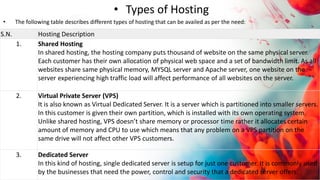
  • 92.
    Characteristics of aComputer Network • Share resources from one computer to another. • Create files and store them in one computer, access those files from the other computer(s) connected over the network. • Connect a printer, scanner, or a fax machine to one computer within the network and let other computers of the network use the machines available over the network.
  • 93.
    Internet • It isa worldwide/global system of interconnected computer networks. It uses the standard Internet Protocol (TCP/IP). Every computer in Internet is identified by a unique IP address. IP Address is a unique set of numbers (such as 110.22.33.114) which identifies a computer’s location.
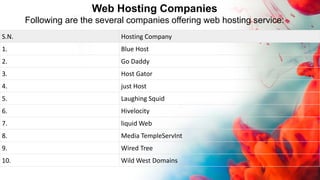
  • 94.
    Intranet • Intranet isthe system in which multiple PCs are connected to each other. PCs in intranet are not available to the world outside the intranet. Usually each organization has its own Intranet network and members/employees of that organization can access the computers in their intranet.
  • 95.
    Differences between Internetand Intranet • Internet is general to PCs all over the world whereas Intranet is specific to few PCs. • Internet provides a wider and better access to websites to a large population, whereas Intranet is restricted. • Internet is not as safe as Intranet. Intranet can be safely privatized as per the need.
  • 96.
    Features Of Computernetwork A list Of Computer network features is given below. • Communication speed • File sharing • Back up and Roll back is easy • Software and Hardware sharing • Security
  • 97.
    Communication speed Network providesus to communicate over the network in a fast and efficient manner. For example, we can do video conferencing, email messaging, etc. over the internet. Therefore, the computer network is a great way to share our knowledge and ideas. File sharing File sharing is one of the major advantage of the computer network. Computer network provides us to share the files with each other. Back up and Roll back is easy Since the files are stored in the main server which is centrally located. Therefore, it is easy to take the back up from the main server.
  • 98.
    Software and Hardwaresharing We can install the applications on the main server, therefore, the user can access the applications centrally. So, we do not need to install the software on every machine. Similarly, hardware can also be shared. Security Network allows the security by ensuring that the user has the right to access the certain files and applications.
  • 99.
    ARPANET • Advanced ResearchProjects Agency Network, ARPANET or ARPAnet began development in 1966 by the United States ARPA. ARPANET was a Wide Area Network linking many Universities and research centers, was first to use packet switching, and was the beginning of what we consider the Internet today. ARPANET was created to make it easier for people to access computers, improve computer equipment, and to have a more effective communication method for the military.
  • 100.
    World Wide Web(WWW) • The World Wide Web (WWW) is a network of online content that is formatted in HTML and accessed via HTTP. The term refers to all the interlinked HTML pages that can be accessed over the Internet. The World Wide Web was originally designed in 1991 by Tim Berners-Lee .
  • 101.
    What is Ecommerce? •Ecommerce, also known as electronic commerce or internet commerce, refers to the buying and selling of goods or services using the internet, and the transfer of money and data to execute these transactions. Ecommerce is often used to refer to the sale of physical products online, but it can also describe any kind of commercial transaction that is facilitated through the internet. • Whereas e-business refers to all aspects of operating an online business, ecommerce refers specifically to the transaction of goods and services.