Web 2 Tools
Web 2 Tools
Web 2 Tools   Tools that are based on sharing and centrality of information are creating new strategies for teaching and learning
Web 1   F irst generation of the Web.  B uilding  and commercialising the  Web A ccessible   (Internet Service Providers) Proto cols such as HTTP ,  HTML and  SMTP F irst Web browsers  and  creation of  websites Web business models  (e commerce) G rowth of key portals on the Web.
Web 1 Features   Web to circa 2004 Dial-up access, 50K bandwidth Static pages Framesets  <blink> and <marquee> tags  HTML forms sent via Email Text Chat, Online Guestbooks
Web 2   The s econd generation of the web Social networking sites, Wikis, Blogs, Real Time communication  Online collaboration & sharing b/w users Emergence of the mobile Internet and mobile devices (including camera phones)
Web 2 Characteristics   Creativity Information Sharing Collaboration Communication Networks of interest  Subscription
Web 2 Applications   Blogs & Wikis  (Blogger, Wikispaces) Social Networking  (MySpace, Facebook) Video sharing (TeacherTube, YouTube) Podcasting (Odeo, Podomatic)
Web 2 Applications   Social Bookmarks  (Del.icio.us, Digg) Chat Maps & Directories (Google Maps) Collaboration & Sharing (Google Docs) Images ( Flickr )
Web 2 Applications   Online Photo Editing ( Picnik ) Online Video Editor ( JumpCut ) Whiteboard  ( Vyew ) Brainstorming & Mindmapping ( Mindomo,  Mindmeister )
Web 2 Applications   Presentation Sharing ( SlideShare )
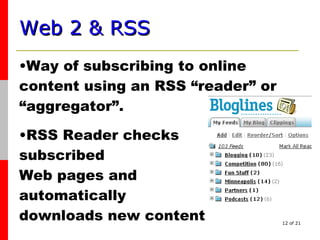
Web 2 & RSS   Way of subscribing to online content using an RSS “reader” or “aggregator”. RSS Reader checks  subscribed  Web pages and  automatically  downloads new content
Web 2 & RSS   Enables the distribution of regularly updated content from blogs, news sites, photo sharing applications, podcasts, videocasts, social bookmarks…and so on. Clip articles  Publish articles through blog Share subscriptions
Web 2 & RSS   Users can subscribe to “feeds” from pages
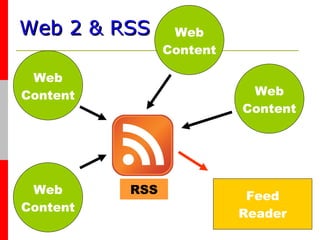
Web 2 & RSS     Web Content Feed Reader Web Content Web Content Web Content RSS
Web 2 & RSS - Teaching   Distribution of Instructional Content Exchange of Information Publishing Assessments & Tasks Collaboration Brainstorming & Mind Mapping Research Creative Expression/Design

Web2 Rss

  • 1.
  • 2.
  • 3.
    Web 2 Tools Tools that are based on sharing and centrality of information are creating new strategies for teaching and learning
  • 4.
    Web 1 F irst generation of the Web. B uilding and commercialising the Web A ccessible (Internet Service Providers) Proto cols such as HTTP , HTML and SMTP F irst Web browsers and creation of websites Web business models (e commerce) G rowth of key portals on the Web.
  • 5.
    Web 1 Features Web to circa 2004 Dial-up access, 50K bandwidth Static pages Framesets <blink> and <marquee> tags HTML forms sent via Email Text Chat, Online Guestbooks
  • 6.
    Web 2 The s econd generation of the web Social networking sites, Wikis, Blogs, Real Time communication Online collaboration & sharing b/w users Emergence of the mobile Internet and mobile devices (including camera phones)
  • 7.
    Web 2 Characteristics Creativity Information Sharing Collaboration Communication Networks of interest Subscription
  • 8.
    Web 2 Applications Blogs & Wikis (Blogger, Wikispaces) Social Networking (MySpace, Facebook) Video sharing (TeacherTube, YouTube) Podcasting (Odeo, Podomatic)
  • 9.
    Web 2 Applications Social Bookmarks (Del.icio.us, Digg) Chat Maps & Directories (Google Maps) Collaboration & Sharing (Google Docs) Images ( Flickr )
  • 10.
    Web 2 Applications Online Photo Editing ( Picnik ) Online Video Editor ( JumpCut ) Whiteboard ( Vyew ) Brainstorming & Mindmapping ( Mindomo, Mindmeister )
  • 11.
    Web 2 Applications Presentation Sharing ( SlideShare )
  • 12.
    Web 2 &RSS Way of subscribing to online content using an RSS “reader” or “aggregator”. RSS Reader checks subscribed Web pages and automatically downloads new content
  • 13.
    Web 2 &RSS Enables the distribution of regularly updated content from blogs, news sites, photo sharing applications, podcasts, videocasts, social bookmarks…and so on. Clip articles Publish articles through blog Share subscriptions
  • 14.
    Web 2 &RSS Users can subscribe to “feeds” from pages
  • 15.
    Web 2 &RSS Web Content Feed Reader Web Content Web Content Web Content RSS
  • 16.
    Web 2 &RSS - Teaching Distribution of Instructional Content Exchange of Information Publishing Assessments & Tasks Collaboration Brainstorming & Mind Mapping Research Creative Expression/Design

Editor's Notes

  • #2 Static pages instead of dynamically generated content The use of Framesets Proprietary HTML extensions such as the &lt;blink&gt; and &lt;marquee&gt; tags introduced during the first browser war Online Guestbooks GIF buttons , typically 88x31 pixels promoting web browsers and other products [1] HTML forms sent via Email - A once common method for submitting HTML forms was via email [2] . A user would fill in a form, and upon clicking submit their email client would attempt to send an email containing the form&apos;s details.