Welcome to WEB 2.0
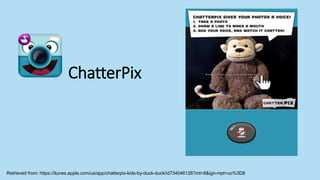
ChatterPix
Retrieved from: https://itunes.apple.com/us/app/chatterpix-kids-by-duck-duck/id734046126?mt=8&ign-mpt=uo%3D8
How can you use Chatterpix
Book Talks
Book Reports
Barrow Media Center. (2014, Jan. 21). Franklin runs away. [video file]. Retrieved from: https://youtu.be/50XLHAHRl6o
Create a
story about a
character.
Paulson, A. (2014, Jan. 22). IMG 0294 (Zoe’s snowgirl). [video file]. Retrieved from: https://youtu.be/nkFu6cHAZ90?list=PLQJ5HiPP68KYbpJgQtXVGz7GTq9ZRRA0B
First grade animal
reports
Meacham, J. (2013, Dec. 13). Butterfly. [video file]. Retrieved from: https://youtu.be/7jlAJU37z6E
SOL 1.5: The student will investigate and
understand that animals have basic needs and
certain distinguishing characteristics.
Geralt (2013). Question Mark. Pixabay. Retrieved from: https://pixabay.com/static/uploads/photo/2013/05/21/08/19/question-mark-112390__180.jpg. CC 0
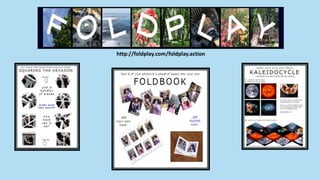
http://foldplay.com/foldplay.action
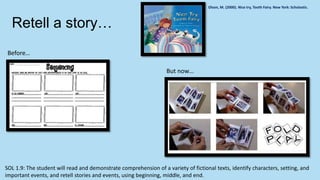
Retell a story…
Olson, M. (2000). Nice try, Tooth Fairy. New York: Scholastic.
SOL 1.9: The student will read and demonstrate comprehension of a variety of fictional texts, identify characters, setting, and
important events, and retell stories and events, using beginning, middle, and end.
Before…
But now…
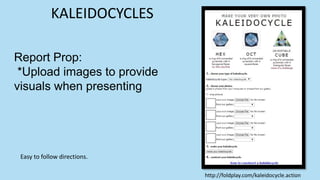
Report Prop:
*Upload images to provide
visuals when presenting
Easy to follow directions.
KALEIDOCYCLES
http://foldplay.com/kaleidocycle.action
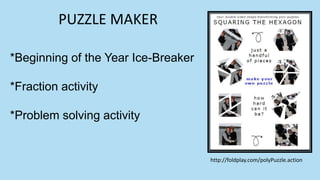
*Beginning of the Year Ice-Breaker
*Fraction activity
*Problem solving activity
PUZZLE MAKER
http://foldplay.com/polyPuzzle.action
Geralt (2013). Question Mark. Pixabay. Retrieved from: https://pixabay.com/static/uploads/photo/2013/05/21/08/19/question-mark-112390__180.jpg. CC 0
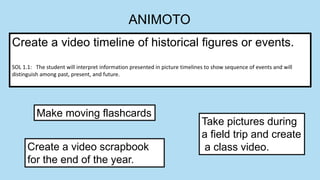
ANIMOTO
Create a video timeline of historical figures or events.
SOL 1.1: The student will interpret information presented in picture timelines to show sequence of events and will
distinguish among past, present, and future.
Create a video scrapbook
for the end of the year.
Take pictures during
a field trip and create
a class video.
Make moving flashcards
Geralt (2013). Question Mark. Pixabay. Retrieved from: https://pixabay.com/static/uploads/photo/2013/05/21/08/19/question-mark-112390__180.jpg. CC 0
IMAGE CHEF
http://www.imagechef.com/
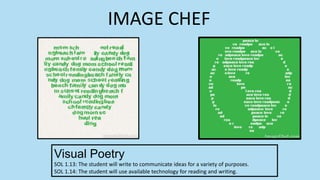
Visual Poetry
SOL 1.13: The student will write to communicate ideas for a variety of purposes.
SOL 1.14: The student will use available technology for reading and writing.
IMAGE CHEF
IMAGE CHEF
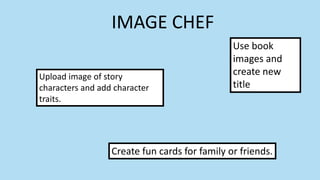
Upload image of story
characters and add character
traits.
Use book
images and
create new
title
Create fun cards for family or friends.
Geralt (2013). Question Mark. Pixabay. Retrieved from: https://pixabay.com/static/uploads/photo/2013/05/21/08/19/question-mark-112390__180.jpg. CC 0
Symbaloo
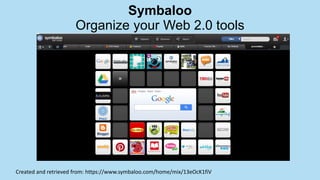
Organize your Web 2.0 tools
Created and retrieved from: https://www.symbaloo.com/home/mix/13eOcK1fiV
Web tools presentation

Web tools presentation

  • 3.
  • 4.
  • 5.
    How can youuse Chatterpix Book Talks Book Reports Barrow Media Center. (2014, Jan. 21). Franklin runs away. [video file]. Retrieved from: https://youtu.be/50XLHAHRl6o
  • 6.
    Create a story abouta character. Paulson, A. (2014, Jan. 22). IMG 0294 (Zoe’s snowgirl). [video file]. Retrieved from: https://youtu.be/nkFu6cHAZ90?list=PLQJ5HiPP68KYbpJgQtXVGz7GTq9ZRRA0B
  • 7.
    First grade animal reports Meacham,J. (2013, Dec. 13). Butterfly. [video file]. Retrieved from: https://youtu.be/7jlAJU37z6E SOL 1.5: The student will investigate and understand that animals have basic needs and certain distinguishing characteristics.
  • 8.
    Geralt (2013). QuestionMark. Pixabay. Retrieved from: https://pixabay.com/static/uploads/photo/2013/05/21/08/19/question-mark-112390__180.jpg. CC 0
  • 9.
  • 10.
    Retell a story… Olson,M. (2000). Nice try, Tooth Fairy. New York: Scholastic. SOL 1.9: The student will read and demonstrate comprehension of a variety of fictional texts, identify characters, setting, and important events, and retell stories and events, using beginning, middle, and end. Before… But now…
  • 11.
    Report Prop: *Upload imagesto provide visuals when presenting Easy to follow directions. KALEIDOCYCLES http://foldplay.com/kaleidocycle.action
  • 12.
    *Beginning of theYear Ice-Breaker *Fraction activity *Problem solving activity PUZZLE MAKER http://foldplay.com/polyPuzzle.action
  • 13.
    Geralt (2013). QuestionMark. Pixabay. Retrieved from: https://pixabay.com/static/uploads/photo/2013/05/21/08/19/question-mark-112390__180.jpg. CC 0
  • 15.
    ANIMOTO Create a videotimeline of historical figures or events. SOL 1.1: The student will interpret information presented in picture timelines to show sequence of events and will distinguish among past, present, and future. Create a video scrapbook for the end of the year. Take pictures during a field trip and create a class video. Make moving flashcards
  • 16.
    Geralt (2013). QuestionMark. Pixabay. Retrieved from: https://pixabay.com/static/uploads/photo/2013/05/21/08/19/question-mark-112390__180.jpg. CC 0
  • 17.
  • 18.
    Visual Poetry SOL 1.13:The student will write to communicate ideas for a variety of purposes. SOL 1.14: The student will use available technology for reading and writing. IMAGE CHEF
  • 19.
    IMAGE CHEF Upload imageof story characters and add character traits. Use book images and create new title Create fun cards for family or friends.
  • 20.
    Geralt (2013). QuestionMark. Pixabay. Retrieved from: https://pixabay.com/static/uploads/photo/2013/05/21/08/19/question-mark-112390__180.jpg. CC 0
  • 21.
    Symbaloo Organize your Web2.0 tools Created and retrieved from: https://www.symbaloo.com/home/mix/13eOcK1fiV

Editor's Notes

  • #2 Welcome to “On the Edge With the Web.” My name is Amy Stratton and I will be presenting exciting web tools that could be used in the classroom or library setting. If you feel like you are on the “edge” with your understanding or experience with web tools then this session is for you. I will share 4 web tools with you today and we will have a time for questions after I discuss each tool. There are handouts for you to take notes.
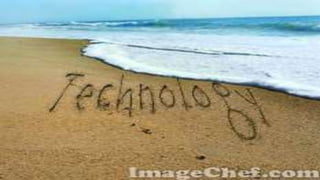
  • #3 Do you feel like you are just getting your toes wet with technology? As soon as you learn or hear about something new, it goes away as quickly as the tide. Do you feel like you are just keeping your head above water? Do you feel like there are so many tools, that you just don’t know where to start? Well today is your lucky day. We are going to discuss web tools that you can use and easily incorporate into your educational setting as soon as you get back to your school. These are easy and user friendly tools that will enhance any educational setting. Alright let’s get started before the tide rolls out again. (You have to watch this slide in presentation mode to see the tide wash over the shore.)
  • #5 The first tool I want to share is Chaterpix. With chatterpix you can make your pictures come alive. This is a mobile application, meaning you use your IPAD or your smart phone, which would really be its only limitation. In just 3 easy steps you can make your photos talk. Take a picture, draw a line using your finger for a mouth and record your voice. Students will enjoy make their pictures talk. The students will enjoy snapping pictures and instantly recording their voice to make it talk. A similar tool called Blabberize is available on personal computers. It uses images saved to your computer and you upload them into blabberize. For this portion, we will just focus on ways to use Chatterpix. There are two versions of the app, which can get confusing: ChatterPix;  and ChatterPix Kids, also called ChatterKids. Both are free, but ChatterPix has Social Sharing features activated, with access to services like Facebook. If you don’t want this possibility, you need to download ChatterPix Kids, which is what my elementary school has done. So let’s see what how you can use ChatterPix.
  • #6 Students can do Book Talks or give book reports using ChatterPix. They can take a picture of their character and record their report, making it seem like the character is telling the report. They only have 60 secs. To record. Let’s take a listen to this student’s book preview.
  • #7 (Double click on black box to play video.) Students could also create their own story about a character. This will really help strengthen their writing skills. Listen to this kindergarten student tell her story about her snowman.
  • #8 (double click on the black box to begin video) One of the first grade SOLs is to research animals, to investigate there habitats and characteristics. First graders always do an animal report. Using Chatterpix would be a fun way to share what they have learned. Let’s listen to this 1st grade share her facts about a butterfly.
  • #9 Let’s take a few minutes for questions or idea sharing. Are there any questions? Take a few minutes to share ideas with your table. Would this be a tool you would like to try? How would you use it? Does anyone want to share an idea of your own? (3-5 minutes)
  • #10 Foldplay is the next tool I want to share. The website has step by step directions for creating each paper folding design. You can see the various types of folded paper templates…squaring the hexagon, foldbook…a folded book made from one sheet of paper, photo kaleidocycle…a 3 Dimensional picture display. The only limitation I could find with this tool is it may be difficult for younger students fold the paper. So here are some ideas for using Foldplay
  • #11 There are so many fun things to create with this tool. Use the foldbook option when retelling a story, which as we all know is the main focus in Language Arts right now. We all have used graphic organizers like this one. But now (click again and pause, for picture to fade in), students can make there very own book to take home and read it with their families. You or the students can upload pictures and students can type their own text to retell the story read in class. Then just print and fold. Students could also add their own text and leave out the pictures. Once it is printed out they can add their own pictures. Writing is taken to a whole new level and retelling a story becomes a fun and interacting activity that students will enjoy.
  • #12 Kaleidocycles are 3 dimensionals shapes created by folding the paper. Students could create 3-dimentsional props to provide a visual when presenting a project. You or the student upload the images you want to appear on each side of the shape. You have the choice of making a 3 different shapes. On the slide is a screen shot of the directions from the website. You can see it walks you through step by step, from uploading pictures to folding the paper, with easy to follow directions. Another way to use a Kaleidocycle is for story retelling. You can upload 4 images, so it is perfect for the “First”, “Next”, ”Then”, and “Last” strategy. Students upload an image for each part and retell a previously heard or read story.
  • #13 The Puzzle Maker option in Foldplay is another possibility. The picture speaks for itself. You can create puzzles as an ice breaker at the beginning of the year. Use the student’s pictures with their names on it as a way for them to learn about new classmates. You could also discuss fractions, equal and unequal parts. Just putting puzzles together is a great problem solving activity in itself. Puzzle Maker had the option of printing on both sides, which would make it extra challenging to put the puzzle together.
  • #14 Let’s stop for questions again. Would you be interested in trying Foldplay? Share some ideas you might try with those around you. Would anyone like to share an idea about a way you might use this tool? (3-5 minutes)
  • #15 Animoto is a tool that can be used to create your own videos. It is easy to use and provides tutorials for additional support. It can be used on your home computer or your mobile device. There are several free templates and musical choices provided, however you will find it is somewhat limited. Another limitation to using the free version is a watermark is displayed on your final video. Once you upgrade the watermark is gone. Check out this video I created from my vacation. Let’s find some other ways to use Animoto in an educational setting.
  • #16 How can you use Animoto in the classroom or library setting? Students could create a video timeline depicting the life of a historical fiqure or historical events. Just upload pictures and have them run in sequential order. (Click for more ideas) You could make moving flashcards like sight words or math facts. (Click) Create a class video about using pictures taken during a fieldtrip. Students could then write captions to go with the pictures. Students could also write a summary of the fieldtrip or even an experience story. (click) Create a video scrapbook with pictures taken throughout the year. This would be a wonderful gift for the students at the end of the year.
  • #17 Let’s stop for questions again. Would you be willing to give Animoto a try? How would you use Animoto? Share some ideas you might try with those around you. Would anyone like to share an idea about a way you might use Animoto? (3-5 minutes)
  • #18 The last tool I want to share Image Chef. ImageChef is a website which allows you to personalize pictures. I have used this tool through out my presentation. It is easy to use and you can do it too. You can add text to your picture and there is an option for animated pictures. Like the one you saw at the beginning of the presentation. (pause and replay 2nd slide)
  • #19 How can you use Image Chef to enhance you lessons. Check out these poetry shapes. Students can add their words and create an individualized shape poem of their own. You simply type in the words you want to appear in you poem, click submit and voila…you have a shape poem. You would find this option under the “visual poetry” tab.
  • #20 Some other ideas are (click for box to appear) Use uploaded book images and create new titles for the book. (click) You could also upload an image of character and add identified character traits. Lastly (click) it would be just be fun to create cards or pictures for family or friends. Anytime you can encourage students to write is a bonus. This would be a fun way for them to accomplish a task that is sometimes very difficult or challenging. One thing to be careful about when using Image Chef is some pictures or images may not be appropriate when you are serving the computer generate file. It could be somewhat of a limitation using this in the classroom.
  • #21 Let’s stop for questions again. Share some ideas you might try with those around you. Would anyone like to share an idea about a way you might use this tool? (3-5 minutes)
  • #22 Finally, before we wrap up this session. I want to show you a way to organize your newly found tools. Symbaloo is an easy way to organize your websites. This is a screen shot of a Symbaloo webmix. You can create your own webmix with tools and website you or your students use. With just a click of the mouse you can easily add a tile to your webmix. The URL or website address is automatically added with it. Then when you click the tile you are linked directly to website or tool you want to use. This would be a great way to organize commonly used websites you want your students to be able to access quickly. Just create an account, like you have to do with all the web tools and you are on your way. You can create more than one webmix and they will all be saved under your account.
  • #23 Thank you for attending today. I hope you found this session helpful. My your newly learned web tools be just a walk in the sand. No don’t draw that line in the sand with technology. Live on the edge and try something new…get out there and try some new web tools.
  • #24 Remember you can do it!