B.P. PODDAR INSTITUTE OF MANAGEMENT & TECHNOLOGY
Department Of Electronics And Communications Engineering (ECE)
NAME UNIVERSITY ROLL NUMBER
KUSHAL SARKAR 11500322003
SUSMELI GHOSH 11500322010
ALAPAN GAYEN 11500322021
NITISH YADAV 11500322022
ECEA GR-II
Web Technology (ECE_A_OE-EC-704A)
HTML Document Structure & Basic layout
Content
This presentation will cover fundamental concepts of HTML, including:
1 HTML Basics
1. What is HTML?
2. Key characteristics of HTML
3 Structure of The HTML document
1. Head element
2. Body element
2 Element , Tags &
Attributes
How HTML elements , tags and their attributes
function.
4 Conclusion
What is HTML?
HTML stands for Hypertext Markup Language.
• Hypertext: Text containing links to other texts.
• Markup Language: Markup is a way of annotating text so that a computer
(browser) can understand how to structure and display it. HTML uses tags (like
<p> for paragraph, <h1> for heading) as its markup system.
It's a simple scripting language primarily used for developing web pages, known for
being easy to learn and understand.
Think of HTML as the skeleton of a webpage:
•It defines what content appears (headings, paragraphs, images, links,
etc.).
•It structures that content so browsers know how to display it.
•It uses tags (like <h1>, <p>, <img>) to mark up text and other elements.
Key Characteristics of HTML
• Not a programming language, but a
markup language.
• Creates plain text files using any
HTML editor.
• Consists of markup tags.
• Saved with .htm or .html extension.
• Not case-sensitive (e.g., <HTML>
is same as <html>).
HTML TAGS
HTML markup tags are also called HTML tags. These denote the various elements in an HTML
document. HTML tags are keywords enclosed in a pair of angular brackets, that is, < and >.
These tags are usually paired (for example, <HTML> and </HTML>) to mark the start and end
of an HTML instruction or HTML element.
The first tag is known as the opening tag and the last tag is called the closing tag.
The end tag or closing tag is preceded with a forward slash (/)
within the angular brackets.
There are two types of tags.
1. Container tags: These tags have a start and an end tag to an HTML element. For example,
<B..<B>, <BODY> ... </BODY>, etc.
2. Empty Tags: These tags have only an opening or a start tag and no closing tags to an HTML
element. For example, <LI>, <IMG> <HR>, etc.
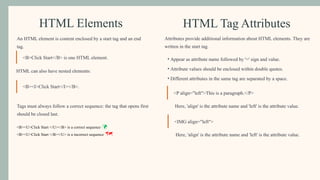
HTML Elements
An HTML element is content enclosed by a start tag and an end
tag.
<B>Click Start</B> is one HTML element.
HTML can also have nested elements:
<B><I>Click Start</I></B>.
Tags must always follow a correct sequence: the tag that opens first
should be closed last.
<B><U>Click Start </U></B> is a correct sequence 
<B><U>Click Start </B></U> is a incorrect sequence 
HTML Tag Attributes
Attributes provide additional information about HTML elements. They are
written in the start tag.
• Appear as attribute name followed by '=' sign and value.
• Attribute values should be enclosed within double quotes.
• Different attributes in the same tag are separated by a space.
<P align="left">This is a paragraph.</P>
Here, 'align' is the attribute name and 'left' is the attribute value.
<IMG align="left">
Here, 'align' is the attribute name and 'left' is the attribute value.
Structure of an HTML Document
2
Root Element or
HTML Element
Contains the <HTML> tag,
detecting the document as
HTML document.
3
Head Element
Contains document information
like <TITLE> (appears in Title
Bar) and <STYLE> tags.
4
Body Element
Defines the document's visible
content, including text, images,
and links.
All HTML documents contain standard HTML tags that are executed in a web browser. The purpose of a web browser is to read the
HTML documents instructions and display them as web pages. The Browser does not display the HTML tags, but uses the tags to
interpret and display the content of the page accordingly.
1
<!DOCTYPE html>
The DOCTYPE
declaration is not an
HTML tag itself. It's a
directive that informs the
browser about the html
document’s version type
and helps it choose the
appropriate rendering
mode (e.g., standards
mode or quirks mode).
Structure of an HTML Document
Head Element in Detail
Example:
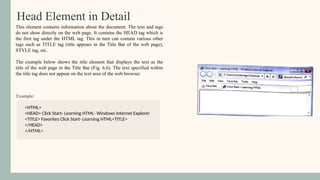
This element contains information about the document. The text and tags
do not show directly on the web page. It contains the HEAD tag which is
the first tag under the HTML tag. This in turn can contain various other
tags such as TITLE tag (title appears in the Title Bar of the web page),
STYLE tag, etc.
The example below shows the title element that displays the text as the
title of the web page in the Title Bar (Fig. 6.6). The text specified within
the title tag does not appear on the text area of the web browser.
<HTML>
<HEAD> Click Start- Learning HTML- Windows Internet Explorer
<TITLE> Favorites Click Start- Learning HTML<TITLE>
</HEAD>
</HTML>
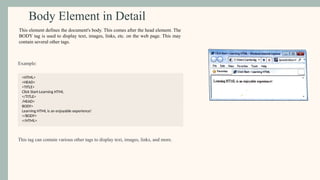
Body Element in Detail
Example:
<HTML>
<HEAD>
<TITLE>
Click Start-Learning HTML
</TITLE>
/HEAD>
BODY>
Learning HTML is an enjoyable experience!
</BODY>
</HTML>
This tag can contain various other tags to display text, images, links, and more.
This element defines the document's body. This comes after the head element. The
BODY tag is used to display text, images, links, etc. on the web page. This may
contain several other tags.
Conclusion
HTML (Hypertext Markup Language) is the foundational
language that structures the content of the web. It uses a system of
tags to define elements such as headings, paragraphs, images, and
links, allowing browsers to display them in an organized way. The
document starts with the <!DOCTYPE html> declaration, which
tells the browser to interpret the page using modern HTML
standards. Understanding HTML’s meaning, parts, and document
structure is essential for creating clear, consistent, and accessible
web pages.
Thank you!

WEB TECHNOLOGY in recent years 122334445

  • 1.
    B.P. PODDAR INSTITUTEOF MANAGEMENT & TECHNOLOGY Department Of Electronics And Communications Engineering (ECE) NAME UNIVERSITY ROLL NUMBER KUSHAL SARKAR 11500322003 SUSMELI GHOSH 11500322010 ALAPAN GAYEN 11500322021 NITISH YADAV 11500322022 ECEA GR-II Web Technology (ECE_A_OE-EC-704A) HTML Document Structure & Basic layout
  • 2.
    Content This presentation willcover fundamental concepts of HTML, including: 1 HTML Basics 1. What is HTML? 2. Key characteristics of HTML 3 Structure of The HTML document 1. Head element 2. Body element 2 Element , Tags & Attributes How HTML elements , tags and their attributes function. 4 Conclusion
  • 3.
    What is HTML? HTMLstands for Hypertext Markup Language. • Hypertext: Text containing links to other texts. • Markup Language: Markup is a way of annotating text so that a computer (browser) can understand how to structure and display it. HTML uses tags (like <p> for paragraph, <h1> for heading) as its markup system. It's a simple scripting language primarily used for developing web pages, known for being easy to learn and understand. Think of HTML as the skeleton of a webpage: •It defines what content appears (headings, paragraphs, images, links, etc.). •It structures that content so browsers know how to display it. •It uses tags (like <h1>, <p>, <img>) to mark up text and other elements.
  • 4.
    Key Characteristics ofHTML • Not a programming language, but a markup language. • Creates plain text files using any HTML editor. • Consists of markup tags. • Saved with .htm or .html extension. • Not case-sensitive (e.g., <HTML> is same as <html>).
  • 5.
    HTML TAGS HTML markuptags are also called HTML tags. These denote the various elements in an HTML document. HTML tags are keywords enclosed in a pair of angular brackets, that is, < and >. These tags are usually paired (for example, <HTML> and </HTML>) to mark the start and end of an HTML instruction or HTML element. The first tag is known as the opening tag and the last tag is called the closing tag. The end tag or closing tag is preceded with a forward slash (/) within the angular brackets. There are two types of tags. 1. Container tags: These tags have a start and an end tag to an HTML element. For example, <B..<B>, <BODY> ... </BODY>, etc. 2. Empty Tags: These tags have only an opening or a start tag and no closing tags to an HTML element. For example, <LI>, <IMG> <HR>, etc.
  • 6.
    HTML Elements An HTMLelement is content enclosed by a start tag and an end tag. <B>Click Start</B> is one HTML element. HTML can also have nested elements: <B><I>Click Start</I></B>. Tags must always follow a correct sequence: the tag that opens first should be closed last. <B><U>Click Start </U></B> is a correct sequence  <B><U>Click Start </B></U> is a incorrect sequence  HTML Tag Attributes Attributes provide additional information about HTML elements. They are written in the start tag. • Appear as attribute name followed by '=' sign and value. • Attribute values should be enclosed within double quotes. • Different attributes in the same tag are separated by a space. <P align="left">This is a paragraph.</P> Here, 'align' is the attribute name and 'left' is the attribute value. <IMG align="left"> Here, 'align' is the attribute name and 'left' is the attribute value.
  • 7.
    Structure of anHTML Document 2 Root Element or HTML Element Contains the <HTML> tag, detecting the document as HTML document. 3 Head Element Contains document information like <TITLE> (appears in Title Bar) and <STYLE> tags. 4 Body Element Defines the document's visible content, including text, images, and links. All HTML documents contain standard HTML tags that are executed in a web browser. The purpose of a web browser is to read the HTML documents instructions and display them as web pages. The Browser does not display the HTML tags, but uses the tags to interpret and display the content of the page accordingly. 1 <!DOCTYPE html> The DOCTYPE declaration is not an HTML tag itself. It's a directive that informs the browser about the html document’s version type and helps it choose the appropriate rendering mode (e.g., standards mode or quirks mode). Structure of an HTML Document
  • 8.
    Head Element inDetail Example: This element contains information about the document. The text and tags do not show directly on the web page. It contains the HEAD tag which is the first tag under the HTML tag. This in turn can contain various other tags such as TITLE tag (title appears in the Title Bar of the web page), STYLE tag, etc. The example below shows the title element that displays the text as the title of the web page in the Title Bar (Fig. 6.6). The text specified within the title tag does not appear on the text area of the web browser. <HTML> <HEAD> Click Start- Learning HTML- Windows Internet Explorer <TITLE> Favorites Click Start- Learning HTML<TITLE> </HEAD> </HTML>
  • 9.
    Body Element inDetail Example: <HTML> <HEAD> <TITLE> Click Start-Learning HTML </TITLE> /HEAD> BODY> Learning HTML is an enjoyable experience! </BODY> </HTML> This tag can contain various other tags to display text, images, links, and more. This element defines the document's body. This comes after the head element. The BODY tag is used to display text, images, links, etc. on the web page. This may contain several other tags.
  • 10.
    Conclusion HTML (Hypertext MarkupLanguage) is the foundational language that structures the content of the web. It uses a system of tags to define elements such as headings, paragraphs, images, and links, allowing browsers to display them in an organized way. The document starts with the <!DOCTYPE html> declaration, which tells the browser to interpret the page using modern HTML standards. Understanding HTML’s meaning, parts, and document structure is essential for creating clear, consistent, and accessible web pages.
  • 11.