Website: http://www.ruchiwebsolutions.com/
Contact person: Ranjan Raja
Moble/Whatsapp: +91-9347045052 / 09032803895
Dilsukhnagar, Hyderabad
Email: info@ruchiwebsolutions.com
Skype: Purnendu_ranjan
Course name: Web Designing Training with Live Project.
CAN YOU CALL/WHATSAPP ME AT 91-9347045052 TO MY
MOBILE TO PLANNING AND EXECUTION OF THIS TRAINING. Can
you attend demo class today or tomorrow, call me once.
Project Covered During Training: Real Time Project Training
1) Mini project: One Mini Project in html4 and css2. Trainer is going to teach one Project using
HTML4 AND CSS2. The Trainer will give you one assignment project also and you will do assignment
project in your home to make sure that you understand the subject clearly.
2) Real Time Project:Trainer is going to teach one real time Project using HTML5, boostrap
AND CSS3 which is going to be RESPONSIVE WEBSITE. The Trainer will give you one assignment
project also and you will do assignment project in your home to make sure that you understand the
subject clearly.
Watch Web designing Demo Video Here:
https://youtu.be/YefAdA9FQDM
Why Training with Us?
I am giving Web designing training with 2 projects. One project is Mini project and
2nd project is real time project in Web designing. This project will help definitely
in your job.
Certification: Yes I will provide you Certificate after successfully attending the
class this will help you in job assistance. I am also helping you in help placement.
Placement and Job: I will give placement assistance. Because I am giving
you real time training with live project so definitely it will help you in job. I have
tie up with good company who hire my students.
My address for Class room training: Ruchiwebsolutions,#201,Datta Sai
complex ,Beside IKON hospital, Landmark: Near to Vijaya Diagnostic Centre,
Dilsukhnagar, Hyderabad, call if any problem to 09347045052.
Trainer Profile
I am Ranjan master degree in computer from Utah State University, USA. I am part of
ruchiwebsolutions in Dilsukhnagar,Hyderabad. I have total 13+ years of experience in Web
designing and user interface designing. I have developed 400 dynamic website till now on html4,html5,
css2,css3,js,jquery and angular js. I have 13 years of experience in Online and class room training. I
already gave the training to some of the corporate company from UK, USA, Malaysia and India in Web
designing and user interface designing. I have worked with international clients based in USA, UK,
Canada, Netherlands, Australia, Italy, Ireland, France etc. I have worked on many different projects -
ranging from small software to complex web applications.
I have a company with name of ruchiwebsolutions in Dilsukhnagar,Hyderabad. I have 3 Web designer
and UI designer working in my company who has 13+yrs real time experience. That UI developer is going
to take your class. He already has given training of 2500 Students till now, and all working in MNC and
Software web Development Company. After demo class, once fee paid will not be refundable.
Our Teaching style: I give real time training with real PROJECT IN Web
designing .Basically i am developer of 13 years of experience so I will try to give
my best output in Web designing training.
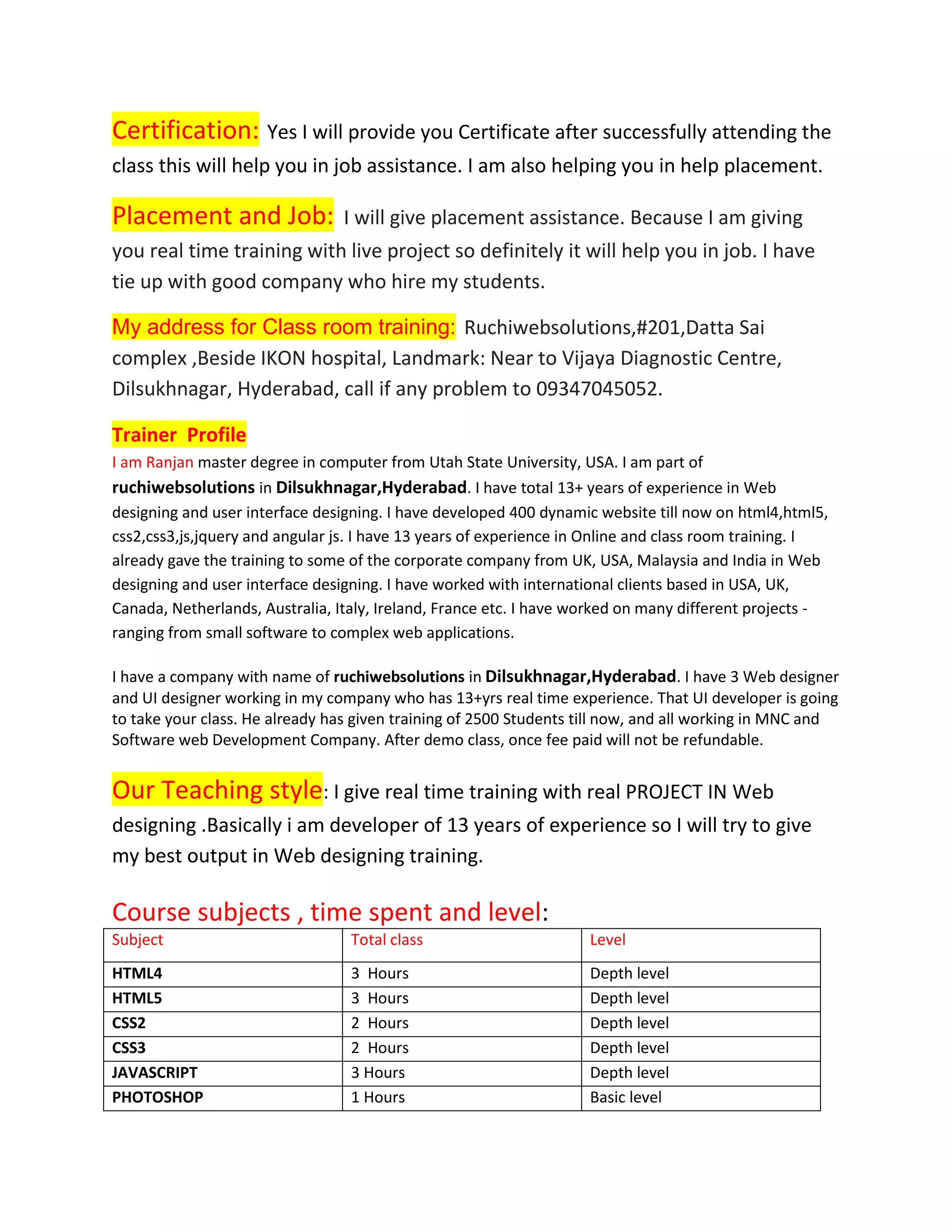
Course subjects , time spent and level:
Subject Total class Level
HTML4 3 Hours Depth level
HTML5 3 Hours Depth level
CSS2 2 Hours Depth level
CSS3 2 Hours Depth level
JAVASCRIPT 3 Hours Depth level
PHOTOSHOP 1 Hours Basic level
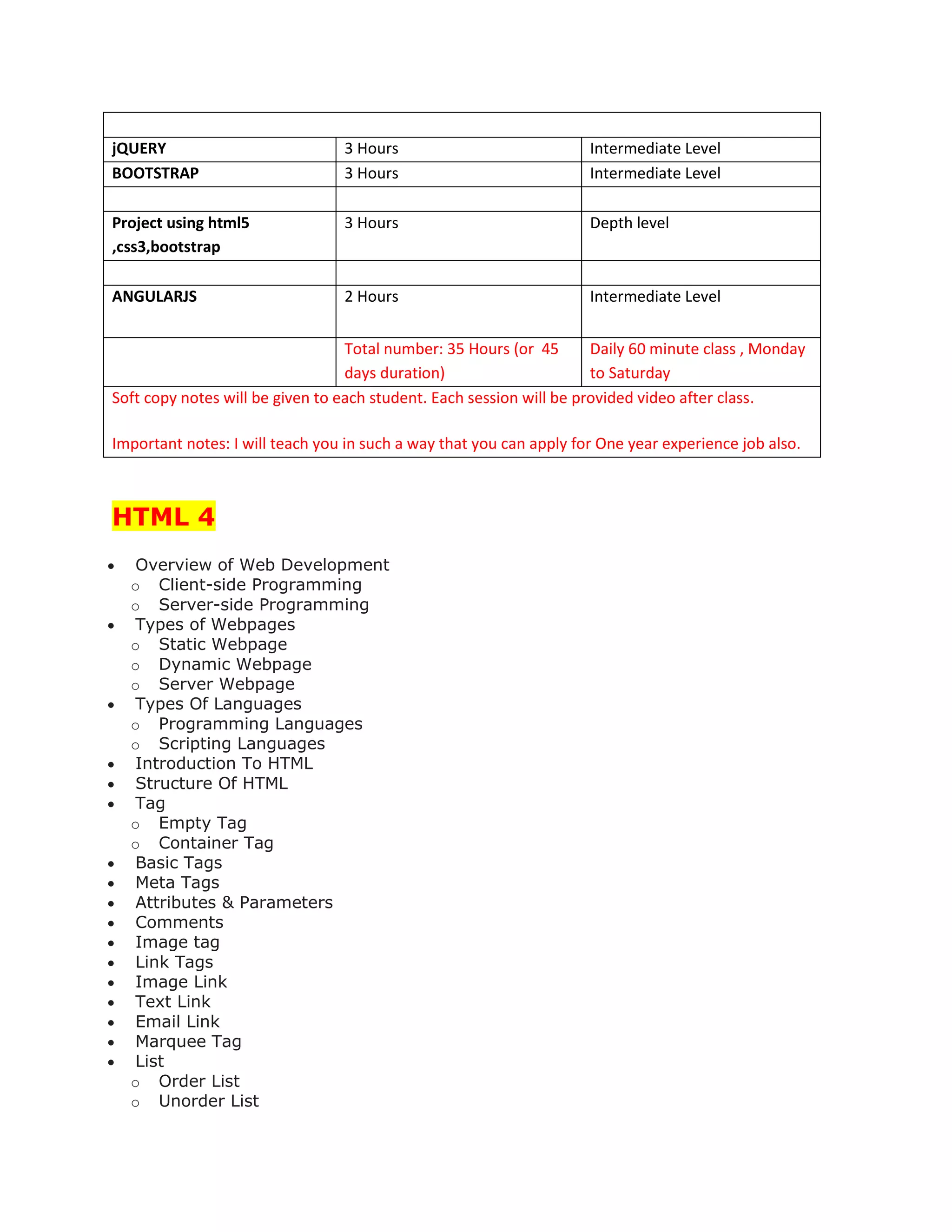
jQUERY 3 Hours Intermediate Level
BOOTSTRAP 3 Hours Intermediate Level
Project using html5
,css3,bootstrap
3 Hours Depth level
ANGULARJS 2 Hours Intermediate Level
Total number: 35 Hours (or 45
days duration)
Daily 60 minute class , Monday
to Saturday
Soft copy notes will be given to each student. Each session will be provided video after class.
Important notes: I will teach you in such a way that you can apply for One year experience job also.
HTML 4
 Overview of Web Development
o Client-side Programming
o Server-side Programming
 Types of Webpages
o Static Webpage
o Dynamic Webpage
o Server Webpage
 Types Of Languages
o Programming Languages
o Scripting Languages
 Introduction To HTML
 Structure Of HTML
 Tag
o Empty Tag
o Container Tag
 Basic Tags
 Meta Tags
 Attributes & Parameters
 Comments
 Image tag
 Link Tags
 Image Link
 Text Link
 Email Link
 Marquee Tag
 List
o Order List
o Unorder List
o Nested List
o Definition List
 Table Tag
 Form tags
 Background Colors & Images
 Introduction To Doctypes
HTML 5
 What is HTML 5
 Overview of HTML 5
o Browser Support
o W3C and Web Hypertext Application Technology Working Group (WHATWG).
Specifications
o Power of HTML5 in web & mobile Domains
o Overview of updated new features
 HTML5 Syntax
o The DOCTYPE
o Character Encoding
o The <script> tag
o The <link> tag
o HTML5 Document
 Forms
o color
o date
o datetime
o datetime-local
o email
o month
o number
o range
o search
o tel
o time
o url
o week
 Form Elements
o <datalist>
o <keygen>
o <output>
 New attributes for <form>
o autocomplete
o novalidate
 New attributes for <input>
o autocomplete
o autofocus
o form
o formaction
o formenctype
o formmethod
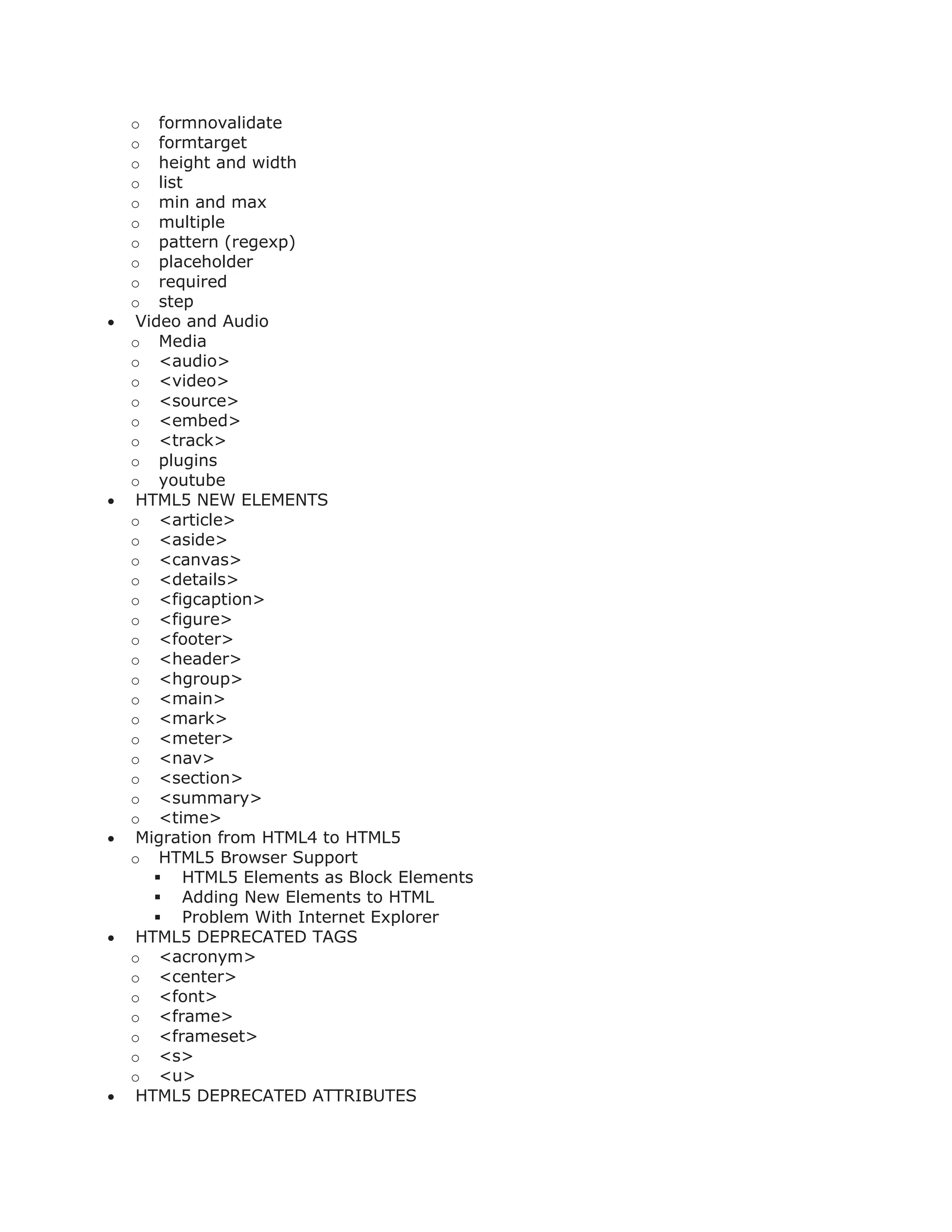
o formnovalidate
o formtarget
o height and width
o list
o min and max
o multiple
o pattern (regexp)
o placeholder
o required
o step
 Video and Audio
o Media
o <audio>
o <video>
o <source>
o <embed>
o <track>
o plugins
o youtube
 HTML5 NEW ELEMENTS
o <article>
o <aside>
o <canvas>
o <details>
o <figcaption>
o <figure>
o <footer>
o <header>
o <hgroup>
o <main>
o <mark>
o <meter>
o <nav>
o <section>
o <summary>
o <time>
 Migration from HTML4 to HTML5
o HTML5 Browser Support
 HTML5 Elements as Block Elements
 Adding New Elements to HTML
 Problem With Internet Explorer
 HTML5 DEPRECATED TAGS
o <acronym>
o <center>
o <font>
o <frame>
o <frameset>
o <s>
o <u>
 HTML5 DEPRECATED ATTRIBUTES
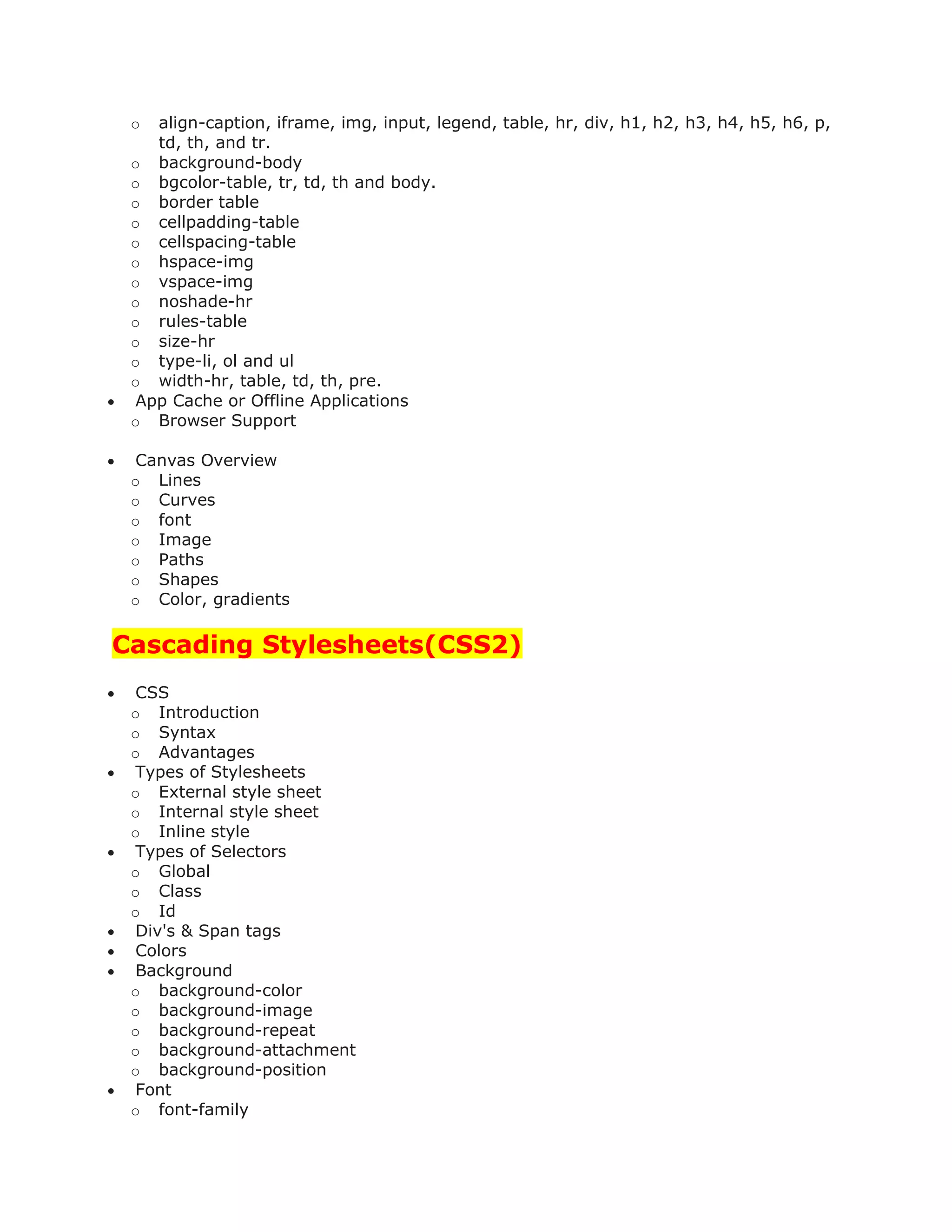
o align-caption, iframe, img, input, legend, table, hr, div, h1, h2, h3, h4, h5, h6, p,
td, th, and tr.
o background-body
o bgcolor-table, tr, td, th and body.
o border table
o cellpadding-table
o cellspacing-table
o hspace-img
o vspace-img
o noshade-hr
o rules-table
o size-hr
o type-li, ol and ul
o width-hr, table, td, th, pre.
 App Cache or Offline Applications
o Browser Support
 Canvas Overview
o Lines
o Curves
o font
o Image
o Paths
o Shapes
o Color, gradients
Cascading Stylesheets(CSS2)
 CSS
o Introduction
o Syntax
o Advantages
 Types of Stylesheets
o External style sheet
o Internal style sheet
o Inline style
 Types of Selectors
o Global
o Class
o Id
 Div's & Span tags
 Colors
 Background
o background-color
o background-image
o background-repeat
o background-attachment
o background-position
 Font
o font-family
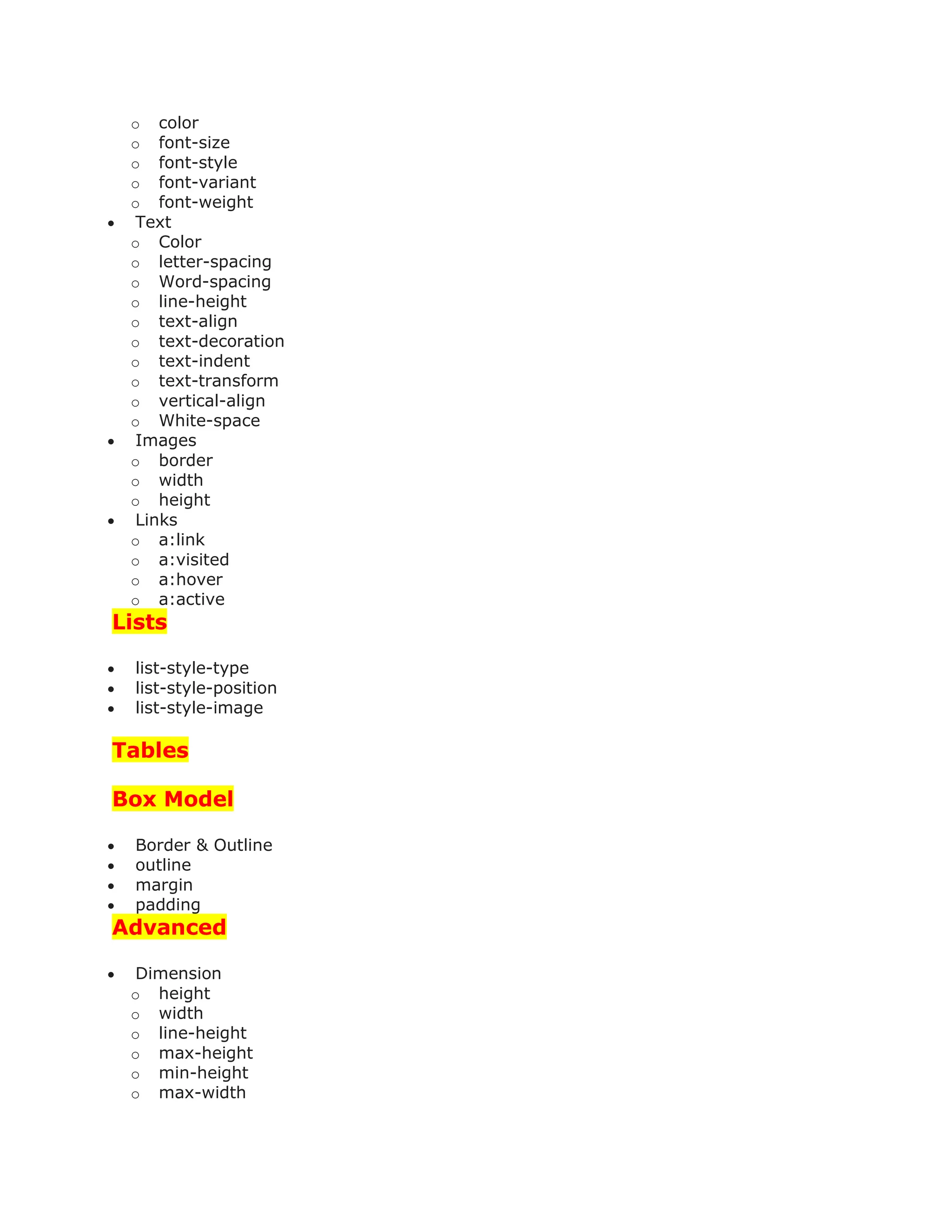
o color
o font-size
o font-style
o font-variant
o font-weight
 Text
o Color
o letter-spacing
o Word-spacing
o line-height
o text-align
o text-decoration
o text-indent
o text-transform
o vertical-align
o White-space
 Images
o border
o width
o height
 Links
o a:link
o a:visited
o a:hover
o a:active
Lists
 list-style-type
 list-style-position
 list-style-image
Tables
Box Model
 Border & Outline
 outline
 margin
 padding
Advanced
 Dimension
o height
o width
o line-height
o max-height
o min-height
o max-width
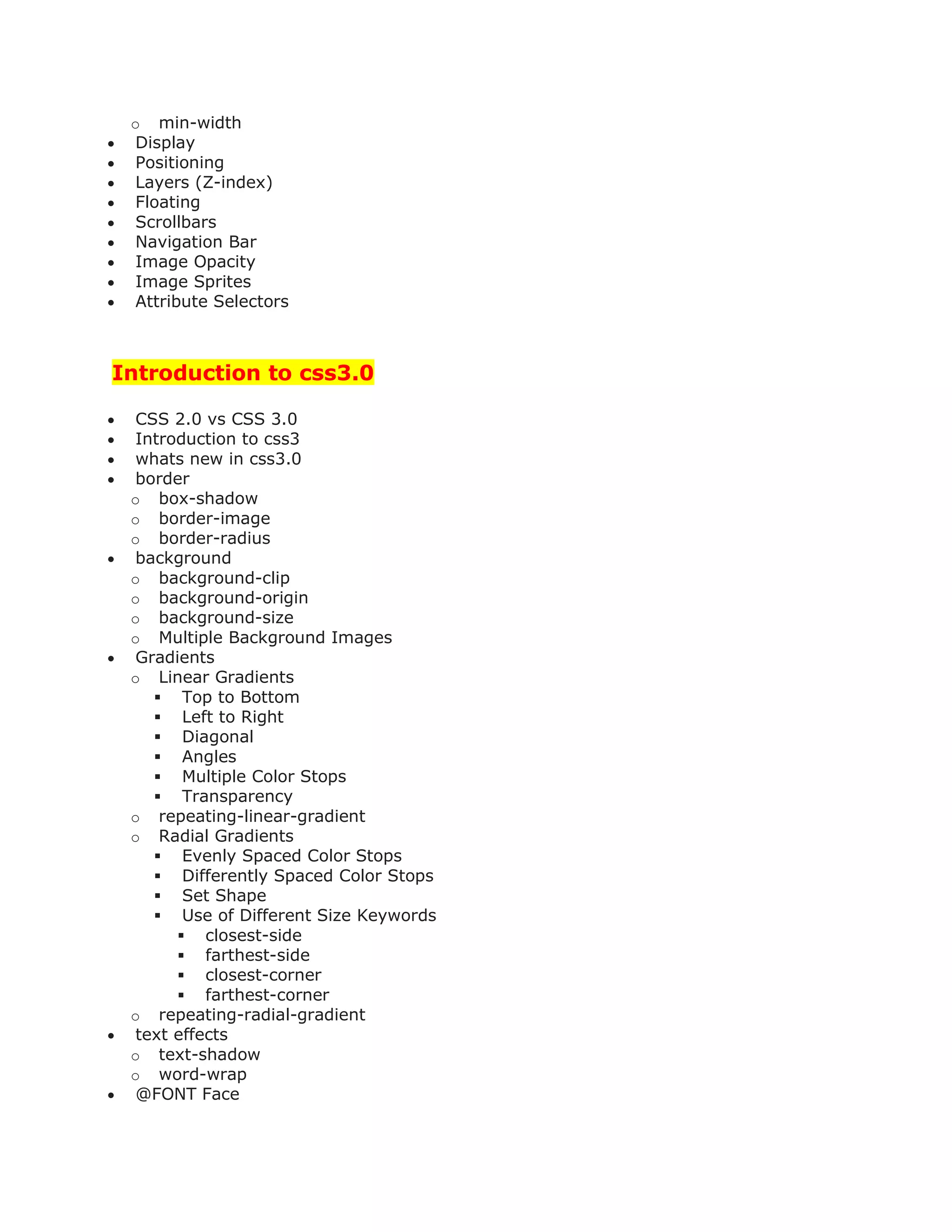
o min-width
 Display
 Positioning
 Layers (Z-index)
 Floating
 Scrollbars
 Navigation Bar
 Image Opacity
 Image Sprites
 Attribute Selectors
Introduction to css3.0
 CSS 2.0 vs CSS 3.0
 Introduction to css3
 whats new in css3.0
 border
o box-shadow
o border-image
o border-radius
 background
o background-clip
o background-origin
o background-size
o Multiple Background Images
 Gradients
o Linear Gradients
 Top to Bottom
 Left to Right
 Diagonal
 Angles
 Multiple Color Stops
 Transparency
o repeating-linear-gradient
o Radial Gradients
 Evenly Spaced Color Stops
 Differently Spaced Color Stops
 Set Shape
 Use of Different Size Keywords
 closest-side
 farthest-side
 closest-corner
 farthest-corner
o repeating-radial-gradient
 text effects
o text-shadow
o word-wrap
 @FONT Face
o Browser Support
o Font Formats
o Browser Support for Font Formats
o Using The Font
o Working with third party plugins
 Google fonts
 Box Resize
 Box Sizing
 Outline
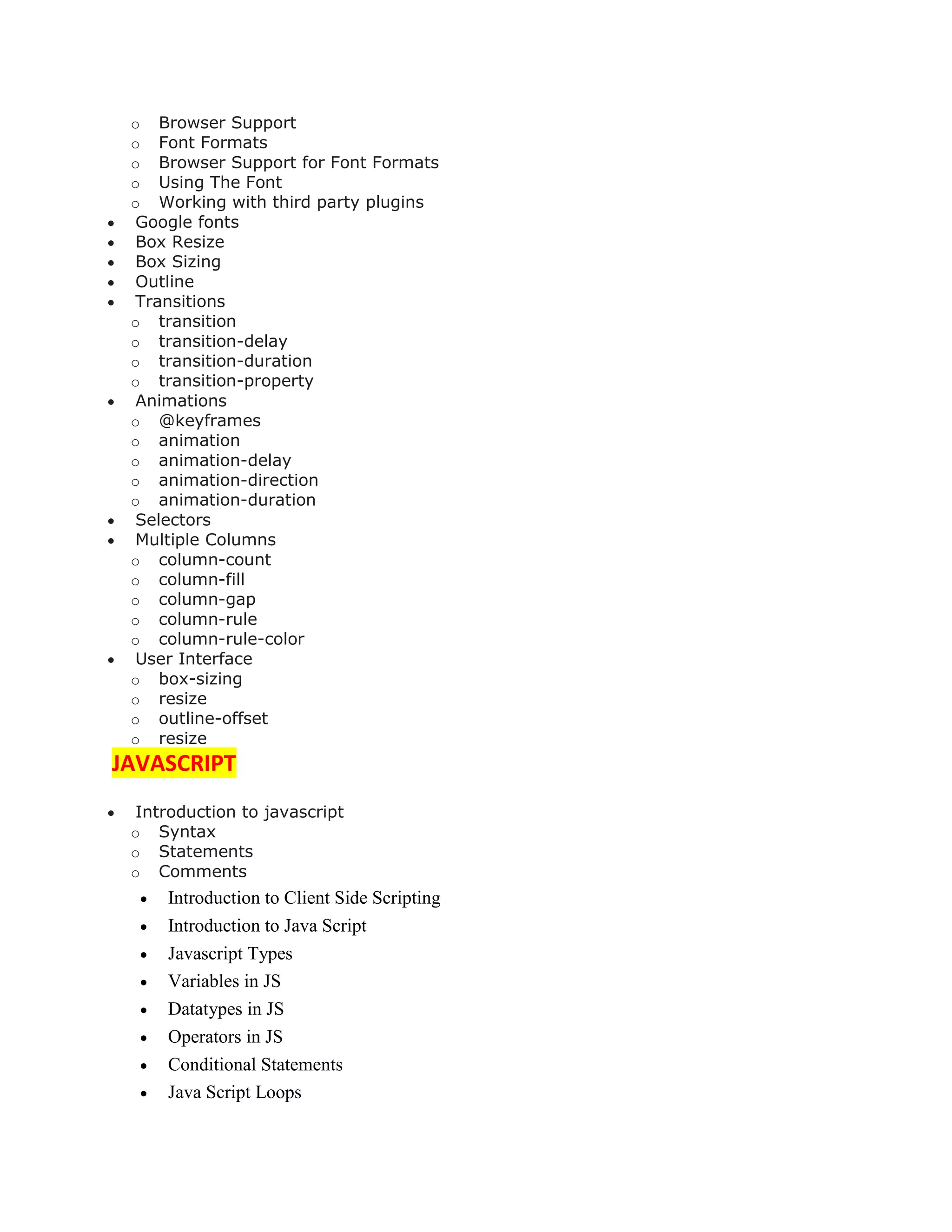
 Transitions
o transition
o transition-delay
o transition-duration
o transition-property
 Animations
o @keyframes
o animation
o animation-delay
o animation-direction
o animation-duration
 Selectors
 Multiple Columns
o column-count
o column-fill
o column-gap
o column-rule
o column-rule-color
 User Interface
o box-sizing
o resize
o outline-offset
o resize
JAVASCRIPT
 Introduction to javascript
o Syntax
o Statements
o Comments
 Introduction to Client Side Scripting
 Introduction to Java Script
 Javascript Types
 Variables in JS
 Datatypes in JS
 Operators in JS
 Conditional Statements
 Java Script Loops
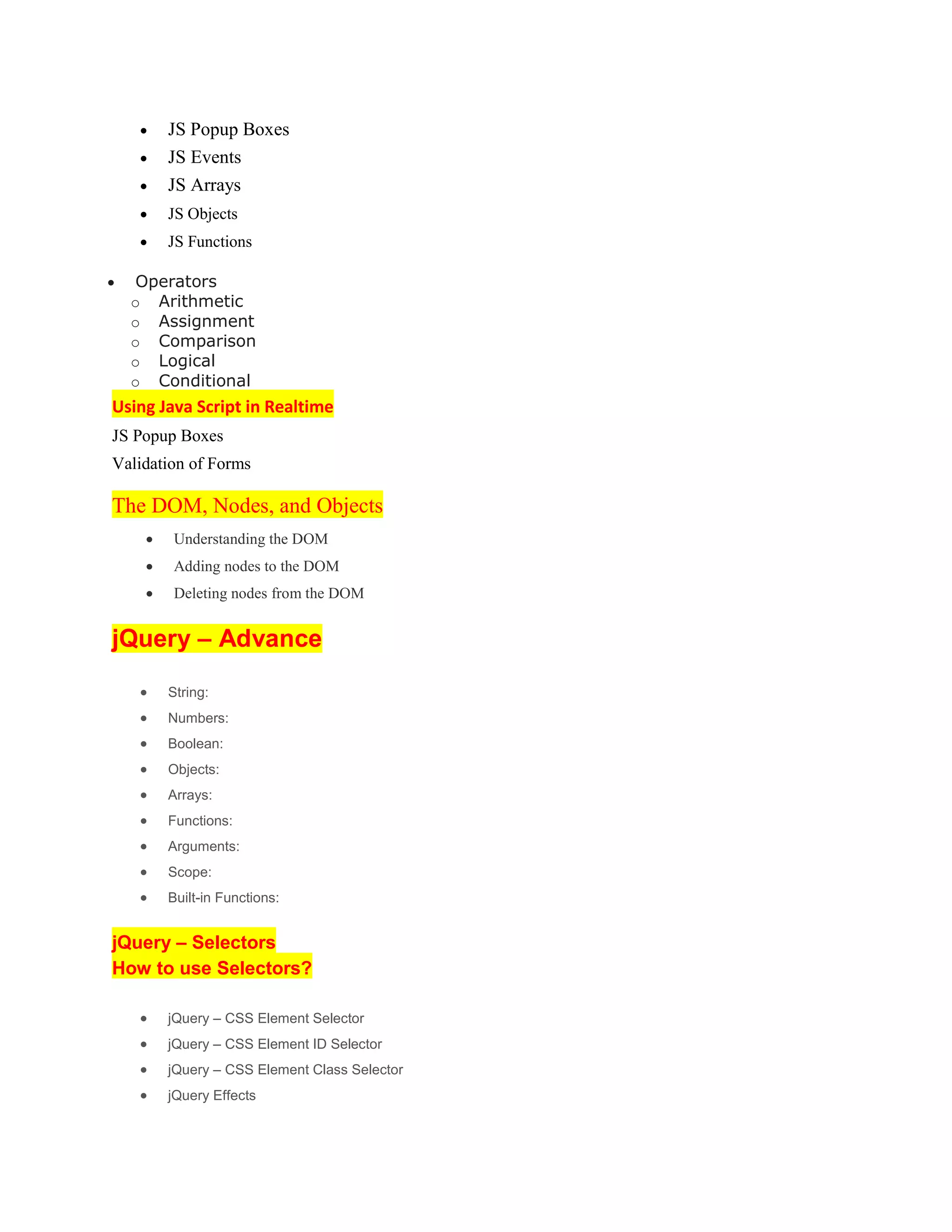
 JS Popup Boxes
 JS Events
 JS Arrays
 JS Objects
 JS Functions
 Operators
o Arithmetic
o Assignment
o Comparison
o Logical
o Conditional
Using Java Script in Realtime
JS Popup Boxes
Validation of Forms
The DOM, Nodes, and Objects
 Understanding the DOM
 Adding nodes to the DOM
 Deleting nodes from the DOM
jQuery – Advance
 String:
 Numbers:
 Boolean:
 Objects:
 Arrays:
 Functions:
 Arguments:
 Scope:
 Built-in Functions:
jQuery – Selectors
How to use Selectors?
 jQuery – CSS Element Selector
 jQuery – CSS Element ID Selector
 jQuery – CSS Element Class Selector
 jQuery Effects
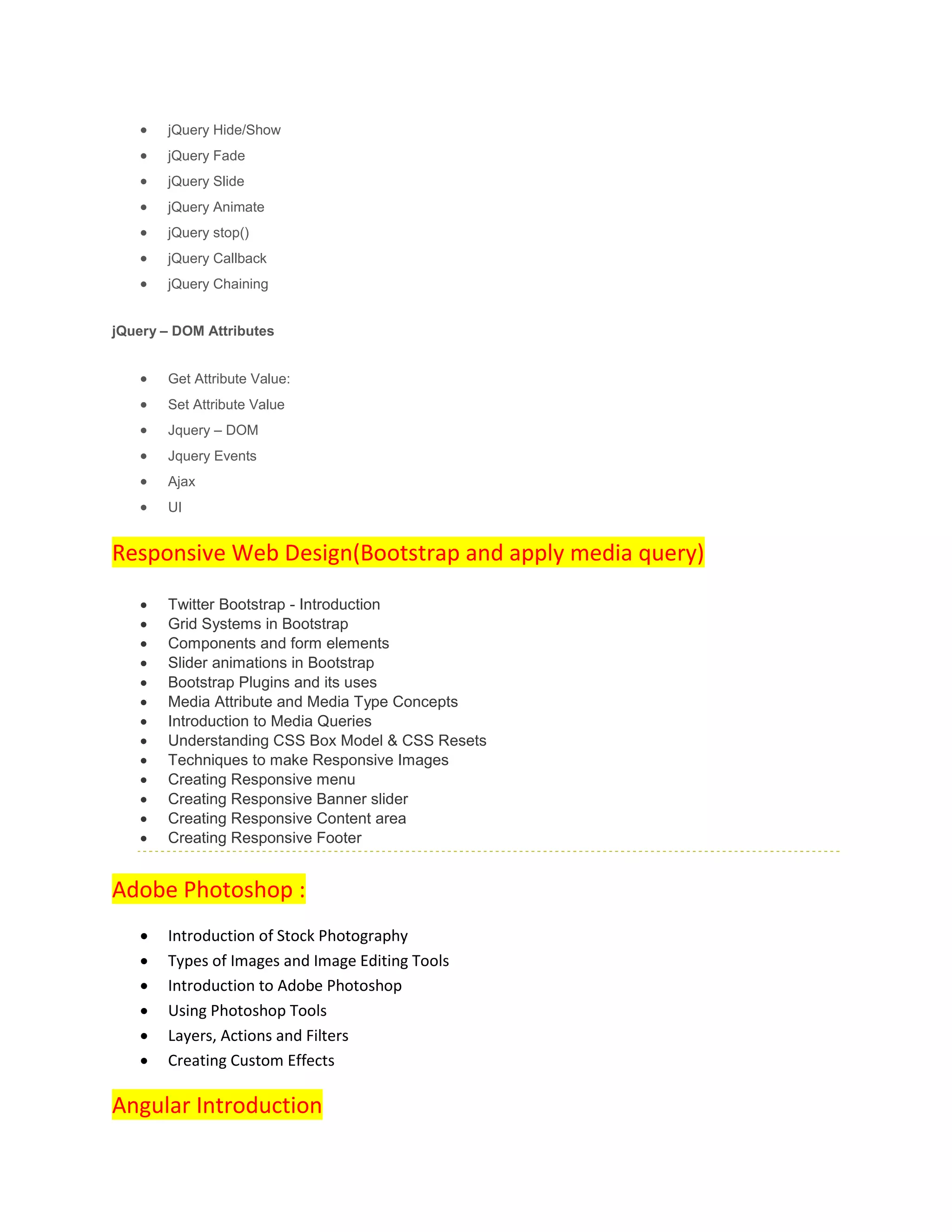
 jQuery Hide/Show
 jQuery Fade
 jQuery Slide
 jQuery Animate
 jQuery stop()
 jQuery Callback
 jQuery Chaining
jQuery – DOM Attributes
 Get Attribute Value:
 Set Attribute Value
 Jquery – DOM
 Jquery Events
 Ajax
 UI
Responsive Web Design(Bootstrap and apply media query)
 Twitter Bootstrap - Introduction
 Grid Systems in Bootstrap
 Components and form elements
 Slider animations in Bootstrap
 Bootstrap Plugins and its uses
 Media Attribute and Media Type Concepts
 Introduction to Media Queries
 Understanding CSS Box Model & CSS Resets
 Techniques to make Responsive Images
 Creating Responsive menu
 Creating Responsive Banner slider
 Creating Responsive Content area
 Creating Responsive Footer
Adobe Photoshop :
 Introduction of Stock Photography
 Types of Images and Image Editing Tools
 Introduction to Adobe Photoshop
 Using Photoshop Tools
 Layers, Actions and Filters
 Creating Custom Effects
Angular Introduction
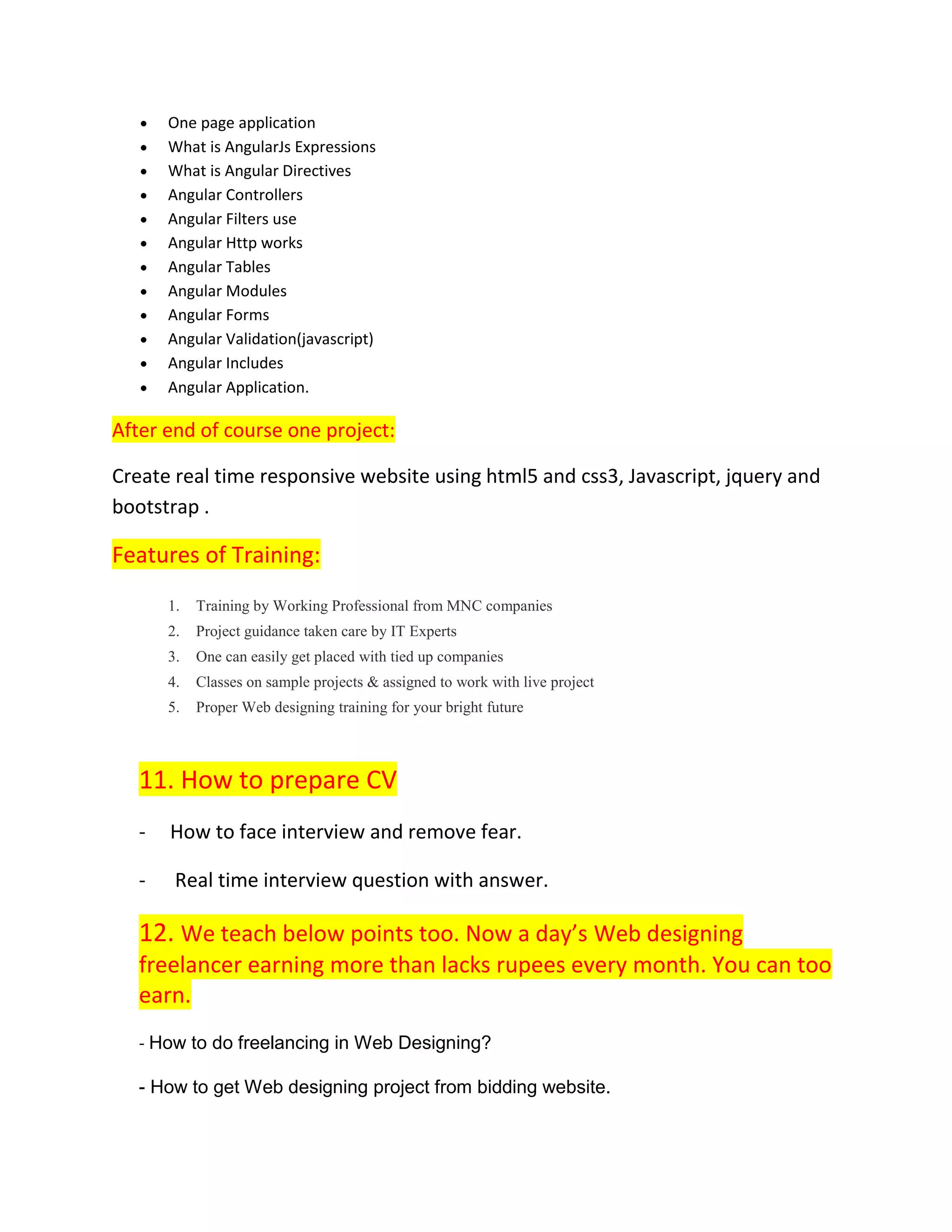
 One page application
 What is AngularJs Expressions
 What is Angular Directives
 Angular Controllers
 Angular Filters use
 Angular Http works
 Angular Tables
 Angular Modules
 Angular Forms
 Angular Validation(javascript)
 Angular Includes
 Angular Application.
After end of course one project:
Create real time responsive website using html5 and css3, Javascript, jquery and
bootstrap .
Features of Training:
1. Training by Working Professional from MNC companies
2. Project guidance taken care by IT Experts
3. One can easily get placed with tied up companies
4. Classes on sample projects & assigned to work with live project
5. Proper Web designing training for your bright future
11. How to prepare CV
- How to face interview and remove fear.
- Real time interview question with answer.
12. We teach below points too. Now a day’s Web designing
freelancer earning more than lacks rupees every month. You can too
earn.
- How to do freelancing in Web Designing?
- How to get Web designing project from bidding website.
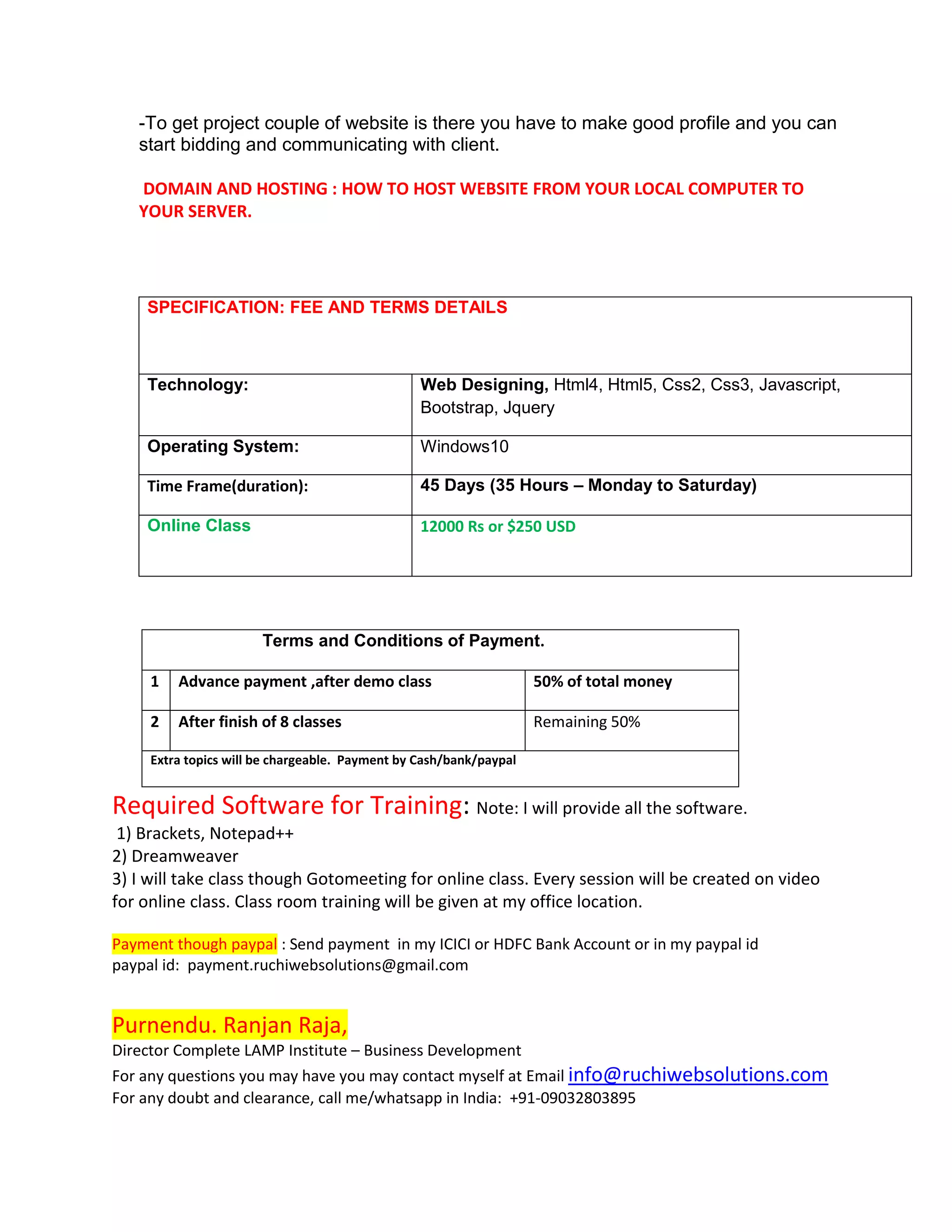
-To get project couple of website is there you have to make good profile and you can
start bidding and communicating with client.
DOMAIN AND HOSTING : HOW TO HOST WEBSITE FROM YOUR LOCAL COMPUTER TO
YOUR SERVER.
SPECIFICATION: FEE AND TERMS DETAILS
Technology: Web Designing, Html4, Html5, Css2, Css3, Javascript,
Bootstrap, Jquery
Operating System: Windows10
Time Frame(duration): 45 Days (35 Hours – Monday to Saturday)
Online Class 12000 Rs or $250 USD
Terms and Conditions of Payment.
1 Advance payment ,after demo class 50% of total money
2 After finish of 8 classes Remaining 50%
Extra topics will be chargeable. Payment by Cash/bank/paypal
Required Software for Training: Note: I will provide all the software.
1) Brackets, Notepad++
2) Dreamweaver
3) I will take class though Gotomeeting for online class. Every session will be created on video
for online class. Class room training will be given at my office location.
Payment though paypal : Send payment in my ICICI or HDFC Bank Account or in my paypal id
paypal id: payment.ruchiwebsolutions@gmail.com
Purnendu. Ranjan Raja,
Director Complete LAMP Institute – Business Development
For any questions you may have you may contact myself at Email info@ruchiwebsolutions.com
For any doubt and clearance, call me/whatsapp in India: +91-09032803895
Once fee is paid, not return back.
Website: http://www.ruchiwebsolutions.com/

Web designing-training-by-ruchiwebsolutions

  • 1.
    Website: http://www.ruchiwebsolutions.com/ Contact person:Ranjan Raja Moble/Whatsapp: +91-9347045052 / 09032803895 Dilsukhnagar, Hyderabad Email: info@ruchiwebsolutions.com Skype: Purnendu_ranjan Course name: Web Designing Training with Live Project. CAN YOU CALL/WHATSAPP ME AT 91-9347045052 TO MY MOBILE TO PLANNING AND EXECUTION OF THIS TRAINING. Can you attend demo class today or tomorrow, call me once. Project Covered During Training: Real Time Project Training 1) Mini project: One Mini Project in html4 and css2. Trainer is going to teach one Project using HTML4 AND CSS2. The Trainer will give you one assignment project also and you will do assignment project in your home to make sure that you understand the subject clearly. 2) Real Time Project:Trainer is going to teach one real time Project using HTML5, boostrap AND CSS3 which is going to be RESPONSIVE WEBSITE. The Trainer will give you one assignment project also and you will do assignment project in your home to make sure that you understand the subject clearly. Watch Web designing Demo Video Here: https://youtu.be/YefAdA9FQDM Why Training with Us? I am giving Web designing training with 2 projects. One project is Mini project and 2nd project is real time project in Web designing. This project will help definitely in your job.
  • 2.
    Certification: Yes Iwill provide you Certificate after successfully attending the class this will help you in job assistance. I am also helping you in help placement. Placement and Job: I will give placement assistance. Because I am giving you real time training with live project so definitely it will help you in job. I have tie up with good company who hire my students. My address for Class room training: Ruchiwebsolutions,#201,Datta Sai complex ,Beside IKON hospital, Landmark: Near to Vijaya Diagnostic Centre, Dilsukhnagar, Hyderabad, call if any problem to 09347045052. Trainer Profile I am Ranjan master degree in computer from Utah State University, USA. I am part of ruchiwebsolutions in Dilsukhnagar,Hyderabad. I have total 13+ years of experience in Web designing and user interface designing. I have developed 400 dynamic website till now on html4,html5, css2,css3,js,jquery and angular js. I have 13 years of experience in Online and class room training. I already gave the training to some of the corporate company from UK, USA, Malaysia and India in Web designing and user interface designing. I have worked with international clients based in USA, UK, Canada, Netherlands, Australia, Italy, Ireland, France etc. I have worked on many different projects - ranging from small software to complex web applications. I have a company with name of ruchiwebsolutions in Dilsukhnagar,Hyderabad. I have 3 Web designer and UI designer working in my company who has 13+yrs real time experience. That UI developer is going to take your class. He already has given training of 2500 Students till now, and all working in MNC and Software web Development Company. After demo class, once fee paid will not be refundable. Our Teaching style: I give real time training with real PROJECT IN Web designing .Basically i am developer of 13 years of experience so I will try to give my best output in Web designing training. Course subjects , time spent and level: Subject Total class Level HTML4 3 Hours Depth level HTML5 3 Hours Depth level CSS2 2 Hours Depth level CSS3 2 Hours Depth level JAVASCRIPT 3 Hours Depth level PHOTOSHOP 1 Hours Basic level
  • 3.
    jQUERY 3 HoursIntermediate Level BOOTSTRAP 3 Hours Intermediate Level Project using html5 ,css3,bootstrap 3 Hours Depth level ANGULARJS 2 Hours Intermediate Level Total number: 35 Hours (or 45 days duration) Daily 60 minute class , Monday to Saturday Soft copy notes will be given to each student. Each session will be provided video after class. Important notes: I will teach you in such a way that you can apply for One year experience job also. HTML 4  Overview of Web Development o Client-side Programming o Server-side Programming  Types of Webpages o Static Webpage o Dynamic Webpage o Server Webpage  Types Of Languages o Programming Languages o Scripting Languages  Introduction To HTML  Structure Of HTML  Tag o Empty Tag o Container Tag  Basic Tags  Meta Tags  Attributes & Parameters  Comments  Image tag  Link Tags  Image Link  Text Link  Email Link  Marquee Tag  List o Order List o Unorder List
  • 4.
    o Nested List oDefinition List  Table Tag  Form tags  Background Colors & Images  Introduction To Doctypes HTML 5  What is HTML 5  Overview of HTML 5 o Browser Support o W3C and Web Hypertext Application Technology Working Group (WHATWG). Specifications o Power of HTML5 in web & mobile Domains o Overview of updated new features  HTML5 Syntax o The DOCTYPE o Character Encoding o The <script> tag o The <link> tag o HTML5 Document  Forms o color o date o datetime o datetime-local o email o month o number o range o search o tel o time o url o week  Form Elements o <datalist> o <keygen> o <output>  New attributes for <form> o autocomplete o novalidate  New attributes for <input> o autocomplete o autofocus o form o formaction o formenctype o formmethod
  • 5.
    o formnovalidate o formtarget oheight and width o list o min and max o multiple o pattern (regexp) o placeholder o required o step  Video and Audio o Media o <audio> o <video> o <source> o <embed> o <track> o plugins o youtube  HTML5 NEW ELEMENTS o <article> o <aside> o <canvas> o <details> o <figcaption> o <figure> o <footer> o <header> o <hgroup> o <main> o <mark> o <meter> o <nav> o <section> o <summary> o <time>  Migration from HTML4 to HTML5 o HTML5 Browser Support  HTML5 Elements as Block Elements  Adding New Elements to HTML  Problem With Internet Explorer  HTML5 DEPRECATED TAGS o <acronym> o <center> o <font> o <frame> o <frameset> o <s> o <u>  HTML5 DEPRECATED ATTRIBUTES
  • 6.
    o align-caption, iframe,img, input, legend, table, hr, div, h1, h2, h3, h4, h5, h6, p, td, th, and tr. o background-body o bgcolor-table, tr, td, th and body. o border table o cellpadding-table o cellspacing-table o hspace-img o vspace-img o noshade-hr o rules-table o size-hr o type-li, ol and ul o width-hr, table, td, th, pre.  App Cache or Offline Applications o Browser Support  Canvas Overview o Lines o Curves o font o Image o Paths o Shapes o Color, gradients Cascading Stylesheets(CSS2)  CSS o Introduction o Syntax o Advantages  Types of Stylesheets o External style sheet o Internal style sheet o Inline style  Types of Selectors o Global o Class o Id  Div's & Span tags  Colors  Background o background-color o background-image o background-repeat o background-attachment o background-position  Font o font-family
  • 7.
    o color o font-size ofont-style o font-variant o font-weight  Text o Color o letter-spacing o Word-spacing o line-height o text-align o text-decoration o text-indent o text-transform o vertical-align o White-space  Images o border o width o height  Links o a:link o a:visited o a:hover o a:active Lists  list-style-type  list-style-position  list-style-image Tables Box Model  Border & Outline  outline  margin  padding Advanced  Dimension o height o width o line-height o max-height o min-height o max-width
  • 8.
    o min-width  Display Positioning  Layers (Z-index)  Floating  Scrollbars  Navigation Bar  Image Opacity  Image Sprites  Attribute Selectors Introduction to css3.0  CSS 2.0 vs CSS 3.0  Introduction to css3  whats new in css3.0  border o box-shadow o border-image o border-radius  background o background-clip o background-origin o background-size o Multiple Background Images  Gradients o Linear Gradients  Top to Bottom  Left to Right  Diagonal  Angles  Multiple Color Stops  Transparency o repeating-linear-gradient o Radial Gradients  Evenly Spaced Color Stops  Differently Spaced Color Stops  Set Shape  Use of Different Size Keywords  closest-side  farthest-side  closest-corner  farthest-corner o repeating-radial-gradient  text effects o text-shadow o word-wrap  @FONT Face
  • 9.
    o Browser Support oFont Formats o Browser Support for Font Formats o Using The Font o Working with third party plugins  Google fonts  Box Resize  Box Sizing  Outline  Transitions o transition o transition-delay o transition-duration o transition-property  Animations o @keyframes o animation o animation-delay o animation-direction o animation-duration  Selectors  Multiple Columns o column-count o column-fill o column-gap o column-rule o column-rule-color  User Interface o box-sizing o resize o outline-offset o resize JAVASCRIPT  Introduction to javascript o Syntax o Statements o Comments  Introduction to Client Side Scripting  Introduction to Java Script  Javascript Types  Variables in JS  Datatypes in JS  Operators in JS  Conditional Statements  Java Script Loops
  • 10.
     JS PopupBoxes  JS Events  JS Arrays  JS Objects  JS Functions  Operators o Arithmetic o Assignment o Comparison o Logical o Conditional Using Java Script in Realtime JS Popup Boxes Validation of Forms The DOM, Nodes, and Objects  Understanding the DOM  Adding nodes to the DOM  Deleting nodes from the DOM jQuery – Advance  String:  Numbers:  Boolean:  Objects:  Arrays:  Functions:  Arguments:  Scope:  Built-in Functions: jQuery – Selectors How to use Selectors?  jQuery – CSS Element Selector  jQuery – CSS Element ID Selector  jQuery – CSS Element Class Selector  jQuery Effects
  • 11.
     jQuery Hide/Show jQuery Fade  jQuery Slide  jQuery Animate  jQuery stop()  jQuery Callback  jQuery Chaining jQuery – DOM Attributes  Get Attribute Value:  Set Attribute Value  Jquery – DOM  Jquery Events  Ajax  UI Responsive Web Design(Bootstrap and apply media query)  Twitter Bootstrap - Introduction  Grid Systems in Bootstrap  Components and form elements  Slider animations in Bootstrap  Bootstrap Plugins and its uses  Media Attribute and Media Type Concepts  Introduction to Media Queries  Understanding CSS Box Model & CSS Resets  Techniques to make Responsive Images  Creating Responsive menu  Creating Responsive Banner slider  Creating Responsive Content area  Creating Responsive Footer Adobe Photoshop :  Introduction of Stock Photography  Types of Images and Image Editing Tools  Introduction to Adobe Photoshop  Using Photoshop Tools  Layers, Actions and Filters  Creating Custom Effects Angular Introduction
  • 12.
     One pageapplication  What is AngularJs Expressions  What is Angular Directives  Angular Controllers  Angular Filters use  Angular Http works  Angular Tables  Angular Modules  Angular Forms  Angular Validation(javascript)  Angular Includes  Angular Application. After end of course one project: Create real time responsive website using html5 and css3, Javascript, jquery and bootstrap . Features of Training: 1. Training by Working Professional from MNC companies 2. Project guidance taken care by IT Experts 3. One can easily get placed with tied up companies 4. Classes on sample projects & assigned to work with live project 5. Proper Web designing training for your bright future 11. How to prepare CV - How to face interview and remove fear. - Real time interview question with answer. 12. We teach below points too. Now a day’s Web designing freelancer earning more than lacks rupees every month. You can too earn. - How to do freelancing in Web Designing? - How to get Web designing project from bidding website.
  • 13.
    -To get projectcouple of website is there you have to make good profile and you can start bidding and communicating with client. DOMAIN AND HOSTING : HOW TO HOST WEBSITE FROM YOUR LOCAL COMPUTER TO YOUR SERVER. SPECIFICATION: FEE AND TERMS DETAILS Technology: Web Designing, Html4, Html5, Css2, Css3, Javascript, Bootstrap, Jquery Operating System: Windows10 Time Frame(duration): 45 Days (35 Hours – Monday to Saturday) Online Class 12000 Rs or $250 USD Terms and Conditions of Payment. 1 Advance payment ,after demo class 50% of total money 2 After finish of 8 classes Remaining 50% Extra topics will be chargeable. Payment by Cash/bank/paypal Required Software for Training: Note: I will provide all the software. 1) Brackets, Notepad++ 2) Dreamweaver 3) I will take class though Gotomeeting for online class. Every session will be created on video for online class. Class room training will be given at my office location. Payment though paypal : Send payment in my ICICI or HDFC Bank Account or in my paypal id paypal id: payment.ruchiwebsolutions@gmail.com Purnendu. Ranjan Raja, Director Complete LAMP Institute – Business Development For any questions you may have you may contact myself at Email info@ruchiwebsolutions.com For any doubt and clearance, call me/whatsapp in India: +91-09032803895
  • 14.
    Once fee ispaid, not return back. Website: http://www.ruchiwebsolutions.com/