Web Components
A sneak peak into Shadow DOM
Kunjan Thakkar
November 2014
 Sr. Developer with Synerzip Softech
 5+ years of development experience
 Mobile Application development in Android, J2ME, Blackberry
 Web development using Javascript, HTML5, AngularJS,
Polymer
Who am I?
 Web Components are a new set of web platform features
that enable developers to build applications in a declarative,
composable way.
What are web components?
What all web components are
available to us?
Custom Elements
The ability to make browser
“learn” new vocabulary. Create
and use new types of DOM
elements.
Shadow DOM
Establish and maintain functional
boundaries resulting into better
encapsulation
Templates
The ability to declare DOM
subtrees and manipulate them to
instantiate document fragments
HTML Imports
Include and reuse HTML
documents in other HTML
documents.
Shadow DOM
Encapsulation at work!!
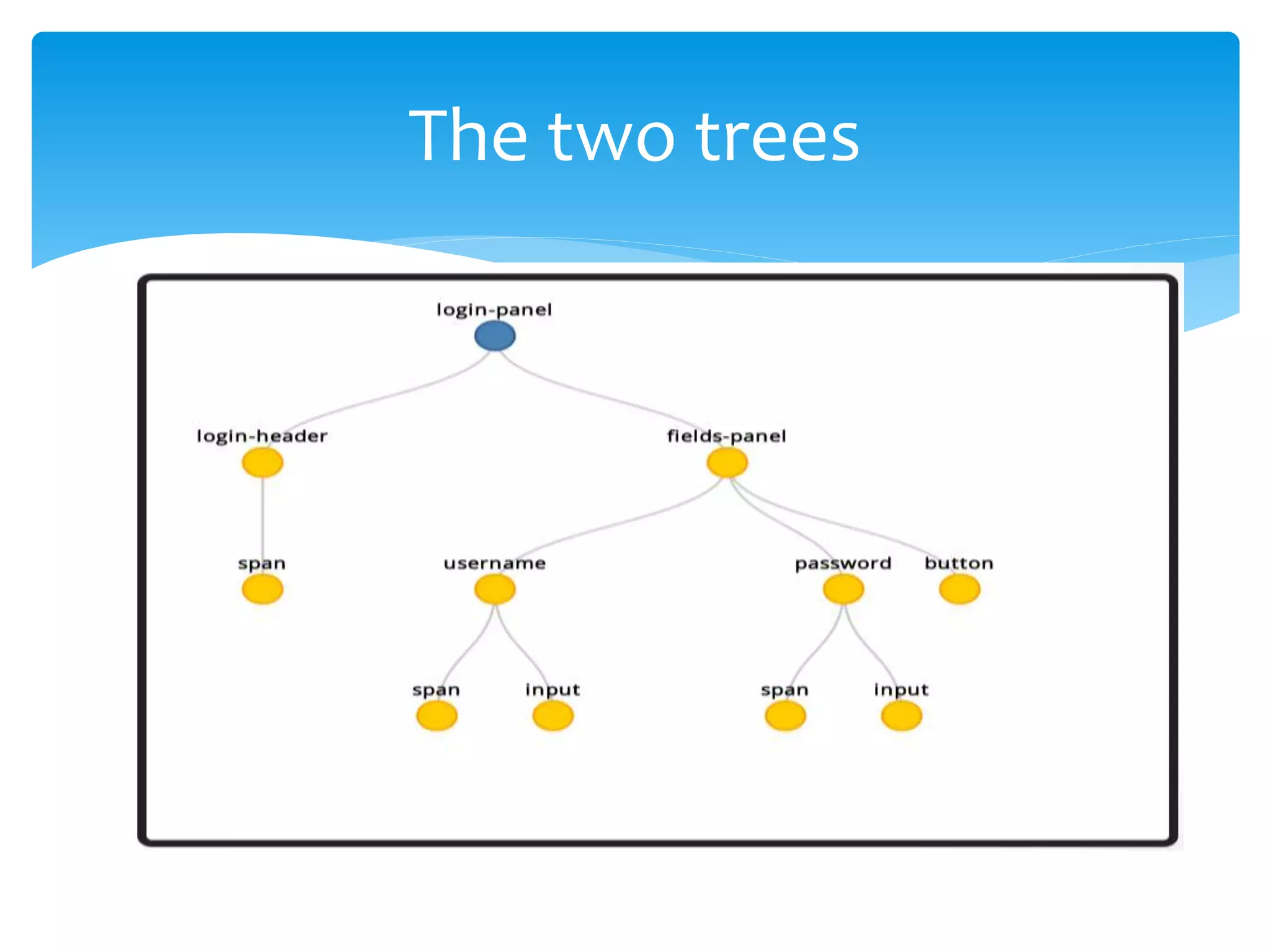
 Shadow DOM is an emerging web standard that gives
developers access to style and DOM scoping.
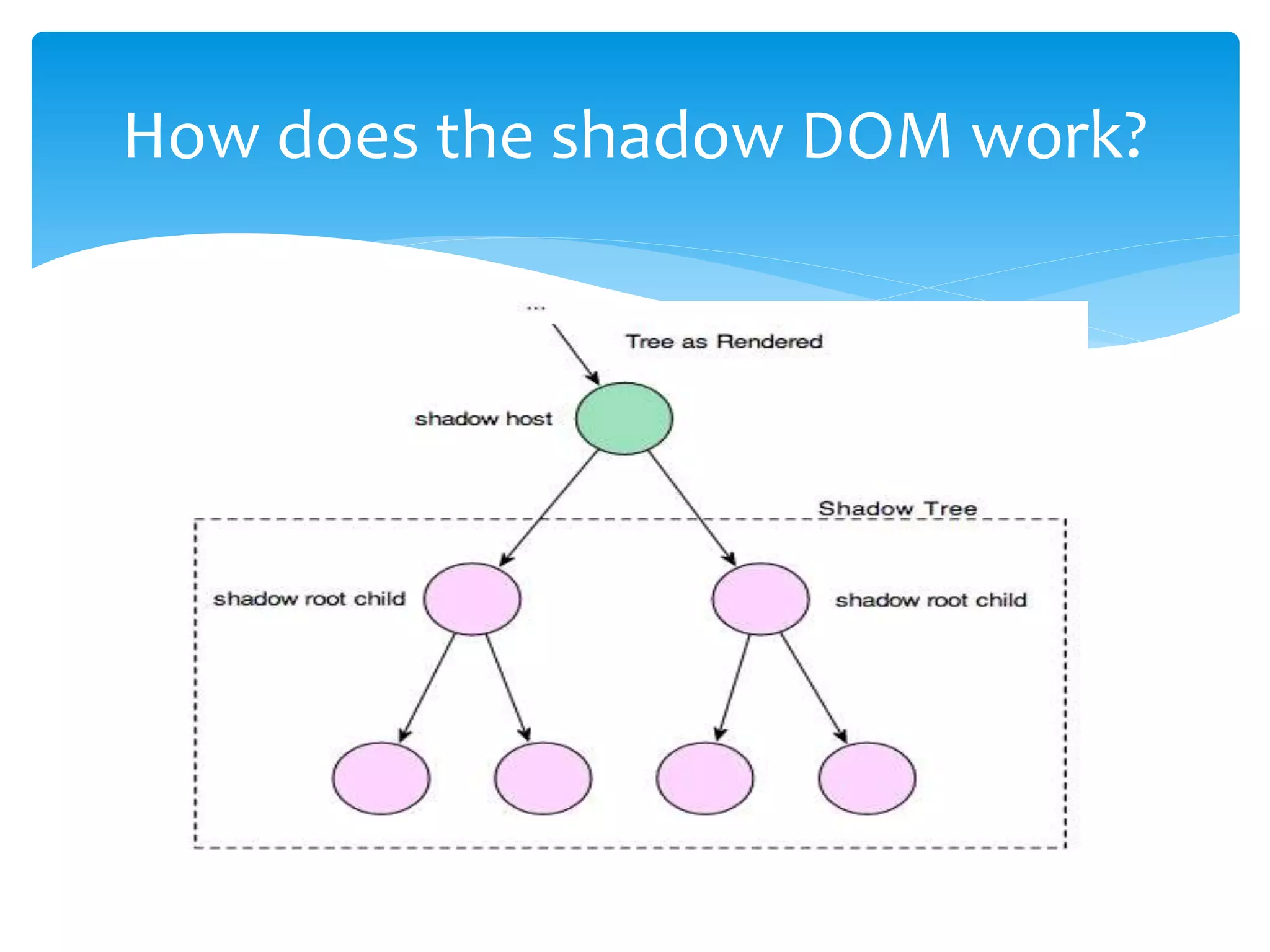
 Shadow DOM is a tree of nodes attached to a host.
What is a Shadow DOM?
Ok got it! But why would I need it for
my components?
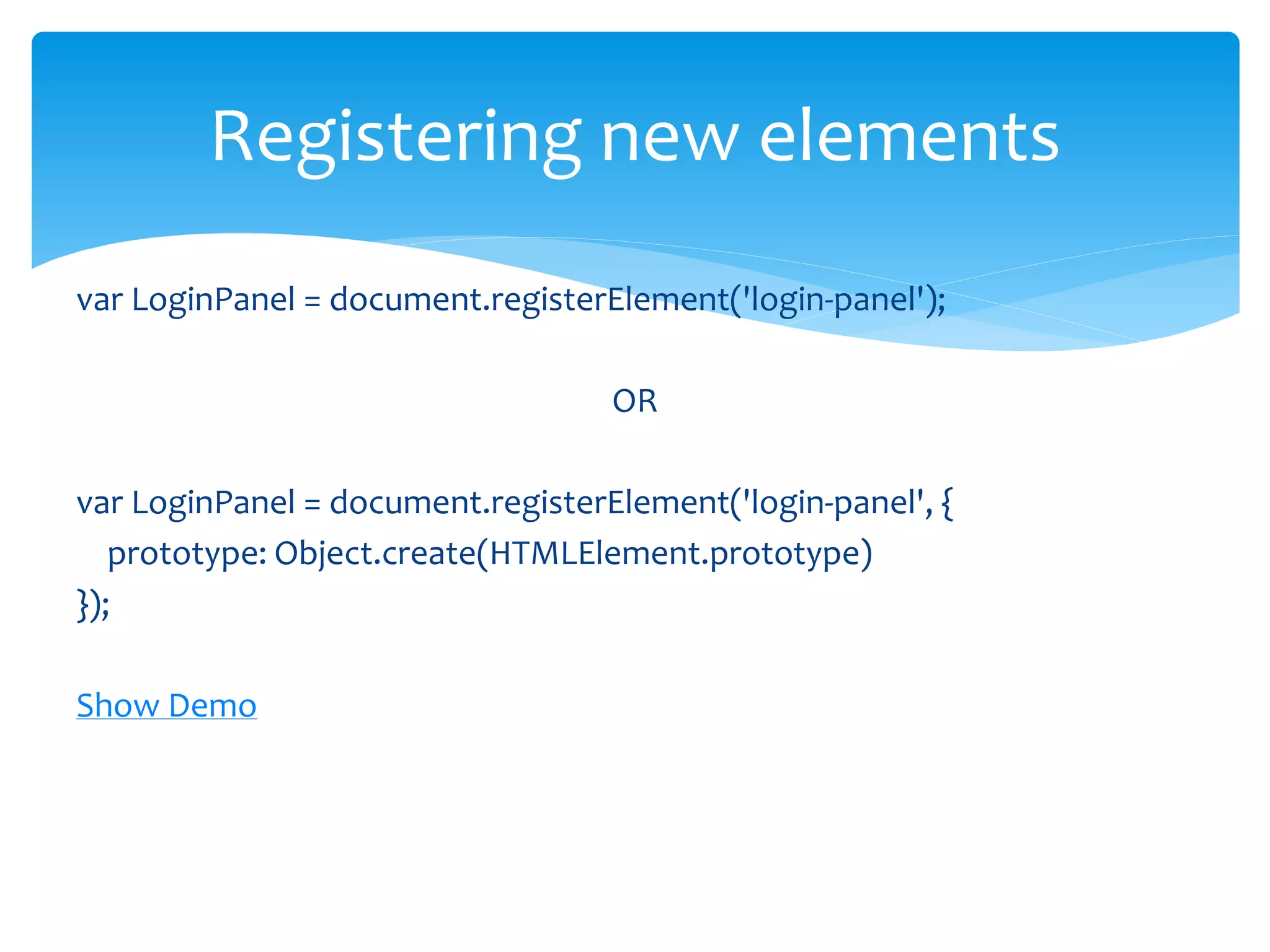
var shadowRoot = host.createShadowRoot();
shadowRoot.appendChild(shadowChildren);
Creating a shadow root
How does the shadow DOM work?
The two trees
 CSS selectors don't cross the shadow boundary.
 CSS styles defined inside a shadow tree are scoped to the
shadow root.
 Elements added to the Shadow Root won't be queried.
Encapsulation
 The host’s children can then be pulled into the shadow tree.
 <content> tag
Insertion Points
 Allows you to add content selectively
 By giving <content> tag a select attribute with CSS selector as a
value, you can distribute host's content to wherever you want.
 select attribute can only take direct children of the host
element. For example, you can NOT assign descendant
elements to the select attribute:
 <div id="host"> <div class="child"> <h1>This is Shadow DOM</h1>
</div> </div> <content select=".child h1"></content> // Not allowed
The ‘select’ attribute
 From host element
 Deep
 Shadow
 From shadow
 host
 host-context
 Content
Breaking the shadow boundaries
 applyAuthorStyles – let the document css style to style
shadow dom as well
 resetStyleInheritance = apply only direct styles, don’t apply
inherited styles
Breaking boundaries continues..
 The youngest shadow root is finally rendered.
 The older shadows can be brought into the youngest
shadow using <shadow> insertion point.
 Shadow insertion point
 The children of the older shadow roots can be pulled in into the
shadow tree
 If multiple <shadow> insertion points exist in a shadow tree,
only the first is recognized. The rest are ignored.
Working with multiple shadows
 Key to encapsulation.
 Helps us to separate content from presentation
 Enables us to have better composition of the DOM.
 Establish functional boundaries in a document tree.
Benefits of using shadow DOM
 Web Components are a way of standardizing widgets and
plugins.
 Web components help us to :
 Write meaningful and maintainable code
 Create reusable modules.
 Offer encapsulation and modularity.
Wrapping up..
 It first started behind a flag in Chrome 27 and Chrome 31 is
the first to have true support for the updated spec
 Feature detection
function hasSupport() {
return 'registerElement' in document;
}
if (hasSupport()) {
console.log('Custom Elements are supported');
} else {
console.log('Custom Elements not supported');
}
Browser Support
 http://webcomponents.org/
 http://www.html5rocks.com/en/tutorials/webcomponents/c
ustomelements/
 http://css-tricks.com/modular-future-web-components/
 http://www.html5rocks.com/en/tutorials/webcomponents/s
hadowdom/
 http://www.html5rocks.com/en/tutorials/webcomponents/s
hadowdom-201/
 http://www.html5rocks.com/en/tutorials/webcomponents/s
hadowdom-301/
References
Thank you!

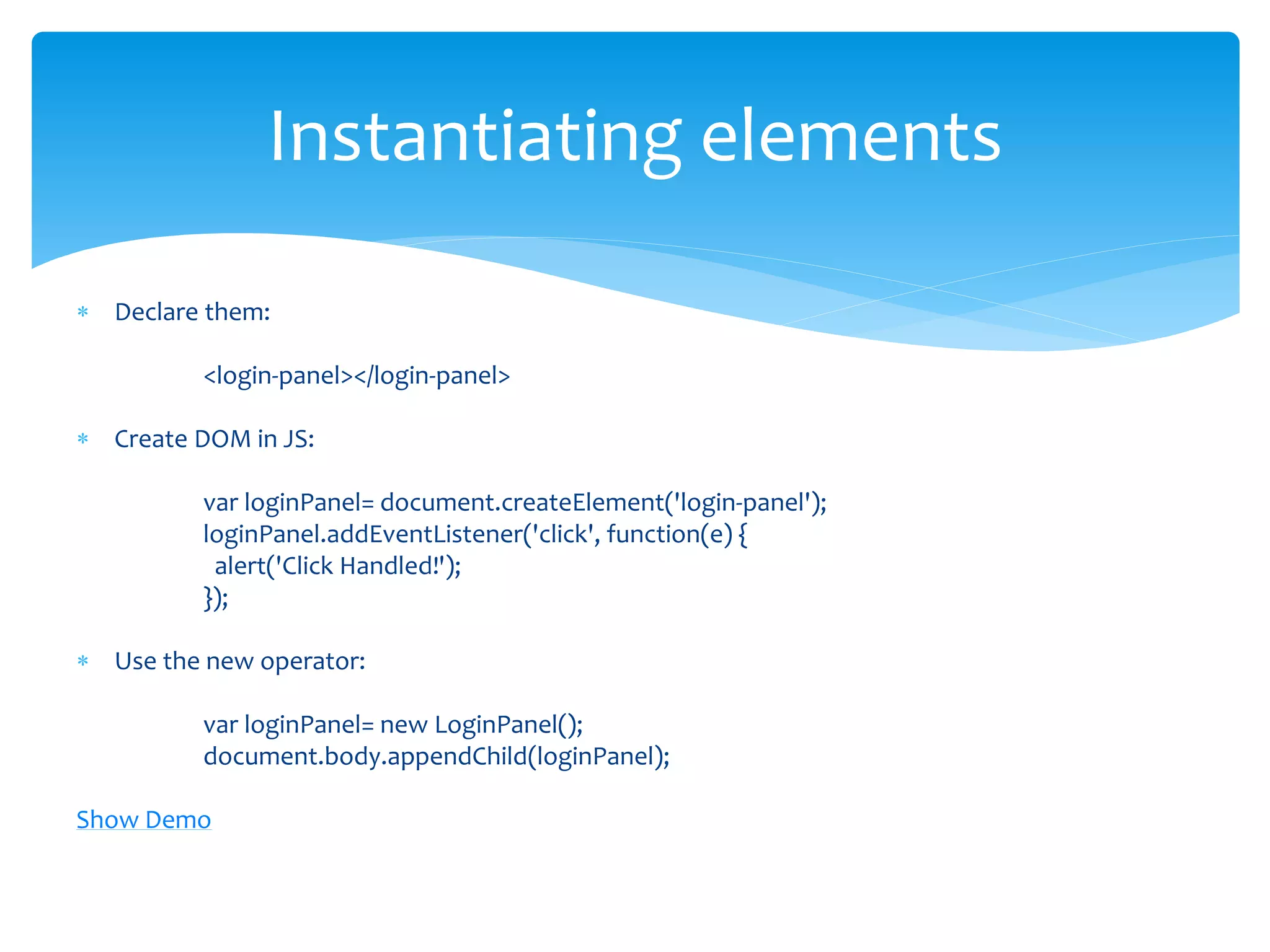
Web components

  • 1.
    Web Components A sneakpeak into Shadow DOM Kunjan Thakkar November 2014
  • 2.
     Sr. Developerwith Synerzip Softech  5+ years of development experience  Mobile Application development in Android, J2ME, Blackberry  Web development using Javascript, HTML5, AngularJS, Polymer Who am I?
  • 3.
     Web Componentsare a new set of web platform features that enable developers to build applications in a declarative, composable way. What are web components?
  • 4.
    What all webcomponents are available to us? Custom Elements The ability to make browser “learn” new vocabulary. Create and use new types of DOM elements. Shadow DOM Establish and maintain functional boundaries resulting into better encapsulation Templates The ability to declare DOM subtrees and manipulate them to instantiate document fragments HTML Imports Include and reuse HTML documents in other HTML documents.
  • 5.
  • 6.
     Shadow DOMis an emerging web standard that gives developers access to style and DOM scoping.  Shadow DOM is a tree of nodes attached to a host. What is a Shadow DOM?
  • 7.
    Ok got it!But why would I need it for my components?
  • 8.
    var shadowRoot =host.createShadowRoot(); shadowRoot.appendChild(shadowChildren); Creating a shadow root
  • 9.
    How does theshadow DOM work?
  • 10.
  • 11.
     CSS selectorsdon't cross the shadow boundary.  CSS styles defined inside a shadow tree are scoped to the shadow root.  Elements added to the Shadow Root won't be queried. Encapsulation
  • 12.
     The host’schildren can then be pulled into the shadow tree.  <content> tag Insertion Points
  • 13.
     Allows youto add content selectively  By giving <content> tag a select attribute with CSS selector as a value, you can distribute host's content to wherever you want.  select attribute can only take direct children of the host element. For example, you can NOT assign descendant elements to the select attribute:  <div id="host"> <div class="child"> <h1>This is Shadow DOM</h1> </div> </div> <content select=".child h1"></content> // Not allowed The ‘select’ attribute
  • 14.
     From hostelement  Deep  Shadow  From shadow  host  host-context  Content Breaking the shadow boundaries
  • 15.
     applyAuthorStyles –let the document css style to style shadow dom as well  resetStyleInheritance = apply only direct styles, don’t apply inherited styles Breaking boundaries continues..
  • 16.
     The youngestshadow root is finally rendered.  The older shadows can be brought into the youngest shadow using <shadow> insertion point.  Shadow insertion point  The children of the older shadow roots can be pulled in into the shadow tree  If multiple <shadow> insertion points exist in a shadow tree, only the first is recognized. The rest are ignored. Working with multiple shadows
  • 17.
     Key toencapsulation.  Helps us to separate content from presentation  Enables us to have better composition of the DOM.  Establish functional boundaries in a document tree. Benefits of using shadow DOM
  • 18.
     Web Componentsare a way of standardizing widgets and plugins.  Web components help us to :  Write meaningful and maintainable code  Create reusable modules.  Offer encapsulation and modularity. Wrapping up..
  • 19.
     It firststarted behind a flag in Chrome 27 and Chrome 31 is the first to have true support for the updated spec  Feature detection function hasSupport() { return 'registerElement' in document; } if (hasSupport()) { console.log('Custom Elements are supported'); } else { console.log('Custom Elements not supported'); } Browser Support
  • 20.
     http://webcomponents.org/  http://www.html5rocks.com/en/tutorials/webcomponents/c ustomelements/ http://css-tricks.com/modular-future-web-components/  http://www.html5rocks.com/en/tutorials/webcomponents/s hadowdom/  http://www.html5rocks.com/en/tutorials/webcomponents/s hadowdom-201/  http://www.html5rocks.com/en/tutorials/webcomponents/s hadowdom-301/ References
  • 21.

Editor's Notes

  • #4 Web Components are a collection of standards which are working their way through the W3C. They enable truly encapsulated and reusable components for the web.
  • #10 The shadow tree replaces all of the host’s content. The contents inside the shadow tree are rendered.
  • #15 Shadow:: -If an element has at least one shadow tree, the ::shadow pseudo-element matches the shadow root itself. It allows you to write selectors that style nodes internal to an element's shadow dom. Style host - The :host selector has low specificity by design, so it’s easier for the document to override it if it needs to. In this case the document style for .widget beats out the shadow style for :host. /*body /deep/ span {*/ /*color: red*/ /*}*/ /*body ::shadow > span {*/ /*color: blue;*/ /*}*/