Containers meet serverless
IDI 2020
October 22nd 2020
Massimo Re Ferrè
Principal Technologist @ Amazon Web Services
Disclaimer
What we will discuss would apply to both Amazon EKS and Amazon ECS
Unless otherwise noticed
I may use them interchangeably throughout this session
For the most part all concepts should/could apply to both
The trends we will talk about transcend specific orchestrator technologies
The trends are ubiquitous
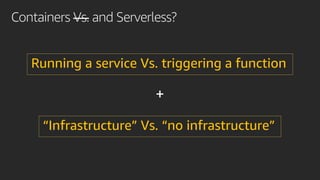
Containers Vs. and Serverless?
Running a service Vs. triggering a function
“Infrastructure” Vs. “no infrastructure”
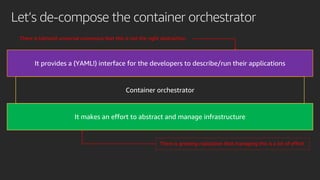
Let’s de-compose the container orchestrator
It makes an effort to abstract and manage infrastructure
It provides a (YAML!) interface for the developers to describe/run their applications
There is (almost) universal consensus that this is not the right abstraction
There is growing realization that managing this is a lot of effort
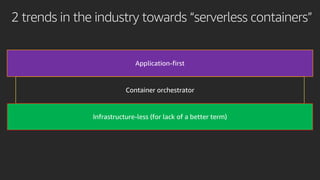
2 trends in the industry towards “serverless containers”
Infrastructure-less (for lack of a better term)
Application-first
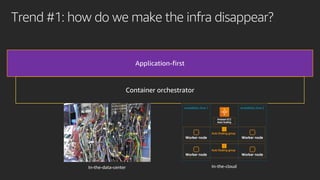
Trend #1: how do we make the infra disappear?
Application-first
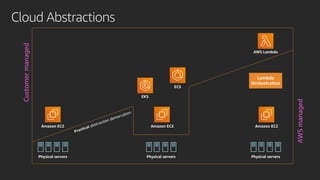
Cloud abstractions should not leak (yet they do)
• If you use EC2 you won’t have to manage the hypervisor/servers
• If you use Lambda you won’t have to manage the stack underneath it
• Why, if you use containers, do you have to manage instances?
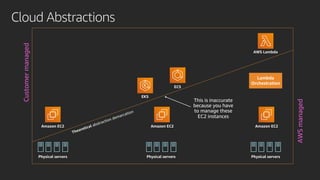
Cloud Abstractions
Physical servers Physical servers Physical servers
ECS
EKS
AWS Lambda
Lambda
Orchestration
Amazon EC2 Amazon EC2 Amazon EC2
Theoretical abstraction demarcation
Customermanaged
AWSmanaged
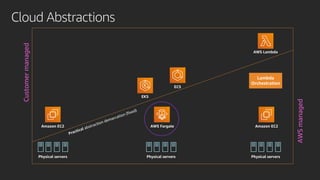
Cloud Abstractions
Physical servers Physical servers Physical servers
ECS
EKS
AWS Lambda
Lambda
Orchestration
Amazon EC2 Amazon EC2 Amazon EC2
Practical abstraction demarcation
Customermanaged
AWSmanaged
Cloud Abstractions
Physical servers Physical servers Physical servers
ECS
EKS
AWS Lambda
Lambda
Orchestration
Amazon EC2 AWS Fargate Amazon EC2
Practical abstraction demarcation (fixed)
Customermanaged
AWSmanaged
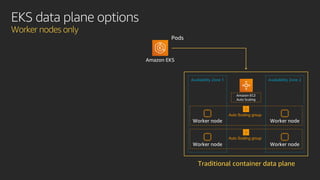
EKS data plane options
Worker nodes only
Amazon EKS
Availability Zone 1
Auto Scaling group
Availability Zone 2
Auto Scaling group
Worker node Worker node
Amazon EC2
Auto Scaling
Traditional container data plane
Pods
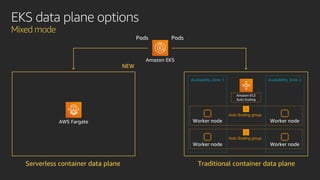
EKS data plane options
Mixed mode
Serverless container data plane
NEW
AWS Fargate
Amazon EKS
Availability Zone 1
Auto Scaling group
Availability Zone 2
Auto Scaling group
Worker node Worker node
Amazon EC2
Auto Scaling
Traditional container data plane
PodsPods
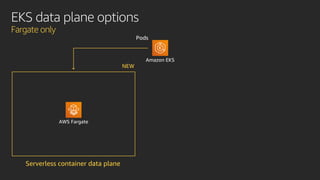
EKS data plane options
Fargate only
Serverless container data plane
NEW
AWS Fargate
Amazon EKS
Pods
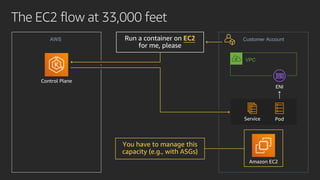
The EC2 flow at 33,000 feet
Amazon EC2
Customer AccountAWS
VPC
PodService
You have to manage this
capacity (e.g., with ASGs)
Run a container on EC2
for me, please
EC2
Control Plane
ENI
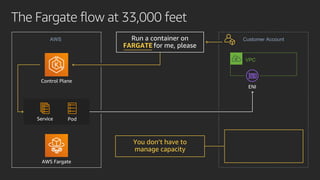
The Fargate flow at 33,000 feet
Customer AccountAWS
Control Plane
VPC
AWS Fargate
Run a container on
FARGATE for me, please
You don’t have to
manage capacity
FARGATE
PodService
ENI
Infrastructure-less demo?
{
"name": profile-a,
"clusterName": mycluster,
"podExecutionRole": iam-role-xyz,
"subnets": subnet-0ad888345,
"selectors": [
{
"namespace": prod,
"labels": {
stack: blue
}
}
]
}
Fargate profile
Simplified deployment flow
Availability Zone 1
Auto Scaling group
Availability Zone 2
Auto Scaling group
Worker node Worker node
Amazon EC2 Auto
Scaling
AWS Fargate
KubernetesAmazon EKS
Fargate Scheduler
Pod 4
Mutating/
Validating
Webhooks
namespace: prod
labels:
- stack: blue
- profile = profile-a
- schedulerName = fargate-
scheduler
Pod
3
2 namespace: prod
labels:
- stack: blue
1
Pod
{
"name": profile-a,
"clusterName": mycluster,
"podExecutionRole": iam-role-xyz,
"subnets": subnet-0ad888345,
"selectors": [
{
"namespace": prod,
"labels": {
stack: blue
}
}
]
}
Fargate profile
Simplified deployment flow
Availability Zone 1
Auto Scaling group
Availability Zone 2
Auto Scaling group
Worker node Worker node
Amazon EC2 Auto
Scaling
AWS Fargate
KubernetesAmazon EKS
Fargate Scheduler
Pod 4
Mutating/
Validating
Webhooks
namespace: test
1
Pod
2
3
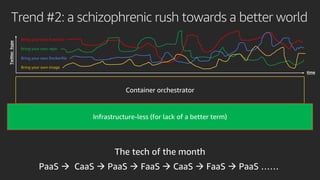
Trend #2: a schizophrenic rush towards a better world
Bring your own Function
Bring your own repo
Bring your own Dockerfile
Bring your own image
Infrastructure-less (for lack of a better term)
Trend #2: a schizophrenic rush towards a better world
Many practical examples: AWS Copilot is a good one (for ECS)
This is a “Bring your own Dockerfile” type of abstraction on top of ECS
Another good example is Google’s own Knative (for EKS)
This is a “Bring your own Function (as a container)” type of abstraction on top of Kubernetes
“AWS Copilot is an open source command line interface that makes it
easy for developers to build, release, and operate production ready
containerized applications on Amazon ECS and AWS Fargate”
• It provides out of the box support for:
• Build
• Deploy
• Day2 operations
• (on ECS/Fargate)
What’s AWS Copilot
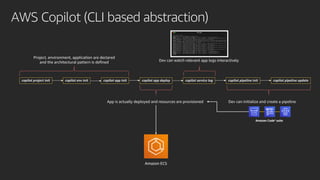
AWS Copilot (CLI based abstraction)
copilot project init copilot env init copilot app init copilot app deploy copilot pipeline init copilot pipeline updatecopilot service log
Project, environment, application are declared
and the architectural pattern is defined
App is actually deployed and resources are provisioned
Dev can watch relevant app logs interactively
Dev can initialize and create a pipeline
Amazon Code* suite
Amazon ECS
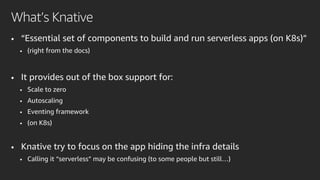
• “Essential set of components to build and run serverless apps (on K8s)”
• (right from the docs)
• It provides out of the box support for:
• Scale to zero
• Autoscaling
• Eventing framework
• (on K8s)
• Knative try to focus on the app hiding the infra details
• Calling it “serverless” may be confusing (to some people but still…)
What’s Knative
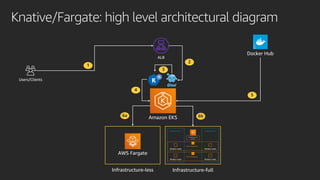
Knative/Fargate: high level architectural diagram
Availability Zone 1
Auto Scaling group
Availability Zone 2
Auto Scaling group
Worker node Worker node
Amazon EC2 Auto
Scaling
AWS Fargate
Amazon EKS
Docker Hub
ALB
1
Users/Clients
2
3
4
5
6a 6b
Infrastructure-less Infrastructure-full
Application-first demo?
• In this short session we have explored 2 trends:
• Infrastructure-less
• Application-first
• We may have over-indexed on one orchestrator
• But the trends are ubiquitous (they apply to both ECS and EKS)…
• …. and the industry as a whole
• Dive deeper yourself into what intrigues you the most
• See links in the next slide
Conclusions
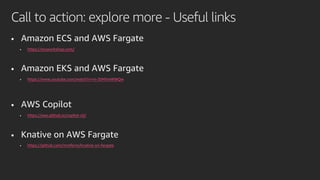
• Amazon ECS and AWS Fargate
• https://ecsworkshop.com/
• Amazon EKS and AWS Fargate
• https://www.youtube.com/watch?v=m-3tMXmWWQw
• AWS Copilot
• https://aws.github.io/copilot-cli/
• Knative on AWS Fargate
• https://github.com/mreferre/knative-on-fargate
Call to action: explore more - Useful links
Thank you
Massimo Re Ferrè
Twitter: twitter.com/mreferre

IDI 2020 - Containers Meet Serverless

  • 1.
    Containers meet serverless IDI2020 October 22nd 2020 Massimo Re Ferrè Principal Technologist @ Amazon Web Services
  • 2.
    Disclaimer What we willdiscuss would apply to both Amazon EKS and Amazon ECS Unless otherwise noticed I may use them interchangeably throughout this session For the most part all concepts should/could apply to both The trends we will talk about transcend specific orchestrator technologies The trends are ubiquitous
  • 3.
    Containers Vs. andServerless? Running a service Vs. triggering a function “Infrastructure” Vs. “no infrastructure”
  • 4.
    Let’s de-compose thecontainer orchestrator It makes an effort to abstract and manage infrastructure It provides a (YAML!) interface for the developers to describe/run their applications There is (almost) universal consensus that this is not the right abstraction There is growing realization that managing this is a lot of effort
  • 5.
    2 trends inthe industry towards “serverless containers” Infrastructure-less (for lack of a better term) Application-first
  • 6.
    Trend #1: howdo we make the infra disappear? Application-first
  • 7.
    Cloud abstractions shouldnot leak (yet they do) • If you use EC2 you won’t have to manage the hypervisor/servers • If you use Lambda you won’t have to manage the stack underneath it • Why, if you use containers, do you have to manage instances?
  • 8.
    Cloud Abstractions Physical serversPhysical servers Physical servers ECS EKS AWS Lambda Lambda Orchestration Amazon EC2 Amazon EC2 Amazon EC2 Theoretical abstraction demarcation Customermanaged AWSmanaged
  • 9.
    Cloud Abstractions Physical serversPhysical servers Physical servers ECS EKS AWS Lambda Lambda Orchestration Amazon EC2 Amazon EC2 Amazon EC2 Practical abstraction demarcation Customermanaged AWSmanaged
  • 10.
    Cloud Abstractions Physical serversPhysical servers Physical servers ECS EKS AWS Lambda Lambda Orchestration Amazon EC2 AWS Fargate Amazon EC2 Practical abstraction demarcation (fixed) Customermanaged AWSmanaged
  • 11.
    EKS data planeoptions Worker nodes only Amazon EKS Availability Zone 1 Auto Scaling group Availability Zone 2 Auto Scaling group Worker node Worker node Worker node Worker node Amazon EC2 Auto Scaling Traditional container data plane Pods
  • 12.
    EKS data planeoptions Mixed mode Serverless container data plane NEW AWS Fargate Amazon EKS Availability Zone 1 Auto Scaling group Availability Zone 2 Auto Scaling group Worker node Worker node Worker node Worker node Amazon EC2 Auto Scaling Traditional container data plane PodsPods
  • 13.
    EKS data planeoptions Fargate only Serverless container data plane NEW AWS Fargate Amazon EKS Pods
  • 14.
    The EC2 flowat 33,000 feet Amazon EC2 Customer AccountAWS VPC PodService You have to manage this capacity (e.g., with ASGs) Run a container on EC2 for me, please EC2 Control Plane ENI
  • 15.
    The Fargate flowat 33,000 feet Customer AccountAWS Control Plane VPC AWS Fargate Run a container on FARGATE for me, please You don’t have to manage capacity FARGATE PodService ENI
  • 16.
  • 17.
    { "name": profile-a, "clusterName": mycluster, "podExecutionRole":iam-role-xyz, "subnets": subnet-0ad888345, "selectors": [ { "namespace": prod, "labels": { stack: blue } } ] } Fargate profile Simplified deployment flow Availability Zone 1 Auto Scaling group Availability Zone 2 Auto Scaling group Worker node Worker node Worker node Worker node Amazon EC2 Auto Scaling AWS Fargate KubernetesAmazon EKS Fargate Scheduler Pod 4 Mutating/ Validating Webhooks namespace: prod labels: - stack: blue - profile = profile-a - schedulerName = fargate- scheduler Pod 3 2 namespace: prod labels: - stack: blue 1 Pod
  • 18.
    { "name": profile-a, "clusterName": mycluster, "podExecutionRole":iam-role-xyz, "subnets": subnet-0ad888345, "selectors": [ { "namespace": prod, "labels": { stack: blue } } ] } Fargate profile Simplified deployment flow Availability Zone 1 Auto Scaling group Availability Zone 2 Auto Scaling group Worker node Worker node Worker node Worker node Amazon EC2 Auto Scaling AWS Fargate KubernetesAmazon EKS Fargate Scheduler Pod 4 Mutating/ Validating Webhooks namespace: test 1 Pod 2 3
  • 19.
    Trend #2: aschizophrenic rush towards a better world Bring your own Function Bring your own repo Bring your own Dockerfile Bring your own image Infrastructure-less (for lack of a better term)
  • 20.
    Trend #2: aschizophrenic rush towards a better world Many practical examples: AWS Copilot is a good one (for ECS) This is a “Bring your own Dockerfile” type of abstraction on top of ECS Another good example is Google’s own Knative (for EKS) This is a “Bring your own Function (as a container)” type of abstraction on top of Kubernetes
  • 21.
    “AWS Copilot isan open source command line interface that makes it easy for developers to build, release, and operate production ready containerized applications on Amazon ECS and AWS Fargate” • It provides out of the box support for: • Build • Deploy • Day2 operations • (on ECS/Fargate) What’s AWS Copilot
  • 22.
    AWS Copilot (CLIbased abstraction) copilot project init copilot env init copilot app init copilot app deploy copilot pipeline init copilot pipeline updatecopilot service log Project, environment, application are declared and the architectural pattern is defined App is actually deployed and resources are provisioned Dev can watch relevant app logs interactively Dev can initialize and create a pipeline Amazon Code* suite Amazon ECS
  • 23.
    • “Essential setof components to build and run serverless apps (on K8s)” • (right from the docs) • It provides out of the box support for: • Scale to zero • Autoscaling • Eventing framework • (on K8s) • Knative try to focus on the app hiding the infra details • Calling it “serverless” may be confusing (to some people but still…) What’s Knative
  • 24.
    Knative/Fargate: high levelarchitectural diagram Availability Zone 1 Auto Scaling group Availability Zone 2 Auto Scaling group Worker node Worker node Worker node Worker node Amazon EC2 Auto Scaling AWS Fargate Amazon EKS Docker Hub ALB 1 Users/Clients 2 3 4 5 6a 6b Infrastructure-less Infrastructure-full
  • 25.
  • 26.
    • In thisshort session we have explored 2 trends: • Infrastructure-less • Application-first • We may have over-indexed on one orchestrator • But the trends are ubiquitous (they apply to both ECS and EKS)… • …. and the industry as a whole • Dive deeper yourself into what intrigues you the most • See links in the next slide Conclusions
  • 27.
    • Amazon ECSand AWS Fargate • https://ecsworkshop.com/ • Amazon EKS and AWS Fargate • https://www.youtube.com/watch?v=m-3tMXmWWQw • AWS Copilot • https://aws.github.io/copilot-cli/ • Knative on AWS Fargate • https://github.com/mreferre/knative-on-fargate Call to action: explore more - Useful links
  • 28.
    Thank you Massimo ReFerrè Twitter: twitter.com/mreferre