VirusScan Enterprise 8.8 [email_address]
VirusScan Enterprise 8.8 About this document New Features Comparison VirusScan Enterprise 8.8 Overview Agenda
VirusScan Enterprise 8.8
About this document Neither McAfee or RANSecurity support automatic upgrading of a pre-release version of the software. Comparison New Features About this document VirusScan Enterprise 8.8
Performance Improvements IntroduciCache Windows Office 2010 ScriptScan Exclusion Support Trusted Intallers VirusScan Enterprise 8.8  New Features Comparison About this document New Features
Reduces On – Access Scan Time Reduces On – Demand Scan Time Reduces System StartUp Time VirusScan Enterprise 8.8  Performance Improvements Comparison About this document New Features
VirusScan Enterprise Caches previously scanned files in a common location to reduce duplicate file scanning and improve performance. This algo applies to On-Demand Scans VirusScan Enterprise 8.8  Introducing Cache Comparison About this document New Features
This release supports all Windows Office 2010 applications, specially adding on-access scanning of Microsoft Outlook 2010 email and attachment files. VirusScan Enterprise 8.8  Windows Office 2010 Comparison About this document New Features
ScriptScan exclusions, URLs of trusted scripts from know safe websites, can be easily added to reduce scanning and improve performance.  Previusly these exclusions required manual registry editing. VirusScan Enterprise 8.8  ScriptScan Exclusion Comparison About this document New Features
Specify if MSI files, installed by msiexec and signed by McAfee or Microsoft, or if Windows Trusted Installer Service files, are scanned on-access: Disabled (default), do not scan files installed by MSI or WTIS. NOTE: Disabled improves the performance of large Microsoft application installers. VirusScan Enterprise 8.8  Trusted Installers Comparison About this document New Features
The objective of this comparison is to analize the performance of VSE 8.8 against VSE 8.7 allowing us to observe the current differences between the two versions.  VirusScan Enterprise 8.8 Comparison New Features About this document Comparison
Scenario: Windows XP SP2, 512Mb RAM Windows 7 Prof, 2GB RAM Windows Srv 2003 Enterprise R2, 512Mb RAM VirusScan Enterprise 8.8 Comparison New Features About this document Comparison
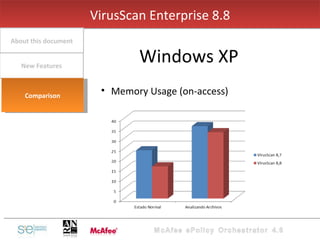
Memory Usage (on-access) VirusScan Enterprise 8.8 Windows XP New Features About this document Comparison
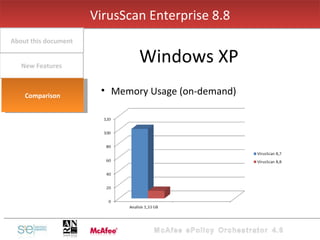
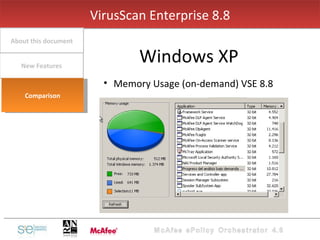
Memory Usage (on-demand) VirusScan Enterprise 8.8 Windows XP New Features About this document Comparison
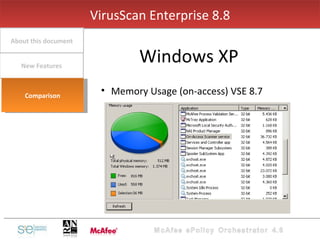
Memory Usage (on-access) VSE 8.7 VirusScan Enterprise 8.8 Windows XP New Features About this document Comparison
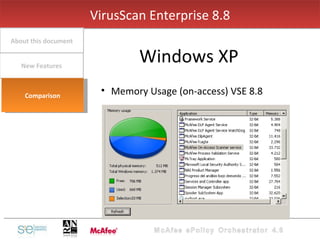
Memory Usage (on-access) VSE 8.8 VirusScan Enterprise 8.8 Windows XP New Features About this document Comparison
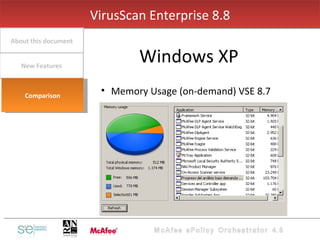
Memory Usage (on-demand) VSE 8.7 VirusScan Enterprise 8.8 Windows XP New Features About this document Comparison
Memory Usage (on-demand) VSE 8.8 VirusScan Enterprise 8.8 Windows XP New Features About this document Comparison
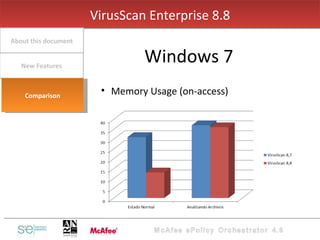
Memory Usage (on-access) VirusScan Enterprise 8.8 Windows 7 New Features About this document Comparison
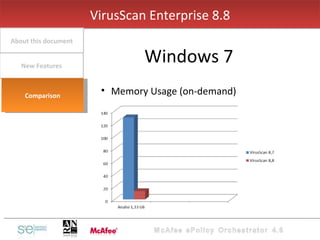
Memory Usage (on-demand) VirusScan Enterprise 8.8 Windows 7 New Features About this document Comparison
Memory Usage (on-access) VSE 8.7 VirusScan Enterprise 8.8 Windows 7 New Features About this document Comparison
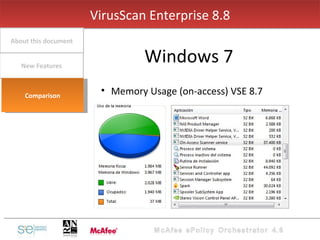
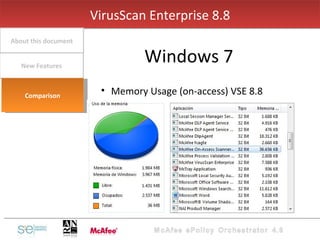
Memory Usage (on-access) VSE 8.8 VirusScan Enterprise 8.8 Windows 7 New Features About this document Comparison
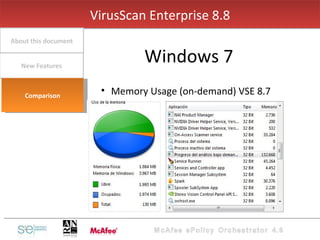
Memory Usage (on-demand) VSE 8.7 VirusScan Enterprise 8.8 Windows 7 New Features About this document Comparison
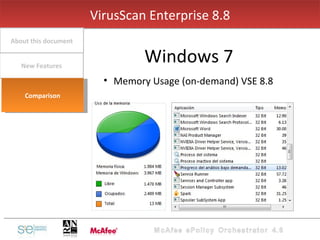
Memory Usage (on-demand) VSE 8.8 VirusScan Enterprise 8.8 Windows 7 New Features About this document Comparison
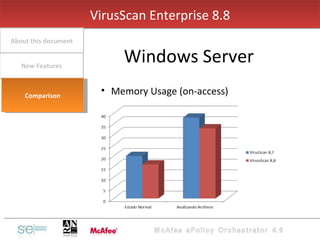
Memory Usage (on-access) VirusScan Enterprise 8.8 Windows Server New Features About this document Comparison
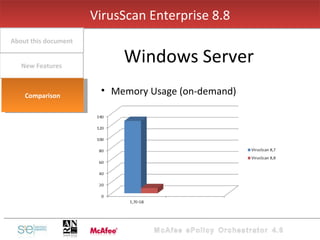
Memory Usage (on-demand) VirusScan Enterprise 8.8 Windows Server New Features About this document Comparison
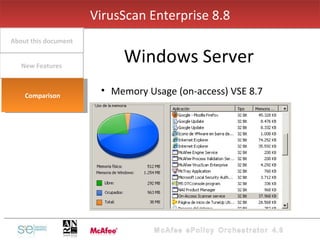
Memory Usage (on-access) VSE 8.7 VirusScan Enterprise 8.8 Windows Server New Features About this document Comparison
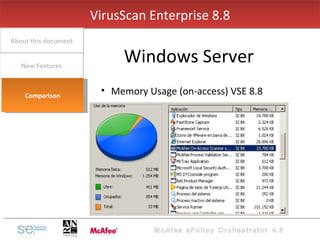
Memory Usage (on-access) VSE 8.8 VirusScan Enterprise 8.8 Windows Server New Features About this document Comparison
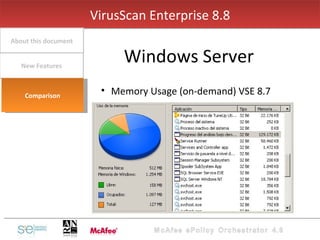
Memory Usage (on-demand) VSE 8.7 VirusScan Enterprise 8.8 Windows Server New Features About this document Comparison
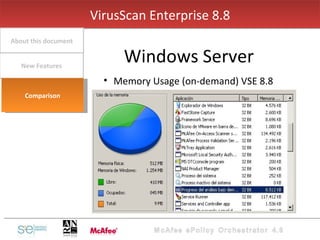
Memory Usage (on-demand) VSE 8.8 VirusScan Enterprise 8.8 Windows Server New Features About this document Comparison
VirusScan Enterprise 8.8   Overview

VirusScan Enterprise v8.8

  • 1.
    VirusScan Enterprise 8.8[email_address]
  • 2.
    VirusScan Enterprise 8.8About this document New Features Comparison VirusScan Enterprise 8.8 Overview Agenda
  • 3.
  • 4.
    About this documentNeither McAfee or RANSecurity support automatic upgrading of a pre-release version of the software. Comparison New Features About this document VirusScan Enterprise 8.8
  • 5.
    Performance Improvements IntroduciCacheWindows Office 2010 ScriptScan Exclusion Support Trusted Intallers VirusScan Enterprise 8.8 New Features Comparison About this document New Features
  • 6.
    Reduces On –Access Scan Time Reduces On – Demand Scan Time Reduces System StartUp Time VirusScan Enterprise 8.8 Performance Improvements Comparison About this document New Features
  • 7.
    VirusScan Enterprise Cachespreviously scanned files in a common location to reduce duplicate file scanning and improve performance. This algo applies to On-Demand Scans VirusScan Enterprise 8.8 Introducing Cache Comparison About this document New Features
  • 8.
    This release supportsall Windows Office 2010 applications, specially adding on-access scanning of Microsoft Outlook 2010 email and attachment files. VirusScan Enterprise 8.8 Windows Office 2010 Comparison About this document New Features
  • 9.
    ScriptScan exclusions, URLsof trusted scripts from know safe websites, can be easily added to reduce scanning and improve performance. Previusly these exclusions required manual registry editing. VirusScan Enterprise 8.8 ScriptScan Exclusion Comparison About this document New Features
  • 10.
    Specify if MSIfiles, installed by msiexec and signed by McAfee or Microsoft, or if Windows Trusted Installer Service files, are scanned on-access: Disabled (default), do not scan files installed by MSI or WTIS. NOTE: Disabled improves the performance of large Microsoft application installers. VirusScan Enterprise 8.8 Trusted Installers Comparison About this document New Features
  • 11.
    The objective ofthis comparison is to analize the performance of VSE 8.8 against VSE 8.7 allowing us to observe the current differences between the two versions. VirusScan Enterprise 8.8 Comparison New Features About this document Comparison
  • 12.
    Scenario: Windows XPSP2, 512Mb RAM Windows 7 Prof, 2GB RAM Windows Srv 2003 Enterprise R2, 512Mb RAM VirusScan Enterprise 8.8 Comparison New Features About this document Comparison
  • 13.
    Memory Usage (on-access)VirusScan Enterprise 8.8 Windows XP New Features About this document Comparison
  • 14.
    Memory Usage (on-demand)VirusScan Enterprise 8.8 Windows XP New Features About this document Comparison
  • 15.
    Memory Usage (on-access)VSE 8.7 VirusScan Enterprise 8.8 Windows XP New Features About this document Comparison
  • 16.
    Memory Usage (on-access)VSE 8.8 VirusScan Enterprise 8.8 Windows XP New Features About this document Comparison
  • 17.
    Memory Usage (on-demand)VSE 8.7 VirusScan Enterprise 8.8 Windows XP New Features About this document Comparison
  • 18.
    Memory Usage (on-demand)VSE 8.8 VirusScan Enterprise 8.8 Windows XP New Features About this document Comparison
  • 19.
    Memory Usage (on-access)VirusScan Enterprise 8.8 Windows 7 New Features About this document Comparison
  • 20.
    Memory Usage (on-demand)VirusScan Enterprise 8.8 Windows 7 New Features About this document Comparison
  • 21.
    Memory Usage (on-access)VSE 8.7 VirusScan Enterprise 8.8 Windows 7 New Features About this document Comparison
  • 22.
    Memory Usage (on-access)VSE 8.8 VirusScan Enterprise 8.8 Windows 7 New Features About this document Comparison
  • 23.
    Memory Usage (on-demand)VSE 8.7 VirusScan Enterprise 8.8 Windows 7 New Features About this document Comparison
  • 24.
    Memory Usage (on-demand)VSE 8.8 VirusScan Enterprise 8.8 Windows 7 New Features About this document Comparison
  • 25.
    Memory Usage (on-access)VirusScan Enterprise 8.8 Windows Server New Features About this document Comparison
  • 26.
    Memory Usage (on-demand)VirusScan Enterprise 8.8 Windows Server New Features About this document Comparison
  • 27.
    Memory Usage (on-access)VSE 8.7 VirusScan Enterprise 8.8 Windows Server New Features About this document Comparison
  • 28.
    Memory Usage (on-access)VSE 8.8 VirusScan Enterprise 8.8 Windows Server New Features About this document Comparison
  • 29.
    Memory Usage (on-demand)VSE 8.7 VirusScan Enterprise 8.8 Windows Server New Features About this document Comparison
  • 30.
    Memory Usage (on-demand)VSE 8.8 VirusScan Enterprise 8.8 Windows Server New Features About this document Comparison
  • 31.