Vinyl-cutter & heat press
Mini-workshop at Bitraf, Jan 2024
Bitraf
• Byggekveld hver Torsdag
• Hobbykveld hver Tirsdag
• Oppgraderingskvelder
• Verksteder for 3D Printing, tekstil, biologi,
resin/støping, tre, plast, kalde
metallarbeider, over
fl
atemontert elektronikk
• Kurs i elektronikk, resin-printing, CNC
fresing, laserskjærer, tegne kretskort,
lodding, programmering og mye mer
(arrangert av medlemmene - for
medlemmene)
Booking
• Alle verktøy bookes i felles-kalender
• Prosessen er beskrevet i Wiki’en
▪ Comprised of paths determined by
mathematical points in space
▪ The correct format for
cutting. The knife moves
along the line
▪ Popular filetypes:
▪ .SVG
▪ .DXF
▪ .EPS
▪ .AI
▪ Made of pixels/dots
▪ Cannot be cut since there is no line
for the knife to follow
▪ Popular filetypes:
▪ .JPG
▪ .BMP
▪ .PNG
▪ .GIF
Raster/Bitmap
Vector
What can be cut?
InkScape is a free and Open
Source software for vector
drawing.
You can also use tools such as
Adobe Illustrator, CorelDraw and
many others.
The main point is that you need to
have vectors and not pixels for the
software to follow. You can
however convert Bitmaps to
Vectors, so lets have a look at that
and what limitations it brings
Preparing a design
I’ll start o
ff
with a warning: Cricut
Design Space is an incredibly bad
software and you’ll experience it
today
You’ll make a design that looks
great, but when you go to cut it,
the software changes parts of your
design to random locations
There are always way to solve this,
but they are extremely un-intuitive,
so here’s one example
The software
The software
When importing a vector
fi
le, the
software will show it correctly, but
when you try to cut it, it may look like
this:
After playing around with the options, I
fi
nally made it work by playing around
with the options in the “Layers” menu
The vinyl cutting process
1. Create your design
2. Stick your material to the mat
3. Load the tool you want to use
(usually the knife)
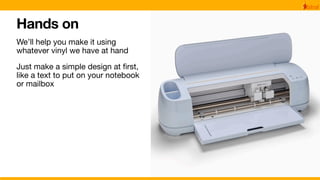
4. Start the Cricut Maker 3
5. Click the “Make it”-button
6. Follow instructions on screen to
load the material. Eventually you’ll
be told to press “Go”. This means
to press the Play-button on the
machine itself
Problem solving
If you cannot progress all the way to pressing the
Play button, there is something with your design
that is preventing cutting it.
This may be caused by many things, but (due to the
terrible software) Cricut won’t tell you what is wrong.
You’ll just have to learn what may ba wrong yourself.
Sometimes, the design might not be cuttable. Try to
fl
atten/combine your design and make sure all
layers are cuttable. Also check that you’ve selected
the correct machine.
You may also have set a layer to something other
than a basic cut. If all else fails, start a new
document and try again…
Different kinds of vinyl
Cricut sells 3 types of vinyl:
• Removable
• Permanent
• IronOn
From other vendors, you can
fi
nd
other variants such as the re
fl
ective
material I use
Iron-on vinyl
Remember: shiny side down & mirror your design
The heat press
How long to press?
Hands on
We’ll help you make it using
whatever vinyl we have at hand
Just make a simple design at
fi
rst,
like a text to put on your notebook
or mailbox

VinylKutter Workshop

  • 1.
    Vinyl-cutter & heatpress Mini-workshop at Bitraf, Jan 2024
  • 2.
    Bitraf • Byggekveld hverTorsdag • Hobbykveld hver Tirsdag • Oppgraderingskvelder • Verksteder for 3D Printing, tekstil, biologi, resin/støping, tre, plast, kalde metallarbeider, over fl atemontert elektronikk • Kurs i elektronikk, resin-printing, CNC fresing, laserskjærer, tegne kretskort, lodding, programmering og mye mer (arrangert av medlemmene - for medlemmene)
  • 3.
    Booking • Alle verktøybookes i felles-kalender • Prosessen er beskrevet i Wiki’en
  • 7.
    ▪ Comprised ofpaths determined by mathematical points in space ▪ The correct format for cutting. The knife moves along the line ▪ Popular filetypes: ▪ .SVG ▪ .DXF ▪ .EPS ▪ .AI ▪ Made of pixels/dots ▪ Cannot be cut since there is no line for the knife to follow ▪ Popular filetypes: ▪ .JPG ▪ .BMP ▪ .PNG ▪ .GIF Raster/Bitmap Vector What can be cut?
  • 8.
    InkScape is afree and Open Source software for vector drawing. You can also use tools such as Adobe Illustrator, CorelDraw and many others. The main point is that you need to have vectors and not pixels for the software to follow. You can however convert Bitmaps to Vectors, so lets have a look at that and what limitations it brings Preparing a design
  • 9.
    I’ll start o ff witha warning: Cricut Design Space is an incredibly bad software and you’ll experience it today You’ll make a design that looks great, but when you go to cut it, the software changes parts of your design to random locations There are always way to solve this, but they are extremely un-intuitive, so here’s one example The software
  • 10.
    The software When importinga vector fi le, the software will show it correctly, but when you try to cut it, it may look like this: After playing around with the options, I fi nally made it work by playing around with the options in the “Layers” menu
  • 11.
    The vinyl cuttingprocess 1. Create your design 2. Stick your material to the mat 3. Load the tool you want to use (usually the knife) 4. Start the Cricut Maker 3 5. Click the “Make it”-button 6. Follow instructions on screen to load the material. Eventually you’ll be told to press “Go”. This means to press the Play-button on the machine itself
  • 12.
    Problem solving If youcannot progress all the way to pressing the Play button, there is something with your design that is preventing cutting it. This may be caused by many things, but (due to the terrible software) Cricut won’t tell you what is wrong. You’ll just have to learn what may ba wrong yourself. Sometimes, the design might not be cuttable. Try to fl atten/combine your design and make sure all layers are cuttable. Also check that you’ve selected the correct machine. You may also have set a layer to something other than a basic cut. If all else fails, start a new document and try again…
  • 13.
    Different kinds ofvinyl Cricut sells 3 types of vinyl: • Removable • Permanent • IronOn From other vendors, you can fi nd other variants such as the re fl ective material I use
  • 14.
    Iron-on vinyl Remember: shinyside down & mirror your design
  • 15.
  • 16.
  • 17.
    Hands on We’ll helpyou make it using whatever vinyl we have at hand Just make a simple design at fi rst, like a text to put on your notebook or mailbox