
14.10.2012


Your Logo Here

                                                            Diethmar Rimser
                                                            Paul Van der Cruyssen


Vibe Landing Page


                                  Diethmar & Paul

     Diethmar Rimser - Austria
           diethmar.rimser(at)brainagents.at
     Paul Van der Cruyssen – Belgium
           paul(at)mooringline.be


     12. October 2010 – OH Board Meeting UK
            Belgium – Austria, 4:4


Duesseldorf, 10/2012                                                                2
© Diethmar Rimser, BrainAgents GmbH & GWAVA Inc, Confidential & Proprietary


                                                                                                1
14.10.2012


                                            Agenda

Why Landing Pages?
Explanation & Description
Exercise: Out from the Resource Library
Exercise: Landing Page I - Simple Contents
Exercise: Landing Page II -
 Contents from Different Departments
Branding


Duesseldorf, 10/2012                                                          3
© Diethmar Rimser, BrainAgents GmbH & GWAVA Inc, Confidential & Proprietary


                            Why Landing Pages?


                                Lost in
                                      Space


Duesseldorf, 10/2012                                                          4
© Diethmar Rimser, BrainAgents GmbH & GWAVA Inc, Confidential & Proprietary


                                                                                          2
14.10.2012


                              Why Landing Pages

Creating a landing page for a workspace enables
  users to see the most important information as
  soon as they access the workspace.
When you create a landing page, you reference
  content from folder entries within the workspace
  to display on the landing page.
Landing pages make it possible to show your Vibe
  in an easy-to-read and easy-to-use
  presentation.
Use landing pages for navigation purposes.

Duesseldorf, 10/2012                                                          5
© Diethmar Rimser, BrainAgents GmbH & GWAVA Inc, Confidential & Proprietary


                     Configuring a Landing Page

Topics:
      Create a landing page workspace
      Changing the workspace view to a landing page
      Modifying the layout of the landing page
      Add content to the landing page


Duesseldorf, 10/2012                                                          6
© Diethmar Rimser, BrainAgents GmbH & GWAVA Inc, Confidential & Proprietary


                                                                                          3
14.10.2012


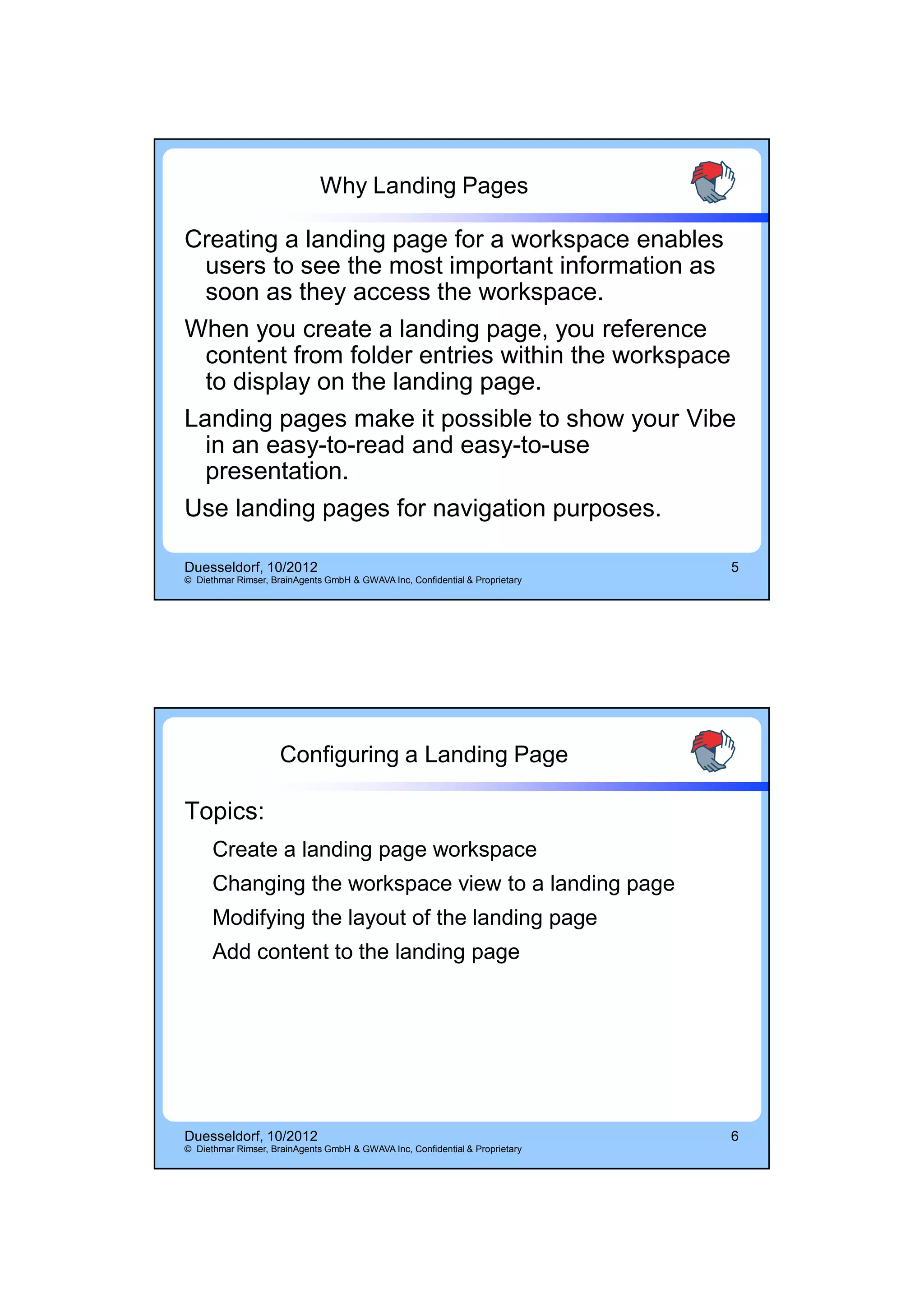
                    Create a New Landing Page


Duesseldorf, 10/2012                                                          7
© Diethmar Rimser, BrainAgents GmbH & GWAVA Inc, Confidential & Proprietary


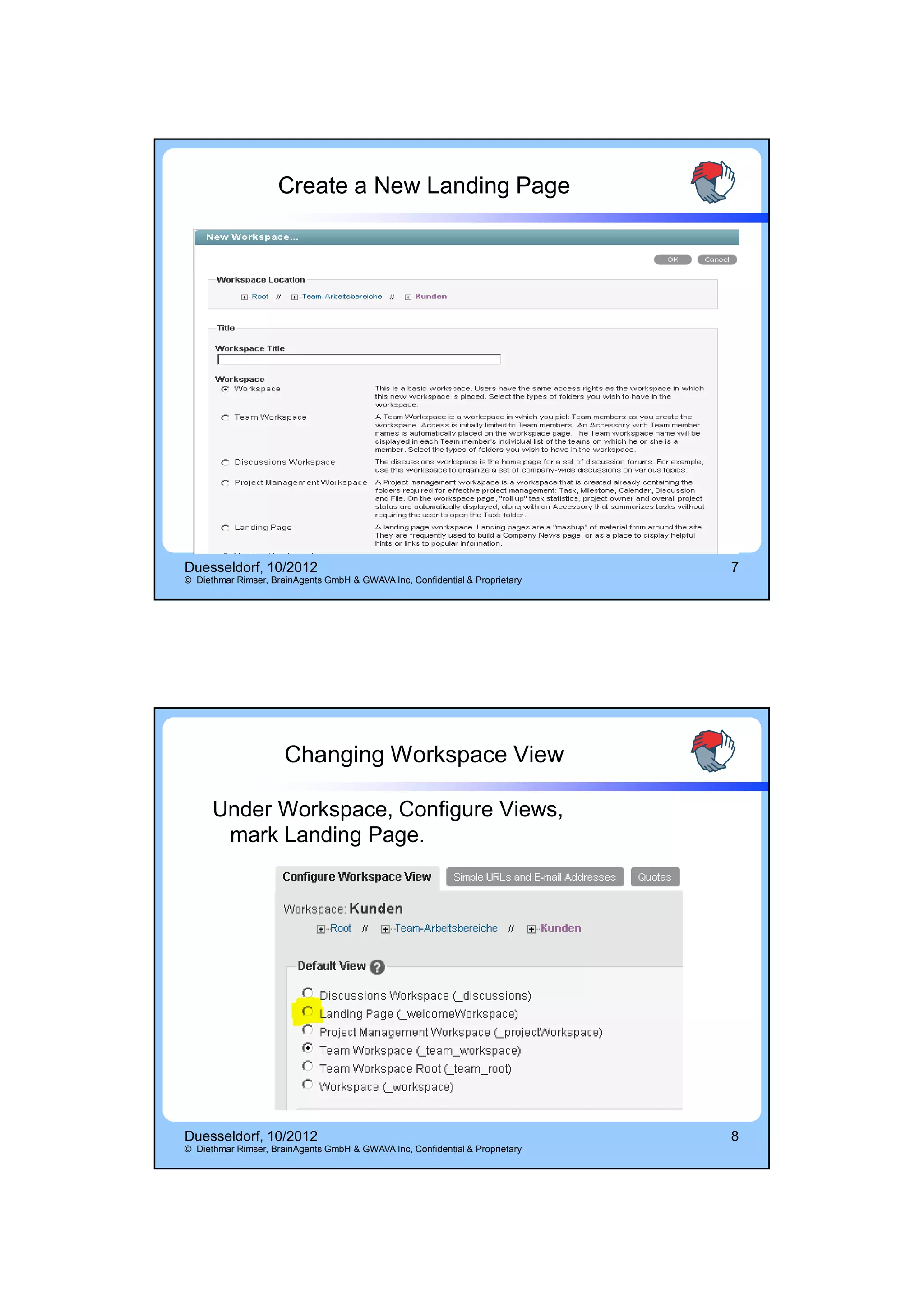
                      Changing Workspace View

      Under Workspace, Configure Views,
       mark Landing Page.


Duesseldorf, 10/2012                                                          8
© Diethmar Rimser, BrainAgents GmbH & GWAVA Inc, Confidential & Proprietary


                                                                                          4
14.10.2012


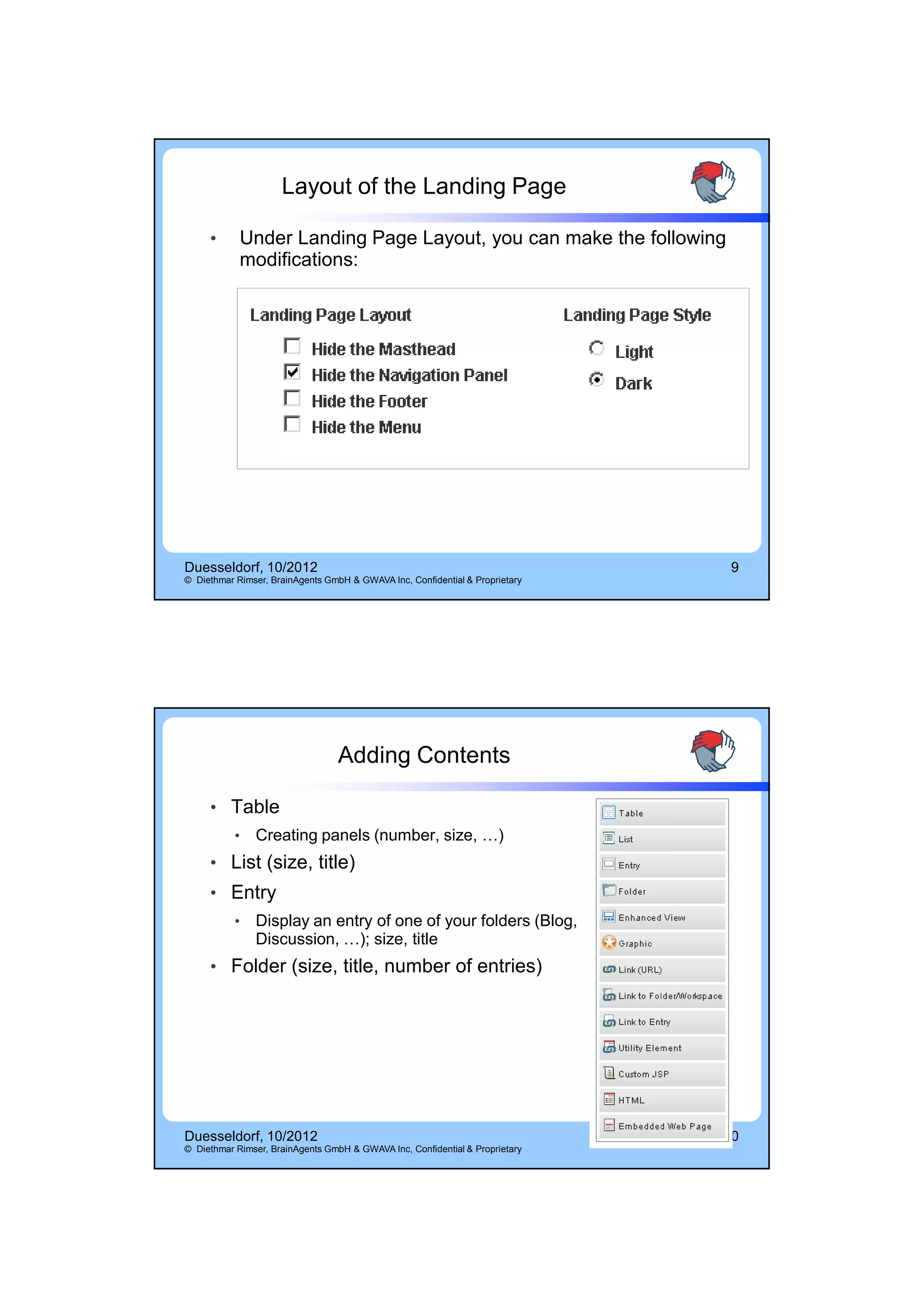
                     Layout of the Landing Page

     •      Under Landing Page Layout, you can make the following
            modifications:


Duesseldorf, 10/2012                                                           9
© Diethmar Rimser, BrainAgents GmbH & GWAVA Inc, Confidential & Proprietary


                                  Adding Contents

     • Table
           •   Creating panels (number, size, …)
     • List (size, title)
     • Entry
           •   Display an entry of one of your folders (Blog,
               Discussion, …); size, title
     • Folder (size, title, number of entries)


Duesseldorf, 10/2012                                                          10
© Diethmar Rimser, BrainAgents GmbH & GWAVA Inc, Confidential & Proprietary


                                                                                           5
14.10.2012


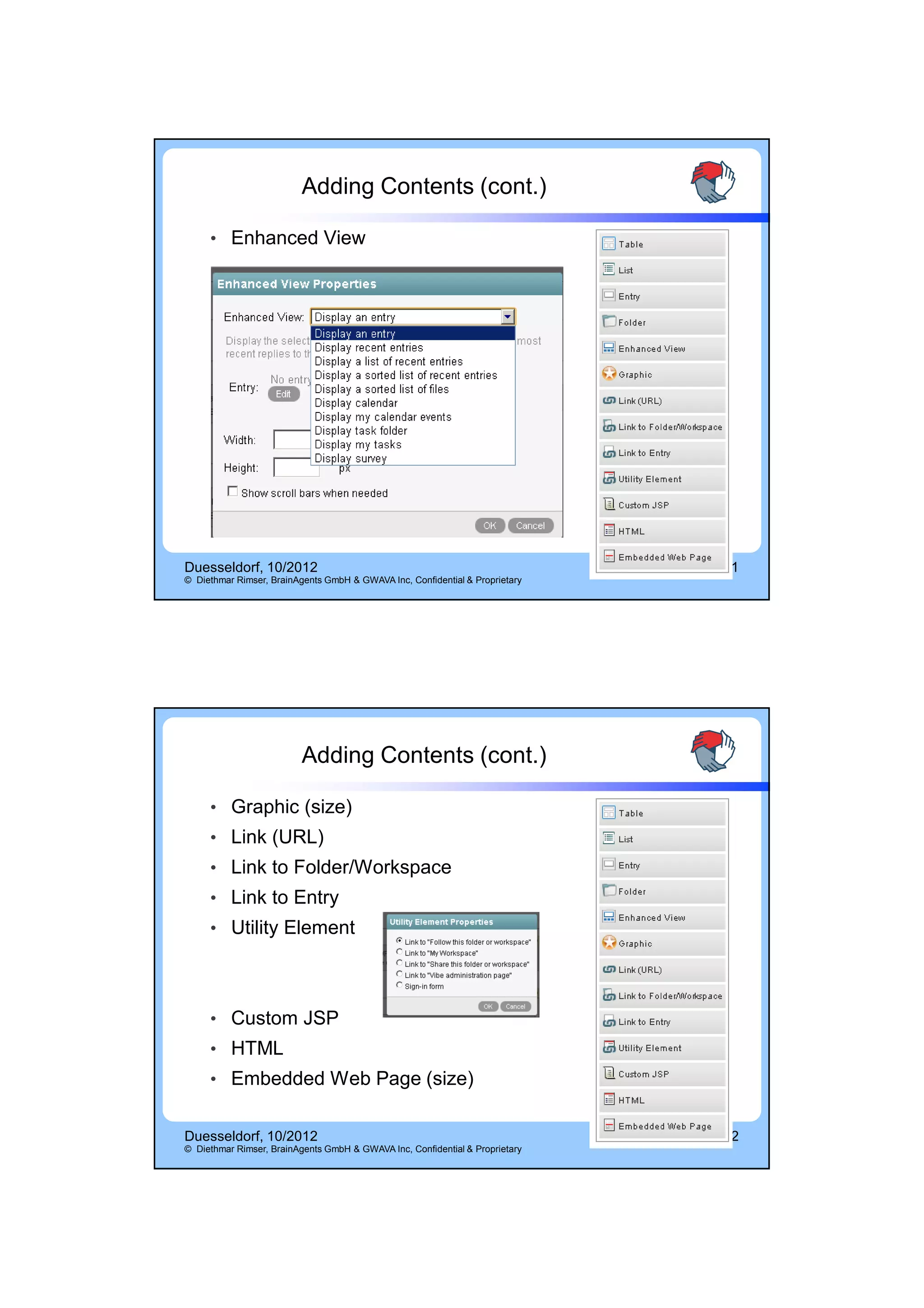
                          Adding Contents (cont.)

     • Enhanced View


Duesseldorf, 10/2012                                                          11
© Diethmar Rimser, BrainAgents GmbH & GWAVA Inc, Confidential & Proprietary


                          Adding Contents (cont.)

     • Graphic (size)
     • Link (URL)
     • Link to Folder/Workspace
     • Link to Entry
     • Utility Element


     • Custom JSP
     • HTML
     • Embedded Web Page (size)


Duesseldorf, 10/2012                                                          12
© Diethmar Rimser, BrainAgents GmbH & GWAVA Inc, Confidential & Proprietary


                                                                                           6
14.10.2012


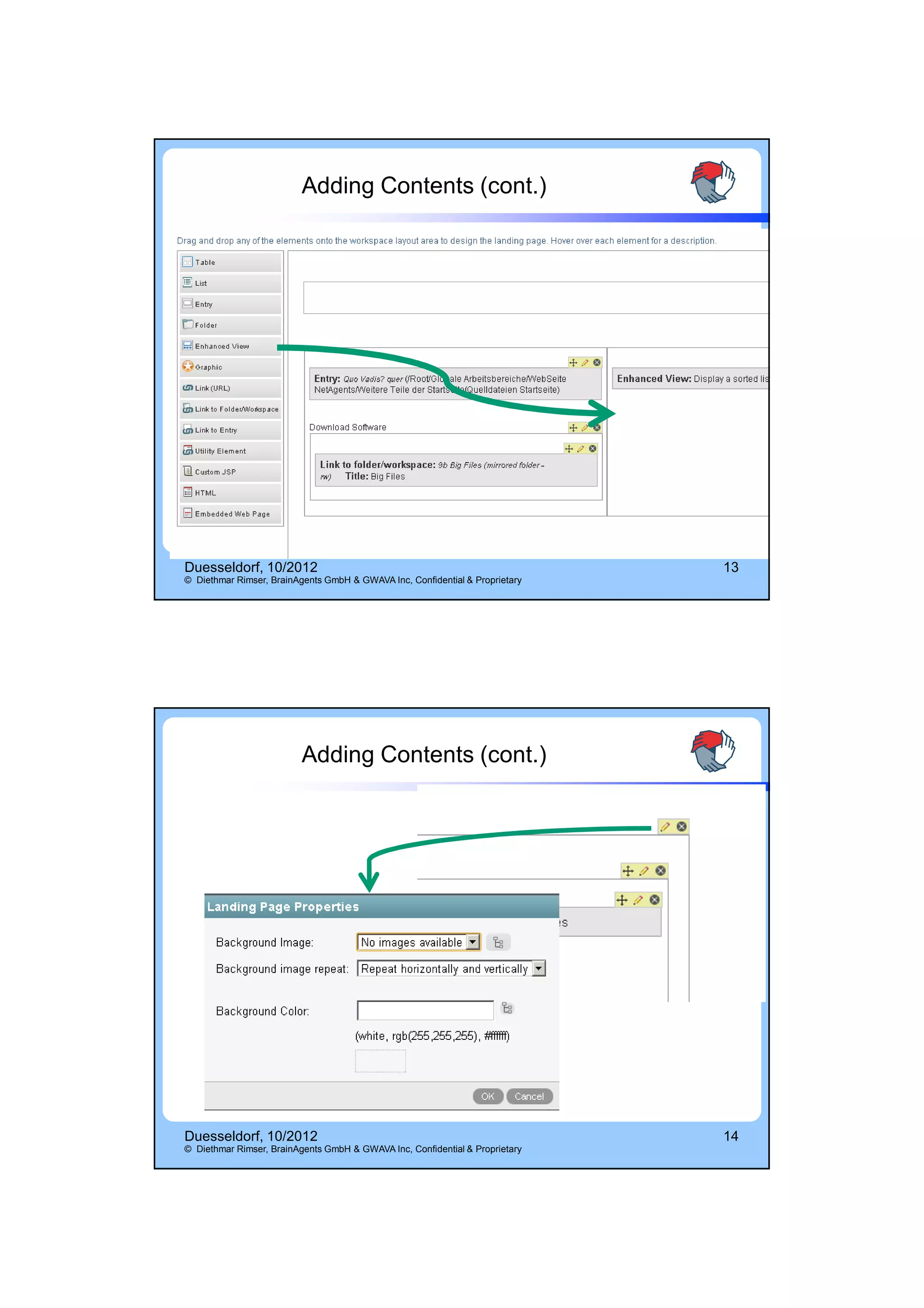
                          Adding Contents (cont.)


Duesseldorf, 10/2012                                                          13
© Diethmar Rimser, BrainAgents GmbH & GWAVA Inc, Confidential & Proprietary


                          Adding Contents (cont.)


Duesseldorf, 10/2012                                                          14
© Diethmar Rimser, BrainAgents GmbH & GWAVA Inc, Confidential & Proprietary


                                                                                           7
14.10.2012


                             Some Imported Examples

• Landing Page Example
• Government Workspace Example
      • City of Plattsburg
• Main (Tablet Example)


Duesseldorf, 10/2012                                                                       15
© Diethmar Rimser, BrainAgents GmbH & GWAVA Inc, Confidential & Proprietary


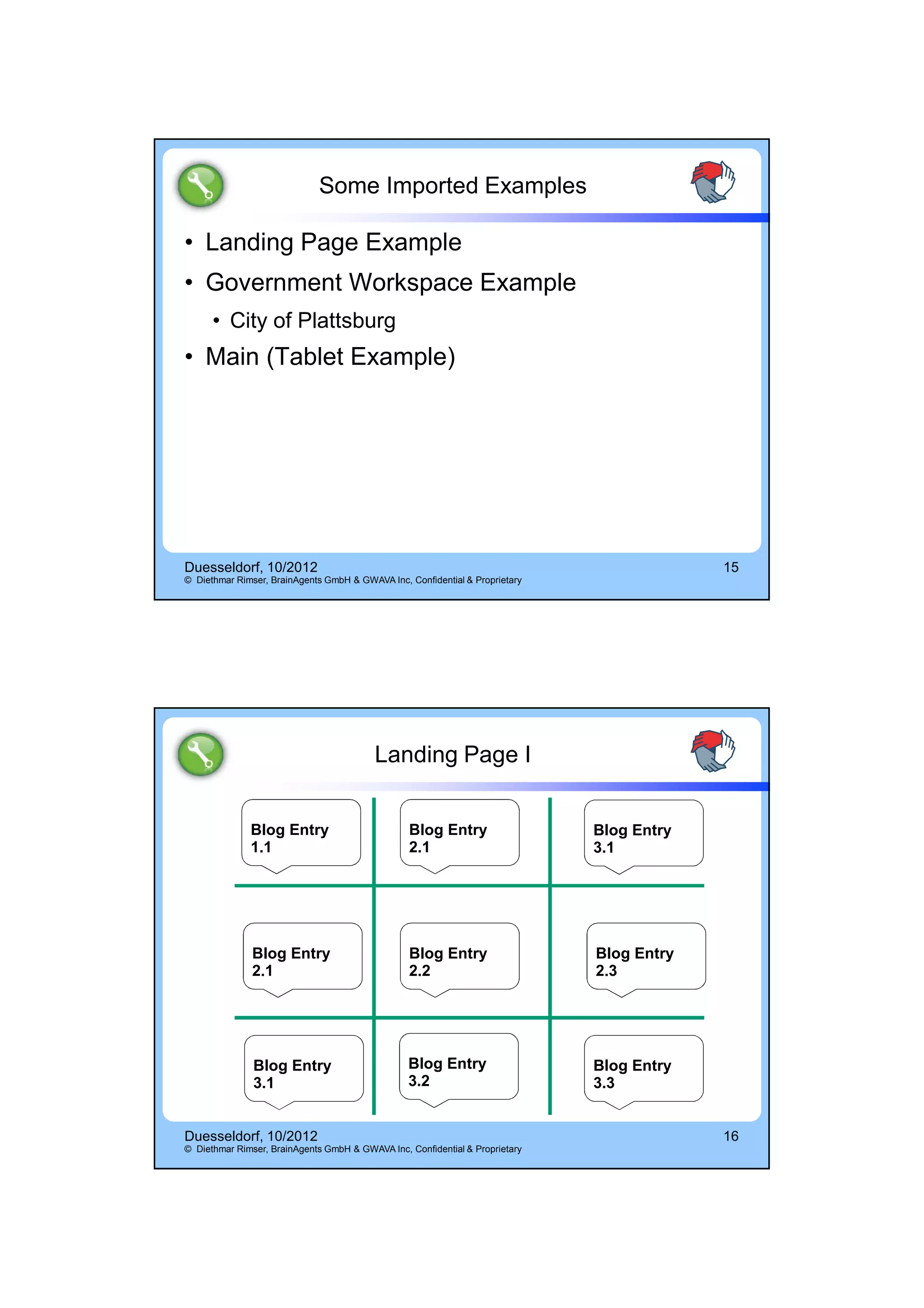
                                          Landing Page I


              Blog Entry                         Blog Entry                   Blog Entry
              1.1                                2.1                          3.1


               Blog Entry                        Blog Entry                   Blog Entry
               2.1                               2.2                          2.3


               Blog Entry                        Blog Entry                   Blog Entry
               3.1                               3.2                          3.3


Duesseldorf, 10/2012                                                                       16
© Diethmar Rimser, BrainAgents GmbH & GWAVA Inc, Confidential & Proprietary


                                                                                                        8
14.10.2012


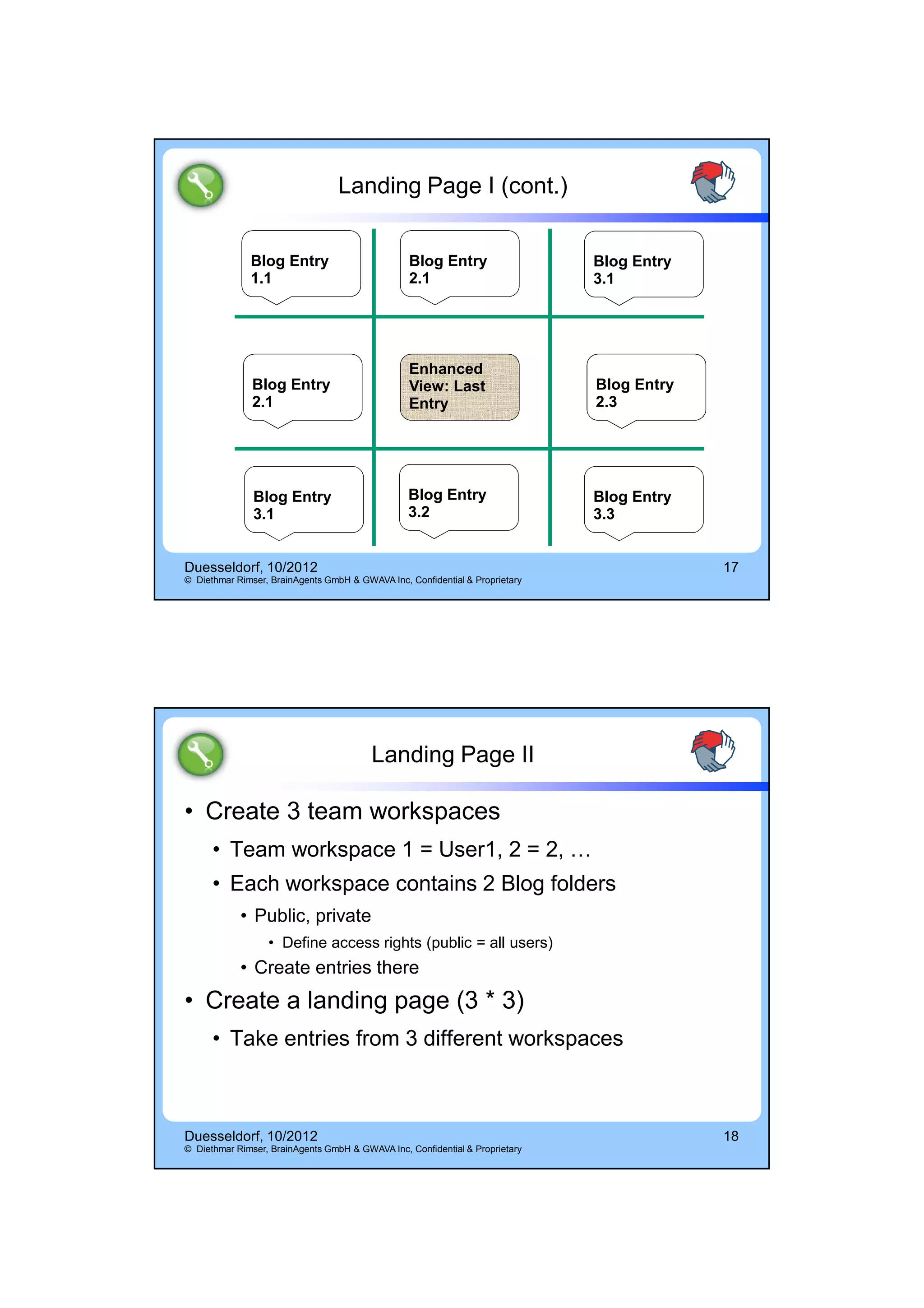
                                  Landing Page I (cont.)


              Blog Entry                         Blog Entry                   Blog Entry
              1.1                                2.1                          3.1


                                                 Enhanced
               Blog Entry                        View: Last                   Blog Entry
               2.1                               Entry                        2.3


               Blog Entry                        Blog Entry                   Blog Entry
               3.1                               3.2                          3.3


Duesseldorf, 10/2012                                                                       17
© Diethmar Rimser, BrainAgents GmbH & GWAVA Inc, Confidential & Proprietary


                                         Landing Page II

• Create 3 team workspaces
      • Team workspace 1 = User1, 2 = 2, …
      • Each workspace contains 2 Blog folders
            • Public, private
                  • Define access rights (public = all users)
            • Create entries there
• Create a landing page (3 * 3)
      • Take entries from 3 different workspaces


Duesseldorf, 10/2012                                                                       18
© Diethmar Rimser, BrainAgents GmbH & GWAVA Inc, Confidential & Proprietary


                                                                                                        9
14.10.2012


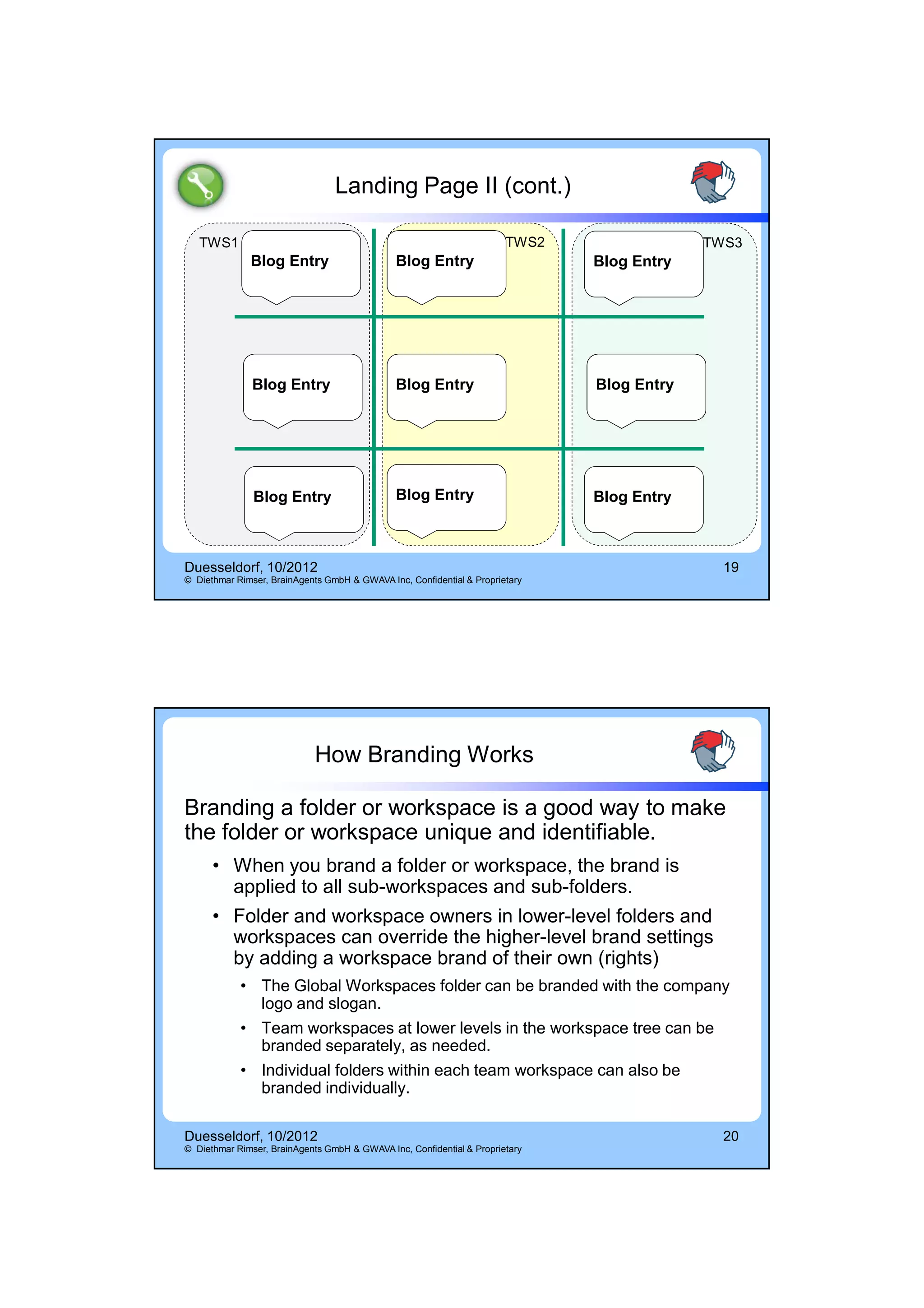
                                 Landing Page II (cont.)

   TWS1                                                                TWS2                TWS3
              Blog Entry                      Blog Entry                      Blog Entry


               Blog Entry                     Blog Entry                      Blog Entry


               Blog Entry                     Blog Entry                      Blog Entry


Duesseldorf, 10/2012                                                                         19
© Diethmar Rimser, BrainAgents GmbH & GWAVA Inc, Confidential & Proprietary


                            How Branding Works

Branding a folder or workspace is a good way to make
the folder or workspace unique and identifiable.
      • When you brand a folder or workspace, the brand is
        applied to all sub-workspaces and sub-folders.
      • Folder and workspace owners in lower-level folders and
        workspaces can override the higher-level brand settings
        by adding a workspace brand of their own (rights)
            • The Global Workspaces folder can be branded with the company
              logo and slogan.
            • Team workspaces at lower levels in the workspace tree can be
              branded separately, as needed.
            • Individual folders within each team workspace can also be
              branded individually.

Duesseldorf, 10/2012                                                                         20
© Diethmar Rimser, BrainAgents GmbH & GWAVA Inc, Confidential & Proprietary


                                                                                                         10
14.10.2012


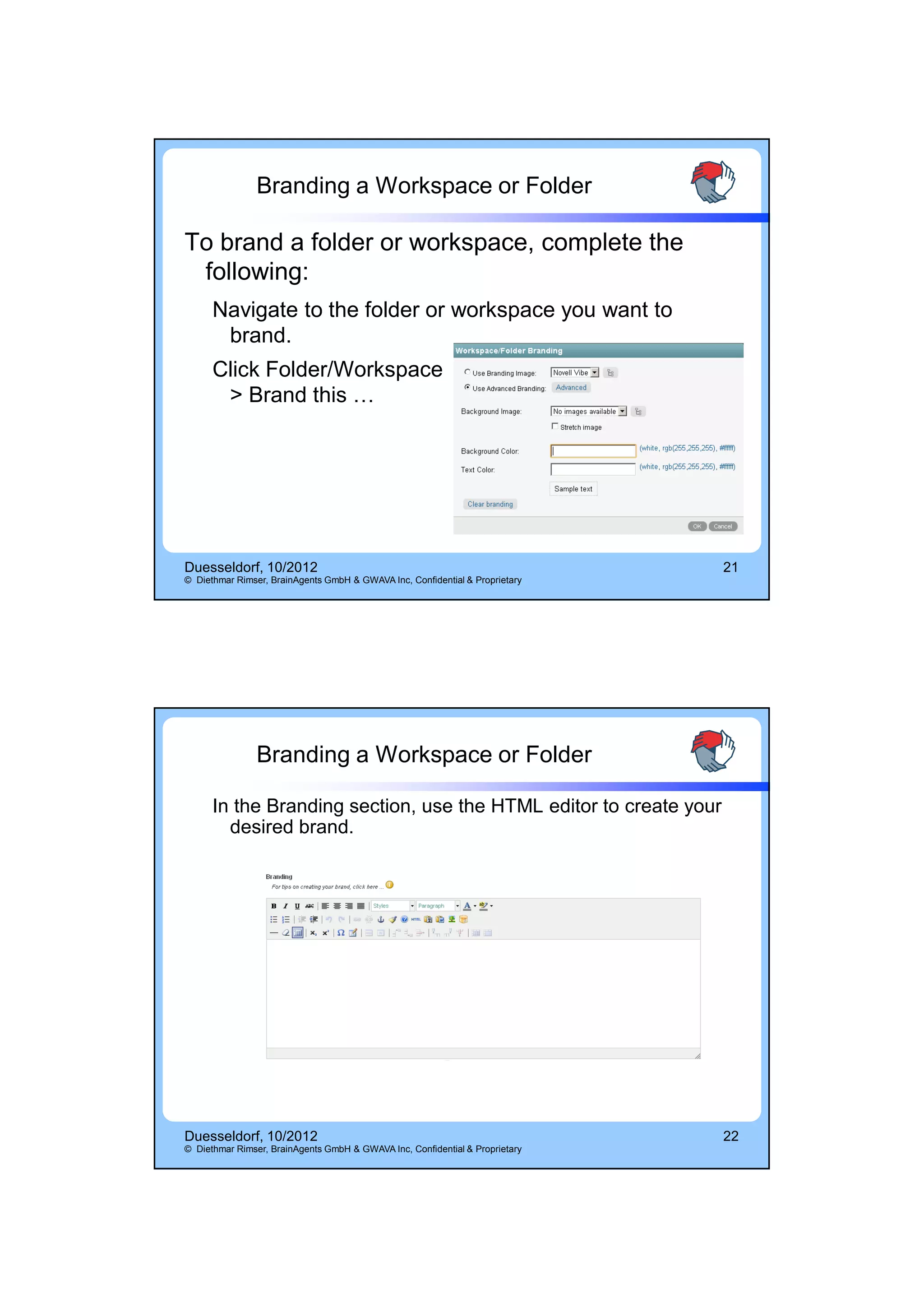
                Branding a Workspace or Folder

To brand a folder or workspace, complete the
 following:
      Navigate to the folder or workspace you want to
       brand.
      Click Folder/Workspace
       > Brand this …


Duesseldorf, 10/2012                                                          21
© Diethmar Rimser, BrainAgents GmbH & GWAVA Inc, Confidential & Proprietary


                Branding a Workspace or Folder

      In the Branding section, use the HTML editor to create your
        desired brand.


Duesseldorf, 10/2012                                                          22
© Diethmar Rimser, BrainAgents GmbH & GWAVA Inc, Confidential & Proprietary


                                                                                          11
14.10.2012


                                                 Branding


                  • Change the Branding for some of
                    your workspaces


Duesseldorf, 10/2012                                                          23
© Diethmar Rimser, BrainAgents GmbH & GWAVA Inc, Confidential & Proprietary


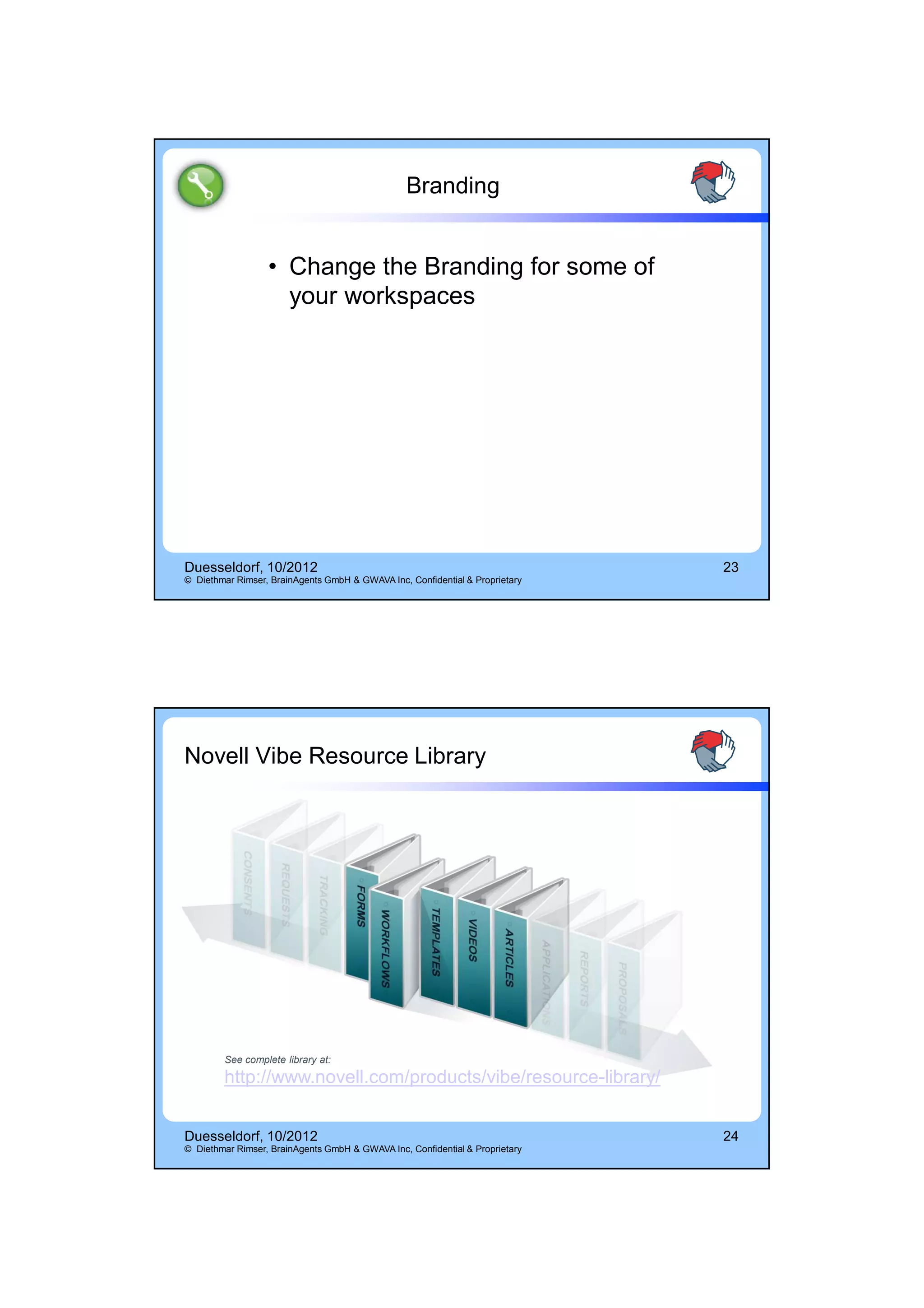
Novell Vibe Resource Library


        See complete library at:
        http://www.novell.com/products/vibe/resource-library/


Duesseldorf, 10/2012                                                          24
© Diethmar Rimser, BrainAgents GmbH & GWAVA Inc, Confidential & Proprietary


                                                                                          12
14.10.2012


Q&A


THE END


                 13

Vibe landing pages h2 d rimser

  • 1.
    14.10.2012 Your Logo Here Diethmar Rimser Paul Van der Cruyssen Vibe Landing Page Diethmar & Paul Diethmar Rimser - Austria diethmar.rimser(at)brainagents.at Paul Van der Cruyssen – Belgium paul(at)mooringline.be 12. October 2010 – OH Board Meeting UK Belgium – Austria, 4:4 Duesseldorf, 10/2012 2 © Diethmar Rimser, BrainAgents GmbH & GWAVA Inc, Confidential & Proprietary 1
  • 2.
    14.10.2012 Agenda Why Landing Pages? Explanation & Description Exercise: Out from the Resource Library Exercise: Landing Page I - Simple Contents Exercise: Landing Page II - Contents from Different Departments Branding Duesseldorf, 10/2012 3 © Diethmar Rimser, BrainAgents GmbH & GWAVA Inc, Confidential & Proprietary Why Landing Pages? Lost in Space Duesseldorf, 10/2012 4 © Diethmar Rimser, BrainAgents GmbH & GWAVA Inc, Confidential & Proprietary 2
  • 3.
    14.10.2012 Why Landing Pages Creating a landing page for a workspace enables users to see the most important information as soon as they access the workspace. When you create a landing page, you reference content from folder entries within the workspace to display on the landing page. Landing pages make it possible to show your Vibe in an easy-to-read and easy-to-use presentation. Use landing pages for navigation purposes. Duesseldorf, 10/2012 5 © Diethmar Rimser, BrainAgents GmbH & GWAVA Inc, Confidential & Proprietary Configuring a Landing Page Topics: Create a landing page workspace Changing the workspace view to a landing page Modifying the layout of the landing page Add content to the landing page Duesseldorf, 10/2012 6 © Diethmar Rimser, BrainAgents GmbH & GWAVA Inc, Confidential & Proprietary 3
  • 4.
    14.10.2012 Create a New Landing Page Duesseldorf, 10/2012 7 © Diethmar Rimser, BrainAgents GmbH & GWAVA Inc, Confidential & Proprietary Changing Workspace View Under Workspace, Configure Views, mark Landing Page. Duesseldorf, 10/2012 8 © Diethmar Rimser, BrainAgents GmbH & GWAVA Inc, Confidential & Proprietary 4
  • 5.
    14.10.2012 Layout of the Landing Page • Under Landing Page Layout, you can make the following modifications: Duesseldorf, 10/2012 9 © Diethmar Rimser, BrainAgents GmbH & GWAVA Inc, Confidential & Proprietary Adding Contents • Table • Creating panels (number, size, …) • List (size, title) • Entry • Display an entry of one of your folders (Blog, Discussion, …); size, title • Folder (size, title, number of entries) Duesseldorf, 10/2012 10 © Diethmar Rimser, BrainAgents GmbH & GWAVA Inc, Confidential & Proprietary 5
  • 6.
    14.10.2012 Adding Contents (cont.) • Enhanced View Duesseldorf, 10/2012 11 © Diethmar Rimser, BrainAgents GmbH & GWAVA Inc, Confidential & Proprietary Adding Contents (cont.) • Graphic (size) • Link (URL) • Link to Folder/Workspace • Link to Entry • Utility Element • Custom JSP • HTML • Embedded Web Page (size) Duesseldorf, 10/2012 12 © Diethmar Rimser, BrainAgents GmbH & GWAVA Inc, Confidential & Proprietary 6
  • 7.
    14.10.2012 Adding Contents (cont.) Duesseldorf, 10/2012 13 © Diethmar Rimser, BrainAgents GmbH & GWAVA Inc, Confidential & Proprietary Adding Contents (cont.) Duesseldorf, 10/2012 14 © Diethmar Rimser, BrainAgents GmbH & GWAVA Inc, Confidential & Proprietary 7
  • 8.
    14.10.2012 Some Imported Examples • Landing Page Example • Government Workspace Example • City of Plattsburg • Main (Tablet Example) Duesseldorf, 10/2012 15 © Diethmar Rimser, BrainAgents GmbH & GWAVA Inc, Confidential & Proprietary Landing Page I Blog Entry Blog Entry Blog Entry 1.1 2.1 3.1 Blog Entry Blog Entry Blog Entry 2.1 2.2 2.3 Blog Entry Blog Entry Blog Entry 3.1 3.2 3.3 Duesseldorf, 10/2012 16 © Diethmar Rimser, BrainAgents GmbH & GWAVA Inc, Confidential & Proprietary 8
  • 9.
    14.10.2012 Landing Page I (cont.) Blog Entry Blog Entry Blog Entry 1.1 2.1 3.1 Enhanced Blog Entry View: Last Blog Entry 2.1 Entry 2.3 Blog Entry Blog Entry Blog Entry 3.1 3.2 3.3 Duesseldorf, 10/2012 17 © Diethmar Rimser, BrainAgents GmbH & GWAVA Inc, Confidential & Proprietary Landing Page II • Create 3 team workspaces • Team workspace 1 = User1, 2 = 2, … • Each workspace contains 2 Blog folders • Public, private • Define access rights (public = all users) • Create entries there • Create a landing page (3 * 3) • Take entries from 3 different workspaces Duesseldorf, 10/2012 18 © Diethmar Rimser, BrainAgents GmbH & GWAVA Inc, Confidential & Proprietary 9
  • 10.
    14.10.2012 Landing Page II (cont.) TWS1 TWS2 TWS3 Blog Entry Blog Entry Blog Entry Blog Entry Blog Entry Blog Entry Blog Entry Blog Entry Blog Entry Duesseldorf, 10/2012 19 © Diethmar Rimser, BrainAgents GmbH & GWAVA Inc, Confidential & Proprietary How Branding Works Branding a folder or workspace is a good way to make the folder or workspace unique and identifiable. • When you brand a folder or workspace, the brand is applied to all sub-workspaces and sub-folders. • Folder and workspace owners in lower-level folders and workspaces can override the higher-level brand settings by adding a workspace brand of their own (rights) • The Global Workspaces folder can be branded with the company logo and slogan. • Team workspaces at lower levels in the workspace tree can be branded separately, as needed. • Individual folders within each team workspace can also be branded individually. Duesseldorf, 10/2012 20 © Diethmar Rimser, BrainAgents GmbH & GWAVA Inc, Confidential & Proprietary 10
  • 11.
    14.10.2012 Branding a Workspace or Folder To brand a folder or workspace, complete the following: Navigate to the folder or workspace you want to brand. Click Folder/Workspace > Brand this … Duesseldorf, 10/2012 21 © Diethmar Rimser, BrainAgents GmbH & GWAVA Inc, Confidential & Proprietary Branding a Workspace or Folder In the Branding section, use the HTML editor to create your desired brand. Duesseldorf, 10/2012 22 © Diethmar Rimser, BrainAgents GmbH & GWAVA Inc, Confidential & Proprietary 11
  • 12.
    14.10.2012 Branding • Change the Branding for some of your workspaces Duesseldorf, 10/2012 23 © Diethmar Rimser, BrainAgents GmbH & GWAVA Inc, Confidential & Proprietary Novell Vibe Resource Library See complete library at: http://www.novell.com/products/vibe/resource-library/ Duesseldorf, 10/2012 24 © Diethmar Rimser, BrainAgents GmbH & GWAVA Inc, Confidential & Proprietary 12
  • 13.