การวิเคราะห์แบบจาลองเวกเตอร์ (Vector Model)
เปิด->ArcMap10.1
เปิด->dam ->Table of contents
คลิกGeoprocessing->Buffer
จะได้หน้าต่าง ดังนี้
ช่อง Input Features ->dam ช่องoutput Features Class->เลือกที่ต้องการจะSave เปลี่ยนช่องLinear unit->500
กดSave ชื่อ Dam500
กด ->Close
เปิด->Dam500 ->Table of contents
เปิดข้อมูล ->a5239iii , a5238iv , a5238iii , a5238i ->Table of contents
คลิกGeoprocessing->Merge
ช่องInput Datasets เลือก a5239iii , a5238iv , a5238iii , a5238i
ช่อง Output Dataset กด Save -> Admin แล้วกด Save
กด Close
เปิดข้อมูล Admin ที่ Table of contents
คลิก Remove -> a5239iii , a5238iv , a5238iii , a5238i
คลิก Remove -> dam
คลิก Admin-> Open Attribute Table
เปิด Catalog ->เลือก luamp , lutam และluprv ->ไปที่ Table of contents
คลิก lutam-> Open
คลิกที่ lutam Table -> Table Optione ->Joinw and Relates
ช่อง->choose the field in this layer that the Join will be based on : เลือก ADM_ID
ช่อง->choose the table to join to this layer,or load the table from disk : เลือก lutam
ช่อง->choose the field in the table to base the join on : เลือก ADM_ID
กด -> OK
คลิก luamp-> Open
เป็นการ Join แบบ กลุ่มต่อหนึ่ง
คลิก luamp Table -> Table Optione ->Joinw and Relates
ช่อง->choose the field in this layer that the Join will be based on : เลือก AMP_ID
ช่อง->choose the table to join to this layer,or load the table from disk : เลือก luamp
ช่อง->choose the field in the table to base the join on : เลือก AMP_ID แล้ว กด -> Ok
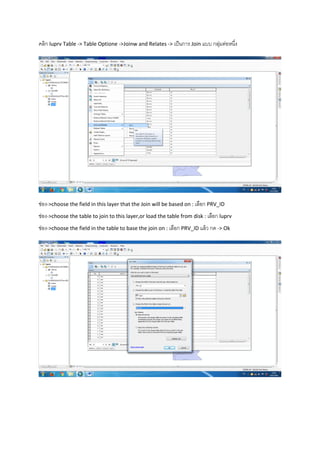
คลิก luprv-> Open
คลิก luprv Table -> Table Optione ->Joinw and Relates -> เป็นการ Join แบบ กลุ่มต่อหนึ่ง
ช่อง->choose the field in this layer that the Join will be based on : เลือก PRV_ID
ช่อง->choose the table to join to this layer,or load the table from disk : เลือก luprv
ช่อง->choose the field in the table to base the join on : เลือก PRV_ID แล้ว กด -> Ok
คลิกGeoprocessing->Clip
ช่องInput Features ->Adnim ช่อง Clip features -> Dam500 และช่อง Output feature class ->Saveที่ต้องการ
ชื่อ Addam500 แล้วกด ->Ok
Saveชื่อ Addam500 แล้วกด ->Ok
กด-> Ok
กด-> Close
เปิดข้อมูล Addam500 ไปที่ table of contents
ต่อไปจะทาการMerge เลือกเปิดขั้นข้อมูลที่ชื่อ a5239iii , a5238iv , a5238iii , a5238i
คลิก Geoprocessing -> Merge
ช่อง Input Datasets เลือกนาข้อมูล a5239iii , a5238iv , a5238iii , a5238i เข้าไป แล้วSave ที่ต้องการ
Save -> ชื่อLand Use แล้วกด-> Ok
กด -> Close
เปิด ->Land use
คลิก->Land use ->open Attribute Table
คลิก เลือกข้อมูล lucod ไปที่ Table of contents
คลิกขวาที่ lucode -> Open
ได้ดังนี้เป็นการ Join แบบ กลุ่มต่อหนึ่ง
คลิก Table Option ->Joins and Relates
ช่อง->choose the field in this layer that the Join will be based on : เลือก LUCODE
ช่อง->choose the table to join to this layer,or load the table from disk : เลือก lucode
ช่อง->choose the field in the table to base the join on : เลือก LUCODE แล้ว กด -> Ok
ผลลัพธ์
คลิก Geoprocessing ->Clip
ช่อง Input features -> Land Use ช่อง Clip features ->Dam500 ช่อง Outpue features class->Saveชี่อที่
ต้องการ
Save-> Land Use500 แล้วกด OK
กด Close
เปิด Land Use ที่ Table of contente
คลิกเลือก ชั้นข้อมูล a5239iii , a5238iv , a5238iii , a5238i และ Land Use ออกจาก Table of contents
คลิก Geoprocessing -> Intersect
ช่อง input features นาเข้าข้อมูล Land Use500 และ Addam500
ช่อง Output Feature Class -> Saveชื่อ Final แล้วSave
กด Close
คลิกขวา->Final ->Open Attribute Table
คลิก ->Table Optione -> Add Field
ตั้งชื่อ Name -> Area เปลี่ยน Type -> Float เปลี่ยน Precision ->15 เปลี่ยน Scaie->4 แล้ว Ok
ได้ช่องใหม่ ชื่อArea ดังนี้
คลิกขวาที่ช่อง Area -> Calculate Geometry…..
กด Ok
ผลลัพธ์หลังจากคานวณแล้ว
คลิก ->Table Optione -> Add Field
ตั้งชื่อ Name -> Rai เปลี่ยน Type -> Float เปลี่ยน Precision ->15 เปลี่ยน Scale-> 4 แล้ว Ok
คลิกขวาที่ช่อง Rai ->Field Calculator …
จะได้ตารางคานวณแบบนี้เราจะคานวณหา จานวนไร่ ด้วย [Area]/1600= แล้วจะได้จานวนไร่ออกมา
จะได้จานวนไร่ ดังนี้
คลิก Table Option -> select By Attributes….
คานวณหา อาเภอชัยบาดาล และ พื้นที่ที่ปลูกข้าวโพด
ได้ผลลัพธ์ ดังนี้
เปิด Microsoft Excel
เปิด ข้อมูล Open
เปิดไฟล์ข้อมูลที่เราบันทึกไว้ชื่อFinal.dbf
จะได้ข้อมูล ดังนี้
คลิก Insert -> PivotTable
แล้วกด OK
จะได้แถบ PivotTable Field List ขึ้นที่มุมชวือ
ติกเลือกข้อมูลที่ชื่อluprv_PRV1 คือ ให้แสดง ชื่อจังหวัด
ติกเลือก luamp_AMP1 ให้แสดงชื่ออาเภอ ของแต่ละจังหวัด
คลิกเลือก lutam_TAM เพื่อแสดงชื่อตาบล ของแต่ละอาเภอ
คลิกเลือก Rai เพื่อแสดง จานวนพื้นที่ของแต่ละจังหวัด อาเภอ และ ตาบล โดยหน่วยเป็นไร่
ติกเลือก lucode_ASS เพื่อแสดงจานวนพื้นที่ว่าเปล่า ของแต่ละจังหวัด

การวิเคราะห์แบบจำลองเวกเตอร์ (Vector Model)