Using Remote Tools for 
Customer Development 
Holly DeWolf 
http://www.hmdewolf.com 
Twitter @hollymdewolf
So all I need is the 
internet and I can do 
this easy peasy? 
https://www.flickr.com/photos/mipsyretro/5593568015/
Steve Blank 
Body language 
Environment 
 Distractions 
https://www.flickr.com/photos/x-ray_delta_one/4059707002/ 
https://www.flickr.com/photos/jbcurio/12122763304/
https://www.flickr.com/photos/molinarius/5868581161/
Customer Development Online 
• Meeting online – a checklist 
• Finding customers online 
• Scheduling your customers
Online Communication 
• Greeting 
• Recording 
•Webcam 
• Cross talk 
• Team etiquette
Logistics 
• Microphone and speaker check 
• Use headphones 
• Screen sharing – window placement 
• Distraction free 
• Free up bandwidth 
• Trouble shooting 
• Backup plans
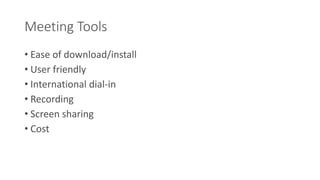
Meeting Tools 
• Ease of download/install 
• User friendly 
• International dial-in 
• Recording 
• Screen sharing 
• Cost
Finding Your Customers
https://www.flickr.com/photos/st3f4n/3405287118/
your grandma 
complete and 
total stranger 
double hourly rate 
strength of your relationship 
Incentive cost
Seek and Yee Shall Find 
• Strengthened relationship 
• Free customer development 
• Knowing how to ask
Scheduling Tools 
• User friendly 
• Clear time zones 
• Complies with data privacy laws 
• Flexible choices 
• Fits with customer’s culture and time-zone
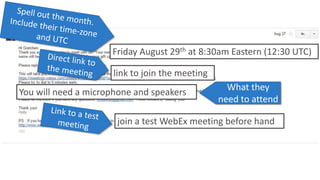
Friday August 29th at 8:30am Eastern (12:30 UTC) 
link to join the meeting 
You will need a microphone and speakers What they 
need to attend 
join a test WebEx meeting before hand
“Plans are worthless, but planning is everything.” 
Dwight Eisenhower, 1957 
http://www.loc.gov/pictures/item/96522674/
http://www.hmdewolf.com
Using Remote Tools for 
Customer Development 
Holly DeWolf 
http://www.hmdewolf.com 
Twitter @hollymdewolf
Questions?
Special Offers 
• YouCanBook.me 
• deWolf Personal Trainer Program

Using remote tools for customer development

Editor's Notes

  • #2 Raise your hand…what’s stopping you Those are all legit reasons…yet, we know one on one works Entrepreneurial books full…learned something impossible w/out talking Why don’t more of us overcome the hurdles we discussed? I believe the biggest difficulty is making it a habit. Just like the challenges that arise from making other For most of us, going to the gym is a chore…same can be said about cust dev Other difficulty with making cus dev a habit (or going to the gym)…reward isn’t always immediate Take awhile to come to “ah huh”. 5/10/20 OR MORE repeing the reward. It takes some time to make cust dev a habit
  • #3 Next half hour, more efficient ways, using internet New workout plan Will do is share, make cus dev a little bit easier As with a new workout plan, you’ll have to put in an initial investment to tailoring The beauty, easier to see results Encourage you to continue cus dev & pack in ah huh Rather than waiting till metrics With the internet the world is becoming a smaller place Want to talk to your cus You can even talk to the guy across town who you never would have met without the internet All from the comfort of your office
  • #4  I agree, there are a lot of benefits Also large benefits in time and money, doing it online It’s a tradeoff for you, your product and your business. Do benefits of in person outweigh “getting out of the office” provides unbiased, unscripted feedback from your customers Tone of voice, asking followup questions Without the cost of flying or fighting traffic across town
  • #5 Before we get started, semantics I’m a user researcher by trade I’ll prob use interchangeably Loved to discuss, save it for later over drinks With tout out of the way, let’s get down to business
  • #6 Obviously meeting with your customers online is going to provide a unique set of challenges. In the history of man-kind, in person communication has had thousands of years to develop, while online communication is in it’s infancy. So, while there are benefits to using the internet, you’ll have to overcome some frustrations that come with communicating online. I want to share a checklist of sorts that will take the rough edges off your first online customer development meeting. Unfortunately, customers don’t just show up at an appointed time ready to talk to you without a little bit of leg work finding and scheduling with them Even if you’re an established company with a list of customers to pull from, you should meet with people who haven’t used your product yet, for new product features or so you don’t exhaust your current set of customers so I’m also going talk about how you can use the internet to finding and scheduling new customers easier.
  • #7 After 100s of online customer engagements I’ve learned a lot of lessons about what works. So, rather than you having to discover them all on your own, I want to share some things to consider when communicating online. However, some of these things won’t really sink in until you practice them. So, grab your partner your grandma, the person sitting next to you….just pretend they aren’t sitting next to you
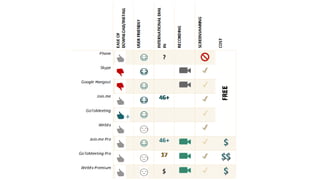
  • #9 Spend the first 10 min of your 30 min meeting explaining how to install skype…not everyone already has it installed on their computer. All screen sharing apps require some sort of install, some are better than others. I can’t say this enough, the tools you use are a reflection on your business…choose one that’s easy for your customer Good to have the backup of dial in numbers, some tools provide more options than others Some tools make it really easy to share recordings. Even if it’s yourself, consider recording. Focus on your customer, followup questions, rather than frantic notes I included phone on here for before you have a product to share, however, even early stages, consider screen sharing so people can show you current workarounds and frustrations Most are free. I used to pay for WebEx Premium…more features, usability isn’t greatest. Now I pay for Join.me Pro…policy of minimum features for maximum usability
  • #10 There are a lot of tools out there and I can’t tell you which one to pick, depends on the requirements of your business. You can take a look at my website for a detailed breakdown of the tools I’ve used Can tell you what I consider
  • #11 I have good news and bad news If you don’t have a good handle on who your customers are (or who you think they are)…drown in a sea Rather than getting answers
  • #12 Easiest, not highest quality toy, has fun doing it If enjoy talking to random people on the internet about your product and don’t care about the quality of that conversation…pick the easiest person to find Chances are you are looking for how your target users view your product Take the time to know who your customer is and where to find them Not knowing will also rob you…knowing what resonates, appeal with more than $ I know this from experience
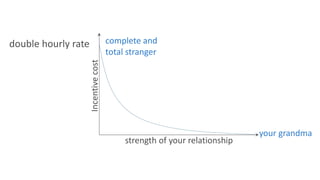
  • #13 The cost of your incentive will be inversely proportional to the strength of your relationship with the customer. If you blast a generic message out to the internet asking for help, you should be prepared to pay double that person’s hourly rate If you have a more trusted (albeit virtual) relationship with the person, do to a host of psychological and sociological reasons, they will help you altruistically I learned this the hard way w/ MG
  • #14 I’m not saying that you can’t use a monetary incentive to get quality people. I’m just saying that if the budget is tight, knowing who and where your customers are can work wonders.
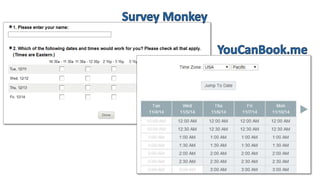
  • #16 Clever solutions with survey monkey I used to use Doodle (more for groups), now I use youcanbook.me Best user interface out there from choosing a time slot to changing the time zone
  • #17 Even though youcanbook.me sends out an automated message I like to followup with a personal email All of the information they need in one place: Spell out the month in the date (most of the world lists month then date) Include the time in their time zone and include UTC for ultimate clarity Direct link to the meetings What they need to attend Contact info in case of tech difficulties Link to test meeting (provides piece of mind for some) Most major email providers will allow you to create this message as a “canned” email so that you can easily send it out as your users schedule *once again, every interaction you have with the customer is a reflection on you and your product. Sending out this email helps your users reference everything they need in one place*
  • #18 There are so many things that are out of your control I suggest writing down every word you intend on communicating to your customer Not because you’ll use those exact words but because as Eisenhower said Start with what you want to learn, that will effect everything from who you want to talk to, how many people, and what you’re going to ask them.