Use case Diagram
•In the Unified Modeling Language (UML), a use case diagram
can summarize the details of your system's users (also known
as actors) and their interactions with the system.
• To build one, you'll use a set of specialized symbols and
connectors. An effective use case diagram can help your team
discuss and represent:
• Scenarios in which your system or application interacts with
people, organizations, or external systems
Software Architecture Design
5.
Use case diagramcomponents
• Actors: The users that interact with a system. An actor can be
a person, an organization, or an outside system that interacts
with your application or system. They must be external objects
that produce or consume data.
• Use case: It describes set of actions performed by a system
for a specific goal.
Software Architecture Design
6.
Use Case Diagram
UseCase Model
The Use Case Model captures the requirements of a system.
Use cases are a means of communicating with users and other
stakeholders about what the system is intended to do.
Actor
Software Architecture Design
7.
Use Case Diagram
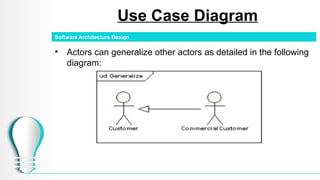
•Actors can generalize other actors as detailed in the following
diagram:
Software Architecture Design
8.
Use Case Diagram
•Use Cases: A use case is a single unit of meaningful work.
• It provides a high-level view of behavior observable to
someone or something outside the system.
• The notation for a use case is an ellipse.
Software Architecture Design
9.
Use Case Diagram
•The notation for using a use case is a connecting line with
an optional arrowhead showing the direction of control.
• The following diagram indicates that the actor Customer uses
the Withdraw use case.
Software Architecture Design
10.
Use Case Diagram
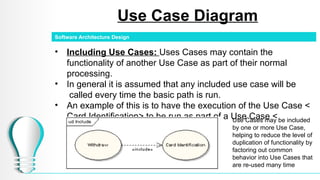
•Including Use Cases: Uses Cases may contain the
functionality of another Use Case as part of their normal
processing.
• In general it is assumed that any included use case will be
called every time the basic path is run.
• An example of this is to have the execution of the Use Case <
Card Identification> to be run as part of a Use Case <
Withdraw> .
Software Architecture Design
Use Cases may be included
by one or more Use Case,
helping to reduce the level of
duplication of functionality by
factoring out common
behavior into Use Cases that
are re-used many time
11.
Use Case Diagram
ExtendingUse Cases: One Use Case may be used to extend
the behavior of another; this is typically used in exceptional
circumstances.
For example, if before modifying a particular type of customer
order, a user must get approval from some higher authority, then
the < Get Approval> Use Case may optionally extend the regular
< Modify Order> Use Case.
Software Architecture Design
Case Study 1
•Let us consider an Automated Trading House System.
• We assume the following features of the system −
• The trading house has transactions with two types of
customers, individual customers and corporate customers.
• Once the customer places an order, it is processed by the
sales department and the customer is given the bill.
• The system allows the manager to manage customer
accounts and answer any queries posted by the customer.
Software Architecture Design
Case Study 2
Letus consider a Library Management System (LMS).
We assume the following features of the system:
•The system has two types of users, students and staff, who can
borrow books.
•A librarian is responsible for managing book records, including
adding new books, updating book details, and deleting outdated records.
•Users can reserve, borrow, and renew books through the system.
•If a user enters an invalid ID, the system denies access.
•Users must authenticate before accessing the system.
•The system allows users to pay fines for overdue books.
•Users can submit feedback through a form, which the librarian can
review.
Software Architecture Design
Case Study 3
Letus consider a Hospital Management System (HMS).
We assume the following features of the system:
•The system has three main actors: Admin, Staff, and Patient.
•An admin can add doctors, add staff, and approve
appointments.
•A patient can book an appointment and view doctor details.
•Staff members can send and view feedback in the system.
•The system allows users to log in and sign up before
accessing services.
•Doctors can view patient details but cannot modify them.
•A logout feature ensures users securely exit the system.
Software Architecture Design