Develop a block for Moodle
Project Context Speakers Michael de Raadt Yajuvendrasinh V Mahida (Masters student) Moodle Trial Project Moodle as new StudyDesk Independent Studies ‘Mini-project’ Develop a block for Moodle
Project Context Semester 1 March 2008 - CSC8480 Computing Complementary Studies Supervisor Mr. Michael de Raadt I was asked to develop block for Moodle I went with proposal of E-Commerce Portal In initial findings about Moodle I found it interesting and decided to develop block for Moodle
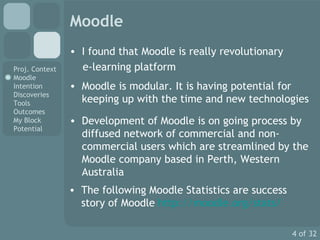
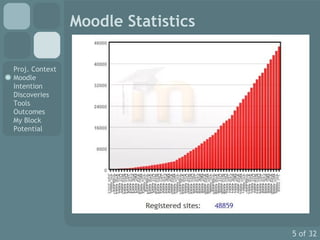
Moodle I found that Moodle is really revolutionary  e-learning platform Moodle is modular. It is having potential for keeping up with the time and new technologies Development of Moodle is on going process by diffused network of commercial and non-commercial users which are streamlined by the Moodle company based in Perth, Western Australia  The following  Moodle Statistics are success story of Moodle  http://moodle.org/stats/
Moodle Statistics
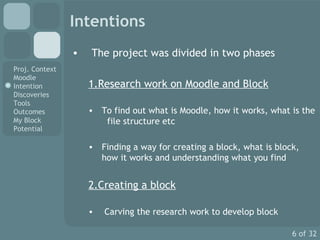
Intentions The project was divided in two phases 1.Research work on Moodle and Block To find out what is Moodle, how it works, what is the  file structure etc Finding a way for creating a block, what is block, how it works and understanding what you find 2.Creating a block Carving the research work to develop block
Discoveries The first difficulty was to find exact information regarding to the development The  http://docs.moodle.org   have very useful documentation for Developer under MoodleDocs. I used this documents as secondary source for the information I feel that there is a need of more detailed and practical documentation work for Developer as the current documentation is inadequate
Discoveries For my development work I downloaded the blocks developed by developer from the Moodle website’s Modules and plugins section I studied them and tried the Trial and Error method and also used the MoodleDocs for block development Many times my Moodle Software was crashed and I learned lot of things through this I found that already developed blocks are the best source for developer as starting point
Discoveries After all these findings I developed the simple Ajax Google Search block It was just simple block which was showing the Google Web Search results I showed to supervisor Mr. Michael de Raadt and he advised me for adding more customization through the Instance Configuration and Global Configuration I downloaded and studied the block that have configurations. And I used that finding to add  customization feature to my block
Tools 1. Eclipse with PHP plugin It is really good IDE with powerful features You can connect to the CVS repository  http://cvs.moodle.org I found that it is very complex and not easy to start with The setting up Eclipse for Moodle development is good guide to start with  http://docs.moodle.org/en/Development:Setting_up_Eclipse
Tools 2. fabFORCE DBDesigner 4 DBDesigner 4 is a open source visual database design system that integrates database design, modeling, creation and maintenance into a single, seamless environment  I used this tool to explore the Moodle database system This is really good tool for playing around the MySQL database of Moodle http://www.fabforce.net/dbdesigner4/downloads.php
Tools 3. NuSphere PHP IDE It is really good IDE with powerful features like friendly user interface, debugger, code navigator etc I used this IDE is as a real time editor for my block  http://www.nusphere.com/ The other features can be useful but I have never needed to use it
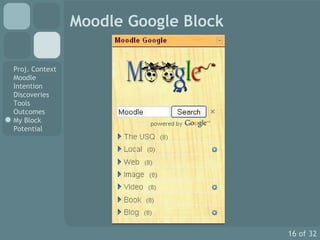
Outcomes Finally I developed the fully customizable Google Search Services block I submitted this block on the Moodle’s  Modules and Plugins section which was accepted as valid block and can be found at  http://moodle.org/mod/data/view.php?d=13&rid=1608 Till today’s date I have received some general queries regarding to the block from the Moodle community and some few users across the community have given me positive feedback about the working of the block
Outcomes Through this course and project I had chance for the experience with the real world development I learnt lot of things in terms of academic and professional skills My supervisor Michael de Raadt kept me on the right track during the project work. This was really important as sometime one can easily lost during the track in absence of proper guidance
Outcomes I have learnt the theoretical aspects of the PHP, HTML, CSS, AJAX through my academic learning With this project I put all these theoretical skills into the professional and real world development This course has proved worthwhile for me….
Moodle Google Block
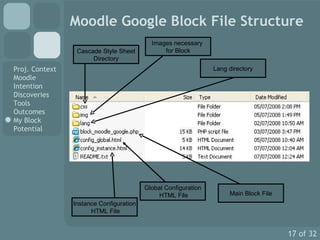
Moodle Google Block File Structure Instance Configuration HTML File Global Configuration HTML File Main Block File Lang directory Cascade Style Sheet Directory Images necessary  for Block
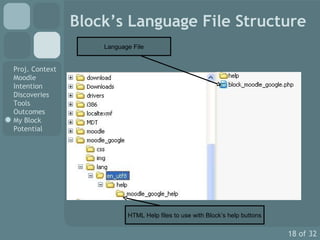
Block’s Language File Structure Language File HTML Help files to use with Block’s help buttons
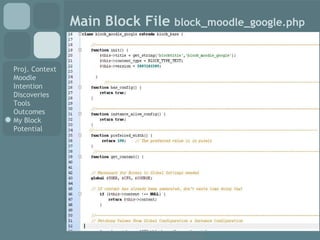
Main Block File  block_moodle_google.php
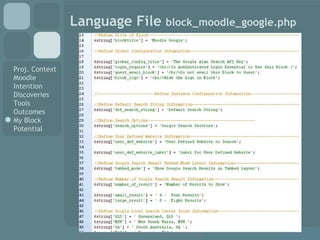
Language File  block_moodle_google.php
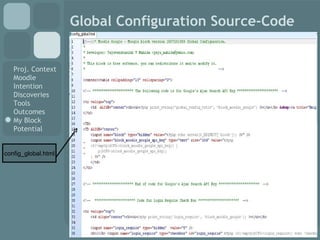
Global Configuration Source-Code config_global.html
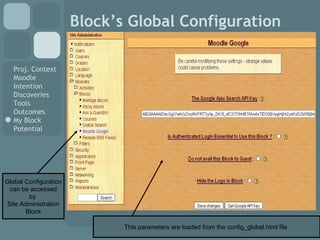
Block’s Global Configuration Global Configuration can be accessed  by  Site Administration Block This parameters are loaded from the config_global.html file
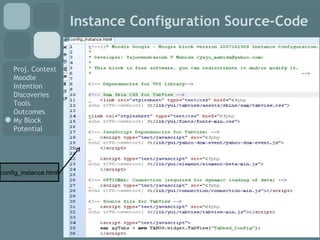
Instance Configuration Source-Code config_instance.html
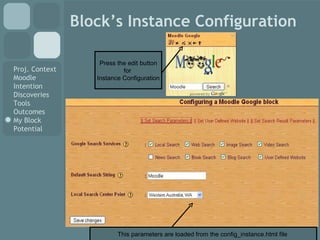
Block’s Instance Configuration Press the edit button for  Instance Configuration This parameters are loaded from the config_instance.html file
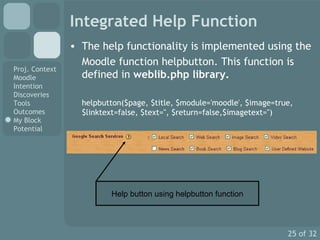
Integrated Help Function The help functionality is implemented using the  Moodle function helpbutton. This function is defined in  weblib.php library. helpbutton($page, $title, $module='moodle', $image=true, $linktext=false, $text='', $return=false,$imagetext='') Help button using helpbutton function
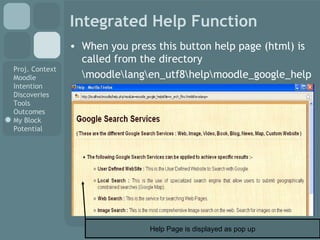
Integrated Help Function When you press this button help page (html) is called from the directory \moodle\lang\en_utf8\help\moodle_google_help Help Page is displayed as pop up
Integrated Help Function I found all these functions very late during work These functions are described with all arguments and required parameters. This can be said the Moodle APIs This is really very smart APIs and with few lines of code one can achieve big functionalities within the Moodle Use of these functions makes the development work very easy
Integrated Help Function The Moodle Community have defined all these various Moodle functions under various library on  http://xref.moodle.org/nav.html?index.html
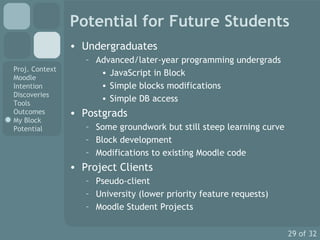
Potential for Future Students Undergraduates Advanced/later-year programming undergrads JavaScript in Block Simple blocks modifications Simple DB access Postgrads Some groundwork but still steep learning curve Block development Modifications to existing Moodle code Project Clients Pseudo-client University (lower priority feature requests) Moodle Student Projects
Useful Links Moodle Docs  - Developer Documents for Moodle Developer http://docs.moodle.org/en/Developer_documentation PHP Cross Reference of Moodle 1.9 - Moodle Functions References and other Stuff http://xref.moodle.org The CVS archive  - This archive contains all the source code for Moodle  http://cvs.moodle.org/
Useful Links Moodle Documentation Development:Block Step by step guide to Creating  Blocks   http://docs.moodle.org/en/Development:Blocks Moodle Google Block This block’s source codes have the comments for each piece of the code.  I have tried to explain each piece of code and what it does This makes easy for any newbie to start developing block http://moodle.org/mod/data/view.php?d=13&rid=1608
Thank you very much…..

upload_test_2

  • 1.
    Develop a blockfor Moodle
  • 2.
    Project Context SpeakersMichael de Raadt Yajuvendrasinh V Mahida (Masters student) Moodle Trial Project Moodle as new StudyDesk Independent Studies ‘Mini-project’ Develop a block for Moodle
  • 3.
    Project Context Semester1 March 2008 - CSC8480 Computing Complementary Studies Supervisor Mr. Michael de Raadt I was asked to develop block for Moodle I went with proposal of E-Commerce Portal In initial findings about Moodle I found it interesting and decided to develop block for Moodle
  • 4.
    Moodle I foundthat Moodle is really revolutionary e-learning platform Moodle is modular. It is having potential for keeping up with the time and new technologies Development of Moodle is on going process by diffused network of commercial and non-commercial users which are streamlined by the Moodle company based in Perth, Western Australia The following Moodle Statistics are success story of Moodle http://moodle.org/stats/
  • 5.
  • 6.
    Intentions The projectwas divided in two phases 1.Research work on Moodle and Block To find out what is Moodle, how it works, what is the file structure etc Finding a way for creating a block, what is block, how it works and understanding what you find 2.Creating a block Carving the research work to develop block
  • 7.
    Discoveries The firstdifficulty was to find exact information regarding to the development The http://docs.moodle.org have very useful documentation for Developer under MoodleDocs. I used this documents as secondary source for the information I feel that there is a need of more detailed and practical documentation work for Developer as the current documentation is inadequate
  • 8.
    Discoveries For mydevelopment work I downloaded the blocks developed by developer from the Moodle website’s Modules and plugins section I studied them and tried the Trial and Error method and also used the MoodleDocs for block development Many times my Moodle Software was crashed and I learned lot of things through this I found that already developed blocks are the best source for developer as starting point
  • 9.
    Discoveries After allthese findings I developed the simple Ajax Google Search block It was just simple block which was showing the Google Web Search results I showed to supervisor Mr. Michael de Raadt and he advised me for adding more customization through the Instance Configuration and Global Configuration I downloaded and studied the block that have configurations. And I used that finding to add customization feature to my block
  • 10.
    Tools 1. Eclipsewith PHP plugin It is really good IDE with powerful features You can connect to the CVS repository http://cvs.moodle.org I found that it is very complex and not easy to start with The setting up Eclipse for Moodle development is good guide to start with http://docs.moodle.org/en/Development:Setting_up_Eclipse
  • 11.
    Tools 2. fabFORCEDBDesigner 4 DBDesigner 4 is a open source visual database design system that integrates database design, modeling, creation and maintenance into a single, seamless environment I used this tool to explore the Moodle database system This is really good tool for playing around the MySQL database of Moodle http://www.fabforce.net/dbdesigner4/downloads.php
  • 12.
    Tools 3. NuSpherePHP IDE It is really good IDE with powerful features like friendly user interface, debugger, code navigator etc I used this IDE is as a real time editor for my block http://www.nusphere.com/ The other features can be useful but I have never needed to use it
  • 13.
    Outcomes Finally Ideveloped the fully customizable Google Search Services block I submitted this block on the Moodle’s Modules and Plugins section which was accepted as valid block and can be found at http://moodle.org/mod/data/view.php?d=13&rid=1608 Till today’s date I have received some general queries regarding to the block from the Moodle community and some few users across the community have given me positive feedback about the working of the block
  • 14.
    Outcomes Through thiscourse and project I had chance for the experience with the real world development I learnt lot of things in terms of academic and professional skills My supervisor Michael de Raadt kept me on the right track during the project work. This was really important as sometime one can easily lost during the track in absence of proper guidance
  • 15.
    Outcomes I havelearnt the theoretical aspects of the PHP, HTML, CSS, AJAX through my academic learning With this project I put all these theoretical skills into the professional and real world development This course has proved worthwhile for me….
  • 16.
  • 17.
    Moodle Google BlockFile Structure Instance Configuration HTML File Global Configuration HTML File Main Block File Lang directory Cascade Style Sheet Directory Images necessary for Block
  • 18.
    Block’s Language FileStructure Language File HTML Help files to use with Block’s help buttons
  • 19.
    Main Block File block_moodle_google.php
  • 20.
    Language File block_moodle_google.php
  • 21.
  • 22.
    Block’s Global ConfigurationGlobal Configuration can be accessed by Site Administration Block This parameters are loaded from the config_global.html file
  • 23.
  • 24.
    Block’s Instance ConfigurationPress the edit button for Instance Configuration This parameters are loaded from the config_instance.html file
  • 25.
    Integrated Help FunctionThe help functionality is implemented using the Moodle function helpbutton. This function is defined in weblib.php library. helpbutton($page, $title, $module='moodle', $image=true, $linktext=false, $text='', $return=false,$imagetext='') Help button using helpbutton function
  • 26.
    Integrated Help FunctionWhen you press this button help page (html) is called from the directory \moodle\lang\en_utf8\help\moodle_google_help Help Page is displayed as pop up
  • 27.
    Integrated Help FunctionI found all these functions very late during work These functions are described with all arguments and required parameters. This can be said the Moodle APIs This is really very smart APIs and with few lines of code one can achieve big functionalities within the Moodle Use of these functions makes the development work very easy
  • 28.
    Integrated Help FunctionThe Moodle Community have defined all these various Moodle functions under various library on http://xref.moodle.org/nav.html?index.html
  • 29.
    Potential for FutureStudents Undergraduates Advanced/later-year programming undergrads JavaScript in Block Simple blocks modifications Simple DB access Postgrads Some groundwork but still steep learning curve Block development Modifications to existing Moodle code Project Clients Pseudo-client University (lower priority feature requests) Moodle Student Projects
  • 30.
    Useful Links MoodleDocs - Developer Documents for Moodle Developer http://docs.moodle.org/en/Developer_documentation PHP Cross Reference of Moodle 1.9 - Moodle Functions References and other Stuff http://xref.moodle.org The CVS archive - This archive contains all the source code for Moodle http://cvs.moodle.org/
  • 31.
    Useful Links MoodleDocumentation Development:Block Step by step guide to Creating Blocks http://docs.moodle.org/en/Development:Blocks Moodle Google Block This block’s source codes have the comments for each piece of the code. I have tried to explain each piece of code and what it does This makes easy for any newbie to start developing block http://moodle.org/mod/data/view.php?d=13&rid=1608
  • 32.
    Thank you verymuch…..