Computer Basics
Dr. Sarabjeet Kaur
Assistant Professor
NIET, Greater Noida
11/12/2024
1
Unit: 2
Logic Design & Computer
Architecture (BCSAI0302)
B Tech (AI)- 3rd
Sem
Noida Institute of Engineering and Technology, GR. Noida
(An Autonomous Institute)
School of Computer Science & Engineering in Emerging Technologies
Dr. Sarabjeet Kaur Logic Design & Computer Architecture Unit 2
2
She has completed her Ph.D. degree in the field of
Antenna from Bhopal University. She has
received her M.Tech degree in Digital
Communication Engineering from Rajiv Gandhi
University from Bhopal in 2008 and B.Tech
degree in Telecommunication Engineering from
Pt. Ravi Shankar university .
Currently, She is working as an Assistant
Professor in the Department of Electronics &
Communication Engineering in NIET, Greater
Noida, India. He has more than 15 years of
teaching & research experience.
Dr. Sarabjeet Kaur (Assistant Professor, ECE)
Biography
11/12/2024 Dr. Sarabjeet Kaur Logic Design & Computer Architecture Unit 2
Faculty Information
11/12/2024 3
Dr. Sarabjeet Kaur Logic Design & Computer Architecture Unit 2
Evaluation scheme
11/12/2024 4
Dr. Sarabjeet Kaur Logic Design & Computer Architecture Unit 2
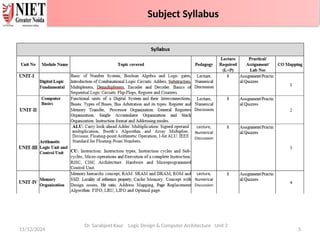
Subject Syllabus
11/12/2024 5
Subject Syllabus
Dr. Sarabjeet Kaur Logic Design & Computer Architecture Unit 2
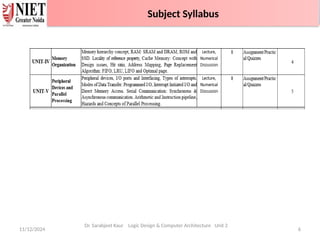
Subject Syllabus
11/12/2024 6
Subject Syllabus
Dr. Sarabjeet Kaur Logic Design & Computer Architecture Unit 2
Subject Syllabus
11/12/2024 7
Branch wise Applications
Dr. Sarabjeet Kaur Logic Design & Computer Architecture Unit 2
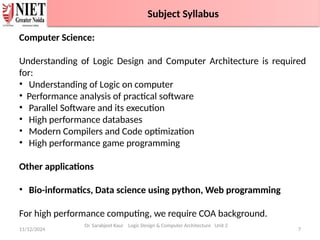
Computer Science:
Understanding of Logic Design and Computer Architecture is required
for:
• Understanding of Logic on computer
• Performance analysis of practical software
• Parallel Software and its execution
• High performance databases
• Modern Compilers and Code optimization
• High performance game programming
Other applications
• Bio-informatics, Data science using python, Web programming
For high performance computing, we require COA background.
Faculty Information
Subject Syllabus
11/12/2024 8
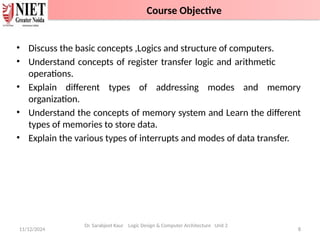
• Discuss the basic concepts ,Logics and structure of computers.
• Understand concepts of register transfer logic and arithmetic
operations.
• Explain different types of addressing modes and memory
organization.
• Understand the concepts of memory system and Learn the different
types of memories to store data.
• Explain the various types of interrupts and modes of data transfer.
Dr. Sarabjeet Kaur Logic Design & Computer Architecture Unit 2
Course Objective
11/12/2024 9
Dr. Sarabjeet Kaur Logic Design & Computer Architecture Unit 2
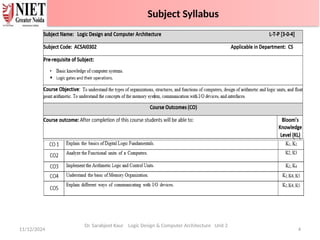
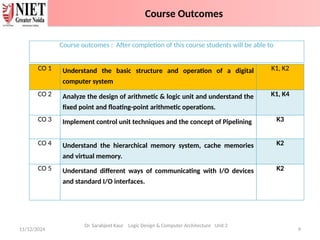
CO 1 Understand the basic structure and operation of a digital
computer system
K1, K2
CO 2 Analyze the design of arithmetic & logic unit and understand the
fixed point and floating-point arithmetic operations.
K1, K4
CO 3 Implement control unit techniques and the concept of Pipelining K3
CO 4 Understand the hierarchical memory system, cache memories
and virtual memory.
K2
CO 5 Understand different ways of communicating with I/O devices
and standard I/O interfaces.
K2
Course outcomes : After completion of this course students will be able to
Course Outcomes
11/12/2024 10
Dr. Sarabjeet Kaur Logic Design & Computer Architecture Unit 2
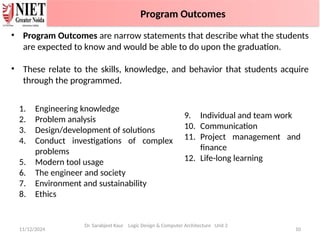
• Program Outcomes are narrow statements that describe what the students
are expected to know and would be able to do upon the graduation.
• These relate to the skills, knowledge, and behavior that students acquire
through the programmed.
1. Engineering knowledge
2. Problem analysis
3. Design/development of solutions
4. Conduct investigations of complex
problems
5. Modern tool usage
6. The engineer and society
7. Environment and sustainability
8. Ethics
9. Individual and team work
10. Communication
11. Project management and
finance
12. Life-long learning
Program Outcomes
11/12/2024 11
Dr. Sarabjeet Kaur Logic Design & Computer Architecture Unit 2
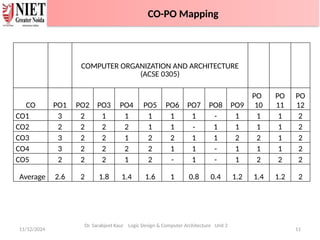
COMPUTER ORGANIZATION AND ARCHITECTURE
(ACSE 0305)
CO PO1 PO2 PO3 PO4 PO5 PO6 PO7 PO8 PO9
PO
10
PO
11
PO
12
CO1 3 2 1 1 1 1 1 - 1 1 1 2
CO2 2 2 2 2 1 1 - 1 1 1 1 2
CO3 3 2 2 1 2 2 1 1 2 2 1 2
CO4 3 2 2 2 2 1 1 - 1 1 1 2
CO5 2 2 2 1 2 - 1 - 1 2 2 2
Average 2.6 2 1.8 1.4 1.6 1 0.8 0.4 1.2 1.4 1.2 2
CO-PO Mapping
11/12/2024 12
Dr. Sarabjeet Kaur Logic Design & Computer Architecture Unit 2
PEO1: Solve real-time complex problems and adapt to technological
changes with the ability of lifelong learning.
PEO2: Work as data scientists, entrepreneurs, and bureaucrats for
the goodwill of the society and pursue higher education.
PEO3: Exhibit professional ethics and moral values with good
leadership qualities and effective interpersonal skills.
Program Educational Objectives
11/12/2024 13
Dr. Sarabjeet Kaur Logic Design & Computer Architecture Unit 2
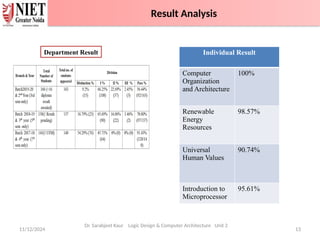
Individual Result
Computer
Organization
and Architecture
100%
Renewable
Energy
Resources
98.57%
Universal
Human Values
90.74%
Introduction to
Microprocessor
95.61%
Department Result
Result Analysis
11/12/2024 14
Dr. Sarabjeet Kaur Logic Design & Computer Architecture Unit 2
Question Paper
Template -100 Marks
End Semester Question Paper Template
• Basic knowledge of Digital Logic Design
• ALU Unit
• Control Unit
• Memory unit
11/12/2024 15
Dr. Sarabjeet Kaur Logic Design & Computer Architecture Unit 2
Prerequisite and Recap
11/12/2024 16
Dr. Sarabjeet Kaur Logic Design & Computer Architecture Unit 2
The Logic Design and Computer Architecture is one of the most
important and comprehensive subject that includes many foundational
concepts and knowledge used in design of a computer system. This
subject provides in-depth knowledge of internal working, structuring,
and implementation of a computer system.
The COA important topics include all the fundamental concepts such
as computer system functional units, processor micro architecture,
program instructions, instruction formats, addressing modes,
instruction pipelining, memory organization, instruction cycle,
interrupts and other important related topics.
Video link: https://www.youtube.com/watch?v=q6oiRtKTpX4
Brief Introduction about Subject
11/12/2024 17
Dr. Sarabjeet Kaur Logic Design & Computer Architecture Unit 2
Computer Science:
Understanding of Logic Design and Computer Architecture is required
for:
• Understanding of Logic on computer
• Performance analysis of practical software
• Parallel Software and its execution
• High performance databases
• Modern Compilers and Code optimization
• High performance game programming
Other applications
• Bio-informatics, Data science using python, Web programming
For high performance computing, we require COA background.
Branch wise Applications
11/12/2024 18
Computer Basics
• Functional units of digital system and their interconnections
• Buses, bus architecture, Types of buses
• Bus arbitration
• Register, bus and memory transfer.
• Processor organization
• General registers organization
• Stack organization
• Addressing modes
Dr. Sarabjeet Kaur Logic Design & Computer Architecture Unit 2
Unit Content
11/12/2024 Dr. Sarabjeet Kaur Logic Design & Computer Architecture Unit 2 19
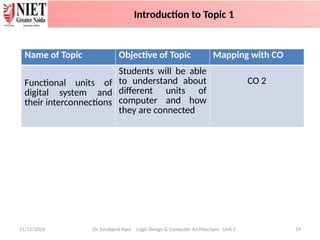
Name of Topic Objective of Topic Mapping with CO
Functional units of
digital system and
their interconnections
Students will be able
to understand about
different units of
computer and how
they are connected
CO 2
Introduction to Topic 1
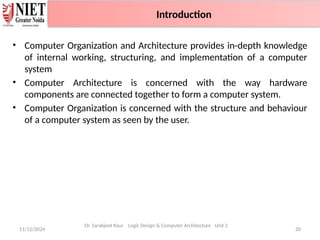
• Computer Organization and Architecture provides in-depth knowledge
of internal working, structuring, and implementation of a computer
system
• Computer Architecture is concerned with the way hardware
components are connected together to form a computer system.
• Computer Organization is concerned with the structure and behaviour
of a computer system as seen by the user.
11/12/2024 20
Introduction
Dr. Sarabjeet Kaur Logic Design & Computer Architecture Unit 2
Introduction
11/12/2024 21
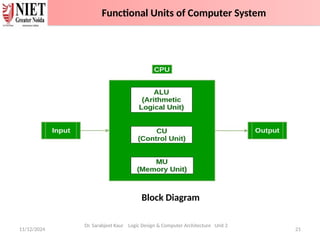
Block Diagram
Dr. Sarabjeet Kaur Logic Design & Computer Architecture Unit 2
Functional Units of Computer System
1. Input Unit :
• The input unit consists of input devices that are attached to the
computer.
• These devices take input and convert it into binary language that the
computer understands.
• Common input devices are keyboard, mouse, joystick, scanner etc.
2. Central Processing Unit (CPU) :
• The CPU is called the brain of the computer because it is the control
centre of the computer.
• It first fetches instructions from memory and then interprets them so
as to know what is to be done.
• CPU executes or performs the required computation and then either
stores the output or displays on the output device
11/12/2024 22
Dr. Sarabjeet Kaur Logic Design & Computer Architecture Unit 2
Functional Units of Computer System
3. Arithmetic and Logic Unit (ALU) :
• It performs mathematical calculations and takes logical decisions.
• Arithmetic calculations include addition, subtraction, multiplication
and division.
• Logical decisions involve comparison of two data items to see which
one is larger or smaller or equal.
4. Control Unit :
• It coordinates and controls the data flow in and out of CPU and also
controls all the operations of ALU, memory registers and
input/output units.
• It decodes the fetched instruction, interprets it and sends control
signals to input/output devices until the required operation is done
properly by ALU and memory.
11/12/2024 23
Dr. Sarabjeet Kaur Logic Design & Computer Architecture Unit 2
Functional Units of Computer System
5. Memory :
• Memory attached to the CPU is used for storage of data and
instructions and is called internal memory.
• The internal memory is divided into many storage locations, each of
which can store data or instructions
6. Output Unit :
• The output unit consists of output devices that are attached with
the computer.
• It converts the binary data coming from CPU to human
understandable form.
• The common output devices are monitor, printer, plotter etc.
11/12/2024 24
Dr. Sarabjeet Kaur Logic Design & Computer Architecture Unit 2
Functional Units of Computer System
11/12/2024 25
Dr. Sarabjeet Kaur Logic Design & Computer Architecture Unit 2
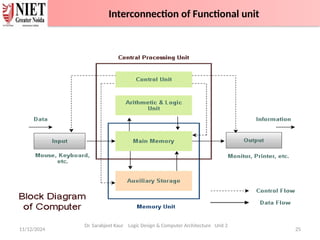
Interconnection of Functional unit
1. Primary / Main memory:
• The memory unit that establishes direct communication with the CPU
is called Main Memory. The main memory is often referred to as RAM
(Random Access Memory).
• It holds the data and instructions that the processor is currently
working on.
2. Secondary Memory / Mass Storage:
• The contents of the secondary memory first get transferred to the
primary memory and then are accessed by the processor; this is
because the processor does not directly interact with the secondary
memory.
• The memory units that provide backup storage are called Auxiliary
Memory. For instance, magnetic disks and magnetic tapes are the most
commonly used auxiliary memories.
11/12/2024 26
Dr. Sarabjeet Kaur Logic Design & Computer Architecture Unit 2
Memory
1. ______ is considered as the brain of the computer.
2. ________ is smallest unit of the information.
3. _________ is the decimal equivalent of the binary number 10111.
4. _______ section is used to perform logic operations such as comparing,
selecting, matching of data.
5. ________ unit is used to store data and instructions.
6. The functions of sequencing and execution are performed by using
a) Input Signals
b) Output Signals
c) Control Signals
d) CPU
7. ________ is a way in which the components of a computer are
connected to each other.
11/12/2024 Dr. Sarabjeet Kaur Logic Design & Computer Architecture Unit 2 27
Daily Quiz
1. ______ is considered as the brain of the computer. ( CPU )
2. ________ is smallest unit of the information? (Bit)
3. _________ is the decimal equivalent of the binary number 10111? (23)
4. _______ section is to perform logic operations such as comparing,
selecting, matching, and merging of data? (ALU/Logic section )
5. _________ is used to store data and instructions. (Memory)
6. The functions of sequencing and execution are performed by using
a) Input Signals
b) Output Signals
c) Control Signals
d) CPU
7. ________ is a way in which the components of a computer are connected
to each other. (Computer Architecture)
11/12/2024 Dr. Sarabjeet Kaur Logic Design & Computer Architecture Unit 2 28
Daily Quiz with Answers
11/12/2024 Dr. Sarabjeet Kaur Logic Design & Computer Architecture Unit 2 29
• Computer Organization and Architecture provides in-depth knowledge
of internal working, structuring, and implementation of a computer
system.
• Computer Architecture is concerned with the way hardware components
are connected together to form a computer system.
• Computer Organization is concerned with the structure and behaviour of
a computer system as seen by the user.
• Computer consists of different blocks such as Input, output, Control unit,
memory unit and ALU.
Recap
11/12/2024 Dr. Sarabjeet Kaur Logic Design & Computer Architecture Unit 2 30
Name of Topic Objective of Topic Mapping with CO
Buses, bus
architecture, Types of
buses
Students will be able
to know the
architecture and
types of buses.
CO 2
Introduction to Topic 2
11/12/2024 31
Dr. Sarabjeet Kaur Logic Design & Computer Architecture Unit 2
Bus Architecture
11/12/2024 32
Bus Architecture
Dr. Sarabjeet Kaur Logic Design & Computer Architecture Unit 2
Bus Architecture
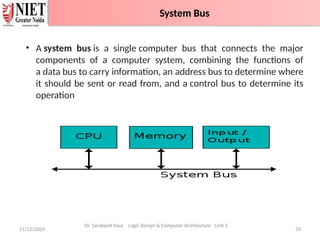
• A system bus is a single computer bus that connects the major
components of a computer system, combining the functions of
a data bus to carry information, an address bus to determine where
it should be sent or read from, and a control bus to determine its
operation
11/12/2024 33
System Bus
Dr. Sarabjeet Kaur Logic Design & Computer Architecture Unit 2
System Bus
• Types of Computer BUS:
1. Data Bus
2. Address Bus
3. Control Bus
11/12/2024 34
Dr. Sarabjeet Kaur Logic Design & Computer Architecture Unit 2
System Bus
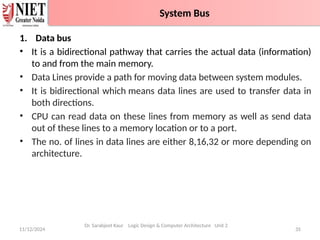
1. Data bus
• It is a bidirectional pathway that carries the actual data (information)
to and from the main memory.
• Data Lines provide a path for moving data between system modules.
• It is bidirectional which means data lines are used to transfer data in
both directions.
• CPU can read data on these lines from memory as well as send data
out of these lines to a memory location or to a port.
• The no. of lines in data lines are either 8,16,32 or more depending on
architecture.
11/12/2024 35
System Bus
Dr. Sarabjeet Kaur Logic Design & Computer Architecture Unit 2
System Bus
• Data lines coordinate in transferring the data among the system
components. The data lines are collectively called data bus. A data bus
may have 32 lines, 64 lines, 128 lines, or even more lines. The number
of lines present in the data bus defines the width of the data bus.
• Each data line is able to transfer only one bit at a time. So the number
of data lines in a data bus determines how many bits it can transfer at
a time. The performance of the system also depends on the width of
the data bus.
11/12/2024 36
System Bus
Dr. Sarabjeet Kaur Logic Design & Computer Architecture Unit 2
System Bus
2. Address bus
• Address Lines are collectively called as address bus.
• It is a unidirectional pathway that allows information to travel in
only one direction.
• No. of lines in address are usually 16,20,24, or more depending on
type and architecture of bus
• It is an internal channel from CPU to Memory across which the
address of data(not data) are transmitted.
• It is used to identify the source or destination of data.
• Here the communication is one way that is, the address is send
from CPU to Memory and I/O Port but not Memory and I/O port
send address to CPU on that line and hence these lines are
unidirectional.
11/12/2024 37
System Bus
Dr. Sarabjeet Kaur Logic Design & Computer Architecture Unit 2
System Bus
2. Address bus
• The content of the address lines of the bus determines the source
or destination of the data present on the data bus. The number of
address lines together is referred to as address bus. The number of
address lines in the address bus determines its width.
• The width of the address bus determines the memory capacity of
the system. The content of address lines is also used for addressing
I/O ports. The higher-order bits determine the bus module and the
lower ordered bits determine the address of memory locations or
I/O ports.
• Whenever the processor has to read a word from the memory it
simply places the address of the corresponding word on the address
line.
11/12/2024 38
System Bus
Dr. Sarabjeet Kaur Logic Design & Computer Architecture Unit 2
System Bus
3. Control bus
• It carries the control and timing signals needed to coordinate the
activities of the entire computer.
• They are used by CPUs for Communicating with other devices
within the computer.
• They are bidirectional.
• Typical Control Lines signals are
Memory Read
Memory Write
I/O Read
I/O Write ,etc
11/12/2024 39
System Bus
Dr. Sarabjeet Kaur Logic Design & Computer Architecture Unit 2
System Bus
• The control signals placed on the control lines control the use and
access to address and data lines of the bus. The control signal
consists of the command and timing information. Here the
command in the control signal specify the operation that has to be
performed. And the timing information over the control signals
specify till when the data and address information is valid .
• The control lines include the lines for:
• Memory Write(MW): This command causes the data on the data
bus to be placed over the addressed memory location.
• Memory Read(MR): This command causes the data on the
addressed memory location to be placed on the data bus.
• I/O Write(IOW): The command over this control line causes the
data on the data bus to be placed over the addressed I/O port.
11/12/2024 40
System Bus
Dr. Sarabjeet Kaur Logic Design & Computer Architecture Unit 2
System Bus
• I/O Read(IOR): The command over this control line causes the data from
the addressed I/O port to be placed over the data bus.
• Transfer ACK(TACK): This control line indicates the data has been received
from the data bus or is placed over the data bus.
• Bus Request(BR): This control line indicates that the component has
requested control over the bus.
• Bus Grant(BG): This control line indicates that the bus has been granted to
the requesting component.
• Interrupt Request(INTR): This control line indicates that interrupts are
pending.
• Interrupt ACK(INTA): This control line provides acknowledgment when the
pending interrupt is serviced.
• Clock(CLK): This control line is used to synchronize the operations.
• Reset(RST): The bit information issued over this control line initializes all
the modules.
11/12/2024 41
System Bus
Dr. Sarabjeet Kaur Logic Design & Computer Architecture Unit 2
System Bus
Bus structures in computer plays important role in connecting the
internal components of the computer. The bus in the computer is
the shared transmission medium. This means multiple components or
devices use the same bus structure to transmit the information signals
to each other.
1. Single Bus Structure –
All units are connected to the same bus.
2. Multiple Bus Structure
a) Traditional Configuration
Uses three buses – local bus, system bus and expanded bus.
b) High Speed BUS Configuration
Uses high speed bus along with three buses – local bus, system bus
and expanded bus used in traditional configuration.
11/12/2024 42
Dr. Sarabjeet Kaur Logic Design & Computer Architecture Unit 2
Bus Structure
11/12/2024 43
Dr. Sarabjeet Kaur Logic Design & Computer Architecture Unit 2
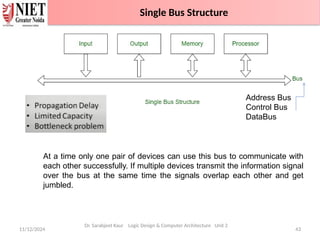
Address Bus
Control Bus
DataBus
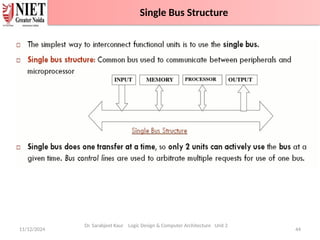
At a time only one pair of devices can use this bus to communicate with
each other successfully. If multiple devices transmit the information signal
over the bus at the same time the signals overlap each other and get
jumbled.
Single Bus Structure
11/12/2024 44
Single Bus Structure
Dr. Sarabjeet Kaur Logic Design & Computer Architecture Unit 2
Single Bus Structure
11/12/2024 45
Single Bus Structure
Dr. Sarabjeet Kaur Logic Design & Computer Architecture Unit 2
Single Bus Structure
11/12/2024 46
Dr. Sarabjeet Kaur Logic Design & Computer Architecture Unit 2
Traditional Bus Configuration
11/12/2024 47
Traditional Bus Configuration
Dr. Sarabjeet Kaur Logic Design & Computer Architecture Unit 2
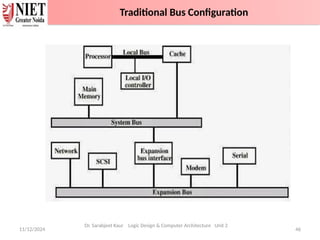
Traditional Bus Architecture
Figure shows some typical example of I/O devices that might be attached to
expansion devices The traditional bus connection uses three buses local bus ,
system bus and expansion bus
1. Local bus connects the processor to cache memory and may support one or
more local devices
2. The cache memory controller connects the cache to local bus and to the
system bus.
3. System bus also connects main memory module
Traditional Bus Configuration
11/12/2024 48
Traditional Bus Configuration
Dr. Sarabjeet Kaur Logic Design & Computer Architecture Unit 2
4. Input /output transfer to and from the main memory across the system bus
does not interface with the processor activity because the process accesses
cache memory.
5. It is possible to connect I/O controllers directly on to the system bus. A
more efficient solution is to make use of one or more expansion buses for this
purpose. An expansion bus interface buffers data transfer between the system
bus and the i/o controller on the expansion bus.
Some typical I/O devices that might be attached to the expansion bus include
Network cards (LAN)
SCSI (Small Computer System Interface)
Modem
Serial Com
This arrangement allows the system to support a wide variety of i/o devices
and at the same time insulate memory to process or traffic from i/o traffic.
Traditional Bus Configuration
11/12/2024 49
Traditional Bus Configuration
Dr. Sarabjeet Kaur Logic Design & Computer Architecture Unit 2
Advantages of Traditional Bus Architecture
A separate cache structure insulates the processor from the
requirement to access the main memory frequently.
This arrangement allows the system to support a wide variety of I/O
devices and, at the same time, insulate memory to processor traffic
from I/O traffic.
Disadvantages of Traditional Bus Architecture
The traditional bus architecture is reasonably efficient but begins to
break down as higher, and higher performance is seen in the I/O
devices.
Traditional Bus Configuration
11/12/2024 50
Dr. Sarabjeet Kaur Logic Design & Computer Architecture Unit 2
High Speed Bus Configuration
11/12/2024 51
High Speed Bus Configuration
Dr. Sarabjeet Kaur Logic Design & Computer Architecture Unit 2
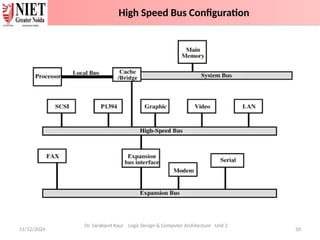
High-Performance Bus Architecture
Like the previous arrangement, there is a local bus that connects the
processor to a cache controller, which is, in turn, connected to a system bus
that supports the main memory.
The cache controller is integrated into a bridge or buffering device that
connects to a high-speed bus.
This (High Speed) bus supports connections to high-speed LANs, such as
Fast Ethernet at 100 Mbps, video and graphics workstation controllers to
local peripheral busses, including SCSI and Firewire.
An expansion bus still supports lower-speed devices, with an interface
buffering traffic between the expansion bus and the high-speed bus.
High Speed Bus Configuration
11/12/2024 52
High Speed Bus Configuration
Dr. Sarabjeet Kaur Logic Design & Computer Architecture Unit 2
Advantages of High-Performance Bus Architecture
The advantage of this arrangement is that the high-speed bus brings
high-demand devices into closer integration with the processor and, at
the same time, is independent of the processor.
So, changes in processor architecture also do not affect the high-speed
bus.
High Speed Bus Configuration
1. ________ bus carries information between processors and
peripherals.
2. _______ are unidirectional bus.
3. _________ bus controls the sequencing of read/write operations.
4. _____ is a common pathway through which information flows
from one computer component to another.
5. Control bus is Unidirectional. T/F
11/12/2024 Dr. Sarabjeet Kaur Logic Design & Computer Architecture Unit 2 53
Daily Quiz
1. ________ bus carries information between processors and peripherals.
(Data Bus)
2. _______ are unidirectional bus. (Address Bus)
3. _________ bus controls the sequencing of read/write operations.
(Control Bus)
4. _____ is a common pathway through which information flows from one
computer component to another. (Bus)
5. Control bus is Unidirectional. False
11/12/2024 Dr. Sarabjeet Kaur Logic Design & Computer Architecture Unit 2 54
Daily Quiz
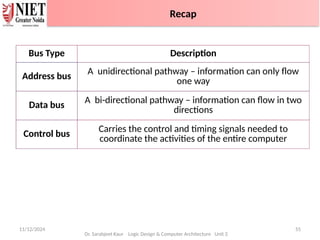
Bus Type Description
Address bus
A unidirectional pathway – information can only flow
one way
Data bus
A bi-directional pathway – information can flow in two
directions
Control bus
Carries the control and timing signals needed to
coordinate the activities of the entire computer
11/12/2024 55
Dr. Sarabjeet Kaur Logic Design & Computer Architecture Unit 2
Recap
11/12/2024 Dr. Sarabjeet Kaur Logic Design & Computer Architecture Unit 2
56
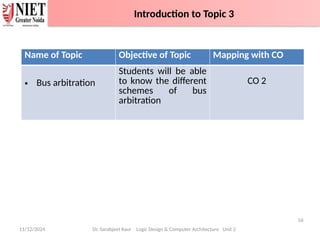
Name of Topic Objective of Topic Mapping with CO
• Bus arbitration
Students will be able
to know the different
schemes of bus
arbitration
CO 2
Introduction to Topic 3
11/12/2024 57
Dr. Sarabjeet Kaur Logic Design & Computer Architecture Unit 2
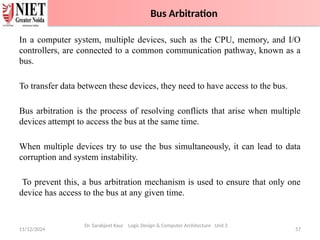
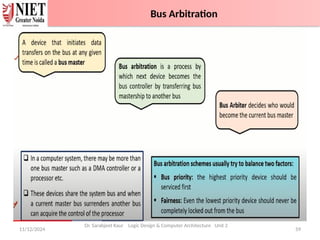
In a computer system, multiple devices, such as the CPU, memory, and I/O
controllers, are connected to a common communication pathway, known as a
bus.
To transfer data between these devices, they need to have access to the bus.
Bus arbitration is the process of resolving conflicts that arise when multiple
devices attempt to access the bus at the same time.
When multiple devices try to use the bus simultaneously, it can lead to data
corruption and system instability.
To prevent this, a bus arbitration mechanism is used to ensure that only one
device has access to the bus at any given time.
Bus Arbitration
Bus Arbitration
It refers to the process by which the current bus master accesses and then
leaves the control of the bus and passes it to another bus requesting processor
unit.
• Bus master: The controller that has access to a bus at an instance.
• Bus Arbiter: It decides who will become the current bus master.
11/12/2024 58
Dr. Sarabjeet Kaur Logic Design & Computer Architecture Unit 2
Bus Arbitration
11/12/2024 59
Dr. Sarabjeet Kaur Logic Design & Computer Architecture Unit 2
Bus Arbitration
11/12/2024 60
Bus Arbitration
Dr. Sarabjeet Kaur Logic Design & Computer Architecture Unit 2
Bus Arbitration
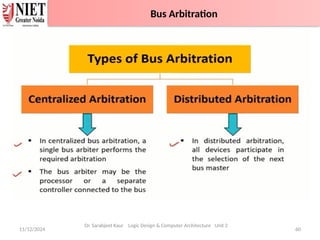
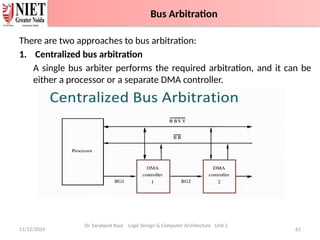
There are two approaches to bus arbitration:
1. Centralized bus arbitration
A single bus arbiter performs the required arbitration, and it can be
either a processor or a separate DMA controller.
11/12/2024 61
Bus Arbitration
Dr. Sarabjeet Kaur Logic Design & Computer Architecture Unit 2
Bus Arbitration
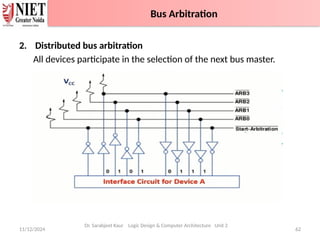
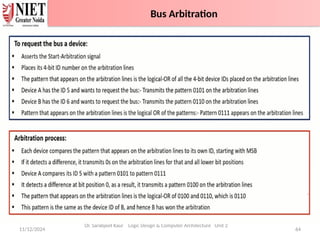
2. Distributed bus arbitration
All devices participate in the selection of the next bus master.
11/12/2024 62
Bus Arbitration
Dr. Sarabjeet Kaur Logic Design & Computer Architecture Unit 2
Bus Arbitration
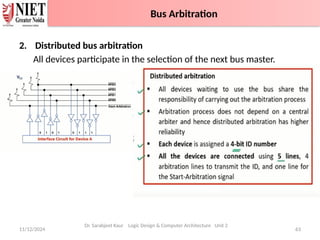
2. Distributed bus arbitration
All devices participate in the selection of the next bus master.
11/12/2024 63
Bus Arbitration
Dr. Sarabjeet Kaur Logic Design & Computer Architecture Unit 2
Bus Arbitration
11/12/2024 64
Bus Arbitration
Dr. Sarabjeet Kaur Logic Design & Computer Architecture Unit 2
Bus Arbitration
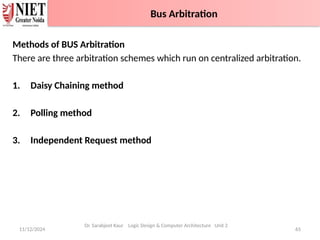
Methods of BUS Arbitration
There are three arbitration schemes which run on centralized arbitration.
1. Daisy Chaining method
2. Polling method
3. Independent Request method
11/12/2024 65
Bus Arbitration
Dr. Sarabjeet Kaur Logic Design & Computer Architecture Unit 2
Bus Arbitration
11/12/2024 66
Dr. Sarabjeet Kaur Logic Design & Computer Architecture Unit 2
Daisy Chaining method
11/12/2024 67
Daisy Chaining method
Dr. Sarabjeet Kaur Logic Design & Computer Architecture Unit 2
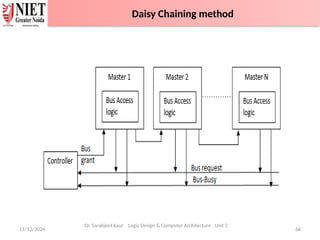
Daisy Chaining method: It is a simple and cheaper method where all the
bus masters use the same line for making bus requests.
The bus grant signal serially propagates through each master until it
encounters the first one who is requesting access to the bus.
This master blocks the propagation of the bus grant signal; therefore, any
other requesting module will not receive the grant signal and hence
cannot access the bus.
During any bus cycle, the bus master may be any device – the processor
or any DMA controller unit, connected to the bus.
Daisy Chaining method
11/12/2024 68
Daisy Chaining method
Advantages –
1. Simplicity and Scalability.
2. The user can add more devices anywhere along the chain
Disadvantages –
3. The value of priority assigned to a device is depends on the
position of master bus.
4. Propagation delay is arises in this method.
5. If one device fails then entire system will stop working.
Dr. Sarabjeet Kaur Logic Design & Computer Architecture Unit 2
Daisy Chaining method
11/12/2024 69
Dr. Sarabjeet Kaur Logic Design & Computer Architecture Unit 2
Polling or Rotating Priority Method
11/12/2024 70
Polling or Rotating Priority Method
Dr. Sarabjeet Kaur Logic Design & Computer Architecture Unit 2
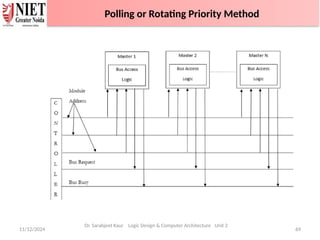
Polling or Rotating Priority method: In this, the controller is used to
generate the address for the master(unique priority), the number of address
lines required depends on the number of masters connected in the system.
The controller generates a sequence of master addresses. When the
requesting master recognizes its address, it activates the busy line and
begins to use the bus.
Polling or Rotating Priority Method
11/12/2024 71
Polling or Rotating Priority Method
Advantages –
1. This method does not favor any particular device and
processor.
2. The method is also quite simple.
3. If one device fails then entire system will not stop working.
Disadvantages –
4. Adding bus masters is difficult as increases the number of
address lines of the circuit.
Dr. Sarabjeet Kaur Logic Design & Computer Architecture Unit 2
Polling or Rotating Priority Method
11/12/2024 72
Dr. Sarabjeet Kaur Logic Design & Computer Architecture Unit 2
Fixed priority or Independent Request method
11/12/2024 73
Dr. Sarabjeet Kaur Logic Design & Computer Architecture Unit 2
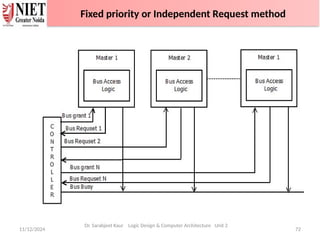
Fixed priority or Independent Request method: In this, each
master has a separate pair of bus request and bus grant lines, and
each pair has a priority assigned to it.
The built-in priority decoder within the controller selects the
highest priority request and asserts the corresponding bus grant
signal.
Fixed priority or Independent Request method
11/12/2024 74
Advantages –
•This method generates fast response.
Disadvantages –
•Hardware cost is high as large no. of control lines are required.
Dr. Sarabjeet Kaur Logic Design & Computer Architecture Unit 2
Fixed priority or Independent Request method
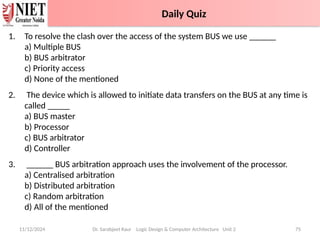
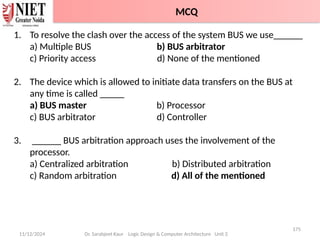
1. To resolve the clash over the access of the system BUS we use ______
a) Multiple BUS
b) BUS arbitrator
c) Priority access
d) None of the mentioned
2. The device which is allowed to initiate data transfers on the BUS at any time is
called _____
a) BUS master
b) Processor
c) BUS arbitrator
d) Controller
3. ______ BUS arbitration approach uses the involvement of the processor.
a) Centralised arbitration
b) Distributed arbitration
c) Random arbitration
d) All of the mentioned
11/12/2024 Dr. Sarabjeet Kaur Logic Design & Computer Architecture Unit 2 75
Daily Quiz
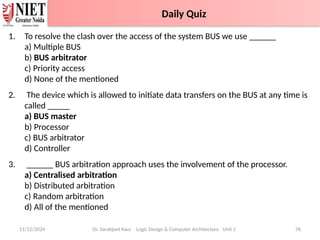
1. To resolve the clash over the access of the system BUS we use ______
a) Multiple BUS
b) BUS arbitrator
c) Priority access
d) None of the mentioned
2. The device which is allowed to initiate data transfers on the BUS at any time is
called _____
a) BUS master
b) Processor
c) BUS arbitrator
d) Controller
3. ______ BUS arbitration approach uses the involvement of the processor.
a) Centralised arbitration
b) Distributed arbitration
c) Random arbitration
d) All of the mentioned
11/12/2024 Dr. Sarabjeet Kaur Logic Design & Computer Architecture Unit 2 76
Daily Quiz with Answers
Daily Quiz
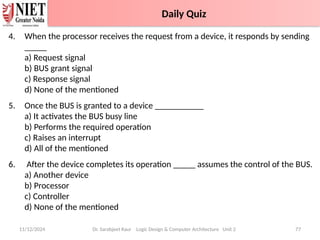
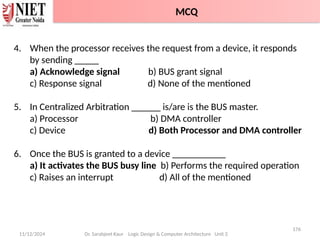
4. When the processor receives the request from a device, it responds by sending
_____
a) Request signal
b) BUS grant signal
c) Response signal
d) None of the mentioned
5. Once the BUS is granted to a device ___________
a) It activates the BUS busy line
b) Performs the required operation
c) Raises an interrupt
d) All of the mentioned
6. After the device completes its operation _____ assumes the control of the BUS.
a) Another device
b) Processor
c) Controller
d) None of the mentioned
11/12/2024 Dr. Sarabjeet Kaur Logic Design & Computer Architecture Unit 2 77
Daily Quiz
Daily Quiz
4. When the processor receives the request from a device, it responds by sending
_____
a) Request signal
b) BUS grant signal
c) Response signal
d) None of the mentioned
5. Once the BUS is granted to a device ___________
a) It activates the BUS busy line
b) Performs the required operation
c) Raises an interrupt
d) All of the mentioned
6. After the device completes its operation _____ assumes the control of the BUS.
a) Another device
b) Processor (After the device completes the operation it releases the BUS and
the processor takes over it.)
c) Controller
d) None of the mentioned
11/12/2024 Dr. Sarabjeet Kaur Logic Design & Computer Architecture Unit 2 78
Daily Quiz with Answers
Daily Quiz
7. The BUS busy line is used __________
a) To indicate the processor is busy
b) To indicate that the BUS master is busy
c) To indicate the BUS is already allocated
d) None of the mentioned
11/12/2024 Dr. Sarabjeet Kaur Logic Design & Computer Architecture Unit 2 79
Daily Quiz
Daily Quiz
7. The BUS busy line is used __________
a) To indicate the processor is busy
b) To indicate that the BUS master is busy
c) To indicate the BUS is already allocated
d) None of the mentioned
11/12/2024 Dr. Sarabjeet Kaur Logic Design & Computer Architecture Unit 2 80
Daily Quiz with Answers
Daily Quiz
11/12/2024 Dr. Sarabjeet Kaur Logic Design & Computer Architecture Unit 2 81
• Bus arbitration refers to the process by which the current bus master
accesses and then leaves the control of the bus and passes it to the
another bus requesting processor unit.
• There are two approaches to bus arbitration: Centralized and Distributed
• There are three arbitration schemes which run on centralized arbitration
– Daisy chain, Polling and Independent request
Recap
11/12/2024 Dr. Sarabjeet Kaur Logic Design & Computer Architecture Unit 2 82
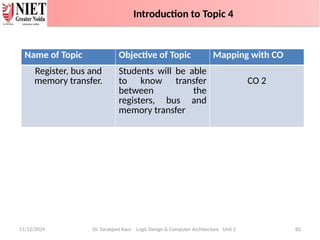
Name of Topic Objective of Topic Mapping with CO
Register, bus and
memory transfer.
Students will be able
to know transfer
between the
registers, bus and
memory transfer
CO 2
Introduction to Topic 4
11/12/2024 83
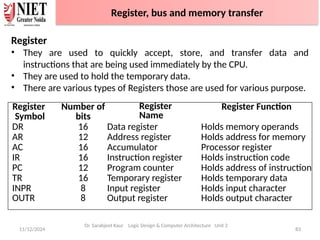
Register
• They are used to quickly accept, store, and transfer data and
instructions that are being used immediately by the CPU.
• They are used to hold the temporary data.
• There are various types of Registers those are used for various purpose.
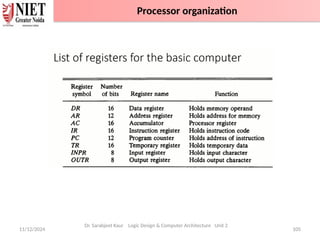
Register
Symbol
Number of
bits
Register
Name
Register Function
DR 16 Data register Holds memory operands
AR 12 Address register Holds address for memory
AC 16 Accumulator Processor register
IR 16 Instruction register Holds instruction code
PC 12 Program counter Holds address of instruction
TR 16 Temporary register Holds temporary data
INPR 8 Input register Holds input character
OUTR 8 Output register Holds output character
Dr. Sarabjeet Kaur Logic Design & Computer Architecture Unit 2
Register, bus and memory transfer
11/12/2024 84
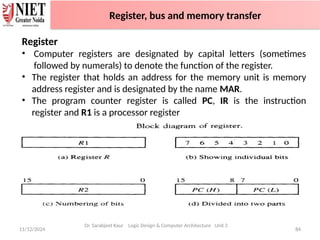
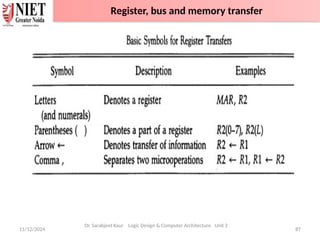
Register
• Computer registers are designated by capital letters (sometimes
followed by numerals) to denote the function of the register.
• The register that holds an address for the memory unit is memory
address register and is designated by the name MAR.
• The program counter register is called PC, IR is the instruction
register and R1 is a processor register
Dr. Sarabjeet Kaur Logic Design & Computer Architecture Unit 2
Register, bus and memory transfer
11/12/2024 85
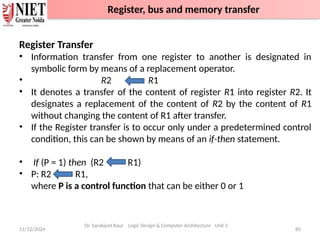
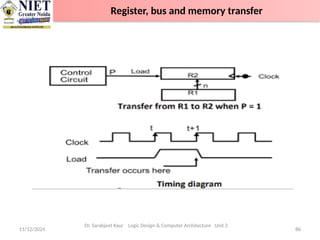
Register Transfer
• Information transfer from one register to another is designated in
symbolic form by means of a replacement operator.
• R2 R1
• It denotes a transfer of the content of register R1 into register R2. It
designates a replacement of the content of R2 by the content of R1
without changing the content of R1 after transfer.
• If the Register transfer is to occur only under a predetermined control
condition, this can be shown by means of an if-then statement.
• If (P = 1) then (R2 R1)
• P: R2 R1,
where P is a control function that can be either 0 or 1
Dr. Sarabjeet Kaur Logic Design & Computer Architecture Unit 2
Register, bus and memory transfer
11/12/2024 86
Dr. Sarabjeet Kaur Logic Design & Computer Architecture Unit 2
Register, bus and memory transfer
11/12/2024 87
Dr. Sarabjeet Kaur Logic Design & Computer Architecture Unit 2
Register, bus and memory transfer
11/12/2024 88
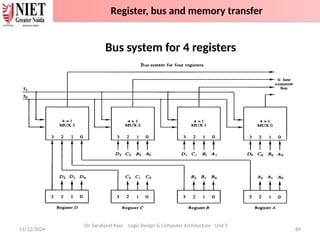
Bus transfer
• A bus structure consists of a set of common lines, one for each bit of
a register.
• Control signals determine which register is selected by the bus during
each transfer.
• Multiplexers can be used to construct a common bus.
• Multiplexers select the source register whose binary information is
then placed on the bus.
• The select lines are connected to the selection inputs of the
multiplexers and choose the bits of one register
Dr. Sarabjeet Kaur Logic Design & Computer Architecture Unit 2
Register, bus and memory transfer
11/12/2024 89
Bus system for 4 registers
Dr. Sarabjeet Kaur Logic Design & Computer Architecture Unit 2
Register, bus and memory transfer
11/12/2024 90
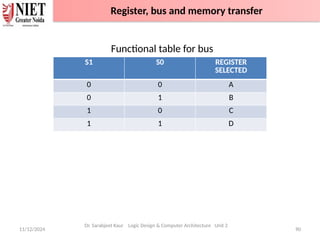
Functional table for bus
Dr. Sarabjeet Kaur Logic Design & Computer Architecture Unit 2
S1 S0 REGISTER
SELECTED
0 0 A
0 1 B
1 0 C
1 1 D
Register, bus and memory transfer
11/12/2024 91
• In general, a bus system will multiplex k registers of n bits each to
produce an n- line common bus.
• This requires n multiplexers – one for each bit
• The size of each multiplexer must be k x 1
• Transfer of information from the bus to one of many destination
registers can be accomplished by connecting bus lines to the
inputs of all designation registers and activating the load control
of particular destination register selected.
• Symbolic statement-
• BUS C, R1 BUS,
• If bus is known to exist in the system, R1 C
Dr. Sarabjeet Kaur Logic Design & Computer Architecture Unit 2
Register, bus and memory transfer
11/12/2024 92
• Instead of using multiplexers, three-state gates can be used to
construct the bus system
• A three-state gate is a digital circuit that exhibits three states.
• Two of the states are signals equivalent to logic 1 and 0
• The third state is a high-impedance state – this behaves like an open
circuit, which means the output is disconnected and does not have a
logic significance.
Dr. Sarabjeet Kaur Logic Design & Computer Architecture Unit 2
Bus Transfer using Three state buffer
11/12/2024 93
• The three-state buffer gate has a normal input and a control input
which determines the output state.
• With control 1, the output equals the normal input
• With control 0, the gate goes to a high-impedance state
• This enables a large number of three-state gate outputs to be
connected with wires to form a common bus line without endangering
loading effects
Dr. Sarabjeet Kaur Logic Design & Computer Architecture Unit 2
Bus Transfer using Three state buffer
11/12/2024 94
Dr. Sarabjeet Kaur Logic Design & Computer Architecture Unit 2
Bus Transfer using Three state buffer
11/12/2024 95
• Decoders are used to ensure that no more than one control input is
active at any given time
• This circuit can replace the multiplexer.
• To construct a common bus for four registers of n bits each using
three-state buffers, we need n circuits with four buffers in each
• Only one decoder is necessary to select between the four registers
Dr. Sarabjeet Kaur Logic Design & Computer Architecture Unit 2
Bus Transfer using Three state buffer
11/12/2024 96
Most of the standard notations used for specifying operations on
memory transfer are stated below.
• The transfer of information from a memory unit to the user end is
called a Read operation.
• A memory word is designated by the letter M.
• We must specify the address of memory word while writing the
memory transfer operations.
• The address register is designated by AR and the data register by DR.
• Thus, a read operation can be stated as:
Read: DR ← M [AR]
• The Read statement causes a transfer of information into the data
register (DR) from the memory word (M) selected by the address
register (AR).
Dr. Sarabjeet Kaur Logic Design & Computer Architecture Unit 2
Memory Transfer
11/12/2024 97
• The transfer of new information to be stored in the memory is called
a Write operation.
• The Write statement causes a transfer of information from register
R1 into the memory word (M) selected by address register (AR).
• Write: M [AR] ← R1
Dr. Sarabjeet Kaur Logic Design & Computer Architecture Unit 2
Memory Transfer
11/12/2024 98
Memory Transfer Block diagram
Above Diagram showing connections to memory unit.
Write: M[AR] ← DR
Read: DR ← M[AR]
Dr. Sarabjeet Kaur Logic Design & Computer Architecture Unit 2
Memory Transfer
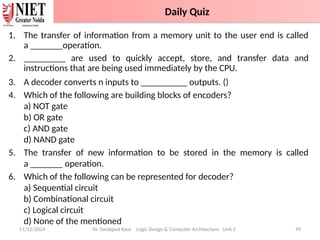
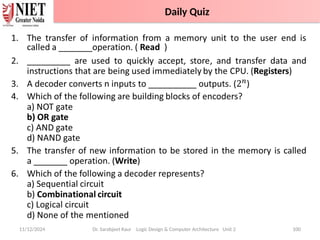
1. The transfer of information from a memory unit to the user end is called
a _______operation.
2. _________ are used to quickly accept, store, and transfer data and
instructions that are being used immediately by the CPU.
3. A decoder converts n inputs to __________ outputs. ()
4. Which of the following are building blocks of encoders?
a) NOT gate
b) OR gate
c) AND gate
d) NAND gate
5. The transfer of new information to be stored in the memory is called
a _______ operation.
6. Which of the following can be represented for decoder?
a) Sequential circuit
b) Combinational circuit
c) Logical circuit
d) None of the mentioned
11/12/2024 Dr. Sarabjeet Kaur Logic Design & Computer Architecture Unit 2 99
Daily Quiz
•
11/12/2024 Dr. Sarabjeet Kaur Logic Design & Computer Architecture Unit 2 100
Daily Quiz
11/12/2024 Dr. Sarabjeet Kaur Logic Design & Computer Architecture Unit 2 101
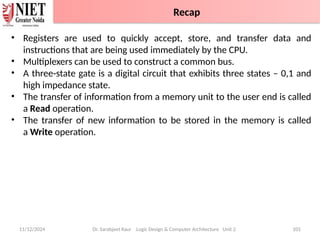
• Registers are used to quickly accept, store, and transfer data and
instructions that are being used immediately by the CPU.
• Multiplexers can be used to construct a common bus.
• A three-state gate is a digital circuit that exhibits three states – 0,1 and
high impedance state.
• The transfer of information from a memory unit to the user end is called
a Read operation.
• The transfer of new information to be stored in the memory is called
a Write operation.
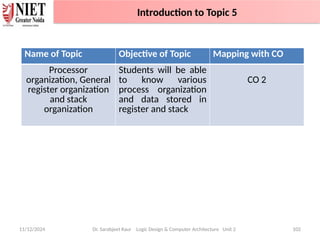
Recap
11/12/2024 Dr. Sarabjeet Kaur Logic Design & Computer Architecture Unit 2 102
Name of Topic Objective of Topic Mapping with CO
Processor
organization, General
register organization
and stack
organization
Students will be able
to know various
process organization
and data stored in
register and stack
CO 2
Introduction to Topic 5
11/12/2024 103
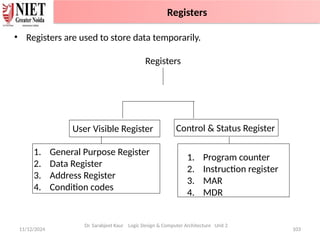
• Registers are used to store data temporarily.
Registers
Dr. Sarabjeet Kaur Logic Design & Computer Architecture Unit 2
1. General Purpose Register
2. Data Register
3. Address Register
4. Condition codes
1. Program counter
2. Instruction register
3. MAR
4. MDR
User Visible Register Control & Status Register
Registers
11/12/2024 104
Dr. Sarabjeet Kaur Logic Design & Computer Architecture Unit 2
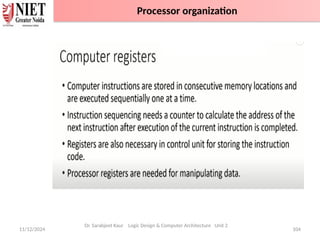
Processor organization
11/12/2024 105
Dr. Sarabjeet Kaur Logic Design & Computer Architecture Unit 2
Processor organization
11/12/2024 106
Dr. Sarabjeet Kaur Logic Design & Computer Architecture Unit 2
Processor organization
11/12/2024 107
Dr. Sarabjeet Kaur Logic Design & Computer Architecture Unit 2
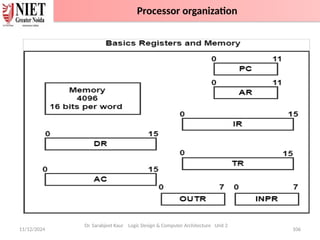
The description for each of the registers determined in the figure is as follows −
The data register holds the operand read from the memory.
The accumulator is a general-purpose register need for processing.
The instruction register holds the read memory.
The temporary data used while processing is stored in the temporary register.
The address register holds the address of the instruction that is to be implemented next
from the memory.
The Program Counter (PC) controls the sequence of instructions to be read. In case a
branch instruction is detected, the sequential execution does not arise. A branch
execution calls for a transfer to an instruction that is not in sequence with the instructions
in the PC.
The input register (INPR) and output register (OUTPR) are the registers used for the I/O
operations. The INPR receives an 8-bit character from the input device. It is similar to the
OUTPR.
Processor organization
11/12/2024 108
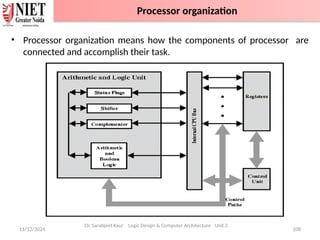
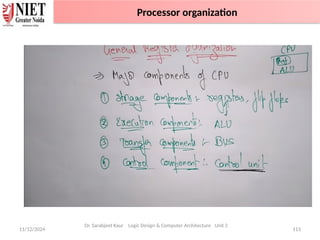
• Processor organization means how the components of processor are
connected and accomplish their task.
Dr. Sarabjeet Kaur Logic Design & Computer Architecture Unit 2
Processor organization
11/12/2024 109
Most computers fall into one of three types of CPU organizations:
• Single accumulator organization.
• General register organization.
• Stack organization.
1. Single accumulator organization
• The instruction format in this type of computer uses one address field.
• All operations are performed with an implied accumulator register.
• Example : ADD X
• where X is the address of the operand. The ADD instruction in this case
results in the operation AC <--AC + M[X].
• AC is the accumulator register and M[X] symbolizes the memory word
located at address X.
Dr. Sarabjeet Kaur Logic Design & Computer Architecture Unit 2
Processor organization-General register organization
11/12/2024 110
2. General register organization
• The instruction format in this type of computer needs three register
address fields.
• ADD R1, R2, R3 to denote the operation R 1 <---R2 + R3 .
• ADD R1, R2, would denote the operation R 1 <---R1 + R2. Only register
addresses for R 1 and R2 need be specified in this instruction.
• General register-type computers employ two or three address fields in
their instruction format.
• Each address field may specify a processor register or a memory word.
• ADD R1, X
R1 ---- R1 + M [X]
Dr. Sarabjeet Kaur Logic Design & Computer Architecture Unit 2
Processor organization
11/12/2024 111
3. Stack organization
• The stack-organized CPU ,Computers with stack organization would
have PUSH and POP instructions which require an address field. Thus
the instruction
• PUSH X
It will push the word at address X to the top of the stack. Stack pointer
is updated automatically.
• ADD
This instruction in stack computer consists of an operation code only
with no address field.
Dr. Sarabjeet Kaur Logic Design & Computer Architecture Unit 2
Processor organization
11/12/2024 112
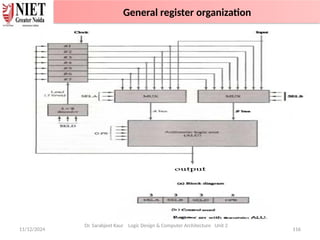
General registers organization
• In this type of organization, computer uses two or three address fields in
their instruction format.
• Each address field may specify a general register or a memory word. If
many CPU registers are available for heavily used variables and
intermediate results
For example:
• MULT R1, R2, R3
• This is an instruction of an arithmetic multiplication written in assembly
language. It uses three address fields R1, R2 and R3.
Dr. Sarabjeet Kaur Logic Design & Computer Architecture Unit 2
General register organization
11/12/2024 113
Dr. Sarabjeet Kaur Logic Design & Computer Architecture Unit 2
Processor organization
11/12/2024 114
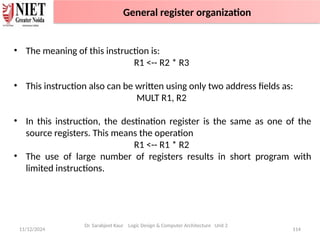
• The meaning of this instruction is:
R1 <-- R2 * R3
• This instruction also can be written using only two address fields as:
MULT R1, R2
• In this instruction, the destination register is the same as one of the
source registers. This means the operation
R1 <-- R1 * R2
• The use of large number of registers results in short program with
limited instructions.
Dr. Sarabjeet Kaur Logic Design & Computer Architecture Unit 2
General register organization
11/12/2024 115
Dr. Sarabjeet Kaur Logic Design & Computer Architecture Unit 2
General register organization
11/12/2024 116
Dr. Sarabjeet Kaur Logic Design & Computer Architecture Unit 2
General register organization
11/12/2024 117
Dr. Sarabjeet Kaur Logic Design & Computer Architecture Unit 2
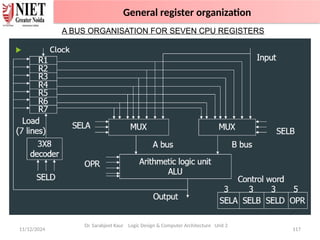
A BUS ORGANISATION FOR SEVEN CPU REGISTERS
General register organization
11/12/2024 118
Dr. Sarabjeet Kaur Logic Design & Computer Architecture Unit 2
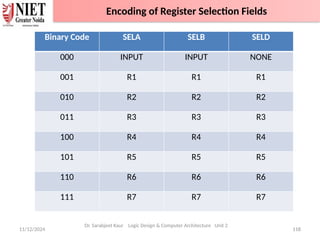
Binary Code SELA SELB SELD
000 INPUT INPUT NONE
001 R1 R1 R1
010 R2 R2 R2
011 R3 R3 R3
100 R4 R4 R4
101 R5 R5 R5
110 R6 R6 R6
111 R7 R7 R7
Encoding of Register Selection Fields
11/12/2024 119
Dr. Sarabjeet Kaur Logic Design & Computer Architecture Unit 2
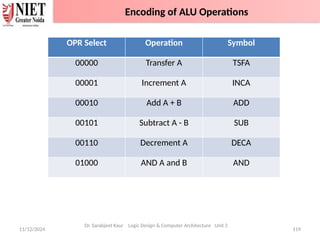
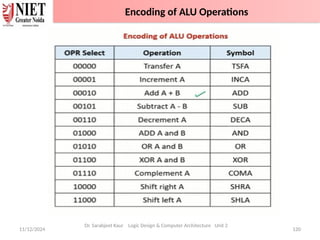
OPR Select Operation Symbol
00000 Transfer A TSFA
00001 Increment A INCA
00010 Add A + B ADD
00101 Subtract A - B SUB
00110 Decrement A DECA
01000 AND A and B AND
Encoding of ALU Operations
11/12/2024 120
Dr. Sarabjeet Kaur Logic Design & Computer Architecture Unit 2
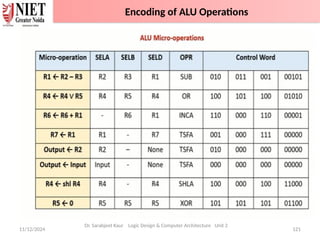
Encoding of ALU Operations
11/12/2024 121
Dr. Sarabjeet Kaur Logic Design & Computer Architecture Unit 2
Encoding of ALU Operations
11/12/2024 122
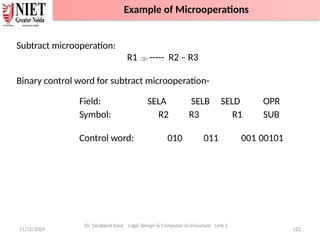
Subtract microoperation:
R1 ----- R2 – R3
Binary control word for subtract microoperation-
Field: SELA SELB SELD OPR
Symbol: R2 R3 R1 SUB
Control word: 010 011 001 00101
Dr. Sarabjeet Kaur Logic Design & Computer Architecture Unit 2
Example of Microoperations
11/12/2024 123
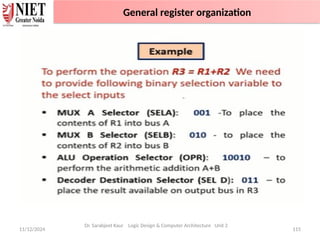
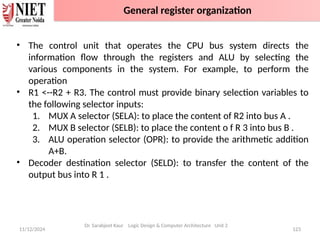
• The control unit that operates the CPU bus system directs the
information flow through the registers and ALU by selecting the
various components in the system. For example, to perform the
operation
• R1 <--R2 + R3. The control must provide binary selection variables to
the following selector inputs:
1. MUX A selector (SELA): to place the content of R2 into bus A .
2. MUX B selector (SELB): to place the content o f R 3 into bus B .
3. ALU operation selector (OPR): to provide the arithmetic addition
A+B.
• Decoder destination selector (SELD): to transfer the content of the
output bus into R 1 .
Dr. Sarabjeet Kaur Logic Design & Computer Architecture Unit 2
General register organization
11/12/2024 124
The advantages of General register based CPU organization
• Efficiency of CPU increases as there are large number of registers are
used in this organization.
• Less memory space is used to store the program since the instructions
are written in compact way.
The disadvantages of General register based CPU organization
• Care should be taken to avoid unnecessary usage of registers. Thus,
compilers need to be more intelligent in this aspect.
• Since large number of registers are used, thus extra cost is required in
this organization.
Dr. Sarabjeet Kaur Logic Design & Computer Architecture Unit 2
General register organization
11/12/2024 125
Dr. Sarabjeet Kaur Logic Design & Computer Architecture Unit 2
Stack Organization
11/12/2024 126
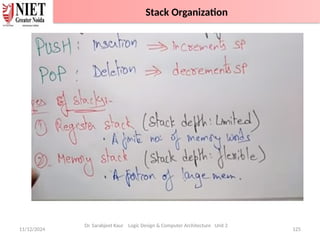
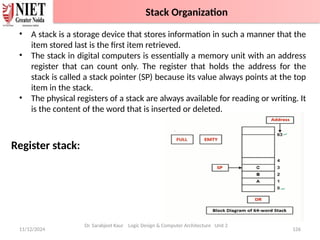
• A stack is a storage device that stores information in such a manner that the
item stored last is the first item retrieved.
• The stack in digital computers is essentially a memory unit with an address
register that can count only. The register that holds the address for the
stack is called a stack pointer (SP) because its value always points at the top
item in the stack.
• The physical registers of a stack are always available for reading or writing. It
is the content of the word that is inserted or deleted.
Register stack:
Dr. Sarabjeet Kaur Logic Design & Computer Architecture Unit 2
Stack Organization
11/12/2024 127
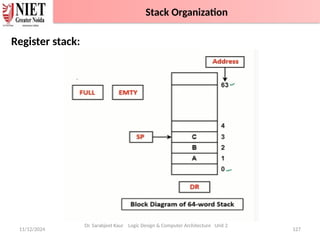
Register stack:
Dr. Sarabjeet Kaur Logic Design & Computer Architecture Unit 2
Stack Organization
11/12/2024 Dr. Sarabjeet Kaur Logic Design & Computer Architecture Unit 2 128
PUSH:
• If the stack is not full (FULL =0), a new item is inserted with a push
operation. The push operation consists of the following sequences of
micro operations:
SP ← SP + 1 Increment stack pointer
M [SP] ← DR WRITE ITEM ON TOP OF THE STACK
IF (SP = 0) then (FULL ← 1) Check is stack is full
EMTY ← 0 Mark the stack not empty
Stack Organization
11/12/2024 Dr. Sarabjeet Kaur Logic Design & Computer Architecture Unit 2 129
POP:
• A new item is deleted from the stack if the stack is not empty (if
EMTY = 0). The pop operation consists of the following sequences of
micro operations:
DR ← M [SP] Read item on top of the stack
SP ← SP - 1 Decrement stack pointer
IF (SP = 0) then (EMTY ← 1) Check if stack is empty
FULL ← 0 Mark the stack not full
• The top item is read from the stack into DR. The stack pointer is
then decremented. If its value reaches zero, the stack is empty, so
EMTY is set to 1.
Stack Organization
11/12/2024 Dr. Sarabjeet Kaur Logic Design & Computer Architecture Unit 2 130
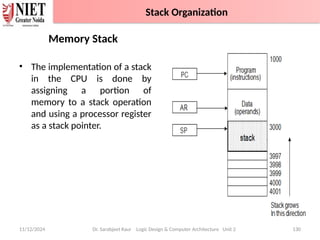
Memory Stack
• The implementation of a stack
in the CPU is done by
assigning a portion of
memory to a stack operation
and using a processor register
as a stack pointer.
Stack Organization
11/12/2024 131
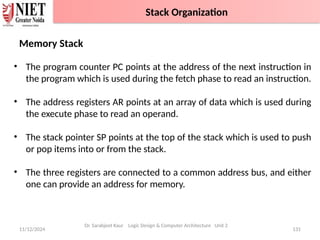
Memory Stack
• The program counter PC points at the address of the next instruction in
the program which is used during the fetch phase to read an instruction.
• The address registers AR points at an array of data which is used during
the execute phase to read an operand.
• The stack pointer SP points at the top of the stack which is used to push
or pop items into or from the stack.
• The three registers are connected to a common address bus, and either
one can provide an address for memory.
Dr. Sarabjeet Kaur Logic Design & Computer Architecture Unit 2
Stack Organization
11/12/2024 132
PUSH
• A new item is inserted with the push operation as follows:
SP ← SP - 1
M[SP] ← DR
• The stack pointer is decremented so that it points at the address
of the next word.
• A memory write operation inserts the word from DR into the top
of the stack.
POP
• A new item is deleted with a pop operation as follows:
DR ← M[SP]
SP ← SP + 1
Dr. Sarabjeet Kaur Logic Design & Computer Architecture Unit 2
Stack Organization
11/12/2024 133
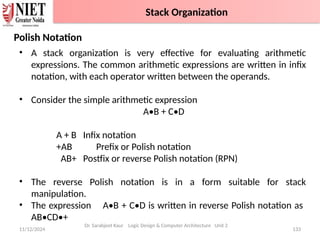
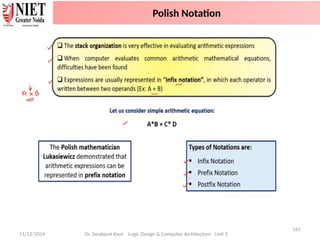
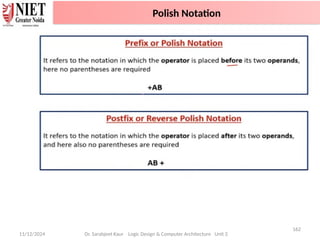
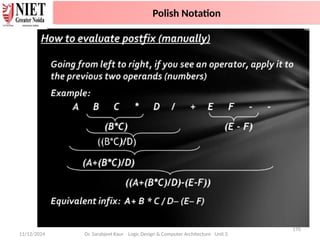
Polish Notation
• A stack organization is very effective for evaluating arithmetic
expressions. The common arithmetic expressions are written in infix
notation, with each operator written between the operands.
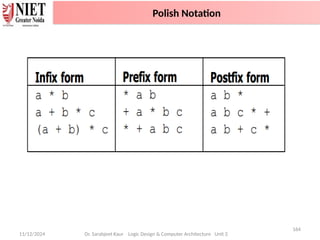
• Consider the simple arithmetic expression
A•B + C•D
A + B Infix notation
+AB Prefix or Polish notation
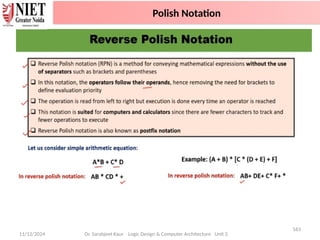
AB+ Postfix or reverse Polish notation (RPN)
• The reverse Polish notation is in a form suitable for stack
manipulation.
• The expression A•B + C•D is written in reverse Polish notation as
AB•CD•+
Dr. Sarabjeet Kaur Logic Design & Computer Architecture Unit 2
Stack Organization
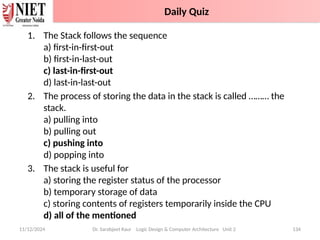
1. The Stack follows the sequence
a) first-in-first-out
b) first-in-last-out
c) last-in-first-out
d) last-in-last-out
2. The process of storing the data in the stack is called ……… the
stack.
a) pulling into
b) pulling out
c) pushing into
d) popping into
3. The stack is useful for
a) storing the register status of the processor
b) temporary storage of data
c) storing contents of registers temporarily inside the CPU
d) all of the mentioned
11/12/2024 Dr. Sarabjeet Kaur Logic Design & Computer Architecture Unit 2 134
Daily Quiz
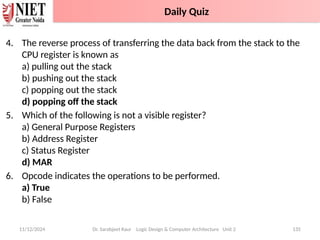
4. The reverse process of transferring the data back from the stack to the
CPU register is known as
a) pulling out the stack
b) pushing out the stack
c) popping out the stack
d) popping off the stack
5. Which of the following is not a visible register?
a) General Purpose Registers
b) Address Register
c) Status Register
d) MAR
6. Opcode indicates the operations to be performed.
a) True
b) False
11/12/2024 Dr. Sarabjeet Kaur Logic Design & Computer Architecture Unit 2 135
Daily Quiz
11/12/2024 Dr. Sarabjeet Kaur Logic Design & Computer Architecture Unit 2 136
Name of Topic Objective of Topic Mapping with CO
Addressing Modes Students will be able
to know the different
addressing modes.
CO 2
Introduction to Topic 6
11/12/2024 137
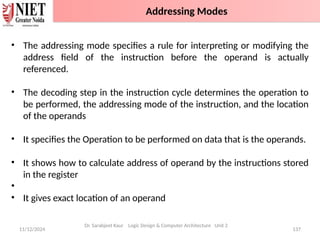
• The addressing mode specifies a rule for interpreting or modifying the
address field of the instruction before the operand is actually
referenced.
• The decoding step in the instruction cycle determines the operation to
be performed, the addressing mode of the instruction, and the location
of the operands
• It specifies the Operation to be performed on data that is the operands.
• It shows how to calculate address of operand by the instructions stored
in the register
•
• It gives exact location of an operand
Dr. Sarabjeet Kaur Logic Design & Computer Architecture Unit 2
Addressing Modes
11/12/2024 138
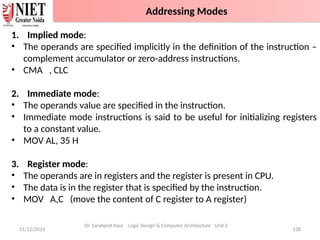
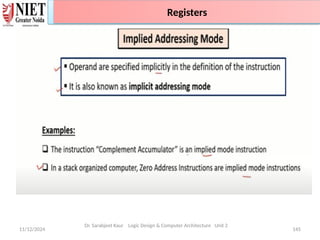
1. Implied mode:
• The operands are specified implicitly in the definition of the instruction –
complement accumulator or zero-address instructions.
• CMA , CLC
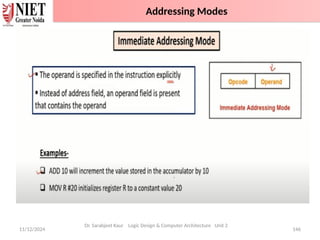
2. Immediate mode:
• The operands value are specified in the instruction.
• Immediate mode instructions is said to be useful for initializing registers
to a constant value.
• MOV AL, 35 H
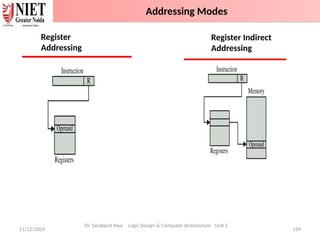
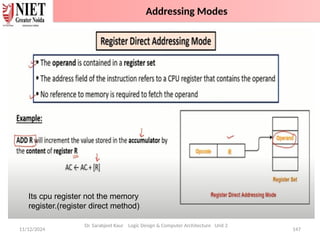
3. Register mode:
• The operands are in registers and the register is present in CPU.
• The data is in the register that is specified by the instruction.
• MOV A,C (move the content of C register to A register)
Dr. Sarabjeet Kaur Logic Design & Computer Architecture Unit 2
Addressing Modes
11/12/2024 139
Dr. Sarabjeet Kaur Logic Design & Computer Architecture Unit 2
Register
Addressing
Register Indirect
Addressing
Addressing Modes
11/12/2024 140
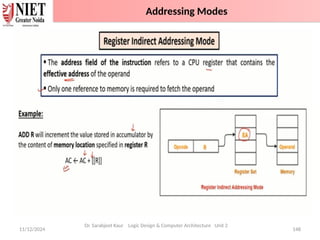
4. Register Indirect mode:
• In this mode the instruction specifies a register in the CPU whose contents
give the address of the operand in memory.
• The selected register contains the address of the operand rather than the
operand itself.
• MOV AX,[CX] (move the content of memory location addressed by the
register CX to the register AX)
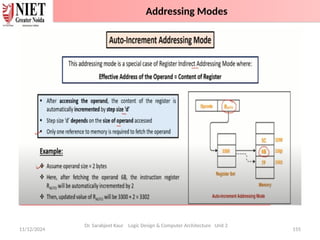
5. Autoincrement/Autodecrement mode:
• This is similar to register indirect mode except that the register is
incremented or decremented after or before its value is used to access
memory.
a) Increment mode- After accessing the operand the contents of this
register are automatically incremented to point to next consecutive
memory location.
Dr. Sarabjeet Kaur Logic Design & Computer Architecture Unit 2
Addressing Modes
11/12/2024 141
Example: Add R1, (R2+)
OR
R1 = R1 + M[R2]
R2 = R2 + d
Useful for stepping through arrays in a loop.
R2 – start of the array, d- size of an element.
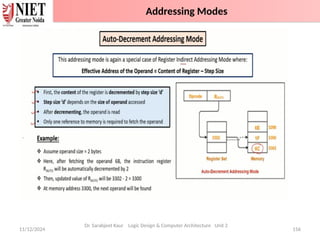
b) Decrement Mode:
• Before accessing the operand , the contents of this register are
automatically decremented to point to the previous consecutive memory
location.
Example- Add R1, (-R2)
OR
R2 = R2 – d
R1 = R1 + M [R2]
Dr. Sarabjeet Kaur Logic Design & Computer Architecture Unit 2
Addressing Modes
11/12/2024 142
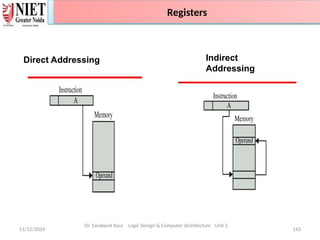
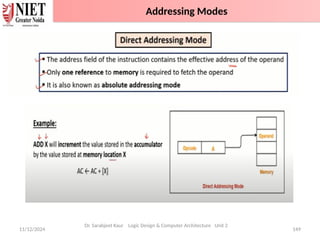
6. Direct Address mode:
• In this mode the effective address is equal to the address part of the
instruction.
• The operand resides in memory and its address is given directly by the
address field of the instruction.
• Example – ADD AL, [0301] (add the content of address 0301 to A)
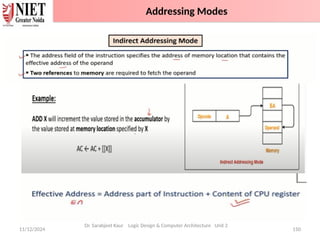
7. Indirect Address mode :
• In this mode the address field of the instruction gives the address where
the effective address is stored in memory.
• In this address field of instruction gives the address where the effective
address is stored in memory.
Dr. Sarabjeet Kaur Logic Design & Computer Architecture Unit 2
Addressing Modes
11/12/2024 143
Addressing Modes
Dr. Sarabjeet Kaur Logic Design & Computer Architecture Unit 2
Direct Addressing Indirect
Addressing
Registers
11/12/2024 144
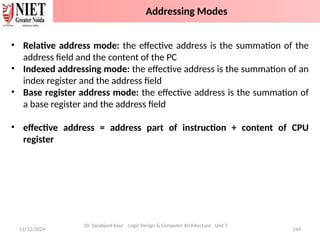
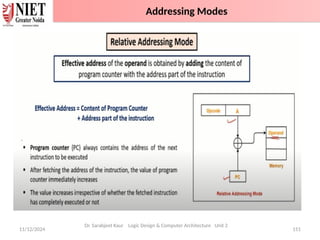
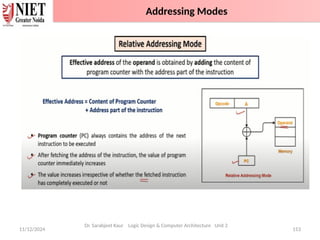
• Relative address mode: the effective address is the summation of the
address field and the content of the PC
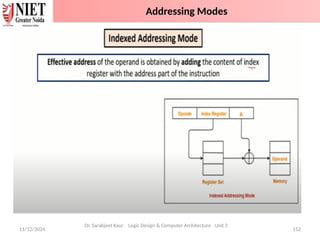
• Indexed addressing mode: the effective address is the summation of an
index register and the address field
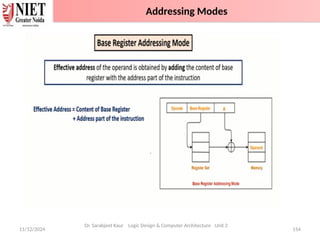
• Base register address mode: the effective address is the summation of
a base register and the address field
• effective address = address part of instruction + content of CPU
register
Dr. Sarabjeet Kaur Logic Design & Computer Architecture Unit 2
Addressing Modes
11/12/2024 145
Addressing Modes
Dr. Sarabjeet Kaur Logic Design & Computer Architecture Unit 2
Registers
11/12/2024 146
Dr. Sarabjeet Kaur Logic Design & Computer Architecture Unit 2
Addressing Modes
11/12/2024 147
Dr. Sarabjeet Kaur Logic Design & Computer Architecture Unit 2
Its cpu register not the memory
register.(register direct method)
Addressing Modes
11/12/2024 148
Dr. Sarabjeet Kaur Logic Design & Computer Architecture Unit 2
Addressing Modes
11/12/2024 149
Dr. Sarabjeet Kaur Logic Design & Computer Architecture Unit 2
Addressing Modes
11/12/2024 150
Dr. Sarabjeet Kaur Logic Design & Computer Architecture Unit 2
Addressing Modes
11/12/2024 151
Dr. Sarabjeet Kaur Logic Design & Computer Architecture Unit 2
Addressing Modes
11/12/2024 152
Dr. Sarabjeet Kaur Logic Design & Computer Architecture Unit 2
Addressing Modes
11/12/2024 153
Dr. Sarabjeet Kaur Logic Design & Computer Architecture Unit 2
Addressing Modes
11/12/2024 154
Dr. Sarabjeet Kaur Logic Design & Computer Architecture Unit 2
Addressing Modes
11/12/2024 155
Dr. Sarabjeet Kaur Logic Design & Computer Architecture Unit 2
Addressing Modes
11/12/2024 156
Dr. Sarabjeet Kaur Logic Design & Computer Architecture Unit 2
Addressing Modes
11/12/2024
157
Dr. Sarabjeet Kaur Logic Design & Computer Architecture Unit 2
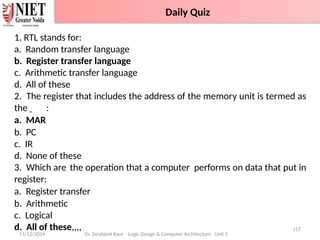
1. RTL stands for:
a. Random transfer language
b. Register transfer language
c. Arithmetic transfer language
d. All of these
2. The register that includes the address of the memory unit is termed as
the :
a. MAR
b. PC
c. IR
d. None of these
3. Which are the operation that a computer performs on data that put in
register:
a. Register transfer
b. Arithmetic
c. Logical
d. All of these,,,,
Daily Quiz
11/12/2024
158
Dr. Sarabjeet Kaur Logic Design & Computer Architecture Unit 2
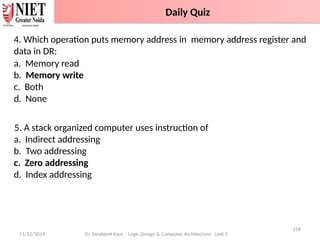
4. Which operation puts memory address in memory address register and
data in DR:
a. Memory read
b. Memory write
c. Both
d. None
5. A stack organized computer uses instruction of
a. Indirect addressing
b. Two addressing
c. Zero addressing
d. Index addressing
Daily Quiz
11/12/2024
159
Dr. Sarabjeet Kaur Logic Design & Computer Architecture Unit 2
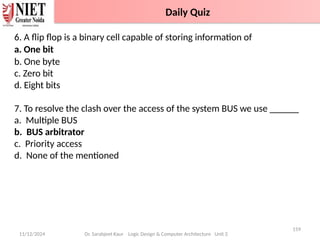
6. A flip flop is a binary cell capable of storing information of
a. One bit
b. One byte
c. Zero bit
d. Eight bits
7. To resolve the clash over the access of the system BUS we use ______
a. Multiple BUS
b. BUS arbitrator
c. Priority access
d. None of the mentioned
Daily Quiz
11/12/2024
160
Dr. Sarabjeet Kaur Logic Design & Computer Architecture Unit 2
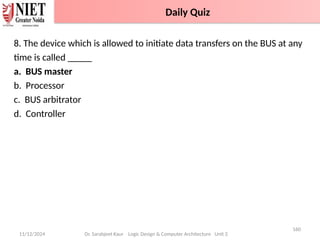
8. The device which is allowed to initiate data transfers on the BUS at any
time is called _____
a. BUS master
b. Processor
c. BUS arbitrator
d. Controller
Daily Quiz
11/12/2024
161
Dr. Sarabjeet Kaur Logic Design & Computer Architecture Unit 2
Polish Notation
11/12/2024
162
Dr. Sarabjeet Kaur Logic Design & Computer Architecture Unit 2
Polish Notation
11/12/2024
163
Dr. Sarabjeet Kaur Logic Design & Computer Architecture Unit 2
Polish Notation
11/12/2024
164
Dr. Sarabjeet Kaur Logic Design & Computer Architecture Unit 2
Polish Notation
11/12/2024
165
Dr. Sarabjeet Kaur Logic Design & Computer Architecture Unit 2
Polish Notation
11/12/2024
166
Dr. Sarabjeet Kaur Logic Design & Computer Architecture Unit 2
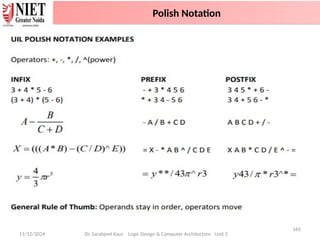
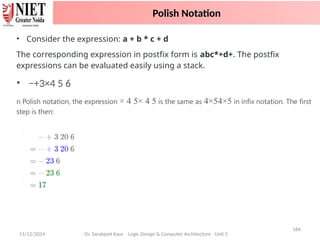
• Consider the expression: a + b * c + d
The corresponding expression in postfix form is abc*+d+. The postfix
expressions can be evaluated easily using a stack.
• −+3×4 5 6
n Polish notation, the expression × 4 5× 4 5 is the same as 4×54×5 in infix notation. The first
step is then:
Polish Notation
11/12/2024
167
Dr. Sarabjeet Kaur Logic Design & Computer Architecture Unit 2
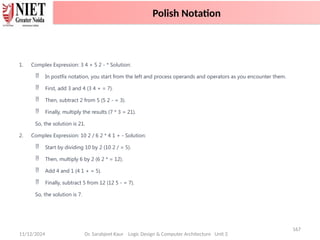
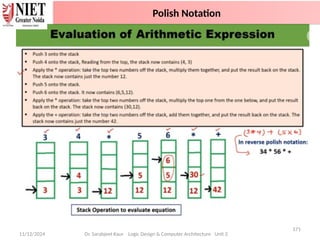
1. Complex Expression: 3 4 + 5 2 - * Solution:
 In postfix notation, you start from the left and process operands and operators as you encounter them.
 First, add 3 and 4 (3 4 + = 7).
 Then, subtract 2 from 5 (5 2 - = 3).
 Finally, multiply the results (7 * 3 = 21).
So, the solution is 21.
2. Complex Expression: 10 2 / 6 2 * 4 1 + - Solution:
 Start by dividing 10 by 2 (10 2 / = 5).
 Then, multiply 6 by 2 (6 2 * = 12).
 Add 4 and 1 (4 1 + = 5).
 Finally, subtract 5 from 12 (12 5 - = 7).
So, the solution is 7.
Polish Notation
11/12/2024
168
Dr. Sarabjeet Kaur Logic Design & Computer Architecture Unit 2
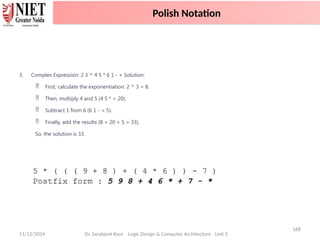
3. Complex Expression: 2 3 ^ 4 5 * 6 1 - + Solution:
 First, calculate the exponentiation: 2 ^ 3 = 8.
 Then, multiply 4 and 5 (4 5 * = 20).
 Subtract 1 from 6 (6 1 - = 5).
 Finally, add the results (8 + 20 + 5 = 33).
So, the solution is 33.
Polish Notation
11/12/2024
169
Dr. Sarabjeet Kaur Logic Design & Computer Architecture Unit 2
Polish Notation
11/12/2024
170
Dr. Sarabjeet Kaur Logic Design & Computer Architecture Unit 2
Polish Notation
11/12/2024
171
Dr. Sarabjeet Kaur Logic Design & Computer Architecture Unit 2
Polish Notation
11/12/2024
172
Dr. Sarabjeet Kaur Logic Design & Computer Architecture Unit 2
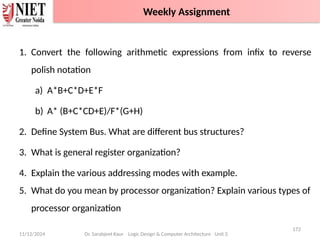
1. Convert the following arithmetic expressions from infix to reverse
polish notation
a) A*B+C*D+E*F
b) A* (B+C*CD+E)/F*(G+H)
2. Define System Bus. What are different bus structures?
3. What is general register organization?
4. Explain the various addressing modes with example.
5. What do you mean by processor organization? Explain various types of
processor organization
Weekly Assignment
11/12/2024
173
Dr. Sarabjeet Kaur Logic Design & Computer Architecture Unit 2
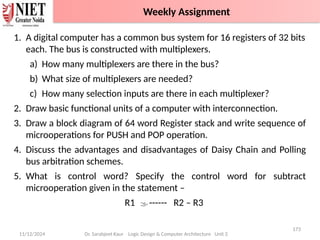
1. A digital computer has a common bus system for 16 registers of 32 bits
each. The bus is constructed with multiplexers.
a) How many multiplexers are there in the bus?
b) What size of multiplexers are needed?
c) How many selection inputs are there in each multiplexer?
2. Draw basic functional units of a computer with interconnection.
3. Draw a block diagram of 64 word Register stack and write sequence of
microoperations for PUSH and POP operation.
4. Discuss the advantages and disadvantages of Daisy Chain and Polling
bus arbitration schemes.
5. What is control word? Specify the control word for subtract
microoperation given in the statement –
R1 ------ R2 – R3
Weekly Assignment
11/12/2024
174
Dr. Sarabjeet Kaur Logic Design & Computer Architecture Unit 2
1. Types OF Buses-
https://www.youtube.com/watch?v=xBYhHC8_A6o&list=PLxCzCOWd7aiHMonh3
G6QNKq53C6oNXGrX&index=4
2. Common bus system using multiplexer
https://www.youtube.com/watch?v=nbDd46e_LpE&list=PLxCzCOWd7aiHMonh3
G6QNKq53C6oNXGrX&index=5
3. Single Accumulator CPU Organisation
https://www.youtube.com/watch?v=k5YMLXPy1SE&list=PLxCzCOWd7aiHMonh3
G6QNKq53C6oNXGrX&index=15
4. General Register CPU Organisation
https://www.youtube.com/watch?v=Za7ozdjE8VI&list=PLxCzCOWd7aiHMonh3G
6QNKq53C6oNXGrX&index=16
5. Register Stack Organisation
https://www.youtube.com/watch?v=u-sp4gBAJKI&list=PLxCzCOWd7aiHMonh3G
6QNKq53C6oNXGrX&index=17
Topic Links
11/12/2024
175
Dr. Sarabjeet Kaur Logic Design & Computer Architecture Unit 2
1. To resolve the clash over the access of the system BUS we use______
a) Multiple BUS b) BUS arbitrator
c) Priority access d) None of the mentioned
2. The device which is allowed to initiate data transfers on the BUS at
any time is called _____
a) BUS master b) Processor
c) BUS arbitrator d) Controller
3. ______ BUS arbitration approach uses the involvement of the
processor.
a) Centralized arbitration b) Distributed arbitration
c) Random arbitration d) All of the mentioned
MCQ
11/12/2024
176
Dr. Sarabjeet Kaur Logic Design & Computer Architecture Unit 2
4. When the processor receives the request from a device, it responds
by sending _____
a) Acknowledge signal b) BUS grant signal
c) Response signal d) None of the mentioned
5. In Centralized Arbitration ______ is/are is the BUS master.
a) Processor b) DMA controller
c) Device d) Both Processor and DMA controller
6. Once the BUS is granted to a device ___________
a) It activates the BUS busy line b) Performs the required operation
c) Raises an interrupt d) All of the mentioned
MCQ
11/12/2024
177
Dr. Sarabjeet Kaur Logic Design & Computer Architecture Unit 2
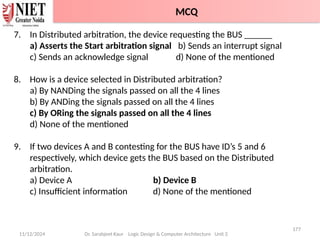
7. In Distributed arbitration, the device requesting the BUS ______
a) Asserts the Start arbitration signal b) Sends an interrupt signal
c) Sends an acknowledge signal d) None of the mentioned
8. How is a device selected in Distributed arbitration?
a) By NANDing the signals passed on all the 4 lines
b) By ANDing the signals passed on all the 4 lines
c) By ORing the signals passed on all the 4 lines
d) None of the mentioned
9. If two devices A and B contesting for the BUS have ID’s 5 and 6
respectively, which device gets the BUS based on the Distributed
arbitration.
a) Device A b) Device B
c) Insufficient information d) None of the mentioned
MCQ
11/12/2024
178
Dr. Sarabjeet Kaur Logic Design & Computer Architecture Unit 2
10. During the execution of a program which gets initialized first?
a) MDR b) IR
c) PC d) MAR
11. Which of the register/s of the processor is/are connected to Memory
Bus?
a) PC b) MAR
c) IR d) Both PC and MAR
12. ISP stands for _________
a) Instruction Set Processor
b) Information Standard Processing
c) Interchange Standard Protocol
d) Interrupt Service Procedure
MCQ
11/12/2024
179
Dr. Sarabjeet Kaur Logic Design & Computer Architecture Unit 2
13. The addressing mode, where you directly specify the operand value is
_______
a) Immediate b) Direct
c) Definite d) Relative
14. _____ addressing mode is most suitable to change the normal
sequence of execution of instructions.
a) Relative b) Indirect
c) Index with Offset d) Immediate
15. ______ is generally used to increase the apparent size of physical
memory.
a) Secondary memory b) Virtual memory
c) Hard-disk d) Disks
MCQ
11/12/2024 180
Dr. Sarabjeet Kaur Logic Design & Computer Architecture Unit 2
1. Construct a bus system for four registers with help of multiplexers.
2. A digital computer has a common bus system for 16 registers of 32
bits each. The bus is constructed with multiplexers.
a) How many selection inputs are there in each multiplexer?
b) What size of multiplexers are needed?
c) How many multiplexers are there in the bus?
3. What is Multiplexer?
Glossary Questions
11/12/2024
181
Dr. Sarabjeet Kaur Logic Design & Computer Architecture Unit 2
Sessional 1
Sessional 2
Sessional 3
Old Question Papers - Sessional
11/12/2024 182
Dr. Sarabjeet Kaur Logic Design & Computer Architecture Unit 2
A typical digital computer has many registers, and paths must be
provided to transfer information from one register to another. The
number of wires will be excessive if separate lines are used between
each register and all other registers in the system. A more efficient
scheme for transferring information between registers in a multiple-
register configuration is a common bus system. A bus structure consists
of a set of common lines, one for each bit of a register, through which
binary information is transferred one at a time. Control signals determine
which register is selected by the bus during each particular register
transfer. One way of constructing a common bus system is with
multiplexers. The multiplexers select the source register whose binary
information is then placed on the bus.
Glossary Questions
11/12/2024
183
Dr. Sarabjeet Kaur Logic Design & Computer Architecture Unit 2
2018-19
2019-20
Old Question Papers
11/12/2024
184
Dr. Sarabjeet Kaur Logic Design & Computer Architecture Unit 2
1. Explain different addressing modes.
2. Explain the importance of different addressing modes in computer
architecture with suitable example.
3. What is an instruction format? Explain different types of instruction
formats in detail.
4. A digital computer has a common bus system for 16 register of 32 bits
each. The bus is Constructed with multiplexers.
(i) How many selection inputs are there in each multiplexer?
(ii) What sizes of multiplexers are needed?
(iii) How many multiplexers are there in the bus?
5. Show the block diagram of the hardware that implements the following
register transfer statement: P: R2 <--- R1
6. Explain sequence of micro-operations for implementing PUSH and POP
instructions in the register stack.
Expected Questions
11/12/2024
185
Dr. Sarabjeet Kaur Logic Design & Computer Architecture Unit 2
7. Differentiate between Computer Architecture and Computer
Organization Explain different addressing modes.
8. Draw the Distributed Arbitration interface circuit for two devices A and B
with their 4- bit unique ID 0110 and 0001 respectively.
i. Write down the new ID generated on Arbitration lines.
ii. Which device become Bus Master.
9. Convert the arithmetic expressions from infix to reverse polish notation.
i. A*B+C*D+E*F
ii. A+B/C-D+E
10. Explain bus organization for seven CPU registers with the help of block
diagram and control word.
11. Draw the block diagrams for Daisy chahing and Independent
Centralised Arbitration schemes.
12. Draw the Multiple Bus structures along with its advantage and
disadvantage.
Expected Questions
11/12/2024
186
Dr. Sarabjeet Kaur Logic Design & Computer Architecture Unit 2
• Computer Organization and Architecture provides in-depth knowledge
of internal working, structuring, and implementation of a computer
system
• Computer Architecture is concerned with the way hardware
components are connected together to form a computer system.
• Computer Organization is concerned with the structure and behaviour
of a computer system as seen by the user.
• A bus is a common pathway through which information flows from one
computer component to another.
• Types of Computer BUS: Data Bus ,Address Bus, Control Bus
• Bus Arbitration -It refers to the process by which the current bus master
accesses and then leaves the control of the bus and passes it to the
another bus requesting processor unit.
Recap of Unit
11/12/2024
187
Dr. Sarabjeet Kaur Logic Design & Computer Architecture Unit 2
• There are two approaches to bus arbitration: Centralized and
Distributed
• There are three arbitration schemes which run on centralized
arbitration – Daisy chain, Polling and Independent request.
• Registers are used to quickly accept, store, and transfer data and
instructions that are being used immediately by the CPU.
• Multiplexers can be used to construct a common bus.
• A three-state gate is a digital circuit that exhibits three states – 0,1 and
high impedance state.
• The transfer of information from a memory unit to the user end is called
a Read operation.
• The transfer of new information to be stored in the memory is called
a Write operation.
Recap of Unit
11/12/2024
188
Dr. Sarabjeet Kaur Logic Design & Computer Architecture Unit 2
• Most computers fall into one of three types of CPU organizations:
1. Single accumulator organization.
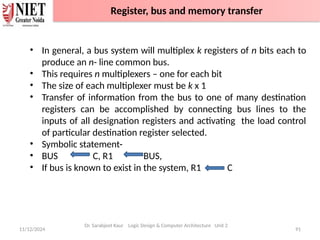
2. General register organization.
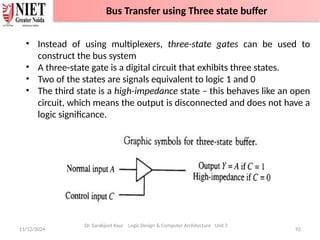
3. Stack organization
• Addressing modes- Implied mode, immediate addressing mode,
register addressing mode, register indirect addressing mode, direct
addressing mode, indirect addressing mode,
autoincrement/autodecrement mode, relative addressing mode, base
addressing mode, indexed addressing mode
Recap of Unit
THANK
YOU

Unit_2_LDCA_CS ---->Computer Basics .pptx

  • 1.
    Computer Basics Dr. SarabjeetKaur Assistant Professor NIET, Greater Noida 11/12/2024 1 Unit: 2 Logic Design & Computer Architecture (BCSAI0302) B Tech (AI)- 3rd Sem Noida Institute of Engineering and Technology, GR. Noida (An Autonomous Institute) School of Computer Science & Engineering in Emerging Technologies Dr. Sarabjeet Kaur Logic Design & Computer Architecture Unit 2
  • 2.
    2 She has completedher Ph.D. degree in the field of Antenna from Bhopal University. She has received her M.Tech degree in Digital Communication Engineering from Rajiv Gandhi University from Bhopal in 2008 and B.Tech degree in Telecommunication Engineering from Pt. Ravi Shankar university . Currently, She is working as an Assistant Professor in the Department of Electronics & Communication Engineering in NIET, Greater Noida, India. He has more than 15 years of teaching & research experience. Dr. Sarabjeet Kaur (Assistant Professor, ECE) Biography 11/12/2024 Dr. Sarabjeet Kaur Logic Design & Computer Architecture Unit 2 Faculty Information
  • 3.
    11/12/2024 3 Dr. SarabjeetKaur Logic Design & Computer Architecture Unit 2 Evaluation scheme
  • 4.
    11/12/2024 4 Dr. SarabjeetKaur Logic Design & Computer Architecture Unit 2 Subject Syllabus
  • 5.
    11/12/2024 5 Subject Syllabus Dr.Sarabjeet Kaur Logic Design & Computer Architecture Unit 2 Subject Syllabus
  • 6.
    11/12/2024 6 Subject Syllabus Dr.Sarabjeet Kaur Logic Design & Computer Architecture Unit 2 Subject Syllabus
  • 7.
    11/12/2024 7 Branch wiseApplications Dr. Sarabjeet Kaur Logic Design & Computer Architecture Unit 2 Computer Science: Understanding of Logic Design and Computer Architecture is required for: • Understanding of Logic on computer • Performance analysis of practical software • Parallel Software and its execution • High performance databases • Modern Compilers and Code optimization • High performance game programming Other applications • Bio-informatics, Data science using python, Web programming For high performance computing, we require COA background. Faculty Information Subject Syllabus
  • 8.
    11/12/2024 8 • Discussthe basic concepts ,Logics and structure of computers. • Understand concepts of register transfer logic and arithmetic operations. • Explain different types of addressing modes and memory organization. • Understand the concepts of memory system and Learn the different types of memories to store data. • Explain the various types of interrupts and modes of data transfer. Dr. Sarabjeet Kaur Logic Design & Computer Architecture Unit 2 Course Objective
  • 9.
    11/12/2024 9 Dr. SarabjeetKaur Logic Design & Computer Architecture Unit 2 CO 1 Understand the basic structure and operation of a digital computer system K1, K2 CO 2 Analyze the design of arithmetic & logic unit and understand the fixed point and floating-point arithmetic operations. K1, K4 CO 3 Implement control unit techniques and the concept of Pipelining K3 CO 4 Understand the hierarchical memory system, cache memories and virtual memory. K2 CO 5 Understand different ways of communicating with I/O devices and standard I/O interfaces. K2 Course outcomes : After completion of this course students will be able to Course Outcomes
  • 10.
    11/12/2024 10 Dr. SarabjeetKaur Logic Design & Computer Architecture Unit 2 • Program Outcomes are narrow statements that describe what the students are expected to know and would be able to do upon the graduation. • These relate to the skills, knowledge, and behavior that students acquire through the programmed. 1. Engineering knowledge 2. Problem analysis 3. Design/development of solutions 4. Conduct investigations of complex problems 5. Modern tool usage 6. The engineer and society 7. Environment and sustainability 8. Ethics 9. Individual and team work 10. Communication 11. Project management and finance 12. Life-long learning Program Outcomes
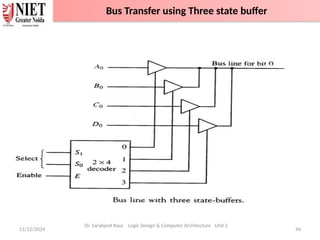
  • 11.
    11/12/2024 11 Dr. SarabjeetKaur Logic Design & Computer Architecture Unit 2 COMPUTER ORGANIZATION AND ARCHITECTURE (ACSE 0305) CO PO1 PO2 PO3 PO4 PO5 PO6 PO7 PO8 PO9 PO 10 PO 11 PO 12 CO1 3 2 1 1 1 1 1 - 1 1 1 2 CO2 2 2 2 2 1 1 - 1 1 1 1 2 CO3 3 2 2 1 2 2 1 1 2 2 1 2 CO4 3 2 2 2 2 1 1 - 1 1 1 2 CO5 2 2 2 1 2 - 1 - 1 2 2 2 Average 2.6 2 1.8 1.4 1.6 1 0.8 0.4 1.2 1.4 1.2 2 CO-PO Mapping
  • 12.
    11/12/2024 12 Dr. SarabjeetKaur Logic Design & Computer Architecture Unit 2 PEO1: Solve real-time complex problems and adapt to technological changes with the ability of lifelong learning. PEO2: Work as data scientists, entrepreneurs, and bureaucrats for the goodwill of the society and pursue higher education. PEO3: Exhibit professional ethics and moral values with good leadership qualities and effective interpersonal skills. Program Educational Objectives
  • 13.
    11/12/2024 13 Dr. SarabjeetKaur Logic Design & Computer Architecture Unit 2 Individual Result Computer Organization and Architecture 100% Renewable Energy Resources 98.57% Universal Human Values 90.74% Introduction to Microprocessor 95.61% Department Result Result Analysis
  • 14.
    11/12/2024 14 Dr. SarabjeetKaur Logic Design & Computer Architecture Unit 2 Question Paper Template -100 Marks End Semester Question Paper Template
  • 15.
    • Basic knowledgeof Digital Logic Design • ALU Unit • Control Unit • Memory unit 11/12/2024 15 Dr. Sarabjeet Kaur Logic Design & Computer Architecture Unit 2 Prerequisite and Recap
  • 16.
    11/12/2024 16 Dr. SarabjeetKaur Logic Design & Computer Architecture Unit 2 The Logic Design and Computer Architecture is one of the most important and comprehensive subject that includes many foundational concepts and knowledge used in design of a computer system. This subject provides in-depth knowledge of internal working, structuring, and implementation of a computer system. The COA important topics include all the fundamental concepts such as computer system functional units, processor micro architecture, program instructions, instruction formats, addressing modes, instruction pipelining, memory organization, instruction cycle, interrupts and other important related topics. Video link: https://www.youtube.com/watch?v=q6oiRtKTpX4 Brief Introduction about Subject
  • 17.
    11/12/2024 17 Dr. SarabjeetKaur Logic Design & Computer Architecture Unit 2 Computer Science: Understanding of Logic Design and Computer Architecture is required for: • Understanding of Logic on computer • Performance analysis of practical software • Parallel Software and its execution • High performance databases • Modern Compilers and Code optimization • High performance game programming Other applications • Bio-informatics, Data science using python, Web programming For high performance computing, we require COA background. Branch wise Applications
  • 18.
    11/12/2024 18 Computer Basics •Functional units of digital system and their interconnections • Buses, bus architecture, Types of buses • Bus arbitration • Register, bus and memory transfer. • Processor organization • General registers organization • Stack organization • Addressing modes Dr. Sarabjeet Kaur Logic Design & Computer Architecture Unit 2 Unit Content
  • 19.
    11/12/2024 Dr. SarabjeetKaur Logic Design & Computer Architecture Unit 2 19 Name of Topic Objective of Topic Mapping with CO Functional units of digital system and their interconnections Students will be able to understand about different units of computer and how they are connected CO 2 Introduction to Topic 1
  • 20.
    • Computer Organizationand Architecture provides in-depth knowledge of internal working, structuring, and implementation of a computer system • Computer Architecture is concerned with the way hardware components are connected together to form a computer system. • Computer Organization is concerned with the structure and behaviour of a computer system as seen by the user. 11/12/2024 20 Introduction Dr. Sarabjeet Kaur Logic Design & Computer Architecture Unit 2 Introduction
  • 21.
    11/12/2024 21 Block Diagram Dr.Sarabjeet Kaur Logic Design & Computer Architecture Unit 2 Functional Units of Computer System
  • 22.
    1. Input Unit: • The input unit consists of input devices that are attached to the computer. • These devices take input and convert it into binary language that the computer understands. • Common input devices are keyboard, mouse, joystick, scanner etc. 2. Central Processing Unit (CPU) : • The CPU is called the brain of the computer because it is the control centre of the computer. • It first fetches instructions from memory and then interprets them so as to know what is to be done. • CPU executes or performs the required computation and then either stores the output or displays on the output device 11/12/2024 22 Dr. Sarabjeet Kaur Logic Design & Computer Architecture Unit 2 Functional Units of Computer System
  • 23.
    3. Arithmetic andLogic Unit (ALU) : • It performs mathematical calculations and takes logical decisions. • Arithmetic calculations include addition, subtraction, multiplication and division. • Logical decisions involve comparison of two data items to see which one is larger or smaller or equal. 4. Control Unit : • It coordinates and controls the data flow in and out of CPU and also controls all the operations of ALU, memory registers and input/output units. • It decodes the fetched instruction, interprets it and sends control signals to input/output devices until the required operation is done properly by ALU and memory. 11/12/2024 23 Dr. Sarabjeet Kaur Logic Design & Computer Architecture Unit 2 Functional Units of Computer System
  • 24.
    5. Memory : •Memory attached to the CPU is used for storage of data and instructions and is called internal memory. • The internal memory is divided into many storage locations, each of which can store data or instructions 6. Output Unit : • The output unit consists of output devices that are attached with the computer. • It converts the binary data coming from CPU to human understandable form. • The common output devices are monitor, printer, plotter etc. 11/12/2024 24 Dr. Sarabjeet Kaur Logic Design & Computer Architecture Unit 2 Functional Units of Computer System
  • 25.
    11/12/2024 25 Dr. SarabjeetKaur Logic Design & Computer Architecture Unit 2 Interconnection of Functional unit
  • 26.
    1. Primary /Main memory: • The memory unit that establishes direct communication with the CPU is called Main Memory. The main memory is often referred to as RAM (Random Access Memory). • It holds the data and instructions that the processor is currently working on. 2. Secondary Memory / Mass Storage: • The contents of the secondary memory first get transferred to the primary memory and then are accessed by the processor; this is because the processor does not directly interact with the secondary memory. • The memory units that provide backup storage are called Auxiliary Memory. For instance, magnetic disks and magnetic tapes are the most commonly used auxiliary memories. 11/12/2024 26 Dr. Sarabjeet Kaur Logic Design & Computer Architecture Unit 2 Memory
  • 27.
    1. ______ isconsidered as the brain of the computer. 2. ________ is smallest unit of the information. 3. _________ is the decimal equivalent of the binary number 10111. 4. _______ section is used to perform logic operations such as comparing, selecting, matching of data. 5. ________ unit is used to store data and instructions. 6. The functions of sequencing and execution are performed by using a) Input Signals b) Output Signals c) Control Signals d) CPU 7. ________ is a way in which the components of a computer are connected to each other. 11/12/2024 Dr. Sarabjeet Kaur Logic Design & Computer Architecture Unit 2 27 Daily Quiz
  • 28.
    1. ______ isconsidered as the brain of the computer. ( CPU ) 2. ________ is smallest unit of the information? (Bit) 3. _________ is the decimal equivalent of the binary number 10111? (23) 4. _______ section is to perform logic operations such as comparing, selecting, matching, and merging of data? (ALU/Logic section ) 5. _________ is used to store data and instructions. (Memory) 6. The functions of sequencing and execution are performed by using a) Input Signals b) Output Signals c) Control Signals d) CPU 7. ________ is a way in which the components of a computer are connected to each other. (Computer Architecture) 11/12/2024 Dr. Sarabjeet Kaur Logic Design & Computer Architecture Unit 2 28 Daily Quiz with Answers
  • 29.
    11/12/2024 Dr. SarabjeetKaur Logic Design & Computer Architecture Unit 2 29 • Computer Organization and Architecture provides in-depth knowledge of internal working, structuring, and implementation of a computer system. • Computer Architecture is concerned with the way hardware components are connected together to form a computer system. • Computer Organization is concerned with the structure and behaviour of a computer system as seen by the user. • Computer consists of different blocks such as Input, output, Control unit, memory unit and ALU. Recap
  • 30.
    11/12/2024 Dr. SarabjeetKaur Logic Design & Computer Architecture Unit 2 30 Name of Topic Objective of Topic Mapping with CO Buses, bus architecture, Types of buses Students will be able to know the architecture and types of buses. CO 2 Introduction to Topic 2
  • 31.
    11/12/2024 31 Dr. SarabjeetKaur Logic Design & Computer Architecture Unit 2 Bus Architecture
  • 32.
    11/12/2024 32 Bus Architecture Dr.Sarabjeet Kaur Logic Design & Computer Architecture Unit 2 Bus Architecture
  • 33.
    • A systembus is a single computer bus that connects the major components of a computer system, combining the functions of a data bus to carry information, an address bus to determine where it should be sent or read from, and a control bus to determine its operation 11/12/2024 33 System Bus Dr. Sarabjeet Kaur Logic Design & Computer Architecture Unit 2 System Bus
  • 34.
    • Types ofComputer BUS: 1. Data Bus 2. Address Bus 3. Control Bus 11/12/2024 34 Dr. Sarabjeet Kaur Logic Design & Computer Architecture Unit 2 System Bus
  • 35.
    1. Data bus •It is a bidirectional pathway that carries the actual data (information) to and from the main memory. • Data Lines provide a path for moving data between system modules. • It is bidirectional which means data lines are used to transfer data in both directions. • CPU can read data on these lines from memory as well as send data out of these lines to a memory location or to a port. • The no. of lines in data lines are either 8,16,32 or more depending on architecture. 11/12/2024 35 System Bus Dr. Sarabjeet Kaur Logic Design & Computer Architecture Unit 2 System Bus
  • 36.
    • Data linescoordinate in transferring the data among the system components. The data lines are collectively called data bus. A data bus may have 32 lines, 64 lines, 128 lines, or even more lines. The number of lines present in the data bus defines the width of the data bus. • Each data line is able to transfer only one bit at a time. So the number of data lines in a data bus determines how many bits it can transfer at a time. The performance of the system also depends on the width of the data bus. 11/12/2024 36 System Bus Dr. Sarabjeet Kaur Logic Design & Computer Architecture Unit 2 System Bus
  • 37.
    2. Address bus •Address Lines are collectively called as address bus. • It is a unidirectional pathway that allows information to travel in only one direction. • No. of lines in address are usually 16,20,24, or more depending on type and architecture of bus • It is an internal channel from CPU to Memory across which the address of data(not data) are transmitted. • It is used to identify the source or destination of data. • Here the communication is one way that is, the address is send from CPU to Memory and I/O Port but not Memory and I/O port send address to CPU on that line and hence these lines are unidirectional. 11/12/2024 37 System Bus Dr. Sarabjeet Kaur Logic Design & Computer Architecture Unit 2 System Bus
  • 38.
    2. Address bus •The content of the address lines of the bus determines the source or destination of the data present on the data bus. The number of address lines together is referred to as address bus. The number of address lines in the address bus determines its width. • The width of the address bus determines the memory capacity of the system. The content of address lines is also used for addressing I/O ports. The higher-order bits determine the bus module and the lower ordered bits determine the address of memory locations or I/O ports. • Whenever the processor has to read a word from the memory it simply places the address of the corresponding word on the address line. 11/12/2024 38 System Bus Dr. Sarabjeet Kaur Logic Design & Computer Architecture Unit 2 System Bus
  • 39.
    3. Control bus •It carries the control and timing signals needed to coordinate the activities of the entire computer. • They are used by CPUs for Communicating with other devices within the computer. • They are bidirectional. • Typical Control Lines signals are Memory Read Memory Write I/O Read I/O Write ,etc 11/12/2024 39 System Bus Dr. Sarabjeet Kaur Logic Design & Computer Architecture Unit 2 System Bus
  • 40.
    • The controlsignals placed on the control lines control the use and access to address and data lines of the bus. The control signal consists of the command and timing information. Here the command in the control signal specify the operation that has to be performed. And the timing information over the control signals specify till when the data and address information is valid . • The control lines include the lines for: • Memory Write(MW): This command causes the data on the data bus to be placed over the addressed memory location. • Memory Read(MR): This command causes the data on the addressed memory location to be placed on the data bus. • I/O Write(IOW): The command over this control line causes the data on the data bus to be placed over the addressed I/O port. 11/12/2024 40 System Bus Dr. Sarabjeet Kaur Logic Design & Computer Architecture Unit 2 System Bus
  • 41.
    • I/O Read(IOR):The command over this control line causes the data from the addressed I/O port to be placed over the data bus. • Transfer ACK(TACK): This control line indicates the data has been received from the data bus or is placed over the data bus. • Bus Request(BR): This control line indicates that the component has requested control over the bus. • Bus Grant(BG): This control line indicates that the bus has been granted to the requesting component. • Interrupt Request(INTR): This control line indicates that interrupts are pending. • Interrupt ACK(INTA): This control line provides acknowledgment when the pending interrupt is serviced. • Clock(CLK): This control line is used to synchronize the operations. • Reset(RST): The bit information issued over this control line initializes all the modules. 11/12/2024 41 System Bus Dr. Sarabjeet Kaur Logic Design & Computer Architecture Unit 2 System Bus
  • 42.
    Bus structures incomputer plays important role in connecting the internal components of the computer. The bus in the computer is the shared transmission medium. This means multiple components or devices use the same bus structure to transmit the information signals to each other. 1. Single Bus Structure – All units are connected to the same bus. 2. Multiple Bus Structure a) Traditional Configuration Uses three buses – local bus, system bus and expanded bus. b) High Speed BUS Configuration Uses high speed bus along with three buses – local bus, system bus and expanded bus used in traditional configuration. 11/12/2024 42 Dr. Sarabjeet Kaur Logic Design & Computer Architecture Unit 2 Bus Structure
  • 43.
    11/12/2024 43 Dr. SarabjeetKaur Logic Design & Computer Architecture Unit 2 Address Bus Control Bus DataBus At a time only one pair of devices can use this bus to communicate with each other successfully. If multiple devices transmit the information signal over the bus at the same time the signals overlap each other and get jumbled. Single Bus Structure
  • 44.
    11/12/2024 44 Single BusStructure Dr. Sarabjeet Kaur Logic Design & Computer Architecture Unit 2 Single Bus Structure
  • 45.
    11/12/2024 45 Single BusStructure Dr. Sarabjeet Kaur Logic Design & Computer Architecture Unit 2 Single Bus Structure
  • 46.
    11/12/2024 46 Dr. SarabjeetKaur Logic Design & Computer Architecture Unit 2 Traditional Bus Configuration
  • 47.
    11/12/2024 47 Traditional BusConfiguration Dr. Sarabjeet Kaur Logic Design & Computer Architecture Unit 2 Traditional Bus Architecture Figure shows some typical example of I/O devices that might be attached to expansion devices The traditional bus connection uses three buses local bus , system bus and expansion bus 1. Local bus connects the processor to cache memory and may support one or more local devices 2. The cache memory controller connects the cache to local bus and to the system bus. 3. System bus also connects main memory module Traditional Bus Configuration
  • 48.
    11/12/2024 48 Traditional BusConfiguration Dr. Sarabjeet Kaur Logic Design & Computer Architecture Unit 2 4. Input /output transfer to and from the main memory across the system bus does not interface with the processor activity because the process accesses cache memory. 5. It is possible to connect I/O controllers directly on to the system bus. A more efficient solution is to make use of one or more expansion buses for this purpose. An expansion bus interface buffers data transfer between the system bus and the i/o controller on the expansion bus. Some typical I/O devices that might be attached to the expansion bus include Network cards (LAN) SCSI (Small Computer System Interface) Modem Serial Com This arrangement allows the system to support a wide variety of i/o devices and at the same time insulate memory to process or traffic from i/o traffic. Traditional Bus Configuration
  • 49.
    11/12/2024 49 Traditional BusConfiguration Dr. Sarabjeet Kaur Logic Design & Computer Architecture Unit 2 Advantages of Traditional Bus Architecture A separate cache structure insulates the processor from the requirement to access the main memory frequently. This arrangement allows the system to support a wide variety of I/O devices and, at the same time, insulate memory to processor traffic from I/O traffic. Disadvantages of Traditional Bus Architecture The traditional bus architecture is reasonably efficient but begins to break down as higher, and higher performance is seen in the I/O devices. Traditional Bus Configuration
  • 50.
    11/12/2024 50 Dr. SarabjeetKaur Logic Design & Computer Architecture Unit 2 High Speed Bus Configuration
  • 51.
    11/12/2024 51 High SpeedBus Configuration Dr. Sarabjeet Kaur Logic Design & Computer Architecture Unit 2 High-Performance Bus Architecture Like the previous arrangement, there is a local bus that connects the processor to a cache controller, which is, in turn, connected to a system bus that supports the main memory. The cache controller is integrated into a bridge or buffering device that connects to a high-speed bus. This (High Speed) bus supports connections to high-speed LANs, such as Fast Ethernet at 100 Mbps, video and graphics workstation controllers to local peripheral busses, including SCSI and Firewire. An expansion bus still supports lower-speed devices, with an interface buffering traffic between the expansion bus and the high-speed bus. High Speed Bus Configuration
  • 52.
    11/12/2024 52 High SpeedBus Configuration Dr. Sarabjeet Kaur Logic Design & Computer Architecture Unit 2 Advantages of High-Performance Bus Architecture The advantage of this arrangement is that the high-speed bus brings high-demand devices into closer integration with the processor and, at the same time, is independent of the processor. So, changes in processor architecture also do not affect the high-speed bus. High Speed Bus Configuration
  • 53.
    1. ________ buscarries information between processors and peripherals. 2. _______ are unidirectional bus. 3. _________ bus controls the sequencing of read/write operations. 4. _____ is a common pathway through which information flows from one computer component to another. 5. Control bus is Unidirectional. T/F 11/12/2024 Dr. Sarabjeet Kaur Logic Design & Computer Architecture Unit 2 53 Daily Quiz
  • 54.
    1. ________ buscarries information between processors and peripherals. (Data Bus) 2. _______ are unidirectional bus. (Address Bus) 3. _________ bus controls the sequencing of read/write operations. (Control Bus) 4. _____ is a common pathway through which information flows from one computer component to another. (Bus) 5. Control bus is Unidirectional. False 11/12/2024 Dr. Sarabjeet Kaur Logic Design & Computer Architecture Unit 2 54 Daily Quiz
  • 55.
    Bus Type Description Addressbus A unidirectional pathway – information can only flow one way Data bus A bi-directional pathway – information can flow in two directions Control bus Carries the control and timing signals needed to coordinate the activities of the entire computer 11/12/2024 55 Dr. Sarabjeet Kaur Logic Design & Computer Architecture Unit 2 Recap
  • 56.
    11/12/2024 Dr. SarabjeetKaur Logic Design & Computer Architecture Unit 2 56 Name of Topic Objective of Topic Mapping with CO • Bus arbitration Students will be able to know the different schemes of bus arbitration CO 2 Introduction to Topic 3
  • 57.
    11/12/2024 57 Dr. SarabjeetKaur Logic Design & Computer Architecture Unit 2 In a computer system, multiple devices, such as the CPU, memory, and I/O controllers, are connected to a common communication pathway, known as a bus. To transfer data between these devices, they need to have access to the bus. Bus arbitration is the process of resolving conflicts that arise when multiple devices attempt to access the bus at the same time. When multiple devices try to use the bus simultaneously, it can lead to data corruption and system instability. To prevent this, a bus arbitration mechanism is used to ensure that only one device has access to the bus at any given time. Bus Arbitration
  • 58.
    Bus Arbitration It refersto the process by which the current bus master accesses and then leaves the control of the bus and passes it to another bus requesting processor unit. • Bus master: The controller that has access to a bus at an instance. • Bus Arbiter: It decides who will become the current bus master. 11/12/2024 58 Dr. Sarabjeet Kaur Logic Design & Computer Architecture Unit 2 Bus Arbitration
  • 59.
    11/12/2024 59 Dr. SarabjeetKaur Logic Design & Computer Architecture Unit 2 Bus Arbitration
  • 60.
    11/12/2024 60 Bus Arbitration Dr.Sarabjeet Kaur Logic Design & Computer Architecture Unit 2 Bus Arbitration
  • 61.
    There are twoapproaches to bus arbitration: 1. Centralized bus arbitration A single bus arbiter performs the required arbitration, and it can be either a processor or a separate DMA controller. 11/12/2024 61 Bus Arbitration Dr. Sarabjeet Kaur Logic Design & Computer Architecture Unit 2 Bus Arbitration
  • 62.
    2. Distributed busarbitration All devices participate in the selection of the next bus master. 11/12/2024 62 Bus Arbitration Dr. Sarabjeet Kaur Logic Design & Computer Architecture Unit 2 Bus Arbitration
  • 63.
    2. Distributed busarbitration All devices participate in the selection of the next bus master. 11/12/2024 63 Bus Arbitration Dr. Sarabjeet Kaur Logic Design & Computer Architecture Unit 2 Bus Arbitration
  • 64.
    11/12/2024 64 Bus Arbitration Dr.Sarabjeet Kaur Logic Design & Computer Architecture Unit 2 Bus Arbitration
  • 65.
    Methods of BUSArbitration There are three arbitration schemes which run on centralized arbitration. 1. Daisy Chaining method 2. Polling method 3. Independent Request method 11/12/2024 65 Bus Arbitration Dr. Sarabjeet Kaur Logic Design & Computer Architecture Unit 2 Bus Arbitration
  • 66.
    11/12/2024 66 Dr. SarabjeetKaur Logic Design & Computer Architecture Unit 2 Daisy Chaining method
  • 67.
    11/12/2024 67 Daisy Chainingmethod Dr. Sarabjeet Kaur Logic Design & Computer Architecture Unit 2 Daisy Chaining method: It is a simple and cheaper method where all the bus masters use the same line for making bus requests. The bus grant signal serially propagates through each master until it encounters the first one who is requesting access to the bus. This master blocks the propagation of the bus grant signal; therefore, any other requesting module will not receive the grant signal and hence cannot access the bus. During any bus cycle, the bus master may be any device – the processor or any DMA controller unit, connected to the bus. Daisy Chaining method
  • 68.
    11/12/2024 68 Daisy Chainingmethod Advantages – 1. Simplicity and Scalability. 2. The user can add more devices anywhere along the chain Disadvantages – 3. The value of priority assigned to a device is depends on the position of master bus. 4. Propagation delay is arises in this method. 5. If one device fails then entire system will stop working. Dr. Sarabjeet Kaur Logic Design & Computer Architecture Unit 2 Daisy Chaining method
  • 69.
    11/12/2024 69 Dr. SarabjeetKaur Logic Design & Computer Architecture Unit 2 Polling or Rotating Priority Method
  • 70.
    11/12/2024 70 Polling orRotating Priority Method Dr. Sarabjeet Kaur Logic Design & Computer Architecture Unit 2 Polling or Rotating Priority method: In this, the controller is used to generate the address for the master(unique priority), the number of address lines required depends on the number of masters connected in the system. The controller generates a sequence of master addresses. When the requesting master recognizes its address, it activates the busy line and begins to use the bus. Polling or Rotating Priority Method
  • 71.
    11/12/2024 71 Polling orRotating Priority Method Advantages – 1. This method does not favor any particular device and processor. 2. The method is also quite simple. 3. If one device fails then entire system will not stop working. Disadvantages – 4. Adding bus masters is difficult as increases the number of address lines of the circuit. Dr. Sarabjeet Kaur Logic Design & Computer Architecture Unit 2 Polling or Rotating Priority Method
  • 72.
    11/12/2024 72 Dr. SarabjeetKaur Logic Design & Computer Architecture Unit 2 Fixed priority or Independent Request method
  • 73.
    11/12/2024 73 Dr. SarabjeetKaur Logic Design & Computer Architecture Unit 2 Fixed priority or Independent Request method: In this, each master has a separate pair of bus request and bus grant lines, and each pair has a priority assigned to it. The built-in priority decoder within the controller selects the highest priority request and asserts the corresponding bus grant signal. Fixed priority or Independent Request method
  • 74.
    11/12/2024 74 Advantages – •Thismethod generates fast response. Disadvantages – •Hardware cost is high as large no. of control lines are required. Dr. Sarabjeet Kaur Logic Design & Computer Architecture Unit 2 Fixed priority or Independent Request method
  • 75.
    1. To resolvethe clash over the access of the system BUS we use ______ a) Multiple BUS b) BUS arbitrator c) Priority access d) None of the mentioned 2. The device which is allowed to initiate data transfers on the BUS at any time is called _____ a) BUS master b) Processor c) BUS arbitrator d) Controller 3. ______ BUS arbitration approach uses the involvement of the processor. a) Centralised arbitration b) Distributed arbitration c) Random arbitration d) All of the mentioned 11/12/2024 Dr. Sarabjeet Kaur Logic Design & Computer Architecture Unit 2 75 Daily Quiz
  • 76.
    1. To resolvethe clash over the access of the system BUS we use ______ a) Multiple BUS b) BUS arbitrator c) Priority access d) None of the mentioned 2. The device which is allowed to initiate data transfers on the BUS at any time is called _____ a) BUS master b) Processor c) BUS arbitrator d) Controller 3. ______ BUS arbitration approach uses the involvement of the processor. a) Centralised arbitration b) Distributed arbitration c) Random arbitration d) All of the mentioned 11/12/2024 Dr. Sarabjeet Kaur Logic Design & Computer Architecture Unit 2 76 Daily Quiz with Answers Daily Quiz
  • 77.
    4. When theprocessor receives the request from a device, it responds by sending _____ a) Request signal b) BUS grant signal c) Response signal d) None of the mentioned 5. Once the BUS is granted to a device ___________ a) It activates the BUS busy line b) Performs the required operation c) Raises an interrupt d) All of the mentioned 6. After the device completes its operation _____ assumes the control of the BUS. a) Another device b) Processor c) Controller d) None of the mentioned 11/12/2024 Dr. Sarabjeet Kaur Logic Design & Computer Architecture Unit 2 77 Daily Quiz Daily Quiz
  • 78.
    4. When theprocessor receives the request from a device, it responds by sending _____ a) Request signal b) BUS grant signal c) Response signal d) None of the mentioned 5. Once the BUS is granted to a device ___________ a) It activates the BUS busy line b) Performs the required operation c) Raises an interrupt d) All of the mentioned 6. After the device completes its operation _____ assumes the control of the BUS. a) Another device b) Processor (After the device completes the operation it releases the BUS and the processor takes over it.) c) Controller d) None of the mentioned 11/12/2024 Dr. Sarabjeet Kaur Logic Design & Computer Architecture Unit 2 78 Daily Quiz with Answers Daily Quiz
  • 79.
    7. The BUSbusy line is used __________ a) To indicate the processor is busy b) To indicate that the BUS master is busy c) To indicate the BUS is already allocated d) None of the mentioned 11/12/2024 Dr. Sarabjeet Kaur Logic Design & Computer Architecture Unit 2 79 Daily Quiz Daily Quiz
  • 80.
    7. The BUSbusy line is used __________ a) To indicate the processor is busy b) To indicate that the BUS master is busy c) To indicate the BUS is already allocated d) None of the mentioned 11/12/2024 Dr. Sarabjeet Kaur Logic Design & Computer Architecture Unit 2 80 Daily Quiz with Answers Daily Quiz
  • 81.
    11/12/2024 Dr. SarabjeetKaur Logic Design & Computer Architecture Unit 2 81 • Bus arbitration refers to the process by which the current bus master accesses and then leaves the control of the bus and passes it to the another bus requesting processor unit. • There are two approaches to bus arbitration: Centralized and Distributed • There are three arbitration schemes which run on centralized arbitration – Daisy chain, Polling and Independent request Recap
  • 82.
    11/12/2024 Dr. SarabjeetKaur Logic Design & Computer Architecture Unit 2 82 Name of Topic Objective of Topic Mapping with CO Register, bus and memory transfer. Students will be able to know transfer between the registers, bus and memory transfer CO 2 Introduction to Topic 4
  • 83.
    11/12/2024 83 Register • Theyare used to quickly accept, store, and transfer data and instructions that are being used immediately by the CPU. • They are used to hold the temporary data. • There are various types of Registers those are used for various purpose. Register Symbol Number of bits Register Name Register Function DR 16 Data register Holds memory operands AR 12 Address register Holds address for memory AC 16 Accumulator Processor register IR 16 Instruction register Holds instruction code PC 12 Program counter Holds address of instruction TR 16 Temporary register Holds temporary data INPR 8 Input register Holds input character OUTR 8 Output register Holds output character Dr. Sarabjeet Kaur Logic Design & Computer Architecture Unit 2 Register, bus and memory transfer
  • 84.
    11/12/2024 84 Register • Computerregisters are designated by capital letters (sometimes followed by numerals) to denote the function of the register. • The register that holds an address for the memory unit is memory address register and is designated by the name MAR. • The program counter register is called PC, IR is the instruction register and R1 is a processor register Dr. Sarabjeet Kaur Logic Design & Computer Architecture Unit 2 Register, bus and memory transfer
  • 85.
    11/12/2024 85 Register Transfer •Information transfer from one register to another is designated in symbolic form by means of a replacement operator. • R2 R1 • It denotes a transfer of the content of register R1 into register R2. It designates a replacement of the content of R2 by the content of R1 without changing the content of R1 after transfer. • If the Register transfer is to occur only under a predetermined control condition, this can be shown by means of an if-then statement. • If (P = 1) then (R2 R1) • P: R2 R1, where P is a control function that can be either 0 or 1 Dr. Sarabjeet Kaur Logic Design & Computer Architecture Unit 2 Register, bus and memory transfer
  • 86.
    11/12/2024 86 Dr. SarabjeetKaur Logic Design & Computer Architecture Unit 2 Register, bus and memory transfer
  • 87.
    11/12/2024 87 Dr. SarabjeetKaur Logic Design & Computer Architecture Unit 2 Register, bus and memory transfer
  • 88.
    11/12/2024 88 Bus transfer •A bus structure consists of a set of common lines, one for each bit of a register. • Control signals determine which register is selected by the bus during each transfer. • Multiplexers can be used to construct a common bus. • Multiplexers select the source register whose binary information is then placed on the bus. • The select lines are connected to the selection inputs of the multiplexers and choose the bits of one register Dr. Sarabjeet Kaur Logic Design & Computer Architecture Unit 2 Register, bus and memory transfer
  • 89.
    11/12/2024 89 Bus systemfor 4 registers Dr. Sarabjeet Kaur Logic Design & Computer Architecture Unit 2 Register, bus and memory transfer
  • 90.
    11/12/2024 90 Functional tablefor bus Dr. Sarabjeet Kaur Logic Design & Computer Architecture Unit 2 S1 S0 REGISTER SELECTED 0 0 A 0 1 B 1 0 C 1 1 D Register, bus and memory transfer
  • 91.
    11/12/2024 91 • Ingeneral, a bus system will multiplex k registers of n bits each to produce an n- line common bus. • This requires n multiplexers – one for each bit • The size of each multiplexer must be k x 1 • Transfer of information from the bus to one of many destination registers can be accomplished by connecting bus lines to the inputs of all designation registers and activating the load control of particular destination register selected. • Symbolic statement- • BUS C, R1 BUS, • If bus is known to exist in the system, R1 C Dr. Sarabjeet Kaur Logic Design & Computer Architecture Unit 2 Register, bus and memory transfer
  • 92.
    11/12/2024 92 • Insteadof using multiplexers, three-state gates can be used to construct the bus system • A three-state gate is a digital circuit that exhibits three states. • Two of the states are signals equivalent to logic 1 and 0 • The third state is a high-impedance state – this behaves like an open circuit, which means the output is disconnected and does not have a logic significance. Dr. Sarabjeet Kaur Logic Design & Computer Architecture Unit 2 Bus Transfer using Three state buffer
  • 93.
    11/12/2024 93 • Thethree-state buffer gate has a normal input and a control input which determines the output state. • With control 1, the output equals the normal input • With control 0, the gate goes to a high-impedance state • This enables a large number of three-state gate outputs to be connected with wires to form a common bus line without endangering loading effects Dr. Sarabjeet Kaur Logic Design & Computer Architecture Unit 2 Bus Transfer using Three state buffer
  • 94.
    11/12/2024 94 Dr. SarabjeetKaur Logic Design & Computer Architecture Unit 2 Bus Transfer using Three state buffer
  • 95.
    11/12/2024 95 • Decodersare used to ensure that no more than one control input is active at any given time • This circuit can replace the multiplexer. • To construct a common bus for four registers of n bits each using three-state buffers, we need n circuits with four buffers in each • Only one decoder is necessary to select between the four registers Dr. Sarabjeet Kaur Logic Design & Computer Architecture Unit 2 Bus Transfer using Three state buffer
  • 96.
    11/12/2024 96 Most ofthe standard notations used for specifying operations on memory transfer are stated below. • The transfer of information from a memory unit to the user end is called a Read operation. • A memory word is designated by the letter M. • We must specify the address of memory word while writing the memory transfer operations. • The address register is designated by AR and the data register by DR. • Thus, a read operation can be stated as: Read: DR ← M [AR] • The Read statement causes a transfer of information into the data register (DR) from the memory word (M) selected by the address register (AR). Dr. Sarabjeet Kaur Logic Design & Computer Architecture Unit 2 Memory Transfer
  • 97.
    11/12/2024 97 • Thetransfer of new information to be stored in the memory is called a Write operation. • The Write statement causes a transfer of information from register R1 into the memory word (M) selected by address register (AR). • Write: M [AR] ← R1 Dr. Sarabjeet Kaur Logic Design & Computer Architecture Unit 2 Memory Transfer
  • 98.
    11/12/2024 98 Memory TransferBlock diagram Above Diagram showing connections to memory unit. Write: M[AR] ← DR Read: DR ← M[AR] Dr. Sarabjeet Kaur Logic Design & Computer Architecture Unit 2 Memory Transfer
  • 99.
    1. The transferof information from a memory unit to the user end is called a _______operation. 2. _________ are used to quickly accept, store, and transfer data and instructions that are being used immediately by the CPU. 3. A decoder converts n inputs to __________ outputs. () 4. Which of the following are building blocks of encoders? a) NOT gate b) OR gate c) AND gate d) NAND gate 5. The transfer of new information to be stored in the memory is called a _______ operation. 6. Which of the following can be represented for decoder? a) Sequential circuit b) Combinational circuit c) Logical circuit d) None of the mentioned 11/12/2024 Dr. Sarabjeet Kaur Logic Design & Computer Architecture Unit 2 99 Daily Quiz
  • 100.
    • 11/12/2024 Dr. SarabjeetKaur Logic Design & Computer Architecture Unit 2 100 Daily Quiz
  • 101.
    11/12/2024 Dr. SarabjeetKaur Logic Design & Computer Architecture Unit 2 101 • Registers are used to quickly accept, store, and transfer data and instructions that are being used immediately by the CPU. • Multiplexers can be used to construct a common bus. • A three-state gate is a digital circuit that exhibits three states – 0,1 and high impedance state. • The transfer of information from a memory unit to the user end is called a Read operation. • The transfer of new information to be stored in the memory is called a Write operation. Recap
  • 102.
    11/12/2024 Dr. SarabjeetKaur Logic Design & Computer Architecture Unit 2 102 Name of Topic Objective of Topic Mapping with CO Processor organization, General register organization and stack organization Students will be able to know various process organization and data stored in register and stack CO 2 Introduction to Topic 5
  • 103.
    11/12/2024 103 • Registersare used to store data temporarily. Registers Dr. Sarabjeet Kaur Logic Design & Computer Architecture Unit 2 1. General Purpose Register 2. Data Register 3. Address Register 4. Condition codes 1. Program counter 2. Instruction register 3. MAR 4. MDR User Visible Register Control & Status Register Registers
  • 104.
    11/12/2024 104 Dr. SarabjeetKaur Logic Design & Computer Architecture Unit 2 Processor organization
  • 105.
    11/12/2024 105 Dr. SarabjeetKaur Logic Design & Computer Architecture Unit 2 Processor organization
  • 106.
    11/12/2024 106 Dr. SarabjeetKaur Logic Design & Computer Architecture Unit 2 Processor organization
  • 107.
    11/12/2024 107 Dr. SarabjeetKaur Logic Design & Computer Architecture Unit 2 The description for each of the registers determined in the figure is as follows − The data register holds the operand read from the memory. The accumulator is a general-purpose register need for processing. The instruction register holds the read memory. The temporary data used while processing is stored in the temporary register. The address register holds the address of the instruction that is to be implemented next from the memory. The Program Counter (PC) controls the sequence of instructions to be read. In case a branch instruction is detected, the sequential execution does not arise. A branch execution calls for a transfer to an instruction that is not in sequence with the instructions in the PC. The input register (INPR) and output register (OUTPR) are the registers used for the I/O operations. The INPR receives an 8-bit character from the input device. It is similar to the OUTPR. Processor organization
  • 108.
    11/12/2024 108 • Processororganization means how the components of processor are connected and accomplish their task. Dr. Sarabjeet Kaur Logic Design & Computer Architecture Unit 2 Processor organization
  • 109.
    11/12/2024 109 Most computersfall into one of three types of CPU organizations: • Single accumulator organization. • General register organization. • Stack organization. 1. Single accumulator organization • The instruction format in this type of computer uses one address field. • All operations are performed with an implied accumulator register. • Example : ADD X • where X is the address of the operand. The ADD instruction in this case results in the operation AC <--AC + M[X]. • AC is the accumulator register and M[X] symbolizes the memory word located at address X. Dr. Sarabjeet Kaur Logic Design & Computer Architecture Unit 2 Processor organization-General register organization
  • 110.
    11/12/2024 110 2. Generalregister organization • The instruction format in this type of computer needs three register address fields. • ADD R1, R2, R3 to denote the operation R 1 <---R2 + R3 . • ADD R1, R2, would denote the operation R 1 <---R1 + R2. Only register addresses for R 1 and R2 need be specified in this instruction. • General register-type computers employ two or three address fields in their instruction format. • Each address field may specify a processor register or a memory word. • ADD R1, X R1 ---- R1 + M [X] Dr. Sarabjeet Kaur Logic Design & Computer Architecture Unit 2 Processor organization
  • 111.
    11/12/2024 111 3. Stackorganization • The stack-organized CPU ,Computers with stack organization would have PUSH and POP instructions which require an address field. Thus the instruction • PUSH X It will push the word at address X to the top of the stack. Stack pointer is updated automatically. • ADD This instruction in stack computer consists of an operation code only with no address field. Dr. Sarabjeet Kaur Logic Design & Computer Architecture Unit 2 Processor organization
  • 112.
    11/12/2024 112 General registersorganization • In this type of organization, computer uses two or three address fields in their instruction format. • Each address field may specify a general register or a memory word. If many CPU registers are available for heavily used variables and intermediate results For example: • MULT R1, R2, R3 • This is an instruction of an arithmetic multiplication written in assembly language. It uses three address fields R1, R2 and R3. Dr. Sarabjeet Kaur Logic Design & Computer Architecture Unit 2 General register organization
  • 113.
    11/12/2024 113 Dr. SarabjeetKaur Logic Design & Computer Architecture Unit 2 Processor organization
  • 114.
    11/12/2024 114 • Themeaning of this instruction is: R1 <-- R2 * R3 • This instruction also can be written using only two address fields as: MULT R1, R2 • In this instruction, the destination register is the same as one of the source registers. This means the operation R1 <-- R1 * R2 • The use of large number of registers results in short program with limited instructions. Dr. Sarabjeet Kaur Logic Design & Computer Architecture Unit 2 General register organization
  • 115.
    11/12/2024 115 Dr. SarabjeetKaur Logic Design & Computer Architecture Unit 2 General register organization
  • 116.
    11/12/2024 116 Dr. SarabjeetKaur Logic Design & Computer Architecture Unit 2 General register organization
  • 117.
    11/12/2024 117 Dr. SarabjeetKaur Logic Design & Computer Architecture Unit 2 A BUS ORGANISATION FOR SEVEN CPU REGISTERS General register organization
  • 118.
    11/12/2024 118 Dr. SarabjeetKaur Logic Design & Computer Architecture Unit 2 Binary Code SELA SELB SELD 000 INPUT INPUT NONE 001 R1 R1 R1 010 R2 R2 R2 011 R3 R3 R3 100 R4 R4 R4 101 R5 R5 R5 110 R6 R6 R6 111 R7 R7 R7 Encoding of Register Selection Fields
  • 119.
    11/12/2024 119 Dr. SarabjeetKaur Logic Design & Computer Architecture Unit 2 OPR Select Operation Symbol 00000 Transfer A TSFA 00001 Increment A INCA 00010 Add A + B ADD 00101 Subtract A - B SUB 00110 Decrement A DECA 01000 AND A and B AND Encoding of ALU Operations
  • 120.
    11/12/2024 120 Dr. SarabjeetKaur Logic Design & Computer Architecture Unit 2 Encoding of ALU Operations
  • 121.
    11/12/2024 121 Dr. SarabjeetKaur Logic Design & Computer Architecture Unit 2 Encoding of ALU Operations
  • 122.
    11/12/2024 122 Subtract microoperation: R1----- R2 – R3 Binary control word for subtract microoperation- Field: SELA SELB SELD OPR Symbol: R2 R3 R1 SUB Control word: 010 011 001 00101 Dr. Sarabjeet Kaur Logic Design & Computer Architecture Unit 2 Example of Microoperations
  • 123.
    11/12/2024 123 • Thecontrol unit that operates the CPU bus system directs the information flow through the registers and ALU by selecting the various components in the system. For example, to perform the operation • R1 <--R2 + R3. The control must provide binary selection variables to the following selector inputs: 1. MUX A selector (SELA): to place the content of R2 into bus A . 2. MUX B selector (SELB): to place the content o f R 3 into bus B . 3. ALU operation selector (OPR): to provide the arithmetic addition A+B. • Decoder destination selector (SELD): to transfer the content of the output bus into R 1 . Dr. Sarabjeet Kaur Logic Design & Computer Architecture Unit 2 General register organization
  • 124.
    11/12/2024 124 The advantagesof General register based CPU organization • Efficiency of CPU increases as there are large number of registers are used in this organization. • Less memory space is used to store the program since the instructions are written in compact way. The disadvantages of General register based CPU organization • Care should be taken to avoid unnecessary usage of registers. Thus, compilers need to be more intelligent in this aspect. • Since large number of registers are used, thus extra cost is required in this organization. Dr. Sarabjeet Kaur Logic Design & Computer Architecture Unit 2 General register organization
  • 125.
    11/12/2024 125 Dr. SarabjeetKaur Logic Design & Computer Architecture Unit 2 Stack Organization
  • 126.
    11/12/2024 126 • Astack is a storage device that stores information in such a manner that the item stored last is the first item retrieved. • The stack in digital computers is essentially a memory unit with an address register that can count only. The register that holds the address for the stack is called a stack pointer (SP) because its value always points at the top item in the stack. • The physical registers of a stack are always available for reading or writing. It is the content of the word that is inserted or deleted. Register stack: Dr. Sarabjeet Kaur Logic Design & Computer Architecture Unit 2 Stack Organization
  • 127.
    11/12/2024 127 Register stack: Dr.Sarabjeet Kaur Logic Design & Computer Architecture Unit 2 Stack Organization
  • 128.
    11/12/2024 Dr. SarabjeetKaur Logic Design & Computer Architecture Unit 2 128 PUSH: • If the stack is not full (FULL =0), a new item is inserted with a push operation. The push operation consists of the following sequences of micro operations: SP ← SP + 1 Increment stack pointer M [SP] ← DR WRITE ITEM ON TOP OF THE STACK IF (SP = 0) then (FULL ← 1) Check is stack is full EMTY ← 0 Mark the stack not empty Stack Organization
  • 129.
    11/12/2024 Dr. SarabjeetKaur Logic Design & Computer Architecture Unit 2 129 POP: • A new item is deleted from the stack if the stack is not empty (if EMTY = 0). The pop operation consists of the following sequences of micro operations: DR ← M [SP] Read item on top of the stack SP ← SP - 1 Decrement stack pointer IF (SP = 0) then (EMTY ← 1) Check if stack is empty FULL ← 0 Mark the stack not full • The top item is read from the stack into DR. The stack pointer is then decremented. If its value reaches zero, the stack is empty, so EMTY is set to 1. Stack Organization
  • 130.
    11/12/2024 Dr. SarabjeetKaur Logic Design & Computer Architecture Unit 2 130 Memory Stack • The implementation of a stack in the CPU is done by assigning a portion of memory to a stack operation and using a processor register as a stack pointer. Stack Organization
  • 131.
    11/12/2024 131 Memory Stack •The program counter PC points at the address of the next instruction in the program which is used during the fetch phase to read an instruction. • The address registers AR points at an array of data which is used during the execute phase to read an operand. • The stack pointer SP points at the top of the stack which is used to push or pop items into or from the stack. • The three registers are connected to a common address bus, and either one can provide an address for memory. Dr. Sarabjeet Kaur Logic Design & Computer Architecture Unit 2 Stack Organization
  • 132.
    11/12/2024 132 PUSH • Anew item is inserted with the push operation as follows: SP ← SP - 1 M[SP] ← DR • The stack pointer is decremented so that it points at the address of the next word. • A memory write operation inserts the word from DR into the top of the stack. POP • A new item is deleted with a pop operation as follows: DR ← M[SP] SP ← SP + 1 Dr. Sarabjeet Kaur Logic Design & Computer Architecture Unit 2 Stack Organization
  • 133.
    11/12/2024 133 Polish Notation •A stack organization is very effective for evaluating arithmetic expressions. The common arithmetic expressions are written in infix notation, with each operator written between the operands. • Consider the simple arithmetic expression A•B + C•D A + B Infix notation +AB Prefix or Polish notation AB+ Postfix or reverse Polish notation (RPN) • The reverse Polish notation is in a form suitable for stack manipulation. • The expression A•B + C•D is written in reverse Polish notation as AB•CD•+ Dr. Sarabjeet Kaur Logic Design & Computer Architecture Unit 2 Stack Organization
  • 134.
    1. The Stackfollows the sequence a) first-in-first-out b) first-in-last-out c) last-in-first-out d) last-in-last-out 2. The process of storing the data in the stack is called ……… the stack. a) pulling into b) pulling out c) pushing into d) popping into 3. The stack is useful for a) storing the register status of the processor b) temporary storage of data c) storing contents of registers temporarily inside the CPU d) all of the mentioned 11/12/2024 Dr. Sarabjeet Kaur Logic Design & Computer Architecture Unit 2 134 Daily Quiz
  • 135.
    4. The reverseprocess of transferring the data back from the stack to the CPU register is known as a) pulling out the stack b) pushing out the stack c) popping out the stack d) popping off the stack 5. Which of the following is not a visible register? a) General Purpose Registers b) Address Register c) Status Register d) MAR 6. Opcode indicates the operations to be performed. a) True b) False 11/12/2024 Dr. Sarabjeet Kaur Logic Design & Computer Architecture Unit 2 135 Daily Quiz
  • 136.
    11/12/2024 Dr. SarabjeetKaur Logic Design & Computer Architecture Unit 2 136 Name of Topic Objective of Topic Mapping with CO Addressing Modes Students will be able to know the different addressing modes. CO 2 Introduction to Topic 6
  • 137.
    11/12/2024 137 • Theaddressing mode specifies a rule for interpreting or modifying the address field of the instruction before the operand is actually referenced. • The decoding step in the instruction cycle determines the operation to be performed, the addressing mode of the instruction, and the location of the operands • It specifies the Operation to be performed on data that is the operands. • It shows how to calculate address of operand by the instructions stored in the register • • It gives exact location of an operand Dr. Sarabjeet Kaur Logic Design & Computer Architecture Unit 2 Addressing Modes
  • 138.
    11/12/2024 138 1. Impliedmode: • The operands are specified implicitly in the definition of the instruction – complement accumulator or zero-address instructions. • CMA , CLC 2. Immediate mode: • The operands value are specified in the instruction. • Immediate mode instructions is said to be useful for initializing registers to a constant value. • MOV AL, 35 H 3. Register mode: • The operands are in registers and the register is present in CPU. • The data is in the register that is specified by the instruction. • MOV A,C (move the content of C register to A register) Dr. Sarabjeet Kaur Logic Design & Computer Architecture Unit 2 Addressing Modes
  • 139.
    11/12/2024 139 Dr. SarabjeetKaur Logic Design & Computer Architecture Unit 2 Register Addressing Register Indirect Addressing Addressing Modes
  • 140.
    11/12/2024 140 4. RegisterIndirect mode: • In this mode the instruction specifies a register in the CPU whose contents give the address of the operand in memory. • The selected register contains the address of the operand rather than the operand itself. • MOV AX,[CX] (move the content of memory location addressed by the register CX to the register AX) 5. Autoincrement/Autodecrement mode: • This is similar to register indirect mode except that the register is incremented or decremented after or before its value is used to access memory. a) Increment mode- After accessing the operand the contents of this register are automatically incremented to point to next consecutive memory location. Dr. Sarabjeet Kaur Logic Design & Computer Architecture Unit 2 Addressing Modes
  • 141.
    11/12/2024 141 Example: AddR1, (R2+) OR R1 = R1 + M[R2] R2 = R2 + d Useful for stepping through arrays in a loop. R2 – start of the array, d- size of an element. b) Decrement Mode: • Before accessing the operand , the contents of this register are automatically decremented to point to the previous consecutive memory location. Example- Add R1, (-R2) OR R2 = R2 – d R1 = R1 + M [R2] Dr. Sarabjeet Kaur Logic Design & Computer Architecture Unit 2 Addressing Modes
  • 142.
    11/12/2024 142 6. DirectAddress mode: • In this mode the effective address is equal to the address part of the instruction. • The operand resides in memory and its address is given directly by the address field of the instruction. • Example – ADD AL, [0301] (add the content of address 0301 to A) 7. Indirect Address mode : • In this mode the address field of the instruction gives the address where the effective address is stored in memory. • In this address field of instruction gives the address where the effective address is stored in memory. Dr. Sarabjeet Kaur Logic Design & Computer Architecture Unit 2 Addressing Modes
  • 143.
    11/12/2024 143 Addressing Modes Dr.Sarabjeet Kaur Logic Design & Computer Architecture Unit 2 Direct Addressing Indirect Addressing Registers
  • 144.
    11/12/2024 144 • Relativeaddress mode: the effective address is the summation of the address field and the content of the PC • Indexed addressing mode: the effective address is the summation of an index register and the address field • Base register address mode: the effective address is the summation of a base register and the address field • effective address = address part of instruction + content of CPU register Dr. Sarabjeet Kaur Logic Design & Computer Architecture Unit 2 Addressing Modes
  • 145.
    11/12/2024 145 Addressing Modes Dr.Sarabjeet Kaur Logic Design & Computer Architecture Unit 2 Registers
  • 146.
    11/12/2024 146 Dr. SarabjeetKaur Logic Design & Computer Architecture Unit 2 Addressing Modes
  • 147.
    11/12/2024 147 Dr. SarabjeetKaur Logic Design & Computer Architecture Unit 2 Its cpu register not the memory register.(register direct method) Addressing Modes
  • 148.
    11/12/2024 148 Dr. SarabjeetKaur Logic Design & Computer Architecture Unit 2 Addressing Modes
  • 149.
    11/12/2024 149 Dr. SarabjeetKaur Logic Design & Computer Architecture Unit 2 Addressing Modes
  • 150.
    11/12/2024 150 Dr. SarabjeetKaur Logic Design & Computer Architecture Unit 2 Addressing Modes
  • 151.
    11/12/2024 151 Dr. SarabjeetKaur Logic Design & Computer Architecture Unit 2 Addressing Modes
  • 152.
    11/12/2024 152 Dr. SarabjeetKaur Logic Design & Computer Architecture Unit 2 Addressing Modes
  • 153.
    11/12/2024 153 Dr. SarabjeetKaur Logic Design & Computer Architecture Unit 2 Addressing Modes
  • 154.
    11/12/2024 154 Dr. SarabjeetKaur Logic Design & Computer Architecture Unit 2 Addressing Modes
  • 155.
    11/12/2024 155 Dr. SarabjeetKaur Logic Design & Computer Architecture Unit 2 Addressing Modes
  • 156.
    11/12/2024 156 Dr. SarabjeetKaur Logic Design & Computer Architecture Unit 2 Addressing Modes
  • 157.
    11/12/2024 157 Dr. Sarabjeet KaurLogic Design & Computer Architecture Unit 2 1. RTL stands for: a. Random transfer language b. Register transfer language c. Arithmetic transfer language d. All of these 2. The register that includes the address of the memory unit is termed as the : a. MAR b. PC c. IR d. None of these 3. Which are the operation that a computer performs on data that put in register: a. Register transfer b. Arithmetic c. Logical d. All of these,,,, Daily Quiz
  • 158.
    11/12/2024 158 Dr. Sarabjeet KaurLogic Design & Computer Architecture Unit 2 4. Which operation puts memory address in memory address register and data in DR: a. Memory read b. Memory write c. Both d. None 5. A stack organized computer uses instruction of a. Indirect addressing b. Two addressing c. Zero addressing d. Index addressing Daily Quiz
  • 159.
    11/12/2024 159 Dr. Sarabjeet KaurLogic Design & Computer Architecture Unit 2 6. A flip flop is a binary cell capable of storing information of a. One bit b. One byte c. Zero bit d. Eight bits 7. To resolve the clash over the access of the system BUS we use ______ a. Multiple BUS b. BUS arbitrator c. Priority access d. None of the mentioned Daily Quiz
  • 160.
    11/12/2024 160 Dr. Sarabjeet KaurLogic Design & Computer Architecture Unit 2 8. The device which is allowed to initiate data transfers on the BUS at any time is called _____ a. BUS master b. Processor c. BUS arbitrator d. Controller Daily Quiz
  • 161.
    11/12/2024 161 Dr. Sarabjeet KaurLogic Design & Computer Architecture Unit 2 Polish Notation
  • 162.
    11/12/2024 162 Dr. Sarabjeet KaurLogic Design & Computer Architecture Unit 2 Polish Notation
  • 163.
    11/12/2024 163 Dr. Sarabjeet KaurLogic Design & Computer Architecture Unit 2 Polish Notation
  • 164.
    11/12/2024 164 Dr. Sarabjeet KaurLogic Design & Computer Architecture Unit 2 Polish Notation
  • 165.
    11/12/2024 165 Dr. Sarabjeet KaurLogic Design & Computer Architecture Unit 2 Polish Notation
  • 166.
    11/12/2024 166 Dr. Sarabjeet KaurLogic Design & Computer Architecture Unit 2 • Consider the expression: a + b * c + d The corresponding expression in postfix form is abc*+d+. The postfix expressions can be evaluated easily using a stack. • −+3×4 5 6 n Polish notation, the expression × 4 5× 4 5 is the same as 4×54×5 in infix notation. The first step is then: Polish Notation
  • 167.
    11/12/2024 167 Dr. Sarabjeet KaurLogic Design & Computer Architecture Unit 2 1. Complex Expression: 3 4 + 5 2 - * Solution:  In postfix notation, you start from the left and process operands and operators as you encounter them.  First, add 3 and 4 (3 4 + = 7).  Then, subtract 2 from 5 (5 2 - = 3).  Finally, multiply the results (7 * 3 = 21). So, the solution is 21. 2. Complex Expression: 10 2 / 6 2 * 4 1 + - Solution:  Start by dividing 10 by 2 (10 2 / = 5).  Then, multiply 6 by 2 (6 2 * = 12).  Add 4 and 1 (4 1 + = 5).  Finally, subtract 5 from 12 (12 5 - = 7). So, the solution is 7. Polish Notation
  • 168.
    11/12/2024 168 Dr. Sarabjeet KaurLogic Design & Computer Architecture Unit 2 3. Complex Expression: 2 3 ^ 4 5 * 6 1 - + Solution:  First, calculate the exponentiation: 2 ^ 3 = 8.  Then, multiply 4 and 5 (4 5 * = 20).  Subtract 1 from 6 (6 1 - = 5).  Finally, add the results (8 + 20 + 5 = 33). So, the solution is 33. Polish Notation
  • 169.
    11/12/2024 169 Dr. Sarabjeet KaurLogic Design & Computer Architecture Unit 2 Polish Notation
  • 170.
    11/12/2024 170 Dr. Sarabjeet KaurLogic Design & Computer Architecture Unit 2 Polish Notation
  • 171.
    11/12/2024 171 Dr. Sarabjeet KaurLogic Design & Computer Architecture Unit 2 Polish Notation
  • 172.
    11/12/2024 172 Dr. Sarabjeet KaurLogic Design & Computer Architecture Unit 2 1. Convert the following arithmetic expressions from infix to reverse polish notation a) A*B+C*D+E*F b) A* (B+C*CD+E)/F*(G+H) 2. Define System Bus. What are different bus structures? 3. What is general register organization? 4. Explain the various addressing modes with example. 5. What do you mean by processor organization? Explain various types of processor organization Weekly Assignment
  • 173.
    11/12/2024 173 Dr. Sarabjeet KaurLogic Design & Computer Architecture Unit 2 1. A digital computer has a common bus system for 16 registers of 32 bits each. The bus is constructed with multiplexers. a) How many multiplexers are there in the bus? b) What size of multiplexers are needed? c) How many selection inputs are there in each multiplexer? 2. Draw basic functional units of a computer with interconnection. 3. Draw a block diagram of 64 word Register stack and write sequence of microoperations for PUSH and POP operation. 4. Discuss the advantages and disadvantages of Daisy Chain and Polling bus arbitration schemes. 5. What is control word? Specify the control word for subtract microoperation given in the statement – R1 ------ R2 – R3 Weekly Assignment
  • 174.
    11/12/2024 174 Dr. Sarabjeet KaurLogic Design & Computer Architecture Unit 2 1. Types OF Buses- https://www.youtube.com/watch?v=xBYhHC8_A6o&list=PLxCzCOWd7aiHMonh3 G6QNKq53C6oNXGrX&index=4 2. Common bus system using multiplexer https://www.youtube.com/watch?v=nbDd46e_LpE&list=PLxCzCOWd7aiHMonh3 G6QNKq53C6oNXGrX&index=5 3. Single Accumulator CPU Organisation https://www.youtube.com/watch?v=k5YMLXPy1SE&list=PLxCzCOWd7aiHMonh3 G6QNKq53C6oNXGrX&index=15 4. General Register CPU Organisation https://www.youtube.com/watch?v=Za7ozdjE8VI&list=PLxCzCOWd7aiHMonh3G 6QNKq53C6oNXGrX&index=16 5. Register Stack Organisation https://www.youtube.com/watch?v=u-sp4gBAJKI&list=PLxCzCOWd7aiHMonh3G 6QNKq53C6oNXGrX&index=17 Topic Links
  • 175.
    11/12/2024 175 Dr. Sarabjeet KaurLogic Design & Computer Architecture Unit 2 1. To resolve the clash over the access of the system BUS we use______ a) Multiple BUS b) BUS arbitrator c) Priority access d) None of the mentioned 2. The device which is allowed to initiate data transfers on the BUS at any time is called _____ a) BUS master b) Processor c) BUS arbitrator d) Controller 3. ______ BUS arbitration approach uses the involvement of the processor. a) Centralized arbitration b) Distributed arbitration c) Random arbitration d) All of the mentioned MCQ
  • 176.
    11/12/2024 176 Dr. Sarabjeet KaurLogic Design & Computer Architecture Unit 2 4. When the processor receives the request from a device, it responds by sending _____ a) Acknowledge signal b) BUS grant signal c) Response signal d) None of the mentioned 5. In Centralized Arbitration ______ is/are is the BUS master. a) Processor b) DMA controller c) Device d) Both Processor and DMA controller 6. Once the BUS is granted to a device ___________ a) It activates the BUS busy line b) Performs the required operation c) Raises an interrupt d) All of the mentioned MCQ
  • 177.
    11/12/2024 177 Dr. Sarabjeet KaurLogic Design & Computer Architecture Unit 2 7. In Distributed arbitration, the device requesting the BUS ______ a) Asserts the Start arbitration signal b) Sends an interrupt signal c) Sends an acknowledge signal d) None of the mentioned 8. How is a device selected in Distributed arbitration? a) By NANDing the signals passed on all the 4 lines b) By ANDing the signals passed on all the 4 lines c) By ORing the signals passed on all the 4 lines d) None of the mentioned 9. If two devices A and B contesting for the BUS have ID’s 5 and 6 respectively, which device gets the BUS based on the Distributed arbitration. a) Device A b) Device B c) Insufficient information d) None of the mentioned MCQ
  • 178.
    11/12/2024 178 Dr. Sarabjeet KaurLogic Design & Computer Architecture Unit 2 10. During the execution of a program which gets initialized first? a) MDR b) IR c) PC d) MAR 11. Which of the register/s of the processor is/are connected to Memory Bus? a) PC b) MAR c) IR d) Both PC and MAR 12. ISP stands for _________ a) Instruction Set Processor b) Information Standard Processing c) Interchange Standard Protocol d) Interrupt Service Procedure MCQ
  • 179.
    11/12/2024 179 Dr. Sarabjeet KaurLogic Design & Computer Architecture Unit 2 13. The addressing mode, where you directly specify the operand value is _______ a) Immediate b) Direct c) Definite d) Relative 14. _____ addressing mode is most suitable to change the normal sequence of execution of instructions. a) Relative b) Indirect c) Index with Offset d) Immediate 15. ______ is generally used to increase the apparent size of physical memory. a) Secondary memory b) Virtual memory c) Hard-disk d) Disks MCQ
  • 180.
    11/12/2024 180 Dr. SarabjeetKaur Logic Design & Computer Architecture Unit 2 1. Construct a bus system for four registers with help of multiplexers. 2. A digital computer has a common bus system for 16 registers of 32 bits each. The bus is constructed with multiplexers. a) How many selection inputs are there in each multiplexer? b) What size of multiplexers are needed? c) How many multiplexers are there in the bus? 3. What is Multiplexer? Glossary Questions
  • 181.
    11/12/2024 181 Dr. Sarabjeet KaurLogic Design & Computer Architecture Unit 2 Sessional 1 Sessional 2 Sessional 3 Old Question Papers - Sessional
  • 182.
    11/12/2024 182 Dr. SarabjeetKaur Logic Design & Computer Architecture Unit 2 A typical digital computer has many registers, and paths must be provided to transfer information from one register to another. The number of wires will be excessive if separate lines are used between each register and all other registers in the system. A more efficient scheme for transferring information between registers in a multiple- register configuration is a common bus system. A bus structure consists of a set of common lines, one for each bit of a register, through which binary information is transferred one at a time. Control signals determine which register is selected by the bus during each particular register transfer. One way of constructing a common bus system is with multiplexers. The multiplexers select the source register whose binary information is then placed on the bus. Glossary Questions
  • 183.
    11/12/2024 183 Dr. Sarabjeet KaurLogic Design & Computer Architecture Unit 2 2018-19 2019-20 Old Question Papers
  • 184.
    11/12/2024 184 Dr. Sarabjeet KaurLogic Design & Computer Architecture Unit 2 1. Explain different addressing modes. 2. Explain the importance of different addressing modes in computer architecture with suitable example. 3. What is an instruction format? Explain different types of instruction formats in detail. 4. A digital computer has a common bus system for 16 register of 32 bits each. The bus is Constructed with multiplexers. (i) How many selection inputs are there in each multiplexer? (ii) What sizes of multiplexers are needed? (iii) How many multiplexers are there in the bus? 5. Show the block diagram of the hardware that implements the following register transfer statement: P: R2 <--- R1 6. Explain sequence of micro-operations for implementing PUSH and POP instructions in the register stack. Expected Questions
  • 185.
    11/12/2024 185 Dr. Sarabjeet KaurLogic Design & Computer Architecture Unit 2 7. Differentiate between Computer Architecture and Computer Organization Explain different addressing modes. 8. Draw the Distributed Arbitration interface circuit for two devices A and B with their 4- bit unique ID 0110 and 0001 respectively. i. Write down the new ID generated on Arbitration lines. ii. Which device become Bus Master. 9. Convert the arithmetic expressions from infix to reverse polish notation. i. A*B+C*D+E*F ii. A+B/C-D+E 10. Explain bus organization for seven CPU registers with the help of block diagram and control word. 11. Draw the block diagrams for Daisy chahing and Independent Centralised Arbitration schemes. 12. Draw the Multiple Bus structures along with its advantage and disadvantage. Expected Questions
  • 186.
    11/12/2024 186 Dr. Sarabjeet KaurLogic Design & Computer Architecture Unit 2 • Computer Organization and Architecture provides in-depth knowledge of internal working, structuring, and implementation of a computer system • Computer Architecture is concerned with the way hardware components are connected together to form a computer system. • Computer Organization is concerned with the structure and behaviour of a computer system as seen by the user. • A bus is a common pathway through which information flows from one computer component to another. • Types of Computer BUS: Data Bus ,Address Bus, Control Bus • Bus Arbitration -It refers to the process by which the current bus master accesses and then leaves the control of the bus and passes it to the another bus requesting processor unit. Recap of Unit
  • 187.
    11/12/2024 187 Dr. Sarabjeet KaurLogic Design & Computer Architecture Unit 2 • There are two approaches to bus arbitration: Centralized and Distributed • There are three arbitration schemes which run on centralized arbitration – Daisy chain, Polling and Independent request. • Registers are used to quickly accept, store, and transfer data and instructions that are being used immediately by the CPU. • Multiplexers can be used to construct a common bus. • A three-state gate is a digital circuit that exhibits three states – 0,1 and high impedance state. • The transfer of information from a memory unit to the user end is called a Read operation. • The transfer of new information to be stored in the memory is called a Write operation. Recap of Unit
  • 188.
    11/12/2024 188 Dr. Sarabjeet KaurLogic Design & Computer Architecture Unit 2 • Most computers fall into one of three types of CPU organizations: 1. Single accumulator organization. 2. General register organization. 3. Stack organization • Addressing modes- Implied mode, immediate addressing mode, register addressing mode, register indirect addressing mode, direct addressing mode, indirect addressing mode, autoincrement/autodecrement mode, relative addressing mode, base addressing mode, indexed addressing mode Recap of Unit
  • 189.