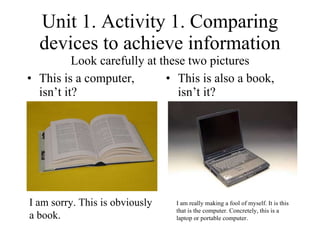
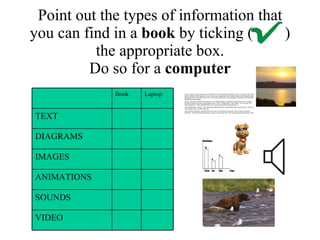
Unit 1. Activity 1. Comparing devices to achieve information Look carefully at these two pictures This is also a  book , isn’t it? This is a computer, isn’t it? I am sorry. This is obviously a book. I am really making a fool of myself. It is this that is the computer. Concretely, this is a laptop or portable computer.
Types of information Try to identify the samples below     Text, diagram, image, animation, sound, video. Press on the image above
Point out the types of information that you can find in a  book  by ticking (  ) the appropriate box. Do so for a  computer     VIDEO SOUNDS ANIMATIONS IMAGES DIAGRAMS TEXT Laptop Book
Imagine you both are going to build a collective Web Page about your favourite football or basketball team Work in pairs
Give the class at least one example of text, diagram, image, animation, sound and video you would choose for that Web Page    
You can use these chunks I would choose the following text/image ... I could put into  ... I wouldn’t choose ... I’d (I would) never put into my Web Page ... Would you choose ...?  I would / I wouldn’t.
Go on by clicking on the image below The remaining worksheets are waiting for you

Unit1 activ1-3-abajo

  • 1.
    Unit 1. Activity1. Comparing devices to achieve information Look carefully at these two pictures This is also a book , isn’t it? This is a computer, isn’t it? I am sorry. This is obviously a book. I am really making a fool of myself. It is this that is the computer. Concretely, this is a laptop or portable computer.
  • 2.
    Types of informationTry to identify the samples below     Text, diagram, image, animation, sound, video. Press on the image above
  • 3.
    Point out thetypes of information that you can find in a book by ticking ( ) the appropriate box. Do so for a computer     VIDEO SOUNDS ANIMATIONS IMAGES DIAGRAMS TEXT Laptop Book
  • 4.
    Imagine you bothare going to build a collective Web Page about your favourite football or basketball team Work in pairs
  • 5.
    Give the classat least one example of text, diagram, image, animation, sound and video you would choose for that Web Page    
  • 6.
    You can usethese chunks I would choose the following text/image ... I could put into ... I wouldn’t choose ... I’d (I would) never put into my Web Page ... Would you choose ...? I would / I wouldn’t.
  • 7.
    Go on byclicking on the image below The remaining worksheets are waiting for you