Object Oriented Programming with Java
Unit No. 2: Object s and Classes
Sanjivani Rural Education Society’s
Sanjivani College of Engineering, Kopargaon-423603
(An Autonomous Institute Affiliated to Savitribai Phule Pune University, Pune)
NAAC ‘A’ Grade Accredited, ISO 9001:2015 Certified
Department of Information Technology
(UG Course: NBA Accredited)
Dr. Y.S.Deshmukh
Assistant Professor
Object Oriented Programming with Java
Objects and Classes:
What is an object in Java?
An entity that has state and behavior is known as an object e.g., chair, bike, marker, pen,
table, car, etc. It can be physical or logical (tangible and intangible). The example of an
intangible object is the banking system.
An object has three characteristics:
State: represents the data (value) of an object.
Behavior: represents the behavior (functionality) of an object such as deposit,
withdraw, etc.
Identity: An object identity is typically implemented via a unique ID. The value of the ID
is not visible to the external user. However, it is used internally by the JVM to identify
each object uniquely.
Object Oriented Programming with Java
Objects
What is an object in Java?
Object Definitions:
An object is a real-world entity.
An object is a runtime entity.
The object is an entity which has state and behavior.
The object is an instance of a class.
Object Oriented Programming with Java
Class:
What is a class in Java
A class is a group of objects which have common properties. It is a template or
blueprint from which objects are created. It is a logical entity. It can't be physical.
A class in Java can contain:
Fields
Methods
Constructors
Blocks
Nested class and interface
Object Oriented Programming with Java
//Java Program to illustrate how to define a class and fields
//Defining a Student class.
class Student{
//defining fields
int id;//field or data member or instance variable
String name;
//creating main method inside the Student class
public static void main(String args[]){
//Creating an object or instance
Student s1=new Student();//creating an object of Student
//Printing values of the object
System.out.println(s1.id);//accessing member through reference variable
System.out.println(s1.name);
}
}
Object Oriented Programming with Java
What are the different ways to create an object in Java?
There are many ways to create an object in java. They are:
• By new keyword
• By newInstance() method
• By clone() method
• By deserialization
• By factory method etc.
Object Oriented Programming with Java
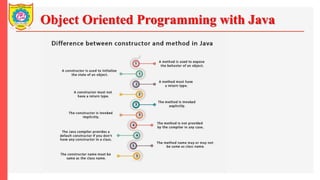
Constructors in Java
In Java, a constructor is a block of codes similar to the method. It is
called when an instance of the class is created. At the time of calling
constructor, memory for the object is allocated in the memory.
It is a special type of method which is used to initialize the object.
Every time an object is created using the new() keyword, at least one
constructor is called.
It calls a default constructor if there is no constructor available in the
class. In such case, Java compiler provides a default constructor by
default.
Object Oriented Programming with Java
Constructors in Java
Rules for creating Java constructor
There are three rules defined for the constructor.
• Constructor name must be the same as its class name
• A Constructor must have no explicit return type
• A Java constructor cannot be abstract, static, final, and synchronized
Object Oriented Programming with Java
Constructors in Java
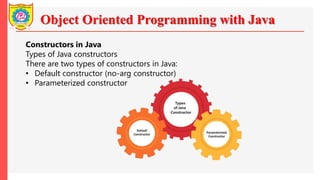
Types of Java constructors
There are two types of constructors in Java:
• Default constructor (no-arg constructor)
• Parameterized constructor
Object Oriented Programming with Java
Constructors in Java: Default Constructor
//Java Program to create and call a default constructor
class Bike1{
//creating a default constructor
Bike1(){System.out.println("Bike is created");}
//main method
public static void main(String args[]){
//calling a default constructor
Bike1 b=new Bike1();
}
}
Object Oriented Programming with Java
Constructors in Java: Example of parameterized constructor
//Java Program to demonstrate the use of the parameterized constructor.
class Student4{
int id;
String name;
//creating a parameterized constructor
Student4(int i,String n){
id = i;
name = n;
}
//method to display the values
void display(){System.out.println(id+" "+name);}
public static void main(String args[]){
//creating objects and passing values
Student4 s1 = new Student4(111,"Karan");
Student4 s2 = new Student4(222,"Aryan");
//calling method to display the values of object
s1.display();
s2.display();
}
}
Object Oriented Programming with Java
Java static keyword:
The static keyword in Java is used for memory management mainly. We can apply static
keyword with variables, methods, blocks and nested classes. The static keyword belongs to the
class than an instance of the class.
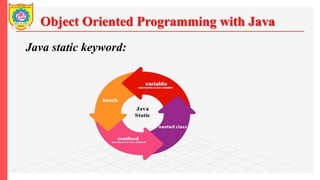
The static can be:
1. Variable (also known as a class variable)
2. Method (also known as a class method)
3. Block
4. Nested class
1) Java static variable
If you declare any variable as static, it is known as a static variable.
Object Oriented Programming with Java
Java static keyword:
Object Oriented Programming with Java
Java static keyword:
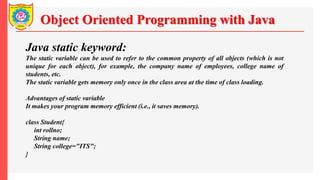
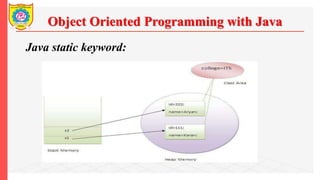
The static variable can be used to refer to the common property of all objects (which is not
unique for each object), for example, the company name of employees, college name of
students, etc.
The static variable gets memory only once in the class area at the time of class loading.
Advantages of static variable
It makes your program memory efficient (i.e., it saves memory).
class Student{
int rollno;
String name;
String college="ITS";
}
Object Oriented Programming with Java
Java static keyword:
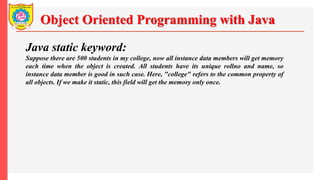
Suppose there are 500 students in my college, now all instance data members will get memory
each time when the object is created. All students have its unique rollno and name, so
instance data member is good in such case. Here, "college" refers to the common property of
all objects. If we make it static, this field will get the memory only once.
Object Oriented Programming with Java
Java static keyword:
Object Oriented Programming with Java
Java static keyword:
class Counter{
int count=0;//will get memory each time when the instance is created
Counter(){
count++;//incrementing value
System.out.println(count);
}
public static void main(String args[]){
//Creating objects
Counter c1=new Counter();
Counter c2=new Counter();
Counter c3=new Counter();
}
}
Object Oriented Programming with Java
Java static keyword:
class Counter2{
static int count=0;//will get memory only once and retain its value
Counter2(){
count++;//incrementing the value of static variable
System.out.println(count);
}
public static void main(String args[]){
//creating objects
Counter2 c1=new Counter2();
Counter2 c2=new Counter2();
Counter2 c3=new Counter2();
}
}
Object Oriented Programming with Java
Java static keyword:
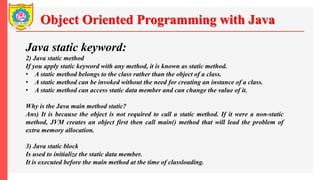
2) Java static method
If you apply static keyword with any method, it is known as static method.
• A static method belongs to the class rather than the object of a class.
• A static method can be invoked without the need for creating an instance of a class.
• A static method can access static data member and can change the value of it.
Why is the Java main method static?
Ans) It is because the object is not required to call a static method. If it were a non-static
method, JVM creates an object first then call main() method that will lead the problem of
extra memory allocation.
3) Java static block
Is used to initialize the static data member.
It is executed before the main method at the time of classloading.
Object Oriented Programming with Java
Java static keyword:
class A2{
static{System.out.println("static block is invoked");}
public static void main(String args[]){
System.out.println("Hello main");
}
}
Can we execute a program without main() method?
Ans) No, one of the ways was the static block, but it was possible till JDK 1.6. Since JDK 1.7,
it is not possible to execute a Java class without the main method.
class A3{
static{
System.out.println("static block is invoked");
System.exit(0);
}
}
Object Oriented Programming with Java
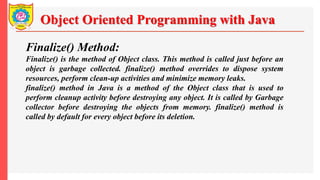
Finalize() Method:
Finalize() is the method of Object class. This method is called just before an
object is garbage collected. finalize() method overrides to dispose system
resources, perform clean-up activities and minimize memory leaks.
finalize() method in Java is a method of the Object class that is used to
perform cleanup activity before destroying any object. It is called by Garbage
collector before destroying the objects from memory. finalize() method is
called by default for every object before its deletion.
Object Oriented Programming with Java
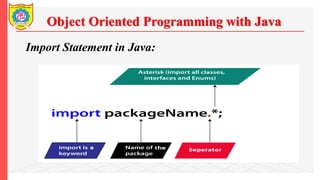
Import Statement in Java:
Import statement in Java is helpful to take a class or all classes visible for a
program specified under a package, with the help of a single statement. It is
pretty beneficial as the programmer do not require to write the entire class
definition. Hence, it improves the readability of the program.
Syntax 1:
import package1[.package2].(*);
• package1: Top-level package
• package2: Subordinate-level package under package1
• *: To import all the classes
Object Oriented Programming with Java
Import Statement in Java:
Object Oriented Programming with Java
Access Control
Access Control in Java refers to the mechanism used to restrict or allow
access to certain parts of a Java program, such as classes, methods, and
variables. Access control determines which classes and objects can access
specific codes or data within a program.
Object Oriented Programming with Java
Access Control
There are four types of Java access modifiers:
• Private: The access level of a private modifier is only within the class. It
cannot be accessed from outside the class.
• Default: The access level of a default modifier is only within the package.
It cannot be accessed from outside the package. If you do not specify any
access level, it will be the default.
• Protected: The access level of a protected modifier is within the package
and outside the package through child class. If you do not make the child
class, it cannot be accessed from outside the package.
• Public: The access level of a public modifier is everywhere. It can be
accessed from within the class, outside the class, within the package and
outside the package.
Object Oriented Programming with Java
Access Control
Object Oriented Programming with Java
Thank You

Unit No 2 Objects and Classes.pptx

  • 1.
    Object Oriented Programmingwith Java Unit No. 2: Object s and Classes Sanjivani Rural Education Society’s Sanjivani College of Engineering, Kopargaon-423603 (An Autonomous Institute Affiliated to Savitribai Phule Pune University, Pune) NAAC ‘A’ Grade Accredited, ISO 9001:2015 Certified Department of Information Technology (UG Course: NBA Accredited) Dr. Y.S.Deshmukh Assistant Professor
  • 2.
    Object Oriented Programmingwith Java Objects and Classes: What is an object in Java? An entity that has state and behavior is known as an object e.g., chair, bike, marker, pen, table, car, etc. It can be physical or logical (tangible and intangible). The example of an intangible object is the banking system. An object has three characteristics: State: represents the data (value) of an object. Behavior: represents the behavior (functionality) of an object such as deposit, withdraw, etc. Identity: An object identity is typically implemented via a unique ID. The value of the ID is not visible to the external user. However, it is used internally by the JVM to identify each object uniquely.
  • 3.
    Object Oriented Programmingwith Java Objects What is an object in Java? Object Definitions: An object is a real-world entity. An object is a runtime entity. The object is an entity which has state and behavior. The object is an instance of a class.
  • 4.
    Object Oriented Programmingwith Java Class: What is a class in Java A class is a group of objects which have common properties. It is a template or blueprint from which objects are created. It is a logical entity. It can't be physical. A class in Java can contain: Fields Methods Constructors Blocks Nested class and interface
  • 5.
    Object Oriented Programmingwith Java //Java Program to illustrate how to define a class and fields //Defining a Student class. class Student{ //defining fields int id;//field or data member or instance variable String name; //creating main method inside the Student class public static void main(String args[]){ //Creating an object or instance Student s1=new Student();//creating an object of Student //Printing values of the object System.out.println(s1.id);//accessing member through reference variable System.out.println(s1.name); } }
  • 6.
    Object Oriented Programmingwith Java What are the different ways to create an object in Java? There are many ways to create an object in java. They are: • By new keyword • By newInstance() method • By clone() method • By deserialization • By factory method etc.
  • 7.
    Object Oriented Programmingwith Java Constructors in Java In Java, a constructor is a block of codes similar to the method. It is called when an instance of the class is created. At the time of calling constructor, memory for the object is allocated in the memory. It is a special type of method which is used to initialize the object. Every time an object is created using the new() keyword, at least one constructor is called. It calls a default constructor if there is no constructor available in the class. In such case, Java compiler provides a default constructor by default.
  • 8.
    Object Oriented Programmingwith Java Constructors in Java Rules for creating Java constructor There are three rules defined for the constructor. • Constructor name must be the same as its class name • A Constructor must have no explicit return type • A Java constructor cannot be abstract, static, final, and synchronized
  • 9.
    Object Oriented Programmingwith Java Constructors in Java Types of Java constructors There are two types of constructors in Java: • Default constructor (no-arg constructor) • Parameterized constructor
  • 10.
    Object Oriented Programmingwith Java Constructors in Java: Default Constructor //Java Program to create and call a default constructor class Bike1{ //creating a default constructor Bike1(){System.out.println("Bike is created");} //main method public static void main(String args[]){ //calling a default constructor Bike1 b=new Bike1(); } }
  • 11.
    Object Oriented Programmingwith Java Constructors in Java: Example of parameterized constructor //Java Program to demonstrate the use of the parameterized constructor. class Student4{ int id; String name; //creating a parameterized constructor Student4(int i,String n){ id = i; name = n; } //method to display the values void display(){System.out.println(id+" "+name);} public static void main(String args[]){ //creating objects and passing values Student4 s1 = new Student4(111,"Karan"); Student4 s2 = new Student4(222,"Aryan"); //calling method to display the values of object s1.display(); s2.display(); } }
  • 12.
  • 13.
    Object Oriented Programmingwith Java Java static keyword: The static keyword in Java is used for memory management mainly. We can apply static keyword with variables, methods, blocks and nested classes. The static keyword belongs to the class than an instance of the class. The static can be: 1. Variable (also known as a class variable) 2. Method (also known as a class method) 3. Block 4. Nested class 1) Java static variable If you declare any variable as static, it is known as a static variable.
  • 14.
    Object Oriented Programmingwith Java Java static keyword:
  • 15.
    Object Oriented Programmingwith Java Java static keyword: The static variable can be used to refer to the common property of all objects (which is not unique for each object), for example, the company name of employees, college name of students, etc. The static variable gets memory only once in the class area at the time of class loading. Advantages of static variable It makes your program memory efficient (i.e., it saves memory). class Student{ int rollno; String name; String college="ITS"; }
  • 16.
    Object Oriented Programmingwith Java Java static keyword: Suppose there are 500 students in my college, now all instance data members will get memory each time when the object is created. All students have its unique rollno and name, so instance data member is good in such case. Here, "college" refers to the common property of all objects. If we make it static, this field will get the memory only once.
  • 17.
    Object Oriented Programmingwith Java Java static keyword:
  • 18.
    Object Oriented Programmingwith Java Java static keyword: class Counter{ int count=0;//will get memory each time when the instance is created Counter(){ count++;//incrementing value System.out.println(count); } public static void main(String args[]){ //Creating objects Counter c1=new Counter(); Counter c2=new Counter(); Counter c3=new Counter(); } }
  • 19.
    Object Oriented Programmingwith Java Java static keyword: class Counter2{ static int count=0;//will get memory only once and retain its value Counter2(){ count++;//incrementing the value of static variable System.out.println(count); } public static void main(String args[]){ //creating objects Counter2 c1=new Counter2(); Counter2 c2=new Counter2(); Counter2 c3=new Counter2(); } }
  • 20.
    Object Oriented Programmingwith Java Java static keyword: 2) Java static method If you apply static keyword with any method, it is known as static method. • A static method belongs to the class rather than the object of a class. • A static method can be invoked without the need for creating an instance of a class. • A static method can access static data member and can change the value of it. Why is the Java main method static? Ans) It is because the object is not required to call a static method. If it were a non-static method, JVM creates an object first then call main() method that will lead the problem of extra memory allocation. 3) Java static block Is used to initialize the static data member. It is executed before the main method at the time of classloading.
  • 21.
    Object Oriented Programmingwith Java Java static keyword: class A2{ static{System.out.println("static block is invoked");} public static void main(String args[]){ System.out.println("Hello main"); } } Can we execute a program without main() method? Ans) No, one of the ways was the static block, but it was possible till JDK 1.6. Since JDK 1.7, it is not possible to execute a Java class without the main method. class A3{ static{ System.out.println("static block is invoked"); System.exit(0); } }
  • 22.
    Object Oriented Programmingwith Java Finalize() Method: Finalize() is the method of Object class. This method is called just before an object is garbage collected. finalize() method overrides to dispose system resources, perform clean-up activities and minimize memory leaks. finalize() method in Java is a method of the Object class that is used to perform cleanup activity before destroying any object. It is called by Garbage collector before destroying the objects from memory. finalize() method is called by default for every object before its deletion.
  • 23.
    Object Oriented Programmingwith Java Import Statement in Java: Import statement in Java is helpful to take a class or all classes visible for a program specified under a package, with the help of a single statement. It is pretty beneficial as the programmer do not require to write the entire class definition. Hence, it improves the readability of the program. Syntax 1: import package1[.package2].(*); • package1: Top-level package • package2: Subordinate-level package under package1 • *: To import all the classes
  • 24.
    Object Oriented Programmingwith Java Import Statement in Java:
  • 25.
    Object Oriented Programmingwith Java Access Control Access Control in Java refers to the mechanism used to restrict or allow access to certain parts of a Java program, such as classes, methods, and variables. Access control determines which classes and objects can access specific codes or data within a program.
  • 26.
    Object Oriented Programmingwith Java Access Control There are four types of Java access modifiers: • Private: The access level of a private modifier is only within the class. It cannot be accessed from outside the class. • Default: The access level of a default modifier is only within the package. It cannot be accessed from outside the package. If you do not specify any access level, it will be the default. • Protected: The access level of a protected modifier is within the package and outside the package through child class. If you do not make the child class, it cannot be accessed from outside the package. • Public: The access level of a public modifier is everywhere. It can be accessed from within the class, outside the class, within the package and outside the package.
  • 27.
    Object Oriented Programmingwith Java Access Control
  • 28.
    Object Oriented Programmingwith Java Thank You