1
CHAPTER- 1
INTRODUCTION TO OBJECT ORIENTED
PROGRAMMING WITH JAVA
What is Java?
Java is a programming language and a platform.
Java is a high level, robust, secured and object-oriented programming language.
Platform: Any hardware or software environment in which a program runs, is known as a
platform. Since Java has its own runtime environment (JRE) and API, it is called platform.
Variable and Datatype in Java
Variable-Variable is name of reserved area allocated in memory.
1. int data=50;//Here data is variable
TYPES OF VARIABLE
There are three types of variables in java
 local variable
 instance variable
 static variable
LOCAL VARIABLE
A variable that is declared inside the method is called local variable.
INSTANCE VARIABLE
A variable that is declared inside the class but outside the method is called instance
variable . It is not declared as static.
STATIC VARIABLE
A variable that is declared as static is called static variable. It cannot be local.
EXAMPLE TO UNDERSTAND THE TYPES OF VARIABLES
1. class A{
2. int data=50;//instance variable
3. static int m=100;//static variable
4. void method(){
5. int n=90;//local variable
6. }
7. }//end of class
2
Data Types in Java
In java, there are two types of data types
 primitive data types
 non-primitive data types
Data Type Default Value Default size
boolean false 1 bit
char 'u0000' 2 byte
byte 0 1 byte
short 0 2 byte
int 0 4 byte
long 0L 8 byte
float 0.0f 4 byte
double 0.0d
8 byte
OPERATORS IN JAVA
Operator in java is a symbol that is used to perform operations. There are many types of
operators in java such as unary operator, arithmetic operator, relational operator, shift
operator, bitwise operator, ternary operator and assignment operator.
Operators Precedence
postfix EXPR++ EXPR--
unary ++EXPR --EXPR +EXPR -EXPR ~ !
3
multiplicative * / %
additive + -
shift << >> >>>
relational < > <= >= instanceof
equality == !=
bitwise AND &
bitwise exclusive OR ^
bitwise inclusive OR |
logical AND &&
logical OR ||
ternary ? :
assignment = += -= *= /= %= &= ^= |= <<= >>= >>>=
OBJECT AND CLASS IN JAVA
OBJECT
Any entity that has state and behavior is known as an object. For example: chair, pen, table,
keyboard, bike etc. It can be physical and logical.
CLASS
Collection of objects is called class. It is a logical entity.
INHERITANCE
When one object acquires all the properties and behaviours of parent object i.e. known as
inheritance. It provides code reusability. It is used to achieve runtime polymorphism.
POLYMORPHISM
When one task is performed by different ways i.e. known as polymorphism. For example: to
convince the customer differently, to draw something e.g. shape or rectangle etc.
In java, we use method overloading and method overriding to achieve polymorphism.
Another example can be to speak something e.g. cat speaks meaw, dog barks woof etc.
ABSTRACTION
Hiding internal details and showing functionality is known as abstraction. For example:
phone call, we don't know the internal processing.
In java, we use abstract class and interface to achieve abstraction.
ENCAPSULATION
Binding (or wrapping) code and data together into a single unit is known as encapsulation.
For example: capsule, it is wrapped with different medicines.
A java class is the example of encapsulation. Java bean is the fully encapsulated class because all
the data members are private here.
OBJECT IN JAVA
An entity that has state and behavior is known as an object e.g. chair, bike, marker, pen,
table, car etc. It can be physical or logical (tangible and intangible). The example of
intangible object is banking system.
An object has three characteristics:
4
 state: represents data (value) of an object.
 behavior: represents the behavior (functionality) of an object such as deposit,
withdraw etc.
 identity: Object identity is typically implemented via a unique ID. The value of the ID
is not visible to the external user. But,it is used internally by the JVM to identify each
object uniquely.
For Example: Pen is an object. Its name is Reynolds, color is white etc. known as its state. It is
used to write, so writing is its behavior.
Object is an instance of a class. Class is a template or blueprint from which objects are
created. So object is the instance(result) of a class.
Class in Java
A class is a group of objects that has common properties. It is a template or blueprint from
which objects are created.
A class in java can contain:
 data member
 method
 constructor
 block
 class and interface
Syntax to declare a class:
class <class_name>{
data member;
method;
}
INSTANCE VARIABLE IN JAVA
A variable that is created inside the class but outside the method, is known as instance
variable.Instance variable doesn't get memory at compile time.It gets memory at runtime when
object(instance) is created.That is why, it is known as instance variable.
Method in Java
In java, a method is like function i.e. used to expose behaviour of an object.
Advantage of Method- Code Reusability, Code Optimization
new keyword
The new keyword is used to allocate memory at runtime.
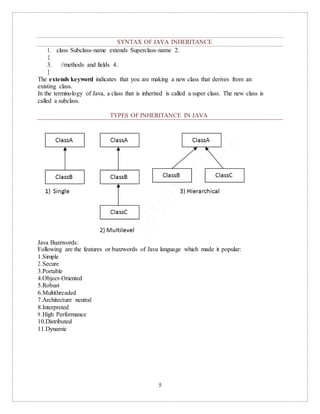
INHERITANCE IN JAVA
 Inheritance
 Types of Inheritance
Inheritance in java is a mechanism in which one object acquires all the properties and
behaviors of parent object.
The idea behind inheritance in java is that you can create new classes that are built upon existing
classes. When you inherit from an existing class, you can reuse methods and fields of parent
class, and you can add new methods and fields also.
5
SYNTAX OF JAVA INHERITANCE
1. class Subclass-name extends Superclass-name 2.
{
3. //methods and fields 4.
}
The extends keyword indicates that you are making a new class that derives from an
existing class.
In the terminology of Java, a class that is inherited is called a super class. The new class is
called a subclass.
TYPES OF INHERITANCE IN JAVA
Java Buzzwords:
Following are the features or buzzwords of Java language which made it popular:
1.Simple
2.Secure
3.Portable
4.Object-Oriented
5.Robust
6.Multithreaded
7.Architecture neutral
8.Interpreted
9.High Performance
10.Distributed
11.Dynamic
COMPUTER
PROGRAMMING-2
JAV
A
CHAPTER- 2
BASICS OF JAVA PROGRAMMING
First Java Program:
Let us look at a simple code that would print the words Hello World.
public class MyFirstJavaProgram {
/* This is m y first java program .
* This will print 'Hello World' as the output
* /
public static void m ain(String []args) {
System .out.println("Hello World"); // prints Hello World
}
}
Simple Example of Object and Class
In this example, we have created a Student class that have two data members id and name. We
are creating the object of the Student class by new keyword and printing the objects value.
class Student1{
int id;//data member (also instance variable) String
name;//data member(also instance variable) public
static void main(String args[]){
Student1 s1=new Student1();//creating an object of Student
System.out.println(s1.id);
System.out.println(s1.name); }
}
Test it Now Output:0 null
Example of Object and class that maintains the records of students
In this example, we are creating the two objects of Student class and initializing the value to
these objects by invoking the insertRecord method on it. Here, we are displaying the state (data)
of the objects by invoking the displayInformation method.
class Student2{
int rollno;
String name;
void insertRecord(int r, String n){ //method rollno=r;
name=n;
}
void displayInformation(){System.out.println(rollno+" "+name);}//method
public static void main(String args[]){
Student2 s1=new Student2();
Student2 s2=new Student2();
1 Mrs.Anamika Raj,Lecturer,KKU
COMPUTER
PROGRAMMING-2
JAV
A
s1.insertRecord(111,"Karan");
s2.insertRecord(222,"Aryan");
s1.displayInformation();
s2.displayInformation(); }
}
COMMENTS
Comments are lines of the program that are just for humans to read.
A comment that starts with a /* and ends with a */ is called a multi-line comment.
The second type of comment starts with a //. When the compiler sees a // it ignores everything that follows
up until the end of that line.
.class file
1. class file in java is generated when you compile .java file using any Java compiler like
Sun's javac which comes along JDK installation and can be found
in JAVA_HOME/bin directory.
2. class file contains byte codes. byte codes are special platform
independent instruction for Java virtual machine. bytecode is not a machine language and
mere instruction to JVM. Since every machine or processor e.g. INTEL or AMD processor
may have different instruction for doing same thing, its left on JVM to translate bytecode into
machine instruction and by this way java achieves platform independence.
3. class file of inner class contains $ in there name. So if a Java source file contains two classes,
one of them is inner class than java compiler will generate two class file. separate class file for
top level and inner class. you can distinguish them by looking at there name. Suppose you have
top level class as "Hello" and inner class as "GoodBye" then java compiler will generate two
class file:
IMPORT STATEMENTS
An import statement is a way of making more of the functionality of Java available to your program. Java
can do a lot of things, and not every program needs to do everything. So,to cut things down to size, so to
speak, Java has its classes divided into "packages." Your own classes are part of packages,too.
Anything that isn't in the java.langpackage or the local package needs to be imported. It's
not unusual to see a series of import statements near the start of a program file:
import java.awt.*;
import java.awt.event.*;
import java.util.*;
2 Mrs.Anamika Raj,Lecturer,KKU
COMPUTER
PROGRAMMING-2
JAV
A
import javax.swing.*;
import javax.swing.event.*;
CONTROLSTATEMENTS
Following is the syntax of the if statement.
if ( condition ) {
// code
}
And here is a small code snippet which displays the message "Hi" only if the value of the
boolean variable wish is true.
if ( wish == true ) {
System.out.println("Hi");
}
Following is the syntax of if else structure.
if ( condition ) {
// code
} else {
// code
}
And here is an example usage which states whether a number is an even number or an odd
number. Even numbers are divisible by zero and hence leave a remainder of zero. The remainder
on dividing the number by two can be obtained using the modulo (%) mathematical operator.
if ( num%2==0){
System.out.println("Number is even");
}else{
System.out.println("Number is odd");
}
Given below is the syntax of the switch structure in Java.
switch ( expression )
{
case value1 :
// code
break;
case value2:
// code
break;
3 Mrs.Anamika Raj,Lecturer,KKU
COMPUTER
PROGRAMMING-2
JAV
A
...
...
case valueN:
// code
break;
...
Given below is an example which prints the day of the week based on the value stored in the int
variable num. 1 stands for Sunday, 2 for Monday and so on:
int day = s.nextInt; // s is a Scanner object connected to System.in
String str; // stores the day in words
switch(day)
{
case 1:
str="Sunday";
break;
case 2:
str="Monday";
break;
case 3:
str="Tuesday";
break;
case 4:
str="Wednesday";
break;
case 5:
str="Thursday";
break;
case 6:
str="Friday";
break;
case 7:
str="Saturday";
break;
default:
str=" Invalid day";
}
System.out.println(str);
...
default:
// code
break;
}
4 Mrs.Anamika Raj,Lecturer,KKU
COMPUTER
PROGRAMMING-2
JAV
A
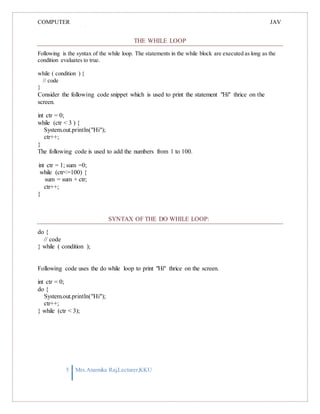
THE WHILE LOOP
Following is the syntax of the while loop. The statements in the while block are executed as long as the
condition evaluates to true.
while ( condition ) {
// code
}
Consider the following code snippet which is used to print the statement "Hi" thrice on the
screen.
int ctr = 0;
while (ctr < 3 ) {
System.out.println("Hi");
ctr++;
}
The following code is used to add the numbers from 1 to 100.
int ctr = 1; sum =0;
while (ctr<=100) {
sum = sum + ctr;
ctr++;
}
SYNTAX OF THE DO WHILE LOOP:
do {
// code
} while ( condition );
Following code uses the do while loop to print "Hi" thrice on the screen.
int ctr = 0;
do {
System.out.println("Hi");
ctr++;
} while (ctr < 3);
5 Mrs.Anamika Raj,Lecturer,KKU
COMPUTER
PROGRAMMING-2
JAV
A
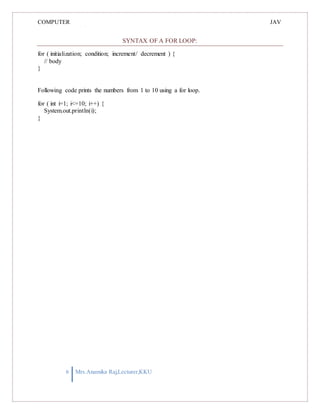
SYNTAX OF A FOR LOOP:
for ( initialization; condition; increment/ decrement ) {
// body
}
Following code prints the numbers from 1 to 10 using a for loop.
for ( int i=1; i<=10; i++) {
System.out.println(i);
}
6 Mrs.Anamika Raj,Lecturer,KKU
COMPUTER
PROGRAMMING-2
JAV
A
1 Mrs.Anamika
Raj,Lecturer,KKU
index
regex
CH AP TE R 3
CH AR ACTE R S & S TR I N G
Java String class methods
The java.lang.String class provides many useful methods to perform operations on
sequence of char values.
No. Method Description
1 char charAt(int index)
returns char value for the
particular index
2
int length() returns string length
3
static String format(String format, Object... args) returns formatted string
4
static String format(Locale l, String format, Object...
args)
returns formatted string with
given locale
5
String substring(int beginIndex)
returns substring for given begin
6
String substring(int beginIndex, int endIndex)
returns substring for given begin
index and end index
returns true or false after
7
boolean contains(CharSequence s)
8
static String join(CharSequence delimiter,
CharSequence... elements)
static String join(CharSequence delimiter,
Iterable<? extends CharSequence> elements)
matching the sequence of char
value
returns a joined string
10 boolean equals(Object another)
checks the equality of string with
object
11 boolean isEmpty() checks if string is empty
12 String concat(String str) concatenates specified string
13 String replace(char old, char new)
replaces all occurrences of
specified char value
String replace(CharSequence old, CharSequence
new)
replaces all occurrences of
specified CharSequence
15 static String equalsIgnoreCase(String another)
compares another string. It
doesn't check case.
16
String[] split(String regex)
returns splitted string matching
17 String[] split(String regex, int limit)
returns splitted string matching
regex and limit
9
14
COMPUTER
PROGRAMMING-2
JAV
A
2 Mrs.Anamika
Raj,Lecturer,KKU
is overloaded.
specified locale.
starting with given index
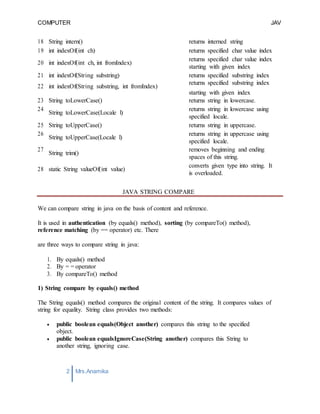
18 String intern() returns interned string
19 int indexOf(int ch) returns specified char value index
20 int indexOf(int ch, int fromIndex)
returns specified char value index
21 int indexOf(String substring) returns specified substring index
22 int indexOf(String substring, int fromIndex)
returns specified substring index
starting with given index
23 String toLowerCase() returns string in lowercase.
24
String toLowerCase(Locale l)
returns string in lowercase using
specified locale.
25 String toUpperCase() returns string in uppercase.
26
String toUpperCase(Locale l)
returns string in uppercase using
27
String trim()
removes beginning and ending
spaces of this string.
28 static String valueOf(int value)
converts given type into string. It
JAVA STRING COMPARE
We can compare string in java on the basis of content and reference.
It is used in authentication (by equals() method), sorting (by compareTo() method),
reference matching (by == operator) etc. There
are three ways to compare string in java:
1. By equals() method
2. By = = operator
3. By compareTo() method
1) String compare by equals() method
The String equals() method compares the original content of the string. It compares values of
string for equality. String class provides two methods:
 public boolean equals(Object another) compares this string to the specified
object.
 public boolean equalsIgnoreCase(String another) compares this String to
another string, ignoring case.
COMPUTER
PROGRAMMING-2
JAV
A
3 Mrs.Anamika
Raj,Lecturer,KKU
1. class Teststringcomparison1{
2. public static void main(String args[]){
3. String s1="Sachin";
4. String s2="Sachin";
5. String s3=new String("Sachin");
6. String s4="Saurav";
7. System.out.println(s1.equals(s2));//true
8. System.out.println(s1.equals(s3));//true
9. System.out.println(s1.equals(s4));//false
10. }
11. }
Test it Now
Output:true
true
false
2) String compare by == operator
The = = operator compares references not values.
3) String compare by compareTo() method
The String compareTo() method compares values lexicographically and returns an integer value
that describes if first string is less than, equal to or greater than second string.
STRING CONCATENATION IN JAVA
In java, string concatenation forms a new string THAT IS the combination of multiple strings.
There are two ways to concat string in java:
1. By + (string concatenation) operator
2. By concat() method
1) STRING CONCATENATION BY + (STRING CONCATENATION) OPERATOR
Java string concatenation operator (+) is used to add strings. For Example:
1. class TestStringConcatenation1{
2. public static void main(String args[]){
3. String s="Sachin"+" Tendulkar";
4. System.out.println(s);//Sachin Tendulkar
COMPUTER
PROGRAMMING-2
JAV
A
4 Mrs.Anamika
Raj,Lecturer,KKU
5. }
6. }
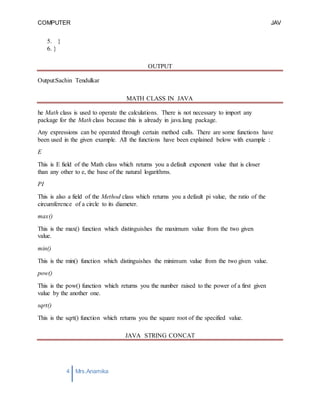
OUTPUT
Output:Sachin Tendulkar
MATH CLASS IN JAVA
he Math class is used to operate the calculations. There is not necessary to import any
package for the Math class because this is already in java.lang package.
Any expressions can be operated through certain method calls. There are some functions have
been used in the given example. All the functions have been explained below with example :
E
This is E field of the Math class which returns you a default exponent value that is closer
than any other to e, the base of the natural logarithms.
PI
This is also a field of the Method class which returns you a default pi value, the ratio of the
circumference of a circle to its diameter.
max()
This is the max() function which distinguishes the maximum value from the two given
value.
min()
This is the min() function which distinguishes the minimum value from the two given value.
pow()
This is the pow() function which returns you the number raised to the power of a first given
value by the another one.
sqrt()
This is the sqrt() function which returns you the square root of the specified value.
JAVA STRING CONCAT
COMPUTER
PROGRAMMING-2
JAV
A
5 Mrs.Anamika
Raj,Lecturer,KKU
The java string concat() method COMBINES SPECIFIED STRING AT THE END OF THIS
STRING. It returns combined string. It is like appending another string.
SIGNATURE
The signature of string concat() method is given below:
1. public String concat(String anotherString)
PARAMETER
anotherString : another string i.e. to be combined at the end of this string.
RETURNS
combined string
Java String concat() method example
1. public class ConcatExample{
2. public static void main(String args[]){
3. String s1="java string";
4. s1.concat("is immutable");
5. System.out.println(s1);
6. s1=s1.concat(" is immutable so assign it explicitly");
7. System.out.println(s1);
8. }}
Test it Now
java string
java string is immutable so assign it explicitly.
COMPUTER
PROGRAMMING-2
JAV
A
1 Mrs.Anamika Raj,Lecturer,KKU
CH AP TE R - 4
S TAN D AR D I N P U T & O U T P U T I N J AV A
Java I/O (Input and Output) is used to process the input and produce the output based on the
input.
Java uses the concept of stream to make I/O operation fast. The java.io package contains all the
classes required for input and output operations.
We can perform file handling in java by java IO API.
Stream
A stream is a sequence of data.In Java a stream is composed of bytes. It's called a stream
because it's like a stream of water that continues to flow.
In java, 3 streams are created for us automatically. All these streams are attached with
console.
1) System.out: standard output stream
2) System.in: standard input stream
3) System.err: standard error stream
Let's see the code to print output and error message to the console.
1. System.out.println("simple message");
2. System.err.println("error message");
Let's see the code to get input from console.
1. int i=System.in.read();//returns ASCII code of 1st character
2. System.out.println((char)i);//will print the character
OutputStream
Java application uses an output stream to write data to a destination, it may be a file,an
array,peripheral device or socket.
InputStream
Java application uses an input stream to read data from a source, it may be a file,an
array,peripheral device or socket.
COMPUTER
PROGRAMMING-2
JAV
A
2 Mrs.Anamika Raj,Lecturer,KKU
OutputStream class
OutputStream class is an abstract class.It is the superclass of all classes representing an
output stream of bytes. An output stream accepts output bytes and sends them to some sink.
Commonly used methods of OutputStream class
Method Description
1) public void write(int)throws
IOException:
2) public void write(byte[])throws
IOException:
is used to write a byte to the current output
stream.
is used to write an array of byte to the current
output stream.
COMPUTER
PROGRAMMING-2
JAV
A
3 Mrs.Anamika Raj,Lecturer,KKU
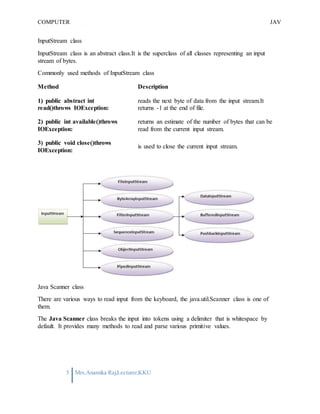
InputStream class
InputStream class is an abstract class.It is the superclass of all classes representing an input
stream of bytes.
Commonly used methods of InputStream class
Method Description
1) public abstract int
read()throws IOException:
2) public int available()throws
IOException:
3) public void close()throws
IOException:
reads the next byte of data from the input stream.It
returns -1 at the end of file.
returns an estimate of the number of bytes that can be
read from the current input stream.
is used to close the current input stream.
Java Scanner class
There are various ways to read input from the keyboard, the java.util.Scanner class is one of
them.
The Java Scanner class breaks the input into tokens using a delimiter that is whitespace by
default. It provides many methods to read and parse various primitive values.
COMPUTER
PROGRAMMING-2
JAV
A
4 Mrs.Anamika Raj,Lecturer,KKU
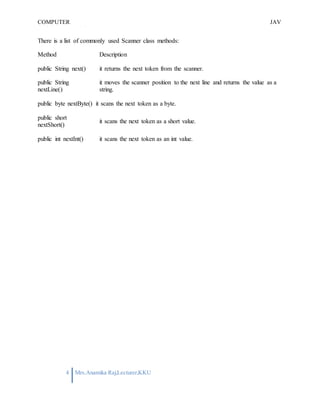
There is a list of commonly used Scanner class methods:
Method Description
public String next() it returns the next token from the scanner.
public String
nextLine()
it moves the scanner position to the next line and returns the value as a
string.
public byte nextByte() it scans the next token as a byte.
public short
nextShort()
it scans the next token as a short value.
public int nextInt() it scans the next token as an int value.
COMPUTER
PROGRAMMING-2
JAV
A
1 Mrs.Anamika
Raj,Lecturer,KKU
class MyClassName{
. . .
} //End of class definition.
CH AP TE R - 5
U SE R D E F I N E D C L A S SE S I N J A V A
DEFINING A CLASS IN JAVA
The general syntax for defining a class in Java is shown below.
This syntax defines a class and creates a new type named MyClassName.
THE DEFINITIONS OF VARIABLES AND METHODS ARE INSERTED BETWEEN
THE OPENING AND CLOSING BRACES.
CREATING AND USING CLASSES AND OBJECTS
A class declaration names the class and encloses the class body between braces. The class name
can be preceded by modifiers. The class body contains fields, methods, and constructors for the
class. A class uses fields to contain state information and uses methods to implement behavior.
Constructors that initialize a new instance of a class use the name of the class and look like
methods without a return type.
You control access to classes and members in the same way: by using an access modifier
such as public in their declaration.
You specify a class variable or a class method by using the static keyword in the member's
declaration. A member that is not declared as static is implicitly an instance member. Class
variables are shared by all instances of a class and can be accessed through the class name as
well as an instance reference. Instances of a class get their own copy of each instance variable,
which must be accessed through an instance reference.
You create an object from a class by using the new operator and a constructor. The new operator
returns a reference to the object that was created. You can assign the reference to a variable or
use it directly.
Instance variables and methods that are accessible to code outside of the class that they are
declared in can be referred to by using a qualified name.
COMPUTER
PROGRAMMING-2
JAV
A
2 Mrs.Anamika
Raj,Lecturer,KKU
The qualified name of an instance variable looks like this:
OBJECTREFERENCE.VARIABLENAME
The qualified name of a method looks like this:
OBJECTREFERENCE.METHODNAME(ARGUMENTLIST)
or:
OBJECTREFERENCE.METHODNAME()
The garbage collector automatically cleans up unused objects. An object is unused if the
program holds no more references to it. You can explicitly drop a reference by setting the
variable holding the reference to null.
Multiple classes in Java
USING MULTIPLE CLASSES IN JAVA PROGRAM
Java program can contain more than one i.e. multiple classes. Following example Java
program contain two classes: Computer and Laptop. Both classes have their own constructors
and a method. In main method we create object of two classes and call their methods.
USING TWO CLASSES IN JAVA PROGRAM
class Computer {
Computer() {
System.out.println("Constructor of Computer class.");
}
void computer_method() {
System.out.println("Power gone! Shut down your PC soon...");
}
public static void main(String[] args) {
Computer my = new Computer();
Laptop your = new Laptop();
my.computer_method();
your.laptop_method();
}
COMPUTER
PROGRAMMING-2
JAV
A
3 Mrs.Anamika
Raj,Lecturer,KKU
}
class Laptop {
Laptop() {
System.out.println("Constructor of Laptop class.");
}
void laptop_method() { System.out.println("99%
Battery available.");
}
}
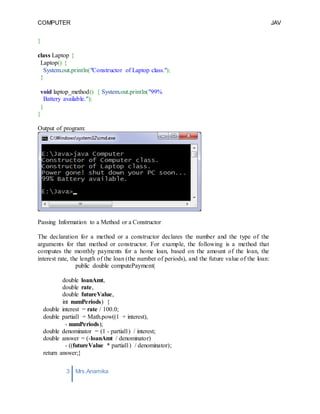
Output of program:
Passing Information to a Method or a Constructor
The declaration for a method or a constructor declares the number and the type of the
arguments for that method or constructor. For example, the following is a method that
computes the monthly payments for a home loan, based on the amount of the loan, the
interest rate, the length of the loan (the number of periods), and the future value of the loan:
public double computePayment(
double loanAmt,
double rate,
double futureValue,
int numPeriods) {
double interest = rate / 100.0;
double partial1 = Math.pow((1 + interest),
- numPeriods);
double denominator = (1 - partial1) / interest;
double answer = (-loanAmt / denominator)
- ((futureValue * partial1) / denominator);
return answer;}
COMPUTER
PROGRAMMING-2
JAV
A
4 Mrs.Anamika
Raj,Lecturer,KKU
This method has four parameters: the loan amount, the interest rate, the future value and the
number of periods. The first three are double-precision floating point numbers, and the fourth is
an integer. The parameters are used in the method body and at runtime will take on the values of
the arguments that are passed in.
PROVIDING CONSTRUCTORS FOR YOUR CLASSES
A class contains constructors that are invoked to create objects from the class blueprint.
Constructor declarations look like method declarations—except that they use the name of the
class and have no return type. For example, Bicycle has one constructor:
public Bicycle(int startCadence, int startSpeed, int startGear) {
gear = startGear;
cadence = startCadence;
speed = startSpeed;
}
To create a new Bicycle object called myBike, a constructor is called by the new operator:
Bicycle myBike = new Bicycle(30, 0, 8);
new Bicycle(30, 0, 8) creates space in memory for the object and initializes its fields.
Although Bicycle only has one constructor, it could have others, including a no-argument
constructor:
public Bicycle() {
gear = 1;
cadence = 10;
speed = 0;
}
Bicycle yourBike = new Bicycle(); invokes the no-argument constructor to create a new
Bicycle object called yourBike.
Both constructors could have been declared in Bicycle because they have different argument
lists. As with methods, the Java platform differentiates constructors on the basis of the number
of arguments in the list and their types. You cannot write two constructors that have the same
number and type of arguments for the same class, because the platform would not be able to tell
them apart. Doing so causes a compile-time error.
COMPUTER
PROGRAMMING-2
JAV
A
5 Mrs.Anamika
Raj,Lecturer,KKU
JAVA – MODIFIERS
Modifiers are keywords that you add to those definitions to change their meanings. The Java
language has a wide variety of modifiers, including the following:
 Java Access Modifiers
 Non Access Modifiers
use a modifier, you include its keyword in the definition of a class, method, or variable. The
modifier precedes the rest of the statement, as in the following examples (Italic ones) −
public class classNam e {
// ...
}
private boolean m yFlag;
static final double weeks = 9.5;
protected static final int BOXWIDTH = 42;
public static void m ain(String[] argum ents) {
// body of method
}
ACCESS CONTROL MODIFIERS:
Java provides a number of access modifiers to set access levels for classes, variables,
methods and constructors. The four access levels are:
 Visible to the package, the default. No modifiers are needed.
 Visible to the class only (private).
 Visible to the world (public).
 Visible to the package and all subclasses (protected).
COMPUTER
PROGRAMMING-2
JAV
A
6 Mrs.Anamika
Raj,Lecturer,KKU
NON ACCESS MODIFIERS:
Java provides a number of non-access modifiers to achieve many other functionality.
 The static modifier for creating class methods and variables
 The final modifier for finalizing the implementations of classes, methods, and
variables.
 The abstract modifier for creating abstract classes and methods.
 The synchronized and volatile modifiers, which are used for threads.
COMPUTER
PROGRAMMING-2
JAV
A
1 Mrs.Anamika Raj,Lecturer,KKU
CH AP TE R - 6
OV E R L OAD E D C ON S TR U CT O R S & M E T H O D S I N J A V A
A Java method is a collection of statements that are grouped together to perform an
operation. When you call the System.out.println() method, for example, the system
actually executes several statements in order to display a message on the console.
Now you will learn how to create your own methods with or without return values, invoke a
method with or without parameters, and apply method abstraction in the program design.
Creating Method
Considering the following example to explain the syntax of a method −
Syntax
public static int methodName(int a, int b) {
// body
}
Here,
 public static − modifier
 int − returntype
 methodName − name of themethod
 a, b − formal parameters
 int a, int b − list of parameters
Method definition consists of a method header and a method body. The same is shown in the
following syntax −
Syntax
modifier returnType nameOfMethod (Parameter List) {
// method body
}
The syntax shown above includes −
 modifier − It defines the access type of the method and it is optional to use.
COMPUTER
PROGRAMMING-2
JAV
A
2 Mrs.Anamika Raj,Lecturer,KKU
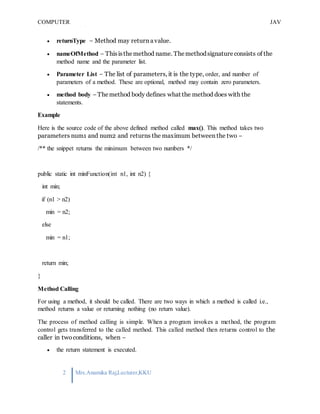
 returnType − Method may return avalue.
 nameOfMethod − Thisisthemethod name. Themethodsignature consists of the
method name and the parameter list.
 Parameter List − The list of parameters, it is the type, order, and number of
parameters of a method. These are optional, method may contain zero parameters.
 method body −Themethod body defines what the method does with the
statements.
Example
Here is the source code of the above defined method called max(). This method takes two
parameters num1 and num2 and returns the maximum between the two −
/** the snippet returns the minimum between two numbers */
public static int minFunction(int n1, int n2) {
int min;
if (n1 > n2)
min = n2;
else
min = n1;
return min;
}
Method Calling
For using a method, it should be called. There are two ways in which a method is called i.e.,
method returns a value or returning nothing (no return value).
The process of method calling is simple. When a program invokes a method, the program
control gets transferred to the called method. This called method then returns control to the
caller in twoconditions, when −
 the return statement is executed.
COMPUTER
PROGRAMMING-2
JAV
A
3 Mrs.Anamika Raj,Lecturer,KKU
 it reaches the method ending closing brace.
The methods returning void is considered as call to a statement. Lets consider an example
−
System.out.println("This is tutorialspoint.com!");
Themethodreturningvaluecan beunderstood by thefollowing example−
int result = sum(6, 9);
Following is the example to demonstrate how to define a method and how to call it −
Example
public class ExampleMinNumber { public
static void main(String[] args) {
int a = 11;
int b = 6;
int c = minFunction(a, b);
System.out.println("Minimum Value = " + c);
}
/** returns the minimum of two numbers */
public static int minFunction(int n1, int n2) {
int min;
if (n1 > n2)
min = n2;
else
min = n1;
return min;
}
}
This will produce the following result –Output Minimum value = 6
COMPUTER
PROGRAMMING-2
JAV
A
4 Mrs.Anamika Raj,Lecturer,KKU
Passing Parameters by Value
While working under calling process, arguments is to be passed. These should be in the same
order as their respective parameters in the method specification. Parameters can be passed by
value or by reference.
Passing Parameters by Value means calling a method with a parameter. Through this, the
argument value is passed to the parameter.
Example
The following program shows an example of passing parameter by value. The values of the
arguments remains the same even after the method invocation.
public class swappingExample {
public static void main(String[] args) {
int a = 30;
int b = 45;
System.out.println("Before swapping, a = " + a + " and b = " + b);
// Invoke the swap method
swapFunction(a, b);
System.out.println("n**Now, Before and After swapping values will be same here**:");
System.out.println("After swapping, a = " + a + " and b is " + b);
}
public static void swapFunction(int a, int b) { System.out.println("Before
swapping(Inside), a = " + a + " b = " + b);
// Swap n1 with n2
int c = a;
a = b;
b = c;
System.out.println("After swapping(Inside), a = " + a + " b = " + b);
}}
COMPUTER
PROGRAMMING-2
JAV
A
5 Mrs.Anamika Raj,Lecturer,KKU
This will produce the following result −
Output
Before swapping, a = 30 and b = 45
Before swapping(Inside), a = 30 b = 45
After swapping(Inside), a = 45 b = 30
**Now, Before and After swapping values will be same here**:
After swapping, a = 30 and b is 45
Method Overloading
When a class has two or more methods by the same name but different parameters, it is known
as method overloading. It is different from overriding. In overriding, a method has the same
method name, type, number of parameters, etc.
Let’s consider the example discussed earlier for finding minimum numbers of integer type. If,
let’s say we want to find the minimum number of double type. Then the concept of overloading
will be introduced to create two or more methods with the same name but different parameters.
The following example explains the same −
Example
public class ExampleOverloading {
public static void main(String[] args) {
int a = 11;
int b = 6;
double c = 7.3;
double d = 9.4;
int result1 = minFunction(a, b);
// same function name with different parameters
double result2 = minFunction(c, d);
COMPUTER
PROGRAMMING-2
JAV
A
6 Mrs.Anamika Raj,Lecturer,KKU
System.out.println("Minimum Value = " + result1);
System.out.println("Minimum Value = " + result2);
}
// for integer
public static int minFunction(int n1, int n2) {
int min;
if (n1 > n2)
min = n2;
else
min = n1;
return min;
}
// for double
public static double minFunction(double n1, double n2) {
double min;
if (n1 > n2)
min = n2;
else
min = n1;
return min;
}
}
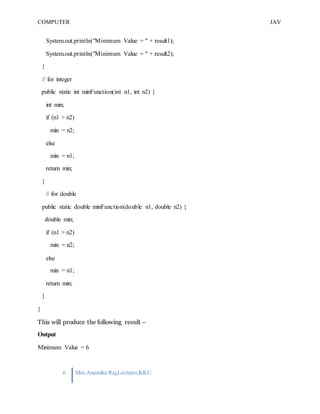
This will produce the following result −
Output
Minimum Value = 6
COMPUTER
PROGRAMMING-2
JAV
A
7 Mrs.Anamika Raj,Lecturer,KKU
Minimum Value = 7.3
Overloading methods makes program readable. Here, two methods are given by the same name
but with different parameters. The minimum number from integer and double types is the result.
THE CONSTRUCTORS
A constructor initializes an object when it is created. It has the same name as its class and is
syntactically similar to a method. However, constructors have no explicit return type.
Typically, you will use a constructor to give initial values to the instance variables defined by the
class, or to perform any other startup procedures required to create a fully formed object.
All classes have constructors, whether you define one or not, because Java automatically
provides a default constructor that initializes all member variables to zero. However, once you
define your own constructor, the default constructor is no longer used.
Example
Here is a simple example that uses a constructor without parameters −
// A simple constructor.
class MyClass {
int x;
// Following is the constructor
MyClass() {
x = 10;
}
}
You will have to call constructor to initialize objects as follows −
public class ConsDemo {
public static void main(String args[]) {
MyClass t1 = new MyClass();
MyClass t2 = new MyClass();
System.out.println(t1.x + " " + t2.x);
}
}
Output 10 10
COMPUTER
PROGRAMMING-2
JAV
A
8 Mrs.Anamika Raj,Lecturer,KKU
PARAMETERIZED CONSTRUCTOR
Most often, you will need a constructor that accepts one or more parameters. Parameters are
added to a constructor in the same way that they are added to a method, just declare them inside
the parentheses after the constructor's name.
Example
Here is a simple example that uses a constructor with a parameter −
// A simple constructor.
class MyClass {
int x;
// Following is the constructor
MyClass(int i ) {
x = i;
}
}
You will need to call a constructor to initialize objects as follows −
public class ConsDemo {
public static void main(String args[]) {
MyClass t1 = new MyClass( 10 );
MyClass t2 = new MyClass( 20 );
System.out.println(t1.x + " " + t2.x);
}
}
This will produce the following result –Output 10 20
THE this KEYWORD
this is a keyword in Java which is used as a reference to the object of the current class, with in an
instance method or a constructor. Using this you can refer the members of a class such as
constructors, variables and methods.
Note − The keyword this is used only within instance methods or constructors.
class Student {
int age;
Student(int age) {
this.age = age;
COMPUTER
PROGRAMMING-2
JAV
A
9 Mrs.Anamika Raj,Lecturer,KKU
}
}
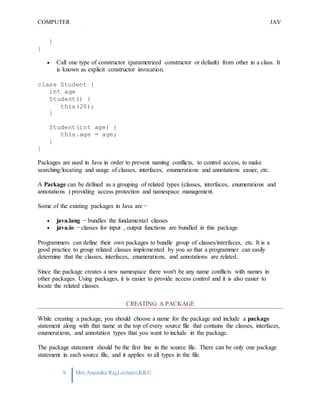
 Call one type of constructor (parametrized constructor or default) from other in a class. It
is known as explicit constructor invocation.
class Student {
int age
Student() {
this(20);
}
Student(int age) {
this.age = age;
}
}
Packages are used in Java in order to prevent naming conflicts, to control access, to make
searching/locating and usage of classes, interfaces, enumerations and annotations easier, etc.
A Package can be defined as a grouping of related types (classes, interfaces, enumerations and
annotations ) providing access protection and namespace management.
Some of the existing packages in Java are −
 java.lang − bundles the fundamental classes
 java.io − classes for input , output functions are bundled in this package
Programmers can define their own packages to bundle group of classes/interfaces, etc. It is a
good practice to group related classes implemented by you so that a programmer can easily
determine that the classes, interfaces, enumerations, and annotations are related.
Since the package creates a new namespace there won't be any name conflicts with names in
other packages. Using packages, it is easier to provide access control and it is also easier to
locate the related classes.
CREATING A PACKAGE
While creating a package, you should choose a name for the package and include a package
statement along with that name at the top of every source file that contains the classes, interfaces,
enumerations, and annotation types that you want to include in the package.
The package statement should be the first line in the source file. There can be only one package
statement in each source file, and it applies to all types in the file.
COMPUTER
PROGRAMMING-2
JAV
A
10 Mrs.Anamika Raj,Lecturer,KKU
If a package statement is not used then the class, interfaces, enumerations, and annotation types
will be placed in the current default package.To compile the Java programs with package
statements, you have to use -d option as shown below.
javac -d Destination_folder file_name.java
Then a folder with the given package name is created in the specified destination, and the
compiled class files will be placed in that folder.
EXAMPLE
Let us look at an example that creates a package called animals. It is a good practice to use
names of packages with lower case letters to avoid any conflicts with the names of classes and
interfaces.
Following package example contains interface named animals −
/* File name : Animal.java */
package animals;
interface Animal {
public void eat();
public void travel();
}
Now, let us implement the above interface in the same package animals −
package animals;
/* File name : MammalInt.java */
public class MammalInt implements Animal {
public void eat() {
System.out.println("Mammal eats");
}
public void travel() {
System.out.println("Mammal travels");
}
public int noOfLegs() {
return 0;
}
public static void main(String args[]) {
COMPUTER
PROGRAMMING-2
JAV
A
11 Mrs.Anamika Raj,Lecturer,KKU
MammalInt m = new MammalInt();
m.eat();
m.travel();
}
}
Now compile the java files as shown below −
$ javac -d . Animal.java
$ javac -d . MammalInt.java
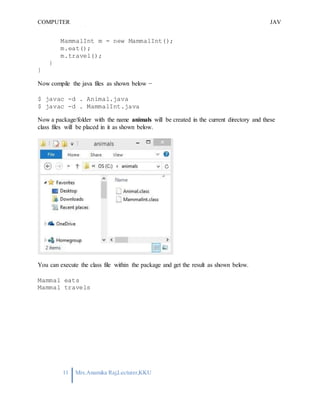
Now a package/folder with the name animals will be created in the current directory and these
class files will be placed in it as shown below.
You can execute the class file within the package and get the result as shown below.
Mammal eats
Mammal travels
COMPUTER
PROGRAMMING-2
JAV
A
1 Mrs.Anamika
Raj,Lecturer,KKU
C HAP T E R - 7
ARRAY S & C O L L E C T I O N S
Java provides a data structure, the array, which stores a fixed-size sequential collection of
elements of the same type. An array is used to store a collection of data, but it is often more
useful to think of an array as a collection of variables of the same type.
Instead of declaring individual variables, such as number0, number1, ..., and number99, you
declare one array variable such as numbers and use numbers[0], numbers[1], and ..., numbers[99]
to represent individual variables.
This tutorial introduces how to declare array variables, create arrays, and process arrays using
indexed variables.
DECLARING ARRAY VARIABLES
To use an array in a program, you must declare a variable to reference the array, and you must
specify the type of array the variable can reference. Here is the syntax for declaring an array
variable −
SYNTAX
dataType[] arrayRefVar; // preferred way. or
dataType arrayRefVar[]; // works but not preferred way.
Note − The style dataType[] arrayRefVar is preferred. The style dataType arrayRefVar[]
comes from the C/C++ language and was adopted in Java to accommodate C/C++ programmers.
EXAMPLE
The following code snippets are examples of this syntax −
double[] myList; // preferred way. or
double myList[]; // works but not preferred way.
CREATING ARRAYS
You can create an array by using the new operator with the following syntax −
COMPUTER
PROGRAMMING-2
JAV
A
2 Mrs.Anamika
Raj,Lecturer,KKU
SYNTAX
arrayRefVar = new dataType[arraySize];
The above statement does two things −
 It creates an array using new dataType[arraySize].
 It assigns the reference of the newly created array to the variable arrayRefVar.
Declaring an array variable, creating an array, and assigning the reference of the array to
thevariable can becombined in one statement,asshown below −
dataType[] arrayRefVar = new dataType[arraySize]; Alternatively
you can createarraysas follows −
dataType[] arrayRefVar = {value0, value1, ..., valuek};
The array elements are accessed through the index. Array indices are 0-based; that is, they start
from 0 to arrayRefVar.length-1.
EXAMPLE
Following statement declares an array variable, myList, creates an array of 10 elements of
double type and assigns its reference to myList −
double[] myList = new double[10];
Following picture represents array myList. Here, myList holds ten double values and the
indices are from 0 to 9.
COMPUTER
PROGRAMMING-2
JAV
A
3 Mrs.Anamika
Raj,Lecturer,KKU
ARRAY OF OBJECTS
Following is the definition of Student class.
class Student {
int marks;
}
An array of objects is created just like an array of primitive type data items in the following
way.
Student[] studentArray = new Student[7];
The above statement creates the array which can hold references to seven Student objects.
MULTI DIMENSIONAL ARRAYS
We have represented an array type using a pair of brackets. Two dimensional arrays are in a
similar way represented by two such pairs of brackets and an N dimensional array is represented
by using N such pairs of brackets. The following statement creates a two dimensional array of
integers, which contains 3 arrays containing 4 integers each.
int[][] a=new int[3][4];
Elements of this array are accessed by specifying the index numbers, here two of them. The first
representing the array number and the second representing the index element in that particular
array.
a[0][2] = 34;
A two dimensional airy can also be initialised using an array initialiser in the following way.
This paints a better picture of a 2D array as an array of arrays.
int[][] d = { { 1,5,74,2}, {4,68,45,65},{5,0,34,54}}:
THE FOREACH LOOPS
JDK 1.5 introduced a new for loop known as foreach loop or enhanced for loop, which
enables you to traverse the complete array sequentially without using an index variable.
EXAMPLE
COMPUTER
PROGRAMMING-2
JAV
A
4 Mrs.Anamika
Raj,Lecturer,KKU
PASSING ARRAYS TO METHODS
Just as you can pass primitive type values to methods, you can also pass arrays to methods. For
example, the following method displays the elements in an int array −
EXAMPLE
public static void printArray(int[] array) {
for (int i = 0; i < array.length; i++) {
System.out.print(array[i] + " ");
}
}
You can invoke it by passing an array. For example, the following statement invokes the
printArray method to display 3, 1, 2, 6, 4, and 2 −
EXAMPLE
printArray(new int[]{3, 1, 2, 6, 4, 2});
LISTS & MAPS
LIST INTERFACE
A List is a ordered collection that can contain duplicate values. It provides three general
purpose implementations.
1) ArrayList
2) LinkedList
3) Vector
1) ARRAYLIST
ArrayList is said to be the best performing list implementation in normal conditions. In
simple words we can say that ArrayList is a expendable array of values or objects. package
com.beingjavaguys.core;
import java.util.ArrayList;
public class ArrayListImplementation {
public static void main(String args[]){
COMPUTER
PROGRAMMING-2
JAV
A
5 Mrs.Anamika
Raj,Lecturer,KKU
ArrayList<String> arrayList = new ArrayList<String>();
arrayList.add("element1");
arrayList.add("element2");
arrayList.add("element3");
System.out.println(arrayList);
arrayList.remove("element3"); System.out.println(arrayList);
}
}
2) LINKEDLIST
Linked list is a bit slower than ArrayList but it performs better in certain conditions.
3) VECTOR
Vector is also a growable array of objects, but unlike ArrayList Vector is thread safe in
nature.
Map Interface
A Map interface provides key-value pairs, map objects contains keys associated with an
value. Maps can not contain duplicate keys and one key can be mapped to atmost one
element. In Java Map interface provides three general purpose implementations.
1) HashMap- A HashMap is a HashTable implementation of Map interface, unlike HashTable it
contains null keys and values. HashMap does not guarantees that the order of the objects will
remain same over the time.
2) TreeMap- A TreeMap provides red-black tree based implementation of Map interface.
3) LinkedHashMap- It is HashTable and LinkedList implementation of Map interface.
LinkedHashMap has a double-linkedList running through all its elements.
COMPUTER
PROGRAMMING-2
JAV
A
1 Mrs.Anamika
Raj,Lecturer,KKU
C H A P T E R 8
EX C EP T I O N H A N D L I N G I N J A VA
1. Exception Handling
2. Advantage of Exception Handling
3. Hierarchy of Exception classes
4. Types of Exception
5. Scenarios where exception may occur
The exceptionhandling in java is one of the powerful mechanism to handlethe
runtime errors so that normal flow of the application can be maintained.
In this page, we will learn about java exception, its type and the difference
between checked and unchecked exceptions.
WHAT IS EXCEPTION
Dictionary Meaning: Exception is an abnormal condition.
In java, exception is an event that disrupts the normal flow of the program. It is
an object which is thrown at runtime.
WHAT IS EXCEPTION HANDLING
Exception Handling is a mechanism to handle runtime errors such as
ClassNotFound, IO, SQL, Remote etc.
ADVANTAGE OF EXCEPTION HANDLING
The core advantage of exception handling is to maintain the normal flow of the
application. Exception normally disrupts the normal flow of the application that
is why we use exception handling. Let's take a scenario:
1. statement 1;
COMPUTER
PROGRAMMING-2
JAV
A
2 Mrs.Anamika
Raj,Lecturer,KKU
2. statement 2;
3. statement 3;
4. statement 4;
5. statement 5;//exception occurs
6. statement 6;
7. statement 7;
8. statement 8;
9. statement 9;
10. statement 10;
Supposethere is 10 statements in your program and there occurs an exception at
statement 5, rest of the codewill not be executed i.e. statement 6 to 10 will not
run. If we perform exception handling, rest of the statement will be executed. That
is why we use exception handling in java.
JAVA TRY-CATCH
JAVA TRY BLOCK
Java try block is used to enclose the codethat might throw an exception. It
must be used within the method.
Java try block must be followed by either catch or finally block.
SYNTAX OF JAVA TRY-CATCH
1. try{
2. //codethat may throw exception
3. }catch(Exception_class_Name ref){}
SYNTAX OF TRY-FINALLY BLOCK
1. try{
2. //codethat may throw exception
3. }finally{}
COMPUTER
PROGRAMMING-2
JAV
A
3 Mrs.Anamika
Raj,Lecturer,KKU
JAVA CATCH MULTIPLE EXCEPTIONS
Java Multi catchblock
If you have to perform different tasks at the occurrence of different Exceptions,
use java multi catch block.
Let's see a simple example of java multi-catch block.
1. public class TestMultipleCatchBlock{
2. public static void main(String args[]){
3. try{
4. int a[]=new int[5];
5. a[5]=30/0;
6. }
7. catch(ArithmeticException e){System.out.println("task1 is completed"
);}
8. catch(ArrayIndexOutOfBoundsException e){System.out.println("task 2
completed");}
9. catch(Exception e){System.out.println("common task completed");} 10.
11. System.out.println("rest of the code...");
12. }
13. }
Test it Now Output:task1
completed
rest of the code...
COMPUTER
PROGRAMMING-2
JAV
A
1 Mrs.Anamika Raj,Lecturer,KKU
CHAPTER 9 FILES AND STREAMS
A file chooser is a component that provides access to the file system. You can add a file
chooser directly to your application or set it up to open as a dialog. The JFileChooser class
provides three methods that display file chooser dialogs: showOpenDialog with an "Open"
approve button, showSaveDialog with a "Save" approve button, and showDialog with a user-
defined approve button. Keep in mind that a JFileChooser object only allows you to retrieve the
user-selected pathname; any opening, saving, or other file manipulating must be implemented
by you. Another way to present a file chooser is to add an instance of JFileChooser to a
container.
JFileChooser provides a simple mechanism for the user to choose a file.
Constructor and Description
JFileChooser()
Constructs a JFileChooser pointing to the user's default directory.
JFileChooser(File currentDirectory)
Constructs a JFileChooser using the given File as the path.
JFileChooser(File currentDirectory, FileSystemView fsv)
Constructs a JFileChooser using the given current directory and FileSystemView.
JFileChooser(FileSystemView fsv)
Constructs a JFileChooser using the given FileSystemView.
JFileChooser(String currentDirectoryPath)
Constructs a JFileChooser using the given path.
JFileChooser(String currentDirectoryPath, FileSystemView fsv)
Constructs a JFileChooser using the given current directory path and FileSystemView
Low level File i/o
Java uses a hierarchy of classes to deal with different types of data. The InputStream and
OutputStream are abstract classes that use low-level I/O streams to read bytes from or send
them to I/O devices such as files, network sockets, and pipes.
COMPUTER
PROGRAMMING-2
JAV
A
2 Mrs.Anamika Raj,Lecturer,KKU
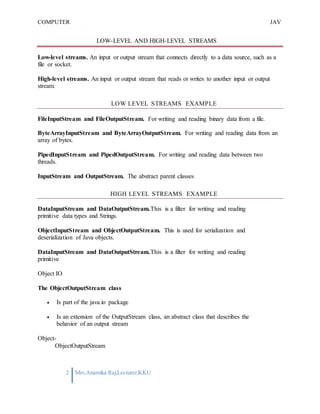
LOW-LEVEL AND HIGH-LEVEL STREAMS
Low-level streams. An input or output stream that connects directly to a data source, such as a
file or socket.
High-level streams. An input or output stream that reads or writes to another input or output
stream.
LOW LEVEL STREAMS EXAMPLE
FileInputStream and FileOutputStream. For writing and reading binary data from a file.
ByteArrayInputStream and ByteArrayOutputStream. For writing and reading data from an
array of bytes.
PipedInputStream and PipedOutputStream. For writing and reading data between two
threads.
InputStream and OutputStream. The abstract parent classes
HIGH LEVEL STREAMS EXAMPLE
DataInputStream and DataOutputStream.This is a filter for writing and reading
primitive data types and Strings.
ObjectInputStream and ObjectOutputStream. This is used for serialization and
deserialization of Java objects.
DataInputStream and DataOutputStream.This is a filter for writing and reading
primitive
Object IO
The ObjectOutputStream class
 Is part of the java.io package
 Is an extension of the OutputStream class, an abstract class that describes the
behavior of an output stream
Object-
ObjectOutputStream
COMPUTER
PROGRAMMING-2
JAV
A
3 Mrs.Anamika Raj,Lecturer,KKU
 Is a high-level class that can be used to send primitive values and "serializable" objects
to a stream. All that is needed for an object to be serializable, is that its class must
implement the Serializable interface. For example, if a Customer class is to be
serializable, its header may be coded
public class Customer implements Serializable
The interface requires no methods.
Many packaged classes are serializable including all wrapper classes, String and Stringbuffer
classes, Vector and Array classes, and the collection classes. In other words, an entire collection,
such as a SortedMap, can be stored as an object on disk!
 Has overloaded constructors but the most useful "chains" to an object that descends from
the OutputStream class (such as a FileOutputStream object). For example, if fd is the
reference of a File object
ObjectOutputStream out = new ObjectOutputStream(new FileOutputStream(fd)); will
construct a ObjectOutputStream object chained to a FileOutputStream object for
sending primitive values and serializable objects to the file. Because a checked, IOException
may occur, the statement should be enclosed in a try block with an appropriate catch.
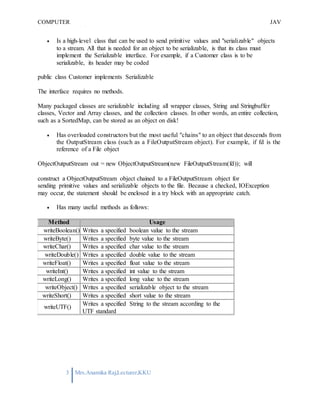
 Has many useful methods as follows:
Method Usage
writeBoolean() Writes a specified boolean value to the stream
writeByte() Writes a specified byte value to the stream
writeChar() Writes a specified char value to the stream
writeDouble() Writes a specified double value to the stream
writeFloat() Writes a specified float value to the stream
writeInt() Writes a specified int value to the stream
writeLong() Writes a specified long value to the stream
writeObject() Writes a specified serializable object to the stream
writeShort() Writes a specified short value to the stream
writeUTF()
Writes a specified String to the stream according to the
UTF standard

Computer Programming 2

  • 1.
    1 CHAPTER- 1 INTRODUCTION TOOBJECT ORIENTED PROGRAMMING WITH JAVA What is Java? Java is a programming language and a platform. Java is a high level, robust, secured and object-oriented programming language. Platform: Any hardware or software environment in which a program runs, is known as a platform. Since Java has its own runtime environment (JRE) and API, it is called platform. Variable and Datatype in Java Variable-Variable is name of reserved area allocated in memory. 1. int data=50;//Here data is variable TYPES OF VARIABLE There are three types of variables in java  local variable  instance variable  static variable LOCAL VARIABLE A variable that is declared inside the method is called local variable. INSTANCE VARIABLE A variable that is declared inside the class but outside the method is called instance variable . It is not declared as static. STATIC VARIABLE A variable that is declared as static is called static variable. It cannot be local. EXAMPLE TO UNDERSTAND THE TYPES OF VARIABLES 1. class A{ 2. int data=50;//instance variable 3. static int m=100;//static variable 4. void method(){ 5. int n=90;//local variable 6. } 7. }//end of class
  • 2.
    2 Data Types inJava In java, there are two types of data types  primitive data types  non-primitive data types Data Type Default Value Default size boolean false 1 bit char 'u0000' 2 byte byte 0 1 byte short 0 2 byte int 0 4 byte long 0L 8 byte float 0.0f 4 byte double 0.0d 8 byte OPERATORS IN JAVA Operator in java is a symbol that is used to perform operations. There are many types of operators in java such as unary operator, arithmetic operator, relational operator, shift operator, bitwise operator, ternary operator and assignment operator. Operators Precedence postfix EXPR++ EXPR-- unary ++EXPR --EXPR +EXPR -EXPR ~ !
  • 3.
    3 multiplicative * /% additive + - shift << >> >>> relational < > <= >= instanceof equality == != bitwise AND & bitwise exclusive OR ^ bitwise inclusive OR | logical AND && logical OR || ternary ? : assignment = += -= *= /= %= &= ^= |= <<= >>= >>>= OBJECT AND CLASS IN JAVA OBJECT Any entity that has state and behavior is known as an object. For example: chair, pen, table, keyboard, bike etc. It can be physical and logical. CLASS Collection of objects is called class. It is a logical entity. INHERITANCE When one object acquires all the properties and behaviours of parent object i.e. known as inheritance. It provides code reusability. It is used to achieve runtime polymorphism. POLYMORPHISM When one task is performed by different ways i.e. known as polymorphism. For example: to convince the customer differently, to draw something e.g. shape or rectangle etc. In java, we use method overloading and method overriding to achieve polymorphism. Another example can be to speak something e.g. cat speaks meaw, dog barks woof etc. ABSTRACTION Hiding internal details and showing functionality is known as abstraction. For example: phone call, we don't know the internal processing. In java, we use abstract class and interface to achieve abstraction. ENCAPSULATION Binding (or wrapping) code and data together into a single unit is known as encapsulation. For example: capsule, it is wrapped with different medicines. A java class is the example of encapsulation. Java bean is the fully encapsulated class because all the data members are private here. OBJECT IN JAVA An entity that has state and behavior is known as an object e.g. chair, bike, marker, pen, table, car etc. It can be physical or logical (tangible and intangible). The example of intangible object is banking system. An object has three characteristics:
  • 4.
    4  state: representsdata (value) of an object.  behavior: represents the behavior (functionality) of an object such as deposit, withdraw etc.  identity: Object identity is typically implemented via a unique ID. The value of the ID is not visible to the external user. But,it is used internally by the JVM to identify each object uniquely. For Example: Pen is an object. Its name is Reynolds, color is white etc. known as its state. It is used to write, so writing is its behavior. Object is an instance of a class. Class is a template or blueprint from which objects are created. So object is the instance(result) of a class. Class in Java A class is a group of objects that has common properties. It is a template or blueprint from which objects are created. A class in java can contain:  data member  method  constructor  block  class and interface Syntax to declare a class: class <class_name>{ data member; method; } INSTANCE VARIABLE IN JAVA A variable that is created inside the class but outside the method, is known as instance variable.Instance variable doesn't get memory at compile time.It gets memory at runtime when object(instance) is created.That is why, it is known as instance variable. Method in Java In java, a method is like function i.e. used to expose behaviour of an object. Advantage of Method- Code Reusability, Code Optimization new keyword The new keyword is used to allocate memory at runtime. INHERITANCE IN JAVA  Inheritance  Types of Inheritance Inheritance in java is a mechanism in which one object acquires all the properties and behaviors of parent object. The idea behind inheritance in java is that you can create new classes that are built upon existing classes. When you inherit from an existing class, you can reuse methods and fields of parent class, and you can add new methods and fields also.
  • 5.
    5 SYNTAX OF JAVAINHERITANCE 1. class Subclass-name extends Superclass-name 2. { 3. //methods and fields 4. } The extends keyword indicates that you are making a new class that derives from an existing class. In the terminology of Java, a class that is inherited is called a super class. The new class is called a subclass. TYPES OF INHERITANCE IN JAVA Java Buzzwords: Following are the features or buzzwords of Java language which made it popular: 1.Simple 2.Secure 3.Portable 4.Object-Oriented 5.Robust 6.Multithreaded 7.Architecture neutral 8.Interpreted 9.High Performance 10.Distributed 11.Dynamic
  • 6.
    COMPUTER PROGRAMMING-2 JAV A CHAPTER- 2 BASICS OFJAVA PROGRAMMING First Java Program: Let us look at a simple code that would print the words Hello World. public class MyFirstJavaProgram { /* This is m y first java program . * This will print 'Hello World' as the output * / public static void m ain(String []args) { System .out.println("Hello World"); // prints Hello World } } Simple Example of Object and Class In this example, we have created a Student class that have two data members id and name. We are creating the object of the Student class by new keyword and printing the objects value. class Student1{ int id;//data member (also instance variable) String name;//data member(also instance variable) public static void main(String args[]){ Student1 s1=new Student1();//creating an object of Student System.out.println(s1.id); System.out.println(s1.name); } } Test it Now Output:0 null Example of Object and class that maintains the records of students In this example, we are creating the two objects of Student class and initializing the value to these objects by invoking the insertRecord method on it. Here, we are displaying the state (data) of the objects by invoking the displayInformation method. class Student2{ int rollno; String name; void insertRecord(int r, String n){ //method rollno=r; name=n; } void displayInformation(){System.out.println(rollno+" "+name);}//method public static void main(String args[]){ Student2 s1=new Student2(); Student2 s2=new Student2(); 1 Mrs.Anamika Raj,Lecturer,KKU
  • 7.
    COMPUTER PROGRAMMING-2 JAV A s1.insertRecord(111,"Karan"); s2.insertRecord(222,"Aryan"); s1.displayInformation(); s2.displayInformation(); } } COMMENTS Comments arelines of the program that are just for humans to read. A comment that starts with a /* and ends with a */ is called a multi-line comment. The second type of comment starts with a //. When the compiler sees a // it ignores everything that follows up until the end of that line. .class file 1. class file in java is generated when you compile .java file using any Java compiler like Sun's javac which comes along JDK installation and can be found in JAVA_HOME/bin directory. 2. class file contains byte codes. byte codes are special platform independent instruction for Java virtual machine. bytecode is not a machine language and mere instruction to JVM. Since every machine or processor e.g. INTEL or AMD processor may have different instruction for doing same thing, its left on JVM to translate bytecode into machine instruction and by this way java achieves platform independence. 3. class file of inner class contains $ in there name. So if a Java source file contains two classes, one of them is inner class than java compiler will generate two class file. separate class file for top level and inner class. you can distinguish them by looking at there name. Suppose you have top level class as "Hello" and inner class as "GoodBye" then java compiler will generate two class file: IMPORT STATEMENTS An import statement is a way of making more of the functionality of Java available to your program. Java can do a lot of things, and not every program needs to do everything. So,to cut things down to size, so to speak, Java has its classes divided into "packages." Your own classes are part of packages,too. Anything that isn't in the java.langpackage or the local package needs to be imported. It's not unusual to see a series of import statements near the start of a program file: import java.awt.*; import java.awt.event.*; import java.util.*; 2 Mrs.Anamika Raj,Lecturer,KKU
  • 8.
    COMPUTER PROGRAMMING-2 JAV A import javax.swing.*; import javax.swing.event.*; CONTROLSTATEMENTS Followingis the syntax of the if statement. if ( condition ) { // code } And here is a small code snippet which displays the message "Hi" only if the value of the boolean variable wish is true. if ( wish == true ) { System.out.println("Hi"); } Following is the syntax of if else structure. if ( condition ) { // code } else { // code } And here is an example usage which states whether a number is an even number or an odd number. Even numbers are divisible by zero and hence leave a remainder of zero. The remainder on dividing the number by two can be obtained using the modulo (%) mathematical operator. if ( num%2==0){ System.out.println("Number is even"); }else{ System.out.println("Number is odd"); } Given below is the syntax of the switch structure in Java. switch ( expression ) { case value1 : // code break; case value2: // code break; 3 Mrs.Anamika Raj,Lecturer,KKU
  • 9.
    COMPUTER PROGRAMMING-2 JAV A ... ... case valueN: // code break; ... Givenbelow is an example which prints the day of the week based on the value stored in the int variable num. 1 stands for Sunday, 2 for Monday and so on: int day = s.nextInt; // s is a Scanner object connected to System.in String str; // stores the day in words switch(day) { case 1: str="Sunday"; break; case 2: str="Monday"; break; case 3: str="Tuesday"; break; case 4: str="Wednesday"; break; case 5: str="Thursday"; break; case 6: str="Friday"; break; case 7: str="Saturday"; break; default: str=" Invalid day"; } System.out.println(str); ... default: // code break; } 4 Mrs.Anamika Raj,Lecturer,KKU
  • 10.
    COMPUTER PROGRAMMING-2 JAV A THE WHILE LOOP Followingis the syntax of the while loop. The statements in the while block are executed as long as the condition evaluates to true. while ( condition ) { // code } Consider the following code snippet which is used to print the statement "Hi" thrice on the screen. int ctr = 0; while (ctr < 3 ) { System.out.println("Hi"); ctr++; } The following code is used to add the numbers from 1 to 100. int ctr = 1; sum =0; while (ctr<=100) { sum = sum + ctr; ctr++; } SYNTAX OF THE DO WHILE LOOP: do { // code } while ( condition ); Following code uses the do while loop to print "Hi" thrice on the screen. int ctr = 0; do { System.out.println("Hi"); ctr++; } while (ctr < 3); 5 Mrs.Anamika Raj,Lecturer,KKU
  • 11.
    COMPUTER PROGRAMMING-2 JAV A SYNTAX OF AFOR LOOP: for ( initialization; condition; increment/ decrement ) { // body } Following code prints the numbers from 1 to 10 using a for loop. for ( int i=1; i<=10; i++) { System.out.println(i); } 6 Mrs.Anamika Raj,Lecturer,KKU
  • 12.
    COMPUTER PROGRAMMING-2 JAV A 1 Mrs.Anamika Raj,Lecturer,KKU index regex CH APTE R 3 CH AR ACTE R S & S TR I N G Java String class methods The java.lang.String class provides many useful methods to perform operations on sequence of char values. No. Method Description 1 char charAt(int index) returns char value for the particular index 2 int length() returns string length 3 static String format(String format, Object... args) returns formatted string 4 static String format(Locale l, String format, Object... args) returns formatted string with given locale 5 String substring(int beginIndex) returns substring for given begin 6 String substring(int beginIndex, int endIndex) returns substring for given begin index and end index returns true or false after 7 boolean contains(CharSequence s) 8 static String join(CharSequence delimiter, CharSequence... elements) static String join(CharSequence delimiter, Iterable<? extends CharSequence> elements) matching the sequence of char value returns a joined string returns a joined string 10 boolean equals(Object another) checks the equality of string with object 11 boolean isEmpty() checks if string is empty 12 String concat(String str) concatenates specified string 13 String replace(char old, char new) replaces all occurrences of specified char value String replace(CharSequence old, CharSequence new) replaces all occurrences of specified CharSequence 15 static String equalsIgnoreCase(String another) compares another string. It doesn't check case. 16 String[] split(String regex) returns splitted string matching 17 String[] split(String regex, int limit) returns splitted string matching regex and limit 9 14
  • 13.
    COMPUTER PROGRAMMING-2 JAV A 2 Mrs.Anamika Raj,Lecturer,KKU is overloaded. specifiedlocale. starting with given index 18 String intern() returns interned string 19 int indexOf(int ch) returns specified char value index 20 int indexOf(int ch, int fromIndex) returns specified char value index 21 int indexOf(String substring) returns specified substring index 22 int indexOf(String substring, int fromIndex) returns specified substring index starting with given index 23 String toLowerCase() returns string in lowercase. 24 String toLowerCase(Locale l) returns string in lowercase using specified locale. 25 String toUpperCase() returns string in uppercase. 26 String toUpperCase(Locale l) returns string in uppercase using 27 String trim() removes beginning and ending spaces of this string. 28 static String valueOf(int value) converts given type into string. It JAVA STRING COMPARE We can compare string in java on the basis of content and reference. It is used in authentication (by equals() method), sorting (by compareTo() method), reference matching (by == operator) etc. There are three ways to compare string in java: 1. By equals() method 2. By = = operator 3. By compareTo() method 1) String compare by equals() method The String equals() method compares the original content of the string. It compares values of string for equality. String class provides two methods:  public boolean equals(Object another) compares this string to the specified object.  public boolean equalsIgnoreCase(String another) compares this String to another string, ignoring case.
  • 14.
    COMPUTER PROGRAMMING-2 JAV A 3 Mrs.Anamika Raj,Lecturer,KKU 1. classTeststringcomparison1{ 2. public static void main(String args[]){ 3. String s1="Sachin"; 4. String s2="Sachin"; 5. String s3=new String("Sachin"); 6. String s4="Saurav"; 7. System.out.println(s1.equals(s2));//true 8. System.out.println(s1.equals(s3));//true 9. System.out.println(s1.equals(s4));//false 10. } 11. } Test it Now Output:true true false 2) String compare by == operator The = = operator compares references not values. 3) String compare by compareTo() method The String compareTo() method compares values lexicographically and returns an integer value that describes if first string is less than, equal to or greater than second string. STRING CONCATENATION IN JAVA In java, string concatenation forms a new string THAT IS the combination of multiple strings. There are two ways to concat string in java: 1. By + (string concatenation) operator 2. By concat() method 1) STRING CONCATENATION BY + (STRING CONCATENATION) OPERATOR Java string concatenation operator (+) is used to add strings. For Example: 1. class TestStringConcatenation1{ 2. public static void main(String args[]){ 3. String s="Sachin"+" Tendulkar"; 4. System.out.println(s);//Sachin Tendulkar
  • 15.
    COMPUTER PROGRAMMING-2 JAV A 4 Mrs.Anamika Raj,Lecturer,KKU 5. } 6.} OUTPUT Output:Sachin Tendulkar MATH CLASS IN JAVA he Math class is used to operate the calculations. There is not necessary to import any package for the Math class because this is already in java.lang package. Any expressions can be operated through certain method calls. There are some functions have been used in the given example. All the functions have been explained below with example : E This is E field of the Math class which returns you a default exponent value that is closer than any other to e, the base of the natural logarithms. PI This is also a field of the Method class which returns you a default pi value, the ratio of the circumference of a circle to its diameter. max() This is the max() function which distinguishes the maximum value from the two given value. min() This is the min() function which distinguishes the minimum value from the two given value. pow() This is the pow() function which returns you the number raised to the power of a first given value by the another one. sqrt() This is the sqrt() function which returns you the square root of the specified value. JAVA STRING CONCAT
  • 16.
    COMPUTER PROGRAMMING-2 JAV A 5 Mrs.Anamika Raj,Lecturer,KKU The javastring concat() method COMBINES SPECIFIED STRING AT THE END OF THIS STRING. It returns combined string. It is like appending another string. SIGNATURE The signature of string concat() method is given below: 1. public String concat(String anotherString) PARAMETER anotherString : another string i.e. to be combined at the end of this string. RETURNS combined string Java String concat() method example 1. public class ConcatExample{ 2. public static void main(String args[]){ 3. String s1="java string"; 4. s1.concat("is immutable"); 5. System.out.println(s1); 6. s1=s1.concat(" is immutable so assign it explicitly"); 7. System.out.println(s1); 8. }} Test it Now java string java string is immutable so assign it explicitly.
  • 17.
    COMPUTER PROGRAMMING-2 JAV A 1 Mrs.Anamika Raj,Lecturer,KKU CHAP TE R - 4 S TAN D AR D I N P U T & O U T P U T I N J AV A Java I/O (Input and Output) is used to process the input and produce the output based on the input. Java uses the concept of stream to make I/O operation fast. The java.io package contains all the classes required for input and output operations. We can perform file handling in java by java IO API. Stream A stream is a sequence of data.In Java a stream is composed of bytes. It's called a stream because it's like a stream of water that continues to flow. In java, 3 streams are created for us automatically. All these streams are attached with console. 1) System.out: standard output stream 2) System.in: standard input stream 3) System.err: standard error stream Let's see the code to print output and error message to the console. 1. System.out.println("simple message"); 2. System.err.println("error message"); Let's see the code to get input from console. 1. int i=System.in.read();//returns ASCII code of 1st character 2. System.out.println((char)i);//will print the character OutputStream Java application uses an output stream to write data to a destination, it may be a file,an array,peripheral device or socket. InputStream Java application uses an input stream to read data from a source, it may be a file,an array,peripheral device or socket.
  • 18.
    COMPUTER PROGRAMMING-2 JAV A 2 Mrs.Anamika Raj,Lecturer,KKU OutputStreamclass OutputStream class is an abstract class.It is the superclass of all classes representing an output stream of bytes. An output stream accepts output bytes and sends them to some sink. Commonly used methods of OutputStream class Method Description 1) public void write(int)throws IOException: 2) public void write(byte[])throws IOException: is used to write a byte to the current output stream. is used to write an array of byte to the current output stream.
  • 19.
    COMPUTER PROGRAMMING-2 JAV A 3 Mrs.Anamika Raj,Lecturer,KKU InputStreamclass InputStream class is an abstract class.It is the superclass of all classes representing an input stream of bytes. Commonly used methods of InputStream class Method Description 1) public abstract int read()throws IOException: 2) public int available()throws IOException: 3) public void close()throws IOException: reads the next byte of data from the input stream.It returns -1 at the end of file. returns an estimate of the number of bytes that can be read from the current input stream. is used to close the current input stream. Java Scanner class There are various ways to read input from the keyboard, the java.util.Scanner class is one of them. The Java Scanner class breaks the input into tokens using a delimiter that is whitespace by default. It provides many methods to read and parse various primitive values.
  • 20.
    COMPUTER PROGRAMMING-2 JAV A 4 Mrs.Anamika Raj,Lecturer,KKU Thereis a list of commonly used Scanner class methods: Method Description public String next() it returns the next token from the scanner. public String nextLine() it moves the scanner position to the next line and returns the value as a string. public byte nextByte() it scans the next token as a byte. public short nextShort() it scans the next token as a short value. public int nextInt() it scans the next token as an int value.
  • 21.
    COMPUTER PROGRAMMING-2 JAV A 1 Mrs.Anamika Raj,Lecturer,KKU class MyClassName{ .. . } //End of class definition. CH AP TE R - 5 U SE R D E F I N E D C L A S SE S I N J A V A DEFINING A CLASS IN JAVA The general syntax for defining a class in Java is shown below. This syntax defines a class and creates a new type named MyClassName. THE DEFINITIONS OF VARIABLES AND METHODS ARE INSERTED BETWEEN THE OPENING AND CLOSING BRACES. CREATING AND USING CLASSES AND OBJECTS A class declaration names the class and encloses the class body between braces. The class name can be preceded by modifiers. The class body contains fields, methods, and constructors for the class. A class uses fields to contain state information and uses methods to implement behavior. Constructors that initialize a new instance of a class use the name of the class and look like methods without a return type. You control access to classes and members in the same way: by using an access modifier such as public in their declaration. You specify a class variable or a class method by using the static keyword in the member's declaration. A member that is not declared as static is implicitly an instance member. Class variables are shared by all instances of a class and can be accessed through the class name as well as an instance reference. Instances of a class get their own copy of each instance variable, which must be accessed through an instance reference. You create an object from a class by using the new operator and a constructor. The new operator returns a reference to the object that was created. You can assign the reference to a variable or use it directly. Instance variables and methods that are accessible to code outside of the class that they are declared in can be referred to by using a qualified name.
  • 22.
    COMPUTER PROGRAMMING-2 JAV A 2 Mrs.Anamika Raj,Lecturer,KKU The qualifiedname of an instance variable looks like this: OBJECTREFERENCE.VARIABLENAME The qualified name of a method looks like this: OBJECTREFERENCE.METHODNAME(ARGUMENTLIST) or: OBJECTREFERENCE.METHODNAME() The garbage collector automatically cleans up unused objects. An object is unused if the program holds no more references to it. You can explicitly drop a reference by setting the variable holding the reference to null. Multiple classes in Java USING MULTIPLE CLASSES IN JAVA PROGRAM Java program can contain more than one i.e. multiple classes. Following example Java program contain two classes: Computer and Laptop. Both classes have their own constructors and a method. In main method we create object of two classes and call their methods. USING TWO CLASSES IN JAVA PROGRAM class Computer { Computer() { System.out.println("Constructor of Computer class."); } void computer_method() { System.out.println("Power gone! Shut down your PC soon..."); } public static void main(String[] args) { Computer my = new Computer(); Laptop your = new Laptop(); my.computer_method(); your.laptop_method(); }
  • 23.
    COMPUTER PROGRAMMING-2 JAV A 3 Mrs.Anamika Raj,Lecturer,KKU } class Laptop{ Laptop() { System.out.println("Constructor of Laptop class."); } void laptop_method() { System.out.println("99% Battery available."); } } Output of program: Passing Information to a Method or a Constructor The declaration for a method or a constructor declares the number and the type of the arguments for that method or constructor. For example, the following is a method that computes the monthly payments for a home loan, based on the amount of the loan, the interest rate, the length of the loan (the number of periods), and the future value of the loan: public double computePayment( double loanAmt, double rate, double futureValue, int numPeriods) { double interest = rate / 100.0; double partial1 = Math.pow((1 + interest), - numPeriods); double denominator = (1 - partial1) / interest; double answer = (-loanAmt / denominator) - ((futureValue * partial1) / denominator); return answer;}
  • 24.
    COMPUTER PROGRAMMING-2 JAV A 4 Mrs.Anamika Raj,Lecturer,KKU This methodhas four parameters: the loan amount, the interest rate, the future value and the number of periods. The first three are double-precision floating point numbers, and the fourth is an integer. The parameters are used in the method body and at runtime will take on the values of the arguments that are passed in. PROVIDING CONSTRUCTORS FOR YOUR CLASSES A class contains constructors that are invoked to create objects from the class blueprint. Constructor declarations look like method declarations—except that they use the name of the class and have no return type. For example, Bicycle has one constructor: public Bicycle(int startCadence, int startSpeed, int startGear) { gear = startGear; cadence = startCadence; speed = startSpeed; } To create a new Bicycle object called myBike, a constructor is called by the new operator: Bicycle myBike = new Bicycle(30, 0, 8); new Bicycle(30, 0, 8) creates space in memory for the object and initializes its fields. Although Bicycle only has one constructor, it could have others, including a no-argument constructor: public Bicycle() { gear = 1; cadence = 10; speed = 0; } Bicycle yourBike = new Bicycle(); invokes the no-argument constructor to create a new Bicycle object called yourBike. Both constructors could have been declared in Bicycle because they have different argument lists. As with methods, the Java platform differentiates constructors on the basis of the number of arguments in the list and their types. You cannot write two constructors that have the same number and type of arguments for the same class, because the platform would not be able to tell them apart. Doing so causes a compile-time error.
  • 25.
    COMPUTER PROGRAMMING-2 JAV A 5 Mrs.Anamika Raj,Lecturer,KKU JAVA –MODIFIERS Modifiers are keywords that you add to those definitions to change their meanings. The Java language has a wide variety of modifiers, including the following:  Java Access Modifiers  Non Access Modifiers use a modifier, you include its keyword in the definition of a class, method, or variable. The modifier precedes the rest of the statement, as in the following examples (Italic ones) − public class classNam e { // ... } private boolean m yFlag; static final double weeks = 9.5; protected static final int BOXWIDTH = 42; public static void m ain(String[] argum ents) { // body of method } ACCESS CONTROL MODIFIERS: Java provides a number of access modifiers to set access levels for classes, variables, methods and constructors. The four access levels are:  Visible to the package, the default. No modifiers are needed.  Visible to the class only (private).  Visible to the world (public).  Visible to the package and all subclasses (protected).
  • 26.
    COMPUTER PROGRAMMING-2 JAV A 6 Mrs.Anamika Raj,Lecturer,KKU NON ACCESSMODIFIERS: Java provides a number of non-access modifiers to achieve many other functionality.  The static modifier for creating class methods and variables  The final modifier for finalizing the implementations of classes, methods, and variables.  The abstract modifier for creating abstract classes and methods.  The synchronized and volatile modifiers, which are used for threads.
  • 27.
    COMPUTER PROGRAMMING-2 JAV A 1 Mrs.Anamika Raj,Lecturer,KKU CHAP TE R - 6 OV E R L OAD E D C ON S TR U CT O R S & M E T H O D S I N J A V A A Java method is a collection of statements that are grouped together to perform an operation. When you call the System.out.println() method, for example, the system actually executes several statements in order to display a message on the console. Now you will learn how to create your own methods with or without return values, invoke a method with or without parameters, and apply method abstraction in the program design. Creating Method Considering the following example to explain the syntax of a method − Syntax public static int methodName(int a, int b) { // body } Here,  public static − modifier  int − returntype  methodName − name of themethod  a, b − formal parameters  int a, int b − list of parameters Method definition consists of a method header and a method body. The same is shown in the following syntax − Syntax modifier returnType nameOfMethod (Parameter List) { // method body } The syntax shown above includes −  modifier − It defines the access type of the method and it is optional to use.
  • 28.
    COMPUTER PROGRAMMING-2 JAV A 2 Mrs.Anamika Raj,Lecturer,KKU returnType − Method may return avalue.  nameOfMethod − Thisisthemethod name. Themethodsignature consists of the method name and the parameter list.  Parameter List − The list of parameters, it is the type, order, and number of parameters of a method. These are optional, method may contain zero parameters.  method body −Themethod body defines what the method does with the statements. Example Here is the source code of the above defined method called max(). This method takes two parameters num1 and num2 and returns the maximum between the two − /** the snippet returns the minimum between two numbers */ public static int minFunction(int n1, int n2) { int min; if (n1 > n2) min = n2; else min = n1; return min; } Method Calling For using a method, it should be called. There are two ways in which a method is called i.e., method returns a value or returning nothing (no return value). The process of method calling is simple. When a program invokes a method, the program control gets transferred to the called method. This called method then returns control to the caller in twoconditions, when −  the return statement is executed.
  • 29.
    COMPUTER PROGRAMMING-2 JAV A 3 Mrs.Anamika Raj,Lecturer,KKU it reaches the method ending closing brace. The methods returning void is considered as call to a statement. Lets consider an example − System.out.println("This is tutorialspoint.com!"); Themethodreturningvaluecan beunderstood by thefollowing example− int result = sum(6, 9); Following is the example to demonstrate how to define a method and how to call it − Example public class ExampleMinNumber { public static void main(String[] args) { int a = 11; int b = 6; int c = minFunction(a, b); System.out.println("Minimum Value = " + c); } /** returns the minimum of two numbers */ public static int minFunction(int n1, int n2) { int min; if (n1 > n2) min = n2; else min = n1; return min; } } This will produce the following result –Output Minimum value = 6
  • 30.
    COMPUTER PROGRAMMING-2 JAV A 4 Mrs.Anamika Raj,Lecturer,KKU PassingParameters by Value While working under calling process, arguments is to be passed. These should be in the same order as their respective parameters in the method specification. Parameters can be passed by value or by reference. Passing Parameters by Value means calling a method with a parameter. Through this, the argument value is passed to the parameter. Example The following program shows an example of passing parameter by value. The values of the arguments remains the same even after the method invocation. public class swappingExample { public static void main(String[] args) { int a = 30; int b = 45; System.out.println("Before swapping, a = " + a + " and b = " + b); // Invoke the swap method swapFunction(a, b); System.out.println("n**Now, Before and After swapping values will be same here**:"); System.out.println("After swapping, a = " + a + " and b is " + b); } public static void swapFunction(int a, int b) { System.out.println("Before swapping(Inside), a = " + a + " b = " + b); // Swap n1 with n2 int c = a; a = b; b = c; System.out.println("After swapping(Inside), a = " + a + " b = " + b); }}
  • 31.
    COMPUTER PROGRAMMING-2 JAV A 5 Mrs.Anamika Raj,Lecturer,KKU Thiswill produce the following result − Output Before swapping, a = 30 and b = 45 Before swapping(Inside), a = 30 b = 45 After swapping(Inside), a = 45 b = 30 **Now, Before and After swapping values will be same here**: After swapping, a = 30 and b is 45 Method Overloading When a class has two or more methods by the same name but different parameters, it is known as method overloading. It is different from overriding. In overriding, a method has the same method name, type, number of parameters, etc. Let’s consider the example discussed earlier for finding minimum numbers of integer type. If, let’s say we want to find the minimum number of double type. Then the concept of overloading will be introduced to create two or more methods with the same name but different parameters. The following example explains the same − Example public class ExampleOverloading { public static void main(String[] args) { int a = 11; int b = 6; double c = 7.3; double d = 9.4; int result1 = minFunction(a, b); // same function name with different parameters double result2 = minFunction(c, d);
  • 32.
    COMPUTER PROGRAMMING-2 JAV A 6 Mrs.Anamika Raj,Lecturer,KKU System.out.println("MinimumValue = " + result1); System.out.println("Minimum Value = " + result2); } // for integer public static int minFunction(int n1, int n2) { int min; if (n1 > n2) min = n2; else min = n1; return min; } // for double public static double minFunction(double n1, double n2) { double min; if (n1 > n2) min = n2; else min = n1; return min; } } This will produce the following result − Output Minimum Value = 6
  • 33.
    COMPUTER PROGRAMMING-2 JAV A 7 Mrs.Anamika Raj,Lecturer,KKU MinimumValue = 7.3 Overloading methods makes program readable. Here, two methods are given by the same name but with different parameters. The minimum number from integer and double types is the result. THE CONSTRUCTORS A constructor initializes an object when it is created. It has the same name as its class and is syntactically similar to a method. However, constructors have no explicit return type. Typically, you will use a constructor to give initial values to the instance variables defined by the class, or to perform any other startup procedures required to create a fully formed object. All classes have constructors, whether you define one or not, because Java automatically provides a default constructor that initializes all member variables to zero. However, once you define your own constructor, the default constructor is no longer used. Example Here is a simple example that uses a constructor without parameters − // A simple constructor. class MyClass { int x; // Following is the constructor MyClass() { x = 10; } } You will have to call constructor to initialize objects as follows − public class ConsDemo { public static void main(String args[]) { MyClass t1 = new MyClass(); MyClass t2 = new MyClass(); System.out.println(t1.x + " " + t2.x); } } Output 10 10
  • 34.
    COMPUTER PROGRAMMING-2 JAV A 8 Mrs.Anamika Raj,Lecturer,KKU PARAMETERIZEDCONSTRUCTOR Most often, you will need a constructor that accepts one or more parameters. Parameters are added to a constructor in the same way that they are added to a method, just declare them inside the parentheses after the constructor's name. Example Here is a simple example that uses a constructor with a parameter − // A simple constructor. class MyClass { int x; // Following is the constructor MyClass(int i ) { x = i; } } You will need to call a constructor to initialize objects as follows − public class ConsDemo { public static void main(String args[]) { MyClass t1 = new MyClass( 10 ); MyClass t2 = new MyClass( 20 ); System.out.println(t1.x + " " + t2.x); } } This will produce the following result –Output 10 20 THE this KEYWORD this is a keyword in Java which is used as a reference to the object of the current class, with in an instance method or a constructor. Using this you can refer the members of a class such as constructors, variables and methods. Note − The keyword this is used only within instance methods or constructors. class Student { int age; Student(int age) { this.age = age;
  • 35.
    COMPUTER PROGRAMMING-2 JAV A 9 Mrs.Anamika Raj,Lecturer,KKU } } Call one type of constructor (parametrized constructor or default) from other in a class. It is known as explicit constructor invocation. class Student { int age Student() { this(20); } Student(int age) { this.age = age; } } Packages are used in Java in order to prevent naming conflicts, to control access, to make searching/locating and usage of classes, interfaces, enumerations and annotations easier, etc. A Package can be defined as a grouping of related types (classes, interfaces, enumerations and annotations ) providing access protection and namespace management. Some of the existing packages in Java are −  java.lang − bundles the fundamental classes  java.io − classes for input , output functions are bundled in this package Programmers can define their own packages to bundle group of classes/interfaces, etc. It is a good practice to group related classes implemented by you so that a programmer can easily determine that the classes, interfaces, enumerations, and annotations are related. Since the package creates a new namespace there won't be any name conflicts with names in other packages. Using packages, it is easier to provide access control and it is also easier to locate the related classes. CREATING A PACKAGE While creating a package, you should choose a name for the package and include a package statement along with that name at the top of every source file that contains the classes, interfaces, enumerations, and annotation types that you want to include in the package. The package statement should be the first line in the source file. There can be only one package statement in each source file, and it applies to all types in the file.
  • 36.
    COMPUTER PROGRAMMING-2 JAV A 10 Mrs.Anamika Raj,Lecturer,KKU Ifa package statement is not used then the class, interfaces, enumerations, and annotation types will be placed in the current default package.To compile the Java programs with package statements, you have to use -d option as shown below. javac -d Destination_folder file_name.java Then a folder with the given package name is created in the specified destination, and the compiled class files will be placed in that folder. EXAMPLE Let us look at an example that creates a package called animals. It is a good practice to use names of packages with lower case letters to avoid any conflicts with the names of classes and interfaces. Following package example contains interface named animals − /* File name : Animal.java */ package animals; interface Animal { public void eat(); public void travel(); } Now, let us implement the above interface in the same package animals − package animals; /* File name : MammalInt.java */ public class MammalInt implements Animal { public void eat() { System.out.println("Mammal eats"); } public void travel() { System.out.println("Mammal travels"); } public int noOfLegs() { return 0; } public static void main(String args[]) {
  • 37.
    COMPUTER PROGRAMMING-2 JAV A 11 Mrs.Anamika Raj,Lecturer,KKU MammalIntm = new MammalInt(); m.eat(); m.travel(); } } Now compile the java files as shown below − $ javac -d . Animal.java $ javac -d . MammalInt.java Now a package/folder with the name animals will be created in the current directory and these class files will be placed in it as shown below. You can execute the class file within the package and get the result as shown below. Mammal eats Mammal travels
  • 38.
    COMPUTER PROGRAMMING-2 JAV A 1 Mrs.Anamika Raj,Lecturer,KKU C HAPT E R - 7 ARRAY S & C O L L E C T I O N S Java provides a data structure, the array, which stores a fixed-size sequential collection of elements of the same type. An array is used to store a collection of data, but it is often more useful to think of an array as a collection of variables of the same type. Instead of declaring individual variables, such as number0, number1, ..., and number99, you declare one array variable such as numbers and use numbers[0], numbers[1], and ..., numbers[99] to represent individual variables. This tutorial introduces how to declare array variables, create arrays, and process arrays using indexed variables. DECLARING ARRAY VARIABLES To use an array in a program, you must declare a variable to reference the array, and you must specify the type of array the variable can reference. Here is the syntax for declaring an array variable − SYNTAX dataType[] arrayRefVar; // preferred way. or dataType arrayRefVar[]; // works but not preferred way. Note − The style dataType[] arrayRefVar is preferred. The style dataType arrayRefVar[] comes from the C/C++ language and was adopted in Java to accommodate C/C++ programmers. EXAMPLE The following code snippets are examples of this syntax − double[] myList; // preferred way. or double myList[]; // works but not preferred way. CREATING ARRAYS You can create an array by using the new operator with the following syntax −
  • 39.
    COMPUTER PROGRAMMING-2 JAV A 2 Mrs.Anamika Raj,Lecturer,KKU SYNTAX arrayRefVar =new dataType[arraySize]; The above statement does two things −  It creates an array using new dataType[arraySize].  It assigns the reference of the newly created array to the variable arrayRefVar. Declaring an array variable, creating an array, and assigning the reference of the array to thevariable can becombined in one statement,asshown below − dataType[] arrayRefVar = new dataType[arraySize]; Alternatively you can createarraysas follows − dataType[] arrayRefVar = {value0, value1, ..., valuek}; The array elements are accessed through the index. Array indices are 0-based; that is, they start from 0 to arrayRefVar.length-1. EXAMPLE Following statement declares an array variable, myList, creates an array of 10 elements of double type and assigns its reference to myList − double[] myList = new double[10]; Following picture represents array myList. Here, myList holds ten double values and the indices are from 0 to 9.
  • 40.
    COMPUTER PROGRAMMING-2 JAV A 3 Mrs.Anamika Raj,Lecturer,KKU ARRAY OFOBJECTS Following is the definition of Student class. class Student { int marks; } An array of objects is created just like an array of primitive type data items in the following way. Student[] studentArray = new Student[7]; The above statement creates the array which can hold references to seven Student objects. MULTI DIMENSIONAL ARRAYS We have represented an array type using a pair of brackets. Two dimensional arrays are in a similar way represented by two such pairs of brackets and an N dimensional array is represented by using N such pairs of brackets. The following statement creates a two dimensional array of integers, which contains 3 arrays containing 4 integers each. int[][] a=new int[3][4]; Elements of this array are accessed by specifying the index numbers, here two of them. The first representing the array number and the second representing the index element in that particular array. a[0][2] = 34; A two dimensional airy can also be initialised using an array initialiser in the following way. This paints a better picture of a 2D array as an array of arrays. int[][] d = { { 1,5,74,2}, {4,68,45,65},{5,0,34,54}}: THE FOREACH LOOPS JDK 1.5 introduced a new for loop known as foreach loop or enhanced for loop, which enables you to traverse the complete array sequentially without using an index variable. EXAMPLE
  • 41.
    COMPUTER PROGRAMMING-2 JAV A 4 Mrs.Anamika Raj,Lecturer,KKU PASSING ARRAYSTO METHODS Just as you can pass primitive type values to methods, you can also pass arrays to methods. For example, the following method displays the elements in an int array − EXAMPLE public static void printArray(int[] array) { for (int i = 0; i < array.length; i++) { System.out.print(array[i] + " "); } } You can invoke it by passing an array. For example, the following statement invokes the printArray method to display 3, 1, 2, 6, 4, and 2 − EXAMPLE printArray(new int[]{3, 1, 2, 6, 4, 2}); LISTS & MAPS LIST INTERFACE A List is a ordered collection that can contain duplicate values. It provides three general purpose implementations. 1) ArrayList 2) LinkedList 3) Vector 1) ARRAYLIST ArrayList is said to be the best performing list implementation in normal conditions. In simple words we can say that ArrayList is a expendable array of values or objects. package com.beingjavaguys.core; import java.util.ArrayList; public class ArrayListImplementation { public static void main(String args[]){
  • 42.
    COMPUTER PROGRAMMING-2 JAV A 5 Mrs.Anamika Raj,Lecturer,KKU ArrayList<String> arrayList= new ArrayList<String>(); arrayList.add("element1"); arrayList.add("element2"); arrayList.add("element3"); System.out.println(arrayList); arrayList.remove("element3"); System.out.println(arrayList); } } 2) LINKEDLIST Linked list is a bit slower than ArrayList but it performs better in certain conditions. 3) VECTOR Vector is also a growable array of objects, but unlike ArrayList Vector is thread safe in nature. Map Interface A Map interface provides key-value pairs, map objects contains keys associated with an value. Maps can not contain duplicate keys and one key can be mapped to atmost one element. In Java Map interface provides three general purpose implementations. 1) HashMap- A HashMap is a HashTable implementation of Map interface, unlike HashTable it contains null keys and values. HashMap does not guarantees that the order of the objects will remain same over the time. 2) TreeMap- A TreeMap provides red-black tree based implementation of Map interface. 3) LinkedHashMap- It is HashTable and LinkedList implementation of Map interface. LinkedHashMap has a double-linkedList running through all its elements.
  • 43.
    COMPUTER PROGRAMMING-2 JAV A 1 Mrs.Anamika Raj,Lecturer,KKU C HA P T E R 8 EX C EP T I O N H A N D L I N G I N J A VA 1. Exception Handling 2. Advantage of Exception Handling 3. Hierarchy of Exception classes 4. Types of Exception 5. Scenarios where exception may occur The exceptionhandling in java is one of the powerful mechanism to handlethe runtime errors so that normal flow of the application can be maintained. In this page, we will learn about java exception, its type and the difference between checked and unchecked exceptions. WHAT IS EXCEPTION Dictionary Meaning: Exception is an abnormal condition. In java, exception is an event that disrupts the normal flow of the program. It is an object which is thrown at runtime. WHAT IS EXCEPTION HANDLING Exception Handling is a mechanism to handle runtime errors such as ClassNotFound, IO, SQL, Remote etc. ADVANTAGE OF EXCEPTION HANDLING The core advantage of exception handling is to maintain the normal flow of the application. Exception normally disrupts the normal flow of the application that is why we use exception handling. Let's take a scenario: 1. statement 1;
  • 44.
    COMPUTER PROGRAMMING-2 JAV A 2 Mrs.Anamika Raj,Lecturer,KKU 2. statement2; 3. statement 3; 4. statement 4; 5. statement 5;//exception occurs 6. statement 6; 7. statement 7; 8. statement 8; 9. statement 9; 10. statement 10; Supposethere is 10 statements in your program and there occurs an exception at statement 5, rest of the codewill not be executed i.e. statement 6 to 10 will not run. If we perform exception handling, rest of the statement will be executed. That is why we use exception handling in java. JAVA TRY-CATCH JAVA TRY BLOCK Java try block is used to enclose the codethat might throw an exception. It must be used within the method. Java try block must be followed by either catch or finally block. SYNTAX OF JAVA TRY-CATCH 1. try{ 2. //codethat may throw exception 3. }catch(Exception_class_Name ref){} SYNTAX OF TRY-FINALLY BLOCK 1. try{ 2. //codethat may throw exception 3. }finally{}
  • 45.
    COMPUTER PROGRAMMING-2 JAV A 3 Mrs.Anamika Raj,Lecturer,KKU JAVA CATCHMULTIPLE EXCEPTIONS Java Multi catchblock If you have to perform different tasks at the occurrence of different Exceptions, use java multi catch block. Let's see a simple example of java multi-catch block. 1. public class TestMultipleCatchBlock{ 2. public static void main(String args[]){ 3. try{ 4. int a[]=new int[5]; 5. a[5]=30/0; 6. } 7. catch(ArithmeticException e){System.out.println("task1 is completed" );} 8. catch(ArrayIndexOutOfBoundsException e){System.out.println("task 2 completed");} 9. catch(Exception e){System.out.println("common task completed");} 10. 11. System.out.println("rest of the code..."); 12. } 13. } Test it Now Output:task1 completed rest of the code...
  • 46.
    COMPUTER PROGRAMMING-2 JAV A 1 Mrs.Anamika Raj,Lecturer,KKU CHAPTER9 FILES AND STREAMS A file chooser is a component that provides access to the file system. You can add a file chooser directly to your application or set it up to open as a dialog. The JFileChooser class provides three methods that display file chooser dialogs: showOpenDialog with an "Open" approve button, showSaveDialog with a "Save" approve button, and showDialog with a user- defined approve button. Keep in mind that a JFileChooser object only allows you to retrieve the user-selected pathname; any opening, saving, or other file manipulating must be implemented by you. Another way to present a file chooser is to add an instance of JFileChooser to a container. JFileChooser provides a simple mechanism for the user to choose a file. Constructor and Description JFileChooser() Constructs a JFileChooser pointing to the user's default directory. JFileChooser(File currentDirectory) Constructs a JFileChooser using the given File as the path. JFileChooser(File currentDirectory, FileSystemView fsv) Constructs a JFileChooser using the given current directory and FileSystemView. JFileChooser(FileSystemView fsv) Constructs a JFileChooser using the given FileSystemView. JFileChooser(String currentDirectoryPath) Constructs a JFileChooser using the given path. JFileChooser(String currentDirectoryPath, FileSystemView fsv) Constructs a JFileChooser using the given current directory path and FileSystemView Low level File i/o Java uses a hierarchy of classes to deal with different types of data. The InputStream and OutputStream are abstract classes that use low-level I/O streams to read bytes from or send them to I/O devices such as files, network sockets, and pipes.
  • 47.
    COMPUTER PROGRAMMING-2 JAV A 2 Mrs.Anamika Raj,Lecturer,KKU LOW-LEVELAND HIGH-LEVEL STREAMS Low-level streams. An input or output stream that connects directly to a data source, such as a file or socket. High-level streams. An input or output stream that reads or writes to another input or output stream. LOW LEVEL STREAMS EXAMPLE FileInputStream and FileOutputStream. For writing and reading binary data from a file. ByteArrayInputStream and ByteArrayOutputStream. For writing and reading data from an array of bytes. PipedInputStream and PipedOutputStream. For writing and reading data between two threads. InputStream and OutputStream. The abstract parent classes HIGH LEVEL STREAMS EXAMPLE DataInputStream and DataOutputStream.This is a filter for writing and reading primitive data types and Strings. ObjectInputStream and ObjectOutputStream. This is used for serialization and deserialization of Java objects. DataInputStream and DataOutputStream.This is a filter for writing and reading primitive Object IO The ObjectOutputStream class  Is part of the java.io package  Is an extension of the OutputStream class, an abstract class that describes the behavior of an output stream Object- ObjectOutputStream
  • 48.
    COMPUTER PROGRAMMING-2 JAV A 3 Mrs.Anamika Raj,Lecturer,KKU Is a high-level class that can be used to send primitive values and "serializable" objects to a stream. All that is needed for an object to be serializable, is that its class must implement the Serializable interface. For example, if a Customer class is to be serializable, its header may be coded public class Customer implements Serializable The interface requires no methods. Many packaged classes are serializable including all wrapper classes, String and Stringbuffer classes, Vector and Array classes, and the collection classes. In other words, an entire collection, such as a SortedMap, can be stored as an object on disk!  Has overloaded constructors but the most useful "chains" to an object that descends from the OutputStream class (such as a FileOutputStream object). For example, if fd is the reference of a File object ObjectOutputStream out = new ObjectOutputStream(new FileOutputStream(fd)); will construct a ObjectOutputStream object chained to a FileOutputStream object for sending primitive values and serializable objects to the file. Because a checked, IOException may occur, the statement should be enclosed in a try block with an appropriate catch.  Has many useful methods as follows: Method Usage writeBoolean() Writes a specified boolean value to the stream writeByte() Writes a specified byte value to the stream writeChar() Writes a specified char value to the stream writeDouble() Writes a specified double value to the stream writeFloat() Writes a specified float value to the stream writeInt() Writes a specified int value to the stream writeLong() Writes a specified long value to the stream writeObject() Writes a specified serializable object to the stream writeShort() Writes a specified short value to the stream writeUTF() Writes a specified String to the stream according to the UTF standard