UNIT – IV
FUNDAMENTALS OF C PROGRAM
INTRODUCTION
• C is a general-purpose programming language that was created in
the early 1970s by Dennis Ritchie at Bell Labs. It’s one of the oldest
and most influential programming languages — many modern
languages like C++, Java, C#, Python, and Go were inspired by it.
• Fast (because it’s close to machine language)
• Portable (can run on different hardware with little modification)
• Powerful (directly manage memory and hardware)
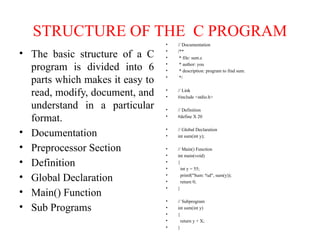
STRUCTURE OF THE C PROGRAM
• The basic structure of a C
program is divided into 6
parts which makes it easy to
read, modify, document, and
understand in a particular
format.
• Documentation
• Preprocessor Section
• Definition
• Global Declaration
• Main() Function
• Sub Programs
• // Documentation
• /**
• * file: sum.c
• * author: you
• * description: program to find sum.
• */
• // Link
• #include <stdio.h>
• // Definition
• #define X 20
• // Global Declaration
• int sum(int y);
• // Main() Function
• int main(void)
• {
• int y = 55;
• printf("Sum: %d", sum(y));
• return 0;
• }
• // Subprogram
• int sum(int y)
• {
• return y + X;
• }
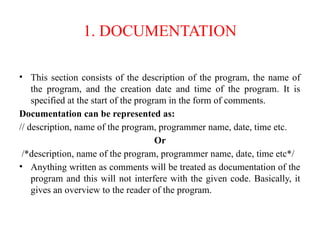
1. DOCUMENTATION
• This section consists of the description of the program, the name of
the program, and the creation date and time of the program. It is
specified at the start of the program in the form of comments.
Documentation can be represented as:
// description, name of the program, programmer name, date, time etc.
Or
/*description, name of the program, programmer name, date, time etc*/
• Anything written as comments will be treated as documentation of the
program and this will not interfere with the given code. Basically, it
gives an overview to the reader of the program.
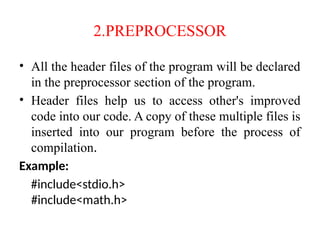
2.PREPROCESSOR
• All the header files of the program will be declared
in the preprocessor section of the program.
• Header files help us to access other's improved
code into our code. A copy of these multiple files is
inserted into our program before the process of
compilation.
Example:
#include<stdio.h>
#include<math.h>
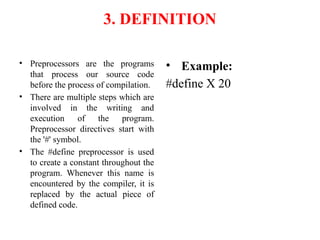
3. DEFINITION
• Preprocessors are the programs
that process our source code
before the process of compilation.
• There are multiple steps which are
involved in the writing and
execution of the program.
Preprocessor directives start with
the '#' symbol.
• The #define preprocessor is used
to create a constant throughout the
program. Whenever this name is
encountered by the compiler, it is
replaced by the actual piece of
defined code.
• Example:
#define X 20
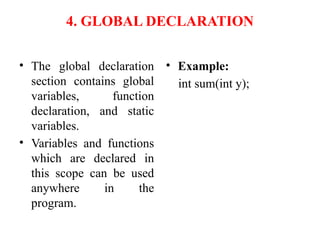
4. GLOBAL DECLARATION
• The global declaration
section contains global
variables, function
declaration, and static
variables.
• Variables and functions
which are declared in
this scope can be used
anywhere in the
program.
• Example:
int sum(int y);
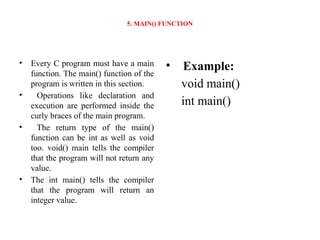
5. MAIN() FUNCTION
• Every C program must have a main
function. The main() function of the
program is written in this section.
• Operations like declaration and
execution are performed inside the
curly braces of the main program.
• The return type of the main()
function can be int as well as void
too. void() main tells the compiler
that the program will not return any
value.
• The int main() tells the compiler
that the program will return an
integer value.
• Example:
void main()
int main()
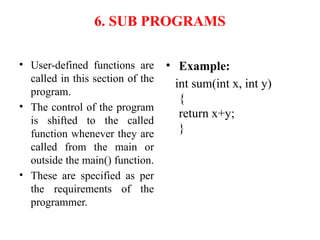
6. SUB PROGRAMS
• User-defined functions are
called in this section of the
program.
• The control of the program
is shifted to the called
function whenever they are
called from the main or
outside the main() function.
• These are specified as per
the requirements of the
programmer.
• Example:
int sum(int x, int y)
{
return x+y;
}
KEYWORDS
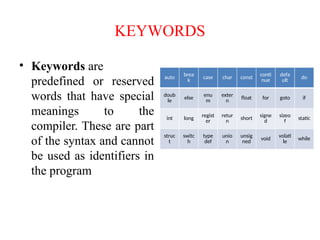
• Keywords are
predefined or reserved
words that have special
meanings to the
compiler. These are part
of the syntax and cannot
be used as identifiers in
the program
auto brea
k case char const conti
nue
defa
ult do
doub
le
else enu
m
exter
n
float for goto if
int long regist
er
retur
n short signe
d
sizeo
f static
struc
t
switc
h
type
def
unio
n
unsig
ned
void volati
le
while
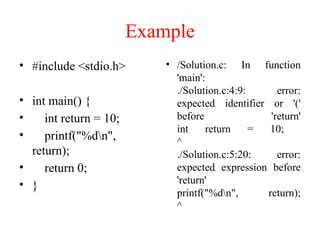
Example
• #include <stdio.h>
• int main() {
• int return = 10;
• printf("%dn",
return);
• return 0;
• }
• /Solution.c: In function
'main':
./Solution.c:4:9: error:
expected identifier or '('
before 'return'
int return = 10;
^
./Solution.c:5:20: error:
expected expression before
'return'
printf("%dn", return);
^
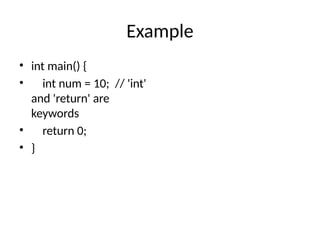
Example
• int main() {
• int num = 10; // 'int'
and 'return' are
keywords
• return 0;
• }
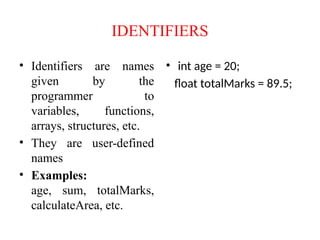
IDENTIFIERS
• Identifiers are names
given by the
programmer to
variables, functions,
arrays, structures, etc.
• They are user-defined
names
• Examples:
age, sum, totalMarks,
calculateArea, etc.
• int age = 20;
float totalMarks = 89.5;
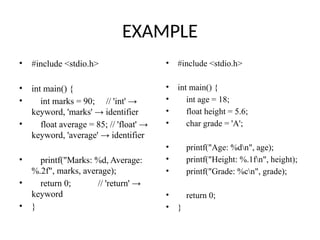
EXAMPLE
• #include <stdio.h>
• int main() {
• int marks = 90; // 'int' →
keyword, 'marks' → identifier
• float average = 85; // 'float' →
keyword, 'average' → identifier
• printf("Marks: %d, Average:
%.2f", marks, average);
• return 0; // 'return' →
keyword
• }
• #include <stdio.h>
• int main() {
• int age = 18;
• float height = 5.6;
• char grade = 'A';
• printf("Age: %dn", age);
• printf("Height: %.1fn", height);
• printf("Grade: %cn", grade);
• return 0;
• }
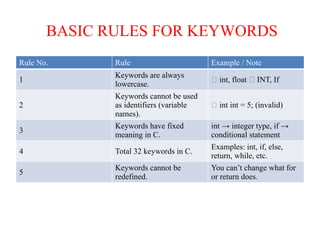
BASIC RULES FOR KEYWORDS
Rule No. Rule Example / Note
1
Keywords are always
lowercase.
✅ int, float ❌ INT, If
2
Keywords cannot be used
as identifiers (variable
names).
❌ int int = 5; (invalid)
3
Keywords have fixed
meaning in C.
int → integer type, if →
conditional statement
4 Total 32 keywords in C.
Examples: int, if, else,
return, while, etc.
5
Keywords cannot be
redefined.
You can’t change what for
or return does.
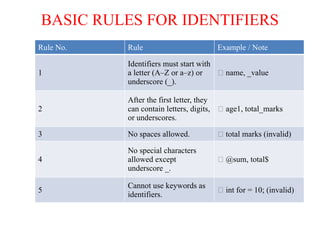
BASIC RULES FOR IDENTIFIERS
Rule No. Rule Example / Note
1
Identifiers must start with
a letter (A–Z or a–z) or
underscore (_).
✅ name, _value
2
After the first letter, they
can contain letters, digits,
or underscores.
✅ age1, total_marks
3 No spaces allowed. ❌ total marks (invalid)
4
No special characters
allowed except
underscore _.
❌ @sum, total$
5
Cannot use keywords as
identifiers.
❌ int for = 10; (invalid)
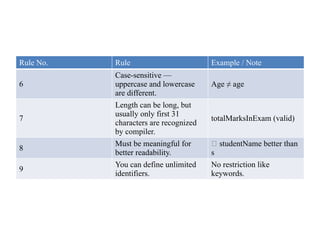
Rule No. Rule Example / Note
6
Case-sensitive —
uppercase and lowercase
are different.
Age ≠ age
7
Length can be long, but
usually only first 31
characters are recognized
by compiler.
totalMarksInExam (valid)
8
Must be meaningful for
better readability.
✅ studentName better than
s
9
You can define unlimited
identifiers.
No restriction like
keywords.
VARIABLES
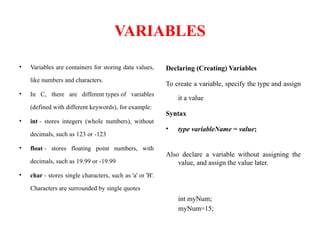
• Variables are containers for storing data values,
like numbers and characters.
• In C, there are different types of variables
(defined with different keywords), for example:
• int - stores integers (whole numbers), without
decimals, such as 123 or -123
• float - stores floating point numbers, with
decimals, such as 19.99 or -19.99
• char - stores single characters, such as 'a' or 'B'.
Characters are surrounded by single quotes
Declaring (Creating) Variables
To create a variable, specify the type and assign
it a value
Syntax
• type variableName = value;
Also declare a variable without assigning the
value, and assign the value later.
int myNum;
myNum=15;
DATA TYPES
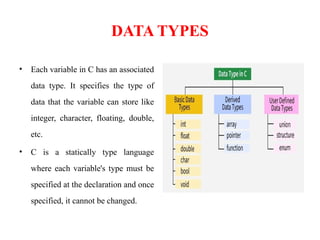
• Each variable in C has an associated
data type. It specifies the type of
data that the variable can store like
integer, character, floating, double,
etc.
• C is a statically type language
where each variable's type must be
specified at the declaration and once
specified, it cannot be changed.
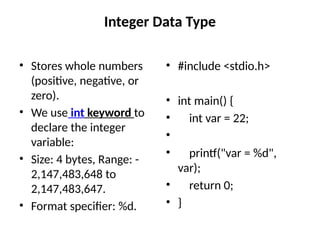
Integer Data Type
• Stores whole numbers
(positive, negative, or
zero).
• We use int keyword to
declare the integer
variable:
• Size: 4 bytes, Range: -
2,147,483,648 to
2,147,483,647.
• Format specifier: %d.
• #include <stdio.h>
• int main() {
• int var = 22;
•
• printf("var = %d",
var);
• return 0;
• }
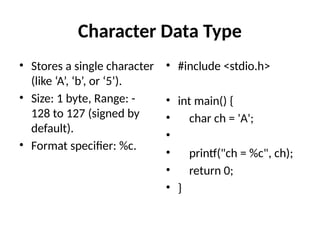
Character Data Type
• Stores a single character
(like ‘A’, ‘b’, or ‘5’).
• Size: 1 byte, Range: -
128 to 127 (signed by
default).
• Format specifier: %c.
• #include <stdio.h>
• int main() {
• char ch = 'A';
•
• printf("ch = %c", ch);
• return 0;
• }
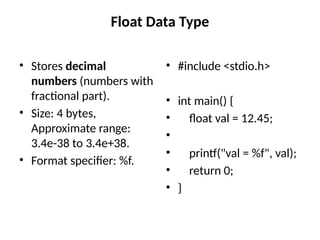
Float Data Type
• Stores decimal
numbers (numbers with
fractional part).
• Size: 4 bytes,
Approximate range:
3.4e-38 to 3.4e+38.
• Format specifier: %f.
• #include <stdio.h>
• int main() {
• float val = 12.45;
•
• printf("val = %f", val);
• return 0;
• }
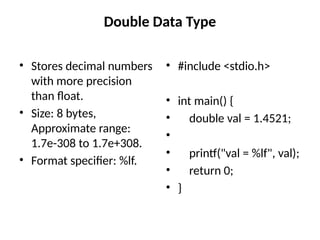
Double Data Type
• Stores decimal numbers
with more precision
than float.
• Size: 8 bytes,
Approximate range:
1.7e-308 to 1.7e+308.
• Format specifier: %lf.
• #include <stdio.h>
• int main() {
• double val = 1.4521;
•
• printf("val = %lf", val);
• return 0;
• }
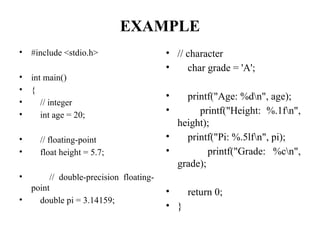
EXAMPLE
• #include <stdio.h>
• int main()
• {
• // integer
• int age = 20;
• // floating-point
• float height = 5.7;
• // double-precision floating-
point
• double pi = 3.14159;
• // character
• char grade = 'A';
• printf("Age: %dn", age);
• printf("Height: %.1fn",
height);
• printf("Pi: %.5lfn", pi);
• printf("Grade: %cn",
grade);
• return 0;
• }
• #include <stdio.h>
• int main() {
• int a = 10;
• float b = 3.14;
• char c = 'A';
• double d =
123.456789;
• char name[] = "C
Programming";
• printf("Integer: %dn", a);
• printf("Float: %.2fn", b);
• printf("Character: %cn",
c);
• printf("Double: %.3lfn",
d);
• printf("String: %sn",
name);
• return 0;
• }
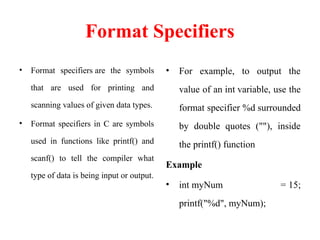
Format Specifiers
• Format specifiers are the symbols
that are used for printing and
scanning values of given data types.
• Format specifiers in C are symbols
used in functions like printf() and
scanf() to tell the compiler what
type of data is being input or output.
• For example, to output the
value of an int variable, use the
format specifier %d surrounded
by double quotes (""), inside
the printf() function
Example
• int myNum = 15;
printf("%d", myNum);
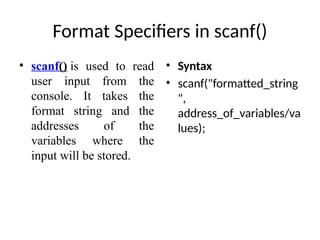
Format Specifiers in scanf()
• scanf() is used to read
user input from the
console. It takes the
format string and the
addresses of the
variables where the
input will be stored.
• Syntax
• scanf("formatted_string
",
address_of_variables/va
lues);
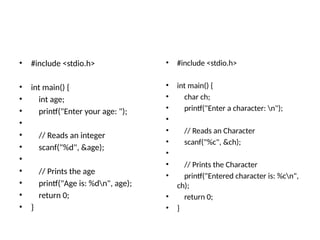
• #include <stdio.h>
• int main() {
• int age;
• printf("Enter your age: ");
•
• // Reads an integer
• scanf("%d", &age);
•
• // Prints the age
• printf("Age is: %dn", age);
• return 0;
• }
• #include <stdio.h>
• int main() {
• char ch;
• printf("Enter a character: n");
•
• // Reads an Character
• scanf("%c", &ch);
•
• // Prints the Character
• printf("Entered character is: %cn",
ch);
• return 0;
• }
• #include <stdio.h>
• int main() {
• int age;
• float weight;
• double height;
• char grade;
• char name[20];
• printf("Enter your name: ");
• scanf("%s", name);
• printf("Enter your age: ");
• scanf("%d", &age);
• printf("Enter your weight (kg):
");
• scanf("%f", &weight);
• printf("Enter your height (m): ");
• scanf("%lf", &height);
• printf("Enter your grade: ");
• scanf(" %c", &grade); // Note space
before %c
• printf("n--- Your Details ---n");
• printf("Name: %snAge: %d
nWeight: %.1f kgnHeight: %.2lf m
nGrade: %cn",
• name, age, weight, height,
grade);
• return 0;
• }
UNIT – IV - INTRODUCTION TO C - FUNDAMENTAL OF COMPUTER PROGRAMMING

  • 1.
  • 2.
    INTRODUCTION • C isa general-purpose programming language that was created in the early 1970s by Dennis Ritchie at Bell Labs. It’s one of the oldest and most influential programming languages — many modern languages like C++, Java, C#, Python, and Go were inspired by it. • Fast (because it’s close to machine language) • Portable (can run on different hardware with little modification) • Powerful (directly manage memory and hardware)
  • 3.
    STRUCTURE OF THEC PROGRAM • The basic structure of a C program is divided into 6 parts which makes it easy to read, modify, document, and understand in a particular format. • Documentation • Preprocessor Section • Definition • Global Declaration • Main() Function • Sub Programs • // Documentation • /** • * file: sum.c • * author: you • * description: program to find sum. • */ • // Link • #include <stdio.h> • // Definition • #define X 20 • // Global Declaration • int sum(int y); • // Main() Function • int main(void) • { • int y = 55; • printf("Sum: %d", sum(y)); • return 0; • } • // Subprogram • int sum(int y) • { • return y + X; • }
  • 4.
    1. DOCUMENTATION • Thissection consists of the description of the program, the name of the program, and the creation date and time of the program. It is specified at the start of the program in the form of comments. Documentation can be represented as: // description, name of the program, programmer name, date, time etc. Or /*description, name of the program, programmer name, date, time etc*/ • Anything written as comments will be treated as documentation of the program and this will not interfere with the given code. Basically, it gives an overview to the reader of the program.
  • 5.
    2.PREPROCESSOR • All theheader files of the program will be declared in the preprocessor section of the program. • Header files help us to access other's improved code into our code. A copy of these multiple files is inserted into our program before the process of compilation. Example: #include<stdio.h> #include<math.h>
  • 6.
    3. DEFINITION • Preprocessorsare the programs that process our source code before the process of compilation. • There are multiple steps which are involved in the writing and execution of the program. Preprocessor directives start with the '#' symbol. • The #define preprocessor is used to create a constant throughout the program. Whenever this name is encountered by the compiler, it is replaced by the actual piece of defined code. • Example: #define X 20
  • 7.
    4. GLOBAL DECLARATION •The global declaration section contains global variables, function declaration, and static variables. • Variables and functions which are declared in this scope can be used anywhere in the program. • Example: int sum(int y);
  • 8.
    5. MAIN() FUNCTION •Every C program must have a main function. The main() function of the program is written in this section. • Operations like declaration and execution are performed inside the curly braces of the main program. • The return type of the main() function can be int as well as void too. void() main tells the compiler that the program will not return any value. • The int main() tells the compiler that the program will return an integer value. • Example: void main() int main()
  • 9.
    6. SUB PROGRAMS •User-defined functions are called in this section of the program. • The control of the program is shifted to the called function whenever they are called from the main or outside the main() function. • These are specified as per the requirements of the programmer. • Example: int sum(int x, int y) { return x+y; }
  • 10.
    KEYWORDS • Keywords are predefinedor reserved words that have special meanings to the compiler. These are part of the syntax and cannot be used as identifiers in the program auto brea k case char const conti nue defa ult do doub le else enu m exter n float for goto if int long regist er retur n short signe d sizeo f static struc t switc h type def unio n unsig ned void volati le while
  • 11.
    Example • #include <stdio.h> •int main() { • int return = 10; • printf("%dn", return); • return 0; • } • /Solution.c: In function 'main': ./Solution.c:4:9: error: expected identifier or '(' before 'return' int return = 10; ^ ./Solution.c:5:20: error: expected expression before 'return' printf("%dn", return); ^
  • 12.
    Example • int main(){ • int num = 10; // 'int' and 'return' are keywords • return 0; • }
  • 13.
    IDENTIFIERS • Identifiers arenames given by the programmer to variables, functions, arrays, structures, etc. • They are user-defined names • Examples: age, sum, totalMarks, calculateArea, etc. • int age = 20; float totalMarks = 89.5;
  • 14.
    EXAMPLE • #include <stdio.h> •int main() { • int marks = 90; // 'int' → keyword, 'marks' → identifier • float average = 85; // 'float' → keyword, 'average' → identifier • printf("Marks: %d, Average: %.2f", marks, average); • return 0; // 'return' → keyword • } • #include <stdio.h> • int main() { • int age = 18; • float height = 5.6; • char grade = 'A'; • printf("Age: %dn", age); • printf("Height: %.1fn", height); • printf("Grade: %cn", grade); • return 0; • }
  • 15.
    BASIC RULES FORKEYWORDS Rule No. Rule Example / Note 1 Keywords are always lowercase. ✅ int, float ❌ INT, If 2 Keywords cannot be used as identifiers (variable names). ❌ int int = 5; (invalid) 3 Keywords have fixed meaning in C. int → integer type, if → conditional statement 4 Total 32 keywords in C. Examples: int, if, else, return, while, etc. 5 Keywords cannot be redefined. You can’t change what for or return does.
  • 16.
    BASIC RULES FORIDENTIFIERS Rule No. Rule Example / Note 1 Identifiers must start with a letter (A–Z or a–z) or underscore (_). ✅ name, _value 2 After the first letter, they can contain letters, digits, or underscores. ✅ age1, total_marks 3 No spaces allowed. ❌ total marks (invalid) 4 No special characters allowed except underscore _. ❌ @sum, total$ 5 Cannot use keywords as identifiers. ❌ int for = 10; (invalid)
  • 17.
    Rule No. RuleExample / Note 6 Case-sensitive — uppercase and lowercase are different. Age ≠ age 7 Length can be long, but usually only first 31 characters are recognized by compiler. totalMarksInExam (valid) 8 Must be meaningful for better readability. ✅ studentName better than s 9 You can define unlimited identifiers. No restriction like keywords.
  • 18.
    VARIABLES • Variables arecontainers for storing data values, like numbers and characters. • In C, there are different types of variables (defined with different keywords), for example: • int - stores integers (whole numbers), without decimals, such as 123 or -123 • float - stores floating point numbers, with decimals, such as 19.99 or -19.99 • char - stores single characters, such as 'a' or 'B'. Characters are surrounded by single quotes Declaring (Creating) Variables To create a variable, specify the type and assign it a value Syntax • type variableName = value; Also declare a variable without assigning the value, and assign the value later. int myNum; myNum=15;
  • 19.
    DATA TYPES • Eachvariable in C has an associated data type. It specifies the type of data that the variable can store like integer, character, floating, double, etc. • C is a statically type language where each variable's type must be specified at the declaration and once specified, it cannot be changed.
  • 20.
    Integer Data Type •Stores whole numbers (positive, negative, or zero). • We use int keyword to declare the integer variable: • Size: 4 bytes, Range: - 2,147,483,648 to 2,147,483,647. • Format specifier: %d. • #include <stdio.h> • int main() { • int var = 22; • • printf("var = %d", var); • return 0; • }
  • 21.
    Character Data Type •Stores a single character (like ‘A’, ‘b’, or ‘5’). • Size: 1 byte, Range: - 128 to 127 (signed by default). • Format specifier: %c. • #include <stdio.h> • int main() { • char ch = 'A'; • • printf("ch = %c", ch); • return 0; • }
  • 22.
    Float Data Type •Stores decimal numbers (numbers with fractional part). • Size: 4 bytes, Approximate range: 3.4e-38 to 3.4e+38. • Format specifier: %f. • #include <stdio.h> • int main() { • float val = 12.45; • • printf("val = %f", val); • return 0; • }
  • 23.
    Double Data Type •Stores decimal numbers with more precision than float. • Size: 8 bytes, Approximate range: 1.7e-308 to 1.7e+308. • Format specifier: %lf. • #include <stdio.h> • int main() { • double val = 1.4521; • • printf("val = %lf", val); • return 0; • }
  • 24.
    EXAMPLE • #include <stdio.h> •int main() • { • // integer • int age = 20; • // floating-point • float height = 5.7; • // double-precision floating- point • double pi = 3.14159; • // character • char grade = 'A'; • printf("Age: %dn", age); • printf("Height: %.1fn", height); • printf("Pi: %.5lfn", pi); • printf("Grade: %cn", grade); • return 0; • }
  • 25.
    • #include <stdio.h> •int main() { • int a = 10; • float b = 3.14; • char c = 'A'; • double d = 123.456789; • char name[] = "C Programming"; • printf("Integer: %dn", a); • printf("Float: %.2fn", b); • printf("Character: %cn", c); • printf("Double: %.3lfn", d); • printf("String: %sn", name); • return 0; • }
  • 26.
    Format Specifiers • Formatspecifiers are the symbols that are used for printing and scanning values of given data types. • Format specifiers in C are symbols used in functions like printf() and scanf() to tell the compiler what type of data is being input or output. • For example, to output the value of an int variable, use the format specifier %d surrounded by double quotes (""), inside the printf() function Example • int myNum = 15; printf("%d", myNum);
  • 27.
    Format Specifiers inscanf() • scanf() is used to read user input from the console. It takes the format string and the addresses of the variables where the input will be stored. • Syntax • scanf("formatted_string ", address_of_variables/va lues);
  • 28.
    • #include <stdio.h> •int main() { • int age; • printf("Enter your age: "); • • // Reads an integer • scanf("%d", &age); • • // Prints the age • printf("Age is: %dn", age); • return 0; • } • #include <stdio.h> • int main() { • char ch; • printf("Enter a character: n"); • • // Reads an Character • scanf("%c", &ch); • • // Prints the Character • printf("Entered character is: %cn", ch); • return 0; • }
  • 29.
    • #include <stdio.h> •int main() { • int age; • float weight; • double height; • char grade; • char name[20]; • printf("Enter your name: "); • scanf("%s", name); • printf("Enter your age: "); • scanf("%d", &age); • printf("Enter your weight (kg): "); • scanf("%f", &weight); • printf("Enter your height (m): "); • scanf("%lf", &height); • printf("Enter your grade: "); • scanf(" %c", &grade); // Note space before %c • printf("n--- Your Details ---n"); • printf("Name: %snAge: %d nWeight: %.1f kgnHeight: %.2lf m nGrade: %cn", • name, age, weight, height, grade); • return 0; • }