1
Classes and Objects in Java
Basics of Classes in Java
2
Contents
 Introduce to classes and objects in Java.
 Understand how some of the OO
concepts learnt so far are supported in
Java.
 Understand important features in Java
classes.
3
Introduction
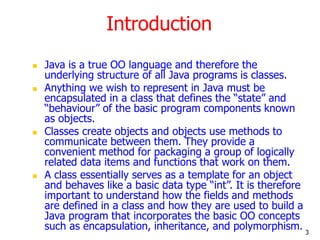
 Java is a true OO language and therefore the
underlying structure of all Java programs is classes.
 Anything we wish to represent in Java must be
encapsulated in a class that defines the “state” and
“behaviour” of the basic program components known
as objects.
 Classes create objects and objects use methods to
communicate between them. They provide a
convenient method for packaging a group of logically
related data items and functions that work on them.
 A class essentially serves as a template for an object
and behaves like a basic data type “int”. It is therefore
important to understand how the fields and methods
are defined in a class and how they are used to build a
Java program that incorporates the basic OO concepts
such as encapsulation, inheritance, and polymorphism.
4
Classes
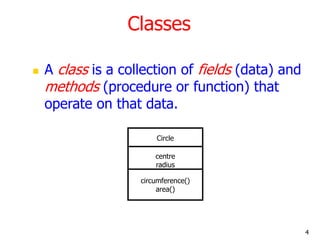
 A class is a collection of fields (data) and
methods (procedure or function) that
operate on that data.
Circle
centre
radius
circumference()
area()
5
Classes
 A class is a collection of fields (data) and methods
(procedure or function) that operate on that data.
 The basic syntax for a class definition:
 Bare bone class – no fields, no methods
public class Circle {
// my circle class
}
class ClassName {
[fields declaration]
[methods declaration]
}
6
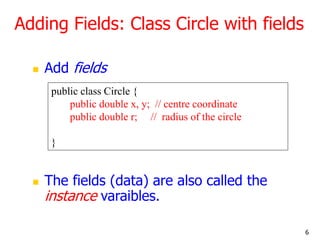
Adding Fields: Class Circle with fields
 Add fields
 The fields (data) are also called the
instance varaibles.
public class Circle {
public double x, y; // centre coordinate
public double r; // radius of the circle
}
7
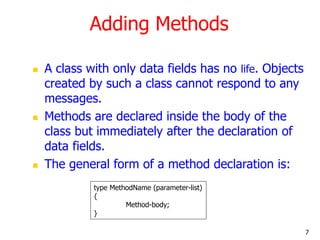
Adding Methods
 A class with only data fields has no life. Objects
created by such a class cannot respond to any
messages.
 Methods are declared inside the body of the
class but immediately after the declaration of
data fields.
 The general form of a method declaration is:
type MethodName (parameter-list)
{
Method-body;
}
8
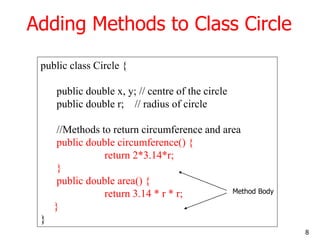
Adding Methods to Class Circle
public class Circle {
public double x, y; // centre of the circle
public double r; // radius of circle
//Methods to return circumference and area
public double circumference() {
return 2*3.14*r;
}
public double area() {
return 3.14 * r * r;
}
}
Method Body
9
Data Abstraction
 Declare the Circle class, have created a
new data type – Data Abstraction
 Can define variables (objects) of that
type:
Circle aCircle;
Circle bCircle;
10
Class of Circle cont.
 aCircle, bCircle simply refers to a Circle
object, not an object itself.
aCircle
Points to nothing (Null Reference)
bCircle
Points to nothing (Null Reference)
null null
11
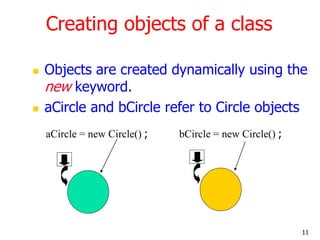
Creating objects of a class
 Objects are created dynamically using the
new keyword.
 aCircle and bCircle refer to Circle objects
bCircle = new Circle() ;
aCircle = new Circle() ;
12
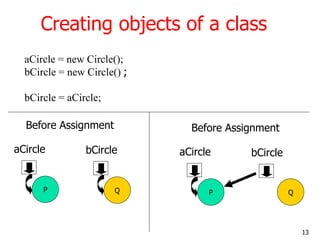
Creating objects of a class
aCircle = new Circle();
bCircle = new Circle() ;
bCircle = aCircle;
13
Creating objects of a class
aCircle = new Circle();
bCircle = new Circle() ;
bCircle = aCircle;
P
aCircle
Q
bCircle
Before Assignment
P
aCircle
Q
bCircle
Before Assignment
14
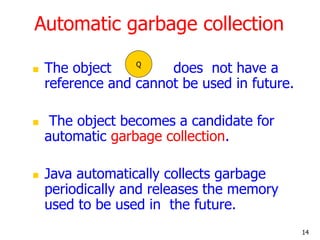
Automatic garbage collection
 The object does not have a
reference and cannot be used in future.
 The object becomes a candidate for
automatic garbage collection.
 Java automatically collects garbage
periodically and releases the memory
used to be used in the future.
Q
15
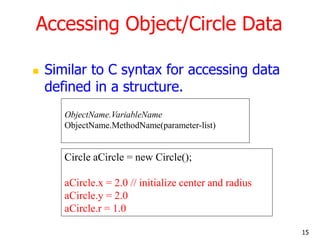
Accessing Object/Circle Data
 Similar to C syntax for accessing data
defined in a structure.
Circle aCircle = new Circle();
aCircle.x = 2.0 // initialize center and radius
aCircle.y = 2.0
aCircle.r = 1.0
ObjectName.VariableName
ObjectName.MethodName(parameter-list)
16
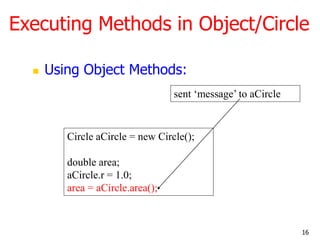
Executing Methods in Object/Circle
 Using Object Methods:
Circle aCircle = new Circle();
double area;
aCircle.r = 1.0;
area = aCircle.area();
sent ‘message’ to aCircle
17
Using Circle Class
// Circle.java: Contains both Circle class and its user class
//Add Circle class code here
class MyMain
{
public static void main(String args[])
{
Circle aCircle; // creating reference
aCircle = new Circle(); // creating object
aCircle.x = 10; // assigning value to data field
aCircle.y = 20;
aCircle.r = 5;
double area = aCircle.area(); // invoking method
double circumf = aCircle.circumference();
System.out.println("Radius="+aCircle.r+" Area="+area);
System.out.println("Radius="+aCircle.r+" Circumference ="+circumf);
}
}
[raj@mundroo]%: java MyMain
Radius=5.0 Area=78.5
Radius=5.0 Circumference =31.400000000000002
18
Summary
 Classes, objects, and methods are the basic
components used in Java programming.
 We have discussed:
 How to define a class
 How to create objects
 How to add data fields and methods to classes
 How to access data fields and methods to classes

Class and Object.ppt

  • 1.
    1 Classes and Objectsin Java Basics of Classes in Java
  • 2.
    2 Contents  Introduce toclasses and objects in Java.  Understand how some of the OO concepts learnt so far are supported in Java.  Understand important features in Java classes.
  • 3.
    3 Introduction  Java isa true OO language and therefore the underlying structure of all Java programs is classes.  Anything we wish to represent in Java must be encapsulated in a class that defines the “state” and “behaviour” of the basic program components known as objects.  Classes create objects and objects use methods to communicate between them. They provide a convenient method for packaging a group of logically related data items and functions that work on them.  A class essentially serves as a template for an object and behaves like a basic data type “int”. It is therefore important to understand how the fields and methods are defined in a class and how they are used to build a Java program that incorporates the basic OO concepts such as encapsulation, inheritance, and polymorphism.
  • 4.
    4 Classes  A classis a collection of fields (data) and methods (procedure or function) that operate on that data. Circle centre radius circumference() area()
  • 5.
    5 Classes  A classis a collection of fields (data) and methods (procedure or function) that operate on that data.  The basic syntax for a class definition:  Bare bone class – no fields, no methods public class Circle { // my circle class } class ClassName { [fields declaration] [methods declaration] }
  • 6.
    6 Adding Fields: ClassCircle with fields  Add fields  The fields (data) are also called the instance varaibles. public class Circle { public double x, y; // centre coordinate public double r; // radius of the circle }
  • 7.
    7 Adding Methods  Aclass with only data fields has no life. Objects created by such a class cannot respond to any messages.  Methods are declared inside the body of the class but immediately after the declaration of data fields.  The general form of a method declaration is: type MethodName (parameter-list) { Method-body; }
  • 8.
    8 Adding Methods toClass Circle public class Circle { public double x, y; // centre of the circle public double r; // radius of circle //Methods to return circumference and area public double circumference() { return 2*3.14*r; } public double area() { return 3.14 * r * r; } } Method Body
  • 9.
    9 Data Abstraction  Declarethe Circle class, have created a new data type – Data Abstraction  Can define variables (objects) of that type: Circle aCircle; Circle bCircle;
  • 10.
    10 Class of Circlecont.  aCircle, bCircle simply refers to a Circle object, not an object itself. aCircle Points to nothing (Null Reference) bCircle Points to nothing (Null Reference) null null
  • 11.
    11 Creating objects ofa class  Objects are created dynamically using the new keyword.  aCircle and bCircle refer to Circle objects bCircle = new Circle() ; aCircle = new Circle() ;
  • 12.
    12 Creating objects ofa class aCircle = new Circle(); bCircle = new Circle() ; bCircle = aCircle;
  • 13.
    13 Creating objects ofa class aCircle = new Circle(); bCircle = new Circle() ; bCircle = aCircle; P aCircle Q bCircle Before Assignment P aCircle Q bCircle Before Assignment
  • 14.
    14 Automatic garbage collection The object does not have a reference and cannot be used in future.  The object becomes a candidate for automatic garbage collection.  Java automatically collects garbage periodically and releases the memory used to be used in the future. Q
  • 15.
    15 Accessing Object/Circle Data Similar to C syntax for accessing data defined in a structure. Circle aCircle = new Circle(); aCircle.x = 2.0 // initialize center and radius aCircle.y = 2.0 aCircle.r = 1.0 ObjectName.VariableName ObjectName.MethodName(parameter-list)
  • 16.
    16 Executing Methods inObject/Circle  Using Object Methods: Circle aCircle = new Circle(); double area; aCircle.r = 1.0; area = aCircle.area(); sent ‘message’ to aCircle
  • 17.
    17 Using Circle Class //Circle.java: Contains both Circle class and its user class //Add Circle class code here class MyMain { public static void main(String args[]) { Circle aCircle; // creating reference aCircle = new Circle(); // creating object aCircle.x = 10; // assigning value to data field aCircle.y = 20; aCircle.r = 5; double area = aCircle.area(); // invoking method double circumf = aCircle.circumference(); System.out.println("Radius="+aCircle.r+" Area="+area); System.out.println("Radius="+aCircle.r+" Circumference ="+circumf); } } [raj@mundroo]%: java MyMain Radius=5.0 Area=78.5 Radius=5.0 Circumference =31.400000000000002
  • 18.
    18 Summary  Classes, objects,and methods are the basic components used in Java programming.  We have discussed:  How to define a class  How to create objects  How to add data fields and methods to classes  How to access data fields and methods to classes

Editor's Notes

  • #6 Bare bone: telanjang
  • #9 Area: luas Circumference: keliling