Welcome to the Brixton Library
Technology Initiative
(Coding for Adults)
ZCDixon@lambeth.gov.uk
BasilBibi@hotmail.com
January 30th 2016
Week 3 – Under The Covers
Technicalities
• Computer architectures – CPU, Ram and disk
• Threads, frames, stack and heap.
• Python - under the covers.
• Garbage Collection.
CPU, Ram, disk and peripherals.
• Computers architected in a modular fashion.
• Hierarchically organised like most control systems.
• Living things, quantum -> cosmological, all knowledge
systems.
• Simple sub units are combined into ever more complex
assemblies of functional components.
• Gestalt - The whole is greater than the sum of it’s parts.
• Emergence - a process whereby larger entities, patterns,
and regularities arise through interactions among
smaller or simpler entities that themselves do not
exhibit such properties - wikipedia
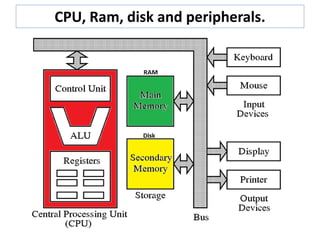
• Computer’s parts are mainly CPU and storage - RAM
and disk.
• Other things are considered peripherals and may have
their own CPUs that are subservient to the main CPU.
CPU, Ram, disk and peripherals.
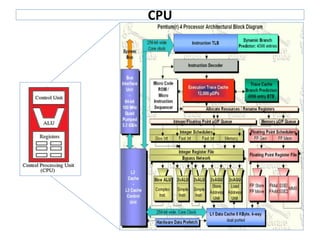
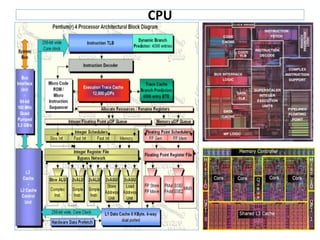
CPU
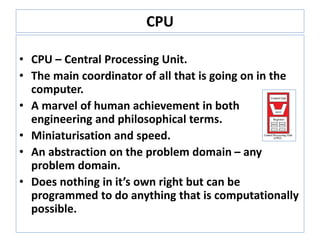
• CPU – Central Processing Unit.
• The main coordinator of all that is going on in the
computer.
• A marvel of human achievement in both
engineering and philosophical terms.
• Miniaturisation and speed.
• An abstraction on the problem domain – any
problem domain.
• Does nothing in it’s own right but can be
programmed to do anything that is computationally
possible.
CPU
CPU
RAM and disk
Both types of storage.
Data in Ram is lost when we switch off.
Data on disk is saved in ferrous material as magnetic orientations
in a ferrous substrate.
Modern storage blurs the lines. Solid state ‘disks’.
How are programs processed?
Instructions are executed by a “thread”
Program data and instructions are kept in memory (ram)
Threads, Frames, Stack and Heap
• A ‘thread’ is the computer equivalent of you reading and
carrying out the instructions in your program.
• Thought experiment : You as a CPU.
Imagine your eyes reading your code with you performing
each statement. Your memory remembers the value of
variables as you execute the instructions in sequence.
• In this way you are enacting a cpu running a thread.
• A thread is a CPU’s core running through a program using the
instruction pointer (IP) and all registers and their state.
• The CPU is where the thread carries out this process.
• A CPU with one core can only be executing one thread at any
one time but it can keep track of many threads and switch
between them.
• This ‘context switching’ happens so fast that to a human
observer many things appear to be are happening ‘at the
same time’
Threads, Frames, Stack and Heap
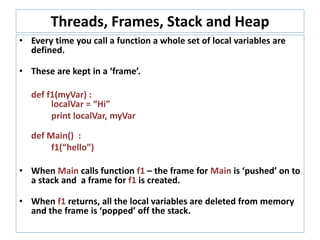
• Every time you call a function a whole set of local variables are
defined.
• These are kept in a ‘frame’.
def f1(myVar) :
localVar = “Hi”
print localVar, myVar
def Main() :
f1(“hello”)
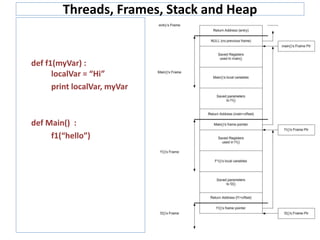
• When Main calls function f1 – the frame for Main is ‘pushed’ on to
a stack and a frame for f1 is created.
• When f1 returns, all the local variables are deleted from memory
and the frame is ‘popped’ off the stack.
Threads, Frames, Stack and Heap
def f1(myVar) :
localVar = “Hi”
print localVar, myVar
def Main() :
f1(“hello”)
Threads, Frames, Stack and Heap
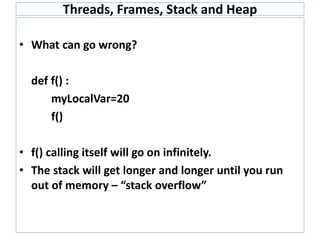
• What can go wrong?
def f() :
myLocalVar=20
f()
• f() calling itself will go on infinitely.
• The stack will get longer and longer until you run
out of memory – “stack overflow”
Threads, Frames, Stack and Heap
• The Heap is where objects are created.
• Everything in Python is an object.
• varFloat = 3.145
• Results in a float being created on the heap.
• If we create a lot of objects we run out of heap.
Threads, Frames, Stack and Heap
• Python has two ways of dealing with the large heap this problem.
• Objects that are no longer in use are called garbage.
• You can directly ask Python to collect the garbage
import gc
collected = gc.collect()
print "Garbage collector: collected %d objects." % (collected)
• Python keeps a count of how many times an object is referenced from
another object.
• When the size of the heap reaches a certain threshold the garbage
collector kicks in.
• Everything has to stop while it does a GC – causes program jitter.
• Called a “Stop The World”
Python - Under The Covers
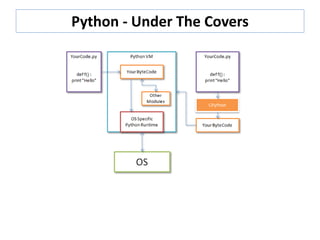
• Python code runs on the Python Virtual Machine.
• Virtual Machines written for every OS so your code
will run anywhere.
• Python can run as either interpreted or compiled
code.
• Python interprets ascii files, compiling on the fly to
create bytecode
• Python VM actually runs bytecode which is a series
of instructions like assembler.
• Precompile code using CPython which is loaded
directly by the VM.
Python - Under The Covers

Under The Covers

  • 1.
    Welcome to theBrixton Library Technology Initiative (Coding for Adults) ZCDixon@lambeth.gov.uk BasilBibi@hotmail.com January 30th 2016 Week 3 – Under The Covers
  • 2.
    Technicalities • Computer architectures– CPU, Ram and disk • Threads, frames, stack and heap. • Python - under the covers. • Garbage Collection.
  • 3.
    CPU, Ram, diskand peripherals. • Computers architected in a modular fashion. • Hierarchically organised like most control systems. • Living things, quantum -> cosmological, all knowledge systems. • Simple sub units are combined into ever more complex assemblies of functional components. • Gestalt - The whole is greater than the sum of it’s parts. • Emergence - a process whereby larger entities, patterns, and regularities arise through interactions among smaller or simpler entities that themselves do not exhibit such properties - wikipedia • Computer’s parts are mainly CPU and storage - RAM and disk. • Other things are considered peripherals and may have their own CPUs that are subservient to the main CPU.
  • 4.
    CPU, Ram, diskand peripherals.
  • 5.
    CPU • CPU –Central Processing Unit. • The main coordinator of all that is going on in the computer. • A marvel of human achievement in both engineering and philosophical terms. • Miniaturisation and speed. • An abstraction on the problem domain – any problem domain. • Does nothing in it’s own right but can be programmed to do anything that is computationally possible.
  • 6.
  • 7.
  • 8.
    RAM and disk Bothtypes of storage. Data in Ram is lost when we switch off. Data on disk is saved in ferrous material as magnetic orientations in a ferrous substrate. Modern storage blurs the lines. Solid state ‘disks’.
  • 9.
    How are programsprocessed? Instructions are executed by a “thread” Program data and instructions are kept in memory (ram)
  • 10.
    Threads, Frames, Stackand Heap • A ‘thread’ is the computer equivalent of you reading and carrying out the instructions in your program. • Thought experiment : You as a CPU. Imagine your eyes reading your code with you performing each statement. Your memory remembers the value of variables as you execute the instructions in sequence. • In this way you are enacting a cpu running a thread. • A thread is a CPU’s core running through a program using the instruction pointer (IP) and all registers and their state. • The CPU is where the thread carries out this process. • A CPU with one core can only be executing one thread at any one time but it can keep track of many threads and switch between them. • This ‘context switching’ happens so fast that to a human observer many things appear to be are happening ‘at the same time’
  • 11.
    Threads, Frames, Stackand Heap • Every time you call a function a whole set of local variables are defined. • These are kept in a ‘frame’. def f1(myVar) : localVar = “Hi” print localVar, myVar def Main() : f1(“hello”) • When Main calls function f1 – the frame for Main is ‘pushed’ on to a stack and a frame for f1 is created. • When f1 returns, all the local variables are deleted from memory and the frame is ‘popped’ off the stack.
  • 12.
    Threads, Frames, Stackand Heap def f1(myVar) : localVar = “Hi” print localVar, myVar def Main() : f1(“hello”)
  • 13.
    Threads, Frames, Stackand Heap • What can go wrong? def f() : myLocalVar=20 f() • f() calling itself will go on infinitely. • The stack will get longer and longer until you run out of memory – “stack overflow”
  • 14.
    Threads, Frames, Stackand Heap • The Heap is where objects are created. • Everything in Python is an object. • varFloat = 3.145 • Results in a float being created on the heap. • If we create a lot of objects we run out of heap.
  • 15.
    Threads, Frames, Stackand Heap • Python has two ways of dealing with the large heap this problem. • Objects that are no longer in use are called garbage. • You can directly ask Python to collect the garbage import gc collected = gc.collect() print "Garbage collector: collected %d objects." % (collected) • Python keeps a count of how many times an object is referenced from another object. • When the size of the heap reaches a certain threshold the garbage collector kicks in. • Everything has to stop while it does a GC – causes program jitter. • Called a “Stop The World”
  • 16.
    Python - UnderThe Covers • Python code runs on the Python Virtual Machine. • Virtual Machines written for every OS so your code will run anywhere. • Python can run as either interpreted or compiled code. • Python interprets ascii files, compiling on the fly to create bytecode • Python VM actually runs bytecode which is a series of instructions like assembler. • Precompile code using CPython which is loaded directly by the VM.
  • 17.
    Python - UnderThe Covers