Copyright 2010- CharlesSeverance
These slides are a derivative work based on the original slides, “Python for Informatics : Exploring Information”, created by Charles Severance. The original
slides are located at www.pythonlearn.com
This modified set of slides was done by John Alexander (2013).
The primary purpose of this derivative work is to make the highest quality Python courseware available to instructors so that they can teach Python, and insure
that the slides are properly formatted for easy, out-of-the-box, use by both Microsoft PowerPoint and OpenOffice Impress.
Unless otherwise noted, the content of this course material is licensed under a Creative Commons Attribution 3.0 License (The “BY” variant of the license)
http://creativecommons.org/licenses/by/3.0/.
Creative Commons Attribution 3.0 License
3.
You can downloadPython at no charge from www.python.org
Note: Make sure you install the latest version of Python 2.x. (Do NOT install Python 3.x). This
course was designed using Python 2.x and some of the examples will not work properly if you
use Python 3.x.
Setting up Python
4.
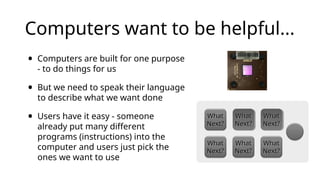
Computers want tobe helpful...
• Computers are built for one purpose
- to do things for us
• But we need to speak their language
to describe what we want done
• Users have it easy - someone
already put many different
programs (instructions) into the
computer and users just pick the
ones we want to use
What
What
Next?
Next?
What
What
Next?
Next?
What
What
Next?
Next?
What
What
Next?
Next?
What
What
Next?
Next?
What
What
Next?
Next?
5.
Users .vs. Programmers
•Users see computers as a set of tools - word processor,
spreadsheet, maps, to-do list, email, etc.
• Programmers learn the computer “ways” and the computer
language
• Programmers have some tools that allow them to build new tools
• Programmers sometimes write tools for lots of users and
sometimes programmers write little “helpers” for themselves to
automate a task
6.
Why be aprogrammer?
• To get some task done - we are the user and programmer
• Help analyze and process data (many programs have APIs)
• To produce something for others to use – write programs
• Fix an issue with a program
7.
What is Code?Software? A
Program?
• A sequence of stored instructions
• It is a little piece of our intelligence in the computer
• It is a little piece of our intelligence we can give to others -
we figure something out and then we encode it and then
give it to someone else to save them the time and energy of
figuring it out
• A piece of creative art - particularly when we do a good job on
user experience
8.
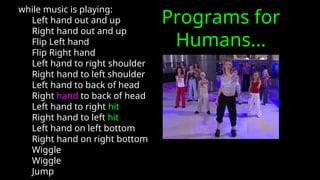
Programs for
Humans...
while musicis playing:
Left hand out and up
Right hand out and up
Flip Left hand
Flip Right hand
Left hand to right shoulder
Right hand to left shoulder
Left hand to back of head
Right hand to back of head
Left hand to right hit
Right hand to left hit
Left hand on left bottom
Right hand on right bottom
Wiggle
Wiggle
Jump
9.
name = raw_input('Enterfile:')
handle = open(name, 'r')
text = handle.read()
words = text.split()
counts = dict()
for word in words:
counts[word] = counts.get(word,0) + 1
bigcount = Nonebigword = None
for word,count in counts.items():
if bigcount is None or count > bigcount:
bigword = word
bigcount = countprint bigword, bigcount
Program for a Computer
Definitions
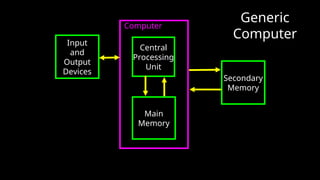
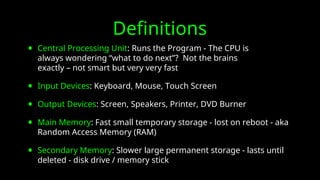
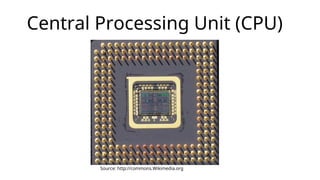
• Central ProcessingUnit: Runs the Program - The CPU is
always wondering “what to do next”? Not the brains
exactly – not smart but very very fast
• Input Devices: Keyboard, Mouse, Touch Screen
• Output Devices: Screen, Speakers, Printer, DVD Burner
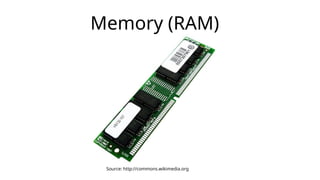
• Main Memory: Fast small temporary storage - lost on reboot - aka
Random Access Memory (RAM)
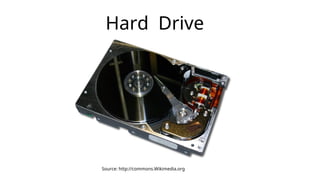
• Secondary Memory: Slower large permanent storage - lasts until
deleted - disk drive / memory stick
Python: A ComputerLanguage
• We need to learn the Python language so we can communicate
our instructions to Python. In the beginning we will make lots of
mistakes
• When you make a mistake, the computer does not think you are
“cute”. It says “syntax error” - given that it “knows” the language
and you are just learning it.
• You must remember that you are intelligent and can learn - the
computer is simple and very fast - but cannot learn - so it is easier
for you to learn Python than for the computer to learn English...
Elements of Python
•Vocabulary / Words - Variables and Reserved words (Chapter
2)
• Sentence structure - valid syntax patterns (Chapters 3-5)
• Story structure - constructing a program for a purpose
22.
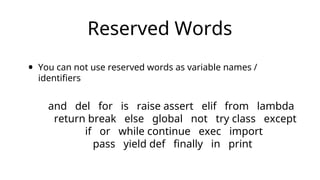
Reserved Words
• Youcan not use reserved words as variable names /
identifiers
and del for is raise assert elif from lambda
return break else global not try class except
if or while continue exec import
pass yield def finally in print
23.
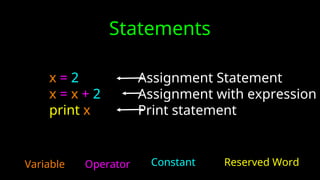
Statements
x = 2
x= x + 2
print x
Variable Operator Constant Reserved Word
Assignment Statement
Assignment with expression
Print statement
24.
Python Scripts
• InteractivePython is good for experiments and programs of 3-4
lines long
• But most programs are much longer so we type them into a file
and tell python to run the commands in the file.
• In a sense we are “giving Python a script”
• As convention, we add “.py” as the suffix on the end of these
files to indicate they contain Python
25.
Interactive vs. Script
•Interactive
- You type directly to Python one line at a time and it responds
• Script
- You enter a sequence of statements (lines) into a file using a
text editor and tell Python to execute the statements in the file
26.
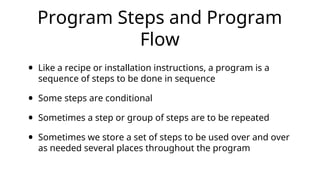
Program Steps andProgram
Flow
• Like a recipe or installation instructions, a program is a
sequence of steps to be done in sequence
• Some steps are conditional
• Sometimes a step or group of steps are to be repeated
• Sometimes we store a set of steps to be used over and over
as needed several places throughout the program
27.
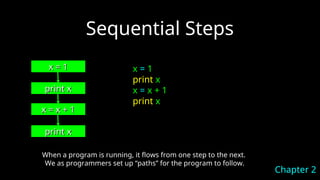
Sequential Steps
x =1
x = 1
print x
print x
x = x + 1
x = x + 1
print x
print x
When a program is running, it flows from one step to the next.
We as programmers set up “paths” for the program to follow.
Chapter 2
x = 1
print x
x = x + 1
print x
28.
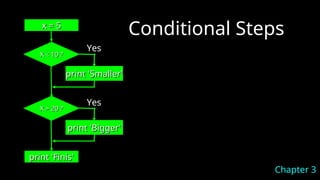
Conditional Steps
x =5
x = 5
X < 10 ?
X < 10 ?
print 'Smaller'
print 'Smaller'
X > 20 ?
X > 20 ?
print 'Bigger'
print 'Bigger'
print 'Finis'
print 'Finis'
Yes
Yes
Chapter 3
29.
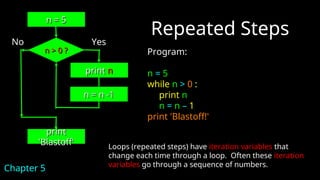
Repeated Steps
Program:
n =5
while n > 0 :
print n
n = n – 1
print 'Blastoff!'
n > 0 ?
n > 0 ?
n = n -1
n = n -1
Loops (repeated steps) have iteration variables that
change each time through a loop. Often these iteration
variables go through a sequence of numbers.
No
print
print
'Blastoff'
'Blastoff'
Chapter 5
Yes
n = 5
n = 5
print
print n
n
30.
Summary
• This isa quick overview of Chapter 1
• We will revisit these concepts throughout the course
• Focus on the big picture

![name = raw_input('Enter file:')
handle = open(name, 'r')
text = handle.read()
words = text.split()
counts = dict()
for word in words:
counts[word] = counts.get(word,0) + 1
bigcount = Nonebigword = None
for word,count in counts.items():
if bigcount is None or count > bigcount:
bigword = word
bigcount = countprint bigword, bigcount
Program for a Computer](https://image.slidesharecdn.com/pythoncourse01intro-250409135828-9c8b54f7/85/PythonCourse_01_Intro-ppt-Python-introduction-turorial-for-beginner-9-320.jpg)