UML and You:
Communicating with your community

           David Haskins
Quick Side Note: “The” UML

I refuse to refer to it as “the” UML. I will simply
refer to the topic as “UML.”
Who created UML?
• Created by the Object Management Group in
  around 1997.
• UML is a consolidation of various competing
  modeling languages.
• James Rumbaugh, Grady Booch, and Ivar
  Jacobson – collectively known as “The Three
  Amigos.”
What is UML?
• A graphical modeling language.
• UML means “Unified Modeling Language”.
• Consists of 14 types of diagrams.
  – Structural diagrams
  – Behavioral diagrams
• UML modeling tools can be found in Eclipse,
  NetBeans, and Visual Studio.
Why use UML?
•   A standard way to communicate ideas
•   Use as a sketch
•   Use as a blueprint
•   Use UML as a programming language. UML
    can be compiled into an application.
    (don’t do this)
Why use UML?

I suggest you use it as a sketch.
Most Common UML Diagrams
• Use Case Diagrams
• Class Diagrams
• Sequence Diagrams
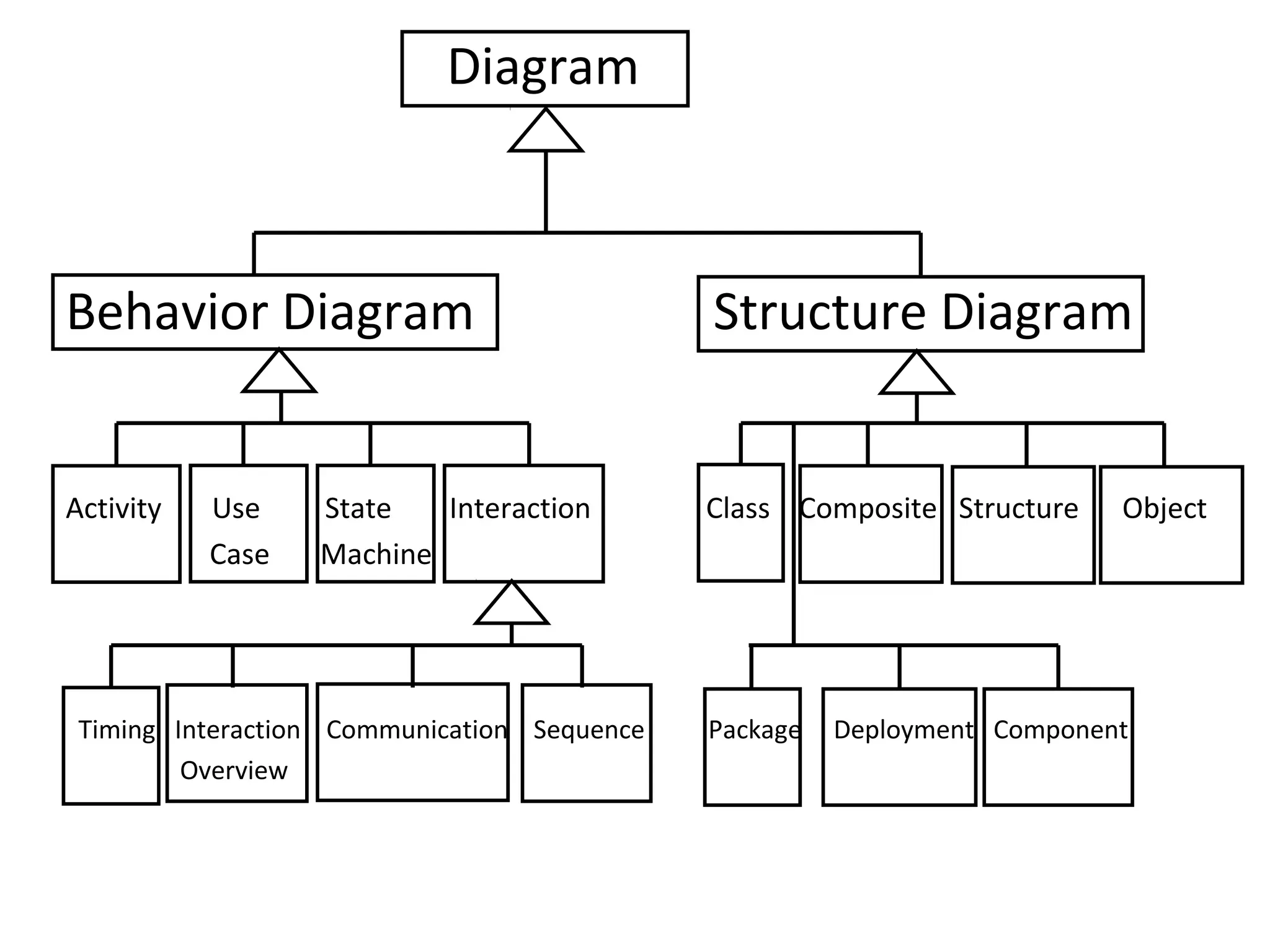
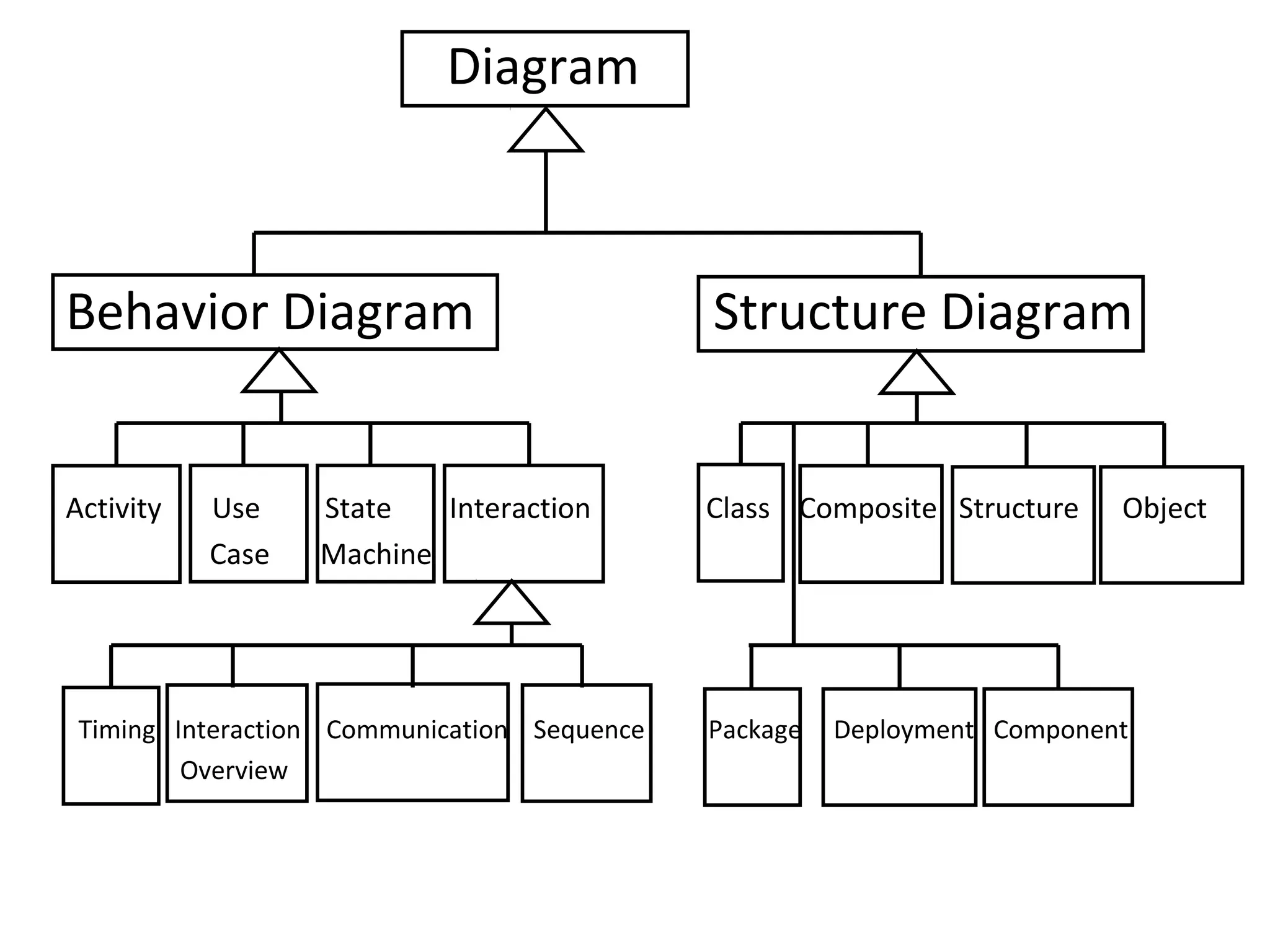
Diagram


Behavior Diagram                             Structure Diagram


Activity   Use    State   Interaction        Class Composite Structure    Object
           Case   Machine


 Timing Interaction Communication Sequence   Package   Deployment Component
         Overview
Use Case Diagram
• Very similar to “user stories” in XP, but
  generally more detailed.
• Includes alternatives to success.
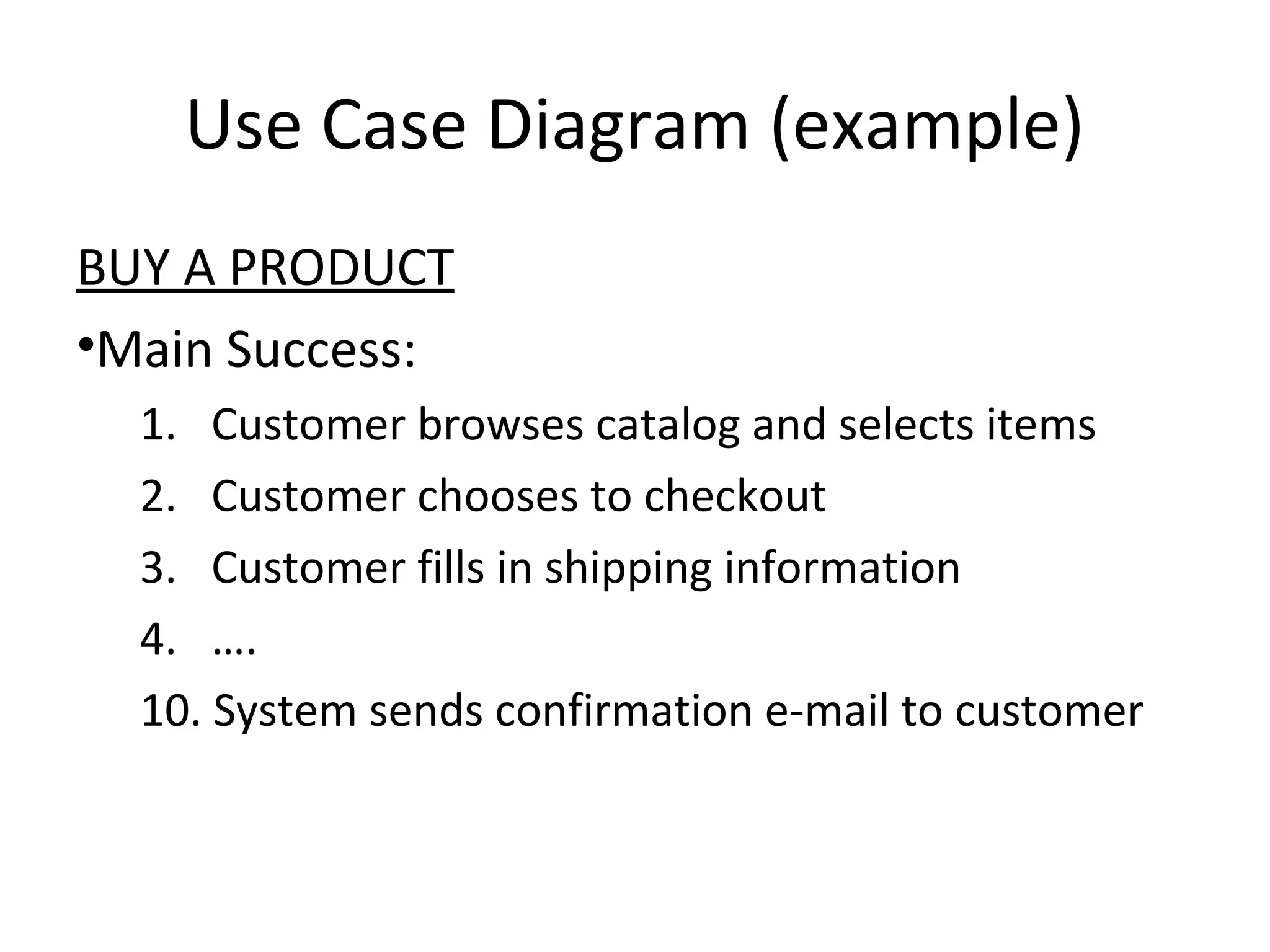
Use Case Diagram (example)
BUY A PRODUCT
•Main Success:
  1. Customer browses catalog and selects items
  2. Customer chooses to checkout
  3. Customer fills in shipping information
  4. ….
  10. System sends confirmation e-mail to customer
Use Case Diagram (example)
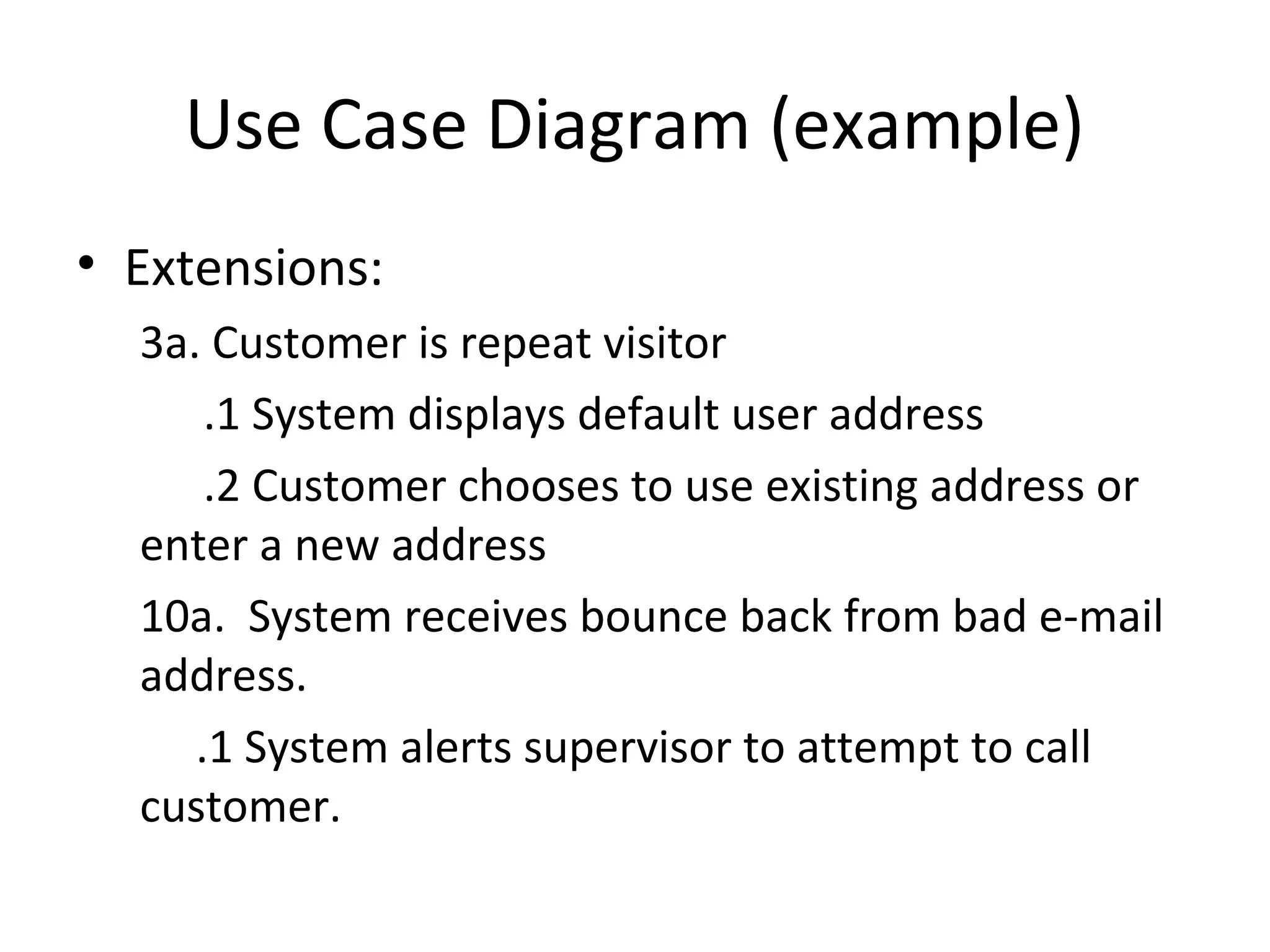
• Extensions:
  3a. Customer is repeat visitor
      .1 System displays default user address
      .2 Customer chooses to use existing address or
  enter a new address
  10a. System receives bounce back from bad e-mail
  address.
     .1 System alerts supervisor to attempt to call
  customer.
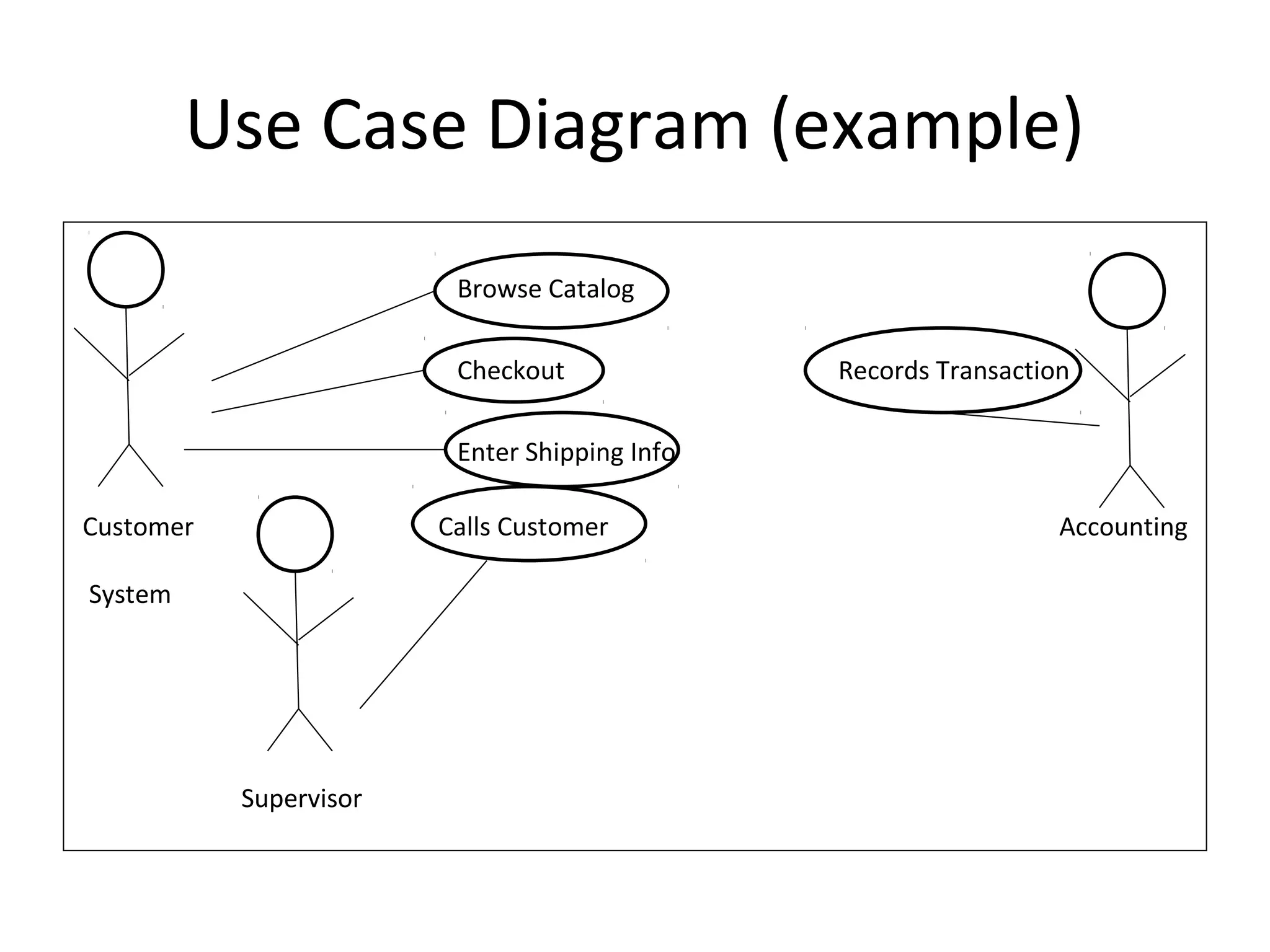
Use Case Diagram (example)
                         Browse Catalog

                         Checkout              Records Transaction

                         Enter Shipping Info

Customer                Calls Customer                           Accounting

System


           Supervisor
Classes vs Objects


What’s the difference between

                      a Class and an Object?
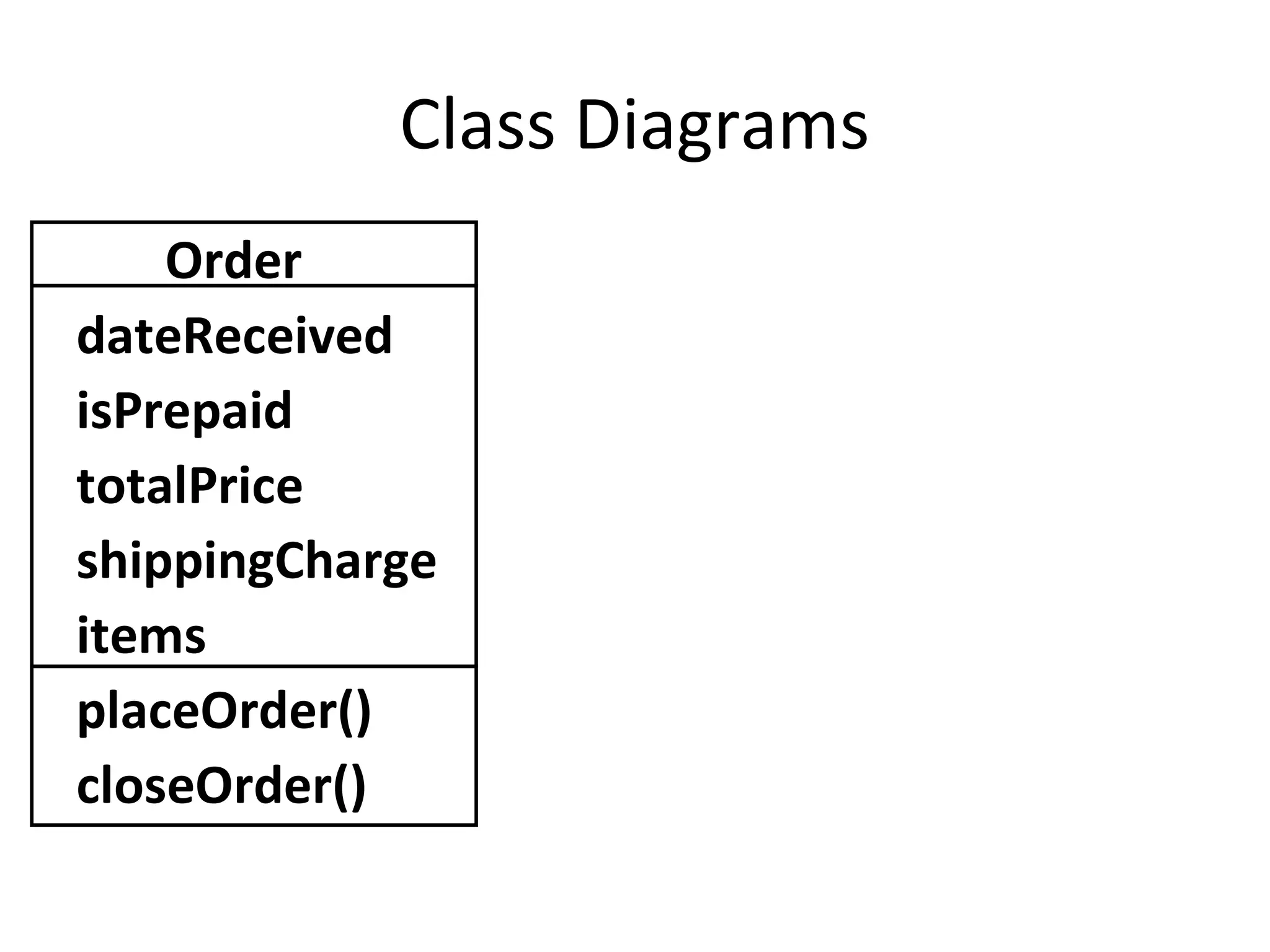
Class Diagrams
    Order
dateReceived
isPrepaid
totalPrice
shippingCharge
items
placeOrder()
closeOrder()
Class Diagrams
            Order
+ dateReceived: Date[1]
- isPrepaid: Boolean [0..1]
+ totalPrice: Float[1]
# shippingCharge: Float [1]
+ items: LineItem [*]
+ placeOrder(int: orderId): Boolean
+ closeOrder(): Boolean
Class Diagrams
                         Order                                   Class name
+ dateReceived: Date[1]
- isPrepaid: Boolean [0..1]
+ totalPrice: Float[1]                                           Attributes
# shippingCharge: Float [1]
+ items: LineItem [*]
+ placeOrder(int: orderId): Boolean
+ closeOrder(): Boolean                                          Operations
Visibility
             Data Type
                            Multiplicity
                                  Parameter List
                                                   Return Type
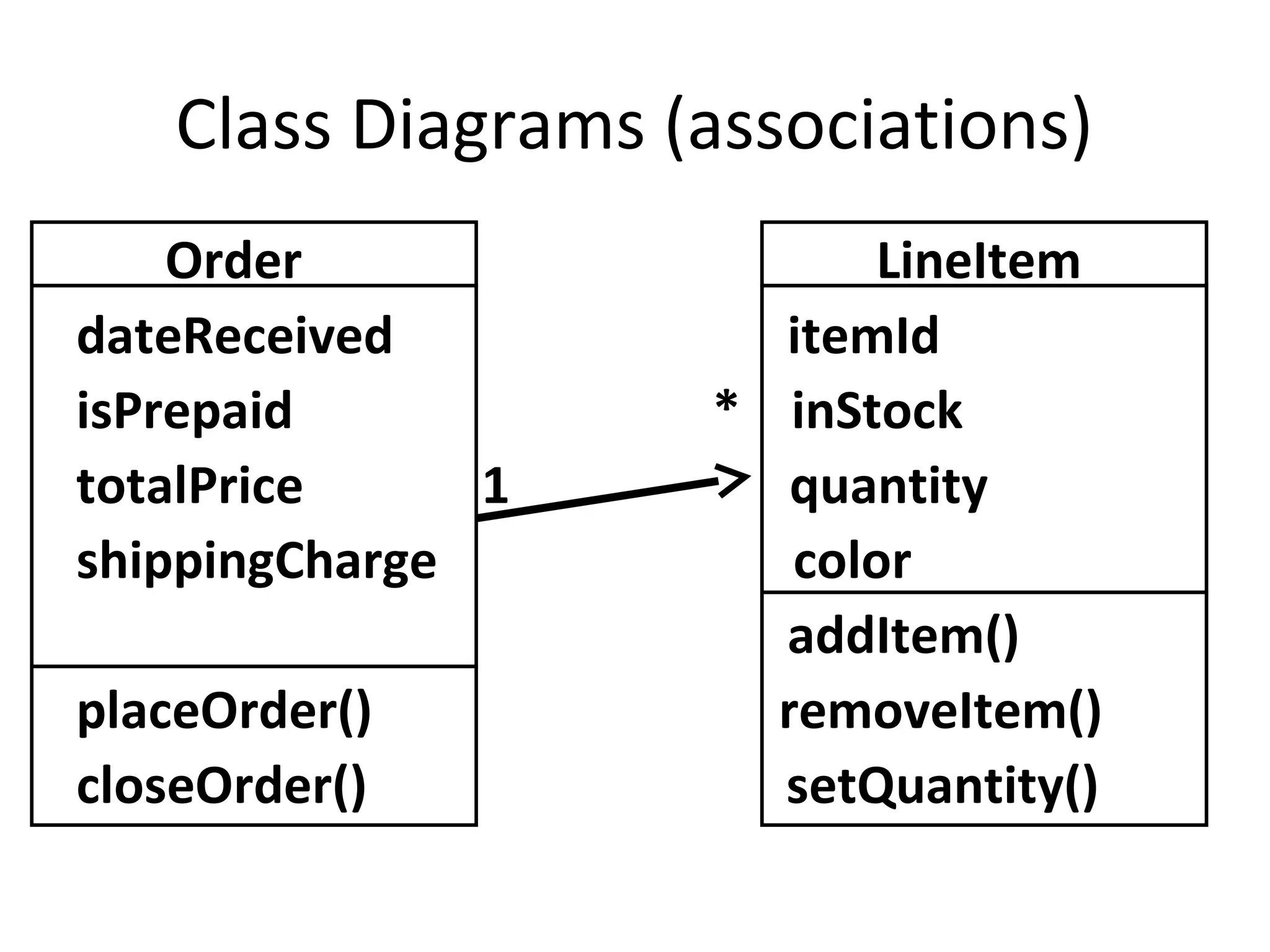
Class Diagrams (associations)
    Order                 LineItem
dateReceived          itemId
isPrepaid           * inStock
totalPrice     1       quantity
shippingCharge         color
                      addItem()
placeOrder()          removeItem()
closeOrder()          setQuantity()
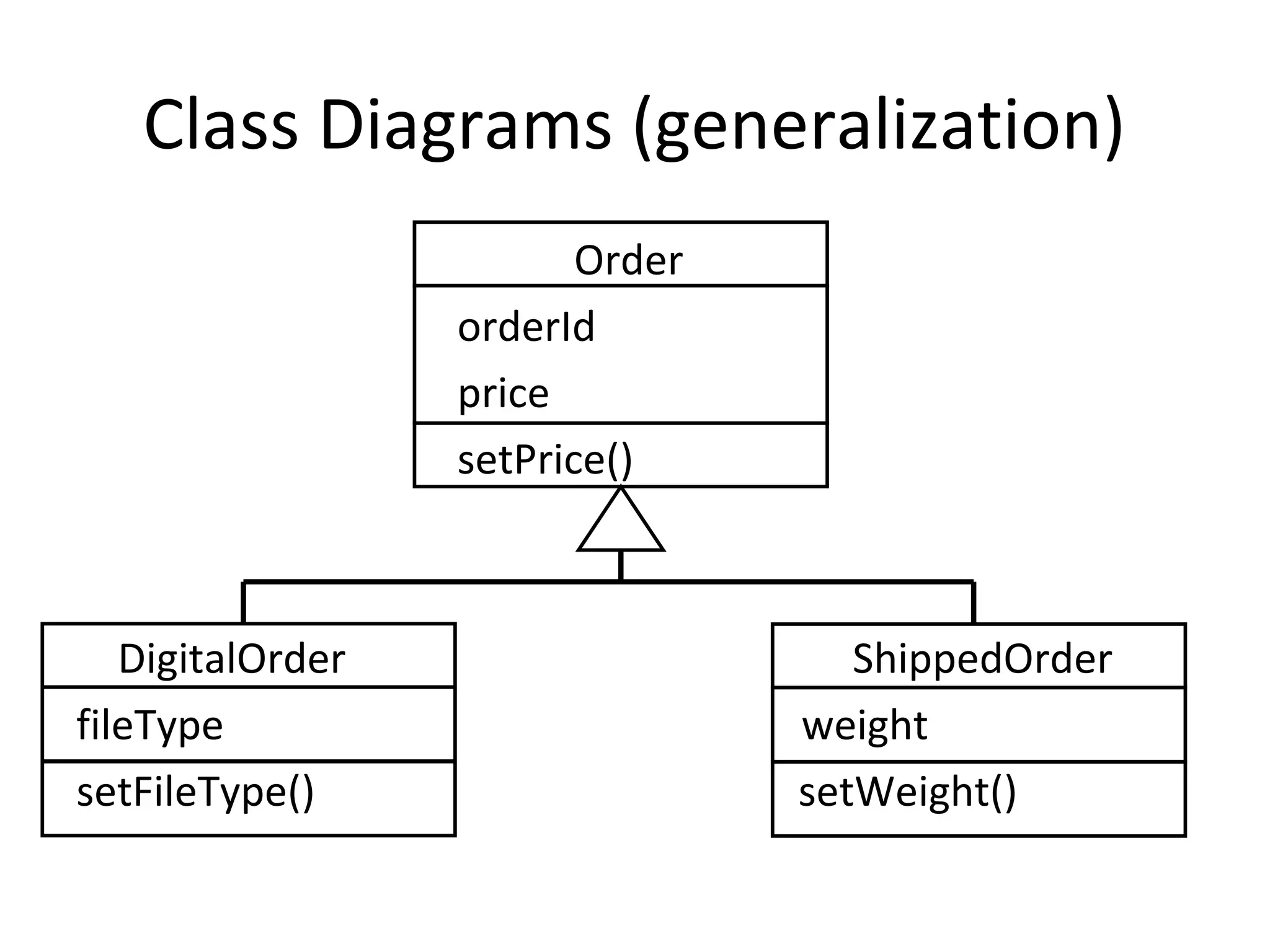
Class Diagrams (generalization)
                         Order
                  orderId
                  price
                  setPrice()


   DigitalOrder                     ShippedOrder
fileType                         weight
setFileType()                    setWeight()
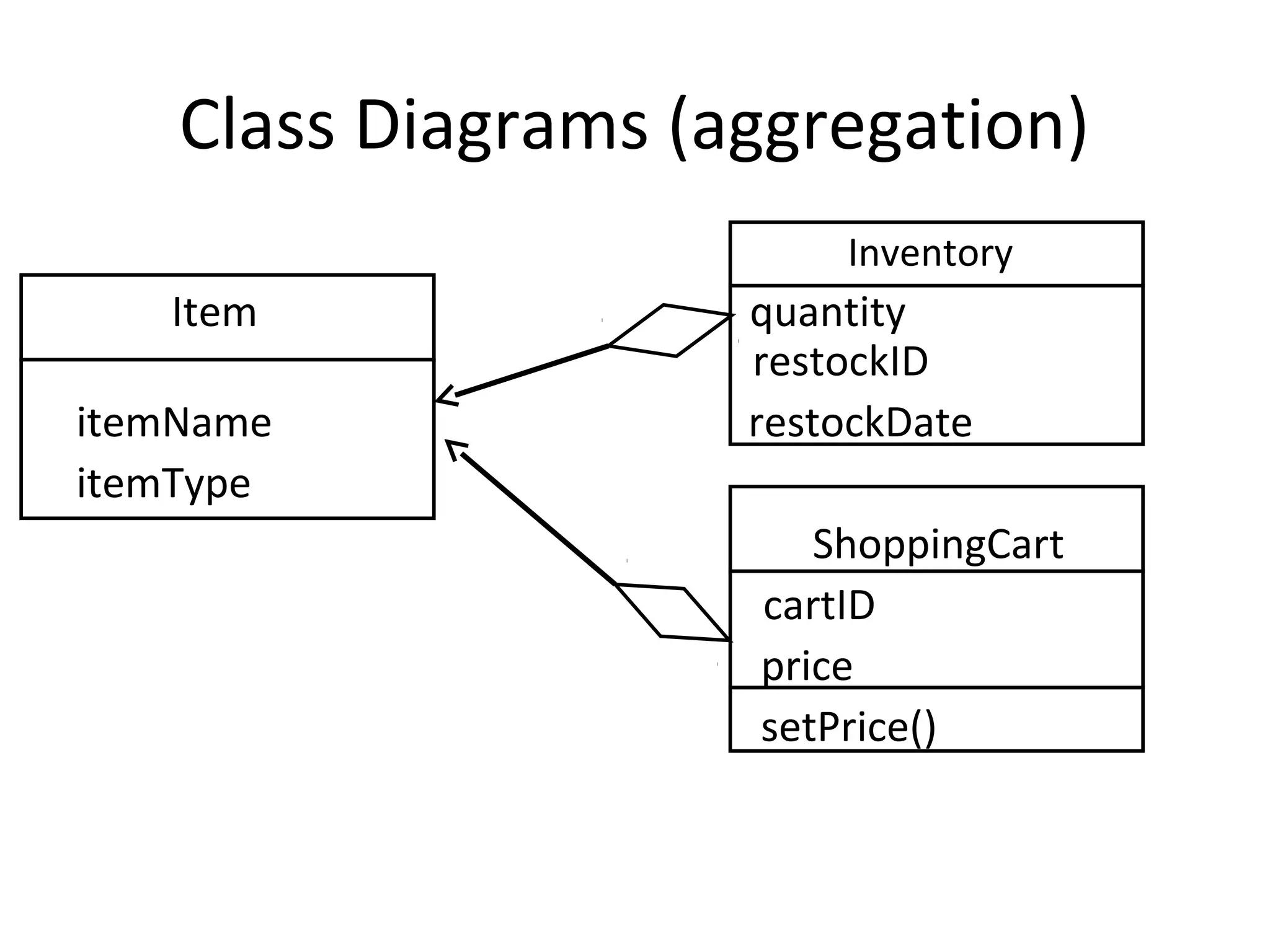
Class Diagrams (aggregation)
                         Inventory
   Item              quantity
                     restockID
itemName             restockDate
itemType
                        ShoppingCart
                     cartID
                     price
                     setPrice()
Aggregation
“Think of it as a modeling placebo”
  – Jim Rumbaugh
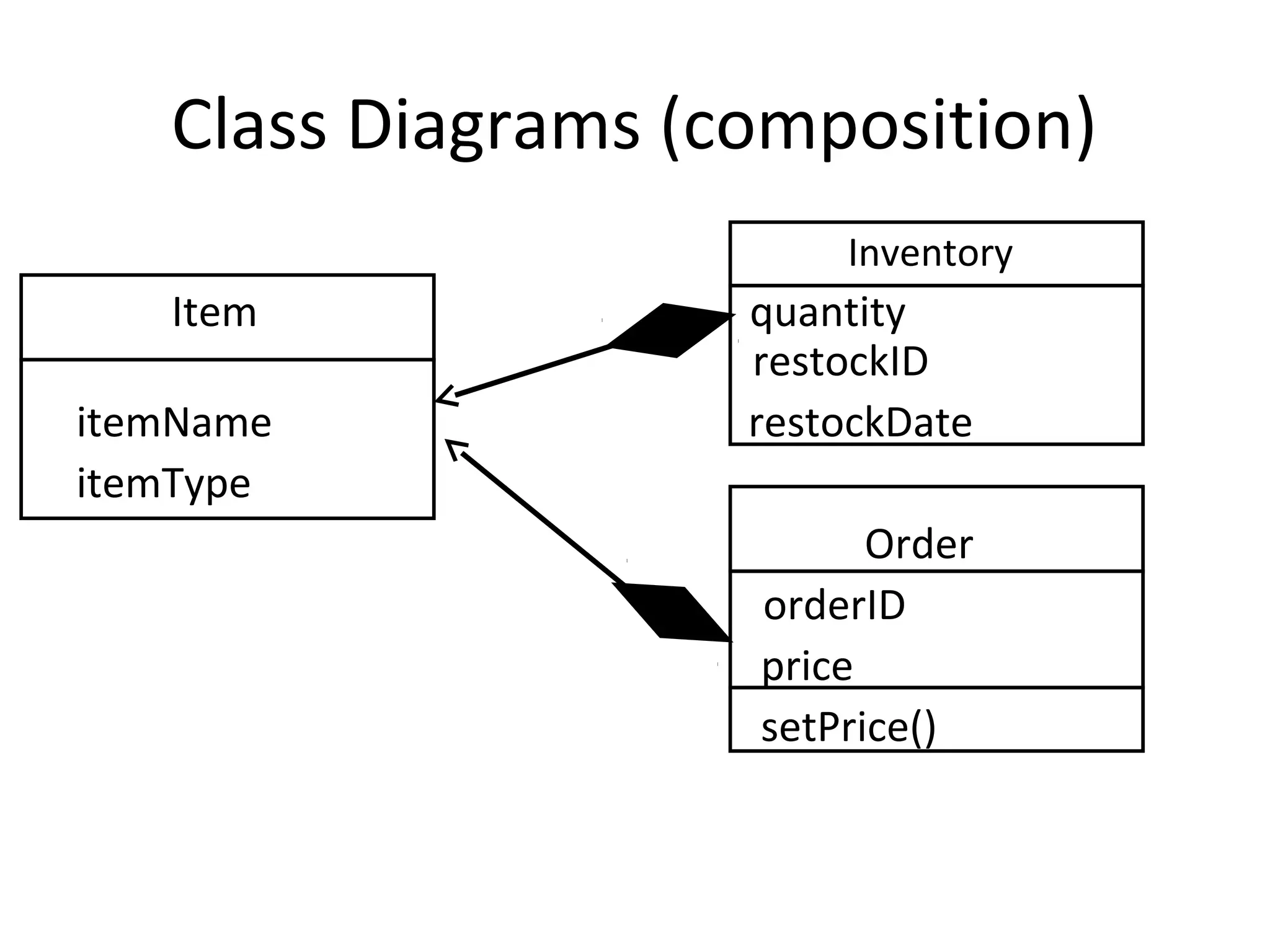
Class Diagrams (composition)
                        Inventory
   Item             quantity
                    restockID
itemName            restockDate
itemType
                          Order
                    orderID
                    price
                    setPrice()
Sequence Diagrams
Shows how objects interact with each other
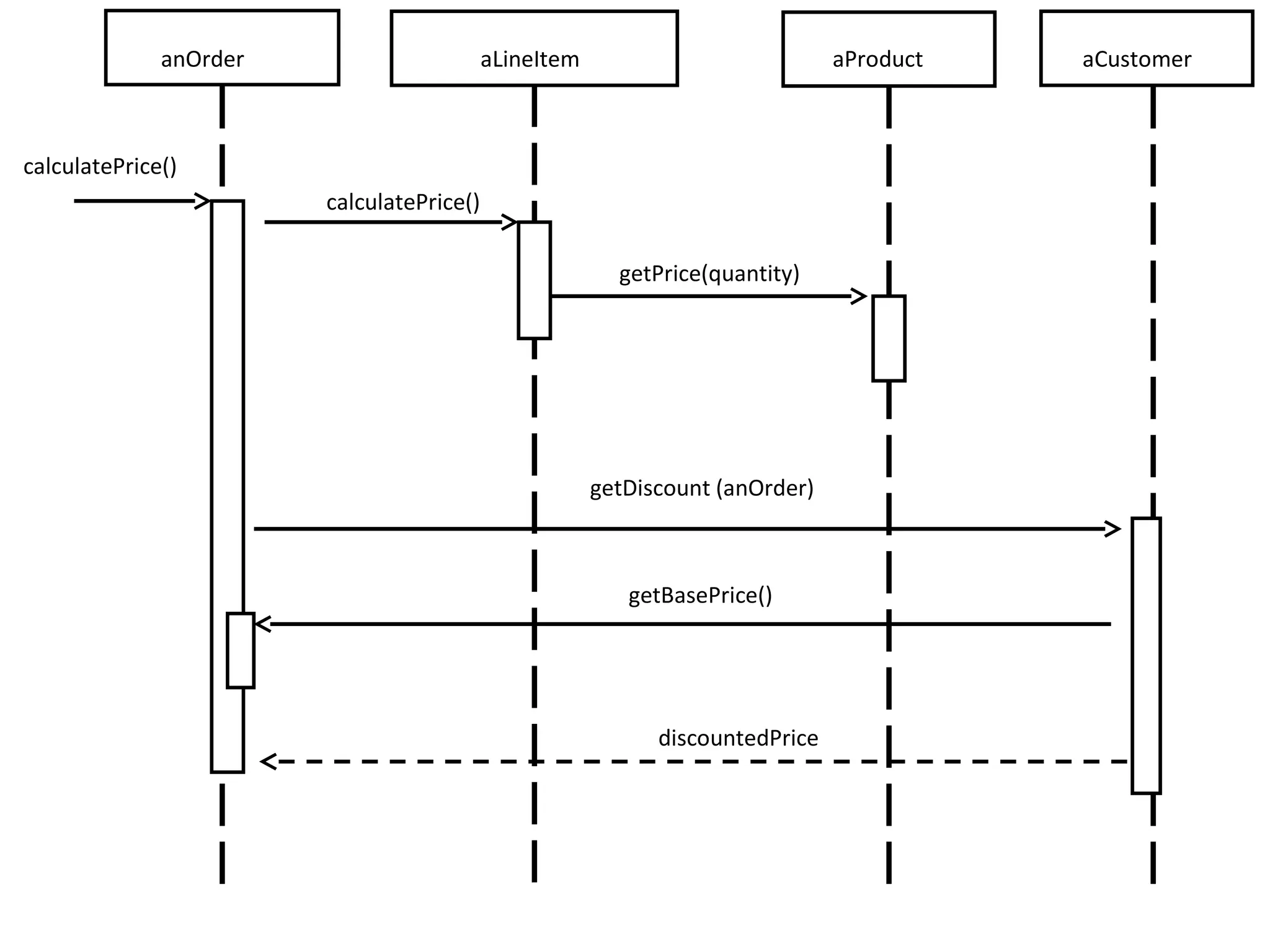
anOrder                      aLineItem                           aProduct   aCustomer


calculatePrice()
                        calculatePrice()

                                                         getPrice(quantity)


                                                       getDiscount (anOrder)


                                                          getBasePrice()


                                                             discountedPrice
Diagram


Behavior Diagram                             Structure Diagram


Activity   Use    State   Interaction        Class Composite Structure    Object
           Case   Machine


 Timing Interaction Communication Sequence   Package   Deployment Component
         Overview
Interested in More?

UML and You

  • 1.
    UML and You: Communicatingwith your community David Haskins
  • 3.
    Quick Side Note:“The” UML I refuse to refer to it as “the” UML. I will simply refer to the topic as “UML.”
  • 4.
    Who created UML? •Created by the Object Management Group in around 1997. • UML is a consolidation of various competing modeling languages. • James Rumbaugh, Grady Booch, and Ivar Jacobson – collectively known as “The Three Amigos.”
  • 5.
    What is UML? •A graphical modeling language. • UML means “Unified Modeling Language”. • Consists of 14 types of diagrams. – Structural diagrams – Behavioral diagrams • UML modeling tools can be found in Eclipse, NetBeans, and Visual Studio.
  • 7.
    Why use UML? • A standard way to communicate ideas • Use as a sketch • Use as a blueprint • Use UML as a programming language. UML can be compiled into an application. (don’t do this)
  • 8.
    Why use UML? Isuggest you use it as a sketch.
  • 9.
    Most Common UMLDiagrams • Use Case Diagrams • Class Diagrams • Sequence Diagrams
  • 10.
    Diagram Behavior Diagram Structure Diagram Activity Use State Interaction Class Composite Structure Object Case Machine Timing Interaction Communication Sequence Package Deployment Component Overview
  • 12.
    Use Case Diagram •Very similar to “user stories” in XP, but generally more detailed. • Includes alternatives to success.
  • 13.
    Use Case Diagram(example) BUY A PRODUCT •Main Success: 1. Customer browses catalog and selects items 2. Customer chooses to checkout 3. Customer fills in shipping information 4. …. 10. System sends confirmation e-mail to customer
  • 14.
    Use Case Diagram(example) • Extensions: 3a. Customer is repeat visitor .1 System displays default user address .2 Customer chooses to use existing address or enter a new address 10a. System receives bounce back from bad e-mail address. .1 System alerts supervisor to attempt to call customer.
  • 15.
    Use Case Diagram(example) Browse Catalog Checkout Records Transaction Enter Shipping Info Customer Calls Customer Accounting System Supervisor
  • 16.
    Classes vs Objects What’sthe difference between a Class and an Object?
  • 17.
    Class Diagrams Order dateReceived isPrepaid totalPrice shippingCharge items placeOrder() closeOrder()
  • 18.
    Class Diagrams Order + dateReceived: Date[1] - isPrepaid: Boolean [0..1] + totalPrice: Float[1] # shippingCharge: Float [1] + items: LineItem [*] + placeOrder(int: orderId): Boolean + closeOrder(): Boolean
  • 19.
    Class Diagrams Order Class name + dateReceived: Date[1] - isPrepaid: Boolean [0..1] + totalPrice: Float[1] Attributes # shippingCharge: Float [1] + items: LineItem [*] + placeOrder(int: orderId): Boolean + closeOrder(): Boolean Operations Visibility Data Type Multiplicity Parameter List Return Type
  • 20.
    Class Diagrams (associations) Order LineItem dateReceived itemId isPrepaid * inStock totalPrice 1 quantity shippingCharge color addItem() placeOrder() removeItem() closeOrder() setQuantity()
  • 21.
    Class Diagrams (generalization) Order orderId price setPrice() DigitalOrder ShippedOrder fileType weight setFileType() setWeight()
  • 22.
    Class Diagrams (aggregation) Inventory Item quantity restockID itemName restockDate itemType ShoppingCart cartID price setPrice()
  • 23.
    Aggregation “Think of itas a modeling placebo” – Jim Rumbaugh
  • 24.
    Class Diagrams (composition) Inventory Item quantity restockID itemName restockDate itemType Order orderID price setPrice()
  • 25.
    Sequence Diagrams Shows howobjects interact with each other
  • 26.
    anOrder aLineItem aProduct aCustomer calculatePrice() calculatePrice() getPrice(quantity) getDiscount (anOrder) getBasePrice() discountedPrice
  • 27.
    Diagram Behavior Diagram Structure Diagram Activity Use State Interaction Class Composite Structure Object Case Machine Timing Interaction Communication Sequence Package Deployment Component Overview
  • 29.