Welcome to Meet Up
 Why this meet up
 ACE Web Academy
 Introduction for UI Development
INTRO
www.acewebacademy.com/
 HTML is the lingua franca for publishing hypertext on the World Wide Web
 Define tags <html><body> <head>….etc
 Platform independent
 Current version is 4.x and in February W3C released the first draft of a test suite
4.01
 For more info: http://www.w3.org/MarkUp/
HTML
www.acewebacademy.com/
CSS
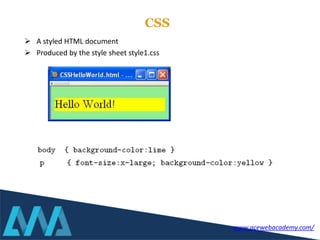
 A styled HTML document
 Produced by the style sheet style1.css
www.acewebacademy.com/
Browsers
www.acewebacademy.com/
Responsive Design
www.acewebacademy.com/
CSS Frame Works
www.acewebacademy.com/
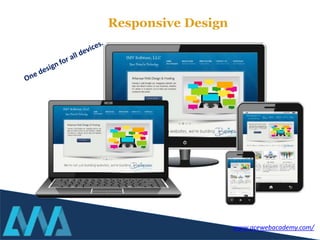
Responsive design is an approach to web page creation that makes use of flexible
layouts, flexible images and cascading style sheet media queries. The goal of
responsive design is to build web pages that detect the visitor’s screen size and
orientation and change the layout accordingly.
Currently the rise of responsive web design techniques, which facilitate the
development of websites that can adapt to various resolutions for different mobile
and desktop devices, is leading to the emergence of responsive frameworks. That is,
they solved the common problem of making a responsive site. These frameworks...to
offer a responsive solution from the point of installation.
Responsive Design
About responsive frameworks
Frontend frameworks usually consist of a package made up of a structure of files and
folders of standardized code (HTML, CSS, JS documents etc.)
CSS source code to create a grid: this allows the developer to position the different
elements that make up the site design in a simple and versatile fashion.
Typography style definitions for HTML elements.
Solutions for cases of browser incompatibility so the site displays correctly in all
browsers.
Creation of standard CSS classes which can be used to style advanced components of
the user interface.
Front-end Frameworks (Or CSS Frameworks)
The usual components are:
Frontend frameworks usually consist of a package made up of a structure of files and
folders of standardized code (HTML, CSS, JS documents etc.)
 Open Source
 Reducing the Development Time
 Mobile Friendly
 Cross Browser Compatibility
 Package made up of HTML, CSS, JS
(Java Script).
Front-end Frameworks (Or CSS Frameworks)
The usual components are:
www.acewebacademy.com/
CSS Frame Works
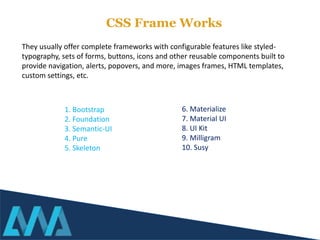
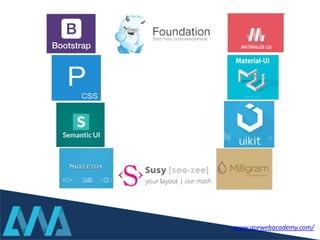
1. Bootstrap
2. Foundation
3. Semantic-UI
4. Pure
5. Skeleton
They usually offer complete frameworks with configurable features like styled-
typography, sets of forms, buttons, icons and other reusable components built to
provide navigation, alerts, popovers, and more, images frames, HTML templates,
custom settings, etc.
6. Materialize
7. Material UI
8. UI Kit
9. Milligram
10. Susy
www.acewebacademy.com/
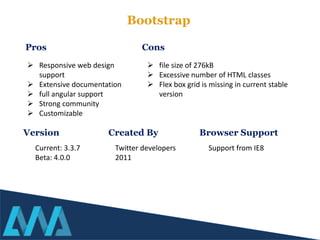
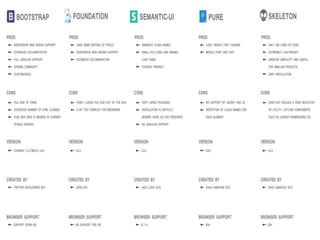
Bootstrap
 Responsive web design
support
 Extensive documentation
 full angular support
 Strong community
 Customizable
 file size of 276kB
 Excessive number of HTML classes
 Flex box grid is missing in current stable
version
Pros Cons
Version
Current: 3.3.7
Beta: 4.0.0
Created By Browser Support
Twitter developers
2011
Support from IE8
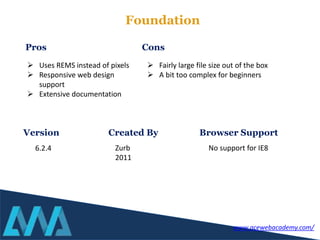
Foundation
 Uses REMS instead of pixels
 Responsive web design
support
 Extensive documentation
 Fairly large file size out of the box
 A bit too complex for beginners
Pros Cons
Version
6.2.4
Created By Browser Support
Zurb
2011
No support for IE8
www.acewebacademy.com/
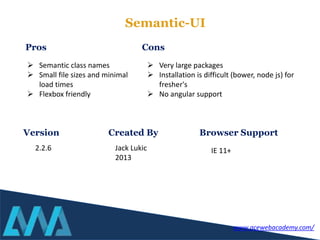
Semantic-UI
 Semantic class names
 Small file sizes and minimal
load times
 Flexbox friendly
 Very large packages
 Installation is difficult (bower, node js) for
fresher's
 No angular support
Pros Cons
Version
2.2.6
Created By Browser Support
Jack Lukic
2013
IE 11+
www.acewebacademy.com/
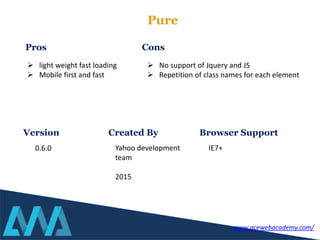
Pure
 light weight fast loading
 Mobile first and fast
 No support of Jquery and JS
 Repetition of class names for each element
Pros Cons
Version
0.6.0
Created By Browser Support
Yahoo development
team
2015
IE7+
www.acewebacademy.com/
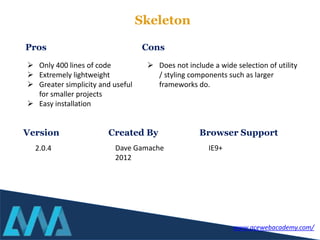
Skeleton
 Only 400 lines of code
 Extremely lightweight
 Greater simplicity and useful
for smaller projects
 Easy installation
 Does not include a wide selection of utility
/ styling components such as larger
frameworks do.
Pros Cons
Version
2.0.4
Created By Browser Support
Dave Gamache
2012
IE9+
www.acewebacademy.com/
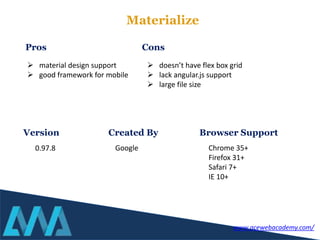
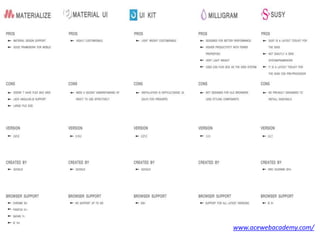
Materialize
 material design support
 good framework for mobile
 doesn’t have flex box grid
 lack angular.js support
 large file size
Pros Cons
Version
0.97.8
Created By Browser Support
Google Chrome 35+
Firefox 31+
Safari 7+
IE 10+
www.acewebacademy.com/
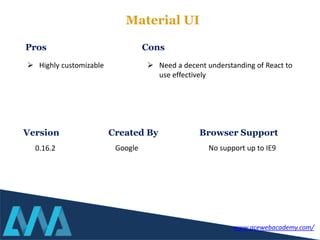
Material UI
 Highly customizable  Need a decent understanding of React to
use effectively
Pros Cons
Version
0.16.2
Created By Browser Support
Google No support up to IE9
www.acewebacademy.com/
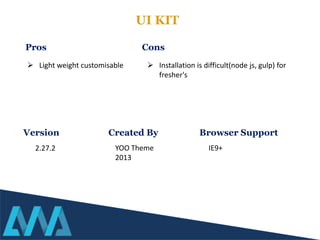
UI KIT
 Light weight customisable  Installation is difficult(node js, gulp) for
fresher's
Pros Cons
Version
2.27.2
Created By Browser Support
YOO Theme
2013
IE9+
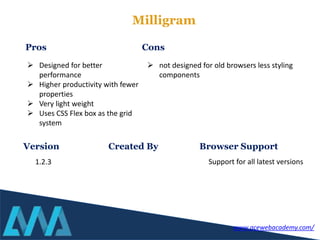
Milligram
 Designed for better
performance
 Higher productivity with fewer
properties
 Very light weight
 Uses CSS Flex box as the grid
system
 not designed for old browsers less styling
components
Pros Cons
Version
1.2.3
Created By Browser Support
Support for all latest versions
www.acewebacademy.com/
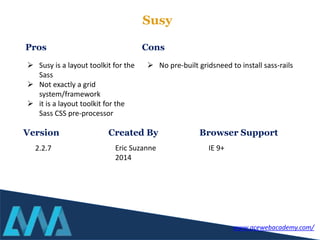
Susy
 Susy is a layout toolkit for the
Sass
 Not exactly a grid
system/framework
 it is a layout toolkit for the
Sass CSS pre-processor
 No pre-built gridsneed to install sass-rails
Pros Cons
Version
2.2.7
Created By Browser Support
Eric Suzanne
2014
IE 9+
www.acewebacademy.com/
Get More information
On
www.acewebacademy.com/blog
http://www.acewebacademy.com/blog/best-free-htmlcss-
online-tutorials-students/
Enhance your knowledge from free CSS/HTML
online resources
Fresher’s choice: Is PHP learning worth today? Front-End Development: FAQs By UI Newbies
www.acewebacademy.com/

Ui development frameworks html-bootstrap by awa

  • 1.
  • 2.
     Why thismeet up  ACE Web Academy  Introduction for UI Development INTRO www.acewebacademy.com/
  • 3.
     HTML isthe lingua franca for publishing hypertext on the World Wide Web  Define tags <html><body> <head>….etc  Platform independent  Current version is 4.x and in February W3C released the first draft of a test suite 4.01  For more info: http://www.w3.org/MarkUp/ HTML www.acewebacademy.com/
  • 4.
    CSS  A styledHTML document  Produced by the style sheet style1.css www.acewebacademy.com/
  • 5.
  • 6.
  • 7.
  • 8.
    Responsive design isan approach to web page creation that makes use of flexible layouts, flexible images and cascading style sheet media queries. The goal of responsive design is to build web pages that detect the visitor’s screen size and orientation and change the layout accordingly. Currently the rise of responsive web design techniques, which facilitate the development of websites that can adapt to various resolutions for different mobile and desktop devices, is leading to the emergence of responsive frameworks. That is, they solved the common problem of making a responsive site. These frameworks...to offer a responsive solution from the point of installation. Responsive Design About responsive frameworks
  • 9.
    Frontend frameworks usuallyconsist of a package made up of a structure of files and folders of standardized code (HTML, CSS, JS documents etc.) CSS source code to create a grid: this allows the developer to position the different elements that make up the site design in a simple and versatile fashion. Typography style definitions for HTML elements. Solutions for cases of browser incompatibility so the site displays correctly in all browsers. Creation of standard CSS classes which can be used to style advanced components of the user interface. Front-end Frameworks (Or CSS Frameworks) The usual components are:
  • 10.
    Frontend frameworks usuallyconsist of a package made up of a structure of files and folders of standardized code (HTML, CSS, JS documents etc.)  Open Source  Reducing the Development Time  Mobile Friendly  Cross Browser Compatibility  Package made up of HTML, CSS, JS (Java Script). Front-end Frameworks (Or CSS Frameworks) The usual components are: www.acewebacademy.com/
  • 11.
    CSS Frame Works 1.Bootstrap 2. Foundation 3. Semantic-UI 4. Pure 5. Skeleton They usually offer complete frameworks with configurable features like styled- typography, sets of forms, buttons, icons and other reusable components built to provide navigation, alerts, popovers, and more, images frames, HTML templates, custom settings, etc. 6. Materialize 7. Material UI 8. UI Kit 9. Milligram 10. Susy
  • 12.
  • 13.
    Bootstrap  Responsive webdesign support  Extensive documentation  full angular support  Strong community  Customizable  file size of 276kB  Excessive number of HTML classes  Flex box grid is missing in current stable version Pros Cons Version Current: 3.3.7 Beta: 4.0.0 Created By Browser Support Twitter developers 2011 Support from IE8
  • 14.
    Foundation  Uses REMSinstead of pixels  Responsive web design support  Extensive documentation  Fairly large file size out of the box  A bit too complex for beginners Pros Cons Version 6.2.4 Created By Browser Support Zurb 2011 No support for IE8 www.acewebacademy.com/
  • 15.
    Semantic-UI  Semantic classnames  Small file sizes and minimal load times  Flexbox friendly  Very large packages  Installation is difficult (bower, node js) for fresher's  No angular support Pros Cons Version 2.2.6 Created By Browser Support Jack Lukic 2013 IE 11+ www.acewebacademy.com/
  • 16.
    Pure  light weightfast loading  Mobile first and fast  No support of Jquery and JS  Repetition of class names for each element Pros Cons Version 0.6.0 Created By Browser Support Yahoo development team 2015 IE7+ www.acewebacademy.com/
  • 17.
    Skeleton  Only 400lines of code  Extremely lightweight  Greater simplicity and useful for smaller projects  Easy installation  Does not include a wide selection of utility / styling components such as larger frameworks do. Pros Cons Version 2.0.4 Created By Browser Support Dave Gamache 2012 IE9+ www.acewebacademy.com/
  • 18.
    Materialize  material designsupport  good framework for mobile  doesn’t have flex box grid  lack angular.js support  large file size Pros Cons Version 0.97.8 Created By Browser Support Google Chrome 35+ Firefox 31+ Safari 7+ IE 10+ www.acewebacademy.com/
  • 19.
    Material UI  Highlycustomizable  Need a decent understanding of React to use effectively Pros Cons Version 0.16.2 Created By Browser Support Google No support up to IE9 www.acewebacademy.com/
  • 20.
    UI KIT  Lightweight customisable  Installation is difficult(node js, gulp) for fresher's Pros Cons Version 2.27.2 Created By Browser Support YOO Theme 2013 IE9+
  • 21.
    Milligram  Designed forbetter performance  Higher productivity with fewer properties  Very light weight  Uses CSS Flex box as the grid system  not designed for old browsers less styling components Pros Cons Version 1.2.3 Created By Browser Support Support for all latest versions www.acewebacademy.com/
  • 22.
    Susy  Susy isa layout toolkit for the Sass  Not exactly a grid system/framework  it is a layout toolkit for the Sass CSS pre-processor  No pre-built gridsneed to install sass-rails Pros Cons Version 2.2.7 Created By Browser Support Eric Suzanne 2014 IE 9+ www.acewebacademy.com/
  • 24.
  • 25.
    Get More information On www.acewebacademy.com/blog http://www.acewebacademy.com/blog/best-free-htmlcss- online-tutorials-students/ Enhanceyour knowledge from free CSS/HTML online resources Fresher’s choice: Is PHP learning worth today? Front-End Development: FAQs By UI Newbies
  • 26.