Major Sponsors Minor Sponsors
about John Liu
Contents
• What is TypeScript
• Why do we need TypeScript
• How
• Demo
• Pinteresp
• Working with your existing JavaScript
What is TypeScript
• Free and open source, strongly supported by Microsoft
• Based on ecmascript 4 + ecmascript 6
• Created by the father of C# Anders Hejlsberg
• A superset of JavaScript
• To answer why we need JavaScript+, we need to
understand what's wrong with vanilla JavaScript
What is the problem
• Why do people hate working in JavaScript?
Problem - dynamic types
• Variables are untyped and dynamic. They are flexible
• Bad because it is so easy to get wrong
• var x = 1; var y = x + 1;
// OK, type is inferred. can assume x and y are both numbers.
• var x = 1; x = "hello";
// NOT OK, type is mixed up. We can't assume what type is x.
• // I am most guilty too - var i, j, k, x, y, z, a, b, c, i1, i2;
// JS is interpreted. There are no design-time intellisense or
compile-time assistance to help you point out errors
Problem - scope
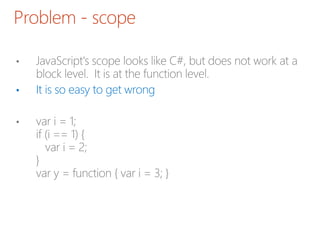
• JavaScript's scope looks like C#, but does not work at a
block level. It is at the function level.
• It is so easy to get wrong
• var i = 1;
if (i == 1) {
var i = 2;
}
var y = function { var i = 3; }
Problem - object inheritance is hard
• Based on object extension. Not class inheritance (at a
syntax level)
• var animal = {
var name;
};
var cat = jQuery.extend( animal,
var claw = function() { /*claw*/ };
});
• //Syntax complicated, so nobody really does it.
Problem - multiple files
• Last problem for today.
• JavaScript doesn't understand multiple files.
• VS.NET helps with <reference>, but doesn't help you
check the correctness of your reference code
Let's look at TypeScript
• To get started with TypeScript, grab it
from http://typescriptlang.org this includes VS2012
extensions
• Next, grab Web Essentials 2012 VS Extension.
http://visualstudiogallery.msdn.microsoft.com/07d54d1
2-7133-4e15-becb-6f451ea3bea6
TypeScript - first glance - optional strong
type checking
• // js
function f(x, y) {
return x * y;
}
• // ts
function f(x : number, y : number) : number {
return x * y;
}
// Type information is enforced in design and
// compile time, but removed at runtime
TypeScript - demo.ts
• Let's go see demo.ts in Visual Studio
TypeScript - pinteresp.ts
• see pinteresp.ts - building a sandbox webpart with
TypeScript
Real world story
• Brian Harry (of TFS) converts TFS Web UI to TypeScript
• 80,000 lines of code
• Heavily tested by unit tests and functional tests, JSLint
clean
• Finds 13 bugs after initial conversion
• http://blogs.msdn.com/b/bharry/archive/2012/10/24/ty
pescript-a-real-world-story-of-adoption-in-tfs.aspx
How - existing projects - practical guidelines
• Q: I have spaghetti JavaScript how do I update
them to TypeScript?
• You don't have to start with your largest file.
You don't have to convert all your files.
Start with the smaller file. Everything will still work.
How - existing projects
• #1 copy the JS file and paste into a TS file.
Remember: JS is subset of TS
How - existing projects
• #2 Add <reference> for
definition files
• #3 Optional arguments in
your functions
• #4 Fix ad-hoc objects to match definition interfaces.
• #5 Create missing definitions (e.g. 3rd party JQuery
extensions)
• Majority of errors are TypeScript asking you to describe
the interface better.
How - existing projects
• #6 Fix minor issues is TS
• Fix deprecated method references (JQuery.live should be JQuery.on)
• Fix Date - Date
• These are common issues - easy to find solutions on StackOverflow (the
official support forum for TypeScript)
• Good news: That's it!
How - existing projects
• Now, you can start to refactor and improve your TypeScript
• #1 Group utility functions into a separate scope.
Move them out into a commonly shared file. Add Type
information and jsdoc comments for them.
• #2 Use F2 rename symbol to finally standardize the
variable/function names in JS, without fearing things would
break
• #3 If you are working with a number of files, TypeScript will
now check across files to make sure you are still calling valid
functions, if your team member change them.
How - existing projects
• Congratulations you (and your team) are on your way to
cleaner, maintainable code
In Summary…
• Awesome VS.NET tools for design, compile and debug
• Helps you understand and write better JavaScript
• Works with any existing third party JS libraries
• Refactoring, multiple files enables code reuse and team
work
• Requires very little new learning. Combine what you
already know from Javascript and C#
• TypeScript is great for your SharePoint projects.
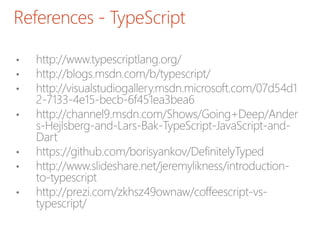
References - TypeScript
• http://www.typescriptlang.org/
• http://blogs.msdn.com/b/typescript/
• http://visualstudiogallery.msdn.microsoft.com/07d54d1
2-7133-4e15-becb-6f451ea3bea6
• http://channel9.msdn.com/Shows/Going+Deep/Ander
s-Hejlsberg-and-Lars-Bak-TypeScript-JavaScript-and-
Dart
• https://github.com/borisyankov/DefinitelyTyped
• http://www.slideshare.net/jeremylikness/introduction-
to-typescript
• http://prezi.com/zkhsz49ownaw/coffeescript-vs-
typescript/
References - SharePoint + TypeScript
• http://www.chaholl.com/archive/2013/01/03/typescript-
in-a-sharepoint-farm-solution.aspx
• http://sptypescript.codeplex.com/
• http://johnliu.net/blog/2013/3/13/building-sharepoint-
solutions-with-microsofts-typescript-why.html
References - JavaScript
• http://javascript.crockford.com/javascript.html
• http://javascript.crockford.com/inheritance.html
• http://www.adequatelygood.com/2010/2/JavaScript-
Scoping-and-Hoisting
• http://www.jibbering.com/faq/notes/closures/
Questions?
Comments?
More info
John.Liu@SharepointGurus.net
@johnnliu
http://JohnLiu.net
Major Sponsors Minor Sponsors

TypeScript-SPS-melb.pptx

  • 1.
  • 2.
  • 3.
    Contents • What isTypeScript • Why do we need TypeScript • How • Demo • Pinteresp • Working with your existing JavaScript
  • 4.
    What is TypeScript •Free and open source, strongly supported by Microsoft • Based on ecmascript 4 + ecmascript 6 • Created by the father of C# Anders Hejlsberg • A superset of JavaScript • To answer why we need JavaScript+, we need to understand what's wrong with vanilla JavaScript
  • 5.
    What is theproblem • Why do people hate working in JavaScript?
  • 6.
    Problem - dynamictypes • Variables are untyped and dynamic. They are flexible • Bad because it is so easy to get wrong • var x = 1; var y = x + 1; // OK, type is inferred. can assume x and y are both numbers. • var x = 1; x = "hello"; // NOT OK, type is mixed up. We can't assume what type is x. • // I am most guilty too - var i, j, k, x, y, z, a, b, c, i1, i2; // JS is interpreted. There are no design-time intellisense or compile-time assistance to help you point out errors
  • 7.
    Problem - scope •JavaScript's scope looks like C#, but does not work at a block level. It is at the function level. • It is so easy to get wrong • var i = 1; if (i == 1) { var i = 2; } var y = function { var i = 3; }
  • 8.
    Problem - objectinheritance is hard • Based on object extension. Not class inheritance (at a syntax level) • var animal = { var name; }; var cat = jQuery.extend( animal, var claw = function() { /*claw*/ }; }); • //Syntax complicated, so nobody really does it.
  • 9.
    Problem - multiplefiles • Last problem for today. • JavaScript doesn't understand multiple files. • VS.NET helps with <reference>, but doesn't help you check the correctness of your reference code
  • 10.
    Let's look atTypeScript • To get started with TypeScript, grab it from http://typescriptlang.org this includes VS2012 extensions • Next, grab Web Essentials 2012 VS Extension. http://visualstudiogallery.msdn.microsoft.com/07d54d1 2-7133-4e15-becb-6f451ea3bea6
  • 11.
    TypeScript - firstglance - optional strong type checking • // js function f(x, y) { return x * y; } • // ts function f(x : number, y : number) : number { return x * y; } // Type information is enforced in design and // compile time, but removed at runtime
  • 12.
    TypeScript - demo.ts •Let's go see demo.ts in Visual Studio
  • 13.
    TypeScript - pinteresp.ts •see pinteresp.ts - building a sandbox webpart with TypeScript
  • 14.
    Real world story •Brian Harry (of TFS) converts TFS Web UI to TypeScript • 80,000 lines of code • Heavily tested by unit tests and functional tests, JSLint clean • Finds 13 bugs after initial conversion • http://blogs.msdn.com/b/bharry/archive/2012/10/24/ty pescript-a-real-world-story-of-adoption-in-tfs.aspx
  • 15.
    How - existingprojects - practical guidelines • Q: I have spaghetti JavaScript how do I update them to TypeScript? • You don't have to start with your largest file. You don't have to convert all your files. Start with the smaller file. Everything will still work.
  • 16.
    How - existingprojects • #1 copy the JS file and paste into a TS file. Remember: JS is subset of TS
  • 17.
    How - existingprojects • #2 Add <reference> for definition files • #3 Optional arguments in your functions • #4 Fix ad-hoc objects to match definition interfaces. • #5 Create missing definitions (e.g. 3rd party JQuery extensions) • Majority of errors are TypeScript asking you to describe the interface better.
  • 18.
    How - existingprojects • #6 Fix minor issues is TS • Fix deprecated method references (JQuery.live should be JQuery.on) • Fix Date - Date • These are common issues - easy to find solutions on StackOverflow (the official support forum for TypeScript) • Good news: That's it!
  • 19.
    How - existingprojects • Now, you can start to refactor and improve your TypeScript • #1 Group utility functions into a separate scope. Move them out into a commonly shared file. Add Type information and jsdoc comments for them. • #2 Use F2 rename symbol to finally standardize the variable/function names in JS, without fearing things would break • #3 If you are working with a number of files, TypeScript will now check across files to make sure you are still calling valid functions, if your team member change them.
  • 20.
    How - existingprojects • Congratulations you (and your team) are on your way to cleaner, maintainable code
  • 21.
    In Summary… • AwesomeVS.NET tools for design, compile and debug • Helps you understand and write better JavaScript • Works with any existing third party JS libraries • Refactoring, multiple files enables code reuse and team work • Requires very little new learning. Combine what you already know from Javascript and C# • TypeScript is great for your SharePoint projects.
  • 22.
    References - TypeScript •http://www.typescriptlang.org/ • http://blogs.msdn.com/b/typescript/ • http://visualstudiogallery.msdn.microsoft.com/07d54d1 2-7133-4e15-becb-6f451ea3bea6 • http://channel9.msdn.com/Shows/Going+Deep/Ander s-Hejlsberg-and-Lars-Bak-TypeScript-JavaScript-and- Dart • https://github.com/borisyankov/DefinitelyTyped • http://www.slideshare.net/jeremylikness/introduction- to-typescript • http://prezi.com/zkhsz49ownaw/coffeescript-vs- typescript/
  • 23.
    References - SharePoint+ TypeScript • http://www.chaholl.com/archive/2013/01/03/typescript- in-a-sharepoint-farm-solution.aspx • http://sptypescript.codeplex.com/ • http://johnliu.net/blog/2013/3/13/building-sharepoint- solutions-with-microsofts-typescript-why.html
  • 24.
    References - JavaScript •http://javascript.crockford.com/javascript.html • http://javascript.crockford.com/inheritance.html • http://www.adequatelygood.com/2010/2/JavaScript- Scoping-and-Hoisting • http://www.jibbering.com/faq/notes/closures/
  • 25.
  • 26.

Editor's Notes

  • #3 Loves .NET, SharePoint & Windows Phone Our team building event was to build a Pergola for John.
  • #7 Who is using lots of JavaScript in their project now? What libraries are you using? JavaScript is designed as a scripting language to do small things on a browser document. We now use it as a full programming language to do all sort of things, a "page" can be the application, and all logic runs in JavaScript. AJAX and REST end points allow us to communicate to the server without refreshing the page. But JavaScript is not suited for large applications As JavaScript code gets complex, it is extremely unwieldy.
  • #11 // not a reference to coffeescript // y is function closure - exposes an inner function, allowing the inner variable x.foo to be modified externally. // extremely important in event handling, but difficult without strong coffee.
  • #12 // not a reference to coffeescript // y is function closure - exposes an inner function, allowing the inner variable x.foo to be modified externally. // extremely important in event handling, but difficult without strong coffee.
  • #17 Some of you might find these examples interesting… Just wait until you had to fix someone else bug in their script You can do it with VS.NET 2010, but there are manual bits involved.  Installer doesn't help you.
  • #26 This is my largest, 1500 line file . TS will complain though, because it thinks you can be more specific
  • #32 If you are already using JavaScript, and you see yourself using more JavaScript. You have to look at TypeScript. The strong tooling in Visual Studio is a key differentiator for Microsoft. TS will be here at least until ECMAScript v6 comes out, whenever that is. Even then, old browsers won't support most of it so you'll still need a way to compile down to plain-old-JavaScript Once you've done the initial hard work and converted a project. There is no going back. It'd be like going back to the dark ages. TypeScript is currently in beta. v0.9 will give us generics! I expect as TS matures and more and more Microsoft teams migrate to it internally, we'll see a lot more TS in one year than now. You can use TypeScript for ASP.NET / MVC / SharePoint as well as Windows Apps