TWEETING
TEACHERS
Using TWITTER for student and   Jon Moss
                                 Pine Grove School
parent communication and as a
professional development tool   @JonMossEdTech
                                #APSCTTechDay
                                www.EDvantaged.com
WHAT IS TWITTER?
 Twitter is a MICRO blogging
  tool.
 Users post brief messages
  (called “Tweets”) for others to
  read.
 Tweets can be a user‟s own
  content, a “retweet” (forward)
  of someone else‟s content, a
  link, or nearly anything else
  can be conveyed as text.
WHAT MAKES TWITTER DIFFERENT
FROM FACEBOOK AND EMAIL?

TWITTER               FACEBOOK               EMAIL
 140 character limit  Limit of post length  Unlimited
                        is subject to
                        change.
 Public to                                   Public to only
  EVERYONE.            Public to friends      those you directly
                        only*                  correspond with.
 Social networking                           Direct
  access to the         Social networking     correspondence
  world!                 access to the         with a finite
                         world!                number of
                                               recipients.
Demonstration

WHAT DOES TWITTER LOOK
LIKE?
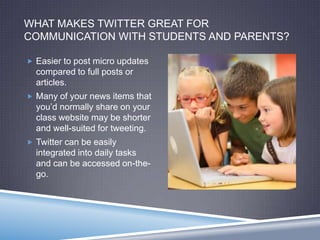
WHAT MAKES TWITTER GREAT FOR
COMMUNICATION WITH STUDENTS AND PARENTS?

 Easier to post micro updates
  compared to full posts or
  articles.
 Many of your news items that
  you‟d normally share on your
  class website may be shorter
  and well-suited for tweeting.
 Twitter can be easily
  integrated into daily tasks
  and can be accessed on-the-
  go.
WHAT MAKES TWITTER IDEAL FOR
PROFESSIONAL DEVELOPMENT?
 Twitter is great for sharing resources, seeking resources, and receiving
  resources.
    True collaboration means that you and others are motivated to help one another!

 Ongoing dialogs – not a one-time PD session without the option of
  follow-up.
 Twitter exchanges can (must) be brief, so there‟s no pressure to draft a
  lengthy message.
 Many, many respected organizations have a presence on Twitter.
 Tweeting teachers have ongoing access to experts, leaders, and
  organizations.
 “It‟s professional development at your will, your leisure, and your
  interest.” (Mercier, 2011)
WARNING!
      (Mercier, 2011)
Demonstration

ACTIONS ON TWITTER
TWITTER SYNTAX

@                                 # (Called a hashtag)
 Creates a “mention” to           Can connect your tweet to an
    connect your tweet to a         organized topic.
                                       @JonMossEdTech „s presentation
    specific person or                   is really, really terrific!
    organization.                        #APSCTTechDay
      @FakeJeffButler, you‟re     Can express a feeling or
       hysterical!                  sentiment.
      Thanks for the                  Learning that Twitter uses the
       recommendations,                  internet... Yawn...
       @elearningteacher !               #TellMeSomethingIDontKnow
                                       6 months left to the school year!
      Thanks for hosting us,
                                         #IsItSummerYet
       @MSNewEngland ! We had a
       great time!
FOR EXAMPLE...
MY EXPERIENCES
 Informal professional development (a mixed blessing!)
 Networking with other professionals
    WordPress Experts
    Other teachers with Educational Technology interests

 Program and app developers
    ShowMe (from the very beginning!)


 Next steps?
    Communicating with parents and families!
WHAT MAKES TWITTER GREAT FOR
COMMUNICATION WITH STUDENTS AND PARENTS?

 Easier to post micro updates
  compared to full posts or
  articles.
 Many of your news items that
  you‟d normally share on your
  class website may be shorter
  and well-suited for tweeting.
 Twitter can be easily
  integrated into daily tasks
  and can me accessed on-
  the-go.
WHAT MAKES TWITTER LOUSY FOR
COMMUNICATION WITH STUDENTS AND PARENTS?
 You cannot be verbose,
  elaborate, eloquent, or
  Shakespearian in 140
  characters.
    Does this make us seem less
     professional?
 Does the very use of Twitter
  make us seem
  unprofessional?
UNFORTUNATE TWEETS...
WHAT MAKES TWITTER LOUSY FOR
COMMUNICATION WITH STUDENTS AND PARENTS?
 You cannot be verbose,
  elaborate, eloquent, or
  Shakespearian in 140
  characters.
    Does this make us seem less
     professional?
 Does the very use of Twitter
  make us seem
  unprofessional?
 You invite RESPONSES.
NEXT STEPS
 Get a Twitter account.
 Start following people and/or organizations. BE A LURKER.
 Maybe post a Tweet about today‟s professional development day!
  (#APSCTTechDay)
 Experiment with different platforms for your Twitter use?
    Website? Native client? 3rd party client app like HootSuite?

 Post a question or comment. Even if it‟s irrelevant.
 See what happens!
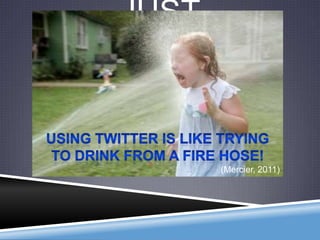
JUST
REMEMBER...


        (Mercier, 2011)
 People/organizations to

THANK YOU!                               follow...

                                        @ASCD
 About me...                           @NCTM
                                        @iPodsibilities
Jon Moss (Pine                         @jasonohler

  Grove)                                @virtual_teach

 www.edvantaged.com                    @iear
    All materials will be available    @elemenous
      online! (Give me a few days!)
                                        @rmbyrne
 @JonMossEdTech
                                        @teach42
 #APSCTTechDay
                                        @paulawhite

                                        But you need to follow
                                         people and organizations
                                         that are meaningful to YOU,
                                         not to me!

Tweeting Teachers

  • 1.
    TWEETING TEACHERS Using TWITTER forstudent and Jon Moss Pine Grove School parent communication and as a professional development tool @JonMossEdTech #APSCTTechDay www.EDvantaged.com
  • 2.
    WHAT IS TWITTER? Twitter is a MICRO blogging tool.  Users post brief messages (called “Tweets”) for others to read.  Tweets can be a user‟s own content, a “retweet” (forward) of someone else‟s content, a link, or nearly anything else can be conveyed as text.
  • 3.
    WHAT MAKES TWITTERDIFFERENT FROM FACEBOOK AND EMAIL? TWITTER FACEBOOK EMAIL  140 character limit  Limit of post length  Unlimited is subject to change.  Public to  Public to only EVERYONE.  Public to friends those you directly only* correspond with.  Social networking  Direct access to the  Social networking correspondence world! access to the with a finite world! number of recipients.
  • 4.
  • 5.
    WHAT MAKES TWITTERGREAT FOR COMMUNICATION WITH STUDENTS AND PARENTS?  Easier to post micro updates compared to full posts or articles.  Many of your news items that you‟d normally share on your class website may be shorter and well-suited for tweeting.  Twitter can be easily integrated into daily tasks and can be accessed on-the- go.
  • 6.
    WHAT MAKES TWITTERIDEAL FOR PROFESSIONAL DEVELOPMENT?  Twitter is great for sharing resources, seeking resources, and receiving resources.  True collaboration means that you and others are motivated to help one another!  Ongoing dialogs – not a one-time PD session without the option of follow-up.  Twitter exchanges can (must) be brief, so there‟s no pressure to draft a lengthy message.  Many, many respected organizations have a presence on Twitter.  Tweeting teachers have ongoing access to experts, leaders, and organizations.  “It‟s professional development at your will, your leisure, and your interest.” (Mercier, 2011)
  • 7.
    WARNING! (Mercier, 2011)
  • 8.
  • 9.
    TWITTER SYNTAX @ # (Called a hashtag)  Creates a “mention” to  Can connect your tweet to an connect your tweet to a organized topic.  @JonMossEdTech „s presentation specific person or is really, really terrific! organization. #APSCTTechDay  @FakeJeffButler, you‟re  Can express a feeling or hysterical! sentiment.  Thanks for the  Learning that Twitter uses the recommendations, internet... Yawn... @elearningteacher ! #TellMeSomethingIDontKnow  6 months left to the school year!  Thanks for hosting us, #IsItSummerYet @MSNewEngland ! We had a great time!
  • 10.
  • 11.
    MY EXPERIENCES  Informalprofessional development (a mixed blessing!)  Networking with other professionals  WordPress Experts  Other teachers with Educational Technology interests  Program and app developers  ShowMe (from the very beginning!)  Next steps?  Communicating with parents and families!
  • 12.
    WHAT MAKES TWITTERGREAT FOR COMMUNICATION WITH STUDENTS AND PARENTS?  Easier to post micro updates compared to full posts or articles.  Many of your news items that you‟d normally share on your class website may be shorter and well-suited for tweeting.  Twitter can be easily integrated into daily tasks and can me accessed on- the-go.
  • 13.
    WHAT MAKES TWITTERLOUSY FOR COMMUNICATION WITH STUDENTS AND PARENTS?  You cannot be verbose, elaborate, eloquent, or Shakespearian in 140 characters.  Does this make us seem less professional?  Does the very use of Twitter make us seem unprofessional?
  • 14.
  • 15.
    WHAT MAKES TWITTERLOUSY FOR COMMUNICATION WITH STUDENTS AND PARENTS?  You cannot be verbose, elaborate, eloquent, or Shakespearian in 140 characters.  Does this make us seem less professional?  Does the very use of Twitter make us seem unprofessional?  You invite RESPONSES.
  • 16.
    NEXT STEPS  Geta Twitter account.  Start following people and/or organizations. BE A LURKER.  Maybe post a Tweet about today‟s professional development day! (#APSCTTechDay)  Experiment with different platforms for your Twitter use?  Website? Native client? 3rd party client app like HootSuite?  Post a question or comment. Even if it‟s irrelevant.  See what happens!
  • 17.
    JUST REMEMBER... (Mercier, 2011)
  • 18.
     People/organizations to THANKYOU! follow...  @ASCD  About me...  @NCTM  @iPodsibilities Jon Moss (Pine  @jasonohler Grove)  @virtual_teach  www.edvantaged.com  @iear  All materials will be available  @elemenous online! (Give me a few days!)  @rmbyrne  @JonMossEdTech  @teach42  #APSCTTechDay  @paulawhite  But you need to follow people and organizations that are meaningful to YOU, not to me!