TVS-x82T Series
Hyperconverged infrastructure for next-generation
performance and data protection
The Unrivaled Hardware-Software Integration for
Next-generation Performance
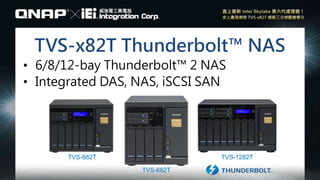
TVS-1282TTVS-882T
TVS-682T
TVS-x82T Thunderbolt™ NAS
• 6/8/12-bay Thunderbolt™ 2 NAS
• Integrated DAS, NAS, iSCSI SAN
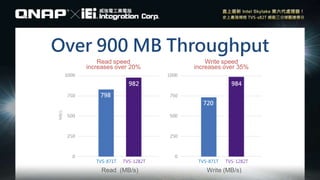
Read speed
increases over 20%
Write speed
increases over 35%
TVS-871T TVS-1282T TVS-871T TVS-1282T
Read (MB/s)
798
982
720
984
Write (MB/s)
Over 900 MB Throughput
Unveil the superior
hardware design
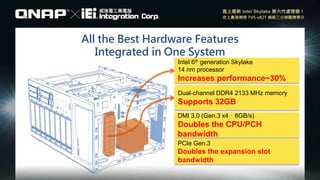
All the Best Hardware Features
Integrated in One System
Intel 6th generation Skylake
14 nm processor
Increases performance~30%
Dual-channel DDR4 2133 MHz memory
Supports 32GB
DMI 3.0 (Gen.3 x4,8GB/s)
Doubles the CPU/PCH
bandwidth
PCIe Gen.3
Doubles the expansion slot
bandwidth
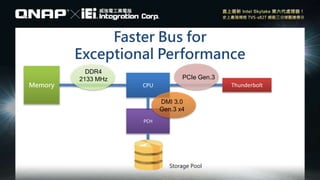
Faster Bus for
Exceptional Performance
PCH
CPUMemory Thunderbolt
Storage Pool
DDR4
2133 MHz PCIe Gen.3
DMI 3.0
Gen.3 x4
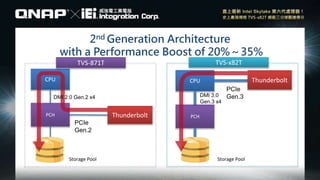
2nd Generation Architecture
with a Performance Boost of 20%~35%
PCH
CPU Thunderbolt
PCH
CPU
Thunderbolt
TVS-871T TVS-x82T
Storage PoolStorage Pool
DMI 3.0
Gen.3 x4
PCIe
Gen.3
PCIe
Gen.2
DMI 2.0 Gen.2 x4
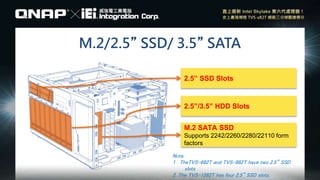
M.2/2.5” SSD/ 3.5” SATA
2.5” SSD Slots
2.5”/3.5” HDD Slots
M.2 SATA SSD
Supports 2242/2260/2280/22110 form
factors
Note:
1. TheTVS-682T and TVS-882T have two 2.5” SSD
slots
2. The TVS-1282T has four 2.5” SSD slots.
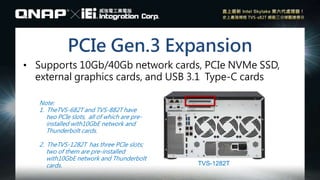
PCIe Gen.3 Expansion
• Supports 10Gb/40Gb network cards, PCIe NVMe SSD,
external graphics cards, and USB 3.1 Type-C cards
Note:
1. TheTVS-682T and TVS-882T have
two PCIe slots, all of which are pre-
installed with10GbE network and
Thunderbolt cards.
2. TheTVS-1282T has three PCIe slots;
two of them are pre-installed
with10GbE network and Thunderbolt
cards. TVS-1282T
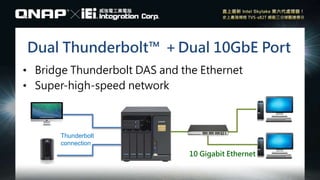
Dual Thunderbolt™ +Dual 10GbE Port
• Bridge Thunderbolt DAS and the Ethernet
• Super-high-speed network
10 Gigabit Ethernet
Thunderbolt
connection
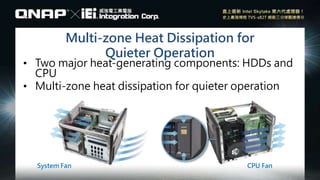
Multi-zone Heat Dissipation for
Quieter Operation
• Two major heat-generating components: HDDs and
CPU
• Multi-zone heat dissipation for quieter operation
System Fan CPU Fan
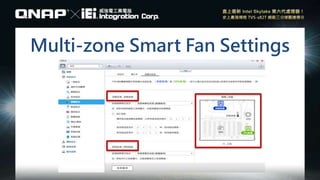
Multi-zone Smart Fan Settings
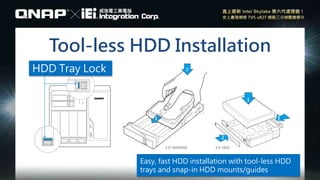
Tool-less HDD Installation
Easy, fast HDD installation with tool-less HDD
trays and snap-in HDD mounts/guides
HDD Tray Lock
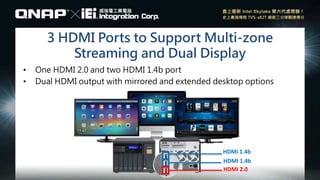
3 HDMI Ports to Support Multi-zone
Streaming and Dual Display
• One HDMI 2.0 and two HDMI 1.4b port
• Dual HDMI output with mirrored and extended desktop options
HDMI 1.4b
HDMI 1.4b
HDMI 2.0
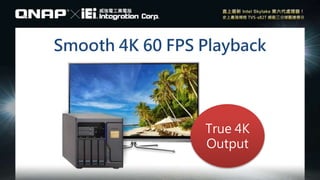
Smooth 4K 60 FPS Playback
True 4K
Output
Direct Sound Output
• Direct music output as your personal stereo
system
• Verbal beep alarm
3.5 mm audio cable
Built-in
dual speakers
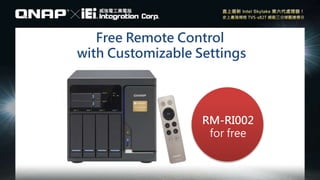
Free Remote Control
with Customizable Settings
RM-RI002
for free
High-quality hardware-
software integration
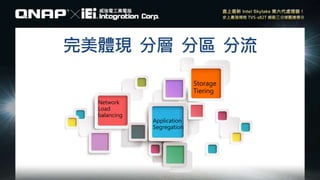
完美體現 分層 分區 分流
Network
Load
balancing
Application
Segregation
Storage
Tiering
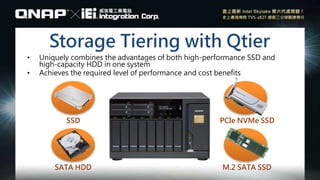
Storage Tiering with Qtier
• Uniquely combines the advantages of both high-performance SSD and
high-capacity HDD in one system
• Achieves the required level of performance and cost benefits
SSD
SATA HDD
PCIe NVMe SSD
M.2 SATA SSD
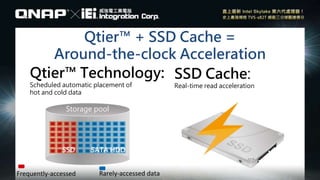
Qtier™ + SSD Cache =
Around-the-clock Acceleration
Qtier™ Technology:
Scheduled automatic placement of
hot and cold data
SSD Cache:
Real-time read acceleration
Frequently-accessed
Storage pool
Rarely-accessed data
SSD SATA HDD
Storage Tiering Scenario 1
• High-traffic news broadcast server/database
• Ideal for serving network traffic with sudden peaks
High-performance Configuration Economical Configuration
NVMe
Read
Cache
Volumes iSCSI LUN
Qtier Pools
SATA HDD
SSD
M.2 SSD
Read
Cache
Volumes iSCSI LUN
Qtier Pools
SATA HDD
SSD
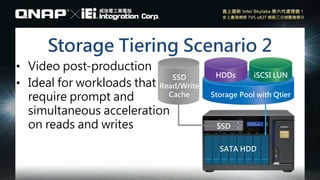
Storage Tiering Scenario 2
• Video post-production
• Ideal for workloads that
require prompt and
simultaneous acceleration
on reads and writes
SSD
Read/Write
Cache
HDDs iSCSI LUN
Storage Pool with Qtier
SATA HDD
SSD
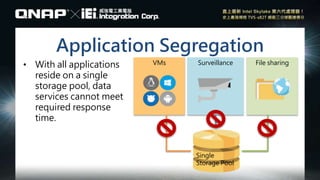
Application Segregation
VMs Surveillance File sharing
Single
Storage Pool
• With all applications
reside on a single
storage pool, data
services cannot meet
required response
time.
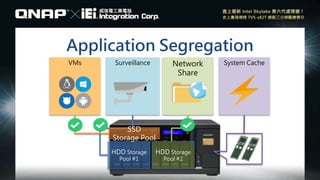
Application Segregation
HDD Storage
Pool #1
VMs Surveillance Network
Share
System Cache
HDD Storage
Pool #2
SSD
Storage Pool
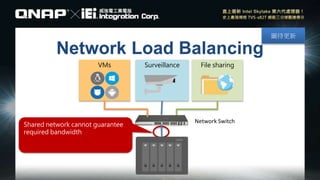
Network Load Balancing
圖待更新
VMs Surveillance File sharing
Network Switch
Shared network cannot guarantee
required bandwidth
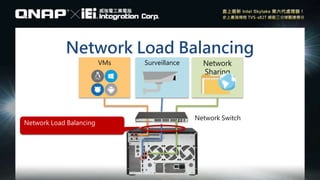
Network Load Balancing
VMs Surveillance Network
Sharing
Network Switch
Network Load Balancing
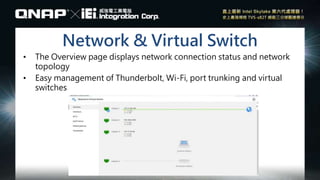
Network & Virtual Switch
• The Overview page displays network connection status and network
topology
• Easy management of Thunderbolt, Wi-Fi, port trunking and virtual
switches
Versatile capacity expansion
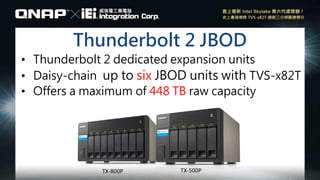
Thunderbolt 2 JBOD
• Thunderbolt 2 dedicated expansion units
• Daisy-chain up to six JBOD units with TVS-x82T
• Offers a maximum of 448 TB raw capacity
TX-500PTX-800P
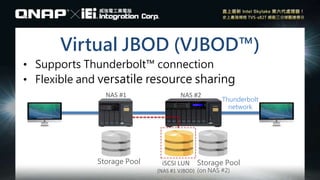
Virtual JBOD (VJBOD™)
• Supports Thunderbolt™ connection
• Flexible and versatile resource sharing
NAS #1 NAS #2
Storage Pool
Thunderbolt
network
Storage Pool
(on NAS #2)
iSCSI LUN
(NAS #1 VJBOD)
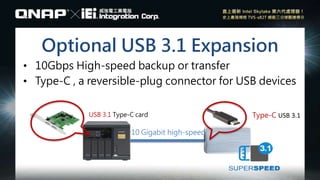
Optional USB 3.1 Expansion
• 10Gbps High-speed backup or transfer
• Type-C , a reversible-plug connector for USB devices
USB 3.1 Type-C card
10 Gigabit high-speed
Type-C USB 3.1
TVS-X82T Series -ENG

TVS-X82T Series -ENG

  • 1.
    TVS-x82T Series Hyperconverged infrastructurefor next-generation performance and data protection
  • 2.
    The Unrivaled Hardware-SoftwareIntegration for Next-generation Performance
  • 3.
    TVS-1282TTVS-882T TVS-682T TVS-x82T Thunderbolt™ NAS •6/8/12-bay Thunderbolt™ 2 NAS • Integrated DAS, NAS, iSCSI SAN
  • 4.
    Read speed increases over20% Write speed increases over 35% TVS-871T TVS-1282T TVS-871T TVS-1282T Read (MB/s) 798 982 720 984 Write (MB/s) Over 900 MB Throughput
  • 5.
  • 6.
    All the BestHardware Features Integrated in One System Intel 6th generation Skylake 14 nm processor Increases performance~30% Dual-channel DDR4 2133 MHz memory Supports 32GB DMI 3.0 (Gen.3 x4,8GB/s) Doubles the CPU/PCH bandwidth PCIe Gen.3 Doubles the expansion slot bandwidth
  • 7.
    Faster Bus for ExceptionalPerformance PCH CPUMemory Thunderbolt Storage Pool DDR4 2133 MHz PCIe Gen.3 DMI 3.0 Gen.3 x4
  • 8.
    2nd Generation Architecture witha Performance Boost of 20%~35% PCH CPU Thunderbolt PCH CPU Thunderbolt TVS-871T TVS-x82T Storage PoolStorage Pool DMI 3.0 Gen.3 x4 PCIe Gen.3 PCIe Gen.2 DMI 2.0 Gen.2 x4
  • 9.
    M.2/2.5” SSD/ 3.5”SATA 2.5” SSD Slots 2.5”/3.5” HDD Slots M.2 SATA SSD Supports 2242/2260/2280/22110 form factors Note: 1. TheTVS-682T and TVS-882T have two 2.5” SSD slots 2. The TVS-1282T has four 2.5” SSD slots.
  • 10.
    PCIe Gen.3 Expansion •Supports 10Gb/40Gb network cards, PCIe NVMe SSD, external graphics cards, and USB 3.1 Type-C cards Note: 1. TheTVS-682T and TVS-882T have two PCIe slots, all of which are pre- installed with10GbE network and Thunderbolt cards. 2. TheTVS-1282T has three PCIe slots; two of them are pre-installed with10GbE network and Thunderbolt cards. TVS-1282T
  • 11.
    Dual Thunderbolt™ +Dual10GbE Port • Bridge Thunderbolt DAS and the Ethernet • Super-high-speed network 10 Gigabit Ethernet Thunderbolt connection
  • 12.
    Multi-zone Heat Dissipationfor Quieter Operation • Two major heat-generating components: HDDs and CPU • Multi-zone heat dissipation for quieter operation System Fan CPU Fan
  • 13.
  • 14.
    Tool-less HDD Installation Easy,fast HDD installation with tool-less HDD trays and snap-in HDD mounts/guides HDD Tray Lock
  • 15.
    3 HDMI Portsto Support Multi-zone Streaming and Dual Display • One HDMI 2.0 and two HDMI 1.4b port • Dual HDMI output with mirrored and extended desktop options HDMI 1.4b HDMI 1.4b HDMI 2.0
  • 16.
    Smooth 4K 60FPS Playback True 4K Output
  • 17.
    Direct Sound Output •Direct music output as your personal stereo system • Verbal beep alarm 3.5 mm audio cable Built-in dual speakers
  • 18.
    Free Remote Control withCustomizable Settings RM-RI002 for free
  • 19.
  • 20.
    完美體現 分層 分區分流 Network Load balancing Application Segregation Storage Tiering
  • 21.
    Storage Tiering withQtier • Uniquely combines the advantages of both high-performance SSD and high-capacity HDD in one system • Achieves the required level of performance and cost benefits SSD SATA HDD PCIe NVMe SSD M.2 SATA SSD
  • 22.
    Qtier™ + SSDCache = Around-the-clock Acceleration Qtier™ Technology: Scheduled automatic placement of hot and cold data SSD Cache: Real-time read acceleration Frequently-accessed Storage pool Rarely-accessed data SSD SATA HDD
  • 23.
    Storage Tiering Scenario1 • High-traffic news broadcast server/database • Ideal for serving network traffic with sudden peaks High-performance Configuration Economical Configuration NVMe Read Cache Volumes iSCSI LUN Qtier Pools SATA HDD SSD M.2 SSD Read Cache Volumes iSCSI LUN Qtier Pools SATA HDD SSD
  • 24.
    Storage Tiering Scenario2 • Video post-production • Ideal for workloads that require prompt and simultaneous acceleration on reads and writes SSD Read/Write Cache HDDs iSCSI LUN Storage Pool with Qtier SATA HDD SSD
  • 25.
    Application Segregation VMs SurveillanceFile sharing Single Storage Pool • With all applications reside on a single storage pool, data services cannot meet required response time.
  • 26.
    Application Segregation HDD Storage Pool#1 VMs Surveillance Network Share System Cache HDD Storage Pool #2 SSD Storage Pool
  • 27.
    Network Load Balancing 圖待更新 VMsSurveillance File sharing Network Switch Shared network cannot guarantee required bandwidth
  • 28.
    Network Load Balancing VMsSurveillance Network Sharing Network Switch Network Load Balancing
  • 29.
    Network & VirtualSwitch • The Overview page displays network connection status and network topology • Easy management of Thunderbolt, Wi-Fi, port trunking and virtual switches
  • 30.
  • 31.
    Thunderbolt 2 JBOD •Thunderbolt 2 dedicated expansion units • Daisy-chain up to six JBOD units with TVS-x82T • Offers a maximum of 448 TB raw capacity TX-500PTX-800P
  • 32.
    Virtual JBOD (VJBOD™) •Supports Thunderbolt™ connection • Flexible and versatile resource sharing NAS #1 NAS #2 Storage Pool Thunderbolt network Storage Pool (on NAS #2) iSCSI LUN (NAS #1 VJBOD)
  • 33.
    Optional USB 3.1Expansion • 10Gbps High-speed backup or transfer • Type-C , a reversible-plug connector for USB devices USB 3.1 Type-C card 10 Gigabit high-speed Type-C USB 3.1

Editor's Notes

  • #4 Qnap 第二代Thunderbolt NAS
  • #5 紅底看不清楚
  • #9 第一二代
  • #15 Demo 安裝硬碟
  • #18 讓NAS也能說說唱唱,播放MP3,或是
  • #23 字放大
  • #24 直播完要存youtube, 當天完成 NVMe 字看不清楚
  • #29 背面照片
  • #32 有錢就任性的梗
  • #33 梗跟新聞時事跟生活聯想