Tutorial for Spinscape
   Getting Started
   http://www.spinscape.com/

      Module 4 Assignment

          Wanda Ardoin-Bailey
             July 25, 2011
Spinscape (www.spinscape.com) is a graphic mapping tool that allows users to organize texts,
images, and hyperlinks for collaboration on projects and ideas. It can help students focus on the important
elements of the course by organizing their thoughts in pretraining activity or by segmenting material for a
deeper level of understanding. The real time collaboration with other users around the world adds greater
depth than any other graphic organizer.
    As part of the pertaining segment of this project, students with similar career cluster interests will
assemble in small groups using Spinscape to organize thoughts, gather information, and share ideas

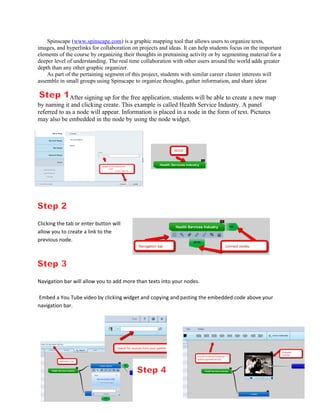
              After signing up for the free application, students will be able to create a new map
by naming it and clicking create. This example is called Health Service Industry. A panel
referred to as a node will appear. Information is placed in a node in the form of text. Pictures
may also be embedded in the node by using the node widget.


Clicking the tab or enter button will
allow you to create a link to the
previous node.


Navigation bar will allow you to add more than texts into your nodes.

Embed a You Tube video by clicking widget and copying and pasting the embedded code above your
navigation bar.
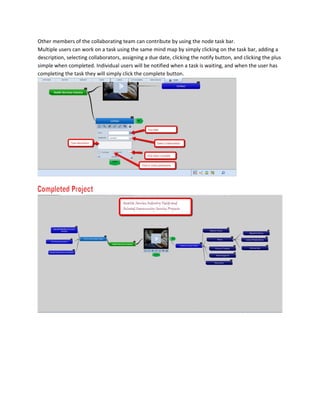
Other members of the collaborating team can contribute by using the node task bar.
Multiple users can work on a task using the same mind map by simply clicking on the task bar, adding a
description, selecting collaborators, assigning a due date, clicking the notify button, and clicking the plus
simple when completed. Individual users will be notified when a task is waiting, and when the user has
completing the task they will simply click the complete button.

Tutorial ardoin baileyw

  • 1.
    Tutorial for Spinscape Getting Started http://www.spinscape.com/ Module 4 Assignment Wanda Ardoin-Bailey July 25, 2011
  • 2.
    Spinscape (www.spinscape.com) isa graphic mapping tool that allows users to organize texts, images, and hyperlinks for collaboration on projects and ideas. It can help students focus on the important elements of the course by organizing their thoughts in pretraining activity or by segmenting material for a deeper level of understanding. The real time collaboration with other users around the world adds greater depth than any other graphic organizer. As part of the pertaining segment of this project, students with similar career cluster interests will assemble in small groups using Spinscape to organize thoughts, gather information, and share ideas After signing up for the free application, students will be able to create a new map by naming it and clicking create. This example is called Health Service Industry. A panel referred to as a node will appear. Information is placed in a node in the form of text. Pictures may also be embedded in the node by using the node widget. Clicking the tab or enter button will allow you to create a link to the previous node. Navigation bar will allow you to add more than texts into your nodes. Embed a You Tube video by clicking widget and copying and pasting the embedded code above your navigation bar.
  • 3.
    Other members ofthe collaborating team can contribute by using the node task bar. Multiple users can work on a task using the same mind map by simply clicking on the task bar, adding a description, selecting collaborators, assigning a due date, clicking the notify button, and clicking the plus simple when completed. Individual users will be notified when a task is waiting, and when the user has completing the task they will simply click the complete button.