Mind Mapping Software
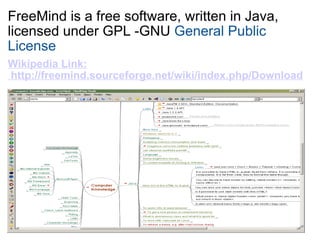
FreeMind is a free software, written in Java, licensed under GPL -GNU  General Public License Wikipedia Link:  http://freemind.sourceforge.net/wiki/index.php/Download
Current users of FreeMind use it for the following purposes: Keeping track of projects , including subtasks, state of subtasks and time recording  Project  workplace , including links to necessary files, executables, source of information and of course information  Workplace for  internet research  using Google and other sources  Essay writing  and  brainstorming Database -Keeping a  small database  of something with  structure  that is either  very dynamic  or  not known in advance .  Commented  internet favorites  or  bookmarks , with colors and fonts having the meaning you want.
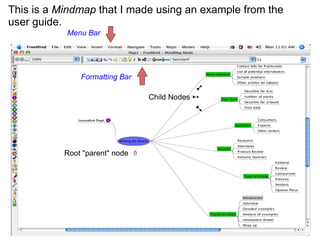
This is a  Mindmap  that I made using an example from the user guide. Root "parent" node   ⇑                        ➹   Child Nodes  ➸                               ➷ Menu Bar Formatting Bar
Features: Fully functional  following of HTML links  stored in the nodes, be it www links or links to local files.  Fast one-click navigation , including folding / unfolding on one click and following links on one click at the same time.  Undo   Smart Drag'n Drop , including the possibility to copy nodes or copy style of nodes; dragging and dropping of multiple selected nodes; dropping of texts or list of files from outside  Smart copying and pasting  Export of map to HTML , with folding Built in icons   It can be  easily customized  and has a set of extensive features  It's user friendly !  
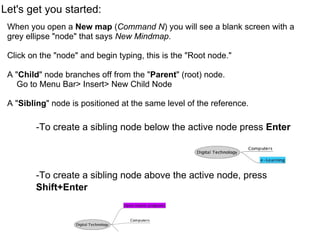
Let's get you started: When you open a  New map  ( Command N ) you will see a blank screen with a grey ellipse "node" that says  New Mindmap .   Click on the "node" and begin typing, this is the "Root node." A " Child " node branches off from the " Parent " (root) node.      Go to Menu Bar> Insert> New Child Node A " Sibling " node is positioned at the same level of the reference.     -To create a sibling node below the active node press  Enter          -To create a sibling node above the active node, press  Shift+Enter
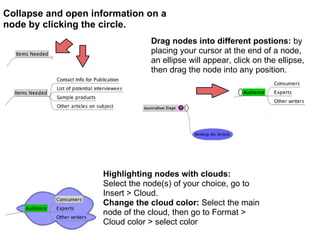
Collapse and open information on a node by clicking the circle.   Drag nodes into different postions:  by placing your cursor at the end of a node, an ellipse will appear, click on the ellipse, then drag the node into any position. Highlighting nodes with clouds: Select the node(s) of your choice, go to Insert > Cloud.  Change the cloud color:  Select the main node of the cloud, then go to Format > Cloud color > select color  
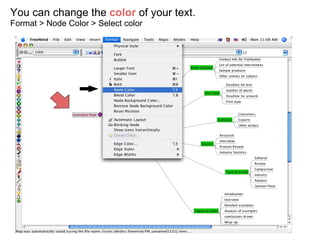
You can change the  color  of your text. Format > Node Color > Select color
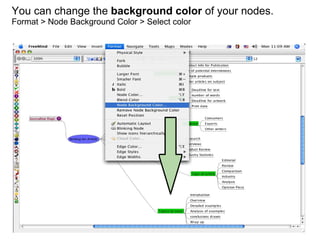
You can change the  background color  of your nodes. Format > Node Background Color > Select color
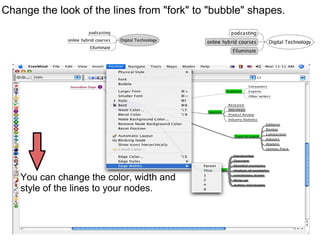
You can change the color, width and  style of the lines to your nodes. Change the look of the lines from "fork" to "bubble" shapes.
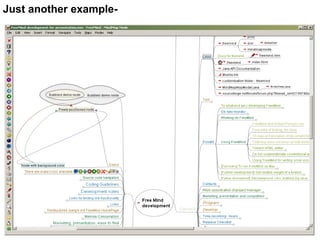
Just another example-
Alternatives to using Freemind: Inspiration - free for 30 days View your Mind MindGenius Thinkgraph (website in french) MS Word Powerpoint
Here is a pretty good Freemind user guide that I found.    http://www.scribd.com/doc/4702175/Freemind-Software-Userguide-Mindmap It helped me do some of the basics, and it has further instructions on how to do more advanced operations. Saving Exporting Links and Hype links Pictures and more...   Good Luck!!

Freemind

  • 1.
  • 2.
    FreeMind is afree software, written in Java, licensed under GPL -GNU General Public License Wikipedia Link: http://freemind.sourceforge.net/wiki/index.php/Download
  • 3.
    Current users ofFreeMind use it for the following purposes: Keeping track of projects , including subtasks, state of subtasks and time recording Project workplace , including links to necessary files, executables, source of information and of course information Workplace for internet research using Google and other sources Essay writing and brainstorming Database -Keeping a small database of something with structure that is either very dynamic or not known in advance . Commented internet favorites or bookmarks , with colors and fonts having the meaning you want.
  • 4.
    This is a Mindmap that I made using an example from the user guide. Root "parent" node   ⇑                        ➹   Child Nodes ➸                             ➷ Menu Bar Formatting Bar
  • 5.
    Features: Fully functional following of HTML links stored in the nodes, be it www links or links to local files. Fast one-click navigation , including folding / unfolding on one click and following links on one click at the same time. Undo Smart Drag'n Drop , including the possibility to copy nodes or copy style of nodes; dragging and dropping of multiple selected nodes; dropping of texts or list of files from outside Smart copying and pasting  Export of map to HTML , with folding Built in icons   It can be easily customized and has a set of extensive features It's user friendly !  
  • 6.
    Let's get youstarted: When you open a New map ( Command N ) you will see a blank screen with a grey ellipse "node" that says New Mindmap .   Click on the "node" and begin typing, this is the "Root node." A " Child " node branches off from the " Parent " (root) node.     Go to Menu Bar> Insert> New Child Node A " Sibling " node is positioned at the same level of the reference.     -To create a sibling node below the active node press Enter         -To create a sibling node above the active node, press Shift+Enter
  • 7.
    Collapse and openinformation on a node by clicking the circle. Drag nodes into different postions: by placing your cursor at the end of a node, an ellipse will appear, click on the ellipse, then drag the node into any position. Highlighting nodes with clouds: Select the node(s) of your choice, go to Insert > Cloud.  Change the cloud color: Select the main node of the cloud, then go to Format > Cloud color > select color  
  • 8.
    You can changethe color of your text. Format > Node Color > Select color
  • 9.
    You can changethe background color of your nodes. Format > Node Background Color > Select color
  • 10.
    You can changethe color, width and  style of the lines to your nodes. Change the look of the lines from "fork" to "bubble" shapes.
  • 11.
  • 12.
    Alternatives to usingFreemind: Inspiration - free for 30 days View your Mind MindGenius Thinkgraph (website in french) MS Word Powerpoint
  • 13.
    Here is apretty good Freemind user guide that I found.    http://www.scribd.com/doc/4702175/Freemind-Software-Userguide-Mindmap It helped me do some of the basics, and it has further instructions on how to do more advanced operations. Saving Exporting Links and Hype links Pictures and more...   Good Luck!!