Computer Science
Class XI ( As per CBSE Board)
Chapter 13
Tuples
New
syllabus
2023-24
Visit : python.mykvs.in for regular updates
Tuples
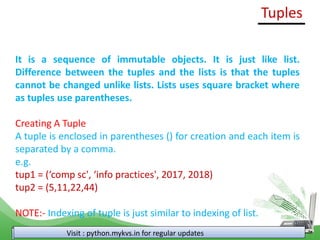
It is a sequence of immutable objects. It is just like list.
Difference between the tuples and the lists is that the tuples
cannot be changed unlike lists. Lists uses square bracket where
as tuples use parentheses.
Creating A Tuple
A tuple is enclosed in parentheses () for creation and each item is
separated by a comma.
e.g.
tup1 = (‘comp sc', ‘info practices', 2017, 2018)
tup2 = (5,11,22,44)
NOTE:- Indexing of tuple is just similar to indexing of list.
Visit : python.mykvs.in for regular updates
Accessing Values from Tuples/tuple slicing
Use the square brackets for slicing along with the
index or indices to obtain the value available at
that index.
e.g.
tup1 = ("comp sc", "info practices", 2017, 2018)
tup2 = (5,11,22,44,9,66)
print ("tup1[0]: ", tup1[0])
print ("tup2[1:5]: ", tup2[1:5])
Output
('tup1[0]: ', 'comp sc')
('tup2[1:5]: ', (11, 22, 44, 9))
Tuples
Visit : python.mykvs.in for regular updates
Iterating Through A Tuple
Element of the tuple can be accessed sequentially
using loop.
e.g.
tup = (5,11,22)
for i in range(0,len(tup)):
print(tup[i])
Output
5
11
22
Tuples
Visit : python.mykvs.in for regular updates
Updating Tuples
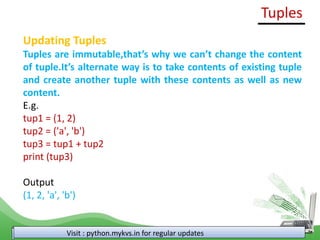
Tuples are immutable,that’s why we can’t change the content
of tuple.It’s alternate way is to take contents of existing tuple
and create another tuple with these contents as well as new
content.
E.g.
tup1 = (1, 2)
tup2 = ('a', 'b')
tup3 = tup1 + tup2
print (tup3)
Output
(1, 2, 'a', 'b')
Tuples
Visit : python.mykvs.in for regular updates
Delete Tuple Elements
Direct deletion of tuple element is not possible but
shifting of required content after discard of
unwanted content to another tuple.
e.g.
tup1 = (1, 2,3)
tup3 = tup1[0:1] + tup1[2:]
print (tup3)
Output
(1, 3)
NOTE : Entire tuple can be deleted using del statement.
e.g. del tup1
Tuples
Visit : python.mykvs.in for regular updates
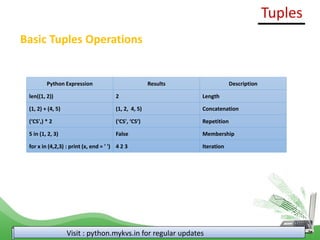
Basic Tuples Operations
Python Expression Results Description
len((1, 2)) 2 Length
(1, 2) + (4, 5) (1, 2, 4, 5) Concatenation
(‘CS',) * 2 (‘CS', ‘CS‘) Repetition
5 in (1, 2, 3) False Membership
for x in (4,2,3) : print (x, end = ' ') 4 2 3 Iteration
Tuples
Visit : python.mykvs.in for regular updates
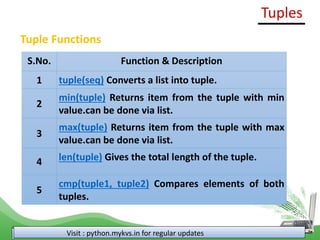
Tuple Functions
S.No. Function & Description
1 tuple(seq) Converts a list into tuple.
2
min(tuple) Returns item from the tuple with min
value.can be done via list.
3
max(tuple) Returns item from the tuple with max
value.can be done via list.
4 len(tuple) Gives the total length of the tuple.
5
cmp(tuple1, tuple2) Compares elements of both
tuples.
Tuples
Visit : python.mykvs.in for regular updates
Tuple Functions
S.No. Function & Description
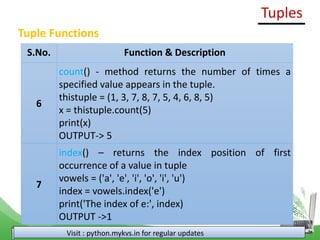
6
count() - method returns the number of times a
specified value appears in the tuple.
thistuple = (1, 3, 7, 8, 7, 5, 4, 6, 8, 5)
x = thistuple.count(5)
print(x)
OUTPUT-> 5
7
index() – returns the index position of first
occurrence of a value in tuple
vowels = ('a', 'e', 'i', 'o', 'i', 'u')
index = vowels.index('e')
print('The index of e:', index)
OUTPUT ->1
Tuples
Visit : python.mykvs.in for regular updates
Tuple Functions
S.No. Function & Description
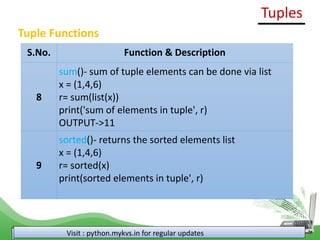
8
sum()- sum of tuple elements can be done via list
x = (1,4,6)
r= sum(list(x))
print('sum of elements in tuple', r)
OUTPUT->11
9
sorted()- returns the sorted elements list
x = (1,4,6)
r= sorted(x)
print(sorted elements in tuple', r)
Tuples
Visit : python.mykvs.in for regular updates
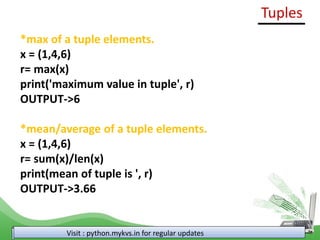
*max of a tuple elements.
x = (1,4,6)
r= max(x)
print('maximum value in tuple', r)
OUTPUT->6
*mean/average of a tuple elements.
x = (1,4,6)
r= sum(x)/len(x)
print(mean of tuple is ', r)
OUTPUT->3.66
Tuples
Visit : python.mykvs.in for regular updates
Linear Search in Tuple
Tuple= (1, 2, 3, 4, 5, 6)
n = 5
B=False
for i in range(len(Tuple)):
if Tuple[i] == n:
B=True
if (B==True):
print("Found")
else:
print("Not Found")
Tuples
Visit : python.mykvs.in for regular updates
Counting the frequency of elements in a tuple
x = (1, 2, 8, 3, 2, 2, 2, 5, 1);
arr=list(x)
#Array fr will store frequencies of element
fr = [None] * len(arr);
visited = -1;
for i in range(0, len(arr)):
count = 1;
for j in range(i+1, len(arr)):
if(arr[i] == arr[j]):
count = count + 1;
#To avoid counting same element again
fr[j] = visited;
if(fr[i] != visited):
fr[i] = count;
#Displays the frequency of each element present in array
print("---------------------");
print(" Element | Frequency");
print("---------------------");
for i in range(0, len(fr)):
if(fr[i] != visited):
print(" " + str(arr[i]) + " | " + str(fr[i]));
print("---------------------");
Tuples
Visit : python.mykvs.in for regular updates
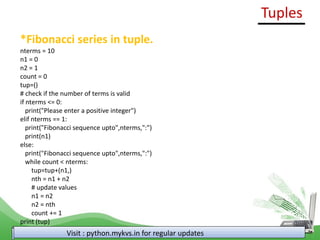
*Fibonacci series in tuple.
nterms = 10
n1 = 0
n2 = 1
count = 0
tup=()
# check if the number of terms is valid
if nterms <= 0:
print("Please enter a positive integer")
elif nterms == 1:
print("Fibonacci sequence upto",nterms,":")
print(n1)
else:
print("Fibonacci sequence upto",nterms,":")
while count < nterms:
tup=tup+(n1,)
nth = n1 + n2
# update values
n1 = n2
n2 = nth
count += 1
print (tup)
Tuples
Visit : python.mykvs.in for regular updates

tuples chapter (1).pdfhsuenduneudhhsbhhd

  • 1.
    Computer Science Class XI( As per CBSE Board) Chapter 13 Tuples New syllabus 2023-24 Visit : python.mykvs.in for regular updates
  • 2.
    Tuples It is asequence of immutable objects. It is just like list. Difference between the tuples and the lists is that the tuples cannot be changed unlike lists. Lists uses square bracket where as tuples use parentheses. Creating A Tuple A tuple is enclosed in parentheses () for creation and each item is separated by a comma. e.g. tup1 = (‘comp sc', ‘info practices', 2017, 2018) tup2 = (5,11,22,44) NOTE:- Indexing of tuple is just similar to indexing of list. Visit : python.mykvs.in for regular updates
  • 3.
    Accessing Values fromTuples/tuple slicing Use the square brackets for slicing along with the index or indices to obtain the value available at that index. e.g. tup1 = ("comp sc", "info practices", 2017, 2018) tup2 = (5,11,22,44,9,66) print ("tup1[0]: ", tup1[0]) print ("tup2[1:5]: ", tup2[1:5]) Output ('tup1[0]: ', 'comp sc') ('tup2[1:5]: ', (11, 22, 44, 9)) Tuples Visit : python.mykvs.in for regular updates
  • 4.
    Iterating Through ATuple Element of the tuple can be accessed sequentially using loop. e.g. tup = (5,11,22) for i in range(0,len(tup)): print(tup[i]) Output 5 11 22 Tuples Visit : python.mykvs.in for regular updates
  • 5.
    Updating Tuples Tuples areimmutable,that’s why we can’t change the content of tuple.It’s alternate way is to take contents of existing tuple and create another tuple with these contents as well as new content. E.g. tup1 = (1, 2) tup2 = ('a', 'b') tup3 = tup1 + tup2 print (tup3) Output (1, 2, 'a', 'b') Tuples Visit : python.mykvs.in for regular updates
  • 6.
    Delete Tuple Elements Directdeletion of tuple element is not possible but shifting of required content after discard of unwanted content to another tuple. e.g. tup1 = (1, 2,3) tup3 = tup1[0:1] + tup1[2:] print (tup3) Output (1, 3) NOTE : Entire tuple can be deleted using del statement. e.g. del tup1 Tuples Visit : python.mykvs.in for regular updates
  • 7.
    Basic Tuples Operations PythonExpression Results Description len((1, 2)) 2 Length (1, 2) + (4, 5) (1, 2, 4, 5) Concatenation (‘CS',) * 2 (‘CS', ‘CS‘) Repetition 5 in (1, 2, 3) False Membership for x in (4,2,3) : print (x, end = ' ') 4 2 3 Iteration Tuples Visit : python.mykvs.in for regular updates
  • 8.
    Tuple Functions S.No. Function& Description 1 tuple(seq) Converts a list into tuple. 2 min(tuple) Returns item from the tuple with min value.can be done via list. 3 max(tuple) Returns item from the tuple with max value.can be done via list. 4 len(tuple) Gives the total length of the tuple. 5 cmp(tuple1, tuple2) Compares elements of both tuples. Tuples Visit : python.mykvs.in for regular updates
  • 9.
    Tuple Functions S.No. Function& Description 6 count() - method returns the number of times a specified value appears in the tuple. thistuple = (1, 3, 7, 8, 7, 5, 4, 6, 8, 5) x = thistuple.count(5) print(x) OUTPUT-> 5 7 index() – returns the index position of first occurrence of a value in tuple vowels = ('a', 'e', 'i', 'o', 'i', 'u') index = vowels.index('e') print('The index of e:', index) OUTPUT ->1 Tuples Visit : python.mykvs.in for regular updates
  • 10.
    Tuple Functions S.No. Function& Description 8 sum()- sum of tuple elements can be done via list x = (1,4,6) r= sum(list(x)) print('sum of elements in tuple', r) OUTPUT->11 9 sorted()- returns the sorted elements list x = (1,4,6) r= sorted(x) print(sorted elements in tuple', r) Tuples Visit : python.mykvs.in for regular updates
  • 11.
    *max of atuple elements. x = (1,4,6) r= max(x) print('maximum value in tuple', r) OUTPUT->6 *mean/average of a tuple elements. x = (1,4,6) r= sum(x)/len(x) print(mean of tuple is ', r) OUTPUT->3.66 Tuples Visit : python.mykvs.in for regular updates
  • 12.
    Linear Search inTuple Tuple= (1, 2, 3, 4, 5, 6) n = 5 B=False for i in range(len(Tuple)): if Tuple[i] == n: B=True if (B==True): print("Found") else: print("Not Found") Tuples Visit : python.mykvs.in for regular updates
  • 13.
    Counting the frequencyof elements in a tuple x = (1, 2, 8, 3, 2, 2, 2, 5, 1); arr=list(x) #Array fr will store frequencies of element fr = [None] * len(arr); visited = -1; for i in range(0, len(arr)): count = 1; for j in range(i+1, len(arr)): if(arr[i] == arr[j]): count = count + 1; #To avoid counting same element again fr[j] = visited; if(fr[i] != visited): fr[i] = count; #Displays the frequency of each element present in array print("---------------------"); print(" Element | Frequency"); print("---------------------"); for i in range(0, len(fr)): if(fr[i] != visited): print(" " + str(arr[i]) + " | " + str(fr[i])); print("---------------------"); Tuples Visit : python.mykvs.in for regular updates
  • 14.
    *Fibonacci series intuple. nterms = 10 n1 = 0 n2 = 1 count = 0 tup=() # check if the number of terms is valid if nterms <= 0: print("Please enter a positive integer") elif nterms == 1: print("Fibonacci sequence upto",nterms,":") print(n1) else: print("Fibonacci sequence upto",nterms,":") while count < nterms: tup=tup+(n1,) nth = n1 + n2 # update values n1 = n2 n2 = nth count += 1 print (tup) Tuples Visit : python.mykvs.in for regular updates