Group 14
Devni de Silva - 140105N
Isuru Dharmadasa - 140120F
Shan Pramuditha - 140474R
Nipuna Sudharaka - 140605X
Sithija Thewahettige - 140623B
CS 4242 Continuous Assessment
Evaluation and Redesigning of Trello
Introduction
● Trello is a web-based project management application
● Now owned by Atlassian Corporation Plc
● By 2017, 25 million signups
● 1.1 million daily active users
● It has noticeable inconveniences
Basic Elements
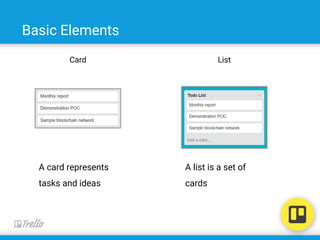
Card List
A card represents
tasks and ideas
A list is a set of
cards
Basic Elements
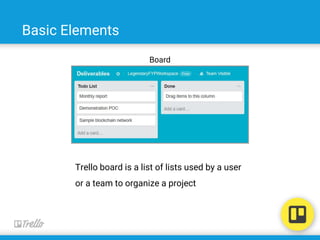
Board
Trello board is a list of lists used by a user
or a team to organize a project
Ben Shneiderman
● A distinguished Professor in the field of Computer Science,
● Founding Director (1983-2000) of the Human-Computer Interaction
Laboratory (http://www.cs.umd.edu/hcil/)
● A pioneering contributor to human-computer interaction and information
visualization.
8 Golden Rules
Shnedierman and Plaisant’s (2010) list of eight golden rules in Designing the
User Interface
1. Strive for consistency
2. Cater to universal usability
3. Offer informative feedback
4. Design dialogues to yield closure
5. Prevent errors
6. Permit easy reversal of actions
7. Support internal locus of control
8. Reduce short-term memory load
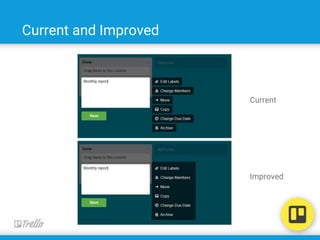
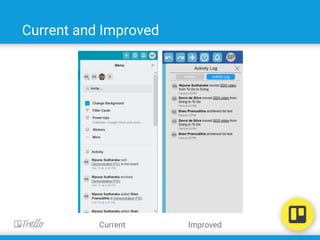
1. Strive for Consistency
Consistency of the interface in actions, prompts, menus, pop-ups,
colour, fonts etc.
● Good
○ Consistency in popup structure and design
○ Maintained good colour consistency
○ Consistency in layouts
● Bad
○ Inconsistency of menus
○ Board sidebar is a combination of menu and the log
Current and Improved
Current
Improved
Current and Improved
Current Improved
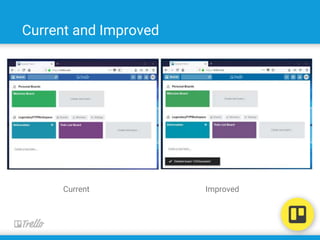
2. Cater to universal usability
Universal usability is the ability for a large group of people to use an application
independently on the abilities and disabilities, language issues, learning issues,
etc. of the people
● Good
○ ability to help the colorblind people in selecting colours for boards
○ User interface in different languages
● Bad
○ User interface is not easy to learn Ex: settings of components
Current and Improved
Current Improved
Feedback
3. Offer informative feedback
Providing the user some information about the actions done, processes
currently happening, the errors that occur, etc.
● Good
○ Boards, icons or cards getting highlighted when hovered.
○ Highlighting and placeholder shown when a card is being moved.
○ Giving feedback on the search results.
○ Maintaining an activity log
● Bad
○ No immediate feedback after an action.
○ Tool tips are too verbose.
○ Active status of drop down buttons are not shown.
Current and Improved
Current Improved
Feedback
Current and Improved
Current Improved
Feedback
Current and Improved
Current Improved
Feedback
4. Design dialogues to yield closure
Actions are organized with a beginning, middle and end. Informative feedback
is given at the completion of a group of actions.
● Bad
○ No informative feedback at the completion of the sign up process.
Current and Improved
Improved
Feedback
5. Prevent Errors
Systems should be designed in such a way so the user cannot make a serious
error. If an error is made, the system should be able to detect the error and
offer simple, comprehensible mechanisms for handling the error.
● Good
○ Notifying when a network error occurs
● Bad
○ Actions done offline are not synced when the network connection is
restored.
Current and Improved
Current Improved
Feedback
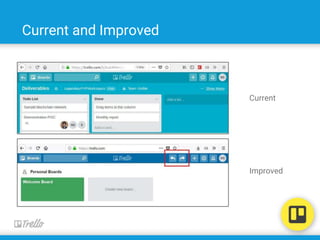
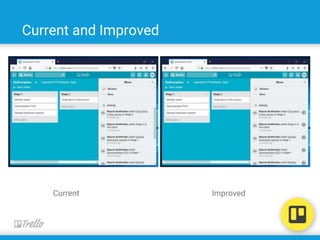
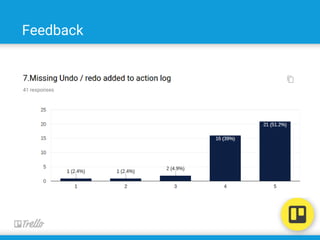
6. Permit easy reversal of actions
Actions done by the user are reversible relieving the user’s anxiety and
encouraging him to explore the application.
● Bad
○ No undo or redo functionality
○ Actions shown in the activity log are not reversible
Current and Improved
Current
Improved
Feedback
Current and Improved
Current Improved
Feedback
7. Support internal locus of control
Allow your users to be the initiators of actions. Give users the sense that they
are in full control of events occurring in the digital space.
● Good
○ Each component have its own action list Ex: workspace, board, list
and card
8. Reduce short term memory load
Facilitating recognition rather recalling short term memory.
● Good
○ Showing all the boards in separate groups in the home page
○ Boards are shown with the same chosen theme throughout the
application
○ Minimizing the number of patterns represented by different colours
in the colour blind friendly mode.
Thank you

Trello User interface evaluation - Human Computer Interactions

  • 1.
    Group 14 Devni deSilva - 140105N Isuru Dharmadasa - 140120F Shan Pramuditha - 140474R Nipuna Sudharaka - 140605X Sithija Thewahettige - 140623B CS 4242 Continuous Assessment Evaluation and Redesigning of Trello
  • 2.
    Introduction ● Trello isa web-based project management application ● Now owned by Atlassian Corporation Plc ● By 2017, 25 million signups ● 1.1 million daily active users ● It has noticeable inconveniences
  • 3.
    Basic Elements Card List Acard represents tasks and ideas A list is a set of cards
  • 4.
    Basic Elements Board Trello boardis a list of lists used by a user or a team to organize a project
  • 5.
    Ben Shneiderman ● Adistinguished Professor in the field of Computer Science, ● Founding Director (1983-2000) of the Human-Computer Interaction Laboratory (http://www.cs.umd.edu/hcil/) ● A pioneering contributor to human-computer interaction and information visualization.
  • 6.
    8 Golden Rules Shnediermanand Plaisant’s (2010) list of eight golden rules in Designing the User Interface 1. Strive for consistency 2. Cater to universal usability 3. Offer informative feedback 4. Design dialogues to yield closure 5. Prevent errors 6. Permit easy reversal of actions 7. Support internal locus of control 8. Reduce short-term memory load
  • 7.
    1. Strive forConsistency Consistency of the interface in actions, prompts, menus, pop-ups, colour, fonts etc. ● Good ○ Consistency in popup structure and design ○ Maintained good colour consistency ○ Consistency in layouts ● Bad ○ Inconsistency of menus ○ Board sidebar is a combination of menu and the log
  • 8.
  • 9.
  • 10.
    2. Cater touniversal usability Universal usability is the ability for a large group of people to use an application independently on the abilities and disabilities, language issues, learning issues, etc. of the people ● Good ○ ability to help the colorblind people in selecting colours for boards ○ User interface in different languages ● Bad ○ User interface is not easy to learn Ex: settings of components
  • 11.
  • 12.
  • 13.
    3. Offer informativefeedback Providing the user some information about the actions done, processes currently happening, the errors that occur, etc. ● Good ○ Boards, icons or cards getting highlighted when hovered. ○ Highlighting and placeholder shown when a card is being moved. ○ Giving feedback on the search results. ○ Maintaining an activity log ● Bad ○ No immediate feedback after an action. ○ Tool tips are too verbose. ○ Active status of drop down buttons are not shown.
  • 14.
  • 15.
  • 16.
  • 17.
  • 18.
  • 19.
  • 20.
    4. Design dialoguesto yield closure Actions are organized with a beginning, middle and end. Informative feedback is given at the completion of a group of actions. ● Bad ○ No informative feedback at the completion of the sign up process.
  • 21.
  • 22.
  • 23.
    5. Prevent Errors Systemsshould be designed in such a way so the user cannot make a serious error. If an error is made, the system should be able to detect the error and offer simple, comprehensible mechanisms for handling the error. ● Good ○ Notifying when a network error occurs ● Bad ○ Actions done offline are not synced when the network connection is restored.
  • 24.
  • 25.
  • 26.
    6. Permit easyreversal of actions Actions done by the user are reversible relieving the user’s anxiety and encouraging him to explore the application. ● Bad ○ No undo or redo functionality ○ Actions shown in the activity log are not reversible
  • 27.
  • 28.
  • 29.
  • 30.
  • 31.
    7. Support internallocus of control Allow your users to be the initiators of actions. Give users the sense that they are in full control of events occurring in the digital space. ● Good ○ Each component have its own action list Ex: workspace, board, list and card
  • 32.
    8. Reduce shortterm memory load Facilitating recognition rather recalling short term memory. ● Good ○ Showing all the boards in separate groups in the home page ○ Boards are shown with the same chosen theme throughout the application ○ Minimizing the number of patterns represented by different colours in the colour blind friendly mode.
  • 33.