対策 - vmstat_update()
•
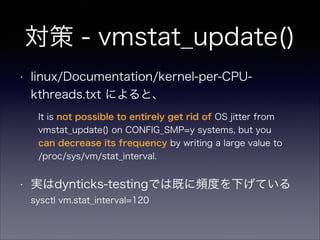
linux/Documentation/kernel-per-CPUkthreads.txtによると、
It is not possible to entirely get rid of OS jitter from
vmstat_update() on CONFIG_SMP=y systems, but you
can decrease its frequency by writing a large value to
/proc/sys/vm/stat_interval.
•
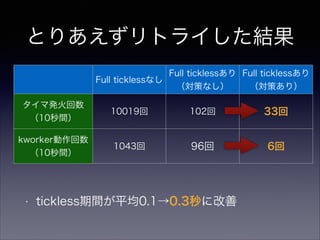
実はdynticks-testingでは既に頻度を下げている
sysctl vm.stat_interval=120






![結果
#
#
!
!
!
!
!
!
!
!
TASK-PID
| |
rcuos/0-18
user_loop-2412
CPU#
|
[001]
[001]
TIMESTAMP FUNCTION
|
|
1233.121545: tick_stop: success=yes msg=
1233.122098: tick_stop: success=no msg=more than 1 task in runqueue
sleep-2413
sleep-2413
sleep-2413
[001]
[001]
[001]
1233.122419: hrtimer_expire_entry: hrtimer=ffff88042f44d900 function=tick_sched_timer now=1232550001205
1233.122429: tick_stop: success=yes msg=
1233.122721: tick_stop: success=no msg=more than 1 task in runqueue
sleep-2413
[001]
1233.122724: tick_stop: success=no msg=more than 1 task in runqueue
user_loop-2412
user_loop-2412
user_loop-2412
[001]
[001]
[001]
1233.123419: hrtimer_expire_entry: hrtimer=ffff88042f44d900 function=tick_sched_timer now=1232551000974
1233.123431: tick_stop: success=yes msg=
1233.123435: tick_stop: success=no msg=more than 1 task in runqueue
user_loop-2412
[001]
1233.123436: tick_stop: success=no msg=more than 1 task in runqueue
user_loop-2412
user_loop-2412
user_loop-2412
[001]
[001]
[001]
1233.123439: tick_stop: success=yes msg=
1233.351523: hrtimer_expire_entry: hrtimer=ffff88042f44d900 function=tick_sched_timer now=1232779000584
1233.351531: tick_stop: success=no msg=more than 1 task in runqueue
user_loop-2412
[001]
1233.351544: tick_stop: success=no msg=more than 1 task in runqueue
kworker/1:2-2261
user_loop-2412
user_loop-2412
user_loop-2412
user_loop-2412
[001]
[001]
[001]
[001]
[001]
1233.351548:
1233.352523:
1233.352526:
1233.435561:
1233.435564:
workqueue_execute_start: work struct ffff88042f44fac8: function od_dbs_timer
hrtimer_expire_entry: hrtimer=ffff88042f44d900 function=tick_sched_timer now=1232780000291
tick_stop: success=yes msg=
hrtimer_expire_entry: hrtimer=ffff88042f44d900 function=tick_sched_timer now=1232863000250
tick_stop: success=no msg=more than 1 task in runqueue
以下、500行(full tickless無効の場合10000行)くらい続く. . .](https://image.slidesharecdn.com/toyookakernelvmfull-tickless-131208022738-phpapp01/85/Linux-Full-tickless-9-320.jpg)

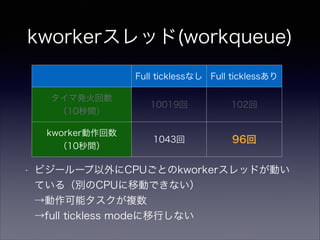
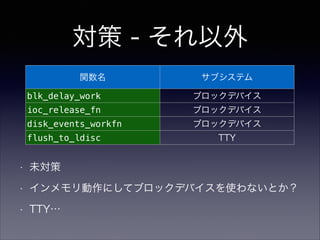
![kworkerスレッドが実行していたもの
関数名
od_dbs_timer
output_poll_execute
[drm_kms_helper]
vmstat_update
サブシステム
CPUfreq
(CPU frequency scaling)
DRM
(Direct Rendering Manager)
メモリ管理
blk_delay_work
ブロックデバイス
ioc_release_fn
ブロックデバイス
disk_events_workfn
ブロックデバイス
flush_to_ldisc
TTY](https://image.slidesharecdn.com/toyookakernelvmfull-tickless-131208022738-phpapp01/85/Linux-Full-tickless-12-320.jpg)