Top 10 Slide Tips
Article by Garr Reynolds
Source: http://www.garrreynolds.com/preso-tips/design/
Simplicity
is key
Source: Linus Bohman - http://www.flickr.com/photos/bohman/210977249
LIMIT TEXT
Source: Eugene Zemlyanskiy - http://www.flickr.com/photos/pictureperfectpose/76138988
Limit transitions
Source: Metropolitan Police - http://www.flickr.com/photos/39990326@N07/4502423001
Use high quality
images
Source: Vincent Garcia - http://www.flickr.com/photos/82316360@N00/5627749757
TEMPLATES
Source: mslavick - http://www.flickr.com/photos/30166666@N03/3827043121
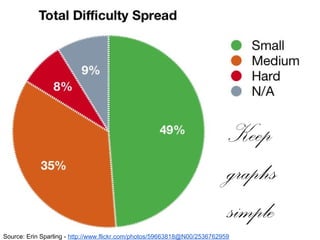
Keep
graphs
simple
Source: Erin Sparling - http://www.flickr.com/photos/59663818@N00/2536762959
USE COLOR WELL
Source: vtdainfo - http://www.flickr.com/photos/43732462@N06/4318987719
Choose your fonts wisely
Source: Peter Miller - http://www.flickr.com/photos/48227962@N04/7346858592
USE
VIDEO
OR
AUDIOSource: Evan Forester - http://www.flickr.com/photos/68510596@N03/6732501771
Organization is key
Source: www.GlynLowe.com - http://www.flickr.com/photos/65354164@N02/8394384671

Top 10 Slide Tips

Editor's Notes

  • #3 You, the presenter, are the main attraction. Your slides should have plenty of negative, or white/blank space. Eliminate clutter!
  • #4 Eliminating text causes the audience to focus on you instead of the writing on your slides. The less text, the better.
  • #5 Animations and transitions are boring and tedious for the audience. Use as few as possible.
  • #6 High quality images keep the audience’s attention and focus. Clipart and things like that are boring and not visually appealing.
  • #7 The audience has seen the same PowerPoint templates over and over again. Do NOT use them. Be creative.
  • #8 Use the appropriate type of chart for the information you are displaying, and make sure the graph is simple and easy to read and understand.
  • #9 Colors influence the attitude and emotion of the audience. Make sure you understand the basics of color and impact you want it to have.
  • #10 Use sans-serif fonts for presentations, and save the fancy serif fonts for essays and other documents with a great deal of text.
  • #11 Using video clips where appropriate can help the audience to remember and learn from your presentation.
  • #12 Organizing your slides in a logical manner is key for your audience to get the most out of your presentation! Keep it natural and organized.