Top 10 Security Risks for
Mobile Backend Developers
22.8.2016 Jiří Danihelka
1. SQL Injection
Recommendations:
 Always use a database library
that is immune to SQL
injections (e.g. Entity
Framework).
 Do not create SQL command
by string concatenations. Do
not rely just on character
encoding.
2
2. Cross Site Scripting and JavaScript Injection
Recommendations:
 Always HTML-encode user strings
before putting them to the web page.
ASP.Net does this automatically
unless you use @Html.Raw(...);
function or a similar one.
 Treat page parameters (e.g. GET
parameters, cookies, ...) as a user
input.
 Do not allow '<' and '>' in user
inputs. (Administrators that create
content may be an exception.)
 Users should not write HTML markup
- use a different markup for them e.g.
BB Code. (Administrators that create
content may be an exception.)
3
3. Broken Authentication and Session Management
Recommendations:
 Do not put session
authentication token into
URL, put it into cookies.
 Users with disabled cookies
should not have access to
sites that need
authentication.
4
 Passwords or session tokens
are stored in insecure places
like:
 URL parameters
 Application logs
 Sharing URL on social
networks
 Log: Error function
‘LoginUser’ failed – the
arguments were Login=‘John’,
Password=‘helllo’
4. Insecure Direct Object References
Recommendations:
 Always check the permission
user when executing
requests. Just hiding the
unavailable options is not
secure enough.
 Optionally use ids of your
objects that are hard to guess
and iterate - e.g. GUID values.
5
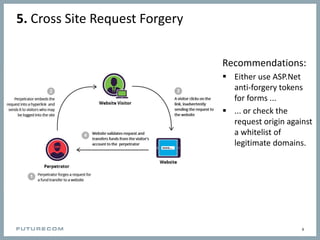
5. Cross Site Request Forgery
Recommendations:
 Either use ASP.Net
anti-forgery tokens
for forms ...
 ... or check the
request origin against
a whitelist of
legitimate domains.
6
6. Security Misconfiguration
Recommendations:
 This topic is very broad and it
is hard to give a general
recommendation.
 Check your website
configuration carefully. Pay
attention to settings related
to security (e.g. session
timeout).
7
 Change default passwords
 Do not store production
credentials in the repository
 Use different credentials in
Dev and Live envoroments
7. Insecure Cryptographic Storage
Recommendations:
 Store passwords in an
encrypted form (not in
plaintext).
 Use one-way encryption of
passwords using hashing.
 Use policies for password
length and complexity to
mitigate brute-force attacks.
 Use hashing with a random
seed to avoid rainbow table
attacks.
8
 Storage of:
 Passwords
 Credit card numbers
 Bank account details
 Any sensitive data
 Additional level of protection
when the database leaks
8. Failure to Restrict URL Access
Recommendations:
 Always check user permission
when accessing a restricted
page.
 Do not just hide links to the
pages, the user can manually
type the path.
9
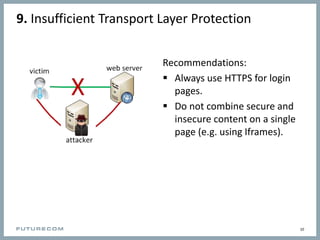
9. Insufficient Transport Layer Protection
Recommendations:
 Always use HTTPS for login
pages.
 Do not combine secure and
insecure content on a single
page (e.g. using Iframes).
10
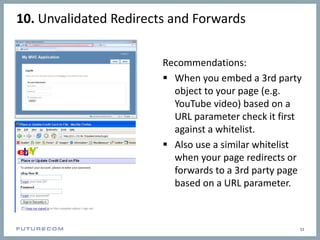
10. Unvalidated Redirects and Forwards
Recommendations:
 When you embed a 3rd party
object to your page (e.g.
YouTube video) based on a
URL parameter check it first
against a whitelist.
 Also use a similar whitelist
when your page redirects or
forwards to a 3rd party page
based on a URL parameter.
11
Security Checklist
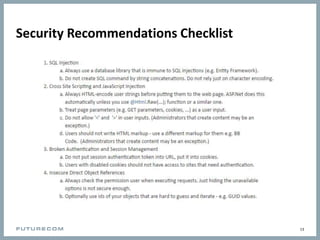
Security Recommendations Checklist
13

Top 10 security risks for mobile backend developers

  • 1.
    Top 10 SecurityRisks for Mobile Backend Developers 22.8.2016 Jiří Danihelka
  • 2.
    1. SQL Injection Recommendations: Always use a database library that is immune to SQL injections (e.g. Entity Framework).  Do not create SQL command by string concatenations. Do not rely just on character encoding. 2
  • 3.
    2. Cross SiteScripting and JavaScript Injection Recommendations:  Always HTML-encode user strings before putting them to the web page. ASP.Net does this automatically unless you use @Html.Raw(...); function or a similar one.  Treat page parameters (e.g. GET parameters, cookies, ...) as a user input.  Do not allow '<' and '>' in user inputs. (Administrators that create content may be an exception.)  Users should not write HTML markup - use a different markup for them e.g. BB Code. (Administrators that create content may be an exception.) 3
  • 4.
    3. Broken Authenticationand Session Management Recommendations:  Do not put session authentication token into URL, put it into cookies.  Users with disabled cookies should not have access to sites that need authentication. 4  Passwords or session tokens are stored in insecure places like:  URL parameters  Application logs  Sharing URL on social networks  Log: Error function ‘LoginUser’ failed – the arguments were Login=‘John’, Password=‘helllo’
  • 5.
    4. Insecure DirectObject References Recommendations:  Always check the permission user when executing requests. Just hiding the unavailable options is not secure enough.  Optionally use ids of your objects that are hard to guess and iterate - e.g. GUID values. 5
  • 6.
    5. Cross SiteRequest Forgery Recommendations:  Either use ASP.Net anti-forgery tokens for forms ...  ... or check the request origin against a whitelist of legitimate domains. 6
  • 7.
    6. Security Misconfiguration Recommendations: This topic is very broad and it is hard to give a general recommendation.  Check your website configuration carefully. Pay attention to settings related to security (e.g. session timeout). 7  Change default passwords  Do not store production credentials in the repository  Use different credentials in Dev and Live envoroments
  • 8.
    7. Insecure CryptographicStorage Recommendations:  Store passwords in an encrypted form (not in plaintext).  Use one-way encryption of passwords using hashing.  Use policies for password length and complexity to mitigate brute-force attacks.  Use hashing with a random seed to avoid rainbow table attacks. 8  Storage of:  Passwords  Credit card numbers  Bank account details  Any sensitive data  Additional level of protection when the database leaks
  • 9.
    8. Failure toRestrict URL Access Recommendations:  Always check user permission when accessing a restricted page.  Do not just hide links to the pages, the user can manually type the path. 9
  • 10.
    9. Insufficient TransportLayer Protection Recommendations:  Always use HTTPS for login pages.  Do not combine secure and insecure content on a single page (e.g. using Iframes). 10
  • 11.
    10. Unvalidated Redirectsand Forwards Recommendations:  When you embed a 3rd party object to your page (e.g. YouTube video) based on a URL parameter check it first against a whitelist.  Also use a similar whitelist when your page redirects or forwards to a 3rd party page based on a URL parameter. 11
  • 12.
  • 13.