Speedtest: Benchmark Your Apache
Kafka
01. Introduction
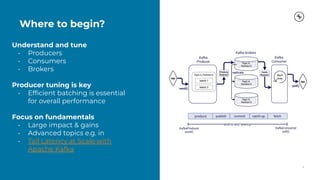
Understand and tune
• Producers
• Consumers
• Brokers
Producer tuning is key
• Efficient batching is essential
for overall performance
Focus on fundamentals
• Large impact & gains
• Advanced topics e.g. in
• Tail Latency at Scale with
Apache Kafka
Where to begin?
3
Service goals and
tradeoffs
4
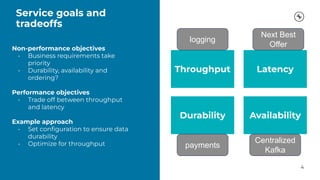
Non-performance objectives
• Business requirements take
priority
• Durability, availability and
ordering?
Performance objectives
• Trade off between throughput
and latency
Example approach
• Set configuration to ensure data
durability
• Optimize for throughput
Throughput Latency
Availability
Durability
payments
logging
Next Best
Offer
Centralized
Kafka
Agenda
5
01. Introduction
Setting the scene & review of relevant terminology
02. Producers
Deep dive into producer internals.
Why is producer behavior key for cluster performance?
03. Consumers
Understand fetching and consumer group behavior.
04. Brokers, Zookeepers and Topics
How are requests handled? Why does Zookeeper matter?
05. Optimising and Tuning Client Applications
Key parameters to consider for different service goals.
06. Summary
Summary and outlook.
Identify your
service goal
Throughput, latency,
durability, or availability
Understand
Kafka
internals
Producer, Consumer
and Broker behavior
Configure
cluster and
clients
Ensure service goals are
met
Benchmark,
monitor, and
tune
Iterative procedure to
drive performance
It is a journey...
02. Producers
Producer
8
acks=1
enable.idempotence=false
max.request.size=1MB
retries=MAX_INT
delivery.timeout.ms=2min
max.in.flight.requests.
per.connection=5
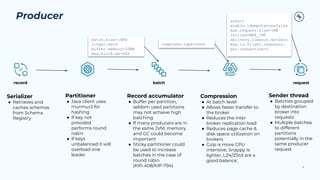
Serializer
● Retrieves and
caches schemas
from Schema
Registry
Partitioner
● Java client uses
murmur2 for
hashing
● If key not
provided
performs round
robin
● If keys
unbalanced it will
overload one
leader
Sender thread
● Batches grouped
by destination
broker into
requests
● Multiple batches
to different
partitions
potentially in the
same producer
request
Record accumulator
● Buffer per partition,
seldom used partitions
may not achieve high
batching
● If many producers are in
the same JVM, memory
and GC could become
important
● Sticky partitioner could
be used to increase
batches in the case of
round robin
(KIP-408/KIP-794)
Compression
● At batch level
● Allows faster transfer to
the broker
● Reduces the inter
broker replication load
● Reduces page cache &
disk space utilization on
brokers
● Gzip is more CPU
intensive, Snappy is
lighter, LZ4/ZStd are a
good balance*
compress.type=none
batch.size=16KB
buffer.memory=32MB
max.block.ms=60s
record batch request
batch.size=16KB
linger.ms=0
buffer.memory=32MB
max.block.ms=60s
compress.type=none
Batching is key
to overall performance
9
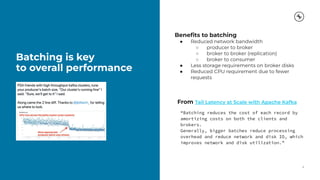
Benefits to batching
● Reduced network bandwidth
○ producer to broker
○ broker to broker (replication)
○ broker to consumer
● Less storage requirements on broker disks
● Reduced CPU requirement due to fewer
requests
From Tail Latency at Scale with Apache Kafka
“Batching reduces the cost of each record by
amortizing costs on both the clients and
brokers.
Generally, bigger batches reduce processing
overhead and reduce network and disk IO, which
improves network and disk utilization.”
Start the demo
environment
10
in docker-compose (on my mac)
1 * zookeeper
5 * brokers
1 * Squid proxy (sends JMX metrics to Health+)
Not starting:
schema registry
connect
ksqlDB
REST Proxy
Confluent Control Center
Copyright 2021, Confluent, Inc. All rights reserved. This document may not be reproduced in any manner without the express written permission of Confluent, Inc. 11
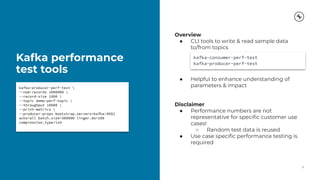
Kafka performance
test tools
12
kafka-producer-perf-test 
--num-records 1000000 
--record-size 1000 
--topic demo-perf-topic 
--throughput 10000 
--print-metrics 
--producer-props bootstrap.servers=kafka:9092
acks=all batch.size=300000 linger.ms=100
compression.type=lz4
Overview
● CLI tools to write & read sample data
to/from topics
● Helpful to enhance understanding of
parameters & impact
Disclaimer
● Performance numbers are not
representative for specific customer use
cases!
○ Random test data is reused
● Use case specific performance testing is
required
kafka-consumer-perf-test
kafka-producer-perf-test
Most significant producer performance metrics
Metric Meaning MBean
record-size-avg Avg record size kafka.producer:type=producer-metrics,client-id=([-.w]+)
batch-size-avg
Avg number of bytes sent per partition
per-request
kafka.producer:type=producer-metrics,client-id=([-.w]+)
bufferpool-wait-ratio
Faction of time an appender waits for
space allocation
kafka.producer:type=producer-metrics,client-id=([-.w]+)
compression-rate-avg
Avg compression rate for a topic.
Compressed / uncompressed batch size
kafka.producer:type=producer-topic-metrics,client-id=([-.w]+),to
pic=([-.w]+)
record-queue-time-avg
Avg time (ms) record batches spent in
the send buffer
kafka.producer:type=producer-metrics,client-id=([-.w]+)
request-latency-avg Avg request latency (ms) kafka.producer:type=producer-metrics,client-id=([-.w]+)
produce-throttle-time-avg
Avg time (ms) a request was throttled
by a broker
kafka.producer:type=producer-metrics,client-id=([-.w]+)
record-retry-rate
Avg per-second number of retried record
sends for a topic
kafka.producer:type=producer-topic-metrics,client-id=([-.w]+),to
pic=([-.w]+)
Overview Java metrics & librdkafka statistics
03. Consumers
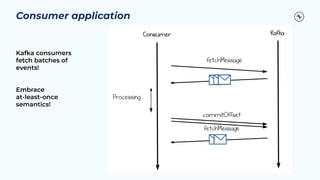
Consumer application
Kafka consumers
fetch batches of
events!
Embrace
at-least-once
semantics!
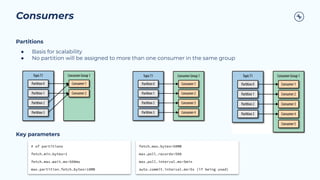
Consumers
Partitions
● Basis for scalability
● No partition will be assigned to more than one consumer in the same group
Key parameters
# of partitions
fetch.min.bytes=1
fetch.max.wait.ms=500ms
max.partition.fetch.bytes=10MB
fetch.max.bytes=50MB
max.poll.records=500
max.poll.interval.ms=5min
auto.commit.interval.ms=5s (if being used)
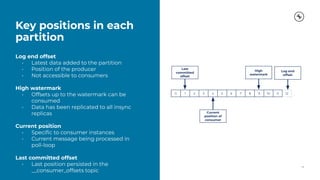
Key positions in each
partition
17
Log end offset
• Latest data added to the partition
• Position of the producer
• Not accessible to consumers
High watermark
• Offsets up to the watermark can be
consumed
• Data has been replicated to all insync
replicas
Current position
• Specific to consumer instances
• Current message being processed in
poll-loop
Last committed offset
• Last position persisted in the
__consumer_offsets topic
0 1 2 3 4 5 6 7 8 9 10 11 12
Last
committed
offset
Current
position of
consumer
High
watermark
Log end
offset
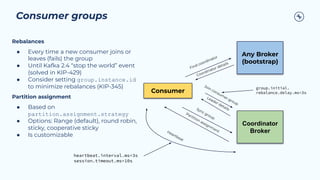
Consumer groups
Consumer
Any Broker
(bootstrap)
Coordinator
Broker
Find coordinator
Coordinator details
Join consum
er group
Leader details
Sync group
Partition assignm
ent
Rebalances
● Every time a new consumer joins or
leaves (fails) the group
● Until Kafka 2.4 “stop the world” event
(solved in KIP-429)
● Consider setting group.instance.id
to minimize rebalances (KIP-345)
Partition assignment
● Based on
partition.assignment.strategy
● Options: Range (default), round robin,
sticky, cooperative sticky
● Is customizable
Heartbeat
heartbeat.interval.ms=3s
session.timeout.ms=10s
group.initial.
rebalance.delay.ms=3s
Selected consumer performance metrics
Metric Meaning MBean
fetch-latency-avg Avg time taken for a fetch request kafka.consumer:type=consumer-fetch-manager-metrics,client-id=([-
.w]+)
fetch-size-avg Avg number of bytes fetched per request kafka.consumer:type=consumer-fetch-manager-metrics,client-id=([-
.w]+)
commit-latency-avg Avg time commit request kafka.consumer:type=consumer-coordinator-metrics,client-id=([-.w
]+)
rebalance-latency-total Total time taken for group rebalances kafka.consumer:type=consumer-coordinator-metrics,client-id=([-.
w]+)
fetch-throttle-time-avg Avg throttle time (ms) kafka.consumer:type=consumer-fetch-manager-metrics,client-id=([-
.w]+)
Overview Java metrics and librdkafka statistics
Consumer
Benchmarking
20
(1) Start with most simple test: Without any
tuning, we get extremely good results
Highlights:
● 10M messages in less than 30 seconds
● 1Gb data retrieved
● 325 Mb/s
Conclusion:
● Tuning producer is key, if it is correctly
tuned, there (can be) almost no tuning
required on consumer side
Copyright 2021, Confluent, Inc. All rights reserved. This document may not be reproduced in any manner without the express written permission of Confluent, Inc. 21
Copyright 2021, Confluent, Inc. All rights reserved. This document may not be reproduced in any manner without the express written permission of Confluent, Inc. 22
04. Brokers, Zookeepers
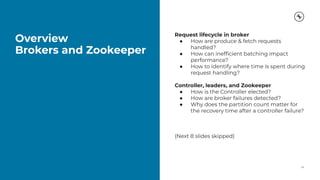
and Topics
Overview
Brokers and Zookeeper
24
Request lifecycle in broker
● How are produce & fetch requests
handled?
● How can inefficient batching impact
performance?
● How to identify where time is spent during
request handling?
Controller, leaders, and Zookeeper
● How is the Controller elected?
● How are broker failures detected?
● Why does the partition count matter for
the recovery time after a controller failure?
(Next 8 slides skipped)
04. Optimizing and Tuning
Client Applications
https://docs.confluent.io/cloud/current/client-apps/optimizing/index.html#optimizing-and-tuning
04. Recommendations &
Conclusions
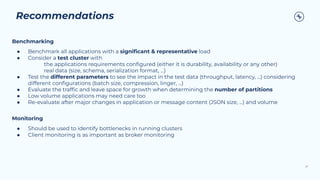
Recommendations
27
Benchmarking
● Benchmark all applications with a significant & representative load
● Consider a test cluster with
the applications requirements configured (either it is durability, availability or any other)
real data (size, schema, serialization format, ...)
● Test the different parameters to see the impact in the test data (throughput, latency, ...) considering
different configurations (batch size, compression, linger, ...)
● Evaluate the traffic and leave space for growth when determining the number of partitions
● Low volume applications may need care too
● Re-evaluate after major changes in application or message content (JSON size, ...) and volume
Monitoring
● Should be used to identify bottlenecks in running clusters
● Client monitoring is as important as broker monitoring
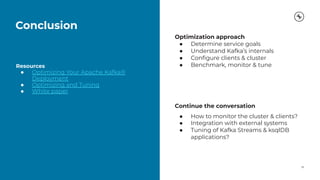
Conclusion
28
Resources
● Optimizing Your Apache Kafka®
Deployment
● Optimizing and Tuning
● White paper
Optimization approach
● Determine service goals
● Understand Kafka’s internals
● Configure clients & cluster
● Benchmark, monitor & tune
Continue the conversation
● How to monitor the cluster & clients?
● Integration with external systems
● Tuning of Kafka Streams & ksqlDB
applications?
29
https://www.confluent.io/get-started/ https://www.confluent.io/get-started/
Tokyo AK Meetup Speedtest - Share.pdf

Tokyo AK Meetup Speedtest - Share.pdf

  • 1.
  • 2.
  • 3.
    Understand and tune •Producers • Consumers • Brokers Producer tuning is key • Efficient batching is essential for overall performance Focus on fundamentals • Large impact & gains • Advanced topics e.g. in • Tail Latency at Scale with Apache Kafka Where to begin? 3
  • 4.
    Service goals and tradeoffs 4 Non-performanceobjectives • Business requirements take priority • Durability, availability and ordering? Performance objectives • Trade off between throughput and latency Example approach • Set configuration to ensure data durability • Optimize for throughput Throughput Latency Availability Durability payments logging Next Best Offer Centralized Kafka
  • 5.
    Agenda 5 01. Introduction Setting thescene & review of relevant terminology 02. Producers Deep dive into producer internals. Why is producer behavior key for cluster performance? 03. Consumers Understand fetching and consumer group behavior. 04. Brokers, Zookeepers and Topics How are requests handled? Why does Zookeeper matter? 05. Optimising and Tuning Client Applications Key parameters to consider for different service goals. 06. Summary Summary and outlook.
  • 6.
    Identify your service goal Throughput,latency, durability, or availability Understand Kafka internals Producer, Consumer and Broker behavior Configure cluster and clients Ensure service goals are met Benchmark, monitor, and tune Iterative procedure to drive performance It is a journey...
  • 7.
  • 8.
    Producer 8 acks=1 enable.idempotence=false max.request.size=1MB retries=MAX_INT delivery.timeout.ms=2min max.in.flight.requests. per.connection=5 Serializer ● Retrieves and cachesschemas from Schema Registry Partitioner ● Java client uses murmur2 for hashing ● If key not provided performs round robin ● If keys unbalanced it will overload one leader Sender thread ● Batches grouped by destination broker into requests ● Multiple batches to different partitions potentially in the same producer request Record accumulator ● Buffer per partition, seldom used partitions may not achieve high batching ● If many producers are in the same JVM, memory and GC could become important ● Sticky partitioner could be used to increase batches in the case of round robin (KIP-408/KIP-794) Compression ● At batch level ● Allows faster transfer to the broker ● Reduces the inter broker replication load ● Reduces page cache & disk space utilization on brokers ● Gzip is more CPU intensive, Snappy is lighter, LZ4/ZStd are a good balance* compress.type=none batch.size=16KB buffer.memory=32MB max.block.ms=60s record batch request batch.size=16KB linger.ms=0 buffer.memory=32MB max.block.ms=60s compress.type=none
  • 9.
    Batching is key tooverall performance 9 Benefits to batching ● Reduced network bandwidth ○ producer to broker ○ broker to broker (replication) ○ broker to consumer ● Less storage requirements on broker disks ● Reduced CPU requirement due to fewer requests From Tail Latency at Scale with Apache Kafka “Batching reduces the cost of each record by amortizing costs on both the clients and brokers. Generally, bigger batches reduce processing overhead and reduce network and disk IO, which improves network and disk utilization.”
  • 10.
    Start the demo environment 10 indocker-compose (on my mac) 1 * zookeeper 5 * brokers 1 * Squid proxy (sends JMX metrics to Health+) Not starting: schema registry connect ksqlDB REST Proxy Confluent Control Center
  • 11.
    Copyright 2021, Confluent,Inc. All rights reserved. This document may not be reproduced in any manner without the express written permission of Confluent, Inc. 11
  • 12.
    Kafka performance test tools 12 kafka-producer-perf-test --num-records 1000000 --record-size 1000 --topic demo-perf-topic --throughput 10000 --print-metrics --producer-props bootstrap.servers=kafka:9092 acks=all batch.size=300000 linger.ms=100 compression.type=lz4 Overview ● CLI tools to write & read sample data to/from topics ● Helpful to enhance understanding of parameters & impact Disclaimer ● Performance numbers are not representative for specific customer use cases! ○ Random test data is reused ● Use case specific performance testing is required kafka-consumer-perf-test kafka-producer-perf-test
  • 13.
    Most significant producerperformance metrics Metric Meaning MBean record-size-avg Avg record size kafka.producer:type=producer-metrics,client-id=([-.w]+) batch-size-avg Avg number of bytes sent per partition per-request kafka.producer:type=producer-metrics,client-id=([-.w]+) bufferpool-wait-ratio Faction of time an appender waits for space allocation kafka.producer:type=producer-metrics,client-id=([-.w]+) compression-rate-avg Avg compression rate for a topic. Compressed / uncompressed batch size kafka.producer:type=producer-topic-metrics,client-id=([-.w]+),to pic=([-.w]+) record-queue-time-avg Avg time (ms) record batches spent in the send buffer kafka.producer:type=producer-metrics,client-id=([-.w]+) request-latency-avg Avg request latency (ms) kafka.producer:type=producer-metrics,client-id=([-.w]+) produce-throttle-time-avg Avg time (ms) a request was throttled by a broker kafka.producer:type=producer-metrics,client-id=([-.w]+) record-retry-rate Avg per-second number of retried record sends for a topic kafka.producer:type=producer-topic-metrics,client-id=([-.w]+),to pic=([-.w]+) Overview Java metrics & librdkafka statistics
  • 14.
  • 15.
    Consumer application Kafka consumers fetchbatches of events! Embrace at-least-once semantics!
  • 16.
    Consumers Partitions ● Basis forscalability ● No partition will be assigned to more than one consumer in the same group Key parameters # of partitions fetch.min.bytes=1 fetch.max.wait.ms=500ms max.partition.fetch.bytes=10MB fetch.max.bytes=50MB max.poll.records=500 max.poll.interval.ms=5min auto.commit.interval.ms=5s (if being used)
  • 17.
    Key positions ineach partition 17 Log end offset • Latest data added to the partition • Position of the producer • Not accessible to consumers High watermark • Offsets up to the watermark can be consumed • Data has been replicated to all insync replicas Current position • Specific to consumer instances • Current message being processed in poll-loop Last committed offset • Last position persisted in the __consumer_offsets topic 0 1 2 3 4 5 6 7 8 9 10 11 12 Last committed offset Current position of consumer High watermark Log end offset
  • 18.
    Consumer groups Consumer Any Broker (bootstrap) Coordinator Broker Findcoordinator Coordinator details Join consum er group Leader details Sync group Partition assignm ent Rebalances ● Every time a new consumer joins or leaves (fails) the group ● Until Kafka 2.4 “stop the world” event (solved in KIP-429) ● Consider setting group.instance.id to minimize rebalances (KIP-345) Partition assignment ● Based on partition.assignment.strategy ● Options: Range (default), round robin, sticky, cooperative sticky ● Is customizable Heartbeat heartbeat.interval.ms=3s session.timeout.ms=10s group.initial. rebalance.delay.ms=3s
  • 19.
    Selected consumer performancemetrics Metric Meaning MBean fetch-latency-avg Avg time taken for a fetch request kafka.consumer:type=consumer-fetch-manager-metrics,client-id=([- .w]+) fetch-size-avg Avg number of bytes fetched per request kafka.consumer:type=consumer-fetch-manager-metrics,client-id=([- .w]+) commit-latency-avg Avg time commit request kafka.consumer:type=consumer-coordinator-metrics,client-id=([-.w ]+) rebalance-latency-total Total time taken for group rebalances kafka.consumer:type=consumer-coordinator-metrics,client-id=([-. w]+) fetch-throttle-time-avg Avg throttle time (ms) kafka.consumer:type=consumer-fetch-manager-metrics,client-id=([- .w]+) Overview Java metrics and librdkafka statistics
  • 20.
    Consumer Benchmarking 20 (1) Start withmost simple test: Without any tuning, we get extremely good results Highlights: ● 10M messages in less than 30 seconds ● 1Gb data retrieved ● 325 Mb/s Conclusion: ● Tuning producer is key, if it is correctly tuned, there (can be) almost no tuning required on consumer side
  • 21.
    Copyright 2021, Confluent,Inc. All rights reserved. This document may not be reproduced in any manner without the express written permission of Confluent, Inc. 21
  • 22.
    Copyright 2021, Confluent,Inc. All rights reserved. This document may not be reproduced in any manner without the express written permission of Confluent, Inc. 22
  • 23.
  • 24.
    Overview Brokers and Zookeeper 24 Requestlifecycle in broker ● How are produce & fetch requests handled? ● How can inefficient batching impact performance? ● How to identify where time is spent during request handling? Controller, leaders, and Zookeeper ● How is the Controller elected? ● How are broker failures detected? ● Why does the partition count matter for the recovery time after a controller failure? (Next 8 slides skipped)
  • 25.
    04. Optimizing andTuning Client Applications https://docs.confluent.io/cloud/current/client-apps/optimizing/index.html#optimizing-and-tuning
  • 26.
  • 27.
    Recommendations 27 Benchmarking ● Benchmark allapplications with a significant & representative load ● Consider a test cluster with the applications requirements configured (either it is durability, availability or any other) real data (size, schema, serialization format, ...) ● Test the different parameters to see the impact in the test data (throughput, latency, ...) considering different configurations (batch size, compression, linger, ...) ● Evaluate the traffic and leave space for growth when determining the number of partitions ● Low volume applications may need care too ● Re-evaluate after major changes in application or message content (JSON size, ...) and volume Monitoring ● Should be used to identify bottlenecks in running clusters ● Client monitoring is as important as broker monitoring
  • 28.
    Conclusion 28 Resources ● Optimizing YourApache Kafka® Deployment ● Optimizing and Tuning ● White paper Optimization approach ● Determine service goals ● Understand Kafka’s internals ● Configure clients & cluster ● Benchmark, monitor & tune Continue the conversation ● How to monitor the cluster & clients? ● Integration with external systems ● Tuning of Kafka Streams & ksqlDB applications?
  • 29.