Titanium Desktop
writing native desktop apps with HTML, CSS, Javascript, and friends.
About Me

             Marshall Culpepper
Titanium Project Lead / Hacker Extraordinaire
                @marshall_law
           http://www.arcaner.com
       mculpepper@appcelerator.com
          http://github.com/marshall
Agenda

• What is Titanium?
• High Level Architecture, Runtime
• API Overview
• Guided Lab: Screengrabber
What is Titanium?

• An open source framework for building native apps
  using web technologies
• Titanium Desktop: Windows, OSX, Linux
• Titanium Mobile: iPhone, Android
                http://appcelerator.com
            http://github.com/appcelerator
                     @appcelerator
          #titanium_app on irc.freenode.net
Motivation
• Single Site Browsers (Fluid, Prizm)
• Adobe AIR
• Cross platform GUI toolkits (Qt, wxWidgets, XUL,
  GTK)
• Dynamic Languages (Ruby, Python, Javascript)
• Binding layers (Jython, Rhino, JavaScriptCore)
• Next gen web tech: HTML5, Gears, CSS3
• ... And lots of caffeine!
Titanium Desktop


•   UI with HTML5, CSS, Canvas. The best of the open web.

•   Support for Javascript, Ruby, Python (PHP coming soon)

•   Languages can be intermixed automatically.

•   Native desktop functionality at your fingertips.

•   Titanium.* APIs are available in all languages

•   Windows (XP/SP2 -> 7), OSX (10.5->10.6, Universal), Linux
    (Debian based distros, Fedora, SuSE)
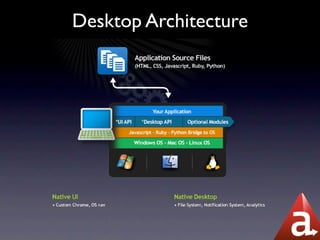
Desktop Architecture
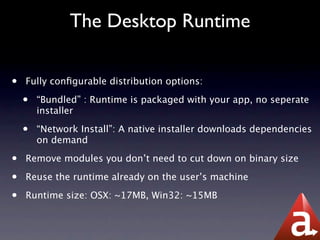
The Desktop Runtime

•   Fully configurable distribution options:

    •   “Bundled” : Runtime is packaged with your app, no seperate
        installer

    •   “Network Install”: A native installer downloads dependencies
        on demand

•   Remove modules you don’t need to cut down on binary size

•   Reuse the runtime already on the user’s machine

•   Runtime size: OSX: ~17MB, Win32: ~15MB
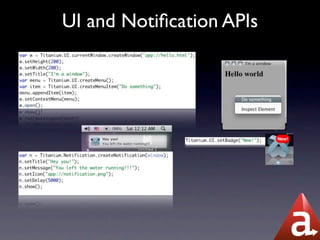
UI and Notification APIs
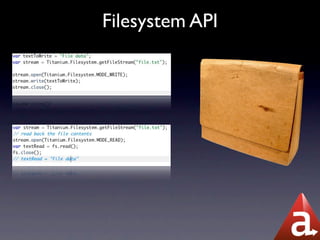
Filesystem API
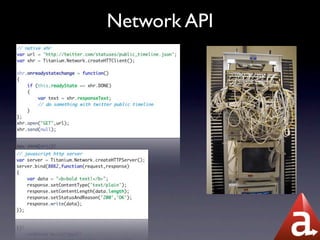
Network API
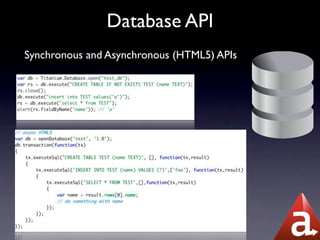
Database API
Synchronous and Asynchronous (HTML5) APIs
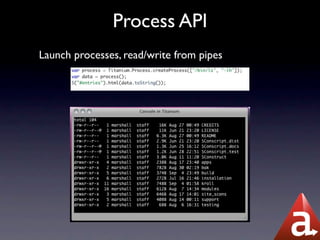
Process API
Launch processes, read/write from pipes
And much more..
•   Web Workers: Multi-threading for Javascript

•   Desktop: Take screenshots, open URLs, applications

•   Comprehensive language support:

    •   Javascript (WebKit / close to trunk -- blazing fast)

    •   Ruby 1.8.6 (1.9 with GVL coming soon)

    •   Python 2.5.4 (2.6 coming soon)

    •   PHP 5.3 (in development)

    •   Lua (in development)

    •   C/C++ Native bindings

    •   Java / C# planned post-1.0
Useful Resources

•   Check out some of my demo apps:

    •   http://github.com/marshall/screengrabber

    •   http://github.com/marshall/quicksnap (Uses Ruby)

•   Desktop testsuite (Drillbit)

•   Full API doc: http://codestrong.com

•   Support forums: http://support.appcelerator.net
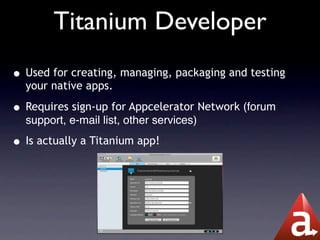
Titanium Developer
• Used for creating, managing, packaging and testing
  your native apps.

• Requires sign-up for Appcelerator Network (forum
  support, e-mail list, other services)

• Is actually a Titanium app!
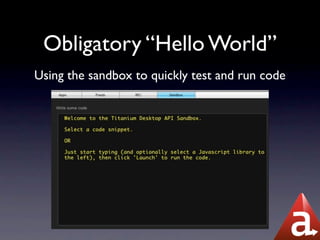
Obligatory “Hello World”
Using the sandbox to quickly test and run code
Screengrabber: Our first app


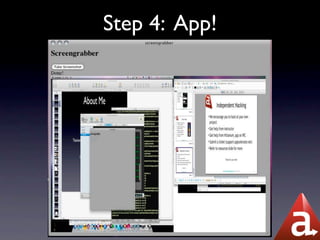
•   An app that takes a screenshot, and shows it to the user

•   App walkthrough:

    •   Create the project in Developer

    •   Overview of config files, manifest, app layout

    •   Quickly roundtrip prototype, show off debugging, etc
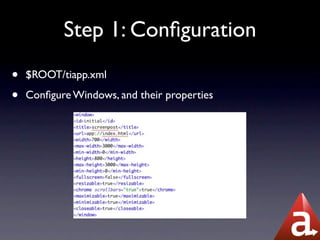
Step 1: Configuration
•   $ROOT/tiapp.xml

•   Configure Windows, and their properties
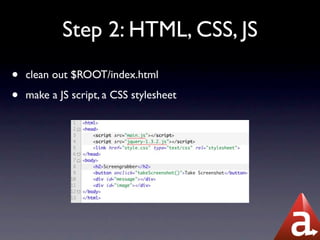
Step 2: HTML, CSS, JS
•   clean out $ROOT/index.html

•   make a JS script, a CSS stylesheet
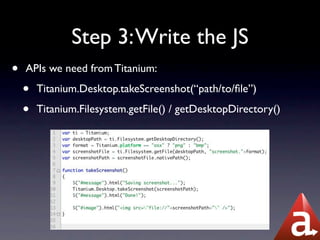
Step 3: Write the JS
•   APIs we need from Titanium:

    •   Titanium.Desktop.takeScreenshot(“path/to/file”)

    •   Titanium.Filesystem.getFile() / getDesktopDirectory()
Step 4: App!
Packaging


•   Once your app is written, you can use our cloud services to
    package and distribute your app.

    •   Automatically packages with the config you specify, for
        the platforms you want to support

    •   Built-in analytics to track who’s using your app,
        downloads, etc
Wrapping it up
•   Current release: 0.6

•   0.7 scheduled for end of Sept., 1.0 GA soon after

•   Come visit IRC for help, or to chat us up

    •   #titanium_app on irc.freenode.net

•   Extra credit: using Python, Ruby during the hack session

•   And now, Lunch!

Titanium Desktop Intro

  • 1.
    Titanium Desktop writing nativedesktop apps with HTML, CSS, Javascript, and friends.
  • 2.
    About Me Marshall Culpepper Titanium Project Lead / Hacker Extraordinaire @marshall_law http://www.arcaner.com mculpepper@appcelerator.com http://github.com/marshall
  • 3.
    Agenda • What isTitanium? • High Level Architecture, Runtime • API Overview • Guided Lab: Screengrabber
  • 4.
    What is Titanium? •An open source framework for building native apps using web technologies • Titanium Desktop: Windows, OSX, Linux • Titanium Mobile: iPhone, Android http://appcelerator.com http://github.com/appcelerator @appcelerator #titanium_app on irc.freenode.net
  • 5.
    Motivation • Single SiteBrowsers (Fluid, Prizm) • Adobe AIR • Cross platform GUI toolkits (Qt, wxWidgets, XUL, GTK) • Dynamic Languages (Ruby, Python, Javascript) • Binding layers (Jython, Rhino, JavaScriptCore) • Next gen web tech: HTML5, Gears, CSS3 • ... And lots of caffeine!
  • 6.
    Titanium Desktop • UI with HTML5, CSS, Canvas. The best of the open web. • Support for Javascript, Ruby, Python (PHP coming soon) • Languages can be intermixed automatically. • Native desktop functionality at your fingertips. • Titanium.* APIs are available in all languages • Windows (XP/SP2 -> 7), OSX (10.5->10.6, Universal), Linux (Debian based distros, Fedora, SuSE)
  • 7.
  • 8.
    The Desktop Runtime • Fully configurable distribution options: • “Bundled” : Runtime is packaged with your app, no seperate installer • “Network Install”: A native installer downloads dependencies on demand • Remove modules you don’t need to cut down on binary size • Reuse the runtime already on the user’s machine • Runtime size: OSX: ~17MB, Win32: ~15MB
  • 9.
  • 10.
  • 11.
  • 12.
    Database API Synchronous andAsynchronous (HTML5) APIs
  • 13.
    Process API Launch processes,read/write from pipes
  • 14.
    And much more.. • Web Workers: Multi-threading for Javascript • Desktop: Take screenshots, open URLs, applications • Comprehensive language support: • Javascript (WebKit / close to trunk -- blazing fast) • Ruby 1.8.6 (1.9 with GVL coming soon) • Python 2.5.4 (2.6 coming soon) • PHP 5.3 (in development) • Lua (in development) • C/C++ Native bindings • Java / C# planned post-1.0
  • 15.
    Useful Resources • Check out some of my demo apps: • http://github.com/marshall/screengrabber • http://github.com/marshall/quicksnap (Uses Ruby) • Desktop testsuite (Drillbit) • Full API doc: http://codestrong.com • Support forums: http://support.appcelerator.net
  • 16.
    Titanium Developer • Usedfor creating, managing, packaging and testing your native apps. • Requires sign-up for Appcelerator Network (forum support, e-mail list, other services) • Is actually a Titanium app!
  • 17.
    Obligatory “Hello World” Usingthe sandbox to quickly test and run code
  • 18.
    Screengrabber: Our firstapp • An app that takes a screenshot, and shows it to the user • App walkthrough: • Create the project in Developer • Overview of config files, manifest, app layout • Quickly roundtrip prototype, show off debugging, etc
  • 19.
    Step 1: Configuration • $ROOT/tiapp.xml • Configure Windows, and their properties
  • 20.
    Step 2: HTML,CSS, JS • clean out $ROOT/index.html • make a JS script, a CSS stylesheet
  • 21.
    Step 3: Writethe JS • APIs we need from Titanium: • Titanium.Desktop.takeScreenshot(“path/to/file”) • Titanium.Filesystem.getFile() / getDesktopDirectory()
  • 22.
  • 23.
    Packaging • Once your app is written, you can use our cloud services to package and distribute your app. • Automatically packages with the config you specify, for the platforms you want to support • Built-in analytics to track who’s using your app, downloads, etc
  • 24.
    Wrapping it up • Current release: 0.6 • 0.7 scheduled for end of Sept., 1.0 GA soon after • Come visit IRC for help, or to chat us up • #titanium_app on irc.freenode.net • Extra credit: using Python, Ruby during the hack session • And now, Lunch!