Milwaukee Marketo Engage
User Group
November 2025
Raven McFarlane| raven.mcfarlane@gmail.com
© 2024 Adobe. All Rights Reserved. Adobe
Confidential.
Adobe User Group House Rules
To ensure our Adobe User Groups stay
user-focused and a safe space for members
to learn, network, and problem solve, we
ask that all Adobe User Group session
attendees follow these rules:
• No self-promotion or pitching of any kind
is permitted at Adobe User Group events
• Don’t contact people outside of the User
Group without their consent
• If User Group members share their use
case at the User Group, please don’t
share that information without their
consent
© 2024 Adobe. All Rights Reserved. Adobe
Confidential.
Notice: This User Group Meeting is NOT being Recorded.
To ensure that we are abiding by the Adobe
User Group Program Code of Conduct and
to respect the privacy of the content shared
during today’s session, we would like to
inform all attendees that this session will
not be recorded.
After the meeting concludes, if you have any
outstanding questions or missed a portion
of the content, please feel free to email us at
raven.mcfarlane@gmail.com or
advocacy@adobe.com and we will do our
best to answer your questions.
© 2024 Adobe. All Rights Reserved. Adobe
Confidential.
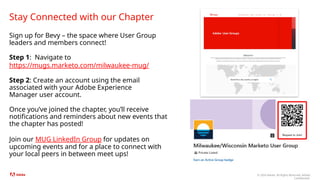
Sign up for Bevy – the space where User Group
leaders and members connect!
Step 1: Navigate to
https://mugs.marketo.com/milwaukee-mug/
Step 2: Create an account using the email
associated with your Adobe Experience
Manager user account.
Once you’ve joined the chapter, you’ll receive
notifications and reminders about new events that
the chapter has posted!
Join our MUG LinkedIn Group for updates on
upcoming events and for a place to connect with
your local peers in between meet ups!
Stay Connected with our Chapter
© 2024 Adobe. All Rights Reserved. Adobe
Confidential.
Share your proudest build, latest challenge or your to-go-to best practices with our group!
We want to hear from you!
Sign up to be a speaker here or help connect us with your
network!
Help steer the future of this group and
become a co-leader.
Interest in a specific topic? Share your
ideas with us here!
Join our LinkedIn
Group!
© 2024 Adobe. All Rights Reserved. Adobe
Confidential.
© 2024 Adobe. All Rights Reserved. Adobe
Confidential.
Share your experience with Adobe Marketo and receive a
$25 gift card as a thank you!
Review us on G2
Review us on
TrustRadius
© 2025 Adobe. All Rights Reserved. Adobe Confidential.
The Sync Strikes Back: Tales from the
MOPs Trenches
Overview
© 2024 Adobe. All Rights Reserved. Adobe
Confidential.
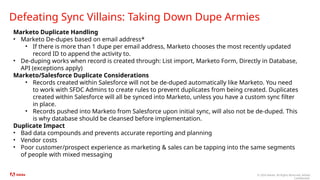
Defeating Sync Villains: Taking Down Dupe Armies
Marketo Duplicate Handling
• Marketo De-dupes based on email address*
• If there is more than 1 dupe per email address, Marketo chooses the most recently updated
record ID to append the activity to.
• De-duping works when record is created through: List import, Marketo Form, Directly in Database,
API (exceptions apply)
Marketo/Salesforce Duplicate Considerations
• Records created within Salesforce will not be de-duped automatically like Marketo. You need
to work with SFDC Admins to create rules to prevent duplicates from being created. Duplicates
created within Salesforce will all be synced into Marketo, unless you have a custom sync filter
in place.
• Records pushed into Marketo from Salesforce upon initial sync, will also not be de-duped. This
is why database should be cleansed before implementation.
Duplicate Impact
• Bad data compounds and prevents accurate reporting and planning
• Vendor costs
• Poor customer/prospect experience as marketing & sales can be tapping into the same segments
of people with mixed messaging
© 2024 Adobe. All Rights Reserved. Adobe
Confidential.
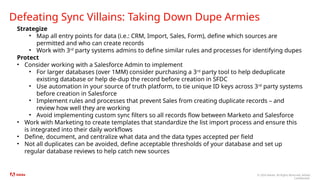
Defeating Sync Villains: Taking Down Dupe Armies
Strategize
• Map all entry points for data (i.e.: CRM, Import, Sales, Form), define which sources are
permitted and who can create records
• Work with 3rd
party systems admins to define similar rules and processes for identifying dupes
Protect
• Consider working with a Salesforce Admin to implement
• For larger databases (over 1MM) consider purchasing a 3rd
party tool to help deduplicate
existing database or help de-dup the record before creation in SFDC
• Use automation in your source of truth platform, to tie unique ID keys across 3rd
party systems
before creation in Salesforce
• Implement rules and processes that prevent Sales from creating duplicate records – and
review how well they are working
• Avoid implementing custom sync filters so all records flow between Marketo and Salesforce
• Work with Marketing to create templates that standardize the list import process and ensure this
is integrated into their daily workflows
• Define, document, and centralize what data and the data types accepted per field
• Not all duplicates can be avoided, define acceptable thresholds of your database and set up
regular database reviews to help catch new sources
© 2024 Adobe. All Rights Reserved. Adobe
Confidential.
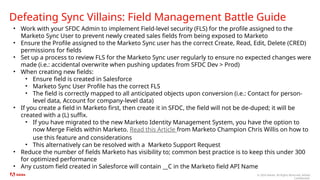
Defeating Sync Villains: Field Management Battle Guide
• Work with your SFDC Admin to implement Field-level security (FLS) for the profile assigned to the
Marketo Sync User to prevent newly created sales fields from being exposed to Marketo
• Ensure the Profile assigned to the Marketo Sync user has the correct Create, Read, Edit, Delete (CRED)
permissions for fields
• Set up a process to review FLS for the Marketo Sync user regularly to ensure no expected changes were
made (i.e.: accidental overwrite when pushing updates from SFDC Dev > Prod)
• When creating new fields:
• Ensure field is created in Salesforce
• Marketo Sync User Profile has the correct FLS
• The field is correctly mapped to all anticipated objects upon conversion (i.e.: Contact for person-
level data, Account for company-level data)
• If you create a field in Marketo first, then create it in SFDC, the field will not be de-duped; it will be
created with a (L) suffix.
• If you have migrated to the new Marketo Identity Management System, you have the option to
now Merge Fields within Marketo. Read this Article from Marketo Champion Chris Willis on how to
use this feature and considerations
• This alternatively can be resolved with a Marketo Support Request
• Reduce the number of fields Marketo has visibility to; common best practice is to keep this under 300
for optimized performance
• Any custom field created in Salesforce will contain __C in the Marketo field API Name
© 2024 Adobe. All Rights Reserved. Adobe
Confidential.
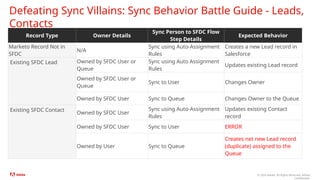
Defeating Sync Villains: Sync Behavior Battle Guide - Leads,
Contacts
Record Type Owner Details
Sync Person to SFDC Flow
Step Details
Expected Behavior
Marketo Record Not in
SFDC
N/A
Sync using Auto-Assignment
Rules
Creates a new Lead record in
Salesforce
Existing SFDC Lead Owned by SFDC User or
Queue
Sync using Auto Assignment
Rules
Updates existing Lead record
Owned by SFDC User or
Queue
Sync to User Changes Owner
Owned by SFDC User Sync to Queue Changes Owner to the Queue
Existing SFDC Contact
Owned by SFDC User
Sync using Auto-Assignment
Rules
Updates existing Contact
record
Owned by SFDC User Sync to User ERROR
Owned by User Sync to Queue
Creates net new Lead record
(duplicate) assigned to the
Queue
© 2024 Adobe. All Rights Reserved. Adobe
Confidential.
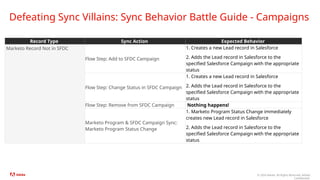
Defeating Sync Villains: Sync Behavior Battle Guide - Campaigns
Record Type Sync Action Expected Behavior
Marketo Record Not in SFDC
Flow Step: Add to SFDC Campaign
1. Creates a new Lead record in Salesforce
2. Adds the Lead record in Salesforce to the
specified Salesforce Campaign with the appropriate
status
Flow Step: Change Status in SFDC Campaign
1. Creates a new Lead record in Salesforce
2. Adds the Lead record in Salesforce to the
specified Salesforce Campaign with the appropriate
status
Flow Step: Remove from SFDC Campaign Nothing happens!
Marketo Program & SFDC Campaign Sync:
Marketo Program Status Change
1. Marketo Program Status Change immediately
creates new Lead record in Salesforce
2. Adds the Lead record in Salesforce to the
specified Salesforce Campaign with the appropriate
status
© 2024 Adobe. All Rights Reserved. Adobe
Confidential.
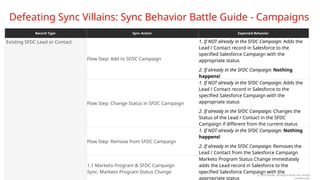
Defeating Sync Villains: Sync Behavior Battle Guide - Campaigns
Existing SFDC Lead or Contact
Flow Step: Add to SFDC Campaign
1. If NOT already in the SFDC Campaign: Adds the
Lead / Contact record in Salesforce to the
specified Salesforce Campaign with the
appropriate status
2. If already in the SFDC Campaign: Nothing
happens!
Flow Step: Change Status in SFDC Campaign
1. If NOT already in the SFDC Campaign: Adds the
Lead / Contact record in Salesforce to the
specified Salesforce Campaign with the
appropriate status
2. If already in the SFDC Campaign: Changes the
Status of the Lead / Contact in the SFDC
Campaign if different from the current status
Flow Step: Remove from SFDC Campaign
1. If NOT already in the SFDC Campaign: Nothing
happens!
2. If already in the SFDC Campaign: Removes the
Lead / Contact from the Salesforce Campaign
1:1 Marketo Program & SFDC Campaign
Sync: Marketo Program Status Change
Marketo Program Status Change immediately
adds the Lead record in Salesforce to the
specified Salesforce Campaign with the
appropriate status
Record Type Sync Action Expected Behavior
© 2024 Adobe. All Rights Reserved. Adobe
Confidential.
Defeating Sync Villains: Lightspeed Sync Strategy
Rules of the Galaxy:
• The Marketo and Salesforce sync will check for updates from Salesforce and send updates from
Marketo to Salesforce every 5 minutes for standard objects in SFDC: Lead, Contact, Account,
Opportunity, Campaign, Event, Task, Email
• All requests made during this interval leverage the Salesforce API and are processed in bulk (your
performance tier determines possible throughput/hour)
• Sync runs approx. 10k record updates per hour, per object and some objects can have different
batch sizes
• Marketo syncs schemas and objects in a very specific order (see article here); if multiple objects
are updated at the same time, sync will process update one object at a time
• Using the “Sync Lead to SFDC” flow step will always take priority over the standard sync
cycle
• Custom objects will be synced last
• Sync determines which records need to be evaluated for an update based on the Last Modified
Timestamp (system mod stamp). This timestamp is updated any time there is a change written to
any field (excludes formula and lookup fields in SFDC)
• The creation of a new lead record or object is called an insert action. The initial sync of a new record
from Marketo to Salesforce must occur with “Sync to SFDC” flow step. This insert action is direct API
call per record to Salesforce and can take 2-5 seconds to complete, per record (this doesn’t account
for any workflows you may have running in Marketo)
© 2024 Adobe. All Rights Reserved. Adobe
Confidential.
Defeating Sync Villains: Lightspeed Sync Strategy
Guide for optimal sync performance
• Try to leverage native sync intervals in process flows more often than flow steps (i.e.: Sync Lead to
SFDC, Add to SFDC Campaign)
• When building automations in Marketo, evaluate which fields can trigger data value changes in
Salesforce, gain clarity on when those action can occur, and the objects that will be updated to
understand impact to sync
• Ensure Marketo Sync User only has visibility to fields in SFDC needed to support marketing workflows
• When possible, leverage the Salesforce/Marketo Program Sync to reduce API calls made for
campaign-level tracking
• Actively monitor your sync backlog to identify trends and review these with your SFDC admin to help
understand what is influencing any backlogs
• If working with a new Marketo instance, calculate estimated time needed to sync SFDC database to
avoid downtime during migration periods
• Schedule bulk data value changes in Marketo to occur during non-business hours to reduce potential
impact to sync
• Increasing batch sizes only increases time required to complete that sync cycle—it doesn’t impact
how much can be processed/hour in an optimally designed instances
Tales from the MOPS
Trenches

The Sync Strikes Back: Tales from the MOPs Trenches

  • 1.
    Milwaukee Marketo Engage UserGroup November 2025 Raven McFarlane| raven.mcfarlane@gmail.com
  • 2.
    © 2024 Adobe.All Rights Reserved. Adobe Confidential. Adobe User Group House Rules To ensure our Adobe User Groups stay user-focused and a safe space for members to learn, network, and problem solve, we ask that all Adobe User Group session attendees follow these rules: • No self-promotion or pitching of any kind is permitted at Adobe User Group events • Don’t contact people outside of the User Group without their consent • If User Group members share their use case at the User Group, please don’t share that information without their consent
  • 3.
    © 2024 Adobe.All Rights Reserved. Adobe Confidential. Notice: This User Group Meeting is NOT being Recorded. To ensure that we are abiding by the Adobe User Group Program Code of Conduct and to respect the privacy of the content shared during today’s session, we would like to inform all attendees that this session will not be recorded. After the meeting concludes, if you have any outstanding questions or missed a portion of the content, please feel free to email us at raven.mcfarlane@gmail.com or advocacy@adobe.com and we will do our best to answer your questions.
  • 4.
    © 2024 Adobe.All Rights Reserved. Adobe Confidential. Sign up for Bevy – the space where User Group leaders and members connect! Step 1: Navigate to https://mugs.marketo.com/milwaukee-mug/ Step 2: Create an account using the email associated with your Adobe Experience Manager user account. Once you’ve joined the chapter, you’ll receive notifications and reminders about new events that the chapter has posted! Join our MUG LinkedIn Group for updates on upcoming events and for a place to connect with your local peers in between meet ups! Stay Connected with our Chapter
  • 5.
    © 2024 Adobe.All Rights Reserved. Adobe Confidential. Share your proudest build, latest challenge or your to-go-to best practices with our group! We want to hear from you! Sign up to be a speaker here or help connect us with your network! Help steer the future of this group and become a co-leader. Interest in a specific topic? Share your ideas with us here! Join our LinkedIn Group!
  • 6.
    © 2024 Adobe.All Rights Reserved. Adobe Confidential.
  • 7.
    © 2024 Adobe.All Rights Reserved. Adobe Confidential.
  • 8.
    Share your experiencewith Adobe Marketo and receive a $25 gift card as a thank you! Review us on G2 Review us on TrustRadius © 2025 Adobe. All Rights Reserved. Adobe Confidential.
  • 9.
    The Sync StrikesBack: Tales from the MOPs Trenches
  • 10.
  • 11.
    © 2024 Adobe.All Rights Reserved. Adobe Confidential. Defeating Sync Villains: Taking Down Dupe Armies Marketo Duplicate Handling • Marketo De-dupes based on email address* • If there is more than 1 dupe per email address, Marketo chooses the most recently updated record ID to append the activity to. • De-duping works when record is created through: List import, Marketo Form, Directly in Database, API (exceptions apply) Marketo/Salesforce Duplicate Considerations • Records created within Salesforce will not be de-duped automatically like Marketo. You need to work with SFDC Admins to create rules to prevent duplicates from being created. Duplicates created within Salesforce will all be synced into Marketo, unless you have a custom sync filter in place. • Records pushed into Marketo from Salesforce upon initial sync, will also not be de-duped. This is why database should be cleansed before implementation. Duplicate Impact • Bad data compounds and prevents accurate reporting and planning • Vendor costs • Poor customer/prospect experience as marketing & sales can be tapping into the same segments of people with mixed messaging
  • 12.
    © 2024 Adobe.All Rights Reserved. Adobe Confidential. Defeating Sync Villains: Taking Down Dupe Armies Strategize • Map all entry points for data (i.e.: CRM, Import, Sales, Form), define which sources are permitted and who can create records • Work with 3rd party systems admins to define similar rules and processes for identifying dupes Protect • Consider working with a Salesforce Admin to implement • For larger databases (over 1MM) consider purchasing a 3rd party tool to help deduplicate existing database or help de-dup the record before creation in SFDC • Use automation in your source of truth platform, to tie unique ID keys across 3rd party systems before creation in Salesforce • Implement rules and processes that prevent Sales from creating duplicate records – and review how well they are working • Avoid implementing custom sync filters so all records flow between Marketo and Salesforce • Work with Marketing to create templates that standardize the list import process and ensure this is integrated into their daily workflows • Define, document, and centralize what data and the data types accepted per field • Not all duplicates can be avoided, define acceptable thresholds of your database and set up regular database reviews to help catch new sources
  • 13.
    © 2024 Adobe.All Rights Reserved. Adobe Confidential. Defeating Sync Villains: Field Management Battle Guide • Work with your SFDC Admin to implement Field-level security (FLS) for the profile assigned to the Marketo Sync User to prevent newly created sales fields from being exposed to Marketo • Ensure the Profile assigned to the Marketo Sync user has the correct Create, Read, Edit, Delete (CRED) permissions for fields • Set up a process to review FLS for the Marketo Sync user regularly to ensure no expected changes were made (i.e.: accidental overwrite when pushing updates from SFDC Dev > Prod) • When creating new fields: • Ensure field is created in Salesforce • Marketo Sync User Profile has the correct FLS • The field is correctly mapped to all anticipated objects upon conversion (i.e.: Contact for person- level data, Account for company-level data) • If you create a field in Marketo first, then create it in SFDC, the field will not be de-duped; it will be created with a (L) suffix. • If you have migrated to the new Marketo Identity Management System, you have the option to now Merge Fields within Marketo. Read this Article from Marketo Champion Chris Willis on how to use this feature and considerations • This alternatively can be resolved with a Marketo Support Request • Reduce the number of fields Marketo has visibility to; common best practice is to keep this under 300 for optimized performance • Any custom field created in Salesforce will contain __C in the Marketo field API Name
  • 14.
    © 2024 Adobe.All Rights Reserved. Adobe Confidential. Defeating Sync Villains: Sync Behavior Battle Guide - Leads, Contacts Record Type Owner Details Sync Person to SFDC Flow Step Details Expected Behavior Marketo Record Not in SFDC N/A Sync using Auto-Assignment Rules Creates a new Lead record in Salesforce Existing SFDC Lead Owned by SFDC User or Queue Sync using Auto Assignment Rules Updates existing Lead record Owned by SFDC User or Queue Sync to User Changes Owner Owned by SFDC User Sync to Queue Changes Owner to the Queue Existing SFDC Contact Owned by SFDC User Sync using Auto-Assignment Rules Updates existing Contact record Owned by SFDC User Sync to User ERROR Owned by User Sync to Queue Creates net new Lead record (duplicate) assigned to the Queue
  • 15.
    © 2024 Adobe.All Rights Reserved. Adobe Confidential. Defeating Sync Villains: Sync Behavior Battle Guide - Campaigns Record Type Sync Action Expected Behavior Marketo Record Not in SFDC Flow Step: Add to SFDC Campaign 1. Creates a new Lead record in Salesforce 2. Adds the Lead record in Salesforce to the specified Salesforce Campaign with the appropriate status Flow Step: Change Status in SFDC Campaign 1. Creates a new Lead record in Salesforce 2. Adds the Lead record in Salesforce to the specified Salesforce Campaign with the appropriate status Flow Step: Remove from SFDC Campaign Nothing happens! Marketo Program & SFDC Campaign Sync: Marketo Program Status Change 1. Marketo Program Status Change immediately creates new Lead record in Salesforce 2. Adds the Lead record in Salesforce to the specified Salesforce Campaign with the appropriate status
  • 16.
    © 2024 Adobe.All Rights Reserved. Adobe Confidential. Defeating Sync Villains: Sync Behavior Battle Guide - Campaigns Existing SFDC Lead or Contact Flow Step: Add to SFDC Campaign 1. If NOT already in the SFDC Campaign: Adds the Lead / Contact record in Salesforce to the specified Salesforce Campaign with the appropriate status 2. If already in the SFDC Campaign: Nothing happens! Flow Step: Change Status in SFDC Campaign 1. If NOT already in the SFDC Campaign: Adds the Lead / Contact record in Salesforce to the specified Salesforce Campaign with the appropriate status 2. If already in the SFDC Campaign: Changes the Status of the Lead / Contact in the SFDC Campaign if different from the current status Flow Step: Remove from SFDC Campaign 1. If NOT already in the SFDC Campaign: Nothing happens! 2. If already in the SFDC Campaign: Removes the Lead / Contact from the Salesforce Campaign 1:1 Marketo Program & SFDC Campaign Sync: Marketo Program Status Change Marketo Program Status Change immediately adds the Lead record in Salesforce to the specified Salesforce Campaign with the appropriate status Record Type Sync Action Expected Behavior
  • 17.
    © 2024 Adobe.All Rights Reserved. Adobe Confidential. Defeating Sync Villains: Lightspeed Sync Strategy Rules of the Galaxy: • The Marketo and Salesforce sync will check for updates from Salesforce and send updates from Marketo to Salesforce every 5 minutes for standard objects in SFDC: Lead, Contact, Account, Opportunity, Campaign, Event, Task, Email • All requests made during this interval leverage the Salesforce API and are processed in bulk (your performance tier determines possible throughput/hour) • Sync runs approx. 10k record updates per hour, per object and some objects can have different batch sizes • Marketo syncs schemas and objects in a very specific order (see article here); if multiple objects are updated at the same time, sync will process update one object at a time • Using the “Sync Lead to SFDC” flow step will always take priority over the standard sync cycle • Custom objects will be synced last • Sync determines which records need to be evaluated for an update based on the Last Modified Timestamp (system mod stamp). This timestamp is updated any time there is a change written to any field (excludes formula and lookup fields in SFDC) • The creation of a new lead record or object is called an insert action. The initial sync of a new record from Marketo to Salesforce must occur with “Sync to SFDC” flow step. This insert action is direct API call per record to Salesforce and can take 2-5 seconds to complete, per record (this doesn’t account for any workflows you may have running in Marketo)
  • 18.
    © 2024 Adobe.All Rights Reserved. Adobe Confidential. Defeating Sync Villains: Lightspeed Sync Strategy Guide for optimal sync performance • Try to leverage native sync intervals in process flows more often than flow steps (i.e.: Sync Lead to SFDC, Add to SFDC Campaign) • When building automations in Marketo, evaluate which fields can trigger data value changes in Salesforce, gain clarity on when those action can occur, and the objects that will be updated to understand impact to sync • Ensure Marketo Sync User only has visibility to fields in SFDC needed to support marketing workflows • When possible, leverage the Salesforce/Marketo Program Sync to reduce API calls made for campaign-level tracking • Actively monitor your sync backlog to identify trends and review these with your SFDC admin to help understand what is influencing any backlogs • If working with a new Marketo instance, calculate estimated time needed to sync SFDC database to avoid downtime during migration periods • Schedule bulk data value changes in Marketo to occur during non-business hours to reduce potential impact to sync • Increasing batch sizes only increases time required to complete that sync cycle—it doesn’t impact how much can be processed/hour in an optimally designed instances
  • 19.
    Tales from theMOPS Trenches

Editor's Notes

  • #5 mailto:raven.mcfarlane@gmail.com?subject=I%20am%20interested%20in%20becoming%20a%20co-leader%20for%20the%20Milwaukee%20MUG
  • #15 Source: https://nation.marketo.com/t5/marketo-whisperer-blogs/salesforce-sync-deep-dive-part-1-sync-to-sfdc-flow-step/ba-p/336254
  • #16 Source: https://nation.marketo.com/t5/marketo-whisperer-blogs/salesforce-sync-deep-dive-part-2-salesforce-campaign-sync/ba-p/336592
  • #17 Source: https://nation.marketo.com/t5/marketo-whisperer-blogs/salesforce-sync-deep-dive-part-2-salesforce-campaign-sync/ba-p/336592