
THE SCANNABLE RESUME
How to Beat a Resume Parsing System
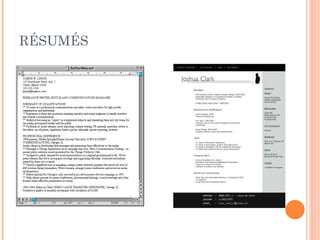
RÉSUMÉS
CHANGES TO THE JOB
APPLICATION PROCESS
   Internet boom inspires HR to use internet
    attachments for résumés

   Software was created to help HR and Recruiters
    sort through the résumés
INTRODUCING THE PARSER
Parser:
 A résumé computer program that removes
  styling (bullets, lines, shading, borders, ect.) in
  order to break down text on submitted résumés
  for relevant information.

   AKA Applicant Tracking System
HOW DOES THE PARSER READ MY
           RÉSUMÉ?
 The parser assigns values to the contents
 of your résumé

 Examples    of Categories
     Education-Where you went to school.
     Contact Info.-Are you local?
     Skills- What skills on your résumé are
      relevant to the position?
     Work Experience- Does the résumé have the
      work experience needed for the job?
HOW DOES HR USE THIS INFO.?
   HR personnel uses the information from the
    parser to scan candidates with relevant skills
    and work experience

   They do a “Google Search” with the parser to
    “keyword search” your résumé
WHAT’S A “RÉSUMÉ KEYWORD?”
   Keywords are specific words or phrases that job
    seekers use to search for jobs and employers use
    to find the right candidates.

   Every industry and job posting has phrases,
    technology, or certifications specifications.

   Ex. Project Manager, PMP Certificate
WHAT HAPPENS NEXT?
   Your résumé will be scored on its relevancy to
    the position

   Relevancy is defined as:
    Matching of employer search terms and your
    résumé

   If you don’t have the relevant keywords, your
    résumé won’t be read by HR
HOW TO WRITE A SCANNABLE
RESUME
   Know Your Fonts

   Spacing, Spacing, Spacing

   Contact Information

   Summary of Qualifications/Keywords

   Education & Experience
FONTS AND CHARACTERS
    Just Say No To:

   Bold, Italicizing, Script, Shading, Graphics,
                               Shading
    Borders & Underlining

   Replace bullets with *(asterisks) or –(hyphens)

   Avoid Slashes
    Ex. Design/develop
FONTS AND CHARACTERS
   Use 10 – 14 point font

Use Helvetica, Times New Roman, Arial, or
Palatino

Don’t   compress lines between characters

Don’tput lines around area codes, use
periods
 Ex. 555.555.555
LINES AND SETTINGS
   Put a line of space between job descriptions

   Don’t use horizontal or vertical lines.

   Don’t use tables, complex layouts, or columns
PERSONAL INFO &
SECTION HEADINGS
 Your name should be the first line of your
  résumé on top of the page.

 Ifyour resume has two pages, put your
  name and Page Two on the second page.

 Each line of your address should be on a
  separate line.

 Category   Headings should be listed with
  capital letters
  EDUCATION, EXPERIENCE
KEYWORDS AND PLACEMENT
   The keyword section should be on page one to
    earn a higher ranking

   Place keywords in the Summary section of your
    résumé

   This is a noun-intensive description of your
    experience and skills.
    Example keywords: manager, managing,
    management, BS Computer Science, mainframes,
    programming, programmer.

   Use them to describe actions from your job.
    Ex. Instructor for Java Script course
WHERE TO FIND KEYWORDS
Keyword Sources:

Resume Specific Keywords
http://resumekeywords.org/industry-specific-
  resume-keywords/

ONET : http://www.onetonline.org/

Google: www.google.com
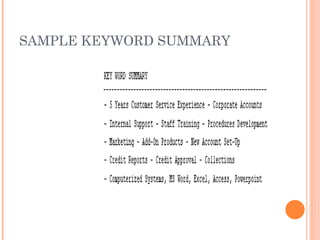
SAMPLE KEYWORD SUMMARY
EXPERIENCE
   Focus on accomplishments that relate to your
    goal.

   Don’t list job responsibilities.

   Quantify your results.

Example:
Increased revenues from $300,000 in 2008 to $3.5
  million in 2012.
EDUCATION-DON’T FORGET TO
LIST…

        Institution type
        Education/degree
        % Marks (GPA Above 3.7)
        Year of passing
        Certifications
        College Name
        College Address
        Highest education
        Languages
        Software Skills (Oracle, Windows)
        Certifications
HOW TO CHECK YOUR SCORE
   RezScore is a free parsing site Upload your
    resume to find your score.
     http://rezscore.com/
    *HR likes to see a score of 80% or higher or a “B”
    on this rating system
COMPARE TO JOB DESCRIPTION
   Compare your resume to a job description here:

    Resunate: The Only Smart Online Resume Builder
FINAL NOTES
 Smallercompanies don’t use parsers, so
 send them a formatted résumé

 Not sure an employer wants a scannable
 or formatted résumé?
 *Send both and add words “Scannable
 Résumé at the bottom

 Useformatted résumés for interviews and
 Job Fairs
QUESTIONS
RESOURCES
 Boston College Career Center
 Carnegie Library Career Center

 Resume Keywords

 ONET

 Resunate

 RezScore

The Scannable Resume

  • 1.
    THE SCANNABLE RESUME Howto Beat a Resume Parsing System
  • 2.
  • 3.
    CHANGES TO THEJOB APPLICATION PROCESS  Internet boom inspires HR to use internet attachments for résumés  Software was created to help HR and Recruiters sort through the résumés
  • 4.
    INTRODUCING THE PARSER Parser: A résumé computer program that removes styling (bullets, lines, shading, borders, ect.) in order to break down text on submitted résumés for relevant information.  AKA Applicant Tracking System
  • 5.
    HOW DOES THEPARSER READ MY RÉSUMÉ?  The parser assigns values to the contents of your résumé  Examples of Categories  Education-Where you went to school.  Contact Info.-Are you local?  Skills- What skills on your résumé are relevant to the position?  Work Experience- Does the résumé have the work experience needed for the job?
  • 6.
    HOW DOES HRUSE THIS INFO.?  HR personnel uses the information from the parser to scan candidates with relevant skills and work experience  They do a “Google Search” with the parser to “keyword search” your résumé
  • 7.
    WHAT’S A “RÉSUMÉKEYWORD?”  Keywords are specific words or phrases that job seekers use to search for jobs and employers use to find the right candidates.  Every industry and job posting has phrases, technology, or certifications specifications.  Ex. Project Manager, PMP Certificate
  • 8.
    WHAT HAPPENS NEXT?  Your résumé will be scored on its relevancy to the position  Relevancy is defined as: Matching of employer search terms and your résumé  If you don’t have the relevant keywords, your résumé won’t be read by HR
  • 9.
    HOW TO WRITEA SCANNABLE RESUME  Know Your Fonts  Spacing, Spacing, Spacing  Contact Information  Summary of Qualifications/Keywords  Education & Experience
  • 10.
    FONTS AND CHARACTERS Just Say No To:  Bold, Italicizing, Script, Shading, Graphics, Shading Borders & Underlining  Replace bullets with *(asterisks) or –(hyphens)  Avoid Slashes Ex. Design/develop
  • 11.
    FONTS AND CHARACTERS  Use 10 – 14 point font Use Helvetica, Times New Roman, Arial, or Palatino Don’t compress lines between characters Don’tput lines around area codes, use periods Ex. 555.555.555
  • 12.
    LINES AND SETTINGS  Put a line of space between job descriptions  Don’t use horizontal or vertical lines.  Don’t use tables, complex layouts, or columns
  • 13.
    PERSONAL INFO & SECTIONHEADINGS  Your name should be the first line of your résumé on top of the page.  Ifyour resume has two pages, put your name and Page Two on the second page.  Each line of your address should be on a separate line.  Category Headings should be listed with capital letters EDUCATION, EXPERIENCE
  • 14.
    KEYWORDS AND PLACEMENT  The keyword section should be on page one to earn a higher ranking  Place keywords in the Summary section of your résumé  This is a noun-intensive description of your experience and skills. Example keywords: manager, managing, management, BS Computer Science, mainframes, programming, programmer.  Use them to describe actions from your job. Ex. Instructor for Java Script course
  • 15.
    WHERE TO FINDKEYWORDS Keyword Sources: Resume Specific Keywords http://resumekeywords.org/industry-specific- resume-keywords/ ONET : http://www.onetonline.org/ Google: www.google.com
  • 16.
  • 17.
    EXPERIENCE  Focus on accomplishments that relate to your goal.  Don’t list job responsibilities.  Quantify your results. Example: Increased revenues from $300,000 in 2008 to $3.5 million in 2012.
  • 18.
    EDUCATION-DON’T FORGET TO LIST…  Institution type  Education/degree  % Marks (GPA Above 3.7)  Year of passing  Certifications  College Name  College Address  Highest education  Languages  Software Skills (Oracle, Windows)  Certifications
  • 19.
    HOW TO CHECKYOUR SCORE  RezScore is a free parsing site Upload your resume to find your score. http://rezscore.com/ *HR likes to see a score of 80% or higher or a “B” on this rating system
  • 20.
    COMPARE TO JOBDESCRIPTION  Compare your resume to a job description here: Resunate: The Only Smart Online Resume Builder
  • 21.
    FINAL NOTES  Smallercompaniesdon’t use parsers, so send them a formatted résumé  Not sure an employer wants a scannable or formatted résumé? *Send both and add words “Scannable Résumé at the bottom  Useformatted résumés for interviews and Job Fairs
  • 22.
  • 23.
    RESOURCES  Boston CollegeCareer Center  Carnegie Library Career Center  Resume Keywords  ONET  Resunate  RezScore