Ring Documentation, Release 1.9
cFuncName = "btn"+x+"()"
button([ :onclick = cFuncName , :value = x])
script(scriptfuncalert(cFuncName,string(x)))
liend()
next
ulend()
}
Screen Shot:
52.14. HTML Lists 469
Ring Documentation, Release 1.9
52.15 HTML Tables
In this example we will learn how to generate HTML tables using the tablestart(), tableend(), rowstart(), rowend()
,headerstart(), headerend(), cellstart() and cellend() functions.
#!ring -cgi
Load "weblib.ring"
Import System.Web
Func Main
New Page
{
divstart([ :style = styledivcenter("400px","500px") ] )
style(styletable() + styletablerows("t01"))
tablestart([ :id = :t01 , :style = stylewidth("100%") ])
rowstart([])
headerstart([]) text("Number") headerend()
headerstart([]) text("square") headerend()
rowend()
for x = 1 to 10
rowstart([])
cellstart([]) text(x) cellend()
cellstart([]) text(x*x) cellend()
rowend()
next
tableend()
divend()
}
Screen Shot:
52.15. HTML Tables 470
Ring Documentation, Release 1.9
52.16 Gradient
In this example we will learn how to use the StyleGradient() function.
The function takes the style number as input (range from 1 to 60).
#!ring -cgi
Load "weblib.ring"
Import System.Web
Func Main
New Page
{
boxstart()
text("StyleGradient() Function")
boxend()
for x = 1 to 60
divstart([ :id = x , :align = "center" ,
:style = stylefloatleft() +
stylesize(string(100/60*6)+"%","50px") +
stylegradient(x) ])
h3(x)
divend()
next
}
Screen Shot:
52.16. Gradient 471
Ring Documentation, Release 1.9
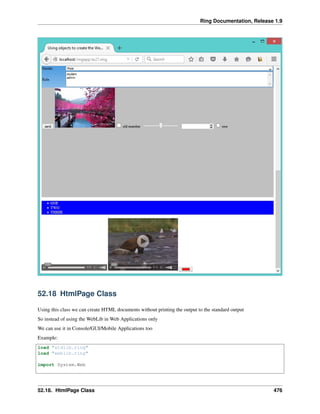
52.17 Generating Pages using Objects
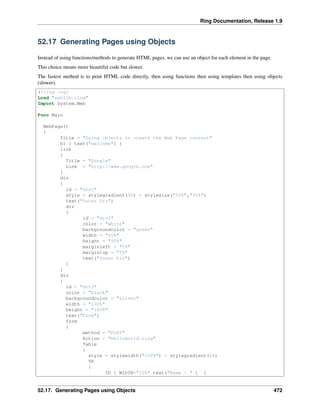
Instead of using functions/methods to generate HTML pages, we can use an object for each element in the page.
This choice means more beautiful code but slower.
The fastest method is to print HTML code directly, then using functions then using templates then using objects
(slower).
#!ring -cgi
Load "weblib.ring"
Import System.Web
Func Main
WebPage()
{
Title = "Using objects to create the Web Page content"
h1 { text("welcome") }
link
{
Title = "Google"
Link = "http://www.google.com"
}
div
{
id = "div1"
style = stylegradient(30) + stylesize("50%","50%")
text("Outer Div")
div
{
id = "div2"
color = "white"
backgroundcolor = "green"
width = "50%"
height = "50%"
marginleft = "5%"
margintop = "5%"
text("Inner Div")
}
}
div
{
id = "div3"
color = "black"
backgroundcolor = "silver"
width = "100%"
height = "100%"
text("Form")
form
{
method = "POST"
Action = "helloworld.ring"
Table
{
style = stylewidth("100%") + stylegradient(24)
TR
{
TD { WIDTH="10%" text("Name : " ) }
52.17. Generating Pages using Objects 472
Ring Documentation, Release 1.9
TD { Input { type = "text" } }
}
TR
{
TD { WIDTH="10%" text("Email : " ) }
TD { Input { type = "text" } }
}
TR
{
TD { WIDTH="10%" text("Password : " ) }
TD { Input { type = "password" } }
}
TR
{
TD { WIDTH="10%" text("Notes") }
TD { TextArea { width="100%" rows = 10 cols = 10
text("type text here...") } }
}
TR
{
TD { WIDTH="10%" text("Gender") }
TD {
select
{
width = "100%"
option { text("Male") }
option { text("Female") }
}
}
}
TR
{
TD { WIDTH="10%" text("Role") }
TD
{
select
{
multiple = "multiple"
width = "100%"
option { text("student") }
option { text("admin") }
}
}
}
}
Input { type = "submit" value = "send" }
Image { src="upload/profile1.jpg" alt="profile"}
Input { type = "checkbox" value = "Old Member"} text("old member")
Input { type = "range" min=1 max=100}
Input { type = "number" min=1 max=100}
Input { type = "radio" color="black" name="one"
value = "one"} text("one")
}
}
div
{
color = "white"
52.17. Generating Pages using Objects 473
Ring Documentation, Release 1.9
backgroundcolor = "blue"
width = "100%"
UL
{
LI { TEXT("ONE") }
LI { TEXT("TWO") }
LI { TEXT("THREE") }
}
}
div
{
audio
{
src = "horse.ogg"
type = "audio/ogg"
}
video
{
width = 320
height = 240
src = "movie.mp4"
type = "video/mp4"
}
Input
{
type = "color"
value = "#ff0000"
onchange = "clickColor(0, -1, -1, 5)"
}
}
}
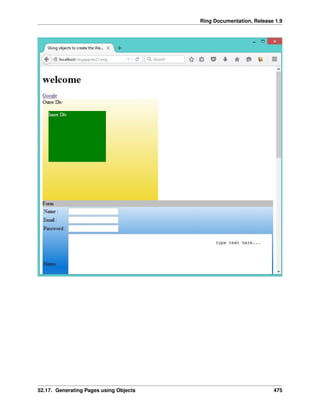
Screen Shot:
52.17. Generating Pages using Objects 474
Ring Documentation, Release 1.9
52.17. Generating Pages using Objects 475
Ring Documentation, Release 1.9
52.18 HtmlPage Class
Using this class we can create HTML documents without printing the output to the standard output
So instead of using the WebLib in Web Applications only
We can use it in Console/GUI/Mobile Applications too
Example:
load "stdlib.ring"
load "weblib.ring"
import System.Web
52.18. HtmlPage Class 476
Ring Documentation, Release 1.9
func main
mypage = new HtmlPage {
h1 { text("Customers Report") }
Table
{
style = stylewidth("100%") + stylegradient(4)
TR
{
TD { WIDTH="10%" text("Customers Count : " ) }
TD { text (100) }
}
}
Table
{
style = stylewidth("100%") + stylegradient(26)
TR
{
style = stylewidth("100%") + stylegradient(24)
TD { text("Name " ) }
TD { text("Age" ) }
TD { text("Country" ) }
TD { text("Job" ) }
TD { text("Company" ) }
}
for x = 1 to 100
TR
{
TD { text("Test" ) }
TD { text("30" ) }
TD { text("Egypt" ) }
TD { text("Sales" ) }
TD { text("Future" ) }
}
next
}
}
write("report.html",mypage.output())
52.19 Using Bootstrap Library using Functions
The next example uses the Bootstrap JavaScript Library when generating the HTML page.
#!ring -cgi
Load "weblib.ring"
Import System.Web
Func Main
new BootstrapPage {
divstart([ :class = "container" ])
divstart([ :class = "jumbotron" ])
h1("Bootstrap Page")
divend()
52.19. Using Bootstrap Library using Functions 477
Ring Documentation, Release 1.9
divstart([ :class = :row ])
divstart([ :class = "col-sm-4" ])
h3("Welcome to the Ring programming language")
p([ :text = "Using a scripting language is very fun!" ])
divend()
divstart([ :class = "col-sm-4" ])
h3("Welcome to the Ring programming language")
p([ :text = "using a scripting language is very fun!" ])
divend()
divstart([ :class = "col-sm-4" ])
h3("Welcome to the Ring programming language")
p([ :text = "using a scripting language is very fun!" ])
divend()
divend()
divend()
}
Screen Shot:
52.20 Using Bootstrap Library using Objects
The next example uses the Bootstrap JavaScript Library when generating the HTML page.
Instead of using functions to generate the HTML elements, we will use objects.
#!ring -cgi
Load "weblib.ring"
Import System.Web
Func Main
52.20. Using Bootstrap Library using Objects 478

The Ring programming language version 1.9 book - Part 51 of 210

  • 1.
    Ring Documentation, Release1.9 cFuncName = "btn"+x+"()" button([ :onclick = cFuncName , :value = x]) script(scriptfuncalert(cFuncName,string(x))) liend() next ulend() } Screen Shot: 52.14. HTML Lists 469
  • 2.
    Ring Documentation, Release1.9 52.15 HTML Tables In this example we will learn how to generate HTML tables using the tablestart(), tableend(), rowstart(), rowend() ,headerstart(), headerend(), cellstart() and cellend() functions. #!ring -cgi Load "weblib.ring" Import System.Web Func Main New Page { divstart([ :style = styledivcenter("400px","500px") ] ) style(styletable() + styletablerows("t01")) tablestart([ :id = :t01 , :style = stylewidth("100%") ]) rowstart([]) headerstart([]) text("Number") headerend() headerstart([]) text("square") headerend() rowend() for x = 1 to 10 rowstart([]) cellstart([]) text(x) cellend() cellstart([]) text(x*x) cellend() rowend() next tableend() divend() } Screen Shot: 52.15. HTML Tables 470
  • 3.
    Ring Documentation, Release1.9 52.16 Gradient In this example we will learn how to use the StyleGradient() function. The function takes the style number as input (range from 1 to 60). #!ring -cgi Load "weblib.ring" Import System.Web Func Main New Page { boxstart() text("StyleGradient() Function") boxend() for x = 1 to 60 divstart([ :id = x , :align = "center" , :style = stylefloatleft() + stylesize(string(100/60*6)+"%","50px") + stylegradient(x) ]) h3(x) divend() next } Screen Shot: 52.16. Gradient 471
  • 4.
    Ring Documentation, Release1.9 52.17 Generating Pages using Objects Instead of using functions/methods to generate HTML pages, we can use an object for each element in the page. This choice means more beautiful code but slower. The fastest method is to print HTML code directly, then using functions then using templates then using objects (slower). #!ring -cgi Load "weblib.ring" Import System.Web Func Main WebPage() { Title = "Using objects to create the Web Page content" h1 { text("welcome") } link { Title = "Google" Link = "http://www.google.com" } div { id = "div1" style = stylegradient(30) + stylesize("50%","50%") text("Outer Div") div { id = "div2" color = "white" backgroundcolor = "green" width = "50%" height = "50%" marginleft = "5%" margintop = "5%" text("Inner Div") } } div { id = "div3" color = "black" backgroundcolor = "silver" width = "100%" height = "100%" text("Form") form { method = "POST" Action = "helloworld.ring" Table { style = stylewidth("100%") + stylegradient(24) TR { TD { WIDTH="10%" text("Name : " ) } 52.17. Generating Pages using Objects 472
  • 5.
    Ring Documentation, Release1.9 TD { Input { type = "text" } } } TR { TD { WIDTH="10%" text("Email : " ) } TD { Input { type = "text" } } } TR { TD { WIDTH="10%" text("Password : " ) } TD { Input { type = "password" } } } TR { TD { WIDTH="10%" text("Notes") } TD { TextArea { width="100%" rows = 10 cols = 10 text("type text here...") } } } TR { TD { WIDTH="10%" text("Gender") } TD { select { width = "100%" option { text("Male") } option { text("Female") } } } } TR { TD { WIDTH="10%" text("Role") } TD { select { multiple = "multiple" width = "100%" option { text("student") } option { text("admin") } } } } } Input { type = "submit" value = "send" } Image { src="upload/profile1.jpg" alt="profile"} Input { type = "checkbox" value = "Old Member"} text("old member") Input { type = "range" min=1 max=100} Input { type = "number" min=1 max=100} Input { type = "radio" color="black" name="one" value = "one"} text("one") } } div { color = "white" 52.17. Generating Pages using Objects 473
  • 6.
    Ring Documentation, Release1.9 backgroundcolor = "blue" width = "100%" UL { LI { TEXT("ONE") } LI { TEXT("TWO") } LI { TEXT("THREE") } } } div { audio { src = "horse.ogg" type = "audio/ogg" } video { width = 320 height = 240 src = "movie.mp4" type = "video/mp4" } Input { type = "color" value = "#ff0000" onchange = "clickColor(0, -1, -1, 5)" } } } Screen Shot: 52.17. Generating Pages using Objects 474
  • 7.
    Ring Documentation, Release1.9 52.17. Generating Pages using Objects 475
  • 8.
    Ring Documentation, Release1.9 52.18 HtmlPage Class Using this class we can create HTML documents without printing the output to the standard output So instead of using the WebLib in Web Applications only We can use it in Console/GUI/Mobile Applications too Example: load "stdlib.ring" load "weblib.ring" import System.Web 52.18. HtmlPage Class 476
  • 9.
    Ring Documentation, Release1.9 func main mypage = new HtmlPage { h1 { text("Customers Report") } Table { style = stylewidth("100%") + stylegradient(4) TR { TD { WIDTH="10%" text("Customers Count : " ) } TD { text (100) } } } Table { style = stylewidth("100%") + stylegradient(26) TR { style = stylewidth("100%") + stylegradient(24) TD { text("Name " ) } TD { text("Age" ) } TD { text("Country" ) } TD { text("Job" ) } TD { text("Company" ) } } for x = 1 to 100 TR { TD { text("Test" ) } TD { text("30" ) } TD { text("Egypt" ) } TD { text("Sales" ) } TD { text("Future" ) } } next } } write("report.html",mypage.output()) 52.19 Using Bootstrap Library using Functions The next example uses the Bootstrap JavaScript Library when generating the HTML page. #!ring -cgi Load "weblib.ring" Import System.Web Func Main new BootstrapPage { divstart([ :class = "container" ]) divstart([ :class = "jumbotron" ]) h1("Bootstrap Page") divend() 52.19. Using Bootstrap Library using Functions 477
  • 10.
    Ring Documentation, Release1.9 divstart([ :class = :row ]) divstart([ :class = "col-sm-4" ]) h3("Welcome to the Ring programming language") p([ :text = "Using a scripting language is very fun!" ]) divend() divstart([ :class = "col-sm-4" ]) h3("Welcome to the Ring programming language") p([ :text = "using a scripting language is very fun!" ]) divend() divstart([ :class = "col-sm-4" ]) h3("Welcome to the Ring programming language") p([ :text = "using a scripting language is very fun!" ]) divend() divend() divend() } Screen Shot: 52.20 Using Bootstrap Library using Objects The next example uses the Bootstrap JavaScript Library when generating the HTML page. Instead of using functions to generate the HTML elements, we will use objects. #!ring -cgi Load "weblib.ring" Import System.Web Func Main 52.20. Using Bootstrap Library using Objects 478