Ring Documentation, Release 1.5.4
backgroundcolor = "blue"
width = "100%"
UL
{
LI { TEXT("ONE") }
LI { TEXT("TWO") }
LI { TEXT("THREE") }
}
}
div
{
audio
{
src = "horse.ogg"
type = "audio/ogg"
}
video
{
width = 320
height = 240
src = "movie.mp4"
type = "video/mp4"
}
Input
{
type = "color"
value = "#ff0000"
onchange = "clickColor(0, -1, -1, 5)"
}
}
}
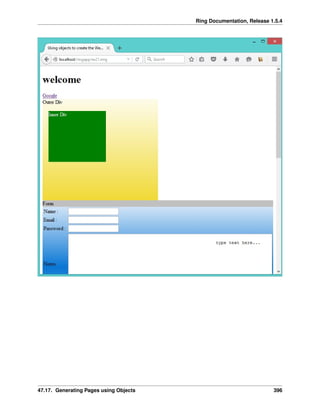
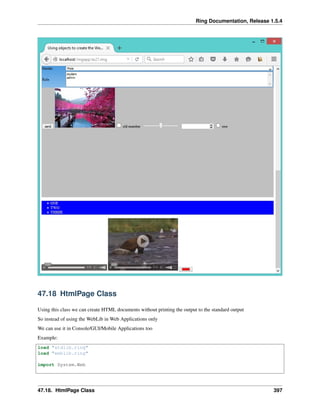
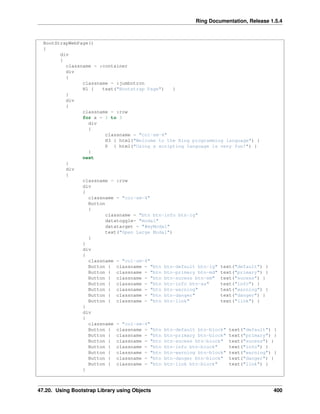
Screen Shot:
47.17. Generating Pages using Objects 395
Ring Documentation, Release 1.5.4
47.17. Generating Pages using Objects 396
Ring Documentation, Release 1.5.4
47.18 HtmlPage Class
Using this class we can create HTML documents without printing the output to the standard output
So instead of using the WebLib in Web Applications only
We can use it in Console/GUI/Mobile Applications too
Example:
load "stdlib.ring"
load "weblib.ring"
import System.Web
47.18. HtmlPage Class 397
Ring Documentation, Release 1.5.4
func main
mypage = new HtmlPage {
h1 { text("Customers Report") }
Table
{
style = stylewidth("100%") + stylegradient(4)
TR
{
TD { WIDTH="10%" text("Customers Count : " ) }
TD { text (100) }
}
}
Table
{
style = stylewidth("100%") + stylegradient(26)
TR
{
style = stylewidth("100%") + stylegradient(24)
TD { text("Name " ) }
TD { text("Age" ) }
TD { text("Country" ) }
TD { text("Job" ) }
TD { text("Company" ) }
}
for x = 1 to 100
TR
{
TD { text("Test" ) }
TD { text("30" ) }
TD { text("Egypt" ) }
TD { text("Sales" ) }
TD { text("Future" ) }
}
next
}
}
write("report.html",mypage.output())
47.19 Using Bootstrap Library using Functions
The next example uses the Bootstrap JavaScript Library when generating the HTML page.
#!c:ringbinring.exe -cgi
Load "weblib.ring"
Import System.Web
Func Main
new BootstrapPage {
divstart([ :class = "container" ])
divstart([ :class = "jumbotron" ])
h1("Bootstrap Page")
divend()
47.19. Using Bootstrap Library using Functions 398
Ring Documentation, Release 1.5.4
divstart([ :class = :row ])
divstart([ :class = "col-sm-4" ])
h3("Welcome to the Ring programming language")
p([ :text = "Using a scripting language is very fun!" ])
divend()
divstart([ :class = "col-sm-4" ])
h3("Welcome to the Ring programming language")
p([ :text = "using a scripting language is very fun!" ])
divend()
divstart([ :class = "col-sm-4" ])
h3("Welcome to the Ring programming language")
p([ :text = "using a scripting language is very fun!" ])
divend()
divend()
divend()
}
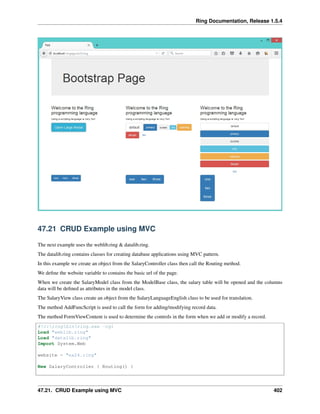
Screen Shot:
47.20 Using Bootstrap Library using Objects
The next example uses the Bootstrap JavaScript Library when generating the HTML page.
Instead of using functions to generate the HTML elements, we will use objects.
#!c:ringbinring.exe -cgi
Load "weblib.ring"
Import System.Web
Func Main
47.20. Using Bootstrap Library using Objects 399
Ring Documentation, Release 1.5.4
BootStrapWebPage()
{
div
{
classname = :container
div
{
classname = :jumbotron
H1 { text("Bootstrap Page") }
}
div
{
classname = :row
for x = 1 to 3
div
{
classname = "col-sm-4"
H3 { html("Welcome to the Ring programming language") }
P { html("Using a scripting language is very fun!") }
}
next
}
div
{
classname = :row
div
{
classname = "col-sm-4"
Button
{
classname = "btn btn-info btn-lg"
datatoggle= "modal"
datatarget = "#myModal"
text("Open Large Modal")
}
}
div
{
classname = "col-sm-4"
Button { classname = "btn btn-default btn-lg" text("default") }
Button { classname = "btn btn-primary btn-md" text("primary") }
Button { classname = "btn btn-sucess btn-sm" text("sucess") }
Button { classname = "btn btn-info btn-xs" text("info") }
Button { classname = "btn btn-warning" text("warning") }
Button { classname = "btn btn-danger" text("danger") }
Button { classname = "btn btn-link" text("link") }
}
div
{
classname = "col-sm-4"
Button { classname = "btn btn-default btn-block" text("default") }
Button { classname = "btn btn-primary btn-block" text("primary") }
Button { classname = "btn btn-sucess btn-block" text("sucess") }
Button { classname = "btn btn-info btn-block" text("info") }
Button { classname = "btn btn-warning btn-block" text("warning") }
Button { classname = "btn btn-danger btn-block" text("danger") }
Button { classname = "btn btn-link btn-block" text("link") }
}
47.20. Using Bootstrap Library using Objects 400
Ring Documentation, Release 1.5.4
div
{
classname = "col-sm-4"
div { classname = "btn-group"
button { classname="btn btn-primary" text("one") }
button { classname="btn btn-primary" text("two") }
button { classname="btn btn-primary" text("three") }
}
}
div
{
classname = "col-sm-4"
div { classname = "btn-group btn-group-lg"
button { classname="btn btn-primary" text("one") }
button { classname="btn btn-primary" text("two") }
button { classname="btn btn-primary" text("three") }
}
}
div
{
classname = "col-sm-4"
div {
classname = "btn-group-vertical btn-group-lg"
button { classname="btn btn-primary" text("one") }
button { classname="btn btn-primary" text("two") }
button { classname="btn btn-primary" text("three") }
}
}
}
div { classname="modal fade" id="myModal" role="dialog"
div { classname = "modal-dialog modal-lg"
div { classname="modal-content"
div { classname="modal-header"
button { classname="close" datadismiss="modal"
html("&times")
}
h4 { classname="modal-title"
text("Modal Header")
}
}
div { classname = "modal-body"
p { text("This is a large model.") }
}
div { classname="modal-footer"
button { classname = "btn btn-default" datadismiss="modal"
text("close")
}
}
}
}
}
}
}
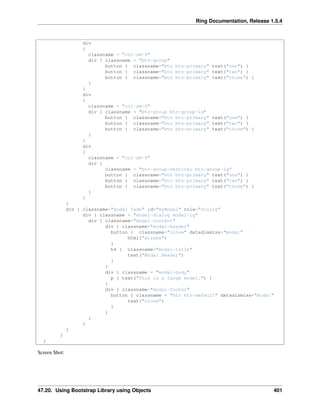
Screen Shot:
47.20. Using Bootstrap Library using Objects 401
Ring Documentation, Release 1.5.4
47.21 CRUD Example using MVC
The next example uses the weblib.ring & datalib.ring.
The datalib.ring contains classes for creating database applications using MVC pattern.
In this example we create an object from the SalaryController class then call the Routing method.
We define the website variable to contains the basic url of the page.
When we create the SalaryModel class from the ModelBase class, the salary table will be opened and the columns
data will be defined as attributes in the model class.
The SalaryView class create an object from the SalaryLanguageEnglish class to be used for translation.
The method AddFuncScript is used to call the form for adding/modifying record data.
The method FormViewContent is used to determine the controls in the form when we add or modify a record.
#!c:ringbinring.exe -cgi
Load "weblib.ring"
Load "datalib.ring"
Import System.Web
website = "ex24.ring"
New SalaryController { Routing() }
47.21. CRUD Example using MVC 402
Ring Documentation, Release 1.5.4
Class SalaryModel from ModelBase
Class SalaryController From ControllerBase
Class SalaryView From ViewBase
oLanguage = new SalaryLanguageEnglish
Func AddFuncScript oPage,oController
return oPage.scriptfuncajax("myadd",oController.cMainURL+
oController.cOperation+"=add","mysubpage")
Func FormViewContent oController,oTranslation,oPage
return [
[ oTranslation.aColumnsTitles[2], "textbox", "name",
oController.oModel.Name, oPage.stylewidth("100%") ],
[ oTranslation.aColumnsTitles[3], "textbox", "salary",
oController.oModel.Salary, oPage.stylewidth("50%") ]
]
Class SalaryLanguageEnglish
cTitle = "Salary Table"
cBack = "back"
aColumnsTitles = ["ID","Name","Salary"]
cOptions = "Options"
cSearch = "Search"
comboitems = ["Select Option...","Edit","Delete"]
cAddRecord = "Add Record"
cEditRecord = "Edit Record"
cRecordDeleted = "Record Deleted!"
aMovePages = ["First","Prev","Next","Last"]
cPage = "Page"
cOf = "of"
cRecordsCount = "Records Count"
cSave = "Save"
temp = new page
cTextAlign = temp.StyleTextRight()
cNoRecords = "No records!"
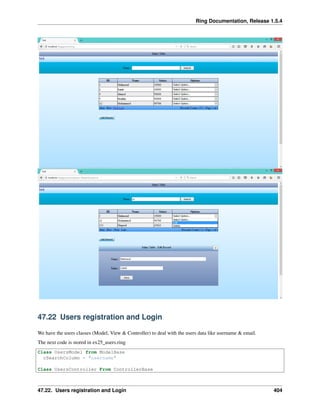
Screen Shot:
47.21. CRUD Example using MVC 403
Ring Documentation, Release 1.5.4
47.22 Users registration and Login
We have the users classes (Model, View & Controller) to deal with the users data like username & email.
The next code is stored in ex25_users.ring
Class UsersModel from ModelBase
cSearchColumn = "username"
Class UsersController From ControllerBase
47.22. Users registration and Login 404

The Ring programming language version 1.5.4 book - Part 43 of 185

  • 1.
    Ring Documentation, Release1.5.4 backgroundcolor = "blue" width = "100%" UL { LI { TEXT("ONE") } LI { TEXT("TWO") } LI { TEXT("THREE") } } } div { audio { src = "horse.ogg" type = "audio/ogg" } video { width = 320 height = 240 src = "movie.mp4" type = "video/mp4" } Input { type = "color" value = "#ff0000" onchange = "clickColor(0, -1, -1, 5)" } } } Screen Shot: 47.17. Generating Pages using Objects 395
  • 2.
    Ring Documentation, Release1.5.4 47.17. Generating Pages using Objects 396
  • 3.
    Ring Documentation, Release1.5.4 47.18 HtmlPage Class Using this class we can create HTML documents without printing the output to the standard output So instead of using the WebLib in Web Applications only We can use it in Console/GUI/Mobile Applications too Example: load "stdlib.ring" load "weblib.ring" import System.Web 47.18. HtmlPage Class 397
  • 4.
    Ring Documentation, Release1.5.4 func main mypage = new HtmlPage { h1 { text("Customers Report") } Table { style = stylewidth("100%") + stylegradient(4) TR { TD { WIDTH="10%" text("Customers Count : " ) } TD { text (100) } } } Table { style = stylewidth("100%") + stylegradient(26) TR { style = stylewidth("100%") + stylegradient(24) TD { text("Name " ) } TD { text("Age" ) } TD { text("Country" ) } TD { text("Job" ) } TD { text("Company" ) } } for x = 1 to 100 TR { TD { text("Test" ) } TD { text("30" ) } TD { text("Egypt" ) } TD { text("Sales" ) } TD { text("Future" ) } } next } } write("report.html",mypage.output()) 47.19 Using Bootstrap Library using Functions The next example uses the Bootstrap JavaScript Library when generating the HTML page. #!c:ringbinring.exe -cgi Load "weblib.ring" Import System.Web Func Main new BootstrapPage { divstart([ :class = "container" ]) divstart([ :class = "jumbotron" ]) h1("Bootstrap Page") divend() 47.19. Using Bootstrap Library using Functions 398
  • 5.
    Ring Documentation, Release1.5.4 divstart([ :class = :row ]) divstart([ :class = "col-sm-4" ]) h3("Welcome to the Ring programming language") p([ :text = "Using a scripting language is very fun!" ]) divend() divstart([ :class = "col-sm-4" ]) h3("Welcome to the Ring programming language") p([ :text = "using a scripting language is very fun!" ]) divend() divstart([ :class = "col-sm-4" ]) h3("Welcome to the Ring programming language") p([ :text = "using a scripting language is very fun!" ]) divend() divend() divend() } Screen Shot: 47.20 Using Bootstrap Library using Objects The next example uses the Bootstrap JavaScript Library when generating the HTML page. Instead of using functions to generate the HTML elements, we will use objects. #!c:ringbinring.exe -cgi Load "weblib.ring" Import System.Web Func Main 47.20. Using Bootstrap Library using Objects 399
  • 6.
    Ring Documentation, Release1.5.4 BootStrapWebPage() { div { classname = :container div { classname = :jumbotron H1 { text("Bootstrap Page") } } div { classname = :row for x = 1 to 3 div { classname = "col-sm-4" H3 { html("Welcome to the Ring programming language") } P { html("Using a scripting language is very fun!") } } next } div { classname = :row div { classname = "col-sm-4" Button { classname = "btn btn-info btn-lg" datatoggle= "modal" datatarget = "#myModal" text("Open Large Modal") } } div { classname = "col-sm-4" Button { classname = "btn btn-default btn-lg" text("default") } Button { classname = "btn btn-primary btn-md" text("primary") } Button { classname = "btn btn-sucess btn-sm" text("sucess") } Button { classname = "btn btn-info btn-xs" text("info") } Button { classname = "btn btn-warning" text("warning") } Button { classname = "btn btn-danger" text("danger") } Button { classname = "btn btn-link" text("link") } } div { classname = "col-sm-4" Button { classname = "btn btn-default btn-block" text("default") } Button { classname = "btn btn-primary btn-block" text("primary") } Button { classname = "btn btn-sucess btn-block" text("sucess") } Button { classname = "btn btn-info btn-block" text("info") } Button { classname = "btn btn-warning btn-block" text("warning") } Button { classname = "btn btn-danger btn-block" text("danger") } Button { classname = "btn btn-link btn-block" text("link") } } 47.20. Using Bootstrap Library using Objects 400
  • 7.
    Ring Documentation, Release1.5.4 div { classname = "col-sm-4" div { classname = "btn-group" button { classname="btn btn-primary" text("one") } button { classname="btn btn-primary" text("two") } button { classname="btn btn-primary" text("three") } } } div { classname = "col-sm-4" div { classname = "btn-group btn-group-lg" button { classname="btn btn-primary" text("one") } button { classname="btn btn-primary" text("two") } button { classname="btn btn-primary" text("three") } } } div { classname = "col-sm-4" div { classname = "btn-group-vertical btn-group-lg" button { classname="btn btn-primary" text("one") } button { classname="btn btn-primary" text("two") } button { classname="btn btn-primary" text("three") } } } } div { classname="modal fade" id="myModal" role="dialog" div { classname = "modal-dialog modal-lg" div { classname="modal-content" div { classname="modal-header" button { classname="close" datadismiss="modal" html("&times") } h4 { classname="modal-title" text("Modal Header") } } div { classname = "modal-body" p { text("This is a large model.") } } div { classname="modal-footer" button { classname = "btn btn-default" datadismiss="modal" text("close") } } } } } } } Screen Shot: 47.20. Using Bootstrap Library using Objects 401
  • 8.
    Ring Documentation, Release1.5.4 47.21 CRUD Example using MVC The next example uses the weblib.ring & datalib.ring. The datalib.ring contains classes for creating database applications using MVC pattern. In this example we create an object from the SalaryController class then call the Routing method. We define the website variable to contains the basic url of the page. When we create the SalaryModel class from the ModelBase class, the salary table will be opened and the columns data will be defined as attributes in the model class. The SalaryView class create an object from the SalaryLanguageEnglish class to be used for translation. The method AddFuncScript is used to call the form for adding/modifying record data. The method FormViewContent is used to determine the controls in the form when we add or modify a record. #!c:ringbinring.exe -cgi Load "weblib.ring" Load "datalib.ring" Import System.Web website = "ex24.ring" New SalaryController { Routing() } 47.21. CRUD Example using MVC 402
  • 9.
    Ring Documentation, Release1.5.4 Class SalaryModel from ModelBase Class SalaryController From ControllerBase Class SalaryView From ViewBase oLanguage = new SalaryLanguageEnglish Func AddFuncScript oPage,oController return oPage.scriptfuncajax("myadd",oController.cMainURL+ oController.cOperation+"=add","mysubpage") Func FormViewContent oController,oTranslation,oPage return [ [ oTranslation.aColumnsTitles[2], "textbox", "name", oController.oModel.Name, oPage.stylewidth("100%") ], [ oTranslation.aColumnsTitles[3], "textbox", "salary", oController.oModel.Salary, oPage.stylewidth("50%") ] ] Class SalaryLanguageEnglish cTitle = "Salary Table" cBack = "back" aColumnsTitles = ["ID","Name","Salary"] cOptions = "Options" cSearch = "Search" comboitems = ["Select Option...","Edit","Delete"] cAddRecord = "Add Record" cEditRecord = "Edit Record" cRecordDeleted = "Record Deleted!" aMovePages = ["First","Prev","Next","Last"] cPage = "Page" cOf = "of" cRecordsCount = "Records Count" cSave = "Save" temp = new page cTextAlign = temp.StyleTextRight() cNoRecords = "No records!" Screen Shot: 47.21. CRUD Example using MVC 403
  • 10.
    Ring Documentation, Release1.5.4 47.22 Users registration and Login We have the users classes (Model, View & Controller) to deal with the users data like username & email. The next code is stored in ex25_users.ring Class UsersModel from ModelBase cSearchColumn = "username" Class UsersController From ControllerBase 47.22. Users registration and Login 404