Java Swing Tutorial
Java Swing
* A part of The JFC
* Swing Java consists of
Look and feel
Accessibility
Java 2D
Drag and Drop, etc
Introductions

Swing is one of the Graphical User Interface tool.

Swing is used to develop the graphical user interface (GUI) in
java.

Swing components used for the building of GUI.

Swing components are helpful for interactivity to Java
applications.

The components of Swing toolkit are given below:
list controls
buttons
labels
tree controls
table controls
Java Swing Class Hierarchy
Swing Events

event source // The Event source is the object. It generates
Events.

event object // The Event object encapsulates the condition
changes in the event source.

event listener // The Event listener is the object that requests
to be notified
Event source:

Object is handling an event to the event listener.Event
handling in Swing toolkit is very easy to handle and powerful.

Objects are notified when a specific event occurs.
JFrame

Open frame place the icon on the title bar.Methods
are as follows:

frame.setIconImage(Toolkit.getDefaultToolkit().getI
mage("icon_confused.gif"));

it’s using the Image class method named
getImage().frame.getDefaultToolkit():
//This is the method of the Toolkit class which gets
the default toolkit.
createAndShowGUI
private static void createAndShowGUI()
{
//Create and set up the window.
JFrame frame = new JFrame("Hi..");
frame.setDefaultCloseOperation(JFrame.EXIT_ON_CLOSE);
//Add a label.
JLabel label = new JLabel("Hello World");
frame.getContentPane().add(label);
//Display the window.
frame.pack();
frame.setVisible(true);
}
Menus
JMenuBar
JMenu
JMenuItem
checkBox
import javax.swing.*;
JCheckBox chk = new JCheckBox("This is the
Check Box");
frame.add(chk);
Text Area
import javax.swing.JTextArea;
// Create a text area with some initial text
JTextArea textarea = new JTextArea("Initial
Text");
int rows = 20;
int cols = 30;
textarea = new JTextArea("Initial Text", rows,
cols);
TextField
JTextField t = new JTextField("Text field 3", 8);
JButton
Button:
Two types: JButton(), JButton(Name)
JButton () is used for create blank JButton instance.
JButton (Name) is used for create a JButton
instance with the specified text.
JButton Button1;
Button1 = new JButton ("Black is White");
add (Button1);
Layout Managers

Most Swing UIs utilise a LayoutManager to control
positioning of items

There is a choice of these which work in different
ways

Initially we do without one, and position items
ourselves:

frame.setLayout(null);
Absolute positioning
JFrame frame = new JFrame("I am a JFrame");
frame.setDefaultCloseOperation(JFrame.EXIT_ON_CLOSE);
frame.setBounds(20,30,300,100);
frame.setLayout(null);
JButton butt=new JButton("Click me");
frame.getContentPane().add(butt);
butt.setBounds(20, 20, 200,20);
frame.setVisible(true);
FlowLayout
JFrame.setDefaultLookAndFeelDecorated(true);
JFrame frame = new JFrame("FlowLayout");
frame.setDefaultCloseOperation(JFrame.EXIT_ON_CLOSE);
frame.getContentPane().setLayout(new FlowLayout());
JButton b1 = new JButton("Hello");
frame.getContentPane().add(b1);
JButton b2 = new JButton("Two");
frame.getContentPane().add(b2);
JTextField t1 = new JTextField("Text here");
frame.getContentPane().add(t1);
frame.pack();
frame.setVisible(true);
BorderLayout
JFrame.setDefaultLookAndFeelDecorated(true);
JFrame frame = new JFrame("Border");
frame.setDefaultCloseOperation(JFrame.EXIT_ON_CLOSE);
JButton b1 = new JButton("At the top");
frame.getContentPane().add(b1,BorderLayout.PAGE_START );
JButton b2 = new JButton("Bottom");
frame.getContentPane().add(b2,BorderLayout.PAGE_END);
JTextField t1 = new JTextField("Left");
frame.getContentPane().add(t1,BorderLayout.LINE_START);
JTextField t2 = new JTextField("Right");
frame.getContentPane().add(t2,BorderLayout.LINE_END);
JButton b3 = new JButton("Centre");
frame.getContentPane().add(b3,BorderLayout.CENTER );
frame.pack();
frame.setVisible(true);
Grid Layout
JFrame.setDefaultLookAndFeelDecorated(true);
JFrame frame = new JFrame("Grid");
frame.setDefaultCloseOperation(JFrame.EXIT_ON_CLOSE);
frame.getContentPane().setLayout(new GridLayout(4,3,5,5));
for (int i=0; i<10; i++)
frame.getContentPane().add(new JButton(""+i));
frame.pack();
frame.setVisible(true);
Swing has a lot of classes
controls
User I/O widgets
eg JButton
containers
things that hold other things
eg JFRame
Containers
general purpose containers -
panel
scroll pane
split pane
tabbed pane
tool bar
top level containers - JFrame JApplet JDialog
JPanel ( in createAndShowGUI)
JFrame.setDefaultLookAndFeelDecorated(true);
JFrame frame = new JFrame("I am a JFrame");
frame.setDefaultCloseOperation(JFrame.EXIT_ON_CLOSE);
frame.setBounds(20,30,300,100);
frame.setLayout(null);
//Create a panel
JPanel myPanel = new JPanel();
myPanel.setBackground(new Color(255,3,25));
myPanel.setOpaque(true);
//Make it the content pane.
frame.setContentPane(myPanel);
frame.setVisible(true);
Tooltip and border
myPanel.setOpaque(true);
myPanel.setToolTipText("I'm a JPanel");
myPanel.setBorder(BorderFactory.createLineBor
der(Color.white));
frame.setContentPane(myPanel);
..
JSplitPane
setLayout(null);
//Create a split pane
JSplitPane myPane = new JSplitPane();
myPane.setOpaque(true);
frame.setContentPane(myPane);
frame.setVisible(true);
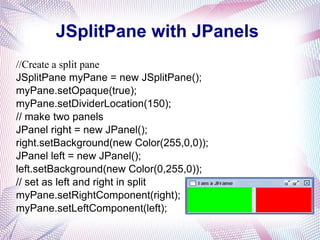
JSplitPane with JPanels
//Create a split pane
JSplitPane myPane = new JSplitPane();
myPane.setOpaque(true);
myPane.setDividerLocation(150);
// make two panels
JPanel right = new JPanel();
right.setBackground(new Color(255,0,0));
JPanel left = new JPanel();
left.setBackground(new Color(0,255,0));
// set as left and right in split
myPane.setRightComponent(right);
myPane.setLeftComponent(left);
Exercise
JDBC (JAVA DATABASE
CONNECTIVITY)
Database and Database
Management System
 Database is simply a collection of data. In relational database,
data is organized into tables.
 Database Management System (DBMS) is software to maintain
and utilize the collections of data (Oracle, DB2, MySQL)
Student_ID Name Major Grade
101 Shannon BCB A
102 Mike BBMB A
103 Wang MCDB A
… … …
MySQL Introduction
 MySQL is a database management system
 SQL stands for the Structured Query Language.
It defines how to insert, retrieve, modify and
delete data
 Free from www.mysql.com
Introductions

JDBC is Java application programming interface

Allows the Java programmers to access database
management system from Java code.

To execute SQL statements
Components of JDBC
JDBC has four Components:
1. The JDBC API.
2. The JDBC Driver Manager.
3. The JDBC Test Suite.
4. The JDBC-ODBC Bridge.
Type 1 JDBC Architecture
Type 2 Java to Native API
Type 3 Java to Network Protocol
Or All- Java Driver
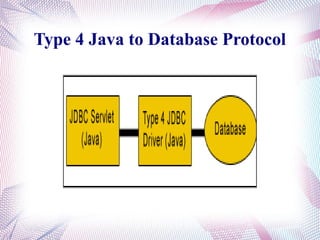
Type 4 Java to Database Protocol
Common SQL statements
SQL Select statement:
The SELECT statement is used to select data from
a table.
Syntax: Select column_names FROM table_name;
SQL INSERT Statement
To insert a single or multiple records into the database.
Syntax: Insert into table_name values(value1,value2..);
The Insert statement has mainly three clauses.
1). Insert: It specifies which table column has to be inserted
in the table.
2). Into : It tells in which the data will be stored.
3). Values: In this we insert the values we have to insert.
UPDATE Statement
The Update statement is used to modify the data
in the table
The syntax is :
UPDATE table_name Set colunm_name =
new_value WHERE column_name = some_name;
DELETE Statement
This delete statement is used to delete rows in a
table.
Systax:
DELETE FROM table_name WHERE
column_name = some_name;
Login
 mysql –h hostname –u username –p
[password]
 Example
% mysql -u usrname -p
Enter password: passowrd
Welcome to the MySQL monitor. Commands
end with ; or g. Your MySQL connection id is
23 to server version: 3.23.41.
Type 'help;' or 'h' for help. Type 'c' to clear the
buffer.
Login Example
 Exp:2
mysql –h 131.131.0.103 –u amudha –p
amudha1
 mysql>
mysql> show databases; (What are the current databases at the server?)
+--------------+
| Database |
+--------------+
| mysql | mysql is a database (stores users’ password …) used by system.
+--------------+
mysql> create database MyDB;(Create a database (make a directory) whose name is
MyDB)
mysql> use MyDB;(Select database to use )
Database changed
mysql> show tables;(What tables are currently stored in the MyDB database? )
Empty set (0.00 sec)
Create Database
 CREATE TABLE Table_Name (column_specifications)
 Example
mysql> CREATE TABLE student
-> (
-> student_ID INT UNSIGNED NOT NULL,
-> name VARCHAR(20) NOT NULL,
-> major VARCHAR(50),
-> grade VARCHAR(5)
-> );
Query OK, 0 rows affected (0.00 sec)
Student_ID Name Major Grade
Create Table
mysql> show tables;
+--------------------+
| Tables_in_MyDB |
+--------------------+
| student |
+--------------------+
1 row in set (0.00 sec)
mysql> describe student;
+---------------+----------------------+------+------+----------+--------+
| Field | Type | Null | Key | Default | Extra |
+---------------+----------------------+-------+-----+-----------+-------+
| student_ID | int(10) unsigned | | | 0 | |
| name | varchar(20) | | | | |
| major | varchar(50) | YES | | NULL | |
| grade | varchar(5) | YES | | NULL | |
+---------------+----------------------+-------+------+----------+-------+
4 rows in set (0.00 sec)
Display Table Structure
 ALTER TABLE table_name Operations
mysql> alter table student add primary key (student_ID);
Query OK, 0 rows affected (0.00 sec)
Records: 0 Duplicates: 0 Warnings: 0
mysql> describe student;
+---------------+--------------------- +-------+------+----------+-------+
| Field | Type | Null | Key | Default | Extra |
+---------------+----------------------+-------+------+----------+-------+
| student_ID | int(10) unsigned | | PRI | 0 | |
| name | varchar(20) | | | | |
| major | varchar(10) | YES | | NULL | |
| grade | varchar(5) | YES | | NULL | |
+---------------+----------------------+-------+------+-----------+-------
+
4 rows in set (0.00 sec)
Modify Table Structure
 INSERT INTO table_name SET
col_name1=value1,
col_name2=value2,
col_name3=value3, …
 Example
mysql> INSERT INTO student SET
student_ID=101, name='Shannon',
major='BCB', grade='A';
Query OK, 1 row affected (0.00 sec)
Student_ID Name Major Grade
101 Shannon BCB A
Insert Record
SELECT
what_columns
FROM table or
tables
WHERE
condition
Example
Student_ID Name Major Grade
101 Shannon BCB A
102 Mike BBMB A
103 Wang MCDB A
… … …
Retrieve Record
 UPDATE table_name
SET which columns to change
WHERE condition
 Example
mysql> UPDATE student SET grade='B' WHERE name='Shannon';
Query OK, 1 row affected (0.00 sec)
Rows matched: 1 Changed: 1 Warnings: 0
mysql> SELECT * FROM student WHERE name=‘Shannon’;
+------------+---------------+--------+--------+
| name | student_ID | major | grade |
+------------+---------------+--------+--------+
| Shannon | 101 | BCB | B |
+------------+---------------+--------+--------+
1 row in set (0.00 sec)
Update Record
 DELETE FROM table_name
WHERE condition
 Example
mysql> DELETE FROM student
WHERE name='Shannon';
Query OK, 1 row affected (0.00
sec)
Delete Record
Steps to creatd JDBC

Tables creation

Load the driver manager

Connection establishment

Statement creations

Process the result set

Execute the statement

Close the connection and statement

Stop the program
Creating a Database Table
String table ;
table= "CREATE TABLE
Employee11(Emp_code integer, Emp_name
varchar(10))";
st.executeUpdate(table);
Connection Establishment

Is an interface in java.sql package
Specifies connection with specific database
like: MySQL, Ms-Access, Oracle etc and java
files.

The SQL statements are executed within the
context of the Connection interface.

Class.forName(String driver):
Connection Establishment
 Syntax
Connection conn;
Class.forname(“com.mysql.jdbc.Driver”).newIns
tance();
DriverManager

It is a class of java.sql package that controls a set
of JDBC drivers.

Each driver has to be register with this class.

getConnection(String url, String userName,
String password):

url: - Database url where stored or created your
database

userName: - User name of MySQL

password: -Password of MySQL
Load the JDBC Driver into the database
 Syntax
String userName = "root";
String password = "mysql";
String url =
"jdbc:mysql://localhost/programs";
 conn =
DriverManager.getConnection(url,userNa
me,password);
Create the statements and update the
values in the table structure
 Statement st=conn.createStatement();
 st.execute("create table stud10(rollno
int,name text,m1 int,m2 int)");
 st.executeUpdate("insert into stud10
values(2,'rani',50,90)");
Process the Query result set
rs=st.executeQuery("select * from stud10");
while(rs.next())
{
System.out.println(rs.getInt(1));
System.out.println(rs.getString(2));
System.out.println(rs.getInt(3));
System.out.println(rs.getInt(4));
}
Close the connection

con.close():

This method is used for disconnecting the
connection.

It frees all the resources occupied by the
database.
Close the statement and connection
 st.close();
 conn.close();
Final Steps
 To import Syntax
export
CLASSPATH=$CLASSPATH:/usr/share/java/my
sql-connector-java-5.1.6.jar
 To Compile
Javac Filename.java
 To Run
java Filename

the java swing tutorial - a part of jfc swing

  • 1.
  • 2.
    Java Swing * Apart of The JFC * Swing Java consists of Look and feel Accessibility Java 2D Drag and Drop, etc
  • 3.
    Introductions  Swing is oneof the Graphical User Interface tool.  Swing is used to develop the graphical user interface (GUI) in java.  Swing components used for the building of GUI.  Swing components are helpful for interactivity to Java applications.  The components of Swing toolkit are given below: list controls buttons labels tree controls table controls
  • 4.
  • 5.
    Swing Events  event source// The Event source is the object. It generates Events.  event object // The Event object encapsulates the condition changes in the event source.  event listener // The Event listener is the object that requests to be notified Event source:  Object is handling an event to the event listener.Event handling in Swing toolkit is very easy to handle and powerful.  Objects are notified when a specific event occurs.
  • 6.
    JFrame  Open frame placethe icon on the title bar.Methods are as follows:  frame.setIconImage(Toolkit.getDefaultToolkit().getI mage("icon_confused.gif"));  it’s using the Image class method named getImage().frame.getDefaultToolkit(): //This is the method of the Toolkit class which gets the default toolkit.
  • 7.
    createAndShowGUI private static voidcreateAndShowGUI() { //Create and set up the window. JFrame frame = new JFrame("Hi.."); frame.setDefaultCloseOperation(JFrame.EXIT_ON_CLOSE); //Add a label. JLabel label = new JLabel("Hello World"); frame.getContentPane().add(label); //Display the window. frame.pack(); frame.setVisible(true); }
  • 8.
  • 9.
    checkBox import javax.swing.*; JCheckBox chk= new JCheckBox("This is the Check Box"); frame.add(chk);
  • 10.
    Text Area import javax.swing.JTextArea; //Create a text area with some initial text JTextArea textarea = new JTextArea("Initial Text"); int rows = 20; int cols = 30; textarea = new JTextArea("Initial Text", rows, cols); TextField JTextField t = new JTextField("Text field 3", 8);
  • 11.
    JButton Button: Two types: JButton(),JButton(Name) JButton () is used for create blank JButton instance. JButton (Name) is used for create a JButton instance with the specified text. JButton Button1; Button1 = new JButton ("Black is White"); add (Button1);
  • 12.
    Layout Managers  Most SwingUIs utilise a LayoutManager to control positioning of items  There is a choice of these which work in different ways  Initially we do without one, and position items ourselves:  frame.setLayout(null);
  • 13.
    Absolute positioning JFrame frame= new JFrame("I am a JFrame"); frame.setDefaultCloseOperation(JFrame.EXIT_ON_CLOSE); frame.setBounds(20,30,300,100); frame.setLayout(null); JButton butt=new JButton("Click me"); frame.getContentPane().add(butt); butt.setBounds(20, 20, 200,20); frame.setVisible(true);
  • 14.
    FlowLayout JFrame.setDefaultLookAndFeelDecorated(true); JFrame frame =new JFrame("FlowLayout"); frame.setDefaultCloseOperation(JFrame.EXIT_ON_CLOSE); frame.getContentPane().setLayout(new FlowLayout()); JButton b1 = new JButton("Hello"); frame.getContentPane().add(b1); JButton b2 = new JButton("Two"); frame.getContentPane().add(b2); JTextField t1 = new JTextField("Text here"); frame.getContentPane().add(t1); frame.pack(); frame.setVisible(true);
  • 15.
    BorderLayout JFrame.setDefaultLookAndFeelDecorated(true); JFrame frame =new JFrame("Border"); frame.setDefaultCloseOperation(JFrame.EXIT_ON_CLOSE); JButton b1 = new JButton("At the top"); frame.getContentPane().add(b1,BorderLayout.PAGE_START ); JButton b2 = new JButton("Bottom"); frame.getContentPane().add(b2,BorderLayout.PAGE_END); JTextField t1 = new JTextField("Left"); frame.getContentPane().add(t1,BorderLayout.LINE_START); JTextField t2 = new JTextField("Right"); frame.getContentPane().add(t2,BorderLayout.LINE_END); JButton b3 = new JButton("Centre"); frame.getContentPane().add(b3,BorderLayout.CENTER ); frame.pack(); frame.setVisible(true);
  • 16.
    Grid Layout JFrame.setDefaultLookAndFeelDecorated(true); JFrame frame= new JFrame("Grid"); frame.setDefaultCloseOperation(JFrame.EXIT_ON_CLOSE); frame.getContentPane().setLayout(new GridLayout(4,3,5,5)); for (int i=0; i<10; i++) frame.getContentPane().add(new JButton(""+i)); frame.pack(); frame.setVisible(true);
  • 17.
    Swing has alot of classes controls User I/O widgets eg JButton containers things that hold other things eg JFRame
  • 18.
    Containers general purpose containers- panel scroll pane split pane tabbed pane tool bar top level containers - JFrame JApplet JDialog
  • 19.
    JPanel ( increateAndShowGUI) JFrame.setDefaultLookAndFeelDecorated(true); JFrame frame = new JFrame("I am a JFrame"); frame.setDefaultCloseOperation(JFrame.EXIT_ON_CLOSE); frame.setBounds(20,30,300,100); frame.setLayout(null); //Create a panel JPanel myPanel = new JPanel(); myPanel.setBackground(new Color(255,3,25)); myPanel.setOpaque(true); //Make it the content pane. frame.setContentPane(myPanel); frame.setVisible(true);
  • 20.
    Tooltip and border myPanel.setOpaque(true); myPanel.setToolTipText("I'ma JPanel"); myPanel.setBorder(BorderFactory.createLineBor der(Color.white)); frame.setContentPane(myPanel); ..
  • 21.
    JSplitPane setLayout(null); //Create a splitpane JSplitPane myPane = new JSplitPane(); myPane.setOpaque(true); frame.setContentPane(myPane); frame.setVisible(true);
  • 22.
    JSplitPane with JPanels //Createa split pane JSplitPane myPane = new JSplitPane(); myPane.setOpaque(true); myPane.setDividerLocation(150); // make two panels JPanel right = new JPanel(); right.setBackground(new Color(255,0,0)); JPanel left = new JPanel(); left.setBackground(new Color(0,255,0)); // set as left and right in split myPane.setRightComponent(right); myPane.setLeftComponent(left);
  • 23.
  • 24.
  • 25.
    Database and Database ManagementSystem  Database is simply a collection of data. In relational database, data is organized into tables.  Database Management System (DBMS) is software to maintain and utilize the collections of data (Oracle, DB2, MySQL) Student_ID Name Major Grade 101 Shannon BCB A 102 Mike BBMB A 103 Wang MCDB A … … …
  • 26.
    MySQL Introduction  MySQLis a database management system  SQL stands for the Structured Query Language. It defines how to insert, retrieve, modify and delete data  Free from www.mysql.com
  • 27.
    Introductions  JDBC is Javaapplication programming interface  Allows the Java programmers to access database management system from Java code.  To execute SQL statements
  • 28.
    Components of JDBC JDBChas four Components: 1. The JDBC API. 2. The JDBC Driver Manager. 3. The JDBC Test Suite. 4. The JDBC-ODBC Bridge.
  • 29.
    Type 1 JDBCArchitecture
  • 30.
    Type 2 Javato Native API
  • 31.
    Type 3 Javato Network Protocol Or All- Java Driver
  • 32.
    Type 4 Javato Database Protocol
  • 33.
    Common SQL statements SQLSelect statement: The SELECT statement is used to select data from a table. Syntax: Select column_names FROM table_name;
  • 34.
    SQL INSERT Statement Toinsert a single or multiple records into the database. Syntax: Insert into table_name values(value1,value2..); The Insert statement has mainly three clauses. 1). Insert: It specifies which table column has to be inserted in the table. 2). Into : It tells in which the data will be stored. 3). Values: In this we insert the values we have to insert.
  • 35.
    UPDATE Statement The Updatestatement is used to modify the data in the table The syntax is : UPDATE table_name Set colunm_name = new_value WHERE column_name = some_name;
  • 36.
    DELETE Statement This deletestatement is used to delete rows in a table. Systax: DELETE FROM table_name WHERE column_name = some_name;
  • 37.
    Login  mysql –hhostname –u username –p [password]  Example % mysql -u usrname -p Enter password: passowrd Welcome to the MySQL monitor. Commands end with ; or g. Your MySQL connection id is 23 to server version: 3.23.41. Type 'help;' or 'h' for help. Type 'c' to clear the buffer.
  • 38.
    Login Example  Exp:2 mysql–h 131.131.0.103 –u amudha –p amudha1  mysql>
  • 39.
    mysql> show databases;(What are the current databases at the server?) +--------------+ | Database | +--------------+ | mysql | mysql is a database (stores users’ password …) used by system. +--------------+ mysql> create database MyDB;(Create a database (make a directory) whose name is MyDB) mysql> use MyDB;(Select database to use ) Database changed mysql> show tables;(What tables are currently stored in the MyDB database? ) Empty set (0.00 sec) Create Database
  • 40.
     CREATE TABLETable_Name (column_specifications)  Example mysql> CREATE TABLE student -> ( -> student_ID INT UNSIGNED NOT NULL, -> name VARCHAR(20) NOT NULL, -> major VARCHAR(50), -> grade VARCHAR(5) -> ); Query OK, 0 rows affected (0.00 sec) Student_ID Name Major Grade Create Table
  • 41.
    mysql> show tables; +--------------------+ |Tables_in_MyDB | +--------------------+ | student | +--------------------+ 1 row in set (0.00 sec) mysql> describe student; +---------------+----------------------+------+------+----------+--------+ | Field | Type | Null | Key | Default | Extra | +---------------+----------------------+-------+-----+-----------+-------+ | student_ID | int(10) unsigned | | | 0 | | | name | varchar(20) | | | | | | major | varchar(50) | YES | | NULL | | | grade | varchar(5) | YES | | NULL | | +---------------+----------------------+-------+------+----------+-------+ 4 rows in set (0.00 sec) Display Table Structure
  • 42.
     ALTER TABLEtable_name Operations mysql> alter table student add primary key (student_ID); Query OK, 0 rows affected (0.00 sec) Records: 0 Duplicates: 0 Warnings: 0 mysql> describe student; +---------------+--------------------- +-------+------+----------+-------+ | Field | Type | Null | Key | Default | Extra | +---------------+----------------------+-------+------+----------+-------+ | student_ID | int(10) unsigned | | PRI | 0 | | | name | varchar(20) | | | | | | major | varchar(10) | YES | | NULL | | | grade | varchar(5) | YES | | NULL | | +---------------+----------------------+-------+------+-----------+------- + 4 rows in set (0.00 sec) Modify Table Structure
  • 43.
     INSERT INTOtable_name SET col_name1=value1, col_name2=value2, col_name3=value3, …  Example mysql> INSERT INTO student SET student_ID=101, name='Shannon', major='BCB', grade='A'; Query OK, 1 row affected (0.00 sec) Student_ID Name Major Grade 101 Shannon BCB A Insert Record
  • 44.
    SELECT what_columns FROM table or tables WHERE condition Example Student_IDName Major Grade 101 Shannon BCB A 102 Mike BBMB A 103 Wang MCDB A … … … Retrieve Record
  • 45.
     UPDATE table_name SETwhich columns to change WHERE condition  Example mysql> UPDATE student SET grade='B' WHERE name='Shannon'; Query OK, 1 row affected (0.00 sec) Rows matched: 1 Changed: 1 Warnings: 0 mysql> SELECT * FROM student WHERE name=‘Shannon’; +------------+---------------+--------+--------+ | name | student_ID | major | grade | +------------+---------------+--------+--------+ | Shannon | 101 | BCB | B | +------------+---------------+--------+--------+ 1 row in set (0.00 sec) Update Record
  • 46.
     DELETE FROMtable_name WHERE condition  Example mysql> DELETE FROM student WHERE name='Shannon'; Query OK, 1 row affected (0.00 sec) Delete Record
  • 47.
    Steps to creatdJDBC  Tables creation  Load the driver manager  Connection establishment  Statement creations  Process the result set  Execute the statement  Close the connection and statement  Stop the program
  • 48.
    Creating a DatabaseTable String table ; table= "CREATE TABLE Employee11(Emp_code integer, Emp_name varchar(10))"; st.executeUpdate(table);
  • 49.
    Connection Establishment  Is aninterface in java.sql package Specifies connection with specific database like: MySQL, Ms-Access, Oracle etc and java files.  The SQL statements are executed within the context of the Connection interface.  Class.forName(String driver):
  • 50.
    Connection Establishment  Syntax Connectionconn; Class.forname(“com.mysql.jdbc.Driver”).newIns tance();
  • 51.
    DriverManager  It is aclass of java.sql package that controls a set of JDBC drivers.  Each driver has to be register with this class.  getConnection(String url, String userName, String password):  url: - Database url where stored or created your database  userName: - User name of MySQL  password: -Password of MySQL
  • 52.
    Load the JDBCDriver into the database  Syntax String userName = "root"; String password = "mysql"; String url = "jdbc:mysql://localhost/programs";  conn = DriverManager.getConnection(url,userNa me,password);
  • 53.
    Create the statementsand update the values in the table structure  Statement st=conn.createStatement();  st.execute("create table stud10(rollno int,name text,m1 int,m2 int)");  st.executeUpdate("insert into stud10 values(2,'rani',50,90)");
  • 54.
    Process the Queryresult set rs=st.executeQuery("select * from stud10"); while(rs.next()) { System.out.println(rs.getInt(1)); System.out.println(rs.getString(2)); System.out.println(rs.getInt(3)); System.out.println(rs.getInt(4)); }
  • 55.
    Close the connection  con.close():  Thismethod is used for disconnecting the connection.  It frees all the resources occupied by the database.
  • 56.
    Close the statementand connection  st.close();  conn.close();
  • 57.
    Final Steps  Toimport Syntax export CLASSPATH=$CLASSPATH:/usr/share/java/my sql-connector-java-5.1.6.jar  To Compile Javac Filename.java  To Run java Filename

Editor's Notes

  • #8 So you make a menubar Make a menu (usually several) and add it to the bar Make menuitems and add them to a menu