The Constrained Application Protocol
(CoAP)- ongoing implementation
Khamdamboy Urunov, a Ph.D. student.
Special Communication Research
Center.,
Graduate School of Financial
Information Security., Kookmin
1
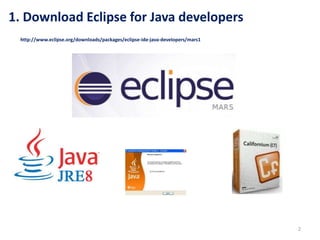
1. Download Eclipse for Java developers
2
http://www.eclipse.org/downloads/packages/eclipse-ide-java-developers/mars1
3
Compiling the Californium
is not required in order to
use it, use Apache Maven
and add the dependency:
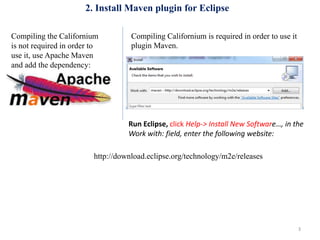
2. Install Maven plugin for Eclipse
Compiling Californium is required in order to use it
plugin Maven.
Run Eclipse, click Help-> Install New Software…, in the
Work with: field, enter the following website:
http://download.eclipse.org/technology/m2e/releases
4
2. Install Maven plugin for Eclipse (2)
3. Download CoAP library
5
On windows, download the .zip file directly from the github page:
https://github.com/eclipse/californium.core
Then unzip it.
6
4. Import the Californium to Eclipse:
Click File -> Import…, you would see the following dialog.
Select Maven->Existing Maven Project, then
click Next.
In the Root Directory:, browse to your
californium-master folder. Check all the
pom.xml files, then click Finish.
7
4. Import the Californium to Eclipse: (2)
You would see all the Californium
libraries and projects are listed on the
left.
5. Download and Import the Californium Element Connector
8
The connector is necessary for all the Californium projects. Download it from the following
link:
Unzip it, and use import the whole library to Eclipse using Maven.
https://github.com/eclipse/californium.element-connector
6. Run Hello World
9
Select the Hello World example, double click it, the code is already compiled automatically
by Eclipse.
Click Run -> Run, you will have a Coap server running on your computer.
10
6. Run Hello World (2)
7. Install Copper user-agent add-ons on
Firefox.
11
8. Access the “HelloWorld” server through Copper
12
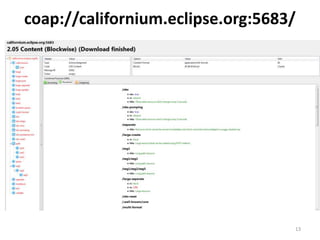
coap://californium.eclipse.org:5683/
same as
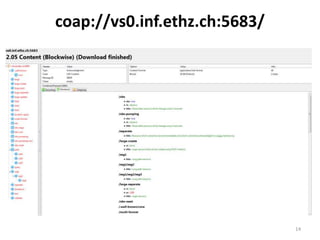
coap://vs0.inf.ethz.ch:5683/
coap://coap.me:5683/
coap://113.198.211.18:5683/
coap://192.168.17.1:5683/.well-known/core
coap://californium.eclipse.org:5683/
13
coap://vs0.inf.ethz.ch:5683/
14
coap://coap.me:5683/
15
Eclipse Hello world:
113.198.211.18:5683
16
Stop running HelloWorld source code
17
Unreachable result
18

The constrained application protocol (co ap) implementation-part3

  • 1.
    The Constrained ApplicationProtocol (CoAP)- ongoing implementation Khamdamboy Urunov, a Ph.D. student. Special Communication Research Center., Graduate School of Financial Information Security., Kookmin 1
  • 2.
    1. Download Eclipsefor Java developers 2 http://www.eclipse.org/downloads/packages/eclipse-ide-java-developers/mars1
  • 3.
    3 Compiling the Californium isnot required in order to use it, use Apache Maven and add the dependency: 2. Install Maven plugin for Eclipse Compiling Californium is required in order to use it plugin Maven. Run Eclipse, click Help-> Install New Software…, in the Work with: field, enter the following website: http://download.eclipse.org/technology/m2e/releases
  • 4.
    4 2. Install Mavenplugin for Eclipse (2)
  • 5.
    3. Download CoAPlibrary 5 On windows, download the .zip file directly from the github page: https://github.com/eclipse/californium.core Then unzip it.
  • 6.
    6 4. Import theCalifornium to Eclipse: Click File -> Import…, you would see the following dialog. Select Maven->Existing Maven Project, then click Next. In the Root Directory:, browse to your californium-master folder. Check all the pom.xml files, then click Finish.
  • 7.
    7 4. Import theCalifornium to Eclipse: (2) You would see all the Californium libraries and projects are listed on the left.
  • 8.
    5. Download andImport the Californium Element Connector 8 The connector is necessary for all the Californium projects. Download it from the following link: Unzip it, and use import the whole library to Eclipse using Maven. https://github.com/eclipse/californium.element-connector
  • 9.
    6. Run HelloWorld 9 Select the Hello World example, double click it, the code is already compiled automatically by Eclipse. Click Run -> Run, you will have a Coap server running on your computer.
  • 10.
    10 6. Run HelloWorld (2)
  • 11.
    7. Install Copperuser-agent add-ons on Firefox. 11
  • 12.
    8. Access the“HelloWorld” server through Copper 12 coap://californium.eclipse.org:5683/ same as coap://vs0.inf.ethz.ch:5683/ coap://coap.me:5683/ coap://113.198.211.18:5683/ coap://192.168.17.1:5683/.well-known/core
  • 13.
  • 14.
  • 15.
  • 16.
  • 17.
  • 18.