1
1-12/2012
TELE
since 1981
The World’s Largest Digital TV Trade Magazine
www.TELE-satellite.com
Company Report
ANTIFERENCE
Trevor Paintain Leads an 75 Year
Old Company Successfully into
the Digital TV Era
Test Report
DEVISER
Jason Wu Targets the
Rapidly Expanding Optic
Market with a New Meter
Test Report
DEKTEC
Build a
Network
with this
Professional
Satellite
Receiver
INTERNATIONAL
3DTV
HDTV
IP/Web
satellite
B 9318 E
Test Report
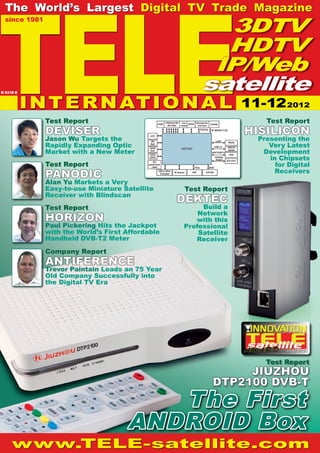
JIUZHOU
DTP2100 DVB-T
Test Report
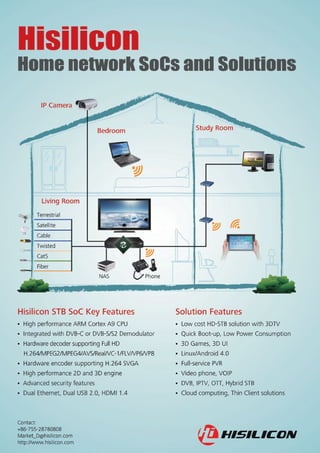
HISILICON
Presenting the
Very Latest
Development
in Chipsets
for Digital
Receivers
Test Report
PANODIC
Alan Yu Markets a Very
Easy-to-use Miniature Satellite
Receiver with Blindscan
Test Report
HORIZON
Paul Pickering Hits the Jackpot
with the World’s First Affordable
Handheld DVB-T2 Meter
The First
ANDROID Box
11-122012
TELE
satellite
TELE-satellite
International
The World’s Largest
Digital TV Trade Magazine
since 1981
Alexander Wiese
Publisher
alex@TELE-satellite.com
HQ in Munich, Germany
Address
TELE-satellite International, PO Box 1234, 85766 Munich-Ufg, GERMANY/EUROPE
Editor-in-Chief
Alexander Wiese, alex@TELE-satellite.com
Published by
TELE-satellite Medien GmbH, Aschheimer Weg 19, 85774 Unterfoehring, GERMANY/EUROPE
Design
Németi Barna Attila
Advertising
www.TELE-satellite.com/ads/
Hard Copy Subscription
www.TELE-satellite.com/subscription/
Copyright © 2012 by TELE-satellite ISSN 1435-7003
TELE-satellite was established in 1981 and today is the oldest, largest and most-read digital tv trade
magazine in the world. TELE-satellite is seen by more than 350,000 digital tv professionals around the
world and is available both in printed form and online.
www.TELE-satellite.com
Dear Readers,
I’m extremely excited that in this issue we are introducing one of
the first Android-based receivers. And if you read this issue of TELE-
satellite a little closer, you’ll discover another article that also has
to do with Android, to be more exact, it’s about a chipset that was
developed for Android receivers. This suggests that more Android-
based receivers will soon become available.
What makes Android so special? We are in no way disappointed
with Linux-based receivers and we’ve already introduced numerous
Linux devices and will continue to do so. The Linux-based system
is perfect for receivers that are optimized for TV reception. That
is a Linux receiver’s strong point but at the same time it’s also
a weak spot: the demands of receiver continue to rise. Receivers
are becoming true media centers and this ends up highlighting the
weaknesses of Linux receivers more and more.
The operating systems in Linux receivers run on chips with a single
kernel and quite often with a clock frequency of 300 MHz. Higher
frequencies are hard to find. Android receivers, that use a chip
based on the ARM architecture, are able to use multiple kernels and
have a clock frequency of more than 1 GHz. In other words, Android
receivers are much faster and more powerful.
This enormous increase in capacity is not needed to watch TV. But
it comes into play when, for example, the PVR function in HD is
used. Another example would be a receiver’s web browser. Under
Linux it would only have a limited use; sufficient memory and Flash
are missing. And yet another point that speaks for Android and
that many users don’t even know about: the color depth with Linux
receivers is extremely limited (not the TV picture but rather the
color selection in the menus). Currently this turns out to be the
knockout punch if you want to use the receiver, for example, to
play games. There are no such limitations with Android; even 3D
games are possible. In this way the Android receiver can become
the gaming center at home.
Android is used in many SmartPhones and tablets; there are
seemingly an unlimited number of Apps and there are drivers for
almost everything. This means that a receiver with Android is
instantly understood by everyone and that every familiar App on
a SmartPhone or Tablet can also be used on an Android receiver.
Even the swipe function can be integrated in an Android receiver,
for example, via an appropriate remote control or you simply use a
SmartPhone with a remote control App.
The advantages of Android are not with TV reception but rather with
all of the additional functions that are expected in today’s modern
receivers. In the end, Android is the new Linux.
Alexander Wiese
Editor-in-Chief TELE-satellite International
8 TELE-satellite International — The World‘s Largest Digital TV Trade Magazine — 1
1-12/2012 — www.TELE-satellite.com
...184
...216
...230
...194
CONTENT
Jiuzhou DTP2100
DVB-T Android Receiver.............. 14
Horizon HD-T2
DVB-T2 Signal
Analyzer............ 28
Panodic HDS275
HDTV Miniature
Satellite Receiver....................... 40
Satlink WS-6936
Combo Meter for
DVB-S and DVB-T................ 50
AntenasCastelo
M-1038
DTT
Indoor/Outdoor
Antenna............... 66
DEVISER AE120
Fiber Optic
Meter................................. 74
DekTec DTE-3137
Professional Satellite
Receiver for the
Network............................. 82
Lookee TV-Box
IPTV Receiver............................ 96
HISILICON HI3716C
Receiver Chip..................166
Feature:
The Wonderful World of Spark
Part 5: HbbTV................................... 114
AWARD Winning:
Digital Receivers of 21st Century......... 124
AWARD Winning:
Signal Analyzers of 21st Century......... 134
AWARD Winning:
IPTV/WebTV Receivers
of 21st Century.............................. 146
Vitor’s Workshop:
Two-axis Motor Control....................... 152
Digital Technology:
New Developments............................ 178
Company Overview:
Antenna and HDMI Manufacturer
Antiference, UK................................. 184
Company Report:
Digital TV Retailer
USATel, São Paulo, Brazil.................... 194
Company Overview:
Best Digital TV Companies
of the World................................... 200
Company Report:
Sports Network ESPN, USA................. 216
Company Report:
Internet TV Provider PPTV, China......... 230
DXer Report:
Jack Moran from
San Diego, USA................................. 240
DXer Report:
Natalino from
Jundiaí, SP, Brazil.............................. 250
Satellite DXer Overview:
Hall of Fame of Satellite
Enthusiasts of the World..................... 262
DTT of the World............................ 270
TELE-satellite History:
TELE-satellite in 1982..................... 276
TELE-satellite History:
TELE-satellite in 1992..................... 278
TELE-satellite History:
TELE-satellite in 2002..................... 280
Satellites of the World................. 284
Global Readership of
TELE-satellite Magazine.................. 288
ADVERTISER‘S INDEX
8DTEK..................................... China......................... 85
ALUOSAT................................. China...109, 145, 151, 255
AMIKO..................................... Hungary..................... 31
ANTIFERENCE......................... UK.............................227
APPLIED INSTRUMENTS......... USA...........................183
AZBOX..................................... Portugal....................291
AZURESHINE........................... Taiwan....................... 53
BAOTONG................................ China......................... 79
BOIINGSAT............................. China........................103
BSD......................................... Brazil........................187
BT........................................... UK.............................237
CABSAT2013........................... Dubai........................169
CASTOR................................... Netherlands..............235
CCBN2013............................... China........................111
CES2013.................................. USA..................... 95, 155
CHANGHONG........................... China........................... 9
CHINABROADCASTING........... China........................237
COMMUNICASIA2013.............. Singapore.................. 93
CONVERGENCEINDIA2013...... India.........................161
CSTB2013................................ Russia........................ 99
DEVISER................................. China.................. 21, 175
DEKTEC................................... Netherlands..............165
DEXING................................... China......................... 45
DIGITALTELEMEDIA................ China........................292
DISHPOINTER......................... UK.............................235
DVBCN.................................... China........................221
FTATV...................................... Argentina..................191
FULANELECTRONICS............... China........................... 5
GLOBALINVACOM.................... UK.............................. 17
GOOSAT.................................. China......................... 37
HISILICON.............................. China........................... 4
HORIZON................................ UK.............................. 71
INTERBEE2012........................ Japan........................119
JIUZHOU................................. China........................292
JONSA..................................... Taiwan......................183
KARMACOM............................. Hungary..................... 31
KWS........................................ Germany.................. 223
MFC......................................... USA...........................187
MICO....................................... China........................... 2
MOTECK.................................. Taiwan......................233
NABSHOW2013....................... USA....................121, 173
OIPF........................................ Sweden.....................243
OPENSAT................................. Portugal....................291
PANODIC................................. China........................... 2
ROGETECH.............................. China......................... 65
SATBEAMS............................... Belgium....................227
SATCATCHER........................... UK.............................. 69
SATELLITEGUYS...................... USA...........................237
SATSON................................... Belgium..................... 63
SBTVD..................................... Brazil........................243
SCATINDIA2012...................... India.........................159
SEN5....................................... China......................... 85
SICHUANJIUZHOU.................. China........................292
SKYWORTH............................. China......................... 11
SMARTWI................................ Denmark.................... 89
SOWELL.................................. China......................... 57
SPAUN..................................... Germ....191, 221, 233, 235
SPAUN ELECTRONIC..................Germany.......................25
TEHNICB................................. Romania...................175
TENOW.................................... China....................... 223
TOPSIGNAL............................. China......................... 47
10 TELE-satellite International — The World‘s Largest Digital TV Trade Magazine — 1
1-12/2012 — www.TELE-satellite.com
12
02-03/2012
www.TELE-satellite.com/12/03/azbox-me
AZBox ME
Today‘s absolute
best Linux Receiver
10-1
1/201
1
www.TELE-satellite.com/11/11/tenow
Tenow TBS6984
Made for TV addicts who can never
watch and record enough channels.
08-09/2009
www.TELE-satellite.com/09/09/globalinvacom
Global Invacom Optical LNB
The first worldwide optical satellite
reception and transmission system
TELE-satellite International — The World‘s Largest Digital TV Trade Magazine — 1
1-12/2012 — www.TELE-satellite.com
MAGAZINE
13
www.TELE-satellite.com — 1
1-12/2012 — TELE-satellite International — 全球发行量最大的数字电视杂志
www.TELE-satellite.com/12/07/amiko
AMIKO ALIEN 2
Unbeatable combination of features and
function – for excellent viewing pleasure!
06-07-08/2012
1
1-12/2012
www.TELE-satellite.com/12/11/jiuzhou
JIUZHOU DTP2100
Cutting-edge receiver thanks
to Android operating system
14 TELE-satellite International — The World‘s Largest Digital TV Trade Magazine — 1
1-12/2012 — www.TELE-satellite.com
Jiuzhou
DTP2100
TEST REPORT DVB-T Android Receiver
15
www.TELE-satellite.com — 1
1-12/2012 — TELE-satellite International — 全球发行量最大的数字电视杂志
•	perfect integration of TV, Internet and
apps
•	PVR function included
•	suitable for in-car and camping use
thanks to 12V power unit
•	complete with numerous helpful
features such as pre-set timer entries for
recordings
•	built-in MP3 jukebox with brilliant ease-
of-use
•	Adaptive Streaming (Smooth Streaming
and HLS)
•	Playready Digital Rights Management
Android
DVB-T Box
0.55
1
1-12/2012
www.TELE-satellite.com/12/1
1/jiuzhou
16 TELE-satellite International — The World‘s Largest Digital TV Trade Magazine — 1
1-12/2012 — www.TELE-satellite.com
TEST REPORT DVB-T Android Receiver
Google’s Extremely Capable
Android Operating System Enters
the World of Digital TV Reception
Android by Google is eve-
rywhere. Looking for a
smartphone, tablet or media
player? Chances are your de-
vice is run by Android.
The small green robot that
is the Android logo adorns
an ever increasing range of
electronic equipment these
days, and it’s easy to see
why: First and foremost,
Android is a sophisticated
and reliable operating sys-
tem, which comes with its
own Google Play platform.
We’re talking about a clearly
structured marketplace here
that offers millions of apps
for download in order to add
features and functions to the
Android OS.
At TELE-satellite we’ve
been expecting Android to
enter the market for satel-
lite, cable and terrestrial re-
ceivers sooner or later, and
now the time has come: The
first Android-based DVB-T
receiver by Jiuzhou has ar-
rived at our test center.
This new receiver is de-
signed to impress – both
inside and outside. As soon
as you open the packag-
ing you’ll discover a device
that does not only rely on
its smart appearance. With
its white colour the DVB-T
receiver seems to suggest:
‘Hey, you might think I’m
just another set-top box, but
in actual fact I’m a lifestyle
JIUZHOU DTP2100
Cutting-edge receiver thanks
to Android operating system
1
2
3
4
5
18 TELE-satellite International — The World‘s Largest Digital TV Trade Magazine — 1
1-12/2012 — www.TELE-satellite.com
product, much like your
smartphone or tablet’. You
could call it technology with
an attitude.
Still, looks can be deceiv-
ing and a truly successful
product must also shine from
within. All the more reason
for us to have a closer look
at the technology used and
to put the Jiuzhou DTP2100
to a demanding test.
Following our own tradi-
tion, we start with the front
panel: A total of four LEDs
indicate the current operat-
ing mode (Lock, Net, Run,
Standby) so that users are
never left in the dark as to
what their box is up to.
The Jiuzhou DTP2100
comes with a fairly large
IR field right on the front,
which makes sure all com-
mands sent from the remote
control are executed swiftly
and reliably. In keeping with
the general design, however,
this area is neatly integrat-
ed and does not reduce the
overall appeal of the receiver
at all.
The rear panel does not
fail to impress us either,
1. Main menu of the Jiuzhou
DTP2100.
2. Main DVB-T menu.
3. Manual channel search.
4. Automatic channel search.
5. Channels that should be
deleted are only marked for
deletion at first. The user
has to reconfirm once again
before deletion actually takes
place.
6. You need to press OK
once again for the marked
channels to be finally deleted.
7. Display settings.
8. Creating timer entries
reminds us of smartphone
configuration. It is, however,
set up in a very user-friendly
way.
9. PVR features such as
timeshift viewing become
available a soon as an
external storage medium is
attached to the receiver.
10. Electronic program guide
of the DTP2100.
11. Events can be marked for
recording directly in the EPG.
12. A total of eight favourites
lists are available, all of which
can be renamed as required.
13. One of the eight favourites
lists.
14. The built-in teletext
decoder works flawlessly.
15. HD channels via DVB-T
are processed without even
the slightest problem.
and offers all connection
options we would have ex-
pected from a latest genera-
tion DVB-T receiver. To be
precise, you will find an RF
input socket for hooking up
the DVB-T antenna, an HDMI
output, an S/PDIF digital au-
dio output, two USB inter-
faces for external storage
media, a mini-SD card read-
er, an RJ45 network socket,
phone jacks for CVBS video
and stereo audio as well as
a socket for connecting the
external 12V power supply
unit.
The last item, in particu-
lar, is a welcome feature for
DVB-T receivers, since it is
only with 12V power supply
that they can be used in cars
or caravans as well.
The remote control that
is shipped with the receiver
leaves us with a good first
impression, thanks to its
smart key layout. Labelling,
on the other hand, is a dif-
ferent story. We would have
appreciated more compre-
hensive and clearer label-
ling of certain keys for DVB-
T use, as we will explain in
more detail later. Altogether,
the build quality and level of
workmanship of the Jiuzhou
DTP2100 are quite impres-
sive.
When you turn on the re-
ceiver for the first you’re
not greeted by an installa-
tion wizard for a change. In-
stead, the main menu of the
DTP2100 appears on screen.
Another thing that is pecu-
liar is that the new Jiuzhou
Android receiver is split into
two different areas. One
is LiveTV, which deals with
DVB-T reception, and the
other area takes care of all
Android-based features and
functions of the receiver.
In line with this setup, our
test report will also first deal
with DVB-T reception, fol-
lowed by an in-depth look at
all Android features.
Selecting LiveTV in the
main menu brings you right
to the previously watched
channel or shows an empty
channel list in case no chan-
nel search has been per-
formed yet.
If you want to call up all
6
7
8
9
10
11
12
13
14
15
19
www.TELE-satellite.com — 1
1-12/2012 — TELE-satellite International — 全球发行量最大的数字电视杂志
16
17
18
19
20
20 TELE-satellite International — The World‘s Largest Digital TV Trade Magazine — 1
1-12/2012 — www.TELE-satellite.com
functions for setting up,
managing and using the
DVB-T receiver all you need
to do is press the Menu but-
ton on the remote control.
Obviously, we started with
a channel search, which can
be performed either manu-
ally or automatically. We did
like the fact that – even with
an automatic search – you
don’t need to scan all fre-
quencies (the entire VHF/
UHF bands are pre-set by
default) but can select or
de-select individual bands as
you see fit.
Speed is of the essence
when it comes to a chan-
nel search, and we have to
say the DTP2100 is not re-
ally a Formula 1 champion.
It took some nine minutes to
search the entire VHF/UHF
ranges based on the pre-de-
fined frequency chart. While
this does not make the Jiu-
zhou box a top achiever, we
should point out that it de-
tected all active frequencies
correctly.
It’s true that the number
of DVB-T channels available
in a given market pales in
comparison with DVB-S re-
ception, but it’s nonetheless
helpful to have a number of
channel editing functions at
hand in order to customise
the receiver according to
your personal preferences.
With the Jiuzhou DTP2100
it is possible to delete,
move, PIN-lock or rename
entries, as well as to mark
certain channels for skip-
ping. Whenever you want
to delete channels a corre-
sponding symbol is added
to those channels, with the
16. The titles of the current
and next event are shown
in the info bar.
17. By default, each
recording is set for a
duration of 120 minutes,
which can either be
confirmed or adjusted after
recording has started.
18. The receiver is capable
of processing a wide range
of different video formats.
19. A single touch of a
button on the remote
control is all it takes to
delete, rename or play back
recordings.
20. A timeline on the
bottom of the screen
facilitates navigation
during playback.
actual deletion process only
taking place when you’re
done and want to leave the
channel edit menu.
You need to confirm your
selection before channels
are finally deleted, so that
you can never remove en-
tries unintentionally. We be-
lieve that’s a great idea and
one that could (or shall we
say: should) find copycats
among other manufacturers
as well. In addition, a total
of eight favourites lists are
available, all of which can be
individually named and ed-
ited.
In the Settings menu you
can adjust parameters for
OSD language (with Eng-
lish, Korean and Chinese to
choose from), screen aspect
(4:3 or 16:9) and presen-
tation of 4:3 content on a
16:9 panel (letterbox, pan &
scan).
It is here that the eight
timer slots can be edited,
or new timer entries can be
created manually.
As expected, the Guide
menu item calls up the in-
tegrated electronic program
guide, which sports a con-
venient layout and shows six
program events at a time.
Using the cross-shaped ar-
row keys on the remote con-
trol you can easily navigate
within the EPG and a time-
line bar helps you select a
specific day for EPG informa-
tion.
Like most PVR receivers
the Jiuzhou DTP2100 allows
creating a timer entry by
simply selecting the desired
event in the EPG. What’s
more, repeat timer events
can easily be set up as well.
In everyday use the Jiu-
zhou DTP2100 is a pleasant
companion. As usual a touch
of the OK button calls up the
channel list, which sports an
easy to use design.
The only thing we felt was
annoying is the fact that
the channel list remains on
screen even after a new
channel has been selected.
In addition, the receiver
does not insert an info bar
every time a new channel
appears on screen, so us-
ers are left without informa-
6
22
23
24
25
26
27
28
29
30
21
22 TELE-satellite International — The World‘s Largest Digital TV Trade Magazine — 1
1-12/2012 — www.TELE-satellite.com
31
32
33
34
35
23
www.TELE-satellite.com — 1
1-12/2012 — TELE-satellite International — 全球发行量最大的数字电视杂志
feature allows to pause live
TV at any given moment and
to continue from that pre-
cise point at a later stage.
We would also have liked
the option to play back pre-
viously recorded events di-
rectly in DVB-T mode. The
way this receiver is designed
you have to switch to An-
droid mode before you can
do that.
The tuner used by Jiuzhou
for its Android receiver is
compatible with DVB-T and
is capable of processing
HDTV using H.264/MPEG-4.
Since such DVB-T HDTV sig-
nals are not available at our
test location we had to make
use of a clever trick in order
to check out this function:
We took a DVB-T2 frequency
with a few HD channels and
re-modulated those into a
DVB-T signal that was then
fed to the DTP2100.
Putting aside the miss-
ing labelling on the remote
control, the entire DVB-T
tion on the current and next
event.
When looking at the re-
mote control, there is no
dedicated button for EPG or
calling up the info bar, and
this is where our previous
criticism regarding the re-
mote control comes into play
again.
As a matter of fact, both
an electronic program guide
and an info bar are of course
implemented in the soft-
ware, there just aren’t the
corresponding keys on the
remote. You have to know
(and remember) that you
need to press the red or yel-
low function key to access
these features. The same is
true for teletext, which is ac-
tivated with the green func-
tion key.
For reasons of simplicity,
Jiuzhou has opted not to la-
bel the remote control for
the DVB-T mode, since the
keys assume different roles
in Android mode.
As far as language selec-
tion and subtitles are con-
cerned, Jiuzhou walks along
a more conventional path: A
key labelled Track will take
care of these adjustments.
Since no dedicated but-
ton for the favourites lists is
available, the manufacturer
has found a very neat way of
implementing this function.
With the channel list opened
on screen you only need to
press the yellow function
key to call up all available fa-
vourites lists. You then sim-
ply select your desired list(s)
in order to make them avail-
able in the standard channel
list layout. Using the Left/
Right keys on the remote
then brings you right to your
favourites.
Obviously, the DTP2100
can easily be turned into a
fully-fledged PVR receiver
simply by attaching an ex-
ternal USB storage medi-
um. It is possible to watch
a second channel while one
channel is being recorded,
provided both channels are
transmitted on the same fre-
quency.
Two simultaneous record-
ings, however, are not pos-
sible. The built-in timeshift
21. HD videos? No problem for
the DTP2100.
22. Videos downloaded from
the Internet can also be played
back without a glitch.
23. One of the high points
of the DTP2100 is the MP3
jukebox, which even shows
album covers.
24. MP3 playback.
25. The DTP2100 image viewer
at work.
26. This picture was never
saved on our test receiver,
but was loaded from Google
Picasa.
27. Thanks to its fully-fledged
web browser the receiver
becomes a neat everyday tool.
28. Access to YouTube videos.
29. You can search for videos
directly on the receiver.
30. Music videos receive a
special icon, making it easy for
them stand out from the crowd.
31. The YouTube app
comes with comprehensive
configuration options.
32. Thank to the Android
operating system the receiver
can be freely customised.
33. If the image shown has a
different aspect ratio than the
TV panel, this can be rectified
thanks to a dedicated menu
item.
34. Apps can easily be updated,
moved or deleted.
35. The receiver can be used
for all sorts of external storage
media, no matter whether it’s a
USB HDD, USB stick or memory
card.
36
37
38
39
40
24 TELE-satellite International — The World‘s Largest Digital TV Trade Magazine — 1
1-12/2012 — www.TELE-satellite.com
part of the receiver created
a very positive impression
on us. This was also helped
by fast switching times of
around one second, which
will please channel surfers
no end.
The only downer is that we
could not find an option to
activate a +5V power sup-
ply on the antenna input.
This way owners of an active
DVB-T antenna will have to
keep using an external pow-
er supply.
Now that we have dealt
with the LiveTV entry of the
main menu, there are seven
more entries to dive into, all
of which deal with Android-
based features and func-
tions.
The receiver is shipped
with Android 2.3.4 ‘Ginger-
bread’. Most of these fea-
tures focus on multimedia
use, which is packed into
menu entries named Video,
Music and Gallery.
As we have mentioned just
above, it is not possible to
play back existing record-
ings in DVB-T mode. To make
up for that, users can select
Video in the DTP2100 main
menu to access a clearly ar-
ranged list of all recordings.
In addition to those record-
ings the receiver is capable
of playing back a multitude
of other video formats as
well, ranging from MPEG and
TS all the way to DivX, which
even worked flawlessly in
1080i HD during our test.
The only thing it rejected
was flash video – no mat-
ter how hard we tried the
DTP2100 refused to play it.
During playback it is pos-
sible to fast forward or re-
wind with 2, 4, 8, 16 or 32
36. Games, tools or any
other apps – Google Play has
millions of apps ready for
download.
37. Before you purchase and
download an app you can
call up a detailed description
complete with screenshots.
38. The Facebook app allows
you to make full use of this
social network right on your
receiver.
39. Facebook timeline and
profile.
40. One touch of a button
on the remote and you’re
all set to post a message or
comment.
fold speed, which hugely
facilities navigation within a
video.
The Music menu entry con-
tains the MP3 jukebox of the
DTP2100 and all we can say
is: WOW! This feature is im-
pressive proof of the amount
of time and effort Android
developers have invested to
come up with a solution that
almost bursts with attention
to detail.
Audio files available on ex-
ternal storage media (USB
or SD card) can be sorted
according to artist, album,
title or playlist. During that
process the receiver takes
into account ID3 tags and
even reads out album cov-
ers, if those are integrated
in the audio file.
Thanks to the optical S/
PDIF or HDMI output mu-
sic is transmitted loss-free
to your HiFi system and the
two USB ports plus SD card
reader make sure you’ll nev-
er run out of memory capac-
ity for your music collection.
Using a flat-screen TV to
show photos of your last
holiday to family and friends
has become the way to go
in recent years. Long gone
are the days of slides and
pictures printed on paper,
so it’s only natural that the
Jiuzhou DTP2100 also offers
a presentation function. And
it goes without saying this
also works with image files
on external storage media.
Yet, there’s even more.
Much more. Just picture
this: You’re at your friends’
place and the conversation
starts to revolve around the
trip to the mountains you did
last month. Too bad you left
at home the USB memory
stick with all photos on it.
No problem with the
DTP2100. If you – like mil-
lions of users worldwide –
have also stored your photos
in the cloud (Google Picasa,
for example) the DTP2100 is
able to access these photo
albums via the Internet and
present a slideshow on the
TV.
It works as if the photos
were stored locally. All you
need to do is enter your login
data and you’re ready to go.
Compact Headend 8 / 16 x DVB-S(2) into QAM
BluBox 8 and BluBox 16
•	 8	/	16	x	DVB-S(2)	(QPSK/8PSK)	into	DVB-C	(QAM)
•	 For	the	reception	of	60/120	TV	programs	SD/HD	and
	 30/60	Radio	programs
•	 Compact	dimensions	and	high	energy	efficiency
•	 LNB	control	with	14/18	V	+	22	kHz	or	DiSEqC	
•	 Configuration	via	LAN/IP
•	 Complete	processing	of	the	transport	streams	possible
•	 All	8	/	16	output	channels	can	be	placed	individually	in	the	spectrum
•	 Two	individual	input	ports
SAT-HD-ANALYZER
SPAROS SAT HD
•	High	quality	and	bright	display	(4.3	inch)
•	MPEG4-display	and	measuring
•	SCR	single	cable	switching	commands	according	to	EN	50494
•	DiSEqC	control
•	Spectrum	analysis
•	Robust,	impact-resistant	housing
•	Splash-resistant	keypad
Optical Transmitter
SOTx 1310607 NF
•	Frequency	range	of	47	...	2200	MHz
•	Laser	output	power:	+6	dBm
•	Quattro-	and	QUAD-LNB	support
Optical Receiver
SORx 1310607 NF and SORx 1310607/1 NF
•	4-way	/	1-way	receiver	in	a	compact	housing
•	Remote	powerable	through	one	coaxial	output
26 TELE-satellite International — The World‘s Largest Digital TV Trade Magazine — 1
1-12/2012 — www.TELE-satellite.com
Naturally, we were only too
eager to try that out and can
confirm that cloud access
works smoothly and flaw-
lessly.
These days the Inter-
net has become our con-
stant companion, no matter
whether it’s the PC at home,
laptop computer, tablet
or smartphone on the go.
We’ve become used to being
online all of the time, every
step of the way.
Following from this, it’s
only logical for Jiuzhou to
add Internet functional-
ity to its DTP2100 by im-
plementing a fully-fledged
web browser. It supports
Javascript, loads web pages
quickly and provides a range
of practical features such as
multi-window browsing.
It only takes a few com-
mands from the remote
control to switch between
windows and you can even
choose to save web content
onto an external storage
medium.
Websites you call up regu-
larly can be moved to a fa-
vourites list and can then be
called up with the touch of
a button. Previously visited
sites can be looked up again
using the history function
which logs all visited pages.
Apart from their brilliant
implementation, all the fea-
tures and functions we dis-
cussed so far are great to
have, but can be found with
other DVB-T receivers as
well. It’s the Android oper-
ating system that well and
truly sets this product apart
from its competitors.
Thanks to Android the
DTP2100 has access to virtu-
ally all apps available on the
Google Play marketplace, no
matter if they come from
multinational software gi-
ants or independent devel-
opers.
You select an app that
seems right for you and
download it to the receiver
– that’s all there is to it. Mil-
lions of apps are available
that way, and while many of
them have to be purchased
there is also a substantial
free offering.
Google Play can either be
accessed directly from the
receiver, or you may browse
the marketplace on your PC
at http://play.google.com.
As soon as you have found
an app in the Google Play
Store you simply press a
button on the receiver’s re-
mote control for the down-
load to begin. Installation is
automatic so that you’ll be
able to work with your new
app in a matter of minutes.
Jiuzhou ships its Android
receiver with a number of
popular apps pre-installed,
such as YouTube or Face-
book, for example. So even
by default you’re all set for
moving around in social net-
works. If you also want to
use Twitter, Foursquare and
similar services you’ll find all
of them in Google Play.
Some apps bring to the
fore a minor drawback of the
DTP2100 – as far as Android
is concerned the receiver is
regarded as a tablet, which
means all apps downloaded
from Google Play act tablet-
like as well. This means some
commands require screen
gestures (swipes, pressing a
certain area on the screen,
etc.) which cannot be per-
formed with the remote
control of the DTP2100. The
same is true for apps requir-
ing a GPS signal.
Even though, we should
not put all the blame on Jiu-
zhou. It seems that Google
and many app developers
were taken by surprise by
the many different uses for
the Android operating sys-
tem. They are now address-
ing these issues and will
surely adjust some of their
apps for receiver use. The
pre-installed Facebook and
YouTube apps, however, are
not affected at all by this
problem. Both access the
respective online services
quickly and reliably, and it
was above all the YouTube
app that truly impressed us.
Users can access their user
account (if available) after
providing their login data. It
is possible to search and sort
specific content, and if you
want to upload your videos
the app even provides that
option as well.
The Facebook app is a
similar treat that provides
an extremely pleasing user
experience. Not only does
it allow you to follow your
friends’ timeline, but you
can also use the message
and chat features that you
know from your PC or mobile
device.
If you need to update your
own status or would like to
add photos or videos – just
go ahead, the Facebook app
supports all these functions
flawlessly.
As far as apps are con-
cerned, we discovered an-
other handy tool for keeping
on top of what might in time
become a rather huge pile of
different apps: With the OTT
(On The Top) entry in the
main menu you can identify
apps you use most frequent-
ly and then have quick ac-
cess to them without having
to browse through all your
other apps.
Before we come to our fi-
DATA
TECHNICAL
Manufacturer	 Sichuan Jiuzhou Electric Group Co., Ltd.
	 6F, Jiuzhou Electric Building, Southern No. 12 Road
	 Hi-Tech Industrial Park, Nanshan District, Shenzhen
	 Guangdong 518057, China
Tel.	 +86-755-26947128
Email	 sales8@d-telemedia.com
Model	 DTP2100
Function	 & Android STB
Input frequency 	 177.5 - 226.5 MHz and 474 - 858 MHz
compatible	no
HDTV support	 yes (up to 1080i in MPEG-4 AVC/ H.264)
Input terminal	 RF-type
HDMI	yes
CVBS, Stereo Audio	yes
S-Video	no
SD Card Reader	yes
Ethernet	yes
USB 2.0	 yes (2x)
RS232	no
PVR Function	yes
Android Version	 2.3.4 „Gingerbread“
Power supply	 12V, 1.5A
DIAGRAM
ENERGY
Active Power
Apparent Power
Mode Apparent Active Factor
Active 14.5 W 8 W 0.55
+
–
Thomas Haring
TELE-satellite
Test Center
Austria
Expert Opinion
www.TELE-satellite.com/11/03/jiuzhou
More about this company
27
www.TELE-satellite.com — 1
1-12/2012 — TELE-satellite International — 全球发行量最大的数字电视杂志
The Jiuzhou DTP2100 is a combination of
rock-solid DVB-T receiver and endless pos-
sibilities offered by the Android operating
system. Apart from flawless DVB-T reception,
this product therefore shines with numerous
multimedia features and allows installation
and use of almost all apps available from the
Googly Play marketplace. The build quality of
the DTP2100 is excellent and its design will add an elegant
touch to any TV rack. Thanks to 12V power supply this And-
roid receiver is perfectly suited for mobile use as well, or any
other place without a mains socket.
The labelling of keys on the remote control could be impro-
ved. No power supply for active antennas directly from the
antenna socket.
15 minutes of active use with TV, Internet, recording, playback,
etc., followed by 15 minutes in standby mode.
nal verdict we should like
to give you a brief overview
of the numerous configura-
tion options that are avail-
able with this Android-based
DVB-T receiver. On the one
hand these deal with Inter-
net and network access, and
on the other hand we’re talk-
ing about basic settings for
language, screen resolution
and app management.
While we did find the WLAN
option in the network menu
of the Jiuzhou DTP2100 we
were unable to activate
wireless Internet access
during our test. When we
looked at the hardware com-
ponents inside the casing
we could not detect a corre-
sponding chipset or antenna
either, which meant our test
receiver had to go online via
cable to our network.
As far as resolution is con-
cerned the DTP2100 offers
576i and SECAM in standard
definition, as well as 720p
and 1080i in high definition.
Unfortunately, 1080p is not
available. The configuration
options are complemented
by language selection and
date and time settings.
It is here in particular that
it becomes evident how truly
global Android has become,
since you will find correct
entries for almost all corners
of the world.
Once apps have been in-
stalled on the receiver the
operating system can be set
to download updates as soon
as they are available.
In addition, installed apps
that are not required any
longer can easily be deleted
with a few commands sent
from the remote control.
Obviously, users can fac-
tory-reset the receiver in
case something goes wrong
or if they want to have a
fresh start with their box.
Even more helpful is the
possibility to save all set-
tings onto an external
storage medium, which is
something we genuinely ap-
preciate. This way it only
takes a couple of seconds to
restore the entire system if
worse comes to worst.
In a nutshell, we can con-
clude that combining a digi-
tal receiver with the Google
Android operating system
was a smart move by Jiu-
zhou. It seems to us that
this is the way to go towards
the future, and even for the
manufacturer this decision
comes with many advan-
tages: Jiuzhou can focus on
its core competence (DVB-T
reception in this case), while
Android covers all extra de-
mands by users.
The Jiuzhou DTP2100 was
the first Android receiver we
ever tested, and we can only
congratulate Jiuzhou on such
a successful implementation
of a groundbreaking idea.
Granted, there are some
software tweaks that need
to be looked at, but those
are peanuts and can easily
be rectified with one of the
upcoming software updates.
28 TELE-satellite International — The World‘s Largest Digital TV Trade Magazine — 1
1-12/2012 — www.TELE-satellite.com
Horizon
HD-T2
•	Comfortable channel scan
that recognizes every usable
broadcaster
•	Capable of localizing 4G
interference
•	Measurement export function
makes possible measurement
protocols
•	Long-life batteries
•	Additional “Star” rating feature
makes this instrument suitable for
non-professionals
TEST REPORT DVB-T2 Signal Analyzer
29
www.TELE-satellite.com — 1
1-12/2012 — TELE-satellite International — 全球发行量最大的数字电视杂志
1
1-12/2012
www.TELE-satellite.com/12/1
1/horizon-hd
30 TELE-satellite International — The World‘s Largest Digital TV Trade Magazine — 1
1-12/2012 — www.TELE-satellite.com
One of the First
DVB-T2 Signal Analyzers
TEST REPORT DVB-T2 Signal Analyzer
The transmission of high-
resolution channels (HDTV)
using the classic terrestrial
distribution method in DVB-T
is only possible on a limited
basis. Thanks to the sub-op-
timal bandwidth usage only
a few HD channels can be
broadcast on those few fre-
quencies.
It’s for this reason that
DVB-T’s successor DVB-
T2 is gaining popularity in
many countries: this stand-
ard guarantees not only the
highest possible error cor-
rection and thereby a very
small likelihood of interfer-
ence in the transmitted sig-
nal, but also very efficient
bandwidth usage allowing
providers to achieve much
higher data transmission
rates on a single frequency.
It only makes sense then
that signal analyzer manu-
facturers have to keep pace
with these developments
and upgrade their products
to the latest technology.
Horizon has once again
taken charge and is one of
the first companies in the
world to market a DVB-T2
compatible signal analyzer.
Horizon has stayed true to
form in terms of the appear-
ance of this new signal ana-
lyzer; it resembles all of the
other analyzers that have
been made over the years.
It consists of a plastic
housing 17 x 16.5 x 6 cm in
size with a 5 x 2.5 cm LCD
display (128 x 64 pixels) on
the front side. Alongside the
display are five buttons to
operate the analyzer and an
“F” jack on the front serves
as the DVB-T/T2 signal in-
put (naturally the analyzer is
also backwards compatible
to DVB-T).
Power to the analyzer is
supplied by two connections,
one is a normal AC connec-
tion on the back of the ana-
lyzer that is rated for 100-
240VAC, and the other is a
12VDC jack on the right side
of the housing which can be
used with the included ciga-
rette lighter adapter. In this
way you can use any power
outlet with the HD-T2 as well
as the power outlet in your
car.
And while we’re on the
subject of power sources,
obviously, power doesn’t
need to be connected while
the analyzer is in use; it has
an internal Li-Ion battery
rated at 2.4 Ah that reliably
powers the analyzer any-
where you need it.
The rechargeable battery
is located on the underside
of the unit and is easy to
access behind a flap. This
makes it simple to swap out
the battery if needed or to
completely remove the bat-
tery in case of longer peri-
ods of inactivity.
Thanks to this intelligent
construction and the two
charging methods, Horizon
can virtually guarantee that
the user won’t wake up to a
dead battery or run into any
surprises while on the job.
And last but not least,
there’s also a USB interface
for connection to a PC.
The analyzer needs about
2-3 hours for it to be com-
pletely charged. Before us-
ing it for the first time, Ho-
rizon recommends charging
the HD-T2 at least for this
time, perhaps one or two
hours more if possible. This
makes sure that the as-yet-
unused battery can provide
its full capacity.
At only 1200 grams (2.6
Lbs), the new Horizon sig-
nal analyzer is comfortably
light and is delivered from
the manufacturer in a black
synthetic carrying case that
can be fitted with a carry-
ing strap also included in the
package.
This allows the user to
HORIZON HD-T2
One of the world’s first DVB-T2
signal analyzers
with exceptional data
1
2
3
4
5
6
7
8
9
10
11
12
13
14
15
16
17
18
19
20
21
22
23
24
32 TELE-satellite International — The World‘s Largest Digital TV Trade Magazine — 1
1-12/2012 — www.TELE-satellite.com
25
26
27
28
29
30
31
32
33
33
www.TELE-satellite.com — 1
1-12/2012 — TELE-satellite International — 全球发行量最大的数字电视杂志
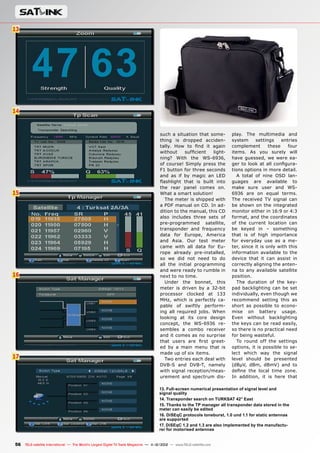
1. HD-T2 Basic Settings
2. The Sleep Timer can help to pre-
vent accidental discharging of the
battery; the HD-T2 accepts incoming
signals for measurement starting at
39 dBuV
3. The HD-T2’s battery is fully
charged, the frequency plan for the
test location Austria has been loaded
4. HD-T2 Main Menu
5. Selection of available transmitter
locations by means of frequency
lists supplied by Horizon
6. You either select the broadcasting
location directly from the entire list
or you limit it to your own region
7. Measurement of a DVB-T2 signal
(UHF channel 60)
8. MER and BER of a DVB-T2 signal
9. 5 stars signify an absolutely per-
fect signal
10. Technical details of a DVB-T2
signal; note the SISO label for Single
Input / Single Output
11. The Physical Layer Pipe con-
cept is being used on the currently
have both hands free while
using the analyzer. Thanks
to the synthetic carrying
case, the HD-T2 is nicely
protected from rain, sprin-
klers and dirt.
A Quick Start Guide leaflet
as well as a detailed user
manual describe in detail
all of the new HD-T2’s func-
tions. All in all, the shipping
package and its workman-
ship left us with a very posi-
tive impression. Horizon has
once again shown their dedi-
cation to quality.
After powering it up, the
background lighting for the
perfectly readable display
comes on that works great
whether you’re in a dark at-
tic or on the roof in bright
sunshine.
The HD-T2 operates with a
total of three labeled buttons
(ON, OFF and OK) and two
unlabeled buttons whereby
four of them make up a cross
and the OFF button does
more than meets the eye.
Holding down the OFF but-
ton with the analyzer turned
off brings up the configura-
tion display. This method
helps to prevent unknowing
or accidental changes to the
settings.
A multitude of settings
capabilities are available in
the configuration menu. It
all starts with the brightness
and contrast of the display,
measured frequency as identified by the
HD-T2 with the PLP label on the display
12. Spectrum display for UHF channel 60
13. Spectrum display for UHF channel 60
and also the adjacent channels
14. Detailed display of UHF channel 60
15. The constellation diagram shows a
tight symmetrical example, the recipe for
an interference-free signal
16. The Log Channel function stores the
reception values of the currently selected
frequency
17. One of our artificially generated DVB-T2
signals with a significantly attenuated
signal level and also with errors introdu-
ced – the values displayed on the HD-T2
are correspondingly poor
18. In manual scan mode bars indicate
improved orientation for the active fre-
quency
19. The Log All function searches the
entire frequency range and stores all of
the reception parameters of any active
frequency that is found
20. The Favorites function allows quick
access to the most recently selected
broadcasting location
21. Three spectrum modes as well as the
constellation diagram are available
22. The Slope Test function displays both
of the active DVB-T2 frequencies next to
each other in bar graph form
23. The Slope Test function displays the
signal levels of the two active DVB-T2 fre-
quencies next to each other, the user can
instantly see the difference in the signal
levels
24. The HD-T2 can supply power to exter-
nal antenna amplifiers with +5V or +12V
25. An artificial DVB-T2 signal generated
by us is measured with perfect signal
levels
26. Technical details of the artificial
DVB-T2 signal we generated
27. Artificially induced errors in our signal
did not bother the HD-T2 at all
28. Comparison measurement of UHF
channel 24 with the HD-T2
29. MER and BER of UHF channel 24 with
the HD-T2
30. Comparison measurement of UHF
channel 24 with a professional analyzer
31. Comparison measurement of UHF
channel 34 with the HD-T2
32. MER and BER of UHF channel 34 with
the HD-T2
33. Comparison measurement of UHF
channel 34 with a professional analyzer
34 TELE-satellite International — The World‘s Largest Digital TV Trade Magazine — 1
1-12/2012 — www.TELE-satellite.com
an audible confirmation tone
with the push of every but-
ton and the selection of the
desired signal level units
(dBµV, dBmV, dBm) and
goes all the way to setting
a level at which the analyzer
defines a signal as accepta-
ble and attenuation settings
that can be set to 10, 20 or
30 dB.
Ideally, the analyzer
should be left in the factory-
set Auto mode in which the
HD-T2 automatically sets the
optimal value. An integrated
sleep timer that is settable
between 1 and 30 minutes
and can be activated if need-
ed so as to prevent acciden-
tal draining of the battery if,
for example, you should for-
get to turn off the analyzer
during a lunch break.
In order to make the HD-T2
attractive to as many users
as possible, Horizon made
the OSD display available in
12 different languages.
Once we set up all of the
settings exactly the way we
wanted to, we could hardly
wait to start using the HD-
T2. In no time at all we had
the analyzer connected to
our VHF/UHF antenna on
the roof of our test center
and with excited fingers we
pressed and held the “ON”
button until the HD-T2 came
to life.
Unlike signal reception
via satellite, the DVB-T/
T2 frequencies for a given
programme are completely
different for each regional
transmitter (exceptions to
this are countries with a
single frequency network
– SFN) so that the same
broadcaster, for example, in
southern Austria transmits
on a different frequency,
say, in eastern Austria.
But Horizon was fully
aware of this anomaly with
DVB-T/T2 reception and
provides prefabricated fre-
quency plans for various
regions of the world. These
frequency plans, for exam-
ple, for Ireland, Italy, Great
Britain, The Czech Republic,
Poland, Denmark, Germany,
Australia, South Africa, Aus-
tria, etc., are available from
Horizon’s website www.hori-
zonhge.com and are eas-
ily loaded onto the analyzer
through its USB port.
We’ll explain more about
this later, but for now suffice
it to say that these lists can
be transferred from a PC to
the HD-T2.
Through the first menu
selection “Choose Transmit-
ter”, the user has access to
precisely this frequency data
from which either the de-
sired region is first selected
and then the local broad-
casting location or the DVB-
1 2
3
4
5
35
www.TELE-satellite.com — 1
1-12/2012 — TELE-satellite International — 全球发行量最大的数字电视杂志
1. The HD-T2 is recognized
by Windows via the USB
serial port; the necessary
drivers are automatically
installed
2. New frequency tables are
always made available in
.exe format. The user simply
has to start the program and
then click on “Transfer”. In
just a few seconds the files
on the PC are transferred to
the analyzer
3. The HD-T2 Log Reader
works very simply: just
connect the analyzer to the
PC, start the Log Reader and
then click on “Read”
4. The data was successfully
transferred
5. The Logger data stored in
the analyzer is displayed on
a PC in an organized manner
and can easily be exported
T/T2 broadcasting location
is selected directly from the
entire list. For Great Britain,
users can even choose their
reception region by enter-
ing in their local postal code;
it’s a feature that is not yet
available for other regions of
the world.
You might be asking your-
self right now why all of this
work to select a desired
broadcasting region is even
necessary. The answer is ac-
tually quite simple: it saves
you a lot of time and effort!
In addition to a complete fre-
quency scan and a manual
frequency scan, the HD-T2
also has the ability, thanks
to the preprogrammed fre-
quency data, to perform a
quick scan in which only the
active frequencies in a re-
gion are actually read and
processed.
Because of this, an in-
staller won’t need to have
a frequency table with him
during an antenna installa-
tion and can instead rely on
the information stored in his
signal analyzer.
A complete frequency
scan starts at the lower end
of the VHF band and ends
at the upper end of the UHF
band. In manual frequency
scan mode the user simply
needs to select the desired
transmission mode (Analog,
DVB-T or DVB-T2) and then
the desired frequency. A
spectrum overview makes
the selection easier and
identifies with a bar graph
which frequencies at what
signal level in the VHF and
UHF bands are actually ac-
tive and for which it would
make sense to run a scan.
In complete and quick
scan modes, the analyzer
stops automatically at every
active frequency, emits a
short confirmation tone and
begins to analyze the fre-
quencies just identified as
active.
Shortly thereafter, the
name of the broadcaster ap-
pears on the screen (assum-
ing of course if a matching
frequency plan was previ-
ously uploaded into the ana-
lyzer) and shows at the bot-
tom of the display whether
the signal is analog, DVB-T
or DVB-T2.
With the help of the “ON”
button the user can now
page through the various
measurement results which
includes the signal level, sig-
nal quality, the MER (Modu-
lation Error rate), the BER
(Bit Error Rate) as well as
some basic signal informa-
tion such as the name of the
Mux, the modulation in use,
symbolrate and FEC.
For those less experienced
users, Horizon included a
five-star signal rating fea-
ture where one star rep-
resents the weakest signal
and five stars the strongest
signal. All of these measure-
ment results are, of course,
36 TELE-satellite International — The World‘s Largest Digital TV Trade Magazine — 1
1-12/2012 — www.TELE-satellite.com
available for the manual, au-
tomatic and quick scans.
We also found the Fa-
vorites function very prac-
tical. It lets the user store
more popular broadcasters
in a dedicated list allow-
ing the user to access them
more quickly. This greatly
simplifies the work of an in-
staller.
Also worth mentioning is
the fact that the HD-T2 in
DVB-T2 mode can also read
the service parameters of a
frequency so that, for ex-
ample, Single Input / Sin-
gle Output is identified with
the label SISO, Multi Input
/ Single Output is labeled
with MISO and if the Physical
Layer Pipe concept is being
used, the label PLP appears.
The IQ Swap function,
that is data streams with
exchanged vectors, is also
quite new. If this function is
activated in the HD-T2, the
scan will take a little longer.
By the way, IQ Swap is
used in only very few re-
gions.
In Spectrum Mode, the HD-
T2 can provide an overview
of the selected frequencies;
Horizon has integrated a to-
tal of three display modes:
Spectrum Channel, Spec-
trum Wide and Spectrum
Narrow.
In Spectrum Channel
mode the currently select-
ed channel is presented in
■
38 TELE-satellite International — The World‘s Largest Digital TV Trade Magazine — 1
1-12/2012 — www.TELE-satellite.com
relatively full-screen mode
in the center of the display
and Spectrum Wide displays
a large segment of the entire
spectrum.
Spectrum Narrow shows a
small segment of the spec-
trum around the desired
frequency. The spectrum
display is refreshed at a fast
enough rate so that it can
easily be used during the
alignment of an antenna.
It includes the FM and DAB
bands as well as the VHF and
UHF bands.
The HD-T2’s constella-
tion diagram display turns
out to be especially useful
when trying to track down
the source of interference
signals such as those that
might be generated by 4G
data connections. You can
recognize at a single glance
whether the form of the dis-
played signal is regular and
tight or if it’s a disturbed,
irregular signal display as
the result of external inter-
ference. The pictures in this
test report show a clean and
well received signal in the
constellation diagram.
We also like the fact that
the HD-T2 can also power
external antenna amplifiers
with +5V or +12V; a fea-
ture that all too many other
manufacturers forget to in-
clude but that always seems
to create an unnecessary
and avoidable problem for
installers.
The Logger function is an
absolute highlight of this
analyzer especially for those
professional users that have
to submit a report of their
work. It can optionally pro-
vide the signal measurement
values of all the active fre-
quencies and then performs
an automatic scan across
the entire VHF/UHF band
for analog, DVB-T and DVB-
T2 signals or lets the user
manually select a frequency
whose signal parameters
then end up in the HD-T2’s
memory.
With the help of special
Windows software (HD-T2
Log Reader), this informa-
tion can be transferred to
a PC where it can be saved,
exported or printed out.
And if, for example, the in-
stallation involves distribut-
ing the signal to multiple us-
ers, the installer can check
the signal levels at all the
endpoints (such as at wall
outlets) and present an Ex-
cel table as proof of his ex-
cellent work.
Professional installers will
definitely appreciate the
Slope Test function in the
HD-T2 when it comes to the
installation of more compli-
cated systems with multi-
ple users and lengthy cable
runs.
If the signal varies due to
multiple amplifiers and split-
ters or if there are longer
cable runs with less than ad-
equately shielded cable, this
could lead to a sloping signal
level within the frequency
range to be carried. That
is, higher frequency signals
could be more attenuated
and lower frequency signals
could be less attenuated ul-
timately leading to reception
problems in the higher fre-
quency ranges.
With the help of the Slope
Test function, this type of
problem can instantly be
recognized. The analyzer
utilizes the frequency plan
selected in “Choose Trans-
mitter” and displays the
signal level values of all the
frequencies in the plan next
to each other. The HD-T2
calculates the signal level
difference between the cur-
rently selected frequency
and all the other active fre-
quencies. This lets the user
see at a single glance the
extent of the signal level dif-
ference.
The pictures in this test
report show an acceptable
difference is signal level of
just a few dBµV.
Thanks to the USB inter-
face on the side of the HD-
T2, the user can easily link
the analyzer to a PC so that
new frequency lists and up-
dated firmware can be up-
loaded.
This interface can also
be used to transfer stored
Logger data back to a PC
for further processing. The
necessary drivers to estab-
lish this link are available
directly from Microsoft for
all Windows versions and in-
tegrated into the operating
system. All that’s needed is
to connect the analyzer to a
free USB port on the PC and
to allow Windows to auto-
matically find the necessary
drivers.
If for some reason the
drivers are not installed au-
tomatically, they can also be
loaded manually from the
Internet via Horizon’s web-
site www.horizonhge.com as
can the HD-T2 Reader soft-
ware and any new firmware.
This is especially important
since Horizon is constantly
at work further developing
their products and regular-
ly releases new versions to
An Excel table with the Logger data from our HD-T2 test analyzer
DATA
TECHNICAL
Manufacturer	 Horizon Global Electronics Ltd, First Floor Office
	 Allen House, Edinburgh Way, Harlow, Essex
	 CM20 2HJ, United Kingdom
Tel.	 +44-1279-417005
Email	 sales@horizonhge.com
Model	 HD-T2
Function	 Digital Meter for Analogue, and Signals
Input frequency	 48 - 862 MHz
compatible	yes
Modulations	 QPSK, 16-QAM, 64-QAM, 256-QAM
Carriers	 : 2k/8k
	 : 1k, 2k, 4k, 8k, 8k+Ext, 16k, 16k+Ext, 32k, 32k+Ext
Guard Intervals	 : 1/4, 1/8, 1/16, 1/32
	 : 1/4, 19/256, 1/8, 19/128, 1/16, 1/32, 1/128
Code Rates	 : 1/2, 2/3, 3/4, 5/6, 7/8
	 : 1/2, 3/5, 2/3, 3/4, 5/6
Bandwidth	 5, 6, 7 and 8 MHz
PLP Mode	 SISO / MISO
PLP Constellation 	 Automatic and indicated with ( R )
Rotation	
Display	 128 x 64 Pixel
OSD Languages	 English, French, German, Italian, Spanish, Dutch, Polish,
	 Swedish, Danish, Norwegian, Croatian, Finish
RF-Input	 F-Type (75 Ohm impedance)
USB Port	yes
Power supply	 100-240V AC, 12V DC
Battery	 2.4 Ah Li-Ion
+
–
www.TELE-satellite.com/TELE-satellite-1111/eng/horizon.pdf
More about this company
Thomas Haring
TELE-satellite
Test Center
Austria
39
www.TELE-satellite.com — 1
1-12/2012 — TELE-satellite International — 全球发行量最大的数字电视杂志
take care of any bugs as well
as add new features.
In our tests, the HD-T2
was recognized without any
problems by our Windows 7
test PC and after only a few
seconds was linked to our
PC. Horizon makes new fre-
quency tables and firmware
available in .exe format so
that the user merely has to
start the .exe file and then
click on the “Transfer” but-
ton – it really doesn’t get
any easier than this.
We set up a total of three
test scenarios for the HD-T2:
the first was an adjustment
of a UHF antenna, the sec-
ond was the measurement
of DVB-T and DVB-T2 signals
that we generated using a
modulator and thereby were
able to induce correspond-
ing error bits, the third was
comparison measurements
of analog and DVB-T signals
using an analyzer from an-
other manufacturer.
Adjusting a UHF antenna
with the HD-T2 was a simple
as it could be; thanks to the
preprogrammed frequency
lists we were able to find
the right broadcaster for our
location in just a very short
time and with the help of the
very sensitive signal param-
eter measurement the an-
tenna was set to its optimal
position in no time at all.
We were then able to iden-
tify all the DVB-T and DVB-
T2 signals; even a weak
DVB-T2 test signal from the
Austrian ORF, that up until
then we didn’t know about,
came into view.
Thanks to the sensitive in-
put of the tuner, even small
changes to the antenna po-
sition were instantly regis-
tered on the HD-T2 making
it very easy to optimally po-
sition the antenna.
Next we modulated a DVB-
T2 signal with a total of four
HD channels on a UHF carri-
er frequency and fed this to
the HD-T2. Even as we inten-
tionally deteriorated the sig-
nal, it did not affect the new
Horizon analyzer; it contin-
ued to show the correct and
appropriate measurements
– even the star ratings given
by the HD-T2 became less
and less until finally only one
star remained.
Last but not least, we
were especially curious how
the HD-T2 would compare to
another professional signal
analyzer. Since this other
analyzer could only process
DVB-T signals, we could not
perform this comparison
test with DVB-T2 signals.
As you can see with the
pictures accompanying this
test report, the measured
signal levels are virtually
identical. This speaks highly
of the quality of the Horizon-
built tuner and complements
the exceptional impression
that we received from this
analyzer.
Even the transferring of
the Logger data stored in the
analyzer functioned without
any problems. It was really
fun using the HD-T2, espe-
cially the exporting of data
in CVS format, and thus to
MS Excel, is an extremely
practical feature.
In conclusion we want to
congratulate Horizon on an-
other superb product that
bolsters the reputation of
the company. The HD-T2 has
all the functions that a pro-
fessional installer would ex-
pect, is exceptionally easy to
use and at only 1200 grams
(2.6 Lbs) is very lightweight.
Thanks to the powerful
battery the HD-T2 can be
used uninterrupted for up to
six hours along with its ex-
ternal power sources.
In our tests the HD-T2
proved itself many times
over.
Reacts very quickly to signal changes, pro-
cesses DVB-T, DVB-T2 and analog signals.
Its ease of use, low weight and practical car-
rying case makes it a joy each time to use the
HD-T2. Thanks to the constellation diagrams,
interference signals can easily be identified;
with the help of the complete scan and the
spectrum display even frequencies that were
up until then unknown could be identified, read
and processed. The Logger function makes possible the cre-
ation of a complete measurement protocol while the Slope test
helps in the identification of sloping signal levels.
None
Expert Opinion
40 TELE-satellite International — The World‘s Largest Digital TV Trade Magazine — 1
1-12/2012 — www.TELE-satellite.com
Panodic
HDS275
TEST REPORT HDTV Miniature Satellite Receiver
41
www.TELE-satellite.com — 1
1-12/2012 — TELE-satellite International — 全球发行量最大的数字电视杂志
•	Small receiver with small remote control
•	Optimized menu guidance with very few
settings
•	Works with BlindScan
•	Easy channel list administration
•	Ability to turn on the receiver to a specific
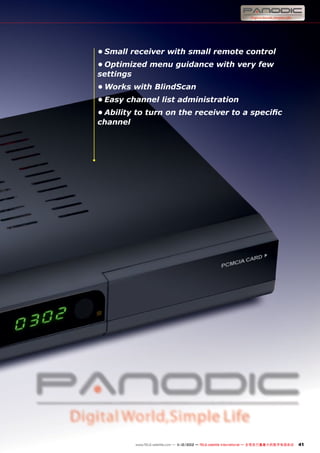
channel
1
1-12/2012
www.TELE-satellite.com/12/1
1/panodic
42 TELE-satellite International — The World‘s Largest Digital TV Trade Magazine — 1
1-12/2012 — www.TELE-satellite.com
A Small
but Nice
HDTV Receiver
TEST REPORT HDTV Miniature Satellite Receiver
Panodic HDS275
Best designed mini-receiver
for the best HD
reception
With its slim dimensions
of only 27 x 16 x 4.7 cm, the
Panodic HDS275 will easily
fit into any TV environment;
thanks to its plain black cabi-
net it blends in nicely with
the background.
The front panel shines in
its simplicity and, in addition
to a segmented display that
shows the current time or
the currently selected chan-
nel number, it sports six but-
tons that can be used to con-
trol the receiver without the
remote control. A status LED
that switches between green
and red indicates to the user
the current operational sta-
tus of the receiver (red =
standby, green = on).
Hidden behind a flap is a
CI slot for use with PayTV
services; it can accept all
the standard CI modules (for
example, Irdeto, Viaccess,
Conax, etc.).
Unlike most other modern
receivers, the HDS275 comes
with a Scart connector for
use on older TVs. Of course,
all the other connections
you’d expect to find are all
there: HDMI, YUV and CVBS
outputs are all available. The
audio output is available on
a coaxial digital audio output
as well as on two analog RCA
outputs.
Since the HDS275 is a
DVB-S/S2 receiver, there’s
also the typical IF tuner in-
put along with its associated
looped-through output as
well as a USB 2.0 interface
that can be used to turn the
receiver into a PVR if it’s con-
nected to an external USB
storage device.
The remote control in-
cluded by the manufacturer,
just like the receiver, is very
small and the pressure points
for the buttons are clearly
marked. The arrangement
of the individual functions
at first glance might seem
a little unorganized, but you
should get used to it after a
short time.
The Panodic HDS275 is not
only small on the outside, it’s
also ‘small’ on the inside. The
installation assistant that
appears the first time the
receiver is turned on only
offers three choices: time,
language and channel scan.
Because of this the in-
stallation is completed very
quickly. The first two options
take no time at all. As is typi-
cal, the HDS275 can also au-
tomatically set the internal
clock directly from the in-
coming satellite signal.
For the language selection
option, the Panodic offers a
representative cross-section
of all the more important Eu-
ropean languages.
It gets more exciting in the
Channel Scan menu. Panodic
included a preprogrammed
list of 24 satellites and cor-
responding transponders.
Unfortunately, this list is not
all that up to date. However,
we did like the wide variety of
settings capabilities to match
the receiver with your anten-
na. The HDS275 supports the
DiSEqC 1.0 and 1.1 protocols
and can therefore be used on
antennas with up to 16 LNBs.
Thanks to the individually
settable LOF, the receiver is
compatible with C-band and
Ku-band antennas as well
as any other type of recep-
tion system. Panodic even
thought about those users
with SCR single-cable solu-
tions and offers the neces-
sary parameters for that kind
of setup.
The manufacturer was very
successful in the implemen-
tation of the channel scan’s
graphical presentation; it is
available in transponder, sin-
gle satellite, multi-satellite
and blind scan modes.
The regular scan of HOT-
BIRD at 13° east found 1498
TV channels and 394 radio
channels in a reasonable
eight minutes. A BlindScan
of the same satellite resulted
in 1466 TV channels and 390
radio channels in 12 minutes;
it needed a little more time
and found fewer channels
than the regular scan using
preprogrammed transpond-
ers.
The main menu of the
HDS275 is divided into six
categories (Installation,
Channel, Preference, Set-
ting, AV and Game) and is
very nicely arranged.
The Installation section
takes you to the reception
settings and the search for
new channels. Compared to
the initial installation assis-
tant, it also provides the abil-
ity to drive DiSEqC 1.2 and
1.3 motorized antennas.
From here the user can
also modify and expand the
preprogrammed satellite and
transponder lists as they see
fit. It’s a feature that we were
happy to play around with.
The Channel section is to-
tally dedicated to editing the
channel list. With nearly 2000
channel entries added by our
test scan of the HOTBIRD
satellite, it’s a feature you
really can’t do without. With
the help of the colored func-
tion buttons on the remote
control, individual channels
1 4
2 5
3 6
0.58
43
www.TELE-satellite.com — 1
1-12/2012 — TELE-satellite International — 全球发行量最大的数字电视杂志
1. Panodic HDS275’s initial settings
2. Antenna settings
3. Channel scan on HOTBIRD
4. Channel list
5. The Info bar shows the content of the
current program but not the next program
6. Main Menu
can be deleted, moved and
renamed as well as sorted al-
phabetically, by FTA/CAS or
CAS/FTA. This makes it very
easy for the user to organize
the nearly 4000 possible en-
tries in the channel list.
Panodic also kept in mind
that kids might be in the
household; individual chan-
nels can be locked out with a
PIN code to keep those curi-
ous eyes from seeing some-
thing they shouldn’t.
7 12
8 13
9 14
10 15
11
44 TELE-satellite International — The World‘s Largest Digital TV Trade Magazine — 1
1-12/2012 — www.TELE-satellite.com
7. Satellite and transponder data can easily be edited
8. Even the DiSEqC 1.2 and 1.3 protocols are supported allowing
the control of motorized antennas
9. The user can match the channel list to his personal tastes in the
Channel Manager
10. The Boot on Channel Option lets the receiver always start with
a predefined channel
11. Language settings
12. PVR settings
13. In addition to a video resolution of 720p, resolutions up to
1080p are possible
14. Five integrated video games pass the time during commercial
breaks
15. Integrated Teletext decoder
16
17
18
19
20
46 TELE-satellite International — The World‘s Largest Digital TV Trade Magazine — 1
1-12/2012 — www.TELE-satellite.com
16. HD channels can easily be
recorded
17. The MP3 player can also
process and display cover art
18. The integrated media player
supports all the common
formats
19. The media player can
also play back full HD videos
without any problems
20. The channel list can be
limited to individual satellite
entries
There are also eight freely
loadable Favorites lists that
round out our overall positive
impression of the channel
list editing capabilities of the
HDS275. In this way, every
family member can set up
their own Favorites list with
their favorite channels.
In addition to typical set-
tings such as OSD language
and time, the Basic settings
menu also comes with some
interesting extras.
One of those is the ‘Option
Boot on Channel’ setting that
lets you program the receiv-
er to go to a specifically de-
fined channel every time the
receiver is turned on and not
just the channel that was last
viewed. Not only that, you
can also select the maximum
size of any recorded data
(1,2,3,4 GB or Unlimited).
It lets you elegantly bypass
that problem of maximum
4GB file sizes in FAT32 for-
matted storage devices.
As far as PVRs go, the
HDS275 shines; in addition to
standard PVR functions, the
Panodic can also automati-
cally add an already started
recording to the Timeshift
cache memory. The size of
the Timeshift can also be ad-
justed by the user.
Before closing the main
menu and watching TV, the
user should take one more
look in the Settings menu.
Since the receiver supports
resolutions via HDMI in 480p,
480i, 576p, 576i, 720p, 1080i
and 1080p modes, it is capa-
ble of providing full HD sig-
nals to modern TVs.
All of these settings capa-
bilities are further enhanced
by an Auto-standby function
that can be automatically ac-
tivated after a user-settable
one, two or three hours and
by the individual adjustment
of contrast, brightness, satu-
ration and color tone of the
displayed video signal. After
our extensive excursion in-
side the new HDS275’s menu
structure, it was finally time
to have a closer look at this
receiver’s everyday opera-
tion.
A push of the OK button
on the remote control dis-
plays, just like with almost
any other receiver, the chan-
nel list. The channel list with
the HDS275 is presented in a
nicely organized fashion and
can be limited to only FTA or
CAS channels.
We also liked the running
ticker used for lengthy chan-
nel names. In this way you
can see the entire name of
a channel instead of just the
first set of characters that
happen to fit. Channel surf-
ing is a pleasure with the
HDS275; less than one sec-
ond is needed to switch be-
tween channels. With the pic-
ture and audio quality there
was also nothing to complain
about but we really didn’t ex-
pect any less from Panodic.
Thanks to the receiver’s
128 MB main memory and
its 4 MB Flash memory, the
receiver reacts very quickly
to commands from the re-
mote control. After switching
to a new channel, an Info bar
appears momentarily at the
bottom of the screen provid-
ing data on the current pro-
gram but not the next pro-
gram.
Aside from that, the Info
bar also shows other typical
data such as the current time
and the encryption method
used. To get an overview of
the currently available pro-
grams, a simple push of the
EPG button on the remote
control is needed to display
all the programming infor-
mation from the provider.
The display of the EPG can be
+
–
Thomas Haring
TELE-satellite
Test Center
Austria
48 TELE-satellite International — The World‘s Largest Digital TV Trade Magazine — 1
1-12/2012 — www.TELE-satellite.com
Living room compatible receiver with all the
necessary everyday features. Stable and
sophisticated software that functions without
any problems.
The Info bar should show the EPG data from
the current and upcoming program.
Expert Opinion
TURKSAT at 42° east as well
as relatively weak signals like
those on BADR at 26° east
that flirt with the thresh-
old level of the receiver. In
both cases the HDS275 was
able to handle the requested
tasks and left us with a very
favorable impression. SCPC
reception was interference
free starting at 2.0 Ms/sec.
and signals with a C/N of 5
dB could be displayed with-
out any large dropouts.
The HDS275 is further sup-
plemented by an integrated
teletext decoder (that also
functioned correctly in our
tests) as well as five video
games (Box Man, Tetris, Hit
Rat, Go Bang, Sudoku) to help
pass the time during those
long commercial breaks.
Since the manufacturer is
constantly at work improving
the HDS275’s software, any
updates that become avail-
able can be uploaded into the
receiver either via the exter-
nal storage device or directly
via satellite.
All in all, we had a lot of fun
putting the Panodic HDS275
through the ringer. It is an-
other excellent example of
a successful concept that in
this case involves not only
the miniaturization of the re-
ceiver and remote control,
but also its menu operation.
either a grid showing seven
channels or it can be limited
to the complete EPG display
of a single channel. Natural-
ly, timer entries can be pro-
grammed directly from the
EPG. This helps to guaran-
tee that you won’t miss that
blockbuster movie or that
next installation of your fa-
vorite TV series.
A total of only ten timer
entries can be filled; it would
be nice if the manufacturer
could improve this number
to 20 entries or perhaps even
more.
As soon as an external
storage device is connected
via the USB 2.0 port, the
receiver can begin record-
ing SD as well as HD chan-
nels. During a recording, the
channel list is reduced to the
number of available channels
and since the receiver only
has one tuner, it would be
those channels that are on
the same transponder. While
it’s not possible to record two
channels at the same time, it
will quite happily record one
channel and let you watch
another channel live. It will
also let you watch a prere-
corded program while re-
cording another program.
Overall we thoroughly en-
joyed the PVR features. But
there’s more. As you would
expect with any namebrand
receiver, the Panodic box
uses the attached storage
device to not only record and
play back TV and radio pro-
grams, it also serves as the
storage device for the MP3
jukebox, the picture viewer
and the media player.
All of these functions were
conceived by Panodic with
great detail. The MP3 player,
for example, can automati-
cally recognize integrated
cover art for a song and then
display it. The media player
supports the DivX (AVI),
VOB, MPEG and TS formats
and can also process full HD
content effortlessly.
As is standard during our
tests, the HDS275’s tuner, a
Sharp S7HZ7306A, also had
to undergo strenuous tests
such as with narrowband
SCPC signals like those on
DATA
TECHNICAL
Manufacturer	 Panodic, 12/F Grentech Building, Keji C Road 3rd,
	 Nanshan, Shenzhen 518057, China
Contact	 www.panodic.com/Contact.aspx
Internet	 www.panodic.com
Model	 HDS275
Function	 / Receiver
Input frequency	 950-2150 MHz
Supported standards	 , , QPSK, 8PSK
SCPC	 yes (> 2 Ms/s)
EPG	yes
Video resolution	 480p, 480i,576p,576i,720p, 1080i, 1080p
RS232	no
Ethernet	no
USB 2.0	yes
HDTV	yes
MPEG4/H.264	yes
Supported OSD languages	 English, French, German, Spanish, Italian, Greek,
	 Portugiese, Russian, Dutch, Czek, Swedish, Turk
DIAGRAM
ENERGY
Active Power
Apparent Power
Mode Apparent Active Factor
Active 12 W 7 W 0.58
StandBy 2 W 0.7 W 0.35
www.TELE-satellite.com/12/03/panodic
More about this company
21
22
23
49
www.TELE-satellite.com — 1
1-12/2012 — TELE-satellite International — 全球发行量最大的数字电视杂志
The first 15 minutes in active operation with channel switching, PVR
recording and playback; the second 15 minutes in standby mode.
21. One of the multiple audio tracks can be
selected
22. EPG overview of a total of seven
channels
23. The complete programming guide of a
channel
50 TELE-satellite International — The World‘s Largest Digital TV Trade Magazine — 1
1-12/2012 — www.TELE-satellite.com
Satlink
WS-6936
•	suitable for measuring DVB-S and DVB-T
signals
•	integrated blind scan for satellite signals as
special treat
•	can be used as receiver as well, if required
•	suitable for alignment of motor-controlled
antennas
•	very precise presentation of measuring
results
TEST REPORT Combo Meter for DVB-S and DVB-T
51
www.TELE-satellite.com — 1
1-12/2012 — TELE-satellite International — 全球发行量最大的数字电视杂志
1
1-12/2012
www.TELE-satellite.com/12/1
1/satlink
52 TELE-satellite International — The World‘s Largest Digital TV Trade Magazine — 1
1-12/2012 — www.TELE-satellite.com
The ‘One-Stop’ Meter
TEST REPORT Combo Meter for DVB-S and DVB-T
When it comes to launch-
ing signal meters, most
manufacturers have always
opted for one of the follow-
ing two marketing strate-
gies: Either the meter is
particularly small and easy
to carry along, with only a
limited range of features
in exchange, or it is fully-
fledged with a correspond-
ing size and weight. Baotong
engineers have embarked
on a path towards a third
category: small and packed
with features. The Satlink
WS-6936 is the outcome of
all their efforts, and we have
taken a closer look at how
it performs with everyday
jobs.
The meter measures 12.5
x 20.5 x 4.5 cm and only
weights 0.66 kg, yet it is
so much more than only a
meter. Baotong has even
packed a fully-featured
DVB-S/DVB-T combo receiv-
er into such a small device.
Thanks to its size and er-
gonomic shape the Satlink
WS-6936 sits nicely in your
hand, with a foldout pedes-
tal assisting use and read-
ability on flat surfaces.
The meter is wrapped with
a bright yellow protective
rubber shell which – in com-
bination with the included
water-repellent carrying
bag – keeps out dust, dirt
and moisture and protects
the device from damage
during regular use. The car-
rying bag comes with a con-
venient strap.
In addition to bag and
strap, the meter is shipped
with the obligatory power
unit for charging the built-
in battery of the WS-6936,
a charger for in-car use, as
well as an AV cable for con-
necting the device to an ex-
ternal monitor.
Look at the new Satlink
WS-6936 for the very first
and the feature that will
strike you most is a 4.3-inch
monitor, which forms the
centrepiece of the meter. As
our test revealed, the man-
ufacturer did not only go for
sheer size, but chose a truly
excellent LCD panel too. It
can even be read in direct
sunlight, and in a dark at-
tic it genuinely shines. On
Satlink WS-6936
Very easy to use signal meter which also
serves as receiver.
1
2
3
4
5 6
54 TELE-satellite International — The World‘s Largest Digital TV Trade Magazine — 1
1-12/2012 — www.TELE-satellite.com
the topside of the casing
Baotong has positioned
the signal inputs for DVB-
S (F-socket) and DVB-T (RF
socket), while the left side
features two connectors for
video output and video in-
put.
Wait a second – a meter
with a signal input? You bet.
Not only can the WS-6936
provide the video signal of
the currently received chan-
nel to an external monitor, it
can also act as a monitor for
an external receiver or sig-
nal source!
On the bottom side you can
find the socket for the exter-
nal power supply unit as well
as a USB port for updating
the meter’s software and for
uploading new satellite and
transponder data. We did
like the fact that the manu-
facturer has even thought of
a mechanical power switch,
which is placed on the lower
left side of the signal meter.
It is required for turning on
and off the device – what a
welcome change from all the
keys and buttons which are
so common these days in
combination with software-
controlled switching.
A total of five LEDs are lo-
cated below the display and
indicate operating mode, 22
kHz signal, control voltage
(13/18V), signal lock and
battery charging. This way
all important parameters of
the meter are available to
users at a single glance.
Apart from the keypad
and cross-shaped naviga-
tion buttons there are four
unlabelled function keys for
controlling the WS-6936. As
usual, these function keys
can assume different roles
depending on the operat-
ing mode. The current func-
8
9
10
11
7 12
55
www.TELE-satellite.com — 1
1-12/2012 — TELE-satellite International — 全球发行量最大的数字电视杂志
1. Main menu of the Satlink WS-6936
2. System settings
3. System settings
4. All parameters of the selected satellite can be adjusted, if
required, before the spectrum display is activated
5. Comprehensive, pre-stored satellite list
6. A number of LOF values (for the Ku and C bands, for example)
are already pre-set for selection
7. SCR unicable solutions are supported as well
8. Complete display of the spectrum
9. Spectrum display (complete)
10. 108 MHz excerpt of the spectrum around the 11078 MHz fre-
quency
11. 540 MHz excerpt of the spectrum around the 11078 MHz fre-
quency
12. Apart from signal level and signal quality bars, the meter also
gives out the desired satellite’s azimuth and elevation values as
well as numerical values for BER, signal level and C/N (MER)
tions are indicated in the on-
screen display.
Baotong has equipped
the WS-6936 with a built-
in 3000 mAH Li-Ion battery
pack, which is capable of
powering the meter for up
to five hours per cycle, af-
ter a charging time of six
hours when connected to
the mains.
The amount of attention to
detail that the manufacturer
has put into this device is
shown in many ways, and we
would like to highlight one
by way of example: Antenna
installers frequently work in
darkish under-roof environ-
ments, and it’s mostly in
13
14
15
16
17
56 TELE-satellite International — The World‘s Largest Digital TV Trade Magazine — 1
1-12/2012 — www.TELE-satellite.com
such a situation that some-
thing is dropped acciden-
tally. How to find it again
without sufficient light-
ning? With the WS-6936,
of course! Simply press the
F1 button for three seconds
and as if by magic an LED
flashlight that is built into
the rear panel comes on.
What a smart solution!
The meter is shipped with
a PDF manual on CD. In ad-
dition to the manual, this CD
also includes three sets of
pre-programmed satellite,
transponder and frequency
data for Europe, America
and Asia. Our test meter
came with all data for Eu-
rope already pre-installed,
so we did not need to do
all the initial programming
and were ready to rumble in
next to no time.
Under the bonnet, this
meter is driven by a 32-bit
processor clocked at 133
MHz, which is perfectly ca-
pable of swiftly perform-
ing all required jobs. When
looking at its core design
concept, the WS-6936 re-
sembles a combo receiver
and it comes as no surprise
that users are first greet-
ed by a main menu that is
made up of six items.
Two entries each deal with
DVB-S and DVB-T, namely
with signal reception/meas-
urement and spectrum dis-
play. The multimedia and
system settings entries
complement these four
items. As you surely will
have guessed, we were ea-
ger to look at all configura-
tions options in more detail.
A total of nine OSD lan-
guages are available to
make sure user and WS-
6936 are on equal terms.
The received TV signal can
be shown on the integrated
monitor either in 16:9 or 4:3
format, and the coordinates
of the current location can
be keyed in – something
that is of high importance
for everyday use as a me-
ter, since it is only with this
information available to the
device that it can assist in
correctly aligning the anten-
na to any available satellite
position.
The duration of the key-
pad backlighting can be set
individually, even though we
recommend setting this as
short as possible to econo-
mise on battery usage.
Even without backlighting
the keys can be read easily,
so there is no practical need
for being wasteful.
To round off the settings
options, it is possible to se-
lect which way the signal
level should be presented
(dBµV, dBm, dBmV) and to
define the local time zone.
In addition, it is here that
13. Full-screen numerical presentation of signal level and
signal quality
14. Transponder search on TURKSAT 42° East
15. Thanks to the TP manager all transponder data stored in the
meter can easily be edited
16. DiSEqC protocols toneburst, 1.0 und 1.1 for static antennas
are supported
17. DiSEqC 1.2 and 1.3 are also implemented by the manufactu-
rer for motorised antennas
18
19
20
21
22
58 TELE-satellite International — The World‘s Largest Digital TV Trade Magazine — 1
1-12/2012 — www.TELE-satellite.com
23
24
25
26
27
59
www.TELE-satellite.com — 1
1-12/2012 — TELE-satellite International — 全球发行量最大的数字电视杂志
18. Voltage of up to 24V can be provided to external signal ampli-
fiers
19. DVB-T spectrum display with frequency selection
20. DVB-T spectrum display with channel selection
21. Active DVB-T frequency in enlarged presentation
22. DVB-T frequency check for detecting signal tilt by checking the
signal levels of several frequencies
23. DVB-T measurement mode – here again, signal level and signal
quality are indicated as bars, and numerical values are given for
BER, signal level and C/N (MER)
24. DVB-T channel search
25. The image viewer reproduces the directory structure of our
USB memory stick
26. Image viewer
27. Overview of all image files available in the directory
new channel lists and up-
dated firmware can be load-
ed onto the device with a
single touch of a button, and
users can decide to save all
internal date onto an exter-
nal storage medium.
As soon as you call up the
spectrum display in DVB-S
mode the meter immedi-
ately displays all pre-stored
satellite entries, which in
our case comprised 26 of
the most popular orbital
positions between 75° East
and 30° West. The LOF of
the used LNB can either be
selected from a list of stand-
ard values or can be entered
manually – hats off to that
convenient option.
Users of SCR unicable so-
lutions will be very pleased
to find out that the manufac-
turer does not leave them in
the dark either by offering
all required parameters for
selection. The new Baotong
meter comes with all control
adjustment options, such
as DiSEqC 1.0, 1.1, 1.2, 1.3
and toneburst.
The pros among our read-
ership will surely have con-
cluded from DiSEqC 1.2 and
1.3 that the meter must
definitely be compatible
with DiSEqC motors, and of
course they are absolute-
ly right. The WS-6936 is a
perfect match for motorised
antennas and will control all
movements as required.
Thanks to the manufac-
turer pre-installed tran-
sponder database the meter
allows selecting a specific
frequency even before the
spectrum is displayed. In
such a case the frequency
is called up directly and
locked. Users can select any
bandwidth between 108 and
540 MHz or may opt for full
spectrum display instead.
The same is true for the
polarisation and the 22 kHz
signal, which can be set or
changed with a single touch
of a button. Thanks to the
function keys below the
screen users can adjust
bandwidth, polarisation and
frequency band settings on
the fly, without having to
make a detour via the set-
tings menu.
Once the required fre-
quency is marked with the
help of the arrow keys –
with Up/Down changing the
y-axis of the display and
therefore the signal level
scale – a press on the F4
function key initiates a sig-
nal search.
We noticed during our
test that the spectrum dis-
play reacts very swiftly to
any signal changes. This is
particularly important for an
initial rough antenna align-
ment, and we cannot praise
such immediate feedback
highly enough.
If you need access to all
adjustment options for sat-
ellite reception/signal meas-
uring the DVB-S entry in the
main menu will open that
door for you. Here you can
edit satellite and transpond-
er lists, start signal scans
and rename, change, add
or delete individual satellite
and transponder entries.
The sky’s the limit, and we
mean it.
Using the Quick Search
function you are able to
perform a manual chan-
nel search on a pre-defined
frequency. It goes without
saying that all adjustment
60 TELE-satellite International — The World‘s Largest Digital TV Trade Magazine — 1
1-12/2012 — www.TELE-satellite.com
options available in the
spectrum mode (LOF, fre-
quency, DiSEqC, etc.) are
available here as well.
Once the selected fre-
quency is keyed in manually
or selected from the pre-
programmed list a window
pops up with two bars that
visualise signal level and
signal quality. In addition,
the meter provides the sig-
nal level, the C/N ratio and
the Bit Error Rate (BER) as
numerical values.
Now we realise why the
WS-6936 wanted to know
the coordinates of the loca-
tion right at the start in the
initial settings menu. The
meter shows the correct az-
imuth and elevation values
of the antenna for reception
of the desired satellite. An
acoustic aid is also provid-
ed, which is a high-pitched
signal beeping in increasing-
ly short intervals, the better
the signal quality becomes
(with a permanent signal
indicating optimum antenna
alignment). This allows an-
tenna alignment even with-
out a direct line of sight.
Once the antenna is posi-
tioned in a way that the sig-
nal quality and signal level
bars show sufficient values
(both of which can also be
zoomed into a full-screen
mode, complete with nu-
merical values), users can
start a scan on the currently
selected transponder or on
the entire satellite.
We tested the full satel-
lite scan with Hotbird at 13°
East and had to wait some
EPG data of a channel for up
to seven days in advance.
If you make use of the AV
output of this handy little
meter you can easily turn
it into an excellent receiver
on your next camping trip,
for example. Thanks to this
one-stop solution you can
use the device for correct-
ly aligning your antenna at
first, and for SD TV recep-
tion later.
The range of functions in
DVB-T mode is identical to
DVB-S mode, with the ex-
ception of pre-stored fre-
quencies, which obviously
are different. We did appre-
ciate that the manufacturer
has thought of power supply
for an external signal ampli-
fier – 5V, 12V or 24V can be
selected to accommodate
virtually all solutions.
Thanks to specifying the
country in which the meter
is being used the frequency
list is adjusted to reflect the
local situation. Like for DVB-
S, the Quick Search func-
tion is available for DVB-T
as well, and the same is true
for spectrum display. It re-
acts just as swiftly to signal
changes as in DVB-S mode
and therefore provided
great help in correctly align-
ing a UHF antenna for test
purposes. The cross-shaped
navigation buttons can be
used in spectrum mode to
either select a specific fre-
quency or particular chan-
15 minutes for its comple-
tion. Thanks to blind scan,
however, all active tran-
sponder were found and
we ended up with a total of
1891 TV channels and 567
radio stations. In case you
wonder why a signal meter
comes with an integrated
channel search at all we
should like to draw your at-
tention to the second oper-
ating mode of the WS-6936,
namely that of a combo re-
ceiver with all features and
functions you would expect
for DVB-S/T reception.
Simply press the OK but-
ton or the F1 function key
for the channel list to open,
and every time you select
a new channel an info bar
shows information on the
new channel. The overall
channel list can be restrict-
ed to a certain channel, or
the technical parameters
of an entry can be called
up with the help of func-
tion keys. If you’re look-
ing for editing functions
you have become used
to from DVB-S/T receiv-
ers you will find them
in the WS-6936 as
well – channels can
be deleted, moved
or renamed at the
touch of a button.
The F3 function
key takes care of
language selec-
tion, while F4
calls up the
28. The MP3 player reproduces
the directory structure of our
USB memory stick
29. Using the function keys the
entries on the channel list can
be restricted to specific satelli-
tes or DVB-T channels
30. Selecting an audio track
31. EPG presentation for up to
seven days in advance
32. Comprehensive channel
information, including signal
level and signal quality
33. Signal measurement on
BADR 26° East (11919H)
34. Signal measurement on
BADR 26° East (11919H) with
professional reference meter
35. Signal measurement on
TURKSAT 42° East (11096H)
36. Signal measurement on
TURKSAT 42° East (11096H)
with professional reference
meter
37. Selecting a new satellite or
transponder list
28
29
30
31
32
33
34
35
36
37
61
www.TELE-satellite.com — 1
1-12/2012 — TELE-satellite International — 全球发行量最大的数字电视杂志
62 TELE-satellite International — The World‘s Largest Digital TV Trade Magazine — 1
1-12/2012 — www.TELE-satellite.com
nel, something we found
extremely helpful in our
test. The meter performed
flawlessly when prompted
to read a user-defined fre-
quency or even the entire
reception range, if required.
All channels that are found
are saved onto the channel
list fully automatically.
In order to make sure a
signal tilt caused by ampli-
fiers, distributors or long
cables etc. does not distort
a measurement result the
WS-6936 offers the option
to select several frequen-
cies at once and creating a
side-by-side presentation
of their parameters (signal
level and signal quality). On
a single screen it is possible
to show up to five channels
at the same time. Using the
arrows keys it is possible
to switch between screens.
This way a signal tilt can be
recognised reliably and then
eliminated.
As always, we created a
number of scenarios for our
practical test, starting with
aligning a 90cm antenna to-
wards TURKSAT 42° East,
then setting up a DiSEqC
motorised dish and finally
aligning a UHF antenna for
optimum DVB-T reception.
We began with entering
the coordinates of our lo-
cation and selecting TURK-
SAT as our target satellite.
Thanks to the spectrum dis-
play and the azimuth and el-
evation values provided by
the WS-6936 it was child’s
play to correctly position
our antenna. The ultimate
fine-tuning was achieved
with the help of the sig-
nal level and signal quality
bars, so that our first job
was completed in next to no
time.
In most cases, the align-
ment of a motorised anten-
na requires a meter plus a
satellite receiver with DiS-
EqC 1.2 and 1.3 compatibil-
ity. This has changed with
the arrival of the WS-6936:
Thanks to a wise decision by
Baotong both functions are
packed into a single prod-
uct. This takes the scare
out of installing motorised
antennas and in our test we
only took a little over half an
hour to arrive at a perfectly
aligned motorised antenna
for reception of all positions
between 75° East and 30°
West, at least as far as the
measurement results indi-
cated by the WS-6936 are
concerned.
But then again, are those
results 100% trustworthy or
does the manufacturer give
out glossed over results?
We performed the same
test with a much more ex-
pensive professional meter
and as you can see in the
screenshots, we arrived at
almost the same values. So
the WS-6936 actually did a
brilliant job.
Please note, however,
that while the WS-6936
does say that one of the
signal quality values indi-
cates C/N, this value is ac-
DATA
TECHNICAL
Manufacturer	 Fujian Baotong Science&Technology Co.,Ltd
Tel.	 86-595-28106302
Email	 dp02@baotong.cc
Model	 Satlink WS-6936
Function	 Digital Meter & Receiver for and Signals
Input frequency	 47 - 862 MHz & 950-2150 MHz
/ compatible	no
Modulations	 QPSK, 16-QAM, 64-QAM
Symbol rates 	 2-45 Ms/s
DiSEqC	 yes (Toneburst, 1.0, 1.1, 1.2, 1.3)
Bandwidth 	 5, 6, 7 and 8 MHz
Display	 4.3 inch
OSD Languages	 English, French, German, Portugese, Spanish,
	 Italian, Czech, Greek
Signal-Input	 F-Type & IEC
USB Port	yes
Power supply	 100-220V AC, 12V DC
Dimensions	 12.5 x 20.5 x 4.5 cm
Weight	 0.66 kg
Battery	 3000 mAH Li-Ion
+
–
Thomas Haring
TELE-satellite
Test Center
Austria
64 TELE-satellite International — The World‘s Largest Digital TV Trade Magazine — 1
1-12/2012 — www.TELE-satellite.com
tually the Modulation Error
Rate (MER) and therefore
must not be compared with
the C/N value presented by
our reference meter. Finally,
we tried to align a UHF an-
tenna for DVB-T reception
and once again our verdict
is that you can hardly ac-
complish such a task more
easily and quickly than with
the WS-6936.
Now that the WS-6936
has proven its worth in the
realm of signal measuring,
we were particularly curious
as to how it would perform
in the TV reception field. To
that end, we used an RCA
cable to connect the meter
with the TV panel at first.
The device does not come
with a remote control, but if
you use a cable with suffi-
cient length you can easily
do without. The size of the
meter is so small it can al-
most be mistaken for a re-
mote control anyway.
The WS-6936 can be used
to conveniently access all
required functions and if
you use the power supply
unit of the car charging unit
that is shipped with the me-
ter you’re all set for hours of
viewing pleasure.
Up until some years ago,
MP3 playback and image
viewing had been the do-
mains of stationary PCs.
These days, however, you’d
be hard pressed to find a
receiver without those func-
tions, and the WS-6936 is
no exception. Obviously,
the manufacturer Baotong
wanted to be right up there
with the best and treated its
meter-cum-receiver combi-
nation to an image viewer
and an MP3 jukebox.
Here too, the integrated
AV output comes very handy
for presenting photos on a
flat-screen TV or for play-
ing back audio on the HiFi
system. Content can be fed
to the WS-6936 via the USB
port that is located on the
bottom of the device. Any
storage medium will do, no
matter whether it’s a USB
memory stick or an external
USB harddisk.
There’s another ex-
tra special treat this new
Satlink meter has in store
for its users: It comes with
a TV input that can be used
DVB-S/DVB-T combo receiver and signal
meter as one-stop solution. Low-threshold
and highly precise tuner. LCD display with
excellent readability. High overall build qual-
ity. Easy to use, hence a perfect tool also for
beginners, even though it also features all
functions required by professionals.
HDTV channels cannot be watched.
Expert Opinion
to display video from an ex-
ternal source on the meter’s
screen. Surveillance camera
anybody? Hook it up to the
video input and add another
function to this neat device.
Thanks very much, Baotong!
The firmware of the
Satlink WS-6936 can eas-
ily be updated via an exter-
nal USB storage medium.
Simply download the latest
firmware version from the
Internet, save it onto the
storage medium and attach
the storage medium to the
meter. The same is true for
the factory pre-installed
satellite, transponder and
frequency lists which can
also be updated from the
Internet or copied from the
CD that is shipped with the
meter, and than transferred
to the device via a USB stor-
age medium. This way each
user has access to satellite
data referring to his specific
location. In addition, DVB-T
frequency lists are also tai-
lored to the region in which
the meter-receiver combo is
used.
Everybody in our test
center thoroughly enjoyed
working with the Baotong
Satlink WS-6936. It’s a
smart combination of preci-
sion meter and fully-fledged
DVB-S and DVB-T combo
receiver. Thanks to the inte-
grated multimedia features
it is also possible to show
images and play back MP3
audio.
The measurement func-
tions of the WS-6936 are
sophisticated and very pre-
cise. The tuner used by the
manufacturer reacts swiftly
to any signal changes and
thanks to an intuitive and
user-friendly OSD interface
it is possible to use the me-
ter without having to study
the manual for hours. All
this makes the WS-6936 a
genuinely worthwhile alter-
native to many of its much
more expensive peers.
66 TELE-satellite International — The World‘s Largest Digital TV Trade Magazine — 1
1-12/2012 — www.TELE-satellite.com
AntenasCastelo
M-1038
TEST REPORT DTT Antenna
67
www.TELE-satellite.com — 1
1-12/2012 — TELE-satellite International — 全球发行量最大的数字电视杂志
•	can be mounted indoors and outdoors
•	flexible mounting for horizontal or
vertical signals
•	excellent design
•	good workmanship
Indoor /
Outdoor
Antenna
1
1-12/2012
www.TELE-satellite.com/12/1
1/castelo
68 TELE-satellite International — The World‘s Largest Digital TV Trade Magazine — 1
1-12/2012 — www.TELE-satellite.com
Terrestrial
Antenna In an
Elegant
Enclosure
TEST REPORT DTT Antenna
TELE-satellite focuses usually on sat-
ellite dishes rather than terrestrial an-
tennas. However, as the digital switch-
over takes place almost everywhere in
the world, a new interest in terrestrial
reception arises. And it often entails a
need for a new terrestrial antenna. If
your old antenna is in good condition
and the new digital channels are trans-
mitted with high enough power from the
same direction as the analog ones were,
your system should be fine for new tech-
nology. But if not, you will need to re-
configure your reception system and a
new terrestrial antenna may well be a
part of this job.
AntenasCostelo (www.antenascastelo.
com.br) is a manufacturer in Brazil with
more than 40 years of experience. They
have introduced a remarkable little an-
tenna, which can be used both indoors
as outdoors. The M-1038 surprises with
its small size: 23 x 14 cm (9 x 5.5”).
Its black plastic enclosure matches the
shape and proportions of a modern flat
screen TV-set. Upon a closer look, it
turns out it can be installed both hori-
zontally as well as vertically. So, if in
your particular location the vertical po-
sition yields better results, M-1038 can
be assembled in the vertical configura-
tion. If so, it will correspond not to a
modern TV screen but to a loudspeaker
of a home cinema system. If you think
of keeping this antenna outdoors rather
than indoors – no problem. There is a
special holder attached in the kit allow-
ing you to mount the M-1038 on a pole
of 25 - 34 mm diameter (1 through 1-3/8
inches). Our big compliments for the
mechanical design as well as esthetics
to the designers of this product.
The M-1038 is a passive device, mean-
ing it does not have any amplifier built
in. As every TV fan knows, small passive
antennae can not achieve the perfor-
mance of full size systems, like multi-el-
ement yagi antennas installed on a roof
of a building. So, we were hesitating in
what way we should test the M-1038. It
would not be fair to compare it with a
full size outdoor antenna. Finally, we de-
cided to take as our reference the sim-
plest form of an improvised antenna – a
metal rod. After all, many people use
such a solution if TV signals are strong
in their location: Just a segment of wire
connected to the inner wire of the co-
axial cable hooked up to your TV-set’s
antenna input at its other end.
Our improvised rod antenna was 170
AntenasCastelo M-1038
Highly elegantly styled antenna
for in and outdoors
1
2
70 TELE-satellite International — The World‘s Largest Digital TV Trade Magazine — 1
1-12/2012 — www.TELE-satellite.com
mm (6.7”) long because we
wanted to keep it compara-
ble with the size of M-1038.
At our test center location
in Western Poland you need
to have a rather good an-
tenna to receive terrestrial
signals. So, to begin with
we decided to used a ter-
restrial signal analyzer to
measure how strong the
signal is at the output of the
M-1038 and at the output of
our reference rod antenna.
In this way, we achieved an
objective evaluation of the
M-1038 performance.
And what was the per-
formance? We started in
the center of the terrestri-
al band – an analog chan-
nel on 417.25 MHz (channel
S21). As you can see on the
frequency spectrum scans,
1. The small AntenasCastelo M-1038
mounted outside on a mast.
2. The antenna can be mounted
horizontally (see picture) as well as
vertically
72 TELE-satellite International — The World‘s Largest Digital TV Trade Magazine — 1
1-12/2012 — www.TELE-satellite.com
the AntenasCostelo M-1038
gave 3 decibels more than
the rod antenna (50.1 dBµV
vs. 46.9 dBµV). That’s quite
something. After switch-
ing the analyzer to meas-
urement mode, the differ-
ence even increased (50.0
dBµV vs. 46.6 dBµV). For
your reference, our roof
antenna produces over 62
dBµV on that channel. Also
the signal-to-noise ration
looked significantly bet-
ter for M-1038: 34.5 dB vs.
30.9 dB. Although, we did
not plan it initially, we con-
nected M-1038 to our TV-
set. The picture was noisy
but readable.
Then we got bolder. we
tried to go live and catch the
real digital channels which
in our location transmit on
634 MHz and 666 MHz. But
the signal from both anten-
nas was too weak to meas-
ure it with our signal ana-
lyzer. But then we realized:
the AntenasCastelo M-1038
can be mounted outside!
We rushed up to our balco-
ny and mounted the M-1038
outdoors on a small mast.
The improvement was no-
ticeable at once. The signal
on 634 MHz rose to 51.6
dBµV with MER equal to
26 dB. The second signal,
on 666 MHz, was some-
what weaker and it rose to
42.9 dBµV with MER equal
to 16.2 dB. How would
this result on a tv screen?
We decided to connect the
antenna to our DVB-T re-
ceiver. The multiplex trans-
mitted on 634 MHz was re-
ceivable but from time to
time our receiver notified
us that there is a too weak
signal. The other multiplex
on 666 MHz was below the
reception threshold of our
receiver.
We compare those results
with the simple rod anten-
na. As could be expected,
for both transponders, the
M-1038 was better. It pro-
vided stronger output by 3
decibels for 634 MHz and
even by 5.5 decibels for
666 MHz. Naturally, MER
was also better: by about
1 dB and 2 dB respectively.
Using a single rod antenna
we would see none of the
two DVB-T signals while the
M-1038 was good enough to
catch at least one of them.
To sum it up: the M-1038
like every other small an-
tenna can not replace a full
size external antenna. How-
ever, if you live relatively
close to the transmitter, es-
pecially on a high floor, such
small antenna could do the
job. It is very easy to install
and everybody can do that.
If only possible though, try
to mount it outdoors as this
improves its performance
significantly.
The AntenasCastelo
M-1038 proved to be visibly
better than that of a simple
improvised rod antenna in
the center of the terrestrial
band. However, being very
simple in design, the M-1038
could not beat the rod an-
tenna for every frequency.
Performance of such simple
designs depend on the ratio
of RF wave length-to-anten-
na length. So it is obvious
that for some frequencies,
170 millimeters of rod an-
tenna could perform better
than M-1038.
DATA
TECHNICAL
Manufacturer	 ANTENASCASTELO, Alameda 15 de Dezembro,
	 1487 - Penha - Bragança Paulista - SP - CEP: 12910-691
	 Brazil
Web	 www.antenascastelo.com.br
Phone	 55 (11) 0800-773-3601 / 4035.3601
Model	 M-1038
Function	 Terrestrial TV& FM Radio Antenna
Application	 Indoor or outdoor
UHF channels	 14 through 69 (60 – 806 MHz)
VHF channels	 2 through 13 (54 - 216 MHz)
FM Frequency Range	 88 - 108 MHz
Impedance	 75 Ω
Dimensions	 23 x 14 x 5.5 cm (9 x 5.5 x 2.2”)
Weight	 450 g
Jacek Pawlowski
TELE-satellite
Test Center
Poland
+
–
2
3
4
1
73
www.TELE-satellite.com — 1
1-12/2012 — TELE-satellite International — 全球发行量最大的数字电视杂志
Exceptional design
can be used both indoors as outdoors
Various positioning options: horizontal, verti-
cal, on a stand, on a pole.
Good performance in the center of terrestrial
band
no option for an active amplifier
Expert Opinion
But what is also obvious,
you can put the M-1038 an-
ywhere in your room and it
will not harm your esthetic
feelings, while our impro-
vised rod antenna will not
look great. The M-1038 has
yet another advantage over
a rod antenna. It has a tel-
escopic antenna for FM ra-
dio (88-108 MHz) inside. So,
you can use it for double
purpose: TV and radio re-
ception. All you have to do is
to pull it out and position for
the best radio reception. We
tried, and had no problem at
all with FM radio reception.
1. M-1038 output signal.
2. M-1038 output signal
measurement results
3. Rod antenna output signal.
4. Rod antenna output signal
measurement results.
74 TELE-satellite International — The World‘s Largest Digital TV Trade Magazine — 1
1-12/2012 — www.TELE-satellite.com
DEVISER
AE 120
Optical
Power Meter
•	so simple to use
•	gives very accurate readings
•	comes with adapters for all popular
connector types
•	shows levels in very small steps
•	if needed, it can be calibrated
TEST REPORT Fiber Optic Meter
75
www.TELE-satellite.com — 1
1-12/2012 — TELE-satellite International — 全球发行量最大的数字电视杂志
■
76 TELE-satellite International — The World‘s Largest Digital TV Trade Magazine — 1
1-12/2012 — www.TELE-satellite.com
TEST REPORT Fiber Optic Meter
TELE-satellite Test Editor Jacek
Pawlowski checking the AES120
Optical Meter by Deviser. A DVB-T
signal is converted into an optical
signal and the results measured
with the AES120
1
1-12/2012
www.TELE-satellite.com/12/1
1/deviser
DEVISER AE 120
Optical Power Meter
Extremely simle to use but
at same time very accurate
77
www.TELE-satellite.com — 1
1-12/2012 — TELE-satellite International — 全球发行量最大的数字电视杂志
Small Size
But Excellent Performance
Fiber optic cables are find-
ing their way into digital TV
installations more and more
often. They are superior to
coax cables due to very low
attenuation and immunity
to electromagnetic interfer-
ence. Their advantages are
especially striking in larger
networks - dedicated for a
multistory building or even
larger. However, like with
the classical coaxial cable
networks, the installer must
have a suitable tool to meas-
ure signal power, even when
dealing with modern optical
networks. And because here
we are dealing with light
rather than electric voltage
and current, another type of
meter is needed.
The AE 120 Optical Power
Meter made by Deviser is a
tiny and lightweight meter
that you can use not only to
confirm that the optical sig-
nal is reaching a given node
of a network but also to ac-
curately measure its power
level. Using the AE120, you
can find bad fiber optic ca-
ble junctions, i.e. the ones
introducing excessive light
attenuation, or locate faulty
components - like optical
splitters.
The AE120 is enclosed in
a gray plastic case which is
surrounded with a protective
holder made of blue rubber.
Below a classical LCD dis-
play, 6 buttons are located.
The input connector can be
found on the top side of the
case. Thanks to the two ad-
ditional adapters included in
the set, you can connect the
AE120 to any type of optical
connector you are likely to
find in an optical networks:
FC, SC or ST. After taking
the meter out of the blue
rubber holder you get access
to its rear panel. There is a
slide door there securing the
battery compartment. Two
AA batteries (or AA accumu-
lators) can be used. In the
set we got for testing, there
was also an AC/DC charger
included.
The user manual that came
along with the AE120 was in
the form of a small booklet.
And because operating the
meter is so simple and intui-
tive, we are sure that except
for maybe the first time, you
will hardly need it. But any-
way, the manual is well writ-
ten and provides all the infor-
mation you might need. The
display of the meter shows
two values: optical level ex-
pressed either in dBm or in
Watts, and the wavelength
in nanometers the meter is
78 TELE-satellite International — The World‘s Largest Digital TV Trade Magazine — 1
1-12/2012 — www.TELE-satellite.com
tuned to. It could not be sim-
pler!
The AE120 has selectable
wavelengths. As you could
expect, there are the com-
mon 1310 nm, 1490 nm and
1550 nm bands. But not only.
One can order additional,
user defined wavelengths.
Our test unit had four addi-
tional bands: 850 nm, 980
nm, 1300 nm and 1610 nm –
so seven in total. The λ but-
ton is used to cycle through
different wavelengths. On
power up, the smallest one
is selected (850 nm in our
case). You should switch to
the correct wavelength in or-
der to get the correct result.
You can easily guess the
function of the other but-
tons. The dBm/W button is
used to cycle the units of
the measured power. The
REF button is used to store
the current measurement
result as the reference level
to which you will be able to
compare the next measure-
ment – most likely - in the
other nodes of the network.
To store the reference level
you press and hold a but-
ton for a longer while. An-
other short press - and you
are back in the normal mode
when you measure the pre-
sent value.
Having stored a result as
the reference, you can press
the dB button to express the
current measurement with
respect to the stored value in
decibels. For example, if you
had measured in one node
a value of +3.66 dBm and
stored it as a reference and
then moved to another node
of the network and meas-
ured -3.38 dBm, pressing
the REF button would show
you -7.04 dB. The meaning
of this would be that at the
second node the signal was
7.04 dB weaker than in our
reference point. In this way,
we can conveniently check if
the optical splitters located
between the two nodes do
not introduce too much at-
tenuation.
The function of the two
remaining button is self-ex-
planatory: one turns on and
off the back-light of the dis-
play and the other is just the
power on/off switch. As you
can see, once you get famil-
iar with this meter, you will
never forget how to use it -
it is so straightforward and
logical.
In order to test the AE120
meter, we used an optical
transmitter converting a
DVB-T signal into an optical
one. We compared the me-
ter to another similar tool
dedicated for the installers.
(graph 1.)
As you can see in the at-
tached graph, the results
of both meters were quite
similar. However, when we
attenuated the signal, AE120
was still able to measure it
(-19.97 dBm) while its com-
80 TELE-satellite International — The World‘s Largest Digital TV Trade Magazine — 1
1-12/2012 — www.TELE-satellite.com
petitor displayed just “LOW”
message.
That’s because the AE120
has an impressive dynamic
range of 68 dB. It can meas-
ure optical power from -43
dBm through to +25 dBm.
Moreover, the Deviser
AE120 was able to measure
power with 0.01 dBm reso-
lution while its competitor
was not able to discriminate
changes smaller than 0.5
dBm.
The AE120 measurement
uncertainty is merely ±0.17
dB (±3%) which is an impres-
sive figure. Deviser made it
possible to re-calibrate the
meter if the user has access
to laboratory grade equip-
ment. It is possible to switch
the meter to the calibration
mode and enter the correc-
tion if needed. The range
of the possible correction is
from -1 dB to + 1dB. It is de-
scribed in the manual how to
do that. Also this operation
is quite simple to perform.
To sum it up: the AE120
is extremely simple to use
but at the same time very
accurate and stable. It is a
perfect companion for every
installer who deals with to-
day’s modern fiber optic net-
works.
DATA
TECHNICAL
Manufacturer	 Tianjin Deviser Electronics Instrument Co., Ltd.
Fax	 +86-22-27645002
E-mail	 overseasbiz@deviser.com.cn
Web page	 www.devisertek.com
Model	 AE120
Function	 Optical Power Meter
Basic Accuracy	 ±0.17 dB (±3%)
Input Range	 -43 dBm ~ +25 dBm
Resolution	 0.01 dBm, mW
Calibrated Wavelengths	 1310 nm, 1490 nm, 1550 nm plus user defined
Connectors	 FC/SC/ST
Ambient Temperature/Humidity	 -10 ~ +60 °C / < 80%
Operation Time (backlight off)	 50 hours with two AA bateries
Dimensions	 119 x 70 x 29 mm
Weight	 200 g without bateries
Jacek Pawlowski
TELE-satellite
Test Center
Poland
+
–
1
2
3
4
5
6
7
8
9
10
www.TELE-satellite.com/TELE-satellite-1107/eng/deviser.pdf
More about this company
81
www.TELE-satellite.com — 1
1-12/2012 — TELE-satellite International — 全球发行量最大的数字电视杂志
Very handy: small and lightweight
Extremely simple to operate
Switchable wavelengths
Available reference level measurement mode
Wide dynamic range and high accuracy
All popular fiber cable connectors supported
The display back-light is rather weak
Expert Opinion
1-6. Do you know the wave-
length of your fibre optic
system? No problem, measure
the same signal for different
lambda and the highest read-
ing indicates the wavelength;
in our case this is evidently
1490 nm because the maxi-
mum reading is just for this
setting
7. After pressing the REF
button for 2 seconds, the
current level (-0.57 dBm)
becomes the reference level
8. Now we have switched to
reference measurement mode
by pressing the dB button
9. Measurement results are
reffered now to -0.57 dBm
10. If you prefer, you may use
mW rather than dBm units
Measurements with the
DEVISER AE 120 Optical Power Meter
82 TELE-satellite International — The World‘s Largest Digital TV Trade Magazine — 1
1-12/2012 — www.TELE-satellite.com
TEST REPORT Professional Satellite Receiver for the Network
83
www.TELE-satellite.com — 1
1-12/2012 — TELE-satellite International — 全球发行量最大的数字电视杂志
DekTec
DTE-3137
•	Capable of inserting all the satellite transponders
into a network
•	Suitable for Unicast as well as Multicast streaming
•	The complete data stream can be recorded
•	Very flexible adaptation thanks to the C++ Library
•	Complete control of the receiver via the network
1
1-12/2012
www.TELE-satellite.com/12/1
1/dektec
0.56
■
84 TELE-satellite International — The World‘s Largest Digital TV Trade Magazine — 1
1-12/2012 — www.TELE-satellite.com
DVB-S/S2 Satellite Receiver
for Network Applications
TEST REPORT Professional Satellite Receiver for the Network
DekTec DTE-3137
Perfectly equipped professional satellite
receiver for use in networks and for
processing in cable networks.
We already introduced the
DTU-215 from DekTec to you
in the 12-01/2012 issue of
TELE-satellite. It is a terres-
trial modulator that can take
an available transponder
stream and process it in a
variety of different ways (for
example, DVB-T or ISDB-T)
and then modulate it on any
desired VHF/UHF frequen-
cy. But the question is how
do you obtain the complete
transponder stream from a
satellite transponder so that
it can be processed, for ex-
ample, with the DTU-215?
This exact question is an-
swered by the new DekTec
professional network satel-
lite receiver DTE-3137. The
DekTec DTE-3137 is a unique The DekTec DTU-215 test report from the 12-01/2012 issue of TELE-satellite
DVB-S/S2 receiver that comes
with a number of special features
while at the same time certain
other features that might be stan-
dard and required for an end user
were left out from this piece of
professional equipment. This sat-
ellite receiver is not meant for the
private end user; it is dedicated
to the professional users.
Thanks to its slim size (13.5 x
13.5 x 3.5 cm) and its very func-
tional construction, the DTE-3137
can be installed in any standard
1
2
3
86 TELE-satellite International — The World‘s Largest Digital TV Trade Magazine — 1
1-12/2012 — www.TELE-satellite.com
well as the DVB-ASI out-
put. There’s also an RJ-45
network interface, a 24-volt
input as well as a multidigit
LCD display that shows sta-
tus information.
An HDMI output, a Scart
jack or RCA jacks that you
would find on a normal re-
ceiver can’t be found here
since it simply would make
no sense to have them given
the application of this receiv-
er. Studying the DTE-3137’s
technical datasheet reveals
its baseline data: it’s a DVB-
S/S2 receiver that supports
the QPSK, 8-PSK, 16-APSK
and 32-APSK modulations.
rack. Additionally, the small
size of this receiver also al-
lows as many as 12 of them
to stacked next to each oth-
er in a 19” rack; each piece
measures only 3.5 cm wide.
On the front panel you’ll
find the satellite IF input as
fer of very large amounts
of data. We were also im-
pressed that the DTE-3137
can also be supplied with
power via the Ethernet cable
(Power over Ethernet) as
long as the available net-
work hardware supports this
function. Especially when
more than one DTE-3137
will be used, the user can
avoid having to use external
24-volt power supplies. Of
course, a power supply is in-
cluded in the package since
Power over Ethernet is not
available in every network.
The manufacturer states
that the DTE-3137 uses a
maximum power of 17 watts
and, as is typical with pro-
fessional equipment, there’s
no standby mode. The hard-
ware is designed such that it
can run 24/7.
In addition to the DTE-
3137 and the power supply,
the manufacturer also in-
cluded in the package a USB
stick on which can be found
not only the user manu-
als but also all the required
The built-in tuner receives
signals in the 950 to 2150
MHz range with symbolrates
from 2.0 to 40 Ms/sec. The
manufacturer reports the in-
put sensitivity to be from -30
to -60 dBm and, of course,
all the necessary parameters
needed to receive a satellite
signal (13/18V control volt-
age, 22 kHz signal) are also
supported.
The Gigabit network con-
nection is accomplished in
the RJ-45 format and thus
permits the speedy trans-
4
5
6
87
www.TELE-satellite.com — 1
1-12/2012 — TELE-satellite International — 全球发行量最大的数字电视杂志
1. StreamXpert in DTAPI Modus
2. Display of a transport stream that was received via
Multicast in UDP format
3. Live playback of an HD stream
4. All stream parameters such as NIT are displayed
5. The data rate of every TV and radio channel is displayed
6. TRT transponder on TURKSAT 42° east
software to operate the DTE-
3137. The same documents
and software are also avail-
able from DekTec’s web-
site (www.DekTec.com) and
since the manufacturer is
always working on improve-
ments, it pays to have a look
at their website to make sure
the most current version of
software is being used.
As the DTE-3137 is first
unpacked, you get the feel-
ing that it’ll all be self-ex-
planatory. The available
connections are all perfectly
labeled so you should have
no trouble figuring out which
cable goes to what connec-
tion. It took us no time at
all to connect the DTE-3137
to our test center’s Gigabit
Network, to attach a signal
cable to the satellite IF input
and to connect the included
power supply. The LCD im-
mediately comes to life and
starts providing status in-
formation. No need to worry
about the ‘No Signal’ mes-
sage; the DTE-3137 has not
yet been told what frequen-
cy it should receive.
The take care of this, the
user should look at the low-
est part of the LCD where
the DTE-3137 displays the
IP address that it identi-
fied from the DHCP server
of our LAN. Since there is
no remote control, the only
way to communicate with
and control the DTE-3137 so
that it can be loaded with the
desired settings and param-
eters is via the network.
So we entered the DTE-
3137’s IP address into our
PC’s web browser and before
we could blink the start page
of the integrated web server
appeared on our monitor.
Fortunately, DekTec decid-
ed to do without all forms of
scripts, flash animation and
other bells and whistles so
that you can access the con-
trol functions from truly any
web browser on every pos-
sible operating system, from
a SmartPhone, to a Windows
PC, to a MAC up to and in-
10
7
8
9
88 TELE-satellite International — The World‘s Largest Digital TV Trade Magazine — 1
1-12/2012 — www.TELE-satellite.com
7. Even the minimum and maximum
bandwidth used by a broadcaster can be
shown
8. StreamXpert can display PID values in
decimal or hexadecimal format
9. The displayed video image can be
adjusted for resolution and brightness
10. PAT, CAT and PMT of the TRT HD
transponders on TURKSAT 42° east
own tool called the DekTec
StreamXpert on the PC. This
tool can be downloaded from
DekTec’s website. In this
mode the web interface only
serves as a status control;
you cannot go through any
settings here.
Since the DTE-3137 is a
professional piece of equip-
ment, the StreamXpert soft-
ware would be sufficient for
most users although there
are many applications that
cannot be covered or cannot
satisfy the requirements of
the customers. For this rea-
son a complete C++ library
was made available to cus-
tomers so that they could
program their own DTE-3137
control software exactly the
way they want it. What a
great idea!
The second mode is
named SMPTE and opens for
the user the full control and
settings capabilities of the
DTE-3137 via the integrated
web server and the SNMP
interface. With the Simple
Network Management Pro-
tocol it involves one of the
cluding Linux systems.
The DTE-3137’s web in-
terface is very nicely orga-
nized; experienced users
will instantly spot the Appli-
cation Switcher. It makes it
possible to control the DTE-
3137 two different ways. In
DTAPI mode the receiver
is fully controlled by its
11
12
13
14
15
90 TELE-satellite International — The World‘s Largest Digital TV Trade Magazine — 1
1-12/2012 — www.TELE-satellite.com
IETF (Internet Engineering
Taskforce) developed net-
work protocols that can be
used to monitor and remote-
ly control network devices
from a central location via
LAN. Since the SNMP doesn’t
define its own values - those
that it could get from the at-
tached devices – it is univer-
sally applicable and through
so-called Management In-
formation Bases (MIB) it can
be individually matched to
the control/monitoring de-
vices. This database, that in
the form of an MIB file must
be made available by the
manufacturer, contains all
the necessary parameters
that an SNMP client would
need for successful com-
munication with the network
device.
Naturally, DekTec has this
database available for its us-
ers via download so that ev-
ery desired SNMP client can
be used to control the DTE-
3137. We opted to download
and use the free iReason-
ing MIB browser that, as
we expected, was able to
work perfectly together with
the DTE-3137 thanks to the
MIB data made available by
DekTec.
Since developing our own
control software using the
DTAPI C++ library provided
by DekTec would have been
an extremely complex un-
dertaking, we decided for
the purposes of this test re-
port to use the StreamXpert
tool from DekTec. This tool
is available on the USB stick
that accompanies the DTE-
3137.
When StreamXpert is
started, it automatically rec-
ognizes (in DTAPI mode) the
DTE-3137 receiver in the lo-
cal network and instantly
creates a link between the
two. According to DekTec,
the PC hardware require-
ments for the StreamXpert
tool are as follows: Windows
XP, Windows 2003, Vista or
Windows 7 operating system
with a minimum of a Pen-
tium 4 processor (1.7 GHz)
for decoding SD transport
streams or an Intel Core 2
or Intel Core i7 for decoding
HD transport streams.
The main window of
StreamXpert is divided into
three sections. The two
larger sections in the middle
of the screen provide infor-
mation on the currently re-
ceived transport stream and
the corresponding PID struc-
ture while the bar at the bot-
tom provides valuable sta-
tus information to the user.
StreamXpert is so clearly
and intuitively programmed
that there’s almost no need
to reference the user manu-
al included on the USB stick.
If you have just a little bit
of understanding of what
16
17
18
19
20
91
www.TELE-satellite.com — 1
1-12/2012 — TELE-satellite International — 全球发行量最大的数字电视杂志
11. With encrypted channels, StreamXpert provides detailed information on the
type of CAS system in use
12. The DTE-3137 supports the reception modes DVB, DVB-RCS and ATSC
13. DTAPI mode
14. Network settings in DTAPI mode
15. Switching between DTAPI and SMPTE modes is as simple as one mouse click
16. The DTE-3137’s web interface in SMPTE mode
17. Frequency entry in SMPTE mode
18. Settings for the output of received data SMPTE mode
19. Network settings in SMPTE mode
20. Display and control of the DTE-3137 via SNMP software
this tool can do, namely the
analysis, display and record-
ing of transponder streams
that can be received with a
compatible receiver, such as
the DTE-3137, the use of this
tool will be nothing less than
self-explanatory.
In the tool’s upper-most
symbol bar, StreamXpert
shows the reception hard-
ware found in the local net-
work. Right next to that are
two entry fields for frequency
and modulation parameters.
And, as is typical with pro-
fessional equipment, the IF
frequency of the desired sat-
ellite transponder has to be
entered, in other words, the
LOF must first be subtracted
from the satellite transpon-
der frequency. For example,
if the DTE-3137 is to receive
the frequency 12150 MHz
and you’re using a univer-
sal Ku-band LNB, you would
enter the IF frequency of
1550 MHz (12150 MHz – LOF
of 10600 MHz). What might
be standard and typical for
a professional might at first
be a little irritating for a be-
ginner but it ends up saving
the manufacturer a lot of ex-
tra work if they were to take
into account all the different
types of LNBs that are in use
today. Along those lines, it
also makes sense that the
22 kHz signal is not auto-
matically turned on or off
based on the frequency that
92 TELE-satellite International — The World‘s Largest Digital TV Trade Magazine — 1
1-12/2012 — www.TELE-satellite.com
is entered, instead the user
has to enter this in manually
as well while selecting the
required polarization voltage
of the LNB.
Additional reception pa-
rameters such as modulation
type, symbolrate or FEC are
not necessary; after press-
ing the enter button, the
DTE-3137 automatically ana-
lyzes the entered frequency
and recognizes all the neces-
sary parameters on its own.
A green dot in the StreamX-
pert’s status bar indicates
that the DTE-3137 was cor-
rectly able to read and pro-
cess the selected frequency.
Next, all the usable infor-
mation from the incoming
transponder stream is then
instantly displayed in the
two main windows includ-
ing a complete PID overview
as well as the content of all
the information tables such
as PAT, CAT, PMT or NIT. As
useful as all of this informa-
tion can be, sometimes you
might just want to know
what channels are being re-
ceived by the DTE-3137 at
that moment. No problem,
with just a few mouse clicks
the StreamXpert software
shows all of the available TV
and radio channels on the
currently received transpon-
ders. These channels can
also be viewed live. It makes
no difference if it’s an SD or
HD channel; keep in mind
though that encrypted con-
tent cannot be decoded due
to the lack of a CI slot.
Underneath the frequency
and modulation entry fields
are the control buttons for
recording the current tran-
sponder stream. With just a
few mouse clicks, the soft-
ware can record the entire
transponder stream onto the
hard drive of the PC. Thanks
to the Gigabit Ethernet con-
nection the recording func-
tion worked perfectly even
on HD content with large
amounts of data without
putting much of a load on
the processor.
Additionally, the StreamX-
pert software allows other
basic settings such as dis-
playing PIDs in decimal or
hexadecimal format, the use
of the hardware acceleration
of a DVXA compatible graph-
ics card for the live display
of DTE-3137 received chan-
nels on a PC, the selection
of the reception mode to be
used (DVB, DVB-RSC or the
American ATSC) and the cre-
ation of a complete log file in
XML format.
Changes to the displayed
transponder stream cannot
be done with the StreamX-
pert software; it can only be
used to completely and pre-
cisely record the data stream
on a PC as it was received as
well as display all the inter-
nal values to the user.
Through the web interface
the operational mode of the
DTE-3137 can be switched to
SMPTE with just one mouse
click and after a quick hard-
ware restart, numerous
additional menu points ap-
pear in the receiver’s web
interface. The user now has
the capability to modify a
variety of reception param-
eters via the web interface
and also how the user can
have control over the data
output via the network con-
nection. The tuner control,
apart from its graphical rep-
resentation, corresponds
exactly to the depicted op-
eration via StreamXpert. Via
its own status page the user
will receive all of the neces-
sary and interesting param-
eters (such as modulation
type, symbolrate, FEC, BER
or SNR) of the currently se-
lected transponder. The sta-
tus indicator ‘Locked’ tells
the user that the DTE-3137
is in operation and process-
ing received data.
For the output via net-
work, there are two differ-
ent modes available: Unicast
and Multicast transmission.
The difference between the
two modes simply has to do
with the number of receiv-
ers. While Unicast is meant
for one single receiver, Mul-
ticast streams can be re-
ceived and processed by a
group of receivers. All of the
required IP parameters can
be entered directly in the
DTE-3137’s web interface;
this also functioned without
any problems in our tests.
Transmissions can take place
in RTP mode as well as UDP
mode making the DTE-3137
a truly universal device.
To monitor and control the
DTE-3137 in SMPTE mode,
not only can the integrated
web server come into use,
but also any SNMP client. As
we mentioned at the begin-
ning of this report, DekTec
provides the required MIB
files for this purpose. As
before, we created a con-
nection to the DTE-3137 via
the iReasoning MIB browser
that allowed us to read and
display a multitude of us-
able information. The possi-
bilities range from hardware
status information (such
as internal temperature) to
tuner parameters that have
a direct influence on recep-
tion. Thanks to the easy-to-
understand MIB browser, the
user can select any value
from the numerous possibili-
ties that would be interest-
ing to him and display them
in an organized table format.
The Unicast or Multicast
transponder stream data
can also be received and re-
corded by the StreamXpert
software. It automatically
adapts itself to the DTE-3137
DATA
TECHNICAL
Manufacturer	 DekTec Digital Video B.V., Godelindeweg 4,
	 1217 HR Hilversum, The Netherlands
Email sales	 info@dektec.com
Internet	 www.dektec.com
Model	 DTE-3137
Function	 Networked / Receiver
Frequency range	 950 - 2150 MHz
Transmission Standards	 DVB, DVB-RSC, ATSC
Modulations	 QPSK, 8-PSK, 16-APSK and 32-APSK
Symbol rate	 2-40 Ms/s
Connectors	 Sat-ZF IN, DVB-ASI, RJ-45
Power consumption	 max. 17W
Dimensions	 13.5 x 13.5 x 3.5 mm
+
–
Thomas Haring
TELE-satellite
Test Center
Austria
DIAGRAM
ENERGY
Active Power
Passive Power
Mode Passive Active Factor
Power On 15.5 W 8.8 W 0.56
94 TELE-satellite International — The World‘s Largest Digital TV Trade Magazine — 1
1-12/2012 — www.TELE-satellite.com
in SMPTE mode and changes
the entry fields for frequen-
cy and modulation mode in
the entry possibilities for IP
address and port of the re-
ceived data stream.
Naturally, the data can also
be used in other applications
and programs that can work
in Unicast or Multicast mode.
Using the web interface, the
transmission mode can be
set to RTP (Real Time Trans-
port Protocol) or UDP (User
Datagram Protocol) and the
parameters TP per IP and TP
size can also be set.
As part of our tests, we at-
tempted to receive the data
stream sent by the DTE-3137
using the very popular VLC
Player (www.videolan.org)
on a Mac and a Windows PC;
as expected, it functioned
without any problems.
Regardless of which mode
was selected, the complete
transport stream is always
available on the DTE-3137’s
DVB-ASI output so that, for
example, it can be passed
on loss-free to a Re-Multi-
plexer or other professional
DVB data stream processing
equipment.
The LCD display on the
DTE-3137 continuously
shows information on the
status of the currently re-
ceived transponder (signal
level, SR, SNR and BER); it
allows a technician to moni-
tor the signal reception di-
rectly on the hardware.
A special section in the
DTE-3137’s web server
makes it possible to update
the firmware to the latest
version once it has been
downloaded from the manu-
facturer’s web site. In addi-
tion, critical DTE-3137 status
information is continuously
available via the web in-
terface such as the current
hardware revision, the cur-
rently installed firmware,
the current IP address or the
connection speed of the net-
work. By the way, if the net-
work doesn’t have a DHCP
server with automatic IP ad-
dress recognition, it can, of
course, be entered manually.
For our tests we put the
DTE-3137 through several
days of continuous opera-
tion and during that time re-
corded an enormous amount
of data via satellite (several
terabytes). And just as we
expected, the DTE-3137
worked perfectly without
any errors or crashes. At the
same time, the transponder
streams were consistently
transmitted to our PC with-
out any interference. Even a
simulated power failure did
not disturb the DTE-3137; as
soon as power was restored,
it went right back into ser-
vice without any interaction
by the user.
The DTE-3137 is a very
reliable DVB-S/S2 receiver
that was explicitly designed
for professional applications.
It takes the received data
and passes it on via a net-
work or DVB-ASI output.
Thanks to the two control
modes it has universal appli-
cations. For example, it can
completely record a DVB-
S/S2 transponder stream,
it can pass on a DVB-S/S2
transponder stream to other
devices, it can pass a stream
on via a network or through
the DVB-ASI output to, for
example, feed it into a DVB-
C cable network or to modify
and re-multiplex the tran-
sponder stream.
The manufacturer-provid-
ed C++ library available for
download also allows the
individual integration of all
Professional equipment with unsurpassable
features. Trouble-free operation of all fea-
tures, very easy control and configuration via
SNMP or web interface. Thanks to the down-
loadable C++ library, the user can integrate
all of the functions individually in his soft-
ware. The output of the received data stream
is carried over the network either directly to
the StreamXpert software or via Unicast/Multicast in RTP or
UDB.
None
Expert Opinion
available hardware features
in the personal control envi-
ronment of the user.
The built-in tuner is very
sensitive and demonstrated
in our tests that it could eas-
ily handle weak and narrow-
band satellite signals. The
automatic recognition of all
the necessary reception pa-
rameters functioned consis-
tently without any difficul-
ties.
Multiple reception tests
on, for example, TURKSAT at
42° east, BADR at 26° east
or NILESAT at 7° west clearly
verified this to be true.
Thanks to the StreamX-
pert software as well as the
wide-ranging settings and
monitoring functions via web
interface or SNMP software,
the user can fully control the
DTE-3137 from remote loca-
tions.
96 TELE-satellite International — The World‘s Largest Digital TV Trade Magazine — 1
1-12/2012 — www.TELE-satellite.com
Lookee
TV-Box
•	very comfortable to use
•	can be connected to a HD
monitor for high resolution
viewing
•	doubles as alarm clock when in
standby
•	ideal for anyone living away
from their home country
•	Universal Plug and Play enabled
TEST REPORT IPTV Receiver
97
www.TELE-satellite.com — 1
1-12/2012 — TELE-satellite International — 全球发行量最大的数字电视杂志
0.54
98 TELE-satellite International — The World‘s Largest Digital TV Trade Magazine — 1
1-12/2012 — www.TELE-satellite.com
TEST REPORT IPTV Receiver
The All-Inclusive Internet Talent
The LookeeTV box meas-
ures a mere 125 x 55.9 x
257.5 mm in size and its
front panel is dominated
by a high-resolution 7” TFT
display in 16:9 format. To
the left and right of the dis-
play are speakers rated at 2
watts.
The rear panel at first
glance doesn’t seem all too
impressive; there’s just an
arrow ring button as well
as three buttons to operate
the TV box without a remote
control.
It’s only when you open up
a small flap on the rear panel
that the box reveals all of its
various connections. These
consist of an HDMI output,
an RJ45 network jack, a mini
USB port (also serves as the
power input), a headphone
jack, an SD card reader,
CVBS video and stereo audio
outputs and last but not least
a jack to connect the includ-
ed FM antenna with the Loo-
keeTV box. The on/off but-
ton can be found on the top
of the box and is therefore
very easy to reach.
The remote control in-
cluded by the manufacturer
completely fulfills all of the
requirements that would
be placed on it and also in
terms of its workmanship,
ergonomics and the labeling
of the buttons.
A detailed manual guides
the user step-by-step
through all of the functions of
the box; the box also comes
with a very logical and easy
to understand OSD such that
most users could easily get
by without the user manual.
In addition to the remote
control and the power sup-
ply, the manufacturer also
includes in the package a
CVBS/stereo audio cable and
a mini-USB cable to link the
box with a PC. All in all, the
overall workmanship of all
the hardware left us with a
very good impression.
In order to be able to use all
of the LookeeTV box’s func-
tions, the first step would
be to create a link with your
router or high-speed modem
so that the box can operate
with an Internet connection.
To that end, all you need to
do is take a look at the 18
different choices in the main
menu whose entries are ar-
ranged in a similar fashion to
the Apps on a SmartPhone.
Selecting “Settings” lets
the user choose a desired
language (the box supports
English, German, French,
simple and traditional Chi-
nese as well as Hebrew) and
access the home network
connection settings.
We liked the fact that in
addition to the RJ45 inter-
face, the manufacturer also
included a WiFi receiver so
that wireless connections
can be set up. All of the nec-
essary functions, such as,
WEP or WPA2 encryption
are available while the SSID
of the desired WLAN can be
entered manually or the box
1
2
3
4
5
100 TELE-satellite International — The World‘s Largest Digital TV Trade Magazine — 1
1-12/2012 — www.TELE-satellite.com
can search for it automati-
cally.
The acquisition of the re-
quired IP data via DHCP is
for the most part standard
today and is of course also
supported by the LookeeTV
box. Nevertheless, these
parameters can be entered
manually if needed. Even a
connection set up with a DSL
or cable provider via PPPoE
is supported.
The LookeeTV box comes
with an integrated screen
saver that converts the TFT
display into a radio alarm
clock with a large time and
date display. The alarm time
can also be set in the Set-
tings menu where you’ll find
two alarm timers available.
The necessary time signal
can be received by the box
via the Internet; the user
then simply needs to enter in
the time difference for his lo-
cation. If the Internet is not
available or if the user for
some reason wants to enter
in the time and date manu-
ally, this capability is also
available.
1, 2, 3, 4. Lookee TV-Box Main
Menu
5. The LookeeTV App sorts the
channels by country/region,
genre and language
6. You can even search by
keywords
7. Results of a search for
“travel”
8. Before playback begins,
the box stores a portion
of the video signal in its
buffer memory to cover
any momentary connection
dropouts
9. Playback of a TV channel
from Iraq
10. 4:3 channels can be
expanded into 16:9 format
11. It’s recommended to play
back a channel in its original
resolution especially if the
picture quality isn’t optimal
12. Radio channels are also
sorted by country/region, genre
and language
13. A total of 39 genres are
available to choose from
14. Nepal FM 91.8 on the
LookeeTV Box via Internet
stream
15. The channel selection with
Shoutcast is nearly unlimited
The various settings are
further enhanced by an Auto
Power Off function that will
turn off the box after a pre-
set time span. There’s also
the ability to update the
LookeeTV box’s firmware or
return the box to its default
settings via the Internet or
via a local storage device.
Next to all of these set-
tings parameters, the menu
selection “TV Out” instantly
caught our eyes. Here the
user can decide if the signal
from the box should be dis-
played on the small integrat-
ed TFT monitor or if it should
be routed to the two outputs
(CVBS and HDMI) on the rear
panel. Unfortunately, it’s not
possible to have both at the
same time.
In our tests we were able
to connect the box to a 42”
LED monitor via the HDMI
port as well as via the CVBS
jacks and thus be able to
enjoy the signal on a large
display. While the display via
CVBS was not quite optimal,
the HDMI display in 720p HD
was especially pleasing to
the eye. Even the small 7”
TFT monitor was bolstered
by brilliant colors, high con-
trast and interference-free
image construction.
Now let’s take a closer look
at the individual functions
and Apps in the LookeeTV
box: Lookee TV and Lookee
Radio. These two programs
are the central components
of the LookeeTV box and
even have their own dedi-
cated access buttons on the
remote control.
Both of them contain pre-
pared lists from the manu-
facturer with all Internet-
based freely receivable TV
and radio stations from
every possible region of the
world. These lists can be
sorted by country and re-
gion as well as by genre and
language for a better over-
view of what’s available. Add
to that a search function as
6
7
8
9
10
11
12
13
14
15
101
www.TELE-satellite.com — 1
1-12/2012 — TELE-satellite International — 全球发行量最大的数字电视杂志
16
17
18
19
20
102 TELE-satellite International — The World‘s Largest Digital TV Trade Magazine — 1
1-12/2012 — www.TELE-satellite.com
well as the ability to place fa-
vorite channels in their own
list.
While looking through the
lists we could hardly contain
ourselves; the regional over-
view included entries from
Africa, Asia, America, Eu-
rope, Oceania and the Near
East. Each of these regions
is then sub-divided into indi-
vidual countries.
All of the TV and radio
broadcasters in the lists
could easily be accessed.
This speaks for the care that
LookeeTV put into these
lists; obviously, the company
doesn’t provide all of these
services directly, rather,
they simply collect all of the
content distributed by the
broadcasters and place them
all in one large database.
Once a channel has been
chosen, the box creates a
connection via the Internet
with the appropriate server
from the provider and begins
to show the content.
This process, depending
on the Internet connection
speed and on the selected
channel, can take as long
as ten seconds although on
average the user will see the
first picture much sooner
than that.
During playback there are
numerous options available
for the user, for example,
how the received picture
should be displayed. Many
broadcasters still transmit in
4:3 format and some of the
content is even transmit-
ted in poor quality. The user
has the choice of watching
it all in its original size, in a
zoomed-in version with the
16. Videos, music and
pictures stored internally or
on an SD card can be made
available
17. Videos, music and pictures
from an SD card
18. Playback of WMV videos
19. An overview of our test
videos in their various
formats
20. MP4 HD playback
correct aspect ratio or in full-
screen mode with stretched
4:3 broadcasts.
During playback, the cur-
rently running channel can
be paused at any time al-
though a time shift function
is not available.
We were also surprised at
the number of available ra-
dio stations. Regardless if it
is Radio Maria Tanzania, The
Voice of Russia or Maitri 99.4
FM from Nepal, the selection
was essentially unlimited.
The video and audio qual-
ity of each channel depends,
as suggested earlier, entirely
on the individual provider.
All-in-all though, we only
found a few TV channels and
almost no radio channels
where the picture and audio
quality would be something
to complain about.
Thanks to the really enor-
mous selection of channels,
the LookeeTV box would be
ideal for anyone living away
from their home country
who is searching for TV and
radio channels from home.
The free Internet stream-
ing service Shoutcast from
Nullsoft is a familiar name
to most radio fans and so
it only made sense that the
LookeeTV box was also fit-
ted with the Shoutcast App.
It provides hundreds of ra-
dio streams from all over
the world sorted into a to-
tal of 36 main categories. It
doesn’t matter if you’re look-
ing for modern country mu-
sic, oldies, classical music,
techno, pop or other music
styles, you’ll be able to find
what you’re looking for.
On top of that there are
also the hundreds of radio
stations that don’t have a
specific music format but of-
fer rather a mixed format.
Our tests of the Shoutcast
App showed that it func-
tioned without any prob-
lems. We especially liked
that if a particular channel
only played back audio, you
6
22
23
24
25
26
27
28
29
30
21
104 TELE-satellite International — The World‘s Largest Digital TV Trade Magazine — 1
1-12/2012 — www.TELE-satellite.com
31
32
33
34
35
105
www.TELE-satellite.com — 1
1-12/2012 — TELE-satellite International — 全球发行量最大的数字电视杂志
data.
If you have a stereo sys-
tem, you can enjoy the audio
output from the box through
the stereo system thanks to
the stereo audio outputs. In
other cases the little speak-
ers on the LookeeTV box
have to take over; we were
actually quite surprised at
the audio quality in our tests.
In addition to the internal
memory, the manufacturer
thought of yet another two
ways to supply the LookeeTV
box with content. One way
would be the SD card reader
on the rear panel that in our
tests allowed content on an
8 GB SD card to be played
back.
The other method is the
UPnP function. With Uni-
versal Plug and Play (UPnP)
it involves an overlapping
standard of devices that can
be used to further distribute
video and audio content as
well as pictures via the In-
ternet.
Since this function is al-
ready integrated into the
Windows Media Player, users
with a Windows PC can make
their entire media collection
could exit the respective App
without any interruption in
the audio playback. After
pressing the OK button, the
user can go back to the main
menu and start up other ser-
vices on the box while the
music continues to play in
the background.
Podcasts have become a
trend in the Internet and it’s
not only large companies,
authorities, governments
and celebrities that use this
luxury to make public infor-
mation in the form of pic-
tures with audio or just audio
all by itself, more and more
private users are taking ad-
vantage of this service and
creating their own themed
podcasts. It could be the lat-
est pasta recipe or it could
be something even more se-
rious such as current reports
of the political situation in
countries where the local
media doesn’t always tell it
like it is.
In all, the LookeeTV box’s
podcast function offers ac-
cess to hundreds of freely
available podcasts that are
sorted into 43 different cat-
egories. And if you’re having
a hard time choosing, you
can simply call up the list of
most popular providers with
names like BBC.
The LookeeTV box comes
with an integrated 1.14 GB
storage device. Audio, vid-
eo and picture files can be
transferred to the box via
the USB port. Note that the
PC in this case will be pro-
viding the power to the Loo-
keeTV box and that because
of this two USB ports will be
occupied. The necessary ca-
ble for this is included with
the LookeeTV box.
We tested this feature with
WMV, MPEG, MP4, HD-MP4,
MOV, Flash and AVI videos
– all of the content could
be played back without any
problems. The box also had
no difficulties with WMA,
MP3, MP4 and AAC audio
21. Blubrry access
22. Lookee Sound
23. Lookee Sound title display
24. Playback of a song via
Lookee Sound
25. Hundreds of freely available
titles are available through the
Inmoo video service
26. A portion of the Inmoo titles
in the Comedy category
27. Inmoo also comes with a
search function
28. Programs with the most
diverse subjects are available
in HD quality
29. Revision 3 on the LookeeTV
box
30. MSNBC
31. NBC Nightly News via the
LookeeTV box
32. The Podcast App
33. Podcasts all about Web
design
34. Without any configuration
the LookeeTV box instantly
recognizes any available UPnP
servers
35. Video playback via UPnP.
The picture quality is as good
as the original
36
37
38
39
40
41
42
43
44
45
106 TELE-satellite International — The World‘s Largest Digital TV Trade Magazine — 1
1-12/2012 — www.TELE-satellite.com
46
47
107
www.TELE-satellite.com — 1
1-12/2012 — TELE-satellite International — 全球发行量最大的数字电视杂志
available to the LookeeTV
box with just a few mouse
clicks.
This worked perfectly in
our tests with a Windows 7
PC. By coincidence we even
had a DVB-S receiver set up
in our test center that also
worked with the UPnP func-
tion; to our surprise, the
LookeeTV box instantly rec-
ognized it and was therefore
36. The integrated picture
viewer shows an organized
summary of all the available
pictures
37. Settings for the calendar
and time
38. The screen saver on the
LookeeTV box resembles an
alarm clock
39. Calendar display
40. Two alarm timers can be set
up individually
41. Settings
42. The LookeeTV box can set
up a network connection via
cable or WiFi
43. DHCP, static addresses as
well as PPPoE are supported
44. Multiple OSD languages are
available for the user
45. The FM radio range can be
switched between 87.5-108 and
76-90 MHz
46. The LookeeTV box’s
firmware can be updated via
Internet or local storage device
47. The video signal is
displayed either on the
integrated TFT monitor or is
made available at the CVBS or
HDMI outputs
able to access all of the re-
cordings that were stored on
the DVB-S receiver.
The quality of the content
received via the network was
exceptional and could easily
be mistaken for the original.
Thanks to Plug & Play, all
of this functioned correctly
without any complicated set-
tings or preparations.
The Blubrry App is a so-
cial network with thousands
of podcasts with the most
diverse of subjects. Subdi-
vided in the main Audio and
Video categories is content
available to the user from
the most unique subject are-
as in 18 different categories
such as vacations, health,
politics or art.
The Lookee Sound App
gives users access to the
SoundCloud service. This
platform was founded in
2007 by two Berlin artists
and since then has been op-
erating with the goal to pro-
vide free music to as many
people as possible. Anyone
can take part in SoundCloud
and not only as a listener but
also as a musician, interpret-
er or composer.
Individual works can very
easily be uploaded to the
Internet through the plat-
form’s website and are then
available to every user.
LookeeTV box owners
also have access to Lookee
Sound’s extensive archive
and can search for music
from well-known or just up-
and-coming artists. In our
tests we found a really good
title and we can only hope
that this artist finds his way
into the limelight.
Another App: Inmoo. Im-
agine that you’re an up-
and-coming filmmaker and
you want to reach as many
viewers as possible without
a large marketing machine
to back you up and with lim-
ited finances. What if you
had a platform like Inmoo
that would allow you to do
just that?
This platform would be
ideal even for movie lovers
that are looking for some-
thing out of the ordinary and
would also like to enjoy mov-
ies other than those from
Hollywood.
So what did the manufac-
turer of the LookeeTV box
do? What else but integrate
the Inmoo App into their
box! Divided into genre and
languages, it provides ac-
cess to thousands of freely
available movies on the In-
moo platform. Thanks to the
integrated search function,
you can look for very specific
content.
A total of 18 Genres from
Cartoons and Thrillers up to
Action, Comedy and many
more are at the user’s fin-
gertips. The movie selection
seems to be endless. This
App turns out to be one of
the highlights of the Loo-
keeTV box due in large part
to its outstanding picture
quality.
If you place high value on
exceptional picture quality,
the Revision 3 App is right
for you. This Internet service
founded in California in 2005
works with its content and
the quality of their offerings
almost on the same level as
an established TV station,
it’s just that the producers
of the content are typically
private people or at the least
not so commercially orient-
ed as larger studios.
Thanks to the many differ-
ent subject areas and shows
with such obscure titles like
“Toasted Donut”, this pro-
vider quickly reached cult
status. Those that have a
LookeeTV box but no PC can
now also enjoy these kinds
of titles directly on their TV.
During the course of our
tests, we had a lot of fun
surfing through all of the
different shows; the perfect
HD picture quality made it all
that much more enjoyable.
In addition to the current
content, there’s also an ex-
tensive archive of Revision
3 carried content. So, if you
happen to miss an episode
of the mostly weekly pro-
grams, don’t worry, all of the
content is archived and is
available to be accessed for
quite some time.
In the old days, you got
your morning news from the
radio; today it’s the up-to-
date news broadcasts via In-
ternet from those large news
networks like MSNBC. For all
those who want to stay in-
formed on what’s going on
in the world, the LookeeTV
box has a dedicated App for
access to MSNBC content.
There you’ll find not only
up-to-date MSNBC news
broadcasts, but also popular
shows like NBC Today and
Meet the Press.
Unfortunately, we weren’t
all too happy with the pic-
ture quality of the programs,
if MSNBC wanted to there
would be great potential for
improvement here. Thanks
to the small 7” TFT monitor
1 3
2
4 6
5
108 TELE-satellite International — The World‘s Largest Digital TV Trade Magazine — 1
1-12/2012 — www.TELE-satellite.com
on the LookeeTV box, this
low quality wasn’t all that
noticeable on such a small
screen, however, trying to
watch MSNBC on a 42” moni-
tor was no fun at all.
Actual printed photo-
graphs are no longer the
norm today. It should come
as no surprise that the Loo-
keeTV box comes with a pic-
ture viewer that can display
any pictures stored on an
SD card or in the internal
memory on the integrated
TFT monitor or on an exter-
nal TV.
The images can be shown
full-screen if desired. While
viewing pictures, they can be
zoomed in on, zoomed out
from, rotated or shown in
slide show format. Thanks to
1. The iPhone App PlugPlayer can control the LookeeTV box via a
network and transfer content to it
2. Without any kind of configuration, the LookeeTV box is instantly
recognized
3. Access to the media on the box
4. It doesn’t matter if it’s videos, pictures or music, you have
complete access to the box via PlugPlayer
5. Content can be played back directly on an iPhone
6. IContent can also be sent from the iPhone to the LookeeTV box
the UPnP interface, the user
can even show pictures that
are stored on a PC through
the LookeeTV box on a TV.
This all worked perfectly in
our tests.
The FM antenna jack locat-
ed alongside the other con-
nections on the LookeeTV
box can also be used as
an input for external audio
sources such as from an MP3
player, discman, etc., the
audio would then be played
back through the internal
speaker in the box.
The FM reception mode
tops it all off; it lets you re-
ceive local over-the-air FM
radio stations. Once the
antenna is connected, an
automatic scan can be per-
formed after which all of the
available FM radio stations
within range will be shown
in a list. Unwanted stations
can quickly be deleted leav-
ing only the desired ones in
the list.
It’s a nice little extra fea-
ture since not all of these
stations might be receivable
via the Internet. Despite the
small size of the included
antenna, it had no trouble
in our tests providing inter-
ference-free reception of our
local FM radio stations.
2
1
110 TELE-satellite International — The World‘s Largest Digital TV Trade Magazine — 1
1-12/2012 — www.TELE-satellite.com
The manufacturer even
thought of including an inte-
grated calendar that can also
display the time directly on
the display. In this way the
user can always have the
current time or the calendar
in view; it’s a nice alternative
to those desk calendars that
are still in use today.
A total of two alarm set-
tings are available that can
be individually activated and
are useful in waking you up
at the right time in the morn-
ing and helping you avoid
missing that important ap-
pointment during the day.
The alarm itself is actually
quite pleasing to the ear; it
can be set to play your fa-
vorite radio station via the
Internet or FM or a favorite
song stored in memory. If
you prefer the classic meth-
od, a normal alarm tone can
also be used.
The LookeeTV box still has
yet another especially prac-
tical feature. We saved the
best for last! The box not
only has the capability to ac-
cess video and audio files via
UPnP from external sources,
this content can also be ac-
tively sent to the box via
1. Even the Windows
Media Player
instantly recognizes
the LookeeTV box
and displays its
content
2. The internal
memory of the box
can be filled via PC
and in that way can
also be formatted
and/or deleted
■
112 TELE-satellite International — The World‘s Largest Digital TV Trade Magazine — 1
1-12/2012 — www.TELE-satellite.com
The display on the box is enhanced by brilliant colors and high contrast
DATA
TECHNICAL
Manufacturer	 LookeeTV Inc., #277 - 5489 Byrne Road, Burnaby, BC,
	 Canada, V5J 3J1
Phone / Fax	 Tel: 1-604-438 6680, Fax: 1-604-326 5832
Email	 inquiry@lookeetv.com
Internet	 www.lookeetv.com
Model	 Lookee TV-Box
Function	 Multimedia Player for various content via local media or Internet
RJ45	yes
WiFi	yes
HDMI	yes
HDTV	 yes (up to 720p)
CVBS	yes
Stereo Audio out	yes
USB Port	yes
Internal Storage	 1.14 GB
SD Card Reader	yes
Display	 7“ TFT 16:9
Headphones	yes
FM Radio	yes
Line In	yes
Internet services	 Lookee TV, Lookee Radio, Shoutcast, Podcast, Blubrry,
	 Ur Llama, Lookee Sound, Inmoo, Revision 3, MSNBC
UPnP	yes
DIAGRAM
ENERGY
Active Power
Apparent Power
Mode Apparent Active Factor
Ready 7.5 W 4 W 0.53
Active 11 W 6 W 0.54
StandBy 7 W 3.5 W 0.5
+
–
Thomas Haring
TELE-satellite
Test Center
Austria
Expert Opinion
113
www.TELE-satellite.com — 1
1-12/2012 — TELE-satellite International — 全球发行量最大的数字电视杂志
The box’s software functioned reliably;
throughout all of our tests we couldn’t find
any problems or other errors.
Thanks to the exceptional TFT monitor on the
box and the ability to play back TV content on
an external TV monitor via the HDMI output,
HD programs were a real pleasure to watch.
With the help of various buttons on the remote control (for
example, switching between the TFT display and video out
or the recalling of titles) the LookeeTV box is very easy and
comfortable to use.
The FM radio only works when the HDMI output is deactivated
No YouTube
UrLlama App not activated
The first 7 minutes active operation although without any content
playback; the next 8 minutes with video and audio playback, the
last 15 minutes in standby with current time display
UPnP! The manufacturer has
developed corresponding
Apps to do this for Android
SmartPhones (LookeePlayer)
and also for iPhones/iPads
(PlugPlayer).
After starting one of these
Apps, the LookeeTV box is
instantly and automatically
recognized as long as both
devices are connected to the
same network.
Now you can control the
LookeeTV box remotely via
your SmartPhone and also,
for example, activate, pause
or stop the playback of au-
dio and video files or even
stream audio and video files
directly to the box.
What could be easier than
sitting on your couch and
playing back your favorite
music or an exciting movie
via your SmartPhone to the
LookeeTV box and then fur-
ther on to your TV?
In our tests this functioned
perfectly and we had a lot of
fun playing around with this.
Up to five devices can be
linked in this way.
Overall we thoroughly en-
joyed putting the LookeeTV
box to the test but there’s
still one problem that needs
to be solved: every one of
our editors wanted to take
the box home and “test” it
themselves.
114 TELE-satellite International — The World‘s Largest Digital TV Trade Magazine — 1
1-12/2012 — www.TELE-satellite.com
The
Wonderful
World of
Spark
•	Links the TV channel with additional content that can
be accessed via the Internet
•	Spark software allows the full-screen presentation of
HbbTV videos
•	HbbTV offers a far more detailed EPG, of course, if
made available by the provider
•	Excellent integration of HbbTV in the Spark software
Part 5:
HbbTV
Spark Receiver Software
FEATURE
115
www.TELE-satellite.com — 1
1-12/2012 — TELE-satellite International — 全球发行量最大的数字电视杂志
2
3
1
116 TELE-satellite International — The World‘s Largest Digital TV Trade Magazine — 1
1-12/2012 — www.TELE-satellite.com
Spark Receiver Software
TV and Internet
Combined in HbbTV
Thomas Haring
FEATURE
restrial antenna as well as
the Internet. Contrary to
the three classic reception
methods, the Internet is
always return-channel ca-
pable which in turn opens
up for the user the ability
to request specific content
from the programming pro-
vider directly via the re-
ceiver and also to receive
corresponding feedback
from them as well.
For the engineers at re-
ceiver manufacturer Fulan
it was essentially an obliga-
tion for them, considering
the advantages of HbbTV,
to make these interactive
services available to users
of their Spark software.
As it turns out, Fulan was
one of the first companies
to integrate this new tech-
nology in their software.
The HbbTV function in the
Spark software can easily
be activated or deactivated
through its own menu en-
try.
If a programming provid-
er makes HbbTV available,
the Spark software identi-
fies this with its own sym-
bol in the Info bar and af-
ter the Info bar disappears
from the screen, a freely-
selectable graphical dis-
play also lets the user know
about any HbbTV offerings
from a broadcaster. A sim-
ple push of the red function
button is all that’s need-
ed to activate HbbTV in a
Spark software equipped
receiver.
Keep in mind though that
the presentation, appear-
ance and content of HbbTV
is determined completely
by the programming pro-
vider. The Spark software
merely provides, similar to
a web browser, the plat-
form needed to display
HbbTV content.
For our tests we searched
for a number of channels
In 2010 several European
programming providers,
software companies and
the SES-Astra satellite op-
erator came together and
developed the HbbTV (Hy-
brid Broadcast Broadband
TV) standard. To put it in
simpler terms, it makes
possible the linking of con-
tent that can be received
via satellite, cable and ter-
6
5
7
8
4
117
www.TELE-satellite.com — 1
1-12/2012 — TELE-satellite International — 全球发行量最大的数字电视杂志
1. A dedicated symbol in the
Info bar of a channel identifies
to the user the existence of
HbbTV content (6th symbol
from the left with the four
colorful points and the label
“HbbTV”)
2. The HbbTV function can be
turned on or off through the
Spark software’s main menu
3. A symbol in the lower right
corner of the screen signifies
that HbbTV content is ready to
be accessed
4. HbbTV content from the
German/French channel ARTE
5. Through HbbTV the user
has access to the entire media
content of a channel
6. The content can be sorted by
editor’s recommendation or by
popularity
7. Through HbbTV providers
can make available detailed
programming descriptions
including trailers
8. ARTE’s Media Library
with HbbTV content. In do-
ing this we discovered that
German channels in Eu-
rope are a step ahead of all
the others when it comes
to HbbTV. In Germany, in
addition to the two public
broadcasting channels ARD
and ZDF, there are quite a
few other privately owned
channels that offer HbbTV;
this is not the case in other
countries. Exceptions to
this are the public channels
in France and Holland that
also offer HbbTV.
There’s quite a bit of
HbbTV testing going on in
other countries so it’s safe
to say that this Spark soft-
ware feature will eventually
become available in many
other European countries.
The technical capabilities
of HbbTV include text, pic-
tures, online voting and di-
rect input to providers (for
example, entering in your
postal code for localized
weather information). Not
only that, there’s also the
ability to play back videos
via the internet through the
receiver.
All of the broadcasters
with HbbTV also make avail-
1
5
3
6
2
4
118 TELE-satellite International — The World‘s Largest Digital TV Trade Magazine — 1
1-12/2012 — www.TELE-satellite.com
HbbTV
in France
1. The French channel France
2 also offers HbbTV content
2. HbbTV is also perfect for
up-to-date news reports
3. Weather information for a
specific region – with HbbTV
no problem at all
4. A detailed weather report
can be accessed through
HbbTV at any time
5. HbbTV videos through
Spark can also be played
back in full-screen mode
6. With the help of Online
Voting, the user can
communicate directly with
the broadcaster
able an expanded EPG that
provides detailed informa-
tion, pictures, etc. In our
tests the Spark software
was able to display all of
the previously mentioned
content from the providers
without any problems; even
the playback of videos pre-
sented no problems.
We especially liked the
excellent picture quality
and, above all, the ability
to play back these videos in
full-screen mode.
Thanks to the wide as-
sortment of content made
1
3
7
4
5 6
2
120 TELE-satellite International — The World‘s Largest Digital TV Trade Magazine — 1
1-12/2012 — www.TELE-satellite.com
available by these provid-
ers, the user can easily ac-
cess the last episode of his
favorite TV series, watch
an exciting documentary or
catch up on the latest news
without having to be bound
to the providers broadcast-
ing schedule.
Setting up the individual
HbbTV content with the
Spark software functioned
in our tests very quickly
and our remote control
commands were promptly
reacted to so that HbbTV
would actually be a lot of
fun.
Overall we can say that
Fulan perfectly integrated
HbbTV into its Spark soft-
ware.
HbbTV in
Holland
1. HbbTV from the Dutch
channel NED1
2. The current daily news
broadcast from NED1 (NOS
Journaal) can be accessed at
any time via HbbTV
3. Access to the NED1 Media
Library
4. Programming overview for
NED1, NED2 and NED3
HbbTV
in Germany
5. Sat.1 Videocenter Media
Library
6. Online Voting via HbbTV
7. Graphically enhanced EPG
via HbbTV
Spark Receiver Software
SPARK OVERVIEW
Part 1:
YouTube
Read Full Report
www.TELE-satellite.com
/12/03/spark
Part 2:
KartinaTV
Read Full Report
www.TELE-satellite.com
/12/05/spark
The Wonderful
World of
Spark
122 TELE-satellite International — The World‘s Largest Digital TV Trade Magazine — 1
1-12/2012 — www.TELE-satellite.com
Part 3:
Spark Apps
Read Full Report
www.TELE-satellite.com
/12/07/spark
Part 4:
Web-TV
Read Full Report
www.TELE-satellite.com
/12/09/spark
Part 5:
HbbTV
Read Full Report
www.TELE-satellite.com
/12/11/spark
123
www.TELE-satellite.com — 1
1-12/2012 — TELE-satellite International — 全球发行量最大的数字电视杂志
DIGITAL
receivers of
这些是获得最高奖的产品
124 TELE-satellite International — The World‘s Largest Digital TV Trade Magazine — 1
1-12/2012 — www.TELE-satellite.com
0.55
Manufacturer Jiuzhou
Website www.jiuzhou.com.cn
Function & Android STB
/LAN — / ●
PVR ●
S-Video/HDMI — / ●
Scart/Digital Audio — / ●
TELE-satellite
Magazine
Business
Voucher
www.TELE-satellite.com/12/11/jiuzhou
Direct Contact to Sales Manager
1
1-12/2012
JIUZHOU DTP2100
Cutting-edge receiver thanks
to Android operating system
Manufacturer Panodic
Website www.panodic.com
Function / Receiver
/LAN ● / —
DiSEqC 1.0 / 1.1 / 1.2 / 1.3
S-Video/HDMI — / ●
Scart/Digital Audio ● / —
0.58
1
1-12/2012
Panodic HDS275
Best designed mini-receiver
for the best HD reception
TELE-satellite
Magazine
Business
Voucher
www.TELE-satellite.info/12/11/panodic
Direct Contact to Sales Manager
125
www.TELE-satellite.com — 1
1-12/2012 — TELE-satellite International — 全球发行量最大的数字电视杂志
AWARD WINNING Digital Receivers of 21st Century
Manufacturer AZBox
Website www.azbox.com
Function
HDTV / Miniature
HDTV Linux Receiver with
Multimedia Features
/LAN ● / ●
Channel Memory unlimited
DiSEqC 1.0 / 1.1 / 1.2 / 1.3 / USALS
S-Video/HDMI — / ●
Scart/Digital Audio — / ●
0.57
TELE-satellite
Magazine
Expert
Opinion
www.TELE-satellite.com/12/09/azbox-mini-me
Read TELE-satellite Test Report
Manufacturer Amiko
Website www.amikostb.com
Function
/ &
Triple Tuner PVR Receiver
/LAN ● / ●
Channel Memory unlimited
DiSEqC 1.0 / 1.1 / 1.2 / 1.3
S-Video/HDMI — / ●
Scart/Digital Audio ● / ●
0.57
TELE-satellite
Magazine
Expert
Opinion
www.TELE-satellite.com/12/07/amiko
Read TELE-satellite Test Report
06-07-08/2012
AMIKO ALIEN 2
Unbeatable combination of features and
function – for excellent viewing pleasure!
09-10/2012
AZBox mini ME
Excellent mini-receiver with Network
features - ideal for a home network
126 TELE-satellite International — The World‘s Largest Digital TV Trade Magazine — 1
1-12/2012 — www.TELE-satellite.com
这些是获得最高奖的产品
Manufacturer Panodic
Website www.panodic.com
Function Small HD PVR
Receiver
/LAN — / —
DiSEqC —
S-Video/HDMI — / ●
Scart/Digital Audio ● / —
0.63
06-07-08/2012
Panodic HDT-127A DVB-T
Well-equipped DVB-T
Mini-Receiver
TELE-satellite
Magazine
Expert
Opinion
www.TELE-satellite.com/12/07/panodic
Read TELE-satellite Test Report
0.5
Manufacturer Skyworth
Website www.skyworthdigital.com
Function
Very small PVR
Receiver with HDMI
/LAN — / —
DiSEqC —
S-Video/HDMI — / ●
Scart/Digital Audio — / —
06-07-08/2012
Skyworth HT-21 DVB-T
Extremely small receiver with best
reception characteristics
TELE-satellite
Magazine
Expert
Opinion
www.TELE-satellite.com/12/07/skyworth
Read TELE-satellite Test Report
127
www.TELE-satellite.com — 1
1-12/2012 — TELE-satellite International — 全球发行量最大的数字电视杂志
AWARD WINNING Digital Receivers of 21st Century
Manufacturer Amiko
Website www.amikostb.com
Function / & Com-
bo Receiver with PVR
/LAN ● / ●
Channel Memory unlimited
DiSEqC 1.0 / 1.1 / 1.2 / 1.3
S-Video/HDMI — / ●
Scart/Digital Audio ● / ●
0.54
04-05/2012
AMIKO STHD-8820 CICXE PVR
Perfect Box to Receive all Available
HDTV Programmes
TELE-satellite
Magazine
Expert
Opinion
www.TELE-satellite.com/12/05/amiko
Read TELE-satellite Test Report
0.56
Manufacturer Skyworth
Website www.skyworthdigital.com
Function Very small PVR
Receiver with HDMI
/LAN ● / ●
DiSEqC 1.0 / 1.1 / 1.2 / 1.3
S-Video/HDMI — / ●
Scart/Digital Audio — / —
04-05/2012
Skyworth HS-18 DVB-S2
Sophisticated, fully-featured miniature
receiver
TELE-satellite
Magazine
Expert
Opinion
www.TELE-satellite.com/12/05/skyworth
Read TELE-satellite Test Report
128 TELE-satellite International — The World‘s Largest Digital TV Trade Magazine — 1
1-12/2012 — www.TELE-satellite.com
这些是获得最高奖的产品
Manufacturer Panodic
Website www.panodic.com
Function
Mini Receiver with
HDMI and PVR
/LAN — / —
DiSEqC —
S-Video/HDMI — / ●
Scart/Digital Audio — / —
0.55
04-05/2012
Panodic M3601E DVB-T
Extremely small receiver with
high-sensitivity HDTV tuner
TELE-satellite
Magazine
Expert
Opinion
www.TELE-satellite.com/12/05/panodic
Read TELE-satellite Test Report
Manufacturer AZBox
Website www.azbox.com
Function
HDTV / Linux
Receiver with Multimedia
Features and large Flash-
memory for 3 Boot Images
/LAN ● / ●
Channel Memory unlimited
DiSEqC 1.0 / 1.1 / 1.2 / USALS
S-Video/HDMI — / ●
Scart/Digital Audio — / ●
0.51
TELE-satellite
Magazine
Expert
Opinion
www.TELE-satellite.com/12/03/azbox-me
Read TELE-satellite Test Report
02-03/2012
AZBox ME
Today‘s absolute best Linux Receiver
129
www.TELE-satellite.com — 1
1-12/2012 — TELE-satellite International — 全球发行量最大的数字电视杂志
Digital Receivers of 21st Century
AWARD WINNING
0.2
12-01/2012
Jiuzhou Combo PVR DTS6695
Top-notch receiver for the
whole family
Manufacturer Jiuzhou
Website www.jiuzhou.com.cn
Function
/ , PVR
Digital Receiver
/LAN ● / ●
Channel Memory 4000
PVR ●
S-Video/HDMI ● / ●
Scart/Digital Audio ● / ●
TELE-satellite
Magazine
Expert
Opinion
www.TELE-satellite.com/12/01/jiuzhou
Read TELE-satellite Test Report
0.59
Manufacturer Skyworth
Website www.skyworth.com.hk
Function
Receiver with PVR
function
/LAN — / —
Channel Memory 1000
PVR ●
S-Video/HDMI — / ●
Scart/Digital Audio — / —
10-1
1/201
1
Skyworth HI-11 PVR ISDB-T
Easy to use terrestrial receiver for
South America
TELE-satellite
Magazine
Expert
Opinion
www.TELE-satellite.com/11/11/skyworth
Read TELE-satellite Test Report
130 TELE-satellite International — The World‘s Largest Digital TV Trade Magazine — 1
1-12/2012 — www.TELE-satellite.com
这些是获得最高奖的产品
0.57
08-09/201
1
Jiuzhou DTS6696
Ideal living room HD Combo receiver
for South America
Manufacturer Jiuzhou
Website www.jiuzhou.com.cn
Function
/ , PVR
Digital Receiver
/LAN ● / ●
Channel Memory 4000
PVR ●
S-Video/HDMI ● / ●
Scart/Digital Audio — / ●
TELE-satellite
Magazine
Expert
Opinion
www.TELE-satellite.com/11/09/jiuzhou
Read TELE-satellite Test Report
Manufacturer Amiko
Website www.amikostb.com
Function
Digital HDTV
including dual boot
/LAN ● / ●
Channel Memory unlimited
DiSEqC 1.0 / 1.1 / 1.2 / 1.3
S-Video/HDMI — / ●
Scart/Digital Audio ● / ●
0.5
04-05/201
1
Amiko SHD-8900 Alien
Innovative dual boot receiver with two
different operating systems
TELE-satellite
Magazine
Expert
Opinion
www.TELE-satellite.com/11/05/amiko
Read TELE-satellite Test Report
131
www.TELE-satellite.com — 1
1-12/2012 — TELE-satellite International — 全球发行量最大的数字电视杂志
Digital Receivers of 21st Century
AWARD WINNING
Manufacturer Fulan
Website www.fulansoft.com
Function
Digital HDTV Receiver with
Dual-Boot and
Spark online-plattform
/LAN ● / ●
Channel Memory unlimited
DiSEqC 1.0 / 1.1 / 1.2 / 1.3
S-Video/HDMI — / ●
Scart/Digital Audio — / ●
0.55
04-05/201
1
Fulan ST7111
Excellently designed operating software
with built-in customer service
TELE-satellite
Magazine
Expert
Opinion
www.TELE-satellite.com/11/05/fulan
Read TELE-satellite Test Report
Manufacturer AZBox
Website www.azbox.com
Function
Digital HDTV Receiver with
and Tuners
and various Multimedia
& Internet Features
/LAN ● / ●
Channel Memory 15000
DiSEqC 1.0 / 1.1 / 1.2 / 1.3
S-Video/HDMI — / ●
Scart/Digital Audio ● / ●
12-01/201
1
AzBox Premium HD
Perfect receiver for watching
all TV channels available
in South America
TELE-satellite
Magazine
Expert
Opinion
www.TELE-satellite.com/11/01/azbox
Read TELE-satellite Test Report
132 TELE-satellite International — The World‘s Largest Digital TV Trade Magazine — 1
1-12/2012 — www.TELE-satellite.com
这些是获得最高奖的产品
Manufacturer Jiuzhou
Website www.jiuzhou.com.cn
Function Digital PVR Receiver
/LAN — / —
Channel Memory 1000
PVR ●
S-Video/HDMI — / ●
Scart/Digital Audio ● / ●
0.58
06-07/2010
Jiuzhou DTT6720
Future-proof HDTV receiver
for terrestrial TV loaded with features
and outstanding picture quality
TELE-satellite
Magazine
Expert
Opinion
www.TELE-satellite.com/10/07/jiuzhou
Read TELE-satellite Test Report
Manufacturer AZBox
Website www.azbox.com
Function
HDTV receiver with
various Multimedia
& Internet Features
/LAN ● / ●
Channel Memory 15000
DiSEqC 1.0 / 1.1 / 1.2 / 1.3
S-Video/HDMI — / ●
Scart/Digital Audio ● / ●
04-05/2010
AzBox Premium HD Plus
Excellent video quality
with full Internet access
0.52
TELE-satellite
Magazine
Expert
Opinion
www.TELE-satellite.com/10/05/azbox
Read TELE-satellite Test Report
133
www.TELE-satellite.com — 1
1-12/2012 — TELE-satellite International — 全球发行量最大的数字电视杂志
这些是获得最高奖的产品
134 TELE-satellite International — The World‘s Largest Digital TV Trade Magazine — 1
1-12/2012 — www.TELE-satellite.com
Manufacturer Horizon Global Electronics
Website www.horizonhge.com
Function Digital Meter for Analogue, and Signals
Frequency Range 48 ~ 862 MHz
Video Output —
Built-in Monitor LCD display
1
1-12/2012
HORIZON HD-T2
One of the world’s first DVB-T2 signal
analyzers with exceptional data
TELE-satellite
Magazine
Expert
Opinion
www.TELE-satellite.com/12/11/horizon-hd
Read TELE-satellite Test Report
Manufacturer Fujian Baotong
Website www.sat-link.com.cn
Function Digital Meter & Receiver for and Signals
Frequency Range 47 ~ 862 MHz & 950 ~ 2150 MHz
Video Output yes
Built-in Monitor 4.3 inch display
1
1-12/2012
Satlink WS-6936
Very easy to use signal meter
which also serves as receiver.
TELE-satellite
Magazine
Expert
Opinion
www.TELE-satellite.com/12/11/satlink
Read TELE-satellite Test Report
135
www.TELE-satellite.com — 1
1-12/2012 — TELE-satellite International — 全球发行量最大的数字电视杂志
Signal Analyzers of 21st Century
AWARD WINNING
Manufacturer Tianjin Deviser Electronics Instrument
Website www.devisertek.com
Function Professional Meter for , and CATV (analog TV)
Frequency Range 5 ~ 1000 MHz
Video Output —
Built-in Monitor 320 × 240 TFT display
09-10/2012
DEVISER DS2400T
This is by far the best handheld measuring
instrument for DVB-T, DVB-C and
CATV I have come across. Deviser has
done an excellent job!
TELE-satellite
Magazine
Expert
Opinion
www.TELE-satellite.com/12/09/deviser
Read TELE-satellite Test Report
Manufacturer Tianjin Deviser Electronics Instrument
Website www.devisertek.com
Function Optical Power Meter
Frequency Range -43 dBm ~ +25 dBm
Video Output —
Built-in Monitor LCD display
1
1-12/2012
DEVISER AE 120
Optical Power Meter
Extremely simle to use but
at same time very accurate
TELE-satellite
Magazine
Expert
Opinion
www.TELE-satellite.com/12/11/deviser
Read TELE-satellite Test Report
136 TELE-satellite International — The World‘s Largest Digital TV Trade Magazine — 1
1-12/2012 — www.TELE-satellite.com
这些是获得最高奖的产品
Manufacturer SatCatcher
Website www.satcatcher.com
Function Digital and analog cable TV meter
Frequency Range 46~862 MHz (for digital TV) and 46~870 MHz (for analog TV)
Video Output —
Built-in Monitor 120 x 64 3.5“ LCD color display
02-03/2012
Satcatcher Digipro C Max
More than a cable meter: includes
everything a professional installer needs
TELE-satellite
Magazine
Expert
Opinion
www.TELE-satellite.com/12/03/satcatcher
Read TELE-satellite Test Report
Manufacturer SPAUN Electronic
Website www.spaun.com
Function / and DSS Signal Analyzer
Frequency Range 950-2150 MHz
Video Output —
Built-in Monitor 4.3” TFT LCD display (16:9)
04-05/2012
SPAROS SAT HD
Very useful meter for setting up critical
satellite systems
TELE-satellite
Magazine
Expert
Opinion
www.TELE-satellite.com/12/05/spaun
Read TELE-satellite Test Report
137
www.TELE-satellite.com — 1
1-12/2012 — TELE-satellite International — 全球发行量最大的数字电视杂志
Signal Analyzers of 21st Century
AWARD WINNING
Manufacturer Tianjin Deviser Electronics Instrument
Website www.devisertek.com
Function Satellite Antenna Meter
Frequency Range 950~2150 MHz
Video Output —
Built-in Monitor LCD display
12-01/2012
Deviser S20 Satellite Meter
Ideally suited to fastly install dishes
TELE-satellite
Magazine
Expert
Opinion
www.TELE-satellite.com/12/01/deviser
Read TELE-satellite Test Report
Manufacturer Horizon Global Electronics
Website www.horizonhge.com
Function Satellite and terrestrial antenna meter
Frequency Range 45~861 MHz (terrestrial) and 950~2150 MHz (satellite)
Video Output —
Built-in Monitor LCD display
12-01/2012
Horizon HD-STM
Perfect choice for an installer who values
a practical instrument.
TELE-satellite
Magazine
Expert
Opinion
www.TELE-satellite.com/12/01/horizon
Read TELE-satellite Test Report
138 TELE-satellite International — The World‘s Largest Digital TV Trade Magazine — 1
1-12/2012 — www.TELE-satellite.com
这些是获得最高奖的产品
Manufacturer 8dtek Technology
Website www.8dtek.com
Function Satellite Meter for Antenna Alignment
Frequency Range L-Band (950-2150 MHz), DVB-S/S2 and analog signal
Video Output Composite
Built-in Monitor Color graphic LCD
06-07/201
1
8dtek DSM Gifted
Very useful small tv meter with
high-end features
TELE-satellite
Magazine
Expert
Opinion
www.TELE-satellite.com/11/07/8dtek
Read TELE-satellite Test Report
Manufacturer 8dtek Technology
Website www.8dtek.com
Function Satellite Meter for Antenna Alignment
Frequency Range L-Band (950-2150 MHz), DVB-S/S2 and analog signal
Video Output A/V (composite + mono)
Built-in Monitor Color graphic 16:9 LCD
08-09/201
1
8dtek DSM Desired
A HDTV signal meter and receiver all in
one with plenty of professional features
TELE-satellite
Magazine
Expert
Opinion
www.TELE-satellite.com/11/09/8dtek
Read TELE-satellite Test Report
139
www.TELE-satellite.com — 1
1-12/2012 — TELE-satellite International — 全球发行量最大的数字电视杂志
Signal Analyzers of 21st Century
AWARD WINNING
Manufacturer Horizon Global Electronics
Website www.horizonhge.com
Function Antenna Alignment Meter
Frequency Range 950~2150 MHz
Video Output —
Built-in Monitor LCD display
10-1
1/2010
Horizon HD-S2
Extremely easy to use with an amazing
list of features for the pros
TELE-satellite
Magazine
Expert
Opinion
www.TELE-satellite.com/10/11/horizon
Read TELE-satellite Test Report
Manufacturer SatCatcher
Website www.satcatcher.com
Function
Signal meter for digital signals in DVB-S, DVB-T and DAB.
Analogue signals in FM radio.
Frequency Range 46~870 MHz
Video Output Composite
Built-in Monitor 120 x 64 3.5“ LCD color display
06-07/201
1
SatCatcher Digipro ST Combo
Combo Signal Analyzer with Huge
Memory for Satellite and Terrestrial
Channels
TELE-satellite
Magazine
Expert
Opinion
www.TELE-satellite.com/11/07/satcatcher
Read TELE-satellite Test Report
140 TELE-satellite International — The World‘s Largest Digital TV Trade Magazine — 1
1-12/2012 — www.TELE-satellite.com
这些是获得最高奖的产品
Manufacturer Horizon Global Electronics
Website www.horizonhge.com
Function
Digital and analog terrestrial TV meter
with spectrum analyzer and USB data output
Frequency Range 49~861 MHz
Video Output —
Built-in Monitor LCD display
08-09/2010
Horizon HD-TM USB PLUS
Small, economic and fast
terrestrial signal meter
TELE-satellite
Magazine
Expert
Opinion
www.TELE-satellite.com/10/09/horizon
Read TELE-satellite Test Report
Manufacturer SPAUN Electronic
Website www.spaun.com
Function TV Signal Analyzer with WiFi Receiver
Frequency Range 45~865 MHz (terrestrial) and 950~2150 MHz (satellite)
Video Output RCA Composite
Built-in Monitor 7 inch 16:9 color LCD display
08-09/2010
SPAROS 609 WIFI OPTION
Converts the signal analyzer to a
universally usable tool
TELE-satellite
Magazine
Expert
Opinion
www.TELE-satellite.com/10/09/spaun
Read TELE-satellite Test Report
141
www.TELE-satellite.com — 1
1-12/2012 — TELE-satellite International — 全球发行量最大的数字电视杂志
Signal Analyzers of 21st Century
AWARD WINNING
Manufacturer Horizon Global Electronics
Website www.horizonhge.com
Function Handheld Satellite Meter for fast and easy Dish Alignment
Frequency Range 950~2150 MHz
Video Output —
Built-in Monitor 128x64 Pixel LCD
12-01/2010
Horizon NanoSat
Ideal for the speedy alignment of
satellite antennas
TELE-satellite
Magazine
Expert
Opinion
www.TELE-satellite.com/10/01/horizon
Read TELE-satellite Test Report
Manufacturer SatCatcher
Website www.satcatcher.com
Function
Signal Meter for DVB-T, analogue TV, digital DAB radio,
analogue FM radio
Frequency Range 46~870 MHz
Video Output —
Built-in Monitor 120 x 64 3.5“ LCD color display
06-07/2010
Satcatcher Digipro T Max
Easy to use signal meter that doesn’t stop
at DVB-T. Everything you want from a
signal meter
TELE-satellite
Magazine
Expert
Opinion
www.TELE-satellite.com/10/07/satcatcher
Read TELE-satellite Test Report
142 TELE-satellite International — The World‘s Largest Digital TV Trade Magazine — 1
1-12/2012 — www.TELE-satellite.com
Manufacturer Global Invacom
Website www.globalinvacom.com
Function Signal Analyzer with an Optical Input
Frequency Range 950(160)~2150 MHz
Optical Range +10 to -25 dBm
Video Output —
Built-in Monitor Eight-digit LCD display
12-01/2010
Global Invacom OptiScan
Future-proof satellite signal analyzer
for optical and coaxial LNBs
TELE-satellite
Magazine
Expert
Opinion
www.TELE-satellite.com/10/01/optiscan
Read TELE-satellite Test Report
Manufacturer Horizon Global Electronics
Website www.horizonhge.com
Function Satellite Meter optimized for Ka-Band
Frequency Range 950~2150 MHz
Video Output —
Built-in Monitor LCD display
10-1
1/2009
Horizon HD-TC8
Ideal multirange signal analyzer
for the Ka and Ku-bands, optimized for
Turbo Coded Data Transmissions
这些是获得最高奖的产品
TELE-satellite
Magazine
Expert
Opinion
www.TELE-satellite.com/09/11/horizon
Read TELE-satellite Test Report
143
www.TELE-satellite.com — 1
1-12/2012 — TELE-satellite International — 全球发行量最大的数字电视杂志
这些是获得最高奖的产品
146 TELE-satellite International — The World‘s Largest Digital TV Trade Magazine — 1
1-12/2012 — www.TELE-satellite.com
Manufacturer LookeeTV
Website www.lookeetv.com
Function
Multimedia Player for local
media and Internet
WIFI/LAN ● / ●
Internal Storage yes, 1.14 GB
HDTV yes (up to 720p)
CVBS/HDMI ● / ●
USB/SD Card ● / ●
0.54
TELE-satellite
Magazine
Expert
Opinion
www.TELE-satellite.com/12/11/lookee
Read TELE-satellite Test Report
Manufacturer AZBox
Website www.azbox.com
Function
HDTV / Miniature
HDTV Linux Receiver with
Multimedia Features
/LAN ● / ●
Channel Memory unlimited
DiSEqC 1.0 / 1.1 / 1.2 / 1.3 / USALS
S-Video/HDMI — / ●
Scart/Digital Audio — / ●
0.57
09-10/2012
AZBox mini ME
Excellent mini-receiver with Network
features - ideal for a home network
TELE-satellite
Magazine
Expert
Opinion
www.TELE-satellite.com/12/09/azbox-mini-me
Read TELE-satellite Test Report
147
www.TELE-satellite.com — 1
1-12/2012 — TELE-satellite International — 全球发行量最大的数字电视杂志
IPTV/WebTV Receivers of 21st Century
AWARD WINNING
Manufacturer Amiko
Website www.amikostb.com
Function
/ &
Triple Tuner PVR Receiver
/LAN ● / ●
Channel Memory unlimited
DiSEqC 1.0 / 1.1 / 1.2 / 1.3
S-Video/HDMI — / ●
Scart/Digital Audio ● / ●
0.57
TELE-satellite
Magazine
Expert
Opinion
www.TELE-satellite.com/12/07/amiko
Read TELE-satellite Test Report
06-07-08/2012
AMIKO ALIEN 2
Unbeatable combination of features and
function – for excellent viewing pleasure!
Manufacturer AZBox
Website www.azbox.com
Function
HDTV / Linux
Receiver with Multimedia
Features and large Flash-
memory for 3 Boot Images
/LAN ● / ●
Channel Memory unlimited
DiSEqC 1.0 / 1.1 / 1.2 / USALS
S-Video/HDMI — / ●
Scart/Digital Audio — / ●
0.51
TELE-satellite
Magazine
Expert
Opinion
www.TELE-satellite.com/12/03/azbox-me
Read TELE-satellite Test Report
02-03/2012
AZBox ME
Today‘s absolute best Linux Receiver
148 TELE-satellite International — The World‘s Largest Digital TV Trade Magazine — 1
1-12/2012 — www.TELE-satellite.com
这些是获得最高奖的产品
Manufacturer Logitech
Website www.logitech.com
Function IPTV Receiver
TELE-satellite
Magazine
Expert
Opinion
www.TELE-satellite.com/12/03/googletv
Read TELE-satellite Test Report
0.54
04-05/2012
AMIKO STHD-8820 CICXE PVR
Perfect Box to Receive all Available
HDTV Programmes
TELE-satellite
Magazine
Expert
Opinion
www.TELE-satellite.com/12/05/amiko
Read TELE-satellite Test Report
Manufacturer Amiko
Website www.amikostb.com
Function
/ &
Combo Receiver with PVR
IPTV KartinaTV
149
www.TELE-satellite.com — 1
1-12/2012 — TELE-satellite International — 全球发行量最大的数字电视杂志
IPTV/WebTV Receivers of 21st Century
AWARD WINNING 这些是获得最高奖的产品
Manufacturer Amino
Website www.aminocom.com
Function IPTV Set-top-Box
Stream Protocol UDP
Menu Standards NetUP Middleware
WLAN —
0.52
TELE-satellite
Magazine
Expert
Opinion
www.TELE-satellite.com/11/03/amino
Read TELE-satellite Test Report
Manufacturer Jiuzhou
Website www.jiuzhou.com.cn
Function IPTV Set-Top-Box
Stream Protocol UDP
Menu Standards
HTML4, Javascript 1.5, Java
Virtual Machine
WLAN ● (via USB stick)
12-01/201
1
Jiuzhou DTP8300
IPTV Receiver Equipped
with Top-Notch Technology
0.57
TELE-satellite
Magazine
Expert
Opinion
www.TELE-satellite.com/11/01/jiuzhou
Read TELE-satellite Test Report
150 TELE-satellite International — The World‘s Largest Digital TV Trade Magazine — 1
1-12/2012 — www.TELE-satellite.com
152 TELE-satellite International — The World‘s Largest Digital TV Trade Magazine — 1
1-12/2012 — www.TELE-satellite.com
Two Motors
for
Two Axes
Two-axis Motor Control
■It’s easy to construct a two-motor system for
a small offset antenna: one motor is mounted
directly to the mast while the second motor is
mounted at a 90° angle on the mast of the first
motor. The first motor on the mast controls the
elevation while the second motor is attached to
the satellite dish and controls the azimuth.
153
www.TELE-satellite.com — 1
1-12/2012 — TELE-satellite International — 全球发行量最大的数字电视杂志
•	Independent control of azimuth and elevation
•	Simplifies the installation of motorized systems
•	Safe from accidental movement, for example, from a
storm
•	Makes possible the perfect reception of inclined
satellites
•	Very simple to make
■
154 TELE-satellite International — The World‘s Largest Digital TV Trade Magazine — 1
1-12/2012 — www.TELE-satellite.com
Two-axis Motor Control
A fixed satellite antenna can only re-
ceive one satellite, no matter what you
do. If more satellites are to be received,
the antenna has to be turned and this
is typically done with actuator motors
or horizon-to-horizon motors. Both of
these systems track an imaginary arc
across the sky where all the satellites
can be found. Setting up one of these
systems is time consuming and comes
with a lot of trial and error.
Even when the antenna is correctly
aligned and is then able to align itself
with all the receivable satellites, this
joy often doesn’t last too long. The big-
gest enemy is wind; it can easily knock
the antenna out of alignment. It doesn’t
take much, and before you know it, the
antenna is no longer aligned with the
satellite arc.
Then, of course, the satellites them-
selves might not be exactly where
they’re supposed to be, either because
they aren’t positioned correctly in space
or because they’re old and can’t main-
tain their correct position anymore.
Professional satellite operators and
satellite DXers, those that are very
hard core hobbyists, use dual axis mo-
tors with which the antennac can be
moved not only in the azimuth direc-
tion (left/right), but also in the eleva-
tion direction (up/down). This makes it
possible to align the antenna perfectly
on any satellite.
For this workshop we came up with
something rather special and unique: is
it possible to mimic a professional two-
axis motorized antenna system using a
pair of standard DiSEqC motors?
These motors can be found in any
satellite shop and they work very well
Dual Motor
Antenna Control
for Small Dishes
Vitor Martins Augusto
with many different satellite receivers
that support the DiSEqC 1.2 protocol.
The Technical Data portion of a TELE-
satellite receiver test report always
identifies if a receiver supports the DiS-
EqC 1.2 protocol.
Next we’d like to refresh your memo-
ry on the operating principles of a DiS-
EqC motor, that is, a motor with a single
axis. In general, these motors are very
easy to install. First you’d need the lon-
gitude and latitude of your location. You
can easily find this information by en-
tering the name of the closest city into
Google along with the words longitude
and latitude.
The first result will usually give you
what you need. Here in the city of Porto
in northern Portugal, “Porto Longitude
Latitude” was entered into Google with
the following results: 41.1N latitude and
8.6W longitude.
The only thing missing was the dec-
lination (the inclination of the motor to
vertical). Some motor manufacturers
such as Moteck include an elevation ta-
ble in the package from which the in-
clination can be read off based on the
latitude.
Moteck makes it even easier for the
user: on the website www.gaaps.com.
The twin LNB on the dish has one output
going to Motor 1 and the second output
going to Motor 2. The satellite receiver is
connected via a DiSEqC 2/1 switch.
■
■
156 TELE-satellite International — The World‘s Largest Digital TV Trade Magazine — 1
1-12/2012 — www.TELE-satellite.com
tw all of the necessary data is avail-
able. You simply enter in the longitude
and latitude of the antenna’s location
along with the position of the desired
satellite.
Again, here in Porto, the azimuth an-
gle of the motor is -31, that is, 31 de-
grees to the east. With the help of the
button on the underside of the motor,
the antenna is manually moved to this
position. A single push of the button
moves the antenna to the east while a
Motor 2 is adjusted so that
the 0° position mimics the
mounting of Motor 2 on a
vertical mast.
Die grüne LED des
Motors signalisiert,
dass der Motor aktiv
geschaltet ist.
quick double-push of the button moves
the antenna to the west.
At this point the motor is correctly
aligned and the antenna itself is now
adjusted just like a normal fixed anten-
na. So, the entire motor/antenna as-
sembly is turned left and right while the
elevation of the antenna is adjusted up
and down until ASTRA 19.2 east comes
into focus.
It’s easier, of course, to adjust the
antenna using a signal analyzer es-
pecially when it can deliver real-time
measurements. Theoretically, the ad-
justment work on the antenna is now
finished; now the receiver needs to be
configured for motorized reception.
In reality, though, the situation is
quite different: if the antenna is moved
to the extreme eastern and western
satellites, it won’t take long to notice
that the motor and antenna actually
don’t follow the satellites in a perfect
arc.
The antenna most likely needs to be
fine-tuned up or down for these outer
satellites. Regardless of whether the
necessary adjustment on both the
1
2
157
www.TELE-satellite.com — 1
1-12/2012 — TELE-satellite International — 全球发行量最大的数字电视杂志
eastern and western ends is in the
same direction or in opposite direc-
tions, it can be determined what needs
to be adjusted.
Sometimes the entire motor and an-
tenna assembly needs to be turned to
the left or the right, in other cases the
elevation of the motor has to be cor-
rected. Since the entire satellite arc
must be checked out with each adjust-
ment to see if reception for all the sat-
ellite positions got better or worse, this
process can take quite a bit of time.
And when the antenna and motor are
finally adjusted perfectly such that eve-
ry satellite position has the best pos-
sible signal reception, it is almost guar-
anteed that this process will have to be
repeated after the first storm.
Some time ago I came up with an idea
to solve this problem; finally I acted on
this idea. What would happen if two mo-
tors were used instead of one? The two
motors would be offset by 90 degrees
so that the second motor would drive
the first motor along with the attached
antenna up and down. A fine-tuning ad-
justment of the antenna would no long-
er be necessary; the antenna assembly
could simply be adjusted up or down for
each satellite position.
And this is exactly what I implement-
ed for this workshop. First I obtained
two Moteck SG2100A motors. These
motors have come to be known as ex-
cellent motors: they are inexpensive,
high-quality and have a long-life. This
motor has been driving my main an-
tenna for five years now and there has
never been a problem.
My first problem was that I might
need to purchase extra adapters or
have some custom made for me to
mount the two motors to each other. I
tested it out on the drawing table and
wouldn’t you know it: it is essentially
possible, as can be seen in the pictures,
to mount one motor at a 90 degree an-
gle to the other without the need of any
extra accessories! From a mechanical
point of view, there was no longer any-
thing in the way of this experiment.
For this experiment I used my test
antenna – a 60 cm offset dish – that
is normally mounted on a moveable
stand. The SG2100A can move dishes
as large as 120 cm in diameter. In this
case, however, I don’t recommend us-
ing a low-cost antenna made out of
steel; they are simply too heavy. It
would be far better to use a name-
brand antenna made out of aluminum.
The two motors were mounted on the
stand’s mast and then the antenna was
mounted to Motor 1. Motor 1 handled
the east/west movement of the anten-
na while Motor 2 handled the up/down
movement of the assembly.
The electrical switching also had to
be figured out but it quickly became
clear that only one DiSEqC 2/1 switch
and a twin LNB would be needed and, of
course, the necessary LNB cables.
The DiSEqC 2/1 switch is to be used
to switch between Motor 1 and Motor
2. A twin LNB needs to be used so that
you can still receive a satellite signal
independent of the DiSEqC setup. The
two outputs of the LNB are connected
to the inputs of the two motors. And as
far as the LNBs go, it would certainly
make sense to use high-quality twin
LNBs for this project.
Pay close attention to the power us-
age since the tuner will be loaded down
with the switches, motors and twin
LNB. The reception capabilities of the
LNB should also be sufficient. In this
test it was interesting to discover that
the two LNB outputs provided differ-
ent levels of signal quality. With that in
mind, the ‘better’ output should be con-
nected to Motor 1. The result is a con-
nection diagram as shown in Figure 2.
Out of sheer curiosity I connected a
signal analyzer to the completed as-
Figure 1: Motor manufacturer Moteck offers an easy to use
calculator on their website www.gaaps.com.tw. It provides the
declination angle for motor alignment based on the entry of your
latitude and longitude as well as the orbital position of the desired
satellite.
Figure 2: Schematic diagram of the two-motor system. One of
the LNB outputs goes to Motor 1 while the second output goes to
Motor 2. The DiSEqC 2/1 switch is used to switch between the two
motors.
158 TELE-satellite International — The World‘s Largest Digital TV Trade Magazine — 1
1-12/2012 — www.TELE-satellite.com
sembly and used it to control not only
the DiSEqC 2/1 switch, but also the two
motors.
Before I even started the previously
mentioned rough alignment based on
the Moteck user manual, I was able to
receive several different satellites just
by moving the two motors! Of course,
it doesn’t make much sense to leave
the antenna setup in this state since for
each satellite you’d then have to move
both motors. But it was clear that this
idea would work.
So the first step was to roughly align
the system without a fine adjustment
of the antenna and Motor 1. The goal is
to remain independent of a fine-tuning
adjustment so that it won’t be neces-
sary to climb on the roof after a storm.
Additionally, each satellite should be
ideally setup for both motors so that
maximum reception is possible. Motor
2 was configured in such a way that
the 0 degree position represents what
it would be like if Motor 1 had been
mounted directly on a vertical mast.
Now it was time to generate a proce-
dure for a receiver to control both mo-
tors. A method had to be found where
the receiver would first switch to DiS-
EqC A and drive Motor 1 to the desired
satellite after which it would switch
to DiSEqC B and move Motor 2 to the
stored position of the same satellite.
Since something like this would hard-
ly be possible without some program-
ming in the Linux firmware or the actual
design of a plug-in, I had to come up
with something simpler. My reference
receiver, the AZBox ME, offers more
possibilities than normal satellite re-
ceivers thanks to the Linux operating
system.
After several attempts, I came up
with the following operation: a dummy
channel (Motor 1) switches to DiSEqC
A while a second dummy channel (Mo-
tor 2) switches to DiSEqC B. Since two
identical motors are being used, the
same satellite table is used for both of
them so that Motor 1 stores the east/
west position and Motor 2 stores the el-
evation.
The actual operation would work like
this: if, for example, you want to switch
from one channel on ASTRA 19.2E to
another channel on HISPASAT 30W,
you first select dummy channel 1 and
then the desired channel on HISPA-
SAT. The antenna will then turn to the
west. Now if you also want to set the
elevation position of the antenna, you
Example of the
enormous range
provided by using
two motors:
Minimum elevation
(even lower was
possible)
Normal position
Maximum elevation
(higher was possible,
but it was of no use)
Back down
3
4
160 TELE-satellite International — The World‘s Largest Digital TV Trade Magazine — 1
1-12/2012 — www.TELE-satellite.com
select dummy channel 2 and press the
‘back’ button to go back to the desired
channel. The antenna will then move to
the correct elevation position already
stored in Motor 2’s memory. When nec-
essary, the elevation position can be
easily adjusted using the remote con-
trol. All you have to do is access the
Motor Configuration menu and use the
fine-tuning tool to bring the signal level
to its highest value.
To make sure this all functions the
way it should, a few tricks are needed.
The two dummy channels used for DiS-
EqC 2/1 switching must correlate with
two different satellites in the receiver’s
satellite list. Since the motors should
be able to drive to every satellite, two
new dummy satellites have to be added
to the list.
For this purpose I loaded the ‘sat-
ellites.xml’ file from the receiver via
FTP. A standard FTP program like the
freeware Filezilla took care of that;
you simply have to configure the new
connection by entering the IP address
of the AZBox ME in the host field. The
user name is ‘root’ and a password
is not needed. Note: if the receiver is
connected to the Internet, you actually
should use a password for the ‘root’ ac-
count. You can connect with Telnet in
the receiver and use the Unix command
‘passwd’. You will then need to enter a
password twice.
The ‘satellites.xml’ file can be found
in the etctuxbox folder. This file has
to be opened on a PC with an editor
and for this purpose the freeware Note-
pad++ is recommended. It recognizes
the XML structure of the file and pro-
vides it in the corresponding format.
There are two new satellites that
need to be added with the names ‘Mo-
tor 1’ and ‘Motor 2’. I also copied the
lines defining ASTRA 19.2E twice, re-
named them and deleted all but one of
the transponders. The reason for this
is that eventually a scan will be per-
formed on this one transponder.
In order for the AZBox ME to accept
this modified satellite position, the po-
sition has to be altered since the re-
ceiver can only accept one position at
a time. That’s why I changed the en-
try ‘position=192’ to ‘position=193’
and ‘position=194’ so that in the future
I’ll know that these are copies of the
ASTRA 19.2E satellite. Figure 3 shows
these modifications.
This file now has to be copied back to
etctuxbox using Filezilla. In order for
these modifications to be accepted, the
receiver has to be restarted. Actually,
it would be enough to restart the user
interface, which would be somewhat
faster.
Now it’s time to go to the tuner con-
figuration, that is actually set up for
DiSEqC 1.2 reception on LNB 1, and
switch the two dummy satellites to LNB
2 and LNB 3. LNB 2 is configured in
such a way that it switches to DiSEqC
AA (without any DiSEqC 1.2 control)
and LNB 3 to DiSEqC AB. Now a scan
can be started for both of these satel-
lites whereby the antenna, in my case,
has to be aligned to ASTRA 19.2E.
The scan should only take place on
one transponder since we only need
one channel for each. It should prefer-
ably be an FTA channel in SD resolu-
tion because this would result in faster
channel switching times. See Figure 4.
When this scan is successful, the
Settings list must still be edited. With
the help of your favorite settings editor
for Linux receivers, it’s time to use the
last trick: All of the channels that were
found for both dummy satellites need
to be deleted except for one for each
‘satellite’.
The remaining two channels are then
renamed to ‘Motor 1’ and ‘Motor 2’ and
Figure 3: In order to control both
motors, the original satellite list is
duplicated twice. In this case the
satellite list 192 (ASTRA 19.2°E) was
resaved twice as satellite list 193 and
again as 194.
Figure 4: To trick Linux, two new
satellites were generated through a
channel scan.
1 6
2 7
3 8
4 9
5 10
162 TELE-satellite International — The World‘s Largest Digital TV Trade Magazine — 1
1-12/2012 — www.TELE-satellite.com
11
12
13
14
15
16
163
www.TELE-satellite.com — 1
1-12/2012 — TELE-satellite International — 全球发行量最大的数字电视杂志
1) The tuner configuration is accessed in the AZBox ME menu
2) The AZBox uses an Availink AVL2108 tuner that is quite sensitive and is therefore
good for weaker signal situations.
3) LNB 1 is configured in DiSEqC 1.2 mode for all satellite positions.
4) Since the SG2100A doesn’t support USALS, this option is turned off. This function
isn’t even appropriate for our project since we will be using the stored tables of both
motors. The best thing would be to create a table that contains the stored motor position
for every satellite. The menu would be called here ‘Stored Position’.
5) Next we will program LNB 2 for the dummy satellite ‘Switching Motor 1’ that won’t be
configured with DiSEqC 1.2 but rather with the Committed DiSEqC Command ‘AA’.
6) For the dummy satellite ‘Switching Motor 2’ we are using LNB 3 with the Committed
DiSEqC Command ‘AB’.
7) In the ‘Positioner Setup Menu’ we can now manually fine-tune the elevation of the
antenna as long as Motor 2 is active. Using our satellite table we know what motor
storage position the respective satellites must be stored to.
8) Switching to channel 2: here Motor 2 was just activated!
9) From HISPASAT 30.0W we turn our antenna back…
10) Where we first switch to channel 1…
11) And then select a channel on ASTRA 19.2E…
12) After a few seconds, the antenna is now pointing to this satellite and a TV picture
appears.
13) Now we switch to channel 2…
14) Motor 2 is activated…
15) And through the correction in elevation the signal level jumps from 17% to 46%!
16) If, for example, you switch back to HISPASAT, the elevation changes since Motor 2 is
still active. The picture shows how the signal level dropped to 39%.
then moved into one of the Favorites
lists. Here they would need to occupy
position 1 and 2 in the list. Why?
Linux receivers have a peculiarity that
we can take advantage of: the channels
in the Favorites lists are numbered like
this! In other words, the first channel
in the Favorites list is channel 1 while
the second is channel 2. This makes it
very easy to switch between the two
motors; you simply select channel 1 or
2 on the remote control.
The arrow button on the remote con-
trol will take you to the previous chan-
nel so in the end you always need only
two button pushes to switch between
the two motors.
This entire process is only necessary
because the original receiver software
doesn’t include the capability to drive
two motors. But in this way, it actually
can be done!
Through the rough alignment based
17
18 20
19 21
164 TELE-satellite International — The World‘s Largest Digital TV Trade Magazine — 1
1-12/2012 — www.TELE-satellite.com
on the Moteck manual I can, to some
extent, receive almost every desired
satellite. At the very least I’ll see a re-
ception indicator. The signal for stable
reception isn’t always good enough.
That’s why it pays to have a second
motor. All I have to do is press the ‘2’
button once and then the arrow but-
ton. Now I can fine-tune Motor 2 up or
down in the receiver’s motor menu until
I have a good signal. Now save the cur-
rent position and it’s all done!
As you can see in the pictures, it’s
quite obvious how I was able to im-
prove the reception of HISPASAT 30.0W
without having to get up from my easy
chair. It doesn’t get easier than this!
When everything is correctly set up,
you can switch between satellites very
quickly: ‘1’, select a channel, ‘2’ and
then back with the arrow button. You
have to get a feel for it; you have to
allow enough time for Motor 1 to drive
to the desired satellite position before
you switch to Motor 2. The DiSEqC
switch only provides power to the cur-
rently active motor. The switch setup
is actually necessary since the receiver
couldn’t provide enough power to drive
both motors at the same time anyway.
Some final thoughts: I’m amazed my-
self at the capabilities of this construc-
tion. No more fumbling around on the
roof; I can now receive all of the satel-
lites for this size of antenna guaranteed
without having to go to the antenna. I
can even receive those older satellites
that have begun to drift and thus re-
quire an elevation adjustment on the
antenna. Maybe this workshop will give
some manufacturers an idea: develop a
two-motor combo system for the two-
axis control of a satellite antenna? Or
design a satellite receiver that can con-
trol two motors at the same time?
Here are a few more construction
tips: it would help to have a signal ana-
lyzer handy, preferably with DiSEqC
1.2 support and
also a real-time
spectrum. The
signal analyzer overview in every issue
of TELE-satellite would certainly help in
finding the right meter.
One thing for sure: you should at first
have a direct view of the antenna while
working. It is somewhat remarkable
what you can do with two motors. It’s
a good idea to avoid any collisions by
setting motor limits; improper use can
lead to damage. Not only that, make
sure that the LNB cables and especially
the ‘F’ connectors are in good shape; a
minimum of five LNB cables are used
and if only one of them is faulty, a se-
vere failure chain of events could occur.
I should know; I speak from experience
here.
The final tip: it’s best to work on the
antenna in the evenings. The Moteck
motors have an LED that shows the
status of the motor. In this setup it
would be easy to identify which motor
was currently active. It’s a great help in
finding out if the two dummy channels
used for motor control are functioning
correctly. Now it’s your turn to have fun
with this project!
17) After we surfed back to channel 1 and used the arrow button
to go back to a HISPASAT channel, the antenna then turns to
HISPASAT. This time the elevation position stored in Motor 2 was
driven to first, only after that did it switch to Motor 1.
18) But we want to improve the reception a little bit more. To do
this we switched back to Motor 2 (‘2’ button).
19) With the arrow button back to GOD TV Europe.
20) And after we adjusted the elevation position in the ‘Positioner
Menu’…
21) …we were able to achieve a signal level of 70% on this channel.
166 TELE-satellite International — The World‘s Largest Digital TV Trade Magazine — 1
1-12/2012 — www.TELE-satellite.com
TEST REPORT Receiver Chip
■
167
www.TELE-satellite.com — 1
1-12/2012 — TELE-satellite International — 全球发行量最大的数字电视杂志
HISILICON
HI3716C
•	Full Integration of all
digital modes
•	Fully compatible with
Google Apps
•	Very low power
requirements
•	3D compatible
•	OpenTV beta receivers
already available
The endless possibilities
of the HI3716C.
1
1-12/2012
www.TELE-satellite.com/12/1
1/hisilicon
■
168 TELE-satellite International — The World‘s Largest Digital TV Trade Magazine — 1
1-12/2012 — www.TELE-satellite.com
TEST REPORT Receiver Chip
HISILICON HI3716C
Do-it-all chipset for receivers that incorporates
all of today’s digital services
A New Do-it-all Chip
for Digital Receivers
A digital receiver, regard-
less if it’s a receiver for satel-
lite reception, for terrestrial
reception, to connect to a ca-
ble network or if it’s a media
player with Internet access,
is comprised in essence of
an SoC (“System on Chip”).
It consists of a microproces-
sor that combines all of the
critical components (such as
CPU, graphics, de-multiplex-
er, controller, memory inter-
face, audio chip, etc.).
Receiver manufacturers
then need to incorporate
RAM, flash memory as well as
a tuner, network chip, front-
end processor (for the re-
mote control and TV screen),
etc., around the SoC in order
to build a complete receiver.
Typically the SoC chip
manufacturer will provide a
corresponding development
environment with OEM firm-
ware and a hardware refer-
ence design so that receiver
manufacturers can test a
simplified version of the end-
product.
HISILICON, a company of
the Huawei Group, is an old
familiar name in the semicon-
Reference designs
already exist, here in
form of a high-end
Linux HD STB.
ductor industry for telecom-
munications and consumer
electronics and with its chips
in China one of the leaders
in the DVB-C and IPTV mar-
kets. Beyond all that, most of
our readers will recognize the
Huawei company name from
the world of mobile phones.
To further expand their
market position, Huawei has
recently introduced their lat-
est SoC. And this one has
what it takes: finally there’s
an SoC for receivers that are
based on the ARM architec-
ture, specifically on the ARM
A9 processor. This means
that not only does Linux run
directly on the chip but also
Android 4.x. This SoC also
has a 3D graphics portion
built into it with which current
3D games would function.
Yet the HI3716 can do even
more in that it also has inter-
faces for DVB tuners, hard
drives and networks. Re-
ceivers that will be based on
the HI3716C chip should be
very exciting; you’ll be able
to play 3D games on an An-
droid satellite receiver with
enough power. The capabili-
ties of this SoC chip are, ac-
cording to the manufacturer,
amazing:
Open Architecture
• Support from Linux and
Android operating systems
• Open-Source
• High performance 3D
graphics component with
support from OpenGL for
games and flash acceleration
Communication
• Video Telephony
• Voice Over Internet Pro-
tocol (VoIP)
Modern receivers are based primarily on a single chip,
the SoC, that combines all of the important functions.
With the HI3716C, HISILICON is starting a market of-
fensive. We took a closer look at the technical specifi-
cations of these new chips so that we could get a better
idea of what kind of functions future receivers would
have with these chips.
■
170 TELE-satellite International — The World‘s Largest Digital TV Trade Magazine — 1
1-12/2012 — www.TELE-satellite.com
Network
Functions
• Two 10/100 Mbit Ether-
net Ports with support from
VLAN and DHCP
• A 10/100/1000 Mbit Eth-
ernet Port for a high speed
network connection
• Low-Cost connection pos-
sibilities for WLAN adapters
via integrated PCIe interfaces
• Connection of peripheral
devices via USB ports
• Connection of peripheral
devices via SATA/eSATA in-
terfaces
• Support of FAT32 or
NTFS file systems – compat-
ible with PC formatted hard
drives
• Recording of encrypted
and unencrypted streams
• Timer for recording of
channels via the Electronic
Program Guide (EPG)
• Display of a transpond-
er with time Shift while the
channel of another tran-
sponder is being recorded
(twin tuner)
Logos,
Information and
Advertisement
• Static images can be
displayed immediately after
turn-on, such as the manu-
facturer logo
• Playback of local videos
and streams from the Inter-
net immediately after turn-
on
• Support of interactive
services and advertisements,
for example, during an EPG
channel change
Games
• Console games and on-
line games
• Plays back background
music and sound effects
• Powerful floating-point
coprocessor and 3D GPU to
improve the game experi-
ence
Home Digital
Entertainment
• Playback of locally stored
music as well as Internet mu-
sic
• MP3 playback with text
• Playback of pictures in
various formats with hard-
ware supported JPEG and
PNG decoding
• Hardware supported
special effects, for example,
for page changes (animated
turning of pages, scrolling,
etc.)
• Playback of MJPEG chips
from mobile phones, digital
cameras or Personal Media
Players (PMP)
• Playback of multimedia
files in all their various for-
mats
Power
Concumption
• Total power usage in
Standby less than 1 W
• Typical power usage in
operation less than 9 W
• Automatic standby at
preset times
3D TV
• Playback of side-by-side
3D videos
Multi Image
Preview
• Dynamic previews from
multiple sources (local mo-
saic)
• Supports advertising
spots in multi-image mosaic
• Automatic volume com-
pensation between different
channels
With all of these new ca-
pabilities, it’s easy to see the
exceptional potential of the
new receiver generation: this
together with modern flat-
screen TVs will become the
place to go for many differ-
ent multimedia formats. And
this could be live digital TV,
IPTV or totally new functions
such as the display of video
streams from security cam-
eras, video telephony or the
display of pictures that were
taken by mobile telephone
cameras. In this way the
HI3716C chip becomes the
multimedia headquarters in
your own home and makes
possible easy access to the
A version of an Android HD STB is possible, as well.
■
171
www.TELE-satellite.com — 1
1-12/2012 — TELE-satellite International — 全球发行量最大的数字电视杂志
Internet.
A note for end users: if
possible, thought should be
given to setting up the home
with a proper network infra-
structure. Cabling is definite-
ly preferred so that in the fu-
ture HDTV can be streamed
to every room in the house.
If necessary, WLAN can be
used as can the existing pow-
er lines in the house. With
this kind of infrastructure
new receivers based on the
new modern SoC’s like the
HI3716C make sense since
now all services would be ful-
ly integrated throughout the
house. It wouldn’t matter, for
example, if that movie were
stored on a PC or in the set
top box; it can be played back
on a tablet, on a laptop or on
a TV monitor. Welcome to the
multimedia age of network
technology!
In order to provide all of
these functions, the HI3716C
has to be a highly integrated
SoC. The central component
is the ARM Cortex A9 proces-
sor that operates at 1 GHz,
corresponding to 2500 MPIs
(Million Operations per Sec-
ond). This involves opera-
tions with floating-point val-
ues.
The problem with receiv-
ers already on the market
with the Android operating
system is that the important
components, for example, to
connect tuners are missing.
It therefore becomes difficult
for those available boxes with
ARM processors to establish
themselves as real set top
boxes.
The HI3716C changes eve-
rything. In the SoC are ad-
ditional hardware kernels for
DES/3DES/AES-encryption,
DEMUXERs for the con-
nection of DVB-S/C/T tun-
ers, JPEG/PNG- and H264/
MPEG2/MPEG4/AVS/VC-1/
Real/H.263-Decoders, etc.
Additionally the SoC is al-
ready set up for the con-
nection of USB2.0, SATA/
eSATA/DDR2 and DD3/Flash/
Wifi Modules/card readers/
Smartcard readers, remote
control, HDMI, etc. So, this
is not about an SoC that was
developed for mobile tele-
phones or tablets, rather it’s
one that was designed spe-
cifically for receivers.
With the right Android
Apps, the perfect receiver
and multimedia player can be
implemented. Thanks to the
speedy Cortex A9 and the 3D
GPU with OpenGL ES 2.0 sup-
port, the receiver can also
serve as a game console.
Some manufacturers have
already tried to implement
such a receiver through other
methods. Instead of integrat-
ing a receiver with an ARM
processor and a second SoC
for the receiver functions,
which would have, of course,
doubled production costs,
they tried to port Android
onto other processor fami-
lies. The MIPSANDROID pro-
ject is unfortunately an ex-
ample of how fast problems
could arise. The porting could
not be completed because
the SoC manufacturer did not
make the necessary specifi-
cations available for the Open
Source driver development.
Even if this approach were
successful, there was anoth-
er grave problem: the Apps
would not have been binary
compatible with the Apps for
ARM processors which would
have prevented access to
stores such as the Google
Store. This would have great-
ly reduced the usefulness of
the Android system.
The new chip from HIO-
SILICON stands out in that it
gives you a true Android feel-
ing while at the same time
guaranteeing typical receiver
and multimedia functions.
The Apps developer, thanks
to the Linux-based Android
and the Open Source nature
of the HI3716C, that can be
used to design receiver and
multimedia programs, is just
fascinating. Just recently, for
example, the XBMC (Xbox
Multimedia Center) porting
for Android devices has start-
ed and the first beta versions
can already be installed. We
tried it out and can confirm
this is a fully featured trans-
And the HI3716C can of course be used as the basis of an Open TV set-top-box.
1
2
3
172 TELE-satellite International — The World‘s Largest Digital TV Trade Magazine — 1
1-12/2012 — www.TELE-satellite.com
1. Many people visited the
HISILICON both during the
CBBN 2012, fascinated with
prototypes using the HI3716C.
2. Full media player support,
with access to network
shares, UPnP servers, etc.
3. The highlight: a set-top-box
running Android 4.0. Note the
screen on the right playing a
3D video!
formation that simply blows
all other media players away.
But on paper technical
specifications are always
good. How does it look with
production units? The first
prototypes from HISLICON
were introduced at the CCBN
trade show in Beijing and re-
sulted in a lively crowd of vis-
itors. Not only was there just
one complete Android 4.0
receiver to stare in wonder
at, there were three differ-
ent models: an HD receiver
based on Android 2.2 with
SmartCard reader and USB
ports, an OpenTV set top box
with integrated tuner and
last but not least, the star of
the show, a high-end Linux
HD receiver. The latter mod-
el had so many connections
that we couldn’t see straight
anymore. On the rear panel
were four USB 2.0 ports, two
network jacks, eSATA, twin
tuner, HDMI and component
outputs, as well as composite
video, L+R audio and SPDIF
(optical and coaxial) outputs.
The prototypes could simul-
taneously playback video
from the tuner and Internet
video; on top of that paral-
lel Apps and widgets were
blended in. It was wonderful!
The operations interface
can be custom designed by
the manufacturer so that
instead of a normal Android
GUI, a GUI designed for the
receiver can be displayed.
This makes this SoC also quite
interesting for IPTV boxes or
even for hotel receivers. It
would allow additional servic-
es to be implemented simply
and cost-effectively.
The trend is clear: a chip like
the HI3716C will completely
change the look in many liv-
ing rooms. Where today you’d
1
2
3
174 TELE-satellite International — The World‘s Largest Digital TV Trade Magazine — 1
1-12/2012 — www.TELE-satellite.com
find receivers, media players
and game consoles next to or
under the TV, it won’t be long
before just one single receiver
is all that would be needed.
An interesting market is ho-
tels that in the future would
be able to offer more than just
PayTV. Desirable would be real
Android based devices with ac-
cess to hotel information, In-
ternet and a multitude of me-
dia formats. This could all be
implemented cost-effectively
with the HI3716C. IPTV receiv-
ers with the HI3716C would
greatly increase the range of
services offered by providers
and at the same time blend
in information and advertising
spots that would help finance
the entire package.
So now we sit and wait for
the first receivers to come
out that are fitted with the
HI3716C chip from HISILICON!
1. 4. Simple GUI for all
multimedia activities? Can be
done…
2. …while the DVB-S2 tuner
keeps playing!
3. All you could ever dream of:
Internet, multimedia, games
console, receiver – all in one
single device.
■
■
176 TELE-satellite International — The World‘s Largest Digital TV Trade Magazine — 1
1-12/2012 — www.TELE-satellite.com
Functional Block
Diagram of the
HI3716C
Typical
Application
Block Diagram
DATA
TECHNICAL
CPU
High-performance core solo ARM Cortex A9 processor
Mechanism of providing dual-core services, processing capability of 2500 MIPs
Built-in I-cache, D-cache, and L2 cache
Hardware JAVA acceleration
Floating-point coprocessor
Memory Control Interface
Double-data rate 2 (DDR2)/DDR3 interface
	 Maximum memory of 1 GB
	 32-bit memory width
Serial peripheral interface (SPI) flash
NAND flash
Video Decoding
H264 MP, HP@ level 4.1
MPEG1
MPEG2 MP@HL
MPEG4 SP@ levels 0–3 and ASP@ levels 0–5
MPEG4 short header format (H.263 baseline)
Divx4–6
AVS baseline@ level 6.0
H.263
RealVideo8/9/10
VC-1 AP
Decoding capabilities of 1080p (30 fps) and 576i (25 fps) or 480i (30 fps)
Video post-processing such as denoising and deblocking Picture Decoding
Full high-definition JPEG decoding, a maximum of 64 megapixels
PNG decoding, a maximum of 64 megapixels
Audio/Video Encoding
H.264/MPEG-4 video encoding, a maximum of 720x576@25 fps
JPEG encoding
Variable bit rate (VBR) and constant bit rate (CBR) modes for video encoding
1-channel audio encoding
Echo cancellation
Audio Decoding
MPEG L1/L2 decoding
Dolby digital and Dolby digital plus decoding
AC3 transparent transmission
Down mixing
Resampling
2-channnel sound mixing
Intelligent volume control
TS Demultiplexing/PVR
3-channel transport stream (TS) inputs including 1-channel intermediate
frequency (IF) input
One built-in quadrature amplitude modulation (QAM) module
1-channel QAM loopback output
A maximum of 96 packet ID (PID) filters
Full-service personal video recorder (PVR)
Recording of scrambled and non-scrambled streams
Advanced encryption standard (AES), data encryption standard (DES),
or triple data encryption standard (3DES) data encryption
Content protection for universal serial bus (USB) devices
+
Vitor Martins Augusto
TELE-satellite
Test Center
Portugal
Content protection for serial advanced technology attachment (SATA) or external
serial advanced technology attachment (eSATA) hard disks
Security Processing
Advanced security features
One-time programmable (OTP) and chip ID Graphics Processing
Enhanced full-hardware 2D graphics acceleration engine
Full-hardware anti-aliasing and anti-flicker
Full-hardware 3D graphics processing unit (GPU) acceleration engine
Standard OpenGL ES 2.0/1.1/1.0 OpenVG 1.1 interfaces
Display Processing
2-layer on-screen display (OSD)
16-bit or 32-bit color depth
Two background layers and two video layers
1920-pixel width for each layer
Image enhancement
Audio/Video Interface
Output norm of PAL, NTSC, or SECAM and force standard
conversion
Aspect ratio of 4:3 or 16:9, force aspect ratio conversion, and scaling
1080p 50(60)/1080i/720p/576p/576i/480p/480i outputs
Receiving of standard-definition and high-definition signals
Simultaneous output of high-definition and standard-definition signals from the
same source or different sources
xvYCC (IEC 61966-2-4) standard for color gamut
Digital video interface
	 High-definition multimedia interface 1.4 (HDMI 1.4) with high-bandwidth
	 digital content protection 1.2 (HDCP 1.2)
	 One BT.656/601 or BT.1120 video input (VI) interface
	 One 24-bit red-green-blue (RGB) output interface
Analog video interface
	 One composite video broadcast signal (CVBS) interface
	 One YPrPb interface
	 One S-Video interface
	 Six built-in video digital-to-analog converters (DACs)
	 Configurable output interface
	 Macrovision and vertical blanking interval (VBI)
Audio interface
	 Left-audio and right-audio channels (RCA output interface with
	 low impedance and imbalance)
	 Sony/Philips digital interface (SPDIF)
	 One built-in audio DAC
	 One digital audio input/audio output (AI/AO) interface
	 (pulse code modulation (PCM) with multiple time slots)
Peripheral Interface
One eSATA/SATA interface (with integrated physical layer (PHY)),
supporting 1.5 Gbit/s or 3.0 Gbit/s rate
One peripheral component interconnect express (PCIe) interface (with integrated PHY)
Two USB 2.0 host ports (with integrated PHY)
One 8-bit secure digital input/output (SDIO) interface
Two 10/100 Mbit/s adaptive Ethernet ports supporting the 2-layer or 3-layer switch
function or one 10/100 Mbit/s or 10/100/1000 Mbit/s adaptive Ethernet port
Three universal asynchronous receiver transmitter (UART) interfaces
Two smart card interfaces, supporting T0, T1, and T14 protocols
One infrared (IR) receiver processor and two input interfaces
One light emitting diode (LED) and keypad control interface
Three inter-integrated circuit (I2C) interfaces
13 groups of general-purpose input/output (GPIO) interfaces
Others
Fast startup
Downloading and running of boot programs through the serial port
Passive standby and low-power consumption
Entire standby power less than 1 W
Typical entire power less than 9 W in operating mode
756-pin plastic ball grid array (PBGA) package with 31 mm x 31 mm dimensions
and 0.8 mm pitch
177
www.TELE-satellite.com — 1
1-12/2012 — TELE-satellite International — 全球发行量最大的数字电视杂志
SoC with ARM Cortex A9 and possibility to
integrate digital tuners
Open Source
Android 4.x support
All current interfaces and connections pos-
sible
Low power consumption
The IP address can not be changed using NMS
Expert Opinion
178 TELE-satellite International — The World‘s Largest Digital TV Trade Magazine — 1
1-12/2012 — www.TELE-satellite.com
DIGITAL TECHNOLOGY New Developments
Read TELE-satellite's Technical
Feature Stories to Know All About
the Digital Developments and
New Technical Breakthroughs
Enjoy Reading TELE-satellite
FREE on Your
Tablet Computer
www.TELE-satellite.com
DIGITAL TECHNOLOGY New Developments
Take Advantage
179
www.TELE-satellite.com — 06-07/2012 — TELE-satellite International — The World‘s Largest Digital TV Trade Magazine 179
www.TELE-satellite.com — 1
1-12/2012 — TELE-satellite International — 全球发行量最大的数字电视杂志
The Secret Special Transmission Modes
www.TELE-satellite.com/TELE-satellite-1209/eng/feature-transmission.pdf
All About Fiber Optic Connectors
www.TELE-satellite.com/TELE-satellite-1209/eng/feature-optical.pdf
Basic Knowledge: Polar Mount Antennas
www.TELE-satellite.com/TELE-satellite-1207/eng/polarmount.pdf
DVB-S2: Hide the SD inside the HD
www.TELE-satellite.com/TELE-satellite-1207/eng/feature-h8psk.pdf
How a tuner for VCM operates
www.TELE-satellite.com/TELE-satellite-1205/eng/dvb-S2-vcm.pdf
DVB-S2 MIS Reception with VCM/ACM
www.TELE-satellite.com/TELE-satellite-1201/eng/tenow-TBS6925.pdf
Automatic Creation of 3D
www.TELE-satellite.com/TELE-satellite-1109/eng/2d3dconversion.pdf
How a Silicon Tuner Works
www.TELE-satellite.com/TELE-satellite-1107/eng/silicontuner.pdf
179
180 TELE-satellite International — The World‘s Largest Digital TV Trade Magazine — 1
1-12/2012 — www.TELE-satellite.com
DIGITAL TECHNOLOGY New Developments
Channel Capacity of a Transponder
www.TELE-satellite.com/TELE-satellite-1107/eng/sdinhd.pdf
CI+ and HD+Encryption
www.TELE-satellite.com/TELE-satellite-1107/eng/CI+HD+.pdf
How MPEG Surround Works
www.TELE-satellite.com/TELE-satellite-1105/eng/ mpeg-surround.pdf
How the SFN Modulation Works
www.TELE-satellite.com/TELE-satellite-1103/eng/sfn.pdf
How HbbTV Works
www.TELE-satellite.com/TELE-satellite-1101/eng/hbbtv.pdf
How DVB-C2 Works
www.TELE-satellite.com/TELE-satellite-1009/eng/dvb-c2.pdf
Streaming TV via the Internet
www.TELE-satellite.com/TELE-satellite-1007/eng/streaming.pdf
Testing Horizon to Horizon Actuator
www.TELE-satellite.com/TELE-satellite-1005/eng/h-h-actuator.pdf
181
www.TELE-satellite.com — 06-07/2012 — TELE-satellite International — The World‘s Largest Digital TV Trade Magazine 181
www.TELE-satellite.com — 1
1-12/2012 — TELE-satellite International — 全球发行量最大的数字电视杂志
How SCR Works
www.TELE-satellite.com/TELE-satellite-0911/eng/scr.pdf
How Decoding Works
www.TELE-satellite.com/TELE-satellite-0909/eng/decoding.pdf
How ABS-S Works
www.TELE-satellite.com/TELE-satellite-0903/eng/abs-s.pdf
Matching LNB with Dish
www.TELE-satellite.com/TELE-satellite-0811/eng/lnb+dish.pdf
How to Calculate the Power Factor
www.TELE-satellite.com/TELE-satellite-0809/eng/powerfactor.pdf
How to Solve Problems with DiSEqC
www.TELE-satellite.com/TELE-satellite-0807/eng/diseqc.pdf
How the 3D Diffractive Antenna Works
www.TELE-satellite.com/TELE-satellite-0805/eng/3ddiffractive.pdf
Relation between Dish Size and EIRP
www.TELE-satellite.com/TELE-satellite-0803/eng/dishsize.pdf
182 TELE-satellite International — The World‘s Largest Digital TV Trade Magazine — 1
1-12/2012 — www.TELE-satellite.com
DIGITAL TECHNOLOGY New Developments
Secrets of the Aspect Ratio
www.TELE-satellite.com/TELE-satellite-0801/eng/aspectratio.pdf
How the Network Connection Works
www.TELE-satellite.com/TELE-satellite-0711/eng/networkconnections.pdf
How the Ka Band Works
www.TELE-satellite.com/TELE-satellite-0709/eng/kaband.pdf
How MPEG Works
www.TELE-satellite.com/TELE-satellite-0707/eng/mpeg.pdf
Secrets of Antenne Alignment
www.TELE-satellite.com/TELE-satellite-0705/eng/performance.pdf
The Secrets of HDMI
www.TELE-satellite.com/TELE-satellite-0703/eng/hdmi.pdf
The Relation of Dish Size and EIRP
www.TELE-satellite.com/TELE-satellite-0701/eng/dishsize.pdf
The Secrets of Polarization
www.TELE-satellite.com/TELE-satellite-0611/eng/polaization.pdf
183
www.TELE-satellite.com — 06-07/2012 — TELE-satellite International — The World‘s Largest Digital TV Trade Magazine 183
www.TELE-satellite.com — 1
1-12/2012 — TELE-satellite International — 全球发行量最大的数字电视杂志
■
184 TELE-satellite International — The World‘s Largest Digital TV Trade Magazine — 1
1-12/2012 — www.TELE-satellite.com
Antiference’s administration
building in the Fradley
Distribution Park in Lichfield
near Birmingham, UK. There’s
also a logistics center in
Lichfield.
COMPANY REPORT Antenna and HDMI Manufacturer, UK
185
www.TELE-satellite.com — 1
1-12/2012 — TELE-satellite International — 全球发行量最大的数字电视杂志
•	Manufacturing TV antennas since 1937
•	Provides all the components needed for TV
reception
•	Expanding into HDMI distribution, as well as
wireless solutions
•	Expanding distribution network to the
European market
•	Offers their own products as OEM and private
label
75 Years of
TV Antennas
from
Antiference
ëLichfield
(Birmingham)
■
186 TELE-satellite International — The World‘s Largest Digital TV Trade Magazine — 1
1-12/2012 — www.TELE-satellite.com
Over 70 Years
of TV Antenna Experience
Antenna and HDMI Manufacturer, UK
COMPANY Report
Trevor Paintain is Antiference’s Managing
Director. He is seen here holding the current
84-page product catalog in his right hand
filled with all of their TV reception and
TV distribution products. In his left hand
he’s holding one of Antiference’s success
stories: the Tribeam UHF antenna.
Everything has a beginning; even TV
reception, that for us today is a part of
life, had a starting point. For England
that was in 1936 when the first regular
TV transmissions began. Broadcasting
took place on VHF channel 1 (50 MHz)
and a system with 405 lines was used.
Today SD uses 720 lines and HD 1080
lines.
These first TV broadcasts were trans-
mitted from Alexandra Palace in Lon-
don (The site is still in operation today
and is now used for DVB-T2 and DAB+).
At the time, it was an absolute sensa-
tion and raised the curiosity levels of
two electronics technicians: Norman
Best and M. S. Beebe. They recognized
the unbelievable potential of this new
technology and thereby found their
market niche that they never changed
after they founded their company in
1937. They named the company An-
tiference, and this name was based
on the main problem that existed back
then: the interference that was created
188 TELE-satellite International — The World‘s Largest Digital TV Trade Magazine — 1
1-12/2012 — www.TELE-satellite.com
■
■
■
189
www.TELE-satellite.com — 1
1-12/2012 — TELE-satellite International — 全球发行量最大的数字电视杂志
by those antennas that were not per-
fectly matched to the frequency. The
antennas from Antiference were the
solution to that problem; they reduced
interference.
In 1938 their young company be-
came a limited liability company in the
London Company Register and the two
young owners hired their first employ-
ees. Back then TV antennas were con-
sidered real high-tech products and
the number of customers they had was
very small. It all really began to take
off in the 1950’s when TVs became af-
fordable and the demand for antennas
skyrocketed. The company, that up un-
til then had its headquarters in central
London, moved to the outskirts of the
city and manufactured TV antennas
with nearly 250 employees. That initial
boom slowly faded but then in 1964
BBC started their second channel in the
UHF band. That meant a renewed de-
mand, this time for UHF antennas.
The company went through a series
of ups and downs in the demand for
antennas so they began to diversify.
This went so far that even a curtain
Many of Antiference’s success
products are on display in their
showroom including HDMI
components, TV amplifiers as well
as cable head ends.
Arnold Boeijen is Antiference’s
European Export Manager and the
first contact for dealers that want to
distribute Antiference’s products in
Europe. He can be directly reached by
e-mail at Arnold@antiference.co.uk
rod manufacturing company was ac-
quired. This company was located in
Lichfield, a half hour train ride north
of Birmingham in England’s Midland. In
1998 the entire company moved to this
location and it can still be found there
today. Antiference’s Managing Director
is Trevor Paintain; he’s been with An-
tiference for 15 years now. He tells us
who the current owners of Antiference
are: “Since May of 2011 Antiference has
been owned by Mr. and Mrs. Bialecki
from Australia.”
How did someone from Australia end
up buying a British company? It turns
out that this was a very logical develop-
ment. “In the 1990’s Kaz Bialecki start-
ed a company in Australia that installed
antenna systems.” Not long after that
he expanded his activities to include
an antenna installation wholesale busi-
ness. “Today his company Bitek oper-
ates five branch offices all across Aus-
tralia.” In 2007 Kaz Bialecki started his
own manufacturing: “In Guangzhou,
China, 150 employees produce anten-
nas and accessories, that is, things like
LCD holders, antenna mounts, antenna
outlets and other installation material.”
Now the connection is beginning to
make sense. Bitek is one of the larg-
est antenna distributors in Australia
and an antenna manufacturer in China
while Antiference is one of the largest
antenna manufacturers and distribu-
tors in Great Britain. For Kaz Bialecki
Two electronics technicians founded the company in 1937; it
was officially entered into the London Company Register on 28th
January 1938.
■
190 TELE-satellite International — The World‘s Largest Digital TV Trade Magazine — 1
1-12/2012 — www.TELE-satellite.com
it was a logical move to acquire An-
tiference: now the combined company
could become more active in the mar-
ket: “Our focus is high quality products
at an inexpensive price and that holds
true even for orders from smaller dis-
tributors”, confirms Trevor Paintain on
the company’s philosophy. “Through
our 75 years of experience in antenna
manufacturing and through Bitek’s pro-
duction experience, the advantages
of both companies have become very
important.” Because of this the market
for Antiference has grown enormously.
“We are now actively expanding.” The
main goal for Antiference is the Euro-
pean market.
And it is there on this continent that
Arnold Boeijen has his office. He is An-
tiference’s European Export Manager
and he reveals to us another interest-
ing piece of information: “All of our
products can be ordered by national
distributors as OEM or private label.”
Since Antiference has only just started
building up a European distribution net-
work, there are still quite a few blank
spots on the map of Europe. “We have
already received a number of inquiries
from national distributors interested in
selling our products in their country”,
we learn from Arnold Boeijen, “but thus
far we’ve only made just a few definite
decisions.” Interested dealers still have
a chance to distribute Antiference’s
products, “and that even under their
own company name no less!”
Now it’s time to take a closer look at
all the products Antiference has to of-
fer. As it turns out, TV antennas only
make up a part of Antiference’s sales.
“Our signal distribution product group
makes up about 30% of our sales”, says
Managing Director Trevor Paintain, “TV
antennas is also at 30%, accessories
make up 15% with mechanical compo-
nents and coaxial cable each taking up
10%.” The remaining 5% is covered by
a new product line from Antiference:
cable head ends. The TELE-satellite
test center is already preparing to test
an Antiference cable head end.
“Our R&D Team is also currently
working on the subject of HDMI”, re-
veals Trevor Paintain about an entirely
new product line that is just getting
started. “We have everything that you’d
need today for HDMI distribution.”
A highlight is a wireless system for
HDMI that we will also be introducing in
a test report here in TELE-satellite very
shortly. “A very interesting segment is
antenna outlet boxes.” Here Antifer-
ence can offer a large variety of an-
tenna outlet boxes ranging from those
with two satellite jacks and a TV con-
nection all the way up to all-inclusive
boxes with every possible combination
as well as HDMI and other connections.
“These days, modern installations de-
mand a variety of different connections
and our outlets are set up for every
possible variation.”
And yet Antiference even has new
things to offer with TV antennas. “We’re
developing antennas with built-in LTE
filters”, we learn from Trevor Paintain.
At the moment there aren’t too many
LTE broadcasters out there as yet but
this will soon change and then the de-
mand for LTE filters, devices that can
filter out the signals of LTE broadcast-
ers for TV reception, will drastically in-
crease.
Antiference over the past 75 years
has remained true to one thing for
sure: TV reception. The technology
over all of these years has consist-
ently changed but Antiference has al-
ways been there offering the matching
products for these changes. Through
the merger with the Australian distri-
bution company and the manufacturer
in China, Antiference has everything it
needs to remain very successful in the
TV reception/component market.
The directional elements in an
X formation of a UHF antenna
were developed by Antiference.
This principle has been in use
by Antiference since 1949.
The antenna in the picture can
receive the entire UHF band
(channels 21 to 60) with a 14.5
dB gain.
■
1
192 TELE-satellite International — The World‘s Largest Digital TV Trade Magazine — 1
1-12/2012 — www.TELE-satellite.com
Ivor Southam is
Antiference’s Supply
Chain Manager.
He’s in charge
of purchasing
materials.
2 3
■
193
www.TELE-satellite.com — 1
1-12/2012 — TELE-satellite International — 全球发行量最大的数字电视杂志
1. Antiference’s new product line
consists of HDMI components. Available
are matrixes, distributors, converters
and amplifiers.
2. Brand new: no more HDMI distribution
via cable: now it’s wireless HDMI
distribution. A test report by TELE-
satellite on this system is in the works.
3. The selection of antenna outlet boxes
is enormous. Here we see only two
differently equipped examples. All the
different variations that you might find
in a home are covered here.
Kerry Cunningham is
responsible for administration.
She gets all the bills.
■
194 TELE-satellite International — The World‘s Largest Digital TV Trade Magazine — 1
1-12/2012 — www.TELE-satellite.com
Digital TV Retailer USATel, Sao Paulo, Brazil
Behind this unremarkable wall of a small
Villa can be found online shop USATel’s
headquarters in Sao Paulo, Brazil.
Administration can be found in the right
side of the building; the warehouse can be
seen in the background.
USATel in
Sao Paulo
COMPANY REPORT
195
www.TELE-satellite.com — 1
1-12/2012 — TELE-satellite International — 全球发行量最大的数字电视杂志
•	Imports all of its
products from China
•	Optimized
assortment for digital
TV needs in Brazil
•	Sells and ships
almost exclusively to
end users
•	Expanding into new
business segments
such as WLAN and
IPTV
COMPANY REPORT
■
ëSão Paulo
196 TELE-satellite International — The World‘s Largest Digital TV Trade Magazine — 1
1-12/2012 — www.TELE-satellite.com
Digital TV Retailer USATel, Sao Paulo, Brazil
Jose Manuel Pereira is USATel’s Manager. The workshop can be seen in
the background
Brazilians Come
Here to Buy
Their Digital TV
Products Online
■
■
197
www.TELE-satellite.com — 1
1-12/2012 — TELE-satellite International — 全球发行量最大的数字电视杂志
The company’s Financial Manager is Allam Almughrabi, who, just like the
owner of the company, also comes from Syria. “We have sales of about
100,000 US dollars every year”, he reveals to us after taking a look at his
books.
The spirit of the
company is secretary
and receptionist
Letica Lacender
1
198 TELE-satellite International — The World‘s Largest Digital TV Trade Magazine — 1
1-12/2012 — www.TELE-satellite.com
Even though “USA” appears promi-
nently in the company’s name, the on-
line shop USATel really doesn’t have
much in common with that large coun-
try in North America. Instead they
are a large online shop in Brazil. The
satellite fan can find anything and ev-
erything needed here and it gives us a
good reason to take a closer look at this
company.
South of Sao Paulo in the suburb of
Villa Nair somewhere on one of the
many hills in this region you’ll find US-
ATel’s headquarters and warehouse.
There’s no company sign but there are
a number of dishes on the roof and
in the courtyard that suggest there’s
something interesting for digital TV en-
thusiasts going on inside.
The company is made up of four
employees; Manager Jose Manuel
Pereira tells us more: “My financial
partner and I founded the company
back in 2000.” Before that Jose Manuel
Pereira, whose family originally came
from Portugal, lived for many years in
Paraguay in Cuidad del Este and ran
a clothing company. When he moved
to Sao Paulo, he got together with
businessman Cshaooky Annahas. He’s
responsible for the finances and Jose
Manuel Pereira takes care of the busi-
ness end of things. The business idea
was digital TV which was just getting
started back then.
“My business partner and owner of
the company Cshaooky Annahas comes
from Syria. Twice a year he travels to
China and takes care of buying the
products.” USATel is an importer; they
import the receivers, LNBs and dishes.
“We get many of the satellite dishes
from China”, Jose Manuel Pereira tells
us. Especially popular are the 1.5-me-
ter antennas for reception of C2 at 70W
and B4 at 74W. “Demand for 60cm dish-
es for reception of HISPASAT at 30W
and INTELSAT 11 at 45W is strongly
increasing”, he adds. Sky uses the IN-
TELSAT 11 satellite for PayTV services.
While USATel sells about 5000 C-band
dishes and roughly 10,000 Ku-band an-
tennas a year, sales of the matching re-
ceivers are considerably less. “We offer
a DVB-S receiver under our own brand
name USATel; we sell about 1000 of
these a year.” But he sees a brand new
business in IPTV: “We are just getting
started offering IPTV receivers; this
should be a big market for us.”
USATel is an Internet online shop
that sells to end users. All orders are
shipped to customers; USATel does not
have walk-in stores. They also have
a business segment geared towards
professional customers. “We also sell
WLAN reception stations.”
The Internet is widely distributed
wirelessly in the 5.8 GHz band through-
out Brazil. Customers therefore don’t
have to wait for their house to be ca-
bled; instead they just install a small
antenna on their house. Even large
1.8-meter diameter antennas that are
used for reception over longer distanc-
es are available from USATel. “They
permit reception at distances of even
70km”, says Jose Manuel Pereira and
then continues, “We sell about 2000
WLAN reception stations via the Inter-
net every year.”
The small company USATel has decid-
ed to focus on just a few products but
they are products that won’t become
obsolete any time soon. This approach
keeps them ahead of the pack when it
comes to technological development in
their own country Brazil.
1. An interesting business segment for
USATel is WLAN reception antennas
that they offer in various sizes. In the
background is a cabinet with receivers that
carry their own USATel brand name.
2. Osmar Gomes is USATel’s Warehouse
Manager. He can be seen here preparing a
shipment for a customer. 1.8-meter dishes
are hanging on the wall and are used to
receive Internet signals in the 5.8 GHz
range.
2
199
www.TELE-satellite.com — 1
1-12/2012 — TELE-satellite International — 全球发行量最大的数字电视杂志
COMPANIES OVERVIEW Best Digital TV Companies of the World
WORLD
of Digital TV Com
A Listings of all Company Reports published by TELE-satellite International Magazine in recent years.
Note: some companies may be out of business due to the fast changes in digital tv trade. We suggest to
Manufacturers (including Software and Information Providers)
		 Company	 Country	 City	 Main Personalities	
		 ABC BIZNIS	 Slovakia	 Topolcany	 Veronika Resetkova	
		 ABCOM	 Slovakia	 Topolcany	 Juraj Masaryk	
		 ABCOM	 Slovakia	 Topolcany	 Juraj Masaryk	
	 	 ALUOSAT	China	 Shenzhen	 Luo Shigang	
	 	 AMIKO	 Hungary	 Budapest	 József Zsimán, Zsolt Harangi	
	 	 ANTIFERENCE	 UK	 Lichfield	 Trevor Paintain	
		 ABIPBOX	 Slovakia	 Topolcany	 Juraj Masaryk	
	 	 APPLIED INSTR.	 USA	 Indianapolis	Tom Haywood, Scott Haywood	
		 ARION	 Korea	 Seoul	 Jason Lee	
		 ARION	 Korea	 Seoul	 Sam Chang	
	 	 AZURESHINE	 Taiwan	 Taoyuan	 Allen Shen	
	 	 BOIINGSAT	 China	 Zhuhai	 Haowen Chiang, Jason Chiang	
		 BOMARE	 Algeria	 Algiers	 Ali Boumediene	
		 BOXSAM	 China	 Jinhua	 Xiaofeng Huang, Jeffrey Zhao	
	 	 BSD	 Brazil	 Jundiai	 Marcos Bernardini (Benni)	
		 BYS	 Algeria	 Oran	 Slimane Ait Yala	
	 	CHANGHONG	China	 Mianyang	 Richard Cheng Li	
		 DMS	 USA	 Atlanta	 Tim Heinrichs	
	 	 DEVISER	 China	 Tianjin	 Zhong Changgan, Jason Wu	
	 	DISHPOINTER	 UK	 London	 Alan	
	 	 DVBCN	China	 Shanghai	 Anna Xie	
		 FORTECSTAR	 Canada	 Toronto	 David McGrath	
	 	 GLOBALINVACOM	UK	 Althorne	 Ivan Horrocks	
	 	 GLOBALSAT	 China	 Zhuhai	 Mike Miao, Alvin Sun, Josie Yang	
	 	 GOLDENMEDIA	 Germany	 Rudersberg	Rose Chakir	
200 TELE-satellite International — The World‘s Largest Digital TV Trade Magazine — 1
1-12/2012 — www.TELE-satellite.com
D LIST
mpanies Reviews
o cooperate with those companies marked „recommended“ in last column of list.
TELE-satellite Company Report
www.TELE-satellite.com/TELE-satellite-0903/eng/abcbiznis.pdf
www.TELE-satellite.com/TELE-satellite-0905/eng/abcom.pdf
www.TELE-satellite.com/TELE-satellite-1111/eng/abcom.pdf
www.TELE-satellite.com/TELE-satellite-0905/eng/aluosat.pdf	 recommended
www.TELE-satellite.com/TELE-satellite-1111/eng/appliedinstruments.pdf	 recommended
www.TELE-satellite.com/TELE-satellite-1211/eng/antiference.pdf	 recommended
www.TELE-satellite.com/TELE-satellite-1009/eng/abcom.pdf
www.TELE-satellite.com/TELE-satellite-1107/eng/amiko.pdf	 recommended
www.TELE-satellite.com/TELE-satellite-0701/eng/arion.pdf
www.TELE-satellite.com/TELE-satellite-0903/eng/arion.pdf
www.TELE-satellite.com/TELE-satellite-0707/eng/azureshine.pdf	 recommended
www.TELE-satellite.com/TELE-satellite-1105/eng/boiingsat.pdf	 recommended
www.TELE-satellite.com/TELE-satellite-1105/eng/bomare.pdf
www.TELE-satellite.com/TELE-satellite-1009/eng/boxsam.pdf
www.TELE-satellite.com/TELE-satellite-1201/eng/bsd.pdf	 recommended
www.TELE-satellite.com/TELE-satellite-1107/eng/bya.pdf
www.TELE-satellite.com/TELE-satellite-1003/eng/changhong.pdf	 recommended
www.TELE-satellite.com/TELE-satellite-1209/eng/dms-international.pdf
www.TELE-satellite.com/TELE-satellite-1107/eng/deviser.pdf	 recommended
www.TELE-satellite.com/TELE-satellite-0803/eng/dishpointer.pdf	 recommended
www.TELE-satellite.com/TELE-satellite-1207/eng/dvbcn.com.pdf	 recommended
www.TELE-satellite.com/TELE-satellite-0705/eng/fortecstar.pdf
www.TELE-satellite.com/TELE-satellite-1005/eng/globalinvacom.pdf	 recommended
www.TELE-satellite.com/TELE-satellite-1103/eng/globalsat.pdf	 recommended
www.TELE-satellite.com/TELE-satellite-1009/eng/goldenmedia.pdf	 recommended
201
www.TELE-satellite.com — 1
1-12/2012 — TELE-satellite International — 全球发行量最大的数字电视杂志
COMPANIES OVERVIEW Best Digital TV Companies of the World
	 	 GOOSAT	 China	 Zhuhai	 Mike Miao, Alvin Sun, Josie Yang	
	 	 HORIZON	 UK	 Harlow	 John McLoone, Robert Sydee	
	 	 HORIZON	 UK	 Harlow	Paul Pickering	
	 	 HORIZON	 UK	 Harlow	 Paul Pickering, John McLoone	
		 HUBER+SUHNER	 Switzerland	 Herisau	 Patrick Zaina, Othmar Fuchs	
		 INFOSAT	 Thailand	 Bangkok	 Jiraporn Tangpiroontham	
		 INFOSAT	 Thailand	 Bangkok	 Niran Tangpiroontham	
		 INFOSAT	 Thailand	 Bangkok	 Niran Tangpiroontham	
		 INPA	 Turkey	 Istanbul	 Ugur and Nurullah Kaki	
	 	 INVACOM	 UK	 Stevenage	 Ivan Horrocks	
		 IPOINT	 Hungary	 Budapest	 Andor Pasztor, Zoltan Korcsok	
	 	 JIUZHOU	 China	 Shenzhen	 Huang Wei, Linda Lee	
	 	 JIUZHOU	China	 Shenzhen	 York Xie	
	 	 JIUZHOU	China	 Shenzhen	 Huang Wei	
	 	 JIUZHOU	China	 Shenzhen	 Zhang Enyong	
	 	 JIUZHOU	China	 Shenzhen	 Huang Wei	
	 	 JIUZHOU	China	 Shenzhen	 Jimmy Zhang	
		 KAIFA	 China	 Shenzhen	 Jackie Yan	
	 	 MFC	 USA	 Syracuse	 Carl Fahrenkrug, Sandy Nelepovitz	
	 	 MOTECK	 Taiwan	 Taipei	 Gary Wu, Gerald Ku	
		 MTI	 Taiwan	 Taipei	 Eugene Wu	
		 NETUP	 Russia	 Moscow	 Abylay Ospan, Evgeniy Makeev, Konstantin Emelyanov	
	 	 PANODIC MICO	 China	 Shenzhen	 You Zhen Yu, Alan Yu	
		 PREVAIL	 China	 Hangzhou	 Xu Quanhai, Necy-xu	
		 PROMAX	 Spain	 Barcelona	 José-Maria Clotet	
	 	 SATBEAMS	 Belgium	 Brussels	 Alexander Derjugin	
	 	 SATELLITEGUYS	 USA	 Hartford	 Scott Greczkowski	
	 	 SATSOUNDS	 Belgium	 Brussels	 Stefaan Cornelis	
		 SEATEL	 UK	 Southampton	 PeterBroadhurst	
		 SEATEL	 USA	 Concord	 Lorna Brady Glover	
	 	 SKYWORTH	China	 Shenzhen	 Jack Jiang	
		 SMART	 Germany	 St. Georgen	 Peter Loble, Christoph Hoefler	
	 	 SMARTWI	 Denmark	 Krusa	 Kurt Olesen	
	 	 SMARTWI	 Denmark	 Krusa	 Kurt Olesen	
		 SMIT	 China	 Shenzhen	 Xueliang Huang	
		 SONICVIEW	 USA	 Oceanside	 Steve Falvey	
	 	 SOWELL	China	 Shenzhen	 Eagle Chain	
	 	 SOWELL	China	 Shenzhen	 Eagle Chain	
	 	 SPAUN	 Germany	 Singen	 Kevin Spaun	
	 	 SPAUN POWER	 Germany	 Singen	 Kevin Spaun	
		 Company	 Country	 City	 Main Personalities	
202 TELE-satellite International — The World‘s Largest Digital TV Trade Magazine — 1
1-12/2012 — www.TELE-satellite.com
www.TELE-satellite.com/TELE-satellite-1207/eng/goosat.pdf	 recommended
www.TELE-satellite.com/TELE-satellite-0701/eng/horizon.pdf	 recommended
www.TELE-satellite.com/TELE-satellite-0801/eng/horizon.pdf	 recommended
www.TELE-satellite.com/TELE-satellite-1111/eng/horizon.pdf	 recommended
www.TELE-satellite.com/TELE-satellite-1111/eng/huber+suhner.pdf
www.TELE-satellite.com/TELE-satellite-0705/eng/infosat.pdf
www.TELE-satellite.com/TELE-satellite-0803/eng/infosat.pdf
www.TELE-satellite.com/TELE-satellite-0907/eng/infosat.pdf
www.TELE-satellite.com/TELE-satellite-1201/eng/inpax.pdf
www.TELE-satellite.com/TELE-satellite-0803/eng/invacom.pdf	 recommended
www.TELE-satellite.com/TELE-satellite-1109/eng/ipont.pdf
www.TELE-satellite.com/TELE-satellite-0703/eng/jiuzhou.pdf	 recommended
www.TELE-satellite.com/TELE-satellite-0803/eng/jiuzhou.pdf	 recommended
www.TELE-satellite.com/TELE-satellite-0903/eng/jiuzhou.pdf	 recommended
www.TELE-satellite.com/TELE-satellite-1003/eng/jiuzhou.pdf	 recommended
www.TELE-satellite.com/TELE-satellite-1103/eng/jiuzhou.pdf	 recommended
www.TELE-satellite.com/TELE-satellite-1203/eng/jiuzhou-ott.pdf	 recommended
www.TELE-satellite.com/TELE-satellite-1003/eng/kaifa.pdf
www.TELE-satellite.com/TELE-satellite-0903/eng/mfc.pdf	 recommended
www.TELE-satellite.com/TELE-satellite-0707/eng/moteck.pdf	 recommended
www.TELE-satellite.com/TELE-satellite-0707/eng/mti.pdf
www.TELE-satellite.com/TELE-satellite-1101/eng/netup.pdf
www.TELE-satellite.com/TELE-satellite-1203/eng/panodic-mico.pdf	 recommended
www.TELE-satellite.com/TELE-satellite-1105/eng/prevail.pdf
www.TELE-satellite.com/TELE-satellite-0909/eng/promax.pdf
www.TELE-satellite.com/TELE-satellite-1011/eng/satbeams.pdf	 recommended
www.TELE-satellite.com/TELE-satellite-1205/eng/satelliteguys.us.pdf	 recommended
www.TELE-satellite.com/TELE-satellite-0705/eng/satsound.pdf	 recommended
www.TELE-satellite.com/TELE-satellite-0803/eng/seatel.pdf
www.TELE-satellite.com/TELE-satellite-0901/eng/seatel.pdf
www.TELE-satellite.com/TELE-satellite-1103/eng/skyworth.pdf	 recommended
www.TELE-satellite.com/TELE-satellite-0901/eng/smart.pdf
www.TELE-satellite.com/TELE-satellite-0707/eng/smartwi.pdf	 recommended
www.TELE-satellite.com/TELE-satellite-1011/eng/smartwi.pdf	 recommended
www.TELE-satellite.com/TELE-satellite-0703/eng/smit.pdf
www.TELE-satellite.com/TELE-satellite-0903/eng/sonicview.pdf
www.TELE-satellite.com/TELE-satellite-1103/eng/sowell.pdf	 recommended
www.TELE-satellite.com/TELE-satellite-1205/eng/sowell-iptv.pdf	 recommended
www.TELE-satellite.com/TELE-satellite-0811/eng/spaun.pdf	 recommended
www.TELE-satellite.com/TELE-satellite-1011/eng/spaun.pdf	 recommended
TELE-satellite Company Report
203
www.TELE-satellite.com — 1
1-12/2012 — TELE-satellite International — 全球发行量最大的数字电视杂志
COMPANIES OVERVIEW Best Digital TV Companies of the World
		 STAB	 Italy	 Ferrara	 Giorgio Bergamini	
		 SUBURSEMESTA	 Indonesia	 Jakarta	 Liong Ten Fook	
		 SVEC	 China	 Chengdu	 Wang Duo, Becky, Belinda	
		 SVEC	 China	 Chengdu	 Wang Duo, Becky, Belinda	
	 	 TENOW	 China	 Shenzhen	 Richard Zhang, Bob Liu, Eric Deng, James Liu	
		 TEVII	 Taiwan	 Taipei	 Matthias Liu	
		 TOPFIELD	 Korea	 Seoul	 Dong Hoon Suk	
		 TOPSIGNAL	 China	 Ninghai	 Zongbao King, Chaofeng Ge, James You	
		 TRIMAX	 China	 Shenzhen	 Jerry Chu	
		 TRIMAX	 China	 Shenzhen	 Jerry Chu	
	 	 TSREADER	 USA	 Annapolis	 Rod Hewitt	
		 VIEWTECH	 USA	 Oceanside	 Jung Kwak, Rob Rhine	
		 WADT	 Brazil	 Sao Paulo	 Joao Alfredo Wadt Miranda	
		 WS INTERNAT.	 USA	 Pacoima	 Robby Dosetareh	
		 YINHE	 China	 Zhangjiagang	 Jianbiao Zhu	
Distributors / Wholesalers / Dealers
		 ATLANTA	 UAE	 Dubai	 Sanjeev Jain	
		 CISS	 Singapore	 Singapore	 Lim ee Cheong	
		 CLARK	 Netherlands	 Rotterdam	 John Kamp	
		 COMINTOUCH	 UAE	 Dubai	 Mohan Kumar	
		 COWMIX	 USA	 Phoenix	 Jeremy Tieman	
		 DOEBIS	 Germany	 Mundersbach	 Rainer Werking	
		 DOEBIS	 Germany	 Mundersbach	 Rainer Werking	
		 DVBSHOP	 Germany	 Munich	 Axel Hundt	
		 ECHOLINK	 UAE	 Dubai	 Ali Abbas	
		 EESHOP	 Netherlands	 Amsterdam	 Antonio Gor-gievski	
		 GLOBALSATELLITE	 USA	 Ft Lauderdale	 Martin Fierstone	
		 GTSAT	 Luxembourg	 Luxembourg	 Guil Mediouni	
		 HYPEX	 UK	 London	 Shyv Sood, Neal	
		 INTELLITECH	 HongKong	 HongKong	 Chris Lee	
		 MAX COMMUNIC.	 Germany	 Hamburg	 Dirk Wittenborg, Thomas Guhlich	
		 MENNYFIX	 Spain	 Teneriffe	 Manfred Weller	
		 MIR ANTENN	 Russia	 Moscow	 Rinat Gubeydullin	
		 NANOXX	 Germany	 Frankfurt	 Marcel Hofbauer	
		 NASA CNS	 Korea	 Seoul	 Shin Hui Tae	
		 OMEGA-SAT	 Brazil	 Sao Paulo	 Carlos Augusto de Quadros	
		 ORSAT	 China	 Chengdu	 Li Xiaorong	
		 P-SAT	 Hungary	 Budapest	 Tibor Posta	
		 QUALITY SATELLITE	 USA	 San Diego	 Sean Falvey	
		 RICK‘S SATELLITE	 USA	 Kansas City	 Rick Caylor	
		 SADOUN	 USA	 Columbus	 Jamal Sadoun	
		 SAMMEG	 South Africa	 Johannesburg	 Joel Dorfan	
		 SATELLITE-AV	 USA	 Sacramento	 Brian Gohl	
		 SATMAN	 Canada	 Winnipeg	 Jerry Fisher	
		 SATSHOP24	 Germany	 Trobitz	 Rainer Schulze, Berndt Rosenberger	
		 SEKISAT	 Korea	 Seoul	 Oh Hwan Jung	
		 SMARTINNOVATIONS	 Netherlands	 Amsterdam	 Herbert Verheijden	
		 SORTEC	 Slovakia	 Bratislava	 Ladislav Šmárik, Pavol Macko	
		 SQUARE PLAN	 South Africa	 Johannesburg	 Bernard Ruberg	
		 TURBOSAT	 UK	 Sittingbourne	 Tomas Lo, Chris Ward	
		 TVSAT REAL	 Russia	 Moscow	 Sergey Kazimirovich	
		 USATEL	 Brazil	 Sao Paulo	 Jose Manuel Pereira, Allam Almughrabi	
		 WORLDWIDE SATEL.	 Netherlands	 Purmerend	 Dennis and Rob van Leeuwen	
		 WORLDWIDE SATEL.	 Canada	 Toronto	 Nick Aquino	
		 Company	 Country	 City	 Main Personalities	
204 TELE-satellite International — The World‘s Largest Digital TV Trade Magazine — 1
1-12/2012 — www.TELE-satellite.com
www.TELE-satellite.com/TELE-satellite-0809/eng/stab.pdf
www.TELE-satellite.com/TELE-satellite-0805/eng/subursemesta.pdf
www.TELE-satellite.com/TELE-satellite-1003/eng/svec.pdf
www.TELE-satellite.com/TELE-satellite-1207/eng/svec.pdf
www.TELE-satellite.com/TELE-satellite-1103/eng/tenow.pdf	 recommended
www.TELE-satellite.com/TELE-satellite-1101/eng/tevii.pdf
www.TELE-satellite.com/TELE-satellite-0905/eng/topfield.pdf
www.TELE-satellite.com/TELE-satellite-1209/eng/topsignal.pdf
www.TELE-satellite.com/TELE-satellite-1103/eng/trimax.pdf
www.TELE-satellite.com/TELE-satellite-1203/eng/trimax.pdf
www.TELE-satellite.com/TELE-satellite-1207/eng/tsreader-rod-hewitt.pdf	 recommended
www.TELE-satellite.com/TELE-satellite-0911/eng/ viewsat .pdf
www.TELE-satellite.com/TELE-satellite-1205/eng/wadt-brazil.pdf
www.TELE-satellite.com/TELE-satellite-1109/eng/wsinternational.pdf
www.TELE-satellite.com/TELE-satellite-1007/eng/yinhe.pdf
www.TELE-satellite.com/TELE-satellite-1007/eng/atlanta.pdf
www.TELE-satellite.com/TELE-satellite-1007/eng/ciss.pdf
www.TELE-satellite.com/TELE-satellite-0811/eng/clark.pdf
www.TELE-satellite.com/TELE-satellite-1007/eng/comintouch.pdf
www.TELE-satellite.com/TELE-satellite-1003/eng/cowmix.pdf
www.TELE-satellite.com/TELE-satellite-0711/eng/doebis.pdf
www.TELE-satellite.com/TELE-satellite-1011/eng/doebis.pdf
www.TELE-satellite.com/TELE-satellite-0803/eng/dvbshop.pdf
www.TELE-satellite.com/TELE-satellite-1007/eng/echolink.pdf
www.TELE-satellite.com/TELE-satellite-1005/eng/eeshop.pdf
www.TELE-satellite.com/TELE-satellite-1007/eng/globalsatellite.pdf
www.TELE-satellite.com/TELE-satellite-0805/eng/gtsat.pdf
www.TELE-satellite.com/TELE-satellite-1205/eng/hypex-icecrypt-uk.pdf
www.TELE-satellite.com/TELE-satellite-0809/eng/intellitech.pdf
www.TELE-satellite.com/TELE-satellite-0705/eng/maxcommunication.pdf
www.TELE-satellite.com/TELE-satellite-0903/eng/mennyfix.pdf
www.TELE-satellite.com/TELE-satellite-1105/eng/mir-antenn.pdf
www.TELE-satellite.com/TELE-satellite-0901/eng/nanoxx.pdf
www.TELE-satellite.com/TELE-satellite-0805/eng/nasacns.pdf
www.TELE-satellite.com/TELE-satellite-1207/eng/antenaomega.pdf
www.TELE-satellite.com/TELE-satellite-1005/eng/orsat.pdf
www.TELE-satellite.com/TELE-satellite-1201/eng/p-sat.pdf
www.TELE-satellite.com/TELE-satellite-1005/eng/qualitysatellite.pdf
www.TELE-satellite.com/TELE-satellite-1205/eng/ricks-satellite-azbox.pdf
www.TELE-satellite.com/TELE-satellite-0707/eng/sadoun.pdf
www.TELE-satellite.com/TELE-satellite-0801/eng/sammeg.pdf
www.TELE-satellite.com/TELE-satellite-1201/eng/satelliteav.pdf
www.TELE-satellite.com/TELE-satellite-0705/eng/canada.pdf
www.TELE-satellite.com/TELE-satellite-1101/eng/ponny.pdf
www.TELE-satellite.com/TELE-satellite-0801/eng/sekisat.pdf
www.TELE-satellite.com/TELE-satellite-1011/eng/smartinnovations.pdf
www.TELE-satellite.com/TELE-satellite-1203/eng/sortec.pdf
www.TELE-satellite.com/TELE-satellite-0811/eng/squareplan.pdf
www.TELE-satellite.com/TELE-satellite-1203/eng/turbosat-icecrypt.pdf
www.TELE-satellite.com/TELE-satellite-1107/eng/tvsatreal.pdf
www.TELE-satellite.com/TELE-satellite-1211/eng/usatel.pdf
www.TELE-satellite.com/TELE-satellite-0903/eng/worldwidesatellite.pdf
www.TELE-satellite.com/TELE-satellite-0905/eng/worldwidesatellites.pdf
TELE-satellite Company Report
205
www.TELE-satellite.com — 1
1-12/2012 — TELE-satellite International — 全球发行量最大的数字电视杂志
COMPANIES OVERVIEW Best Digital TV Companies of the World
Our Favorite
BEST
DIGITAL TV
COMPANIES
of THE WORLD
AZBOX H
ALUO-SAT H
JIUZHOU H
PANODIC H
SKYWORTH H
SOWELL H
TENOW H
H APPLIED INSTRUMENTS
H AZURESHINE
BOIINGSAT H
GOOSAT H
H BSD
H DEVISER
H TOPSIGNAL
GLOBALINVACOM H
ANTIFERENCE H
HORIZON H
DISHPOINTER H
DVBCN H
H SMARTWI
H GOLDENMEDIA
H SPAUN
H SPAUN POWER
MFC H
SATGUYS H
TSREADER H
SATBEAMS H
WSINTERNATIONAL H
206 TELE-satellite International — The World‘s Largest Digital TV Trade Magazine — 1
1-12/2012 — www.TELE-satellite.com
Aluo-Sat
China
www.aluo-sat.com
Consulting
Distribution
Turnover
US$ 1-5mio
Employees
5-10
	 Read Full Report	www.TELE-satellite.com/09/05/aluosat
Antiference
UK
www.antiference.co.uk/
Manufacturer of TV
Antennas and Accessories
Turnover
US$ 10-25mio
Employees
100-250
	 Read Full Report	www.TELE-satellite.com/12/11/antiference
 Applied Instr.
USA
www.appliedin.com
Manufacturer of Signal
Analyzer and Noise Generator
Turnover
US$ 10-25mio
Employees
25-50
	 Read Full Report	www.TELE-satellite.com/11/11/applied
207
www.TELE-satellite.com — 1
1-12/2012 — TELE-satellite International — 全球发行量最大的数字电视杂志
COMPANIES OVERVIEW Best Digital TV Companies of the World
Azureshine
Taiwan
www.azureshine.com.tw
Manufacturer
of Professional Dishes
Turnover
US$ 5-10mio
Employees
50-100
	 Read Full Report	www.TELE-satellite.com/07/07/azureshine
Boiingsat
China
www.boiingsat.com
LNB Manufacturer
Turnover
US$ 10-25mio
Employees
100-250
	 Read Full Report	www.TELE-satellite.com/11/05/boiingsat
BSD
Brazil
www.portalbsd.com.br
Digital TV Information
Website
Turnover
US$ 0.5-1mio
Employees
5-10
	 Read Full Report	www.TELE-satellite.com/12/01/bsd
208 TELE-satellite International — The World‘s Largest Digital TV Trade Magazine — 1
1-12/2012 — www.TELE-satellite.com
Deviser
China
www.devisertek.com
Manufacturer of Signal
Analyzers and Broadcast
Measurement Instruments
Turnover
US$ 25-30mio
Employees
250-500
	 Read Full Report	www.TELE-satellite.com/11/07/deviser
Dishpointer
UK
www.dishpointer.com
Information Website
and Software Programming
Turnover
US$ 0.5-1mio
Employees
5-10
	 Read Full Report	www.TELE-satellite.com/08/03/dishpointer
DVBCN
China
www.dvbcn.com
Digital TV Forum Website
and Software Programming
Turnover
US$ 1-2.5mio
Employees
10-25
	 Read Full Report	www.TELE-satellite.com/12/07/dvbcn
209
www.TELE-satellite.com — 1
1-12/2012 — TELE-satellite International — 全球发行量最大的数字电视杂志
COMPANIES OVERVIEW Best Digital TV Companies of the World
GlobalInvacom
UK
www.globalinvacom.com
Manufacturer
of Fibre Optic Products
Turnover
US$ 5-10mio
Employees
50-100
	 Read Full Report	www.TELE-satellite.com/10/09/globalinvacom
 Golden Media
Germany
www.cynextra.com
Manufacturer
of Digital TV Receiver
Turnover
US$ 1-5mio
Employees
10-25
	 Read Full Report	www.TELE-satellite.com/10/09/goldenmedia
GOOSAT
China
www.goosat.com
High Quantity
Manufacturer
Turnover
US$ 100-150mio
Employees
500-1000
	 Read Full Report	www.TELE-satellite.com/12/07/goosat
210 TELE-satellite International — The World‘s Largest Digital TV Trade Magazine — 1
1-12/2012 — www.TELE-satellite.com
Horizon
UK
www.horizonhge.com
Manufacturer
of Signal Meters
Turnover
US$ 2-5mio
Employees
10-50
	 Read Full Report	www.TELE-satellite.com/11/11/horizon
Jiuzhou
China
www.jiuzhou.com.cn
Manufacturer of STB,
IPTV, LNB, Fibre Optics
Turnover
US$250-500mio
Employees
1000-2500
	 Read Full Report	www.TELE-satellite.com/11/03/jiuzhou
MFC
USA
www.microwavefilter.com
HF Filter
Manufacturer
Turnover
US$2.5-5mio
Employees
50-100
	 Read Full Report	www.TELE-satellite.com/09/03/mfc
211
www.TELE-satellite.com — 1
1-12/2012 — TELE-satellite International — 全球发行量最大的数字电视杂志
COMPANIES OVERVIEW Best Digital TV Companies of the World
Panodic
China
www.panodic.com
STB
Manufacturer
Turnover
US$ 100-150mio
Employees
1500-2000
	 Read Full Report	www.TELE-satellite.com/12/03/panodic
Satbeams
Belgium
www.satbeams.com
Satellite Information
Website and Software
Programming
Turnover
US$ 0.5-1mio
Employees
2-5
	 Read Full Report	www.TELE-satellite.com/10/11/satbeams
SatGuys
USA
www.satelliteguys.com
Satellite Information
Website and Forum
Turnover
US$ 0.5-1mio
Employees
5-10
	 Read Full Report	www.TELE-satellite.com/12/05/satguys
212 TELE-satellite International — The World‘s Largest Digital TV Trade Magazine — 1
1-12/2012 — www.TELE-satellite.com
Skyworth
China
www.skyworth.com
High Quantity
STB Manufacturer
Turnover
US$ 200-300mio
Employees
2000-3000
	 Read Full Report	www.TELE-satellite.com/11/03/skyworth
SmartWi
Denmark
www.smartwi.net
Manufacturer
of Wireless Card Reader
Turnover
US$ 1-2mio
Employees
5-10
	 Read Full Report	www.TELE-satellite.com/10/11/smartwi
Sowell
China
www.sowell-tech.com
Digital TV STB Manufacturer
Turnover
US$ 50-100mio
Employees
50-100
	 Read Full Report	www.TELE-satellite.com/12/05/sowell
213
www.TELE-satellite.com — 1
1-12/2012 — TELE-satellite International — 全球发行量最大的数字电视杂志
COMPANIES OVERVIEW Best Digital TV Companies of the World
Spaun
Germany
www.spaun.com
High Quality
Accessories Manufacturer
Turnover
US$ 10-25mio
Employees
50-100
	 Read Full Report	www.TELE-satellite.com/08/03/spaun
 Spaun Power
Germany
www.spaun.com
Manufacturer
of Power Supplies
Turnover
US$ 2.5-5mio
Employees
25-50
	 Read Full Report	www.TELE-satellite.com/10/11/spaun
Topsignal
China
www.topsignalsat.com/
Satellite Dish
Mass Manufacturer
Turnover
US$ 10-25mio
Employees
250-500
	 Read Full Report	www.TELE-satellite.com/12/09/topsignal
214 TELE-satellite International — The World‘s Largest Digital TV Trade Magazine — 1
1-12/2012 — www.TELE-satellite.com
Tenow
China
www.tenower.com
PC Card
Manufacturer
Turnover
US$ 2-5mio
Employees
10-25
	 Read Full Report	www.TELE-satellite.com/11/03/tenow
TSReader
USA
www.coolstf.com
Analyzer Software
and Programming
Turnover
US$ 0.5-1mio
Employees
1-5
	 Read Full Report	www.TELE-satellite.com/12/07/tsreader
WSInternational
USA
www.wsidigital.com
Manufacturer
of STB and Meters
Turnover
US$ 1-2mio
Employees
5-10
	 Read Full Report	www.TELE-satellite.com/11/09/wsinternational
215
www.TELE-satellite.com — 1
1-12/2012 — TELE-satellite International — 全球发行量最大的数字电视杂志
216 TELE-satellite International — The World‘s Largest Digital TV Trade Magazine — 1
1-12/2012 — www.TELE-satellite.com
Inside
ESPN
COMPANY REPORT Sports Network ESPN, USA
■
217
www.TELE-satellite.com — 1
1-12/2012 — TELE-satellite International — 全球发行量最大的数字电视杂志
•	One of the first USA TV channels to transmit via
satellite
•	Has a direct presence or partnerships in many
countries
•	Transmits in HD and 3D as well as on the radio
and via the Internet
•	Largest offering of sports programming
An enormous dish that is no
longer in use marks the entrance
to ESPN’s studio complex.
ëBristol
CT, USA
■
218 TELE-satellite International — The World‘s Largest Digital TV Trade Magazine — 1
1-12/2012 — www.TELE-satellite.com
Sports Network ESPN, USA
The Largest
Sports Network in the World
ESPN’s satellite dishes in
Bristol, Connecticut
[photo: Scott Greczkowski]
COMPANY REPORT
219
www.TELE-satellite.com — 1
1-12/2012 — TELE-satellite International — 全球发行量最大的数字电视杂志
In the world of sports there is one
TV channel that is known around the
world: ESPN. The ESPN abbreviation
came into existence with the found-
ing of the TV channel back in 1978 and
stands for “Entertainment and Sports
Programming Network”. But since 1984
it has only been known as ESPN.
Up to and including live transmis-
sions, ESPN produces all of its pro-
gramming from their studios in Bristol,
Connecticut in northeastern USA. Af-
ter the terrorist attacks in 2001, ESPN
greatly increased their security and as
a result no longer allow any visitors to
their studios. But there are exceptions
such as for relatives of ESPN employ-
ees. We were able to take part in one of
1
2
220 TELE-satellite International — The World‘s Largest Digital TV Trade Magazine — 1
1-12/2012 — www.TELE-satellite.com
these internal studio tours.
Two factors came together when
ESPN came into being. The first was the
newly founded cable networks, such as
the one started by cable operator ‘Unit-
ed Cable’ in Connecticut. The new tech-
nology back then allowed for the first
time numerous channels to be carried
and just like with cable operators els-
where, ‘United Cable’ also offered pub-
lic access channels. These are chan-
nels that are made available to citizens
and enthusiasts to transmit there own
programs for free. BTW: When he was
younger, Scott Greczkowski, founder of
the “SatelliteGuys.com” forum, was a
studio technician for the ‘United Cable’s
public access channel.
The second factor that spurned ESPN
were two sports enthusiasts, Ed Eagan
and Bill Rasmussen. They used the op-
1. Scott Greczkowski
from SatelliteGuys.com
in the ESPN News sports
anchor’s spot. In his youth
Scott witnessed the early
beginnings of ESPN
2. Bristol is proud to be the
home of ESPN
2
1
222 TELE-satellite International — The World‘s Largest Digital TV Trade Magazine — 1
1-12/2012 — www.TELE-satellite.com
1. ESPN broadcasts not only TV but also radio.
Six radio studios can be found in the Bristol
studio complex.
2. “SportsCenter” is one of their popular
programs. From there ESPN handles live
interviews and also switches over to live events
in stadiums.
224 TELE-satellite International — The World‘s Largest Digital TV Trade Magazine — 1
1-12/2012 — www.TELE-satellite.com
■
225
www.TELE-satellite.com — 1
1-12/2012 — TELE-satellite International — 全球发行量最大的数字电视杂志
portunity to broadcast sporting events
in Connecticut over the ‘United Cable’s
public access channel.
They were so in to the whole idea
that they consistently needed more air
time. And right at the same time the
first satellites began to appear in the
sky. This gave both of them the idea to
broadcast to all of America via satellite
instead of just to cable subscribers in
Connecticut.
It all came to fruition in 1979: with
the help of investors they founded
ESPN and leased a satellite transpon-
der. And, of course, at the same time
a studio had to be set up. They chose
Bristol, Connecticut. There they found
the ideal location in a valley where they
could erect the uplink antenna and a
studio complex.
Today there are nine TV studios there,
two combo studios for radio and TV
A look at one of
ESPN’s studios
■
226 TELE-satellite International — The World‘s Largest Digital TV Trade Magazine — 1
1-12/2012 — www.TELE-satellite.com
as well as six radio studios. The com-
pany, which was acquired by Disney in
1996, today has 5000 employees and
broadcasts not only to the USA but to
many countries around the world either
via direct partnerships (ESPN Interna-
tional) or through affiliated stations.
Since 2003 ESPN has been available in
HD with 3D broadcasts available since
2010, albeit just live transmissions.
For sports fans, ESPN offers a large
assortment of programming and the
website espn.go.com provides access
to an enormous sports archive. ESPN
has had the world of sports firmly in its
grasp for more than 30 years.
Technicians are highly
focused in the Master
Control Room
228 TELE-satellite International — The World‘s Largest Digital TV Trade Magazine — 1
1-12/2012 — www.TELE-satellite.com
■
229
www.TELE-satellite.com — 1
1-12/2012 — TELE-satellite International — 全球发行量最大的数字电视杂志
All of the studio cables come
together in the Network Center.
230 TELE-satellite International — The World‘s Largest Digital TV Trade Magazine — 1
1-12/2012 — www.TELE-satellite.com
HDTV with IPTV
Provider PPTV
•	Offers more than 100 TV channels
as well as hundreds of thousands of
programming hours for download
•	Can only be received domestically
in China
•	Large IPTV provider with more
than 100 million users
•	Expansion into the OTT market for
TVs and receivers
•	HDTV is an area of growth and
makes PayTV possible
COMPANY REPORT Internet TV Provider PPTV, China
■
231
www.TELE-satellite.com — 1
1-12/2012 — TELE-satellite International — 全球发行量最大的数字电视杂志
V
In the Zhangjiang
Microelectronics Port, an
office complex directly at the
Zhangjiang High-Tech Park
station of the #2 Metro line, you’ll
find PPTV’s headquarters. 500
people work here; in the branch
office in Beijing are another 300
employees and at their third
location in Guangzhou are yet
another 100 employees.
ëShanghai
■
232 TELE-satellite International — The World‘s Largest Digital TV Trade Magazine — 1
1-12/2012 — www.TELE-satellite.com
China’s Largest
IPTV Provider
is Expanding
with HDTV
Bill Yao is Founder and
President of the IPTV
provider PPTV
With more than 100 million unique
users per month, the Chinese IPTV pro-
vider PPTV - from what we know - is
the largest IPTV provider in the world.
With the expansion into HDTV (High
Definition TV), PPTV’s programming
packages are also becoming interesting
for receiver manufacturers. We met up
with PPTVs Vice President and General
Manager of the Multiple Terminal Busi-
ness Unit, Steven Shan, at the compa-
ny’s headquarters in Shanghai to find
out more about what they are planning.
PPTV was founded in 2004 by Bill Yao.
Bill Yao was born in 1980 and that made
him only 24 years old when he started
PPTV! His idea was to take all of the
new satellite channels from the Chinese
provinces and make them available
for everyone via the Internet, in other
words, stream them. The idea caught
on and in 2006 Bill Yao expanded PPTVs
offering to include video-on-demand
and since then PPTV has climbed its
way to the top of the Internet TV and
video ladder with ease. For Chinese
speaking viewers inside of China, PPTV
(www.pptv.com) is the first website to
go to when it comes to TV and video via
the Internet.
The reason that PPTV is concentrat-
ing on the domestic Chinese market
has to do with the company’s business
strategy: “PPTV is free”; explains Ste-
ven Shan, “it is financed through adver-
tisements that appear before the start
of a video and through banner ads as
well as other ad methods such as pop
ups.” PPTV’s ad customers have no in-
terest in making their ads available to
viewers outside of China or paying for
it. On top of that there are copyright is-
sues. “Since we concentrate on domes-
tic ads, we don’t have to worry about
- with just a few exceptions - the rights
involved with showing TV channels or
videos outside of China.” The IP ad-
dress of every viewer is checked (Geo
location); if the IP address lies outside
of China, PPTV only shows videos
cleared for foreign transmission.
How can you see PPTVs TV channels
and videos? “We have a solution for ev-
ery situation”, declares Steven Shan.
“PC and laptop viewers simply need to
go to our website to view the channels
directly. Or you can download our own
PPTV software.” It’s available in all the
different formats: for Windows and Mac
operating systems plus there are spe-
cial versions for the iPhone and iPad
as well as the corresponding Android
versions for Smartphones and tablets.
For each “terminal” PPTV provides the
matching user interface; this explains
the term Multiple Terminal Business
Unit that Steven Shan runs and that
is responsible for the matching of the
COMPANY REPORT Internet TV Provider PPTV, China
1 2
234 TELE-satellite International — The World‘s Largest Digital TV Trade Magazine — 1
1-12/2012 — www.TELE-satellite.com
software for each type of interface.
And now it gets exciting. Depend-
ing on whether the picture is displayed
on an iPhone, a laptop or a big-screen
TV, different data transfer rates are
required. “Our software automatically
adjusts itself to the user’s display”, we
learn from Steven Shan, “We deliver
nine different speeds.” Steven Shan
lists them for us:
● 50 kB is the streaming speed for
simple mobile telephones known by
PPTV as Feature Phones. The picture
quality is sufficient for the small dis-
play screens used by mobile phones
● 150 kB is for simple Smartphones
with larger displays
● 300 kB is for real Smartphones
● 500 kB is used if the viewer is
watching PPTV channels on his laptop
or PC
● 800 kB is used for iPhone or iPad
users
● 1.4 MB is used for TVs with nor-
mal sized TV screens
● 2.3 MB is used for big-screen TVs
● 4 MB for HDTV
● 8 MB for big-screen HDTVs
The last four categories are the most
interesting for us since these involve
OTT. “These high data transfer rates
are only used if the PPTV software is
already integrated into the TV.” In 2009
PPTV began developing this OTT tech-
nology and in 2010 the first TVs began
appearing on the Chinese market in-
tegrated with PPTV’s OTT function. In
2011 there were already 2.5 million of
these OTT compatible TVs on the mar-
ket; for 2012 PPTV is expecting this
number to increase to 6-7 million. “The
entire market in China accounts for
roughly 40 million TV sets each year,
10% of them will be OTT compatible.”
When it comes to HDTV, PPTV’s busi-
ness model looks a little bit different
1. Vincent Tao has been CEO of PPTV since
2009. Before that he worked at Microsoft.
2. Steven Shan is Vice President and
General Manager of PPTV’s Multiple
Terminal Business Unit. He’s showing the
PPTV application on an iPad; there’s also a
matching version for the iPhone.
compared to its SD video offerings.
“With these high data transmission
rates, we’ve entered into cooperation
with Internet service provides”, ex-
plains Steven Shan to us. “For this rea-
son with HDTV we are switching to a
PayTV model.” PPTV is making HDTV
available as a PayTV service. “Most
ISPs can still handle data speeds from
1.4 to 2.3 MB. Faster speeds requite a
fiber-optic connection.”
PPTV founder Bill Yao has found an
interesting strategy here: you start
with free services, offer more and more
value to the services until you reach a
point where the customers are willing
to pay for the services. It’s a strategy
that many Internet startups have used.
The Japanese investment firm Soft-
bank has recognized the potential with
PPTV; in 2011 Softbank acquired a 35%
■
236 TELE-satellite International — The World‘s Largest Digital TV Trade Magazine — 1
1-12/2012 — www.TELE-satellite.com
stake in PPTV. Softbank is also involved
with two other top Chinese Internet
firms: the sales platform Alibaba and
the social network service renren. By
the way, the Chinese government also
owns a stake in PPTV.
PPTV has a huge investment in all of
this: “We operate around 5000 servers
at more than 200 locations all over Chi-
na.” This guarantees that every user
in China can obtain the best possible
bandwidth for downloading TV chan-
nels and VoD services.
PPTV has very impressively shown
how an Internet startup managed to
climb to the top of the ladder in a new
market segment in just a few years.
It’s a segment that, with the steady in-
crease in high speed Internet connec-
tions, is an important addition to the
programming offered via satellite or
terrestrially. PPTV shows that the in-
tegration of Internet services (OTT) is
an important task for manufacturers of
TVs and receivers.
PPTV’s receptionist
in Shanghai
1
2
238 TELE-satellite International — The World‘s Largest Digital TV Trade Magazine — 1
1-12/2012 — www.TELE-satellite.com
1. A look into
the Marketing
department. The
posters on the walls
and ceiling remind
the workers to always
be strong and to
work towards PPTV’s
success.
2. An example of TV
reception on a laptop
using the PPTV
software. More than
100 channels from
China are streamed
by PPTV. They can
only be received if
the users IP address
is located inside
China.
3. Crystal Xu is PR
supervisor and is
standing in front of
the “P” from PPTV
3
239
www.TELE-satellite.com — 1
1-12/2012 — TELE-satellite International — 全球发行量最大的数字电视杂志
■
240 TELE-satellite International — The World‘s Largest Digital TV Trade Magazine — 1
1-12/2012 — www.TELE-satellite.com
Satellite DXer
•	One of the first satellite DXers in
the USA
•	Regularly records bullfights
•	Has his own editing studio in his
home
•	Follows NASA’s TV broadcasts
Barely recognizable from the
street Jack Moran’s 3.0-meter dish
in the yard of his home in Chula
Vista near San Diego in southern
California.
Jack Moran, San Diego, USA
DXer REPORT
241
www.TELE-satellite.com — 1
1-12/2012 — TELE-satellite International — 全球发行量最大的数字电视杂志
for 35 Years
■
242 TELE-satellite International — The World‘s Largest Digital TV Trade Magazine — 1
1-12/2012 — www.TELE-satellite.com
Jack Moran’s 3.0-meter
antenna. The mast makes
up part of a chicken coup;
the chickens feel quite
comfortable under the
dish.
Jack Moran, San Diego, USA
DXer REPORT
The New IPTV Standard
• OIPF provides the IPTV market with open end-2-end IPTV specifications
• OIPF includes most IPTV stakeholders
• OIPF stimulates a go-to-market drive from the IPTV industry
Open IPTV Forum
650, Route des Lucioles
F-06921 SOPHIA-ANTIPOLIS Cedex
France
Tel: +33 4 92 94 43 83
Fax: +33 4 92 38 52 90
Email: contact@oipf.tv
Website: www.oipf.tv
1
244 TELE-satellite International — The World‘s Largest Digital TV Trade Magazine — 1
1-12/2012 — www.TELE-satellite.com
1. Jack Moran rarely performs anymore
tests. He has, just for that purpose, erected
a mast in such a way that he can easily
check out new dishes and LNBs.
2. Jack shows us the dish farm on his roof.
“At the moment only one of those dishes is
connected and functioning.” Jack collected
11 Ku-band antennas.
There weren’t that many satellite
DXers back in 1978: TV via satellite
was still in its infancy towards the end
of the 70’s. But for Jack Moran it was
nothing out of the ordinary; he has al-
ways worked in broadcasting.
We met up with Jack Moran in his
home in Chula Vista, California, locat-
ed near San Diego in the southwest-
ern corner of the USA right next to
the Mexican border. Jack Moran, who
ëChula Vista,
San Diego
2
245
www.TELE-satellite.com — 1
1-12/2012 — TELE-satellite International — 全球发行量最大的数字电视杂志
recently retired, sat down with us and
told us how he became a satellite DXer.
“I was interested in broadcasting
technology way back when I was a
boy”, remembers Jack, “Later on as a
soldier it became part of my job.” Jack
worked in nearly every aspect of the
broadcasting world, from transmis-
sion technician to cameraman. He still
sits behind the camera today covering
a very special segment: he regularly
1
2
246 TELE-satellite International — The World‘s Largest Digital TV Trade Magazine — 1
1-12/2012 — www.TELE-satellite.com
films bullfights in Tijuana, Mexico right
on the other side of the border. “The
season goes from May to September
every year and then on every Sunday
there are bullfights that I fully record
with my camera.” Today he does this
work only for fun but a few years ago
he and his wife were actually able to
make some money from this by sell-
ing DVDs of these bullfights. “2007
was our best year; we managed to sell
1500 DVDs.”
The Internet, though, has brought
this business to a standstill – not many
people buy DVDs these days anymore.
“I am fascinated with bullfighting; in
fact, I stood in the arena as a Tore-
ro myself back in my younger days”,
beams Jack as he shows us a picture
from the old days.
His fascination with bullfighting is
the reason why he converted his home
into a real studio. He collected count-
less pieces of equipment and connect-
ed them all together so that he could
electronically edit the videos and store
them on a server in his home. “I have
five fixed IPs.”
The Internet also managed to reduce
his enthusiasm for satellite reception.
“Today I rarely do any DXing any-
more”, admits Jack as he gestures to
all the dishes still mounted on his roof.
“Only one of them is still connected
and working.” He’s still interested in
NASA’s satellite broadcast that he reg-
ularly receives from AMC-18C (105W).
Jack admits that his fascination with
satellite reception has faded. “These
days my wife, who is originally from
Korea, watches her Korean TV chan-
nels via the Internet”, laments Jack re-
garding this development. Jack saved
many of the satellite magazines from
the old days. “Here I have many years
worth of TELE-satellite that I regularly
bought”, explains Jack as he points to
the thick stack of TELE-satellite maga-
zines. Today, though, he can read the
magazine online.
1. A look at the rack Jack set up in his
studio.
2. Still sitting in his living room TV
cabinet: one of the first GENERAL
INSTRUMENTS satellite receivers that
Jack used back in 1978. Underneath
are the two receivers that he uses
today: a DVB-S2 receiver and a box to
receive the Mexican PayTV package.
He uses that to keep track of Mexican
bullfighting broadcasts.
■
247
www.TELE-satellite.com — 1
1-12/2012 — TELE-satellite International — 全球发行量最大的数字电视杂志
It’s not everyday
you’d find such an
assortment of studio
technology in a private
home.
2
1
3
248 TELE-satellite International — The World‘s Largest Digital TV Trade Magazine — 1
1-12/2012 — www.TELE-satellite.com
4
5
6
249
www.TELE-satellite.com — 1
1-12/2012 — TELE-satellite International — 全球发行量最大的数字电视杂志
1. Who is that? That’s right, it’s Jack Moran in his
younger days when he himself was a Torero.
2. A cover from one of Jack’s DVDs on which he
recorded bullfights in its entirety from neighboring
Tijuana and then sold to others. Unfortunately, this
business model doesn’t work anymore.
3. Jack saved old TELE-satellite issues in stacks
4. Jack also set up a small camera museum in which
rare camera models can be seen.
5. A picture from the old days: Jack’s wife is busy
cementing in the mast that today carries the 3.0-meter
dish.
6. Luo Shigang from Aluosat in China visiting Jack
Moran.
■
250 TELE-satellite International — The World‘s Largest Digital TV Trade Magazine — 1
1-12/2012 — www.TELE-satellite.com
You can already tell from
the street that a satellite DXer
lives here.
Natalino from Jundiai, SP, Brazil
DXer REPORT
251
www.TELE-satellite.com — 1
1-12/2012 — TELE-satellite International — 全球发行量最大的数字电视杂志
The
Technically
Enthusiastic
Natalino
•	Receives with eight satellite dishes
•	Watches it all on three big-screen TVs
•	Always buying the latest equipment
•	Regularly keeps himself informed about everything new
in the world of satellites
•	Very lucky with his wife: she encourages him
ëJundiaí, SP
■
252 TELE-satellite International — The World‘s Largest Digital TV Trade Magazine — 1
1-12/2012 — www.TELE-satellite.com
When a
Wife Also
Enjoys Her
Husband’s
Hobby…
Natalino from Jundiaí, SP, Brazil
DXer REPORT
Natalino on his terrace in front of his 3.0-meter
dish with actuator. Since his house is located
relatively high on a hill in Jundiai, his antenna can
range all the way from 116W (SATMEX 5) to 1W
(INTELSAT 10).
■
■
254 TELE-satellite International — The World‘s Largest Digital TV Trade Magazine — 1
1-12/2012 — www.TELE-satellite.com
Natalino is very lucky: his wife has
nothing against his hobby and enjoys
watching all those TV channels on their
three flat big-screen TVs (one in the
bedroom, one in the living room and
another in the work room). These chan-
nels come from eight fixed satellite an-
tennas, five on the roof, one on the ter-
race and two mounted on the wall.
As it turns out, he started his hobby
relatively late. He explains to us that he
only erected his first antenna in 2005:
“That was a 1.5-meter mesh antenna
that I had pointed to BRASILSAT B4.”
Back then Natalino didn’t really know
anything about technology or satellite
reception. He never learned a real trade
but in the meantime has been success-
fully running his own little company with
five employees that distributes in his
home city of Jundiai Prospect. A good
portion of the income he receives from
this goes right into his hobby. “So far
I’ve probably given out at least 50,000
Real (about 20,000 Euros) for all of my
reception equipment”, he admits.
His second large acquisition was a
1.8-meter dish with a motor in 2006.
He fitted his 3.0-
meter antenna with
a C/Ku-band Combi
feed.
Close-up view of the mast:
because of its elevated position,
Natalino had to secure the mast
with guy wires.
256 TELE-satellite International — The World‘s Largest Digital TV Trade Magazine — 1
1-12/2012 — www.TELE-satellite.com
■
257
www.TELE-satellite.com — 1
1-12/2012 — TELE-satellite International — 全球发行量最大的数字电视杂志
“Since I really didn’t know anything
about satellite reception, I had to re-
search it all and teach it to myself.”
A great help to him was Marcus Ben-
ni’s Internet forum at www.portalbsd.
com.br. Here you’ll find Brazilian satel-
lite DXers exchanging information. “I
visit the forum every day to see what’s
new.”
Satellite receivers are scattered all
over his house. Since Natalino is now
right in the middle of renovating and
extending his home, he doesn’t have
much room to organize his equipment.
“I’m planning to set up a dedicated
room just for my equipment.” But since
he’s always out there buying something
new, it’s hard to believe that he’ll ever
be able to keep his enormous collection
organized. But that’s really not all that
important; he enjoys every new piece
of equipment that he buys.
Natalino is definitely not one of those
enthusiasts that wants to be able to
receive as much as possible but then
doesn’t have the time to sit down and
actually watch these channels. He and
his wife often sit down in front of their
55” LED monitor or later in the even-
ing in the bedroom in front of their 52”
Sony Bravia HD monitor. Some of the
channels he enjoys watching: CCTV,
DW, AlJazeera, Bandeirantes TV in HD,
TV Columbia and Canal Uno out of Co-
lumbia, Russia Today and the Brazilian
channels TV Nazare and Ulbra TV.
We noticed that there are speakers
in every room of the house. Natalino
explains, “I enjoy listening to good au-
dio.” By that though he doesn’t mean
radio stations but rather a TV channel’s
audio.
Natalino should be very happy that
his wife also enjoys his hobby. That
means that he can continue to spend
more money on new TV equipment. For
satellite product manufacturers, Na-
talino is the perfect type of customer!
Natalino has five dishes
mounted on the roof. To the far
left is a 1.8-meter dish with a
motor that he is readjusting with
a signal analyzer. To the right is
a 2.85-meter antenna that is fixed
on NSS 806.
■
■
258 TELE-satellite International — The World‘s Largest Digital TV Trade Magazine — 1
1-12/2012 — www.TELE-satellite.com
On the other side of the roof
Natalino installed a 2.6-meter
dish with a motor that is currently
pointed to BRASILSAT B4. To the
right is a 1.8-meter antenna that
is also pointed to B4. A fifth dish
on his roof at 1.5-meters is also
pointed to B4.
You can see his five roof-mounted
satellite dishes from his neighbor’s
property.
259
www.TELE-satellite.com — 1
1-12/2012 — TELE-satellite International — 全球发行量最大的数字电视杂志
1
2
260 TELE-satellite International — The World‘s Largest Digital TV Trade Magazine — 1
1-12/2012 — www.TELE-satellite.com
1. Natalino in his bedroom that he has filled with
technology.
2. Natalino’s living room. He is discussing the
details of a newly acquired satellite receiver with
Marcus Benni from the Brazilian satellite forum
BSD.
1
2
261
www.TELE-satellite.com — 1
1-12/2012 — TELE-satellite International — 全球发行量最大的数字电视杂志
1. Naturally, Natalino also enjoys reading
TELE-satellite where he learns all about new
satellite receivers and dishes.
2. Natalino even has a 4.0-meter antenna but
he had to take it down because of the current
renovations going on in his house. He’s
storing the dish’s segments here and can’t
wait to reinstall this antenna.
Hall of Fame of Satellite Enthusiasts of the World
SATELLITE DXer OVERVIEW
MOST FAMOUS
Satellite and TVRO
Enthusiasts
WORLDWIDE
262
Hall of Fame of Satellite Enthusiasts of the World
SATELLITE DXer OVERVIEW
TELE-satellite International — The World‘s Largest Digital TV Trade Magazine — 1
1-12/2012 — www.TELE-satellite.com
Big Ronaldo
Campinas (SP)
Roy Carman
London
Scott Greczkowski
Newington, CT
Juan Carlos
Santiago
Diego
Tenerife
Tony
Toronto
Ralf S
Eml
Benni
Jundiaí (SP)
Oscar Campos
Santiago
263
www.TELE-satellite.com — 1
1-12/2012 — TELE-satellite International — 全球发行量最大的数字电视杂志
Györgi
Budapest
Ken Wong
Hongkong
Laszlo Toth
Püspökladany
Jang Lee
Gangwon
Keito Takahashi and
Takao Kameda, Tokyo
Siddharth Gautam
New Delhi
Rainer Schulz and Berndt
Rosenberger, Tröbitz
Hakan Kasli
Antalya
Jiri Vanek
Jablonec nad Nisou
Satheesan Puzhakkara
Thiruvananthapuram
Cahit Nuri Or
Adapazari
ShiToy
Beijing
Yahya
Saudi Arabia
Vincent
Jakarta
Applesat
Beijing
Luo Shigang
Shenzhen
Feedhunter Rini
Amsterdam
Pharmacist
Klerksdorp
Ron Eberson
Amsterdam
Ingo
Stilfontein
Leo
Leuven
Grandfather
Johannesburg
BSH
Brussels
Thomas
Vienna
Sunke
lichheim
Pepsi
Mengyang
Hall of Fame of Satellite Enthusiasts of the World
SATELLITE DXer OVERVIEW
Natalino	 Brazil
Natalino, Jundiaí, Brazil
www.TELE-satellite.com/TELE-satellite-1211/eng/natalino.pdf
Oscar	 Chile
Oscar Campos, Santiago, Chile
www.TELE-satellite.com/TELE-satellite-1209/eng/oscar.pdf
Big Ronaldo	 Brazil
Ronaldo Zovaro, Louveira, Brazil
www.TELE-satellite.com/TELE-satellite-1207/eng/bigronaldo.pdf
DX-Ralf	 Germany
Ralf Sunke, Emlichheim, Germany
www.TELE-satellite.com/TELE-satellite-1207/eng/dx-ralf.pdf
SatGuy	 USA
Scott Greczkowski, Newington, CT, USA
www.TELE-satellite.com/TELE-satellite-1205/eng/satelliteguys.us.pdf
Györgi	 Hungary
Györgi (George), Budapest
www.TELE-satellite.com/TELE-satellite-1203/eng/dxerbudapest.pdf
264
Hall of Fame of Satellite Enthusiasts of the World
SATELLITE DXer OVERVIEW
TELE-satellite International — The World‘s Largest Digital TV Trade Magazine — 1
1-12/2012 — www.TELE-satellite.com
Benni	 Brazil
Marcos Eduardo Bernardini, Jundiaí (SP)
www.TELE-satellite.com/TELE-satellite-1201/eng/bsd.pdf
DX Bozoth	 Hungary
Laszlo Toth, Püspökladany
www.TELE-satellite.com/TELE-satellite-1111/eng/dx-bozoth.pdf
Ken Wong	 Hongkong
Ken Wong, Hongkong
www.TELE-satellite.com/TELE-satellite-1111/eng/dxerhongkong.pdf
DXer	 Iran
Daryoush, Mehdi, Saeed, Davood, Milad
www.TELE-satellite.com/TELE-satellite-1107/eng/dishes-in-iran.pdf
Jang Lee	 Korea
Jang Lee, Gangwon
www.TELE-satellite.com/TELE-satellite-1105/eng/korea.pdf
Keito, Takao	 Japan
Keito Takahashi and Takao Kameda, Tokyo
www.TELE-satellite.com/TELE-satellite-1103/eng/japan-dxer.pdf
265
www.TELE-satellite.com — 1
1-12/2012 — TELE-satellite International — 全球发行量最大的数字电视杂志
Hall of Fame of Satellite Enthusiasts of the World
SATELLITE DXer OVERVIEW
Ponny	 Germany
Rainer Schulz and Berndt Rosenberger, Tröbitz
www.TELE-satellite.com/TELE-satellite-1101/eng/ponny.pdf
Pepsi	 China
Pepsi, Mengyang, Sichuan, China
www.TELE-satellite.com/TELE-satellite-1011/eng/pepsi.pdf
Jiri	 Czech
Jiri Vanek, Jablonec nad Nisou
www.TELE-satellite.com/TELE-satellite-1009/eng/jiri.pdf
Siddharth	 India
Siddharth Gautam, New Delhi
www.TELE-satellite.com/TELE-satellite-1007/eng/india.pdf
Astra Fan	 Turkey
Cahit Nuri Or, Adapazari
www.TELE-satellite.com/TELE-satellite-1005/eng/astrainturkey.pdf
Satheesan	 India
Satheesan Puzhakkara, Thiruvananthapuram
www.TELE-satellite.com/TELE-satellite-1003/eng/indiadxer.pdf
266
Hall of Fame of Satellite Enthusiasts of the World
SATELLITE DXer OVERVIEW
TELE-satellite International — The World‘s Largest Digital TV Trade Magazine — 1
1-12/2012 — www.TELE-satellite.com
Hakan	 Turkey
Hakan Kasli, Antalya
www.TELE-satellite.com/TELE-satellite-1001/eng/dxerinturkey.pdf
Yahya	 Saudi Arabia
Yahya, Saudi Arabia
www.TELE-satellite.com/TELE-satellite-0911/eng/yahya.pdf
Vincent	 Indonesia
Vincent, Jakarta
www.TELE-satellite.com/TELE-satellite-0909/eng/indonesia.pdf
Stone	 China
ShiToy, Beijing
www.TELE-satellite.com/TELE-satellite-0909/eng/beijingdxer.pdf
Roy	 UK
Roy Carman, London
www.TELE-satellite.com/TELE-satellite-0909/eng/londondxer.pdf
Applesat	 China
Applesat, Beijing
www.TELE-satellite.com/TELE-satellite-0907/eng/applesat.pdf
267
www.TELE-satellite.com — 1
1-12/2012 — TELE-satellite International — 全球发行量最大的数字电视杂志
Hall of Fame of Satellite Enthusiasts of the World
SATELLITE DXer OVERVIEW
Aluosat	 China
Luo Shigang, Shenzhen
www.TELE-satellite.com/TELE-satellite-0905/eng/aluosat.pdf
Pharmacist	 South Africa
Pieter Redelinghuys, Klerksdorp
www.TELE-satellite.com/TELE-satellite-0901/eng/pharmacist.pdf
Diego	 Spain
Diego Fernando Sanchez Rosende, Tenerife
www.TELE-satellite.com/TELE-satellite-0901/eng/dxer.pdf
Feedhunter	 Netherlands
Rini de Weijze, Amsterdam
www.TELE-satellite.com/TELE-satellite-0811/eng/feedhunter-rini.pdf
Ron	 Netherlands
Ron Eberson, Amsterdam
www.TELE-satellite.com/TELE-satellite-0811/eng/ka-band.pdf
Juan Carlos	 Chile
Juan Carlos Miranda Duarte, Santiago
www.TELE-satellite.com/TELE-satellite-0807/eng/chile.pdf
268
Hall of Fame of Satellite Enthusiasts of the World
SATELLITE DXer OVERVIEW
TELE-satellite International — The World‘s Largest Digital TV Trade Magazine — 1
1-12/2012 — www.TELE-satellite.com
Tony	 Canada
Tony Di Rienzo, Toronto
www.TELE-satellite.com/TELE-satellite-0711/eng/tony.pdf
Grandfather	 South Africa
Ivor Cartmell, Johannesburg
www.TELE-satellite.com/TELE-satellite-0711/eng/grandfather.pdf
Ingo	 South Africa
Ingo Salomon, Stilfontein
www.TELE-satellite.com/TELE-satellite-0709/eng/ingo.pdf
Leo	 Belgium
Leo Stouten, Leuven
www.TELE-satellite.com/TELE-satellite-0705/eng/leostouten.pdf
BSH	 Belgium
Aimé Holvoet, Brussels
www.TELE-satellite.com/TELE-satellite-0705/eng/bsh.pdf
Thomas	 Austria
Thomas Haring, Vienna
www.TELE-satellite.com/TELE-satellite-0609/eng/c-band.pdf
269
www.TELE-satellite.com — 1
1-12/2012 — TELE-satellite International — 全球发行量最大的数字电视杂志
Tropic of Capricorn
Equator
Arctic Circle
Prime
Meridian
(Greenwich
0'0W
0'0W
0°0'0
0°0'0
30°0'0E
30°0'0E
60°0'0E
60°0'0E
90°0'0E
90°0'0E
120°0'0E
120°0'0E
150°0'0
150°0'0
Map Legend
WOR
WOR
TELE-satellite Magazine is published in all major languages and read worldwide by manu
www.TELE-satellite.com
TELE-satellite serves
SOUTHERN AFRICA
with its English, French and
Portuguese language editions
ENGLISH
TELE-satellite
FRENCH
Français
TÉLÉ-satellite
PORTUGUESE
Português
TELE-satélite
TELE-satellite serves
MIDDLE EAST
with its Arabic, Farsi and
Hebrew language editions
ARABIC
‫العربية‬
‫ستاليت‬-‫تيلى‬
FARSI
‫فارسي‬
TELE-satellite
HEBREW
‫עברית‬
‫סאטלייט‬-‫טלה‬
TELE-satellite serves
WESTERN EUROPE
with its English, German and
French language editions
ENGLISH
TELE-satellite
GERMAN
Deutsch
TELE-satellit
FRENCH
Français
TÉLÉ-satellite
TELE-satellite serves
EASTERN EUROPE
with its Russian, Polish and
Turkish language editions
RUSSIAN
Русский
ТЕЛЕ-сателлайт
POLISH
Polski
TELE-satelita
TURKISH
Türkçe
TELE-satellite
TELE-satellite serves
NORTHERN AFRICA
with its Arabic, French and
Portuguese language edtions
ARABIC
‫العربية‬
‫ستاليت‬-‫تيلى‬
FRENCH
Français
TÉLÉ-satellite
PORTUGUESE
Português
TELE-satélite
TELE
since 1981
The World’s Largest Digital TV Trade Magazine
INTERNATIONAL
3DTV
HDTV
IP/Web
satellite
E
E
180°0'0
180°0'0
60°0'0S
30°0'0S
0°0'0
30°0'0N
60°0'0N
Tropic o
Tropic of Cancer
Antarctic Circle
180°0'0
180°0'0
150°0'0W
150°0'0W
120°0'0W
120°0'0W
90°0'0W
90°0'0W
60°0'0W
60°0'0W
30°0'0W
30°0'0W
60°0'0S
30°0'0S
0°0'0
30°0'0N
60°0'0N
RLDWIDE
RLDWIDE
ufacturers, distributors, wholesalers, dealers, traders and private enthusiasts of digital TV
TELE-satellite serves
NORTHERN AMERICA
with its English, Spanish and
French language editions
ENGLISH
TELE-satellite
SPANISH
Español
TELE-satélite
FRENCH
Français
TÉLÉ-satellite
TELE-satellite serves
SOUTHERN AMERICA
with its Spanish, Portuguese and
French language editions
SPANISH
Español
TELE-satélite
PORTUGUESE
Português
TELE-satélite
FRENCH
Français
TÉLÉ-satellite
TELE-satellite serves
ASIA
with its Chinese, Indonesian and
English language editions
CHINESE
中文
国际卫星电视
INDONESIAN
Bahasa Indonesia
TELE-satelit
ENGLISH
TELE-satellite
INTERNATIONAL TELE-satellite Magazine
Missed
TELE-satellite?
ONLINE
Read
Previous Issues
www.TELE-satellite.com
276 TELE-satellite International — The World‘s Largest Digital TV Trade Magazine — 1
1-12/2012 — www.TELE-satellite.com
30
Years Ago
Satellite TV in Europe
One of the regular programmes at the time in Europe is the english
language channel Satellite Television PLC, transmitted via the
OTS satellite. This channel is only available via satellite.
Further regular programmes can be seen via the French
Symphonie satellite with the 1st French TV channel. Another
regular programme is the 1st Sowjet channel via the GORIZONT
satellite.
To receive these channels legally a reception permit is required.
In West Germany this can be obtained (or more probably not) at
the DBP, in Witzerland at the PTT, in Austria at the Post and in
East Germany at the DP. The application has to include similar
informations in any case: name of the space orbit station,
reception frequencies, which signals are to be received, reason of
reception, type and make of reception equipment and finally the
approval of the entity responsible for the satellite.
Cover page of TELE-satellite 06-07/2002
TELE-satellite HISTORY TELE-satellite in 1982
277
www.TELE-satellite.com — 1
1-12/2012 — TELE-satellite International — 全球发行量最大的数字电视杂志
278 TELE-satellite International — The World‘s Largest Digital TV Trade Magazine — 1
1-12/2012 — www.TELE-satellite.com
20
Years Ago
The new Arabsat Pro LNB by California Amplifier works in the S
band range (2.5-2.7 GHz). It's offered with a 5 year garantee.
Cover page of TELE-satellite 06-07/2002
TELE-satellite HISTORY TELE-satellite in 1992
279
www.TELE-satellite.com — 1
1-12/2012 — TELE-satellite International — 全球发行量最大的数字电视杂志
280 TELE-satellite International — The World‘s Largest Digital TV Trade Magazine — 1
1-12/2012 — www.TELE-satellite.com
Unlimited Video Archive!
Receiver with
Removable
Hard Drive
p 21
Espionage Tip:
How to Find
Those Hidden
Signals
p 12
Your Dream System!
Satellite TV with
Plasma Screen
p 83
Every
Satellite
Around
the
World!
Stab Italy: Robot Controls Motor p 16
ENG
The World’s Largest Satellite Magazine
includes SatcoDX
Satellite Chart
Full Version
CD
ROM
Inside!
5,95 ¤
www.TELE-satellite.com
EU
10-11 2002
595
€
MA: 30,00 DH TR: 8 milyon TL LI: 6000 LL DK: 45:- DKr
JO: 2.00 D NG: 350 Naira KE: 200 Sh IS: 400 Kr
TELE-satellite HISTORY TELE-satellite in 2002
10
Years Ago
HE HE HE!
Oh sure! And who was it that abso-
lutely had to go with him to the
“Intelligence Training” course for
dogs?
Juan Carlos Aragón was born in 1964 in Spain. His
profession is engineer. He came to the satellite DX
hobby after years of listening to Short and Medium
Wave radio stations.
281
www.TELE-satellite.com — 1
1-12/2012 — TELE-satellite International — 全球发行量最大的数字电视杂志
The alignment of an
antenna on a satellite that
has analog signals usually
does not require the use
of any kind of measure-
ment equipment. And for
private users it goes some-
thing like this: the picture’s
coming, the picture’s there,
there’s no snow and done!
Digital signals make life a
little more difficult for the
installer. He could of course
drag the customer’s receiver
and TV up onto the roof
with him and use the on-
screen signal strength and
quality bar graphs to prop-
erly align the dish. But the
customer might not be too
thrilled with this idea. The
English company HORIZON
GLOBAL ELECTRONICS,
Ltd., with its alignment and
installation meter HDSM
2, has designed an inex-
pensive alternative for the
installer. The unit is about
the size of a thick paperback
book and it comes complete
with a leather pouch and a
shoulder strap to help pro-
tect it from damp weather.
It also comes with a char-
ger for 100-240 VAC plus a
car charger for 13VDC and
an RS-232 cable so that
satellite data can be down-
loaded from the Internet.
All of the control buttons as
well as the LNB connections
(looped-through) are found
on the front panel. The dis-
play shows the selected sat-
ellites, the polarization, the
signal strength and quality,
the C/N value and the cor-
rect Bit Error Rate.
Starlight 6800:
The Complete Monitoring Station
Owners of larger antennas
with actuators for C-band
and Ku-band reception
usually have a difficult time
finding a receiver that has
everything that they need:
a positioner, connections
for a mechanical polarizer,
CI slots for PayTV recep-
tion and for good audio
and video quality an AC-3
and S-VHS output. Even
for our test department
it wasn’t that easy to find
such a receiver. EUROSAT
decided to help by sending
us the Manhattan Starlight
6800. On the front panel of
the silver-gray cabinet are
eight buttons that permit
not only the normal opera-
tion of the receiver but
also it programming. The
6800 comes with two CI
slots that accept a variety
of different CA modules. It
also comes with embedded
IRDETO with an appropri-
ate card slot. Up to 5000
channels can be stored with
the current channel shown
on the four-digit display.
But it’s the rear panel
of this receiver that will
excite the DX’er. In addi-
tion to the two Scart con-
nectors and jacks for the
looped-through IF, there
are also four RCA jacks
for video, analog stereo
audio, programmable 0/12
volts and digital audio (S/
PDIF). Six quick-clamps link
this receiver to an actua-
tor (36V/5A max) and a
mechanical polarizer (such
as a Corotor for C-band and
Ku-band).
HDSM 2:
DVB Antenna Measurement Unit
282 TELE-satellite International — The World‘s Largest Digital TV Trade Magazine — 1
1-12/2012 — www.TELE-satellite.com
TELE-satellite HISTORY TELE-satellite in 2002
Discussions regarding „out-of-
footprint“ reception are almost as
old as satellite transmission itself.
However, there has never been a
reasonable explanation for the fact
that ASTRA can be received in some
parts of South America or that TELE-
satellite reader K. Schumacher in
southern Brazil can receive the
analog signals of ASTRA and EUTEL-
SAT almost noise free with his self-
assembled 8 m antenna. The digital
signals, on the other hand, seem
to be unreachable with his equip-
ment. TELE-satellite International
contributor Vladimir T. Lemos is an
engineer for spaceship antennas in
Washington, D.C. and has addressed
this question.
Out-of-footprint reception is due in
part to the overspill of electromag-
netic energy radiated from the satel-
lite antenna onto a region beyond that
of the intended service area. On a day
with a clear sky, there is higher over-
spill because more power reaches the
ground antenna. Since most satellites
are designed to provide, under bad
weather conditions, a minimum power
flux density at the edge of the coverage
area, there is excess power available for
reception when the weather is good.
The electromagnetic energy is also
spread outside the service area when
there is spillover from the feed in a dual
reflector antenna system. In a single
reflector antenna, the feed spillover is
directed towards outer space. Note the
distinction between overspill and feed
spillover. Figure 1 shows feed spillover
in the PLANK satellite dual reflector
antenna system: in a Gregorian con-
figuration, the feed points towards the
small secondary antenna and the large
primary 1.5 meter reflector is directed
towards the Earth.
Overspill suggests that large ground
paraboloidal antennas could receive
weaker signals because they would
provide higher gain at communication
satellite frequencies. However, even a
large antenna would not guarantee you
could get unintended satellite service
in your backyard. Overspill accounts
in part for the out-of-footprint recep-
tion reports, but mostly for the cases
where the ground antenna is located
near the boundaries of a coverage area.
Someone in central Africa with an over-
sized Ku-band antenna could pick up
signals from EUTELSAT Atlantic Bird 2
European coverage area. If there is too
much overspill, the signals of adjacent
service areas with the same frequency
and sense of polarization interfere with
other. At lower frequencies, the prob-
lem is worse because the radio waves
are spread over a broader area. Figure
2 shows spillover interference in radio
astronomy band: overspill from a wire-
less service operating in an adjacent
service area adds noise to the system.
In order to provide service over an
irregular geographical region that is
What’s behind
out-of-footprint reception?
Figure 1
Figure 2
Figure 3
Figure 4
Figure 5
Links on the Internet
283
www.TELE-satellite.com — 1
1-12/2012 — TELE-satellite International — 全球发行量最大的数字电视杂志
SAMSUNG
HT-DL100
DSR9400FTA
PS-42P2S
D
igital satellite receivers deliver first class video yet some of this
quality is lost when viewed with a standard TV. The same can be
said for a digital audio output. It wants nothing more than to be
linked with a Dolby Surround system that has a digital audio input (opti-
cal or electrical). Why shouldn’t you simply set up a Dolby Digital Movie
Theater in your home? Samsung has put together a package for us to
test that would do the job perfectly.
Plasma Display PS-42 P2S
At 32 Kg (70 Lbs) you might need a little help lifting the plasma display onto a
stand or installing it on the included wall mount. But this is what you get with a
107 cm (42”) picture in 16:9 format.
On the back of the display, two different video sources can be connected via
the Scart jack, the RCA jacks or the S-VHS connector. In our tests these sources
were of course a digital satellite receiver (Samsung DSR-9400 FTA) and the video
output of the Home Theater HT-DL100. But a PC also has its place on this plasma
monitor (D-sub 15). A better display for the Internet or for Flight Simulator you
could hardly find. Two additional audio inputs for analog stereo are also provided.
The two speakers that hang on either side of the display are connected to the
built-in amplifier (2 x 7 Watts) via a set of quick clamps. Fortunately, you don’t
have to be too concerned about this limited power output since the audio can
also be routed to the Dolby Surround system from which also comes DVD, CD
and radio tuner audio. Once you have worked through all the different on-screen
menus, then, with a resolution of 852x480 and a contrast ratio of 700:1, it will
really feel like a movie theater.
Pleasing to the Eyes and Ears
SAMSUNG
DSR 9400 FTA,
Plasma Screen and
Home Theater System
enclosed by a contour line, modern communication satel-
lites use shaped reflector antennas. Figure 3 shows the
coverage area of JSAT-110 outlined with a 57dBW EIRP con-
tour line at the edge of coverage, corresponding to a power
flux density of –105.1 dBW/m-2.
Given that a simple paraboloidal reflector antenna would
focus the electromagnetic energy on a regular (circular
or elliptical) region on the surface of the Earth, the idea
behind a shaped reflector antenna is that by deforming the
reflector surface it is possible to adjust the antenna pattern
to fit the desired service area. This is similar to illuminat-
ing a distorted mirror to produce a distorted reflection. All
EUTELSAT HotBird satellites use a 2.3-meter dual gridded
shaped reflector antenna system. Figure 4 shows a dual
gridded shaped reflector antenna: perpendicular laser-
etched embedded grids on the Kevlar surface allow for the
use of two reflectors, one behind the other. Depending on
the polarization, either the front or back reflector can be
used for transmission or reception.
However, even the most carefully constructed surface is
not perfect: the electromagnetic energy that is incident on
the reflector is subject to diffraction, which happens pri-
marily at the edges of the reflector. The diffracted waves
may interact with the focused waves or even diverge away
from the intended coverage area. As the diffracted waves
travel away from the reflector antenna, they interfere with
each other producing arbitrary regions on Earth where the
electromagnetic energy is stronger and others where signal
is unusable. This phenomenon can be understood if you
imagine radio waves turning away from their path as the
electromagnetic energy from the feed hits the edge of the
reflector. Figure 5 shows a diffracted photograph image:
spreading of light as they pass thought the camera aper-
ture. Although diffraction decreases at higher frequencies,
it can account for out-of-footprint reception of analogue
Ku-band signals. Digital signals are more difficult to receive
because modulation schemes based on amplitude and
phase encoding are very sensitive to increases in the bit-
error-rate resulting from depolarization of electromagnetic
energy. It is very difficult to predict where a combination
of overspill and diffraction of electromagnetic energy could
allow for out-of-footprint reception. That would depend on
the area of the intended coverage region, orbital location of
the satellite and the characteristics of the satellite anten-
nas, including the shape of the reflector.
Readers may wish to program their satellite receivers
and scan for unintended programming in their area.
8m dish in Brazil to receive ASTRA from Europe
INTELSAT 10-02 - Europe, Middle East, North India ◄ 359.2 East (000.8 West)
C-Band: INTELSAT 10-02 - Europe, Africa, South East Asia ◄ 359.2 East (000.8 West)
THOR 5, 6 - Europe ◄ 359.2 East (000.8 West)
AMOS 2, 3 - Europe, Middle East ◄ 356.0 East (004.0 West)
EUTELSAT 5 WEST A - Europe ◄ 355.0 East (005.0 West)
C-Band: EUTELSAT 5 WEST A - Europe ◄ 355.0 East (005.0 West)
NILESAT 101, 102, 201, EUTELSAT 7 WEST A - Middle East ◄ 353.0 East (007.0 West)
EUTELSAT 8 WEST A - Europe, America, Middle East ◄ 352.0 East (008.0 West)
EXPRESS AM44 - Middle East ◄ 349.0 East (011.0 West)
C-Band: EXPRESS AM44 - Europe, North Africa, Middle East ◄ 349.0 East (011.0 West)
EUTELSAT 12 WEST A - Europe, Africa ◄ 347.5 East (012.5 West)
TELSTAR 12 - Europe, South Africa, Am. ◄ 345.0 East (015.0 West)
INTELSAT 901 - Europe, Middle East ◄ 342.0 East (018.0 West)
C-Band: INTELSAT 901 - Europe, Africa, Atlantic Ocean Region ◄ 342.0 East (018.0 West)
NSS 7 - Europe, Africa ◄ 340.0 East (020.0 West)
C-Band: NSS 7 - Africa ◄ 340.0 East (020.0 West)
SES 4 - Europe, MIddle East ◄ 338.0 East (022.0 West)
C-Band: SES 4 - America ◄ 338.0 East (022.0 West)
INTELSAT 905 - Europe ◄ 335.5 East (024.5 West)
C-Band: INTELSAT 905 - Europe, Africa, America ◄ 335.5 East (024.5 West)
INTELSAT 907 - Europe ◄ 332.5 East (027.5 West)
C-Band: INTELSAT 907 - Europe, Africa, America ◄ 332.5 East (027.5 West)
HISPASAT 1C, 1D, 1E - Europe, America ◄ 330.0 East (030.0 West)
INTELSAT 25 - Africa ◄ 328.5 East (031.5 West)
C-Band: INTELSAT 25 - Europe, Africa ◄ 328.5 East (031.5 West)
INTELSAT 903 - Europe ◄ 325.5 East (034.5 West)
C-Band: INTELSAT 903 - Europe ◄ 325.5 East (034.5 West)
TELSTAR 11N - Europe, Africa ◄ 322.5 East (037.5 West)
C-Band: NSS 10 - Europe, Africa, America ◄ 322.5 East (037.5 West)
NSS 806 - Europe ◄ 319.5 East (040.5 West)
C-Band: NSS 806 - America, Europe ◄ 319.5 East (040.5 West)
INTELSAT 11 - Brazil ◄ 317.0 East (043.0 West)
C-Band: INTELSAT 11 - Brazil ◄ 315.0 East (043.0 West)
INTELSAT 14 - Europe, North Africa, South America ◄ 315.0 East (045.0 West)
C-Band: INTELSAT 14 - America ◄ 315.0 East (045.0 West)
INTELSAT 1R - America ◄ 315.0 East (050.0 West)
INTELSAT 707 - America ◄ 307.0 East (053.0 West)
C-Band: INTELSAT 707 - America, Africa ◄ 307.0 East (053.0 West)
Galaxy 11 - Brazil ◄ 304.5 East (055.5 West)
C-Band: INTELSAT 805 - America ◄ 304.5 East (055.5 West)
INTELSAT 9 - Mexico, Brazil, Europe ◄ 302.0 East (058.0 West)
C-Band: INTELSAT 9 - America ◄ 302.0 East (058.0 West)
C-Band: INTELSAT 16 - America ◄ 302.0 East (058.0 West)
AMAZONAS 1 - Brazil, South America ◄ 299.0 East (061.0 West)
C-Band: AMAZONAS 1 - America ◄ 299.0 East (061.0 West)
AMAZONAS 2 - North America ◄ 299.0 East (061.0 West)
ECHOSTAR 12,15 - Conus ◄ 298.5 East (061.5 West)
TELSTAR 14R - Brazil, Mercosul ◄ 297.0 East (063.0 West)
STARONE C1 - Brazil ◄ 295.0 East (065.0 West)
C-Band: STARONE C1 - South America ◄ 295.0 East (065.0 West)
STARONE C2 - Brazil ◄ 290.0 East (070.0 West)
C-Band: STARONE C2 - South America ◄ 290.0 East (070.0 West)
AMC 6 - North America ◄ 288.0 East (072.0 West)
C-Band: AMC 6 - North America ◄ 288.0 East (072.0 West)
NIMIQ 5 - Conus ◄ 287.5 East (072.5 West)
C-Band: BRASILSAT B3 - Brazil ◄ 285.0 East (075.0 West)
ECHOSTAR 8, 1 - America, Mexico ◄ 283.0 East (077.0 West)
SIMON BOLIVAR - South America ◄ 282.0 East (078.0 West)
C-Band: SIMON BOLIVAR - South America ◄ 282.0 East (078.0 West)
NIMIQ 4 - Canada ◄ 278.0 East (082.0 West)
AMC 9 - North America ◄ 277.0 East (083.0 West)
C-Band: BRASILSAT B4 - Brazil ◄ 276.0 East (084.0 West)
AMC 16 - North America ◄ 275.0 East (085.0 West)
SES 2 - North America ◄ 273.0 East (087.0 West)
C-Band: SES 2 - North America ◄ 273.0 East (087.0 West)
GALAXY 28 - America ◄ 271.0 East (089.0 West)
C-Band: GALAXY 28 - America ◄ 271.0 East (089.0 West)
NIMIQ 1 - Canada ◄ 269.0 East (091.0 West)
GALAXY 17 - North America ◄ 269.0 East (091.0 West)
C-Band: GALAXY 17 - North America ◄ 269.0 East (091.0 West)
GALAXY 25 - North America ◄ 266.9 East (093.1 West)
GALAXY 3C - North America ◄ 265.0 East (095.0 West)
C-Band: GALAXY 3C - North America ◄ 265.0 East (095.0 West)
GALAXY 19 - North America ◄ 263.0 East (097.0 West)
C-Band: GALAXY 19 - North America ◄ 263.0 East (097.0 West)
GALAXY 16 - North America ◄ 261.0 East (099.0 West)
C-Band: GALAXY 16 - North America ◄ 261.0 East (099.0 West)
DIRECTV 4S, 8 - America ◄ 259.0 East (101.0 West)
SES 1 - North America ◄ 259.0 East (101.0 West)
C-Band: SES 1 - North America ◄ 259.0 East (101.0 West)
AMC 1 - North America ◄ 257.0 East (103.0 West)
C-Band: AMC 1 - North America ◄ 257.0 East (103.0 West)
AMC 15 - North America ◄ 255.0 East (105.0 West)
C-Band: AMC 18 - North America ◄ 255.0 East (105.0 West)
ANIK F1R - North America ◄ 252.7 East (107.3 West)
C-Band: ANIK F1R - North America ◄ 252.7 East (107.3 West)
C-Band: ANIK F1 - South America ◄ 252.7 East (107.3 West)
ECHOSTAR 10, 11 - America ◄ 250.0 East (110.0 West)
DIRECTV 5 - America ◄ 250.0 East (110.0 West)
ANIK F2 - North America ◄ 248.9 East (111.1 West)
C-Band: ANIK F2 - North America ◄ 248.9 East (111.1 West)
SATMEX 6 - America ◄ 247.0 East (113.0 West)
C-Band: SATMEX 6 - America ◄ 247.0 East (113.0 West)
SATMEX 5 - America ◄ 243.2 East (116.8 West)
C-Band: SATMEX 5 - America ◄ 243.2 East (116.8 West)
ANIK F3 - Conus ◄ 241.0 East (119.0 West)
C-Band: ANIK F3 - America ◄ 241.0 East (119.0 West)
ECHOSTAR 14 - Conus ◄ 241.0 East (119.0 West)
DIRECTV 7S - Conus ◄ 241.0 East (119.0 West)
ECHOSTAR 9, GALAXY 23 - North America ◄ 239.0 East (121.0 West)
C-Band: ECHOSTAR 9, GALAXY 23 - North America ◄ 239.0 East (121.0 West)
GALAXY 18 - North America ◄ 237.0 East (123.0 West)
C-Band: GALAXY 18 - North America ◄ 237.0 East (123.0 West)
C-Band: GALAXY 14 - North America ◄ 235.0 East (125.0 West)
AMC 21 - North America ◄ 235.0 East (125.0 West)
GALAXY 13, HORIZONS 1 - North America ◄ 233.0 East (127.0 West)
C-Band: GALAXY 13, HORIZONS 1 - North America ◄ 233.0 East (127.0 West)
CIEL 2 - America ◄ 231.0 East (129.0 West)
C-Band: AMC 11 - North America ◄ 229.0 East (131.0 West)
C-Band: GALAXY 15- North America ◄ 227.0 East (133.0 West)
C-Band: AMC 10 - North America ◄ 225.0 East (135.0 West)
C-Band: AMC 7 - North America ◄ 223.0 East (137.0 West)
C-Band: AMC 8 - North America ◄ 221.0 East (139.0 West)
Satellites
of the
World
TELE
satellite
G L O B A L
DIGITAL TV
MAGAZINE
003.0 East ► C-Band: RASCOM QAF 1R - Africa
003.0 East ► RASCOM QAF 1R - Africa
003.0 East ► EUTELSAT 3C - Europe
003.0 East ► C-Band: EUTELSAT 3A - EUROPE
004.8 East ► ASTRA 4A - Europe
007.0 East ► EUTELSAT 7A - Europe, Africa
009.0 East ► EUTELSAT 9A - Europe
009.0 East ► EUTELSAT KA-SAT 9A - Ireland
010.0 East ► EUTELSAT 10A - Europe
010.0 East ► C-Band: EUTELSAT 10A - Global
013.0 East ► EUTELSAT HOTBIRD 13A,13B,13C - Europe, Middle East
016.0 East ► EUTELSAT 16A - Europe, Africa
017.0 East ► Amos 5 - North Africa, Middle East
017.0 East ► C-Band: Amos 5 - Africa, Middle East
019.2 East ► ASTRA 1H,1KR,1L,1M,2C - Europe
020.0 East ► C-Band: ARABSAT 5C - Africa, Middle East
021.6 East ► EUTELSAT 21A - Europe, Asia, West Africa
023.5 East ► ASTRA 3B, THOR 2, ASTRA 1D - Europe
025.5 East ► EUTELSAT 25A - Europe, Asia
026.0 East ► BADR 4,5,6 - North Africa, Middle East
028.2 East ► EUTELSAT 28A, ASTRA 1N,2A,2B - Europe
030.5 East ► ARABSAT 5A - Middle East
030.5 East ► C-Band: ARABSAT 5A - Asia, Middle East
031.5 East ► ASTRA 1G - Europe
033.0 East ► EUTELSAT 33A - Europe
033.0 East ► INELSAT NEWDAWN - Africa
034.0 East ► ARABSAT 2B - Middle East
036.0 East ► EUTELSAT 36A,36B - Europe , South Africa, Asia, Russia
038.0 East ► PAKSAT 1R - Pakistan, North India
038.0 East ► C-Band: PAKSAT 1R - Pakistan, India, Middle East, Africa
039.0 East ► HELLAS SAT 2 - Europe, Middle East, Asia
042.0 East ► TURKSAT 2A,3A - Europe, Russia
045.0 East ► INTELSAT 12 - India, South Africa, Middle East, Europe
049.0 East ► C-Band: YAMAL 202 - Global
052.5 East ► YAHSAT 1A -Europe, Middle East, Africa
053.0 East ► EXPRESS AM22 -Europe, Middle East, North India
055.0 East ► GSAT-8,ASTRA 1F - Russia
056.0 East ► BONUM 1 - East Russia
057.0 East ► NSS 12 - Europe, Russia, Africa, India
057.0 East ► C-Band: NSS 12 - Europe, Russia, Africa, India, Global
060.0 East ► INTELSAT 904 - Europe
060.0 East ► C-Band: INTELSAT 904 - Europe, Africa, Global
062.0 East ► INTELSAT 902 - Europe, Middle East
062.0 East ► C-Band: INTELSAT 902 - Europe, China, Australia, South Africa, Global
063.0 East ► INTELSAT 20 -Europe
064.2 East ► INTELSAT 906 - India, Nepal
064.2 East ► C-Band: INTELSAT 906 - Europe, Africa, South India, Global
066.0 East ► INTELSAT 17 -Europe,Russia
068.5 East ► INTELSAT 7 - South Africa
068.5 East ► INTELSAT 10 - Africa, Europe, Middle East
068.5 East ► C-Band: INTELSAT 10 - Global
070.5 East ► EUTELSAT 70A - Europe,Middle East, India
074.0 East ► INSAT 4CR - India
074.0 East ► C-Band: INSAT 3C - India
075.0 East ► ABS-1 - Europe, Asia, Middle East
075.0 East ► C-Band: ABS-1 - Global
076.5 East ► APSTAR 7 - China
076.5 East ► C-Band: APSTAR 7 - Global
078.5 East ► THAICOM 5 - Thailand
078.5 East ► C-Band: THAICOM 5 - India,China,Thailand, Global
080.0 East ► C-Band: EXPRESS MD1 - Russia, North India
083.0 East ► INSAT 4A - India
083.0 East ► C-Band: INSAT 4A - India, Middle East
085.0 East ► INTELSAT 15 - Middle East
085.0 East ► HORIZONS 2 - Russia
086.5 East ► KAZSAT 2 - Russia
087.5 East ► C-Band: CHINASAT 5A - China, India, Midle East
088.0 East ► ST 2 - India, Malaysia
088.0 East ► C-Band: ST 2 - India, Thailand
090.0 East ► YAMAL 201 - Russia, North India
090.0 East ► C-Band: YAMAL 201 - Russia, North India
091.5 East ► MEASAT 3 - Malaysia, South Asia
091.5 East ► C-Band: MEASAT 3 -Global, Thailand, Australia, East Asia
091.5 East ► MEASAT 3A - Malaysia, South Asia
091.5 East ► C-Band: MEASAT 3A -Global
092.2 East ► CHINASAT 9 - China
093.5 East ► INSAT 3A,4B - India
093.5 East ► C-Band: INSAT 3A,4B - India, Middle East
095.0 East ► NSS 6 - India, Middle East, South Africa, North East Asia, Australia
096.5 East ► C-Band: EXPRESS AM 33 - Asia, Russia,China
100.5 East ► ASIASAT 5 - East Asia, India, Middle East, Thailand
100.5 East ► C-Band: ASIASAT 5 - Global
103.0 East ► C-Band: EXPRESS A2 - Russia, China
105.5 East ► ASIASAT 3S - East Asia, South Asia, Australia
105.5 East ► C-Band: ASIASAT 3S - Global
108.2 East ► NSS 11 - South Asia, North East Asia, China
108.2 East ► C-Band: TELKOM 1 - Indonesia
108.2 East ► SES 7 - South Asia, Australia
110.0 East ► BSAT 3A,2C,3C N-SAT 110,JCSAT 110R - Japan
110.5 East ► C-Band: CHINASAT 10 - China, Asia Pacific
113.0 East ► KOREASAT 5 - South Korea, North East Asia
113.0 East ► C-Band: PALAPA D - Asia, Australia
115.5 East ► C-Band: CHINASAT 6B - Global
116.0 East ► ABS 7 - South Korea
116.0 East ► KOREASAT 6 - South Korea
118.0 East ► C-Band: TELKOM 2 - Global
122.0 East ► ASIASAT 4 - East Asia, Australia
122.0 East ► C-Band: ASIASAT 4 - Global
124.0 East ► JCSAT 4A - Japan
125.0 East ► C-Band: CHINASAT 6A - China
128.0 East ► JCSAT 3A - Japan
128.0 East ► C-Band: JCSAT 3A - Asia
132.0 East ► VINASAT 1 - Vietnam
132.0 East ► C-Band:VINASAT 1 - Asia, Australia
132.0 East ► JCSAT 5A - Japan
134.0 East ► APSTAR 6 - China
134.0 East ► C-Band: APSTAR 6 - Asia, Australia
138.0 East ► TELSTAR 18 - India, China
138.0 East ► C-Band: TELSTAR 18 - Asia, Australia
140.0 East ► EXPRESS AM3 - Russia, China
140.0 East ► C-Band: EXPRESS AM3 - Russia, China
144.0 East ► SUPERBIRD C2 - Japan
150.0 East ► JCSAT 1B - Asia
152.0 East ► OPTUS D2 - Australia, Newzealand
154.0 East ► JCSAT 2A - Japan
154.0 East ► C-Band: JCSAT 2A - AsiaOceaniaHawaii
156.0 East ► OPTUS C1,D3 - Australia, Newzealand
160.0 East ► OPTUS D1 - Australia, Newzealand
162.0 East ► SUPERBIRD B2 - Japan
164.0 East ► OPTUS B3 - Asia
166.0 East ► INTELSAT 8 - Australia, Newzealand, North East Asia
166.0 East ► C-Band: INTELSAT 8,19 - Australia
169.0 East ► C-Band: INTELSAT 5 - Pacific
172.0 East ► GE 23 - South Pacific, South East Pacific
172.0 East ► C-Band: GE 23 - Pacific
180.0 East ► INTELSAT 18 - Australia, Pacific
180.0 East ► C-Band: INTELSAT 18 - Pacific
Copyright 2012 by TELE-satellite Magazine
www.TELE-satellite.com
Readers'
Breakdown
Manufacturers	4%
Distributors	8%
Wholesaler	18%
Dealers	27%
Installers	12%
Satellite Provider	 2%
Cable Provider	 8%
IPTV Provider	 5%
Program Provider	 6%
Governmental	2%
Institutional	2%
Private Enthusiasts	6%
Top 25
Countries
 4000 Readers
Top 25 to 105
Countries
 175 - 4000 Readers
Top 106 to 180
Countries
 175 Readers
Brazil	31066
Germany	28576
United States	 22229
Iran	14120
Italy	13981
UK	12658
Indonesia	10656
China	10418
Netherlands	10078
Turkey	9581
Romania	8645
Algeria	8566
France	8144
Hungary	6056
Poland	5722
India	5552
Belgium	5370
Russia	5310
Morocco	4941
Greece	4675
Czech Republic	4466
Portugal	4416
Egypt	4293
Spain	4187
Bulgaria	4016
Canada	3931
Slovakia	3706
Saudi Arabia	 3696
Ukraine	3566
Pakistan	2950
Switzerland	2939
Austria	2917
Croatia	2854
Tunisia	2746
Malaysia	2483
Sweden	2429
Iraq	2414
Israel	2234
Norway	2198
Argentina	2072
Australia	2061
Chile	1965
Serbia	1917
United Arab Emirates	 1683
South Africa	 1656
Ireland	1504
Denmark	1448
Thailand	1331
Venezuela	1270
Mexico	1149
Finland	1088
Philippines	1034
Colombia	998
Sri Lanka	 966
Nigeria	891
Lithuania	872
Lebanon	861
Bosnia and Herzegovina	 858
Jordan	848
Syria	838
South Korea	 781
Yemen	746
Sudan	738
Libya	723
Macedonia	715
Kenya	605
Japan	603
Peru	592
Cyprus	589
Kuwait	560
Puerto Rico	 512
Hong Kong	 507
Qatar	486
Albania	475
Panama	475
Moldova	466
Latvia	464
Oman	448
Taiwan	445
Uruguay	445
Ecuador	427
New Zealand	 427
Slovenia	398
Senegal	398
Paraguay	389
Luxembourg	381
Georgia	323
Mauritius	320
Ghana	318
Vietnam	307
Estonia	296
Bolivia	293
Bahrain	286
Côte d’Ivoire	 280
Belarus	274
Aruba	254
Singapore	248
Bangladesh	232
Dominican Republic	 224
Iceland	184
Cameroon	181
Kazakhstan	179
Barbados	178
Uganda	178
Ethiopia	163
Myanmar	158
Montenegro	154
Malta	150
Palestinian Territories	 139
Netherlands Antilles	 138
Trinidad and Tobago	 133
Mali	128
Botswana	117
Brunei	115
Armenia	114
Zimbabwe	107
Costa Rica	 106
Niger	106
Tanzania	106
Maldives	102
Malawi	101
Namibia	99
Suriname	96
Afghanistan	94
Azerbaijan	94
Mauritania	94
Madagascar	91
Zambia	85
Martinique	75
Haiti	72
Uzbekistan	70
Gambia	67
Guatemala	66
French Polynesia	 66
Angola	61
New Caledonia	 61
Congo	59
Honduras	59
Rwanda	58
Burkina Faso	 54
French Guiana	 51
Nepal	51
Guadeloupe	48
Kyrgyzstan	48
Seychelles	48
Réunion	46
Jamaica	45
Mozambique	45
Djibouti	43
Guyana	43
Cambodia	40
Benin	38
Comoros	38
Tajikistan	37
Gabon	34
Togo	32
Bermuda	29
Greenland	29
Monaco	27
El Salvador	 27
Cape Verde	 26
Mongolia	26
Dominica	22
Somalia	22
Burundi	21
Turkmenistan	19
Laos	16
Macau	16
Bahamas	14
Fiji	14
Papua New Guinea	 14
Belize	13
Nicaragua	13
Cuba	11
Guinea	11
Isle of Man	 11
British Virgin Islands	 11
U.S. Virgin Islands	 11
TELE-satellite Deadlines
Issue TELE-satellite
11-12/2012
TELE-satellite
01-02/2013
TELE-satellite
03-04/2013
TELE-satellite
05-06/2013
# 1211 1301 1303 1305
Editorial Deadline 31 August 2012 2 November 2012 28 December 2012 1 March 2013
Advertisement Deadline
广告截止日期
7 September 2012 9 November 2012 4 January 2013 8 March 2013
Hardcopies 19 October 2012 21 December 2012 15 February 2013 19 April 2013
Online 2 November 2012 4 January 2013 1 March 2013 3 May 2013
3 - 5 November 2012
SCaT India 2012
South Asia‘s Largest Tradeshow
of the Indian Cable  Satellite
Television Industry
World Trade Centre, Cuffe Parade,
Mumbai, India
www.scatmag.com/scatindia/
8 - 11 January 2013
2013 International CES
Manufacturers, developers and
suppliers of consumer technology
hardware, content, technology
delivery systems and related
products and services
Las Vegas Convention Center, Las
Vegas Nevada, USA
Opening Hours:
8 January: 10:00am - 6:00pm
9 - 10 Jan.: 9:00am - 6:00pm
11 January: 9:00am - 4:00pm
www.cesweb.org
16 - 18 January 2013
Convergence India 2013
New Delhi, India
7 - 9 February 2013
CSTB 2013
Key professional media event
covering all the cutting-edge
formats and trends of TV and
telecommunication: digital
cable, satellite, free-to-air TV;
IPTV; OTT TV; HDTV and 3DTV;
mobile TV; TV content; multi-
service networks; satellite
communications, etc.
IEC “Crocus Expo”, Pavilion 1
Moscow, Russia
www.cstb.ru
26 -28 February 2013
AndinaLink 2013
Cartagena de India, Colombia
19 - 21 March 2013
CABSAT 2013
Premier Broadcast  Satellite
Platform in the ME  North Africa
Dubai International Convention and
Exhibition Centre, Dubai, UAE
Opening Hours:
19 - 20 March: 10:00am - 6:00pm
21 March: 10:00am - 5:00pm
www.cabsat.com
19 - 21 March 2013
IPTV Forum
London, UK
21 - 23 March 2013
CCBN 2013
China Content Broadcasting
Network Exhibition - largest
broadcasting technology and
equipment expo in the Asia-Pacific
region
Beijing International Exhibition
Center, Beijing, China
Opening Hours:
21 - 22 March: 9:00am - 5:00pm
23 March: 9:00am - 4:30pm
www.ccbn.tv
13 - 16 April 2013
HKTDC Spring
Hongkong, China
8 - 11 April 2013
NAB Show 2013
Essential destination for broader-
casting® professionals who share a
passion for bringing content to life
on any platform
Las Vegas Convention Center, USA
Opening Hours:
8 - 10 April: 9:00am - 6:00pm
11 April: 9:00am - 2:00pm
www.nabshow.com
4 - 6 June 2013
ANGA 2013
Cologne, Germany
18 - 21 June 2013
CommunicAsia 2013
CommunicAsia2013 will feature
a comprehensive range of the
latest products, technologies and
solutions, and offer an enhanced
platform for business networking
and partnership opportunities.
Basement 2, Levels 1, 4  5
Marina Bay Sands, Singapore
Opening Hours:
18 - 20 June: 10:30am - 6:00pm
21 June: 10:30am - 4:00pm
www.communicasia.com
6 - 9 August 2013
ABTA 2013
São Paulo, Brasil
Digital TV Exhibitions
290 TELE-satellite International — The World‘s Largest Digital TV Trade Magazine — 1
1-12/2012 — www.TELE-satellite.com
TELE-satellite-1211
TELE-satellite-1211

TELE-satellite-1211

  • 1.
    1 1-12/2012 TELE since 1981 The World’sLargest Digital TV Trade Magazine www.TELE-satellite.com Company Report ANTIFERENCE Trevor Paintain Leads an 75 Year Old Company Successfully into the Digital TV Era Test Report DEVISER Jason Wu Targets the Rapidly Expanding Optic Market with a New Meter Test Report DEKTEC Build a Network with this Professional Satellite Receiver INTERNATIONAL 3DTV HDTV IP/Web satellite B 9318 E Test Report JIUZHOU DTP2100 DVB-T Test Report HISILICON Presenting the Very Latest Development in Chipsets for Digital Receivers Test Report PANODIC Alan Yu Markets a Very Easy-to-use Miniature Satellite Receiver with Blindscan Test Report HORIZON Paul Pickering Hits the Jackpot with the World’s First Affordable Handheld DVB-T2 Meter The First ANDROID Box 11-122012
  • 3.
    TELE satellite TELE-satellite International The World’s Largest DigitalTV Trade Magazine since 1981 Alexander Wiese Publisher alex@TELE-satellite.com HQ in Munich, Germany Address TELE-satellite International, PO Box 1234, 85766 Munich-Ufg, GERMANY/EUROPE Editor-in-Chief Alexander Wiese, alex@TELE-satellite.com Published by TELE-satellite Medien GmbH, Aschheimer Weg 19, 85774 Unterfoehring, GERMANY/EUROPE Design Németi Barna Attila Advertising www.TELE-satellite.com/ads/ Hard Copy Subscription www.TELE-satellite.com/subscription/ Copyright © 2012 by TELE-satellite ISSN 1435-7003 TELE-satellite was established in 1981 and today is the oldest, largest and most-read digital tv trade magazine in the world. TELE-satellite is seen by more than 350,000 digital tv professionals around the world and is available both in printed form and online. www.TELE-satellite.com Dear Readers, I’m extremely excited that in this issue we are introducing one of the first Android-based receivers. And if you read this issue of TELE- satellite a little closer, you’ll discover another article that also has to do with Android, to be more exact, it’s about a chipset that was developed for Android receivers. This suggests that more Android- based receivers will soon become available. What makes Android so special? We are in no way disappointed with Linux-based receivers and we’ve already introduced numerous Linux devices and will continue to do so. The Linux-based system is perfect for receivers that are optimized for TV reception. That is a Linux receiver’s strong point but at the same time it’s also a weak spot: the demands of receiver continue to rise. Receivers are becoming true media centers and this ends up highlighting the weaknesses of Linux receivers more and more. The operating systems in Linux receivers run on chips with a single kernel and quite often with a clock frequency of 300 MHz. Higher frequencies are hard to find. Android receivers, that use a chip based on the ARM architecture, are able to use multiple kernels and have a clock frequency of more than 1 GHz. In other words, Android receivers are much faster and more powerful. This enormous increase in capacity is not needed to watch TV. But it comes into play when, for example, the PVR function in HD is used. Another example would be a receiver’s web browser. Under Linux it would only have a limited use; sufficient memory and Flash are missing. And yet another point that speaks for Android and that many users don’t even know about: the color depth with Linux receivers is extremely limited (not the TV picture but rather the color selection in the menus). Currently this turns out to be the knockout punch if you want to use the receiver, for example, to play games. There are no such limitations with Android; even 3D games are possible. In this way the Android receiver can become the gaming center at home. Android is used in many SmartPhones and tablets; there are seemingly an unlimited number of Apps and there are drivers for almost everything. This means that a receiver with Android is instantly understood by everyone and that every familiar App on a SmartPhone or Tablet can also be used on an Android receiver. Even the swipe function can be integrated in an Android receiver, for example, via an appropriate remote control or you simply use a SmartPhone with a remote control App. The advantages of Android are not with TV reception but rather with all of the additional functions that are expected in today’s modern receivers. In the end, Android is the new Linux. Alexander Wiese Editor-in-Chief TELE-satellite International
  • 8.
    8 TELE-satellite International— The World‘s Largest Digital TV Trade Magazine — 1 1-12/2012 — www.TELE-satellite.com ...184 ...216 ...230 ...194 CONTENT Jiuzhou DTP2100 DVB-T Android Receiver.............. 14 Horizon HD-T2 DVB-T2 Signal Analyzer............ 28 Panodic HDS275 HDTV Miniature Satellite Receiver....................... 40 Satlink WS-6936 Combo Meter for DVB-S and DVB-T................ 50 AntenasCastelo M-1038 DTT Indoor/Outdoor Antenna............... 66 DEVISER AE120 Fiber Optic Meter................................. 74 DekTec DTE-3137 Professional Satellite Receiver for the Network............................. 82 Lookee TV-Box IPTV Receiver............................ 96 HISILICON HI3716C Receiver Chip..................166 Feature: The Wonderful World of Spark Part 5: HbbTV................................... 114 AWARD Winning: Digital Receivers of 21st Century......... 124 AWARD Winning: Signal Analyzers of 21st Century......... 134 AWARD Winning: IPTV/WebTV Receivers of 21st Century.............................. 146 Vitor’s Workshop: Two-axis Motor Control....................... 152 Digital Technology: New Developments............................ 178 Company Overview: Antenna and HDMI Manufacturer Antiference, UK................................. 184 Company Report: Digital TV Retailer USATel, São Paulo, Brazil.................... 194 Company Overview: Best Digital TV Companies of the World................................... 200 Company Report: Sports Network ESPN, USA................. 216 Company Report: Internet TV Provider PPTV, China......... 230 DXer Report: Jack Moran from San Diego, USA................................. 240 DXer Report: Natalino from Jundiaí, SP, Brazil.............................. 250 Satellite DXer Overview: Hall of Fame of Satellite Enthusiasts of the World..................... 262 DTT of the World............................ 270 TELE-satellite History: TELE-satellite in 1982..................... 276 TELE-satellite History: TELE-satellite in 1992..................... 278 TELE-satellite History: TELE-satellite in 2002..................... 280 Satellites of the World................. 284 Global Readership of TELE-satellite Magazine.................. 288
  • 10.
    ADVERTISER‘S INDEX 8DTEK..................................... China.........................85 ALUOSAT................................. China...109, 145, 151, 255 AMIKO..................................... Hungary..................... 31 ANTIFERENCE......................... UK.............................227 APPLIED INSTRUMENTS......... USA...........................183 AZBOX..................................... Portugal....................291 AZURESHINE........................... Taiwan....................... 53 BAOTONG................................ China......................... 79 BOIINGSAT............................. China........................103 BSD......................................... Brazil........................187 BT........................................... UK.............................237 CABSAT2013........................... Dubai........................169 CASTOR................................... Netherlands..............235 CCBN2013............................... China........................111 CES2013.................................. USA..................... 95, 155 CHANGHONG........................... China........................... 9 CHINABROADCASTING........... China........................237 COMMUNICASIA2013.............. Singapore.................. 93 CONVERGENCEINDIA2013...... India.........................161 CSTB2013................................ Russia........................ 99 DEVISER................................. China.................. 21, 175 DEKTEC................................... Netherlands..............165 DEXING................................... China......................... 45 DIGITALTELEMEDIA................ China........................292 DISHPOINTER......................... UK.............................235 DVBCN.................................... China........................221 FTATV...................................... Argentina..................191 FULANELECTRONICS............... China........................... 5 GLOBALINVACOM.................... UK.............................. 17 GOOSAT.................................. China......................... 37 HISILICON.............................. China........................... 4 HORIZON................................ UK.............................. 71 INTERBEE2012........................ Japan........................119 JIUZHOU................................. China........................292 JONSA..................................... Taiwan......................183 KARMACOM............................. Hungary..................... 31 KWS........................................ Germany.................. 223 MFC......................................... USA...........................187 MICO....................................... China........................... 2 MOTECK.................................. Taiwan......................233 NABSHOW2013....................... USA....................121, 173 OIPF........................................ Sweden.....................243 OPENSAT................................. Portugal....................291 PANODIC................................. China........................... 2 ROGETECH.............................. China......................... 65 SATBEAMS............................... Belgium....................227 SATCATCHER........................... UK.............................. 69 SATELLITEGUYS...................... USA...........................237 SATSON................................... Belgium..................... 63 SBTVD..................................... Brazil........................243 SCATINDIA2012...................... India.........................159 SEN5....................................... China......................... 85 SICHUANJIUZHOU.................. China........................292 SKYWORTH............................. China......................... 11 SMARTWI................................ Denmark.................... 89 SOWELL.................................. China......................... 57 SPAUN..................................... Germ....191, 221, 233, 235 SPAUN ELECTRONIC..................Germany.......................25 TEHNICB................................. Romania...................175 TENOW.................................... China....................... 223 TOPSIGNAL............................. China......................... 47 10 TELE-satellite International — The World‘s Largest Digital TV Trade Magazine — 1 1-12/2012 — www.TELE-satellite.com
  • 12.
    12 02-03/2012 www.TELE-satellite.com/12/03/azbox-me AZBox ME Today‘s absolute bestLinux Receiver 10-1 1/201 1 www.TELE-satellite.com/11/11/tenow Tenow TBS6984 Made for TV addicts who can never watch and record enough channels. 08-09/2009 www.TELE-satellite.com/09/09/globalinvacom Global Invacom Optical LNB The first worldwide optical satellite reception and transmission system TELE-satellite International — The World‘s Largest Digital TV Trade Magazine — 1 1-12/2012 — www.TELE-satellite.com
  • 13.
    MAGAZINE 13 www.TELE-satellite.com — 1 1-12/2012— TELE-satellite International — 全球发行量最大的数字电视杂志 www.TELE-satellite.com/12/07/amiko AMIKO ALIEN 2 Unbeatable combination of features and function – for excellent viewing pleasure! 06-07-08/2012 1 1-12/2012 www.TELE-satellite.com/12/11/jiuzhou JIUZHOU DTP2100 Cutting-edge receiver thanks to Android operating system
  • 14.
    14 TELE-satellite International— The World‘s Largest Digital TV Trade Magazine — 1 1-12/2012 — www.TELE-satellite.com Jiuzhou DTP2100 TEST REPORT DVB-T Android Receiver
  • 15.
    15 www.TELE-satellite.com — 1 1-12/2012— TELE-satellite International — 全球发行量最大的数字电视杂志 • perfect integration of TV, Internet and apps • PVR function included • suitable for in-car and camping use thanks to 12V power unit • complete with numerous helpful features such as pre-set timer entries for recordings • built-in MP3 jukebox with brilliant ease- of-use • Adaptive Streaming (Smooth Streaming and HLS) • Playready Digital Rights Management Android DVB-T Box
  • 16.
    0.55 1 1-12/2012 www.TELE-satellite.com/12/1 1/jiuzhou 16 TELE-satellite International— The World‘s Largest Digital TV Trade Magazine — 1 1-12/2012 — www.TELE-satellite.com TEST REPORT DVB-T Android Receiver Google’s Extremely Capable Android Operating System Enters the World of Digital TV Reception Android by Google is eve- rywhere. Looking for a smartphone, tablet or media player? Chances are your de- vice is run by Android. The small green robot that is the Android logo adorns an ever increasing range of electronic equipment these days, and it’s easy to see why: First and foremost, Android is a sophisticated and reliable operating sys- tem, which comes with its own Google Play platform. We’re talking about a clearly structured marketplace here that offers millions of apps for download in order to add features and functions to the Android OS. At TELE-satellite we’ve been expecting Android to enter the market for satel- lite, cable and terrestrial re- ceivers sooner or later, and now the time has come: The first Android-based DVB-T receiver by Jiuzhou has ar- rived at our test center. This new receiver is de- signed to impress – both inside and outside. As soon as you open the packag- ing you’ll discover a device that does not only rely on its smart appearance. With its white colour the DVB-T receiver seems to suggest: ‘Hey, you might think I’m just another set-top box, but in actual fact I’m a lifestyle JIUZHOU DTP2100 Cutting-edge receiver thanks to Android operating system
  • 18.
    1 2 3 4 5 18 TELE-satellite International— The World‘s Largest Digital TV Trade Magazine — 1 1-12/2012 — www.TELE-satellite.com product, much like your smartphone or tablet’. You could call it technology with an attitude. Still, looks can be deceiv- ing and a truly successful product must also shine from within. All the more reason for us to have a closer look at the technology used and to put the Jiuzhou DTP2100 to a demanding test. Following our own tradi- tion, we start with the front panel: A total of four LEDs indicate the current operat- ing mode (Lock, Net, Run, Standby) so that users are never left in the dark as to what their box is up to. The Jiuzhou DTP2100 comes with a fairly large IR field right on the front, which makes sure all com- mands sent from the remote control are executed swiftly and reliably. In keeping with the general design, however, this area is neatly integrat- ed and does not reduce the overall appeal of the receiver at all. The rear panel does not fail to impress us either, 1. Main menu of the Jiuzhou DTP2100. 2. Main DVB-T menu. 3. Manual channel search. 4. Automatic channel search. 5. Channels that should be deleted are only marked for deletion at first. The user has to reconfirm once again before deletion actually takes place. 6. You need to press OK once again for the marked channels to be finally deleted. 7. Display settings. 8. Creating timer entries reminds us of smartphone configuration. It is, however, set up in a very user-friendly way. 9. PVR features such as timeshift viewing become available a soon as an external storage medium is attached to the receiver. 10. Electronic program guide of the DTP2100. 11. Events can be marked for recording directly in the EPG. 12. A total of eight favourites lists are available, all of which can be renamed as required. 13. One of the eight favourites lists. 14. The built-in teletext decoder works flawlessly. 15. HD channels via DVB-T are processed without even the slightest problem. and offers all connection options we would have ex- pected from a latest genera- tion DVB-T receiver. To be precise, you will find an RF input socket for hooking up the DVB-T antenna, an HDMI output, an S/PDIF digital au- dio output, two USB inter- faces for external storage media, a mini-SD card read- er, an RJ45 network socket, phone jacks for CVBS video and stereo audio as well as a socket for connecting the external 12V power supply unit. The last item, in particu- lar, is a welcome feature for DVB-T receivers, since it is only with 12V power supply that they can be used in cars or caravans as well. The remote control that is shipped with the receiver leaves us with a good first impression, thanks to its smart key layout. Labelling, on the other hand, is a dif- ferent story. We would have appreciated more compre- hensive and clearer label- ling of certain keys for DVB- T use, as we will explain in more detail later. Altogether, the build quality and level of workmanship of the Jiuzhou DTP2100 are quite impres- sive. When you turn on the re- ceiver for the first you’re not greeted by an installa- tion wizard for a change. In- stead, the main menu of the DTP2100 appears on screen. Another thing that is pecu- liar is that the new Jiuzhou Android receiver is split into two different areas. One is LiveTV, which deals with DVB-T reception, and the other area takes care of all Android-based features and functions of the receiver. In line with this setup, our test report will also first deal with DVB-T reception, fol- lowed by an in-depth look at all Android features. Selecting LiveTV in the main menu brings you right to the previously watched channel or shows an empty channel list in case no chan- nel search has been per- formed yet. If you want to call up all
  • 19.
    6 7 8 9 10 11 12 13 14 15 19 www.TELE-satellite.com — 1 1-12/2012— TELE-satellite International — 全球发行量最大的数字电视杂志
  • 20.
    16 17 18 19 20 20 TELE-satellite International— The World‘s Largest Digital TV Trade Magazine — 1 1-12/2012 — www.TELE-satellite.com functions for setting up, managing and using the DVB-T receiver all you need to do is press the Menu but- ton on the remote control. Obviously, we started with a channel search, which can be performed either manu- ally or automatically. We did like the fact that – even with an automatic search – you don’t need to scan all fre- quencies (the entire VHF/ UHF bands are pre-set by default) but can select or de-select individual bands as you see fit. Speed is of the essence when it comes to a chan- nel search, and we have to say the DTP2100 is not re- ally a Formula 1 champion. It took some nine minutes to search the entire VHF/UHF ranges based on the pre-de- fined frequency chart. While this does not make the Jiu- zhou box a top achiever, we should point out that it de- tected all active frequencies correctly. It’s true that the number of DVB-T channels available in a given market pales in comparison with DVB-S re- ception, but it’s nonetheless helpful to have a number of channel editing functions at hand in order to customise the receiver according to your personal preferences. With the Jiuzhou DTP2100 it is possible to delete, move, PIN-lock or rename entries, as well as to mark certain channels for skip- ping. Whenever you want to delete channels a corre- sponding symbol is added to those channels, with the 16. The titles of the current and next event are shown in the info bar. 17. By default, each recording is set for a duration of 120 minutes, which can either be confirmed or adjusted after recording has started. 18. The receiver is capable of processing a wide range of different video formats. 19. A single touch of a button on the remote control is all it takes to delete, rename or play back recordings. 20. A timeline on the bottom of the screen facilitates navigation during playback. actual deletion process only taking place when you’re done and want to leave the channel edit menu. You need to confirm your selection before channels are finally deleted, so that you can never remove en- tries unintentionally. We be- lieve that’s a great idea and one that could (or shall we say: should) find copycats among other manufacturers as well. In addition, a total of eight favourites lists are available, all of which can be individually named and ed- ited. In the Settings menu you can adjust parameters for OSD language (with Eng- lish, Korean and Chinese to choose from), screen aspect (4:3 or 16:9) and presen- tation of 4:3 content on a 16:9 panel (letterbox, pan & scan). It is here that the eight timer slots can be edited, or new timer entries can be created manually. As expected, the Guide menu item calls up the in- tegrated electronic program guide, which sports a con- venient layout and shows six program events at a time. Using the cross-shaped ar- row keys on the remote con- trol you can easily navigate within the EPG and a time- line bar helps you select a specific day for EPG informa- tion. Like most PVR receivers the Jiuzhou DTP2100 allows creating a timer entry by simply selecting the desired event in the EPG. What’s more, repeat timer events can easily be set up as well. In everyday use the Jiu- zhou DTP2100 is a pleasant companion. As usual a touch of the OK button calls up the channel list, which sports an easy to use design. The only thing we felt was annoying is the fact that the channel list remains on screen even after a new channel has been selected. In addition, the receiver does not insert an info bar every time a new channel appears on screen, so us- ers are left without informa-
  • 22.
    6 22 23 24 25 26 27 28 29 30 21 22 TELE-satellite International— The World‘s Largest Digital TV Trade Magazine — 1 1-12/2012 — www.TELE-satellite.com
  • 23.
    31 32 33 34 35 23 www.TELE-satellite.com — 1 1-12/2012— TELE-satellite International — 全球发行量最大的数字电视杂志 feature allows to pause live TV at any given moment and to continue from that pre- cise point at a later stage. We would also have liked the option to play back pre- viously recorded events di- rectly in DVB-T mode. The way this receiver is designed you have to switch to An- droid mode before you can do that. The tuner used by Jiuzhou for its Android receiver is compatible with DVB-T and is capable of processing HDTV using H.264/MPEG-4. Since such DVB-T HDTV sig- nals are not available at our test location we had to make use of a clever trick in order to check out this function: We took a DVB-T2 frequency with a few HD channels and re-modulated those into a DVB-T signal that was then fed to the DTP2100. Putting aside the miss- ing labelling on the remote control, the entire DVB-T tion on the current and next event. When looking at the re- mote control, there is no dedicated button for EPG or calling up the info bar, and this is where our previous criticism regarding the re- mote control comes into play again. As a matter of fact, both an electronic program guide and an info bar are of course implemented in the soft- ware, there just aren’t the corresponding keys on the remote. You have to know (and remember) that you need to press the red or yel- low function key to access these features. The same is true for teletext, which is ac- tivated with the green func- tion key. For reasons of simplicity, Jiuzhou has opted not to la- bel the remote control for the DVB-T mode, since the keys assume different roles in Android mode. As far as language selec- tion and subtitles are con- cerned, Jiuzhou walks along a more conventional path: A key labelled Track will take care of these adjustments. Since no dedicated but- ton for the favourites lists is available, the manufacturer has found a very neat way of implementing this function. With the channel list opened on screen you only need to press the yellow function key to call up all available fa- vourites lists. You then sim- ply select your desired list(s) in order to make them avail- able in the standard channel list layout. Using the Left/ Right keys on the remote then brings you right to your favourites. Obviously, the DTP2100 can easily be turned into a fully-fledged PVR receiver simply by attaching an ex- ternal USB storage medi- um. It is possible to watch a second channel while one channel is being recorded, provided both channels are transmitted on the same fre- quency. Two simultaneous record- ings, however, are not pos- sible. The built-in timeshift 21. HD videos? No problem for the DTP2100. 22. Videos downloaded from the Internet can also be played back without a glitch. 23. One of the high points of the DTP2100 is the MP3 jukebox, which even shows album covers. 24. MP3 playback. 25. The DTP2100 image viewer at work. 26. This picture was never saved on our test receiver, but was loaded from Google Picasa. 27. Thanks to its fully-fledged web browser the receiver becomes a neat everyday tool. 28. Access to YouTube videos. 29. You can search for videos directly on the receiver. 30. Music videos receive a special icon, making it easy for them stand out from the crowd. 31. The YouTube app comes with comprehensive configuration options. 32. Thank to the Android operating system the receiver can be freely customised. 33. If the image shown has a different aspect ratio than the TV panel, this can be rectified thanks to a dedicated menu item. 34. Apps can easily be updated, moved or deleted. 35. The receiver can be used for all sorts of external storage media, no matter whether it’s a USB HDD, USB stick or memory card.
  • 24.
    36 37 38 39 40 24 TELE-satellite International— The World‘s Largest Digital TV Trade Magazine — 1 1-12/2012 — www.TELE-satellite.com part of the receiver created a very positive impression on us. This was also helped by fast switching times of around one second, which will please channel surfers no end. The only downer is that we could not find an option to activate a +5V power sup- ply on the antenna input. This way owners of an active DVB-T antenna will have to keep using an external pow- er supply. Now that we have dealt with the LiveTV entry of the main menu, there are seven more entries to dive into, all of which deal with Android- based features and func- tions. The receiver is shipped with Android 2.3.4 ‘Ginger- bread’. Most of these fea- tures focus on multimedia use, which is packed into menu entries named Video, Music and Gallery. As we have mentioned just above, it is not possible to play back existing record- ings in DVB-T mode. To make up for that, users can select Video in the DTP2100 main menu to access a clearly ar- ranged list of all recordings. In addition to those record- ings the receiver is capable of playing back a multitude of other video formats as well, ranging from MPEG and TS all the way to DivX, which even worked flawlessly in 1080i HD during our test. The only thing it rejected was flash video – no mat- ter how hard we tried the DTP2100 refused to play it. During playback it is pos- sible to fast forward or re- wind with 2, 4, 8, 16 or 32 36. Games, tools or any other apps – Google Play has millions of apps ready for download. 37. Before you purchase and download an app you can call up a detailed description complete with screenshots. 38. The Facebook app allows you to make full use of this social network right on your receiver. 39. Facebook timeline and profile. 40. One touch of a button on the remote and you’re all set to post a message or comment. fold speed, which hugely facilities navigation within a video. The Music menu entry con- tains the MP3 jukebox of the DTP2100 and all we can say is: WOW! This feature is im- pressive proof of the amount of time and effort Android developers have invested to come up with a solution that almost bursts with attention to detail. Audio files available on ex- ternal storage media (USB or SD card) can be sorted according to artist, album, title or playlist. During that process the receiver takes into account ID3 tags and even reads out album cov- ers, if those are integrated in the audio file. Thanks to the optical S/ PDIF or HDMI output mu- sic is transmitted loss-free to your HiFi system and the two USB ports plus SD card reader make sure you’ll nev- er run out of memory capac- ity for your music collection. Using a flat-screen TV to show photos of your last holiday to family and friends has become the way to go in recent years. Long gone are the days of slides and pictures printed on paper, so it’s only natural that the Jiuzhou DTP2100 also offers a presentation function. And it goes without saying this also works with image files on external storage media. Yet, there’s even more. Much more. Just picture this: You’re at your friends’ place and the conversation starts to revolve around the trip to the mountains you did last month. Too bad you left at home the USB memory stick with all photos on it. No problem with the DTP2100. If you – like mil- lions of users worldwide – have also stored your photos in the cloud (Google Picasa, for example) the DTP2100 is able to access these photo albums via the Internet and present a slideshow on the TV. It works as if the photos were stored locally. All you need to do is enter your login data and you’re ready to go.
  • 25.
    Compact Headend 8/ 16 x DVB-S(2) into QAM BluBox 8 and BluBox 16 • 8 / 16 x DVB-S(2) (QPSK/8PSK) into DVB-C (QAM) • For the reception of 60/120 TV programs SD/HD and 30/60 Radio programs • Compact dimensions and high energy efficiency • LNB control with 14/18 V + 22 kHz or DiSEqC • Configuration via LAN/IP • Complete processing of the transport streams possible • All 8 / 16 output channels can be placed individually in the spectrum • Two individual input ports SAT-HD-ANALYZER SPAROS SAT HD • High quality and bright display (4.3 inch) • MPEG4-display and measuring • SCR single cable switching commands according to EN 50494 • DiSEqC control • Spectrum analysis • Robust, impact-resistant housing • Splash-resistant keypad Optical Transmitter SOTx 1310607 NF • Frequency range of 47 ... 2200 MHz • Laser output power: +6 dBm • Quattro- and QUAD-LNB support Optical Receiver SORx 1310607 NF and SORx 1310607/1 NF • 4-way / 1-way receiver in a compact housing • Remote powerable through one coaxial output
  • 26.
    26 TELE-satellite International— The World‘s Largest Digital TV Trade Magazine — 1 1-12/2012 — www.TELE-satellite.com Naturally, we were only too eager to try that out and can confirm that cloud access works smoothly and flaw- lessly. These days the Inter- net has become our con- stant companion, no matter whether it’s the PC at home, laptop computer, tablet or smartphone on the go. We’ve become used to being online all of the time, every step of the way. Following from this, it’s only logical for Jiuzhou to add Internet functional- ity to its DTP2100 by im- plementing a fully-fledged web browser. It supports Javascript, loads web pages quickly and provides a range of practical features such as multi-window browsing. It only takes a few com- mands from the remote control to switch between windows and you can even choose to save web content onto an external storage medium. Websites you call up regu- larly can be moved to a fa- vourites list and can then be called up with the touch of a button. Previously visited sites can be looked up again using the history function which logs all visited pages. Apart from their brilliant implementation, all the fea- tures and functions we dis- cussed so far are great to have, but can be found with other DVB-T receivers as well. It’s the Android oper- ating system that well and truly sets this product apart from its competitors. Thanks to Android the DTP2100 has access to virtu- ally all apps available on the Google Play marketplace, no matter if they come from multinational software gi- ants or independent devel- opers. You select an app that seems right for you and download it to the receiver – that’s all there is to it. Mil- lions of apps are available that way, and while many of them have to be purchased there is also a substantial free offering. Google Play can either be accessed directly from the receiver, or you may browse the marketplace on your PC at http://play.google.com. As soon as you have found an app in the Google Play Store you simply press a button on the receiver’s re- mote control for the down- load to begin. Installation is automatic so that you’ll be able to work with your new app in a matter of minutes. Jiuzhou ships its Android receiver with a number of popular apps pre-installed, such as YouTube or Face- book, for example. So even by default you’re all set for moving around in social net- works. If you also want to use Twitter, Foursquare and similar services you’ll find all of them in Google Play. Some apps bring to the fore a minor drawback of the DTP2100 – as far as Android is concerned the receiver is regarded as a tablet, which means all apps downloaded from Google Play act tablet- like as well. This means some commands require screen gestures (swipes, pressing a certain area on the screen, etc.) which cannot be per- formed with the remote control of the DTP2100. The same is true for apps requir- ing a GPS signal. Even though, we should not put all the blame on Jiu- zhou. It seems that Google and many app developers were taken by surprise by the many different uses for the Android operating sys- tem. They are now address- ing these issues and will surely adjust some of their apps for receiver use. The pre-installed Facebook and YouTube apps, however, are not affected at all by this problem. Both access the respective online services quickly and reliably, and it was above all the YouTube app that truly impressed us. Users can access their user account (if available) after providing their login data. It is possible to search and sort specific content, and if you want to upload your videos the app even provides that option as well. The Facebook app is a similar treat that provides an extremely pleasing user experience. Not only does it allow you to follow your friends’ timeline, but you can also use the message and chat features that you know from your PC or mobile device. If you need to update your own status or would like to add photos or videos – just go ahead, the Facebook app supports all these functions flawlessly. As far as apps are con- cerned, we discovered an- other handy tool for keeping on top of what might in time become a rather huge pile of different apps: With the OTT (On The Top) entry in the main menu you can identify apps you use most frequent- ly and then have quick ac- cess to them without having to browse through all your other apps. Before we come to our fi-
  • 27.
    DATA TECHNICAL Manufacturer Sichuan JiuzhouElectric Group Co., Ltd. 6F, Jiuzhou Electric Building, Southern No. 12 Road Hi-Tech Industrial Park, Nanshan District, Shenzhen Guangdong 518057, China Tel. +86-755-26947128 Email sales8@d-telemedia.com Model DTP2100 Function & Android STB Input frequency 177.5 - 226.5 MHz and 474 - 858 MHz compatible no HDTV support yes (up to 1080i in MPEG-4 AVC/ H.264) Input terminal RF-type HDMI yes CVBS, Stereo Audio yes S-Video no SD Card Reader yes Ethernet yes USB 2.0 yes (2x) RS232 no PVR Function yes Android Version 2.3.4 „Gingerbread“ Power supply 12V, 1.5A DIAGRAM ENERGY Active Power Apparent Power Mode Apparent Active Factor Active 14.5 W 8 W 0.55 + – Thomas Haring TELE-satellite Test Center Austria Expert Opinion www.TELE-satellite.com/11/03/jiuzhou More about this company 27 www.TELE-satellite.com — 1 1-12/2012 — TELE-satellite International — 全球发行量最大的数字电视杂志 The Jiuzhou DTP2100 is a combination of rock-solid DVB-T receiver and endless pos- sibilities offered by the Android operating system. Apart from flawless DVB-T reception, this product therefore shines with numerous multimedia features and allows installation and use of almost all apps available from the Googly Play marketplace. The build quality of the DTP2100 is excellent and its design will add an elegant touch to any TV rack. Thanks to 12V power supply this And- roid receiver is perfectly suited for mobile use as well, or any other place without a mains socket. The labelling of keys on the remote control could be impro- ved. No power supply for active antennas directly from the antenna socket. 15 minutes of active use with TV, Internet, recording, playback, etc., followed by 15 minutes in standby mode. nal verdict we should like to give you a brief overview of the numerous configura- tion options that are avail- able with this Android-based DVB-T receiver. On the one hand these deal with Inter- net and network access, and on the other hand we’re talk- ing about basic settings for language, screen resolution and app management. While we did find the WLAN option in the network menu of the Jiuzhou DTP2100 we were unable to activate wireless Internet access during our test. When we looked at the hardware com- ponents inside the casing we could not detect a corre- sponding chipset or antenna either, which meant our test receiver had to go online via cable to our network. As far as resolution is con- cerned the DTP2100 offers 576i and SECAM in standard definition, as well as 720p and 1080i in high definition. Unfortunately, 1080p is not available. The configuration options are complemented by language selection and date and time settings. It is here in particular that it becomes evident how truly global Android has become, since you will find correct entries for almost all corners of the world. Once apps have been in- stalled on the receiver the operating system can be set to download updates as soon as they are available. In addition, installed apps that are not required any longer can easily be deleted with a few commands sent from the remote control. Obviously, users can fac- tory-reset the receiver in case something goes wrong or if they want to have a fresh start with their box. Even more helpful is the possibility to save all set- tings onto an external storage medium, which is something we genuinely ap- preciate. This way it only takes a couple of seconds to restore the entire system if worse comes to worst. In a nutshell, we can con- clude that combining a digi- tal receiver with the Google Android operating system was a smart move by Jiu- zhou. It seems to us that this is the way to go towards the future, and even for the manufacturer this decision comes with many advan- tages: Jiuzhou can focus on its core competence (DVB-T reception in this case), while Android covers all extra de- mands by users. The Jiuzhou DTP2100 was the first Android receiver we ever tested, and we can only congratulate Jiuzhou on such a successful implementation of a groundbreaking idea. Granted, there are some software tweaks that need to be looked at, but those are peanuts and can easily be rectified with one of the upcoming software updates.
  • 28.
    28 TELE-satellite International— The World‘s Largest Digital TV Trade Magazine — 1 1-12/2012 — www.TELE-satellite.com Horizon HD-T2 • Comfortable channel scan that recognizes every usable broadcaster • Capable of localizing 4G interference • Measurement export function makes possible measurement protocols • Long-life batteries • Additional “Star” rating feature makes this instrument suitable for non-professionals TEST REPORT DVB-T2 Signal Analyzer
  • 29.
    29 www.TELE-satellite.com — 1 1-12/2012— TELE-satellite International — 全球发行量最大的数字电视杂志
  • 30.
    1 1-12/2012 www.TELE-satellite.com/12/1 1/horizon-hd 30 TELE-satellite International— The World‘s Largest Digital TV Trade Magazine — 1 1-12/2012 — www.TELE-satellite.com One of the First DVB-T2 Signal Analyzers TEST REPORT DVB-T2 Signal Analyzer The transmission of high- resolution channels (HDTV) using the classic terrestrial distribution method in DVB-T is only possible on a limited basis. Thanks to the sub-op- timal bandwidth usage only a few HD channels can be broadcast on those few fre- quencies. It’s for this reason that DVB-T’s successor DVB- T2 is gaining popularity in many countries: this stand- ard guarantees not only the highest possible error cor- rection and thereby a very small likelihood of interfer- ence in the transmitted sig- nal, but also very efficient bandwidth usage allowing providers to achieve much higher data transmission rates on a single frequency. It only makes sense then that signal analyzer manu- facturers have to keep pace with these developments and upgrade their products to the latest technology. Horizon has once again taken charge and is one of the first companies in the world to market a DVB-T2 compatible signal analyzer. Horizon has stayed true to form in terms of the appear- ance of this new signal ana- lyzer; it resembles all of the other analyzers that have been made over the years. It consists of a plastic housing 17 x 16.5 x 6 cm in size with a 5 x 2.5 cm LCD display (128 x 64 pixels) on the front side. Alongside the display are five buttons to operate the analyzer and an “F” jack on the front serves as the DVB-T/T2 signal in- put (naturally the analyzer is also backwards compatible to DVB-T). Power to the analyzer is supplied by two connections, one is a normal AC connec- tion on the back of the ana- lyzer that is rated for 100- 240VAC, and the other is a 12VDC jack on the right side of the housing which can be used with the included ciga- rette lighter adapter. In this way you can use any power outlet with the HD-T2 as well as the power outlet in your car. And while we’re on the subject of power sources, obviously, power doesn’t need to be connected while the analyzer is in use; it has an internal Li-Ion battery rated at 2.4 Ah that reliably powers the analyzer any- where you need it. The rechargeable battery is located on the underside of the unit and is easy to access behind a flap. This makes it simple to swap out the battery if needed or to completely remove the bat- tery in case of longer peri- ods of inactivity. Thanks to this intelligent construction and the two charging methods, Horizon can virtually guarantee that the user won’t wake up to a dead battery or run into any surprises while on the job. And last but not least, there’s also a USB interface for connection to a PC. The analyzer needs about 2-3 hours for it to be com- pletely charged. Before us- ing it for the first time, Ho- rizon recommends charging the HD-T2 at least for this time, perhaps one or two hours more if possible. This makes sure that the as-yet- unused battery can provide its full capacity. At only 1200 grams (2.6 Lbs), the new Horizon sig- nal analyzer is comfortably light and is delivered from the manufacturer in a black synthetic carrying case that can be fitted with a carry- ing strap also included in the package. This allows the user to HORIZON HD-T2 One of the world’s first DVB-T2 signal analyzers with exceptional data
  • 32.
    1 2 3 4 5 6 7 8 9 10 11 12 13 14 15 16 17 18 19 20 21 22 23 24 32 TELE-satellite International— The World‘s Largest Digital TV Trade Magazine — 1 1-12/2012 — www.TELE-satellite.com
  • 33.
    25 26 27 28 29 30 31 32 33 33 www.TELE-satellite.com — 1 1-12/2012— TELE-satellite International — 全球发行量最大的数字电视杂志 1. HD-T2 Basic Settings 2. The Sleep Timer can help to pre- vent accidental discharging of the battery; the HD-T2 accepts incoming signals for measurement starting at 39 dBuV 3. The HD-T2’s battery is fully charged, the frequency plan for the test location Austria has been loaded 4. HD-T2 Main Menu 5. Selection of available transmitter locations by means of frequency lists supplied by Horizon 6. You either select the broadcasting location directly from the entire list or you limit it to your own region 7. Measurement of a DVB-T2 signal (UHF channel 60) 8. MER and BER of a DVB-T2 signal 9. 5 stars signify an absolutely per- fect signal 10. Technical details of a DVB-T2 signal; note the SISO label for Single Input / Single Output 11. The Physical Layer Pipe con- cept is being used on the currently have both hands free while using the analyzer. Thanks to the synthetic carrying case, the HD-T2 is nicely protected from rain, sprin- klers and dirt. A Quick Start Guide leaflet as well as a detailed user manual describe in detail all of the new HD-T2’s func- tions. All in all, the shipping package and its workman- ship left us with a very posi- tive impression. Horizon has once again shown their dedi- cation to quality. After powering it up, the background lighting for the perfectly readable display comes on that works great whether you’re in a dark at- tic or on the roof in bright sunshine. The HD-T2 operates with a total of three labeled buttons (ON, OFF and OK) and two unlabeled buttons whereby four of them make up a cross and the OFF button does more than meets the eye. Holding down the OFF but- ton with the analyzer turned off brings up the configura- tion display. This method helps to prevent unknowing or accidental changes to the settings. A multitude of settings capabilities are available in the configuration menu. It all starts with the brightness and contrast of the display, measured frequency as identified by the HD-T2 with the PLP label on the display 12. Spectrum display for UHF channel 60 13. Spectrum display for UHF channel 60 and also the adjacent channels 14. Detailed display of UHF channel 60 15. The constellation diagram shows a tight symmetrical example, the recipe for an interference-free signal 16. The Log Channel function stores the reception values of the currently selected frequency 17. One of our artificially generated DVB-T2 signals with a significantly attenuated signal level and also with errors introdu- ced – the values displayed on the HD-T2 are correspondingly poor 18. In manual scan mode bars indicate improved orientation for the active fre- quency 19. The Log All function searches the entire frequency range and stores all of the reception parameters of any active frequency that is found 20. The Favorites function allows quick access to the most recently selected broadcasting location 21. Three spectrum modes as well as the constellation diagram are available 22. The Slope Test function displays both of the active DVB-T2 frequencies next to each other in bar graph form 23. The Slope Test function displays the signal levels of the two active DVB-T2 fre- quencies next to each other, the user can instantly see the difference in the signal levels 24. The HD-T2 can supply power to exter- nal antenna amplifiers with +5V or +12V 25. An artificial DVB-T2 signal generated by us is measured with perfect signal levels 26. Technical details of the artificial DVB-T2 signal we generated 27. Artificially induced errors in our signal did not bother the HD-T2 at all 28. Comparison measurement of UHF channel 24 with the HD-T2 29. MER and BER of UHF channel 24 with the HD-T2 30. Comparison measurement of UHF channel 24 with a professional analyzer 31. Comparison measurement of UHF channel 34 with the HD-T2 32. MER and BER of UHF channel 34 with the HD-T2 33. Comparison measurement of UHF channel 34 with a professional analyzer
  • 34.
    34 TELE-satellite International— The World‘s Largest Digital TV Trade Magazine — 1 1-12/2012 — www.TELE-satellite.com an audible confirmation tone with the push of every but- ton and the selection of the desired signal level units (dBµV, dBmV, dBm) and goes all the way to setting a level at which the analyzer defines a signal as accepta- ble and attenuation settings that can be set to 10, 20 or 30 dB. Ideally, the analyzer should be left in the factory- set Auto mode in which the HD-T2 automatically sets the optimal value. An integrated sleep timer that is settable between 1 and 30 minutes and can be activated if need- ed so as to prevent acciden- tal draining of the battery if, for example, you should for- get to turn off the analyzer during a lunch break. In order to make the HD-T2 attractive to as many users as possible, Horizon made the OSD display available in 12 different languages. Once we set up all of the settings exactly the way we wanted to, we could hardly wait to start using the HD- T2. In no time at all we had the analyzer connected to our VHF/UHF antenna on the roof of our test center and with excited fingers we pressed and held the “ON” button until the HD-T2 came to life. Unlike signal reception via satellite, the DVB-T/ T2 frequencies for a given programme are completely different for each regional transmitter (exceptions to this are countries with a single frequency network – SFN) so that the same broadcaster, for example, in southern Austria transmits on a different frequency, say, in eastern Austria. But Horizon was fully aware of this anomaly with DVB-T/T2 reception and provides prefabricated fre- quency plans for various regions of the world. These frequency plans, for exam- ple, for Ireland, Italy, Great Britain, The Czech Republic, Poland, Denmark, Germany, Australia, South Africa, Aus- tria, etc., are available from Horizon’s website www.hori- zonhge.com and are eas- ily loaded onto the analyzer through its USB port. We’ll explain more about this later, but for now suffice it to say that these lists can be transferred from a PC to the HD-T2. Through the first menu selection “Choose Transmit- ter”, the user has access to precisely this frequency data from which either the de- sired region is first selected and then the local broad- casting location or the DVB-
  • 35.
    1 2 3 4 5 35 www.TELE-satellite.com —1 1-12/2012 — TELE-satellite International — 全球发行量最大的数字电视杂志 1. The HD-T2 is recognized by Windows via the USB serial port; the necessary drivers are automatically installed 2. New frequency tables are always made available in .exe format. The user simply has to start the program and then click on “Transfer”. In just a few seconds the files on the PC are transferred to the analyzer 3. The HD-T2 Log Reader works very simply: just connect the analyzer to the PC, start the Log Reader and then click on “Read” 4. The data was successfully transferred 5. The Logger data stored in the analyzer is displayed on a PC in an organized manner and can easily be exported T/T2 broadcasting location is selected directly from the entire list. For Great Britain, users can even choose their reception region by enter- ing in their local postal code; it’s a feature that is not yet available for other regions of the world. You might be asking your- self right now why all of this work to select a desired broadcasting region is even necessary. The answer is ac- tually quite simple: it saves you a lot of time and effort! In addition to a complete fre- quency scan and a manual frequency scan, the HD-T2 also has the ability, thanks to the preprogrammed fre- quency data, to perform a quick scan in which only the active frequencies in a re- gion are actually read and processed. Because of this, an in- staller won’t need to have a frequency table with him during an antenna installa- tion and can instead rely on the information stored in his signal analyzer. A complete frequency scan starts at the lower end of the VHF band and ends at the upper end of the UHF band. In manual frequency scan mode the user simply needs to select the desired transmission mode (Analog, DVB-T or DVB-T2) and then the desired frequency. A spectrum overview makes the selection easier and identifies with a bar graph which frequencies at what signal level in the VHF and UHF bands are actually ac- tive and for which it would make sense to run a scan. In complete and quick scan modes, the analyzer stops automatically at every active frequency, emits a short confirmation tone and begins to analyze the fre- quencies just identified as active. Shortly thereafter, the name of the broadcaster ap- pears on the screen (assum- ing of course if a matching frequency plan was previ- ously uploaded into the ana- lyzer) and shows at the bot- tom of the display whether the signal is analog, DVB-T or DVB-T2. With the help of the “ON” button the user can now page through the various measurement results which includes the signal level, sig- nal quality, the MER (Modu- lation Error rate), the BER (Bit Error Rate) as well as some basic signal informa- tion such as the name of the Mux, the modulation in use, symbolrate and FEC. For those less experienced users, Horizon included a five-star signal rating fea- ture where one star rep- resents the weakest signal and five stars the strongest signal. All of these measure- ment results are, of course,
  • 36.
    36 TELE-satellite International— The World‘s Largest Digital TV Trade Magazine — 1 1-12/2012 — www.TELE-satellite.com available for the manual, au- tomatic and quick scans. We also found the Fa- vorites function very prac- tical. It lets the user store more popular broadcasters in a dedicated list allow- ing the user to access them more quickly. This greatly simplifies the work of an in- staller. Also worth mentioning is the fact that the HD-T2 in DVB-T2 mode can also read the service parameters of a frequency so that, for ex- ample, Single Input / Sin- gle Output is identified with the label SISO, Multi Input / Single Output is labeled with MISO and if the Physical Layer Pipe concept is being used, the label PLP appears. The IQ Swap function, that is data streams with exchanged vectors, is also quite new. If this function is activated in the HD-T2, the scan will take a little longer. By the way, IQ Swap is used in only very few re- gions. In Spectrum Mode, the HD- T2 can provide an overview of the selected frequencies; Horizon has integrated a to- tal of three display modes: Spectrum Channel, Spec- trum Wide and Spectrum Narrow. In Spectrum Channel mode the currently select- ed channel is presented in
  • 38.
    ■ 38 TELE-satellite International— The World‘s Largest Digital TV Trade Magazine — 1 1-12/2012 — www.TELE-satellite.com relatively full-screen mode in the center of the display and Spectrum Wide displays a large segment of the entire spectrum. Spectrum Narrow shows a small segment of the spec- trum around the desired frequency. The spectrum display is refreshed at a fast enough rate so that it can easily be used during the alignment of an antenna. It includes the FM and DAB bands as well as the VHF and UHF bands. The HD-T2’s constella- tion diagram display turns out to be especially useful when trying to track down the source of interference signals such as those that might be generated by 4G data connections. You can recognize at a single glance whether the form of the dis- played signal is regular and tight or if it’s a disturbed, irregular signal display as the result of external inter- ference. The pictures in this test report show a clean and well received signal in the constellation diagram. We also like the fact that the HD-T2 can also power external antenna amplifiers with +5V or +12V; a fea- ture that all too many other manufacturers forget to in- clude but that always seems to create an unnecessary and avoidable problem for installers. The Logger function is an absolute highlight of this analyzer especially for those professional users that have to submit a report of their work. It can optionally pro- vide the signal measurement values of all the active fre- quencies and then performs an automatic scan across the entire VHF/UHF band for analog, DVB-T and DVB- T2 signals or lets the user manually select a frequency whose signal parameters then end up in the HD-T2’s memory. With the help of special Windows software (HD-T2 Log Reader), this informa- tion can be transferred to a PC where it can be saved, exported or printed out. And if, for example, the in- stallation involves distribut- ing the signal to multiple us- ers, the installer can check the signal levels at all the endpoints (such as at wall outlets) and present an Ex- cel table as proof of his ex- cellent work. Professional installers will definitely appreciate the Slope Test function in the HD-T2 when it comes to the installation of more compli- cated systems with multi- ple users and lengthy cable runs. If the signal varies due to multiple amplifiers and split- ters or if there are longer cable runs with less than ad- equately shielded cable, this could lead to a sloping signal level within the frequency range to be carried. That is, higher frequency signals could be more attenuated and lower frequency signals could be less attenuated ul- timately leading to reception problems in the higher fre- quency ranges. With the help of the Slope Test function, this type of problem can instantly be recognized. The analyzer utilizes the frequency plan selected in “Choose Trans- mitter” and displays the signal level values of all the frequencies in the plan next to each other. The HD-T2 calculates the signal level difference between the cur- rently selected frequency and all the other active fre- quencies. This lets the user see at a single glance the extent of the signal level dif- ference. The pictures in this test report show an acceptable difference is signal level of just a few dBµV. Thanks to the USB inter- face on the side of the HD- T2, the user can easily link the analyzer to a PC so that new frequency lists and up- dated firmware can be up- loaded. This interface can also be used to transfer stored Logger data back to a PC for further processing. The necessary drivers to estab- lish this link are available directly from Microsoft for all Windows versions and in- tegrated into the operating system. All that’s needed is to connect the analyzer to a free USB port on the PC and to allow Windows to auto- matically find the necessary drivers. If for some reason the drivers are not installed au- tomatically, they can also be loaded manually from the Internet via Horizon’s web- site www.horizonhge.com as can the HD-T2 Reader soft- ware and any new firmware. This is especially important since Horizon is constantly at work further developing their products and regular- ly releases new versions to An Excel table with the Logger data from our HD-T2 test analyzer
  • 39.
    DATA TECHNICAL Manufacturer Horizon GlobalElectronics Ltd, First Floor Office Allen House, Edinburgh Way, Harlow, Essex CM20 2HJ, United Kingdom Tel. +44-1279-417005 Email sales@horizonhge.com Model HD-T2 Function Digital Meter for Analogue, and Signals Input frequency 48 - 862 MHz compatible yes Modulations QPSK, 16-QAM, 64-QAM, 256-QAM Carriers : 2k/8k : 1k, 2k, 4k, 8k, 8k+Ext, 16k, 16k+Ext, 32k, 32k+Ext Guard Intervals : 1/4, 1/8, 1/16, 1/32 : 1/4, 19/256, 1/8, 19/128, 1/16, 1/32, 1/128 Code Rates : 1/2, 2/3, 3/4, 5/6, 7/8 : 1/2, 3/5, 2/3, 3/4, 5/6 Bandwidth 5, 6, 7 and 8 MHz PLP Mode SISO / MISO PLP Constellation Automatic and indicated with ( R ) Rotation Display 128 x 64 Pixel OSD Languages English, French, German, Italian, Spanish, Dutch, Polish, Swedish, Danish, Norwegian, Croatian, Finish RF-Input F-Type (75 Ohm impedance) USB Port yes Power supply 100-240V AC, 12V DC Battery 2.4 Ah Li-Ion + – www.TELE-satellite.com/TELE-satellite-1111/eng/horizon.pdf More about this company Thomas Haring TELE-satellite Test Center Austria 39 www.TELE-satellite.com — 1 1-12/2012 — TELE-satellite International — 全球发行量最大的数字电视杂志 take care of any bugs as well as add new features. In our tests, the HD-T2 was recognized without any problems by our Windows 7 test PC and after only a few seconds was linked to our PC. Horizon makes new fre- quency tables and firmware available in .exe format so that the user merely has to start the .exe file and then click on the “Transfer” but- ton – it really doesn’t get any easier than this. We set up a total of three test scenarios for the HD-T2: the first was an adjustment of a UHF antenna, the sec- ond was the measurement of DVB-T and DVB-T2 signals that we generated using a modulator and thereby were able to induce correspond- ing error bits, the third was comparison measurements of analog and DVB-T signals using an analyzer from an- other manufacturer. Adjusting a UHF antenna with the HD-T2 was a simple as it could be; thanks to the preprogrammed frequency lists we were able to find the right broadcaster for our location in just a very short time and with the help of the very sensitive signal param- eter measurement the an- tenna was set to its optimal position in no time at all. We were then able to iden- tify all the DVB-T and DVB- T2 signals; even a weak DVB-T2 test signal from the Austrian ORF, that up until then we didn’t know about, came into view. Thanks to the sensitive in- put of the tuner, even small changes to the antenna po- sition were instantly regis- tered on the HD-T2 making it very easy to optimally po- sition the antenna. Next we modulated a DVB- T2 signal with a total of four HD channels on a UHF carri- er frequency and fed this to the HD-T2. Even as we inten- tionally deteriorated the sig- nal, it did not affect the new Horizon analyzer; it contin- ued to show the correct and appropriate measurements – even the star ratings given by the HD-T2 became less and less until finally only one star remained. Last but not least, we were especially curious how the HD-T2 would compare to another professional signal analyzer. Since this other analyzer could only process DVB-T signals, we could not perform this comparison test with DVB-T2 signals. As you can see with the pictures accompanying this test report, the measured signal levels are virtually identical. This speaks highly of the quality of the Horizon- built tuner and complements the exceptional impression that we received from this analyzer. Even the transferring of the Logger data stored in the analyzer functioned without any problems. It was really fun using the HD-T2, espe- cially the exporting of data in CVS format, and thus to MS Excel, is an extremely practical feature. In conclusion we want to congratulate Horizon on an- other superb product that bolsters the reputation of the company. The HD-T2 has all the functions that a pro- fessional installer would ex- pect, is exceptionally easy to use and at only 1200 grams (2.6 Lbs) is very lightweight. Thanks to the powerful battery the HD-T2 can be used uninterrupted for up to six hours along with its ex- ternal power sources. In our tests the HD-T2 proved itself many times over. Reacts very quickly to signal changes, pro- cesses DVB-T, DVB-T2 and analog signals. Its ease of use, low weight and practical car- rying case makes it a joy each time to use the HD-T2. Thanks to the constellation diagrams, interference signals can easily be identified; with the help of the complete scan and the spectrum display even frequencies that were up until then unknown could be identified, read and processed. The Logger function makes possible the cre- ation of a complete measurement protocol while the Slope test helps in the identification of sloping signal levels. None Expert Opinion
  • 40.
    40 TELE-satellite International— The World‘s Largest Digital TV Trade Magazine — 1 1-12/2012 — www.TELE-satellite.com Panodic HDS275 TEST REPORT HDTV Miniature Satellite Receiver
  • 41.
    41 www.TELE-satellite.com — 1 1-12/2012— TELE-satellite International — 全球发行量最大的数字电视杂志 • Small receiver with small remote control • Optimized menu guidance with very few settings • Works with BlindScan • Easy channel list administration • Ability to turn on the receiver to a specific channel
  • 42.
    1 1-12/2012 www.TELE-satellite.com/12/1 1/panodic 42 TELE-satellite International— The World‘s Largest Digital TV Trade Magazine — 1 1-12/2012 — www.TELE-satellite.com A Small but Nice HDTV Receiver TEST REPORT HDTV Miniature Satellite Receiver Panodic HDS275 Best designed mini-receiver for the best HD reception With its slim dimensions of only 27 x 16 x 4.7 cm, the Panodic HDS275 will easily fit into any TV environment; thanks to its plain black cabi- net it blends in nicely with the background. The front panel shines in its simplicity and, in addition to a segmented display that shows the current time or the currently selected chan- nel number, it sports six but- tons that can be used to con- trol the receiver without the remote control. A status LED that switches between green and red indicates to the user the current operational sta- tus of the receiver (red = standby, green = on). Hidden behind a flap is a CI slot for use with PayTV services; it can accept all the standard CI modules (for example, Irdeto, Viaccess, Conax, etc.). Unlike most other modern receivers, the HDS275 comes with a Scart connector for use on older TVs. Of course, all the other connections you’d expect to find are all there: HDMI, YUV and CVBS outputs are all available. The audio output is available on a coaxial digital audio output as well as on two analog RCA outputs. Since the HDS275 is a DVB-S/S2 receiver, there’s also the typical IF tuner in- put along with its associated looped-through output as well as a USB 2.0 interface that can be used to turn the receiver into a PVR if it’s con- nected to an external USB storage device. The remote control in- cluded by the manufacturer, just like the receiver, is very small and the pressure points for the buttons are clearly marked. The arrangement of the individual functions at first glance might seem a little unorganized, but you should get used to it after a short time. The Panodic HDS275 is not only small on the outside, it’s also ‘small’ on the inside. The installation assistant that appears the first time the receiver is turned on only offers three choices: time, language and channel scan. Because of this the in- stallation is completed very quickly. The first two options take no time at all. As is typi- cal, the HDS275 can also au- tomatically set the internal clock directly from the in- coming satellite signal. For the language selection option, the Panodic offers a representative cross-section of all the more important Eu- ropean languages. It gets more exciting in the Channel Scan menu. Panodic included a preprogrammed list of 24 satellites and cor- responding transponders. Unfortunately, this list is not all that up to date. However, we did like the wide variety of settings capabilities to match the receiver with your anten- na. The HDS275 supports the DiSEqC 1.0 and 1.1 protocols and can therefore be used on antennas with up to 16 LNBs. Thanks to the individually settable LOF, the receiver is compatible with C-band and Ku-band antennas as well as any other type of recep- tion system. Panodic even thought about those users with SCR single-cable solu- tions and offers the neces- sary parameters for that kind of setup. The manufacturer was very successful in the implemen- tation of the channel scan’s graphical presentation; it is available in transponder, sin- gle satellite, multi-satellite and blind scan modes. The regular scan of HOT- BIRD at 13° east found 1498 TV channels and 394 radio channels in a reasonable eight minutes. A BlindScan of the same satellite resulted in 1466 TV channels and 390 radio channels in 12 minutes; it needed a little more time and found fewer channels than the regular scan using preprogrammed transpond- ers. The main menu of the HDS275 is divided into six categories (Installation, Channel, Preference, Set- ting, AV and Game) and is very nicely arranged. The Installation section takes you to the reception settings and the search for new channels. Compared to the initial installation assis- tant, it also provides the abil- ity to drive DiSEqC 1.2 and 1.3 motorized antennas. From here the user can also modify and expand the preprogrammed satellite and transponder lists as they see fit. It’s a feature that we were happy to play around with. The Channel section is to- tally dedicated to editing the channel list. With nearly 2000 channel entries added by our test scan of the HOTBIRD satellite, it’s a feature you really can’t do without. With the help of the colored func- tion buttons on the remote control, individual channels
  • 43.
    1 4 2 5 36 0.58 43 www.TELE-satellite.com — 1 1-12/2012 — TELE-satellite International — 全球发行量最大的数字电视杂志 1. Panodic HDS275’s initial settings 2. Antenna settings 3. Channel scan on HOTBIRD 4. Channel list 5. The Info bar shows the content of the current program but not the next program 6. Main Menu can be deleted, moved and renamed as well as sorted al- phabetically, by FTA/CAS or CAS/FTA. This makes it very easy for the user to organize the nearly 4000 possible en- tries in the channel list. Panodic also kept in mind that kids might be in the household; individual chan- nels can be locked out with a PIN code to keep those curi- ous eyes from seeing some- thing they shouldn’t.
  • 44.
    7 12 8 13 914 10 15 11 44 TELE-satellite International — The World‘s Largest Digital TV Trade Magazine — 1 1-12/2012 — www.TELE-satellite.com 7. Satellite and transponder data can easily be edited 8. Even the DiSEqC 1.2 and 1.3 protocols are supported allowing the control of motorized antennas 9. The user can match the channel list to his personal tastes in the Channel Manager 10. The Boot on Channel Option lets the receiver always start with a predefined channel 11. Language settings 12. PVR settings 13. In addition to a video resolution of 720p, resolutions up to 1080p are possible 14. Five integrated video games pass the time during commercial breaks 15. Integrated Teletext decoder
  • 46.
    16 17 18 19 20 46 TELE-satellite International— The World‘s Largest Digital TV Trade Magazine — 1 1-12/2012 — www.TELE-satellite.com 16. HD channels can easily be recorded 17. The MP3 player can also process and display cover art 18. The integrated media player supports all the common formats 19. The media player can also play back full HD videos without any problems 20. The channel list can be limited to individual satellite entries There are also eight freely loadable Favorites lists that round out our overall positive impression of the channel list editing capabilities of the HDS275. In this way, every family member can set up their own Favorites list with their favorite channels. In addition to typical set- tings such as OSD language and time, the Basic settings menu also comes with some interesting extras. One of those is the ‘Option Boot on Channel’ setting that lets you program the receiv- er to go to a specifically de- fined channel every time the receiver is turned on and not just the channel that was last viewed. Not only that, you can also select the maximum size of any recorded data (1,2,3,4 GB or Unlimited). It lets you elegantly bypass that problem of maximum 4GB file sizes in FAT32 for- matted storage devices. As far as PVRs go, the HDS275 shines; in addition to standard PVR functions, the Panodic can also automati- cally add an already started recording to the Timeshift cache memory. The size of the Timeshift can also be ad- justed by the user. Before closing the main menu and watching TV, the user should take one more look in the Settings menu. Since the receiver supports resolutions via HDMI in 480p, 480i, 576p, 576i, 720p, 1080i and 1080p modes, it is capa- ble of providing full HD sig- nals to modern TVs. All of these settings capa- bilities are further enhanced by an Auto-standby function that can be automatically ac- tivated after a user-settable one, two or three hours and by the individual adjustment of contrast, brightness, satu- ration and color tone of the displayed video signal. After our extensive excursion in- side the new HDS275’s menu structure, it was finally time to have a closer look at this receiver’s everyday opera- tion. A push of the OK button on the remote control dis- plays, just like with almost any other receiver, the chan- nel list. The channel list with the HDS275 is presented in a nicely organized fashion and can be limited to only FTA or CAS channels. We also liked the running ticker used for lengthy chan- nel names. In this way you can see the entire name of a channel instead of just the first set of characters that happen to fit. Channel surf- ing is a pleasure with the HDS275; less than one sec- ond is needed to switch be- tween channels. With the pic- ture and audio quality there was also nothing to complain about but we really didn’t ex- pect any less from Panodic. Thanks to the receiver’s 128 MB main memory and its 4 MB Flash memory, the receiver reacts very quickly to commands from the re- mote control. After switching to a new channel, an Info bar appears momentarily at the bottom of the screen provid- ing data on the current pro- gram but not the next pro- gram. Aside from that, the Info bar also shows other typical data such as the current time and the encryption method used. To get an overview of the currently available pro- grams, a simple push of the EPG button on the remote control is needed to display all the programming infor- mation from the provider. The display of the EPG can be
  • 48.
    + – Thomas Haring TELE-satellite Test Center Austria 48TELE-satellite International — The World‘s Largest Digital TV Trade Magazine — 1 1-12/2012 — www.TELE-satellite.com Living room compatible receiver with all the necessary everyday features. Stable and sophisticated software that functions without any problems. The Info bar should show the EPG data from the current and upcoming program. Expert Opinion TURKSAT at 42° east as well as relatively weak signals like those on BADR at 26° east that flirt with the thresh- old level of the receiver. In both cases the HDS275 was able to handle the requested tasks and left us with a very favorable impression. SCPC reception was interference free starting at 2.0 Ms/sec. and signals with a C/N of 5 dB could be displayed with- out any large dropouts. The HDS275 is further sup- plemented by an integrated teletext decoder (that also functioned correctly in our tests) as well as five video games (Box Man, Tetris, Hit Rat, Go Bang, Sudoku) to help pass the time during those long commercial breaks. Since the manufacturer is constantly at work improving the HDS275’s software, any updates that become avail- able can be uploaded into the receiver either via the exter- nal storage device or directly via satellite. All in all, we had a lot of fun putting the Panodic HDS275 through the ringer. It is an- other excellent example of a successful concept that in this case involves not only the miniaturization of the re- ceiver and remote control, but also its menu operation. either a grid showing seven channels or it can be limited to the complete EPG display of a single channel. Natural- ly, timer entries can be pro- grammed directly from the EPG. This helps to guaran- tee that you won’t miss that blockbuster movie or that next installation of your fa- vorite TV series. A total of only ten timer entries can be filled; it would be nice if the manufacturer could improve this number to 20 entries or perhaps even more. As soon as an external storage device is connected via the USB 2.0 port, the receiver can begin record- ing SD as well as HD chan- nels. During a recording, the channel list is reduced to the number of available channels and since the receiver only has one tuner, it would be those channels that are on the same transponder. While it’s not possible to record two channels at the same time, it will quite happily record one channel and let you watch another channel live. It will also let you watch a prere- corded program while re- cording another program. Overall we thoroughly en- joyed the PVR features. But there’s more. As you would expect with any namebrand receiver, the Panodic box uses the attached storage device to not only record and play back TV and radio pro- grams, it also serves as the storage device for the MP3 jukebox, the picture viewer and the media player. All of these functions were conceived by Panodic with great detail. The MP3 player, for example, can automati- cally recognize integrated cover art for a song and then display it. The media player supports the DivX (AVI), VOB, MPEG and TS formats and can also process full HD content effortlessly. As is standard during our tests, the HDS275’s tuner, a Sharp S7HZ7306A, also had to undergo strenuous tests such as with narrowband SCPC signals like those on
  • 49.
    DATA TECHNICAL Manufacturer Panodic, 12/FGrentech Building, Keji C Road 3rd, Nanshan, Shenzhen 518057, China Contact www.panodic.com/Contact.aspx Internet www.panodic.com Model HDS275 Function / Receiver Input frequency 950-2150 MHz Supported standards , , QPSK, 8PSK SCPC yes (> 2 Ms/s) EPG yes Video resolution 480p, 480i,576p,576i,720p, 1080i, 1080p RS232 no Ethernet no USB 2.0 yes HDTV yes MPEG4/H.264 yes Supported OSD languages English, French, German, Spanish, Italian, Greek, Portugiese, Russian, Dutch, Czek, Swedish, Turk DIAGRAM ENERGY Active Power Apparent Power Mode Apparent Active Factor Active 12 W 7 W 0.58 StandBy 2 W 0.7 W 0.35 www.TELE-satellite.com/12/03/panodic More about this company 21 22 23 49 www.TELE-satellite.com — 1 1-12/2012 — TELE-satellite International — 全球发行量最大的数字电视杂志 The first 15 minutes in active operation with channel switching, PVR recording and playback; the second 15 minutes in standby mode. 21. One of the multiple audio tracks can be selected 22. EPG overview of a total of seven channels 23. The complete programming guide of a channel
  • 50.
    50 TELE-satellite International— The World‘s Largest Digital TV Trade Magazine — 1 1-12/2012 — www.TELE-satellite.com Satlink WS-6936 • suitable for measuring DVB-S and DVB-T signals • integrated blind scan for satellite signals as special treat • can be used as receiver as well, if required • suitable for alignment of motor-controlled antennas • very precise presentation of measuring results TEST REPORT Combo Meter for DVB-S and DVB-T
  • 51.
    51 www.TELE-satellite.com — 1 1-12/2012— TELE-satellite International — 全球发行量最大的数字电视杂志
  • 52.
    1 1-12/2012 www.TELE-satellite.com/12/1 1/satlink 52 TELE-satellite International— The World‘s Largest Digital TV Trade Magazine — 1 1-12/2012 — www.TELE-satellite.com The ‘One-Stop’ Meter TEST REPORT Combo Meter for DVB-S and DVB-T When it comes to launch- ing signal meters, most manufacturers have always opted for one of the follow- ing two marketing strate- gies: Either the meter is particularly small and easy to carry along, with only a limited range of features in exchange, or it is fully- fledged with a correspond- ing size and weight. Baotong engineers have embarked on a path towards a third category: small and packed with features. The Satlink WS-6936 is the outcome of all their efforts, and we have taken a closer look at how it performs with everyday jobs. The meter measures 12.5 x 20.5 x 4.5 cm and only weights 0.66 kg, yet it is so much more than only a meter. Baotong has even packed a fully-featured DVB-S/DVB-T combo receiv- er into such a small device. Thanks to its size and er- gonomic shape the Satlink WS-6936 sits nicely in your hand, with a foldout pedes- tal assisting use and read- ability on flat surfaces. The meter is wrapped with a bright yellow protective rubber shell which – in com- bination with the included water-repellent carrying bag – keeps out dust, dirt and moisture and protects the device from damage during regular use. The car- rying bag comes with a con- venient strap. In addition to bag and strap, the meter is shipped with the obligatory power unit for charging the built- in battery of the WS-6936, a charger for in-car use, as well as an AV cable for con- necting the device to an ex- ternal monitor. Look at the new Satlink WS-6936 for the very first and the feature that will strike you most is a 4.3-inch monitor, which forms the centrepiece of the meter. As our test revealed, the man- ufacturer did not only go for sheer size, but chose a truly excellent LCD panel too. It can even be read in direct sunlight, and in a dark at- tic it genuinely shines. On Satlink WS-6936 Very easy to use signal meter which also serves as receiver.
  • 54.
    1 2 3 4 5 6 54 TELE-satelliteInternational — The World‘s Largest Digital TV Trade Magazine — 1 1-12/2012 — www.TELE-satellite.com the topside of the casing Baotong has positioned the signal inputs for DVB- S (F-socket) and DVB-T (RF socket), while the left side features two connectors for video output and video in- put. Wait a second – a meter with a signal input? You bet. Not only can the WS-6936 provide the video signal of the currently received chan- nel to an external monitor, it can also act as a monitor for an external receiver or sig- nal source! On the bottom side you can find the socket for the exter- nal power supply unit as well as a USB port for updating the meter’s software and for uploading new satellite and transponder data. We did like the fact that the manu- facturer has even thought of a mechanical power switch, which is placed on the lower left side of the signal meter. It is required for turning on and off the device – what a welcome change from all the keys and buttons which are so common these days in combination with software- controlled switching. A total of five LEDs are lo- cated below the display and indicate operating mode, 22 kHz signal, control voltage (13/18V), signal lock and battery charging. This way all important parameters of the meter are available to users at a single glance. Apart from the keypad and cross-shaped naviga- tion buttons there are four unlabelled function keys for controlling the WS-6936. As usual, these function keys can assume different roles depending on the operat- ing mode. The current func-
  • 55.
    8 9 10 11 7 12 55 www.TELE-satellite.com —1 1-12/2012 — TELE-satellite International — 全球发行量最大的数字电视杂志 1. Main menu of the Satlink WS-6936 2. System settings 3. System settings 4. All parameters of the selected satellite can be adjusted, if required, before the spectrum display is activated 5. Comprehensive, pre-stored satellite list 6. A number of LOF values (for the Ku and C bands, for example) are already pre-set for selection 7. SCR unicable solutions are supported as well 8. Complete display of the spectrum 9. Spectrum display (complete) 10. 108 MHz excerpt of the spectrum around the 11078 MHz fre- quency 11. 540 MHz excerpt of the spectrum around the 11078 MHz fre- quency 12. Apart from signal level and signal quality bars, the meter also gives out the desired satellite’s azimuth and elevation values as well as numerical values for BER, signal level and C/N (MER) tions are indicated in the on- screen display. Baotong has equipped the WS-6936 with a built- in 3000 mAH Li-Ion battery pack, which is capable of powering the meter for up to five hours per cycle, af- ter a charging time of six hours when connected to the mains. The amount of attention to detail that the manufacturer has put into this device is shown in many ways, and we would like to highlight one by way of example: Antenna installers frequently work in darkish under-roof environ- ments, and it’s mostly in
  • 56.
    13 14 15 16 17 56 TELE-satellite International— The World‘s Largest Digital TV Trade Magazine — 1 1-12/2012 — www.TELE-satellite.com such a situation that some- thing is dropped acciden- tally. How to find it again without sufficient light- ning? With the WS-6936, of course! Simply press the F1 button for three seconds and as if by magic an LED flashlight that is built into the rear panel comes on. What a smart solution! The meter is shipped with a PDF manual on CD. In ad- dition to the manual, this CD also includes three sets of pre-programmed satellite, transponder and frequency data for Europe, America and Asia. Our test meter came with all data for Eu- rope already pre-installed, so we did not need to do all the initial programming and were ready to rumble in next to no time. Under the bonnet, this meter is driven by a 32-bit processor clocked at 133 MHz, which is perfectly ca- pable of swiftly perform- ing all required jobs. When looking at its core design concept, the WS-6936 re- sembles a combo receiver and it comes as no surprise that users are first greet- ed by a main menu that is made up of six items. Two entries each deal with DVB-S and DVB-T, namely with signal reception/meas- urement and spectrum dis- play. The multimedia and system settings entries complement these four items. As you surely will have guessed, we were ea- ger to look at all configura- tions options in more detail. A total of nine OSD lan- guages are available to make sure user and WS- 6936 are on equal terms. The received TV signal can be shown on the integrated monitor either in 16:9 or 4:3 format, and the coordinates of the current location can be keyed in – something that is of high importance for everyday use as a me- ter, since it is only with this information available to the device that it can assist in correctly aligning the anten- na to any available satellite position. The duration of the key- pad backlighting can be set individually, even though we recommend setting this as short as possible to econo- mise on battery usage. Even without backlighting the keys can be read easily, so there is no practical need for being wasteful. To round off the settings options, it is possible to se- lect which way the signal level should be presented (dBµV, dBm, dBmV) and to define the local time zone. In addition, it is here that 13. Full-screen numerical presentation of signal level and signal quality 14. Transponder search on TURKSAT 42° East 15. Thanks to the TP manager all transponder data stored in the meter can easily be edited 16. DiSEqC protocols toneburst, 1.0 und 1.1 for static antennas are supported 17. DiSEqC 1.2 and 1.3 are also implemented by the manufactu- rer for motorised antennas
  • 58.
    18 19 20 21 22 58 TELE-satellite International— The World‘s Largest Digital TV Trade Magazine — 1 1-12/2012 — www.TELE-satellite.com
  • 59.
    23 24 25 26 27 59 www.TELE-satellite.com — 1 1-12/2012— TELE-satellite International — 全球发行量最大的数字电视杂志 18. Voltage of up to 24V can be provided to external signal ampli- fiers 19. DVB-T spectrum display with frequency selection 20. DVB-T spectrum display with channel selection 21. Active DVB-T frequency in enlarged presentation 22. DVB-T frequency check for detecting signal tilt by checking the signal levels of several frequencies 23. DVB-T measurement mode – here again, signal level and signal quality are indicated as bars, and numerical values are given for BER, signal level and C/N (MER) 24. DVB-T channel search 25. The image viewer reproduces the directory structure of our USB memory stick 26. Image viewer 27. Overview of all image files available in the directory new channel lists and up- dated firmware can be load- ed onto the device with a single touch of a button, and users can decide to save all internal date onto an exter- nal storage medium. As soon as you call up the spectrum display in DVB-S mode the meter immedi- ately displays all pre-stored satellite entries, which in our case comprised 26 of the most popular orbital positions between 75° East and 30° West. The LOF of the used LNB can either be selected from a list of stand- ard values or can be entered manually – hats off to that convenient option. Users of SCR unicable so- lutions will be very pleased to find out that the manufac- turer does not leave them in the dark either by offering all required parameters for selection. The new Baotong meter comes with all control adjustment options, such as DiSEqC 1.0, 1.1, 1.2, 1.3 and toneburst. The pros among our read- ership will surely have con- cluded from DiSEqC 1.2 and 1.3 that the meter must definitely be compatible with DiSEqC motors, and of course they are absolute- ly right. The WS-6936 is a perfect match for motorised antennas and will control all movements as required. Thanks to the manufac- turer pre-installed tran- sponder database the meter allows selecting a specific frequency even before the spectrum is displayed. In such a case the frequency is called up directly and locked. Users can select any bandwidth between 108 and 540 MHz or may opt for full spectrum display instead. The same is true for the polarisation and the 22 kHz signal, which can be set or changed with a single touch of a button. Thanks to the function keys below the screen users can adjust bandwidth, polarisation and frequency band settings on the fly, without having to make a detour via the set- tings menu. Once the required fre- quency is marked with the help of the arrow keys – with Up/Down changing the y-axis of the display and therefore the signal level scale – a press on the F4 function key initiates a sig- nal search. We noticed during our test that the spectrum dis- play reacts very swiftly to any signal changes. This is particularly important for an initial rough antenna align- ment, and we cannot praise such immediate feedback highly enough. If you need access to all adjustment options for sat- ellite reception/signal meas- uring the DVB-S entry in the main menu will open that door for you. Here you can edit satellite and transpond- er lists, start signal scans and rename, change, add or delete individual satellite and transponder entries. The sky’s the limit, and we mean it. Using the Quick Search function you are able to perform a manual chan- nel search on a pre-defined frequency. It goes without saying that all adjustment
  • 60.
    60 TELE-satellite International— The World‘s Largest Digital TV Trade Magazine — 1 1-12/2012 — www.TELE-satellite.com options available in the spectrum mode (LOF, fre- quency, DiSEqC, etc.) are available here as well. Once the selected fre- quency is keyed in manually or selected from the pre- programmed list a window pops up with two bars that visualise signal level and signal quality. In addition, the meter provides the sig- nal level, the C/N ratio and the Bit Error Rate (BER) as numerical values. Now we realise why the WS-6936 wanted to know the coordinates of the loca- tion right at the start in the initial settings menu. The meter shows the correct az- imuth and elevation values of the antenna for reception of the desired satellite. An acoustic aid is also provid- ed, which is a high-pitched signal beeping in increasing- ly short intervals, the better the signal quality becomes (with a permanent signal indicating optimum antenna alignment). This allows an- tenna alignment even with- out a direct line of sight. Once the antenna is posi- tioned in a way that the sig- nal quality and signal level bars show sufficient values (both of which can also be zoomed into a full-screen mode, complete with nu- merical values), users can start a scan on the currently selected transponder or on the entire satellite. We tested the full satel- lite scan with Hotbird at 13° East and had to wait some EPG data of a channel for up to seven days in advance. If you make use of the AV output of this handy little meter you can easily turn it into an excellent receiver on your next camping trip, for example. Thanks to this one-stop solution you can use the device for correct- ly aligning your antenna at first, and for SD TV recep- tion later. The range of functions in DVB-T mode is identical to DVB-S mode, with the ex- ception of pre-stored fre- quencies, which obviously are different. We did appre- ciate that the manufacturer has thought of power supply for an external signal ampli- fier – 5V, 12V or 24V can be selected to accommodate virtually all solutions. Thanks to specifying the country in which the meter is being used the frequency list is adjusted to reflect the local situation. Like for DVB- S, the Quick Search func- tion is available for DVB-T as well, and the same is true for spectrum display. It re- acts just as swiftly to signal changes as in DVB-S mode and therefore provided great help in correctly align- ing a UHF antenna for test purposes. The cross-shaped navigation buttons can be used in spectrum mode to either select a specific fre- quency or particular chan- 15 minutes for its comple- tion. Thanks to blind scan, however, all active tran- sponder were found and we ended up with a total of 1891 TV channels and 567 radio stations. In case you wonder why a signal meter comes with an integrated channel search at all we should like to draw your at- tention to the second oper- ating mode of the WS-6936, namely that of a combo re- ceiver with all features and functions you would expect for DVB-S/T reception. Simply press the OK but- ton or the F1 function key for the channel list to open, and every time you select a new channel an info bar shows information on the new channel. The overall channel list can be restrict- ed to a certain channel, or the technical parameters of an entry can be called up with the help of func- tion keys. If you’re look- ing for editing functions you have become used to from DVB-S/T receiv- ers you will find them in the WS-6936 as well – channels can be deleted, moved or renamed at the touch of a button. The F3 function key takes care of language selec- tion, while F4 calls up the 28. The MP3 player reproduces the directory structure of our USB memory stick 29. Using the function keys the entries on the channel list can be restricted to specific satelli- tes or DVB-T channels 30. Selecting an audio track 31. EPG presentation for up to seven days in advance 32. Comprehensive channel information, including signal level and signal quality 33. Signal measurement on BADR 26° East (11919H) 34. Signal measurement on BADR 26° East (11919H) with professional reference meter 35. Signal measurement on TURKSAT 42° East (11096H) 36. Signal measurement on TURKSAT 42° East (11096H) with professional reference meter 37. Selecting a new satellite or transponder list
  • 61.
    28 29 30 31 32 33 34 35 36 37 61 www.TELE-satellite.com — 1 1-12/2012— TELE-satellite International — 全球发行量最大的数字电视杂志
  • 62.
    62 TELE-satellite International— The World‘s Largest Digital TV Trade Magazine — 1 1-12/2012 — www.TELE-satellite.com nel, something we found extremely helpful in our test. The meter performed flawlessly when prompted to read a user-defined fre- quency or even the entire reception range, if required. All channels that are found are saved onto the channel list fully automatically. In order to make sure a signal tilt caused by ampli- fiers, distributors or long cables etc. does not distort a measurement result the WS-6936 offers the option to select several frequen- cies at once and creating a side-by-side presentation of their parameters (signal level and signal quality). On a single screen it is possible to show up to five channels at the same time. Using the arrows keys it is possible to switch between screens. This way a signal tilt can be recognised reliably and then eliminated. As always, we created a number of scenarios for our practical test, starting with aligning a 90cm antenna to- wards TURKSAT 42° East, then setting up a DiSEqC motorised dish and finally aligning a UHF antenna for optimum DVB-T reception. We began with entering the coordinates of our lo- cation and selecting TURK- SAT as our target satellite. Thanks to the spectrum dis- play and the azimuth and el- evation values provided by the WS-6936 it was child’s play to correctly position our antenna. The ultimate fine-tuning was achieved with the help of the sig- nal level and signal quality bars, so that our first job was completed in next to no time. In most cases, the align- ment of a motorised anten- na requires a meter plus a satellite receiver with DiS- EqC 1.2 and 1.3 compatibil- ity. This has changed with the arrival of the WS-6936: Thanks to a wise decision by Baotong both functions are packed into a single prod- uct. This takes the scare out of installing motorised antennas and in our test we only took a little over half an hour to arrive at a perfectly aligned motorised antenna for reception of all positions between 75° East and 30° West, at least as far as the measurement results indi- cated by the WS-6936 are concerned. But then again, are those results 100% trustworthy or does the manufacturer give out glossed over results? We performed the same test with a much more ex- pensive professional meter and as you can see in the screenshots, we arrived at almost the same values. So the WS-6936 actually did a brilliant job. Please note, however, that while the WS-6936 does say that one of the signal quality values indi- cates C/N, this value is ac-
  • 64.
    DATA TECHNICAL Manufacturer Fujian BaotongScience&Technology Co.,Ltd Tel. 86-595-28106302 Email dp02@baotong.cc Model Satlink WS-6936 Function Digital Meter & Receiver for and Signals Input frequency 47 - 862 MHz & 950-2150 MHz / compatible no Modulations QPSK, 16-QAM, 64-QAM Symbol rates 2-45 Ms/s DiSEqC yes (Toneburst, 1.0, 1.1, 1.2, 1.3) Bandwidth 5, 6, 7 and 8 MHz Display 4.3 inch OSD Languages English, French, German, Portugese, Spanish, Italian, Czech, Greek Signal-Input F-Type & IEC USB Port yes Power supply 100-220V AC, 12V DC Dimensions 12.5 x 20.5 x 4.5 cm Weight 0.66 kg Battery 3000 mAH Li-Ion + – Thomas Haring TELE-satellite Test Center Austria 64 TELE-satellite International — The World‘s Largest Digital TV Trade Magazine — 1 1-12/2012 — www.TELE-satellite.com tually the Modulation Error Rate (MER) and therefore must not be compared with the C/N value presented by our reference meter. Finally, we tried to align a UHF an- tenna for DVB-T reception and once again our verdict is that you can hardly ac- complish such a task more easily and quickly than with the WS-6936. Now that the WS-6936 has proven its worth in the realm of signal measuring, we were particularly curious as to how it would perform in the TV reception field. To that end, we used an RCA cable to connect the meter with the TV panel at first. The device does not come with a remote control, but if you use a cable with suffi- cient length you can easily do without. The size of the meter is so small it can al- most be mistaken for a re- mote control anyway. The WS-6936 can be used to conveniently access all required functions and if you use the power supply unit of the car charging unit that is shipped with the me- ter you’re all set for hours of viewing pleasure. Up until some years ago, MP3 playback and image viewing had been the do- mains of stationary PCs. These days, however, you’d be hard pressed to find a receiver without those func- tions, and the WS-6936 is no exception. Obviously, the manufacturer Baotong wanted to be right up there with the best and treated its meter-cum-receiver combi- nation to an image viewer and an MP3 jukebox. Here too, the integrated AV output comes very handy for presenting photos on a flat-screen TV or for play- ing back audio on the HiFi system. Content can be fed to the WS-6936 via the USB port that is located on the bottom of the device. Any storage medium will do, no matter whether it’s a USB memory stick or an external USB harddisk. There’s another ex- tra special treat this new Satlink meter has in store for its users: It comes with a TV input that can be used DVB-S/DVB-T combo receiver and signal meter as one-stop solution. Low-threshold and highly precise tuner. LCD display with excellent readability. High overall build qual- ity. Easy to use, hence a perfect tool also for beginners, even though it also features all functions required by professionals. HDTV channels cannot be watched. Expert Opinion to display video from an ex- ternal source on the meter’s screen. Surveillance camera anybody? Hook it up to the video input and add another function to this neat device. Thanks very much, Baotong! The firmware of the Satlink WS-6936 can eas- ily be updated via an exter- nal USB storage medium. Simply download the latest firmware version from the Internet, save it onto the storage medium and attach the storage medium to the meter. The same is true for the factory pre-installed satellite, transponder and frequency lists which can also be updated from the Internet or copied from the CD that is shipped with the meter, and than transferred to the device via a USB stor- age medium. This way each user has access to satellite data referring to his specific location. In addition, DVB-T frequency lists are also tai- lored to the region in which the meter-receiver combo is used. Everybody in our test center thoroughly enjoyed working with the Baotong Satlink WS-6936. It’s a smart combination of preci- sion meter and fully-fledged DVB-S and DVB-T combo receiver. Thanks to the inte- grated multimedia features it is also possible to show images and play back MP3 audio. The measurement func- tions of the WS-6936 are sophisticated and very pre- cise. The tuner used by the manufacturer reacts swiftly to any signal changes and thanks to an intuitive and user-friendly OSD interface it is possible to use the me- ter without having to study the manual for hours. All this makes the WS-6936 a genuinely worthwhile alter- native to many of its much more expensive peers.
  • 66.
    66 TELE-satellite International— The World‘s Largest Digital TV Trade Magazine — 1 1-12/2012 — www.TELE-satellite.com AntenasCastelo M-1038 TEST REPORT DTT Antenna
  • 67.
    67 www.TELE-satellite.com — 1 1-12/2012— TELE-satellite International — 全球发行量最大的数字电视杂志 • can be mounted indoors and outdoors • flexible mounting for horizontal or vertical signals • excellent design • good workmanship Indoor / Outdoor Antenna
  • 68.
    1 1-12/2012 www.TELE-satellite.com/12/1 1/castelo 68 TELE-satellite International— The World‘s Largest Digital TV Trade Magazine — 1 1-12/2012 — www.TELE-satellite.com Terrestrial Antenna In an Elegant Enclosure TEST REPORT DTT Antenna TELE-satellite focuses usually on sat- ellite dishes rather than terrestrial an- tennas. However, as the digital switch- over takes place almost everywhere in the world, a new interest in terrestrial reception arises. And it often entails a need for a new terrestrial antenna. If your old antenna is in good condition and the new digital channels are trans- mitted with high enough power from the same direction as the analog ones were, your system should be fine for new tech- nology. But if not, you will need to re- configure your reception system and a new terrestrial antenna may well be a part of this job. AntenasCostelo (www.antenascastelo. com.br) is a manufacturer in Brazil with more than 40 years of experience. They have introduced a remarkable little an- tenna, which can be used both indoors as outdoors. The M-1038 surprises with its small size: 23 x 14 cm (9 x 5.5”). Its black plastic enclosure matches the shape and proportions of a modern flat screen TV-set. Upon a closer look, it turns out it can be installed both hori- zontally as well as vertically. So, if in your particular location the vertical po- sition yields better results, M-1038 can be assembled in the vertical configura- tion. If so, it will correspond not to a modern TV screen but to a loudspeaker of a home cinema system. If you think of keeping this antenna outdoors rather than indoors – no problem. There is a special holder attached in the kit allow- ing you to mount the M-1038 on a pole of 25 - 34 mm diameter (1 through 1-3/8 inches). Our big compliments for the mechanical design as well as esthetics to the designers of this product. The M-1038 is a passive device, mean- ing it does not have any amplifier built in. As every TV fan knows, small passive antennae can not achieve the perfor- mance of full size systems, like multi-el- ement yagi antennas installed on a roof of a building. So, we were hesitating in what way we should test the M-1038. It would not be fair to compare it with a full size outdoor antenna. Finally, we de- cided to take as our reference the sim- plest form of an improvised antenna – a metal rod. After all, many people use such a solution if TV signals are strong in their location: Just a segment of wire connected to the inner wire of the co- axial cable hooked up to your TV-set’s antenna input at its other end. Our improvised rod antenna was 170 AntenasCastelo M-1038 Highly elegantly styled antenna for in and outdoors
  • 70.
    1 2 70 TELE-satellite International— The World‘s Largest Digital TV Trade Magazine — 1 1-12/2012 — www.TELE-satellite.com mm (6.7”) long because we wanted to keep it compara- ble with the size of M-1038. At our test center location in Western Poland you need to have a rather good an- tenna to receive terrestrial signals. So, to begin with we decided to used a ter- restrial signal analyzer to measure how strong the signal is at the output of the M-1038 and at the output of our reference rod antenna. In this way, we achieved an objective evaluation of the M-1038 performance. And what was the per- formance? We started in the center of the terrestri- al band – an analog chan- nel on 417.25 MHz (channel S21). As you can see on the frequency spectrum scans, 1. The small AntenasCastelo M-1038 mounted outside on a mast. 2. The antenna can be mounted horizontally (see picture) as well as vertically
  • 72.
    72 TELE-satellite International— The World‘s Largest Digital TV Trade Magazine — 1 1-12/2012 — www.TELE-satellite.com the AntenasCostelo M-1038 gave 3 decibels more than the rod antenna (50.1 dBµV vs. 46.9 dBµV). That’s quite something. After switch- ing the analyzer to meas- urement mode, the differ- ence even increased (50.0 dBµV vs. 46.6 dBµV). For your reference, our roof antenna produces over 62 dBµV on that channel. Also the signal-to-noise ration looked significantly bet- ter for M-1038: 34.5 dB vs. 30.9 dB. Although, we did not plan it initially, we con- nected M-1038 to our TV- set. The picture was noisy but readable. Then we got bolder. we tried to go live and catch the real digital channels which in our location transmit on 634 MHz and 666 MHz. But the signal from both anten- nas was too weak to meas- ure it with our signal ana- lyzer. But then we realized: the AntenasCastelo M-1038 can be mounted outside! We rushed up to our balco- ny and mounted the M-1038 outdoors on a small mast. The improvement was no- ticeable at once. The signal on 634 MHz rose to 51.6 dBµV with MER equal to 26 dB. The second signal, on 666 MHz, was some- what weaker and it rose to 42.9 dBµV with MER equal to 16.2 dB. How would this result on a tv screen? We decided to connect the antenna to our DVB-T re- ceiver. The multiplex trans- mitted on 634 MHz was re- ceivable but from time to time our receiver notified us that there is a too weak signal. The other multiplex on 666 MHz was below the reception threshold of our receiver. We compare those results with the simple rod anten- na. As could be expected, for both transponders, the M-1038 was better. It pro- vided stronger output by 3 decibels for 634 MHz and even by 5.5 decibels for 666 MHz. Naturally, MER was also better: by about 1 dB and 2 dB respectively. Using a single rod antenna we would see none of the two DVB-T signals while the M-1038 was good enough to catch at least one of them. To sum it up: the M-1038 like every other small an- tenna can not replace a full size external antenna. How- ever, if you live relatively close to the transmitter, es- pecially on a high floor, such small antenna could do the job. It is very easy to install and everybody can do that. If only possible though, try to mount it outdoors as this improves its performance significantly. The AntenasCastelo M-1038 proved to be visibly better than that of a simple improvised rod antenna in the center of the terrestrial band. However, being very simple in design, the M-1038 could not beat the rod an- tenna for every frequency. Performance of such simple designs depend on the ratio of RF wave length-to-anten- na length. So it is obvious that for some frequencies, 170 millimeters of rod an- tenna could perform better than M-1038.
  • 73.
    DATA TECHNICAL Manufacturer ANTENASCASTELO, Alameda15 de Dezembro, 1487 - Penha - Bragança Paulista - SP - CEP: 12910-691 Brazil Web www.antenascastelo.com.br Phone 55 (11) 0800-773-3601 / 4035.3601 Model M-1038 Function Terrestrial TV& FM Radio Antenna Application Indoor or outdoor UHF channels 14 through 69 (60 – 806 MHz) VHF channels 2 through 13 (54 - 216 MHz) FM Frequency Range 88 - 108 MHz Impedance 75 Ω Dimensions 23 x 14 x 5.5 cm (9 x 5.5 x 2.2”) Weight 450 g Jacek Pawlowski TELE-satellite Test Center Poland + – 2 3 4 1 73 www.TELE-satellite.com — 1 1-12/2012 — TELE-satellite International — 全球发行量最大的数字电视杂志 Exceptional design can be used both indoors as outdoors Various positioning options: horizontal, verti- cal, on a stand, on a pole. Good performance in the center of terrestrial band no option for an active amplifier Expert Opinion But what is also obvious, you can put the M-1038 an- ywhere in your room and it will not harm your esthetic feelings, while our impro- vised rod antenna will not look great. The M-1038 has yet another advantage over a rod antenna. It has a tel- escopic antenna for FM ra- dio (88-108 MHz) inside. So, you can use it for double purpose: TV and radio re- ception. All you have to do is to pull it out and position for the best radio reception. We tried, and had no problem at all with FM radio reception. 1. M-1038 output signal. 2. M-1038 output signal measurement results 3. Rod antenna output signal. 4. Rod antenna output signal measurement results.
  • 74.
    74 TELE-satellite International— The World‘s Largest Digital TV Trade Magazine — 1 1-12/2012 — www.TELE-satellite.com DEVISER AE 120 Optical Power Meter • so simple to use • gives very accurate readings • comes with adapters for all popular connector types • shows levels in very small steps • if needed, it can be calibrated TEST REPORT Fiber Optic Meter
  • 75.
    75 www.TELE-satellite.com — 1 1-12/2012— TELE-satellite International — 全球发行量最大的数字电视杂志
  • 76.
    ■ 76 TELE-satellite International— The World‘s Largest Digital TV Trade Magazine — 1 1-12/2012 — www.TELE-satellite.com TEST REPORT Fiber Optic Meter TELE-satellite Test Editor Jacek Pawlowski checking the AES120 Optical Meter by Deviser. A DVB-T signal is converted into an optical signal and the results measured with the AES120
  • 77.
    1 1-12/2012 www.TELE-satellite.com/12/1 1/deviser DEVISER AE 120 OpticalPower Meter Extremely simle to use but at same time very accurate 77 www.TELE-satellite.com — 1 1-12/2012 — TELE-satellite International — 全球发行量最大的数字电视杂志 Small Size But Excellent Performance Fiber optic cables are find- ing their way into digital TV installations more and more often. They are superior to coax cables due to very low attenuation and immunity to electromagnetic interfer- ence. Their advantages are especially striking in larger networks - dedicated for a multistory building or even larger. However, like with the classical coaxial cable networks, the installer must have a suitable tool to meas- ure signal power, even when dealing with modern optical networks. And because here we are dealing with light rather than electric voltage and current, another type of meter is needed. The AE 120 Optical Power Meter made by Deviser is a tiny and lightweight meter that you can use not only to confirm that the optical sig- nal is reaching a given node of a network but also to ac- curately measure its power level. Using the AE120, you can find bad fiber optic ca- ble junctions, i.e. the ones introducing excessive light attenuation, or locate faulty components - like optical splitters. The AE120 is enclosed in a gray plastic case which is surrounded with a protective holder made of blue rubber. Below a classical LCD dis- play, 6 buttons are located. The input connector can be found on the top side of the case. Thanks to the two ad- ditional adapters included in the set, you can connect the AE120 to any type of optical connector you are likely to find in an optical networks: FC, SC or ST. After taking the meter out of the blue rubber holder you get access to its rear panel. There is a slide door there securing the battery compartment. Two AA batteries (or AA accumu- lators) can be used. In the set we got for testing, there was also an AC/DC charger included. The user manual that came along with the AE120 was in the form of a small booklet. And because operating the meter is so simple and intui- tive, we are sure that except for maybe the first time, you will hardly need it. But any- way, the manual is well writ- ten and provides all the infor- mation you might need. The display of the meter shows two values: optical level ex- pressed either in dBm or in Watts, and the wavelength in nanometers the meter is
  • 78.
    78 TELE-satellite International— The World‘s Largest Digital TV Trade Magazine — 1 1-12/2012 — www.TELE-satellite.com tuned to. It could not be sim- pler! The AE120 has selectable wavelengths. As you could expect, there are the com- mon 1310 nm, 1490 nm and 1550 nm bands. But not only. One can order additional, user defined wavelengths. Our test unit had four addi- tional bands: 850 nm, 980 nm, 1300 nm and 1610 nm – so seven in total. The λ but- ton is used to cycle through different wavelengths. On power up, the smallest one is selected (850 nm in our case). You should switch to the correct wavelength in or- der to get the correct result. You can easily guess the function of the other but- tons. The dBm/W button is used to cycle the units of the measured power. The REF button is used to store the current measurement result as the reference level to which you will be able to compare the next measure- ment – most likely - in the other nodes of the network. To store the reference level you press and hold a but- ton for a longer while. An- other short press - and you are back in the normal mode when you measure the pre- sent value. Having stored a result as the reference, you can press the dB button to express the current measurement with respect to the stored value in decibels. For example, if you had measured in one node a value of +3.66 dBm and stored it as a reference and then moved to another node of the network and meas- ured -3.38 dBm, pressing the REF button would show you -7.04 dB. The meaning of this would be that at the second node the signal was 7.04 dB weaker than in our reference point. In this way, we can conveniently check if the optical splitters located between the two nodes do not introduce too much at- tenuation. The function of the two remaining button is self-ex- planatory: one turns on and off the back-light of the dis- play and the other is just the power on/off switch. As you can see, once you get famil- iar with this meter, you will never forget how to use it - it is so straightforward and logical. In order to test the AE120 meter, we used an optical transmitter converting a DVB-T signal into an optical one. We compared the me- ter to another similar tool dedicated for the installers. (graph 1.) As you can see in the at- tached graph, the results of both meters were quite similar. However, when we attenuated the signal, AE120 was still able to measure it (-19.97 dBm) while its com-
  • 80.
    80 TELE-satellite International— The World‘s Largest Digital TV Trade Magazine — 1 1-12/2012 — www.TELE-satellite.com petitor displayed just “LOW” message. That’s because the AE120 has an impressive dynamic range of 68 dB. It can meas- ure optical power from -43 dBm through to +25 dBm. Moreover, the Deviser AE120 was able to measure power with 0.01 dBm reso- lution while its competitor was not able to discriminate changes smaller than 0.5 dBm. The AE120 measurement uncertainty is merely ±0.17 dB (±3%) which is an impres- sive figure. Deviser made it possible to re-calibrate the meter if the user has access to laboratory grade equip- ment. It is possible to switch the meter to the calibration mode and enter the correc- tion if needed. The range of the possible correction is from -1 dB to + 1dB. It is de- scribed in the manual how to do that. Also this operation is quite simple to perform. To sum it up: the AE120 is extremely simple to use but at the same time very accurate and stable. It is a perfect companion for every installer who deals with to- day’s modern fiber optic net- works.
  • 81.
    DATA TECHNICAL Manufacturer Tianjin DeviserElectronics Instrument Co., Ltd. Fax +86-22-27645002 E-mail overseasbiz@deviser.com.cn Web page www.devisertek.com Model AE120 Function Optical Power Meter Basic Accuracy ±0.17 dB (±3%) Input Range -43 dBm ~ +25 dBm Resolution 0.01 dBm, mW Calibrated Wavelengths 1310 nm, 1490 nm, 1550 nm plus user defined Connectors FC/SC/ST Ambient Temperature/Humidity -10 ~ +60 °C / < 80% Operation Time (backlight off) 50 hours with two AA bateries Dimensions 119 x 70 x 29 mm Weight 200 g without bateries Jacek Pawlowski TELE-satellite Test Center Poland + – 1 2 3 4 5 6 7 8 9 10 www.TELE-satellite.com/TELE-satellite-1107/eng/deviser.pdf More about this company 81 www.TELE-satellite.com — 1 1-12/2012 — TELE-satellite International — 全球发行量最大的数字电视杂志 Very handy: small and lightweight Extremely simple to operate Switchable wavelengths Available reference level measurement mode Wide dynamic range and high accuracy All popular fiber cable connectors supported The display back-light is rather weak Expert Opinion 1-6. Do you know the wave- length of your fibre optic system? No problem, measure the same signal for different lambda and the highest read- ing indicates the wavelength; in our case this is evidently 1490 nm because the maxi- mum reading is just for this setting 7. After pressing the REF button for 2 seconds, the current level (-0.57 dBm) becomes the reference level 8. Now we have switched to reference measurement mode by pressing the dB button 9. Measurement results are reffered now to -0.57 dBm 10. If you prefer, you may use mW rather than dBm units Measurements with the DEVISER AE 120 Optical Power Meter
  • 82.
    82 TELE-satellite International— The World‘s Largest Digital TV Trade Magazine — 1 1-12/2012 — www.TELE-satellite.com TEST REPORT Professional Satellite Receiver for the Network
  • 83.
    83 www.TELE-satellite.com — 1 1-12/2012— TELE-satellite International — 全球发行量最大的数字电视杂志 DekTec DTE-3137 • Capable of inserting all the satellite transponders into a network • Suitable for Unicast as well as Multicast streaming • The complete data stream can be recorded • Very flexible adaptation thanks to the C++ Library • Complete control of the receiver via the network
  • 84.
    1 1-12/2012 www.TELE-satellite.com/12/1 1/dektec 0.56 ■ 84 TELE-satellite International— The World‘s Largest Digital TV Trade Magazine — 1 1-12/2012 — www.TELE-satellite.com DVB-S/S2 Satellite Receiver for Network Applications TEST REPORT Professional Satellite Receiver for the Network DekTec DTE-3137 Perfectly equipped professional satellite receiver for use in networks and for processing in cable networks. We already introduced the DTU-215 from DekTec to you in the 12-01/2012 issue of TELE-satellite. It is a terres- trial modulator that can take an available transponder stream and process it in a variety of different ways (for example, DVB-T or ISDB-T) and then modulate it on any desired VHF/UHF frequen- cy. But the question is how do you obtain the complete transponder stream from a satellite transponder so that it can be processed, for ex- ample, with the DTU-215? This exact question is an- swered by the new DekTec professional network satel- lite receiver DTE-3137. The DekTec DTE-3137 is a unique The DekTec DTU-215 test report from the 12-01/2012 issue of TELE-satellite DVB-S/S2 receiver that comes with a number of special features while at the same time certain other features that might be stan- dard and required for an end user were left out from this piece of professional equipment. This sat- ellite receiver is not meant for the private end user; it is dedicated to the professional users. Thanks to its slim size (13.5 x 13.5 x 3.5 cm) and its very func- tional construction, the DTE-3137 can be installed in any standard
  • 86.
    1 2 3 86 TELE-satellite International— The World‘s Largest Digital TV Trade Magazine — 1 1-12/2012 — www.TELE-satellite.com well as the DVB-ASI out- put. There’s also an RJ-45 network interface, a 24-volt input as well as a multidigit LCD display that shows sta- tus information. An HDMI output, a Scart jack or RCA jacks that you would find on a normal re- ceiver can’t be found here since it simply would make no sense to have them given the application of this receiv- er. Studying the DTE-3137’s technical datasheet reveals its baseline data: it’s a DVB- S/S2 receiver that supports the QPSK, 8-PSK, 16-APSK and 32-APSK modulations. rack. Additionally, the small size of this receiver also al- lows as many as 12 of them to stacked next to each oth- er in a 19” rack; each piece measures only 3.5 cm wide. On the front panel you’ll find the satellite IF input as fer of very large amounts of data. We were also im- pressed that the DTE-3137 can also be supplied with power via the Ethernet cable (Power over Ethernet) as long as the available net- work hardware supports this function. Especially when more than one DTE-3137 will be used, the user can avoid having to use external 24-volt power supplies. Of course, a power supply is in- cluded in the package since Power over Ethernet is not available in every network. The manufacturer states that the DTE-3137 uses a maximum power of 17 watts and, as is typical with pro- fessional equipment, there’s no standby mode. The hard- ware is designed such that it can run 24/7. In addition to the DTE- 3137 and the power supply, the manufacturer also in- cluded in the package a USB stick on which can be found not only the user manu- als but also all the required The built-in tuner receives signals in the 950 to 2150 MHz range with symbolrates from 2.0 to 40 Ms/sec. The manufacturer reports the in- put sensitivity to be from -30 to -60 dBm and, of course, all the necessary parameters needed to receive a satellite signal (13/18V control volt- age, 22 kHz signal) are also supported. The Gigabit network con- nection is accomplished in the RJ-45 format and thus permits the speedy trans-
  • 87.
    4 5 6 87 www.TELE-satellite.com — 1 1-12/2012— TELE-satellite International — 全球发行量最大的数字电视杂志 1. StreamXpert in DTAPI Modus 2. Display of a transport stream that was received via Multicast in UDP format 3. Live playback of an HD stream 4. All stream parameters such as NIT are displayed 5. The data rate of every TV and radio channel is displayed 6. TRT transponder on TURKSAT 42° east software to operate the DTE- 3137. The same documents and software are also avail- able from DekTec’s web- site (www.DekTec.com) and since the manufacturer is always working on improve- ments, it pays to have a look at their website to make sure the most current version of software is being used. As the DTE-3137 is first unpacked, you get the feel- ing that it’ll all be self-ex- planatory. The available connections are all perfectly labeled so you should have no trouble figuring out which cable goes to what connec- tion. It took us no time at all to connect the DTE-3137 to our test center’s Gigabit Network, to attach a signal cable to the satellite IF input and to connect the included power supply. The LCD im- mediately comes to life and starts providing status in- formation. No need to worry about the ‘No Signal’ mes- sage; the DTE-3137 has not yet been told what frequen- cy it should receive. The take care of this, the user should look at the low- est part of the LCD where the DTE-3137 displays the IP address that it identi- fied from the DHCP server of our LAN. Since there is no remote control, the only way to communicate with and control the DTE-3137 so that it can be loaded with the desired settings and param- eters is via the network. So we entered the DTE- 3137’s IP address into our PC’s web browser and before we could blink the start page of the integrated web server appeared on our monitor. Fortunately, DekTec decid- ed to do without all forms of scripts, flash animation and other bells and whistles so that you can access the con- trol functions from truly any web browser on every pos- sible operating system, from a SmartPhone, to a Windows PC, to a MAC up to and in-
  • 88.
    10 7 8 9 88 TELE-satellite International— The World‘s Largest Digital TV Trade Magazine — 1 1-12/2012 — www.TELE-satellite.com 7. Even the minimum and maximum bandwidth used by a broadcaster can be shown 8. StreamXpert can display PID values in decimal or hexadecimal format 9. The displayed video image can be adjusted for resolution and brightness 10. PAT, CAT and PMT of the TRT HD transponders on TURKSAT 42° east own tool called the DekTec StreamXpert on the PC. This tool can be downloaded from DekTec’s website. In this mode the web interface only serves as a status control; you cannot go through any settings here. Since the DTE-3137 is a professional piece of equip- ment, the StreamXpert soft- ware would be sufficient for most users although there are many applications that cannot be covered or cannot satisfy the requirements of the customers. For this rea- son a complete C++ library was made available to cus- tomers so that they could program their own DTE-3137 control software exactly the way they want it. What a great idea! The second mode is named SMPTE and opens for the user the full control and settings capabilities of the DTE-3137 via the integrated web server and the SNMP interface. With the Simple Network Management Pro- tocol it involves one of the cluding Linux systems. The DTE-3137’s web in- terface is very nicely orga- nized; experienced users will instantly spot the Appli- cation Switcher. It makes it possible to control the DTE- 3137 two different ways. In DTAPI mode the receiver is fully controlled by its
  • 90.
    11 12 13 14 15 90 TELE-satellite International— The World‘s Largest Digital TV Trade Magazine — 1 1-12/2012 — www.TELE-satellite.com IETF (Internet Engineering Taskforce) developed net- work protocols that can be used to monitor and remote- ly control network devices from a central location via LAN. Since the SNMP doesn’t define its own values - those that it could get from the at- tached devices – it is univer- sally applicable and through so-called Management In- formation Bases (MIB) it can be individually matched to the control/monitoring de- vices. This database, that in the form of an MIB file must be made available by the manufacturer, contains all the necessary parameters that an SNMP client would need for successful com- munication with the network device. Naturally, DekTec has this database available for its us- ers via download so that ev- ery desired SNMP client can be used to control the DTE- 3137. We opted to download and use the free iReason- ing MIB browser that, as we expected, was able to work perfectly together with the DTE-3137 thanks to the MIB data made available by DekTec. Since developing our own control software using the DTAPI C++ library provided by DekTec would have been an extremely complex un- dertaking, we decided for the purposes of this test re- port to use the StreamXpert tool from DekTec. This tool is available on the USB stick that accompanies the DTE- 3137. When StreamXpert is started, it automatically rec- ognizes (in DTAPI mode) the DTE-3137 receiver in the lo- cal network and instantly creates a link between the two. According to DekTec, the PC hardware require- ments for the StreamXpert tool are as follows: Windows XP, Windows 2003, Vista or Windows 7 operating system with a minimum of a Pen- tium 4 processor (1.7 GHz) for decoding SD transport streams or an Intel Core 2 or Intel Core i7 for decoding HD transport streams. The main window of StreamXpert is divided into three sections. The two larger sections in the middle of the screen provide infor- mation on the currently re- ceived transport stream and the corresponding PID struc- ture while the bar at the bot- tom provides valuable sta- tus information to the user. StreamXpert is so clearly and intuitively programmed that there’s almost no need to reference the user manu- al included on the USB stick. If you have just a little bit of understanding of what
  • 91.
    16 17 18 19 20 91 www.TELE-satellite.com — 1 1-12/2012— TELE-satellite International — 全球发行量最大的数字电视杂志 11. With encrypted channels, StreamXpert provides detailed information on the type of CAS system in use 12. The DTE-3137 supports the reception modes DVB, DVB-RCS and ATSC 13. DTAPI mode 14. Network settings in DTAPI mode 15. Switching between DTAPI and SMPTE modes is as simple as one mouse click 16. The DTE-3137’s web interface in SMPTE mode 17. Frequency entry in SMPTE mode 18. Settings for the output of received data SMPTE mode 19. Network settings in SMPTE mode 20. Display and control of the DTE-3137 via SNMP software this tool can do, namely the analysis, display and record- ing of transponder streams that can be received with a compatible receiver, such as the DTE-3137, the use of this tool will be nothing less than self-explanatory. In the tool’s upper-most symbol bar, StreamXpert shows the reception hard- ware found in the local net- work. Right next to that are two entry fields for frequency and modulation parameters. And, as is typical with pro- fessional equipment, the IF frequency of the desired sat- ellite transponder has to be entered, in other words, the LOF must first be subtracted from the satellite transpon- der frequency. For example, if the DTE-3137 is to receive the frequency 12150 MHz and you’re using a univer- sal Ku-band LNB, you would enter the IF frequency of 1550 MHz (12150 MHz – LOF of 10600 MHz). What might be standard and typical for a professional might at first be a little irritating for a be- ginner but it ends up saving the manufacturer a lot of ex- tra work if they were to take into account all the different types of LNBs that are in use today. Along those lines, it also makes sense that the 22 kHz signal is not auto- matically turned on or off based on the frequency that
  • 92.
    92 TELE-satellite International— The World‘s Largest Digital TV Trade Magazine — 1 1-12/2012 — www.TELE-satellite.com is entered, instead the user has to enter this in manually as well while selecting the required polarization voltage of the LNB. Additional reception pa- rameters such as modulation type, symbolrate or FEC are not necessary; after press- ing the enter button, the DTE-3137 automatically ana- lyzes the entered frequency and recognizes all the neces- sary parameters on its own. A green dot in the StreamX- pert’s status bar indicates that the DTE-3137 was cor- rectly able to read and pro- cess the selected frequency. Next, all the usable infor- mation from the incoming transponder stream is then instantly displayed in the two main windows includ- ing a complete PID overview as well as the content of all the information tables such as PAT, CAT, PMT or NIT. As useful as all of this informa- tion can be, sometimes you might just want to know what channels are being re- ceived by the DTE-3137 at that moment. No problem, with just a few mouse clicks the StreamXpert software shows all of the available TV and radio channels on the currently received transpon- ders. These channels can also be viewed live. It makes no difference if it’s an SD or HD channel; keep in mind though that encrypted con- tent cannot be decoded due to the lack of a CI slot. Underneath the frequency and modulation entry fields are the control buttons for recording the current tran- sponder stream. With just a few mouse clicks, the soft- ware can record the entire transponder stream onto the hard drive of the PC. Thanks to the Gigabit Ethernet con- nection the recording func- tion worked perfectly even on HD content with large amounts of data without putting much of a load on the processor. Additionally, the StreamX- pert software allows other basic settings such as dis- playing PIDs in decimal or hexadecimal format, the use of the hardware acceleration of a DVXA compatible graph- ics card for the live display of DTE-3137 received chan- nels on a PC, the selection of the reception mode to be used (DVB, DVB-RSC or the American ATSC) and the cre- ation of a complete log file in XML format. Changes to the displayed transponder stream cannot be done with the StreamX- pert software; it can only be used to completely and pre- cisely record the data stream on a PC as it was received as well as display all the inter- nal values to the user. Through the web interface the operational mode of the DTE-3137 can be switched to SMPTE with just one mouse click and after a quick hard- ware restart, numerous additional menu points ap- pear in the receiver’s web interface. The user now has the capability to modify a variety of reception param- eters via the web interface and also how the user can have control over the data output via the network con- nection. The tuner control, apart from its graphical rep- resentation, corresponds exactly to the depicted op- eration via StreamXpert. Via its own status page the user will receive all of the neces- sary and interesting param- eters (such as modulation type, symbolrate, FEC, BER or SNR) of the currently se- lected transponder. The sta- tus indicator ‘Locked’ tells the user that the DTE-3137 is in operation and process- ing received data. For the output via net- work, there are two differ- ent modes available: Unicast and Multicast transmission. The difference between the two modes simply has to do with the number of receiv- ers. While Unicast is meant for one single receiver, Mul- ticast streams can be re- ceived and processed by a group of receivers. All of the required IP parameters can be entered directly in the DTE-3137’s web interface; this also functioned without any problems in our tests. Transmissions can take place in RTP mode as well as UDP mode making the DTE-3137 a truly universal device. To monitor and control the DTE-3137 in SMPTE mode, not only can the integrated web server come into use, but also any SNMP client. As we mentioned at the begin- ning of this report, DekTec provides the required MIB files for this purpose. As before, we created a con- nection to the DTE-3137 via the iReasoning MIB browser that allowed us to read and display a multitude of us- able information. The possi- bilities range from hardware status information (such as internal temperature) to tuner parameters that have a direct influence on recep- tion. Thanks to the easy-to- understand MIB browser, the user can select any value from the numerous possibili- ties that would be interest- ing to him and display them in an organized table format. The Unicast or Multicast transponder stream data can also be received and re- corded by the StreamXpert software. It automatically adapts itself to the DTE-3137
  • 94.
    DATA TECHNICAL Manufacturer DekTec DigitalVideo B.V., Godelindeweg 4, 1217 HR Hilversum, The Netherlands Email sales info@dektec.com Internet www.dektec.com Model DTE-3137 Function Networked / Receiver Frequency range 950 - 2150 MHz Transmission Standards DVB, DVB-RSC, ATSC Modulations QPSK, 8-PSK, 16-APSK and 32-APSK Symbol rate 2-40 Ms/s Connectors Sat-ZF IN, DVB-ASI, RJ-45 Power consumption max. 17W Dimensions 13.5 x 13.5 x 3.5 mm + – Thomas Haring TELE-satellite Test Center Austria DIAGRAM ENERGY Active Power Passive Power Mode Passive Active Factor Power On 15.5 W 8.8 W 0.56 94 TELE-satellite International — The World‘s Largest Digital TV Trade Magazine — 1 1-12/2012 — www.TELE-satellite.com in SMPTE mode and changes the entry fields for frequen- cy and modulation mode in the entry possibilities for IP address and port of the re- ceived data stream. Naturally, the data can also be used in other applications and programs that can work in Unicast or Multicast mode. Using the web interface, the transmission mode can be set to RTP (Real Time Trans- port Protocol) or UDP (User Datagram Protocol) and the parameters TP per IP and TP size can also be set. As part of our tests, we at- tempted to receive the data stream sent by the DTE-3137 using the very popular VLC Player (www.videolan.org) on a Mac and a Windows PC; as expected, it functioned without any problems. Regardless of which mode was selected, the complete transport stream is always available on the DTE-3137’s DVB-ASI output so that, for example, it can be passed on loss-free to a Re-Multi- plexer or other professional DVB data stream processing equipment. The LCD display on the DTE-3137 continuously shows information on the status of the currently re- ceived transponder (signal level, SR, SNR and BER); it allows a technician to moni- tor the signal reception di- rectly on the hardware. A special section in the DTE-3137’s web server makes it possible to update the firmware to the latest version once it has been downloaded from the manu- facturer’s web site. In addi- tion, critical DTE-3137 status information is continuously available via the web in- terface such as the current hardware revision, the cur- rently installed firmware, the current IP address or the connection speed of the net- work. By the way, if the net- work doesn’t have a DHCP server with automatic IP ad- dress recognition, it can, of course, be entered manually. For our tests we put the DTE-3137 through several days of continuous opera- tion and during that time re- corded an enormous amount of data via satellite (several terabytes). And just as we expected, the DTE-3137 worked perfectly without any errors or crashes. At the same time, the transponder streams were consistently transmitted to our PC with- out any interference. Even a simulated power failure did not disturb the DTE-3137; as soon as power was restored, it went right back into ser- vice without any interaction by the user. The DTE-3137 is a very reliable DVB-S/S2 receiver that was explicitly designed for professional applications. It takes the received data and passes it on via a net- work or DVB-ASI output. Thanks to the two control modes it has universal appli- cations. For example, it can completely record a DVB- S/S2 transponder stream, it can pass on a DVB-S/S2 transponder stream to other devices, it can pass a stream on via a network or through the DVB-ASI output to, for example, feed it into a DVB- C cable network or to modify and re-multiplex the tran- sponder stream. The manufacturer-provid- ed C++ library available for download also allows the individual integration of all Professional equipment with unsurpassable features. Trouble-free operation of all fea- tures, very easy control and configuration via SNMP or web interface. Thanks to the down- loadable C++ library, the user can integrate all of the functions individually in his soft- ware. The output of the received data stream is carried over the network either directly to the StreamXpert software or via Unicast/Multicast in RTP or UDB. None Expert Opinion available hardware features in the personal control envi- ronment of the user. The built-in tuner is very sensitive and demonstrated in our tests that it could eas- ily handle weak and narrow- band satellite signals. The automatic recognition of all the necessary reception pa- rameters functioned consis- tently without any difficul- ties. Multiple reception tests on, for example, TURKSAT at 42° east, BADR at 26° east or NILESAT at 7° west clearly verified this to be true. Thanks to the StreamX- pert software as well as the wide-ranging settings and monitoring functions via web interface or SNMP software, the user can fully control the DTE-3137 from remote loca- tions.
  • 96.
    96 TELE-satellite International— The World‘s Largest Digital TV Trade Magazine — 1 1-12/2012 — www.TELE-satellite.com Lookee TV-Box • very comfortable to use • can be connected to a HD monitor for high resolution viewing • doubles as alarm clock when in standby • ideal for anyone living away from their home country • Universal Plug and Play enabled TEST REPORT IPTV Receiver
  • 97.
    97 www.TELE-satellite.com — 1 1-12/2012— TELE-satellite International — 全球发行量最大的数字电视杂志
  • 98.
    0.54 98 TELE-satellite International— The World‘s Largest Digital TV Trade Magazine — 1 1-12/2012 — www.TELE-satellite.com TEST REPORT IPTV Receiver The All-Inclusive Internet Talent The LookeeTV box meas- ures a mere 125 x 55.9 x 257.5 mm in size and its front panel is dominated by a high-resolution 7” TFT display in 16:9 format. To the left and right of the dis- play are speakers rated at 2 watts. The rear panel at first glance doesn’t seem all too impressive; there’s just an arrow ring button as well as three buttons to operate the TV box without a remote control. It’s only when you open up a small flap on the rear panel that the box reveals all of its various connections. These consist of an HDMI output, an RJ45 network jack, a mini USB port (also serves as the power input), a headphone jack, an SD card reader, CVBS video and stereo audio outputs and last but not least a jack to connect the includ- ed FM antenna with the Loo- keeTV box. The on/off but- ton can be found on the top of the box and is therefore very easy to reach. The remote control in- cluded by the manufacturer completely fulfills all of the requirements that would be placed on it and also in terms of its workmanship, ergonomics and the labeling of the buttons. A detailed manual guides the user step-by-step through all of the functions of the box; the box also comes with a very logical and easy to understand OSD such that most users could easily get by without the user manual. In addition to the remote control and the power sup- ply, the manufacturer also includes in the package a CVBS/stereo audio cable and a mini-USB cable to link the box with a PC. All in all, the overall workmanship of all the hardware left us with a very good impression. In order to be able to use all of the LookeeTV box’s func- tions, the first step would be to create a link with your router or high-speed modem so that the box can operate with an Internet connection. To that end, all you need to do is take a look at the 18 different choices in the main menu whose entries are ar- ranged in a similar fashion to the Apps on a SmartPhone. Selecting “Settings” lets the user choose a desired language (the box supports English, German, French, simple and traditional Chi- nese as well as Hebrew) and access the home network connection settings. We liked the fact that in addition to the RJ45 inter- face, the manufacturer also included a WiFi receiver so that wireless connections can be set up. All of the nec- essary functions, such as, WEP or WPA2 encryption are available while the SSID of the desired WLAN can be entered manually or the box
  • 100.
    1 2 3 4 5 100 TELE-satellite International— The World‘s Largest Digital TV Trade Magazine — 1 1-12/2012 — www.TELE-satellite.com can search for it automati- cally. The acquisition of the re- quired IP data via DHCP is for the most part standard today and is of course also supported by the LookeeTV box. Nevertheless, these parameters can be entered manually if needed. Even a connection set up with a DSL or cable provider via PPPoE is supported. The LookeeTV box comes with an integrated screen saver that converts the TFT display into a radio alarm clock with a large time and date display. The alarm time can also be set in the Set- tings menu where you’ll find two alarm timers available. The necessary time signal can be received by the box via the Internet; the user then simply needs to enter in the time difference for his lo- cation. If the Internet is not available or if the user for some reason wants to enter in the time and date manu- ally, this capability is also available. 1, 2, 3, 4. Lookee TV-Box Main Menu 5. The LookeeTV App sorts the channels by country/region, genre and language 6. You can even search by keywords 7. Results of a search for “travel” 8. Before playback begins, the box stores a portion of the video signal in its buffer memory to cover any momentary connection dropouts 9. Playback of a TV channel from Iraq 10. 4:3 channels can be expanded into 16:9 format 11. It’s recommended to play back a channel in its original resolution especially if the picture quality isn’t optimal 12. Radio channels are also sorted by country/region, genre and language 13. A total of 39 genres are available to choose from 14. Nepal FM 91.8 on the LookeeTV Box via Internet stream 15. The channel selection with Shoutcast is nearly unlimited The various settings are further enhanced by an Auto Power Off function that will turn off the box after a pre- set time span. There’s also the ability to update the LookeeTV box’s firmware or return the box to its default settings via the Internet or via a local storage device. Next to all of these set- tings parameters, the menu selection “TV Out” instantly caught our eyes. Here the user can decide if the signal from the box should be dis- played on the small integrat- ed TFT monitor or if it should be routed to the two outputs (CVBS and HDMI) on the rear panel. Unfortunately, it’s not possible to have both at the same time. In our tests we were able to connect the box to a 42” LED monitor via the HDMI port as well as via the CVBS jacks and thus be able to enjoy the signal on a large display. While the display via CVBS was not quite optimal, the HDMI display in 720p HD was especially pleasing to the eye. Even the small 7” TFT monitor was bolstered by brilliant colors, high con- trast and interference-free image construction. Now let’s take a closer look at the individual functions and Apps in the LookeeTV box: Lookee TV and Lookee Radio. These two programs are the central components of the LookeeTV box and even have their own dedi- cated access buttons on the remote control. Both of them contain pre- pared lists from the manu- facturer with all Internet- based freely receivable TV and radio stations from every possible region of the world. These lists can be sorted by country and re- gion as well as by genre and language for a better over- view of what’s available. Add to that a search function as
  • 101.
    6 7 8 9 10 11 12 13 14 15 101 www.TELE-satellite.com — 1 1-12/2012— TELE-satellite International — 全球发行量最大的数字电视杂志
  • 102.
    16 17 18 19 20 102 TELE-satellite International— The World‘s Largest Digital TV Trade Magazine — 1 1-12/2012 — www.TELE-satellite.com well as the ability to place fa- vorite channels in their own list. While looking through the lists we could hardly contain ourselves; the regional over- view included entries from Africa, Asia, America, Eu- rope, Oceania and the Near East. Each of these regions is then sub-divided into indi- vidual countries. All of the TV and radio broadcasters in the lists could easily be accessed. This speaks for the care that LookeeTV put into these lists; obviously, the company doesn’t provide all of these services directly, rather, they simply collect all of the content distributed by the broadcasters and place them all in one large database. Once a channel has been chosen, the box creates a connection via the Internet with the appropriate server from the provider and begins to show the content. This process, depending on the Internet connection speed and on the selected channel, can take as long as ten seconds although on average the user will see the first picture much sooner than that. During playback there are numerous options available for the user, for example, how the received picture should be displayed. Many broadcasters still transmit in 4:3 format and some of the content is even transmit- ted in poor quality. The user has the choice of watching it all in its original size, in a zoomed-in version with the 16. Videos, music and pictures stored internally or on an SD card can be made available 17. Videos, music and pictures from an SD card 18. Playback of WMV videos 19. An overview of our test videos in their various formats 20. MP4 HD playback correct aspect ratio or in full- screen mode with stretched 4:3 broadcasts. During playback, the cur- rently running channel can be paused at any time al- though a time shift function is not available. We were also surprised at the number of available ra- dio stations. Regardless if it is Radio Maria Tanzania, The Voice of Russia or Maitri 99.4 FM from Nepal, the selection was essentially unlimited. The video and audio qual- ity of each channel depends, as suggested earlier, entirely on the individual provider. All-in-all though, we only found a few TV channels and almost no radio channels where the picture and audio quality would be something to complain about. Thanks to the really enor- mous selection of channels, the LookeeTV box would be ideal for anyone living away from their home country who is searching for TV and radio channels from home. The free Internet stream- ing service Shoutcast from Nullsoft is a familiar name to most radio fans and so it only made sense that the LookeeTV box was also fit- ted with the Shoutcast App. It provides hundreds of ra- dio streams from all over the world sorted into a to- tal of 36 main categories. It doesn’t matter if you’re look- ing for modern country mu- sic, oldies, classical music, techno, pop or other music styles, you’ll be able to find what you’re looking for. On top of that there are also the hundreds of radio stations that don’t have a specific music format but of- fer rather a mixed format. Our tests of the Shoutcast App showed that it func- tioned without any prob- lems. We especially liked that if a particular channel only played back audio, you
  • 104.
    6 22 23 24 25 26 27 28 29 30 21 104 TELE-satellite International— The World‘s Largest Digital TV Trade Magazine — 1 1-12/2012 — www.TELE-satellite.com
  • 105.
    31 32 33 34 35 105 www.TELE-satellite.com — 1 1-12/2012— TELE-satellite International — 全球发行量最大的数字电视杂志 data. If you have a stereo sys- tem, you can enjoy the audio output from the box through the stereo system thanks to the stereo audio outputs. In other cases the little speak- ers on the LookeeTV box have to take over; we were actually quite surprised at the audio quality in our tests. In addition to the internal memory, the manufacturer thought of yet another two ways to supply the LookeeTV box with content. One way would be the SD card reader on the rear panel that in our tests allowed content on an 8 GB SD card to be played back. The other method is the UPnP function. With Uni- versal Plug and Play (UPnP) it involves an overlapping standard of devices that can be used to further distribute video and audio content as well as pictures via the In- ternet. Since this function is al- ready integrated into the Windows Media Player, users with a Windows PC can make their entire media collection could exit the respective App without any interruption in the audio playback. After pressing the OK button, the user can go back to the main menu and start up other ser- vices on the box while the music continues to play in the background. Podcasts have become a trend in the Internet and it’s not only large companies, authorities, governments and celebrities that use this luxury to make public infor- mation in the form of pic- tures with audio or just audio all by itself, more and more private users are taking ad- vantage of this service and creating their own themed podcasts. It could be the lat- est pasta recipe or it could be something even more se- rious such as current reports of the political situation in countries where the local media doesn’t always tell it like it is. In all, the LookeeTV box’s podcast function offers ac- cess to hundreds of freely available podcasts that are sorted into 43 different cat- egories. And if you’re having a hard time choosing, you can simply call up the list of most popular providers with names like BBC. The LookeeTV box comes with an integrated 1.14 GB storage device. Audio, vid- eo and picture files can be transferred to the box via the USB port. Note that the PC in this case will be pro- viding the power to the Loo- keeTV box and that because of this two USB ports will be occupied. The necessary ca- ble for this is included with the LookeeTV box. We tested this feature with WMV, MPEG, MP4, HD-MP4, MOV, Flash and AVI videos – all of the content could be played back without any problems. The box also had no difficulties with WMA, MP3, MP4 and AAC audio 21. Blubrry access 22. Lookee Sound 23. Lookee Sound title display 24. Playback of a song via Lookee Sound 25. Hundreds of freely available titles are available through the Inmoo video service 26. A portion of the Inmoo titles in the Comedy category 27. Inmoo also comes with a search function 28. Programs with the most diverse subjects are available in HD quality 29. Revision 3 on the LookeeTV box 30. MSNBC 31. NBC Nightly News via the LookeeTV box 32. The Podcast App 33. Podcasts all about Web design 34. Without any configuration the LookeeTV box instantly recognizes any available UPnP servers 35. Video playback via UPnP. The picture quality is as good as the original
  • 106.
    36 37 38 39 40 41 42 43 44 45 106 TELE-satellite International— The World‘s Largest Digital TV Trade Magazine — 1 1-12/2012 — www.TELE-satellite.com
  • 107.
    46 47 107 www.TELE-satellite.com — 1 1-12/2012— TELE-satellite International — 全球发行量最大的数字电视杂志 available to the LookeeTV box with just a few mouse clicks. This worked perfectly in our tests with a Windows 7 PC. By coincidence we even had a DVB-S receiver set up in our test center that also worked with the UPnP func- tion; to our surprise, the LookeeTV box instantly rec- ognized it and was therefore 36. The integrated picture viewer shows an organized summary of all the available pictures 37. Settings for the calendar and time 38. The screen saver on the LookeeTV box resembles an alarm clock 39. Calendar display 40. Two alarm timers can be set up individually 41. Settings 42. The LookeeTV box can set up a network connection via cable or WiFi 43. DHCP, static addresses as well as PPPoE are supported 44. Multiple OSD languages are available for the user 45. The FM radio range can be switched between 87.5-108 and 76-90 MHz 46. The LookeeTV box’s firmware can be updated via Internet or local storage device 47. The video signal is displayed either on the integrated TFT monitor or is made available at the CVBS or HDMI outputs able to access all of the re- cordings that were stored on the DVB-S receiver. The quality of the content received via the network was exceptional and could easily be mistaken for the original. Thanks to Plug & Play, all of this functioned correctly without any complicated set- tings or preparations. The Blubrry App is a so- cial network with thousands of podcasts with the most diverse of subjects. Subdi- vided in the main Audio and Video categories is content available to the user from the most unique subject are- as in 18 different categories such as vacations, health, politics or art. The Lookee Sound App gives users access to the SoundCloud service. This platform was founded in 2007 by two Berlin artists and since then has been op- erating with the goal to pro- vide free music to as many people as possible. Anyone can take part in SoundCloud and not only as a listener but also as a musician, interpret- er or composer. Individual works can very easily be uploaded to the Internet through the plat- form’s website and are then available to every user. LookeeTV box owners also have access to Lookee Sound’s extensive archive and can search for music from well-known or just up- and-coming artists. In our tests we found a really good title and we can only hope that this artist finds his way into the limelight. Another App: Inmoo. Im- agine that you’re an up- and-coming filmmaker and you want to reach as many viewers as possible without a large marketing machine to back you up and with lim- ited finances. What if you had a platform like Inmoo that would allow you to do just that? This platform would be ideal even for movie lovers that are looking for some- thing out of the ordinary and would also like to enjoy mov- ies other than those from Hollywood. So what did the manufac- turer of the LookeeTV box do? What else but integrate the Inmoo App into their box! Divided into genre and languages, it provides ac- cess to thousands of freely available movies on the In- moo platform. Thanks to the integrated search function, you can look for very specific content. A total of 18 Genres from Cartoons and Thrillers up to Action, Comedy and many more are at the user’s fin- gertips. The movie selection seems to be endless. This App turns out to be one of the highlights of the Loo- keeTV box due in large part to its outstanding picture quality. If you place high value on exceptional picture quality, the Revision 3 App is right for you. This Internet service founded in California in 2005 works with its content and the quality of their offerings almost on the same level as an established TV station, it’s just that the producers of the content are typically private people or at the least not so commercially orient- ed as larger studios. Thanks to the many differ- ent subject areas and shows with such obscure titles like “Toasted Donut”, this pro- vider quickly reached cult status. Those that have a LookeeTV box but no PC can now also enjoy these kinds of titles directly on their TV. During the course of our tests, we had a lot of fun surfing through all of the different shows; the perfect HD picture quality made it all that much more enjoyable. In addition to the current content, there’s also an ex- tensive archive of Revision 3 carried content. So, if you happen to miss an episode of the mostly weekly pro- grams, don’t worry, all of the content is archived and is available to be accessed for quite some time. In the old days, you got your morning news from the radio; today it’s the up-to- date news broadcasts via In- ternet from those large news networks like MSNBC. For all those who want to stay in- formed on what’s going on in the world, the LookeeTV box has a dedicated App for access to MSNBC content. There you’ll find not only up-to-date MSNBC news broadcasts, but also popular shows like NBC Today and Meet the Press. Unfortunately, we weren’t all too happy with the pic- ture quality of the programs, if MSNBC wanted to there would be great potential for improvement here. Thanks to the small 7” TFT monitor
  • 108.
    1 3 2 4 6 5 108TELE-satellite International — The World‘s Largest Digital TV Trade Magazine — 1 1-12/2012 — www.TELE-satellite.com on the LookeeTV box, this low quality wasn’t all that noticeable on such a small screen, however, trying to watch MSNBC on a 42” moni- tor was no fun at all. Actual printed photo- graphs are no longer the norm today. It should come as no surprise that the Loo- keeTV box comes with a pic- ture viewer that can display any pictures stored on an SD card or in the internal memory on the integrated TFT monitor or on an exter- nal TV. The images can be shown full-screen if desired. While viewing pictures, they can be zoomed in on, zoomed out from, rotated or shown in slide show format. Thanks to 1. The iPhone App PlugPlayer can control the LookeeTV box via a network and transfer content to it 2. Without any kind of configuration, the LookeeTV box is instantly recognized 3. Access to the media on the box 4. It doesn’t matter if it’s videos, pictures or music, you have complete access to the box via PlugPlayer 5. Content can be played back directly on an iPhone 6. IContent can also be sent from the iPhone to the LookeeTV box the UPnP interface, the user can even show pictures that are stored on a PC through the LookeeTV box on a TV. This all worked perfectly in our tests. The FM antenna jack locat- ed alongside the other con- nections on the LookeeTV box can also be used as an input for external audio sources such as from an MP3 player, discman, etc., the audio would then be played back through the internal speaker in the box. The FM reception mode tops it all off; it lets you re- ceive local over-the-air FM radio stations. Once the antenna is connected, an automatic scan can be per- formed after which all of the available FM radio stations within range will be shown in a list. Unwanted stations can quickly be deleted leav- ing only the desired ones in the list. It’s a nice little extra fea- ture since not all of these stations might be receivable via the Internet. Despite the small size of the included antenna, it had no trouble in our tests providing inter- ference-free reception of our local FM radio stations.
  • 110.
    2 1 110 TELE-satellite International— The World‘s Largest Digital TV Trade Magazine — 1 1-12/2012 — www.TELE-satellite.com The manufacturer even thought of including an inte- grated calendar that can also display the time directly on the display. In this way the user can always have the current time or the calendar in view; it’s a nice alternative to those desk calendars that are still in use today. A total of two alarm set- tings are available that can be individually activated and are useful in waking you up at the right time in the morn- ing and helping you avoid missing that important ap- pointment during the day. The alarm itself is actually quite pleasing to the ear; it can be set to play your fa- vorite radio station via the Internet or FM or a favorite song stored in memory. If you prefer the classic meth- od, a normal alarm tone can also be used. The LookeeTV box still has yet another especially prac- tical feature. We saved the best for last! The box not only has the capability to ac- cess video and audio files via UPnP from external sources, this content can also be ac- tively sent to the box via 1. Even the Windows Media Player instantly recognizes the LookeeTV box and displays its content 2. The internal memory of the box can be filled via PC and in that way can also be formatted and/or deleted
  • 112.
    ■ 112 TELE-satellite International— The World‘s Largest Digital TV Trade Magazine — 1 1-12/2012 — www.TELE-satellite.com The display on the box is enhanced by brilliant colors and high contrast
  • 113.
    DATA TECHNICAL Manufacturer LookeeTV Inc.,#277 - 5489 Byrne Road, Burnaby, BC, Canada, V5J 3J1 Phone / Fax Tel: 1-604-438 6680, Fax: 1-604-326 5832 Email inquiry@lookeetv.com Internet www.lookeetv.com Model Lookee TV-Box Function Multimedia Player for various content via local media or Internet RJ45 yes WiFi yes HDMI yes HDTV yes (up to 720p) CVBS yes Stereo Audio out yes USB Port yes Internal Storage 1.14 GB SD Card Reader yes Display 7“ TFT 16:9 Headphones yes FM Radio yes Line In yes Internet services Lookee TV, Lookee Radio, Shoutcast, Podcast, Blubrry, Ur Llama, Lookee Sound, Inmoo, Revision 3, MSNBC UPnP yes DIAGRAM ENERGY Active Power Apparent Power Mode Apparent Active Factor Ready 7.5 W 4 W 0.53 Active 11 W 6 W 0.54 StandBy 7 W 3.5 W 0.5 + – Thomas Haring TELE-satellite Test Center Austria Expert Opinion 113 www.TELE-satellite.com — 1 1-12/2012 — TELE-satellite International — 全球发行量最大的数字电视杂志 The box’s software functioned reliably; throughout all of our tests we couldn’t find any problems or other errors. Thanks to the exceptional TFT monitor on the box and the ability to play back TV content on an external TV monitor via the HDMI output, HD programs were a real pleasure to watch. With the help of various buttons on the remote control (for example, switching between the TFT display and video out or the recalling of titles) the LookeeTV box is very easy and comfortable to use. The FM radio only works when the HDMI output is deactivated No YouTube UrLlama App not activated The first 7 minutes active operation although without any content playback; the next 8 minutes with video and audio playback, the last 15 minutes in standby with current time display UPnP! The manufacturer has developed corresponding Apps to do this for Android SmartPhones (LookeePlayer) and also for iPhones/iPads (PlugPlayer). After starting one of these Apps, the LookeeTV box is instantly and automatically recognized as long as both devices are connected to the same network. Now you can control the LookeeTV box remotely via your SmartPhone and also, for example, activate, pause or stop the playback of au- dio and video files or even stream audio and video files directly to the box. What could be easier than sitting on your couch and playing back your favorite music or an exciting movie via your SmartPhone to the LookeeTV box and then fur- ther on to your TV? In our tests this functioned perfectly and we had a lot of fun playing around with this. Up to five devices can be linked in this way. Overall we thoroughly en- joyed putting the LookeeTV box to the test but there’s still one problem that needs to be solved: every one of our editors wanted to take the box home and “test” it themselves.
  • 114.
    114 TELE-satellite International— The World‘s Largest Digital TV Trade Magazine — 1 1-12/2012 — www.TELE-satellite.com The Wonderful World of Spark • Links the TV channel with additional content that can be accessed via the Internet • Spark software allows the full-screen presentation of HbbTV videos • HbbTV offers a far more detailed EPG, of course, if made available by the provider • Excellent integration of HbbTV in the Spark software Part 5: HbbTV Spark Receiver Software FEATURE
  • 115.
    115 www.TELE-satellite.com — 1 1-12/2012— TELE-satellite International — 全球发行量最大的数字电视杂志
  • 116.
    2 3 1 116 TELE-satellite International— The World‘s Largest Digital TV Trade Magazine — 1 1-12/2012 — www.TELE-satellite.com Spark Receiver Software TV and Internet Combined in HbbTV Thomas Haring FEATURE restrial antenna as well as the Internet. Contrary to the three classic reception methods, the Internet is always return-channel ca- pable which in turn opens up for the user the ability to request specific content from the programming pro- vider directly via the re- ceiver and also to receive corresponding feedback from them as well. For the engineers at re- ceiver manufacturer Fulan it was essentially an obliga- tion for them, considering the advantages of HbbTV, to make these interactive services available to users of their Spark software. As it turns out, Fulan was one of the first companies to integrate this new tech- nology in their software. The HbbTV function in the Spark software can easily be activated or deactivated through its own menu en- try. If a programming provid- er makes HbbTV available, the Spark software identi- fies this with its own sym- bol in the Info bar and af- ter the Info bar disappears from the screen, a freely- selectable graphical dis- play also lets the user know about any HbbTV offerings from a broadcaster. A sim- ple push of the red function button is all that’s need- ed to activate HbbTV in a Spark software equipped receiver. Keep in mind though that the presentation, appear- ance and content of HbbTV is determined completely by the programming pro- vider. The Spark software merely provides, similar to a web browser, the plat- form needed to display HbbTV content. For our tests we searched for a number of channels In 2010 several European programming providers, software companies and the SES-Astra satellite op- erator came together and developed the HbbTV (Hy- brid Broadcast Broadband TV) standard. To put it in simpler terms, it makes possible the linking of con- tent that can be received via satellite, cable and ter-
  • 117.
    6 5 7 8 4 117 www.TELE-satellite.com — 1 1-12/2012— TELE-satellite International — 全球发行量最大的数字电视杂志 1. A dedicated symbol in the Info bar of a channel identifies to the user the existence of HbbTV content (6th symbol from the left with the four colorful points and the label “HbbTV”) 2. The HbbTV function can be turned on or off through the Spark software’s main menu 3. A symbol in the lower right corner of the screen signifies that HbbTV content is ready to be accessed 4. HbbTV content from the German/French channel ARTE 5. Through HbbTV the user has access to the entire media content of a channel 6. The content can be sorted by editor’s recommendation or by popularity 7. Through HbbTV providers can make available detailed programming descriptions including trailers 8. ARTE’s Media Library with HbbTV content. In do- ing this we discovered that German channels in Eu- rope are a step ahead of all the others when it comes to HbbTV. In Germany, in addition to the two public broadcasting channels ARD and ZDF, there are quite a few other privately owned channels that offer HbbTV; this is not the case in other countries. Exceptions to this are the public channels in France and Holland that also offer HbbTV. There’s quite a bit of HbbTV testing going on in other countries so it’s safe to say that this Spark soft- ware feature will eventually become available in many other European countries. The technical capabilities of HbbTV include text, pic- tures, online voting and di- rect input to providers (for example, entering in your postal code for localized weather information). Not only that, there’s also the ability to play back videos via the internet through the receiver. All of the broadcasters with HbbTV also make avail-
  • 118.
    1 5 3 6 2 4 118 TELE-satellite International— The World‘s Largest Digital TV Trade Magazine — 1 1-12/2012 — www.TELE-satellite.com HbbTV in France 1. The French channel France 2 also offers HbbTV content 2. HbbTV is also perfect for up-to-date news reports 3. Weather information for a specific region – with HbbTV no problem at all 4. A detailed weather report can be accessed through HbbTV at any time 5. HbbTV videos through Spark can also be played back in full-screen mode 6. With the help of Online Voting, the user can communicate directly with the broadcaster able an expanded EPG that provides detailed informa- tion, pictures, etc. In our tests the Spark software was able to display all of the previously mentioned content from the providers without any problems; even the playback of videos pre- sented no problems. We especially liked the excellent picture quality and, above all, the ability to play back these videos in full-screen mode. Thanks to the wide as- sortment of content made
  • 120.
    1 3 7 4 5 6 2 120 TELE-satelliteInternational — The World‘s Largest Digital TV Trade Magazine — 1 1-12/2012 — www.TELE-satellite.com available by these provid- ers, the user can easily ac- cess the last episode of his favorite TV series, watch an exciting documentary or catch up on the latest news without having to be bound to the providers broadcast- ing schedule. Setting up the individual HbbTV content with the Spark software functioned in our tests very quickly and our remote control commands were promptly reacted to so that HbbTV would actually be a lot of fun. Overall we can say that Fulan perfectly integrated HbbTV into its Spark soft- ware. HbbTV in Holland 1. HbbTV from the Dutch channel NED1 2. The current daily news broadcast from NED1 (NOS Journaal) can be accessed at any time via HbbTV 3. Access to the NED1 Media Library 4. Programming overview for NED1, NED2 and NED3 HbbTV in Germany 5. Sat.1 Videocenter Media Library 6. Online Voting via HbbTV 7. Graphically enhanced EPG via HbbTV
  • 122.
    Spark Receiver Software SPARKOVERVIEW Part 1: YouTube Read Full Report www.TELE-satellite.com /12/03/spark Part 2: KartinaTV Read Full Report www.TELE-satellite.com /12/05/spark The Wonderful World of Spark 122 TELE-satellite International — The World‘s Largest Digital TV Trade Magazine — 1 1-12/2012 — www.TELE-satellite.com
  • 123.
    Part 3: Spark Apps ReadFull Report www.TELE-satellite.com /12/07/spark Part 4: Web-TV Read Full Report www.TELE-satellite.com /12/09/spark Part 5: HbbTV Read Full Report www.TELE-satellite.com /12/11/spark 123 www.TELE-satellite.com — 1 1-12/2012 — TELE-satellite International — 全球发行量最大的数字电视杂志
  • 124.
    DIGITAL receivers of 这些是获得最高奖的产品 124 TELE-satelliteInternational — The World‘s Largest Digital TV Trade Magazine — 1 1-12/2012 — www.TELE-satellite.com
  • 125.
    0.55 Manufacturer Jiuzhou Website www.jiuzhou.com.cn Function& Android STB /LAN — / ● PVR ● S-Video/HDMI — / ● Scart/Digital Audio — / ● TELE-satellite Magazine Business Voucher www.TELE-satellite.com/12/11/jiuzhou Direct Contact to Sales Manager 1 1-12/2012 JIUZHOU DTP2100 Cutting-edge receiver thanks to Android operating system Manufacturer Panodic Website www.panodic.com Function / Receiver /LAN ● / — DiSEqC 1.0 / 1.1 / 1.2 / 1.3 S-Video/HDMI — / ● Scart/Digital Audio ● / — 0.58 1 1-12/2012 Panodic HDS275 Best designed mini-receiver for the best HD reception TELE-satellite Magazine Business Voucher www.TELE-satellite.info/12/11/panodic Direct Contact to Sales Manager 125 www.TELE-satellite.com — 1 1-12/2012 — TELE-satellite International — 全球发行量最大的数字电视杂志
  • 126.
    AWARD WINNING DigitalReceivers of 21st Century Manufacturer AZBox Website www.azbox.com Function HDTV / Miniature HDTV Linux Receiver with Multimedia Features /LAN ● / ● Channel Memory unlimited DiSEqC 1.0 / 1.1 / 1.2 / 1.3 / USALS S-Video/HDMI — / ● Scart/Digital Audio — / ● 0.57 TELE-satellite Magazine Expert Opinion www.TELE-satellite.com/12/09/azbox-mini-me Read TELE-satellite Test Report Manufacturer Amiko Website www.amikostb.com Function / & Triple Tuner PVR Receiver /LAN ● / ● Channel Memory unlimited DiSEqC 1.0 / 1.1 / 1.2 / 1.3 S-Video/HDMI — / ● Scart/Digital Audio ● / ● 0.57 TELE-satellite Magazine Expert Opinion www.TELE-satellite.com/12/07/amiko Read TELE-satellite Test Report 06-07-08/2012 AMIKO ALIEN 2 Unbeatable combination of features and function – for excellent viewing pleasure! 09-10/2012 AZBox mini ME Excellent mini-receiver with Network features - ideal for a home network 126 TELE-satellite International — The World‘s Largest Digital TV Trade Magazine — 1 1-12/2012 — www.TELE-satellite.com
  • 127.
    这些是获得最高奖的产品 Manufacturer Panodic Website www.panodic.com FunctionSmall HD PVR Receiver /LAN — / — DiSEqC — S-Video/HDMI — / ● Scart/Digital Audio ● / — 0.63 06-07-08/2012 Panodic HDT-127A DVB-T Well-equipped DVB-T Mini-Receiver TELE-satellite Magazine Expert Opinion www.TELE-satellite.com/12/07/panodic Read TELE-satellite Test Report 0.5 Manufacturer Skyworth Website www.skyworthdigital.com Function Very small PVR Receiver with HDMI /LAN — / — DiSEqC — S-Video/HDMI — / ● Scart/Digital Audio — / — 06-07-08/2012 Skyworth HT-21 DVB-T Extremely small receiver with best reception characteristics TELE-satellite Magazine Expert Opinion www.TELE-satellite.com/12/07/skyworth Read TELE-satellite Test Report 127 www.TELE-satellite.com — 1 1-12/2012 — TELE-satellite International — 全球发行量最大的数字电视杂志
  • 128.
    AWARD WINNING DigitalReceivers of 21st Century Manufacturer Amiko Website www.amikostb.com Function / & Com- bo Receiver with PVR /LAN ● / ● Channel Memory unlimited DiSEqC 1.0 / 1.1 / 1.2 / 1.3 S-Video/HDMI — / ● Scart/Digital Audio ● / ● 0.54 04-05/2012 AMIKO STHD-8820 CICXE PVR Perfect Box to Receive all Available HDTV Programmes TELE-satellite Magazine Expert Opinion www.TELE-satellite.com/12/05/amiko Read TELE-satellite Test Report 0.56 Manufacturer Skyworth Website www.skyworthdigital.com Function Very small PVR Receiver with HDMI /LAN ● / ● DiSEqC 1.0 / 1.1 / 1.2 / 1.3 S-Video/HDMI — / ● Scart/Digital Audio — / — 04-05/2012 Skyworth HS-18 DVB-S2 Sophisticated, fully-featured miniature receiver TELE-satellite Magazine Expert Opinion www.TELE-satellite.com/12/05/skyworth Read TELE-satellite Test Report 128 TELE-satellite International — The World‘s Largest Digital TV Trade Magazine — 1 1-12/2012 — www.TELE-satellite.com
  • 129.
    这些是获得最高奖的产品 Manufacturer Panodic Website www.panodic.com Function MiniReceiver with HDMI and PVR /LAN — / — DiSEqC — S-Video/HDMI — / ● Scart/Digital Audio — / — 0.55 04-05/2012 Panodic M3601E DVB-T Extremely small receiver with high-sensitivity HDTV tuner TELE-satellite Magazine Expert Opinion www.TELE-satellite.com/12/05/panodic Read TELE-satellite Test Report Manufacturer AZBox Website www.azbox.com Function HDTV / Linux Receiver with Multimedia Features and large Flash- memory for 3 Boot Images /LAN ● / ● Channel Memory unlimited DiSEqC 1.0 / 1.1 / 1.2 / USALS S-Video/HDMI — / ● Scart/Digital Audio — / ● 0.51 TELE-satellite Magazine Expert Opinion www.TELE-satellite.com/12/03/azbox-me Read TELE-satellite Test Report 02-03/2012 AZBox ME Today‘s absolute best Linux Receiver 129 www.TELE-satellite.com — 1 1-12/2012 — TELE-satellite International — 全球发行量最大的数字电视杂志
  • 130.
    Digital Receivers of21st Century AWARD WINNING 0.2 12-01/2012 Jiuzhou Combo PVR DTS6695 Top-notch receiver for the whole family Manufacturer Jiuzhou Website www.jiuzhou.com.cn Function / , PVR Digital Receiver /LAN ● / ● Channel Memory 4000 PVR ● S-Video/HDMI ● / ● Scart/Digital Audio ● / ● TELE-satellite Magazine Expert Opinion www.TELE-satellite.com/12/01/jiuzhou Read TELE-satellite Test Report 0.59 Manufacturer Skyworth Website www.skyworth.com.hk Function Receiver with PVR function /LAN — / — Channel Memory 1000 PVR ● S-Video/HDMI — / ● Scart/Digital Audio — / — 10-1 1/201 1 Skyworth HI-11 PVR ISDB-T Easy to use terrestrial receiver for South America TELE-satellite Magazine Expert Opinion www.TELE-satellite.com/11/11/skyworth Read TELE-satellite Test Report 130 TELE-satellite International — The World‘s Largest Digital TV Trade Magazine — 1 1-12/2012 — www.TELE-satellite.com
  • 131.
    这些是获得最高奖的产品 0.57 08-09/201 1 Jiuzhou DTS6696 Ideal livingroom HD Combo receiver for South America Manufacturer Jiuzhou Website www.jiuzhou.com.cn Function / , PVR Digital Receiver /LAN ● / ● Channel Memory 4000 PVR ● S-Video/HDMI ● / ● Scart/Digital Audio — / ● TELE-satellite Magazine Expert Opinion www.TELE-satellite.com/11/09/jiuzhou Read TELE-satellite Test Report Manufacturer Amiko Website www.amikostb.com Function Digital HDTV including dual boot /LAN ● / ● Channel Memory unlimited DiSEqC 1.0 / 1.1 / 1.2 / 1.3 S-Video/HDMI — / ● Scart/Digital Audio ● / ● 0.5 04-05/201 1 Amiko SHD-8900 Alien Innovative dual boot receiver with two different operating systems TELE-satellite Magazine Expert Opinion www.TELE-satellite.com/11/05/amiko Read TELE-satellite Test Report 131 www.TELE-satellite.com — 1 1-12/2012 — TELE-satellite International — 全球发行量最大的数字电视杂志
  • 132.
    Digital Receivers of21st Century AWARD WINNING Manufacturer Fulan Website www.fulansoft.com Function Digital HDTV Receiver with Dual-Boot and Spark online-plattform /LAN ● / ● Channel Memory unlimited DiSEqC 1.0 / 1.1 / 1.2 / 1.3 S-Video/HDMI — / ● Scart/Digital Audio — / ● 0.55 04-05/201 1 Fulan ST7111 Excellently designed operating software with built-in customer service TELE-satellite Magazine Expert Opinion www.TELE-satellite.com/11/05/fulan Read TELE-satellite Test Report Manufacturer AZBox Website www.azbox.com Function Digital HDTV Receiver with and Tuners and various Multimedia & Internet Features /LAN ● / ● Channel Memory 15000 DiSEqC 1.0 / 1.1 / 1.2 / 1.3 S-Video/HDMI — / ● Scart/Digital Audio ● / ● 12-01/201 1 AzBox Premium HD Perfect receiver for watching all TV channels available in South America TELE-satellite Magazine Expert Opinion www.TELE-satellite.com/11/01/azbox Read TELE-satellite Test Report 132 TELE-satellite International — The World‘s Largest Digital TV Trade Magazine — 1 1-12/2012 — www.TELE-satellite.com
  • 133.
    这些是获得最高奖的产品 Manufacturer Jiuzhou Website www.jiuzhou.com.cn FunctionDigital PVR Receiver /LAN — / — Channel Memory 1000 PVR ● S-Video/HDMI — / ● Scart/Digital Audio ● / ● 0.58 06-07/2010 Jiuzhou DTT6720 Future-proof HDTV receiver for terrestrial TV loaded with features and outstanding picture quality TELE-satellite Magazine Expert Opinion www.TELE-satellite.com/10/07/jiuzhou Read TELE-satellite Test Report Manufacturer AZBox Website www.azbox.com Function HDTV receiver with various Multimedia & Internet Features /LAN ● / ● Channel Memory 15000 DiSEqC 1.0 / 1.1 / 1.2 / 1.3 S-Video/HDMI — / ● Scart/Digital Audio ● / ● 04-05/2010 AzBox Premium HD Plus Excellent video quality with full Internet access 0.52 TELE-satellite Magazine Expert Opinion www.TELE-satellite.com/10/05/azbox Read TELE-satellite Test Report 133 www.TELE-satellite.com — 1 1-12/2012 — TELE-satellite International — 全球发行量最大的数字电视杂志
  • 134.
    这些是获得最高奖的产品 134 TELE-satellite International— The World‘s Largest Digital TV Trade Magazine — 1 1-12/2012 — www.TELE-satellite.com
  • 135.
    Manufacturer Horizon GlobalElectronics Website www.horizonhge.com Function Digital Meter for Analogue, and Signals Frequency Range 48 ~ 862 MHz Video Output — Built-in Monitor LCD display 1 1-12/2012 HORIZON HD-T2 One of the world’s first DVB-T2 signal analyzers with exceptional data TELE-satellite Magazine Expert Opinion www.TELE-satellite.com/12/11/horizon-hd Read TELE-satellite Test Report Manufacturer Fujian Baotong Website www.sat-link.com.cn Function Digital Meter & Receiver for and Signals Frequency Range 47 ~ 862 MHz & 950 ~ 2150 MHz Video Output yes Built-in Monitor 4.3 inch display 1 1-12/2012 Satlink WS-6936 Very easy to use signal meter which also serves as receiver. TELE-satellite Magazine Expert Opinion www.TELE-satellite.com/12/11/satlink Read TELE-satellite Test Report 135 www.TELE-satellite.com — 1 1-12/2012 — TELE-satellite International — 全球发行量最大的数字电视杂志
  • 136.
    Signal Analyzers of21st Century AWARD WINNING Manufacturer Tianjin Deviser Electronics Instrument Website www.devisertek.com Function Professional Meter for , and CATV (analog TV) Frequency Range 5 ~ 1000 MHz Video Output — Built-in Monitor 320 × 240 TFT display 09-10/2012 DEVISER DS2400T This is by far the best handheld measuring instrument for DVB-T, DVB-C and CATV I have come across. Deviser has done an excellent job! TELE-satellite Magazine Expert Opinion www.TELE-satellite.com/12/09/deviser Read TELE-satellite Test Report Manufacturer Tianjin Deviser Electronics Instrument Website www.devisertek.com Function Optical Power Meter Frequency Range -43 dBm ~ +25 dBm Video Output — Built-in Monitor LCD display 1 1-12/2012 DEVISER AE 120 Optical Power Meter Extremely simle to use but at same time very accurate TELE-satellite Magazine Expert Opinion www.TELE-satellite.com/12/11/deviser Read TELE-satellite Test Report 136 TELE-satellite International — The World‘s Largest Digital TV Trade Magazine — 1 1-12/2012 — www.TELE-satellite.com
  • 137.
    这些是获得最高奖的产品 Manufacturer SatCatcher Website www.satcatcher.com FunctionDigital and analog cable TV meter Frequency Range 46~862 MHz (for digital TV) and 46~870 MHz (for analog TV) Video Output — Built-in Monitor 120 x 64 3.5“ LCD color display 02-03/2012 Satcatcher Digipro C Max More than a cable meter: includes everything a professional installer needs TELE-satellite Magazine Expert Opinion www.TELE-satellite.com/12/03/satcatcher Read TELE-satellite Test Report Manufacturer SPAUN Electronic Website www.spaun.com Function / and DSS Signal Analyzer Frequency Range 950-2150 MHz Video Output — Built-in Monitor 4.3” TFT LCD display (16:9) 04-05/2012 SPAROS SAT HD Very useful meter for setting up critical satellite systems TELE-satellite Magazine Expert Opinion www.TELE-satellite.com/12/05/spaun Read TELE-satellite Test Report 137 www.TELE-satellite.com — 1 1-12/2012 — TELE-satellite International — 全球发行量最大的数字电视杂志
  • 138.
    Signal Analyzers of21st Century AWARD WINNING Manufacturer Tianjin Deviser Electronics Instrument Website www.devisertek.com Function Satellite Antenna Meter Frequency Range 950~2150 MHz Video Output — Built-in Monitor LCD display 12-01/2012 Deviser S20 Satellite Meter Ideally suited to fastly install dishes TELE-satellite Magazine Expert Opinion www.TELE-satellite.com/12/01/deviser Read TELE-satellite Test Report Manufacturer Horizon Global Electronics Website www.horizonhge.com Function Satellite and terrestrial antenna meter Frequency Range 45~861 MHz (terrestrial) and 950~2150 MHz (satellite) Video Output — Built-in Monitor LCD display 12-01/2012 Horizon HD-STM Perfect choice for an installer who values a practical instrument. TELE-satellite Magazine Expert Opinion www.TELE-satellite.com/12/01/horizon Read TELE-satellite Test Report 138 TELE-satellite International — The World‘s Largest Digital TV Trade Magazine — 1 1-12/2012 — www.TELE-satellite.com
  • 139.
    这些是获得最高奖的产品 Manufacturer 8dtek Technology Websitewww.8dtek.com Function Satellite Meter for Antenna Alignment Frequency Range L-Band (950-2150 MHz), DVB-S/S2 and analog signal Video Output Composite Built-in Monitor Color graphic LCD 06-07/201 1 8dtek DSM Gifted Very useful small tv meter with high-end features TELE-satellite Magazine Expert Opinion www.TELE-satellite.com/11/07/8dtek Read TELE-satellite Test Report Manufacturer 8dtek Technology Website www.8dtek.com Function Satellite Meter for Antenna Alignment Frequency Range L-Band (950-2150 MHz), DVB-S/S2 and analog signal Video Output A/V (composite + mono) Built-in Monitor Color graphic 16:9 LCD 08-09/201 1 8dtek DSM Desired A HDTV signal meter and receiver all in one with plenty of professional features TELE-satellite Magazine Expert Opinion www.TELE-satellite.com/11/09/8dtek Read TELE-satellite Test Report 139 www.TELE-satellite.com — 1 1-12/2012 — TELE-satellite International — 全球发行量最大的数字电视杂志
  • 140.
    Signal Analyzers of21st Century AWARD WINNING Manufacturer Horizon Global Electronics Website www.horizonhge.com Function Antenna Alignment Meter Frequency Range 950~2150 MHz Video Output — Built-in Monitor LCD display 10-1 1/2010 Horizon HD-S2 Extremely easy to use with an amazing list of features for the pros TELE-satellite Magazine Expert Opinion www.TELE-satellite.com/10/11/horizon Read TELE-satellite Test Report Manufacturer SatCatcher Website www.satcatcher.com Function Signal meter for digital signals in DVB-S, DVB-T and DAB. Analogue signals in FM radio. Frequency Range 46~870 MHz Video Output Composite Built-in Monitor 120 x 64 3.5“ LCD color display 06-07/201 1 SatCatcher Digipro ST Combo Combo Signal Analyzer with Huge Memory for Satellite and Terrestrial Channels TELE-satellite Magazine Expert Opinion www.TELE-satellite.com/11/07/satcatcher Read TELE-satellite Test Report 140 TELE-satellite International — The World‘s Largest Digital TV Trade Magazine — 1 1-12/2012 — www.TELE-satellite.com
  • 141.
    这些是获得最高奖的产品 Manufacturer Horizon GlobalElectronics Website www.horizonhge.com Function Digital and analog terrestrial TV meter with spectrum analyzer and USB data output Frequency Range 49~861 MHz Video Output — Built-in Monitor LCD display 08-09/2010 Horizon HD-TM USB PLUS Small, economic and fast terrestrial signal meter TELE-satellite Magazine Expert Opinion www.TELE-satellite.com/10/09/horizon Read TELE-satellite Test Report Manufacturer SPAUN Electronic Website www.spaun.com Function TV Signal Analyzer with WiFi Receiver Frequency Range 45~865 MHz (terrestrial) and 950~2150 MHz (satellite) Video Output RCA Composite Built-in Monitor 7 inch 16:9 color LCD display 08-09/2010 SPAROS 609 WIFI OPTION Converts the signal analyzer to a universally usable tool TELE-satellite Magazine Expert Opinion www.TELE-satellite.com/10/09/spaun Read TELE-satellite Test Report 141 www.TELE-satellite.com — 1 1-12/2012 — TELE-satellite International — 全球发行量最大的数字电视杂志
  • 142.
    Signal Analyzers of21st Century AWARD WINNING Manufacturer Horizon Global Electronics Website www.horizonhge.com Function Handheld Satellite Meter for fast and easy Dish Alignment Frequency Range 950~2150 MHz Video Output — Built-in Monitor 128x64 Pixel LCD 12-01/2010 Horizon NanoSat Ideal for the speedy alignment of satellite antennas TELE-satellite Magazine Expert Opinion www.TELE-satellite.com/10/01/horizon Read TELE-satellite Test Report Manufacturer SatCatcher Website www.satcatcher.com Function Signal Meter for DVB-T, analogue TV, digital DAB radio, analogue FM radio Frequency Range 46~870 MHz Video Output — Built-in Monitor 120 x 64 3.5“ LCD color display 06-07/2010 Satcatcher Digipro T Max Easy to use signal meter that doesn’t stop at DVB-T. Everything you want from a signal meter TELE-satellite Magazine Expert Opinion www.TELE-satellite.com/10/07/satcatcher Read TELE-satellite Test Report 142 TELE-satellite International — The World‘s Largest Digital TV Trade Magazine — 1 1-12/2012 — www.TELE-satellite.com
  • 143.
    Manufacturer Global Invacom Websitewww.globalinvacom.com Function Signal Analyzer with an Optical Input Frequency Range 950(160)~2150 MHz Optical Range +10 to -25 dBm Video Output — Built-in Monitor Eight-digit LCD display 12-01/2010 Global Invacom OptiScan Future-proof satellite signal analyzer for optical and coaxial LNBs TELE-satellite Magazine Expert Opinion www.TELE-satellite.com/10/01/optiscan Read TELE-satellite Test Report Manufacturer Horizon Global Electronics Website www.horizonhge.com Function Satellite Meter optimized for Ka-Band Frequency Range 950~2150 MHz Video Output — Built-in Monitor LCD display 10-1 1/2009 Horizon HD-TC8 Ideal multirange signal analyzer for the Ka and Ku-bands, optimized for Turbo Coded Data Transmissions 这些是获得最高奖的产品 TELE-satellite Magazine Expert Opinion www.TELE-satellite.com/09/11/horizon Read TELE-satellite Test Report 143 www.TELE-satellite.com — 1 1-12/2012 — TELE-satellite International — 全球发行量最大的数字电视杂志
  • 146.
    这些是获得最高奖的产品 146 TELE-satellite International— The World‘s Largest Digital TV Trade Magazine — 1 1-12/2012 — www.TELE-satellite.com
  • 147.
    Manufacturer LookeeTV Website www.lookeetv.com Function MultimediaPlayer for local media and Internet WIFI/LAN ● / ● Internal Storage yes, 1.14 GB HDTV yes (up to 720p) CVBS/HDMI ● / ● USB/SD Card ● / ● 0.54 TELE-satellite Magazine Expert Opinion www.TELE-satellite.com/12/11/lookee Read TELE-satellite Test Report Manufacturer AZBox Website www.azbox.com Function HDTV / Miniature HDTV Linux Receiver with Multimedia Features /LAN ● / ● Channel Memory unlimited DiSEqC 1.0 / 1.1 / 1.2 / 1.3 / USALS S-Video/HDMI — / ● Scart/Digital Audio — / ● 0.57 09-10/2012 AZBox mini ME Excellent mini-receiver with Network features - ideal for a home network TELE-satellite Magazine Expert Opinion www.TELE-satellite.com/12/09/azbox-mini-me Read TELE-satellite Test Report 147 www.TELE-satellite.com — 1 1-12/2012 — TELE-satellite International — 全球发行量最大的数字电视杂志
  • 148.
    IPTV/WebTV Receivers of21st Century AWARD WINNING Manufacturer Amiko Website www.amikostb.com Function / & Triple Tuner PVR Receiver /LAN ● / ● Channel Memory unlimited DiSEqC 1.0 / 1.1 / 1.2 / 1.3 S-Video/HDMI — / ● Scart/Digital Audio ● / ● 0.57 TELE-satellite Magazine Expert Opinion www.TELE-satellite.com/12/07/amiko Read TELE-satellite Test Report 06-07-08/2012 AMIKO ALIEN 2 Unbeatable combination of features and function – for excellent viewing pleasure! Manufacturer AZBox Website www.azbox.com Function HDTV / Linux Receiver with Multimedia Features and large Flash- memory for 3 Boot Images /LAN ● / ● Channel Memory unlimited DiSEqC 1.0 / 1.1 / 1.2 / USALS S-Video/HDMI — / ● Scart/Digital Audio — / ● 0.51 TELE-satellite Magazine Expert Opinion www.TELE-satellite.com/12/03/azbox-me Read TELE-satellite Test Report 02-03/2012 AZBox ME Today‘s absolute best Linux Receiver 148 TELE-satellite International — The World‘s Largest Digital TV Trade Magazine — 1 1-12/2012 — www.TELE-satellite.com
  • 149.
    这些是获得最高奖的产品 Manufacturer Logitech Website www.logitech.com FunctionIPTV Receiver TELE-satellite Magazine Expert Opinion www.TELE-satellite.com/12/03/googletv Read TELE-satellite Test Report 0.54 04-05/2012 AMIKO STHD-8820 CICXE PVR Perfect Box to Receive all Available HDTV Programmes TELE-satellite Magazine Expert Opinion www.TELE-satellite.com/12/05/amiko Read TELE-satellite Test Report Manufacturer Amiko Website www.amikostb.com Function / & Combo Receiver with PVR IPTV KartinaTV 149 www.TELE-satellite.com — 1 1-12/2012 — TELE-satellite International — 全球发行量最大的数字电视杂志
  • 150.
    IPTV/WebTV Receivers of21st Century AWARD WINNING 这些是获得最高奖的产品 Manufacturer Amino Website www.aminocom.com Function IPTV Set-top-Box Stream Protocol UDP Menu Standards NetUP Middleware WLAN — 0.52 TELE-satellite Magazine Expert Opinion www.TELE-satellite.com/11/03/amino Read TELE-satellite Test Report Manufacturer Jiuzhou Website www.jiuzhou.com.cn Function IPTV Set-Top-Box Stream Protocol UDP Menu Standards HTML4, Javascript 1.5, Java Virtual Machine WLAN ● (via USB stick) 12-01/201 1 Jiuzhou DTP8300 IPTV Receiver Equipped with Top-Notch Technology 0.57 TELE-satellite Magazine Expert Opinion www.TELE-satellite.com/11/01/jiuzhou Read TELE-satellite Test Report 150 TELE-satellite International — The World‘s Largest Digital TV Trade Magazine — 1 1-12/2012 — www.TELE-satellite.com
  • 152.
    152 TELE-satellite International— The World‘s Largest Digital TV Trade Magazine — 1 1-12/2012 — www.TELE-satellite.com Two Motors for Two Axes Two-axis Motor Control ■It’s easy to construct a two-motor system for a small offset antenna: one motor is mounted directly to the mast while the second motor is mounted at a 90° angle on the mast of the first motor. The first motor on the mast controls the elevation while the second motor is attached to the satellite dish and controls the azimuth.
  • 153.
    153 www.TELE-satellite.com — 1 1-12/2012— TELE-satellite International — 全球发行量最大的数字电视杂志 • Independent control of azimuth and elevation • Simplifies the installation of motorized systems • Safe from accidental movement, for example, from a storm • Makes possible the perfect reception of inclined satellites • Very simple to make
  • 154.
    ■ 154 TELE-satellite International— The World‘s Largest Digital TV Trade Magazine — 1 1-12/2012 — www.TELE-satellite.com Two-axis Motor Control A fixed satellite antenna can only re- ceive one satellite, no matter what you do. If more satellites are to be received, the antenna has to be turned and this is typically done with actuator motors or horizon-to-horizon motors. Both of these systems track an imaginary arc across the sky where all the satellites can be found. Setting up one of these systems is time consuming and comes with a lot of trial and error. Even when the antenna is correctly aligned and is then able to align itself with all the receivable satellites, this joy often doesn’t last too long. The big- gest enemy is wind; it can easily knock the antenna out of alignment. It doesn’t take much, and before you know it, the antenna is no longer aligned with the satellite arc. Then, of course, the satellites them- selves might not be exactly where they’re supposed to be, either because they aren’t positioned correctly in space or because they’re old and can’t main- tain their correct position anymore. Professional satellite operators and satellite DXers, those that are very hard core hobbyists, use dual axis mo- tors with which the antennac can be moved not only in the azimuth direc- tion (left/right), but also in the eleva- tion direction (up/down). This makes it possible to align the antenna perfectly on any satellite. For this workshop we came up with something rather special and unique: is it possible to mimic a professional two- axis motorized antenna system using a pair of standard DiSEqC motors? These motors can be found in any satellite shop and they work very well Dual Motor Antenna Control for Small Dishes Vitor Martins Augusto with many different satellite receivers that support the DiSEqC 1.2 protocol. The Technical Data portion of a TELE- satellite receiver test report always identifies if a receiver supports the DiS- EqC 1.2 protocol. Next we’d like to refresh your memo- ry on the operating principles of a DiS- EqC motor, that is, a motor with a single axis. In general, these motors are very easy to install. First you’d need the lon- gitude and latitude of your location. You can easily find this information by en- tering the name of the closest city into Google along with the words longitude and latitude. The first result will usually give you what you need. Here in the city of Porto in northern Portugal, “Porto Longitude Latitude” was entered into Google with the following results: 41.1N latitude and 8.6W longitude. The only thing missing was the dec- lination (the inclination of the motor to vertical). Some motor manufacturers such as Moteck include an elevation ta- ble in the package from which the in- clination can be read off based on the latitude. Moteck makes it even easier for the user: on the website www.gaaps.com. The twin LNB on the dish has one output going to Motor 1 and the second output going to Motor 2. The satellite receiver is connected via a DiSEqC 2/1 switch.
  • 156.
    ■ ■ 156 TELE-satellite International— The World‘s Largest Digital TV Trade Magazine — 1 1-12/2012 — www.TELE-satellite.com tw all of the necessary data is avail- able. You simply enter in the longitude and latitude of the antenna’s location along with the position of the desired satellite. Again, here in Porto, the azimuth an- gle of the motor is -31, that is, 31 de- grees to the east. With the help of the button on the underside of the motor, the antenna is manually moved to this position. A single push of the button moves the antenna to the east while a Motor 2 is adjusted so that the 0° position mimics the mounting of Motor 2 on a vertical mast. Die grüne LED des Motors signalisiert, dass der Motor aktiv geschaltet ist. quick double-push of the button moves the antenna to the west. At this point the motor is correctly aligned and the antenna itself is now adjusted just like a normal fixed anten- na. So, the entire motor/antenna as- sembly is turned left and right while the elevation of the antenna is adjusted up and down until ASTRA 19.2 east comes into focus. It’s easier, of course, to adjust the antenna using a signal analyzer es- pecially when it can deliver real-time measurements. Theoretically, the ad- justment work on the antenna is now finished; now the receiver needs to be configured for motorized reception. In reality, though, the situation is quite different: if the antenna is moved to the extreme eastern and western satellites, it won’t take long to notice that the motor and antenna actually don’t follow the satellites in a perfect arc. The antenna most likely needs to be fine-tuned up or down for these outer satellites. Regardless of whether the necessary adjustment on both the
  • 157.
    1 2 157 www.TELE-satellite.com — 1 1-12/2012— TELE-satellite International — 全球发行量最大的数字电视杂志 eastern and western ends is in the same direction or in opposite direc- tions, it can be determined what needs to be adjusted. Sometimes the entire motor and an- tenna assembly needs to be turned to the left or the right, in other cases the elevation of the motor has to be cor- rected. Since the entire satellite arc must be checked out with each adjust- ment to see if reception for all the sat- ellite positions got better or worse, this process can take quite a bit of time. And when the antenna and motor are finally adjusted perfectly such that eve- ry satellite position has the best pos- sible signal reception, it is almost guar- anteed that this process will have to be repeated after the first storm. Some time ago I came up with an idea to solve this problem; finally I acted on this idea. What would happen if two mo- tors were used instead of one? The two motors would be offset by 90 degrees so that the second motor would drive the first motor along with the attached antenna up and down. A fine-tuning ad- justment of the antenna would no long- er be necessary; the antenna assembly could simply be adjusted up or down for each satellite position. And this is exactly what I implement- ed for this workshop. First I obtained two Moteck SG2100A motors. These motors have come to be known as ex- cellent motors: they are inexpensive, high-quality and have a long-life. This motor has been driving my main an- tenna for five years now and there has never been a problem. My first problem was that I might need to purchase extra adapters or have some custom made for me to mount the two motors to each other. I tested it out on the drawing table and wouldn’t you know it: it is essentially possible, as can be seen in the pictures, to mount one motor at a 90 degree an- gle to the other without the need of any extra accessories! From a mechanical point of view, there was no longer any- thing in the way of this experiment. For this experiment I used my test antenna – a 60 cm offset dish – that is normally mounted on a moveable stand. The SG2100A can move dishes as large as 120 cm in diameter. In this case, however, I don’t recommend us- ing a low-cost antenna made out of steel; they are simply too heavy. It would be far better to use a name- brand antenna made out of aluminum. The two motors were mounted on the stand’s mast and then the antenna was mounted to Motor 1. Motor 1 handled the east/west movement of the anten- na while Motor 2 handled the up/down movement of the assembly. The electrical switching also had to be figured out but it quickly became clear that only one DiSEqC 2/1 switch and a twin LNB would be needed and, of course, the necessary LNB cables. The DiSEqC 2/1 switch is to be used to switch between Motor 1 and Motor 2. A twin LNB needs to be used so that you can still receive a satellite signal independent of the DiSEqC setup. The two outputs of the LNB are connected to the inputs of the two motors. And as far as the LNBs go, it would certainly make sense to use high-quality twin LNBs for this project. Pay close attention to the power us- age since the tuner will be loaded down with the switches, motors and twin LNB. The reception capabilities of the LNB should also be sufficient. In this test it was interesting to discover that the two LNB outputs provided differ- ent levels of signal quality. With that in mind, the ‘better’ output should be con- nected to Motor 1. The result is a con- nection diagram as shown in Figure 2. Out of sheer curiosity I connected a signal analyzer to the completed as- Figure 1: Motor manufacturer Moteck offers an easy to use calculator on their website www.gaaps.com.tw. It provides the declination angle for motor alignment based on the entry of your latitude and longitude as well as the orbital position of the desired satellite. Figure 2: Schematic diagram of the two-motor system. One of the LNB outputs goes to Motor 1 while the second output goes to Motor 2. The DiSEqC 2/1 switch is used to switch between the two motors.
  • 158.
    158 TELE-satellite International— The World‘s Largest Digital TV Trade Magazine — 1 1-12/2012 — www.TELE-satellite.com sembly and used it to control not only the DiSEqC 2/1 switch, but also the two motors. Before I even started the previously mentioned rough alignment based on the Moteck user manual, I was able to receive several different satellites just by moving the two motors! Of course, it doesn’t make much sense to leave the antenna setup in this state since for each satellite you’d then have to move both motors. But it was clear that this idea would work. So the first step was to roughly align the system without a fine adjustment of the antenna and Motor 1. The goal is to remain independent of a fine-tuning adjustment so that it won’t be neces- sary to climb on the roof after a storm. Additionally, each satellite should be ideally setup for both motors so that maximum reception is possible. Motor 2 was configured in such a way that the 0 degree position represents what it would be like if Motor 1 had been mounted directly on a vertical mast. Now it was time to generate a proce- dure for a receiver to control both mo- tors. A method had to be found where the receiver would first switch to DiS- EqC A and drive Motor 1 to the desired satellite after which it would switch to DiSEqC B and move Motor 2 to the stored position of the same satellite. Since something like this would hard- ly be possible without some program- ming in the Linux firmware or the actual design of a plug-in, I had to come up with something simpler. My reference receiver, the AZBox ME, offers more possibilities than normal satellite re- ceivers thanks to the Linux operating system. After several attempts, I came up with the following operation: a dummy channel (Motor 1) switches to DiSEqC A while a second dummy channel (Mo- tor 2) switches to DiSEqC B. Since two identical motors are being used, the same satellite table is used for both of them so that Motor 1 stores the east/ west position and Motor 2 stores the el- evation. The actual operation would work like this: if, for example, you want to switch from one channel on ASTRA 19.2E to another channel on HISPASAT 30W, you first select dummy channel 1 and then the desired channel on HISPA- SAT. The antenna will then turn to the west. Now if you also want to set the elevation position of the antenna, you Example of the enormous range provided by using two motors: Minimum elevation (even lower was possible) Normal position Maximum elevation (higher was possible, but it was of no use) Back down
  • 160.
    3 4 160 TELE-satellite International— The World‘s Largest Digital TV Trade Magazine — 1 1-12/2012 — www.TELE-satellite.com select dummy channel 2 and press the ‘back’ button to go back to the desired channel. The antenna will then move to the correct elevation position already stored in Motor 2’s memory. When nec- essary, the elevation position can be easily adjusted using the remote con- trol. All you have to do is access the Motor Configuration menu and use the fine-tuning tool to bring the signal level to its highest value. To make sure this all functions the way it should, a few tricks are needed. The two dummy channels used for DiS- EqC 2/1 switching must correlate with two different satellites in the receiver’s satellite list. Since the motors should be able to drive to every satellite, two new dummy satellites have to be added to the list. For this purpose I loaded the ‘sat- ellites.xml’ file from the receiver via FTP. A standard FTP program like the freeware Filezilla took care of that; you simply have to configure the new connection by entering the IP address of the AZBox ME in the host field. The user name is ‘root’ and a password is not needed. Note: if the receiver is connected to the Internet, you actually should use a password for the ‘root’ ac- count. You can connect with Telnet in the receiver and use the Unix command ‘passwd’. You will then need to enter a password twice. The ‘satellites.xml’ file can be found in the etctuxbox folder. This file has to be opened on a PC with an editor and for this purpose the freeware Note- pad++ is recommended. It recognizes the XML structure of the file and pro- vides it in the corresponding format. There are two new satellites that need to be added with the names ‘Mo- tor 1’ and ‘Motor 2’. I also copied the lines defining ASTRA 19.2E twice, re- named them and deleted all but one of the transponders. The reason for this is that eventually a scan will be per- formed on this one transponder. In order for the AZBox ME to accept this modified satellite position, the po- sition has to be altered since the re- ceiver can only accept one position at a time. That’s why I changed the en- try ‘position=192’ to ‘position=193’ and ‘position=194’ so that in the future I’ll know that these are copies of the ASTRA 19.2E satellite. Figure 3 shows these modifications. This file now has to be copied back to etctuxbox using Filezilla. In order for these modifications to be accepted, the receiver has to be restarted. Actually, it would be enough to restart the user interface, which would be somewhat faster. Now it’s time to go to the tuner con- figuration, that is actually set up for DiSEqC 1.2 reception on LNB 1, and switch the two dummy satellites to LNB 2 and LNB 3. LNB 2 is configured in such a way that it switches to DiSEqC AA (without any DiSEqC 1.2 control) and LNB 3 to DiSEqC AB. Now a scan can be started for both of these satel- lites whereby the antenna, in my case, has to be aligned to ASTRA 19.2E. The scan should only take place on one transponder since we only need one channel for each. It should prefer- ably be an FTA channel in SD resolu- tion because this would result in faster channel switching times. See Figure 4. When this scan is successful, the Settings list must still be edited. With the help of your favorite settings editor for Linux receivers, it’s time to use the last trick: All of the channels that were found for both dummy satellites need to be deleted except for one for each ‘satellite’. The remaining two channels are then renamed to ‘Motor 1’ and ‘Motor 2’ and Figure 3: In order to control both motors, the original satellite list is duplicated twice. In this case the satellite list 192 (ASTRA 19.2°E) was resaved twice as satellite list 193 and again as 194. Figure 4: To trick Linux, two new satellites were generated through a channel scan.
  • 162.
    1 6 2 7 38 4 9 5 10 162 TELE-satellite International — The World‘s Largest Digital TV Trade Magazine — 1 1-12/2012 — www.TELE-satellite.com
  • 163.
    11 12 13 14 15 16 163 www.TELE-satellite.com — 1 1-12/2012— TELE-satellite International — 全球发行量最大的数字电视杂志 1) The tuner configuration is accessed in the AZBox ME menu 2) The AZBox uses an Availink AVL2108 tuner that is quite sensitive and is therefore good for weaker signal situations. 3) LNB 1 is configured in DiSEqC 1.2 mode for all satellite positions. 4) Since the SG2100A doesn’t support USALS, this option is turned off. This function isn’t even appropriate for our project since we will be using the stored tables of both motors. The best thing would be to create a table that contains the stored motor position for every satellite. The menu would be called here ‘Stored Position’. 5) Next we will program LNB 2 for the dummy satellite ‘Switching Motor 1’ that won’t be configured with DiSEqC 1.2 but rather with the Committed DiSEqC Command ‘AA’. 6) For the dummy satellite ‘Switching Motor 2’ we are using LNB 3 with the Committed DiSEqC Command ‘AB’. 7) In the ‘Positioner Setup Menu’ we can now manually fine-tune the elevation of the antenna as long as Motor 2 is active. Using our satellite table we know what motor storage position the respective satellites must be stored to. 8) Switching to channel 2: here Motor 2 was just activated! 9) From HISPASAT 30.0W we turn our antenna back… 10) Where we first switch to channel 1… 11) And then select a channel on ASTRA 19.2E… 12) After a few seconds, the antenna is now pointing to this satellite and a TV picture appears. 13) Now we switch to channel 2… 14) Motor 2 is activated… 15) And through the correction in elevation the signal level jumps from 17% to 46%! 16) If, for example, you switch back to HISPASAT, the elevation changes since Motor 2 is still active. The picture shows how the signal level dropped to 39%. then moved into one of the Favorites lists. Here they would need to occupy position 1 and 2 in the list. Why? Linux receivers have a peculiarity that we can take advantage of: the channels in the Favorites lists are numbered like this! In other words, the first channel in the Favorites list is channel 1 while the second is channel 2. This makes it very easy to switch between the two motors; you simply select channel 1 or 2 on the remote control. The arrow button on the remote con- trol will take you to the previous chan- nel so in the end you always need only two button pushes to switch between the two motors. This entire process is only necessary because the original receiver software doesn’t include the capability to drive two motors. But in this way, it actually can be done! Through the rough alignment based
  • 164.
    17 18 20 19 21 164TELE-satellite International — The World‘s Largest Digital TV Trade Magazine — 1 1-12/2012 — www.TELE-satellite.com on the Moteck manual I can, to some extent, receive almost every desired satellite. At the very least I’ll see a re- ception indicator. The signal for stable reception isn’t always good enough. That’s why it pays to have a second motor. All I have to do is press the ‘2’ button once and then the arrow but- ton. Now I can fine-tune Motor 2 up or down in the receiver’s motor menu until I have a good signal. Now save the cur- rent position and it’s all done! As you can see in the pictures, it’s quite obvious how I was able to im- prove the reception of HISPASAT 30.0W without having to get up from my easy chair. It doesn’t get easier than this! When everything is correctly set up, you can switch between satellites very quickly: ‘1’, select a channel, ‘2’ and then back with the arrow button. You have to get a feel for it; you have to allow enough time for Motor 1 to drive to the desired satellite position before you switch to Motor 2. The DiSEqC switch only provides power to the cur- rently active motor. The switch setup is actually necessary since the receiver couldn’t provide enough power to drive both motors at the same time anyway. Some final thoughts: I’m amazed my- self at the capabilities of this construc- tion. No more fumbling around on the roof; I can now receive all of the satel- lites for this size of antenna guaranteed without having to go to the antenna. I can even receive those older satellites that have begun to drift and thus re- quire an elevation adjustment on the antenna. Maybe this workshop will give some manufacturers an idea: develop a two-motor combo system for the two- axis control of a satellite antenna? Or design a satellite receiver that can con- trol two motors at the same time? Here are a few more construction tips: it would help to have a signal ana- lyzer handy, preferably with DiSEqC 1.2 support and also a real-time spectrum. The signal analyzer overview in every issue of TELE-satellite would certainly help in finding the right meter. One thing for sure: you should at first have a direct view of the antenna while working. It is somewhat remarkable what you can do with two motors. It’s a good idea to avoid any collisions by setting motor limits; improper use can lead to damage. Not only that, make sure that the LNB cables and especially the ‘F’ connectors are in good shape; a minimum of five LNB cables are used and if only one of them is faulty, a se- vere failure chain of events could occur. I should know; I speak from experience here. The final tip: it’s best to work on the antenna in the evenings. The Moteck motors have an LED that shows the status of the motor. In this setup it would be easy to identify which motor was currently active. It’s a great help in finding out if the two dummy channels used for motor control are functioning correctly. Now it’s your turn to have fun with this project! 17) After we surfed back to channel 1 and used the arrow button to go back to a HISPASAT channel, the antenna then turns to HISPASAT. This time the elevation position stored in Motor 2 was driven to first, only after that did it switch to Motor 1. 18) But we want to improve the reception a little bit more. To do this we switched back to Motor 2 (‘2’ button). 19) With the arrow button back to GOD TV Europe. 20) And after we adjusted the elevation position in the ‘Positioner Menu’… 21) …we were able to achieve a signal level of 70% on this channel.
  • 166.
    166 TELE-satellite International— The World‘s Largest Digital TV Trade Magazine — 1 1-12/2012 — www.TELE-satellite.com TEST REPORT Receiver Chip
  • 167.
    ■ 167 www.TELE-satellite.com — 1 1-12/2012— TELE-satellite International — 全球发行量最大的数字电视杂志 HISILICON HI3716C • Full Integration of all digital modes • Fully compatible with Google Apps • Very low power requirements • 3D compatible • OpenTV beta receivers already available The endless possibilities of the HI3716C.
  • 168.
    1 1-12/2012 www.TELE-satellite.com/12/1 1/hisilicon ■ 168 TELE-satellite International— The World‘s Largest Digital TV Trade Magazine — 1 1-12/2012 — www.TELE-satellite.com TEST REPORT Receiver Chip HISILICON HI3716C Do-it-all chipset for receivers that incorporates all of today’s digital services A New Do-it-all Chip for Digital Receivers A digital receiver, regard- less if it’s a receiver for satel- lite reception, for terrestrial reception, to connect to a ca- ble network or if it’s a media player with Internet access, is comprised in essence of an SoC (“System on Chip”). It consists of a microproces- sor that combines all of the critical components (such as CPU, graphics, de-multiplex- er, controller, memory inter- face, audio chip, etc.). Receiver manufacturers then need to incorporate RAM, flash memory as well as a tuner, network chip, front- end processor (for the re- mote control and TV screen), etc., around the SoC in order to build a complete receiver. Typically the SoC chip manufacturer will provide a corresponding development environment with OEM firm- ware and a hardware refer- ence design so that receiver manufacturers can test a simplified version of the end- product. HISILICON, a company of the Huawei Group, is an old familiar name in the semicon- Reference designs already exist, here in form of a high-end Linux HD STB. ductor industry for telecom- munications and consumer electronics and with its chips in China one of the leaders in the DVB-C and IPTV mar- kets. Beyond all that, most of our readers will recognize the Huawei company name from the world of mobile phones. To further expand their market position, Huawei has recently introduced their lat- est SoC. And this one has what it takes: finally there’s an SoC for receivers that are based on the ARM architec- ture, specifically on the ARM A9 processor. This means that not only does Linux run directly on the chip but also Android 4.x. This SoC also has a 3D graphics portion built into it with which current 3D games would function. Yet the HI3716 can do even more in that it also has inter- faces for DVB tuners, hard drives and networks. Re- ceivers that will be based on the HI3716C chip should be very exciting; you’ll be able to play 3D games on an An- droid satellite receiver with enough power. The capabili- ties of this SoC chip are, ac- cording to the manufacturer, amazing: Open Architecture • Support from Linux and Android operating systems • Open-Source • High performance 3D graphics component with support from OpenGL for games and flash acceleration Communication • Video Telephony • Voice Over Internet Pro- tocol (VoIP) Modern receivers are based primarily on a single chip, the SoC, that combines all of the important functions. With the HI3716C, HISILICON is starting a market of- fensive. We took a closer look at the technical specifi- cations of these new chips so that we could get a better idea of what kind of functions future receivers would have with these chips.
  • 170.
    ■ 170 TELE-satellite International— The World‘s Largest Digital TV Trade Magazine — 1 1-12/2012 — www.TELE-satellite.com Network Functions • Two 10/100 Mbit Ether- net Ports with support from VLAN and DHCP • A 10/100/1000 Mbit Eth- ernet Port for a high speed network connection • Low-Cost connection pos- sibilities for WLAN adapters via integrated PCIe interfaces • Connection of peripheral devices via USB ports • Connection of peripheral devices via SATA/eSATA in- terfaces • Support of FAT32 or NTFS file systems – compat- ible with PC formatted hard drives • Recording of encrypted and unencrypted streams • Timer for recording of channels via the Electronic Program Guide (EPG) • Display of a transpond- er with time Shift while the channel of another tran- sponder is being recorded (twin tuner) Logos, Information and Advertisement • Static images can be displayed immediately after turn-on, such as the manu- facturer logo • Playback of local videos and streams from the Inter- net immediately after turn- on • Support of interactive services and advertisements, for example, during an EPG channel change Games • Console games and on- line games • Plays back background music and sound effects • Powerful floating-point coprocessor and 3D GPU to improve the game experi- ence Home Digital Entertainment • Playback of locally stored music as well as Internet mu- sic • MP3 playback with text • Playback of pictures in various formats with hard- ware supported JPEG and PNG decoding • Hardware supported special effects, for example, for page changes (animated turning of pages, scrolling, etc.) • Playback of MJPEG chips from mobile phones, digital cameras or Personal Media Players (PMP) • Playback of multimedia files in all their various for- mats Power Concumption • Total power usage in Standby less than 1 W • Typical power usage in operation less than 9 W • Automatic standby at preset times 3D TV • Playback of side-by-side 3D videos Multi Image Preview • Dynamic previews from multiple sources (local mo- saic) • Supports advertising spots in multi-image mosaic • Automatic volume com- pensation between different channels With all of these new ca- pabilities, it’s easy to see the exceptional potential of the new receiver generation: this together with modern flat- screen TVs will become the place to go for many differ- ent multimedia formats. And this could be live digital TV, IPTV or totally new functions such as the display of video streams from security cam- eras, video telephony or the display of pictures that were taken by mobile telephone cameras. In this way the HI3716C chip becomes the multimedia headquarters in your own home and makes possible easy access to the A version of an Android HD STB is possible, as well.
  • 171.
    ■ 171 www.TELE-satellite.com — 1 1-12/2012— TELE-satellite International — 全球发行量最大的数字电视杂志 Internet. A note for end users: if possible, thought should be given to setting up the home with a proper network infra- structure. Cabling is definite- ly preferred so that in the fu- ture HDTV can be streamed to every room in the house. If necessary, WLAN can be used as can the existing pow- er lines in the house. With this kind of infrastructure new receivers based on the new modern SoC’s like the HI3716C make sense since now all services would be ful- ly integrated throughout the house. It wouldn’t matter, for example, if that movie were stored on a PC or in the set top box; it can be played back on a tablet, on a laptop or on a TV monitor. Welcome to the multimedia age of network technology! In order to provide all of these functions, the HI3716C has to be a highly integrated SoC. The central component is the ARM Cortex A9 proces- sor that operates at 1 GHz, corresponding to 2500 MPIs (Million Operations per Sec- ond). This involves opera- tions with floating-point val- ues. The problem with receiv- ers already on the market with the Android operating system is that the important components, for example, to connect tuners are missing. It therefore becomes difficult for those available boxes with ARM processors to establish themselves as real set top boxes. The HI3716C changes eve- rything. In the SoC are ad- ditional hardware kernels for DES/3DES/AES-encryption, DEMUXERs for the con- nection of DVB-S/C/T tun- ers, JPEG/PNG- and H264/ MPEG2/MPEG4/AVS/VC-1/ Real/H.263-Decoders, etc. Additionally the SoC is al- ready set up for the con- nection of USB2.0, SATA/ eSATA/DDR2 and DD3/Flash/ Wifi Modules/card readers/ Smartcard readers, remote control, HDMI, etc. So, this is not about an SoC that was developed for mobile tele- phones or tablets, rather it’s one that was designed spe- cifically for receivers. With the right Android Apps, the perfect receiver and multimedia player can be implemented. Thanks to the speedy Cortex A9 and the 3D GPU with OpenGL ES 2.0 sup- port, the receiver can also serve as a game console. Some manufacturers have already tried to implement such a receiver through other methods. Instead of integrat- ing a receiver with an ARM processor and a second SoC for the receiver functions, which would have, of course, doubled production costs, they tried to port Android onto other processor fami- lies. The MIPSANDROID pro- ject is unfortunately an ex- ample of how fast problems could arise. The porting could not be completed because the SoC manufacturer did not make the necessary specifi- cations available for the Open Source driver development. Even if this approach were successful, there was anoth- er grave problem: the Apps would not have been binary compatible with the Apps for ARM processors which would have prevented access to stores such as the Google Store. This would have great- ly reduced the usefulness of the Android system. The new chip from HIO- SILICON stands out in that it gives you a true Android feel- ing while at the same time guaranteeing typical receiver and multimedia functions. The Apps developer, thanks to the Linux-based Android and the Open Source nature of the HI3716C, that can be used to design receiver and multimedia programs, is just fascinating. Just recently, for example, the XBMC (Xbox Multimedia Center) porting for Android devices has start- ed and the first beta versions can already be installed. We tried it out and can confirm this is a fully featured trans- And the HI3716C can of course be used as the basis of an Open TV set-top-box.
  • 172.
    1 2 3 172 TELE-satellite International— The World‘s Largest Digital TV Trade Magazine — 1 1-12/2012 — www.TELE-satellite.com 1. Many people visited the HISILICON both during the CBBN 2012, fascinated with prototypes using the HI3716C. 2. Full media player support, with access to network shares, UPnP servers, etc. 3. The highlight: a set-top-box running Android 4.0. Note the screen on the right playing a 3D video! formation that simply blows all other media players away. But on paper technical specifications are always good. How does it look with production units? The first prototypes from HISLICON were introduced at the CCBN trade show in Beijing and re- sulted in a lively crowd of vis- itors. Not only was there just one complete Android 4.0 receiver to stare in wonder at, there were three differ- ent models: an HD receiver based on Android 2.2 with SmartCard reader and USB ports, an OpenTV set top box with integrated tuner and last but not least, the star of the show, a high-end Linux HD receiver. The latter mod- el had so many connections that we couldn’t see straight anymore. On the rear panel were four USB 2.0 ports, two network jacks, eSATA, twin tuner, HDMI and component outputs, as well as composite video, L+R audio and SPDIF (optical and coaxial) outputs. The prototypes could simul- taneously playback video from the tuner and Internet video; on top of that paral- lel Apps and widgets were blended in. It was wonderful! The operations interface can be custom designed by the manufacturer so that instead of a normal Android GUI, a GUI designed for the receiver can be displayed. This makes this SoC also quite interesting for IPTV boxes or even for hotel receivers. It would allow additional servic- es to be implemented simply and cost-effectively. The trend is clear: a chip like the HI3716C will completely change the look in many liv- ing rooms. Where today you’d
  • 174.
    1 2 3 174 TELE-satellite International— The World‘s Largest Digital TV Trade Magazine — 1 1-12/2012 — www.TELE-satellite.com find receivers, media players and game consoles next to or under the TV, it won’t be long before just one single receiver is all that would be needed. An interesting market is ho- tels that in the future would be able to offer more than just PayTV. Desirable would be real Android based devices with ac- cess to hotel information, In- ternet and a multitude of me- dia formats. This could all be implemented cost-effectively with the HI3716C. IPTV receiv- ers with the HI3716C would greatly increase the range of services offered by providers and at the same time blend in information and advertising spots that would help finance the entire package. So now we sit and wait for the first receivers to come out that are fitted with the HI3716C chip from HISILICON! 1. 4. Simple GUI for all multimedia activities? Can be done… 2. …while the DVB-S2 tuner keeps playing! 3. All you could ever dream of: Internet, multimedia, games console, receiver – all in one single device.
  • 176.
    ■ ■ 176 TELE-satellite International— The World‘s Largest Digital TV Trade Magazine — 1 1-12/2012 — www.TELE-satellite.com Functional Block Diagram of the HI3716C Typical Application Block Diagram
  • 177.
    DATA TECHNICAL CPU High-performance core soloARM Cortex A9 processor Mechanism of providing dual-core services, processing capability of 2500 MIPs Built-in I-cache, D-cache, and L2 cache Hardware JAVA acceleration Floating-point coprocessor Memory Control Interface Double-data rate 2 (DDR2)/DDR3 interface Maximum memory of 1 GB 32-bit memory width Serial peripheral interface (SPI) flash NAND flash Video Decoding H264 MP, HP@ level 4.1 MPEG1 MPEG2 MP@HL MPEG4 SP@ levels 0–3 and ASP@ levels 0–5 MPEG4 short header format (H.263 baseline) Divx4–6 AVS baseline@ level 6.0 H.263 RealVideo8/9/10 VC-1 AP Decoding capabilities of 1080p (30 fps) and 576i (25 fps) or 480i (30 fps) Video post-processing such as denoising and deblocking Picture Decoding Full high-definition JPEG decoding, a maximum of 64 megapixels PNG decoding, a maximum of 64 megapixels Audio/Video Encoding H.264/MPEG-4 video encoding, a maximum of 720x576@25 fps JPEG encoding Variable bit rate (VBR) and constant bit rate (CBR) modes for video encoding 1-channel audio encoding Echo cancellation Audio Decoding MPEG L1/L2 decoding Dolby digital and Dolby digital plus decoding AC3 transparent transmission Down mixing Resampling 2-channnel sound mixing Intelligent volume control TS Demultiplexing/PVR 3-channel transport stream (TS) inputs including 1-channel intermediate frequency (IF) input One built-in quadrature amplitude modulation (QAM) module 1-channel QAM loopback output A maximum of 96 packet ID (PID) filters Full-service personal video recorder (PVR) Recording of scrambled and non-scrambled streams Advanced encryption standard (AES), data encryption standard (DES), or triple data encryption standard (3DES) data encryption Content protection for universal serial bus (USB) devices + Vitor Martins Augusto TELE-satellite Test Center Portugal Content protection for serial advanced technology attachment (SATA) or external serial advanced technology attachment (eSATA) hard disks Security Processing Advanced security features One-time programmable (OTP) and chip ID Graphics Processing Enhanced full-hardware 2D graphics acceleration engine Full-hardware anti-aliasing and anti-flicker Full-hardware 3D graphics processing unit (GPU) acceleration engine Standard OpenGL ES 2.0/1.1/1.0 OpenVG 1.1 interfaces Display Processing 2-layer on-screen display (OSD) 16-bit or 32-bit color depth Two background layers and two video layers 1920-pixel width for each layer Image enhancement Audio/Video Interface Output norm of PAL, NTSC, or SECAM and force standard conversion Aspect ratio of 4:3 or 16:9, force aspect ratio conversion, and scaling 1080p 50(60)/1080i/720p/576p/576i/480p/480i outputs Receiving of standard-definition and high-definition signals Simultaneous output of high-definition and standard-definition signals from the same source or different sources xvYCC (IEC 61966-2-4) standard for color gamut Digital video interface High-definition multimedia interface 1.4 (HDMI 1.4) with high-bandwidth digital content protection 1.2 (HDCP 1.2) One BT.656/601 or BT.1120 video input (VI) interface One 24-bit red-green-blue (RGB) output interface Analog video interface One composite video broadcast signal (CVBS) interface One YPrPb interface One S-Video interface Six built-in video digital-to-analog converters (DACs) Configurable output interface Macrovision and vertical blanking interval (VBI) Audio interface Left-audio and right-audio channels (RCA output interface with low impedance and imbalance) Sony/Philips digital interface (SPDIF) One built-in audio DAC One digital audio input/audio output (AI/AO) interface (pulse code modulation (PCM) with multiple time slots) Peripheral Interface One eSATA/SATA interface (with integrated physical layer (PHY)), supporting 1.5 Gbit/s or 3.0 Gbit/s rate One peripheral component interconnect express (PCIe) interface (with integrated PHY) Two USB 2.0 host ports (with integrated PHY) One 8-bit secure digital input/output (SDIO) interface Two 10/100 Mbit/s adaptive Ethernet ports supporting the 2-layer or 3-layer switch function or one 10/100 Mbit/s or 10/100/1000 Mbit/s adaptive Ethernet port Three universal asynchronous receiver transmitter (UART) interfaces Two smart card interfaces, supporting T0, T1, and T14 protocols One infrared (IR) receiver processor and two input interfaces One light emitting diode (LED) and keypad control interface Three inter-integrated circuit (I2C) interfaces 13 groups of general-purpose input/output (GPIO) interfaces Others Fast startup Downloading and running of boot programs through the serial port Passive standby and low-power consumption Entire standby power less than 1 W Typical entire power less than 9 W in operating mode 756-pin plastic ball grid array (PBGA) package with 31 mm x 31 mm dimensions and 0.8 mm pitch 177 www.TELE-satellite.com — 1 1-12/2012 — TELE-satellite International — 全球发行量最大的数字电视杂志 SoC with ARM Cortex A9 and possibility to integrate digital tuners Open Source Android 4.x support All current interfaces and connections pos- sible Low power consumption The IP address can not be changed using NMS Expert Opinion
  • 178.
    178 TELE-satellite International— The World‘s Largest Digital TV Trade Magazine — 1 1-12/2012 — www.TELE-satellite.com DIGITAL TECHNOLOGY New Developments Read TELE-satellite's Technical Feature Stories to Know All About the Digital Developments and New Technical Breakthroughs Enjoy Reading TELE-satellite FREE on Your Tablet Computer www.TELE-satellite.com DIGITAL TECHNOLOGY New Developments Take Advantage
  • 179.
    179 www.TELE-satellite.com — 06-07/2012— TELE-satellite International — The World‘s Largest Digital TV Trade Magazine 179 www.TELE-satellite.com — 1 1-12/2012 — TELE-satellite International — 全球发行量最大的数字电视杂志 The Secret Special Transmission Modes www.TELE-satellite.com/TELE-satellite-1209/eng/feature-transmission.pdf All About Fiber Optic Connectors www.TELE-satellite.com/TELE-satellite-1209/eng/feature-optical.pdf Basic Knowledge: Polar Mount Antennas www.TELE-satellite.com/TELE-satellite-1207/eng/polarmount.pdf DVB-S2: Hide the SD inside the HD www.TELE-satellite.com/TELE-satellite-1207/eng/feature-h8psk.pdf How a tuner for VCM operates www.TELE-satellite.com/TELE-satellite-1205/eng/dvb-S2-vcm.pdf DVB-S2 MIS Reception with VCM/ACM www.TELE-satellite.com/TELE-satellite-1201/eng/tenow-TBS6925.pdf Automatic Creation of 3D www.TELE-satellite.com/TELE-satellite-1109/eng/2d3dconversion.pdf How a Silicon Tuner Works www.TELE-satellite.com/TELE-satellite-1107/eng/silicontuner.pdf 179
  • 180.
    180 TELE-satellite International— The World‘s Largest Digital TV Trade Magazine — 1 1-12/2012 — www.TELE-satellite.com DIGITAL TECHNOLOGY New Developments Channel Capacity of a Transponder www.TELE-satellite.com/TELE-satellite-1107/eng/sdinhd.pdf CI+ and HD+Encryption www.TELE-satellite.com/TELE-satellite-1107/eng/CI+HD+.pdf How MPEG Surround Works www.TELE-satellite.com/TELE-satellite-1105/eng/ mpeg-surround.pdf How the SFN Modulation Works www.TELE-satellite.com/TELE-satellite-1103/eng/sfn.pdf How HbbTV Works www.TELE-satellite.com/TELE-satellite-1101/eng/hbbtv.pdf How DVB-C2 Works www.TELE-satellite.com/TELE-satellite-1009/eng/dvb-c2.pdf Streaming TV via the Internet www.TELE-satellite.com/TELE-satellite-1007/eng/streaming.pdf Testing Horizon to Horizon Actuator www.TELE-satellite.com/TELE-satellite-1005/eng/h-h-actuator.pdf
  • 181.
    181 www.TELE-satellite.com — 06-07/2012— TELE-satellite International — The World‘s Largest Digital TV Trade Magazine 181 www.TELE-satellite.com — 1 1-12/2012 — TELE-satellite International — 全球发行量最大的数字电视杂志 How SCR Works www.TELE-satellite.com/TELE-satellite-0911/eng/scr.pdf How Decoding Works www.TELE-satellite.com/TELE-satellite-0909/eng/decoding.pdf How ABS-S Works www.TELE-satellite.com/TELE-satellite-0903/eng/abs-s.pdf Matching LNB with Dish www.TELE-satellite.com/TELE-satellite-0811/eng/lnb+dish.pdf How to Calculate the Power Factor www.TELE-satellite.com/TELE-satellite-0809/eng/powerfactor.pdf How to Solve Problems with DiSEqC www.TELE-satellite.com/TELE-satellite-0807/eng/diseqc.pdf How the 3D Diffractive Antenna Works www.TELE-satellite.com/TELE-satellite-0805/eng/3ddiffractive.pdf Relation between Dish Size and EIRP www.TELE-satellite.com/TELE-satellite-0803/eng/dishsize.pdf
  • 182.
    182 TELE-satellite International— The World‘s Largest Digital TV Trade Magazine — 1 1-12/2012 — www.TELE-satellite.com DIGITAL TECHNOLOGY New Developments Secrets of the Aspect Ratio www.TELE-satellite.com/TELE-satellite-0801/eng/aspectratio.pdf How the Network Connection Works www.TELE-satellite.com/TELE-satellite-0711/eng/networkconnections.pdf How the Ka Band Works www.TELE-satellite.com/TELE-satellite-0709/eng/kaband.pdf How MPEG Works www.TELE-satellite.com/TELE-satellite-0707/eng/mpeg.pdf Secrets of Antenne Alignment www.TELE-satellite.com/TELE-satellite-0705/eng/performance.pdf The Secrets of HDMI www.TELE-satellite.com/TELE-satellite-0703/eng/hdmi.pdf The Relation of Dish Size and EIRP www.TELE-satellite.com/TELE-satellite-0701/eng/dishsize.pdf The Secrets of Polarization www.TELE-satellite.com/TELE-satellite-0611/eng/polaization.pdf
  • 183.
    183 www.TELE-satellite.com — 06-07/2012— TELE-satellite International — The World‘s Largest Digital TV Trade Magazine 183 www.TELE-satellite.com — 1 1-12/2012 — TELE-satellite International — 全球发行量最大的数字电视杂志
  • 184.
    ■ 184 TELE-satellite International— The World‘s Largest Digital TV Trade Magazine — 1 1-12/2012 — www.TELE-satellite.com Antiference’s administration building in the Fradley Distribution Park in Lichfield near Birmingham, UK. There’s also a logistics center in Lichfield. COMPANY REPORT Antenna and HDMI Manufacturer, UK
  • 185.
    185 www.TELE-satellite.com — 1 1-12/2012— TELE-satellite International — 全球发行量最大的数字电视杂志 • Manufacturing TV antennas since 1937 • Provides all the components needed for TV reception • Expanding into HDMI distribution, as well as wireless solutions • Expanding distribution network to the European market • Offers their own products as OEM and private label 75 Years of TV Antennas from Antiference
  • 186.
    ëLichfield (Birmingham) ■ 186 TELE-satellite International— The World‘s Largest Digital TV Trade Magazine — 1 1-12/2012 — www.TELE-satellite.com Over 70 Years of TV Antenna Experience Antenna and HDMI Manufacturer, UK COMPANY Report Trevor Paintain is Antiference’s Managing Director. He is seen here holding the current 84-page product catalog in his right hand filled with all of their TV reception and TV distribution products. In his left hand he’s holding one of Antiference’s success stories: the Tribeam UHF antenna. Everything has a beginning; even TV reception, that for us today is a part of life, had a starting point. For England that was in 1936 when the first regular TV transmissions began. Broadcasting took place on VHF channel 1 (50 MHz) and a system with 405 lines was used. Today SD uses 720 lines and HD 1080 lines. These first TV broadcasts were trans- mitted from Alexandra Palace in Lon- don (The site is still in operation today and is now used for DVB-T2 and DAB+). At the time, it was an absolute sensa- tion and raised the curiosity levels of two electronics technicians: Norman Best and M. S. Beebe. They recognized the unbelievable potential of this new technology and thereby found their market niche that they never changed after they founded their company in 1937. They named the company An- tiference, and this name was based on the main problem that existed back then: the interference that was created
  • 188.
    188 TELE-satellite International— The World‘s Largest Digital TV Trade Magazine — 1 1-12/2012 — www.TELE-satellite.com
  • 189.
    ■ ■ ■ 189 www.TELE-satellite.com — 1 1-12/2012— TELE-satellite International — 全球发行量最大的数字电视杂志 by those antennas that were not per- fectly matched to the frequency. The antennas from Antiference were the solution to that problem; they reduced interference. In 1938 their young company be- came a limited liability company in the London Company Register and the two young owners hired their first employ- ees. Back then TV antennas were con- sidered real high-tech products and the number of customers they had was very small. It all really began to take off in the 1950’s when TVs became af- fordable and the demand for antennas skyrocketed. The company, that up un- til then had its headquarters in central London, moved to the outskirts of the city and manufactured TV antennas with nearly 250 employees. That initial boom slowly faded but then in 1964 BBC started their second channel in the UHF band. That meant a renewed de- mand, this time for UHF antennas. The company went through a series of ups and downs in the demand for antennas so they began to diversify. This went so far that even a curtain Many of Antiference’s success products are on display in their showroom including HDMI components, TV amplifiers as well as cable head ends. Arnold Boeijen is Antiference’s European Export Manager and the first contact for dealers that want to distribute Antiference’s products in Europe. He can be directly reached by e-mail at Arnold@antiference.co.uk rod manufacturing company was ac- quired. This company was located in Lichfield, a half hour train ride north of Birmingham in England’s Midland. In 1998 the entire company moved to this location and it can still be found there today. Antiference’s Managing Director is Trevor Paintain; he’s been with An- tiference for 15 years now. He tells us who the current owners of Antiference are: “Since May of 2011 Antiference has been owned by Mr. and Mrs. Bialecki from Australia.” How did someone from Australia end up buying a British company? It turns out that this was a very logical develop- ment. “In the 1990’s Kaz Bialecki start- ed a company in Australia that installed antenna systems.” Not long after that he expanded his activities to include an antenna installation wholesale busi- ness. “Today his company Bitek oper- ates five branch offices all across Aus- tralia.” In 2007 Kaz Bialecki started his own manufacturing: “In Guangzhou, China, 150 employees produce anten- nas and accessories, that is, things like LCD holders, antenna mounts, antenna outlets and other installation material.” Now the connection is beginning to make sense. Bitek is one of the larg- est antenna distributors in Australia and an antenna manufacturer in China while Antiference is one of the largest antenna manufacturers and distribu- tors in Great Britain. For Kaz Bialecki Two electronics technicians founded the company in 1937; it was officially entered into the London Company Register on 28th January 1938.
  • 190.
    ■ 190 TELE-satellite International— The World‘s Largest Digital TV Trade Magazine — 1 1-12/2012 — www.TELE-satellite.com it was a logical move to acquire An- tiference: now the combined company could become more active in the mar- ket: “Our focus is high quality products at an inexpensive price and that holds true even for orders from smaller dis- tributors”, confirms Trevor Paintain on the company’s philosophy. “Through our 75 years of experience in antenna manufacturing and through Bitek’s pro- duction experience, the advantages of both companies have become very important.” Because of this the market for Antiference has grown enormously. “We are now actively expanding.” The main goal for Antiference is the Euro- pean market. And it is there on this continent that Arnold Boeijen has his office. He is An- tiference’s European Export Manager and he reveals to us another interest- ing piece of information: “All of our products can be ordered by national distributors as OEM or private label.” Since Antiference has only just started building up a European distribution net- work, there are still quite a few blank spots on the map of Europe. “We have already received a number of inquiries from national distributors interested in selling our products in their country”, we learn from Arnold Boeijen, “but thus far we’ve only made just a few definite decisions.” Interested dealers still have a chance to distribute Antiference’s products, “and that even under their own company name no less!” Now it’s time to take a closer look at all the products Antiference has to of- fer. As it turns out, TV antennas only make up a part of Antiference’s sales. “Our signal distribution product group makes up about 30% of our sales”, says Managing Director Trevor Paintain, “TV antennas is also at 30%, accessories make up 15% with mechanical compo- nents and coaxial cable each taking up 10%.” The remaining 5% is covered by a new product line from Antiference: cable head ends. The TELE-satellite test center is already preparing to test an Antiference cable head end. “Our R&D Team is also currently working on the subject of HDMI”, re- veals Trevor Paintain about an entirely new product line that is just getting started. “We have everything that you’d need today for HDMI distribution.” A highlight is a wireless system for HDMI that we will also be introducing in a test report here in TELE-satellite very shortly. “A very interesting segment is antenna outlet boxes.” Here Antifer- ence can offer a large variety of an- tenna outlet boxes ranging from those with two satellite jacks and a TV con- nection all the way up to all-inclusive boxes with every possible combination as well as HDMI and other connections. “These days, modern installations de- mand a variety of different connections and our outlets are set up for every possible variation.” And yet Antiference even has new things to offer with TV antennas. “We’re developing antennas with built-in LTE filters”, we learn from Trevor Paintain. At the moment there aren’t too many LTE broadcasters out there as yet but this will soon change and then the de- mand for LTE filters, devices that can filter out the signals of LTE broadcast- ers for TV reception, will drastically in- crease. Antiference over the past 75 years has remained true to one thing for sure: TV reception. The technology over all of these years has consist- ently changed but Antiference has al- ways been there offering the matching products for these changes. Through the merger with the Australian distri- bution company and the manufacturer in China, Antiference has everything it needs to remain very successful in the TV reception/component market. The directional elements in an X formation of a UHF antenna were developed by Antiference. This principle has been in use by Antiference since 1949. The antenna in the picture can receive the entire UHF band (channels 21 to 60) with a 14.5 dB gain.
  • 192.
    ■ 1 192 TELE-satellite International— The World‘s Largest Digital TV Trade Magazine — 1 1-12/2012 — www.TELE-satellite.com Ivor Southam is Antiference’s Supply Chain Manager. He’s in charge of purchasing materials.
  • 193.
    2 3 ■ 193 www.TELE-satellite.com —1 1-12/2012 — TELE-satellite International — 全球发行量最大的数字电视杂志 1. Antiference’s new product line consists of HDMI components. Available are matrixes, distributors, converters and amplifiers. 2. Brand new: no more HDMI distribution via cable: now it’s wireless HDMI distribution. A test report by TELE- satellite on this system is in the works. 3. The selection of antenna outlet boxes is enormous. Here we see only two differently equipped examples. All the different variations that you might find in a home are covered here. Kerry Cunningham is responsible for administration. She gets all the bills.
  • 194.
    ■ 194 TELE-satellite International— The World‘s Largest Digital TV Trade Magazine — 1 1-12/2012 — www.TELE-satellite.com Digital TV Retailer USATel, Sao Paulo, Brazil Behind this unremarkable wall of a small Villa can be found online shop USATel’s headquarters in Sao Paulo, Brazil. Administration can be found in the right side of the building; the warehouse can be seen in the background. USATel in Sao Paulo COMPANY REPORT
  • 195.
    195 www.TELE-satellite.com — 1 1-12/2012— TELE-satellite International — 全球发行量最大的数字电视杂志 • Imports all of its products from China • Optimized assortment for digital TV needs in Brazil • Sells and ships almost exclusively to end users • Expanding into new business segments such as WLAN and IPTV
  • 196.
    COMPANY REPORT ■ ëSão Paulo 196TELE-satellite International — The World‘s Largest Digital TV Trade Magazine — 1 1-12/2012 — www.TELE-satellite.com Digital TV Retailer USATel, Sao Paulo, Brazil Jose Manuel Pereira is USATel’s Manager. The workshop can be seen in the background Brazilians Come Here to Buy Their Digital TV Products Online
  • 197.
    ■ ■ 197 www.TELE-satellite.com — 1 1-12/2012— TELE-satellite International — 全球发行量最大的数字电视杂志 The company’s Financial Manager is Allam Almughrabi, who, just like the owner of the company, also comes from Syria. “We have sales of about 100,000 US dollars every year”, he reveals to us after taking a look at his books. The spirit of the company is secretary and receptionist Letica Lacender
  • 198.
    1 198 TELE-satellite International— The World‘s Largest Digital TV Trade Magazine — 1 1-12/2012 — www.TELE-satellite.com Even though “USA” appears promi- nently in the company’s name, the on- line shop USATel really doesn’t have much in common with that large coun- try in North America. Instead they are a large online shop in Brazil. The satellite fan can find anything and ev- erything needed here and it gives us a good reason to take a closer look at this company. South of Sao Paulo in the suburb of Villa Nair somewhere on one of the many hills in this region you’ll find US- ATel’s headquarters and warehouse. There’s no company sign but there are a number of dishes on the roof and in the courtyard that suggest there’s something interesting for digital TV en- thusiasts going on inside. The company is made up of four employees; Manager Jose Manuel Pereira tells us more: “My financial partner and I founded the company back in 2000.” Before that Jose Manuel Pereira, whose family originally came from Portugal, lived for many years in Paraguay in Cuidad del Este and ran a clothing company. When he moved to Sao Paulo, he got together with businessman Cshaooky Annahas. He’s responsible for the finances and Jose Manuel Pereira takes care of the busi- ness end of things. The business idea was digital TV which was just getting started back then. “My business partner and owner of the company Cshaooky Annahas comes from Syria. Twice a year he travels to China and takes care of buying the products.” USATel is an importer; they import the receivers, LNBs and dishes. “We get many of the satellite dishes from China”, Jose Manuel Pereira tells us. Especially popular are the 1.5-me- ter antennas for reception of C2 at 70W and B4 at 74W. “Demand for 60cm dish- es for reception of HISPASAT at 30W and INTELSAT 11 at 45W is strongly increasing”, he adds. Sky uses the IN- TELSAT 11 satellite for PayTV services. While USATel sells about 5000 C-band dishes and roughly 10,000 Ku-band an- tennas a year, sales of the matching re- ceivers are considerably less. “We offer a DVB-S receiver under our own brand name USATel; we sell about 1000 of these a year.” But he sees a brand new business in IPTV: “We are just getting started offering IPTV receivers; this should be a big market for us.” USATel is an Internet online shop that sells to end users. All orders are shipped to customers; USATel does not have walk-in stores. They also have a business segment geared towards professional customers. “We also sell WLAN reception stations.” The Internet is widely distributed wirelessly in the 5.8 GHz band through- out Brazil. Customers therefore don’t have to wait for their house to be ca- bled; instead they just install a small antenna on their house. Even large 1.8-meter diameter antennas that are used for reception over longer distanc- es are available from USATel. “They permit reception at distances of even 70km”, says Jose Manuel Pereira and then continues, “We sell about 2000 WLAN reception stations via the Inter- net every year.” The small company USATel has decid- ed to focus on just a few products but they are products that won’t become obsolete any time soon. This approach keeps them ahead of the pack when it comes to technological development in their own country Brazil. 1. An interesting business segment for USATel is WLAN reception antennas that they offer in various sizes. In the background is a cabinet with receivers that carry their own USATel brand name. 2. Osmar Gomes is USATel’s Warehouse Manager. He can be seen here preparing a shipment for a customer. 1.8-meter dishes are hanging on the wall and are used to receive Internet signals in the 5.8 GHz range.
  • 199.
    2 199 www.TELE-satellite.com — 1 1-12/2012— TELE-satellite International — 全球发行量最大的数字电视杂志
  • 200.
    COMPANIES OVERVIEW BestDigital TV Companies of the World WORLD of Digital TV Com A Listings of all Company Reports published by TELE-satellite International Magazine in recent years. Note: some companies may be out of business due to the fast changes in digital tv trade. We suggest to Manufacturers (including Software and Information Providers) Company Country City Main Personalities ABC BIZNIS Slovakia Topolcany Veronika Resetkova ABCOM Slovakia Topolcany Juraj Masaryk ABCOM Slovakia Topolcany Juraj Masaryk ALUOSAT China Shenzhen Luo Shigang AMIKO Hungary Budapest József Zsimán, Zsolt Harangi ANTIFERENCE UK Lichfield Trevor Paintain ABIPBOX Slovakia Topolcany Juraj Masaryk APPLIED INSTR. USA Indianapolis Tom Haywood, Scott Haywood ARION Korea Seoul Jason Lee ARION Korea Seoul Sam Chang AZURESHINE Taiwan Taoyuan Allen Shen BOIINGSAT China Zhuhai Haowen Chiang, Jason Chiang BOMARE Algeria Algiers Ali Boumediene BOXSAM China Jinhua Xiaofeng Huang, Jeffrey Zhao BSD Brazil Jundiai Marcos Bernardini (Benni) BYS Algeria Oran Slimane Ait Yala CHANGHONG China Mianyang Richard Cheng Li DMS USA Atlanta Tim Heinrichs DEVISER China Tianjin Zhong Changgan, Jason Wu DISHPOINTER UK London Alan DVBCN China Shanghai Anna Xie FORTECSTAR Canada Toronto David McGrath GLOBALINVACOM UK Althorne Ivan Horrocks GLOBALSAT China Zhuhai Mike Miao, Alvin Sun, Josie Yang GOLDENMEDIA Germany Rudersberg Rose Chakir 200 TELE-satellite International — The World‘s Largest Digital TV Trade Magazine — 1 1-12/2012 — www.TELE-satellite.com
  • 201.
    D LIST mpanies Reviews ocooperate with those companies marked „recommended“ in last column of list. TELE-satellite Company Report www.TELE-satellite.com/TELE-satellite-0903/eng/abcbiznis.pdf www.TELE-satellite.com/TELE-satellite-0905/eng/abcom.pdf www.TELE-satellite.com/TELE-satellite-1111/eng/abcom.pdf www.TELE-satellite.com/TELE-satellite-0905/eng/aluosat.pdf recommended www.TELE-satellite.com/TELE-satellite-1111/eng/appliedinstruments.pdf recommended www.TELE-satellite.com/TELE-satellite-1211/eng/antiference.pdf recommended www.TELE-satellite.com/TELE-satellite-1009/eng/abcom.pdf www.TELE-satellite.com/TELE-satellite-1107/eng/amiko.pdf recommended www.TELE-satellite.com/TELE-satellite-0701/eng/arion.pdf www.TELE-satellite.com/TELE-satellite-0903/eng/arion.pdf www.TELE-satellite.com/TELE-satellite-0707/eng/azureshine.pdf recommended www.TELE-satellite.com/TELE-satellite-1105/eng/boiingsat.pdf recommended www.TELE-satellite.com/TELE-satellite-1105/eng/bomare.pdf www.TELE-satellite.com/TELE-satellite-1009/eng/boxsam.pdf www.TELE-satellite.com/TELE-satellite-1201/eng/bsd.pdf recommended www.TELE-satellite.com/TELE-satellite-1107/eng/bya.pdf www.TELE-satellite.com/TELE-satellite-1003/eng/changhong.pdf recommended www.TELE-satellite.com/TELE-satellite-1209/eng/dms-international.pdf www.TELE-satellite.com/TELE-satellite-1107/eng/deviser.pdf recommended www.TELE-satellite.com/TELE-satellite-0803/eng/dishpointer.pdf recommended www.TELE-satellite.com/TELE-satellite-1207/eng/dvbcn.com.pdf recommended www.TELE-satellite.com/TELE-satellite-0705/eng/fortecstar.pdf www.TELE-satellite.com/TELE-satellite-1005/eng/globalinvacom.pdf recommended www.TELE-satellite.com/TELE-satellite-1103/eng/globalsat.pdf recommended www.TELE-satellite.com/TELE-satellite-1009/eng/goldenmedia.pdf recommended 201 www.TELE-satellite.com — 1 1-12/2012 — TELE-satellite International — 全球发行量最大的数字电视杂志
  • 202.
    COMPANIES OVERVIEW BestDigital TV Companies of the World GOOSAT China Zhuhai Mike Miao, Alvin Sun, Josie Yang HORIZON UK Harlow John McLoone, Robert Sydee HORIZON UK Harlow Paul Pickering HORIZON UK Harlow Paul Pickering, John McLoone HUBER+SUHNER Switzerland Herisau Patrick Zaina, Othmar Fuchs INFOSAT Thailand Bangkok Jiraporn Tangpiroontham INFOSAT Thailand Bangkok Niran Tangpiroontham INFOSAT Thailand Bangkok Niran Tangpiroontham INPA Turkey Istanbul Ugur and Nurullah Kaki INVACOM UK Stevenage Ivan Horrocks IPOINT Hungary Budapest Andor Pasztor, Zoltan Korcsok JIUZHOU China Shenzhen Huang Wei, Linda Lee JIUZHOU China Shenzhen York Xie JIUZHOU China Shenzhen Huang Wei JIUZHOU China Shenzhen Zhang Enyong JIUZHOU China Shenzhen Huang Wei JIUZHOU China Shenzhen Jimmy Zhang KAIFA China Shenzhen Jackie Yan MFC USA Syracuse Carl Fahrenkrug, Sandy Nelepovitz MOTECK Taiwan Taipei Gary Wu, Gerald Ku MTI Taiwan Taipei Eugene Wu NETUP Russia Moscow Abylay Ospan, Evgeniy Makeev, Konstantin Emelyanov PANODIC MICO China Shenzhen You Zhen Yu, Alan Yu PREVAIL China Hangzhou Xu Quanhai, Necy-xu PROMAX Spain Barcelona José-Maria Clotet SATBEAMS Belgium Brussels Alexander Derjugin SATELLITEGUYS USA Hartford Scott Greczkowski SATSOUNDS Belgium Brussels Stefaan Cornelis SEATEL UK Southampton PeterBroadhurst SEATEL USA Concord Lorna Brady Glover SKYWORTH China Shenzhen Jack Jiang SMART Germany St. Georgen Peter Loble, Christoph Hoefler SMARTWI Denmark Krusa Kurt Olesen SMARTWI Denmark Krusa Kurt Olesen SMIT China Shenzhen Xueliang Huang SONICVIEW USA Oceanside Steve Falvey SOWELL China Shenzhen Eagle Chain SOWELL China Shenzhen Eagle Chain SPAUN Germany Singen Kevin Spaun SPAUN POWER Germany Singen Kevin Spaun Company Country City Main Personalities 202 TELE-satellite International — The World‘s Largest Digital TV Trade Magazine — 1 1-12/2012 — www.TELE-satellite.com
  • 203.
    www.TELE-satellite.com/TELE-satellite-1207/eng/goosat.pdf recommended www.TELE-satellite.com/TELE-satellite-0701/eng/horizon.pdf recommended www.TELE-satellite.com/TELE-satellite-0801/eng/horizon.pdf recommended www.TELE-satellite.com/TELE-satellite-1111/eng/horizon.pdf recommended www.TELE-satellite.com/TELE-satellite-1111/eng/huber+suhner.pdf www.TELE-satellite.com/TELE-satellite-0705/eng/infosat.pdf www.TELE-satellite.com/TELE-satellite-0803/eng/infosat.pdf www.TELE-satellite.com/TELE-satellite-0907/eng/infosat.pdf www.TELE-satellite.com/TELE-satellite-1201/eng/inpax.pdf www.TELE-satellite.com/TELE-satellite-0803/eng/invacom.pdf recommended www.TELE-satellite.com/TELE-satellite-1109/eng/ipont.pdf www.TELE-satellite.com/TELE-satellite-0703/eng/jiuzhou.pdf recommended www.TELE-satellite.com/TELE-satellite-0803/eng/jiuzhou.pdf recommended www.TELE-satellite.com/TELE-satellite-0903/eng/jiuzhou.pdf recommended www.TELE-satellite.com/TELE-satellite-1003/eng/jiuzhou.pdf recommended www.TELE-satellite.com/TELE-satellite-1103/eng/jiuzhou.pdf recommended www.TELE-satellite.com/TELE-satellite-1203/eng/jiuzhou-ott.pdf recommended www.TELE-satellite.com/TELE-satellite-1003/eng/kaifa.pdf www.TELE-satellite.com/TELE-satellite-0903/eng/mfc.pdf recommended www.TELE-satellite.com/TELE-satellite-0707/eng/moteck.pdf recommended www.TELE-satellite.com/TELE-satellite-0707/eng/mti.pdf www.TELE-satellite.com/TELE-satellite-1101/eng/netup.pdf www.TELE-satellite.com/TELE-satellite-1203/eng/panodic-mico.pdf recommended www.TELE-satellite.com/TELE-satellite-1105/eng/prevail.pdf www.TELE-satellite.com/TELE-satellite-0909/eng/promax.pdf www.TELE-satellite.com/TELE-satellite-1011/eng/satbeams.pdf recommended www.TELE-satellite.com/TELE-satellite-1205/eng/satelliteguys.us.pdf recommended www.TELE-satellite.com/TELE-satellite-0705/eng/satsound.pdf recommended www.TELE-satellite.com/TELE-satellite-0803/eng/seatel.pdf www.TELE-satellite.com/TELE-satellite-0901/eng/seatel.pdf www.TELE-satellite.com/TELE-satellite-1103/eng/skyworth.pdf recommended www.TELE-satellite.com/TELE-satellite-0901/eng/smart.pdf www.TELE-satellite.com/TELE-satellite-0707/eng/smartwi.pdf recommended www.TELE-satellite.com/TELE-satellite-1011/eng/smartwi.pdf recommended www.TELE-satellite.com/TELE-satellite-0703/eng/smit.pdf www.TELE-satellite.com/TELE-satellite-0903/eng/sonicview.pdf www.TELE-satellite.com/TELE-satellite-1103/eng/sowell.pdf recommended www.TELE-satellite.com/TELE-satellite-1205/eng/sowell-iptv.pdf recommended www.TELE-satellite.com/TELE-satellite-0811/eng/spaun.pdf recommended www.TELE-satellite.com/TELE-satellite-1011/eng/spaun.pdf recommended TELE-satellite Company Report 203 www.TELE-satellite.com — 1 1-12/2012 — TELE-satellite International — 全球发行量最大的数字电视杂志
  • 204.
    COMPANIES OVERVIEW BestDigital TV Companies of the World STAB Italy Ferrara Giorgio Bergamini SUBURSEMESTA Indonesia Jakarta Liong Ten Fook SVEC China Chengdu Wang Duo, Becky, Belinda SVEC China Chengdu Wang Duo, Becky, Belinda TENOW China Shenzhen Richard Zhang, Bob Liu, Eric Deng, James Liu TEVII Taiwan Taipei Matthias Liu TOPFIELD Korea Seoul Dong Hoon Suk TOPSIGNAL China Ninghai Zongbao King, Chaofeng Ge, James You TRIMAX China Shenzhen Jerry Chu TRIMAX China Shenzhen Jerry Chu TSREADER USA Annapolis Rod Hewitt VIEWTECH USA Oceanside Jung Kwak, Rob Rhine WADT Brazil Sao Paulo Joao Alfredo Wadt Miranda WS INTERNAT. USA Pacoima Robby Dosetareh YINHE China Zhangjiagang Jianbiao Zhu Distributors / Wholesalers / Dealers ATLANTA UAE Dubai Sanjeev Jain CISS Singapore Singapore Lim ee Cheong CLARK Netherlands Rotterdam John Kamp COMINTOUCH UAE Dubai Mohan Kumar COWMIX USA Phoenix Jeremy Tieman DOEBIS Germany Mundersbach Rainer Werking DOEBIS Germany Mundersbach Rainer Werking DVBSHOP Germany Munich Axel Hundt ECHOLINK UAE Dubai Ali Abbas EESHOP Netherlands Amsterdam Antonio Gor-gievski GLOBALSATELLITE USA Ft Lauderdale Martin Fierstone GTSAT Luxembourg Luxembourg Guil Mediouni HYPEX UK London Shyv Sood, Neal INTELLITECH HongKong HongKong Chris Lee MAX COMMUNIC. Germany Hamburg Dirk Wittenborg, Thomas Guhlich MENNYFIX Spain Teneriffe Manfred Weller MIR ANTENN Russia Moscow Rinat Gubeydullin NANOXX Germany Frankfurt Marcel Hofbauer NASA CNS Korea Seoul Shin Hui Tae OMEGA-SAT Brazil Sao Paulo Carlos Augusto de Quadros ORSAT China Chengdu Li Xiaorong P-SAT Hungary Budapest Tibor Posta QUALITY SATELLITE USA San Diego Sean Falvey RICK‘S SATELLITE USA Kansas City Rick Caylor SADOUN USA Columbus Jamal Sadoun SAMMEG South Africa Johannesburg Joel Dorfan SATELLITE-AV USA Sacramento Brian Gohl SATMAN Canada Winnipeg Jerry Fisher SATSHOP24 Germany Trobitz Rainer Schulze, Berndt Rosenberger SEKISAT Korea Seoul Oh Hwan Jung SMARTINNOVATIONS Netherlands Amsterdam Herbert Verheijden SORTEC Slovakia Bratislava Ladislav Šmárik, Pavol Macko SQUARE PLAN South Africa Johannesburg Bernard Ruberg TURBOSAT UK Sittingbourne Tomas Lo, Chris Ward TVSAT REAL Russia Moscow Sergey Kazimirovich USATEL Brazil Sao Paulo Jose Manuel Pereira, Allam Almughrabi WORLDWIDE SATEL. Netherlands Purmerend Dennis and Rob van Leeuwen WORLDWIDE SATEL. Canada Toronto Nick Aquino Company Country City Main Personalities 204 TELE-satellite International — The World‘s Largest Digital TV Trade Magazine — 1 1-12/2012 — www.TELE-satellite.com
  • 205.
    www.TELE-satellite.com/TELE-satellite-0809/eng/stab.pdf www.TELE-satellite.com/TELE-satellite-0805/eng/subursemesta.pdf www.TELE-satellite.com/TELE-satellite-1003/eng/svec.pdf www.TELE-satellite.com/TELE-satellite-1207/eng/svec.pdf www.TELE-satellite.com/TELE-satellite-1103/eng/tenow.pdf recommended www.TELE-satellite.com/TELE-satellite-1101/eng/tevii.pdf www.TELE-satellite.com/TELE-satellite-0905/eng/topfield.pdf www.TELE-satellite.com/TELE-satellite-1209/eng/topsignal.pdf www.TELE-satellite.com/TELE-satellite-1103/eng/trimax.pdf www.TELE-satellite.com/TELE-satellite-1203/eng/trimax.pdf www.TELE-satellite.com/TELE-satellite-1207/eng/tsreader-rod-hewitt.pdf recommended www.TELE-satellite.com/TELE-satellite-0911/eng/viewsat .pdf www.TELE-satellite.com/TELE-satellite-1205/eng/wadt-brazil.pdf www.TELE-satellite.com/TELE-satellite-1109/eng/wsinternational.pdf www.TELE-satellite.com/TELE-satellite-1007/eng/yinhe.pdf www.TELE-satellite.com/TELE-satellite-1007/eng/atlanta.pdf www.TELE-satellite.com/TELE-satellite-1007/eng/ciss.pdf www.TELE-satellite.com/TELE-satellite-0811/eng/clark.pdf www.TELE-satellite.com/TELE-satellite-1007/eng/comintouch.pdf www.TELE-satellite.com/TELE-satellite-1003/eng/cowmix.pdf www.TELE-satellite.com/TELE-satellite-0711/eng/doebis.pdf www.TELE-satellite.com/TELE-satellite-1011/eng/doebis.pdf www.TELE-satellite.com/TELE-satellite-0803/eng/dvbshop.pdf www.TELE-satellite.com/TELE-satellite-1007/eng/echolink.pdf www.TELE-satellite.com/TELE-satellite-1005/eng/eeshop.pdf www.TELE-satellite.com/TELE-satellite-1007/eng/globalsatellite.pdf www.TELE-satellite.com/TELE-satellite-0805/eng/gtsat.pdf www.TELE-satellite.com/TELE-satellite-1205/eng/hypex-icecrypt-uk.pdf www.TELE-satellite.com/TELE-satellite-0809/eng/intellitech.pdf www.TELE-satellite.com/TELE-satellite-0705/eng/maxcommunication.pdf www.TELE-satellite.com/TELE-satellite-0903/eng/mennyfix.pdf www.TELE-satellite.com/TELE-satellite-1105/eng/mir-antenn.pdf www.TELE-satellite.com/TELE-satellite-0901/eng/nanoxx.pdf www.TELE-satellite.com/TELE-satellite-0805/eng/nasacns.pdf www.TELE-satellite.com/TELE-satellite-1207/eng/antenaomega.pdf www.TELE-satellite.com/TELE-satellite-1005/eng/orsat.pdf www.TELE-satellite.com/TELE-satellite-1201/eng/p-sat.pdf www.TELE-satellite.com/TELE-satellite-1005/eng/qualitysatellite.pdf www.TELE-satellite.com/TELE-satellite-1205/eng/ricks-satellite-azbox.pdf www.TELE-satellite.com/TELE-satellite-0707/eng/sadoun.pdf www.TELE-satellite.com/TELE-satellite-0801/eng/sammeg.pdf www.TELE-satellite.com/TELE-satellite-1201/eng/satelliteav.pdf www.TELE-satellite.com/TELE-satellite-0705/eng/canada.pdf www.TELE-satellite.com/TELE-satellite-1101/eng/ponny.pdf www.TELE-satellite.com/TELE-satellite-0801/eng/sekisat.pdf www.TELE-satellite.com/TELE-satellite-1011/eng/smartinnovations.pdf www.TELE-satellite.com/TELE-satellite-1203/eng/sortec.pdf www.TELE-satellite.com/TELE-satellite-0811/eng/squareplan.pdf www.TELE-satellite.com/TELE-satellite-1203/eng/turbosat-icecrypt.pdf www.TELE-satellite.com/TELE-satellite-1107/eng/tvsatreal.pdf www.TELE-satellite.com/TELE-satellite-1211/eng/usatel.pdf www.TELE-satellite.com/TELE-satellite-0903/eng/worldwidesatellite.pdf www.TELE-satellite.com/TELE-satellite-0905/eng/worldwidesatellites.pdf TELE-satellite Company Report 205 www.TELE-satellite.com — 1 1-12/2012 — TELE-satellite International — 全球发行量最大的数字电视杂志
  • 206.
    COMPANIES OVERVIEW BestDigital TV Companies of the World Our Favorite BEST DIGITAL TV COMPANIES of THE WORLD AZBOX H ALUO-SAT H JIUZHOU H PANODIC H SKYWORTH H SOWELL H TENOW H H APPLIED INSTRUMENTS H AZURESHINE BOIINGSAT H GOOSAT H H BSD H DEVISER H TOPSIGNAL GLOBALINVACOM H ANTIFERENCE H HORIZON H DISHPOINTER H DVBCN H H SMARTWI H GOLDENMEDIA H SPAUN H SPAUN POWER MFC H SATGUYS H TSREADER H SATBEAMS H WSINTERNATIONAL H 206 TELE-satellite International — The World‘s Largest Digital TV Trade Magazine — 1 1-12/2012 — www.TELE-satellite.com
  • 207.
    Aluo-Sat China www.aluo-sat.com Consulting Distribution Turnover US$ 1-5mio Employees 5-10 ReadFull Report www.TELE-satellite.com/09/05/aluosat Antiference UK www.antiference.co.uk/ Manufacturer of TV Antennas and Accessories Turnover US$ 10-25mio Employees 100-250 Read Full Report www.TELE-satellite.com/12/11/antiference Applied Instr. USA www.appliedin.com Manufacturer of Signal Analyzer and Noise Generator Turnover US$ 10-25mio Employees 25-50 Read Full Report www.TELE-satellite.com/11/11/applied 207 www.TELE-satellite.com — 1 1-12/2012 — TELE-satellite International — 全球发行量最大的数字电视杂志
  • 208.
    COMPANIES OVERVIEW BestDigital TV Companies of the World Azureshine Taiwan www.azureshine.com.tw Manufacturer of Professional Dishes Turnover US$ 5-10mio Employees 50-100 Read Full Report www.TELE-satellite.com/07/07/azureshine Boiingsat China www.boiingsat.com LNB Manufacturer Turnover US$ 10-25mio Employees 100-250 Read Full Report www.TELE-satellite.com/11/05/boiingsat BSD Brazil www.portalbsd.com.br Digital TV Information Website Turnover US$ 0.5-1mio Employees 5-10 Read Full Report www.TELE-satellite.com/12/01/bsd 208 TELE-satellite International — The World‘s Largest Digital TV Trade Magazine — 1 1-12/2012 — www.TELE-satellite.com
  • 209.
    Deviser China www.devisertek.com Manufacturer of Signal Analyzersand Broadcast Measurement Instruments Turnover US$ 25-30mio Employees 250-500 Read Full Report www.TELE-satellite.com/11/07/deviser Dishpointer UK www.dishpointer.com Information Website and Software Programming Turnover US$ 0.5-1mio Employees 5-10 Read Full Report www.TELE-satellite.com/08/03/dishpointer DVBCN China www.dvbcn.com Digital TV Forum Website and Software Programming Turnover US$ 1-2.5mio Employees 10-25 Read Full Report www.TELE-satellite.com/12/07/dvbcn 209 www.TELE-satellite.com — 1 1-12/2012 — TELE-satellite International — 全球发行量最大的数字电视杂志
  • 210.
    COMPANIES OVERVIEW BestDigital TV Companies of the World GlobalInvacom UK www.globalinvacom.com Manufacturer of Fibre Optic Products Turnover US$ 5-10mio Employees 50-100 Read Full Report www.TELE-satellite.com/10/09/globalinvacom Golden Media Germany www.cynextra.com Manufacturer of Digital TV Receiver Turnover US$ 1-5mio Employees 10-25 Read Full Report www.TELE-satellite.com/10/09/goldenmedia GOOSAT China www.goosat.com High Quantity Manufacturer Turnover US$ 100-150mio Employees 500-1000 Read Full Report www.TELE-satellite.com/12/07/goosat 210 TELE-satellite International — The World‘s Largest Digital TV Trade Magazine — 1 1-12/2012 — www.TELE-satellite.com
  • 211.
    Horizon UK www.horizonhge.com Manufacturer of Signal Meters Turnover US$2-5mio Employees 10-50 Read Full Report www.TELE-satellite.com/11/11/horizon Jiuzhou China www.jiuzhou.com.cn Manufacturer of STB, IPTV, LNB, Fibre Optics Turnover US$250-500mio Employees 1000-2500 Read Full Report www.TELE-satellite.com/11/03/jiuzhou MFC USA www.microwavefilter.com HF Filter Manufacturer Turnover US$2.5-5mio Employees 50-100 Read Full Report www.TELE-satellite.com/09/03/mfc 211 www.TELE-satellite.com — 1 1-12/2012 — TELE-satellite International — 全球发行量最大的数字电视杂志
  • 212.
    COMPANIES OVERVIEW BestDigital TV Companies of the World Panodic China www.panodic.com STB Manufacturer Turnover US$ 100-150mio Employees 1500-2000 Read Full Report www.TELE-satellite.com/12/03/panodic Satbeams Belgium www.satbeams.com Satellite Information Website and Software Programming Turnover US$ 0.5-1mio Employees 2-5 Read Full Report www.TELE-satellite.com/10/11/satbeams SatGuys USA www.satelliteguys.com Satellite Information Website and Forum Turnover US$ 0.5-1mio Employees 5-10 Read Full Report www.TELE-satellite.com/12/05/satguys 212 TELE-satellite International — The World‘s Largest Digital TV Trade Magazine — 1 1-12/2012 — www.TELE-satellite.com
  • 213.
    Skyworth China www.skyworth.com High Quantity STB Manufacturer Turnover US$200-300mio Employees 2000-3000 Read Full Report www.TELE-satellite.com/11/03/skyworth SmartWi Denmark www.smartwi.net Manufacturer of Wireless Card Reader Turnover US$ 1-2mio Employees 5-10 Read Full Report www.TELE-satellite.com/10/11/smartwi Sowell China www.sowell-tech.com Digital TV STB Manufacturer Turnover US$ 50-100mio Employees 50-100 Read Full Report www.TELE-satellite.com/12/05/sowell 213 www.TELE-satellite.com — 1 1-12/2012 — TELE-satellite International — 全球发行量最大的数字电视杂志
  • 214.
    COMPANIES OVERVIEW BestDigital TV Companies of the World Spaun Germany www.spaun.com High Quality Accessories Manufacturer Turnover US$ 10-25mio Employees 50-100 Read Full Report www.TELE-satellite.com/08/03/spaun Spaun Power Germany www.spaun.com Manufacturer of Power Supplies Turnover US$ 2.5-5mio Employees 25-50 Read Full Report www.TELE-satellite.com/10/11/spaun Topsignal China www.topsignalsat.com/ Satellite Dish Mass Manufacturer Turnover US$ 10-25mio Employees 250-500 Read Full Report www.TELE-satellite.com/12/09/topsignal 214 TELE-satellite International — The World‘s Largest Digital TV Trade Magazine — 1 1-12/2012 — www.TELE-satellite.com
  • 215.
    Tenow China www.tenower.com PC Card Manufacturer Turnover US$ 2-5mio Employees 10-25 Read Full Report www.TELE-satellite.com/11/03/tenow TSReader USA www.coolstf.com Analyzer Software and Programming Turnover US$ 0.5-1mio Employees 1-5 Read Full Report www.TELE-satellite.com/12/07/tsreader WSInternational USA www.wsidigital.com Manufacturer of STB and Meters Turnover US$ 1-2mio Employees 5-10 Read Full Report www.TELE-satellite.com/11/09/wsinternational 215 www.TELE-satellite.com — 1 1-12/2012 — TELE-satellite International — 全球发行量最大的数字电视杂志
  • 216.
    216 TELE-satellite International— The World‘s Largest Digital TV Trade Magazine — 1 1-12/2012 — www.TELE-satellite.com Inside ESPN COMPANY REPORT Sports Network ESPN, USA
  • 217.
    ■ 217 www.TELE-satellite.com — 1 1-12/2012— TELE-satellite International — 全球发行量最大的数字电视杂志 • One of the first USA TV channels to transmit via satellite • Has a direct presence or partnerships in many countries • Transmits in HD and 3D as well as on the radio and via the Internet • Largest offering of sports programming An enormous dish that is no longer in use marks the entrance to ESPN’s studio complex.
  • 218.
    ëBristol CT, USA ■ 218 TELE-satelliteInternational — The World‘s Largest Digital TV Trade Magazine — 1 1-12/2012 — www.TELE-satellite.com Sports Network ESPN, USA The Largest Sports Network in the World ESPN’s satellite dishes in Bristol, Connecticut [photo: Scott Greczkowski] COMPANY REPORT
  • 219.
    219 www.TELE-satellite.com — 1 1-12/2012— TELE-satellite International — 全球发行量最大的数字电视杂志 In the world of sports there is one TV channel that is known around the world: ESPN. The ESPN abbreviation came into existence with the found- ing of the TV channel back in 1978 and stands for “Entertainment and Sports Programming Network”. But since 1984 it has only been known as ESPN. Up to and including live transmis- sions, ESPN produces all of its pro- gramming from their studios in Bristol, Connecticut in northeastern USA. Af- ter the terrorist attacks in 2001, ESPN greatly increased their security and as a result no longer allow any visitors to their studios. But there are exceptions such as for relatives of ESPN employ- ees. We were able to take part in one of
  • 220.
    1 2 220 TELE-satellite International— The World‘s Largest Digital TV Trade Magazine — 1 1-12/2012 — www.TELE-satellite.com these internal studio tours. Two factors came together when ESPN came into being. The first was the newly founded cable networks, such as the one started by cable operator ‘Unit- ed Cable’ in Connecticut. The new tech- nology back then allowed for the first time numerous channels to be carried and just like with cable operators els- where, ‘United Cable’ also offered pub- lic access channels. These are chan- nels that are made available to citizens and enthusiasts to transmit there own programs for free. BTW: When he was younger, Scott Greczkowski, founder of the “SatelliteGuys.com” forum, was a studio technician for the ‘United Cable’s public access channel. The second factor that spurned ESPN were two sports enthusiasts, Ed Eagan and Bill Rasmussen. They used the op- 1. Scott Greczkowski from SatelliteGuys.com in the ESPN News sports anchor’s spot. In his youth Scott witnessed the early beginnings of ESPN 2. Bristol is proud to be the home of ESPN
  • 222.
    2 1 222 TELE-satellite International— The World‘s Largest Digital TV Trade Magazine — 1 1-12/2012 — www.TELE-satellite.com 1. ESPN broadcasts not only TV but also radio. Six radio studios can be found in the Bristol studio complex. 2. “SportsCenter” is one of their popular programs. From there ESPN handles live interviews and also switches over to live events in stadiums.
  • 224.
    224 TELE-satellite International— The World‘s Largest Digital TV Trade Magazine — 1 1-12/2012 — www.TELE-satellite.com
  • 225.
    ■ 225 www.TELE-satellite.com — 1 1-12/2012— TELE-satellite International — 全球发行量最大的数字电视杂志 portunity to broadcast sporting events in Connecticut over the ‘United Cable’s public access channel. They were so in to the whole idea that they consistently needed more air time. And right at the same time the first satellites began to appear in the sky. This gave both of them the idea to broadcast to all of America via satellite instead of just to cable subscribers in Connecticut. It all came to fruition in 1979: with the help of investors they founded ESPN and leased a satellite transpon- der. And, of course, at the same time a studio had to be set up. They chose Bristol, Connecticut. There they found the ideal location in a valley where they could erect the uplink antenna and a studio complex. Today there are nine TV studios there, two combo studios for radio and TV A look at one of ESPN’s studios
  • 226.
    ■ 226 TELE-satellite International— The World‘s Largest Digital TV Trade Magazine — 1 1-12/2012 — www.TELE-satellite.com as well as six radio studios. The com- pany, which was acquired by Disney in 1996, today has 5000 employees and broadcasts not only to the USA but to many countries around the world either via direct partnerships (ESPN Interna- tional) or through affiliated stations. Since 2003 ESPN has been available in HD with 3D broadcasts available since 2010, albeit just live transmissions. For sports fans, ESPN offers a large assortment of programming and the website espn.go.com provides access to an enormous sports archive. ESPN has had the world of sports firmly in its grasp for more than 30 years. Technicians are highly focused in the Master Control Room
  • 228.
    228 TELE-satellite International— The World‘s Largest Digital TV Trade Magazine — 1 1-12/2012 — www.TELE-satellite.com
  • 229.
    ■ 229 www.TELE-satellite.com — 1 1-12/2012— TELE-satellite International — 全球发行量最大的数字电视杂志 All of the studio cables come together in the Network Center.
  • 230.
    230 TELE-satellite International— The World‘s Largest Digital TV Trade Magazine — 1 1-12/2012 — www.TELE-satellite.com HDTV with IPTV Provider PPTV • Offers more than 100 TV channels as well as hundreds of thousands of programming hours for download • Can only be received domestically in China • Large IPTV provider with more than 100 million users • Expansion into the OTT market for TVs and receivers • HDTV is an area of growth and makes PayTV possible COMPANY REPORT Internet TV Provider PPTV, China
  • 231.
    ■ 231 www.TELE-satellite.com — 1 1-12/2012— TELE-satellite International — 全球发行量最大的数字电视杂志 V In the Zhangjiang Microelectronics Port, an office complex directly at the Zhangjiang High-Tech Park station of the #2 Metro line, you’ll find PPTV’s headquarters. 500 people work here; in the branch office in Beijing are another 300 employees and at their third location in Guangzhou are yet another 100 employees.
  • 232.
    ëShanghai ■ 232 TELE-satellite International— The World‘s Largest Digital TV Trade Magazine — 1 1-12/2012 — www.TELE-satellite.com China’s Largest IPTV Provider is Expanding with HDTV Bill Yao is Founder and President of the IPTV provider PPTV With more than 100 million unique users per month, the Chinese IPTV pro- vider PPTV - from what we know - is the largest IPTV provider in the world. With the expansion into HDTV (High Definition TV), PPTV’s programming packages are also becoming interesting for receiver manufacturers. We met up with PPTVs Vice President and General Manager of the Multiple Terminal Busi- ness Unit, Steven Shan, at the compa- ny’s headquarters in Shanghai to find out more about what they are planning. PPTV was founded in 2004 by Bill Yao. Bill Yao was born in 1980 and that made him only 24 years old when he started PPTV! His idea was to take all of the new satellite channels from the Chinese provinces and make them available for everyone via the Internet, in other words, stream them. The idea caught on and in 2006 Bill Yao expanded PPTVs offering to include video-on-demand and since then PPTV has climbed its way to the top of the Internet TV and video ladder with ease. For Chinese speaking viewers inside of China, PPTV (www.pptv.com) is the first website to go to when it comes to TV and video via the Internet. The reason that PPTV is concentrat- ing on the domestic Chinese market has to do with the company’s business strategy: “PPTV is free”; explains Ste- ven Shan, “it is financed through adver- tisements that appear before the start of a video and through banner ads as well as other ad methods such as pop ups.” PPTV’s ad customers have no in- terest in making their ads available to viewers outside of China or paying for it. On top of that there are copyright is- sues. “Since we concentrate on domes- tic ads, we don’t have to worry about - with just a few exceptions - the rights involved with showing TV channels or videos outside of China.” The IP ad- dress of every viewer is checked (Geo location); if the IP address lies outside of China, PPTV only shows videos cleared for foreign transmission. How can you see PPTVs TV channels and videos? “We have a solution for ev- ery situation”, declares Steven Shan. “PC and laptop viewers simply need to go to our website to view the channels directly. Or you can download our own PPTV software.” It’s available in all the different formats: for Windows and Mac operating systems plus there are spe- cial versions for the iPhone and iPad as well as the corresponding Android versions for Smartphones and tablets. For each “terminal” PPTV provides the matching user interface; this explains the term Multiple Terminal Business Unit that Steven Shan runs and that is responsible for the matching of the COMPANY REPORT Internet TV Provider PPTV, China
  • 234.
    1 2 234 TELE-satelliteInternational — The World‘s Largest Digital TV Trade Magazine — 1 1-12/2012 — www.TELE-satellite.com software for each type of interface. And now it gets exciting. Depend- ing on whether the picture is displayed on an iPhone, a laptop or a big-screen TV, different data transfer rates are required. “Our software automatically adjusts itself to the user’s display”, we learn from Steven Shan, “We deliver nine different speeds.” Steven Shan lists them for us: ● 50 kB is the streaming speed for simple mobile telephones known by PPTV as Feature Phones. The picture quality is sufficient for the small dis- play screens used by mobile phones ● 150 kB is for simple Smartphones with larger displays ● 300 kB is for real Smartphones ● 500 kB is used if the viewer is watching PPTV channels on his laptop or PC ● 800 kB is used for iPhone or iPad users ● 1.4 MB is used for TVs with nor- mal sized TV screens ● 2.3 MB is used for big-screen TVs ● 4 MB for HDTV ● 8 MB for big-screen HDTVs The last four categories are the most interesting for us since these involve OTT. “These high data transfer rates are only used if the PPTV software is already integrated into the TV.” In 2009 PPTV began developing this OTT tech- nology and in 2010 the first TVs began appearing on the Chinese market in- tegrated with PPTV’s OTT function. In 2011 there were already 2.5 million of these OTT compatible TVs on the mar- ket; for 2012 PPTV is expecting this number to increase to 6-7 million. “The entire market in China accounts for roughly 40 million TV sets each year, 10% of them will be OTT compatible.” When it comes to HDTV, PPTV’s busi- ness model looks a little bit different 1. Vincent Tao has been CEO of PPTV since 2009. Before that he worked at Microsoft. 2. Steven Shan is Vice President and General Manager of PPTV’s Multiple Terminal Business Unit. He’s showing the PPTV application on an iPad; there’s also a matching version for the iPhone. compared to its SD video offerings. “With these high data transmission rates, we’ve entered into cooperation with Internet service provides”, ex- plains Steven Shan to us. “For this rea- son with HDTV we are switching to a PayTV model.” PPTV is making HDTV available as a PayTV service. “Most ISPs can still handle data speeds from 1.4 to 2.3 MB. Faster speeds requite a fiber-optic connection.” PPTV founder Bill Yao has found an interesting strategy here: you start with free services, offer more and more value to the services until you reach a point where the customers are willing to pay for the services. It’s a strategy that many Internet startups have used. The Japanese investment firm Soft- bank has recognized the potential with PPTV; in 2011 Softbank acquired a 35%
  • 236.
    ■ 236 TELE-satellite International— The World‘s Largest Digital TV Trade Magazine — 1 1-12/2012 — www.TELE-satellite.com stake in PPTV. Softbank is also involved with two other top Chinese Internet firms: the sales platform Alibaba and the social network service renren. By the way, the Chinese government also owns a stake in PPTV. PPTV has a huge investment in all of this: “We operate around 5000 servers at more than 200 locations all over Chi- na.” This guarantees that every user in China can obtain the best possible bandwidth for downloading TV chan- nels and VoD services. PPTV has very impressively shown how an Internet startup managed to climb to the top of the ladder in a new market segment in just a few years. It’s a segment that, with the steady in- crease in high speed Internet connec- tions, is an important addition to the programming offered via satellite or terrestrially. PPTV shows that the in- tegration of Internet services (OTT) is an important task for manufacturers of TVs and receivers. PPTV’s receptionist in Shanghai
  • 238.
    1 2 238 TELE-satellite International— The World‘s Largest Digital TV Trade Magazine — 1 1-12/2012 — www.TELE-satellite.com 1. A look into the Marketing department. The posters on the walls and ceiling remind the workers to always be strong and to work towards PPTV’s success. 2. An example of TV reception on a laptop using the PPTV software. More than 100 channels from China are streamed by PPTV. They can only be received if the users IP address is located inside China. 3. Crystal Xu is PR supervisor and is standing in front of the “P” from PPTV
  • 239.
    3 239 www.TELE-satellite.com — 1 1-12/2012— TELE-satellite International — 全球发行量最大的数字电视杂志
  • 240.
    ■ 240 TELE-satellite International— The World‘s Largest Digital TV Trade Magazine — 1 1-12/2012 — www.TELE-satellite.com Satellite DXer • One of the first satellite DXers in the USA • Regularly records bullfights • Has his own editing studio in his home • Follows NASA’s TV broadcasts Barely recognizable from the street Jack Moran’s 3.0-meter dish in the yard of his home in Chula Vista near San Diego in southern California. Jack Moran, San Diego, USA DXer REPORT
  • 241.
    241 www.TELE-satellite.com — 1 1-12/2012— TELE-satellite International — 全球发行量最大的数字电视杂志 for 35 Years
  • 242.
    ■ 242 TELE-satellite International— The World‘s Largest Digital TV Trade Magazine — 1 1-12/2012 — www.TELE-satellite.com Jack Moran’s 3.0-meter antenna. The mast makes up part of a chicken coup; the chickens feel quite comfortable under the dish. Jack Moran, San Diego, USA DXer REPORT
  • 243.
    The New IPTVStandard • OIPF provides the IPTV market with open end-2-end IPTV specifications • OIPF includes most IPTV stakeholders • OIPF stimulates a go-to-market drive from the IPTV industry Open IPTV Forum 650, Route des Lucioles F-06921 SOPHIA-ANTIPOLIS Cedex France Tel: +33 4 92 94 43 83 Fax: +33 4 92 38 52 90 Email: contact@oipf.tv Website: www.oipf.tv
  • 244.
    1 244 TELE-satellite International— The World‘s Largest Digital TV Trade Magazine — 1 1-12/2012 — www.TELE-satellite.com 1. Jack Moran rarely performs anymore tests. He has, just for that purpose, erected a mast in such a way that he can easily check out new dishes and LNBs. 2. Jack shows us the dish farm on his roof. “At the moment only one of those dishes is connected and functioning.” Jack collected 11 Ku-band antennas. There weren’t that many satellite DXers back in 1978: TV via satellite was still in its infancy towards the end of the 70’s. But for Jack Moran it was nothing out of the ordinary; he has al- ways worked in broadcasting. We met up with Jack Moran in his home in Chula Vista, California, locat- ed near San Diego in the southwest- ern corner of the USA right next to the Mexican border. Jack Moran, who
  • 245.
    ëChula Vista, San Diego 2 245 www.TELE-satellite.com— 1 1-12/2012 — TELE-satellite International — 全球发行量最大的数字电视杂志 recently retired, sat down with us and told us how he became a satellite DXer. “I was interested in broadcasting technology way back when I was a boy”, remembers Jack, “Later on as a soldier it became part of my job.” Jack worked in nearly every aspect of the broadcasting world, from transmis- sion technician to cameraman. He still sits behind the camera today covering a very special segment: he regularly
  • 246.
    1 2 246 TELE-satellite International— The World‘s Largest Digital TV Trade Magazine — 1 1-12/2012 — www.TELE-satellite.com films bullfights in Tijuana, Mexico right on the other side of the border. “The season goes from May to September every year and then on every Sunday there are bullfights that I fully record with my camera.” Today he does this work only for fun but a few years ago he and his wife were actually able to make some money from this by sell- ing DVDs of these bullfights. “2007 was our best year; we managed to sell 1500 DVDs.” The Internet, though, has brought this business to a standstill – not many people buy DVDs these days anymore. “I am fascinated with bullfighting; in fact, I stood in the arena as a Tore- ro myself back in my younger days”, beams Jack as he shows us a picture from the old days. His fascination with bullfighting is the reason why he converted his home into a real studio. He collected count- less pieces of equipment and connect- ed them all together so that he could electronically edit the videos and store them on a server in his home. “I have five fixed IPs.” The Internet also managed to reduce his enthusiasm for satellite reception. “Today I rarely do any DXing any- more”, admits Jack as he gestures to all the dishes still mounted on his roof. “Only one of them is still connected and working.” He’s still interested in NASA’s satellite broadcast that he reg- ularly receives from AMC-18C (105W). Jack admits that his fascination with satellite reception has faded. “These days my wife, who is originally from Korea, watches her Korean TV chan- nels via the Internet”, laments Jack re- garding this development. Jack saved many of the satellite magazines from the old days. “Here I have many years worth of TELE-satellite that I regularly bought”, explains Jack as he points to the thick stack of TELE-satellite maga- zines. Today, though, he can read the magazine online. 1. A look at the rack Jack set up in his studio. 2. Still sitting in his living room TV cabinet: one of the first GENERAL INSTRUMENTS satellite receivers that Jack used back in 1978. Underneath are the two receivers that he uses today: a DVB-S2 receiver and a box to receive the Mexican PayTV package. He uses that to keep track of Mexican bullfighting broadcasts.
  • 247.
    ■ 247 www.TELE-satellite.com — 1 1-12/2012— TELE-satellite International — 全球发行量最大的数字电视杂志 It’s not everyday you’d find such an assortment of studio technology in a private home.
  • 248.
    2 1 3 248 TELE-satellite International— The World‘s Largest Digital TV Trade Magazine — 1 1-12/2012 — www.TELE-satellite.com
  • 249.
    4 5 6 249 www.TELE-satellite.com — 1 1-12/2012— TELE-satellite International — 全球发行量最大的数字电视杂志 1. Who is that? That’s right, it’s Jack Moran in his younger days when he himself was a Torero. 2. A cover from one of Jack’s DVDs on which he recorded bullfights in its entirety from neighboring Tijuana and then sold to others. Unfortunately, this business model doesn’t work anymore. 3. Jack saved old TELE-satellite issues in stacks 4. Jack also set up a small camera museum in which rare camera models can be seen. 5. A picture from the old days: Jack’s wife is busy cementing in the mast that today carries the 3.0-meter dish. 6. Luo Shigang from Aluosat in China visiting Jack Moran.
  • 250.
    ■ 250 TELE-satellite International— The World‘s Largest Digital TV Trade Magazine — 1 1-12/2012 — www.TELE-satellite.com You can already tell from the street that a satellite DXer lives here. Natalino from Jundiai, SP, Brazil DXer REPORT
  • 251.
    251 www.TELE-satellite.com — 1 1-12/2012— TELE-satellite International — 全球发行量最大的数字电视杂志 The Technically Enthusiastic Natalino • Receives with eight satellite dishes • Watches it all on three big-screen TVs • Always buying the latest equipment • Regularly keeps himself informed about everything new in the world of satellites • Very lucky with his wife: she encourages him
  • 252.
    ëJundiaí, SP ■ 252 TELE-satelliteInternational — The World‘s Largest Digital TV Trade Magazine — 1 1-12/2012 — www.TELE-satellite.com When a Wife Also Enjoys Her Husband’s Hobby… Natalino from Jundiaí, SP, Brazil DXer REPORT Natalino on his terrace in front of his 3.0-meter dish with actuator. Since his house is located relatively high on a hill in Jundiai, his antenna can range all the way from 116W (SATMEX 5) to 1W (INTELSAT 10).
  • 254.
    ■ ■ 254 TELE-satellite International— The World‘s Largest Digital TV Trade Magazine — 1 1-12/2012 — www.TELE-satellite.com Natalino is very lucky: his wife has nothing against his hobby and enjoys watching all those TV channels on their three flat big-screen TVs (one in the bedroom, one in the living room and another in the work room). These chan- nels come from eight fixed satellite an- tennas, five on the roof, one on the ter- race and two mounted on the wall. As it turns out, he started his hobby relatively late. He explains to us that he only erected his first antenna in 2005: “That was a 1.5-meter mesh antenna that I had pointed to BRASILSAT B4.” Back then Natalino didn’t really know anything about technology or satellite reception. He never learned a real trade but in the meantime has been success- fully running his own little company with five employees that distributes in his home city of Jundiai Prospect. A good portion of the income he receives from this goes right into his hobby. “So far I’ve probably given out at least 50,000 Real (about 20,000 Euros) for all of my reception equipment”, he admits. His second large acquisition was a 1.8-meter dish with a motor in 2006. He fitted his 3.0- meter antenna with a C/Ku-band Combi feed. Close-up view of the mast: because of its elevated position, Natalino had to secure the mast with guy wires.
  • 256.
    256 TELE-satellite International— The World‘s Largest Digital TV Trade Magazine — 1 1-12/2012 — www.TELE-satellite.com
  • 257.
    ■ 257 www.TELE-satellite.com — 1 1-12/2012— TELE-satellite International — 全球发行量最大的数字电视杂志 “Since I really didn’t know anything about satellite reception, I had to re- search it all and teach it to myself.” A great help to him was Marcus Ben- ni’s Internet forum at www.portalbsd. com.br. Here you’ll find Brazilian satel- lite DXers exchanging information. “I visit the forum every day to see what’s new.” Satellite receivers are scattered all over his house. Since Natalino is now right in the middle of renovating and extending his home, he doesn’t have much room to organize his equipment. “I’m planning to set up a dedicated room just for my equipment.” But since he’s always out there buying something new, it’s hard to believe that he’ll ever be able to keep his enormous collection organized. But that’s really not all that important; he enjoys every new piece of equipment that he buys. Natalino is definitely not one of those enthusiasts that wants to be able to receive as much as possible but then doesn’t have the time to sit down and actually watch these channels. He and his wife often sit down in front of their 55” LED monitor or later in the even- ing in the bedroom in front of their 52” Sony Bravia HD monitor. Some of the channels he enjoys watching: CCTV, DW, AlJazeera, Bandeirantes TV in HD, TV Columbia and Canal Uno out of Co- lumbia, Russia Today and the Brazilian channels TV Nazare and Ulbra TV. We noticed that there are speakers in every room of the house. Natalino explains, “I enjoy listening to good au- dio.” By that though he doesn’t mean radio stations but rather a TV channel’s audio. Natalino should be very happy that his wife also enjoys his hobby. That means that he can continue to spend more money on new TV equipment. For satellite product manufacturers, Na- talino is the perfect type of customer! Natalino has five dishes mounted on the roof. To the far left is a 1.8-meter dish with a motor that he is readjusting with a signal analyzer. To the right is a 2.85-meter antenna that is fixed on NSS 806.
  • 258.
    ■ ■ 258 TELE-satellite International— The World‘s Largest Digital TV Trade Magazine — 1 1-12/2012 — www.TELE-satellite.com On the other side of the roof Natalino installed a 2.6-meter dish with a motor that is currently pointed to BRASILSAT B4. To the right is a 1.8-meter antenna that is also pointed to B4. A fifth dish on his roof at 1.5-meters is also pointed to B4. You can see his five roof-mounted satellite dishes from his neighbor’s property.
  • 259.
    259 www.TELE-satellite.com — 1 1-12/2012— TELE-satellite International — 全球发行量最大的数字电视杂志
  • 260.
    1 2 260 TELE-satellite International— The World‘s Largest Digital TV Trade Magazine — 1 1-12/2012 — www.TELE-satellite.com 1. Natalino in his bedroom that he has filled with technology. 2. Natalino’s living room. He is discussing the details of a newly acquired satellite receiver with Marcus Benni from the Brazilian satellite forum BSD.
  • 261.
    1 2 261 www.TELE-satellite.com — 1 1-12/2012— TELE-satellite International — 全球发行量最大的数字电视杂志 1. Naturally, Natalino also enjoys reading TELE-satellite where he learns all about new satellite receivers and dishes. 2. Natalino even has a 4.0-meter antenna but he had to take it down because of the current renovations going on in his house. He’s storing the dish’s segments here and can’t wait to reinstall this antenna.
  • 262.
    Hall of Fameof Satellite Enthusiasts of the World SATELLITE DXer OVERVIEW MOST FAMOUS Satellite and TVRO Enthusiasts WORLDWIDE 262 Hall of Fame of Satellite Enthusiasts of the World SATELLITE DXer OVERVIEW TELE-satellite International — The World‘s Largest Digital TV Trade Magazine — 1 1-12/2012 — www.TELE-satellite.com Big Ronaldo Campinas (SP) Roy Carman London Scott Greczkowski Newington, CT Juan Carlos Santiago Diego Tenerife Tony Toronto Ralf S Eml Benni Jundiaí (SP) Oscar Campos Santiago
  • 263.
    263 www.TELE-satellite.com — 1 1-12/2012— TELE-satellite International — 全球发行量最大的数字电视杂志 Györgi Budapest Ken Wong Hongkong Laszlo Toth Püspökladany Jang Lee Gangwon Keito Takahashi and Takao Kameda, Tokyo Siddharth Gautam New Delhi Rainer Schulz and Berndt Rosenberger, Tröbitz Hakan Kasli Antalya Jiri Vanek Jablonec nad Nisou Satheesan Puzhakkara Thiruvananthapuram Cahit Nuri Or Adapazari ShiToy Beijing Yahya Saudi Arabia Vincent Jakarta Applesat Beijing Luo Shigang Shenzhen Feedhunter Rini Amsterdam Pharmacist Klerksdorp Ron Eberson Amsterdam Ingo Stilfontein Leo Leuven Grandfather Johannesburg BSH Brussels Thomas Vienna Sunke lichheim Pepsi Mengyang
  • 264.
    Hall of Fameof Satellite Enthusiasts of the World SATELLITE DXer OVERVIEW Natalino Brazil Natalino, Jundiaí, Brazil www.TELE-satellite.com/TELE-satellite-1211/eng/natalino.pdf Oscar Chile Oscar Campos, Santiago, Chile www.TELE-satellite.com/TELE-satellite-1209/eng/oscar.pdf Big Ronaldo Brazil Ronaldo Zovaro, Louveira, Brazil www.TELE-satellite.com/TELE-satellite-1207/eng/bigronaldo.pdf DX-Ralf Germany Ralf Sunke, Emlichheim, Germany www.TELE-satellite.com/TELE-satellite-1207/eng/dx-ralf.pdf SatGuy USA Scott Greczkowski, Newington, CT, USA www.TELE-satellite.com/TELE-satellite-1205/eng/satelliteguys.us.pdf Györgi Hungary Györgi (George), Budapest www.TELE-satellite.com/TELE-satellite-1203/eng/dxerbudapest.pdf 264 Hall of Fame of Satellite Enthusiasts of the World SATELLITE DXer OVERVIEW TELE-satellite International — The World‘s Largest Digital TV Trade Magazine — 1 1-12/2012 — www.TELE-satellite.com
  • 265.
    Benni Brazil Marcos EduardoBernardini, Jundiaí (SP) www.TELE-satellite.com/TELE-satellite-1201/eng/bsd.pdf DX Bozoth Hungary Laszlo Toth, Püspökladany www.TELE-satellite.com/TELE-satellite-1111/eng/dx-bozoth.pdf Ken Wong Hongkong Ken Wong, Hongkong www.TELE-satellite.com/TELE-satellite-1111/eng/dxerhongkong.pdf DXer Iran Daryoush, Mehdi, Saeed, Davood, Milad www.TELE-satellite.com/TELE-satellite-1107/eng/dishes-in-iran.pdf Jang Lee Korea Jang Lee, Gangwon www.TELE-satellite.com/TELE-satellite-1105/eng/korea.pdf Keito, Takao Japan Keito Takahashi and Takao Kameda, Tokyo www.TELE-satellite.com/TELE-satellite-1103/eng/japan-dxer.pdf 265 www.TELE-satellite.com — 1 1-12/2012 — TELE-satellite International — 全球发行量最大的数字电视杂志
  • 266.
    Hall of Fameof Satellite Enthusiasts of the World SATELLITE DXer OVERVIEW Ponny Germany Rainer Schulz and Berndt Rosenberger, Tröbitz www.TELE-satellite.com/TELE-satellite-1101/eng/ponny.pdf Pepsi China Pepsi, Mengyang, Sichuan, China www.TELE-satellite.com/TELE-satellite-1011/eng/pepsi.pdf Jiri Czech Jiri Vanek, Jablonec nad Nisou www.TELE-satellite.com/TELE-satellite-1009/eng/jiri.pdf Siddharth India Siddharth Gautam, New Delhi www.TELE-satellite.com/TELE-satellite-1007/eng/india.pdf Astra Fan Turkey Cahit Nuri Or, Adapazari www.TELE-satellite.com/TELE-satellite-1005/eng/astrainturkey.pdf Satheesan India Satheesan Puzhakkara, Thiruvananthapuram www.TELE-satellite.com/TELE-satellite-1003/eng/indiadxer.pdf 266 Hall of Fame of Satellite Enthusiasts of the World SATELLITE DXer OVERVIEW TELE-satellite International — The World‘s Largest Digital TV Trade Magazine — 1 1-12/2012 — www.TELE-satellite.com
  • 267.
    Hakan Turkey Hakan Kasli,Antalya www.TELE-satellite.com/TELE-satellite-1001/eng/dxerinturkey.pdf Yahya Saudi Arabia Yahya, Saudi Arabia www.TELE-satellite.com/TELE-satellite-0911/eng/yahya.pdf Vincent Indonesia Vincent, Jakarta www.TELE-satellite.com/TELE-satellite-0909/eng/indonesia.pdf Stone China ShiToy, Beijing www.TELE-satellite.com/TELE-satellite-0909/eng/beijingdxer.pdf Roy UK Roy Carman, London www.TELE-satellite.com/TELE-satellite-0909/eng/londondxer.pdf Applesat China Applesat, Beijing www.TELE-satellite.com/TELE-satellite-0907/eng/applesat.pdf 267 www.TELE-satellite.com — 1 1-12/2012 — TELE-satellite International — 全球发行量最大的数字电视杂志
  • 268.
    Hall of Fameof Satellite Enthusiasts of the World SATELLITE DXer OVERVIEW Aluosat China Luo Shigang, Shenzhen www.TELE-satellite.com/TELE-satellite-0905/eng/aluosat.pdf Pharmacist South Africa Pieter Redelinghuys, Klerksdorp www.TELE-satellite.com/TELE-satellite-0901/eng/pharmacist.pdf Diego Spain Diego Fernando Sanchez Rosende, Tenerife www.TELE-satellite.com/TELE-satellite-0901/eng/dxer.pdf Feedhunter Netherlands Rini de Weijze, Amsterdam www.TELE-satellite.com/TELE-satellite-0811/eng/feedhunter-rini.pdf Ron Netherlands Ron Eberson, Amsterdam www.TELE-satellite.com/TELE-satellite-0811/eng/ka-band.pdf Juan Carlos Chile Juan Carlos Miranda Duarte, Santiago www.TELE-satellite.com/TELE-satellite-0807/eng/chile.pdf 268 Hall of Fame of Satellite Enthusiasts of the World SATELLITE DXer OVERVIEW TELE-satellite International — The World‘s Largest Digital TV Trade Magazine — 1 1-12/2012 — www.TELE-satellite.com
  • 269.
    Tony Canada Tony DiRienzo, Toronto www.TELE-satellite.com/TELE-satellite-0711/eng/tony.pdf Grandfather South Africa Ivor Cartmell, Johannesburg www.TELE-satellite.com/TELE-satellite-0711/eng/grandfather.pdf Ingo South Africa Ingo Salomon, Stilfontein www.TELE-satellite.com/TELE-satellite-0709/eng/ingo.pdf Leo Belgium Leo Stouten, Leuven www.TELE-satellite.com/TELE-satellite-0705/eng/leostouten.pdf BSH Belgium Aimé Holvoet, Brussels www.TELE-satellite.com/TELE-satellite-0705/eng/bsh.pdf Thomas Austria Thomas Haring, Vienna www.TELE-satellite.com/TELE-satellite-0609/eng/c-band.pdf 269 www.TELE-satellite.com — 1 1-12/2012 — TELE-satellite International — 全球发行量最大的数字电视杂志
  • 272.
    Tropic of Capricorn Equator ArcticCircle Prime Meridian (Greenwich 0'0W 0'0W 0°0'0 0°0'0 30°0'0E 30°0'0E 60°0'0E 60°0'0E 90°0'0E 90°0'0E 120°0'0E 120°0'0E 150°0'0 150°0'0 Map Legend WOR WOR TELE-satellite Magazine is published in all major languages and read worldwide by manu www.TELE-satellite.com TELE-satellite serves SOUTHERN AFRICA with its English, French and Portuguese language editions ENGLISH TELE-satellite FRENCH Français TÉLÉ-satellite PORTUGUESE Português TELE-satélite TELE-satellite serves MIDDLE EAST with its Arabic, Farsi and Hebrew language editions ARABIC ‫العربية‬ ‫ستاليت‬-‫تيلى‬ FARSI ‫فارسي‬ TELE-satellite HEBREW ‫עברית‬ ‫סאטלייט‬-‫טלה‬ TELE-satellite serves WESTERN EUROPE with its English, German and French language editions ENGLISH TELE-satellite GERMAN Deutsch TELE-satellit FRENCH Français TÉLÉ-satellite TELE-satellite serves EASTERN EUROPE with its Russian, Polish and Turkish language editions RUSSIAN Русский ТЕЛЕ-сателлайт POLISH Polski TELE-satelita TURKISH Türkçe TELE-satellite TELE-satellite serves NORTHERN AFRICA with its Arabic, French and Portuguese language edtions ARABIC ‫العربية‬ ‫ستاليت‬-‫تيلى‬ FRENCH Français TÉLÉ-satellite PORTUGUESE Português TELE-satélite TELE since 1981 The World’s Largest Digital TV Trade Magazine INTERNATIONAL 3DTV HDTV IP/Web satellite
  • 273.
    E E 180°0'0 180°0'0 60°0'0S 30°0'0S 0°0'0 30°0'0N 60°0'0N Tropic o Tropic ofCancer Antarctic Circle 180°0'0 180°0'0 150°0'0W 150°0'0W 120°0'0W 120°0'0W 90°0'0W 90°0'0W 60°0'0W 60°0'0W 30°0'0W 30°0'0W 60°0'0S 30°0'0S 0°0'0 30°0'0N 60°0'0N RLDWIDE RLDWIDE ufacturers, distributors, wholesalers, dealers, traders and private enthusiasts of digital TV TELE-satellite serves NORTHERN AMERICA with its English, Spanish and French language editions ENGLISH TELE-satellite SPANISH Español TELE-satélite FRENCH Français TÉLÉ-satellite TELE-satellite serves SOUTHERN AMERICA with its Spanish, Portuguese and French language editions SPANISH Español TELE-satélite PORTUGUESE Português TELE-satélite FRENCH Français TÉLÉ-satellite TELE-satellite serves ASIA with its Chinese, Indonesian and English language editions CHINESE 中文 国际卫星电视 INDONESIAN Bahasa Indonesia TELE-satelit ENGLISH TELE-satellite
  • 274.
  • 276.
    276 TELE-satellite International— The World‘s Largest Digital TV Trade Magazine — 1 1-12/2012 — www.TELE-satellite.com 30 Years Ago Satellite TV in Europe One of the regular programmes at the time in Europe is the english language channel Satellite Television PLC, transmitted via the OTS satellite. This channel is only available via satellite. Further regular programmes can be seen via the French Symphonie satellite with the 1st French TV channel. Another regular programme is the 1st Sowjet channel via the GORIZONT satellite. To receive these channels legally a reception permit is required. In West Germany this can be obtained (or more probably not) at the DBP, in Witzerland at the PTT, in Austria at the Post and in East Germany at the DP. The application has to include similar informations in any case: name of the space orbit station, reception frequencies, which signals are to be received, reason of reception, type and make of reception equipment and finally the approval of the entity responsible for the satellite. Cover page of TELE-satellite 06-07/2002 TELE-satellite HISTORY TELE-satellite in 1982
  • 277.
    277 www.TELE-satellite.com — 1 1-12/2012— TELE-satellite International — 全球发行量最大的数字电视杂志
  • 278.
    278 TELE-satellite International— The World‘s Largest Digital TV Trade Magazine — 1 1-12/2012 — www.TELE-satellite.com 20 Years Ago The new Arabsat Pro LNB by California Amplifier works in the S band range (2.5-2.7 GHz). It's offered with a 5 year garantee. Cover page of TELE-satellite 06-07/2002 TELE-satellite HISTORY TELE-satellite in 1992
  • 279.
    279 www.TELE-satellite.com — 1 1-12/2012— TELE-satellite International — 全球发行量最大的数字电视杂志
  • 280.
    280 TELE-satellite International— The World‘s Largest Digital TV Trade Magazine — 1 1-12/2012 — www.TELE-satellite.com Unlimited Video Archive! Receiver with Removable Hard Drive p 21 Espionage Tip: How to Find Those Hidden Signals p 12 Your Dream System! Satellite TV with Plasma Screen p 83 Every Satellite Around the World! Stab Italy: Robot Controls Motor p 16 ENG The World’s Largest Satellite Magazine includes SatcoDX Satellite Chart Full Version CD ROM Inside! 5,95 ¤ www.TELE-satellite.com EU 10-11 2002 595 € MA: 30,00 DH TR: 8 milyon TL LI: 6000 LL DK: 45:- DKr JO: 2.00 D NG: 350 Naira KE: 200 Sh IS: 400 Kr TELE-satellite HISTORY TELE-satellite in 2002 10 Years Ago HE HE HE! Oh sure! And who was it that abso- lutely had to go with him to the “Intelligence Training” course for dogs? Juan Carlos Aragón was born in 1964 in Spain. His profession is engineer. He came to the satellite DX hobby after years of listening to Short and Medium Wave radio stations.
  • 281.
    281 www.TELE-satellite.com — 1 1-12/2012— TELE-satellite International — 全球发行量最大的数字电视杂志 The alignment of an antenna on a satellite that has analog signals usually does not require the use of any kind of measure- ment equipment. And for private users it goes some- thing like this: the picture’s coming, the picture’s there, there’s no snow and done! Digital signals make life a little more difficult for the installer. He could of course drag the customer’s receiver and TV up onto the roof with him and use the on- screen signal strength and quality bar graphs to prop- erly align the dish. But the customer might not be too thrilled with this idea. The English company HORIZON GLOBAL ELECTRONICS, Ltd., with its alignment and installation meter HDSM 2, has designed an inex- pensive alternative for the installer. The unit is about the size of a thick paperback book and it comes complete with a leather pouch and a shoulder strap to help pro- tect it from damp weather. It also comes with a char- ger for 100-240 VAC plus a car charger for 13VDC and an RS-232 cable so that satellite data can be down- loaded from the Internet. All of the control buttons as well as the LNB connections (looped-through) are found on the front panel. The dis- play shows the selected sat- ellites, the polarization, the signal strength and quality, the C/N value and the cor- rect Bit Error Rate. Starlight 6800: The Complete Monitoring Station Owners of larger antennas with actuators for C-band and Ku-band reception usually have a difficult time finding a receiver that has everything that they need: a positioner, connections for a mechanical polarizer, CI slots for PayTV recep- tion and for good audio and video quality an AC-3 and S-VHS output. Even for our test department it wasn’t that easy to find such a receiver. EUROSAT decided to help by sending us the Manhattan Starlight 6800. On the front panel of the silver-gray cabinet are eight buttons that permit not only the normal opera- tion of the receiver but also it programming. The 6800 comes with two CI slots that accept a variety of different CA modules. It also comes with embedded IRDETO with an appropri- ate card slot. Up to 5000 channels can be stored with the current channel shown on the four-digit display. But it’s the rear panel of this receiver that will excite the DX’er. In addi- tion to the two Scart con- nectors and jacks for the looped-through IF, there are also four RCA jacks for video, analog stereo audio, programmable 0/12 volts and digital audio (S/ PDIF). Six quick-clamps link this receiver to an actua- tor (36V/5A max) and a mechanical polarizer (such as a Corotor for C-band and Ku-band). HDSM 2: DVB Antenna Measurement Unit
  • 282.
    282 TELE-satellite International— The World‘s Largest Digital TV Trade Magazine — 1 1-12/2012 — www.TELE-satellite.com TELE-satellite HISTORY TELE-satellite in 2002 Discussions regarding „out-of- footprint“ reception are almost as old as satellite transmission itself. However, there has never been a reasonable explanation for the fact that ASTRA can be received in some parts of South America or that TELE- satellite reader K. Schumacher in southern Brazil can receive the analog signals of ASTRA and EUTEL- SAT almost noise free with his self- assembled 8 m antenna. The digital signals, on the other hand, seem to be unreachable with his equip- ment. TELE-satellite International contributor Vladimir T. Lemos is an engineer for spaceship antennas in Washington, D.C. and has addressed this question. Out-of-footprint reception is due in part to the overspill of electromag- netic energy radiated from the satel- lite antenna onto a region beyond that of the intended service area. On a day with a clear sky, there is higher over- spill because more power reaches the ground antenna. Since most satellites are designed to provide, under bad weather conditions, a minimum power flux density at the edge of the coverage area, there is excess power available for reception when the weather is good. The electromagnetic energy is also spread outside the service area when there is spillover from the feed in a dual reflector antenna system. In a single reflector antenna, the feed spillover is directed towards outer space. Note the distinction between overspill and feed spillover. Figure 1 shows feed spillover in the PLANK satellite dual reflector antenna system: in a Gregorian con- figuration, the feed points towards the small secondary antenna and the large primary 1.5 meter reflector is directed towards the Earth. Overspill suggests that large ground paraboloidal antennas could receive weaker signals because they would provide higher gain at communication satellite frequencies. However, even a large antenna would not guarantee you could get unintended satellite service in your backyard. Overspill accounts in part for the out-of-footprint recep- tion reports, but mostly for the cases where the ground antenna is located near the boundaries of a coverage area. Someone in central Africa with an over- sized Ku-band antenna could pick up signals from EUTELSAT Atlantic Bird 2 European coverage area. If there is too much overspill, the signals of adjacent service areas with the same frequency and sense of polarization interfere with other. At lower frequencies, the prob- lem is worse because the radio waves are spread over a broader area. Figure 2 shows spillover interference in radio astronomy band: overspill from a wire- less service operating in an adjacent service area adds noise to the system. In order to provide service over an irregular geographical region that is What’s behind out-of-footprint reception? Figure 1 Figure 2 Figure 3 Figure 4 Figure 5 Links on the Internet
  • 283.
    283 www.TELE-satellite.com — 1 1-12/2012— TELE-satellite International — 全球发行量最大的数字电视杂志 SAMSUNG HT-DL100 DSR9400FTA PS-42P2S D igital satellite receivers deliver first class video yet some of this quality is lost when viewed with a standard TV. The same can be said for a digital audio output. It wants nothing more than to be linked with a Dolby Surround system that has a digital audio input (opti- cal or electrical). Why shouldn’t you simply set up a Dolby Digital Movie Theater in your home? Samsung has put together a package for us to test that would do the job perfectly. Plasma Display PS-42 P2S At 32 Kg (70 Lbs) you might need a little help lifting the plasma display onto a stand or installing it on the included wall mount. But this is what you get with a 107 cm (42”) picture in 16:9 format. On the back of the display, two different video sources can be connected via the Scart jack, the RCA jacks or the S-VHS connector. In our tests these sources were of course a digital satellite receiver (Samsung DSR-9400 FTA) and the video output of the Home Theater HT-DL100. But a PC also has its place on this plasma monitor (D-sub 15). A better display for the Internet or for Flight Simulator you could hardly find. Two additional audio inputs for analog stereo are also provided. The two speakers that hang on either side of the display are connected to the built-in amplifier (2 x 7 Watts) via a set of quick clamps. Fortunately, you don’t have to be too concerned about this limited power output since the audio can also be routed to the Dolby Surround system from which also comes DVD, CD and radio tuner audio. Once you have worked through all the different on-screen menus, then, with a resolution of 852x480 and a contrast ratio of 700:1, it will really feel like a movie theater. Pleasing to the Eyes and Ears SAMSUNG DSR 9400 FTA, Plasma Screen and Home Theater System enclosed by a contour line, modern communication satel- lites use shaped reflector antennas. Figure 3 shows the coverage area of JSAT-110 outlined with a 57dBW EIRP con- tour line at the edge of coverage, corresponding to a power flux density of –105.1 dBW/m-2. Given that a simple paraboloidal reflector antenna would focus the electromagnetic energy on a regular (circular or elliptical) region on the surface of the Earth, the idea behind a shaped reflector antenna is that by deforming the reflector surface it is possible to adjust the antenna pattern to fit the desired service area. This is similar to illuminat- ing a distorted mirror to produce a distorted reflection. All EUTELSAT HotBird satellites use a 2.3-meter dual gridded shaped reflector antenna system. Figure 4 shows a dual gridded shaped reflector antenna: perpendicular laser- etched embedded grids on the Kevlar surface allow for the use of two reflectors, one behind the other. Depending on the polarization, either the front or back reflector can be used for transmission or reception. However, even the most carefully constructed surface is not perfect: the electromagnetic energy that is incident on the reflector is subject to diffraction, which happens pri- marily at the edges of the reflector. The diffracted waves may interact with the focused waves or even diverge away from the intended coverage area. As the diffracted waves travel away from the reflector antenna, they interfere with each other producing arbitrary regions on Earth where the electromagnetic energy is stronger and others where signal is unusable. This phenomenon can be understood if you imagine radio waves turning away from their path as the electromagnetic energy from the feed hits the edge of the reflector. Figure 5 shows a diffracted photograph image: spreading of light as they pass thought the camera aper- ture. Although diffraction decreases at higher frequencies, it can account for out-of-footprint reception of analogue Ku-band signals. Digital signals are more difficult to receive because modulation schemes based on amplitude and phase encoding are very sensitive to increases in the bit- error-rate resulting from depolarization of electromagnetic energy. It is very difficult to predict where a combination of overspill and diffraction of electromagnetic energy could allow for out-of-footprint reception. That would depend on the area of the intended coverage region, orbital location of the satellite and the characteristics of the satellite anten- nas, including the shape of the reflector. Readers may wish to program their satellite receivers and scan for unintended programming in their area. 8m dish in Brazil to receive ASTRA from Europe
  • 284.
    INTELSAT 10-02 -Europe, Middle East, North India ◄ 359.2 East (000.8 West) C-Band: INTELSAT 10-02 - Europe, Africa, South East Asia ◄ 359.2 East (000.8 West) THOR 5, 6 - Europe ◄ 359.2 East (000.8 West) AMOS 2, 3 - Europe, Middle East ◄ 356.0 East (004.0 West) EUTELSAT 5 WEST A - Europe ◄ 355.0 East (005.0 West) C-Band: EUTELSAT 5 WEST A - Europe ◄ 355.0 East (005.0 West) NILESAT 101, 102, 201, EUTELSAT 7 WEST A - Middle East ◄ 353.0 East (007.0 West) EUTELSAT 8 WEST A - Europe, America, Middle East ◄ 352.0 East (008.0 West) EXPRESS AM44 - Middle East ◄ 349.0 East (011.0 West) C-Band: EXPRESS AM44 - Europe, North Africa, Middle East ◄ 349.0 East (011.0 West) EUTELSAT 12 WEST A - Europe, Africa ◄ 347.5 East (012.5 West) TELSTAR 12 - Europe, South Africa, Am. ◄ 345.0 East (015.0 West) INTELSAT 901 - Europe, Middle East ◄ 342.0 East (018.0 West) C-Band: INTELSAT 901 - Europe, Africa, Atlantic Ocean Region ◄ 342.0 East (018.0 West) NSS 7 - Europe, Africa ◄ 340.0 East (020.0 West) C-Band: NSS 7 - Africa ◄ 340.0 East (020.0 West) SES 4 - Europe, MIddle East ◄ 338.0 East (022.0 West) C-Band: SES 4 - America ◄ 338.0 East (022.0 West) INTELSAT 905 - Europe ◄ 335.5 East (024.5 West) C-Band: INTELSAT 905 - Europe, Africa, America ◄ 335.5 East (024.5 West) INTELSAT 907 - Europe ◄ 332.5 East (027.5 West) C-Band: INTELSAT 907 - Europe, Africa, America ◄ 332.5 East (027.5 West) HISPASAT 1C, 1D, 1E - Europe, America ◄ 330.0 East (030.0 West) INTELSAT 25 - Africa ◄ 328.5 East (031.5 West) C-Band: INTELSAT 25 - Europe, Africa ◄ 328.5 East (031.5 West) INTELSAT 903 - Europe ◄ 325.5 East (034.5 West) C-Band: INTELSAT 903 - Europe ◄ 325.5 East (034.5 West) TELSTAR 11N - Europe, Africa ◄ 322.5 East (037.5 West) C-Band: NSS 10 - Europe, Africa, America ◄ 322.5 East (037.5 West) NSS 806 - Europe ◄ 319.5 East (040.5 West) C-Band: NSS 806 - America, Europe ◄ 319.5 East (040.5 West) INTELSAT 11 - Brazil ◄ 317.0 East (043.0 West) C-Band: INTELSAT 11 - Brazil ◄ 315.0 East (043.0 West) INTELSAT 14 - Europe, North Africa, South America ◄ 315.0 East (045.0 West) C-Band: INTELSAT 14 - America ◄ 315.0 East (045.0 West) INTELSAT 1R - America ◄ 315.0 East (050.0 West) INTELSAT 707 - America ◄ 307.0 East (053.0 West) C-Band: INTELSAT 707 - America, Africa ◄ 307.0 East (053.0 West) Galaxy 11 - Brazil ◄ 304.5 East (055.5 West) C-Band: INTELSAT 805 - America ◄ 304.5 East (055.5 West) INTELSAT 9 - Mexico, Brazil, Europe ◄ 302.0 East (058.0 West) C-Band: INTELSAT 9 - America ◄ 302.0 East (058.0 West) C-Band: INTELSAT 16 - America ◄ 302.0 East (058.0 West) AMAZONAS 1 - Brazil, South America ◄ 299.0 East (061.0 West) C-Band: AMAZONAS 1 - America ◄ 299.0 East (061.0 West) AMAZONAS 2 - North America ◄ 299.0 East (061.0 West) ECHOSTAR 12,15 - Conus ◄ 298.5 East (061.5 West) TELSTAR 14R - Brazil, Mercosul ◄ 297.0 East (063.0 West) STARONE C1 - Brazil ◄ 295.0 East (065.0 West) C-Band: STARONE C1 - South America ◄ 295.0 East (065.0 West) STARONE C2 - Brazil ◄ 290.0 East (070.0 West) C-Band: STARONE C2 - South America ◄ 290.0 East (070.0 West) AMC 6 - North America ◄ 288.0 East (072.0 West) C-Band: AMC 6 - North America ◄ 288.0 East (072.0 West) NIMIQ 5 - Conus ◄ 287.5 East (072.5 West) C-Band: BRASILSAT B3 - Brazil ◄ 285.0 East (075.0 West) ECHOSTAR 8, 1 - America, Mexico ◄ 283.0 East (077.0 West) SIMON BOLIVAR - South America ◄ 282.0 East (078.0 West) C-Band: SIMON BOLIVAR - South America ◄ 282.0 East (078.0 West) NIMIQ 4 - Canada ◄ 278.0 East (082.0 West) AMC 9 - North America ◄ 277.0 East (083.0 West) C-Band: BRASILSAT B4 - Brazil ◄ 276.0 East (084.0 West) AMC 16 - North America ◄ 275.0 East (085.0 West) SES 2 - North America ◄ 273.0 East (087.0 West) C-Band: SES 2 - North America ◄ 273.0 East (087.0 West) GALAXY 28 - America ◄ 271.0 East (089.0 West) C-Band: GALAXY 28 - America ◄ 271.0 East (089.0 West) NIMIQ 1 - Canada ◄ 269.0 East (091.0 West) GALAXY 17 - North America ◄ 269.0 East (091.0 West) C-Band: GALAXY 17 - North America ◄ 269.0 East (091.0 West) GALAXY 25 - North America ◄ 266.9 East (093.1 West) GALAXY 3C - North America ◄ 265.0 East (095.0 West) C-Band: GALAXY 3C - North America ◄ 265.0 East (095.0 West) GALAXY 19 - North America ◄ 263.0 East (097.0 West) C-Band: GALAXY 19 - North America ◄ 263.0 East (097.0 West) GALAXY 16 - North America ◄ 261.0 East (099.0 West) C-Band: GALAXY 16 - North America ◄ 261.0 East (099.0 West) DIRECTV 4S, 8 - America ◄ 259.0 East (101.0 West) SES 1 - North America ◄ 259.0 East (101.0 West) C-Band: SES 1 - North America ◄ 259.0 East (101.0 West) AMC 1 - North America ◄ 257.0 East (103.0 West) C-Band: AMC 1 - North America ◄ 257.0 East (103.0 West) AMC 15 - North America ◄ 255.0 East (105.0 West) C-Band: AMC 18 - North America ◄ 255.0 East (105.0 West) ANIK F1R - North America ◄ 252.7 East (107.3 West) C-Band: ANIK F1R - North America ◄ 252.7 East (107.3 West) C-Band: ANIK F1 - South America ◄ 252.7 East (107.3 West) ECHOSTAR 10, 11 - America ◄ 250.0 East (110.0 West) DIRECTV 5 - America ◄ 250.0 East (110.0 West) ANIK F2 - North America ◄ 248.9 East (111.1 West) C-Band: ANIK F2 - North America ◄ 248.9 East (111.1 West) SATMEX 6 - America ◄ 247.0 East (113.0 West) C-Band: SATMEX 6 - America ◄ 247.0 East (113.0 West) SATMEX 5 - America ◄ 243.2 East (116.8 West) C-Band: SATMEX 5 - America ◄ 243.2 East (116.8 West) ANIK F3 - Conus ◄ 241.0 East (119.0 West) C-Band: ANIK F3 - America ◄ 241.0 East (119.0 West) ECHOSTAR 14 - Conus ◄ 241.0 East (119.0 West) DIRECTV 7S - Conus ◄ 241.0 East (119.0 West) ECHOSTAR 9, GALAXY 23 - North America ◄ 239.0 East (121.0 West) C-Band: ECHOSTAR 9, GALAXY 23 - North America ◄ 239.0 East (121.0 West) GALAXY 18 - North America ◄ 237.0 East (123.0 West) C-Band: GALAXY 18 - North America ◄ 237.0 East (123.0 West) C-Band: GALAXY 14 - North America ◄ 235.0 East (125.0 West) AMC 21 - North America ◄ 235.0 East (125.0 West) GALAXY 13, HORIZONS 1 - North America ◄ 233.0 East (127.0 West) C-Band: GALAXY 13, HORIZONS 1 - North America ◄ 233.0 East (127.0 West) CIEL 2 - America ◄ 231.0 East (129.0 West) C-Band: AMC 11 - North America ◄ 229.0 East (131.0 West) C-Band: GALAXY 15- North America ◄ 227.0 East (133.0 West) C-Band: AMC 10 - North America ◄ 225.0 East (135.0 West) C-Band: AMC 7 - North America ◄ 223.0 East (137.0 West) C-Band: AMC 8 - North America ◄ 221.0 East (139.0 West) Satellites of the World TELE satellite G L O B A L DIGITAL TV MAGAZINE
  • 285.
    003.0 East ►C-Band: RASCOM QAF 1R - Africa 003.0 East ► RASCOM QAF 1R - Africa 003.0 East ► EUTELSAT 3C - Europe 003.0 East ► C-Band: EUTELSAT 3A - EUROPE 004.8 East ► ASTRA 4A - Europe 007.0 East ► EUTELSAT 7A - Europe, Africa 009.0 East ► EUTELSAT 9A - Europe 009.0 East ► EUTELSAT KA-SAT 9A - Ireland 010.0 East ► EUTELSAT 10A - Europe 010.0 East ► C-Band: EUTELSAT 10A - Global 013.0 East ► EUTELSAT HOTBIRD 13A,13B,13C - Europe, Middle East 016.0 East ► EUTELSAT 16A - Europe, Africa 017.0 East ► Amos 5 - North Africa, Middle East 017.0 East ► C-Band: Amos 5 - Africa, Middle East 019.2 East ► ASTRA 1H,1KR,1L,1M,2C - Europe 020.0 East ► C-Band: ARABSAT 5C - Africa, Middle East 021.6 East ► EUTELSAT 21A - Europe, Asia, West Africa 023.5 East ► ASTRA 3B, THOR 2, ASTRA 1D - Europe 025.5 East ► EUTELSAT 25A - Europe, Asia 026.0 East ► BADR 4,5,6 - North Africa, Middle East 028.2 East ► EUTELSAT 28A, ASTRA 1N,2A,2B - Europe 030.5 East ► ARABSAT 5A - Middle East 030.5 East ► C-Band: ARABSAT 5A - Asia, Middle East 031.5 East ► ASTRA 1G - Europe 033.0 East ► EUTELSAT 33A - Europe 033.0 East ► INELSAT NEWDAWN - Africa 034.0 East ► ARABSAT 2B - Middle East 036.0 East ► EUTELSAT 36A,36B - Europe , South Africa, Asia, Russia 038.0 East ► PAKSAT 1R - Pakistan, North India 038.0 East ► C-Band: PAKSAT 1R - Pakistan, India, Middle East, Africa 039.0 East ► HELLAS SAT 2 - Europe, Middle East, Asia 042.0 East ► TURKSAT 2A,3A - Europe, Russia 045.0 East ► INTELSAT 12 - India, South Africa, Middle East, Europe 049.0 East ► C-Band: YAMAL 202 - Global 052.5 East ► YAHSAT 1A -Europe, Middle East, Africa 053.0 East ► EXPRESS AM22 -Europe, Middle East, North India 055.0 East ► GSAT-8,ASTRA 1F - Russia 056.0 East ► BONUM 1 - East Russia 057.0 East ► NSS 12 - Europe, Russia, Africa, India 057.0 East ► C-Band: NSS 12 - Europe, Russia, Africa, India, Global 060.0 East ► INTELSAT 904 - Europe 060.0 East ► C-Band: INTELSAT 904 - Europe, Africa, Global 062.0 East ► INTELSAT 902 - Europe, Middle East 062.0 East ► C-Band: INTELSAT 902 - Europe, China, Australia, South Africa, Global 063.0 East ► INTELSAT 20 -Europe 064.2 East ► INTELSAT 906 - India, Nepal 064.2 East ► C-Band: INTELSAT 906 - Europe, Africa, South India, Global 066.0 East ► INTELSAT 17 -Europe,Russia 068.5 East ► INTELSAT 7 - South Africa 068.5 East ► INTELSAT 10 - Africa, Europe, Middle East 068.5 East ► C-Band: INTELSAT 10 - Global 070.5 East ► EUTELSAT 70A - Europe,Middle East, India 074.0 East ► INSAT 4CR - India 074.0 East ► C-Band: INSAT 3C - India 075.0 East ► ABS-1 - Europe, Asia, Middle East 075.0 East ► C-Band: ABS-1 - Global 076.5 East ► APSTAR 7 - China 076.5 East ► C-Band: APSTAR 7 - Global 078.5 East ► THAICOM 5 - Thailand 078.5 East ► C-Band: THAICOM 5 - India,China,Thailand, Global 080.0 East ► C-Band: EXPRESS MD1 - Russia, North India 083.0 East ► INSAT 4A - India 083.0 East ► C-Band: INSAT 4A - India, Middle East 085.0 East ► INTELSAT 15 - Middle East 085.0 East ► HORIZONS 2 - Russia 086.5 East ► KAZSAT 2 - Russia 087.5 East ► C-Band: CHINASAT 5A - China, India, Midle East 088.0 East ► ST 2 - India, Malaysia 088.0 East ► C-Band: ST 2 - India, Thailand 090.0 East ► YAMAL 201 - Russia, North India 090.0 East ► C-Band: YAMAL 201 - Russia, North India 091.5 East ► MEASAT 3 - Malaysia, South Asia 091.5 East ► C-Band: MEASAT 3 -Global, Thailand, Australia, East Asia 091.5 East ► MEASAT 3A - Malaysia, South Asia 091.5 East ► C-Band: MEASAT 3A -Global 092.2 East ► CHINASAT 9 - China 093.5 East ► INSAT 3A,4B - India 093.5 East ► C-Band: INSAT 3A,4B - India, Middle East 095.0 East ► NSS 6 - India, Middle East, South Africa, North East Asia, Australia 096.5 East ► C-Band: EXPRESS AM 33 - Asia, Russia,China 100.5 East ► ASIASAT 5 - East Asia, India, Middle East, Thailand 100.5 East ► C-Band: ASIASAT 5 - Global 103.0 East ► C-Band: EXPRESS A2 - Russia, China 105.5 East ► ASIASAT 3S - East Asia, South Asia, Australia 105.5 East ► C-Band: ASIASAT 3S - Global 108.2 East ► NSS 11 - South Asia, North East Asia, China 108.2 East ► C-Band: TELKOM 1 - Indonesia 108.2 East ► SES 7 - South Asia, Australia 110.0 East ► BSAT 3A,2C,3C N-SAT 110,JCSAT 110R - Japan 110.5 East ► C-Band: CHINASAT 10 - China, Asia Pacific 113.0 East ► KOREASAT 5 - South Korea, North East Asia 113.0 East ► C-Band: PALAPA D - Asia, Australia 115.5 East ► C-Band: CHINASAT 6B - Global 116.0 East ► ABS 7 - South Korea 116.0 East ► KOREASAT 6 - South Korea 118.0 East ► C-Band: TELKOM 2 - Global 122.0 East ► ASIASAT 4 - East Asia, Australia 122.0 East ► C-Band: ASIASAT 4 - Global 124.0 East ► JCSAT 4A - Japan 125.0 East ► C-Band: CHINASAT 6A - China 128.0 East ► JCSAT 3A - Japan 128.0 East ► C-Band: JCSAT 3A - Asia 132.0 East ► VINASAT 1 - Vietnam 132.0 East ► C-Band:VINASAT 1 - Asia, Australia 132.0 East ► JCSAT 5A - Japan 134.0 East ► APSTAR 6 - China 134.0 East ► C-Band: APSTAR 6 - Asia, Australia 138.0 East ► TELSTAR 18 - India, China 138.0 East ► C-Band: TELSTAR 18 - Asia, Australia 140.0 East ► EXPRESS AM3 - Russia, China 140.0 East ► C-Band: EXPRESS AM3 - Russia, China 144.0 East ► SUPERBIRD C2 - Japan 150.0 East ► JCSAT 1B - Asia 152.0 East ► OPTUS D2 - Australia, Newzealand 154.0 East ► JCSAT 2A - Japan 154.0 East ► C-Band: JCSAT 2A - AsiaOceaniaHawaii 156.0 East ► OPTUS C1,D3 - Australia, Newzealand 160.0 East ► OPTUS D1 - Australia, Newzealand 162.0 East ► SUPERBIRD B2 - Japan 164.0 East ► OPTUS B3 - Asia 166.0 East ► INTELSAT 8 - Australia, Newzealand, North East Asia 166.0 East ► C-Band: INTELSAT 8,19 - Australia 169.0 East ► C-Band: INTELSAT 5 - Pacific 172.0 East ► GE 23 - South Pacific, South East Pacific 172.0 East ► C-Band: GE 23 - Pacific 180.0 East ► INTELSAT 18 - Australia, Pacific 180.0 East ► C-Band: INTELSAT 18 - Pacific Copyright 2012 by TELE-satellite Magazine www.TELE-satellite.com
  • 288.
    Readers' Breakdown Manufacturers 4% Distributors 8% Wholesaler 18% Dealers 27% Installers 12% Satellite Provider 2% CableProvider 8% IPTV Provider 5% Program Provider 6% Governmental 2% Institutional 2% Private Enthusiasts 6%
  • 289.
    Top 25 Countries 4000Readers Top 25 to 105 Countries 175 - 4000 Readers Top 106 to 180 Countries 175 Readers Brazil 31066 Germany 28576 United States 22229 Iran 14120 Italy 13981 UK 12658 Indonesia 10656 China 10418 Netherlands 10078 Turkey 9581 Romania 8645 Algeria 8566 France 8144 Hungary 6056 Poland 5722 India 5552 Belgium 5370 Russia 5310 Morocco 4941 Greece 4675 Czech Republic 4466 Portugal 4416 Egypt 4293 Spain 4187 Bulgaria 4016 Canada 3931 Slovakia 3706 Saudi Arabia 3696 Ukraine 3566 Pakistan 2950 Switzerland 2939 Austria 2917 Croatia 2854 Tunisia 2746 Malaysia 2483 Sweden 2429 Iraq 2414 Israel 2234 Norway 2198 Argentina 2072 Australia 2061 Chile 1965 Serbia 1917 United Arab Emirates 1683 South Africa 1656 Ireland 1504 Denmark 1448 Thailand 1331 Venezuela 1270 Mexico 1149 Finland 1088 Philippines 1034 Colombia 998 Sri Lanka 966 Nigeria 891 Lithuania 872 Lebanon 861 Bosnia and Herzegovina 858 Jordan 848 Syria 838 South Korea 781 Yemen 746 Sudan 738 Libya 723 Macedonia 715 Kenya 605 Japan 603 Peru 592 Cyprus 589 Kuwait 560 Puerto Rico 512 Hong Kong 507 Qatar 486 Albania 475 Panama 475 Moldova 466 Latvia 464 Oman 448 Taiwan 445 Uruguay 445 Ecuador 427 New Zealand 427 Slovenia 398 Senegal 398 Paraguay 389 Luxembourg 381 Georgia 323 Mauritius 320 Ghana 318 Vietnam 307 Estonia 296 Bolivia 293 Bahrain 286 Côte d’Ivoire 280 Belarus 274 Aruba 254 Singapore 248 Bangladesh 232 Dominican Republic 224 Iceland 184 Cameroon 181 Kazakhstan 179 Barbados 178 Uganda 178 Ethiopia 163 Myanmar 158 Montenegro 154 Malta 150 Palestinian Territories 139 Netherlands Antilles 138 Trinidad and Tobago 133 Mali 128 Botswana 117 Brunei 115 Armenia 114 Zimbabwe 107 Costa Rica 106 Niger 106 Tanzania 106 Maldives 102 Malawi 101 Namibia 99 Suriname 96 Afghanistan 94 Azerbaijan 94 Mauritania 94 Madagascar 91 Zambia 85 Martinique 75 Haiti 72 Uzbekistan 70 Gambia 67 Guatemala 66 French Polynesia 66 Angola 61 New Caledonia 61 Congo 59 Honduras 59 Rwanda 58 Burkina Faso 54 French Guiana 51 Nepal 51 Guadeloupe 48 Kyrgyzstan 48 Seychelles 48 Réunion 46 Jamaica 45 Mozambique 45 Djibouti 43 Guyana 43 Cambodia 40 Benin 38 Comoros 38 Tajikistan 37 Gabon 34 Togo 32 Bermuda 29 Greenland 29 Monaco 27 El Salvador 27 Cape Verde 26 Mongolia 26 Dominica 22 Somalia 22 Burundi 21 Turkmenistan 19 Laos 16 Macau 16 Bahamas 14 Fiji 14 Papua New Guinea 14 Belize 13 Nicaragua 13 Cuba 11 Guinea 11 Isle of Man 11 British Virgin Islands 11 U.S. Virgin Islands 11
  • 290.
    TELE-satellite Deadlines Issue TELE-satellite 11-12/2012 TELE-satellite 01-02/2013 TELE-satellite 03-04/2013 TELE-satellite 05-06/2013 #1211 1301 1303 1305 Editorial Deadline 31 August 2012 2 November 2012 28 December 2012 1 March 2013 Advertisement Deadline 广告截止日期 7 September 2012 9 November 2012 4 January 2013 8 March 2013 Hardcopies 19 October 2012 21 December 2012 15 February 2013 19 April 2013 Online 2 November 2012 4 January 2013 1 March 2013 3 May 2013 3 - 5 November 2012 SCaT India 2012 South Asia‘s Largest Tradeshow of the Indian Cable Satellite Television Industry World Trade Centre, Cuffe Parade, Mumbai, India www.scatmag.com/scatindia/ 8 - 11 January 2013 2013 International CES Manufacturers, developers and suppliers of consumer technology hardware, content, technology delivery systems and related products and services Las Vegas Convention Center, Las Vegas Nevada, USA Opening Hours: 8 January: 10:00am - 6:00pm 9 - 10 Jan.: 9:00am - 6:00pm 11 January: 9:00am - 4:00pm www.cesweb.org 16 - 18 January 2013 Convergence India 2013 New Delhi, India 7 - 9 February 2013 CSTB 2013 Key professional media event covering all the cutting-edge formats and trends of TV and telecommunication: digital cable, satellite, free-to-air TV; IPTV; OTT TV; HDTV and 3DTV; mobile TV; TV content; multi- service networks; satellite communications, etc. IEC “Crocus Expo”, Pavilion 1 Moscow, Russia www.cstb.ru 26 -28 February 2013 AndinaLink 2013 Cartagena de India, Colombia 19 - 21 March 2013 CABSAT 2013 Premier Broadcast Satellite Platform in the ME North Africa Dubai International Convention and Exhibition Centre, Dubai, UAE Opening Hours: 19 - 20 March: 10:00am - 6:00pm 21 March: 10:00am - 5:00pm www.cabsat.com 19 - 21 March 2013 IPTV Forum London, UK 21 - 23 March 2013 CCBN 2013 China Content Broadcasting Network Exhibition - largest broadcasting technology and equipment expo in the Asia-Pacific region Beijing International Exhibition Center, Beijing, China Opening Hours: 21 - 22 March: 9:00am - 5:00pm 23 March: 9:00am - 4:30pm www.ccbn.tv 13 - 16 April 2013 HKTDC Spring Hongkong, China 8 - 11 April 2013 NAB Show 2013 Essential destination for broader- casting® professionals who share a passion for bringing content to life on any platform Las Vegas Convention Center, USA Opening Hours: 8 - 10 April: 9:00am - 6:00pm 11 April: 9:00am - 2:00pm www.nabshow.com 4 - 6 June 2013 ANGA 2013 Cologne, Germany 18 - 21 June 2013 CommunicAsia 2013 CommunicAsia2013 will feature a comprehensive range of the latest products, technologies and solutions, and offer an enhanced platform for business networking and partnership opportunities. Basement 2, Levels 1, 4 5 Marina Bay Sands, Singapore Opening Hours: 18 - 20 June: 10:30am - 6:00pm 21 June: 10:30am - 4:00pm www.communicasia.com 6 - 9 August 2013 ABTA 2013 São Paulo, Brasil Digital TV Exhibitions 290 TELE-satellite International — The World‘s Largest Digital TV Trade Magazine — 1 1-12/2012 — www.TELE-satellite.com