Prepared by:
MS. ERICA L. CATURAY
Subject Instructor
Technology for Teaching
a
an
nd
d L
Le
ea
ar
rn
ni
in
ng
g 2
2
CHAPTER 3
Productivity Software
Applications for Language
Teaching and Learning
Lesson 1:
Productivity Software
Applications for Language
Teaching and Learning
At the end of this chapter, you are expected to:
• Identify uses of productivity software applications in the teaching-
learning of language;
• Share experiences in using productivity software applications as a
language learner;
• Explore samples of documents, presentations, and spreadsheets
that were used in delivering learning plans for languages; and
• Report new open-ended tools or productivity software
applications that are beneficial for language learning.
Open-ended Tools in
Their Uses in Teaching
and Learning Language
Skills
Open-ended Tools in
Their Uses in Teaching
and Learning Language
Skills
Open-ended tools or productivity software
applications
- are ICT tools, which help the teachers and learners
make their learning together concrete, efficient,
encouraging, and meaningful.
• Teachers need to demonstrate 21st-century
characteristics to be able to meet the demands of
21st-century learners (Palmer, 2015).
These characteristics in the context of language teaching are
briefly presented for teachers too:
1. create a learner-centered classroom and make instruction
personalized because learners have different personalities, goals,
and needs;
2. facilitate the students’ productivity skills so they can produce
when assisted and given the chance, movies that are helpful to
enhance their language proficiency;
3. learn new technologies since technology keeps on developing
and learning a tool once is not an option for teachers;
4. go global to allow students to learn languages, culture, and
acquire communication skills virtually;
These characteristics in the context of language teaching are
briefly presented for teachers too:
5. be smart and allow the use of devices as it’s to language
acquisition;
6. do blogging. this will give teachers a real experience to see the
valley of writing for real audience and establishing their digital
presence;
7. go digital to help promote the “go paperless” advocacy and to
help level up the language learning experience of the student
through digital discussions and alike;
8. collaborate with other educators and students to give
opportunity for the sharing of great ideas beyond a conversation
and paper copy;
These characteristics in the context of language teaching are
briefly presented for teachers too:
9. use web chats to share research and ideas and stay updated in
the field;
10.connect with like-minded individuals through using media tools
like social media;
11.introduce Project-Based Learning to allow students to develop
their driving question, conduct research, contact experts, and
create other projects for sharing with the use of existing devices
present;
12.Build positive digital footprint that aims to model appropriate
use of social media, produce and publish valuable content, and
create shareable resources;
These characteristics in the context of language teaching are
briefly presented for teachers too:
13.code as it is today’s literacy which helps boost students’ writing
skills as the feeling of writing a page with HTML is amazing;
14.innovate the expander teaching toolbox for the sake of their
students by engaging social media for discussions and
announcements and using new formats like TED talks in
presenting their lessons; and
15.keep learning.
How the various productivity software applications can be
used in the language classrooms:
1. Using Word in Scaffolding Student Learning in a Language
Classroom
• To appreciate the value of word applications in scaffolding
student learning, we have to explore how these are maximized by
teachers.
• Scaffolding to assist, guide, or facilitate the learning process
(Word Links 2008).
• Examples of scaffolding for learning that are usually prepared
using word applications are learning plans, assessment tools,
templates, and forms, graphic organizers, and others.
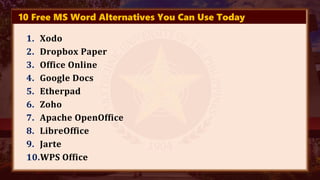
10 Free MS Word Alternatives You Can Use Today
1. Xodo
2. Dropbox Paper
3. Office Online
4. Google Docs
5. Etherpad
6. Zoho
7. Apache OpenOffice
8. LibreOffice
9. Jarte
10.WPS Office
The Essential Parts of
Learning Plans
The Essential Parts of
Learning Plans
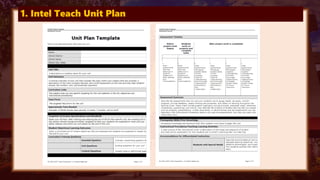
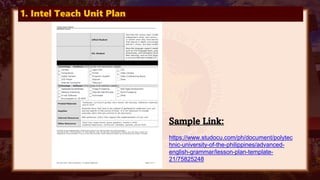
1. Intel Teach Unit Plan
Sample Link:
https://www.studocu.com/ph/document/polytec
hnic-university-of-the-philippines/advanced-
english-grammar/lesson-plan-template-
21/75825248
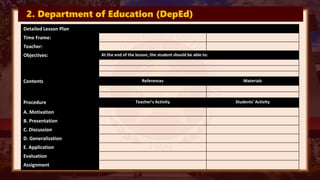
2. Department of Education (DepEd)
Detailed Lesson Plan
Time Frame:
Teacher:
Objectives: At the end of the lesson, the student should be able to:
Contents References Materials
Procedure Teacher’s Activity Students’ Activity
A. Motivation
B. Presentation
C. Discussion
D. Generalization
E. Application
Evaluation
Assignment
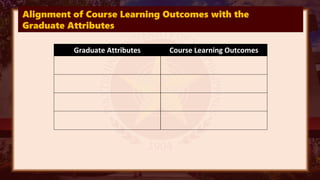
3. PUP Syllabus Template
Alignment of Course Learning Outcomes with the
Graduate Attributes
Graduate Attributes Course Learning Outcomes
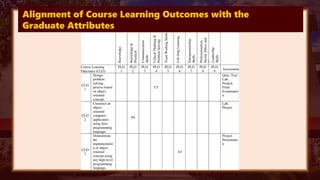
Alignment of Course Learning Outcomes with the
Graduate Attributes
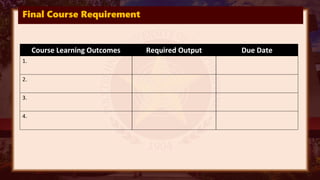
Final Course Requirement
Course Learning Outcomes Required Output Due Date
1.
2.
3.
4.
Graphic Organizers
Using Word Processing
Applications
Graphic Organizers
Using Word Processing
Applications
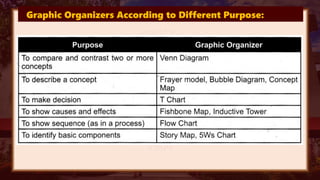
Graphic Organizers According to Different Purpose:
How presentation software
activates for macro skills
(Schcolnik and Kol, 1999):
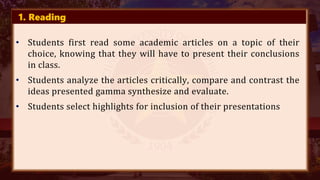
1. Reading
• Students first read some academic articles on a topic of their
choice, knowing that they will have to present their conclusions
in class.
• Students analyze the articles critically, compare and contrast the
ideas presented gamma synthesize and evaluate.
• Students select highlights for inclusion of their presentations
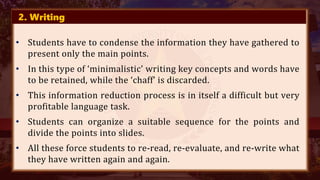
2. Writing
• Students have to condense the information they have gathered to
present only the main points.
• In this type of ‘minimalistic’ writing key concepts and words have
to be retained, while the ‘chaff’ is discarded.
• This information reduction process is in itself a difficult but very
profitable language task.
• Students can organize a suitable sequence for the points and
divide the points into slides.
• All these force students to re-read, re-evaluate, and re-write what
they have written again and again.
3. Speaking
• The material that students have read, organized, and summarized
has to be presented orally to convey a clear message to an
audience of peers.
• Just as they would in a purely oral presentation, students have to
rehearse the pronunciation of difficult words, time themselves,
and make sure that they have all the English lexicon needed for
their speech.
• The added value of computer presentations is that the repeated
revisions of their slides give students extensive exposure to the
content of their talk helping them remember what they want to
say and giving them more self confidence.
4. Listening
• Listening to a non-native speaker is not easy, and visual elements
facilitate comprehension.
• We gave the listeners a task requiring them to write down three
new facts they learned about the subject and one question to ask
the speaker at the end of the presentation.
Other studies confirm that the use of presentation
software facilitates the acquisition of the four macro skills.
Most teachers recognize the spoken component of
presenting, as students are required to speak when giving
their presentations(Brooks and Gavin,2015). Moreover, they
are required to research and plan out their presentations
for a properly structured academic presentation.
Basic Instructional Design in Preparing Presentations
1. Setting up the presentation class
2. Organization of presentation
3. Presentation skills
4. Use of visual aids
5. Performing self reflections
Technology for Teaching and Learning.pdf

Technology for Teaching and Learning.pdf

  • 1.
    Prepared by: MS. ERICAL. CATURAY Subject Instructor Technology for Teaching a an nd d L Le ea ar rn ni in ng g 2 2
  • 2.
    CHAPTER 3 Productivity Software Applicationsfor Language Teaching and Learning Lesson 1: Productivity Software Applications for Language Teaching and Learning
  • 3.
    At the endof this chapter, you are expected to: • Identify uses of productivity software applications in the teaching- learning of language; • Share experiences in using productivity software applications as a language learner; • Explore samples of documents, presentations, and spreadsheets that were used in delivering learning plans for languages; and • Report new open-ended tools or productivity software applications that are beneficial for language learning.
  • 4.
    Open-ended Tools in TheirUses in Teaching and Learning Language Skills Open-ended Tools in Their Uses in Teaching and Learning Language Skills
  • 5.
    Open-ended tools orproductivity software applications - are ICT tools, which help the teachers and learners make their learning together concrete, efficient, encouraging, and meaningful. • Teachers need to demonstrate 21st-century characteristics to be able to meet the demands of 21st-century learners (Palmer, 2015).
  • 6.
    These characteristics inthe context of language teaching are briefly presented for teachers too: 1. create a learner-centered classroom and make instruction personalized because learners have different personalities, goals, and needs; 2. facilitate the students’ productivity skills so they can produce when assisted and given the chance, movies that are helpful to enhance their language proficiency; 3. learn new technologies since technology keeps on developing and learning a tool once is not an option for teachers; 4. go global to allow students to learn languages, culture, and acquire communication skills virtually;
  • 7.
    These characteristics inthe context of language teaching are briefly presented for teachers too: 5. be smart and allow the use of devices as it’s to language acquisition; 6. do blogging. this will give teachers a real experience to see the valley of writing for real audience and establishing their digital presence; 7. go digital to help promote the “go paperless” advocacy and to help level up the language learning experience of the student through digital discussions and alike; 8. collaborate with other educators and students to give opportunity for the sharing of great ideas beyond a conversation and paper copy;
  • 8.
    These characteristics inthe context of language teaching are briefly presented for teachers too: 9. use web chats to share research and ideas and stay updated in the field; 10.connect with like-minded individuals through using media tools like social media; 11.introduce Project-Based Learning to allow students to develop their driving question, conduct research, contact experts, and create other projects for sharing with the use of existing devices present; 12.Build positive digital footprint that aims to model appropriate use of social media, produce and publish valuable content, and create shareable resources;
  • 9.
    These characteristics inthe context of language teaching are briefly presented for teachers too: 13.code as it is today’s literacy which helps boost students’ writing skills as the feeling of writing a page with HTML is amazing; 14.innovate the expander teaching toolbox for the sake of their students by engaging social media for discussions and announcements and using new formats like TED talks in presenting their lessons; and 15.keep learning.
  • 10.
    How the variousproductivity software applications can be used in the language classrooms: 1. Using Word in Scaffolding Student Learning in a Language Classroom • To appreciate the value of word applications in scaffolding student learning, we have to explore how these are maximized by teachers. • Scaffolding to assist, guide, or facilitate the learning process (Word Links 2008). • Examples of scaffolding for learning that are usually prepared using word applications are learning plans, assessment tools, templates, and forms, graphic organizers, and others.
  • 11.
    10 Free MSWord Alternatives You Can Use Today 1. Xodo 2. Dropbox Paper 3. Office Online 4. Google Docs 5. Etherpad 6. Zoho 7. Apache OpenOffice 8. LibreOffice 9. Jarte 10.WPS Office
  • 12.
    The Essential Partsof Learning Plans The Essential Parts of Learning Plans
  • 13.
    1. Intel TeachUnit Plan
  • 14.
    1. Intel TeachUnit Plan Sample Link: https://www.studocu.com/ph/document/polytec hnic-university-of-the-philippines/advanced- english-grammar/lesson-plan-template- 21/75825248
  • 15.
    2. Department ofEducation (DepEd) Detailed Lesson Plan Time Frame: Teacher: Objectives: At the end of the lesson, the student should be able to: Contents References Materials Procedure Teacher’s Activity Students’ Activity A. Motivation B. Presentation C. Discussion D. Generalization E. Application Evaluation Assignment
  • 16.
  • 17.
    Alignment of CourseLearning Outcomes with the Graduate Attributes Graduate Attributes Course Learning Outcomes
  • 18.
    Alignment of CourseLearning Outcomes with the Graduate Attributes
  • 19.
    Final Course Requirement CourseLearning Outcomes Required Output Due Date 1. 2. 3. 4.
  • 20.
    Graphic Organizers Using WordProcessing Applications Graphic Organizers Using Word Processing Applications
  • 21.
    Graphic Organizers Accordingto Different Purpose:
  • 22.
    How presentation software activatesfor macro skills (Schcolnik and Kol, 1999):
  • 23.
    1. Reading • Studentsfirst read some academic articles on a topic of their choice, knowing that they will have to present their conclusions in class. • Students analyze the articles critically, compare and contrast the ideas presented gamma synthesize and evaluate. • Students select highlights for inclusion of their presentations
  • 24.
    2. Writing • Studentshave to condense the information they have gathered to present only the main points. • In this type of ‘minimalistic’ writing key concepts and words have to be retained, while the ‘chaff’ is discarded. • This information reduction process is in itself a difficult but very profitable language task. • Students can organize a suitable sequence for the points and divide the points into slides. • All these force students to re-read, re-evaluate, and re-write what they have written again and again.
  • 25.
    3. Speaking • Thematerial that students have read, organized, and summarized has to be presented orally to convey a clear message to an audience of peers. • Just as they would in a purely oral presentation, students have to rehearse the pronunciation of difficult words, time themselves, and make sure that they have all the English lexicon needed for their speech. • The added value of computer presentations is that the repeated revisions of their slides give students extensive exposure to the content of their talk helping them remember what they want to say and giving them more self confidence.
  • 26.
    4. Listening • Listeningto a non-native speaker is not easy, and visual elements facilitate comprehension. • We gave the listeners a task requiring them to write down three new facts they learned about the subject and one question to ask the speaker at the end of the presentation.
  • 27.
    Other studies confirmthat the use of presentation software facilitates the acquisition of the four macro skills. Most teachers recognize the spoken component of presenting, as students are required to speak when giving their presentations(Brooks and Gavin,2015). Moreover, they are required to research and plan out their presentations for a properly structured academic presentation.
  • 28.
    Basic Instructional Designin Preparing Presentations 1. Setting up the presentation class 2. Organization of presentation 3. Presentation skills 4. Use of visual aids 5. Performing self reflections