





Techniques for effective
test data management in
test automation
Anshita Mathur
QA Consultant – Test Automation Competency
Lack of etiquette and manners is a huge turn off.
KnolX Etiquettes
 Punctuality
Join the session 5 minutes prior to the session start time. We start on
time and conclude on time!
 Feedback
Make sure to submit a constructive feedback for all sessions as it is very
helpful for the presenter.
 Silent Mode
Keep your mobile devices in silent mode, feel free to move out of session
in case you need to attend an urgent call.
 Avoid Disturbance
Avoid unwanted chit chat during the session.
1. Introduction to Test Data Management (TDM)
2. What is Test Data?
3. Types of Test Data
4. Importance of TDM in Test Automation
5. Challenges in Test Data Management
6. Techniques for Effective Test Data Management
7. Best Practices for Implementing Test Data
Management
8. Demo
9. Q & A
Introduction
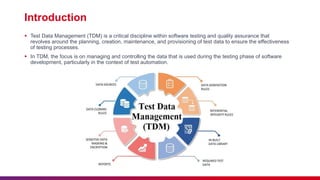
 Test Data Management (TDM) is a critical discipline within software testing and quality assurance that
revolves around the planning, creation, maintenance, and provisioning of test data to ensure the effectiveness
of testing processes.
 In TDM, the focus is on managing and controlling the data that is used during the testing phase of software
development, particularly in the context of test automation.
Definition of Test Data
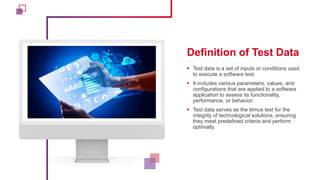
 Test data is a set of inputs or conditions used
to execute a software test.
 It includes various parameters, values, and
configurations that are applied to a software
application to assess its functionality,
performance, or behavior.
 Test data serves as the litmus test for the
integrity of technological solutions, ensuring
they meet predefined criteria and perform
optimally.
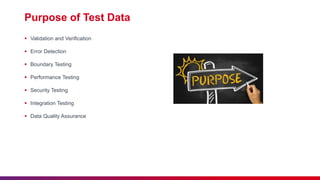
Purpose of Test Data
 Validation and Verification
 Error Detection
 Boundary Testing
 Performance Testing
 Security Testing
 Integration Testing
 Data Quality Assurance
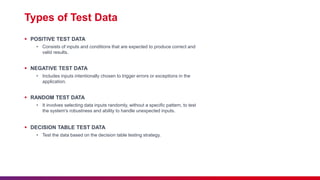
Types of Test Data
 POSITIVE TEST DATA
• Consists of inputs and conditions that are expected to produce correct and
valid results.
 NEGATIVE TEST DATA
• Includes inputs intentionally chosen to trigger errors or exceptions in the
application.
 RANDOM TEST DATA
• It involves selecting data inputs randomly, without a specific pattern, to test
the system's robustness and ability to handle unexpected inputs.
 DECISION TABLE TEST DATA
• Test the data based on the decision table testing strategy.
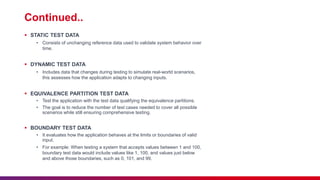
Continued..
 STATIC TEST DATA
• Consists of unchanging reference data used to validate system behavior over
time.
 DYNAMIC TEST DATA
• Includes data that changes during testing to simulate real-world scenarios,
this assesses how the application adapts to changing inputs.
 EQUIVALENCE PARTITION TEST DATA
• Test the application with the test data qualifying the equivalence partitions.
• The goal is to reduce the number of test cases needed to cover all possible
scenarios while still ensuring comprehensive testing.
 BOUNDARY TEST DATA
• It evaluates how the application behaves at the limits or boundaries of valid
input.
• For example: When testing a system that accepts values between 1 and 100,
boundary test data would include values like 1, 100, and values just below
and above those boundaries, such as 0, 101, and 99.
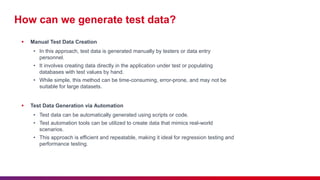
How can we generate test data?
 Manual Test Data Creation
• In this approach, test data is generated manually by testers or data entry
personnel.
• It involves creating data directly in the application under test or populating
databases with test values by hand.
• While simple, this method can be time-consuming, error-prone, and may not be
suitable for large datasets.
 Test Data Generation via Automation
• Test data can be automatically generated using scripts or code.
• Test automation tools can be utilized to create data that mimics real-world
scenarios.
• This approach is efficient and repeatable, making it ideal for regression testing and
performance testing.
How can we generate test data?
 Test Data Creation through Backend Injection
• Here, test data is injected directly into the backend database or application.
• This can be done using SQL scripts or other data manipulation methods.
• It's useful for scenarios where you need specific data configurations or want to
modify existing data to suit test cases.
 Generating Test Data with Commercial Tools
• Several commercial tools are available that offer features for test data generation.
• These tools can help you create a variety of data types, including realistic,
randomized, or parameterized datasets.
• They often come with user-friendly interfaces and are suitable for organizations
looking for comprehensive test data management solutions.
Importance of TDM
 Data Relevance and Realism
 Accuracy and Quality Assurance
 Efficiency and Resource Savings
 Data Security and Privacy
 Testing at Scale
 Version Control and Traceability
 Compliance and Regulatory Requirements
 Reproducibility and Consistency
 Reduced Risk of Production Data Contamination
 Collaboration and Team Efficiency
FORES
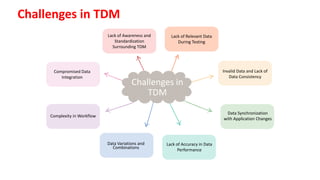
Lack of Awareness and
Standardization
Surrounding TDM
Lack of Relevant Data
During Testing
Data Variations and
Combinations
Lack of Accuracy in Data
Performance
HEALTH
Data Synchronization
with Application Changes
temperature
Invalid Data and Lack of
Data Consistency
GREENHOU
SE EFFECT
Complexity in Workflow
OCEANS
RENEWABLE
ENERGY
Challenges in
TDM
Compromised Data
Integration
Challenges in TDM
Techniques for Test Data Management (TDM)
 Data Profiling and Discovery:
• Analyzing and understanding the existing data to identify
patterns, relationships, and potential sources.
 Data Sub setting:
• Selecting a subset of production data for testing, reducing
data volume and improving test efficiency.
 Data Cloning and Masking:
• Creating copies of production data while protecting sensitive
information through data masking or anonymization.
 Data Generation:
• Generating synthetic data using tools, scripts, or algorithms to
create diverse and controlled test scenarios.
 Data Virtualization:
• Creating virtual copies of data to reduce the need for data
cloning and save storage space.
 Data Synchronization with Application Changes:
• Keeping test data aligned with software changes by updating
and modifying test data as the application evolves.
 Data Validation and Verification:
• Applying validation checks to ensure data accuracy and
integrity while verifying that test data aligns with expected
outcomes.
 Data Reconciliation:
• Comparing data before and after testing to identify
discrepancies, errors, or changes, ensuring data consistency.
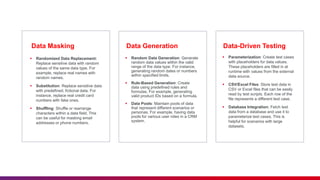
Data Generation Data-Driven Testing
Data Masking
 Randomized Data Replacement:
Replace sensitive data with random
values of the same data type. For
example, replace real names with
random names.
 Substitution: Replace sensitive data
with predefined, fictional data. For
instance, replace real credit card
numbers with fake ones.
 Shuffling: Shuffle or rearrange
characters within a data field. This
can be useful for masking email
addresses or phone numbers.
 Random Data Generation: Generate
random data values within the valid
range of the data type. For instance,
generating random dates or numbers
within specified limits.
 Rule-Based Generation: Create
data using predefined rules and
formulas. For example, generating
valid product IDs based on a formula.
 Data Pools: Maintain pools of data
that represent different scenarios or
personas. For example, having data
pools for various user roles in a CRM
system.
 Parameterization: Create test cases
with placeholders for data values.
These placeholders are filled in at
runtime with values from the external
data source.
 CSV/Excel Files: Store test data in
CSV or Excel files that can be easily
read by test scripts. Each row of the
file represents a different test case.
 Database Integration: Fetch test
data from a database and use it to
parameterize test cases. This is
helpful for scenarios with large
datasets.
What are the Test Data Management Best
Practices?
 Focus on Data security
 Focus to Application Security
 Effective Planning
 Automation is crucial
 Isolation of test data from real data
 Continuous Data Analysis
 Mock the production environment
Techniques for effective test data management in test automation.pptx

Techniques for effective test data management in test automation.pptx

  • 1.
    Techniques for effective testdata management in test automation Anshita Mathur QA Consultant – Test Automation Competency
  • 2.
    Lack of etiquetteand manners is a huge turn off. KnolX Etiquettes  Punctuality Join the session 5 minutes prior to the session start time. We start on time and conclude on time!  Feedback Make sure to submit a constructive feedback for all sessions as it is very helpful for the presenter.  Silent Mode Keep your mobile devices in silent mode, feel free to move out of session in case you need to attend an urgent call.  Avoid Disturbance Avoid unwanted chit chat during the session.
  • 3.
    1. Introduction toTest Data Management (TDM) 2. What is Test Data? 3. Types of Test Data 4. Importance of TDM in Test Automation 5. Challenges in Test Data Management 6. Techniques for Effective Test Data Management 7. Best Practices for Implementing Test Data Management 8. Demo 9. Q & A
  • 5.
    Introduction  Test DataManagement (TDM) is a critical discipline within software testing and quality assurance that revolves around the planning, creation, maintenance, and provisioning of test data to ensure the effectiveness of testing processes.  In TDM, the focus is on managing and controlling the data that is used during the testing phase of software development, particularly in the context of test automation.
  • 6.
    Definition of TestData  Test data is a set of inputs or conditions used to execute a software test.  It includes various parameters, values, and configurations that are applied to a software application to assess its functionality, performance, or behavior.  Test data serves as the litmus test for the integrity of technological solutions, ensuring they meet predefined criteria and perform optimally.
  • 7.
    Purpose of TestData  Validation and Verification  Error Detection  Boundary Testing  Performance Testing  Security Testing  Integration Testing  Data Quality Assurance
  • 8.
    Types of TestData  POSITIVE TEST DATA • Consists of inputs and conditions that are expected to produce correct and valid results.  NEGATIVE TEST DATA • Includes inputs intentionally chosen to trigger errors or exceptions in the application.  RANDOM TEST DATA • It involves selecting data inputs randomly, without a specific pattern, to test the system's robustness and ability to handle unexpected inputs.  DECISION TABLE TEST DATA • Test the data based on the decision table testing strategy.
  • 9.
    Continued..  STATIC TESTDATA • Consists of unchanging reference data used to validate system behavior over time.  DYNAMIC TEST DATA • Includes data that changes during testing to simulate real-world scenarios, this assesses how the application adapts to changing inputs.  EQUIVALENCE PARTITION TEST DATA • Test the application with the test data qualifying the equivalence partitions. • The goal is to reduce the number of test cases needed to cover all possible scenarios while still ensuring comprehensive testing.  BOUNDARY TEST DATA • It evaluates how the application behaves at the limits or boundaries of valid input. • For example: When testing a system that accepts values between 1 and 100, boundary test data would include values like 1, 100, and values just below and above those boundaries, such as 0, 101, and 99.
  • 10.
    How can wegenerate test data?  Manual Test Data Creation • In this approach, test data is generated manually by testers or data entry personnel. • It involves creating data directly in the application under test or populating databases with test values by hand. • While simple, this method can be time-consuming, error-prone, and may not be suitable for large datasets.  Test Data Generation via Automation • Test data can be automatically generated using scripts or code. • Test automation tools can be utilized to create data that mimics real-world scenarios. • This approach is efficient and repeatable, making it ideal for regression testing and performance testing.
  • 11.
    How can wegenerate test data?  Test Data Creation through Backend Injection • Here, test data is injected directly into the backend database or application. • This can be done using SQL scripts or other data manipulation methods. • It's useful for scenarios where you need specific data configurations or want to modify existing data to suit test cases.  Generating Test Data with Commercial Tools • Several commercial tools are available that offer features for test data generation. • These tools can help you create a variety of data types, including realistic, randomized, or parameterized datasets. • They often come with user-friendly interfaces and are suitable for organizations looking for comprehensive test data management solutions.
  • 12.
    Importance of TDM Data Relevance and Realism  Accuracy and Quality Assurance  Efficiency and Resource Savings  Data Security and Privacy  Testing at Scale  Version Control and Traceability  Compliance and Regulatory Requirements  Reproducibility and Consistency  Reduced Risk of Production Data Contamination  Collaboration and Team Efficiency
  • 13.
    FORES Lack of Awarenessand Standardization Surrounding TDM Lack of Relevant Data During Testing Data Variations and Combinations Lack of Accuracy in Data Performance HEALTH Data Synchronization with Application Changes temperature Invalid Data and Lack of Data Consistency GREENHOU SE EFFECT Complexity in Workflow OCEANS RENEWABLE ENERGY Challenges in TDM Compromised Data Integration Challenges in TDM
  • 14.
    Techniques for TestData Management (TDM)  Data Profiling and Discovery: • Analyzing and understanding the existing data to identify patterns, relationships, and potential sources.  Data Sub setting: • Selecting a subset of production data for testing, reducing data volume and improving test efficiency.  Data Cloning and Masking: • Creating copies of production data while protecting sensitive information through data masking or anonymization.  Data Generation: • Generating synthetic data using tools, scripts, or algorithms to create diverse and controlled test scenarios.  Data Virtualization: • Creating virtual copies of data to reduce the need for data cloning and save storage space.  Data Synchronization with Application Changes: • Keeping test data aligned with software changes by updating and modifying test data as the application evolves.  Data Validation and Verification: • Applying validation checks to ensure data accuracy and integrity while verifying that test data aligns with expected outcomes.  Data Reconciliation: • Comparing data before and after testing to identify discrepancies, errors, or changes, ensuring data consistency.
  • 15.
    Data Generation Data-DrivenTesting Data Masking  Randomized Data Replacement: Replace sensitive data with random values of the same data type. For example, replace real names with random names.  Substitution: Replace sensitive data with predefined, fictional data. For instance, replace real credit card numbers with fake ones.  Shuffling: Shuffle or rearrange characters within a data field. This can be useful for masking email addresses or phone numbers.  Random Data Generation: Generate random data values within the valid range of the data type. For instance, generating random dates or numbers within specified limits.  Rule-Based Generation: Create data using predefined rules and formulas. For example, generating valid product IDs based on a formula.  Data Pools: Maintain pools of data that represent different scenarios or personas. For example, having data pools for various user roles in a CRM system.  Parameterization: Create test cases with placeholders for data values. These placeholders are filled in at runtime with values from the external data source.  CSV/Excel Files: Store test data in CSV or Excel files that can be easily read by test scripts. Each row of the file represents a different test case.  Database Integration: Fetch test data from a database and use it to parameterize test cases. This is helpful for scenarios with large datasets.
  • 16.
    What are theTest Data Management Best Practices?  Focus on Data security  Focus to Application Security  Effective Planning  Automation is crucial  Isolation of test data from real data  Continuous Data Analysis  Mock the production environment