🤗 datasets로 협업하기
# datasets # MLOps # huggingface
진명훈
2
1
2
🤗 datasets 소개
🤗 hub에 데이터 업로드하기
3 🤗 datasets로 협업하기
5 🤗 datasets 꿀팁 방출
4 🤗 load_dataset 메서드 탐구
3
🤗 datasets 소개
• 데이터셋 협업이 필요한 이유?
• huggingface란?
• 🤗 datasets란?
데이터셋 협업이 필요한 이유?
• 모든 ML/DL 프로젝트에는? Data가 필요!
• 원본 데이터로만 학습을 진행하나요?
• 잘못 라벨링 된 데이터 제거
• Data Augmentation
• Train / Valid / Test split
• 다양한 Dataset을 모델별로 달리 학습시킬 수도!
• 언제까지 csv 파일 메일 / slack으로 주고받으실 건가요?
• 굉장히 비효율적이고 꼬일 가능성이 농후해요!
• 우리 모두 데이터셋 관리를 효율적으로 해봐요 🤗
4
#Collaborate
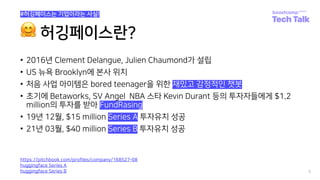
🤗 허깅페이스란?
• 2016년 Clement Delangue, Julien Chaumond가 설립
• US 뉴욕 Brooklyn에 본사 위치
• 처음 사업 아이템은 bored teenager을 위한 재밌고 감정적인 챗봇
• 초기에 Betaworks, SV Angel NBA 스타 Kevin Durant 등의 투자자들에게 $1.2
million의 투자를 받아 FundRasing
• 19년 12월, $15 million Series A 투자유치 성공
• 21년 03월, $40 million Series B 투자유치 성공
5
#허깅페이스는 기업이라는 사실!
https://pitchbook.com/profiles/company/168527-08
huggingface Series A
huggingface Series B
🤗 datasets란?
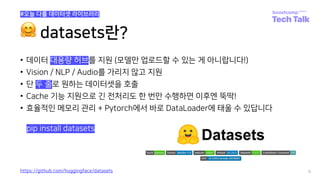
• 데이터 대용량 허브를 지원 (모델만 업로드할 수 있는 게 아니랍니다!)
• Vision / NLP / Audio를 가리지 않고 지원
• 단 두 줄로 원하는 데이터셋을 호출
• Cache 기능 지원으로 긴 전처리도 한 번만 수행하면 이후엔 뚝딱!
• 효율적인 메모리 관리 + Pytorch에서 바로 DataLoader에 태울 수 있답니다
6
https://github.com/huggingface/datasets
pip install datasets
#오늘 다룰 데이터셋 라이브러리
7
🤗 hub에 데이터 업로드
• huggingface hub 가입 및 레포 생성
• Code로 repository 만들어보기
• Upload하는 세 가지 방법
• Dataset script 작성하는 방법
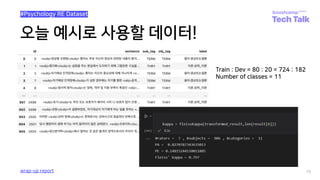
오늘 예시로 사용할 데이터!
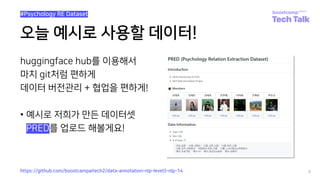
huggingface hub를 이용해서
마치 git처럼 편하게
데이터 버전관리 + 협업을 편하게!
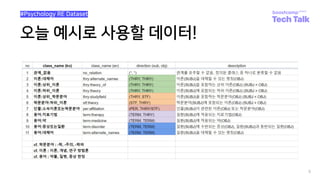
• 예시로 저희가 만든 데이터셋
• PRED를 업로드 해볼게요!
8
https://github.com/boostcampaitech2/data-annotation-nlp-level3-nlp-14
#Psychology RE Dataset
오늘 예시로 사용할 데이터!
9
#Psychology RE Dataset
오늘 예시로 사용할 데이터!
10
#Psychology RE Dataset
wrap-up report
Train : Dev = 80 : 20 = 724 : 182
Number of classes = 11
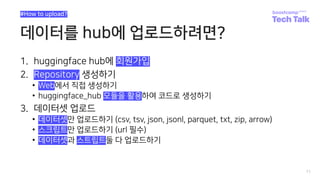
데이터를 hub에 업로드하려면?
1. huggingface hub에 회원가입
2. Repository 생성하기
• Web에서 직접 생성하기
• huggingface_hub 모듈을 활용하여 코드로 생성하기
3. 데이터셋 업로드
• 데이터셋만 업로드하기 (csv, tsv, json, jsonl, parquet, txt, zip, arrow)
• 스크립트만 업로드하기 (url 필수)
• 데이터셋과 스트립트둘 다 업로드하기
11
#How to upload?
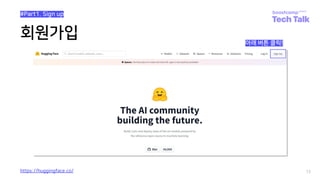
회원가입
12
https://huggingface.co/
아래 버튼 클릭!
#Part1. Sign up
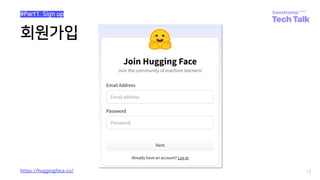
회원가입
13
https://huggingface.co/
#Part1. Sign up
14
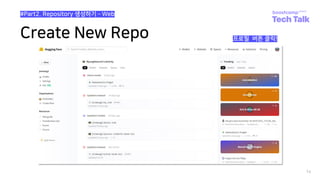
Create New Repo 프로필 버튼 클릭!
#Part2. Repository 생성하기 ­ Web
Create New Repo
15
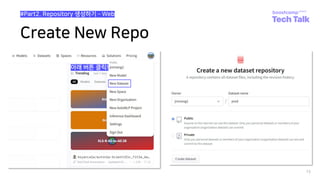
아래 버튼 클릭!
#Part2. Repository 생성하기 ­ Web
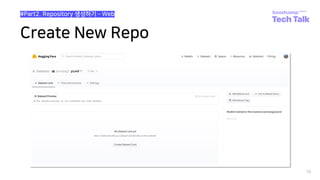
Create New Repo
16
#Part2. Repository 생성하기 ­ Web
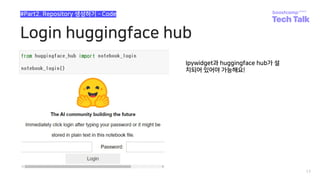
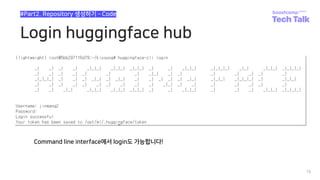
Login huggingface hub
17
#Part2. Repository 생성하기 ­ Code
Ipywidget과 huggingface hub가 설
치되어 있어야 가능해요!
Login huggingface hub
18
#Part2. Repository 생성하기 ­ Code
Command line interface에서 login도 가능합니다!
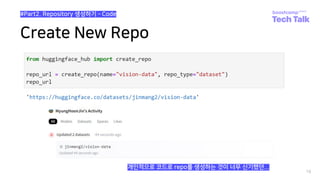
Create New Repo
19
#Part2. Repository 생성하기 ­ Code
개인적으로 코드로 repo를 생성하는 것이 너무 신기했던...
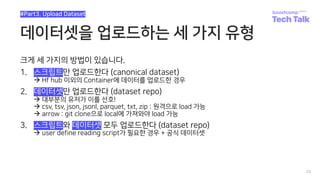
데이터셋을 업로드하는 세 가지 유형
크게 세 가지의 방법이 있습니다.
1. 스크립트만 업로드한다 (canonical dataset)
à Hf hub 이외의 Container에 데이터를 업로드한 경우
2. 데이터셋만 업로드한다 (dataset repo)
à 대부분의 유저가 이를 선호!
à csv, tsv, json, jsonl, parquet, txt, zip : 원격으로 load 가능
à arrow : git clone으로 local에 가져와야 load 가능
3. 스크립트와 데이터셋 모두 업로드한다 (dataset repo)
à user define reading script가 필요한 경우 + 공식 데이터셋
20
#Part3. Upload Dataset
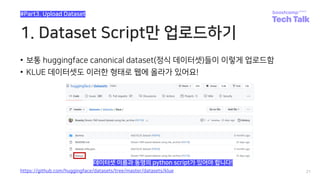
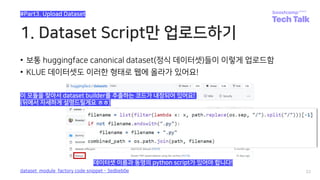
1. Dataset Script만 업로드하기
• 보통 huggingface canonical dataset(정식 데이터셋)들이 이렇게 업로드함
• KLUE 데이터셋도 이러한 형태로 웹에 올라가 있어요!
21
#Part3. Upload Dataset
https://github.com/huggingface/datasets/tree/master/datasets/klue
데이터셋 이름과 동명의 python script가 있어야 합니다!
1. Dataset Script만 업로드하기
• 보통 huggingface canonical dataset(정식 데이터셋)들이 이렇게 업로드함
• KLUE 데이터셋도 이러한 형태로 웹에 올라가 있어요!
22
#Part3. Upload Dataset
dataset_module_factory code snippet - 3edbeb0e
데이터셋 이름과 동명의 python script가 있어야 합니다!
이 모듈을 찾아서 dataset builder를 추출하는 코드가 내장되어 있어요!
(뒤에서 자세하게 설명드릴게요 ㅎㅎ)
2. Dataset file만 업로드하기
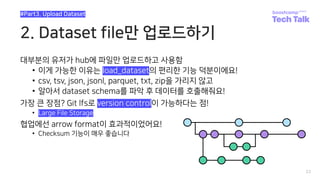
대부분의 유저가 hub에 파일만 업로드하고 사용함
• 이게 가능한 이유는 load_dataset의 편리한 기능 덕분이에요!
• csv, tsv, json, jsonl, parquet, txt, zip을 가리지 않고
• 알아서 dataset schema를 파악 후 데이터를 호출해줘요!
가장 큰 장점? Git lfs로 version control이 가능하다는 점!
• Large File Storage
협업에선 arrow format이 효과적이었어요!
• Checksum 기능이 매우 좋습니다
23
#Part3. Upload Dataset
3. 둘 다 업로드하기
사실 1. dataset script만 업로드하기와 다를 것이 없어요
• 굳이 뽑자면 hub에 데이터를 올려서 별도의 storage가 필요 없다는 점과
• DATA_URL로 상대경로가 사용 가능하여 preview 지원이 쉽다는 점?
KLUE 대회 때 3번 방식으로 레포를 관리했으나 비효율적
• 커밋할 때 마다 checksum해주고 script 변경 사항도 올려줘야 해요
그래도 script를 잘 짜면 편리한 점이 많습니다
• Train, valid, test 기준을 그 때 그 때마다 다르게 지정할 수 있음
• 특정 column을 무시하거나 sample별 if문 사용이 가능
Script가 무조건 필요한 경우도 있어요
• e.g., 1~4번 line에 meta data가 들어있는 경우
24
#Part3. Upload Dataset
대회 형식의 협업에선 2번을, 배포 차원에서는 3번으로 수행하시길 권장드려요!
데이터셋 스크립트 작성요령
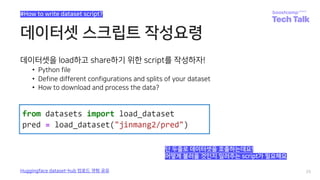
데이터셋을 load하고 share하기 위한 script를 작성하자!
• Python file
• Define different configurations and splits of your dataset
• How to download and process the data?
25
#How to write dataset script?
Huggingface dataset-hub 업로드 경험 공유
단 두줄로 데이터셋을 호출하는데요!
어떻게 불러올 것인지 일러주는 script가 필요해요
데이터셋 스크립트 작성요령
26
#How to write dataset script?
Huggingface dataset-hub 업로드 경험 공유
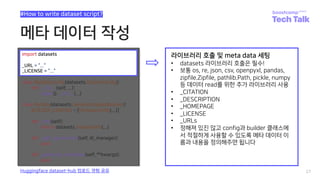
import datasets
_URL = “...”
_LICENSE = “...”
class MyDataConfig(datasets.BuilderConfig):
def __init__(self, ...):
super().__init__(...)
class MyData(datasets.GeneratorBasedBuilder):
BUILDER_CONFIGS = [MyDataConfig(...)]
def _info(self):
return datasets.DatasetInfo(...)
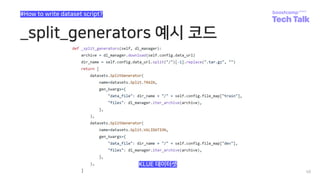
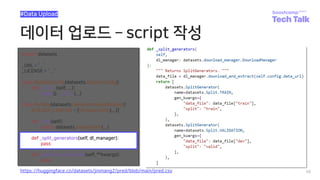
def _split_generators(self, dl_manager):
pass
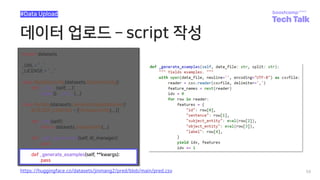
def _generate_examples(self, **kwargs):
pass
메타 데이터 작성
27
#How to write dataset script?
Huggingface dataset-hub 업로드 경험 공유
import datasets
_URL = “...”
_LICENSE = “...”
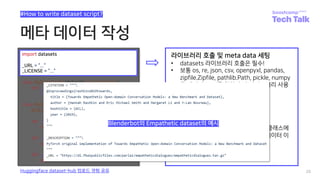
라이브러리 호출 및 meta data 세팅
• datasets 라이브러리 호출은 필수!
• 보통 os, re, json, csv, openpyxl, pandas,
zipfile.Zipfile, pathlib.Path, pickle, numpy
등 데이터 read를 위한 추가 라이브러리 사용
• _CITATION
• _DESCRIPTION
• _HOMEPAGE
• _LICENSE
• _URLs
• 정해져 있진 않고 config과 builder 클래스에
서 적절하게 사용할 수 있도록 메타 데이터 이
름과 내용을 정의해주면 됩니다
메타 데이터 작성
28
#How to write dataset script?
Huggingface dataset-hub 업로드 경험 공유
import datasets
_URL = “...”
_LICENSE = “...”
라이브러리 호출 및 meta data 세팅
• datasets 라이브러리 호출은 필수!
• 보통 os, re, json, csv, openpyxl, pandas,
zipfile.Zipfile, pathlib.Path, pickle, numpy
등 데이터 read를 위한 추가 라이브러리 사용
• _CITATION
• _DESCRIPTION
• _HOMEPAGE
• _LICENSE
• _URLs
• 정해져 있진 않고 config과 builder 클래스에
서 적절하게 사용할 수 있도록 메타 데이터 이
름과 내용을 정의해주면 됩니다
Blenderbot의 Empathetic dataset의 예시
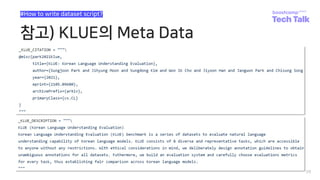
참고) KLUE의 Meta Data
29
#How to write dataset script?
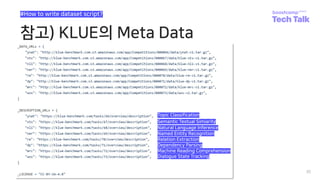
참고) KLUE의 Meta Data
30
#How to write dataset script?
Topic Classification
Semantic Textual Simiarity
Natural Language Inference
Named Entity Recognition
Relation Extraction
Dependency Parsing
Machine Reading Comprehension
Dialogue State Tracking
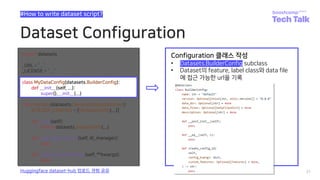
Dataset Configuration
31
#How to write dataset script?
Huggingface dataset-hub 업로드 경험 공유
class MyDataConfig(datasets.BuilderConfig):
def __init__(self, ...):
super().__init__(...)
Configuration 클래스 작성
• Datasets.BuilderConfig subclass
• Dataset의 feature, label class와 data file
에 접근 가능한 url을 기록
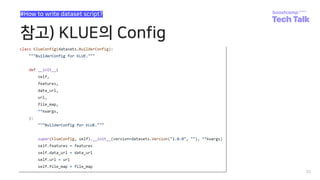
참고) KLUE의 Config
32
#How to write dataset script?
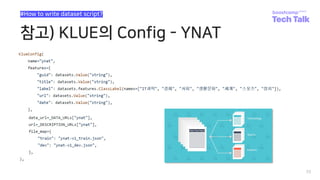
참고) KLUE의 Config - YNAT
33
#How to write dataset script?
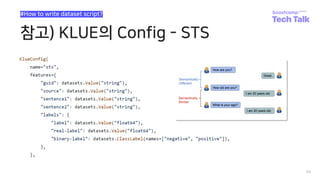
참고) KLUE의 Config - STS
34
#How to write dataset script?
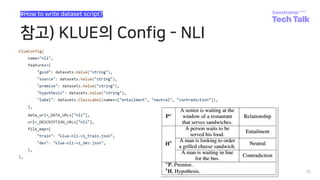
참고) KLUE의 Config - NLI
35
#How to write dataset script?
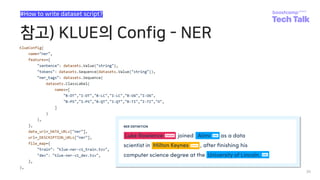
참고) KLUE의 Config - NER
36
#How to write dataset script?
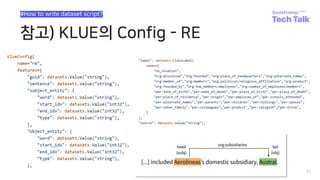
참고) KLUE의 Config - RE
37
#How to write dataset script?
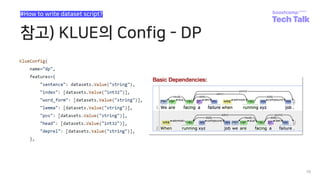
참고) KLUE의 Config - DP
38
#How to write dataset script?
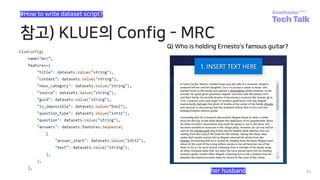
참고) KLUE의 Config - MRC
39
#How to write dataset script?
Q) Who is holding Ernesto's famous guitar?
her husband
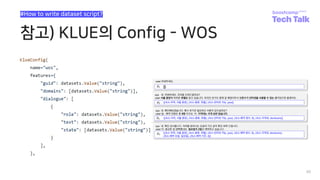
참고) KLUE의 Config - WOS
40
#How to write dataset script?
GeneratorBasedBuilder Class
41
#How to write dataset script?
Huggingface dataset-hub 업로드 경험 공유
class MyData(datasets.GeneratorBasedBuilder):
BUILDER_CONFIGS = [MyDataConfig(...)]
Builder 클래스 작성
• datasets.GeneratorBasedBuilder subclass
• BUILDER_CONFIGS는 list 형태로 여러 가지
data에 대한 config을 설정할 수 있다.
• 각 config에 대한 객체를 생성
• Config은 name 인자를 필수적으로 받습니다
• 만약 config의 수가 1개 이상일 경우,
• name을 필수 적으로 인자로 받아야 에러가 발
생하지 않습니다.
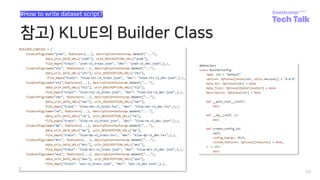
• e.g., klue의 경우 8가지의 task가 있습니다.
• load_dataset(“klue”)로 호출할 경우,
• 어떤 data를 가져올 것인지 지정되지 않아 에러
를 띄우게 됩니다.
참고) KLUE의 Builder Class
42
#How to write dataset script?
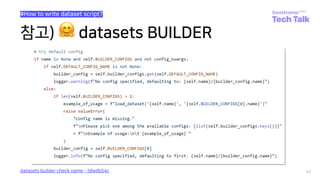
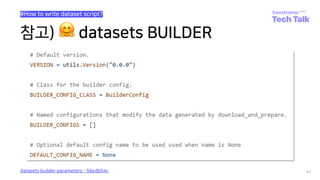
참고) 🤗 datasets BUILDER
43
#How to write dataset script?
datasets builder check name - 56edb54c
참고) 🤗 datasets BUILDER
44
#How to write dataset script?
datasets builder parameters - 56edb54c
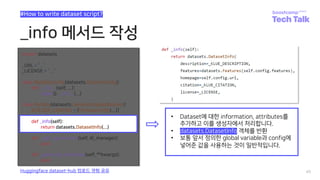
_info 메서드 작성
45
#How to write dataset script?
Huggingface dataset-hub 업로드 경험 공유
def _info(self):
return datasets.DatasetInfo(...)
• Dataset에 대한 information, attributes를
추가하고 이를 생성자에서 처리합니다.
• datasets.DatasetInfo 객체를 반환
• 보통 앞서 정의한 global variable과 config에
넣어준 값을 사용하는 것이 일반적입니다.
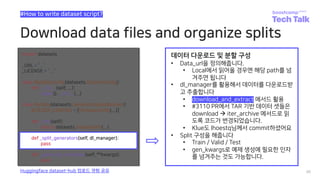
Download data files and organize splits
46
#How to write dataset script?
Huggingface dataset-hub 업로드 경험 공유
def _split_generators(self, dl_manager):
pass
데이터 다운로드 및 분할 구성
• Data_url을 정의해줍니다.
• Local에서 읽어올 경우엔 해당 path를 넘
겨주면 됩니다
• dl_manager를 활용해서 데이터를 다운로드받
고 추출합니다
• download_and_extract 메서드 활용
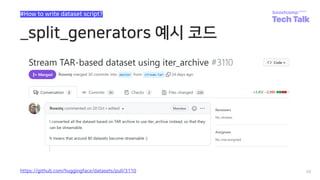
• #3110 PR에서 TAR 기반 데이터 셋들은
download à iter_archive 메서드로 읽
도록 코드가 변경되었습니다.
• Klue도 lhoestq님께서 commit하셨어요
• Split 구성을 해줍니다
• Train / Valid / Test
• gen_kwargs로 예제 생성에 필요한 인자
를 넘겨주는 것도 가능합니다.
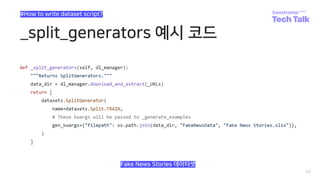
_split_generators 예시 코드
47
#How to write dataset script?
Fake News Stories 데이터셋
_split_generators 예시 코드
48
#How to write dataset script?
KLUE 데이터셋
_split_generators 예시 코드
49
#How to write dataset script?
https://github.com/huggingface/datasets/pull/3110
Generate samples
50
#How to write dataset script?
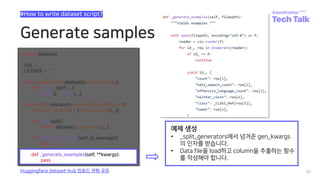
Huggingface dataset-hub 업로드 경험 공유
def _generate_examples(self, **kwargs):
pass
예제 생성
• _split_generators에서 넘겨준 gen_kwargs
의 인자를 받습니다.
• Data file을 load하고 column을 추출하는 함수
를 작성해야 합니다.
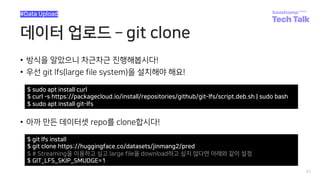
데이터 업로드 ­ git clone
• 방식을 알았으니 차근차근 진행해봅시다!
• 우선 git lfs(large file system)을 설치해야 해요!
51
#Data Upload
$ sudo apt install curl
$ curl -s https://packagecloud.io/install/repositories/github/git-lfs/script.deb.sh | sudo bash
$ sudo apt install git-lfs
• 아까 만든 데이터셋 repo를 clone합시다!
$ git lfs install
$ git clone https://huggingface.co/datasets/jinmang2/pred
$ # Streaming을 이용하고 싶고 large file을 download하고 싶지 않다면 아래와 같이 설정
$ GIT_LFS_SKIP_SMUDGE=1
데이터 업로드 ­ git lfs track
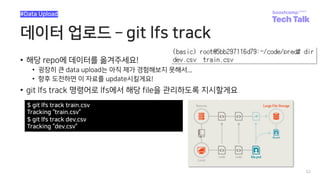
• 해당 repo에 데이터를 옮겨주세요!
• 굉장히 큰 data upload는 아직 제가 경험해보지 못해서...
• 향후 도전하면 이 자료를 update시킬게요!
• git lfs track 명령어로 lfs에서 해당 file을 관리하도록 지시할게요
52
#Data Upload
$ git lfs track train.csv
Tracking “train.csv”
$ git lfs track dev.csv
Tracking “dev.csv”
데이터 업로드 ­ add/commit/push
53
#Data Upload
$ git add train.csv
$ git add dev.csv
$ git branch ­M main
$ git commit -m “upload data”
[main 49a2427] upload data
2 files changed, 6 insertions(+)
create mode 100644 dev.csv
create mode 100644 train.csv
$ git push origin main
Counting objects: 4, done.% (2/2), 374 KB | 0 B/s
Delta compression using up to 8 threads.
Compressing objects: 100% (4/4), done.
Writing objects: 100% (4/4), 532 bytes | 532.00 KiB/s, done.
Total 4 (delta 0), reused 0 (delta 0)
To https://huggingface.co/datasets/jinmang2/pred
01a4cee..49a2427 main -> main
• 이제 git을 사용하듯 repo에 데이터를 업로드해봅시다!
데이터 업로드 ­ script 작성
54
#Data Upload
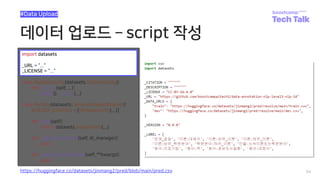
import datasets
_URL = “...”
_LICENSE = “...”
https://huggingface.co/datasets/jinmang2/pred/blob/main/pred.csv
데이터 업로드 ­ script 작성
55
#Data Upload
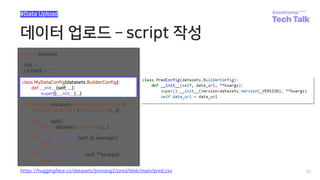
class MyDataConfig(datasets.BuilderConfig):
def __init__(self, ...):
super().__init__(...)
https://huggingface.co/datasets/jinmang2/pred/blob/main/pred.csv
데이터 업로드 ­ script 작성
56
#Data Upload
class MyData(datasets.GeneratorBasedBuilder):
BUILDER_CONFIGS = [MyDataConfig(...)]
https://huggingface.co/datasets/jinmang2/pred/blob/main/pred.csv
데이터 업로드 ­ script 작성
57
#Data Upload
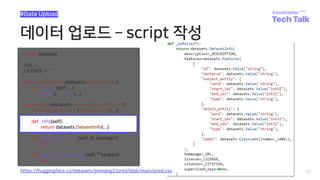
def _info(self):
return datasets.DatasetInfo(...)
https://huggingface.co/datasets/jinmang2/pred/blob/main/pred.csv
데이터 업로드 ­ script 작성
58
#Data Upload
def _split_generators(self, dl_manager):
pass
https://huggingface.co/datasets/jinmang2/pred/blob/main/pred.csv
데이터 업로드 ­ script 작성
59
#Data Upload
def _generate_examples(self, **kwargs):
pass
https://huggingface.co/datasets/jinmang2/pred/blob/main/pred.csv
Adding tests and metadata
• Dataset에 test data와 checksum metadata를 추가
• 테스트 및 검증하고 생성된 데이터 셋을 인증할 수 있게!
60
#Additional
https://huggingface.co/docs/datasets/share_dataset.html#sharing-your-dataset
$ root@<your_id>:~/pred# cd ..
$ root@<your_id>:~# dataset-cli test pred --save_infos --all_configs
Testing builder 'pred' (1/1)
Downloading and preparing dataset pred/pred to
/opt/ml/.cache/huggingface/datasets/pred/pred/0.0.0/3511603182c8362e0369afd244ecaf540e9a1700304bdfda3ecbd3ba7f748c7e...
100%|██████████████████████████████████████████████| 2/2 [00:00<00:00, 8405.42it/s]
100%|██████████████████████████████████████████████| 2/2 [00:00<00:00, 1619.11it/s]
Dataset pred downloaded and prepared to
/opt/ml/.cache/huggingface/datasets/pred/pred/0.0.0/3511603182c8362e0369afd244ecaf540e9a1700304bdfda3ecbd3ba7f748c7e.
Subsequent calls will reuse this data.
100%|██████████████████████████████████████████████| 2/2 [00:00<00:00, 580.17it/s]
Dataset Infos file saved at dataset_infos.json
Test successful.
Adding tests and metadata
• Dataset에 test data와 checksum metadata를 추가
• 테스트 및 검증하고 생성된 데이터 셋을 인증할 수 있게!
61
#Additional
https://huggingface.co/docs/datasets/share_dataset.html#sharing-your-dataset
$ root@<your_id>:~# dataset-cli dummy_data pred --auto_generate
100%|██████████████████████████████████████████████| 2/2 [00:01<00:00, 1.21it/s]
100%|██████████████████████████████████████████████| 2/2 [00:00<00:00, 1302.78it/s]
Dummy data generation done and dummy data test succeeded for config 'pred''.
Automatic dummy data generation succeeded for all configs of 'pred’
$ root@<your_id>:~# cp ./datasets/pred/dummy .
Push to hub
62
#push_to_hub
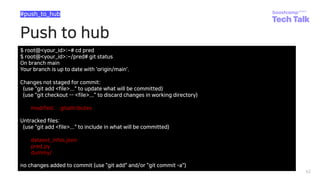
$ root@<your_id>:~# cd pred
$ root@<your_id>:~/pred# git status
On branch main
Your branch is up to date with 'origin/main'.
Changes not staged for commit:
(use "git add <file>..." to update what will be committed)
(use "git checkout -- <file>..." to discard changes in working directory)
modified: .gitattributes
Untracked files:
(use "git add <file>..." to include in what will be committed)
dataset_infos.json
pred.py
dummy/
no changes added to commit (use "git add" and/or "git commit -a")
Push to hub
63
#push_to_hub
$ root@<your_id>:~/pred# git add *
$ root@<your_id>:~/pred# git status
On branch main
Your branch is up to date with 'origin/main'.
Changes to be committed:
(use "git reset HEAD <file>..." to unstage)
modified: .gitattributes
new file: dataset_infos.json
new file: pred.py
new file: dummy/pred/0.0.0/dummy_data.zip
new file: dummy/pred/0.0.0/dummy_data.zip.lock
$ root@<your_id>:~/pred# git commit ­m “upload datasets script and meta data”
[main adac29c] upload datasets script and meta data
Push to hub
64
#push_to_hub
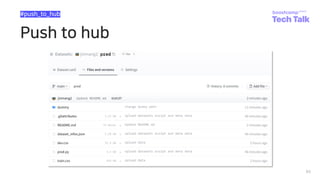
$ root@<your_id>:~/pred# git push origin main
Counting objects: 6, done.% (1/1), 2.0 KB | 0 B/s
Delta compression using up to 8 threads.
Compressing objects: 100% (6/6), done.
Writing objects: 100% (6/6), 2.53 KiB | 2.53 MiB/s, done.
Total 6 (delta 1), reused 0 (delta 0)
To https://huggingface.co/datasets/jinmang2/pred
49a2427..adac29c main -> main
$ root@<your_id>:~/pred# git tag v0.0.0
$ root@<your_id>:~/pred# git push --tags
Total 0 (delta 0), reused 0 (delta 0)
To https://huggingface.co/datasets/jinmang2/pred
* [new tag] v0.0.0 -> v0.0.0
Push to hub
65
#push_to_hub
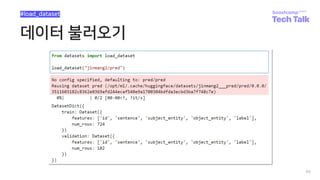
데이터 불러오기
66
#load_dataset
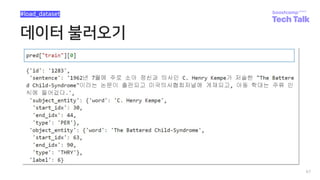
데이터 불러오기
67
#load_dataset
68
🤗 datasets로 협업하기
• KiYOUNG2의 협업 방식
• Dataset version 관리
• 아쉬웠던 점과 좋았던 점
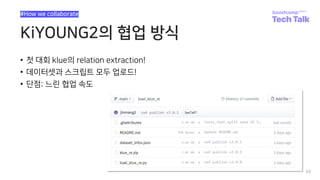
KiYOUNG2의 협업 방식
• 첫 대회 klue의 relation extraction!
• 데이터셋과 스크립트 모두 업로드!
• 단점: 느린 협업 속도
69
#How we collaborate
KiYOUNG2의 협업 방식
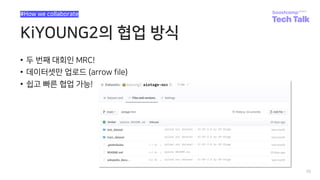
• 두 번째 대회인 MRC!
• 데이터셋만 업로드 (arrow file)
• 쉽고 빠른 협업 가능!
70
#How we collaborate
Dataset Version 관리
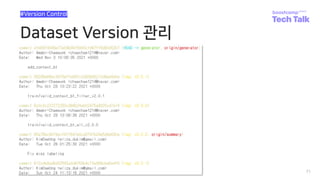
71
#Version Control
아쉬웠던 점과 좋았던 점
• 대회 당시엔 라이브러리에 대한 공부보단 빠른 적용이 필요했기에
• Version을 효율적으로 관리하지 못했습니다. (최종 버전 4.1.0의 기적…ㄷㄷ)
• 하지만 데이터를 git으로 관리하며 mail로 송수신할 필요가 없게 되며
• 데이터 증강/dev set 분리 등 데이터셋 작업이 수행됐을 때 정확한 공유가 가능
72
#The bad and the good
73
🤗 load_dataset 메서드 탐구
• 🤗 datasets 구조 파악하기
• Parameter 뜯어보기
• 내부 동작 알아보기
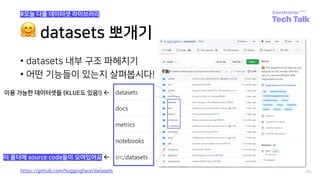
🤗 datasets 뽀개기
• datasets 내부 구조 파헤치기
• 어떤 기능들이 있는지 살펴봅시다!
74
#오늘 다룰 데이터셋 라이브러리
이용 가능한 데이터셋들 (KLUE도 있음!) ß
이 폴더에 source code들이 모여있어요 ß
https://github.com/huggingface/datasets
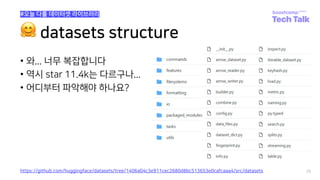
🤗 datasets structure
• 와... 너무 복잡합니다
• 역시 star 11.4k는 다르구나...
• 어디부터 파악해야 하나요?
75
https://github.com/huggingface/datasets/tree/1406a04c3e911cec2680d8bc513653e0cafcaaa4/src/datasets
#오늘 다룰 데이터셋 라이브러리
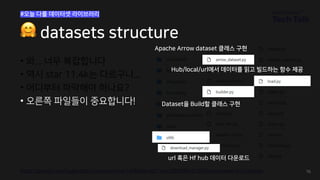
• 와... 너무 복잡합니다
• 역시 star 11.4k는 다르구나...
• 어디부터 파악해야 하나요?
https://github.com/huggingface/datasets/tree/1406a04c3e911cec2680d8bc513653e0cafcaaa4/src/datasets 76
• 오른쪽 파일들이 중요합니다! Dataset을 Build할 클래스 구현
Hub/local/url에서 데이터를 읽고 빌드하는 함수 제공
url 혹은 Hf hub 데이터 다운로드
🤗 datasets structure
#오늘 다룰 데이터셋 라이브러리
Apache Arrow dataset 클래스 구현
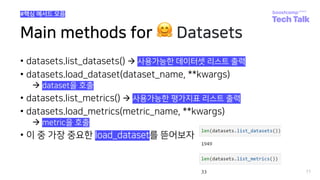
Main methods for 🤗 Datasets
• datasets.list_datasets() à 사용가능한 데이터셋 리스트 출력
• datasets.load_dataset(dataset_name, **kwargs)
à dataset을 호출
• datasets.list_metrics() à 사용가능한 평가지표 리스트 출력
• datasets.load_metrics(metric_name, **kwargs)
à metric을 호출
• 이 중 가장 중요한 load_dataset를 뜯어보자
77
#핵심 메서드 모음
load_dataset() ­ arguments
78
#datasets.load_dataset 동작 상세
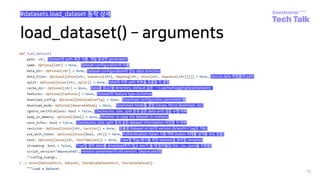
Dataset의 path 혹은 이름. 제일 중요한 parameter!
Dataset configuration의 이름
Dataset configuration이 있는 data directory
Source data 파일들의 path
Data의 어떤 split 부분을 호출할 지 결정
Data를 읽고/쓸 directory. Default 값은 `~/.cache/huggingface/datasets`
Dataset의 feature type (schema)
Download configuration parameter들
Download mode를 결정 (reuse, force download, etc)
Checksums, size, split 등과 같은 data drift 검증 수행 여부
Whether to copy the dataset in-memory
Checksums, size, split 등과 같은 dataset information 저장할 지 여부
호출할 Dataset script의 version (branch나 tag도 가능)
Authentication token 사용 여부 (token 자체를 넘겨줄 수도 있음)
True일 경우 data를 download하지 않고 iter가 돌 때 읽어들임 (txt, csv, jsonl을 지원함)
Task별 학습/평가를 위한 dataset을 준비할 template
revision parameter의 old version. Deprecated임
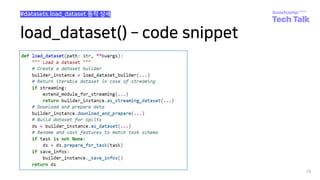
load_dataset() ­ code snippet
79
#datasets.load_dataset 동작 상세
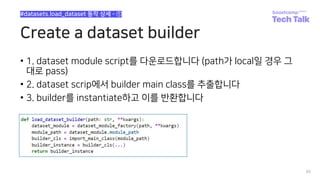
Create a dataset builder
• 1. dataset module script를 다운로드합니다 (path가 local일 경우 그
대로 pass)
• 2. dataset scrip에서 builder main class를 추출합니다
• 3. builder를 instantiate하고 이를 반환합니다
80
#datasets.load_dataset 동작 상세 - ①
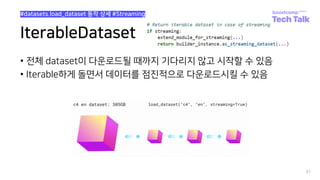
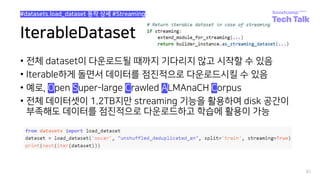
IterableDataset
• 전체 dataset이 다운로드될 때까지 기다리지 않고 시작할 수 있음
• Iterable하게 돌면서 데이터를 점진적으로 다운로드시킬 수 있음
81
#datasets.load_dataset 동작 상세 #Streaming
IterableDataset
• 전체 dataset이 다운로드될 때까지 기다리지 않고 시작할 수 있음
• Iterable하게 돌면서 데이터를 점진적으로 다운로드시킬 수 있음
• 예로, Open Super-large Crawled ALMAnaCH Corpus
• 전체 데이터셋이 1.2TB지만 streaming 기능을 활용하여 disk 공간이
부족해도 데이터를 점진적으로 다운로드하고 학습에 활용이 가능
82
#datasets.load_dataset 동작 상세 #Streaming
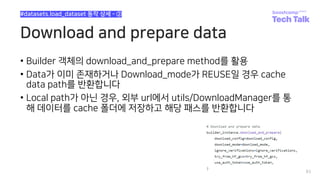
Download and prepare data
• Builder 객체의 download_and_prepare method를 활용
• Data가 이미 존재하거나 Download_mode가 REUSE일 경우 cache
data path를 반환합니다
• Local path가 아닌 경우, 외부 url에서 utils/DownloadManager를 통
해 데이터를 cache 폴더에 저장하고 해당 패스를 반환합니다
83
#datasets.load_dataset 동작 상세 - ②
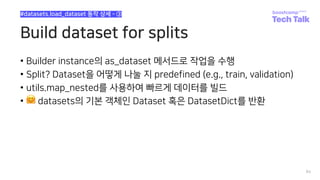
Build dataset for splits
• Builder instance의 as_dataset 메서드로 작업을 수행
• Split? Dataset을 어떻게 나눌 지 predefined (e.g., train, validation)
• utils.map_nested를 사용하여 빠르게 데이터를 빌드
• 🤗 datasets의 기본 객체인 Dataset 혹은 DatasetDict를 반환
84
#datasets.load_dataset 동작 상세 - ③
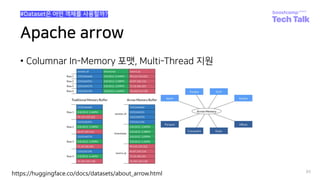
Apache arrow
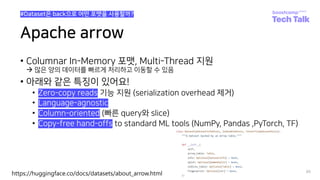
• Columnar In-Memory 포맷, Multi-Thread 지원
85
#Dataset은 어떤 객체를 사용할까?
https://huggingface.co/docs/datasets/about_arrow.html
Apache arrow
• Columnar In-Memory 포맷, Multi-Thread 지원
à 많은 양의 데이터를 빠르게 처리하고 이동할 수 있음
• 아래와 같은 특징이 있어요!
• Zero-copy reads 기능 지원 (serialization overhead 제거)
• Language-agnostic
• Column-oriented (빠른 query와 slice)
• Copy-free hand-offs to standard ML tools (NumPy, Pandas ,PyTorch, TF)
86
#Dataset은 back으로 어떤 포맷을 사용할까?
https://huggingface.co/docs/datasets/about_arrow.html
Rename and cast features
• 생성할 때 tasktemplate을 입력으로 넣어줘서 특정 column들을 미리
전처리해오는 것도 가능!
87
#datasets.load_dataset 동작 상세 - ④
load_dataset() ­ 정리!
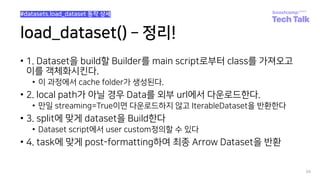
• 1. Dataset을 build할 Builder를 main script로부터 class를 가져오고
이를 객체화시킨다.
• 이 과정에서 cache folder가 생성된다.
• 2. local path가 아닐 경우 Data를 외부 url에서 다운로드한다.
• 만일 streaming=True이면 다운로드하지 않고 IterableDataset을 반환한다
• 3. split에 맞게 dataset을 Build한다
• Dataset script에서 user custom정의할 수 있다
• 4. task에 맞게 post-formatting하여 최종 Arrow Dataset을 반환
88
#datasets.load_dataset 동작 상세
load_metric() ­ code snippet
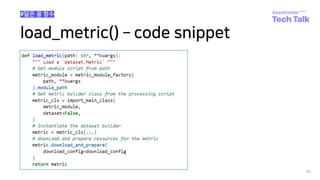
89
#닮은 꼴 함수
90
🤗 datasets 꿀팁
• Memory Mapped file + Streaming
• Cache Management
• Pandas / Scikit-learn처럼 사용하기
• Semantic Search
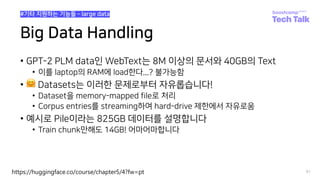
Big Data Handling
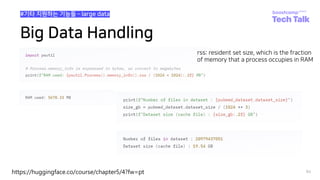
• GPT-2 PLM data인 WebText는 8M 이상의 문서와 40GB의 Text
• 이를 laptop의 RAM에 load한다...? 불가능함
• 🤗 Datasets는 이러한 문제로부터 자유롭습니다!
• Dataset을 memory-mapped file로 처리
• Corpus entries를 streaming하여 hard-drive 제한에서 자유로움
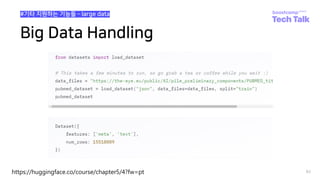
• 예시로 Pile이라는 825GB 데이터를 설명합니다
• Train chunk만해도 14GB! 어마어마합니다
91
#기타 지원하는 기능들 ­ large data
https://huggingface.co/course/chapter5/4?fw=pt
Big Data Handling
92
#기타 지원하는 기능들 ­ large data
https://huggingface.co/course/chapter5/4?fw=pt
Big Data Handling
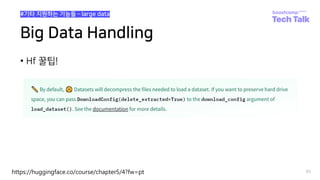
• Hf 꿀팁!
93
#기타 지원하는 기능들 ­ large data
https://huggingface.co/course/chapter5/4?fw=pt
Big Data Handling
94
#기타 지원하는 기능들 ­ large data
https://huggingface.co/course/chapter5/4?fw=pt
rss: resident set size, which is the fraction
of memory that a process occupies in RAM
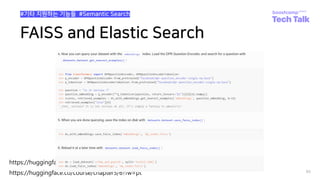
FAISS and Elastic Search
95
#기타 지원하는 기능들 #Semantic Search
https://huggingface.co/docs/datasets/faiss_es.html
https://huggingface.co/course/chapter5/6?fw=pt
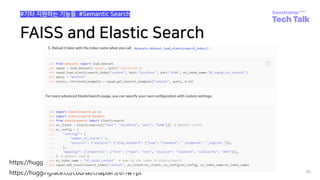
FAISS and Elastic Search
96
#기타 지원하는 기능들 #Semantic Search
https://huggingface.co/docs/datasets/faiss_es.html
https://huggingface.co/course/chapter5/6?fw=pt
Cache management
• Dataset을 다운로드하면 processing script와 data가 local에 자동으
로 저장됨
• 🤗 Datasets에서는 map, load에서 cache 기능을 지원해서 전체 데이
터 세트를 다시 다운로드하거나 처리하는 것을 방지할 수 있다
• 매우 편리한 기능!
97
#기타 지원하는 기능들 #캐싱 처리
https://huggingface.co/docs/datasets/cache.html
조금 더 실용적인 예제
• Train test split
• Sort, shuffle, select, split, and shard
• Rename, remove, cast, flatten, map
• Multiprocessing, Batch processing, tokenization
• Chunking, data augmentation
• Multiple splits, distributed usage, concat, format, save, export
98
#기타 지원하는 기능들 #Practical Example
Q&A
99
감사합니다
100

[부스트캠프 Tech Talk] 진명훈_datasets로 협업하기

  • 1.
    🤗 datasets로 협업하기 #datasets # MLOps # huggingface 진명훈
  • 2.
    2 1 2 🤗 datasets 소개 🤗hub에 데이터 업로드하기 3 🤗 datasets로 협업하기 5 🤗 datasets 꿀팁 방출 4 🤗 load_dataset 메서드 탐구
  • 3.
    3 🤗 datasets 소개 •데이터셋 협업이 필요한 이유? • huggingface란? • 🤗 datasets란?
  • 4.
    데이터셋 협업이 필요한이유? • 모든 ML/DL 프로젝트에는? Data가 필요! • 원본 데이터로만 학습을 진행하나요? • 잘못 라벨링 된 데이터 제거 • Data Augmentation • Train / Valid / Test split • 다양한 Dataset을 모델별로 달리 학습시킬 수도! • 언제까지 csv 파일 메일 / slack으로 주고받으실 건가요? • 굉장히 비효율적이고 꼬일 가능성이 농후해요! • 우리 모두 데이터셋 관리를 효율적으로 해봐요 🤗 4 #Collaborate
  • 5.
    🤗 허깅페이스란? • 2016년Clement Delangue, Julien Chaumond가 설립 • US 뉴욕 Brooklyn에 본사 위치 • 처음 사업 아이템은 bored teenager을 위한 재밌고 감정적인 챗봇 • 초기에 Betaworks, SV Angel NBA 스타 Kevin Durant 등의 투자자들에게 $1.2 million의 투자를 받아 FundRasing • 19년 12월, $15 million Series A 투자유치 성공 • 21년 03월, $40 million Series B 투자유치 성공 5 #허깅페이스는 기업이라는 사실! https://pitchbook.com/profiles/company/168527-08 huggingface Series A huggingface Series B
  • 6.
    🤗 datasets란? • 데이터대용량 허브를 지원 (모델만 업로드할 수 있는 게 아니랍니다!) • Vision / NLP / Audio를 가리지 않고 지원 • 단 두 줄로 원하는 데이터셋을 호출 • Cache 기능 지원으로 긴 전처리도 한 번만 수행하면 이후엔 뚝딱! • 효율적인 메모리 관리 + Pytorch에서 바로 DataLoader에 태울 수 있답니다 6 https://github.com/huggingface/datasets pip install datasets #오늘 다룰 데이터셋 라이브러리
  • 7.
    7 🤗 hub에 데이터업로드 • huggingface hub 가입 및 레포 생성 • Code로 repository 만들어보기 • Upload하는 세 가지 방법 • Dataset script 작성하는 방법
  • 8.
    오늘 예시로 사용할데이터! huggingface hub를 이용해서 마치 git처럼 편하게 데이터 버전관리 + 협업을 편하게! • 예시로 저희가 만든 데이터셋 • PRED를 업로드 해볼게요! 8 https://github.com/boostcampaitech2/data-annotation-nlp-level3-nlp-14 #Psychology RE Dataset
  • 9.
    오늘 예시로 사용할데이터! 9 #Psychology RE Dataset
  • 10.
    오늘 예시로 사용할데이터! 10 #Psychology RE Dataset wrap-up report Train : Dev = 80 : 20 = 724 : 182 Number of classes = 11
  • 11.
    데이터를 hub에 업로드하려면? 1.huggingface hub에 회원가입 2. Repository 생성하기 • Web에서 직접 생성하기 • huggingface_hub 모듈을 활용하여 코드로 생성하기 3. 데이터셋 업로드 • 데이터셋만 업로드하기 (csv, tsv, json, jsonl, parquet, txt, zip, arrow) • 스크립트만 업로드하기 (url 필수) • 데이터셋과 스트립트둘 다 업로드하기 11 #How to upload?
  • 12.
  • 13.
  • 14.
    14 Create New Repo프로필 버튼 클릭! #Part2. Repository 생성하기 ­ Web
  • 15.
    Create New Repo 15 아래버튼 클릭! #Part2. Repository 생성하기 ­ Web
  • 16.
    Create New Repo 16 #Part2.Repository 생성하기 ­ Web
  • 17.
    Login huggingface hub 17 #Part2.Repository 생성하기 ­ Code Ipywidget과 huggingface hub가 설 치되어 있어야 가능해요!
  • 18.
    Login huggingface hub 18 #Part2.Repository 생성하기 ­ Code Command line interface에서 login도 가능합니다!
  • 19.
    Create New Repo 19 #Part2.Repository 생성하기 ­ Code 개인적으로 코드로 repo를 생성하는 것이 너무 신기했던...
  • 20.
    데이터셋을 업로드하는 세가지 유형 크게 세 가지의 방법이 있습니다. 1. 스크립트만 업로드한다 (canonical dataset) à Hf hub 이외의 Container에 데이터를 업로드한 경우 2. 데이터셋만 업로드한다 (dataset repo) à 대부분의 유저가 이를 선호! à csv, tsv, json, jsonl, parquet, txt, zip : 원격으로 load 가능 à arrow : git clone으로 local에 가져와야 load 가능 3. 스크립트와 데이터셋 모두 업로드한다 (dataset repo) à user define reading script가 필요한 경우 + 공식 데이터셋 20 #Part3. Upload Dataset
  • 21.
    1. Dataset Script만업로드하기 • 보통 huggingface canonical dataset(정식 데이터셋)들이 이렇게 업로드함 • KLUE 데이터셋도 이러한 형태로 웹에 올라가 있어요! 21 #Part3. Upload Dataset https://github.com/huggingface/datasets/tree/master/datasets/klue 데이터셋 이름과 동명의 python script가 있어야 합니다!
  • 22.
    1. Dataset Script만업로드하기 • 보통 huggingface canonical dataset(정식 데이터셋)들이 이렇게 업로드함 • KLUE 데이터셋도 이러한 형태로 웹에 올라가 있어요! 22 #Part3. Upload Dataset dataset_module_factory code snippet - 3edbeb0e 데이터셋 이름과 동명의 python script가 있어야 합니다! 이 모듈을 찾아서 dataset builder를 추출하는 코드가 내장되어 있어요! (뒤에서 자세하게 설명드릴게요 ㅎㅎ)
  • 23.
    2. Dataset file만업로드하기 대부분의 유저가 hub에 파일만 업로드하고 사용함 • 이게 가능한 이유는 load_dataset의 편리한 기능 덕분이에요! • csv, tsv, json, jsonl, parquet, txt, zip을 가리지 않고 • 알아서 dataset schema를 파악 후 데이터를 호출해줘요! 가장 큰 장점? Git lfs로 version control이 가능하다는 점! • Large File Storage 협업에선 arrow format이 효과적이었어요! • Checksum 기능이 매우 좋습니다 23 #Part3. Upload Dataset
  • 24.
    3. 둘 다업로드하기 사실 1. dataset script만 업로드하기와 다를 것이 없어요 • 굳이 뽑자면 hub에 데이터를 올려서 별도의 storage가 필요 없다는 점과 • DATA_URL로 상대경로가 사용 가능하여 preview 지원이 쉽다는 점? KLUE 대회 때 3번 방식으로 레포를 관리했으나 비효율적 • 커밋할 때 마다 checksum해주고 script 변경 사항도 올려줘야 해요 그래도 script를 잘 짜면 편리한 점이 많습니다 • Train, valid, test 기준을 그 때 그 때마다 다르게 지정할 수 있음 • 특정 column을 무시하거나 sample별 if문 사용이 가능 Script가 무조건 필요한 경우도 있어요 • e.g., 1~4번 line에 meta data가 들어있는 경우 24 #Part3. Upload Dataset 대회 형식의 협업에선 2번을, 배포 차원에서는 3번으로 수행하시길 권장드려요!
  • 25.
    데이터셋 스크립트 작성요령 데이터셋을load하고 share하기 위한 script를 작성하자! • Python file • Define different configurations and splits of your dataset • How to download and process the data? 25 #How to write dataset script? Huggingface dataset-hub 업로드 경험 공유 단 두줄로 데이터셋을 호출하는데요! 어떻게 불러올 것인지 일러주는 script가 필요해요
  • 26.
    데이터셋 스크립트 작성요령 26 #Howto write dataset script? Huggingface dataset-hub 업로드 경험 공유 import datasets _URL = “...” _LICENSE = “...” class MyDataConfig(datasets.BuilderConfig): def __init__(self, ...): super().__init__(...) class MyData(datasets.GeneratorBasedBuilder): BUILDER_CONFIGS = [MyDataConfig(...)] def _info(self): return datasets.DatasetInfo(...) def _split_generators(self, dl_manager): pass def _generate_examples(self, **kwargs): pass
  • 27.
    메타 데이터 작성 27 #Howto write dataset script? Huggingface dataset-hub 업로드 경험 공유 import datasets _URL = “...” _LICENSE = “...” 라이브러리 호출 및 meta data 세팅 • datasets 라이브러리 호출은 필수! • 보통 os, re, json, csv, openpyxl, pandas, zipfile.Zipfile, pathlib.Path, pickle, numpy 등 데이터 read를 위한 추가 라이브러리 사용 • _CITATION • _DESCRIPTION • _HOMEPAGE • _LICENSE • _URLs • 정해져 있진 않고 config과 builder 클래스에 서 적절하게 사용할 수 있도록 메타 데이터 이 름과 내용을 정의해주면 됩니다
  • 28.
    메타 데이터 작성 28 #Howto write dataset script? Huggingface dataset-hub 업로드 경험 공유 import datasets _URL = “...” _LICENSE = “...” 라이브러리 호출 및 meta data 세팅 • datasets 라이브러리 호출은 필수! • 보통 os, re, json, csv, openpyxl, pandas, zipfile.Zipfile, pathlib.Path, pickle, numpy 등 데이터 read를 위한 추가 라이브러리 사용 • _CITATION • _DESCRIPTION • _HOMEPAGE • _LICENSE • _URLs • 정해져 있진 않고 config과 builder 클래스에 서 적절하게 사용할 수 있도록 메타 데이터 이 름과 내용을 정의해주면 됩니다 Blenderbot의 Empathetic dataset의 예시
  • 29.
    참고) KLUE의 MetaData 29 #How to write dataset script?
  • 30.
    참고) KLUE의 MetaData 30 #How to write dataset script? Topic Classification Semantic Textual Simiarity Natural Language Inference Named Entity Recognition Relation Extraction Dependency Parsing Machine Reading Comprehension Dialogue State Tracking
  • 31.
    Dataset Configuration 31 #How towrite dataset script? Huggingface dataset-hub 업로드 경험 공유 class MyDataConfig(datasets.BuilderConfig): def __init__(self, ...): super().__init__(...) Configuration 클래스 작성 • Datasets.BuilderConfig subclass • Dataset의 feature, label class와 data file 에 접근 가능한 url을 기록
  • 32.
    참고) KLUE의 Config 32 #Howto write dataset script?
  • 33.
    참고) KLUE의 Config- YNAT 33 #How to write dataset script?
  • 34.
    참고) KLUE의 Config- STS 34 #How to write dataset script?
  • 35.
    참고) KLUE의 Config- NLI 35 #How to write dataset script?
  • 36.
    참고) KLUE의 Config- NER 36 #How to write dataset script?
  • 37.
    참고) KLUE의 Config- RE 37 #How to write dataset script?
  • 38.
    참고) KLUE의 Config- DP 38 #How to write dataset script?
  • 39.
    참고) KLUE의 Config- MRC 39 #How to write dataset script? Q) Who is holding Ernesto's famous guitar? her husband
  • 40.
    참고) KLUE의 Config- WOS 40 #How to write dataset script?
  • 41.
    GeneratorBasedBuilder Class 41 #How towrite dataset script? Huggingface dataset-hub 업로드 경험 공유 class MyData(datasets.GeneratorBasedBuilder): BUILDER_CONFIGS = [MyDataConfig(...)] Builder 클래스 작성 • datasets.GeneratorBasedBuilder subclass • BUILDER_CONFIGS는 list 형태로 여러 가지 data에 대한 config을 설정할 수 있다. • 각 config에 대한 객체를 생성 • Config은 name 인자를 필수적으로 받습니다 • 만약 config의 수가 1개 이상일 경우, • name을 필수 적으로 인자로 받아야 에러가 발 생하지 않습니다. • e.g., klue의 경우 8가지의 task가 있습니다. • load_dataset(“klue”)로 호출할 경우, • 어떤 data를 가져올 것인지 지정되지 않아 에러 를 띄우게 됩니다.
  • 42.
    참고) KLUE의 BuilderClass 42 #How to write dataset script?
  • 43.
    참고) 🤗 datasetsBUILDER 43 #How to write dataset script? datasets builder check name - 56edb54c
  • 44.
    참고) 🤗 datasetsBUILDER 44 #How to write dataset script? datasets builder parameters - 56edb54c
  • 45.
    _info 메서드 작성 45 #Howto write dataset script? Huggingface dataset-hub 업로드 경험 공유 def _info(self): return datasets.DatasetInfo(...) • Dataset에 대한 information, attributes를 추가하고 이를 생성자에서 처리합니다. • datasets.DatasetInfo 객체를 반환 • 보통 앞서 정의한 global variable과 config에 넣어준 값을 사용하는 것이 일반적입니다.
  • 46.
    Download data filesand organize splits 46 #How to write dataset script? Huggingface dataset-hub 업로드 경험 공유 def _split_generators(self, dl_manager): pass 데이터 다운로드 및 분할 구성 • Data_url을 정의해줍니다. • Local에서 읽어올 경우엔 해당 path를 넘 겨주면 됩니다 • dl_manager를 활용해서 데이터를 다운로드받 고 추출합니다 • download_and_extract 메서드 활용 • #3110 PR에서 TAR 기반 데이터 셋들은 download à iter_archive 메서드로 읽 도록 코드가 변경되었습니다. • Klue도 lhoestq님께서 commit하셨어요 • Split 구성을 해줍니다 • Train / Valid / Test • gen_kwargs로 예제 생성에 필요한 인자 를 넘겨주는 것도 가능합니다.
  • 47.
    _split_generators 예시 코드 47 #Howto write dataset script? Fake News Stories 데이터셋
  • 48.
    _split_generators 예시 코드 48 #Howto write dataset script? KLUE 데이터셋
  • 49.
    _split_generators 예시 코드 49 #Howto write dataset script? https://github.com/huggingface/datasets/pull/3110
  • 50.
    Generate samples 50 #How towrite dataset script? Huggingface dataset-hub 업로드 경험 공유 def _generate_examples(self, **kwargs): pass 예제 생성 • _split_generators에서 넘겨준 gen_kwargs 의 인자를 받습니다. • Data file을 load하고 column을 추출하는 함수 를 작성해야 합니다.
  • 51.
    데이터 업로드 ­git clone • 방식을 알았으니 차근차근 진행해봅시다! • 우선 git lfs(large file system)을 설치해야 해요! 51 #Data Upload $ sudo apt install curl $ curl -s https://packagecloud.io/install/repositories/github/git-lfs/script.deb.sh | sudo bash $ sudo apt install git-lfs • 아까 만든 데이터셋 repo를 clone합시다! $ git lfs install $ git clone https://huggingface.co/datasets/jinmang2/pred $ # Streaming을 이용하고 싶고 large file을 download하고 싶지 않다면 아래와 같이 설정 $ GIT_LFS_SKIP_SMUDGE=1
  • 52.
    데이터 업로드 ­git lfs track • 해당 repo에 데이터를 옮겨주세요! • 굉장히 큰 data upload는 아직 제가 경험해보지 못해서... • 향후 도전하면 이 자료를 update시킬게요! • git lfs track 명령어로 lfs에서 해당 file을 관리하도록 지시할게요 52 #Data Upload $ git lfs track train.csv Tracking “train.csv” $ git lfs track dev.csv Tracking “dev.csv”
  • 53.
    데이터 업로드 ­add/commit/push 53 #Data Upload $ git add train.csv $ git add dev.csv $ git branch ­M main $ git commit -m “upload data” [main 49a2427] upload data 2 files changed, 6 insertions(+) create mode 100644 dev.csv create mode 100644 train.csv $ git push origin main Counting objects: 4, done.% (2/2), 374 KB | 0 B/s Delta compression using up to 8 threads. Compressing objects: 100% (4/4), done. Writing objects: 100% (4/4), 532 bytes | 532.00 KiB/s, done. Total 4 (delta 0), reused 0 (delta 0) To https://huggingface.co/datasets/jinmang2/pred 01a4cee..49a2427 main -> main • 이제 git을 사용하듯 repo에 데이터를 업로드해봅시다!
  • 54.
    데이터 업로드 ­script 작성 54 #Data Upload import datasets _URL = “...” _LICENSE = “...” https://huggingface.co/datasets/jinmang2/pred/blob/main/pred.csv
  • 55.
    데이터 업로드 ­script 작성 55 #Data Upload class MyDataConfig(datasets.BuilderConfig): def __init__(self, ...): super().__init__(...) https://huggingface.co/datasets/jinmang2/pred/blob/main/pred.csv
  • 56.
    데이터 업로드 ­script 작성 56 #Data Upload class MyData(datasets.GeneratorBasedBuilder): BUILDER_CONFIGS = [MyDataConfig(...)] https://huggingface.co/datasets/jinmang2/pred/blob/main/pred.csv
  • 57.
    데이터 업로드 ­script 작성 57 #Data Upload def _info(self): return datasets.DatasetInfo(...) https://huggingface.co/datasets/jinmang2/pred/blob/main/pred.csv
  • 58.
    데이터 업로드 ­script 작성 58 #Data Upload def _split_generators(self, dl_manager): pass https://huggingface.co/datasets/jinmang2/pred/blob/main/pred.csv
  • 59.
    데이터 업로드 ­script 작성 59 #Data Upload def _generate_examples(self, **kwargs): pass https://huggingface.co/datasets/jinmang2/pred/blob/main/pred.csv
  • 60.
    Adding tests andmetadata • Dataset에 test data와 checksum metadata를 추가 • 테스트 및 검증하고 생성된 데이터 셋을 인증할 수 있게! 60 #Additional https://huggingface.co/docs/datasets/share_dataset.html#sharing-your-dataset $ root@<your_id>:~/pred# cd .. $ root@<your_id>:~# dataset-cli test pred --save_infos --all_configs Testing builder 'pred' (1/1) Downloading and preparing dataset pred/pred to /opt/ml/.cache/huggingface/datasets/pred/pred/0.0.0/3511603182c8362e0369afd244ecaf540e9a1700304bdfda3ecbd3ba7f748c7e... 100%|██████████████████████████████████████████████| 2/2 [00:00<00:00, 8405.42it/s] 100%|██████████████████████████████████████████████| 2/2 [00:00<00:00, 1619.11it/s] Dataset pred downloaded and prepared to /opt/ml/.cache/huggingface/datasets/pred/pred/0.0.0/3511603182c8362e0369afd244ecaf540e9a1700304bdfda3ecbd3ba7f748c7e. Subsequent calls will reuse this data. 100%|██████████████████████████████████████████████| 2/2 [00:00<00:00, 580.17it/s] Dataset Infos file saved at dataset_infos.json Test successful.
  • 61.
    Adding tests andmetadata • Dataset에 test data와 checksum metadata를 추가 • 테스트 및 검증하고 생성된 데이터 셋을 인증할 수 있게! 61 #Additional https://huggingface.co/docs/datasets/share_dataset.html#sharing-your-dataset $ root@<your_id>:~# dataset-cli dummy_data pred --auto_generate 100%|██████████████████████████████████████████████| 2/2 [00:01<00:00, 1.21it/s] 100%|██████████████████████████████████████████████| 2/2 [00:00<00:00, 1302.78it/s] Dummy data generation done and dummy data test succeeded for config 'pred''. Automatic dummy data generation succeeded for all configs of 'pred’ $ root@<your_id>:~# cp ./datasets/pred/dummy .
  • 62.
    Push to hub 62 #push_to_hub $root@<your_id>:~# cd pred $ root@<your_id>:~/pred# git status On branch main Your branch is up to date with 'origin/main'. Changes not staged for commit: (use "git add <file>..." to update what will be committed) (use "git checkout -- <file>..." to discard changes in working directory) modified: .gitattributes Untracked files: (use "git add <file>..." to include in what will be committed) dataset_infos.json pred.py dummy/ no changes added to commit (use "git add" and/or "git commit -a")
  • 63.
    Push to hub 63 #push_to_hub $root@<your_id>:~/pred# git add * $ root@<your_id>:~/pred# git status On branch main Your branch is up to date with 'origin/main'. Changes to be committed: (use "git reset HEAD <file>..." to unstage) modified: .gitattributes new file: dataset_infos.json new file: pred.py new file: dummy/pred/0.0.0/dummy_data.zip new file: dummy/pred/0.0.0/dummy_data.zip.lock $ root@<your_id>:~/pred# git commit ­m “upload datasets script and meta data” [main adac29c] upload datasets script and meta data
  • 64.
    Push to hub 64 #push_to_hub $root@<your_id>:~/pred# git push origin main Counting objects: 6, done.% (1/1), 2.0 KB | 0 B/s Delta compression using up to 8 threads. Compressing objects: 100% (6/6), done. Writing objects: 100% (6/6), 2.53 KiB | 2.53 MiB/s, done. Total 6 (delta 1), reused 0 (delta 0) To https://huggingface.co/datasets/jinmang2/pred 49a2427..adac29c main -> main $ root@<your_id>:~/pred# git tag v0.0.0 $ root@<your_id>:~/pred# git push --tags Total 0 (delta 0), reused 0 (delta 0) To https://huggingface.co/datasets/jinmang2/pred * [new tag] v0.0.0 -> v0.0.0
  • 65.
  • 66.
  • 67.
  • 68.
    68 🤗 datasets로 협업하기 •KiYOUNG2의 협업 방식 • Dataset version 관리 • 아쉬웠던 점과 좋았던 점
  • 69.
    KiYOUNG2의 협업 방식 •첫 대회 klue의 relation extraction! • 데이터셋과 스크립트 모두 업로드! • 단점: 느린 협업 속도 69 #How we collaborate
  • 70.
    KiYOUNG2의 협업 방식 •두 번째 대회인 MRC! • 데이터셋만 업로드 (arrow file) • 쉽고 빠른 협업 가능! 70 #How we collaborate
  • 71.
  • 72.
    아쉬웠던 점과 좋았던점 • 대회 당시엔 라이브러리에 대한 공부보단 빠른 적용이 필요했기에 • Version을 효율적으로 관리하지 못했습니다. (최종 버전 4.1.0의 기적…ㄷㄷ) • 하지만 데이터를 git으로 관리하며 mail로 송수신할 필요가 없게 되며 • 데이터 증강/dev set 분리 등 데이터셋 작업이 수행됐을 때 정확한 공유가 가능 72 #The bad and the good
  • 73.
    73 🤗 load_dataset 메서드탐구 • 🤗 datasets 구조 파악하기 • Parameter 뜯어보기 • 내부 동작 알아보기
  • 74.
    🤗 datasets 뽀개기 •datasets 내부 구조 파헤치기 • 어떤 기능들이 있는지 살펴봅시다! 74 #오늘 다룰 데이터셋 라이브러리 이용 가능한 데이터셋들 (KLUE도 있음!) ß 이 폴더에 source code들이 모여있어요 ß https://github.com/huggingface/datasets
  • 75.
    🤗 datasets structure •와... 너무 복잡합니다 • 역시 star 11.4k는 다르구나... • 어디부터 파악해야 하나요? 75 https://github.com/huggingface/datasets/tree/1406a04c3e911cec2680d8bc513653e0cafcaaa4/src/datasets #오늘 다룰 데이터셋 라이브러리
  • 76.
    • 와... 너무복잡합니다 • 역시 star 11.4k는 다르구나... • 어디부터 파악해야 하나요? https://github.com/huggingface/datasets/tree/1406a04c3e911cec2680d8bc513653e0cafcaaa4/src/datasets 76 • 오른쪽 파일들이 중요합니다! Dataset을 Build할 클래스 구현 Hub/local/url에서 데이터를 읽고 빌드하는 함수 제공 url 혹은 Hf hub 데이터 다운로드 🤗 datasets structure #오늘 다룰 데이터셋 라이브러리 Apache Arrow dataset 클래스 구현
  • 77.
    Main methods for🤗 Datasets • datasets.list_datasets() à 사용가능한 데이터셋 리스트 출력 • datasets.load_dataset(dataset_name, **kwargs) à dataset을 호출 • datasets.list_metrics() à 사용가능한 평가지표 리스트 출력 • datasets.load_metrics(metric_name, **kwargs) à metric을 호출 • 이 중 가장 중요한 load_dataset를 뜯어보자 77 #핵심 메서드 모음
  • 78.
    load_dataset() ­ arguments 78 #datasets.load_dataset동작 상세 Dataset의 path 혹은 이름. 제일 중요한 parameter! Dataset configuration의 이름 Dataset configuration이 있는 data directory Source data 파일들의 path Data의 어떤 split 부분을 호출할 지 결정 Data를 읽고/쓸 directory. Default 값은 `~/.cache/huggingface/datasets` Dataset의 feature type (schema) Download configuration parameter들 Download mode를 결정 (reuse, force download, etc) Checksums, size, split 등과 같은 data drift 검증 수행 여부 Whether to copy the dataset in-memory Checksums, size, split 등과 같은 dataset information 저장할 지 여부 호출할 Dataset script의 version (branch나 tag도 가능) Authentication token 사용 여부 (token 자체를 넘겨줄 수도 있음) True일 경우 data를 download하지 않고 iter가 돌 때 읽어들임 (txt, csv, jsonl을 지원함) Task별 학습/평가를 위한 dataset을 준비할 template revision parameter의 old version. Deprecated임
  • 79.
    load_dataset() ­ codesnippet 79 #datasets.load_dataset 동작 상세
  • 80.
    Create a datasetbuilder • 1. dataset module script를 다운로드합니다 (path가 local일 경우 그 대로 pass) • 2. dataset scrip에서 builder main class를 추출합니다 • 3. builder를 instantiate하고 이를 반환합니다 80 #datasets.load_dataset 동작 상세 - ①
  • 81.
    IterableDataset • 전체 dataset이다운로드될 때까지 기다리지 않고 시작할 수 있음 • Iterable하게 돌면서 데이터를 점진적으로 다운로드시킬 수 있음 81 #datasets.load_dataset 동작 상세 #Streaming
  • 82.
    IterableDataset • 전체 dataset이다운로드될 때까지 기다리지 않고 시작할 수 있음 • Iterable하게 돌면서 데이터를 점진적으로 다운로드시킬 수 있음 • 예로, Open Super-large Crawled ALMAnaCH Corpus • 전체 데이터셋이 1.2TB지만 streaming 기능을 활용하여 disk 공간이 부족해도 데이터를 점진적으로 다운로드하고 학습에 활용이 가능 82 #datasets.load_dataset 동작 상세 #Streaming
  • 83.
    Download and preparedata • Builder 객체의 download_and_prepare method를 활용 • Data가 이미 존재하거나 Download_mode가 REUSE일 경우 cache data path를 반환합니다 • Local path가 아닌 경우, 외부 url에서 utils/DownloadManager를 통 해 데이터를 cache 폴더에 저장하고 해당 패스를 반환합니다 83 #datasets.load_dataset 동작 상세 - ②
  • 84.
    Build dataset forsplits • Builder instance의 as_dataset 메서드로 작업을 수행 • Split? Dataset을 어떻게 나눌 지 predefined (e.g., train, validation) • utils.map_nested를 사용하여 빠르게 데이터를 빌드 • 🤗 datasets의 기본 객체인 Dataset 혹은 DatasetDict를 반환 84 #datasets.load_dataset 동작 상세 - ③
  • 85.
    Apache arrow • ColumnarIn-Memory 포맷, Multi-Thread 지원 85 #Dataset은 어떤 객체를 사용할까? https://huggingface.co/docs/datasets/about_arrow.html
  • 86.
    Apache arrow • ColumnarIn-Memory 포맷, Multi-Thread 지원 à 많은 양의 데이터를 빠르게 처리하고 이동할 수 있음 • 아래와 같은 특징이 있어요! • Zero-copy reads 기능 지원 (serialization overhead 제거) • Language-agnostic • Column-oriented (빠른 query와 slice) • Copy-free hand-offs to standard ML tools (NumPy, Pandas ,PyTorch, TF) 86 #Dataset은 back으로 어떤 포맷을 사용할까? https://huggingface.co/docs/datasets/about_arrow.html
  • 87.
    Rename and castfeatures • 생성할 때 tasktemplate을 입력으로 넣어줘서 특정 column들을 미리 전처리해오는 것도 가능! 87 #datasets.load_dataset 동작 상세 - ④
  • 88.
    load_dataset() ­ 정리! •1. Dataset을 build할 Builder를 main script로부터 class를 가져오고 이를 객체화시킨다. • 이 과정에서 cache folder가 생성된다. • 2. local path가 아닐 경우 Data를 외부 url에서 다운로드한다. • 만일 streaming=True이면 다운로드하지 않고 IterableDataset을 반환한다 • 3. split에 맞게 dataset을 Build한다 • Dataset script에서 user custom정의할 수 있다 • 4. task에 맞게 post-formatting하여 최종 Arrow Dataset을 반환 88 #datasets.load_dataset 동작 상세
  • 89.
    load_metric() ­ codesnippet 89 #닮은 꼴 함수
  • 90.
    90 🤗 datasets 꿀팁 •Memory Mapped file + Streaming • Cache Management • Pandas / Scikit-learn처럼 사용하기 • Semantic Search
  • 91.
    Big Data Handling •GPT-2 PLM data인 WebText는 8M 이상의 문서와 40GB의 Text • 이를 laptop의 RAM에 load한다...? 불가능함 • 🤗 Datasets는 이러한 문제로부터 자유롭습니다! • Dataset을 memory-mapped file로 처리 • Corpus entries를 streaming하여 hard-drive 제한에서 자유로움 • 예시로 Pile이라는 825GB 데이터를 설명합니다 • Train chunk만해도 14GB! 어마어마합니다 91 #기타 지원하는 기능들 ­ large data https://huggingface.co/course/chapter5/4?fw=pt
  • 92.
    Big Data Handling 92 #기타지원하는 기능들 ­ large data https://huggingface.co/course/chapter5/4?fw=pt
  • 93.
    Big Data Handling •Hf 꿀팁! 93 #기타 지원하는 기능들 ­ large data https://huggingface.co/course/chapter5/4?fw=pt
  • 94.
    Big Data Handling 94 #기타지원하는 기능들 ­ large data https://huggingface.co/course/chapter5/4?fw=pt rss: resident set size, which is the fraction of memory that a process occupies in RAM
  • 95.
    FAISS and ElasticSearch 95 #기타 지원하는 기능들 #Semantic Search https://huggingface.co/docs/datasets/faiss_es.html https://huggingface.co/course/chapter5/6?fw=pt
  • 96.
    FAISS and ElasticSearch 96 #기타 지원하는 기능들 #Semantic Search https://huggingface.co/docs/datasets/faiss_es.html https://huggingface.co/course/chapter5/6?fw=pt
  • 97.
    Cache management • Dataset을다운로드하면 processing script와 data가 local에 자동으 로 저장됨 • 🤗 Datasets에서는 map, load에서 cache 기능을 지원해서 전체 데이 터 세트를 다시 다운로드하거나 처리하는 것을 방지할 수 있다 • 매우 편리한 기능! 97 #기타 지원하는 기능들 #캐싱 처리 https://huggingface.co/docs/datasets/cache.html
  • 98.
    조금 더 실용적인예제 • Train test split • Sort, shuffle, select, split, and shard • Rename, remove, cast, flatten, map • Multiprocessing, Batch processing, tokenization • Chunking, data augmentation • Multiple splits, distributed usage, concat, format, save, export 98 #기타 지원하는 기능들 #Practical Example
  • 99.
  • 100.