

Taming the
Email Tiger
A Strategic, Best Practice Approach
to Better Managing Email Overload
Training workshop
Halve the time,
double your results and
triple your productivity
when using e-mail
Steuart Snooks
E-mail Strategist &
Productivity Expert
www.emailtiger.com.au
Today’s agenda
1: Overview of the impact
of e-mail ‘overload’
2: Best practices and solutions
3: ‘Hands-on’ application
Solutions for Success 2013 www.emailtiger.com.au
The Challenge of
E-mail Overload
In summary, the problems with e-mail overload are:
1: IT capacity
2: risk of lost information and/or
intellectual property
3: individual employee productivity
Solutions for Success 2013 www.emailtiger.com.au
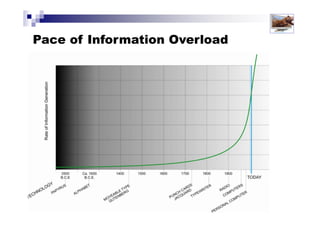
Pace of Information Overload
Solutions for Success 2013 www.emailtiger.com.au
Pace of E-mail Overload
It took 70 years for the telephone to become a
mainstream consumer telecommunications technology
It took only 15 years for the fax to do same
It took just 18 months
for email!
Solutions for Success 2013 www.emailtiger.com.au
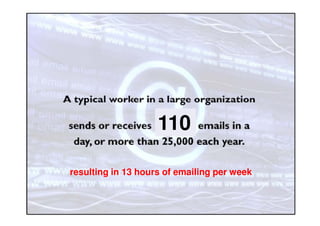
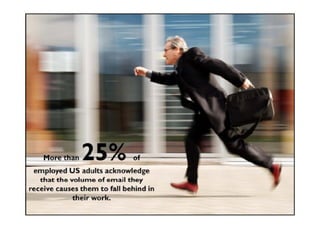
resulting in 13 hours of emailing per week
Solutions for Success 2013 www.emailtiger.com.au
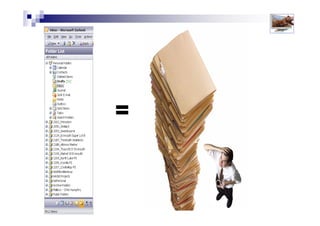
=
Solutions for Success 2013 www.emailtiger.com.au
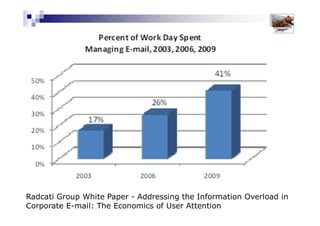
Radcati Group White Paper - Addressing the Information
Overload in Corporate E-mail: The Economics of User Attention
Solutions for Success 2013 www.emailtiger.com.au
Wastes too much time !
Solutions for Success 2013 www.emailtiger.com.au
Mastery
Smart
Effective
Survival
Overloaded / Overwhelmed
Email
Mastery
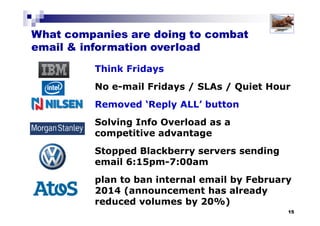
Think Fridays
No e-mail Fridays / SLAs / Quiet Hour
Removed ‘Reply ALL’ button
Solving Info Overload as a
competitive advantage
Stopped Blackberry servers sending
email 6:15pm-7:00am
plan to ban internal email by February
2014 (announcement has already
reduced volumes by 20%)
What companies are doing to combat
email & information overload
Solutions for Success 2013 www.emailtiger.com.au
So . . . .
what’s the
solution?
Solutions for Success 2013 www.emailtiger.com.au
The Solution
Solutions for Success 2013 www.emailtiger.com.au
Mastery
Smart
Effective
Survival
Overloaded / Overwhelmed
The Solution
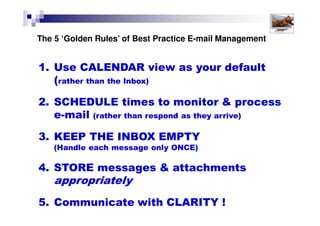
Best Practice Email Management
3: KEEP THE INBOX EMPTY (handle each message only ONCE)
4: STORE messages & attachments appropriately
5: Communicate with CLARITY !
2: SCHEDULE times to monitor & process email
(rather than react as they arrive)
1: Use CALENDAR view as your default (rather than the Inbox)
Solutions for Success 2013 www.emailtiger.com.au
Best Practice Email Management
1: Use CALENDAR view as your default (rather than the Inbox)
Solutions for Success 2013 www.emailtiger.com.au
1: Use CALENDAR view
as your default setting,
rather than the Inbox
Best Practice Email Management
Solutions for Success 2013 www.emailtiger.com.au
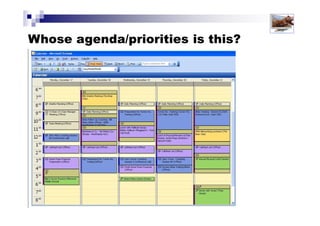
Whose agenda/priorities is this?
Solutions for Success 2013 www.emailtiger.com.au
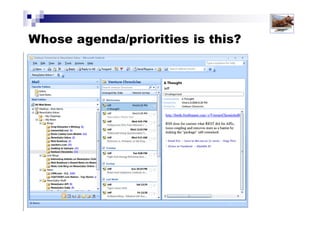
Whose agenda/priorities is this?
Solutions for Success 2013 www.emailtiger.com.au
7 Reasons Why You Should NOT Check
Email First Thing in the Morning?
1: The inbox is NOT your to-do list
2: Starting with email makes you REactive rather than PROactive
3: Ignorance is bliss!
4: Avoids short-term gratification to achieve longer term results
5: Checking e-mail is an excuse for a lack of priorities
6: Your morning energy and alertness should be directed to
higher priorities
7: Controls unmanaged and unspoken expectations
Solutions for Success 2013 www.emailtiger.com.au
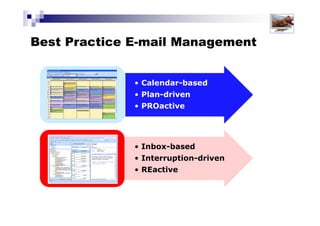
Shift Your Working Paradigm
A key to being more productive and effective in the workplace,
especially when using email is to shift your ‘default’ working style.
• Inbox-based
• Interruption-
driven
• REactive
• Calendar-based
• Plan-driven
• PROactive
Solutions for Success 2013 www.emailtiger.com.au
Best Practice Email Management
2: SCHEDULE times to monitor & process email
(rather than react as they arrive)
1: Use CALENDAR view as your default (rather than the Inbox)
Solutions for Success 2013 www.emailtiger.com.au
Best Practice Email Management
2: SCHEDULE times
to monitor and
process e-mail,
rather than respond
or react as they arrive
Solutions for Success 2013 www.emailtiger.com.au
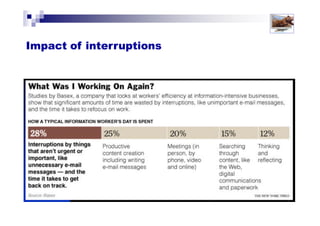
Impact of email interruptions
Solutions for Success 2013 www.emailtiger.com.au
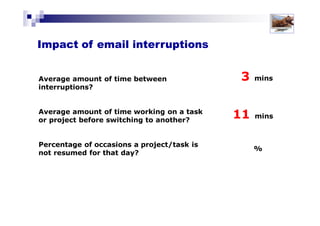
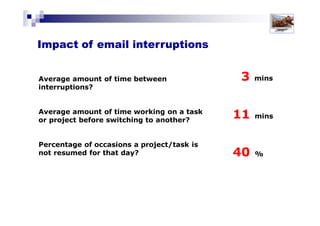
Average amount of time
between interruptions?
Average amount of time
working on a task or project
before switching to another?
Percentage of occasions a
project/task is not resumed for
that day?
3 mins
11 mins
40 %
Solutions for Success 2013 www.emailtiger.com.au
Impact of email interruptions
Latest research shows . . .
Solutions for Success 2013 www.emailtiger.com.au
Impact of interruptions on IQ = 10 points
Impact of smoking marijuana = 4 points
Average IQ level
is 100
Impact of interruptions on our IQ
Solutions for Success 2013 www.emailtiger.com.au
Multi-tasking
As a result of constant
interruptions, do you find
that you start to multi-task?
Do you often have 2 or 3
files open on your desk?
Does your computer often
have 4 or 5 windows (or
more) open at once?
Solutions for Success 2013 www.emailtiger.com.au
Multi-tasking
Author Maggie Jackson warns that . . .
"Relying on multitasking
as a way of life, we chop up
our opportunities and abilities to
make big-picture sense of the world
and pursue our long-term goals“
"Distracted: The Erosion of Attention and the Coming Dark Age."
Solutions for Success 2013 www.emailtiger.com.au
Multi-tasking
The 7 Critical Impacts of Email &
Information Overload?
1: Interruptions
2: Loss of focus
3: Multi-tasking
4: Poor decision-making
5: Lack of ‘think’ time
6: Organisational dysfunction
7: Mental health & well-being
8: Quality of life
Solutions for Success 2013 www.emailtiger.com.au
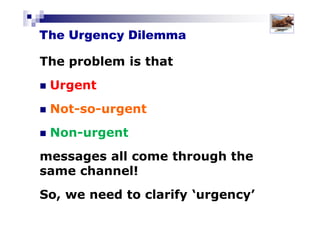
The Urgency Dilemma
The problem is that
Urgent
Not-so-urgent
Non-urgent
messages all come through the same channel!
So, we need to clarify what is truly ‘urgent’
URGENT
Not so
URGENT
Not
URGENT
7 Reasons Why You Should NOT
Use E-mail for Urgent Messages
1. Lack of background detail, richness and context
2. E-mail can be easily misunderstood
3. It can actually take LONGER to fully communicate your message
4. The synchronicity of e-mail as a sender
5. The synchronicity of e-mail as a receiver
6. It’s the wrong ‘mode’ for urgent communication
7. Limits your control of e-mail
Solutions for Success 2013 www.emailtiger.com.au
When do you check email?
As they arrive?
Randomly?
At set times of the day?
Set up your system to help you
(ie: re-set default settings)
Solutions for Success 2013 www.emailtiger.com.au
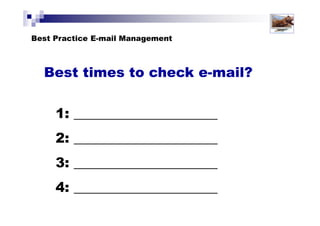
Best times to check email?
Research shows that for most people, in most office-based roles,
checking e-mail at 4 planned times a day (to a max of 45 mins each
time) allows you to turn all e-mail around in a 24 hour period.
Early in the day, as ‘second thing’ (after
checking your calendar!1
2
3
4
About 30-45 minutes before your lunch
break (NOT mid-morning)
Any time that suits you during the afternoon
About 30-45 minutes before you finish
for the day
Solutions for Success 2013 www.emailtiger.com.au
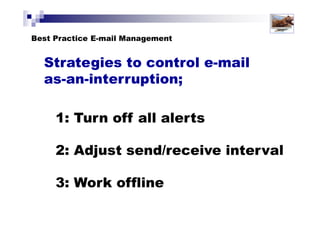
Strategies to control email
‘as-an-interruption’
Adjust
send/
receive
interval
Work
offline
Turn
off all
alerts
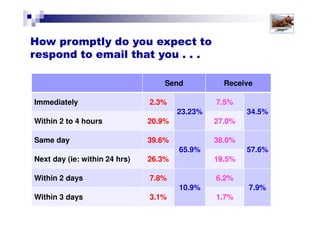
Send Receive
Immediately 2.2%
22.5%
6.7%
32.9%
Within 2 to 4 hours 20.3% 26.2%
Same day 37.7%
64.4%
36.6%
58.1%
Next day (ie: within 24 hrs) 26.7% 21.5%
Within 2 days 8.9%
13.1%
6.7%
9.0%
Within 3 days 4.3% 2.2%
How promptly do you expect to
respond to email that you . . .
Solutions for Success 2013 www.emailtiger.com.au
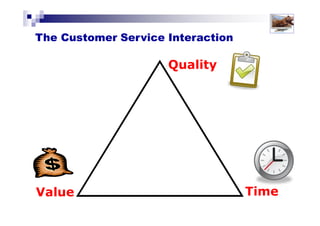
TimeValue
Quality
QuickCheap
Good
The Customer Service Interaction
Solutions for Success 2013 www.emailtiger.com.au
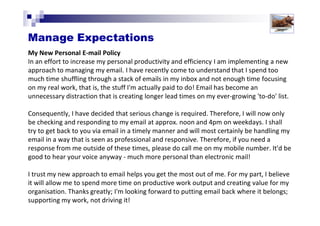
My New Personal E-mail Policy
In an effort to increase my personal productivity and efficiency I am implementing a new
approach to managing my email. I have recently come to understand that I spend too
much time shuffling through a stack of emails in my inbox and not enough time focusing
on my real work, that is, the stuff I'm actually paid to do! Email has become an
unnecessary distraction that is creating longer lead times on my ever-growing 'to-do' list.
Consequently, I have decided that serious change is required. Therefore, I will now only be
checking and responding to my email at approx. noon and 4pm on weekdays. I shall try to
get back to you via email in a timely manner and will most certainly be handling my email
in a way that is seen as professional and responsive. Therefore, if you need a response
from me outside of these times, please do call me on my mobile number. It'd be good to
hear your voice anyway - much more personal than electronic mail!
I trust my new approach to email helps you get the most out of me. For my part, I believe
it will allow me to spend more time on productive work output and creating value for my
organisation. Thanks greatly; I'm looking forward to putting email back where it belongs;
supporting my work, not driving it!
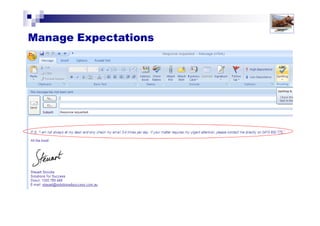
Managing Expectations
Solutions for Success 2013 www.emailtiger.com.au
Managing Expectations
Best Practice Email Management
3: KEEP THE INBOX EMPTY (handle each message only ONCE)
2: SCHEDULE times to monitor & process email
(rather than react as they arrive)
1: Use CALENDAR view as your default (rather than the Inbox)
Solutions for Success 2013 www.emailtiger.com.au
Best Practice E-mail Management
3: KEEP THE INBOX EMPTY
Handle each message only ONCE
Solutions for Success 2013 www.emailtiger.com.au
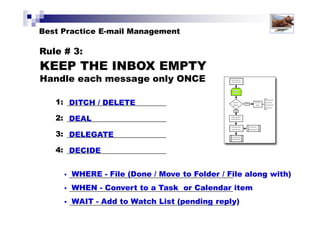
• WHERE - File (Move to a Folder / File along with)
• WHEN - Convert to a Task or Calendar item
• WAIT - Add to a Wait/Watch List/Pending Reply folder
The 4D methodology
DITCH / DELETE
DEAL
DELEGATE
DECIDE
1:
2:
3:
4:
Solutions for Success 2013 www.emailtiger.com.au
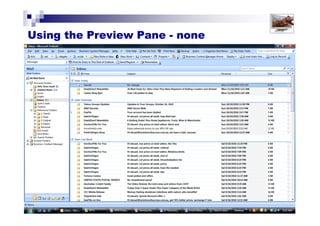
Using the Preview Pane
Solutions for Success 2013 www.emailtiger.com.au
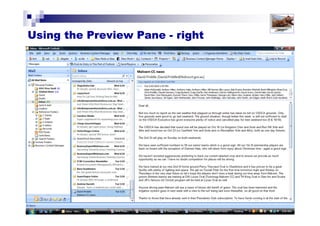
Using the Preview Pane
Solutions for Success 2013 www.emailtiger.com.au
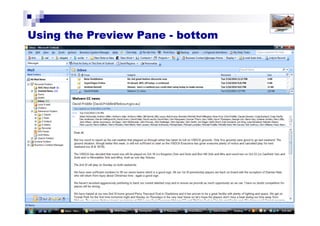
Using the Preview Pane
Solutions for Success 2013 www.emailtiger.com.au
Using Automation
Establish rules to automate
decisions and processes
“CC” rule
Use auto-signature to ‘train’ others
Solutions for Success 2013 www.emailtiger.com.au
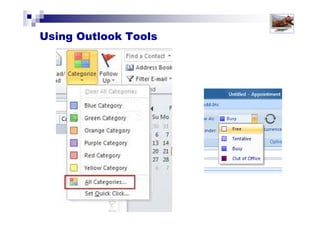
Using Outlook Tools
Solutions for Success 2013 www.emailtiger.com.au
Using colour categories in the Calednar
Solutions for Success 2013 www.emailtiger.com.au
Using Outlook Tools
Solutions for Success 2013 www.emailtiger.com.au
Best Practice Email Management
3: KEEP THE INBOX EMPTY (handle each message only ONCE)
4: STORE messages & attachments appropriately
2: SCHEDULE times to monitor & process email
(rather than react as they arrive)
1: Use CALENDAR view as your default (rather than the Inbox)
Solutions for Success 2013 www.emailtiger.com.au
4: STORE e-mail messages
and attachments
appropriately
Best Practice Email Management
Solutions for Success 2013 www.emailtiger.com.au
4 keys to storing e-mail effectively
1. Reduce mailbox size
2. Send document links instead of
attachments
3. Establish folder structure
4. Auto-archiving
Solutions for Success 2013 www.emailtiger.com.au
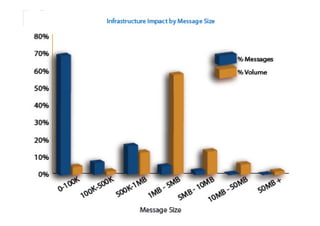
According to research by Permessa, based
on 15 years of experience with leading
global enterprises,
80% of email volume
comes from just 4% of
messages
which, in turn, typically comes from just
1% of the user community.
1: Reduce mailbox size
Solutions for Success 2013 www.emailtiger.com.au
1: Reduce mailbox size
Solutions for Success 2013 www.emailtiger.com.au
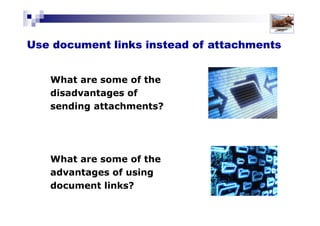
2. Use document links instead of
attachments
What are some of the
disadvantages of
sending attachments?
What are some of the
advantages of using
document links?
Solutions for Success 2013 www.emailtiger.com.au
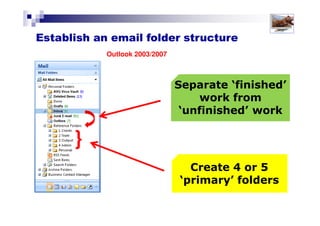
Separate ‘finished’
work from
‘unfinished’ work
Create 4 or 5
‘primary’ folders
Outlook 2003/2007
}
3. Establish an email folder structure
Solutions for Success 2013 www.emailtiger.com.au
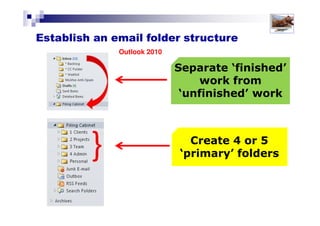
Separate ‘finished’
work from
‘unfinished’ work
Create 4 or 5
‘primary’ folders
Outlook 2010
3. Establish an email folder structure
Solutions for Success 2013 www.emailtiger.com.au
Mailbox – Steuart Snooks
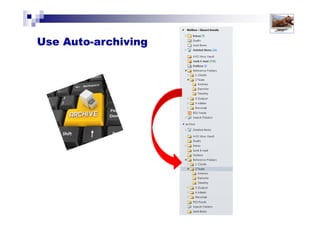
4. Use Auto-archiving
Solutions for Success 2013 www.emailtiger.com.au
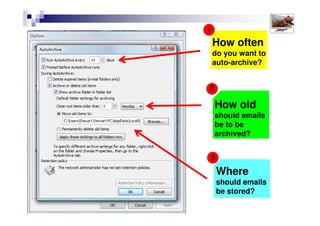
How often
do you want to
auto-archive?
1
2
3
How old
should emails
be to be
archived?
Where
should emails
be stored?
4. Use Auto-archiving
Solutions for Success 2013 www.emailtiger.com.au
Best Practice Email Management
3: KEEP THE INBOX EMPTY (handle each message only ONCE)
4: STORE messages & attachments appropriately
5: Communicate with CLARITY !
2: SCHEDULE times to monitor & process email
(rather than react as they arrive)
1: Use CALENDAR view as your default (rather than the Inbox)
Solutions for Success 2013 www.emailtiger.com.au
5: Communicate
with CLARITY !
Solutions for Success 2013 www.emailtiger.com.au
Best Practice Email Management
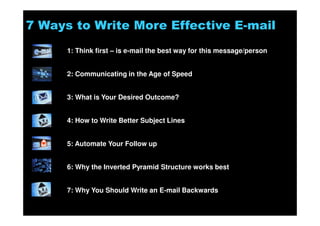
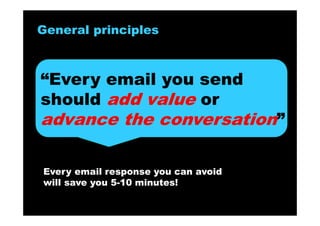
7 Ways to Write More Effective E-mail
1: Think first – is e-mail the best way for this message/person
2: Communicating in the Age of Speed
3: What is Your Desired Outcome?
4: How to Write Better Subject Lines
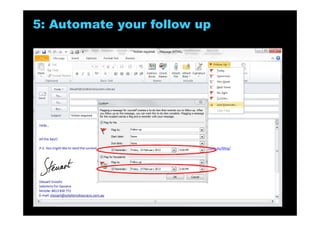
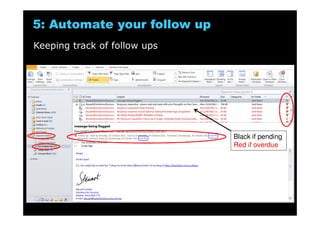
5: Automate Your Follow up
6: Why the Inverted Pyramid Structure works best
7: Why You Should Write an E-mail Backwards
Solutions for Success 2013 www.emailtiger.com.au
Media richness framework
(based on a theory by Daft & Lengel)
Timeneedtocommunicate
Degree/depthofunderstanding
Greater context or richness
Asynchronous
Synchronous
Digital
Auditory
Visual
Solutions for Success 2013 www.emailtiger.com.au
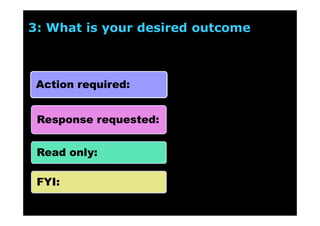
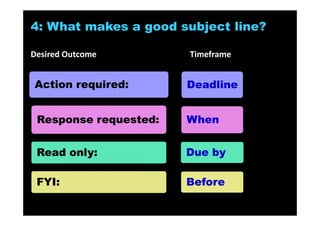
Action required:
Response requested:
Read only:
FYI:
3: What is your desired outcome
Solutions for Success 2013 www.emailtiger.com.au
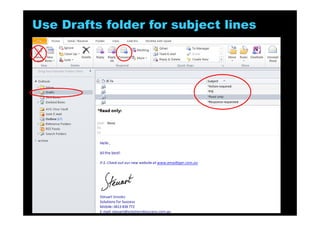
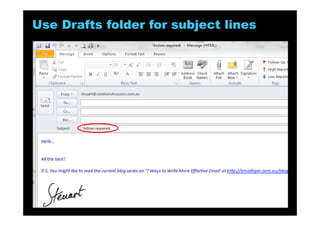
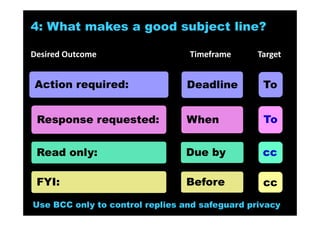
4: What makes a good subject line?
To
cc
1: Desired outcome
clearly stated (so the
reader knows what’s
expected of them
2: Timeframe
specified
3: Clear, concise
description of the
subject
Recipient placed in the CC box – for their information only, no action or response expected
Recipient placed in the TO box – an action is expected
Solutions for Success 2013 www.emailtiger.com.au
To
To
cc
cc
Use BCC only to control replies and safeguard privacy
Action required:
Response requested:
Read only:
FYI:
Deadline
When
Due by
Before
4: What makes a good subject line?
Desired Outcome Timeframe Target
Solutions for Success 2013 www.emailtiger.com.au
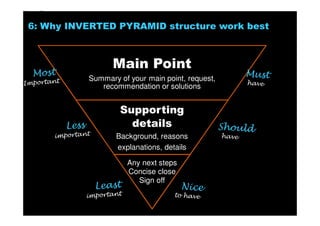
Main Point
Summary of your main point, request,
recommendation or solutions
Supporting
details
Background, reasons
explanations, details
Any next steps
Concise close
Sign off
6: Why INVERTED PYRAMID structure work best
Solutions for Success 2013 www.emailtiger.com.au
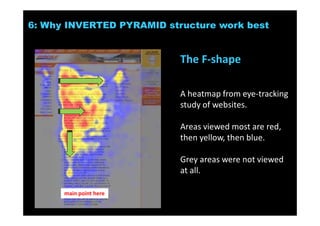
The F-shape
A heatmap from eye-tracking
study of websites.
Areas viewed most are red,
then yellow, then blue.
Grey areas were not viewed
at all.
6: Why INVERTED PYRAMID structure work best
main point here
Solutions for Success 2013 www.emailtiger.com.au
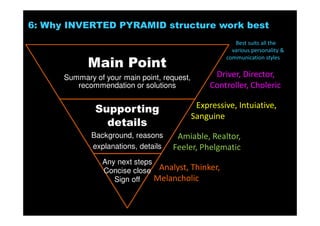
Main Point
Summary of your main point, request,
recommendation or solutions
Supporting
details
Background, reasons
explanations, details
Any next steps
Concise close
Sign off
6: Why INVERTED PYRAMID structure work best
Best suits all the
various personality &
communication styles
Driver, Director,
Controller, Choleric
Expressive, Intuiative,
Sanguine
Amiable, Realtor,
Feeler, Phelgmatic
Analyst, Thinker,
Melancholic
Solutions for Success 2013 www.emailtiger.com.au
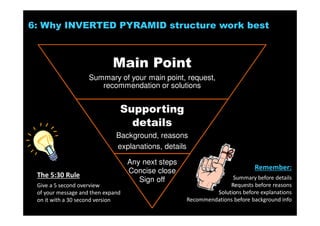
Main Point
Summary of your main point, request,
recommendation or solutions
Supporting
details
Background, reasons
explanations, details
Any next steps
Concise close
Sign off
6: Why INVERTED PYRAMID structure work best
The 5:30 Rule
Give a 5 second overview
of your message and then expand
on it with a 30 second version
Remember:
Summary before details
Requests before reasons
Solutions before explanations
Recommendations before background info
Solutions for Success 2013 www.emailtiger.com.au
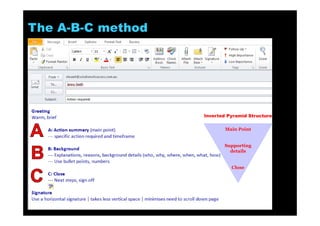
The A-B-C method
Inverted Pyramid Structure
Main Point
Supporting
details
Close
Solutions for Success 2013 www.emailtiger.com.au
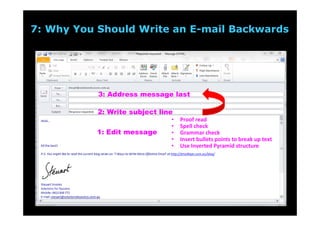
3: Address message last
2: Write subject line
1: Edit message
7: Why You Should Write an E-mail Backwards
Solutions for Success 2013 www.emailtiger.com.au
Best Practice Email Management
3: KEEP THE INBOX EMPTY (handle each message only ONCE)
4: STORE messages & attachments appropriately
5: Communicate with CLARITY !
2: SCHEDULE times to monitor & process email
(rather than react as they arrive)
1: Use CALENDAR view as your default (rather than the Inbox)
Solutions for Success 2013 www.emailtiger.com.au
Stay in touch and up-to-date
www.emailtiger.com.au
Steuart G. Snooks
Email Strategist & Expert
Conference presentations
E-mail audits/surveys
Consulting & advice
Keynote speaking
Research papers
Workshops
Blog posts
Audio CDs
Webinars
Seminars
Coaching
E-books
Articles
Ideas
Tips
Taming the
Email Tiger
A Strategic, Best Practice Approach
to Better Managing Email Overload
Training workshop
Halve the time,
double your results and
triple your productivity
when using e-mail
Steuart Snooks
E-mail Strategist &
Productivity Expert
www.emailtiger.com.au

Taming the Email Tiger workshop slideshow v1.5

  • 1.
    Taming the Email Tiger AStrategic, Best Practice Approach to Better Managing Email Overload Training workshop Halve the time, double your results and triple your productivity when using e-mail Steuart Snooks E-mail Strategist & Productivity Expert www.emailtiger.com.au
  • 2.
    Today’s agenda 1: Overviewof the impact of e-mail ‘overload’ 2: Best practices and solutions 3: ‘Hands-on’ application Solutions for Success 2013 www.emailtiger.com.au
  • 3.
    The Challenge of E-mailOverload In summary, the problems with e-mail overload are: 1: IT capacity 2: risk of lost information and/or intellectual property 3: individual employee productivity Solutions for Success 2013 www.emailtiger.com.au
  • 4.
    Pace of InformationOverload Solutions for Success 2013 www.emailtiger.com.au
  • 5.
    Pace of E-mailOverload It took 70 years for the telephone to become a mainstream consumer telecommunications technology It took only 15 years for the fax to do same It took just 18 months for email! Solutions for Success 2013 www.emailtiger.com.au
  • 6.
    resulting in 13hours of emailing per week Solutions for Success 2013 www.emailtiger.com.au
  • 7.
    = Solutions for Success2013 www.emailtiger.com.au
  • 8.
    Radcati Group WhitePaper - Addressing the Information Overload in Corporate E-mail: The Economics of User Attention Solutions for Success 2013 www.emailtiger.com.au
  • 9.
    Wastes too muchtime ! Solutions for Success 2013 www.emailtiger.com.au
  • 10.
    Solutions for Success2013 www.emailtiger.com.au
  • 11.
    Solutions for Success2013 www.emailtiger.com.au
  • 12.
  • 13.
    Think Fridays No e-mailFridays / SLAs / Quiet Hour Removed ‘Reply ALL’ button Solving Info Overload as a competitive advantage Stopped Blackberry servers sending email 6:15pm-7:00am plan to ban internal email by February 2014 (announcement has already reduced volumes by 20%) What companies are doing to combat email & information overload Solutions for Success 2013 www.emailtiger.com.au
  • 14.
    So . .. . what’s the solution? Solutions for Success 2013 www.emailtiger.com.au
  • 15.
    The Solution Solutions forSuccess 2013 www.emailtiger.com.au
  • 16.
  • 17.
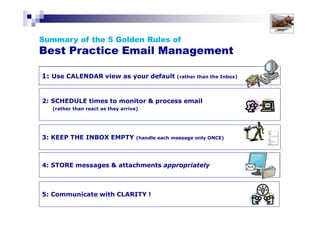
    Best Practice EmailManagement 3: KEEP THE INBOX EMPTY (handle each message only ONCE) 4: STORE messages & attachments appropriately 5: Communicate with CLARITY ! 2: SCHEDULE times to monitor & process email (rather than react as they arrive) 1: Use CALENDAR view as your default (rather than the Inbox) Solutions for Success 2013 www.emailtiger.com.au
  • 18.
    Best Practice EmailManagement 1: Use CALENDAR view as your default (rather than the Inbox) Solutions for Success 2013 www.emailtiger.com.au
  • 19.
    1: Use CALENDARview as your default setting, rather than the Inbox Best Practice Email Management Solutions for Success 2013 www.emailtiger.com.au
  • 20.
    Whose agenda/priorities isthis? Solutions for Success 2013 www.emailtiger.com.au
  • 21.
    Whose agenda/priorities isthis? Solutions for Success 2013 www.emailtiger.com.au
  • 22.
    7 Reasons WhyYou Should NOT Check Email First Thing in the Morning? 1: The inbox is NOT your to-do list 2: Starting with email makes you REactive rather than PROactive 3: Ignorance is bliss! 4: Avoids short-term gratification to achieve longer term results 5: Checking e-mail is an excuse for a lack of priorities 6: Your morning energy and alertness should be directed to higher priorities 7: Controls unmanaged and unspoken expectations Solutions for Success 2013 www.emailtiger.com.au
  • 23.
    Shift Your WorkingParadigm A key to being more productive and effective in the workplace, especially when using email is to shift your ‘default’ working style. • Inbox-based • Interruption- driven • REactive • Calendar-based • Plan-driven • PROactive Solutions for Success 2013 www.emailtiger.com.au
  • 24.
    Best Practice EmailManagement 2: SCHEDULE times to monitor & process email (rather than react as they arrive) 1: Use CALENDAR view as your default (rather than the Inbox) Solutions for Success 2013 www.emailtiger.com.au
  • 25.
    Best Practice EmailManagement 2: SCHEDULE times to monitor and process e-mail, rather than respond or react as they arrive Solutions for Success 2013 www.emailtiger.com.au
  • 26.
    Impact of emailinterruptions Solutions for Success 2013 www.emailtiger.com.au Average amount of time between interruptions? Average amount of time working on a task or project before switching to another? Percentage of occasions a project/task is not resumed for that day? 3 mins 11 mins 40 %
  • 27.
    Solutions for Success2013 www.emailtiger.com.au Impact of email interruptions
  • 28.
  • 29.
    Solutions for Success2013 www.emailtiger.com.au Impact of interruptions on IQ = 10 points Impact of smoking marijuana = 4 points Average IQ level is 100 Impact of interruptions on our IQ
  • 30.
    Solutions for Success2013 www.emailtiger.com.au Multi-tasking As a result of constant interruptions, do you find that you start to multi-task? Do you often have 2 or 3 files open on your desk? Does your computer often have 4 or 5 windows (or more) open at once?
  • 31.
    Solutions for Success2013 www.emailtiger.com.au Multi-tasking Author Maggie Jackson warns that . . . "Relying on multitasking as a way of life, we chop up our opportunities and abilities to make big-picture sense of the world and pursue our long-term goals“ "Distracted: The Erosion of Attention and the Coming Dark Age."
  • 32.
    Solutions for Success2013 www.emailtiger.com.au Multi-tasking
  • 33.
    The 7 CriticalImpacts of Email & Information Overload? 1: Interruptions 2: Loss of focus 3: Multi-tasking 4: Poor decision-making 5: Lack of ‘think’ time 6: Organisational dysfunction 7: Mental health & well-being 8: Quality of life Solutions for Success 2013 www.emailtiger.com.au
  • 34.
    Solutions for Success2013 www.emailtiger.com.au The Urgency Dilemma The problem is that Urgent Not-so-urgent Non-urgent messages all come through the same channel! So, we need to clarify what is truly ‘urgent’ URGENT Not so URGENT Not URGENT
  • 35.
    7 Reasons WhyYou Should NOT Use E-mail for Urgent Messages 1. Lack of background detail, richness and context 2. E-mail can be easily misunderstood 3. It can actually take LONGER to fully communicate your message 4. The synchronicity of e-mail as a sender 5. The synchronicity of e-mail as a receiver 6. It’s the wrong ‘mode’ for urgent communication 7. Limits your control of e-mail Solutions for Success 2013 www.emailtiger.com.au
  • 36.
    When do youcheck email? As they arrive? Randomly? At set times of the day? Set up your system to help you (ie: re-set default settings) Solutions for Success 2013 www.emailtiger.com.au
  • 37.
    Solutions for Success2013 www.emailtiger.com.au Best times to check email? Research shows that for most people, in most office-based roles, checking e-mail at 4 planned times a day (to a max of 45 mins each time) allows you to turn all e-mail around in a 24 hour period. Early in the day, as ‘second thing’ (after checking your calendar!1 2 3 4 About 30-45 minutes before your lunch break (NOT mid-morning) Any time that suits you during the afternoon About 30-45 minutes before you finish for the day
  • 38.
    Solutions for Success2013 www.emailtiger.com.au Strategies to control email ‘as-an-interruption’ Adjust send/ receive interval Work offline Turn off all alerts
  • 39.
    Send Receive Immediately 2.2% 22.5% 6.7% 32.9% Within2 to 4 hours 20.3% 26.2% Same day 37.7% 64.4% 36.6% 58.1% Next day (ie: within 24 hrs) 26.7% 21.5% Within 2 days 8.9% 13.1% 6.7% 9.0% Within 3 days 4.3% 2.2% How promptly do you expect to respond to email that you . . . Solutions for Success 2013 www.emailtiger.com.au
  • 40.
    Solutions for Success2013 www.emailtiger.com.au TimeValue Quality QuickCheap Good The Customer Service Interaction
  • 41.
    Solutions for Success2013 www.emailtiger.com.au My New Personal E-mail Policy In an effort to increase my personal productivity and efficiency I am implementing a new approach to managing my email. I have recently come to understand that I spend too much time shuffling through a stack of emails in my inbox and not enough time focusing on my real work, that is, the stuff I'm actually paid to do! Email has become an unnecessary distraction that is creating longer lead times on my ever-growing 'to-do' list. Consequently, I have decided that serious change is required. Therefore, I will now only be checking and responding to my email at approx. noon and 4pm on weekdays. I shall try to get back to you via email in a timely manner and will most certainly be handling my email in a way that is seen as professional and responsive. Therefore, if you need a response from me outside of these times, please do call me on my mobile number. It'd be good to hear your voice anyway - much more personal than electronic mail! I trust my new approach to email helps you get the most out of me. For my part, I believe it will allow me to spend more time on productive work output and creating value for my organisation. Thanks greatly; I'm looking forward to putting email back where it belongs; supporting my work, not driving it! Managing Expectations
  • 42.
    Solutions for Success2013 www.emailtiger.com.au Managing Expectations
  • 43.
    Best Practice EmailManagement 3: KEEP THE INBOX EMPTY (handle each message only ONCE) 2: SCHEDULE times to monitor & process email (rather than react as they arrive) 1: Use CALENDAR view as your default (rather than the Inbox) Solutions for Success 2013 www.emailtiger.com.au
  • 44.
    Best Practice E-mailManagement 3: KEEP THE INBOX EMPTY Handle each message only ONCE Solutions for Success 2013 www.emailtiger.com.au
  • 45.
    • WHERE -File (Move to a Folder / File along with) • WHEN - Convert to a Task or Calendar item • WAIT - Add to a Wait/Watch List/Pending Reply folder The 4D methodology DITCH / DELETE DEAL DELEGATE DECIDE 1: 2: 3: 4: Solutions for Success 2013 www.emailtiger.com.au
  • 46.
    Using the PreviewPane Solutions for Success 2013 www.emailtiger.com.au
  • 47.
    Using the PreviewPane Solutions for Success 2013 www.emailtiger.com.au
  • 48.
    Using the PreviewPane Solutions for Success 2013 www.emailtiger.com.au
  • 49.
    Using Automation Establish rulesto automate decisions and processes “CC” rule Use auto-signature to ‘train’ others Solutions for Success 2013 www.emailtiger.com.au
  • 50.
    Using Outlook Tools Solutionsfor Success 2013 www.emailtiger.com.au
  • 51.
    Using colour categoriesin the Calednar Solutions for Success 2013 www.emailtiger.com.au
  • 52.
    Using Outlook Tools Solutionsfor Success 2013 www.emailtiger.com.au
  • 53.
    Best Practice EmailManagement 3: KEEP THE INBOX EMPTY (handle each message only ONCE) 4: STORE messages & attachments appropriately 2: SCHEDULE times to monitor & process email (rather than react as they arrive) 1: Use CALENDAR view as your default (rather than the Inbox) Solutions for Success 2013 www.emailtiger.com.au
  • 54.
    4: STORE e-mailmessages and attachments appropriately Best Practice Email Management Solutions for Success 2013 www.emailtiger.com.au
  • 55.
    4 keys tostoring e-mail effectively 1. Reduce mailbox size 2. Send document links instead of attachments 3. Establish folder structure 4. Auto-archiving Solutions for Success 2013 www.emailtiger.com.au
  • 56.
    According to researchby Permessa, based on 15 years of experience with leading global enterprises, 80% of email volume comes from just 4% of messages which, in turn, typically comes from just 1% of the user community. 1: Reduce mailbox size Solutions for Success 2013 www.emailtiger.com.au
  • 57.
    1: Reduce mailboxsize Solutions for Success 2013 www.emailtiger.com.au
  • 58.
    2. Use documentlinks instead of attachments What are some of the disadvantages of sending attachments? What are some of the advantages of using document links? Solutions for Success 2013 www.emailtiger.com.au
  • 59.
    Separate ‘finished’ work from ‘unfinished’work Create 4 or 5 ‘primary’ folders Outlook 2003/2007 } 3. Establish an email folder structure Solutions for Success 2013 www.emailtiger.com.au
  • 60.
    Separate ‘finished’ work from ‘unfinished’work Create 4 or 5 ‘primary’ folders Outlook 2010 3. Establish an email folder structure Solutions for Success 2013 www.emailtiger.com.au
  • 61.
    Mailbox – SteuartSnooks 4. Use Auto-archiving Solutions for Success 2013 www.emailtiger.com.au
  • 62.
    How often do youwant to auto-archive? 1 2 3 How old should emails be to be archived? Where should emails be stored? 4. Use Auto-archiving Solutions for Success 2013 www.emailtiger.com.au
  • 63.
    Best Practice EmailManagement 3: KEEP THE INBOX EMPTY (handle each message only ONCE) 4: STORE messages & attachments appropriately 5: Communicate with CLARITY ! 2: SCHEDULE times to monitor & process email (rather than react as they arrive) 1: Use CALENDAR view as your default (rather than the Inbox) Solutions for Success 2013 www.emailtiger.com.au
  • 64.
    5: Communicate with CLARITY! Solutions for Success 2013 www.emailtiger.com.au Best Practice Email Management
  • 65.
    7 Ways toWrite More Effective E-mail 1: Think first – is e-mail the best way for this message/person 2: Communicating in the Age of Speed 3: What is Your Desired Outcome? 4: How to Write Better Subject Lines 5: Automate Your Follow up 6: Why the Inverted Pyramid Structure works best 7: Why You Should Write an E-mail Backwards Solutions for Success 2013 www.emailtiger.com.au
  • 66.
    Media richness framework (basedon a theory by Daft & Lengel) Timeneedtocommunicate Degree/depthofunderstanding Greater context or richness Asynchronous Synchronous Digital Auditory Visual Solutions for Success 2013 www.emailtiger.com.au
  • 67.
    Action required: Response requested: Readonly: FYI: 3: What is your desired outcome Solutions for Success 2013 www.emailtiger.com.au
  • 68.
    4: What makesa good subject line? To cc 1: Desired outcome clearly stated (so the reader knows what’s expected of them 2: Timeframe specified 3: Clear, concise description of the subject Recipient placed in the CC box – for their information only, no action or response expected Recipient placed in the TO box – an action is expected Solutions for Success 2013 www.emailtiger.com.au
  • 69.
    To To cc cc Use BCC onlyto control replies and safeguard privacy Action required: Response requested: Read only: FYI: Deadline When Due by Before 4: What makes a good subject line? Desired Outcome Timeframe Target Solutions for Success 2013 www.emailtiger.com.au
  • 70.
    Main Point Summary ofyour main point, request, recommendation or solutions Supporting details Background, reasons explanations, details Any next steps Concise close Sign off 6: Why INVERTED PYRAMID structure work best Solutions for Success 2013 www.emailtiger.com.au
  • 71.
    The F-shape A heatmapfrom eye-tracking study of websites. Areas viewed most are red, then yellow, then blue. Grey areas were not viewed at all. 6: Why INVERTED PYRAMID structure work best main point here Solutions for Success 2013 www.emailtiger.com.au
  • 72.
    Main Point Summary ofyour main point, request, recommendation or solutions Supporting details Background, reasons explanations, details Any next steps Concise close Sign off 6: Why INVERTED PYRAMID structure work best Best suits all the various personality & communication styles Driver, Director, Controller, Choleric Expressive, Intuiative, Sanguine Amiable, Realtor, Feeler, Phelgmatic Analyst, Thinker, Melancholic Solutions for Success 2013 www.emailtiger.com.au
  • 73.
    Main Point Summary ofyour main point, request, recommendation or solutions Supporting details Background, reasons explanations, details Any next steps Concise close Sign off 6: Why INVERTED PYRAMID structure work best The 5:30 Rule Give a 5 second overview of your message and then expand on it with a 30 second version Remember: Summary before details Requests before reasons Solutions before explanations Recommendations before background info Solutions for Success 2013 www.emailtiger.com.au
  • 74.
    The A-B-C method InvertedPyramid Structure Main Point Supporting details Close Solutions for Success 2013 www.emailtiger.com.au
  • 75.
    3: Address messagelast 2: Write subject line 1: Edit message 7: Why You Should Write an E-mail Backwards Solutions for Success 2013 www.emailtiger.com.au
  • 76.
    Best Practice EmailManagement 3: KEEP THE INBOX EMPTY (handle each message only ONCE) 4: STORE messages & attachments appropriately 5: Communicate with CLARITY ! 2: SCHEDULE times to monitor & process email (rather than react as they arrive) 1: Use CALENDAR view as your default (rather than the Inbox) Solutions for Success 2013 www.emailtiger.com.au
  • 77.
    Stay in touchand up-to-date www.emailtiger.com.au Steuart G. Snooks Email Strategist & Expert Conference presentations E-mail audits/surveys Consulting & advice Keynote speaking Research papers Workshops Blog posts Audio CDs Webinars Seminars Coaching E-books Articles Ideas Tips
  • 78.
    Taming the Email Tiger AStrategic, Best Practice Approach to Better Managing Email Overload Training workshop Halve the time, double your results and triple your productivity when using e-mail Steuart Snooks E-mail Strategist & Productivity Expert www.emailtiger.com.au